


VOTING POWER100.00%
DOWNVOTE POWER100.00%
RESOURCE CREDITS100.00%
REPUTATION PROGRESS0.00%
Net Worth
19.619USD
HIVE
0.397HIVE
HBD
0.254HBD
Own HP
47.447HP
Detailed Balance
| HIVE | ||
| balance | 0.397HIVE | HIVE |
| market_balance | 0.000HIVE | HIVE |
| savings_balance | 0.000HIVE | HIVE |
| reward_hive_balance | 0.000HIVE | HIVE |
| HIVE POWER | ||
| Own HP | 47.447HP | HP |
| Delegated Out | 0.000HP | HP |
| Delegation In | 0.000HP | HP |
| Effective Power | 47.447HP | HP |
| Reward HP (pending) | 0.897HP | HP |
| HBD | ||
| hbd_balance | 0.254HBD | HBD |
| hbd_conversions | 0.000HBD | HBD |
| hbd_market_balance | 0.000HBD | HBD |
| savings_hbd_balance | 0.000HBD | HBD |
| reward_hbd_balance | 0.227HBD | HBD |
{
  "balance": "0.397 HIVE",
  "savings_balance": "0.000 HIVE",
  "reward_hive_balance": "0.000 HIVE",
  "vesting_shares": "77010.197900 VESTS",
  "delegated_vesting_shares": "0.000000 VESTS",
  "received_vesting_shares": "0.000000 VESTS",
  "hbd_balance": "0.254 HBD",
  "savings_hbd_balance": "0.000 HBD",
  "reward_hbd_balance": "0.227 HBD"
}
Account Info
| name | abrienne3 |
| id | 133375 |
| rank | 0 |
| reputation | 0 |
| created | 2017-02-20T10:37:30 |
| recovery_account | steem |
| proxy | None |
| invited_by | null |
| post_count | 30 |
| comment_count | 0 |
| lifetime_vote_count | 0 |
| witnesses_voted_for | 0 |
| last_post | 2020-03-18T07:06:03 |
| last_root_post | 2020-03-18T07:06:03 |
| last_vote_time | 2019-02-21T05:55:12 |
| proxied_vsf_votes | 0, 0, 0, 0 |
| can_vote | 1 |
| voting_power | 9,800 |
| delayed_votes | None |
| governance_vote_expiration_ts | 1969-12-31T23:59:59 |
| balance | 0.397 HIVE |
| savings_balance | 0.000 HIVE |
| hbd_balance | 0.254 HBD |
| savings_hbd_balance | 0.000 HBD |
| vesting_shares | 77010.197900 VESTS |
| delegated_vesting_shares | 0.000000 VESTS |
| received_vesting_shares | 0.000000 VESTS |
| reward_vesting_balance | 1853.981819 VESTS |
| vesting_balance | 0.000 HIVE |
| vesting_withdraw_rate | 0.000000 VESTS |
| next_vesting_withdrawal | 1969-12-31T23:59:59 |
| withdrawn | 0 |
| to_withdraw | 0 |
| withdraw_routes | 0 |
| savings_withdraw_requests | 0 |
| last_account_recovery | 1970-01-01T00:00:00 |
| reset_account | null |
| last_owner_update | 1970-01-01T00:00:00 |
| last_account_update | 1970-01-01T00:00:00 |
| mined | No |
| hbd_seconds | 0 |
| hbd_last_interest_payment | 1970-01-01T00:00:00 |
| savings_hbd_last_interest_payment | 1970-01-01T00:00:00 |
{
  "active": {
    "account_auths": [],
    "key_auths": [
      [
        "STM7BfY3YZRoKTZ7Q7G28PDPkzTso72bpogTyp6udB83pQe1oSGFy",
        1
      ]
    ],
    "weight_threshold": 1
  },
  "balance": "0.397 HIVE",
  "can_vote": true,
  "comment_count": 0,
  "created": "2017-02-20T10:37:30",
  "curation_rewards": 0,
  "delayed_votes": [],
  "delegated_vesting_shares": "0.000000 VESTS",
  "downvote_manabar": {
    "current_mana": 0,
    "last_update_time": 1487587047
  },
  "governance_vote_expiration_ts": "1969-12-31T23:59:59",
  "guest_bloggers": [],
  "hbd_balance": "0.254 HBD",
  "hbd_last_interest_payment": "1970-01-01T00:00:00",
  "hbd_seconds": "0",
  "hbd_seconds_last_update": "2017-03-25T12:11:15",
  "id": 133375,
  "json_metadata": "",
  "last_account_recovery": "1970-01-01T00:00:00",
  "last_account_update": "1970-01-01T00:00:00",
  "last_owner_update": "1970-01-01T00:00:00",
  "last_post": "2020-03-18T07:06:03",
  "last_root_post": "2020-03-18T07:06:03",
  "last_vote_time": "2019-02-21T05:55:12",
  "lifetime_vote_count": 0,
  "market_history": [],
  "memo_key": "STM5Za61V5UQgjyEkvG6gQvog3m3RhXY7HXyM8X5LqA79FhcZ8oJk",
  "mined": false,
  "name": "abrienne3",
  "next_vesting_withdrawal": "1969-12-31T23:59:59",
  "open_recurrent_transfers": 0,
  "other_history": [],
  "owner": {
    "account_auths": [],
    "key_auths": [
      [
        "STM5AeDEAciHGbF2Y9K8ZX8erUWkDoJB9UuGjuD772vf716dB65ph",
        1
      ]
    ],
    "weight_threshold": 1
  },
  "pending_claimed_accounts": 0,
  "pending_transfers": 0,
  "post_bandwidth": 10664,
  "post_count": 30,
  "post_history": [],
  "post_voting_power": "77010.197900 VESTS",
  "posting": {
    "account_auths": [],
    "key_auths": [
      [
        "STM6h7W4MrCsSzS5e8fcLBUQUrn6kRya3STsCEW74JHVBGgZoPxpB",
        1
      ]
    ],
    "weight_threshold": 1
  },
  "posting_json_metadata": "",
  "posting_rewards": 5743,
  "previous_owner_update": "1970-01-01T00:00:00",
  "proxied_vsf_votes": [
    0,
    0,
    0,
    0
  ],
  "proxy": "",
  "received_vesting_shares": "0.000000 VESTS",
  "recovery_account": "steem",
  "reputation": 0,
  "reset_account": "null",
  "reward_hbd_balance": "0.227 HBD",
  "reward_hive_balance": "0.000 HIVE",
  "reward_vesting_balance": "1853.981819 VESTS",
  "reward_vesting_hive": "0.897 HIVE",
  "savings_balance": "0.000 HIVE",
  "savings_hbd_balance": "0.000 HBD",
  "savings_hbd_last_interest_payment": "1970-01-01T00:00:00",
  "savings_hbd_seconds": "0",
  "savings_hbd_seconds_last_update": "1970-01-01T00:00:00",
  "savings_withdraw_requests": 0,
  "tags_usage": [],
  "to_withdraw": 0,
  "transfer_history": [],
  "vesting_balance": "0.000 HIVE",
  "vesting_shares": "77010.197900 VESTS",
  "vesting_withdraw_rate": "0.000000 VESTS",
  "vote_history": [],
  "voting_manabar": {
    "current_mana": 75469993942,
    "last_update_time": 1550728512
  },
  "voting_power": 9800,
  "withdraw_routes": 0,
  "withdrawn": 0,
  "witness_votes": [],
  "witnesses_voted_for": 0,
  "rank": 0
}
Withdraw Routes
| Incoming | Outgoing |
|---|---|
Empty | Empty |
{
  "incoming": [],
  "outgoing": []
}From Date
To Date
vorygasent 0.001 HIVE to @abrienne3- "UA_SOSAT"2026/03/14 22:38:33
vorygasent 0.001 HIVE to @abrienne3- "UA_SOSAT"
2026/03/14 22:38:33
| to | abrienne3 |
| from | voryga |
| memo | UA_SOSAT |
| amount | 0.001 HIVE |
| Transaction Info | Block #104634899/Trx 1f3cb60de72e04baf09fe0674c2366f0824db1ee |
View Raw JSON Data
{
  "op": [
    "transfer",
    {
      "to": "abrienne3",
      "from": "voryga",
      "memo": "UA_SOSAT",
      "amount": "0.001 HIVE"
    }
  ],
  "block": 104634899,
  "trx_id": "1f3cb60de72e04baf09fe0674c2366f0824db1ee",
  "op_in_trx": 0,
  "timestamp": "2026-03-14T22:38:33",
  "virtual_op": false,
  "trx_in_block": 25
}hivesurveysent 0.001 HIVE to @abrienne3- "By spending just 5-10 minutes of your time to answer an ONLINE SURVEY, you'll receive $1 worth of HIVE or STEEM (4.762 STEEM or 3.125 HIVE) as a token of our appreciation!!! Hello there! I'm Sichen DO..."2023/10/27 16:11:39
hivesurveysent 0.001 HIVE to @abrienne3- "By spending just 5-10 minutes of your time to answer an ONLINE SURVEY, you'll receive $1 worth of HIVE or STEEM (4.762 STEEM or 3.125 HIVE) as a token of our appreciation!!! Hello there! I'm Sichen DO..."
2023/10/27 16:11:39
| to | abrienne3 |
| from | hivesurvey |
| memo | By spending just 5-10 minutes of your time to answer an ONLINE SURVEY, you'll receive $1 worth of HIVE or STEEM (4.762 STEEM or 3.125 HIVE) as a token of our appreciation!!! Hello there! I'm Sichen DONG, a research postgraduate student at the University of Hong Kong. I'm currently organizing a paid survey as part of my research study. We kindly invite Steem/Hive members to participate in a survey that focuses on the social changes you've observed since the takeover of Steemit, Inc. by Tron on February 14, 2020. We're delving into the intriguing realm of decentralized autonomous organizations (DAOs) and exploring the impact of social norms on cooperation within these communities. Please note that the survey is conducted in English. Rest assured, your participation involves no more risk than your everyday activities. You retain the freedom to withdraw from the study at any point. Your support is invaluable to our research, and we're eagerly looking forward to your participation! Ready to dive in? Access the survey via this link: https://hivesurvey.vercel.app/ |
| amount | 0.001 HIVE |
| Transaction Info | Block #79640550/Trx 2ad7a792a2511ecf0dcc365b6a6575801fce5a6b |
View Raw JSON Data
{
  "op": [
    "transfer",
    {
      "to": "abrienne3",
      "from": "hivesurvey",
      "memo": "By spending just 5-10 minutes of your time to answer an ONLINE SURVEY, you'll receive $1 worth of HIVE or STEEM (4.762 STEEM or 3.125 HIVE) as a token of our appreciation!!! Hello there! I'm Sichen DONG, a research postgraduate student at the University of Hong Kong. I'm currently organizing a paid survey as part of my research study. We kindly invite Steem/Hive members to participate in a survey that focuses on the social changes you've observed since the takeover of Steemit, Inc. by Tron on February 14, 2020. We're delving into the intriguing realm of decentralized autonomous organizations (DAOs) and exploring the impact of social norms on cooperation within these communities. Please note that the survey is conducted in English. Rest assured, your participation involves no more risk than your everyday activities. You retain the freedom to withdraw from the study at any point. Your support is invaluable to our research, and we're eagerly looking forward to your participation! Ready to dive in? Access the survey via this link: https://hivesurvey.vercel.app/",
      "amount": "0.001 HIVE"
    }
  ],
  "block": 79640550,
  "trx_id": "2ad7a792a2511ecf0dcc365b6a6575801fce5a6b",
  "op_in_trx": 0,
  "timestamp": "2023-10-27T16:11:39",
  "virtual_op": false,
  "trx_in_block": 26
}engravesent 0.001 HIVE to @abrienne3- "I've noticed you have a recovery account set to @steem, which is a security issue! Review your recovery account if you don't want to lose your tokens! Read more: https://peakd.com/witness-update/@engr..."2020/04/05 00:34:24
engravesent 0.001 HIVE to @abrienne3- "I've noticed you have a recovery account set to @steem, which is a security issue! Review your recovery account if you don't want to lose your tokens! Read more: https://peakd.com/witness-update/@engr..."
2020/04/05 00:34:24
| to | abrienne3 |
| from | engrave |
| memo | I've noticed you have a recovery account set to @steem, which is a security issue! Review your recovery account if you don't want to lose your tokens! Read more: https://peakd.com/witness-update/@engrave/review-your-recovery-account-if-you-dont-want-to-lose-your-assets |
| amount | 0.001 HIVE |
| Transaction Info | Block #42260772/Trx 0b3521c2ac980f6e18df8fe07efedf52ea3b9771 |
View Raw JSON Data
{
  "op": [
    "transfer",
    {
      "to": "abrienne3",
      "from": "engrave",
      "memo": "I've noticed you have a recovery account set to @steem, which is a security issue! Review your recovery account if you don't want to lose your tokens! Read more: https://peakd.com/witness-update/@engrave/review-your-recovery-account-if-you-dont-want-to-lose-your-assets",
      "amount": "0.001 HIVE"
    }
  ],
  "block": 42260772,
  "trx_id": "0b3521c2ac980f6e18df8fe07efedf52ea3b9771",
  "op_in_trx": 4,
  "timestamp": "2020-04-05T00:34:24",
  "virtual_op": false,
  "trx_in_block": 1
}abrienne3updated payout for yahoo-email-backup-software-takes-backup-and-export-to-outlook-pst2020/03/25 07:06:03
abrienne3updated payout for yahoo-email-backup-software-takes-backup-and-export-to-outlook-pst
2020/03/25 07:06:03
| author | abrienne3 |
| permlink | yahoo-email-backup-software-takes-backup-and-export-to-outlook-pst |
| Transaction Info | Block #41953212/Virtual Operation 4294967295:3 |
View Raw JSON Data
{
  "op": [
    "comment_payout_update",
    {
      "author": "abrienne3",
      "permlink": "yahoo-email-backup-software-takes-backup-and-export-to-outlook-pst"
    }
  ],
  "block": 41953212,
  "trx_id": "0000000000000000000000000000000000000000",
  "op_in_trx": 3,
  "timestamp": "2020-03-25T07:06:03",
  "virtual_op": true,
  "trx_in_block": 4294967295
}shareseffective vote applied for @abrienne3 / yahoo-email-backup-software-takes-backup-and-export-to-outlook-pst2020/03/18 08:04:30
shareseffective vote applied for @abrienne3 / yahoo-email-backup-software-takes-backup-and-export-to-outlook-pst
2020/03/18 08:04:30
| voter | shares |
| author | abrienne3 |
| weight | 1382 (13.82%) |
| rshares | 2837787324 |
| permlink | yahoo-email-backup-software-takes-backup-and-export-to-outlook-pst |
| pending payout | 0.015 HBD |
| total vote weight | 52866 |
| Transaction Info | Block #41754141/Trx 31fa2bd2a58e18909d9ad85142d89e815aaf18cb |
View Raw JSON Data
{
  "op": [
    "effective_comment_vote",
    {
      "voter": "shares",
      "author": "abrienne3",
      "weight": 1382,
      "rshares": 2837787324,
      "permlink": "yahoo-email-backup-software-takes-backup-and-export-to-outlook-pst",
      "pending_payout": "0.015 HBD",
      "total_vote_weight": 52866
    }
  ],
  "block": 41754141,
  "trx_id": "31fa2bd2a58e18909d9ad85142d89e815aaf18cb",
  "op_in_trx": 1,
  "timestamp": "2020-03-18T08:04:30",
  "virtual_op": true,
  "trx_in_block": 16
}2020/03/18 08:04:30
2020/03/18 08:04:30
| voter | shares |
| author | abrienne3 |
| weight | 500 (5.00%) |
| permlink | yahoo-email-backup-software-takes-backup-and-export-to-outlook-pst |
| Transaction Info | Block #41754141/Trx 31fa2bd2a58e18909d9ad85142d89e815aaf18cb |
View Raw JSON Data
{
  "op": [
    "vote",
    {
      "voter": "shares",
      "author": "abrienne3",
      "weight": 500,
      "permlink": "yahoo-email-backup-software-takes-backup-and-export-to-outlook-pst"
    }
  ],
  "block": 41754141,
  "trx_id": "31fa2bd2a58e18909d9ad85142d89e815aaf18cb",
  "op_in_trx": 0,
  "timestamp": "2020-03-18T08:04:30",
  "virtual_op": false,
  "trx_in_block": 16
}yeheyeffective vote applied for @abrienne3 / yahoo-email-backup-software-takes-backup-and-export-to-outlook-pst2020/03/18 08:04:27
yeheyeffective vote applied for @abrienne3 / yahoo-email-backup-software-takes-backup-and-export-to-outlook-pst
2020/03/18 08:04:27
| voter | yehey |
| author | abrienne3 |
| weight | 51484 |
| rshares | 104364876149 |
| permlink | yahoo-email-backup-software-takes-backup-and-export-to-outlook-pst |
| pending payout | 0.015 HBD |
| total vote weight | 51484 |
| Transaction Info | Block #41754140/Trx 63a5ed8fc29594bee4b667d0ecc67b0ce97e84ea |
View Raw JSON Data
{
  "op": [
    "effective_comment_vote",
    {
      "voter": "yehey",
      "author": "abrienne3",
      "weight": 51484,
      "rshares": 104364876149,
      "permlink": "yahoo-email-backup-software-takes-backup-and-export-to-outlook-pst",
      "pending_payout": "0.015 HBD",
      "total_vote_weight": 51484
    }
  ],
  "block": 41754140,
  "trx_id": "63a5ed8fc29594bee4b667d0ecc67b0ce97e84ea",
  "op_in_trx": 1,
  "timestamp": "2020-03-18T08:04:27",
  "virtual_op": true,
  "trx_in_block": 0
}2020/03/18 08:04:27
2020/03/18 08:04:27
| voter | yehey |
| author | abrienne3 |
| weight | 1000 (10.00%) |
| permlink | yahoo-email-backup-software-takes-backup-and-export-to-outlook-pst |
| Transaction Info | Block #41754140/Trx 63a5ed8fc29594bee4b667d0ecc67b0ce97e84ea |
View Raw JSON Data
{
  "op": [
    "vote",
    {
      "voter": "yehey",
      "author": "abrienne3",
      "weight": 1000,
      "permlink": "yahoo-email-backup-software-takes-backup-and-export-to-outlook-pst"
    }
  ],
  "block": 41754140,
  "trx_id": "63a5ed8fc29594bee4b667d0ecc67b0ce97e84ea",
  "op_in_trx": 0,
  "timestamp": "2020-03-18T08:04:27",
  "virtual_op": false,
  "trx_in_block": 0
}abrienne3published a new post: yahoo-email-backup-software-takes-backup-and-export-to-outlook-pst2020/03/18 07:14:12
abrienne3published a new post: yahoo-email-backup-software-takes-backup-and-export-to-outlook-pst
2020/03/18 07:14:12
| body | @@ -1,28 +1,222 @@ +!%5Byahoo-email-backup%5D(https://lh4.googleusercontent.com/o2Q9S-fxtVBS0V0wFAO8CMwmLfQE3hs7cbOJsLqD0Hr6DkQ-aXYnDHOQUqAbmOC6Q3VBRjWrta4m9kCVT1MkAgPDgHmNT2Ej0vRuefG7BUpuR9mKwMf89x2YLPdjkqY9ct03eZPb)%0A The main feature of every em |
| title | Yahoo Email Backup Software takes Backup & Export to Outlook PST |
| author | abrienne3 |
| permlink | yahoo-email-backup-software-takes-backup-and-export-to-outlook-pst |
| json metadata | {"tags":["email","backup","software"],"links":["https://www.sysinfotools.com/yahoo-backup.php"],"app":"steemit/0.2","format":"markdown","image":["https://lh4.googleusercontent.com/o2Q9S-fxtVBS0V0wFAO8CMwmLfQE3hs7cbOJsLqD0Hr6DkQ-aXYnDHOQUqAbmOC6Q3VBRjWrta4m9kCVT1MkAgPDgHmNT2Ej0vRuefG7BUpuR9mKwMf89x2YLPdjkqY9ct03eZPb"]} |
| parent author | |
| parent permlink | export |
| Transaction Info | Block #41753136/Trx 7a1e35eaec13ab9130daf9d6d7948d5dcf963bb4 |
View Raw JSON Data
{
  "op": [
    "comment",
    {
      "body": "@@ -1,28 +1,222 @@\n+!%5Byahoo-email-backup%5D(https://lh4.googleusercontent.com/o2Q9S-fxtVBS0V0wFAO8CMwmLfQE3hs7cbOJsLqD0Hr6DkQ-aXYnDHOQUqAbmOC6Q3VBRjWrta4m9kCVT1MkAgPDgHmNT2Ej0vRuefG7BUpuR9mKwMf89x2YLPdjkqY9ct03eZPb)%0A\n The main feature of every em\n",
      "title": "Yahoo Email Backup Software takes Backup & Export to Outlook PST",
      "author": "abrienne3",
      "permlink": "yahoo-email-backup-software-takes-backup-and-export-to-outlook-pst",
      "json_metadata": "{\"tags\":[\"email\",\"backup\",\"software\"],\"links\":[\"https://www.sysinfotools.com/yahoo-backup.php\"],\"app\":\"steemit/0.2\",\"format\":\"markdown\",\"image\":[\"https://lh4.googleusercontent.com/o2Q9S-fxtVBS0V0wFAO8CMwmLfQE3hs7cbOJsLqD0Hr6DkQ-aXYnDHOQUqAbmOC6Q3VBRjWrta4m9kCVT1MkAgPDgHmNT2Ej0vRuefG7BUpuR9mKwMf89x2YLPdjkqY9ct03eZPb\"]}",
      "parent_author": "",
      "parent_permlink": "export"
    }
  ],
  "block": 41753136,
  "trx_id": "7a1e35eaec13ab9130daf9d6d7948d5dcf963bb4",
  "op_in_trx": 0,
  "timestamp": "2020-03-18T07:14:12",
  "virtual_op": false,
  "trx_in_block": 2
}abrienne3custom json: follow2020/03/18 07:07:36
abrienne3custom json: follow
2020/03/18 07:07:36
| id | follow |
| json | ["reblog",{"account":"abrienne3","author":"abrienne3","permlink":"yahoo-email-backup-software-takes-backup-and-export-to-outlook-pst"}] |
| required auths | [] |
| required posting auths | ["abrienne3"] |
| Transaction Info | Block #41753004/Trx 533e4c489c79def9ed53a5dcbc9dcbd48a9fe0b5 |
View Raw JSON Data
{
  "op": [
    "custom_json",
    {
      "id": "follow",
      "json": "[\"reblog\",{\"account\":\"abrienne3\",\"author\":\"abrienne3\",\"permlink\":\"yahoo-email-backup-software-takes-backup-and-export-to-outlook-pst\"}]",
      "required_auths": [],
      "required_posting_auths": [
        "abrienne3"
      ]
    }
  ],
  "block": 41753004,
  "trx_id": "533e4c489c79def9ed53a5dcbc9dcbd48a9fe0b5",
  "op_in_trx": 0,
  "timestamp": "2020-03-18T07:07:36",
  "virtual_op": false,
  "trx_in_block": 14
}abrienne3published a new post: yahoo-email-backup-software-takes-backup-and-export-to-outlook-pst2020/03/18 07:06:06
abrienne3published a new post: yahoo-email-backup-software-takes-backup-and-export-to-outlook-pst
2020/03/18 07:06:06
| body | The main feature of every email client is to send and receive emails either with attachments or without. Sometimes, emails are not secure due to low server security. Urls starting with HTTPS have secured connection. Therefore, Yahoo mail is not as secured as compared to Gmail and other mail clients. The Yahoo network can be easily hacked and disabled by intruders. For security purposes, the user must always have a backup of his/her mailboxes in case of emergency. <a href="https://www.sysinfotools.com/yahoo-backup.php">Yahoo email backup software</a> takes backup & export to Outlook PST without any doubt. <h2>Reasons to export Yahoo mail to PST</h2> * tends to store data in system hard disks instead of storing directly on the server. So, data can be accessed from anywhere even when offline. * Storing data on servers may act as a portal for hackers to intrude in. Users must always keep the backup of mails by opting to export Yahoo mail to PST file. * The data can be easily shared with other recipients. Storing data in hard disks is a much efficient option for emergencies. <h2>Some Important Features of Yahoo Backup Tool</h2> <b>* Backup Yahoo Emails</b> The utility helps to store the Yahoo mailbox items into a portable drive or to other mail clients. With this user can use the backup data in case of original data loss. <b>* Convert Yahoo mail in Different File Extensions</b> The backup software helps to convert Yahoo mailbox into different file extensions. It allows conversion to file formats like PST, EML, EMLX, MSG, HTML, MBOX, MHT, TXT, PDF, etc. <b>* Keeps original Data Hierarchy</b> After conversion, the tool often converts the data into a hierarchical form and makes it more organized. <b>* Delete after Download</b> It gives users the option to delete the mails after it is converted. Users can do so by checking the checkbox adjacent to 'Delete After Download'. <b> *Date-Range filter</b> The main feature of this tool is the Date-range feature. In manual methods, users have to choose mails one by one for conversion. Whereas Yahoo backup utility allows you to choose mail by entering a date range and then emails from a certain range will appear on the screen. This method makes it easier to choose emails accordingly. <b>* Compatibility </b> The backup utility is compatible with all versions of windows that are as follows: <b>2000, 2003, XP, Vista, 7, 8, 8.1, 10, and 12 .</b> Furthermore, it is also compatible with all versions of Yahoo mail application. <b>Installation of Software</b> <h3>Method 1: Import Yahoo Mailbox to Other Email Clients</h3> Follow the step by step guide to import Yahoo mail to other email clients. This way a user can create backup of the existing Yahoo mailbox at different locations for emergencies. Follow the below-given steps. * <b>Download and Install</b> the Yahoo Backup Tool and enter the login details to access your Yahoo profile. Import Yahoo email to other mail clients like <b>Zimbra, Thunderbird, Gmail, etc.</b> by following the below method: * To save Yahoo mailbox as Gmail, <b>choose Gmail</b> from the <b>drop-down list.</b> 1. <b>Select</b> the mails from Yahoo mailbox. 2. Users can opt for a <b>date- range filter</b> feature to sort mails. 3. If you want to delete emails after downloading, you can check the checkbox adjacent to it. 4. Before saving the files, rename them by retyping the name in the <b>'Naming Convention' field.</b> 5. To proceed further, <b>click</b> the Next button. * Enter your Gmail <b>login credentials</b> and then <b>hit</b> the Login button to access your <b>Gmail account.</b> * Wait for the migration process to <b>complete.</b> * After successful completion, <b>click</b> on the <b>Ok button.</b> Now, you can access your Yahoo mailbox in Gmail. <h3>Method 2: Export Yahoo Mail To different File Extensions</h3> Do the step by step process export Yahoo emails to PST file format. Follow the below-mentioned steps. * <b>Download and Install</b> Yahoo Backup Tool. Enter the <b>login details</b> of your yahoo mail to access your email account. <b>Export Yahoo mail To PST</b> * <b>Choose</b> the PST file format and then give the <b>temporary path and destination path.</b> Then, <b>click</b> on the Next button. * Next, <<b>choose</b> the folders from Yahoo mailbox. 1. Sort the folders using a <b>Date-range filter.</b> 2. Must <b>rename</b> the folder before saving it. 3. Check the checkbox <b>"delete after download"</b> if needed. 4. At last, <b>click</b>the Next button to continue further. * Wait for the conversion process to <b>complete.</b> * <b>Click Ok</b> to exit the software after Yahoo mail successfully exports to the PST file. <h4>Conclusion</h4> We conclude that Yahoo email backup software takes backup & export to Outlook PST by following the above method. We have discussed all the possible reasons why a mail client should be migrated to a PST file. Users must note that they must always have a backup of their important mails in case they need one. |
| title | Yahoo Email Backup Software takes Backup & Export to Outlook PST |
| author | abrienne3 |
| permlink | yahoo-email-backup-software-takes-backup-and-export-to-outlook-pst |
| json metadata | {"tags":["export","yahoo","mail","to","pst"],"links":["https://www.sysinfotools.com/yahoo-backup.php"],"app":"steemit/0.2","format":"markdown"} |
| parent author | |
| parent permlink | export |
| Transaction Info | Block #41752974/Trx 30cdb6ea5bbedc863a30f9043f422eabcca61aba |
View Raw JSON Data
{
  "op": [
    "comment",
    {
      "body": "The main feature of every email client is to send and receive emails either with attachments or without. Sometimes, emails are not secure due to low server security. Urls starting with HTTPS have secured connection. Therefore, Yahoo mail is not as secured as compared to Gmail and other mail clients. The Yahoo network can be easily hacked and disabled by intruders. For security purposes, the user must always have a backup of his/her mailboxes in case of emergency. <a href=\"https://www.sysinfotools.com/yahoo-backup.php\">Yahoo email backup software</a> takes backup & export to Outlook PST without any doubt.\n\n<h2>Reasons to export Yahoo mail to PST</h2>\n\n* tends to store data in system hard disks instead of storing directly on the server. So, data can be accessed from anywhere even when offline.\n* Storing data on servers may act as a portal for hackers to intrude in. Users must always keep the backup of mails by opting to export Yahoo mail to PST file.\n* The data can be easily shared with other recipients. Storing data in hard disks is a much efficient option for emergencies.\n\n<h2>Some Important Features of Yahoo Backup Tool</h2>\n\n<b>* Backup Yahoo Emails</b>\n\nThe utility helps to store the Yahoo mailbox items into a portable drive or to other mail clients. With this user can use the backup data in case of original data loss. \n\n<b>* Convert Yahoo mail in Different File Extensions</b>\n\nThe backup software helps to convert Yahoo mailbox into different file extensions. It allows conversion to file formats like PST, EML, EMLX, MSG, HTML, MBOX, MHT, TXT, PDF, etc.\n\n<b>* Keeps original Data Hierarchy</b>\n\nAfter conversion, the tool often converts the data into a hierarchical form and makes it more organized.\n\n<b>* Delete after Download</b>\n\nIt gives users the option to delete the mails after it is converted. Users can do so by checking the checkbox adjacent to 'Delete After Download'.\n\n<b> *Date-Range filter</b>\n\nThe main feature of this tool is the Date-range feature. In manual methods, users have to choose mails one by one for conversion. Whereas Yahoo backup utility allows you to choose mail by entering a date range and then emails from a certain range will appear on the screen. This method makes it easier to choose emails accordingly.\n\n<b>* Compatibility </b>\n\nThe backup utility is compatible with all versions of windows that are as follows: <b>2000, 2003, XP, Vista, 7, 8, 8.1, 10, and 12 .</b> Furthermore, it is also compatible with all versions of Yahoo mail application.\n\n<b>Installation of Software</b>\n\n<h3>Method 1: Import Yahoo Mailbox to Other Email Clients</h3>\n\nFollow the step by step guide to import Yahoo mail to other email clients. This way a user can create backup of the existing Yahoo mailbox at different locations for emergencies. Follow the below-given steps.\n\n* <b>Download and Install</b> the Yahoo Backup Tool and enter the login details to access your Yahoo profile.\n\nImport Yahoo email to other mail clients like <b>Zimbra, Thunderbird, Gmail, etc.</b> by following the below method:\n\n* To save Yahoo mailbox as Gmail, <b>choose Gmail</b> from the <b>drop-down list.</b>\n1.  <b>Select</b> the mails from Yahoo mailbox.\n2.  Users can opt for a <b>date- range filter</b> feature to sort mails.\n3.  If you want to delete emails after downloading, you can check the checkbox adjacent to it.\n4.  Before saving the files, rename them by retyping the name in the <b>'Naming Convention' field.</b>\n5.  To proceed further, <b>click</b> the Next button.\n* Enter your Gmail <b>login credentials</b> and then <b>hit</b> the Login button to access your <b>Gmail account.</b>\n* Wait for the migration process to <b>complete.</b>\n* After successful completion, <b>click</b> on the <b>Ok button.</b> Now, you can access your Yahoo mailbox in Gmail.\n\n<h3>Method 2: Export Yahoo Mail To different File Extensions</h3>\n\nDo the step by step process export Yahoo emails to PST file format. Follow the below-mentioned steps.\n\n* <b>Download and Install</b> Yahoo Backup Tool. Enter the <b>login details</b> of your yahoo mail to access your email account.\n\n<b>Export Yahoo mail To PST</b>\n\n* <b>Choose</b> the PST file format and then give the <b>temporary path and destination path.</b> Then, <b>click</b> on the Next button.\n* Next, <<b>choose</b> the folders from Yahoo mailbox.\n1. Sort the folders using a <b>Date-range filter.</b>\n2. Must <b>rename</b> the folder before saving it.\n3. Check the checkbox <b>\"delete after download\"</b> if needed.\n4. At last, <b>click</b>the Next button to continue further.\n * Wait for the conversion process to <b>complete.</b>\n* <b>Click Ok</b> to exit the software after Yahoo mail successfully exports to the PST file.\n\n<h4>Conclusion</h4>\n\n We conclude that Yahoo email backup software takes backup & export to Outlook PST by following the above method. We have discussed all the possible reasons why a mail client should be migrated to a PST file. Users must note that they must always have a backup of their important mails in case they need one.",
      "title": "Yahoo Email Backup Software takes Backup & Export to Outlook PST",
      "author": "abrienne3",
      "permlink": "yahoo-email-backup-software-takes-backup-and-export-to-outlook-pst",
      "json_metadata": "{\"tags\":[\"export\",\"yahoo\",\"mail\",\"to\",\"pst\"],\"links\":[\"https://www.sysinfotools.com/yahoo-backup.php\"],\"app\":\"steemit/0.2\",\"format\":\"markdown\"}",
      "parent_author": "",
      "parent_permlink": "export"
    }
  ],
  "block": 41752974,
  "trx_id": "30cdb6ea5bbedc863a30f9043f422eabcca61aba",
  "op_in_trx": 0,
  "timestamp": "2020-03-18T07:06:06",
  "virtual_op": false,
  "trx_in_block": 21
}abrienne3updated payout for how-to-merge-pst-files-in-outlook-2016-with-two-different-methods2020/02/24 09:09:21
abrienne3updated payout for how-to-merge-pst-files-in-outlook-2016-with-two-different-methods
2020/02/24 09:09:21
| author | abrienne3 |
| permlink | how-to-merge-pst-files-in-outlook-2016-with-two-different-methods |
| Transaction Info | Block #41095290/Virtual Operation 4294967295:3 |
View Raw JSON Data
{
  "op": [
    "comment_payout_update",
    {
      "author": "abrienne3",
      "permlink": "how-to-merge-pst-files-in-outlook-2016-with-two-different-methods"
    }
  ],
  "block": 41095290,
  "trx_id": "0000000000000000000000000000000000000000",
  "op_in_trx": 3,
  "timestamp": "2020-02-24T09:09:21",
  "virtual_op": true,
  "trx_in_block": 4294967295
}2020/02/20 11:12:36
2020/02/20 11:12:36
| body | Congratulations @abrienne3! You received a personal award! <table><tr><td>https://steemitimages.com/70x70/http://steemitboard.com/@abrienne3/birthday3.png</td><td>Happy Birthday! - You are on the Steem blockchain for 3 years!</td></tr></table> <sub>_You can view [your badges on your Steem Board](https://steemitboard.com/@abrienne3) and compare to others on the [Steem Ranking](https://steemitboard.com/ranking/index.php?name=abrienne3)_</sub> ###### [Vote for @Steemitboard as a witness](https://v2.steemconnect.com/sign/account-witness-vote?witness=steemitboard&approve=1) to get one more award and increased upvotes! |
| title | |
| author | steemitboard |
| permlink | steemitboard-notify-abrienne3-20200220t111232000z |
| json metadata | {"image":["https://steemitboard.com/img/notify.png"]} |
| parent author | abrienne3 |
| parent permlink | how-to-merge-pst-files-in-outlook-2016-with-two-different-methods |
| Transaction Info | Block #40982860/Trx fc7fbe55978238e689c73d1fcc8ba6edfc3cb66f |
View Raw JSON Data
{
  "op": [
    "comment",
    {
      "body": "Congratulations @abrienne3! You received a personal award!\n\n<table><tr><td>https://steemitimages.com/70x70/http://steemitboard.com/@abrienne3/birthday3.png</td><td>Happy Birthday! - You are on the Steem blockchain for 3 years!</td></tr></table>\n\n<sub>_You can view [your badges on your Steem Board](https://steemitboard.com/@abrienne3) and compare to others on the [Steem Ranking](https://steemitboard.com/ranking/index.php?name=abrienne3)_</sub>\n\n\n###### [Vote for @Steemitboard as a witness](https://v2.steemconnect.com/sign/account-witness-vote?witness=steemitboard&approve=1) to get one more award and increased upvotes!",
      "title": "",
      "author": "steemitboard",
      "permlink": "steemitboard-notify-abrienne3-20200220t111232000z",
      "json_metadata": "{\"image\":[\"https://steemitboard.com/img/notify.png\"]}",
      "parent_author": "abrienne3",
      "parent_permlink": "how-to-merge-pst-files-in-outlook-2016-with-two-different-methods"
    }
  ],
  "block": 40982860,
  "trx_id": "fc7fbe55978238e689c73d1fcc8ba6edfc3cb66f",
  "op_in_trx": 0,
  "timestamp": "2020-02-20T11:12:36",
  "virtual_op": false,
  "trx_in_block": 23
}abrienne3published a new post: how-to-merge-pst-files-in-outlook-2016-with-two-different-methods2020/02/17 09:09:24
abrienne3published a new post: how-to-merge-pst-files-in-outlook-2016-with-two-different-methods
2020/02/17 09:09:24
| body |  Managing multiple PST data files is very difficult and it becomes more critical when Outlook PST files are in bulk. Then we need to find out how to manage the Outlook PST files without missing any data. In this article, we will tell about the manual guide to merge PST files in Outlook with the alternative method of you fail to get the appropriate results. Full Manual Guide to Combine PST files into one The combining Outlook files with the manual solution is really hard, at the time it becomes complicated and requires technical expertise. However, successfully consolidate PST file by the two different methods involved in combining PST files in Outlook 2016 and 2013. <b>1st Process</b> * <b>Open</b> Outlook Program. * <b>Hit</b> New Items. * <b>Choose</b> More Items. * Select Outlook <b>Data File option.</b> * Define the <b>location to store</b> the PST File. * Name the <b>PST File.</b> * Click <b>Ok.</b> <b>2nd Process</b> * In Outlook, <b>Choose File tab > Open > Import.</b> * In ImportExport Wizard, <b>select</b> Import from another program or file option. * Click on <b>Next.</b> * <b>Select</b> file type to import * Click on <b>Outlook Data File (.pst).</b> * Click on <b>Next.</b> * Click <b>Browse.</b> * <b>Choose</b> the file to import * Check the Do not import <b>Duplicates option.</b> * Click on <b>Next.</b> * Now, click on <b>select</b> the folder to import * Also, Include <b>subfolders/Import items</b> into the same folder. * Click on <b>Finish</b> After the above-explained steps are finished you will get the resultant combined Outlook PST file. The same process must be run again for each Outlook PST folders like contacts, calendar, etc that you have. Now, we will tell the instant solution to Merge PST files into one in Outlook 2013, 2013, 2010, 2007, and so on. <h2>Professional Method to Combine Multiple PST Files into One: Instant Solution</h2> <b>Step1:</b> Download and install <a href="https://www.sysinfotools.com/recovery/pst-merge.php">SysInfoTools PST Merge Software.</a> <b>Step2:</b> Click on Add file Button; choose multiple files to merge.  <b> Step3:</b> Now choose any options to merge Outlook data files such as Merge, Join, and Merge Contacts. <b> Step4:</b> Option required; like remove duplicates, exclude or include deleted items, or attach Outlook data file Select them. <b> Step5:</b> Browse for a location to Store the resultant Outlook data after the fulfilment of the merging process. <b> Step6:</b> Lastly, click on the merge pst files option to begin the process. <h3>Key Features of PST File Merge Software</h3> This alternative method is suggested over the first one to Merge PST files into one. As with this PST file merger software, you can get a safe and secure tool to consolidate PST files in Outlook 2016, 2013, and 2010. <b>Three options to merge Outlook data files.</b> * Option to remove duplicate items * Permits inclusion or exclusion of Outlook data files. * Split an Outlook data file. * No limitation on PST file size. <h4>Last Words</h4> We have explained the two different ways to <a href="http://www.how2repairoutlookpst.com/blog/how-to-merge-outlook-pst-file/">merge Outlook data files</a> with attachments. The Outlook user has the option to choose either method as per the requirement and Merge PST files in Outlook 2007, 2010, 2013, and 2016. Both methods work fine and are examined under suitable conditions and apparatus. But as per expert suggestion, PST Merge is the better choice. |
| title | How to merge pst files in outlook 2016 with Two Different Methods |
| author | abrienne3 |
| permlink | how-to-merge-pst-files-in-outlook-2016-with-two-different-methods |
| json metadata | {"tags":["outlook","merge","pst","file"],"image":["https://lh3.googleusercontent.com/O1QHBNFqKWmt3Jpp5VcpKOYvULU1L5CBJgl-Va_jDus7mn9SmzJ9w3FPU-uw2no-KptSTnXjHn7ZqaKjntM4HWU1VrcFLKW3BqXkqADm","https://lh4.googleusercontent.com/8JJrdsq1Zv7CFrg_GysrpE9ZYT18bo1O0QonmEMJjzS_2Z4l_9QC1I1VAXwVRGQKN3_ooSX04ziPAh1CrtXJSoNSohgI1hlwYQirsMzD"],"links":["https://www.sysinfotools.com/recovery/pst-merge.php","http://www.how2repairoutlookpst.com/blog/how-to-merge-outlook-pst-file/"],"app":"steemit/0.1","format":"markdown"} |
| parent author | |
| parent permlink | outlook |
| Transaction Info | Block #40894173/Trx 30ce1dd1ef8002842da54c9e6f0c9e5dcba6b95f |
View Raw JSON Data
{
"op": [
"comment",
{
"body": "\nManaging multiple PST data files is very difficult and it becomes more critical when Outlook PST files are in bulk. Then we need to find out how to manage the Outlook PST files without missing any data. In this article, we will tell about the manual guide to merge PST files in Outlook with the alternative method of you fail to get the appropriate results.\nFull Manual Guide to Combine PST files into one\n\nThe combining Outlook files with the manual solution is really hard, at the time it becomes complicated and requires technical expertise. However, successfully consolidate PST file by the two different methods involved in combining PST files in Outlook 2016 and 2013.\n\n<b>1st Process</b>\n\n* <b>Open</b> Outlook Program.\n* <b>Hit</b> New Items.\n* <b>Choose</b> More Items.\n* Select Outlook <b>Data File option.</b>\n* Define the <b>location to store</b> the PST File.\n* Name the <b>PST File.</b>\n* Click <b>Ok.</b>\n\n<b>2nd Process</b>\n\n* In Outlook, <b>Choose File tab > Open > Import.</b>\n* In ImportExport Wizard, <b>select</b> Import from another program or file option.\n* Click on <b>Next.</b>\n* <b>Select</b> file type to import\n* Click on <b>Outlook Data File (.pst).</b>\n* Click on <b>Next.</b>\n* Click <b>Browse.</b>\n* <b>Choose</b> the file to import\n* Check the Do not import <b>Duplicates option.</b>\n* Click on <b>Next.</b>\n* Now, click on <b>select</b> the folder to import\n* Also, Include <b>subfolders/Import items</b> into the same folder.\n* Click on <b>Finish</b>\n\nAfter the above-explained steps are finished you will get the resultant combined Outlook PST file. The same process must be run again for each Outlook PST folders like contacts, calendar, etc that you have.\nNow, we will tell the instant solution to Merge PST files into one in Outlook 2013, 2013, 2010, 2007, and so on.\n\n<h2>Professional Method to Combine Multiple PST Files into One: Instant Solution</h2>\n\n<b>Step1:</b> Download and install <a href=\"https://www.sysinfotools.com/recovery/pst-merge.php\">SysInfoTools PST Merge Software.</a>\n<b>Step2:</b> Click on Add file Button; choose multiple files to merge.\n\n<b> Step3:</b> Now choose any options to merge Outlook data files such as Merge, Join, and Merge Contacts.\n<b> Step4:</b> Option required; like remove duplicates, exclude or include deleted items, or attach Outlook data file Select them.\n<b> Step5:</b> Browse for a location to Store the resultant Outlook data after the fulfilment of the merging process.\n<b> Step6:</b> Lastly, click on the merge pst files option to begin the process.\n\n<h3>Key Features of PST File Merge Software</h3>\n\nThis alternative method is suggested over the first one to Merge PST files into one. As with this PST file merger software, you can get a safe and secure tool to consolidate PST files in Outlook 2016, 2013, and 2010.\n\n<b>Three options to merge Outlook data files.</b>\n* Option to remove duplicate items\n* Permits inclusion or exclusion of Outlook data files.\n* Split an Outlook data file.\n* No limitation on PST file size.\n\n<h4>Last Words</h4>\nWe have explained the two different ways to <a href=\"http://www.how2repairoutlookpst.com/blog/how-to-merge-outlook-pst-file/\">merge Outlook data files</a> with attachments. The Outlook user has the option to choose either method as per the requirement and Merge PST files in Outlook 2007, 2010, 2013, and 2016. Both methods work fine and are examined under suitable conditions and apparatus. But as per expert suggestion, PST Merge is the better choice.",
"title": "How to merge pst files in outlook 2016 with Two Different Methods",
"author": "abrienne3",
"permlink": "how-to-merge-pst-files-in-outlook-2016-with-two-different-methods",
"json_metadata": "{\"tags\":[\"outlook\",\"merge\",\"pst\",\"file\"],\"image\":[\"https://lh3.googleusercontent.com/O1QHBNFqKWmt3Jpp5VcpKOYvULU1L5CBJgl-Va_jDus7mn9SmzJ9w3FPU-uw2no-KptSTnXjHn7ZqaKjntM4HWU1VrcFLKW3BqXkqADm\",\"https://lh4.googleusercontent.com/8JJrdsq1Zv7CFrg_GysrpE9ZYT18bo1O0QonmEMJjzS_2Z4l_9QC1I1VAXwVRGQKN3_ooSX04ziPAh1CrtXJSoNSohgI1hlwYQirsMzD\"],\"links\":[\"https://www.sysinfotools.com/recovery/pst-merge.php\",\"http://www.how2repairoutlookpst.com/blog/how-to-merge-outlook-pst-file/\"],\"app\":\"steemit/0.1\",\"format\":\"markdown\"}",
"parent_author": "",
"parent_permlink": "outlook"
}
],
"block": 40894173,
"trx_id": "30ce1dd1ef8002842da54c9e6f0c9e5dcba6b95f",
"op_in_trx": 0,
"timestamp": "2020-02-17T09:09:24",
"virtual_op": false,
"trx_in_block": 12
}abrienne3updated payout for how-to-convert-olm-to-pst-manual-tricks-and-techniques2020/02/10 12:43:45
abrienne3updated payout for how-to-convert-olm-to-pst-manual-tricks-and-techniques
2020/02/10 12:43:45
| author | abrienne3 |
| permlink | how-to-convert-olm-to-pst-manual-tricks-and-techniques |
| Transaction Info | Block #40697270/Virtual Operation 4294967295:2 |
View Raw JSON Data
{
  "op": [
    "comment_payout_update",
    {
      "author": "abrienne3",
      "permlink": "how-to-convert-olm-to-pst-manual-tricks-and-techniques"
    }
  ],
  "block": 40697270,
  "trx_id": "0000000000000000000000000000000000000000",
  "op_in_trx": 2,
  "timestamp": "2020-02-10T12:43:45",
  "virtual_op": true,
  "trx_in_block": 4294967295
}2020/02/08 09:17:54
2020/02/08 09:17:54
| author | abrienne3 |
| permlink | learn-how-to-convert-maildir-maildir-to-pst-pdf-mbox-eml-msg-and-html-format-online |
| Transaction Info | Block #40635685/Virtual Operation 4294967295:4 |
View Raw JSON Data
{
  "op": [
    "comment_payout_update",
    {
      "author": "abrienne3",
      "permlink": "learn-how-to-convert-maildir-maildir-to-pst-pdf-mbox-eml-msg-and-html-format-online"
    }
  ],
  "block": 40635685,
  "trx_id": "0000000000000000000000000000000000000000",
  "op_in_trx": 4,
  "timestamp": "2020-02-08T09:17:54",
  "virtual_op": true,
  "trx_in_block": 4294967295
}abrienne3updated payout for export-emails-from-microsoft-outlook-to-thunderbird2020/02/06 12:22:39
abrienne3updated payout for export-emails-from-microsoft-outlook-to-thunderbird
2020/02/06 12:22:39
| author | abrienne3 |
| permlink | export-emails-from-microsoft-outlook-to-thunderbird |
| Transaction Info | Block #40581895/Virtual Operation 4294967295:3 |
View Raw JSON Data
{
  "op": [
    "comment_payout_update",
    {
      "author": "abrienne3",
      "permlink": "export-emails-from-microsoft-outlook-to-thunderbird"
    }
  ],
  "block": 40581895,
  "trx_id": "0000000000000000000000000000000000000000",
  "op_in_trx": 3,
  "timestamp": "2020-02-06T12:22:39",
  "virtual_op": true,
  "trx_in_block": 4294967295
}abrienne3published a new post: how-to-convert-olm-to-pst-manual-tricks-and-techniques2020/02/03 12:43:48
abrienne3published a new post: how-to-convert-olm-to-pst-manual-tricks-and-techniques
2020/02/03 12:43:48
| body |  Are you looking for solutions to convert OLM to PST? If yes, then here you will get to know all the possible approaches for OLM to PST conversion. So, keep reading this write-up till the end of this. Mac Outlook saves mail data of users in OLM format and Windows Outlook saves mail data in PST format. OLM files cannot open in the Outlook version of Windows. That’s why there is a need to <a href="https://www.sysinfotools.com/recovery/olm-to-pst-converter.php">export OLM to PST. </a> Let’s discuss its needs in detail. <h2>Why is it necessary to convert OLM file to PST?</h2> * Whenever someone switches from Mac to Windows, they first need to move from Mac Outlook to Windows Outlook. Then OLM to PST conversion is needed. * If you are unable to access and open OLM file after converting OLM to PST file, you can easily view the data in the OLM file. Now, you are curious to know the methods to migrate Outlook OLM to PST. So, just follow the next section. <h2>Technical Tricks & Methods to Convert OLM to PST</h2> <h3>Manual Method</h3> <b>This method contains 4 steps:</b> * Establishing an IMAP account mail * Using IMAP mail account to set up Outlook for Mac * Moving emails from Outlook mail account to IMAP mail account. * Synchronizing the IMAP account with Windows MS Outlook <h3>Step 1: Establishing an IMAP account mail</h3> <b>Follow the below steps:</b> * Initially, make a new Gmail account. * Go to “Gears” icon and choose “Settings”. * Now, hit on Forwarding and POP/IMAP option. * Allow IMAP Access. * By default, Google may block third-party mail clients like e.g. Outlook. So, to allow Third-Party Mail Clients, enable the “Less secure apps” by visiting: <b>My Account >> Sign-in & security >> Connected apps & sites >> “Allow less secure apps.</b> * Now, enter the following data in the IMAP account settings of your mail client: <b>Server:</b>your gmail.com <b>Encryption/Authentication:</b> SSL <b>Port:</b> 993 <b>Username:</b> Your Gmail account email address <b>Password:</b> Your Gmail account password <h3>Step 2: Using IMAP mail account to set up Outlook for Mac</h3> * Initially, open Outlook for Mac. * Hit on Menu >>Tools >> Accounts. * Then press Email. After this, enter an email address, password, and other detail that is asked. Then hit on Add Account. * Wait for its completion, then verify the IMAP mail account. <h3>Step 3: Moving emails from Outlook mail account to IMAP mail account.</h3> After setting up the Outlook for Mac with an IMAP account, now follow the steps to transfer mails from Outlook to IMAP account: * Firstly, open Outlook for Mac. * Then choose any mailbox item that you want to move and right-click on it. Hit on Move >> Copy to Folder. * Then type the name of your IMAP folder and hit on Copy. * This will copy the selected mailbox data to IMAP mailbox then hit on the Send/Receive button to update your Outlook for Mac IMAP folder. <h3>Step 4: Synchronizing the IMAP account with Windows MS Outlook</h3> Last step to synchronize your Outlook on Windows PC using the same IMAP account that you have created in Gmail. * First, setting up the same Gmail IMAP account that you have created on your Windows Outlook client. * Now, by dragging and dropping, move the emails from the IMAP account to your Windows Outlook Inbox Folder. <h3>II. Automatic Method</h3> Use OLM Converter for directly converting OLM to PST file format. It also recovers corrupted OLM files. This software export all the content from Mac Outlook including email messages, calendar, contacts, journals, task, etc. into Windows Outlook. No data loss occurs during the conversion process. It supports all MS Outlook versions including 2019, 2016, 2013, 2010, 2007 (both 32 and 64 Bit Versions). <h4>Final Verdict</h4> We have described here about OLM and PST files with the reasons for conversion. Then all the manual solutions have been discussed to convert OLM to PST files. As manual solutions have many drawbacks, so to avoid these an automated tool also given. Hopefully, you will be able to export OLM to PST quickly with these mention steps. |
| title | How to Convert OLM to PST - Manual Tricks & Techniques |
| author | abrienne3 |
| permlink | how-to-convert-olm-to-pst-manual-tricks-and-techniques |
| json metadata | {"tags":["converter","olm","solution"],"image":["https://lh6.googleusercontent.com/T3KhCTSTqSmSvPtOX2nDBBjH4FFnqgivLGYYfzYwdaYesQZuMZA194IemcnGsksbOspBP4SU7prxVT37eiQWM7r6U8-_sFerTaT1XRaG---nDtfE1jppRNdt7IoKcUjtCRpMuSz6"],"links":["https://www.sysinfotools.com/recovery/olm-to-pst-converter.php"],"app":"steemit/0.1","format":"markdown"} |
| parent author | |
| parent permlink | converter |
| Transaction Info | Block #40496110/Trx 4d0bd4e43fa05d08f2713fd8476be6680e3096a5 |
View Raw JSON Data
{
"op": [
"comment",
{
"body": "\nAre you looking for solutions to convert OLM to PST? If yes, then here you will get to know all the possible approaches for OLM to PST conversion. So, keep reading this write-up till the end of this.\n\nMac Outlook saves mail data of users in OLM format and Windows Outlook saves mail data in PST format. OLM files cannot open in the Outlook version of Windows. That’s why there is a need to <a href=\"https://www.sysinfotools.com/recovery/olm-to-pst-converter.php\">export OLM to PST. </a>\n\nLet’s discuss its needs in detail.\n\n<h2>Why is it necessary to convert OLM file to PST?</h2>\n\n* Whenever someone switches from Mac to Windows, they first need to move from Mac Outlook to Windows Outlook. Then OLM to PST conversion is needed.\n* If you are unable to access and open OLM file after converting OLM to PST file, you can easily view the data in the OLM file.\n\nNow, you are curious to know the methods to migrate Outlook OLM to PST. So, just follow the next section.\n\n<h2>Technical Tricks & Methods to Convert OLM to PST</h2>\n\n<h3>Manual Method</h3>\n\n<b>This method contains 4 steps:</b>\n* Establishing an IMAP account mail\n* Using IMAP mail account to set up Outlook for Mac\n* Moving emails from Outlook mail account to IMAP mail account.\n* Synchronizing the IMAP account with Windows MS Outlook\n\n<h3>Step 1: Establishing an IMAP account mail</h3>\n\n<b>Follow the below steps:</b>\n\n* Initially, make a new Gmail account.\n* Go to “Gears” icon and choose “Settings”.\n* Now, hit on Forwarding and POP/IMAP option.\n* Allow IMAP Access.\n* By default, Google may block third-party mail clients like e.g. Outlook. So, to allow Third-Party Mail Clients, enable the “Less secure apps” by visiting:\n<b>My Account >> Sign-in & security >> Connected apps & sites >> “Allow less secure apps.</b>\n* Now, enter the following data in the IMAP account settings of your mail client:\n<b>Server:</b>your gmail.com\n<b>Encryption/Authentication:</b> SSL\n<b>Port:</b> 993\n<b>Username:</b> Your Gmail account email address\n <b>Password:</b> Your Gmail account password\n \n<h3>Step 2: Using IMAP mail account to set up Outlook for Mac</h3>\n\n* Initially, open Outlook for Mac.\n* Hit on Menu >>Tools >> Accounts.\n* Then press Email. After this, enter an email address, password, and other detail that is asked. Then hit on Add Account.\n* Wait for its completion, then verify the IMAP mail account.\n\n<h3>Step 3: Moving emails from Outlook mail account to IMAP mail account.</h3>\n\nAfter setting up the Outlook for Mac with an IMAP account, now follow the steps to transfer mails from Outlook to IMAP account:\n\n* Firstly, open Outlook for Mac.\n* Then choose any mailbox item that you want to move and right-click on it. Hit on Move >> Copy to Folder.\n* Then type the name of your IMAP folder and hit on Copy.\n* This will copy the selected mailbox data to IMAP mailbox then hit on the Send/Receive button to update your Outlook for Mac IMAP folder.\n\n<h3>Step 4: Synchronizing the IMAP account with Windows MS Outlook</h3>\n\nLast step to synchronize your Outlook on Windows PC using the same IMAP account that you have created in Gmail.\n\n* First, setting up the same Gmail IMAP account that you have created on your Windows Outlook client.\n* Now, by dragging and dropping, move the emails from the IMAP account to your Windows Outlook Inbox Folder.\n\n<h3>II. Automatic Method</h3>\n\nUse OLM Converter for directly converting OLM to PST file format. It also recovers corrupted OLM files. This software export all the content from Mac Outlook including email messages, calendar, contacts, journals, task, etc. into Windows Outlook. No data loss occurs during the conversion process. It supports all MS Outlook versions including 2019, 2016, 2013, 2010, 2007 (both 32 and 64 Bit Versions).\n\n<h4>Final Verdict</h4>\n\nWe have described here about OLM and PST files with the reasons for conversion. Then all the manual solutions have been discussed to convert OLM to PST files. As manual solutions have many drawbacks, so to avoid these an automated tool also given. Hopefully, you will be able to export OLM to PST quickly with these mention steps.",
"title": "How to Convert OLM to PST - Manual Tricks & Techniques",
"author": "abrienne3",
"permlink": "how-to-convert-olm-to-pst-manual-tricks-and-techniques",
"json_metadata": "{\"tags\":[\"converter\",\"olm\",\"solution\"],\"image\":[\"https://lh6.googleusercontent.com/T3KhCTSTqSmSvPtOX2nDBBjH4FFnqgivLGYYfzYwdaYesQZuMZA194IemcnGsksbOspBP4SU7prxVT37eiQWM7r6U8-_sFerTaT1XRaG---nDtfE1jppRNdt7IoKcUjtCRpMuSz6\"],\"links\":[\"https://www.sysinfotools.com/recovery/olm-to-pst-converter.php\"],\"app\":\"steemit/0.1\",\"format\":\"markdown\"}",
"parent_author": "",
"parent_permlink": "converter"
}
],
"block": 40496110,
"trx_id": "4d0bd4e43fa05d08f2713fd8476be6680e3096a5",
"op_in_trx": 0,
"timestamp": "2020-02-03T12:43:48",
"virtual_op": false,
"trx_in_block": 3
}abrienne3published a new post: export-emails-from-microsoft-outlook-to-thunderbird2020/02/03 11:35:00
abrienne3published a new post: export-emails-from-microsoft-outlook-to-thunderbird
2020/02/03 11:35:00
| body | @@ -741,25 +741,16 @@ ird%3C/h2%3E -%3Cbr%3E%3C/br%3E + %0A%0A%3Cp%3EMan @@ -1218,34 +1218,24 @@ /h%3E%3Cbr%3E%3C/br%3E -%0A%3Cbr%3E%3C/br%3E %0A%0A%3Cb%3EThere a @@ -1295,25 +1295,16 @@ ow:%3C/b%3E%0A -%3Cbr%3E%3C/br%3E + %0A%3Cb%3E1. E @@ -1358,25 +1358,16 @@ r%3E%3C/br%3E%0A -%3Cbr%3E%3C/br%3E + %0A* %3Cb%3EHi @@ -2017,25 +2017,16 @@ r%3E%3C/br%3E%0A -%3Cbr%3E%3C/br%3E + %0AThis ap @@ -2465,34 +2465,24 @@ rd:%3Cbr%3E%3C/br%3E -%0A%3Cbr%3E%3C/br%3E %0A%0A* %3Cb%3EGo to @@ -2891,26 +2891,16 @@ br%3E%3C/br%3E -%0A%3Cbr%3E%3C/br%3E %0A%0A%3Cb%3ENot @@ -3000,34 +3000,24 @@ ns:%3Cbr%3E%3C/br%3E -%0A%3Cbr%3E%3C/br%3E %0A%0A* %3Cb%3E Visi @@ -3635,27 +3635,18 @@ r%3E%3C/br%3E%0A -%3Cbr%3E%3C/br%3E%0A%0A +* Now, Ins @@ -3760,27 +3760,16 @@ r%3E%3C/br%3E%0A -%3Cbr%3E%3C/br%3E%0A%0A * Select @@ -4425,26 +4425,16 @@ br%3E%3C/br%3E -%0A%3Cbr%3E%3C/br%3E %0A%0AThese @@ -4908,18 +4908,8 @@ /br%3E -%0A%3Cbr%3E%3C/br%3E %0A%0A%3Ch |
| title | Export Emails from Microsoft Outlook to Thunderbird |
| author | abrienne3 |
| permlink | export-emails-from-microsoft-outlook-to-thunderbird |
| json metadata | {"tags":["thunderbird","outlook","email","conversion"],"links":["https://www.shdatarescue.com/mbox-converter/"],"app":"steemit/0.1","format":"markdown","image":["https://lh4.googleusercontent.com/nN2VDcTpw4pm_JoZ9NNnyCZ5fgycD_GhSM4r298yafOhHeUAORkrVrRlu2gJM6NfCxq44LZ4LuaIg-CeK2A3h5oRgzoQCZNA-EWEOCC4mPxmq7iWhyNaq3SD0hCW2RBEPxj7SsPe"]} |
| parent author | |
| parent permlink | migration |
| Transaction Info | Block #40494739/Trx 329c3b603ea008af8377af8a0fc4ec717fa5dabe |
View Raw JSON Data
{
  "op": [
    "comment",
    {
      "body": "@@ -741,25 +741,16 @@\n ird%3C/h2%3E\n-%3Cbr%3E%3C/br%3E\n \n+\n %0A%0A%3Cp%3EMan\n@@ -1218,34 +1218,24 @@\n /h%3E%3Cbr%3E%3C/br%3E\n-%0A%3Cbr%3E%3C/br%3E\n %0A%0A%3Cb%3EThere a\n@@ -1295,25 +1295,16 @@\n ow:%3C/b%3E%0A\n-%3Cbr%3E%3C/br%3E\n \n+\n %0A%3Cb%3E1. E\n@@ -1358,25 +1358,16 @@\n r%3E%3C/br%3E%0A\n-%3Cbr%3E%3C/br%3E\n \n+\n %0A* %3Cb%3EHi\n@@ -2017,25 +2017,16 @@\n r%3E%3C/br%3E%0A\n-%3Cbr%3E%3C/br%3E\n \n+\n %0AThis ap\n@@ -2465,34 +2465,24 @@\n rd:%3Cbr%3E%3C/br%3E\n-%0A%3Cbr%3E%3C/br%3E\n %0A%0A* %3Cb%3EGo to\n@@ -2891,26 +2891,16 @@\n br%3E%3C/br%3E\n-%0A%3Cbr%3E%3C/br%3E\n %0A%0A%3Cb%3ENot\n@@ -3000,34 +3000,24 @@\n ns:%3Cbr%3E%3C/br%3E\n-%0A%3Cbr%3E%3C/br%3E\n %0A%0A* %3Cb%3E Visi\n@@ -3635,27 +3635,18 @@\n r%3E%3C/br%3E%0A\n-%3Cbr%3E%3C/br%3E%0A%0A\n+* \n Now, Ins\n@@ -3760,27 +3760,16 @@\n r%3E%3C/br%3E%0A\n-%3Cbr%3E%3C/br%3E%0A%0A\n * Select\n@@ -4425,26 +4425,16 @@\n br%3E%3C/br%3E\n-%0A%3Cbr%3E%3C/br%3E\n %0A%0AThese \n@@ -4908,18 +4908,8 @@\n /br%3E\n-%0A%3Cbr%3E%3C/br%3E\n %0A%0A%3Ch\n",
      "title": "Export Emails from Microsoft Outlook to Thunderbird",
      "author": "abrienne3",
      "permlink": "export-emails-from-microsoft-outlook-to-thunderbird",
      "json_metadata": "{\"tags\":[\"thunderbird\",\"outlook\",\"email\",\"conversion\"],\"links\":[\"https://www.shdatarescue.com/mbox-converter/\"],\"app\":\"steemit/0.1\",\"format\":\"markdown\",\"image\":[\"https://lh4.googleusercontent.com/nN2VDcTpw4pm_JoZ9NNnyCZ5fgycD_GhSM4r298yafOhHeUAORkrVrRlu2gJM6NfCxq44LZ4LuaIg-CeK2A3h5oRgzoQCZNA-EWEOCC4mPxmq7iWhyNaq3SD0hCW2RBEPxj7SsPe\"]}",
      "parent_author": "",
      "parent_permlink": "migration"
    }
  ],
  "block": 40494739,
  "trx_id": "329c3b603ea008af8377af8a0fc4ec717fa5dabe",
  "op_in_trx": 0,
  "timestamp": "2020-02-03T11:35:00",
  "virtual_op": false,
  "trx_in_block": 0
}abrienne3published a new post: export-emails-from-microsoft-outlook-to-thunderbird2020/02/03 11:29:51
abrienne3published a new post: export-emails-from-microsoft-outlook-to-thunderbird
2020/02/03 11:29:51
| body | @@ -1,8 +1,234 @@ +!%5Bexport-image-from-microsoft-outlook-to-thunderbird%5D(https://lh4.googleusercontent.com/nN2VDcTpw4pm_JoZ9NNnyCZ5fgycD_GhSM4r298yafOhHeUAORkrVrRlu2gJM6NfCxq44LZ4LuaIg-CeK2A3h5oRgzoQCZNA-EWEOCC4mPxmq7iWhyNaq3SD0hCW2RBEPxj7SsPe)%0A %3Cp%3EWould @@ -1324,26 +1324,16 @@ r%3E%3C/br%3E%0A -%3Cbr%3E%3C/br%3E%0A %3Cb%3E1. Ex @@ -1392,25 +1392,24 @@ %3E%0A%3Cbr%3E%3C/br%3E%0A -%0A * %3Cb%3EHit%3C/b%3E @@ -2064,17 +2064,16 @@ r%3E%3C/br%3E%0A -%0A This app |
| title | Export Emails from Microsoft Outlook to Thunderbird |
| author | abrienne3 |
| permlink | export-emails-from-microsoft-outlook-to-thunderbird |
| json metadata | {"tags":["thunderbird","outlook","email","conversion"],"links":["https://www.shdatarescue.com/mbox-converter/"],"app":"steemit/0.1","format":"markdown","image":["https://lh4.googleusercontent.com/nN2VDcTpw4pm_JoZ9NNnyCZ5fgycD_GhSM4r298yafOhHeUAORkrVrRlu2gJM6NfCxq44LZ4LuaIg-CeK2A3h5oRgzoQCZNA-EWEOCC4mPxmq7iWhyNaq3SD0hCW2RBEPxj7SsPe"]} |
| parent author | |
| parent permlink | migration |
| Transaction Info | Block #40494636/Trx f3902ecb45ebd06f3af12cddbb80c83da72ca0c7 |
View Raw JSON Data
{
  "op": [
    "comment",
    {
      "body": "@@ -1,8 +1,234 @@\n+!%5Bexport-image-from-microsoft-outlook-to-thunderbird%5D(https://lh4.googleusercontent.com/nN2VDcTpw4pm_JoZ9NNnyCZ5fgycD_GhSM4r298yafOhHeUAORkrVrRlu2gJM6NfCxq44LZ4LuaIg-CeK2A3h5oRgzoQCZNA-EWEOCC4mPxmq7iWhyNaq3SD0hCW2RBEPxj7SsPe)%0A\n %3Cp%3EWould\n@@ -1324,26 +1324,16 @@\n r%3E%3C/br%3E%0A\n-%3Cbr%3E%3C/br%3E%0A\n %3Cb%3E1. Ex\n@@ -1392,25 +1392,24 @@\n %3E%0A%3Cbr%3E%3C/br%3E%0A\n-%0A\n * %3Cb%3EHit%3C/b%3E\n@@ -2064,17 +2064,16 @@\n r%3E%3C/br%3E%0A\n-%0A\n This app\n",
      "title": "Export Emails from Microsoft Outlook to Thunderbird",
      "author": "abrienne3",
      "permlink": "export-emails-from-microsoft-outlook-to-thunderbird",
      "json_metadata": "{\"tags\":[\"thunderbird\",\"outlook\",\"email\",\"conversion\"],\"links\":[\"https://www.shdatarescue.com/mbox-converter/\"],\"app\":\"steemit/0.1\",\"format\":\"markdown\",\"image\":[\"https://lh4.googleusercontent.com/nN2VDcTpw4pm_JoZ9NNnyCZ5fgycD_GhSM4r298yafOhHeUAORkrVrRlu2gJM6NfCxq44LZ4LuaIg-CeK2A3h5oRgzoQCZNA-EWEOCC4mPxmq7iWhyNaq3SD0hCW2RBEPxj7SsPe\"]}",
      "parent_author": "",
      "parent_permlink": "migration"
    }
  ],
  "block": 40494636,
  "trx_id": "f3902ecb45ebd06f3af12cddbb80c83da72ca0c7",
  "op_in_trx": 0,
  "timestamp": "2020-02-03T11:29:51",
  "virtual_op": false,
  "trx_in_block": 2
}filipinoeffective vote applied for @abrienne3 / learn-how-to-convert-maildir-maildir-to-pst-pdf-mbox-eml-msg-and-html-format-online2020/02/01 10:32:06
filipinoeffective vote applied for @abrienne3 / learn-how-to-convert-maildir-maildir-to-pst-pdf-mbox-eml-msg-and-html-format-online
2020/02/01 10:32:06
| voter | filipino |
| author | abrienne3 |
| weight | 36 (0.36%) |
| rshares | 72872526 |
| permlink | learn-how-to-convert-maildir-maildir-to-pst-pdf-mbox-eml-msg-and-html-format-online |
| pending payout | 0.008 HBD |
| total vote weight | 27386 |
| Transaction Info | Block #40435996/Trx 6e2b0b90ed43922b0a7ec652466fc88206c67697 |
View Raw JSON Data
{
  "op": [
    "effective_comment_vote",
    {
      "voter": "filipino",
      "author": "abrienne3",
      "weight": 36,
      "rshares": 72872526,
      "permlink": "learn-how-to-convert-maildir-maildir-to-pst-pdf-mbox-eml-msg-and-html-format-online",
      "pending_payout": "0.008 HBD",
      "total_vote_weight": 27386
    }
  ],
  "block": 40435996,
  "trx_id": "6e2b0b90ed43922b0a7ec652466fc88206c67697",
  "op_in_trx": 1,
  "timestamp": "2020-02-01T10:32:06",
  "virtual_op": true,
  "trx_in_block": 2
}2020/02/01 10:32:06
2020/02/01 10:32:06
| voter | filipino |
| author | abrienne3 |
| weight | 1000 (10.00%) |
| permlink | learn-how-to-convert-maildir-maildir-to-pst-pdf-mbox-eml-msg-and-html-format-online |
| Transaction Info | Block #40435996/Trx 6e2b0b90ed43922b0a7ec652466fc88206c67697 |
View Raw JSON Data
{
  "op": [
    "vote",
    {
      "voter": "filipino",
      "author": "abrienne3",
      "weight": 1000,
      "permlink": "learn-how-to-convert-maildir-maildir-to-pst-pdf-mbox-eml-msg-and-html-format-online"
    }
  ],
  "block": 40435996,
  "trx_id": "6e2b0b90ed43922b0a7ec652466fc88206c67697",
  "op_in_trx": 0,
  "timestamp": "2020-02-01T10:32:06",
  "virtual_op": false,
  "trx_in_block": 2
}yeheyeffective vote applied for @abrienne3 / learn-how-to-convert-maildir-maildir-to-pst-pdf-mbox-eml-msg-and-html-format-online2020/02/01 10:02:36
yeheyeffective vote applied for @abrienne3 / learn-how-to-convert-maildir-maildir-to-pst-pdf-mbox-eml-msg-and-html-format-online
2020/02/01 10:02:36
| voter | yehey |
| author | abrienne3 |
| weight | 27251 |
| rshares | 54922644805 |
| permlink | learn-how-to-convert-maildir-maildir-to-pst-pdf-mbox-eml-msg-and-html-format-online |
| pending payout | 0.008 HBD |
| total vote weight | 27350 |
| Transaction Info | Block #40435407/Trx c37cd2c50c15647068f906b7f9ec8ab57b2632bd |
View Raw JSON Data
{
  "op": [
    "effective_comment_vote",
    {
      "voter": "yehey",
      "author": "abrienne3",
      "weight": 27251,
      "rshares": 54922644805,
      "permlink": "learn-how-to-convert-maildir-maildir-to-pst-pdf-mbox-eml-msg-and-html-format-online",
      "pending_payout": "0.008 HBD",
      "total_vote_weight": 27350
    }
  ],
  "block": 40435407,
  "trx_id": "c37cd2c50c15647068f906b7f9ec8ab57b2632bd",
  "op_in_trx": 1,
  "timestamp": "2020-02-01T10:02:36",
  "virtual_op": true,
  "trx_in_block": 5
}2020/02/01 10:02:36
2020/02/01 10:02:36
| voter | yehey |
| author | abrienne3 |
| weight | 1000 (10.00%) |
| permlink | learn-how-to-convert-maildir-maildir-to-pst-pdf-mbox-eml-msg-and-html-format-online |
| Transaction Info | Block #40435407/Trx c37cd2c50c15647068f906b7f9ec8ab57b2632bd |
View Raw JSON Data
{
  "op": [
    "vote",
    {
      "voter": "yehey",
      "author": "abrienne3",
      "weight": 1000,
      "permlink": "learn-how-to-convert-maildir-maildir-to-pst-pdf-mbox-eml-msg-and-html-format-online"
    }
  ],
  "block": 40435407,
  "trx_id": "c37cd2c50c15647068f906b7f9ec8ab57b2632bd",
  "op_in_trx": 0,
  "timestamp": "2020-02-01T10:02:36",
  "virtual_op": false,
  "trx_in_block": 5
}leduc1984effective vote applied for @abrienne3 / learn-how-to-convert-maildir-maildir-to-pst-pdf-mbox-eml-msg-and-html-format-online2020/02/01 09:51:24
leduc1984effective vote applied for @abrienne3 / learn-how-to-convert-maildir-maildir-to-pst-pdf-mbox-eml-msg-and-html-format-online
2020/02/01 09:51:24
| voter | leduc1984 |
| author | abrienne3 |
| weight | 79 (0.79%) |
| rshares | 158904122 |
| permlink | learn-how-to-convert-maildir-maildir-to-pst-pdf-mbox-eml-msg-and-html-format-online |
| pending payout | 0.000 HBD |
| total vote weight | 99 |
| Transaction Info | Block #40435183/Trx ca7437868212c1742e6193e9b0944ed134630b4d |
View Raw JSON Data
{
  "op": [
    "effective_comment_vote",
    {
      "voter": "leduc1984",
      "author": "abrienne3",
      "weight": 79,
      "rshares": 158904122,
      "permlink": "learn-how-to-convert-maildir-maildir-to-pst-pdf-mbox-eml-msg-and-html-format-online",
      "pending_payout": "0.000 HBD",
      "total_vote_weight": 99
    }
  ],
  "block": 40435183,
  "trx_id": "ca7437868212c1742e6193e9b0944ed134630b4d",
  "op_in_trx": 1,
  "timestamp": "2020-02-01T09:51:24",
  "virtual_op": true,
  "trx_in_block": 22
}2020/02/01 09:51:24
2020/02/01 09:51:24
| voter | leduc1984 |
| author | abrienne3 |
| weight | 8000 (80.00%) |
| permlink | learn-how-to-convert-maildir-maildir-to-pst-pdf-mbox-eml-msg-and-html-format-online |
| Transaction Info | Block #40435183/Trx ca7437868212c1742e6193e9b0944ed134630b4d |
View Raw JSON Data
{
  "op": [
    "vote",
    {
      "voter": "leduc1984",
      "author": "abrienne3",
      "weight": 8000,
      "permlink": "learn-how-to-convert-maildir-maildir-to-pst-pdf-mbox-eml-msg-and-html-format-online"
    }
  ],
  "block": 40435183,
  "trx_id": "ca7437868212c1742e6193e9b0944ed134630b4d",
  "op_in_trx": 0,
  "timestamp": "2020-02-01T09:51:24",
  "virtual_op": false,
  "trx_in_block": 22
}laissez-faireeffective vote applied for @abrienne3 / learn-how-to-convert-maildir-maildir-to-pst-pdf-mbox-eml-msg-and-html-format-online2020/02/01 09:31:03
laissez-faireeffective vote applied for @abrienne3 / learn-how-to-convert-maildir-maildir-to-pst-pdf-mbox-eml-msg-and-html-format-online
2020/02/01 09:31:03
| voter | laissez-faire |
| author | abrienne3 |
| weight | 20 (0.20%) |
| rshares | 41181163 |
| permlink | learn-how-to-convert-maildir-maildir-to-pst-pdf-mbox-eml-msg-and-html-format-online |
| pending payout | 0.000 HBD |
| total vote weight | 20 |
| Transaction Info | Block #40434777/Trx 0d2c224dc84a95d7a200ec153b57a2778538a44b |
View Raw JSON Data
{
  "op": [
    "effective_comment_vote",
    {
      "voter": "laissez-faire",
      "author": "abrienne3",
      "weight": 20,
      "rshares": 41181163,
      "permlink": "learn-how-to-convert-maildir-maildir-to-pst-pdf-mbox-eml-msg-and-html-format-online",
      "pending_payout": "0.000 HBD",
      "total_vote_weight": 20
    }
  ],
  "block": 40434777,
  "trx_id": "0d2c224dc84a95d7a200ec153b57a2778538a44b",
  "op_in_trx": 1,
  "timestamp": "2020-02-01T09:31:03",
  "virtual_op": true,
  "trx_in_block": 24
}2020/02/01 09:31:03
2020/02/01 09:31:03
| voter | laissez-faire |
| author | abrienne3 |
| weight | 10000 (100.00%) |
| permlink | learn-how-to-convert-maildir-maildir-to-pst-pdf-mbox-eml-msg-and-html-format-online |
| Transaction Info | Block #40434777/Trx 0d2c224dc84a95d7a200ec153b57a2778538a44b |
View Raw JSON Data
{
  "op": [
    "vote",
    {
      "voter": "laissez-faire",
      "author": "abrienne3",
      "weight": 10000,
      "permlink": "learn-how-to-convert-maildir-maildir-to-pst-pdf-mbox-eml-msg-and-html-format-online"
    }
  ],
  "block": 40434777,
  "trx_id": "0d2c224dc84a95d7a200ec153b57a2778538a44b",
  "op_in_trx": 0,
  "timestamp": "2020-02-01T09:31:03",
  "virtual_op": false,
  "trx_in_block": 24
}raise-me-upeffective vote applied for @abrienne3 / learn-how-to-convert-maildir-maildir-to-pst-pdf-mbox-eml-msg-and-html-format-online2020/02/01 09:31:00
raise-me-upeffective vote applied for @abrienne3 / learn-how-to-convert-maildir-maildir-to-pst-pdf-mbox-eml-msg-and-html-format-online
2020/02/01 09:31:00
| voter | raise-me-up |
| author | abrienne3 |
| weight | 0 (0.00%) |
| rshares | 0 |
| permlink | learn-how-to-convert-maildir-maildir-to-pst-pdf-mbox-eml-msg-and-html-format-online |
| pending payout | 0.000 HBD |
| total vote weight | 0 |
| Transaction Info | Block #40434776/Trx b3addae897f1c62d14088853281dbbd963f27548 |
View Raw JSON Data
{
  "op": [
    "effective_comment_vote",
    {
      "voter": "raise-me-up",
      "author": "abrienne3",
      "weight": 0,
      "rshares": 0,
      "permlink": "learn-how-to-convert-maildir-maildir-to-pst-pdf-mbox-eml-msg-and-html-format-online",
      "pending_payout": "0.000 HBD",
      "total_vote_weight": 0
    }
  ],
  "block": 40434776,
  "trx_id": "b3addae897f1c62d14088853281dbbd963f27548",
  "op_in_trx": 1,
  "timestamp": "2020-02-01T09:31:00",
  "virtual_op": true,
  "trx_in_block": 1
}2020/02/01 09:31:00
2020/02/01 09:31:00
| voter | raise-me-up |
| author | abrienne3 |
| weight | 1 (0.01%) |
| permlink | learn-how-to-convert-maildir-maildir-to-pst-pdf-mbox-eml-msg-and-html-format-online |
| Transaction Info | Block #40434776/Trx b3addae897f1c62d14088853281dbbd963f27548 |
View Raw JSON Data
{
  "op": [
    "vote",
    {
      "voter": "raise-me-up",
      "author": "abrienne3",
      "weight": 1,
      "permlink": "learn-how-to-convert-maildir-maildir-to-pst-pdf-mbox-eml-msg-and-html-format-online"
    }
  ],
  "block": 40434776,
  "trx_id": "b3addae897f1c62d14088853281dbbd963f27548",
  "op_in_trx": 0,
  "timestamp": "2020-02-01T09:31:00",
  "virtual_op": false,
  "trx_in_block": 1
}2020/02/01 09:17:57
2020/02/01 09:17:57
| body |  Email communication is very important to everyone in their lives. But due to changes in technology, most users want to <a href="https://www.sysinfotools.com/maildir-converter.php">convert Maildir to PST.</a>So, in this blog, we're going to talk about Maildir / Maildir++ and PST first and then the reason for migration and finally all the manual and direct solutions. <b>Maildir vs Outlook PST</b> <b>Maildir-</b> Maildir is a set up of email that stores email messages in its database over the server. In this, each and every email holds a separate file with a different name from other and every Maildir folder called a directory. Maildir is divided into sub-directories such as cur, tmp, and new. <b>Outlook PST-</b>The outlook is a mostly used email client that is used by most of the businesses, organizations, users, etc. A desktop-based email client that stores data of emails, contacts, calendars, tasks, journals, etc. in the PST format. <h2>Why is it necessary to import Maildir to Outlook PST for users?</h2> Both email clients have their own advantages but Maildir is a server-based email client that’s why users want to move Maildir to PST format. As with the Maildir, users cannot approach the email directory and they have to connect the server every time to preview the data files. Therefore, they need to transfer Maildir/Maildir++ files to Outlook. Because Outlook is a desktop-based email client and a more secure email client. <h2>How to Convert Maildir to PST, PDF, MBOX, EML, MSG, & HTML Format Online?</h2> <b>Here manual solutions to import Maildir files into PST is given below:</b> <h3>Method 1: Exporting Maildir files from the Server</h3> 1. Initially, connect to the <b>Server of any website.</b> 2. Next, to explore files, <b>double press the mail folder.</b> 3. You will be able to see all Maildir file folder including <b>Draft, Sent, Trash, cur, tmp, new, etc.</b> 4. Then make a <b>Maildir file backup</b> with all subfolders in a local drive. <h3>Method 2: Importing all Maildir/Maildir++ files to MS Outlook</h3> 1. Firstly, sign in to <b>MS Outlook >>hit on the File tab.</b> 2. Choose <b>Open & Export option >>in file dropdown >>Import/Export.</b> 3. <b>Press the Next button and choose</b> Import from another program or file option from the list given. 4. Then open converted PST file from a local drive using the Browse option. <b>Click on the Next button.</b> 5. At last, press the <b>finish button</b> on the upcoming wizard to complete the process. These are the two manual ways to convert Maildir to Outlook PST. For converting Maildir files into other formats(PDF, MBOX, EML, MSG, & HTML), you can choose Maildir Converter. This utility directly converts all Maildir files into all the formats and maintains data integrity in the whole process. You can also convert Maildir to PST also if you don’t want to use a lengthy manual process. This tool supports Linux platforms like Dovecot, Mutt, MPOP, etc. mails for conversion. It can compatible with every Windows version including Windows 10 as well. Now let’s begin with the conversion process using Maildir Converter online. <h3>Steps to Convert Maildir/maildir++ to PST , PDF, MBOX, EML, MSG, & HTML Format</h3> 1. Initially, <b>launch the tool and then hit</b> on the Add folder to find the Maildir path in your system. 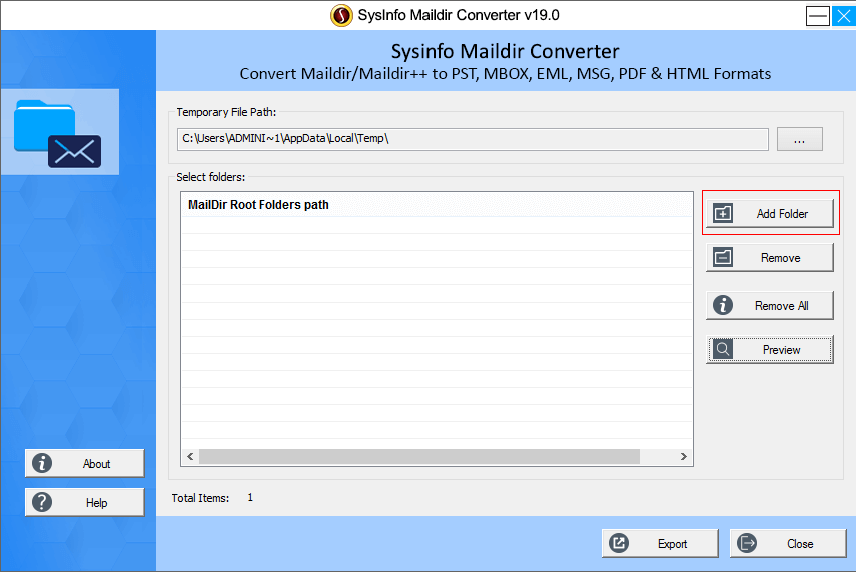 2. Next, <b>select the Maildir folder</b> from your system. 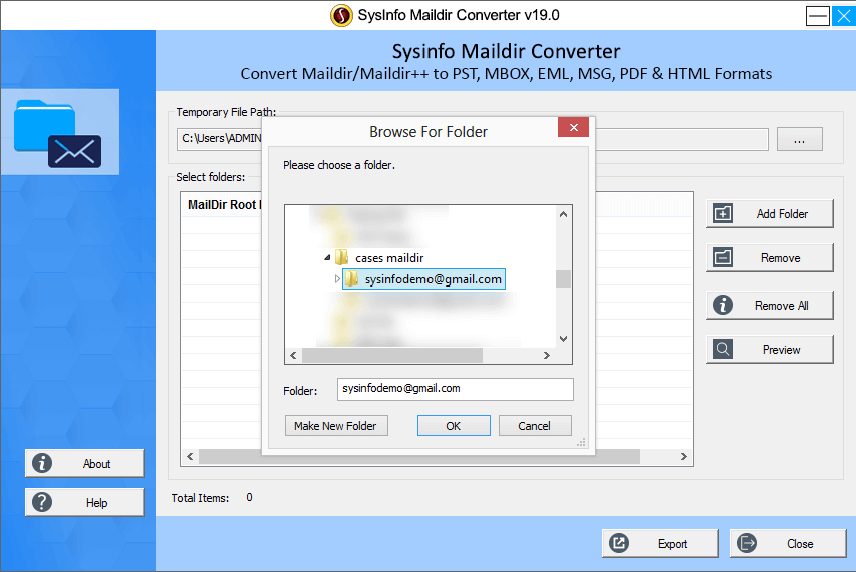 3. Then <b>choose</b> the folder that you have added to the application. 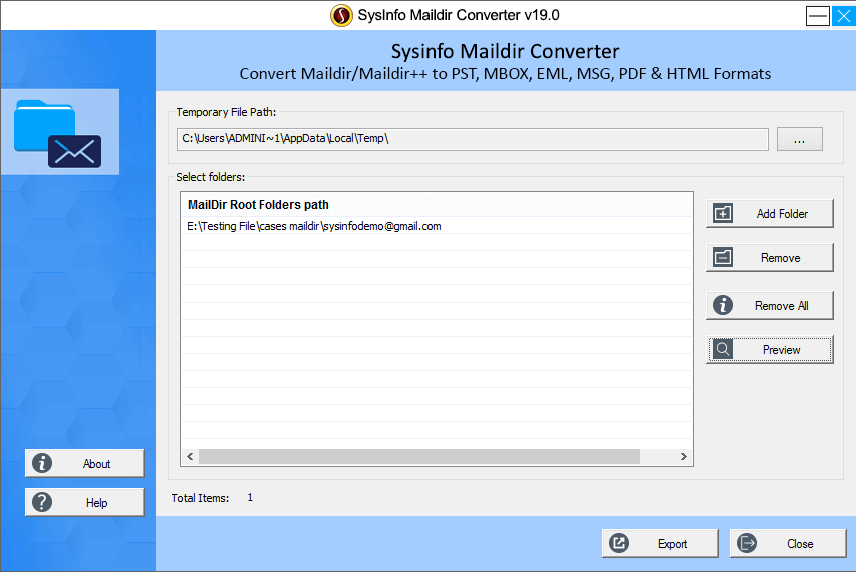 4.<b> Hit on the Preview button</b> to observe the emails in Maildir folder. 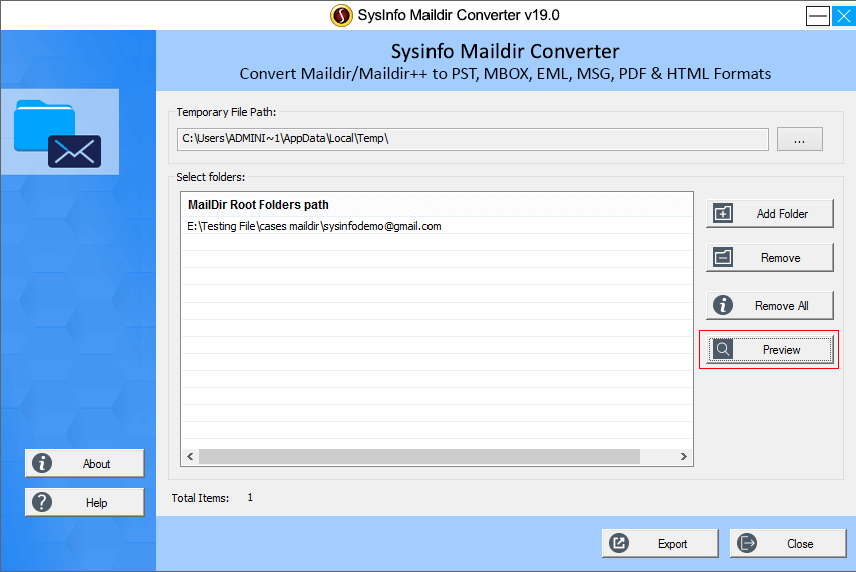 5. <b>Choose</b> the folder items to convert it to other formats. 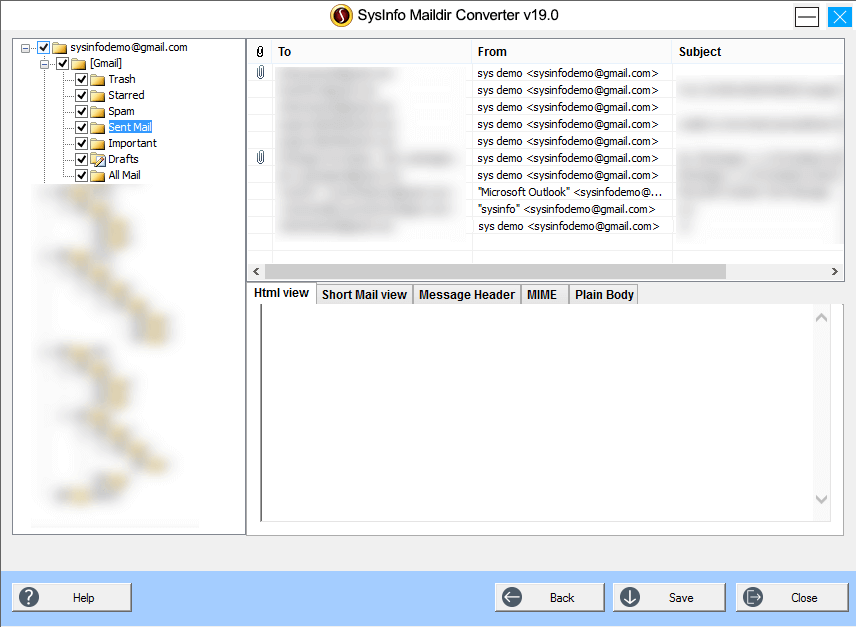 6. Now, <b>select</b> save as option to PST( EML, MSG, MBOX, etc). If you want to split PST file also then you can <b>choose the option to split PST.</b> 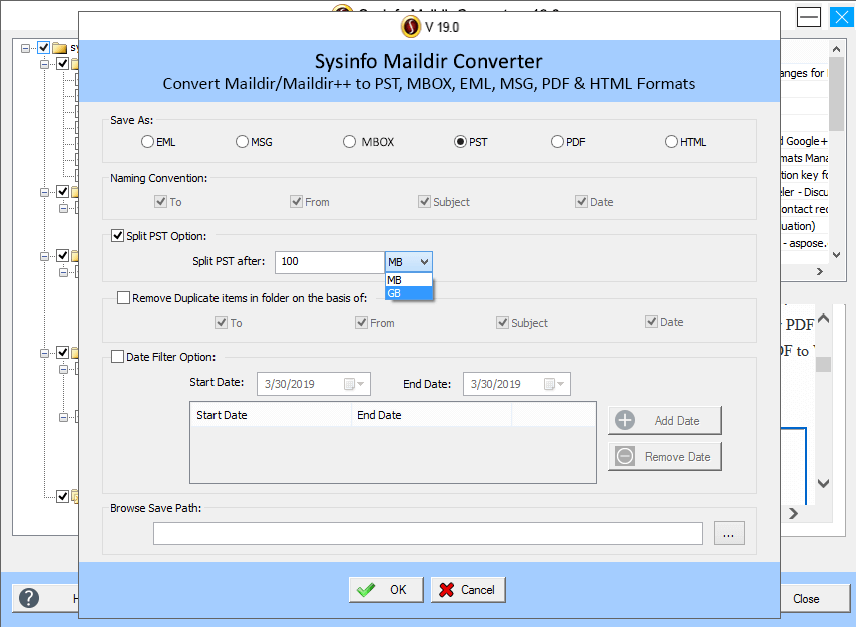 Then hit on <b>OK </b> 7. <b>Select</b> the destination location to save the resultant format. 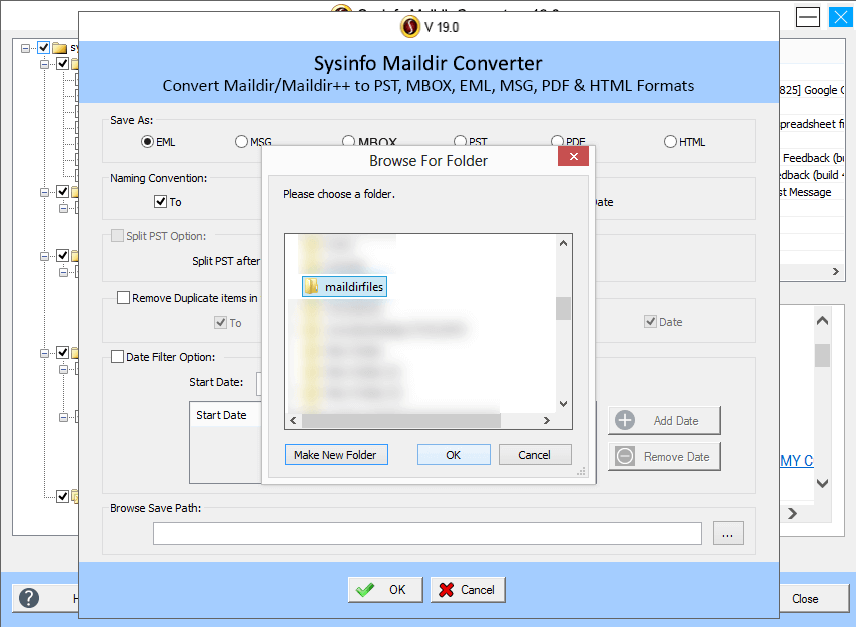 8. Wait until the process completes then <b>press OK.</b> 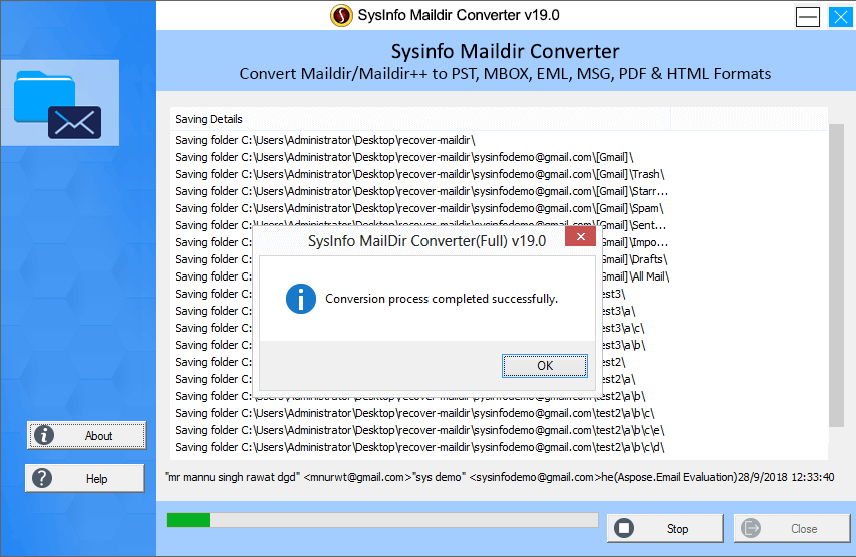 These all are the steps by which you can easily and quickly online convert Maildir files into other formats as well. <h4>Conclusion</h4> In this write-up, methods to convert Maildir to PST, PDF, MBOX, etc. are explained in detail. Manual methods are provided here but to find an instant solution an expert solution is provided for it. |
| title | Learn How to Convert Maildir/Maildir++ to PST , PDF, MBOX, EML, MSG, & HTML Format Online |
| author | abrienne3 |
| permlink | learn-how-to-convert-maildir-maildir-to-pst-pdf-mbox-eml-msg-and-html-format-online |
| json metadata | {"tags":["outlook","migration","conversion"],"image":["https://lh5.googleusercontent.com/TRyQpl18sRSNQAbOrXOekSO-R5JsIy56fuEgBeJC8byONcGEU56BvY8vd4vjGyoJ4XyVj4g20Z6wAMesAeIKwu5idU2_jkYwqrrlF9H7","https://www.sysinfotools.com/sysinfo-img/screenshot/maildir-converter/step1.png","https://www.sysinfotools.com/sysinfo-img/screenshot/maildir-converter/step2.png","https://www.sysinfotools.com/sysinfo-img/screenshot/maildir-converter/step3.png","https://www.sysinfotools.com/sysinfo-img/screenshot/maildir-converter/step4.png","https://www.sysinfotools.com/sysinfo-img/screenshot/maildir-converter/step5.png","https://www.sysinfotools.com/sysinfo-img/screenshot/maildir-converter/step6.png","https://www.sysinfotools.com/sysinfo-img/screenshot/maildir-converter/step7.png","https://www.sysinfotools.com/sysinfo-img/screenshot/maildir-converter/step8.png"],"links":["https://www.sysinfotools.com/maildir-converter.php"],"app":"steemit/0.1","format":"markdown"} |
| parent author | |
| parent permlink | outlook |
| Transaction Info | Block #40434515/Trx 7b56ce6d649cae69b5fd455f0c7d8cb3d676f4b4 |
View Raw JSON Data
{
"op": [
"comment",
{
"body": "\n\nEmail communication is very important to everyone in their lives. But due to changes in technology, most users want to <a href=\"https://www.sysinfotools.com/maildir-converter.php\">convert Maildir to PST.</a>So, in this blog, we're going to talk about Maildir / Maildir++ and PST first and then the reason for migration and finally all the manual and direct solutions.\n\n<b>Maildir vs Outlook PST</b>\n\n<b>Maildir-</b> Maildir is a set up of email that stores email messages in its database over the server. In this, each and every email holds a separate file with a different name from other and every Maildir folder called a directory. Maildir is divided into sub-directories such as cur, tmp, and new.\n\n<b>Outlook PST-</b>The outlook is a mostly used email client that is used by most of the businesses, organizations, users, etc. A desktop-based email client that stores data of emails, contacts, calendars, tasks, journals, etc. in the PST format.\n\n<h2>Why is it necessary to import Maildir to Outlook PST for users?</h2>\n\nBoth email clients have their own advantages but Maildir is a server-based email client that’s why users want to move Maildir to PST format. As with the Maildir, users cannot approach the email directory and they have to connect the server every time to preview the data files. Therefore, they need to transfer Maildir/Maildir++ files to Outlook. Because Outlook is a desktop-based email client and a more secure email client.\n\n<h2>How to Convert Maildir to PST, PDF, MBOX, EML, MSG, & HTML Format Online?</h2>\n\n<b>Here manual solutions to import Maildir files into PST is given below:</b>\n\n<h3>Method 1: Exporting Maildir files from the Server</h3>\n\n1. Initially, connect to the <b>Server of any website.</b>\n2. Next, to explore files, <b>double press the mail folder.</b>\n3. You will be able to see all Maildir file folder including <b>Draft, Sent, Trash, cur, tmp, new, etc.</b>\n4. Then make a <b>Maildir file backup</b> with all subfolders in a local drive.\n\n<h3>Method 2: Importing all Maildir/Maildir++ files to MS Outlook</h3>\n\n1. Firstly, sign in to <b>MS Outlook >>hit on the File tab.</b>\n2. Choose <b>Open & Export option >>in file dropdown >>Import/Export.</b>\n3. <b>Press the Next button and choose</b> Import from another program or file option from the list given.\n4. Then open converted PST file from a local drive using the Browse option. <b>Click on the Next button.</b>\n5. At last, press the <b>finish button</b> on the upcoming wizard to complete the process.\n\nThese are the two manual ways to convert Maildir to Outlook PST. For converting Maildir files into other formats(PDF, MBOX, EML, MSG, & HTML), you can choose Maildir Converter. This utility directly converts all Maildir files into all the formats and maintains data integrity in the whole process. \nYou can also convert Maildir to PST also if you don’t want to use a lengthy manual process. This tool supports Linux platforms like Dovecot, Mutt, MPOP, etc. mails for conversion. It can compatible with every Windows version including Windows 10 as well. \n\nNow let’s begin with the conversion process using Maildir Converter online.\n\n<h3>Steps to Convert Maildir/maildir++ to PST , PDF, MBOX, EML, MSG, & HTML Format</h3>\n\n1. Initially, <b>launch the tool and then hit</b> on the Add folder to find the Maildir path in your system. \n2. Next, <b>select the Maildir folder</b> from your system. \n3. Then <b>choose</b> the folder that you have added to the application. \n4.<b> Hit on the Preview button</b> to observe the emails in Maildir folder. \n5. <b>Choose</b> the folder items to convert it to other formats. \n6. Now, <b>select</b> save as option to PST( EML, MSG, MBOX, etc). If you want to split PST file also then you can <b>choose the option to split PST.</b> \nThen hit on <b>OK </b>\n7. <b>Select</b> the destination location to save the resultant format. \n8. Wait until the process completes then <b>press OK.</b> \n\nThese all are the steps by which you can easily and quickly online convert Maildir files into other formats as well. \n\n<h4>Conclusion</h4>\n\nIn this write-up, methods to convert Maildir to PST, PDF, MBOX, etc. are explained in detail. Manual methods are provided here but to find an instant solution an expert solution is provided for it.",
"title": "Learn How to Convert Maildir/Maildir++ to PST , PDF, MBOX, EML, MSG, & HTML Format Online",
"author": "abrienne3",
"permlink": "learn-how-to-convert-maildir-maildir-to-pst-pdf-mbox-eml-msg-and-html-format-online",
"json_metadata": "{\"tags\":[\"outlook\",\"migration\",\"conversion\"],\"image\":[\"https://lh5.googleusercontent.com/TRyQpl18sRSNQAbOrXOekSO-R5JsIy56fuEgBeJC8byONcGEU56BvY8vd4vjGyoJ4XyVj4g20Z6wAMesAeIKwu5idU2_jkYwqrrlF9H7\",\"https://www.sysinfotools.com/sysinfo-img/screenshot/maildir-converter/step1.png\",\"https://www.sysinfotools.com/sysinfo-img/screenshot/maildir-converter/step2.png\",\"https://www.sysinfotools.com/sysinfo-img/screenshot/maildir-converter/step3.png\",\"https://www.sysinfotools.com/sysinfo-img/screenshot/maildir-converter/step4.png\",\"https://www.sysinfotools.com/sysinfo-img/screenshot/maildir-converter/step5.png\",\"https://www.sysinfotools.com/sysinfo-img/screenshot/maildir-converter/step6.png\",\"https://www.sysinfotools.com/sysinfo-img/screenshot/maildir-converter/step7.png\",\"https://www.sysinfotools.com/sysinfo-img/screenshot/maildir-converter/step8.png\"],\"links\":[\"https://www.sysinfotools.com/maildir-converter.php\"],\"app\":\"steemit/0.1\",\"format\":\"markdown\"}",
"parent_author": "",
"parent_permlink": "outlook"
}
],
"block": 40434515,
"trx_id": "7b56ce6d649cae69b5fd455f0c7d8cb3d676f4b4",
"op_in_trx": 0,
"timestamp": "2020-02-01T09:17:57",
"virtual_op": false,
"trx_in_block": 28
}yeheyeffective vote applied for @abrienne3 / export-emails-from-microsoft-outlook-to-thunderbird2020/01/30 13:02:51
yeheyeffective vote applied for @abrienne3 / export-emails-from-microsoft-outlook-to-thunderbird
2020/01/30 13:02:51
| voter | yehey |
| author | abrienne3 |
| weight | 27395 |
| rshares | 55213483474 |
| permlink | export-emails-from-microsoft-outlook-to-thunderbird |
| pending payout | 0.008 HBD |
| total vote weight | 27414 |
| Transaction Info | Block #40381522/Trx 42a48e67175eca9c545971f035b083a9ba10dcfd |
View Raw JSON Data
{
  "op": [
    "effective_comment_vote",
    {
      "voter": "yehey",
      "author": "abrienne3",
      "weight": 27395,
      "rshares": 55213483474,
      "permlink": "export-emails-from-microsoft-outlook-to-thunderbird",
      "pending_payout": "0.008 HBD",
      "total_vote_weight": 27414
    }
  ],
  "block": 40381522,
  "trx_id": "42a48e67175eca9c545971f035b083a9ba10dcfd",
  "op_in_trx": 1,
  "timestamp": "2020-01-30T13:02:51",
  "virtual_op": true,
  "trx_in_block": 35
}yeheyupvoted (10.00%) @abrienne3 / export-emails-from-microsoft-outlook-to-thunderbird2020/01/30 13:02:51
yeheyupvoted (10.00%) @abrienne3 / export-emails-from-microsoft-outlook-to-thunderbird
2020/01/30 13:02:51
| voter | yehey |
| author | abrienne3 |
| weight | 1000 (10.00%) |
| permlink | export-emails-from-microsoft-outlook-to-thunderbird |
| Transaction Info | Block #40381522/Trx 42a48e67175eca9c545971f035b083a9ba10dcfd |
View Raw JSON Data
{
  "op": [
    "vote",
    {
      "voter": "yehey",
      "author": "abrienne3",
      "weight": 1000,
      "permlink": "export-emails-from-microsoft-outlook-to-thunderbird"
    }
  ],
  "block": 40381522,
  "trx_id": "42a48e67175eca9c545971f035b083a9ba10dcfd",
  "op_in_trx": 0,
  "timestamp": "2020-01-30T13:02:51",
  "virtual_op": false,
  "trx_in_block": 35
}abrienne3published a new post: export-emails-from-microsoft-outlook-to-thunderbird2020/01/30 12:49:03
abrienne3published a new post: export-emails-from-microsoft-outlook-to-thunderbird
2020/01/30 12:49:03
| body | @@ -210,32 +210,87 @@ uickly transfer +%3Ca href=%22https://www.shdatarescue.com/mbox-converter/%22%3E Outlook Mail to @@ -301,17 +301,20 @@ derbird. - +%3C/a%3E The firs @@ -4380,63 +4380,8 @@ rom -%3Ca href=%22https://www.shdatarescue.com/mbox-converter/%22%3E Micr @@ -4408,20 +4408,16 @@ nderbird -%3C/a%3E but it |
| title | Export Emails from Microsoft Outlook to Thunderbird |
| author | abrienne3 |
| permlink | export-emails-from-microsoft-outlook-to-thunderbird |
| json metadata | {"tags":["thunderbird","outlook","email","conversion"],"links":["https://www.shdatarescue.com/mbox-converter/"],"app":"steemit/0.1","format":"markdown"} |
| parent author | |
| parent permlink | migration |
| Transaction Info | Block #40381247/Trx 908b0d01eb46a8686bd4c0b7ac24aff137a75ec9 |
View Raw JSON Data
{
  "op": [
    "comment",
    {
      "body": "@@ -210,32 +210,87 @@\n uickly transfer \n+%3Ca href=%22https://www.shdatarescue.com/mbox-converter/%22%3E\n Outlook Mail to \n@@ -301,17 +301,20 @@\n derbird.\n- \n+%3C/a%3E\n The firs\n@@ -4380,63 +4380,8 @@\n rom \n-%3Ca href=%22https://www.shdatarescue.com/mbox-converter/%22%3E\n Micr\n@@ -4408,20 +4408,16 @@\n nderbird\n-%3C/a%3E\n  but it \n",
      "title": "Export Emails from Microsoft Outlook to Thunderbird",
      "author": "abrienne3",
      "permlink": "export-emails-from-microsoft-outlook-to-thunderbird",
      "json_metadata": "{\"tags\":[\"thunderbird\",\"outlook\",\"email\",\"conversion\"],\"links\":[\"https://www.shdatarescue.com/mbox-converter/\"],\"app\":\"steemit/0.1\",\"format\":\"markdown\"}",
      "parent_author": "",
      "parent_permlink": "migration"
    }
  ],
  "block": 40381247,
  "trx_id": "908b0d01eb46a8686bd4c0b7ac24aff137a75ec9",
  "op_in_trx": 0,
  "timestamp": "2020-01-30T12:49:03",
  "virtual_op": false,
  "trx_in_block": 5
}laissez-faireeffective vote applied for @abrienne3 / export-emails-from-microsoft-outlook-to-thunderbird2020/01/30 12:39:36
laissez-faireeffective vote applied for @abrienne3 / export-emails-from-microsoft-outlook-to-thunderbird
2020/01/30 12:39:36
| voter | laissez-faire |
| author | abrienne3 |
| weight | 19 (0.19%) |
| rshares | 38294338 |
| permlink | export-emails-from-microsoft-outlook-to-thunderbird |
| pending payout | 0.000 HBD |
| total vote weight | 19 |
| Transaction Info | Block #40381058/Trx 4fba9fd2e21180abbc9b5b30321f013002f1546e |
View Raw JSON Data
{
  "op": [
    "effective_comment_vote",
    {
      "voter": "laissez-faire",
      "author": "abrienne3",
      "weight": 19,
      "rshares": 38294338,
      "permlink": "export-emails-from-microsoft-outlook-to-thunderbird",
      "pending_payout": "0.000 HBD",
      "total_vote_weight": 19
    }
  ],
  "block": 40381058,
  "trx_id": "4fba9fd2e21180abbc9b5b30321f013002f1546e",
  "op_in_trx": 1,
  "timestamp": "2020-01-30T12:39:36",
  "virtual_op": true,
  "trx_in_block": 43
}laissez-faireupvoted (100.00%) @abrienne3 / export-emails-from-microsoft-outlook-to-thunderbird2020/01/30 12:39:36
laissez-faireupvoted (100.00%) @abrienne3 / export-emails-from-microsoft-outlook-to-thunderbird
2020/01/30 12:39:36
| voter | laissez-faire |
| author | abrienne3 |
| weight | 10000 (100.00%) |
| permlink | export-emails-from-microsoft-outlook-to-thunderbird |
| Transaction Info | Block #40381058/Trx 4fba9fd2e21180abbc9b5b30321f013002f1546e |
View Raw JSON Data
{
  "op": [
    "vote",
    {
      "voter": "laissez-faire",
      "author": "abrienne3",
      "weight": 10000,
      "permlink": "export-emails-from-microsoft-outlook-to-thunderbird"
    }
  ],
  "block": 40381058,
  "trx_id": "4fba9fd2e21180abbc9b5b30321f013002f1546e",
  "op_in_trx": 0,
  "timestamp": "2020-01-30T12:39:36",
  "virtual_op": false,
  "trx_in_block": 43
}raise-me-upeffective vote applied for @abrienne3 / export-emails-from-microsoft-outlook-to-thunderbird2020/01/30 12:39:33
raise-me-upeffective vote applied for @abrienne3 / export-emails-from-microsoft-outlook-to-thunderbird
2020/01/30 12:39:33
| voter | raise-me-up |
| author | abrienne3 |
| weight | 0 (0.00%) |
| rshares | 0 |
| permlink | export-emails-from-microsoft-outlook-to-thunderbird |
| pending payout | 0.000 HBD |
| total vote weight | 0 |
| Transaction Info | Block #40381057/Trx 3bde31e3852cf7ccb2d4f323081f9f47526a5f4c |
View Raw JSON Data
{
  "op": [
    "effective_comment_vote",
    {
      "voter": "raise-me-up",
      "author": "abrienne3",
      "weight": 0,
      "rshares": 0,
      "permlink": "export-emails-from-microsoft-outlook-to-thunderbird",
      "pending_payout": "0.000 HBD",
      "total_vote_weight": 0
    }
  ],
  "block": 40381057,
  "trx_id": "3bde31e3852cf7ccb2d4f323081f9f47526a5f4c",
  "op_in_trx": 1,
  "timestamp": "2020-01-30T12:39:33",
  "virtual_op": true,
  "trx_in_block": 36
}raise-me-upupvoted (0.01%) @abrienne3 / export-emails-from-microsoft-outlook-to-thunderbird2020/01/30 12:39:33
raise-me-upupvoted (0.01%) @abrienne3 / export-emails-from-microsoft-outlook-to-thunderbird
2020/01/30 12:39:33
| voter | raise-me-up |
| author | abrienne3 |
| weight | 1 (0.01%) |
| permlink | export-emails-from-microsoft-outlook-to-thunderbird |
| Transaction Info | Block #40381057/Trx 3bde31e3852cf7ccb2d4f323081f9f47526a5f4c |
View Raw JSON Data
{
  "op": [
    "vote",
    {
      "voter": "raise-me-up",
      "author": "abrienne3",
      "weight": 1,
      "permlink": "export-emails-from-microsoft-outlook-to-thunderbird"
    }
  ],
  "block": 40381057,
  "trx_id": "3bde31e3852cf7ccb2d4f323081f9f47526a5f4c",
  "op_in_trx": 0,
  "timestamp": "2020-01-30T12:39:33",
  "virtual_op": false,
  "trx_in_block": 36
}abrienne3published a new post: export-emails-from-microsoft-outlook-to-thunderbird2020/01/30 12:24:06
abrienne3published a new post: export-emails-from-microsoft-outlook-to-thunderbird
2020/01/30 12:24:06
| body | <p>Would you like to export emails from Microsoft Outlook to Thunderbird? If yes, then now you can now finish your search, as here you'll definitely get your solution. You need to just focus on this guide to quickly transfer Outlook Mail to Thunderbird. The first section explains the reasons for this migration then the second section suggests all manual tricks for it. Keep reading this blog carefully.</p> <h2> Why Export Email from Outlook to Thunderbird</h2><br></br> <p>Many users want to transfer email from Outlook to Thunderbird on a new computer as Mozilla Thunderbird is an open-source email client for maintaining Personal Information. It is easier to install Thunderbird on any PC than Outlook. As it is a cross-platform desktop-based application it can easily accessible on Windows, Mac, Linux OS. But Outlook is not cross-platform and also it is a paid service.</p> <h3>Step to Export Outlook Emails to Thunderbird Manually</h><br></br> <br></br> <b>There are three manual methods that you can use as given below:</b> <br></br> <br></br> <b>1. Export Outlook to Thunderbird on a System</b>.<br></br> <br></br> * <b>Hit</b> on the Start button first then navigate to.<br></br> * Default <b>Programs >> Set Outlook</b> your default program.<br></br> * Then run Thunderbird and <b>press on the Tools.</b> Hit on Import/Export Menu.<br></br> * <b>Choose</b> the radio button that appears next to Mail then press ‘Next’. After that choose Outlook from the provided list and tap ‘Next’. <br></br> * Press <b>Finish</b> to complete the import process.<br></br> <p>For importing other PST files like Address book, Contacts, etc. repeat this import process. Then set Thunderbird your Default Program.<p> <b>2. Export Outlook to Thunderbird by Google Take Out</b><br></br> <br></br> This approach explains you configuring the Gmail account in Outlook and sending all of your emails to your Gmail account from Outlook mail. The PST file is then imported into Thunderbird MBOX format. To do that, open your Outlook and then perform Google Takeout's Outlook to Thunderbird migration, you need to add your Gmail account to Outlook. To achieve good migration go step by step to export emails from Microsoft Outlook to Thunderbird:<br></br> <br></br> * <b>Go to ‘File’</b>on the top menu bar of Microsoft Outlook.<br></br> * <b>Press ‘Add account’</b> that will open a new window.<br></br> * Then fill the form including all the user credentials like <b>Username, Email ID Password.</b><br></br> * Next, open your <b>Gmail account</b>and hit on ‘Settings’.<br></br> * Navigate to Forwarding and POP/IMAP option and choose <b>Enable IMAP >> Save the changes.</b><br></br> <br></br> <b>Notice:</b>Open your Gmail Online and turn on the access for safe apps by performing these actions:<br></br> <br></br> * <b> Visit and click</b> on your Outlook account.<br></br> * <b>Click</b> on when the process is completed.<br></br> * All of your Gmail's been configured to Outlook after this. Now copy or drag and drop all your emails from <b>Outlook Mail into Gmail account.</b><br></br> * Next, <b>sign</b> in to your Gmail account.<br></br> * Then open <b>Google takeout.</b><br></br> * Hit on create an archive of search <b>items, emails, tasks, messages, etc. that are linked to your account.</b><br></br> * At last, you've been sent a copy of the files (on Gmail Account). Now, open the Downloaded<b> Zip folder from Gmail.</b><br></br> <br></br> Now, Install the Add-on ExportImportTool and Launch Thunderbird application before opening the Thunderbird Setup.<br></br> <br></br> * Select Application <b>Menu >> Tools >> Add-ons and select “Install Add-on From File…” </b>and find your Download folder. Then install it and <b>“Relaunch” Thunderbird.</b><br></br> * Then navigate to <b>Tools >> ImportExportTools >> Import MBOX file.</b>This will export Outlook PST into Thunderbird as MBOX File<br></br> * Search for the Mbox file from the path <b>(Downloads\takeout-257879jik\Takeout\Mail) and hit </b>on the Open button to open PST in Thunderbird<br></br> * After that, Thunderbird will import PST files to MBOX. It may assign the folder a name by adding a suffix. Therefore, you can open your exported Outlook PST in Thunderbird now.<br></br> <br></br> These two manual methods will help to Export Emails from <a href="https://www.shdatarescue.com/mbox-converter/">Microsoft Outlook to Thunderbird</a> but it takes a lot of time for execution. Also, users get irritated by the complexity and lengthy steps. Therefore, using a direct way or an expert solution you can quickly convert Outlook to Thunderbird. Using a tool helps in maintaining the data content intact that secures the data. It is recommended to always use a professional tool to transfer Outlook Mail to Thunderbird.<br></br> <br></br> <h4>Final Thoughts</h4> This guide provides all the reasons for exporting Outlook emails to Thunderbird. Also, explained two manual techniques so that a user can choose any one of them of their choice. |
| title | Export Emails from Microsoft Outlook to Thunderbird |
| author | abrienne3 |
| permlink | export-emails-from-microsoft-outlook-to-thunderbird |
| json metadata | {"tags":["thunderbird","outlook","email","conversion"],"links":["https://www.shdatarescue.com/mbox-converter/"],"app":"steemit/0.1","format":"markdown"} |
| parent author | |
| parent permlink | migration |
| Transaction Info | Block #40380749/Trx be10aba810185af544b4739d969d939c2ecb0d2a |
View Raw JSON Data
{
  "op": [
    "comment",
    {
      "body": "<p>Would you like to export emails from Microsoft Outlook to Thunderbird? If yes, then now you can now finish your search, as here you'll definitely get your solution. You need to just focus on this guide to quickly transfer Outlook Mail to Thunderbird. The first section explains the reasons for this migration then the second section suggests all manual tricks for it. Keep reading this blog carefully.</p>\n\n<h2> Why Export Email from Outlook to Thunderbird</h2><br></br>\n\n<p>Many users want to transfer email from Outlook to Thunderbird on a new computer as Mozilla Thunderbird is an open-source email client for maintaining Personal Information. It is easier to install Thunderbird on any PC than Outlook. As it is a cross-platform desktop-based application it can easily accessible on Windows, Mac, Linux OS. But Outlook is not cross-platform and also it is a paid service.</p>\n\n<h3>Step to Export Outlook Emails to Thunderbird Manually</h><br></br>\n<br></br>\n\n<b>There are three manual methods that you can use as given below:</b>\n<br></br>\n<br></br>\n<b>1. Export Outlook to Thunderbird on a System</b>.<br></br>\n<br></br>\n\n* <b>Hit</b> on the  Start button first then navigate to.<br></br>\n* Default <b>Programs >> Set Outlook</b> your default program.<br></br>\n* Then run Thunderbird and <b>press on the Tools.</b> Hit on Import/Export Menu.<br></br>\n* <b>Choose</b> the radio button that appears next to Mail then press ‘Next’.  After that choose Outlook from the provided list and tap  ‘Next’. <br></br>\n* Press <b>Finish</b> to complete the import process.<br></br>\n\n<p>For importing other PST files like Address book, Contacts, etc. repeat this import process. Then set Thunderbird your Default Program.<p>\n\n<b>2. Export Outlook to Thunderbird by Google Take Out</b><br></br>\n<br></br>\n\nThis approach explains you configuring the Gmail account in Outlook and sending all of your emails to your Gmail account from Outlook mail. The PST file is then imported into Thunderbird MBOX format. To do that, open your Outlook and then perform Google Takeout's Outlook to Thunderbird migration, you need to add your Gmail account to Outlook. To achieve good migration go step by step to export emails from Microsoft Outlook to Thunderbird:<br></br>\n<br></br>\n\n* <b>Go to ‘File’</b>on the top menu bar of Microsoft Outlook.<br></br>\n* <b>Press  ‘Add account’</b> that will open a new window.<br></br>\n* Then fill the form including all the user credentials like <b>Username, Email ID Password.</b><br></br>\n* Next, open your <b>Gmail account</b>and hit on ‘Settings’.<br></br>\n* Navigate to Forwarding and POP/IMAP option and choose <b>Enable IMAP >> Save the changes.</b><br></br>\n<br></br>\n\n<b>Notice:</b>Open your Gmail Online and turn on the access for safe apps by performing these actions:<br></br>\n<br></br>\n\n* <b> Visit and click</b> on your Outlook account.<br></br>\n* <b>Click</b> on when the process is completed.<br></br>\n* All of your Gmail's been configured to Outlook after this. Now copy or drag and drop all your emails from <b>Outlook Mail into Gmail account.</b><br></br>\n* Next, <b>sign</b> in to your Gmail account.<br></br>\n* Then open <b>Google takeout.</b><br></br>\n* Hit on create an archive of search <b>items, emails, tasks, messages, etc. that are linked to your account.</b><br></br>\n* At last, you've been sent a copy of the files (on Gmail Account). Now, open the Downloaded<b> Zip folder from Gmail.</b><br></br>\n<br></br>\n\nNow, Install the Add-on ExportImportTool and Launch Thunderbird application before opening the Thunderbird Setup.<br></br>\n<br></br>\n\n* Select Application <b>Menu >> Tools >> Add-ons and select “Install Add-on From File…” </b>and find your Download folder. Then install it and <b>“Relaunch” Thunderbird.</b><br></br>\n* Then navigate to <b>Tools >> ImportExportTools >> Import MBOX file.</b>This will export Outlook PST into Thunderbird as MBOX File<br></br>\n* Search for the Mbox file from the path <b>(Downloads\\takeout-257879jik\\Takeout\\Mail) and hit </b>on the Open button to open PST in Thunderbird<br></br>\n* After that, Thunderbird will import PST files to MBOX. It may assign the folder a name by adding a suffix. Therefore, you can open your exported Outlook PST in Thunderbird now.<br></br>\n<br></br>\n\nThese two manual methods will help to Export Emails from <a href=\"https://www.shdatarescue.com/mbox-converter/\">Microsoft Outlook to Thunderbird</a> but it takes a lot of time for execution. Also, users get irritated by the complexity and lengthy steps. Therefore, using a direct way or an expert solution you can quickly convert Outlook to Thunderbird. Using a tool helps in maintaining the data content intact that secures the data. It is recommended to always use a professional tool to transfer Outlook Mail to Thunderbird.<br></br>\n<br></br>\n\n<h4>Final Thoughts</h4>\n\nThis guide provides all the reasons for exporting Outlook emails to Thunderbird. Also, explained two manual techniques so that a user can choose any one of them of their choice.",
      "title": "Export Emails from Microsoft Outlook to Thunderbird",
      "author": "abrienne3",
      "permlink": "export-emails-from-microsoft-outlook-to-thunderbird",
      "json_metadata": "{\"tags\":[\"thunderbird\",\"outlook\",\"email\",\"conversion\"],\"links\":[\"https://www.shdatarescue.com/mbox-converter/\"],\"app\":\"steemit/0.1\",\"format\":\"markdown\"}",
      "parent_author": "",
      "parent_permlink": "migration"
    }
  ],
  "block": 40380749,
  "trx_id": "be10aba810185af544b4739d969d939c2ecb0d2a",
  "op_in_trx": 0,
  "timestamp": "2020-01-30T12:24:06",
  "virtual_op": false,
  "trx_in_block": 36
}abrienne3published a new post: export-emails-from-microsoft-outlook-to-thunderbird2020/01/30 12:22:42
abrienne3published a new post: export-emails-from-microsoft-outlook-to-thunderbird
2020/01/30 12:22:42
| body | <p>Would you like to export emails from Microsoft Outlook to Thunderbird? If yes, then now you can now finish your search, as here you'll definitely get your solution. You need to just focus on this guide to quickly transfer Outlook Mail to Thunderbird. The first section explains the reasons for this migration then the second section suggests all manual tricks for it. Keep reading this blog carefully.</p> <h2> Why Export Email from Outlook to Thunderbird</h2><br></br> <p>Many users want to transfer email from Outlook to Thunderbird on a new computer as Mozilla Thunderbird is an open-source email client for maintaining Personal Information. It is easier to install Thunderbird on any PC than Outlook. As it is a cross-platform desktop-based application it can easily accessible on Windows, Mac, Linux OS. But Outlook is not cross-platform and also it is a paid service.</p> <h3>Step to Export Outlook Emails to Thunderbird Manually</h><br></br> <br></br> <b>There are three manual methods that you can use as given below:</b> <br></br> <br></br> <b>1. Export Outlook to Thunderbird on a System</b>.<br></br> <br></br> * <b>Hit</b> on the Start button first then navigate to.<br></br> * Default <b>Programs >> Set Outlook</b> your default program.<br></br> * Then run Thunderbird and <b>press on the Tools.</b> Hit on Import/Export Menu.<br></br> * <b>Choose</b> the radio button that appears next to Mail then press ‘Next’. After that choose Outlook from the provided list and tap ‘Next’. <br></br> * Press <b>Finish</b> to complete the import process.<br></br> <p>For importing other PST files like Address book, Contacts, etc. repeat this import process. Then set Thunderbird your Default Program.<p> <b>2. Export Outlook to Thunderbird by Google Take Out</b><br></br> <br></br> This approach explains you configuring the Gmail account in Outlook and sending all of your emails to your Gmail account from Outlook mail. The PST file is then imported into Thunderbird MBOX format. To do that, open your Outlook and then perform Google Takeout's Outlook to Thunderbird migration, you need to add your Gmail account to Outlook. To achieve good migration go step by step to export emails from Microsoft Outlook to Thunderbird:<br></br> <br></br> * <b>Go to ‘File’</b>on the top menu bar of Microsoft Outlook.<br></br> * <b>Press ‘Add account’</b> that will open a new window.<br></br> * Then fill the form including all the user credentials like <b>Username, Email ID Password.</b><br></br> * Next, open your <b>Gmail account</b>and hit on ‘Settings’.<br></br> * Navigate to Forwarding and POP/IMAP option and choose <b>Enable IMAP >> Save the changes.</b><br></br> <br></br> <b>Notice:</b>Open your Gmail Online and turn on the access for safe apps by performing these actions:<br></br> <br></br> * <b> Visit and click</b> on your Outlook account.<br></br> * <b>Click</b> on when the process is completed.<br></br> * All of your Gmail's been configured to Outlook after this. Now copy or drag and drop all your emails from <b>Outlook Mail into Gmail account.</b><br></br> * Next, <b>sign</b> in to your Gmail account.<br></br> * Then open <b>Google takeout.</b><br></br> * Hit on create an archive of search <b>items, emails, tasks, messages, etc. that are linked to your account.</b><br></br> * At last, you've been sent a copy of the files (on Gmail Account). Now, open the Downloaded<b> Zip folder from Gmail.</b><br></br> <br></br> Now, Install the Add-on ExportImportTool and Launch Thunderbird application before opening the Thunderbird Setup.<br></br> <br></br> * Select Application <b>Menu >> Tools >> Add-ons and select “Install Add-on From File…” </b>and find your Download folder. Then install it and <b>“Relaunch” Thunderbird.</b><br></br> * Then navigate to <b>Tools >> ImportExportTools >> Import MBOX file.</b>This will export Outlook PST into Thunderbird as MBOX File<br></br> * Search for the Mbox file from the path <b>(Downloads\takeout-257879jik\Takeout\Mail) and hit </b>on the Open button to open PST in Thunderbird<br></br> * After that, Thunderbird will import PST files to MBOX. It may assign the folder a name by adding a suffix. Therefore, you can open your exported Outlook PST in Thunderbird now.<br></br> <br></br> These two manual methods will help to Export Emails from <a href="https://www.shdatarescue.com/mbox-converter/">Microsoft Outlook to Thunderbird</a> but it takes a lot of time for execution. Also, users get irritated by the complexity and lengthy steps. Therefore, using a direct way or an expert solution you can quickly convert Outlook to Thunderbird. Using a tool helps in maintaining the data content intact that secures the data. It is recommended to always use a professional tool to transfer Outlook Mail to Thunderbird.<br></br> <br></br> <h4>Final Thoughts</h4> This guide provides all the reasons for exporting Outlook emails to Thunderbird. Also, explained two manual techniques so that a user can choose any one of them of their choice. |
| title | Export Emails from Microsoft Outlook to Thunderbird |
| author | abrienne3 |
| permlink | export-emails-from-microsoft-outlook-to-thunderbird |
| json metadata | {"tags":["migration"],"links":["https://www.shdatarescue.com/mbox-converter/"],"app":"steemit/0.1","format":"markdown"} |
| parent author | |
| parent permlink | migration |
| Transaction Info | Block #40380721/Trx f400558a08f88c1be134065f0a8816d5f7f286e9 |
View Raw JSON Data
{
  "op": [
    "comment",
    {
      "body": "<p>Would you like to export emails from Microsoft Outlook to Thunderbird? If yes, then now you can now finish your search, as here you'll definitely get your solution. You need to just focus on this guide to quickly transfer Outlook Mail to Thunderbird. The first section explains the reasons for this migration then the second section suggests all manual tricks for it. Keep reading this blog carefully.</p>\n\n<h2> Why Export Email from Outlook to Thunderbird</h2><br></br>\n\n<p>Many users want to transfer email from Outlook to Thunderbird on a new computer as Mozilla Thunderbird is an open-source email client for maintaining Personal Information. It is easier to install Thunderbird on any PC than Outlook. As it is a cross-platform desktop-based application it can easily accessible on Windows, Mac, Linux OS. But Outlook is not cross-platform and also it is a paid service.</p>\n\n<h3>Step to Export Outlook Emails to Thunderbird Manually</h><br></br>\n<br></br>\n\n<b>There are three manual methods that you can use as given below:</b>\n<br></br>\n<br></br>\n<b>1. Export Outlook to Thunderbird on a System</b>.<br></br>\n<br></br>\n\n* <b>Hit</b> on the  Start button first then navigate to.<br></br>\n* Default <b>Programs >> Set Outlook</b> your default program.<br></br>\n* Then run Thunderbird and <b>press on the Tools.</b> Hit on Import/Export Menu.<br></br>\n* <b>Choose</b> the radio button that appears next to Mail then press ‘Next’.  After that choose Outlook from the provided list and tap  ‘Next’. <br></br>\n* Press <b>Finish</b> to complete the import process.<br></br>\n\n<p>For importing other PST files like Address book, Contacts, etc. repeat this import process. Then set Thunderbird your Default Program.<p>\n\n<b>2. Export Outlook to Thunderbird by Google Take Out</b><br></br>\n<br></br>\n\nThis approach explains you configuring the Gmail account in Outlook and sending all of your emails to your Gmail account from Outlook mail. The PST file is then imported into Thunderbird MBOX format. To do that, open your Outlook and then perform Google Takeout's Outlook to Thunderbird migration, you need to add your Gmail account to Outlook. To achieve good migration go step by step to export emails from Microsoft Outlook to Thunderbird:<br></br>\n<br></br>\n\n* <b>Go to ‘File’</b>on the top menu bar of Microsoft Outlook.<br></br>\n* <b>Press  ‘Add account’</b> that will open a new window.<br></br>\n* Then fill the form including all the user credentials like <b>Username, Email ID Password.</b><br></br>\n* Next, open your <b>Gmail account</b>and hit on ‘Settings’.<br></br>\n* Navigate to Forwarding and POP/IMAP option and choose <b>Enable IMAP >> Save the changes.</b><br></br>\n<br></br>\n\n<b>Notice:</b>Open your Gmail Online and turn on the access for safe apps by performing these actions:<br></br>\n<br></br>\n\n* <b> Visit and click</b> on your Outlook account.<br></br>\n* <b>Click</b> on when the process is completed.<br></br>\n* All of your Gmail's been configured to Outlook after this. Now copy or drag and drop all your emails from <b>Outlook Mail into Gmail account.</b><br></br>\n* Next, <b>sign</b> in to your Gmail account.<br></br>\n* Then open <b>Google takeout.</b><br></br>\n* Hit on create an archive of search <b>items, emails, tasks, messages, etc. that are linked to your account.</b><br></br>\n* At last, you've been sent a copy of the files (on Gmail Account). Now, open the Downloaded<b> Zip folder from Gmail.</b><br></br>\n<br></br>\n\nNow, Install the Add-on ExportImportTool and Launch Thunderbird application before opening the Thunderbird Setup.<br></br>\n<br></br>\n\n* Select Application <b>Menu >> Tools >> Add-ons and select “Install Add-on From File…” </b>and find your Download folder. Then install it and <b>“Relaunch” Thunderbird.</b><br></br>\n* Then navigate to <b>Tools >> ImportExportTools >> Import MBOX file.</b>This will export Outlook PST into Thunderbird as MBOX File<br></br>\n* Search for the Mbox file from the path <b>(Downloads\\takeout-257879jik\\Takeout\\Mail) and hit </b>on the Open button to open PST in Thunderbird<br></br>\n* After that, Thunderbird will import PST files to MBOX. It may assign the folder a name by adding a suffix. Therefore, you can open your exported Outlook PST in Thunderbird now.<br></br>\n<br></br>\n\nThese two manual methods will help to Export Emails from <a href=\"https://www.shdatarescue.com/mbox-converter/\">Microsoft Outlook to Thunderbird</a> but it takes a lot of time for execution. Also, users get irritated by the complexity and lengthy steps. Therefore, using a direct way or an expert solution you can quickly convert Outlook to Thunderbird. Using a tool helps in maintaining the data content intact that secures the data. It is recommended to always use a professional tool to transfer Outlook Mail to Thunderbird.<br></br>\n<br></br>\n\n<h4>Final Thoughts</h4>\n\nThis guide provides all the reasons for exporting Outlook emails to Thunderbird. Also, explained two manual techniques so that a user can choose any one of them of their choice.",
      "title": "Export Emails from Microsoft Outlook to Thunderbird",
      "author": "abrienne3",
      "permlink": "export-emails-from-microsoft-outlook-to-thunderbird",
      "json_metadata": "{\"tags\":[\"migration\"],\"links\":[\"https://www.shdatarescue.com/mbox-converter/\"],\"app\":\"steemit/0.1\",\"format\":\"markdown\"}",
      "parent_author": "",
      "parent_permlink": "migration"
    }
  ],
  "block": 40380721,
  "trx_id": "f400558a08f88c1be134065f0a8816d5f7f286e9",
  "op_in_trx": 0,
  "timestamp": "2020-01-30T12:22:42",
  "virtual_op": false,
  "trx_in_block": 32
}jansmithsmthreplied to @abrienne3 / q3siav2020/01/08 13:18:36
jansmithsmthreplied to @abrienne3 / q3siav
2020/01/08 13:18:36
| body | hiii |
| title | |
| author | jansmithsmth |
| permlink | q3siav |
| json metadata | {"app":"steemit/0.1"} |
| parent author | abrienne3 |
| parent permlink | different-email-formats-to-help-ease-you-away-from-outlook |
| Transaction Info | Block #39749494/Trx 168df8bcbaedff1d1276dedb9779e7ca6cce37e7 |
View Raw JSON Data
{
  "op": [
    "comment",
    {
      "body": "hiii",
      "title": "",
      "author": "jansmithsmth",
      "permlink": "q3siav",
      "json_metadata": "{\"app\":\"steemit/0.1\"}",
      "parent_author": "abrienne3",
      "parent_permlink": "different-email-formats-to-help-ease-you-away-from-outlook"
    }
  ],
  "block": 39749494,
  "trx_id": "168df8bcbaedff1d1276dedb9779e7ca6cce37e7",
  "op_in_trx": 0,
  "timestamp": "2020-01-08T13:18:36",
  "virtual_op": false,
  "trx_in_block": 21
}abrienne3published a new post: top-7-features-of-sysinfo-ost-to-pst-converter-useful-for-all-users2019/12/06 05:34:45
abrienne3published a new post: top-7-features-of-sysinfo-ost-to-pst-converter-useful-for-all-users
2019/12/06 05:34:45
| body | @@ -36,16 +36,19 @@ nd what +%3Cb%3E features @@ -67,24 +67,28 @@ ST Converter +%3C/b%3E can be most @@ -124,13 +124,16 @@ vide -s +d by +%3Cb%3E Sysi @@ -140,16 +140,20 @@ nfoTools +%3C/b%3E ? Here I @@ -398,16 +398,19 @@ of the +%3Cb%3E Microsof @@ -423,16 +423,20 @@ ce suite +%3C/b%3E , one of @@ -699,24 +699,31 @@ a as an +%3Cb%3E OST file +%3C/b%3E (also kn @@ -758,24 +758,31 @@ es) and +%3Cb%3E PST file +%3C/b%3E (Persona @@ -987,16 +987,20 @@ you are + %3Cb%3E migratin @@ -1021,16 +1021,20 @@ T as PST +%3C/b%3E but it @@ -1662,17 +1662,20 @@ s.png)%0A%0A -* +%3Ch2%3E Let's se @@ -1680,18 +1680,39 @@ see why -it +SysInfoTools OST to PST is the @@ -1747,11 +1747,19 @@ sers -*%0A%0A +%3C/h2%3E%0A%0A%3Ch3%3E 1. C @@ -1806,16 +1806,21 @@ OST file +%3C/h3%3E %0ABeing a @@ -2142,16 +2142,20 @@ e(s). %0A%0A +%3Ch3%3E 2. Expor @@ -2199,16 +2199,21 @@ T format +%3C/h3%3E %0AMany of @@ -2443,16 +2443,20 @@ ulty. %0A%0A +%3Ch3%3E 3. Save @@ -2492,16 +2492,21 @@ Formats +%3C/h3%3E %0ABesides @@ -2858,16 +2858,20 @@ etc. %0A%0A +%3Ch3%3E 4. Recov @@ -2920,16 +2920,21 @@ Feature) +%3C/h3%3E %0AThe mot @@ -3244,16 +3244,20 @@ data.%0A%0A +%3Ch3%3E 5. Optio @@ -3294,16 +3294,21 @@ te Range +%3C/h3%3E %0AIf you @@ -3622,16 +3622,20 @@ ngly. %0A%0A +%3Ch3%3E 6. Previ @@ -3665,16 +3665,21 @@ igration +%3C/h3%3E %0ABefore @@ -3977,16 +3977,20 @@ ware. %0A%0A +%3Ch3%3E 7. Maint @@ -4014,17 +4014,21 @@ Accuracy -. +%3C/h3%3E %0AThe app @@ -4402,18 +4402,20 @@ 0ujq8o%0A%0A -** +%3Ch4%3E Final wo @@ -4420,10 +4420,13 @@ word -** +%3C/h4%3E %0ABy |
| title | Top 7 Features Of SysInfo OST to PST Converter Useful For All Users |
| author | abrienne3 |
| permlink | top-7-features-of-sysinfo-ost-to-pst-converter-useful-for-all-users |
| json metadata | {"tags":["converter","ost","to","pst"],"image":["https://cdn.steemitimages.com/DQmT5iCFLSm21QR9bKyjtZfXCpCtEhJ2nx28rGbaBkK3wuq/step-images.png","https://img.youtube.com/vi/eDni50ujq8o/0.jpg"],"links":["https://wordpress.semnaitik.com/best-ost-to-pst-converter-tool/","https://www.sysinfotools.com/blog/top-5-best-ost-pst-converter-tools-2019/","https://www.youtube.com/watch?v=eDni50ujq8o","https://www.sysinfotools.com/ost-to-pst-converter.php"],"app":"steemit/0.1","format":"markdown"} |
| parent author | |
| parent permlink | sysinfo |
| Transaction Info | Block #38791570/Trx 5c6243bd54a66e59022963b865cacc4cfb653c4d |
View Raw JSON Data
{
  "op": [
    "comment",
    {
      "body": "@@ -36,16 +36,19 @@\n nd what \n+%3Cb%3E\n features\n@@ -67,24 +67,28 @@\n ST Converter\n+%3C/b%3E\n  can be most\n@@ -124,13 +124,16 @@\n vide\n-s\n+d\n  by \n+%3Cb%3E\n Sysi\n@@ -140,16 +140,20 @@\n nfoTools\n+%3C/b%3E\n ? Here I\n@@ -398,16 +398,19 @@\n  of the \n+%3Cb%3E\n Microsof\n@@ -423,16 +423,20 @@\n ce suite\n+%3C/b%3E\n , one of\n@@ -699,24 +699,31 @@\n a as an \n+%3Cb%3E\n OST file\n+%3C/b%3E\n (also kn\n@@ -758,24 +758,31 @@\n es) and \n+%3Cb%3E\n PST file\n+%3C/b%3E\n (Persona\n@@ -987,16 +987,20 @@\n you are \n+ %3Cb%3E\n migratin\n@@ -1021,16 +1021,20 @@\n T as PST\n+%3C/b%3E\n  but it \n@@ -1662,17 +1662,20 @@\n s.png)%0A%0A\n-*\n+%3Ch2%3E\n Let's se\n@@ -1680,18 +1680,39 @@\n see why \n-it\n+SysInfoTools OST to PST\n  is the \n@@ -1747,11 +1747,19 @@\n sers\n-*%0A%0A\n+%3C/h2%3E%0A%0A%3Ch3%3E\n 1. C\n@@ -1806,16 +1806,21 @@\n OST file\n+%3C/h3%3E\n %0ABeing a\n@@ -2142,16 +2142,20 @@\n e(s). %0A%0A\n+%3Ch3%3E\n 2. Expor\n@@ -2199,16 +2199,21 @@\n T format\n+%3C/h3%3E\n %0AMany of\n@@ -2443,16 +2443,20 @@\n ulty. %0A%0A\n+%3Ch3%3E\n 3. Save \n@@ -2492,16 +2492,21 @@\n  Formats\n+%3C/h3%3E\n %0ABesides\n@@ -2858,16 +2858,20 @@\n  etc. %0A%0A\n+%3Ch3%3E\n 4. Recov\n@@ -2920,16 +2920,21 @@\n Feature)\n+%3C/h3%3E\n %0AThe mot\n@@ -3244,16 +3244,20 @@\n  data.%0A%0A\n+%3Ch3%3E\n 5. Optio\n@@ -3294,16 +3294,21 @@\n te Range\n+%3C/h3%3E\n %0AIf you \n@@ -3622,16 +3622,20 @@\n ngly. %0A%0A\n+%3Ch3%3E\n 6. Previ\n@@ -3665,16 +3665,21 @@\n igration\n+%3C/h3%3E\n %0ABefore \n@@ -3977,16 +3977,20 @@\n ware. %0A%0A\n+%3Ch3%3E\n 7. Maint\n@@ -4014,17 +4014,21 @@\n Accuracy\n-.\n+%3C/h3%3E\n %0AThe app\n@@ -4402,18 +4402,20 @@\n 0ujq8o%0A%0A\n-**\n+%3Ch4%3E\n Final wo\n@@ -4420,10 +4420,13 @@\n word\n-**\n+%3C/h4%3E\n %0ABy \n",
      "title": "Top 7 Features Of SysInfo OST to PST Converter Useful For All Users",
      "author": "abrienne3",
      "permlink": "top-7-features-of-sysinfo-ost-to-pst-converter-useful-for-all-users",
      "json_metadata": "{\"tags\":[\"converter\",\"ost\",\"to\",\"pst\"],\"image\":[\"https://cdn.steemitimages.com/DQmT5iCFLSm21QR9bKyjtZfXCpCtEhJ2nx28rGbaBkK3wuq/step-images.png\",\"https://img.youtube.com/vi/eDni50ujq8o/0.jpg\"],\"links\":[\"https://wordpress.semnaitik.com/best-ost-to-pst-converter-tool/\",\"https://www.sysinfotools.com/blog/top-5-best-ost-pst-converter-tools-2019/\",\"https://www.youtube.com/watch?v=eDni50ujq8o\",\"https://www.sysinfotools.com/ost-to-pst-converter.php\"],\"app\":\"steemit/0.1\",\"format\":\"markdown\"}",
      "parent_author": "",
      "parent_permlink": "sysinfo"
    }
  ],
  "block": 38791570,
  "trx_id": "5c6243bd54a66e59022963b865cacc4cfb653c4d",
  "op_in_trx": 0,
  "timestamp": "2019-12-06T05:34:45",
  "virtual_op": false,
  "trx_in_block": 22
}abrienne3published a new post: top-7-features-of-sysinfo-ost-to-pst-converter-useful-for-all-users2019/12/06 05:31:09
abrienne3published a new post: top-7-features-of-sysinfo-ost-to-pst-converter-useful-for-all-users
2019/12/06 05:31:09
| body | @@ -1,12 +1,236 @@ +Is it difficult for you to understand what features of OST to PST Converter can be most helpful for you which is provides by SysinfoTools? Here I will help you with all the most prominent features of SysinfoTools converter%0A%0A If you are a @@ -490,16 +490,18 @@ amed as +a personal @@ -563,17 +563,16 @@ ur email -s files a @@ -614,18 +614,16 @@ ssages. -%0A%0A Outlook @@ -675,16 +675,19 @@ data as +an OST file @@ -800,16 +800,20 @@ ta from +the OST file @@ -1053,16 +1053,18 @@ In such +a case to @@ -1171,27 +1171,17 @@ you -some features of an +the %5Bbest OST @@ -1213,16 +1213,82 @@ Software +%5D(https://wordpress.semnaitik.com/best-ost-to-pst-converter-tool/) provide @@ -2645,16 +2645,20 @@ ely use +the OST file @@ -2751,16 +2751,17 @@ e Mail & +, etc. %0A%0A @@ -3107,16 +3107,20 @@ fecting +the original @@ -3349,16 +3349,20 @@ help of +the date ran @@ -3429,16 +3429,17 @@ ich mean +s you mus @@ -3440,20 +3440,16 @@ ou must -the email be @@ -3630,17 +3630,19 @@ des you -a +the capabil @@ -3822,16 +3822,17 @@ contacts +, etc. wi @@ -4010,20 +4010,16 @@ losing -the consiste |
| title | Top 7 Features Of SysInfo OST to PST Converter Useful For All Users |
| author | abrienne3 |
| permlink | top-7-features-of-sysinfo-ost-to-pst-converter-useful-for-all-users |
| json metadata | {"tags":["converter","ost","to","pst"],"image":["https://cdn.steemitimages.com/DQmT5iCFLSm21QR9bKyjtZfXCpCtEhJ2nx28rGbaBkK3wuq/step-images.png","https://img.youtube.com/vi/eDni50ujq8o/0.jpg"],"links":["https://wordpress.semnaitik.com/best-ost-to-pst-converter-tool/","https://www.sysinfotools.com/blog/top-5-best-ost-pst-converter-tools-2019/","https://www.youtube.com/watch?v=eDni50ujq8o","https://www.sysinfotools.com/ost-to-pst-converter.php"],"app":"steemit/0.1","format":"markdown"} |
| parent author | |
| parent permlink | sysinfo |
| Transaction Info | Block #38791499/Trx e998d5fa4580d4c27de9d581f8507e97e9878a90 |
View Raw JSON Data
{
  "op": [
    "comment",
    {
      "body": "@@ -1,12 +1,236 @@\n+Is it difficult for you to understand what features of OST to PST Converter can be most helpful for you which is provides by SysinfoTools? Here I will help you with all the most prominent features of SysinfoTools converter%0A%0A\n If you are a\n@@ -490,16 +490,18 @@\n amed as \n+a \n personal\n@@ -563,17 +563,16 @@\n ur email\n-s\n  files a\n@@ -614,18 +614,16 @@\n ssages. \n-%0A%0A\n Outlook \n@@ -675,16 +675,19 @@\n data as \n+an \n OST file\n@@ -800,16 +800,20 @@\n ta from \n+the \n OST file\n@@ -1053,16 +1053,18 @@\n In such \n+a \n case to \n@@ -1171,27 +1171,17 @@\n you \n-some features of an\n+the %5Bbest\n  OST\n@@ -1213,16 +1213,82 @@\n Software\n+%5D(https://wordpress.semnaitik.com/best-ost-to-pst-converter-tool/)\n  provide\n@@ -2645,16 +2645,20 @@\n ely use \n+the \n OST file\n@@ -2751,16 +2751,17 @@\n e Mail &\n+,\n  etc. %0A%0A\n@@ -3107,16 +3107,20 @@\n fecting \n+the \n original\n@@ -3349,16 +3349,20 @@\n help of \n+the \n date ran\n@@ -3429,16 +3429,17 @@\n ich mean\n+s\n  you mus\n@@ -3440,20 +3440,16 @@\n ou must \n-the \n email be\n@@ -3630,17 +3630,19 @@\n des you \n-a\n+the\n  capabil\n@@ -3822,16 +3822,17 @@\n contacts\n+,\n  etc. wi\n@@ -4010,20 +4010,16 @@\n  losing \n-the \n consiste\n",
      "title": "Top 7 Features Of SysInfo OST to PST Converter Useful For All Users",
      "author": "abrienne3",
      "permlink": "top-7-features-of-sysinfo-ost-to-pst-converter-useful-for-all-users",
      "json_metadata": "{\"tags\":[\"converter\",\"ost\",\"to\",\"pst\"],\"image\":[\"https://cdn.steemitimages.com/DQmT5iCFLSm21QR9bKyjtZfXCpCtEhJ2nx28rGbaBkK3wuq/step-images.png\",\"https://img.youtube.com/vi/eDni50ujq8o/0.jpg\"],\"links\":[\"https://wordpress.semnaitik.com/best-ost-to-pst-converter-tool/\",\"https://www.sysinfotools.com/blog/top-5-best-ost-pst-converter-tools-2019/\",\"https://www.youtube.com/watch?v=eDni50ujq8o\",\"https://www.sysinfotools.com/ost-to-pst-converter.php\"],\"app\":\"steemit/0.1\",\"format\":\"markdown\"}",
      "parent_author": "",
      "parent_permlink": "sysinfo"
    }
  ],
  "block": 38791499,
  "trx_id": "e998d5fa4580d4c27de9d581f8507e97e9878a90",
  "op_in_trx": 0,
  "timestamp": "2019-12-06T05:31:09",
  "virtual_op": false,
  "trx_in_block": 17
}2019/12/04 06:08:57
2019/12/04 06:08:57
| author | abrienne3 |
| permlink | computer-help-advice-on-recover-access-to-outlook-file-if-corrupted-or-deleted |
| Transaction Info | Block #38734762/Virtual Operation 4294967295:2 |
View Raw JSON Data
{
  "op": [
    "comment_payout_update",
    {
      "author": "abrienne3",
      "permlink": "computer-help-advice-on-recover-access-to-outlook-file-if-corrupted-or-deleted"
    }
  ],
  "block": 38734762,
  "trx_id": "0000000000000000000000000000000000000000",
  "op_in_trx": 2,
  "timestamp": "2019-12-04T06:08:57",
  "virtual_op": true,
  "trx_in_block": 4294967295
}mikitseffective vote applied for @abrienne3 / computer-help-advice-on-recover-access-to-outlook-file-if-corrupted-or-deleted2019/11/27 06:40:51
mikitseffective vote applied for @abrienne3 / computer-help-advice-on-recover-access-to-outlook-file-if-corrupted-or-deleted
2019/11/27 06:40:51
| voter | mikits |
| author | abrienne3 |
| weight | 131 (1.31%) |
| rshares | 263034173 |
| permlink | computer-help-advice-on-recover-access-to-outlook-file-if-corrupted-or-deleted |
| pending payout | 0.000 HBD |
| total vote weight | 131 |
| Transaction Info | Block #38534165/Trx 47f1199131dc625116acfbee7ed122f00894a63f |
View Raw JSON Data
{
  "op": [
    "effective_comment_vote",
    {
      "voter": "mikits",
      "author": "abrienne3",
      "weight": 131,
      "rshares": 263034173,
      "permlink": "computer-help-advice-on-recover-access-to-outlook-file-if-corrupted-or-deleted",
      "pending_payout": "0.000 HBD",
      "total_vote_weight": 131
    }
  ],
  "block": 38534165,
  "trx_id": "47f1199131dc625116acfbee7ed122f00894a63f",
  "op_in_trx": 1,
  "timestamp": "2019-11-27T06:40:51",
  "virtual_op": true,
  "trx_in_block": 44
}2019/11/27 06:40:51
2019/11/27 06:40:51
| voter | mikits |
| author | abrienne3 |
| weight | 10000 (100.00%) |
| permlink | computer-help-advice-on-recover-access-to-outlook-file-if-corrupted-or-deleted |
| Transaction Info | Block #38534165/Trx 47f1199131dc625116acfbee7ed122f00894a63f |
View Raw JSON Data
{
  "op": [
    "vote",
    {
      "voter": "mikits",
      "author": "abrienne3",
      "weight": 10000,
      "permlink": "computer-help-advice-on-recover-access-to-outlook-file-if-corrupted-or-deleted"
    }
  ],
  "block": 38534165,
  "trx_id": "47f1199131dc625116acfbee7ed122f00894a63f",
  "op_in_trx": 0,
  "timestamp": "2019-11-27T06:40:51",
  "virtual_op": false,
  "trx_in_block": 44
}abrienne3published a new post: computer-help-advice-on-recover-access-to-outlook-file-if-corrupted-or-deleted2019/11/27 06:09:00
abrienne3published a new post: computer-help-advice-on-recover-access-to-outlook-file-if-corrupted-or-deleted
2019/11/27 06:09:00
| body | Sometimes Outlook may need to be repaired in order to fix certain problems. The problems may occur due to bad sectors or other possible changes to your system. Read this post carefully and sort your problem.  <b>User Query:</b> <i>"Outlook 2013 has become corrupt"</i>. Whenever I launch the Outlook, I get an error message saying: "C\USER\JOHN\DOCUMENTS\OUTLOOK FILES\OUTLOOK.PST CANNOT BE OPENED". I tried everything but failed to find an appropriate result, I have also lost everything in my Outlook File. Help me recover PST files so that I can open it again? <b>Ans:</b> These messages typically appear when becoming corrupted and need to be repaired. There can be a number of reasons behind this error some causes can be hanging hard drive issues that is; if your hard drive has “bad sectors” and the PST file is stored on that sector, it can corrupt your profile. In such similar situations, the best foot forward steps can be updating the anti-virus program and fully scan your system which deletes the turns up after the fact. You can go with anti-malware scanner such as Malware Bytes or quarantine whatever turns up there as well. If you got corrupted personal files, you never left out with a way to open them. f you are unable to repair the PST file in time, you can lose your important email files or and mailbox data. As we know that Microsoft has provided us with the Inbox Repair tool to scan and repair the PST file to rebuild the corrupted file structure or deleted data. With the help of the idea, I want to recommend you to use Scanpst Utility. After that, if problems continue, you’ll need to launch the Inbox Repair Tool, also known as SCANPST.EXE. This is essentially a process that figures out why you can’t open your Outlook profile. To launch SCANPST.EXE for Outlook 2013, please visit the following page and follow the illustrated step-by-step instructions found here: https://wordpress.semnaitik.com/repair-pst-file/ Here I want to brief you with the steps: 1. Locate and Click on Scanpst Tool. 2. Inbox Repair Tool window will appear in front of you. 3. Add the corrupt PST file. 4. Click on the Start button to scan the PST file for any errors. 5. After the scanning process completes, all the errors will be found. 6. Press the Repair button to repair the file. 7. Finally, click OK to confirm it."On a message saying “Repair complete”. Sometimes Outlook may need to be repaired in order to fix certain problems faced by users. The problems may occur due to bad sectors or other possible changes to your system. Read this post carefully and sort your problem. Above mention, the solution can help users to repair and recover Outlook PST files and access the Outlook once again with losing any bit of data. Carefully follow the blog and find a successful result for your Outlook files. Moreover, there other [PST Repair software](https://www.sysinfotools.com/recovery/pst-recovery.php) is available online which helps you recover back the corrupt data and get access to the Outlook file again. Additionally these repairing software you can also save the scanned PST file and preview PST emails or files. You can opt for any solution to your choice. |
| title | Computer help: Advice on Recover Access to Outlook file If Corrupted Or Deleted |
| author | abrienne3 |
| permlink | computer-help-advice-on-recover-access-to-outlook-file-if-corrupted-or-deleted |
| json metadata | {"tags":["recover","outlook","corrupted"],"image":["https://cdn.steemitimages.com/DQmVk2MJKfo58NT4J1H9kwYYAkD3GVGqAY95fy3SU1WGUTn/Advice-on-Recover-Access-to-Outlook-file-If-Corrupted-Or-Deleted.png"],"links":["https://wordpress.semnaitik.com/repair-pst-file/","https://www.sysinfotools.com/recovery/pst-recovery.php"],"app":"steemit/0.1","format":"markdown"} |
| parent author | |
| parent permlink | recover |
| Transaction Info | Block #38533528/Trx 4e97395254adcacd600a621853b3b3dbadcde138 |
View Raw JSON Data
{
"op": [
"comment",
{
"body": "Sometimes Outlook may need to be repaired in order to fix certain problems. The problems may occur due to bad sectors or other possible changes to your system. Read this post carefully and sort your problem.\n\n\n<b>User Query:</b> <i>\"Outlook 2013 has become corrupt\"</i>. Whenever I launch the Outlook, I get an error message saying: \"C\\USER\\JOHN\\DOCUMENTS\\OUTLOOK FILES\\OUTLOOK.PST CANNOT BE OPENED\". I tried everything but failed to find an appropriate result, I have also lost everything in my Outlook File. Help me recover PST files so that I can open it again?\n\n<b>Ans:</b> These messages typically appear when becoming corrupted and need to be repaired.\n\nThere can be a number of reasons behind this error some causes can be hanging hard drive issues that is; if your hard drive has “bad sectors” and the PST file is stored on that sector, it can corrupt your profile. In such similar situations, the best foot forward steps can be updating the anti-virus program and fully scan your system which deletes the turns up after the fact. You can go with anti-malware scanner such as Malware Bytes or quarantine whatever turns up there as well.\n\nIf you got corrupted personal files, you never left out with a way to open them. f you are unable to repair the PST file in time, you can lose your important email files or and mailbox data. As we know that Microsoft has provided us with the Inbox Repair tool to scan and repair the PST file to rebuild the corrupted file structure or deleted data. With the help of the idea, I want to recommend you to use Scanpst Utility.\n\nAfter that, if problems continue, you’ll need to launch the Inbox Repair Tool, also known as SCANPST.EXE. This is essentially a process that figures out why you can’t open your Outlook profile.\nTo launch SCANPST.EXE for Outlook 2013, please visit the following page and follow the illustrated step-by-step instructions found here: https://wordpress.semnaitik.com/repair-pst-file/\n\nHere I want to brief you with the steps: \n1.\tLocate and Click on Scanpst Tool.\n2.\tInbox Repair Tool window will appear in front of you.\n3.\tAdd the corrupt PST file.\n4.\tClick on the Start button to scan the PST file for any errors.\n5.\tAfter the scanning process completes, all the errors will be found. \n6.\tPress the Repair button to repair the file.\n7.\tFinally, click OK to confirm it.\"On a message saying “Repair complete”.\n\nSometimes Outlook may need to be repaired in order to fix certain problems faced by users. The problems may occur due to bad sectors or other possible changes to your system. Read this post carefully and sort your problem. Above mention, the solution can help users to repair and recover Outlook PST files and access the Outlook once again with losing any bit of data. Carefully follow the blog and find a successful result for your Outlook files. Moreover, there other [PST Repair software](https://www.sysinfotools.com/recovery/pst-recovery.php) is available online which helps you recover back the corrupt data and get access to the Outlook file again. Additionally these repairing software you can also save the scanned PST file and preview PST emails or files. You can opt for any solution to your choice.",
"title": "Computer help: Advice on Recover Access to Outlook file If Corrupted Or Deleted",
"author": "abrienne3",
"permlink": "computer-help-advice-on-recover-access-to-outlook-file-if-corrupted-or-deleted",
"json_metadata": "{\"tags\":[\"recover\",\"outlook\",\"corrupted\"],\"image\":[\"https://cdn.steemitimages.com/DQmVk2MJKfo58NT4J1H9kwYYAkD3GVGqAY95fy3SU1WGUTn/Advice-on-Recover-Access-to-Outlook-file-If-Corrupted-Or-Deleted.png\"],\"links\":[\"https://wordpress.semnaitik.com/repair-pst-file/\",\"https://www.sysinfotools.com/recovery/pst-recovery.php\"],\"app\":\"steemit/0.1\",\"format\":\"markdown\"}",
"parent_author": "",
"parent_permlink": "recover"
}
],
"block": 38533528,
"trx_id": "4e97395254adcacd600a621853b3b3dbadcde138",
"op_in_trx": 0,
"timestamp": "2019-11-27T06:09:00",
"virtual_op": false,
"trx_in_block": 13
}dtubesent 0.001 HIVE to @abrienne3- "DTube Coin Round #1 is live! Visit https://token.d.tube for more information"2019/09/20 20:43:30
dtubesent 0.001 HIVE to @abrienne3- "DTube Coin Round #1 is live! Visit https://token.d.tube for more information"
2019/09/20 20:43:30
| to | abrienne3 |
| from | dtube |
| memo | DTube Coin Round #1 is live! Visit https://token.d.tube for more information |
| amount | 0.001 HIVE |
| Transaction Info | Block #36596486/Trx 9135dced730a86210311372c18c870f70cc5b93e |
View Raw JSON Data
{
  "op": [
    "transfer",
    {
      "to": "abrienne3",
      "from": "dtube",
      "memo": "DTube Coin Round #1 is live! Visit https://token.d.tube for more information",
      "amount": "0.001 HIVE"
    }
  ],
  "block": 36596486,
  "trx_id": "9135dced730a86210311372c18c870f70cc5b93e",
  "op_in_trx": 34,
  "timestamp": "2019-09-20T20:43:30",
  "virtual_op": false,
  "trx_in_block": 48
}dtubesent 0.001 HIVE to @abrienne3- "Final call to claim your DTube account! It takes only 5 minutes. Go now to https://d.tube"2019/09/03 17:19:45
dtubesent 0.001 HIVE to @abrienne3- "Final call to claim your DTube account! It takes only 5 minutes. Go now to https://d.tube"
2019/09/03 17:19:45
| to | abrienne3 |
| from | dtube |
| memo | Final call to claim your DTube account! It takes only 5 minutes. Go now to https://d.tube |
| amount | 0.001 HIVE |
| Transaction Info | Block #36104504/Trx 72ec274b6ccb967e0ec04249ce40f80c868645bf |
View Raw JSON Data
{
  "op": [
    "transfer",
    {
      "to": "abrienne3",
      "from": "dtube",
      "memo": "Final call to claim your DTube account! It takes only 5 minutes. Go now to https://d.tube",
      "amount": "0.001 HIVE"
    }
  ],
  "block": 36104504,
  "trx_id": "72ec274b6ccb967e0ec04249ce40f80c868645bf",
  "op_in_trx": 12,
  "timestamp": "2019-09-03T17:19:45",
  "virtual_op": false,
  "trx_in_block": 2
}2019/08/26 07:44:45
2019/08/26 07:44:45
| voter | abrienne3 |
| author | abrienne3 |
| weight | 10000 (100.00%) |
| permlink | why-microsoft-outlook-crash-how-to-troubleshoot-issues-that-cause-outlook-to-crash |
| Transaction Info | Block #35884344/Trx 78a64c7ef2dd6b5c9d1cc396de2113672df7a633 |
View Raw JSON Data
{
  "op": [
    "vote",
    {
      "voter": "abrienne3",
      "author": "abrienne3",
      "weight": 10000,
      "permlink": "why-microsoft-outlook-crash-how-to-troubleshoot-issues-that-cause-outlook-to-crash"
    }
  ],
  "block": 35884344,
  "trx_id": "78a64c7ef2dd6b5c9d1cc396de2113672df7a633",
  "op_in_trx": 0,
  "timestamp": "2019-08-26T07:44:45",
  "virtual_op": false,
  "trx_in_block": 17
}jansmithsmthreplied to @abrienne3 / pwn28b2019/08/22 12:48:33
jansmithsmthreplied to @abrienne3 / pwn28b
2019/08/22 12:48:33
| body | eSoftTools <a href="https://www.esofttools.com/ost-to-pst-converter.html"><b>OST to PST Converter</b></a> tool is fully loaded by smart conversion features, it helps the user to convert OST file securely into 6+ different formats like Office 365, MBOX, CSV, EML, MSG, vCard, HTML, PST Outlook. A advanced feature of this tool is, it shows the smart preview before converting OST file into other format and also it does not need installation of MS Outlook for converting OST file into PST Outlook. Entire users can easily convert up to 50 emails into available formats by using the demo pack. Get More Info:- <b>https://www.esofttools.com/ost-to-pst-converter.html</b> https://www.esofttools.com/img/ost/convertost.png |
| title | |
| author | jansmithsmth |
| permlink | pwn28b |
| json metadata | {"tags":["sysinfo"],"image":["https://www.esofttools.com/img/ost/convertost.png"],"links":["https://www.esofttools.com/ost-to-pst-converter.html"],"app":"steemit/0.1"} |
| parent author | abrienne3 |
| parent permlink | top-7-features-of-sysinfo-ost-to-pst-converter-useful-for-all-users |
| Transaction Info | Block #35775387/Trx 0c0d2ac0d1d01a45296cdd548bfc9a2d3d1f36a0 |
View Raw JSON Data
{
  "op": [
    "comment",
    {
      "body": "eSoftTools <a href=\"https://www.esofttools.com/ost-to-pst-converter.html\"><b>OST to PST Converter</b></a> tool is fully loaded by smart conversion features, it helps the user to convert OST file securely into 6+ different formats like Office 365, MBOX, CSV, EML, MSG, vCard, HTML, PST Outlook. A advanced feature of this tool is, it shows the smart preview before converting OST file into other format and also it does not need installation of MS Outlook for converting OST file into PST Outlook. Entire users can easily convert up to 50 emails into available formats by using the demo pack.\n\nGet More Info:- <b>https://www.esofttools.com/ost-to-pst-converter.html</b>\n\nhttps://www.esofttools.com/img/ost/convertost.png",
      "title": "",
      "author": "jansmithsmth",
      "permlink": "pwn28b",
      "json_metadata": "{\"tags\":[\"sysinfo\"],\"image\":[\"https://www.esofttools.com/img/ost/convertost.png\"],\"links\":[\"https://www.esofttools.com/ost-to-pst-converter.html\"],\"app\":\"steemit/0.1\"}",
      "parent_author": "abrienne3",
      "parent_permlink": "top-7-features-of-sysinfo-ost-to-pst-converter-useful-for-all-users"
    }
  ],
  "block": 35775387,
  "trx_id": "0c0d2ac0d1d01a45296cdd548bfc9a2d3d1f36a0",
  "op_in_trx": 0,
  "timestamp": "2019-08-22T12:48:33",
  "virtual_op": false,
  "trx_in_block": 13
}2019/07/02 12:35:54
2019/07/02 12:35:54
| author | abrienne3 |
| permlink | why-microsoft-outlook-crash-how-to-troubleshoot-issues-that-cause-outlook-to-crash |
| Transaction Info | Block #34309827/Virtual Operation 4294967295:3 |
View Raw JSON Data
{
  "op": [
    "comment_payout_update",
    {
      "author": "abrienne3",
      "permlink": "why-microsoft-outlook-crash-how-to-troubleshoot-issues-that-cause-outlook-to-crash"
    }
  ],
  "block": 34309827,
  "trx_id": "0000000000000000000000000000000000000000",
  "op_in_trx": 3,
  "timestamp": "2019-07-02T12:35:54",
  "virtual_op": true,
  "trx_in_block": 4294967295
}2019/06/25 12:38:36
2019/06/25 12:38:36
| body | @@ -4230,17 +4230,16 @@ te%3C/h4%3E%0A -%0A If you s @@ -5236,228 +5236,50 @@ www. -google.com/url?client=internal-uds-cse&cx=017678225229831608404:dsiqse0nnls&q=https://www.sysinfotools.com/recovery/pst-recovery.php&sa=U&ved=2ahUKEwiSrYy40oTjAhVMLo8KHUoPDyYQFjAAegQIBRAB&usg=AOvVaw1uyH_kGOYmEugOycgdEghE +sysinfotools.com/recovery/pst-recovery.php ) fo |
| title | Why Microsoft Outlook Crash? How to Troubleshoot issues that cause Outlook to Crash? |
| author | abrienne3 |
| permlink | why-microsoft-outlook-crash-how-to-troubleshoot-issues-that-cause-outlook-to-crash |
| json metadata | {"tags":["technology","recovery","outlook","pst","file"],"links":["https://www.sysinfotools.com/recovery/pst-recovery.php"],"app":"steemit/0.1","format":"markdown"} |
| parent author | |
| parent permlink | technology |
| Transaction Info | Block #34108505/Trx 42910dcdd57b064ddca481816e4c6c9c2209cef5 |
View Raw JSON Data
{
  "op": [
    "comment",
    {
      "body": "@@ -4230,17 +4230,16 @@\n te%3C/h4%3E%0A\n-%0A\n If you s\n@@ -5236,228 +5236,50 @@\n www.\n-google.com/url?client=internal-uds-cse&cx=017678225229831608404:dsiqse0nnls&q=https://www.sysinfotools.com/recovery/pst-recovery.php&sa=U&ved=2ahUKEwiSrYy40oTjAhVMLo8KHUoPDyYQFjAAegQIBRAB&usg=AOvVaw1uyH_kGOYmEugOycgdEghE\n+sysinfotools.com/recovery/pst-recovery.php\n ) fo\n",
      "title": "Why Microsoft Outlook Crash? How to Troubleshoot issues that cause Outlook to Crash?",
      "author": "abrienne3",
      "permlink": "why-microsoft-outlook-crash-how-to-troubleshoot-issues-that-cause-outlook-to-crash",
      "json_metadata": "{\"tags\":[\"technology\",\"recovery\",\"outlook\",\"pst\",\"file\"],\"links\":[\"https://www.sysinfotools.com/recovery/pst-recovery.php\"],\"app\":\"steemit/0.1\",\"format\":\"markdown\"}",
      "parent_author": "",
      "parent_permlink": "technology"
    }
  ],
  "block": 34108505,
  "trx_id": "42910dcdd57b064ddca481816e4c6c9c2209cef5",
  "op_in_trx": 0,
  "timestamp": "2019-06-25T12:38:36",
  "virtual_op": false,
  "trx_in_block": 16
}2019/06/25 12:35:57
2019/06/25 12:35:57
| body | MS Outlook, provided by Microsoft is a desktop-based utility program that provides its users the facility to send and receive emails. It is the most in use email client worldwide and also offers some other supplementary features of a personal information manager. Furthermore, MS Outlook sometimes unable to open some of the email messages, every time the user tries to access the emails the Microsoft Outlook Crash. The user may face this annoying Outlook crashing error during the launch of Outlook application or sometimes while accessing or forwarding the email message. So in this handset, you will get to know about the most common and frequent reasons for crashing of MS Outlook along with how to troubleshoot such issues, with easy and brisk solutions to get rid of them. <h2>Reasons for sudden Outlook crash problem</h2> Before-mentioned circumstances which can be a really disturbing situation for the user, because such a dilemma happens unknowingly and randomly so to identify the reason for such crash is utterly difficult many times. Meanwhile, I have found some of the common reasons which can cause Outlook crash are mentioned below. <ul> <li><b>Corrupted Outlook Application: </b> This can be the most common reason for Outlook crash, the wrong Outlook installation or a virus attack over the Outlook makes it a corrupted application.</li> <li><b>Corrupt MS Outlook User Profile: </b> Sometimes the user’s Microsoft Outlook profile may get defected due to some reasons which can initiate crashes in Microsoft Outlook email client.</li> <li><b>Configure Damaged Outlook Data Items: </b> Outlook mainly uses two types of data files namely PST and OST and if there is an error in these files then also Outlook user has to face a crash.</li> <li><b>Error in Outlook Messages: </b> If any of the email messages is infected with or without attachment then it can also lead to the crashing of Outlook application.</li> </ul> <h3>Repair Microsoft Outlook Crash Issue Manually</h3> The user can opt for the below-mentioned ways to fix the Outlook crash error with ease. Follow the steps to do so: <h4>Method 1: Resolve Feasible Errors with Add-ons</h4> <ol> <li>Firstly, exit from the MS Outlook application.</li> <li>Now Open Run dialog box by following any of the below-stated ways.</li> <li>If you are a Windows 10, 8.1, or 8 client then, click on Windows + R key from the keyboard.</li> <li>If you are using Windows 7 OS, and then, follow the path, Start >> > input Run >> > Hit Run option.</li> <li>Here in the search box type Outlook /safe, and then choose the OK button.</li> <li>Just in case, if the error is repaired, on File menu bar, select the Options, and hit on Add-Ins button.</li> <li>After that, select COM Add-ins, and then hit the OK button.</li> <li>Now Decide to clear all checkboxes below the list and later, press OK button.</li> <li>Finally, opt to Restart Microsoft Outlook. If an issue does not occur, keep adding all add-ins at once until this issue happens again.</li> </ol> <h4>Method 3: Create a New MS Outlook User Profile</h4> <ol> <li>Open the Control Panel, and there select the Mail. <li>Hit on Show Profiles option. <li>Then, pick the profile that you require to delete, and click on Remove button. <i>Essential Note:</i> When you remove the user profile it will also delete the correlated data files with that profile. So do not remove a profile if your data is not on the server as backup files.</li> <li>Further, choose the Add profile option.</li> <li>Under the Profile Name dialog box input a precise user name.</li> <li>Now you have to enter all needed credentials i.e. user name, primary SMTP address, and a strong password. Then, click on Next to continue.</li> <li>The following message may be visible on your computer screen: Allow this web-page to config smith@domain server settings? </li> <li>To get rid of this message, choose Don't ask me about this website again checkbox and then press Allow.</li> <li>When you have indicated a message, enter all the required sign in details, and then, select the OK button.</li> <li>Click the Finish button once you completed with the setup procedure.</li> </ol> <h4>Method 3: Repair the complete Microsoft Office Suite</h4> If you still face the Microsoft Outlook Crash problem despite after the aforesaid solutions are done examining, you are suggested to repair the MS Office suite downloaded on your machine. For doing do so: <ol> <li>Close all Office applications and then go to the control panel.</li> <li>In the control panel window choose ‘Add or Remove Programs’ if you are using Windows XP or ‘Program and Features’ in Windows 7, Vista or any latest version of Windows OS.</li> <li>Select MS Office suite and then click Change, and then proceed with the repairing procedure.</li> </ol> <h2>Bottom Line</h2> So this article explains how to troubleshoot the crash issues in Microsoft Outlook. Your Outlook may not respond, it suddenly crashes when you actively working at it, or it crashes in the starting. All these issues will take you to a mind disturbing state, so you can follow the above-discussed methods to repair your corrupted Outlook or one can go for [SysInfo Outlook file recovery software](https://www.google.com/url?client=internal-uds-cse&cx=017678225229831608404:dsiqse0nnls&q=https://www.sysinfotools.com/recovery/pst-recovery.php&sa=U&ved=2ahUKEwiSrYy40oTjAhVMLo8KHUoPDyYQFjAAegQIBRAB&usg=AOvVaw1uyH_kGOYmEugOycgdEghE) for a fast and easy solution. |
| title | Why Microsoft Outlook Crash? How to Troubleshoot issues that cause Outlook to Crash? |
| author | abrienne3 |
| permlink | why-microsoft-outlook-crash-how-to-troubleshoot-issues-that-cause-outlook-to-crash |
| json metadata | {"tags":["technology","recovery","outlook","pst","file"],"links":["https://www.google.com/url?client=internal-uds-cse&cx=017678225229831608404:dsiqse0nnls&q=https://www.sysinfotools.com/recovery/pst-recovery.php&sa=U&ved=2ahUKEwiSrYy40oTjAhVMLo8KHUoPDyYQFjAAegQIBRAB&usg=AOvVaw1uyH_kGOYmEugOycgdEghE"],"app":"steemit/0.1","format":"markdown"} |
| parent author | |
| parent permlink | technology |
| Transaction Info | Block #34108452/Trx bd1f6c7ce7ea622f119d79f1654c3b98a100bce5 |
View Raw JSON Data
{
  "op": [
    "comment",
    {
      "body": "MS Outlook, provided by Microsoft is a desktop-based utility program that provides its users the facility to send and receive emails. It is the most in use email client worldwide and also offers some other supplementary features of a personal information manager. Furthermore, MS Outlook sometimes unable to open some of the email messages, every time the user tries to access the emails the Microsoft Outlook Crash. The user may face this annoying Outlook crashing error during the launch of Outlook application or sometimes while accessing or forwarding the email message.\n\nSo in this handset, you will get to know about the most common and frequent reasons for crashing of MS Outlook along with how to troubleshoot such issues, with easy and brisk solutions to get rid of them.\n\n<h2>Reasons for sudden Outlook crash problem</h2>\n\nBefore-mentioned circumstances which can be a really disturbing situation for the user, because such a dilemma happens unknowingly and randomly so to identify the reason for such crash is utterly difficult many times. Meanwhile, I have found some of the common reasons which can cause Outlook crash are mentioned below.\n<ul>\n<li><b>Corrupted Outlook Application: </b> This can be the most common reason for Outlook crash, the wrong Outlook installation or a virus attack over the Outlook makes it a corrupted application.</li>\n\n<li><b>Corrupt MS Outlook User Profile:  </b> Sometimes the user’s Microsoft Outlook profile may get defected due to some reasons which can initiate crashes in Microsoft Outlook email client.</li>\n\n<li><b>Configure Damaged Outlook Data Items:  </b> Outlook mainly uses two types of data files namely PST and OST and if there is an error in these files then also Outlook user has to face a crash.</li>\n\n<li><b>Error in Outlook Messages: </b>  If any of the email messages is infected with or without attachment then it can also lead to the crashing of Outlook application.</li>\n</ul>\n\n<h3>Repair Microsoft Outlook Crash Issue Manually</h3>\n\nThe user can opt for the below-mentioned ways to fix the Outlook crash error with ease. Follow the steps to do so:\n\n<h4>Method 1: Resolve Feasible Errors with Add-ons</h4>\n<ol>\n<li>Firstly, exit from the MS Outlook application.</li>\n<li>Now Open Run dialog box by following any of the below-stated ways.</li>\n<li>If you are a Windows 10, 8.1, or 8 client then, click on Windows + R key from the keyboard.</li>\n<li>If you are using Windows 7 OS, and then, follow the path, Start >> > input Run >> > Hit Run option.</li>\n<li>Here in the search box type Outlook /safe, and then choose the OK button.</li>\n<li>Just in case, if the error is repaired, on File menu bar, select the Options, and hit on Add-Ins button.</li>\n<li>After that, select COM Add-ins, and then hit the OK button.</li>\n<li>Now Decide to clear all checkboxes below the list and later, press OK button.</li>\n<li>Finally, opt to Restart Microsoft Outlook. If an issue does not occur, keep adding all add-ins at once until this issue happens again.</li>\n</ol>\n<h4>Method 3: Create a New MS Outlook User Profile</h4>\n<ol>\n<li>Open the Control Panel, and there select the Mail.\n<li>Hit on Show Profiles option.\n<li>Then, pick the profile that you require to delete, and click on Remove button.\n<i>Essential Note:</i> When you remove the user profile it will also delete the correlated data files with that profile. So do not remove a profile if your data is not on the server as backup files.</li>\n<li>Further, choose the Add profile option.</li>\n<li>Under the Profile Name dialog box input a precise user name.</li>\n<li>Now you have to enter all needed credentials i.e. user name, primary SMTP address, and a strong password. Then, click on Next to continue.</li>\n<li>The following message may be visible on your computer screen:\nAllow this web-page to config smith@domain server settings? </li>\n\n<li>To get rid of this message, choose Don't ask me about this website again checkbox and then press Allow.</li>\n\n<li>When you have indicated a message, enter all the required sign in details, and then, select the OK button.</li>\n\n<li>Click the Finish button once you completed with the setup procedure.</li>\n</ol>\n\n<h4>Method 3: Repair the complete Microsoft Office Suite</h4>\n\nIf you still face the Microsoft Outlook Crash problem despite after the aforesaid solutions are done examining, you are suggested to repair the MS Office suite downloaded on your machine. For doing do so: \n<ol>\n<li>Close all Office applications and then go to the control panel.</li>\n<li>In the control panel window choose ‘Add or Remove Programs’ if you are using Windows XP or ‘Program and Features’ in Windows 7, Vista or any latest version of Windows OS.</li>\n<li>Select MS Office suite and then click Change, and then proceed with the repairing procedure.</li>\n</ol>\n\n<h2>Bottom Line</h2>\n\nSo this article explains how to troubleshoot the crash issues in Microsoft Outlook. Your Outlook may not respond, it suddenly crashes when you actively working at it, or it crashes in the starting. All these issues will take you to a mind disturbing state, so you can follow the above-discussed methods to repair your corrupted Outlook or one can go for [SysInfo Outlook file recovery software](https://www.google.com/url?client=internal-uds-cse&cx=017678225229831608404:dsiqse0nnls&q=https://www.sysinfotools.com/recovery/pst-recovery.php&sa=U&ved=2ahUKEwiSrYy40oTjAhVMLo8KHUoPDyYQFjAAegQIBRAB&usg=AOvVaw1uyH_kGOYmEugOycgdEghE) for a fast and easy solution.",
      "title": "Why Microsoft Outlook Crash? How to Troubleshoot issues that cause Outlook to Crash?",
      "author": "abrienne3",
      "permlink": "why-microsoft-outlook-crash-how-to-troubleshoot-issues-that-cause-outlook-to-crash",
      "json_metadata": "{\"tags\":[\"technology\",\"recovery\",\"outlook\",\"pst\",\"file\"],\"links\":[\"https://www.google.com/url?client=internal-uds-cse&cx=017678225229831608404:dsiqse0nnls&q=https://www.sysinfotools.com/recovery/pst-recovery.php&sa=U&ved=2ahUKEwiSrYy40oTjAhVMLo8KHUoPDyYQFjAAegQIBRAB&usg=AOvVaw1uyH_kGOYmEugOycgdEghE\"],\"app\":\"steemit/0.1\",\"format\":\"markdown\"}",
      "parent_author": "",
      "parent_permlink": "technology"
    }
  ],
  "block": 34108452,
  "trx_id": "bd1f6c7ce7ea622f119d79f1654c3b98a100bce5",
  "op_in_trx": 0,
  "timestamp": "2019-06-25T12:35:57",
  "virtual_op": false,
  "trx_in_block": 15
}abrienne3updated payout for free-way-to-convert-mbox-emails-to-pdf-for-windows-and-mac2019/06/18 09:53:27
abrienne3updated payout for free-way-to-convert-mbox-emails-to-pdf-for-windows-and-mac
2019/06/18 09:53:27
| author | abrienne3 |
| permlink | free-way-to-convert-mbox-emails-to-pdf-for-windows-and-mac |
| Transaction Info | Block #33903806/Virtual Operation 4294967295:2 |
View Raw JSON Data
{
  "op": [
    "comment_payout_update",
    {
      "author": "abrienne3",
      "permlink": "free-way-to-convert-mbox-emails-to-pdf-for-windows-and-mac"
    }
  ],
  "block": 33903806,
  "trx_id": "0000000000000000000000000000000000000000",
  "op_in_trx": 2,
  "timestamp": "2019-06-18T09:53:27",
  "virtual_op": true,
  "trx_in_block": 4294967295
}abrienne3published a new post: free-way-to-convert-mbox-emails-to-pdf-for-windows-and-mac2019/06/11 09:53:30
abrienne3published a new post: free-way-to-convert-mbox-emails-to-pdf-for-windows-and-mac
2019/06/11 09:53:30
| body | There are numerous user need to change the MBOX file to PDF. Although users can transform the file format manually by converting their MBOX mailbox to PDF format. In any case, there are a few disadvantages of the manual strategy as it doesn't allow to export MBOX messages with attachment to Adobe PDF and also it does not permit bulk file conversion.  It is one of the major issues faced by most but with [SysInfoTools MBOX Exporter software](https://www.sysinfotools.com/mbox-exporter.php) can export numerous MBOX messages to document, and so we are listed under top best converters. MBOX file is supported by diverse email clients like <i>Apple Mail, Thunderbird, Opera Mail, The Bat, Eudora, etc</i>. It basically contains the emails, with responsive properties, attachments, objects, etc embedded within them. Can also execute on an operating system like Windows and Mac. Portable documents are mostly supported by all OS Platforms like <i>Windows, Mac, Linux, Unix</i> and a wide range of applications can directly open it including Adobe Acrobat, Microsoft PDF Reader, and various other platforms. Because of its popularity almost, all devices are providing utilities to open, read, or manage PDF files. This software can easily help you to easily export MBOX mailbox file to PDF Adobe without losing or changing the original information. <h3>Let learn about some prominent features of MBOX exporter.</h3> • Support exportation of MBOX to PST, PDF, EML, EMLX, etc. • Also import MBOX emails to Yahoo, IMAP, and Thunderbird. • Offers user the bulk conversion MBOX files. • Other feature like Date filter, Naming Convention and Removes duplicates. • Easy GUI Interface that smoothly runs on Windows/Mac OS. <h3>Bottom Line</h3> It isn't really necessary that the manual strategies can be a success to Export MBOX email files to PDF. But to spare time and for security purposes, the user may choose for MBOX Exporter software. It totally dependents upon the user to pick the ideal solution among the manual and third-party solution. Read more to [Learn how to import MBOX emails into Gmail Account](https://writeapp.me/sysinfotools/note/import-mbox-to-gmail-windows-mac) |
| title | Free Way to Convert MBOX Emails to PDF For Windows and Mac |
| author | abrienne3 |
| permlink | free-way-to-convert-mbox-emails-to-pdf-for-windows-and-mac |
| json metadata | {"tags":["technology","import","mbox","adobe","pdf"],"image":["https://cdn.steemitimages.com/DQma6A1wUb1u5q94L6mvMAwiAgCkkm2sdRuKeM8sSQUT5Bd/convert-mbox-emails-to-pdf-for-windows-and-mac.jpg"],"links":["https://www.sysinfotools.com/mbox-exporter.php","https://writeapp.me/sysinfotools/note/import-mbox-to-gmail-windows-mac"],"app":"steemit/0.1","format":"markdown"} |
| parent author | |
| parent permlink | technology |
| Transaction Info | Block #33702662/Trx ae0e807f7cbe18ce8ed14f59a65c39f19a39e6bc |
View Raw JSON Data
{
"op": [
"comment",
{
"body": "There are numerous user need to change the MBOX file to PDF. Although users can transform the file format manually by converting their MBOX mailbox to PDF format. In any case, there are a few disadvantages of the manual strategy as it doesn't allow to export MBOX messages with attachment to Adobe PDF and also it does not permit bulk file conversion.\n\n\n\nIt is one of the major issues faced by most but with [SysInfoTools MBOX Exporter software](https://www.sysinfotools.com/mbox-exporter.php) can export numerous MBOX messages to document, and so we are listed under top best converters.\n\nMBOX file is supported by diverse email clients like <i>Apple Mail, Thunderbird, Opera Mail, The Bat, Eudora, etc</i>. It basically contains the emails, with responsive properties, attachments, objects, etc embedded within them. Can also execute on an operating system like Windows and Mac.\n\nPortable documents are mostly supported by all OS Platforms like <i>Windows, Mac, Linux, Unix</i> and a wide range of applications can directly open it including Adobe Acrobat, Microsoft PDF Reader, and various other platforms. Because of its popularity almost, all devices are providing utilities to open, read, or manage PDF files.\n\nThis software can easily help you to easily export MBOX mailbox file to PDF Adobe without losing or changing the original information. \n\n<h3>Let learn about some prominent features of MBOX exporter.</h3>\n\n•\tSupport exportation of MBOX to PST, PDF, EML, EMLX, etc.\n•\tAlso import MBOX emails to Yahoo, IMAP, and Thunderbird.\n•\tOffers user the bulk conversion MBOX files.\n•\tOther feature like Date filter, Naming Convention and Removes duplicates.\n•\tEasy GUI Interface that smoothly runs on Windows/Mac OS.\n\n<h3>Bottom Line</h3>\nIt isn't really necessary that the manual strategies can be a success to Export MBOX email files to PDF. But to spare time and for security purposes, the user may choose for MBOX Exporter software. It totally dependents upon the user to pick the ideal solution among the manual and third-party solution.\n\nRead more to [Learn how to import MBOX emails into Gmail Account](https://writeapp.me/sysinfotools/note/import-mbox-to-gmail-windows-mac)",
"title": "Free Way to Convert MBOX Emails to PDF For Windows and Mac",
"author": "abrienne3",
"permlink": "free-way-to-convert-mbox-emails-to-pdf-for-windows-and-mac",
"json_metadata": "{\"tags\":[\"technology\",\"import\",\"mbox\",\"adobe\",\"pdf\"],\"image\":[\"https://cdn.steemitimages.com/DQma6A1wUb1u5q94L6mvMAwiAgCkkm2sdRuKeM8sSQUT5Bd/convert-mbox-emails-to-pdf-for-windows-and-mac.jpg\"],\"links\":[\"https://www.sysinfotools.com/mbox-exporter.php\",\"https://writeapp.me/sysinfotools/note/import-mbox-to-gmail-windows-mac\"],\"app\":\"steemit/0.1\",\"format\":\"markdown\"}",
"parent_author": "",
"parent_permlink": "technology"
}
],
"block": 33702662,
"trx_id": "ae0e807f7cbe18ce8ed14f59a65c39f19a39e6bc",
"op_in_trx": 0,
"timestamp": "2019-06-11T09:53:30",
"virtual_op": false,
"trx_in_block": 9
}abrienne3upvoted (100.00%) @moreabout.tech / howtoconvertavmwarevmdktohyper-vvhdx-it67oy7x902019/05/28 12:07:27
abrienne3upvoted (100.00%) @moreabout.tech / howtoconvertavmwarevmdktohyper-vvhdx-it67oy7x90
2019/05/28 12:07:27
| voter | abrienne3 |
| author | moreabout.tech |
| weight | 10000 (100.00%) |
| permlink | howtoconvertavmwarevmdktohyper-vvhdx-it67oy7x90 |
| Transaction Info | Block #33302629/Trx daebddef49168dc41d6ed0ca7d4aca0ab22d7777 |
View Raw JSON Data
{
  "op": [
    "vote",
    {
      "voter": "abrienne3",
      "author": "moreabout.tech",
      "weight": 10000,
      "permlink": "howtoconvertavmwarevmdktohyper-vvhdx-it67oy7x90"
    }
  ],
  "block": 33302629,
  "trx_id": "daebddef49168dc41d6ed0ca7d4aca0ab22d7777",
  "op_in_trx": 0,
  "timestamp": "2019-05-28T12:07:27",
  "virtual_op": false,
  "trx_in_block": 18
}abrienne3published a new post: import-eml-files-into-thunderbird-mbox-file-format2019/05/09 12:50:09
abrienne3published a new post: import-eml-files-into-thunderbird-mbox-file-format
2019/05/09 12:50:09
| body | @@ -1883,17 +1883,37 @@ ry. -%3Ca herf=%22 +%5BSysInfoTools EML Converter%5D( http @@ -1958,40 +1958,9 @@ .php -%22%3ESysInfoTools EML Converter%3C/a%3E +) off |
| title | Import EML Files into Thunderbird MBOX file Format |
| author | abrienne3 |
| permlink | import-eml-files-into-thunderbird-mbox-file-format |
| json metadata | {"tags":["technology","import","eml","thunderbird","mbox"],"image":["https://cdn.steemitimages.com/DQmUpiTjY8NvoPm1TmPVniSuzPBgCVzNPNhFQYFo5Jcjrt8/eml-to-thunderbird.png","https://cdn.steemitimages.com/DQmXgnkAuYwfpfWfnxiMg8FJEBduSeu43eJ3RPGXKM8MUc5/Import-eml-file-into-thunderbird2.png","https://cdn.steemitimages.com/DQmRVKwDJ4sXoVKgiCwiCsX5DHEXMBCM34bGCKuurYav9p3/Import-eml-file-into-thunderbird3.png"],"app":"steemit/0.1","format":"markdown","links":["https://www.sysinfotools.com/eml-converter.php"]} |
| parent author | |
| parent permlink | technology |
| Transaction Info | Block #32756636/Trx f806b2021f8b11cabebe087abf0da2f37a084f9e |
View Raw JSON Data
{
  "op": [
    "comment",
    {
      "body": "@@ -1883,17 +1883,37 @@\n ry. \n-%3Ca herf=%22\n+%5BSysInfoTools EML Converter%5D(\n http\n@@ -1958,40 +1958,9 @@\n .php\n-%22%3ESysInfoTools EML Converter%3C/a%3E\n+)\n  off\n",
      "title": "Import EML Files into Thunderbird  MBOX file Format",
      "author": "abrienne3",
      "permlink": "import-eml-files-into-thunderbird-mbox-file-format",
      "json_metadata": "{\"tags\":[\"technology\",\"import\",\"eml\",\"thunderbird\",\"mbox\"],\"image\":[\"https://cdn.steemitimages.com/DQmUpiTjY8NvoPm1TmPVniSuzPBgCVzNPNhFQYFo5Jcjrt8/eml-to-thunderbird.png\",\"https://cdn.steemitimages.com/DQmXgnkAuYwfpfWfnxiMg8FJEBduSeu43eJ3RPGXKM8MUc5/Import-eml-file-into-thunderbird2.png\",\"https://cdn.steemitimages.com/DQmRVKwDJ4sXoVKgiCwiCsX5DHEXMBCM34bGCKuurYav9p3/Import-eml-file-into-thunderbird3.png\"],\"app\":\"steemit/0.1\",\"format\":\"markdown\",\"links\":[\"https://www.sysinfotools.com/eml-converter.php\"]}",
      "parent_author": "",
      "parent_permlink": "technology"
    }
  ],
  "block": 32756636,
  "trx_id": "f806b2021f8b11cabebe087abf0da2f37a084f9e",
  "op_in_trx": 0,
  "timestamp": "2019-05-09T12:50:09",
  "virtual_op": false,
  "trx_in_block": 61
}abrienne3updated payout for export-convert-maildir-to-pst-for-microsoft-outlook2019/04/30 10:40:30
abrienne3updated payout for export-convert-maildir-to-pst-for-microsoft-outlook
2019/04/30 10:40:30
| author | abrienne3 |
| permlink | export-convert-maildir-to-pst-for-microsoft-outlook |
| Transaction Info | Block #32495012/Virtual Operation 4294967295:6 |
View Raw JSON Data
{
  "op": [
    "comment_payout_update",
    {
      "author": "abrienne3",
      "permlink": "export-convert-maildir-to-pst-for-microsoft-outlook"
    }
  ],
  "block": 32495012,
  "trx_id": "0000000000000000000000000000000000000000",
  "op_in_trx": 6,
  "timestamp": "2019-04-30T10:40:30",
  "virtual_op": true,
  "trx_in_block": 4294967295
}abrienne3received 0.047 HBD reward share for export-convert-maildir-to-pst-for-microsoft-outlook2019/04/30 10:40:30
abrienne3received 0.047 HBD reward share for export-convert-maildir-to-pst-for-microsoft-outlook
2019/04/30 10:40:30
| author | abrienne3 |
| payout | 0.047 HBD |
| permlink | export-convert-maildir-to-pst-for-microsoft-outlook |
| author rewards | 105 |
| total payout value | 0.035 HBD |
| curator payout value | 0.011 HBD |
| beneficiary payout value | 0.000 HBD |
| Transaction Info | Block #32495012/Virtual Operation 4294967295:5 |
View Raw JSON Data
{
  "op": [
    "comment_reward",
    {
      "author": "abrienne3",
      "payout": "0.047 HBD",
      "permlink": "export-convert-maildir-to-pst-for-microsoft-outlook",
      "author_rewards": 105,
      "total_payout_value": "0.035 HBD",
      "curator_payout_value": "0.011 HBD",
      "beneficiary_payout_value": "0.000 HBD"
    }
  ],
  "block": 32495012,
  "trx_id": "0000000000000000000000000000000000000000",
  "op_in_trx": 5,
  "timestamp": "2019-04-30T10:40:30",
  "virtual_op": true,
  "trx_in_block": 4294967295
}abrienne3received 0.017 HBD, 0.065 HP author reward for @abrienne3 / export-convert-maildir-to-pst-for-microsoft-outlook2019/04/30 10:40:30
abrienne3received 0.017 HBD, 0.065 HP author reward for @abrienne3 / export-convert-maildir-to-pst-for-microsoft-outlook
2019/04/30 10:40:30
| author | abrienne3 |
| permlink | export-convert-maildir-to-pst-for-microsoft-outlook |
| hbd payout | 0.017 HBD |
| hive payout | 0.000 HIVE |
| vesting payout | 105.808936 VESTS |
| payout must be claimed | true |
| curators vesting payout | 65.881035 VESTS |
| Transaction Info | Block #32495012/Virtual Operation 4294967295:4 |
View Raw JSON Data
{
  "op": [
    "author_reward",
    {
      "author": "abrienne3",
      "permlink": "export-convert-maildir-to-pst-for-microsoft-outlook",
      "hbd_payout": "0.017 HBD",
      "hive_payout": "0.000 HIVE",
      "vesting_payout": "105.808936 VESTS",
      "payout_must_be_claimed": true,
      "curators_vesting_payout": "65.881035 VESTS"
    }
  ],
  "block": 32495012,
  "trx_id": "0000000000000000000000000000000000000000",
  "op_in_trx": 4,
  "timestamp": "2019-04-30T10:40:30",
  "virtual_op": true,
  "trx_in_block": 4294967295
}abrienne3updated payout for import-eml-files-into-thunderbird-mbox-file-format2019/04/25 07:24:39
abrienne3updated payout for import-eml-files-into-thunderbird-mbox-file-format
2019/04/25 07:24:39
| author | abrienne3 |
| permlink | import-eml-files-into-thunderbird-mbox-file-format |
| Transaction Info | Block #32347171/Virtual Operation 4294967295:6 |
View Raw JSON Data
{
  "op": [
    "comment_payout_update",
    {
      "author": "abrienne3",
      "permlink": "import-eml-files-into-thunderbird-mbox-file-format"
    }
  ],
  "block": 32347171,
  "trx_id": "0000000000000000000000000000000000000000",
  "op_in_trx": 6,
  "timestamp": "2019-04-25T07:24:39",
  "virtual_op": true,
  "trx_in_block": 4294967295
}abrienne3received 0.053 HBD reward share for import-eml-files-into-thunderbird-mbox-file-format2019/04/25 07:24:39
abrienne3received 0.053 HBD reward share for import-eml-files-into-thunderbird-mbox-file-format
2019/04/25 07:24:39
| author | abrienne3 |
| payout | 0.053 HBD |
| permlink | import-eml-files-into-thunderbird-mbox-file-format |
| author rewards | 99 |
| total payout value | 0.039 HBD |
| curator payout value | 0.013 HBD |
| beneficiary payout value | 0.000 HBD |
| Transaction Info | Block #32347171/Virtual Operation 4294967295:5 |
View Raw JSON Data
{
  "op": [
    "comment_reward",
    {
      "author": "abrienne3",
      "payout": "0.053 HBD",
      "permlink": "import-eml-files-into-thunderbird-mbox-file-format",
      "author_rewards": 99,
      "total_payout_value": "0.039 HBD",
      "curator_payout_value": "0.013 HBD",
      "beneficiary_payout_value": "0.000 HBD"
    }
  ],
  "block": 32347171,
  "trx_id": "0000000000000000000000000000000000000000",
  "op_in_trx": 5,
  "timestamp": "2019-04-25T07:24:39",
  "virtual_op": true,
  "trx_in_block": 4294967295
}abrienne3received 0.019 HBD, 0.062 HP author reward for @abrienne3 / import-eml-files-into-thunderbird-mbox-file-format2019/04/25 07:24:39
abrienne3received 0.019 HBD, 0.062 HP author reward for @abrienne3 / import-eml-files-into-thunderbird-mbox-file-format
2019/04/25 07:24:39
| author | abrienne3 |
| permlink | import-eml-files-into-thunderbird-mbox-file-format |
| hbd payout | 0.019 HBD |
| hive payout | 0.000 HIVE |
| vesting payout | 99.849814 VESTS |
| payout must be claimed | true |
| curators vesting payout | 63.903881 VESTS |
| Transaction Info | Block #32347171/Virtual Operation 4294967295:4 |
View Raw JSON Data
{
  "op": [
    "author_reward",
    {
      "author": "abrienne3",
      "permlink": "import-eml-files-into-thunderbird-mbox-file-format",
      "hbd_payout": "0.019 HBD",
      "hive_payout": "0.000 HIVE",
      "vesting_payout": "99.849814 VESTS",
      "payout_must_be_claimed": true,
      "curators_vesting_payout": "63.903881 VESTS"
    }
  ],
  "block": 32347171,
  "trx_id": "0000000000000000000000000000000000000000",
  "op_in_trx": 4,
  "timestamp": "2019-04-25T07:24:39",
  "virtual_op": true,
  "trx_in_block": 4294967295
}steemitboardeffective vote applied for @abrienne3 / export-convert-maildir-to-pst-for-microsoft-outlook2019/04/23 14:29:12
steemitboardeffective vote applied for @abrienne3 / export-convert-maildir-to-pst-for-microsoft-outlook
2019/04/23 14:29:12
| voter | steemitboard |
| author | abrienne3 |
| weight | 22928 |
| rshares | 12021109513 |
| permlink | export-convert-maildir-to-pst-for-microsoft-outlook |
| pending payout | 0.057 HBD |
| total vote weight | 310777 |
| Transaction Info | Block #32298085/Trx 52ade738388b76ee0bbfa399a88480002f372063 |
View Raw JSON Data
{
  "op": [
    "effective_comment_vote",
    {
      "voter": "steemitboard",
      "author": "abrienne3",
      "weight": 22928,
      "rshares": 12021109513,
      "permlink": "export-convert-maildir-to-pst-for-microsoft-outlook",
      "pending_payout": "0.057 HBD",
      "total_vote_weight": 310777
    }
  ],
  "block": 32298085,
  "trx_id": "52ade738388b76ee0bbfa399a88480002f372063",
  "op_in_trx": 1,
  "timestamp": "2019-04-23T14:29:12",
  "virtual_op": true,
  "trx_in_block": 19
}steemitboardupvoted (1.00%) @abrienne3 / export-convert-maildir-to-pst-for-microsoft-outlook2019/04/23 14:29:12
steemitboardupvoted (1.00%) @abrienne3 / export-convert-maildir-to-pst-for-microsoft-outlook
2019/04/23 14:29:12
| voter | steemitboard |
| author | abrienne3 |
| weight | 100 (1.00%) |
| permlink | export-convert-maildir-to-pst-for-microsoft-outlook |
| Transaction Info | Block #32298085/Trx 52ade738388b76ee0bbfa399a88480002f372063 |
View Raw JSON Data
{
  "op": [
    "vote",
    {
      "voter": "steemitboard",
      "author": "abrienne3",
      "weight": 100,
      "permlink": "export-convert-maildir-to-pst-for-microsoft-outlook"
    }
  ],
  "block": 32298085,
  "trx_id": "52ade738388b76ee0bbfa399a88480002f372063",
  "op_in_trx": 0,
  "timestamp": "2019-04-23T14:29:12",
  "virtual_op": false,
  "trx_in_block": 19
}2019/04/23 14:29:09
2019/04/23 14:29:09
| body | Congratulations @abrienne3! You have completed the following achievement on the Steem blockchain and have been rewarded with new badge(s) : <table><tr><td>https://steemitimages.com/60x70/http://steemitboard.com/@abrienne3/posts.png?201904231352</td><td>You published more than 10 posts. Your next target is to reach 20 posts.</td></tr> </table> <sub>_You can view [your badges on your Steem Board](https://steemitboard.com/@abrienne3) and compare to others on the [Steem Ranking](http://steemitboard.com/ranking/index.php?name=abrienne3)_</sub> <sub>_If you no longer want to receive notifications, reply to this comment with the word_ `STOP`</sub> To support your work, I also upvoted your post! ###### [Vote for @Steemitboard as a witness](https://v2.steemconnect.com/sign/account-witness-vote?witness=steemitboard&approve=1) to get one more award and increased upvotes! |
| title | |
| author | steemitboard |
| permlink | steemitboard-notify-abrienne3-20190423t142905000z |
| json metadata | {"image":["https://steemitboard.com/img/notify.png"]} |
| parent author | abrienne3 |
| parent permlink | export-convert-maildir-to-pst-for-microsoft-outlook |
| Transaction Info | Block #32298084/Trx 1ec4091861116c50f4a21b7c5abcf1a859eeb417 |
View Raw JSON Data
{
  "op": [
    "comment",
    {
      "body": "Congratulations @abrienne3! You have completed the following achievement on the Steem blockchain and have been rewarded with new badge(s) :\n\n<table><tr><td>https://steemitimages.com/60x70/http://steemitboard.com/@abrienne3/posts.png?201904231352</td><td>You published more than 10 posts. Your next target is to reach 20 posts.</td></tr>\n</table>\n\n<sub>_You can view [your badges on your Steem Board](https://steemitboard.com/@abrienne3) and compare to others on the [Steem Ranking](http://steemitboard.com/ranking/index.php?name=abrienne3)_</sub>\n<sub>_If you no longer want to receive notifications, reply to this comment with the word_ `STOP`</sub>\n\n\nTo support your work, I also upvoted your post!\n\n\n###### [Vote for @Steemitboard as a witness](https://v2.steemconnect.com/sign/account-witness-vote?witness=steemitboard&approve=1) to get one more award and increased upvotes!",
      "title": "",
      "author": "steemitboard",
      "permlink": "steemitboard-notify-abrienne3-20190423t142905000z",
      "json_metadata": "{\"image\":[\"https://steemitboard.com/img/notify.png\"]}",
      "parent_author": "abrienne3",
      "parent_permlink": "export-convert-maildir-to-pst-for-microsoft-outlook"
    }
  ],
  "block": 32298084,
  "trx_id": "1ec4091861116c50f4a21b7c5abcf1a859eeb417",
  "op_in_trx": 0,
  "timestamp": "2019-04-23T14:29:09",
  "virtual_op": false,
  "trx_in_block": 4
}hozn4ukhlytriwceffective vote applied for @abrienne3 / export-convert-maildir-to-pst-for-microsoft-outlook2019/04/23 12:54:42
hozn4ukhlytriwceffective vote applied for @abrienne3 / export-convert-maildir-to-pst-for-microsoft-outlook
2019/04/23 12:54:42
| voter | hozn4ukhlytriwc |
| author | abrienne3 |
| weight | 254 (2.54%) |
| rshares | 133128730 |
| permlink | export-convert-maildir-to-pst-for-microsoft-outlook |
| pending payout | 0.050 HBD |
| total vote weight | 287849 |
| Transaction Info | Block #32296195/Trx ee4e9d4acbe550707b498c240f5c208e99fa2521 |
View Raw JSON Data
{
  "op": [
    "effective_comment_vote",
    {
      "voter": "hozn4ukhlytriwc",
      "author": "abrienne3",
      "weight": 254,
      "rshares": 133128730,
      "permlink": "export-convert-maildir-to-pst-for-microsoft-outlook",
      "pending_payout": "0.050 HBD",
      "total_vote_weight": 287849
    }
  ],
  "block": 32296195,
  "trx_id": "ee4e9d4acbe550707b498c240f5c208e99fa2521",
  "op_in_trx": 1,
  "timestamp": "2019-04-23T12:54:42",
  "virtual_op": true,
  "trx_in_block": 12
}hozn4ukhlytriwcupvoted (15.00%) @abrienne3 / export-convert-maildir-to-pst-for-microsoft-outlook2019/04/23 12:54:42
hozn4ukhlytriwcupvoted (15.00%) @abrienne3 / export-convert-maildir-to-pst-for-microsoft-outlook
2019/04/23 12:54:42
| voter | hozn4ukhlytriwc |
| author | abrienne3 |
| weight | 1500 (15.00%) |
| permlink | export-convert-maildir-to-pst-for-microsoft-outlook |
| Transaction Info | Block #32296195/Trx ee4e9d4acbe550707b498c240f5c208e99fa2521 |
View Raw JSON Data
{
  "op": [
    "vote",
    {
      "voter": "hozn4ukhlytriwc",
      "author": "abrienne3",
      "weight": 1500,
      "permlink": "export-convert-maildir-to-pst-for-microsoft-outlook"
    }
  ],
  "block": 32296195,
  "trx_id": "ee4e9d4acbe550707b498c240f5c208e99fa2521",
  "op_in_trx": 0,
  "timestamp": "2019-04-23T12:54:42",
  "virtual_op": false,
  "trx_in_block": 12
}abrienne3published a new post: import-eml-files-into-thunderbird-mbox-file-format2019/04/23 12:21:30
abrienne3published a new post: import-eml-files-into-thunderbird-mbox-file-format
2019/04/23 12:21:30
| body | @@ -702,16 +702,144 @@ oblem.%0A%0A +!%5Beml-to-thunderbird.png%5D(https://cdn.steemitimages.com/DQmUpiTjY8NvoPm1TmPVniSuzPBgCVzNPNhFQYFo5Jcjrt8/eml-to-thunderbird.png)%0A In this |
| title | Import EML Files into Thunderbird MBOX file Format |
| author | abrienne3 |
| permlink | import-eml-files-into-thunderbird-mbox-file-format |
| json metadata | {"tags":["technology","import","eml","thunderbird","mbox"],"image":["https://cdn.steemitimages.com/DQmUpiTjY8NvoPm1TmPVniSuzPBgCVzNPNhFQYFo5Jcjrt8/eml-to-thunderbird.png","https://cdn.steemitimages.com/DQmXgnkAuYwfpfWfnxiMg8FJEBduSeu43eJ3RPGXKM8MUc5/Import-eml-file-into-thunderbird2.png","https://cdn.steemitimages.com/DQmRVKwDJ4sXoVKgiCwiCsX5DHEXMBCM34bGCKuurYav9p3/Import-eml-file-into-thunderbird3.png"],"app":"steemit/0.1","format":"markdown"} |
| parent author | |
| parent permlink | technology |
| Transaction Info | Block #32295531/Trx 3ede020e79dc93b6c066ff4c4b8385c7eb5ffcb7 |
View Raw JSON Data
{
  "op": [
    "comment",
    {
      "body": "@@ -702,16 +702,144 @@\n oblem.%0A%0A\n+!%5Beml-to-thunderbird.png%5D(https://cdn.steemitimages.com/DQmUpiTjY8NvoPm1TmPVniSuzPBgCVzNPNhFQYFo5Jcjrt8/eml-to-thunderbird.png)%0A\n In this \n",
      "title": "Import EML Files into Thunderbird  MBOX file Format",
      "author": "abrienne3",
      "permlink": "import-eml-files-into-thunderbird-mbox-file-format",
      "json_metadata": "{\"tags\":[\"technology\",\"import\",\"eml\",\"thunderbird\",\"mbox\"],\"image\":[\"https://cdn.steemitimages.com/DQmUpiTjY8NvoPm1TmPVniSuzPBgCVzNPNhFQYFo5Jcjrt8/eml-to-thunderbird.png\",\"https://cdn.steemitimages.com/DQmXgnkAuYwfpfWfnxiMg8FJEBduSeu43eJ3RPGXKM8MUc5/Import-eml-file-into-thunderbird2.png\",\"https://cdn.steemitimages.com/DQmRVKwDJ4sXoVKgiCwiCsX5DHEXMBCM34bGCKuurYav9p3/Import-eml-file-into-thunderbird3.png\"],\"app\":\"steemit/0.1\",\"format\":\"markdown\"}",
      "parent_author": "",
      "parent_permlink": "technology"
    }
  ],
  "block": 32295531,
  "trx_id": "3ede020e79dc93b6c066ff4c4b8385c7eb5ffcb7",
  "op_in_trx": 0,
  "timestamp": "2019-04-23T12:21:30",
  "virtual_op": false,
  "trx_in_block": 41
}abrienne3published a new post: export-convert-maildir-to-pst-for-microsoft-outlook2019/04/23 12:20:57
abrienne3published a new post: export-convert-maildir-to-pst-for-microsoft-outlook
2019/04/23 12:20:57
| body | @@ -263,16 +263,152 @@ sion. %0A%0A +!%5Bmaildir-to-pst-outlook.png%5D(https://cdn.steemitimages.com/DQmRQuhezQLkvw9idYHowRzXmn9mY5f6gLpyAtN41SRor9n/maildir-to-pst-outlook.png)%0A %3Cb%3ENow a |
| title | Export/Convert Maildir to PST for Microsoft Outlook |
| author | abrienne3 |
| permlink | export-convert-maildir-to-pst-for-microsoft-outlook |
| json metadata | {"tags":["technology","outlook","maildir","pst"],"image":["https://cdn.steemitimages.com/DQmRQuhezQLkvw9idYHowRzXmn9mY5f6gLpyAtN41SRor9n/maildir-to-pst-outlook.png","https://cdn.steemitimages.com/DQmSaQnLAkGig5dPiRqNNBbHY2pFbAPWdeyS1oy7jPvhLDx/MaildirConverter1.png","https://cdn.steemitimages.com/DQmf5ZB5vCARPJqCxccZoTBwhseSPSAsF4qBYPWC2bCduFi/Export%20maildir%20to%20pst.png"],"links":["https://www.sysinfotools.com/maildir-converter.php"],"app":"steemit/0.1","format":"markdown"} |
| parent author | |
| parent permlink | technology |
| Transaction Info | Block #32295520/Trx 74ffc23079ee41f07aada5ac328057e0294e8c3d |
View Raw JSON Data
{
  "op": [
    "comment",
    {
      "body": "@@ -263,16 +263,152 @@\n sion. %0A%0A\n+!%5Bmaildir-to-pst-outlook.png%5D(https://cdn.steemitimages.com/DQmRQuhezQLkvw9idYHowRzXmn9mY5f6gLpyAtN41SRor9n/maildir-to-pst-outlook.png)%0A\n %3Cb%3ENow a\n",
      "title": "Export/Convert Maildir to PST for Microsoft Outlook",
      "author": "abrienne3",
      "permlink": "export-convert-maildir-to-pst-for-microsoft-outlook",
      "json_metadata": "{\"tags\":[\"technology\",\"outlook\",\"maildir\",\"pst\"],\"image\":[\"https://cdn.steemitimages.com/DQmRQuhezQLkvw9idYHowRzXmn9mY5f6gLpyAtN41SRor9n/maildir-to-pst-outlook.png\",\"https://cdn.steemitimages.com/DQmSaQnLAkGig5dPiRqNNBbHY2pFbAPWdeyS1oy7jPvhLDx/MaildirConverter1.png\",\"https://cdn.steemitimages.com/DQmf5ZB5vCARPJqCxccZoTBwhseSPSAsF4qBYPWC2bCduFi/Export%20maildir%20to%20pst.png\"],\"links\":[\"https://www.sysinfotools.com/maildir-converter.php\"],\"app\":\"steemit/0.1\",\"format\":\"markdown\"}",
      "parent_author": "",
      "parent_permlink": "technology"
    }
  ],
  "block": 32295520,
  "trx_id": "74ffc23079ee41f07aada5ac328057e0294e8c3d",
  "op_in_trx": 0,
  "timestamp": "2019-04-23T12:20:57",
  "virtual_op": false,
  "trx_in_block": 11
}teameffective vote applied for @abrienne3 / export-convert-maildir-to-pst-for-microsoft-outlook2019/04/23 10:57:24
teameffective vote applied for @abrienne3 / export-convert-maildir-to-pst-for-microsoft-outlook
2019/04/23 10:57:24
| voter | team |
| author | abrienne3 |
| weight | 287595 |
| rshares | 82063315305 |
| permlink | export-convert-maildir-to-pst-for-microsoft-outlook |
| pending payout | 0.050 HBD |
| total vote weight | 287595 |
| Transaction Info | Block #32293849/Trx ee56c90fcd6a5f89fafb15646220d6f337772fbc |
View Raw JSON Data
{
  "op": [
    "effective_comment_vote",
    {
      "voter": "team",
      "author": "abrienne3",
      "weight": 287595,
      "rshares": 82063315305,
      "permlink": "export-convert-maildir-to-pst-for-microsoft-outlook",
      "pending_payout": "0.050 HBD",
      "total_vote_weight": 287595
    }
  ],
  "block": 32293849,
  "trx_id": "ee56c90fcd6a5f89fafb15646220d6f337772fbc",
  "op_in_trx": 1,
  "timestamp": "2019-04-23T10:57:24",
  "virtual_op": true,
  "trx_in_block": 52
}teamupvoted (10.00%) @abrienne3 / export-convert-maildir-to-pst-for-microsoft-outlook2019/04/23 10:57:24
teamupvoted (10.00%) @abrienne3 / export-convert-maildir-to-pst-for-microsoft-outlook
2019/04/23 10:57:24
| voter | team |
| author | abrienne3 |
| weight | 1000 (10.00%) |
| permlink | export-convert-maildir-to-pst-for-microsoft-outlook |
| Transaction Info | Block #32293849/Trx ee56c90fcd6a5f89fafb15646220d6f337772fbc |
View Raw JSON Data
{
  "op": [
    "vote",
    {
      "voter": "team",
      "author": "abrienne3",
      "weight": 1000,
      "permlink": "export-convert-maildir-to-pst-for-microsoft-outlook"
    }
  ],
  "block": 32293849,
  "trx_id": "ee56c90fcd6a5f89fafb15646220d6f337772fbc",
  "op_in_trx": 0,
  "timestamp": "2019-04-23T10:57:24",
  "virtual_op": false,
  "trx_in_block": 52
}steeming-hoteffective vote applied for @abrienne3 / export-convert-maildir-to-pst-for-microsoft-outlook2019/04/23 10:43:12
steeming-hoteffective vote applied for @abrienne3 / export-convert-maildir-to-pst-for-microsoft-outlook
2019/04/23 10:43:12
| voter | steeming-hot |
| author | abrienne3 |
| weight | 0 (0.00%) |
| rshares | 0 |
| permlink | export-convert-maildir-to-pst-for-microsoft-outlook |
| pending payout | 0.000 HBD |
| total vote weight | 0 |
| Transaction Info | Block #32293565/Trx bd9f207dc2b94f9b8ac7b0c41d2f1807ba7aba7c |
View Raw JSON Data
{
  "op": [
    "effective_comment_vote",
    {
      "voter": "steeming-hot",
      "author": "abrienne3",
      "weight": 0,
      "rshares": 0,
      "permlink": "export-convert-maildir-to-pst-for-microsoft-outlook",
      "pending_payout": "0.000 HBD",
      "total_vote_weight": 0
    }
  ],
  "block": 32293565,
  "trx_id": "bd9f207dc2b94f9b8ac7b0c41d2f1807ba7aba7c",
  "op_in_trx": 1,
  "timestamp": "2019-04-23T10:43:12",
  "virtual_op": true,
  "trx_in_block": 2
}Manabar
Voting Power100.00%
Downvote Power100.00%
Resource Credits100.00%
Reputation Progress0.00%
{
  "voting_manabar": {
    "current_mana": 75469993942,
    "last_update_time": 1550728512
  },
  "downvote_manabar": {
    "current_mana": 0,
    "last_update_time": 1487587047
  },
  "rc_account": {
    "account": "abrienne3",
    "delegated_rc": 0,
    "max_rc": 79030946873,
    "max_rc_creation_adjustment": {
      "amount": "2020748973",
      "nai": "@@000000037",
      "precision": 6
    },
    "rc_manabar": {
      "current_mana": 71705981576,
      "last_update_time": 1584515649
    },
    "received_delegated_rc": 0
  }
}
Account Metadata
| POSTING JSON METADATA | |
| None | |
| JSON METADATA | |
| None |
{
  "posting_json_metadata": {},
  "json_metadata": {}
}
Auth Keys
Owner
Single Signature
Public Keys
STM5AeDEAciHGbF2Y9K8ZX8erUWkDoJB9UuGjuD772vf716dB65ph1/1
Active
Single Signature
Public Keys
STM7BfY3YZRoKTZ7Q7G28PDPkzTso72bpogTyp6udB83pQe1oSGFy1/1
Posting
Single Signature
Public Keys
STM6h7W4MrCsSzS5e8fcLBUQUrn6kRya3STsCEW74JHVBGgZoPxpB1/1
Memo
STM5Za61V5UQgjyEkvG6gQvog3m3RhXY7HXyM8X5LqA79FhcZ8oJk
{
  "owner": {
    "account_auths": [],
    "key_auths": [
      [
        "STM5AeDEAciHGbF2Y9K8ZX8erUWkDoJB9UuGjuD772vf716dB65ph",
        1
      ]
    ],
    "weight_threshold": 1
  },
  "active": {
    "account_auths": [],
    "key_auths": [
      [
        "STM7BfY3YZRoKTZ7Q7G28PDPkzTso72bpogTyp6udB83pQe1oSGFy",
        1
      ]
    ],
    "weight_threshold": 1
  },
  "posting": {
    "account_auths": [],
    "key_auths": [
      [
        "STM6h7W4MrCsSzS5e8fcLBUQUrn6kRya3STsCEW74JHVBGgZoPxpB",
        1
      ]
    ],
    "weight_threshold": 1
  },
  "memo": "STM5Za61V5UQgjyEkvG6gQvog3m3RhXY7HXyM8X5LqA79FhcZ8oJk"
}
Witness Votes
0 / 30
No active witness votes.
[]