

VOTING POWER100.00%
DOWNVOTE POWER100.00%
RESOURCE CREDITS100.00%
REPUTATION PROGRESS0.00%
Net Worth
0.037USD
STEEM
0.000STEEM
SBD
0.000SBD
Effective Power
5.008SP
├── Own SP
0.634SP
└── Incoming DelegationsDeleg
+4.374SP
Detailed Balance
| STEEM | ||
| balance | 0.000STEEM | STEEM |
| market_balance | 0.000STEEM | STEEM |
| savings_balance | 0.000STEEM | STEEM |
| reward_steem_balance | 0.000STEEM | STEEM |
| STEEM POWER | ||
| Own SP | 0.634SP | SP |
| Delegated Out | 0.000SP | SP |
| Delegation In | 4.374SP | SP |
| Effective Power | 5.008SP | SP |
| Reward SP (pending) | 0.000SP | SP |
| SBD | ||
| sbd_balance | 0.000SBD | SBD |
| sbd_conversions | 0.000SBD | SBD |
| sbd_market_balance | 0.000SBD | SBD |
| savings_sbd_balance | 0.000SBD | SBD |
| reward_sbd_balance | 0.000SBD | SBD |
{
  "balance": "0.000 STEEM",
  "savings_balance": "0.000 STEEM",
  "reward_steem_balance": "0.000 STEEM",
  "vesting_shares": "1031.576282 VESTS",
  "delegated_vesting_shares": "0.000000 VESTS",
  "received_vesting_shares": "7112.083524 VESTS",
  "sbd_balance": "0.000 SBD",
  "savings_sbd_balance": "0.000 SBD",
  "reward_sbd_balance": "0.000 SBD",
  "conversions": []
}
Account Info
| name | ronegac |
| id | 325567 |
| rank | 1,450,481 |
| reputation | 111110845 |
| created | 2017-08-21T21:32:42 |
| recovery_account | steem |
| proxy | None |
| post_count | 5 |
| comment_count | 0 |
| lifetime_vote_count | 0 |
| witnesses_voted_for | 0 |
| last_post | 2017-08-22T18:26:00 |
| last_root_post | 2017-08-22T18:26:00 |
| last_vote_time | 2017-08-22T18:26:00 |
| proxied_vsf_votes | 0, 0, 0, 0 |
| can_vote | 1 |
| voting_power | 0 |
| delayed_votes | 0 |
| balance | 0.000 STEEM |
| savings_balance | 0.000 STEEM |
| sbd_balance | 0.000 SBD |
| savings_sbd_balance | 0.000 SBD |
| vesting_shares | 1031.576282 VESTS |
| delegated_vesting_shares | 0.000000 VESTS |
| received_vesting_shares | 7112.083524 VESTS |
| reward_vesting_balance | 0.000000 VESTS |
| vesting_balance | 0.000 STEEM |
| vesting_withdraw_rate | 0.000000 VESTS |
| next_vesting_withdrawal | 1969-12-31T23:59:59 |
| withdrawn | 0 |
| to_withdraw | 0 |
| withdraw_routes | 0 |
| savings_withdraw_requests | 0 |
| last_account_recovery | 1970-01-01T00:00:00 |
| reset_account | null |
| last_owner_update | 1970-01-01T00:00:00 |
| last_account_update | 2017-08-22T16:55:30 |
| mined | No |
| sbd_seconds | 0 |
| sbd_last_interest_payment | 1970-01-01T00:00:00 |
| savings_sbd_last_interest_payment | 1970-01-01T00:00:00 |
{
  "active": {
    "account_auths": [],
    "key_auths": [
      [
        "STM7bjQew36PHqwDrtGRHrjpa6S4GwLXLHoiytuAKh875fYahejq3",
        1
      ]
    ],
    "weight_threshold": 1
  },
  "balance": "0.000 STEEM",
  "can_vote": true,
  "comment_count": 0,
  "created": "2017-08-21T21:32:42",
  "curation_rewards": 0,
  "delegated_vesting_shares": "0.000000 VESTS",
  "downvote_manabar": {
    "current_mana": 2035914951,
    "last_update_time": 1779083538
  },
  "guest_bloggers": [],
  "id": 325567,
  "json_metadata": "{\"profile\":{\"name\":\"ronegac\",\"about\":\"I'm just a simple guy with the goal to nurish young minds everyday.\",\"location\":\"Ormoc City, Leyte\"}}",
  "last_account_recovery": "1970-01-01T00:00:00",
  "last_account_update": "2017-08-22T16:55:30",
  "last_owner_update": "1970-01-01T00:00:00",
  "last_post": "2017-08-22T18:26:00",
  "last_root_post": "2017-08-22T18:26:00",
  "last_vote_time": "2017-08-22T18:26:00",
  "lifetime_vote_count": 0,
  "market_history": [],
  "memo_key": "STM7QQVR9JtBYKgktwErAn6WMHrDYUeNKFdQFhXGLgQ2MRwBdusA1",
  "mined": false,
  "name": "ronegac",
  "next_vesting_withdrawal": "1969-12-31T23:59:59",
  "other_history": [],
  "owner": {
    "account_auths": [],
    "key_auths": [
      [
        "STM732XPnifj2Unc9uxXWUpcKjX7hU3h1aB6ubVutg2Jj7hSq4pLn",
        1
      ]
    ],
    "weight_threshold": 1
  },
  "pending_claimed_accounts": 0,
  "post_bandwidth": 0,
  "post_count": 5,
  "post_history": [],
  "posting": {
    "account_auths": [],
    "key_auths": [
      [
        "STM6uaCPdtTtRz9wHnzJVpjmnRpBKMvCLGH2aAcxi2KGYKwfVu8Wd",
        1
      ]
    ],
    "weight_threshold": 1
  },
  "posting_json_metadata": "{\"profile\":{\"name\":\"ronegac\",\"about\":\"I'm just a simple guy with the goal to nurish young minds everyday.\",\"location\":\"Ormoc City, Leyte\"}}",
  "posting_rewards": 0,
  "proxied_vsf_votes": [
    0,
    0,
    0,
    0
  ],
  "proxy": "",
  "received_vesting_shares": "7112.083524 VESTS",
  "recovery_account": "steem",
  "reputation": 111110845,
  "reset_account": "null",
  "reward_sbd_balance": "0.000 SBD",
  "reward_steem_balance": "0.000 STEEM",
  "reward_vesting_balance": "0.000000 VESTS",
  "reward_vesting_steem": "0.000 STEEM",
  "savings_balance": "0.000 STEEM",
  "savings_sbd_balance": "0.000 SBD",
  "savings_sbd_last_interest_payment": "1970-01-01T00:00:00",
  "savings_sbd_seconds": "0",
  "savings_sbd_seconds_last_update": "1970-01-01T00:00:00",
  "savings_withdraw_requests": 0,
  "sbd_balance": "0.000 SBD",
  "sbd_last_interest_payment": "1970-01-01T00:00:00",
  "sbd_seconds": "0",
  "sbd_seconds_last_update": "1970-01-01T00:00:00",
  "tags_usage": [],
  "to_withdraw": 0,
  "transfer_history": [],
  "vesting_balance": "0.000 STEEM",
  "vesting_shares": "1031.576282 VESTS",
  "vesting_withdraw_rate": "0.000000 VESTS",
  "vote_history": [],
  "voting_manabar": {
    "current_mana": "8143659806",
    "last_update_time": 1779083538
  },
  "voting_power": 0,
  "withdraw_routes": 0,
  "withdrawn": 0,
  "witness_votes": [],
  "witnesses_voted_for": 0,
  "rank": 1450481
}
Withdraw Routes
| Incoming | Outgoing |
|---|---|
Empty | Empty |
{
  "incoming": [],
  "outgoing": []
}From Date
To Date
2026/05/18 05:52:18
2026/05/18 05:52:18
| delegatee | ronegac |
| delegator | steem |
| vesting shares | 7112.083524 VESTS |
| Transaction Info | Block #106150160/Trx 7fcd5c7914d44c046d85be235758da12c593beff |
View Raw JSON Data
{
  "block": 106150160,
  "op": [
    "delegate_vesting_shares",
    {
      "delegatee": "ronegac",
      "delegator": "steem",
      "vesting_shares": "7112.083524 VESTS"
    }
  ],
  "op_in_trx": 0,
  "timestamp": "2026-05-18T05:52:18",
  "trx_id": "7fcd5c7914d44c046d85be235758da12c593beff",
  "trx_in_block": 0,
  "virtual_op": 0
}2026/05/13 02:40:36
2026/05/13 02:40:36
| delegatee | ronegac |
| delegator | steem |
| vesting shares | 4399.873119 VESTS |
| Transaction Info | Block #106003051/Trx f4a34df49670608d8b9e750e7d85ba5ccbc6d9ce |
View Raw JSON Data
{
  "block": 106003051,
  "op": [
    "delegate_vesting_shares",
    {
      "delegatee": "ronegac",
      "delegator": "steem",
      "vesting_shares": "4399.873119 VESTS"
    }
  ],
  "op_in_trx": 0,
  "timestamp": "2026-05-13T02:40:36",
  "trx_id": "f4a34df49670608d8b9e750e7d85ba5ccbc6d9ce",
  "trx_in_block": 6,
  "virtual_op": 0
}2026/04/26 05:04:36
2026/04/26 05:04:36
| delegatee | ronegac |
| delegator | steem |
| vesting shares | 7124.599280 VESTS |
| Transaction Info | Block #105517655/Trx 1515ae494dbd9bd7efdf99246dd238eb7e5ae3a6 |
View Raw JSON Data
{
  "block": 105517655,
  "op": [
    "delegate_vesting_shares",
    {
      "delegatee": "ronegac",
      "delegator": "steem",
      "vesting_shares": "7124.599280 VESTS"
    }
  ],
  "op_in_trx": 0,
  "timestamp": "2026-04-26T05:04:36",
  "trx_id": "1515ae494dbd9bd7efdf99246dd238eb7e5ae3a6",
  "trx_in_block": 0,
  "virtual_op": 0
}2026/01/23 22:54:36
2026/01/23 22:54:36
| delegatee | ronegac |
| delegator | steem |
| vesting shares | 4441.419938 VESTS |
| Transaction Info | Block #102869910/Trx e682209ca7e748c68042f6e8ebf4e2eddaa1a055 |
View Raw JSON Data
{
  "block": 102869910,
  "op": [
    "delegate_vesting_shares",
    {
      "delegatee": "ronegac",
      "delegator": "steem",
      "vesting_shares": "4441.419938 VESTS"
    }
  ],
  "op_in_trx": 0,
  "timestamp": "2026-01-23T22:54:36",
  "trx_id": "e682209ca7e748c68042f6e8ebf4e2eddaa1a055",
  "trx_in_block": 0,
  "virtual_op": 0
}2024/12/17 18:05:06
2024/12/17 18:05:06
| delegatee | ronegac |
| delegator | steem |
| vesting shares | 4605.639135 VESTS |
| Transaction Info | Block #91316133/Trx c59ba6af1d1164615f464817c75acb71dd97c8cb |
View Raw JSON Data
{
  "block": 91316133,
  "op": [
    "delegate_vesting_shares",
    {
      "delegatee": "ronegac",
      "delegator": "steem",
      "vesting_shares": "4605.639135 VESTS"
    }
  ],
  "op_in_trx": 0,
  "timestamp": "2024-12-17T18:05:06",
  "trx_id": "c59ba6af1d1164615f464817c75acb71dd97c8cb",
  "trx_in_block": 1,
  "virtual_op": 0
}2023/11/14 09:46:21
2023/11/14 09:46:21
| delegatee | ronegac |
| delegator | steem |
| vesting shares | 4774.772667 VESTS |
| Transaction Info | Block #79870285/Trx 51ff8191e99b4eb42f15664f81ff5f327d0120f0 |
View Raw JSON Data
{
  "block": 79870285,
  "op": [
    "delegate_vesting_shares",
    {
      "delegatee": "ronegac",
      "delegator": "steem",
      "vesting_shares": "4774.772667 VESTS"
    }
  ],
  "op_in_trx": 0,
  "timestamp": "2023-11-14T09:46:21",
  "trx_id": "51ff8191e99b4eb42f15664f81ff5f327d0120f0",
  "trx_in_block": 9,
  "virtual_op": 0
}2023/09/22 09:53:54
2023/09/22 09:53:54
| delegatee | ronegac |
| delegator | steem |
| vesting shares | 7711.681453 VESTS |
| Transaction Info | Block #78362274/Trx c9968fc503482892e1bdd4b76d871e8bcd191c50 |
View Raw JSON Data
{
  "block": 78362274,
  "op": [
    "delegate_vesting_shares",
    {
      "delegatee": "ronegac",
      "delegator": "steem",
      "vesting_shares": "7711.681453 VESTS"
    }
  ],
  "op_in_trx": 0,
  "timestamp": "2023-09-22T09:53:54",
  "trx_id": "c9968fc503482892e1bdd4b76d871e8bcd191c50",
  "trx_in_block": 4,
  "virtual_op": 0
}2022/11/03 17:25:24
2022/11/03 17:25:24
| delegatee | ronegac |
| delegator | steem |
| vesting shares | 7933.732891 VESTS |
| Transaction Info | Block #69120093/Trx 056fccf972c35bb0a6eed0893215cda57a88dc44 |
View Raw JSON Data
{
  "block": 69120093,
  "op": [
    "delegate_vesting_shares",
    {
      "delegatee": "ronegac",
      "delegator": "steem",
      "vesting_shares": "7933.732891 VESTS"
    }
  ],
  "op_in_trx": 0,
  "timestamp": "2022-11-03T17:25:24",
  "trx_id": "056fccf972c35bb0a6eed0893215cda57a88dc44",
  "trx_in_block": 3,
  "virtual_op": 0
}2022/01/17 22:39:51
2022/01/17 22:39:51
| delegatee | ronegac |
| delegator | steem |
| vesting shares | 8153.840492 VESTS |
| Transaction Info | Block #60823392/Trx 3c20e647bdd089e84cc9a7cb5e759458d3faa9a3 |
View Raw JSON Data
{
  "block": 60823392,
  "op": [
    "delegate_vesting_shares",
    {
      "delegatee": "ronegac",
      "delegator": "steem",
      "vesting_shares": "8153.840492 VESTS"
    }
  ],
  "op_in_trx": 0,
  "timestamp": "2022-01-17T22:39:51",
  "trx_id": "3c20e647bdd089e84cc9a7cb5e759458d3faa9a3",
  "trx_in_block": 17,
  "virtual_op": 0
}2021/06/14 05:51:48
2021/06/14 05:51:48
| delegatee | ronegac |
| delegator | steem |
| vesting shares | 8338.034780 VESTS |
| Transaction Info | Block #54613739/Trx 22472f4644d14e20d9aba9e41d8422bcaddf016d |
View Raw JSON Data
{
  "block": 54613739,
  "op": [
    "delegate_vesting_shares",
    {
      "delegatee": "ronegac",
      "delegator": "steem",
      "vesting_shares": "8338.034780 VESTS"
    }
  ],
  "op_in_trx": 0,
  "timestamp": "2021-06-14T05:51:48",
  "trx_id": "22472f4644d14e20d9aba9e41d8422bcaddf016d",
  "trx_in_block": 5,
  "virtual_op": 0
}2020/12/11 16:04:39
2020/12/11 16:04:39
| delegatee | ronegac |
| delegator | steem |
| vesting shares | 8525.456754 VESTS |
| Transaction Info | Block #49361018/Trx 3a0c25e641b3a4e909abe313409476cd8568fa94 |
View Raw JSON Data
{
  "block": 49361018,
  "op": [
    "delegate_vesting_shares",
    {
      "delegatee": "ronegac",
      "delegator": "steem",
      "vesting_shares": "8525.456754 VESTS"
    }
  ],
  "op_in_trx": 0,
  "timestamp": "2020-12-11T16:04:39",
  "trx_id": "3a0c25e641b3a4e909abe313409476cd8568fa94",
  "trx_in_block": 2,
  "virtual_op": 0
}2020/12/06 09:40:24
2020/12/06 09:40:24
| delegatee | ronegac |
| delegator | steem |
| vesting shares | 1912.543513 VESTS |
| Transaction Info | Block #49212543/Trx 6083835ea504f22b7e986be9bc51108bcfdf8d1f |
View Raw JSON Data
{
  "block": 49212543,
  "op": [
    "delegate_vesting_shares",
    {
      "delegatee": "ronegac",
      "delegator": "steem",
      "vesting_shares": "1912.543513 VESTS"
    }
  ],
  "op_in_trx": 0,
  "timestamp": "2020-12-06T09:40:24",
  "trx_id": "6083835ea504f22b7e986be9bc51108bcfdf8d1f",
  "trx_in_block": 2,
  "virtual_op": 0
}2020/12/05 19:42:24
2020/12/05 19:42:24
| delegatee | ronegac |
| delegator | steem |
| vesting shares | 8531.664608 VESTS |
| Transaction Info | Block #49196100/Trx cddae221968d886ffcdb0690299c0c7703c0cecd |
View Raw JSON Data
{
  "block": 49196100,
  "op": [
    "delegate_vesting_shares",
    {
      "delegatee": "ronegac",
      "delegator": "steem",
      "vesting_shares": "8531.664608 VESTS"
    }
  ],
  "op_in_trx": 0,
  "timestamp": "2020-12-05T19:42:24",
  "trx_id": "cddae221968d886ffcdb0690299c0c7703c0cecd",
  "trx_in_block": 7,
  "virtual_op": 0
}2020/11/03 01:57:30
2020/11/03 01:57:30
| delegatee | ronegac |
| delegator | steem |
| vesting shares | 1920.017158 VESTS |
| Transaction Info | Block #48269951/Trx d3bc676e0a0e5ce992e23a9071eb3d233e68fb1e |
View Raw JSON Data
{
  "block": 48269951,
  "op": [
    "delegate_vesting_shares",
    {
      "delegatee": "ronegac",
      "delegator": "steem",
      "vesting_shares": "1920.017158 VESTS"
    }
  ],
  "op_in_trx": 0,
  "timestamp": "2020-11-03T01:57:30",
  "trx_id": "d3bc676e0a0e5ce992e23a9071eb3d233e68fb1e",
  "trx_in_block": 0,
  "virtual_op": 0
}2020/05/09 10:43:06
2020/05/09 10:43:06
| delegatee | ronegac |
| delegator | steem |
| vesting shares | 8734.469967 VESTS |
| Transaction Info | Block #43222866/Trx ab8eac2b58bb046a874821bad6dc82e5c6742074 |
View Raw JSON Data
{
  "block": 43222866,
  "op": [
    "delegate_vesting_shares",
    {
      "delegatee": "ronegac",
      "delegator": "steem",
      "vesting_shares": "8734.469967 VESTS"
    }
  ],
  "op_in_trx": 0,
  "timestamp": "2020-05-09T10:43:06",
  "trx_id": "ab8eac2b58bb046a874821bad6dc82e5c6742074",
  "trx_in_block": 2,
  "virtual_op": 0
}2020/05/08 15:04:06
2020/05/08 15:04:06
| delegatee | ronegac |
| delegator | steem |
| vesting shares | 1953.311140 VESTS |
| Transaction Info | Block #43199846/Trx aaa78ef401e3264b3a4c71282899240b145ec498 |
View Raw JSON Data
{
  "block": 43199846,
  "op": [
    "delegate_vesting_shares",
    {
      "delegatee": "ronegac",
      "delegator": "steem",
      "vesting_shares": "1953.311140 VESTS"
    }
  ],
  "op_in_trx": 0,
  "timestamp": "2020-05-08T15:04:06",
  "trx_id": "aaa78ef401e3264b3a4c71282899240b145ec498",
  "trx_in_block": 13,
  "virtual_op": 0
}2020/04/16 03:02:39
2020/04/16 03:02:39
| delegatee | ronegac |
| delegator | steem |
| vesting shares | 8747.357415 VESTS |
| Transaction Info | Block #42568862/Trx 1ea13efcfe28c2f2d599370b0ac679144fddd9b6 |
View Raw JSON Data
{
  "block": 42568862,
  "op": [
    "delegate_vesting_shares",
    {
      "delegatee": "ronegac",
      "delegator": "steem",
      "vesting_shares": "8747.357415 VESTS"
    }
  ],
  "op_in_trx": 0,
  "timestamp": "2020-04-16T03:02:39",
  "trx_id": "1ea13efcfe28c2f2d599370b0ac679144fddd9b6",
  "trx_in_block": 6,
  "virtual_op": 0
}2019/08/21 22:33:42
2019/08/21 22:33:42
| author | steemitboard |
| body | Congratulations @ronegac! You received a personal award! <table><tr><td>https://steemitimages.com/70x70/http://steemitboard.com/@ronegac/birthday2.png</td><td>Happy Birthday! - You are on the Steem blockchain for 2 years!</td></tr></table> <sub>_You can view [your badges on your Steem Board](https://steemitboard.com/@ronegac) and compare to others on the [Steem Ranking](https://steemitboard.com/ranking/index.php?name=ronegac)_</sub> ###### [Vote for @Steemitboard as a witness](https://v2.steemconnect.com/sign/account-witness-vote?witness=steemitboard&approve=1) to get one more award and increased upvotes! |
| json metadata | {"image":["https://steemitboard.com/img/notify.png"]} |
| parent author | ronegac |
| parent permlink | my-selection-of-computer-tweaks-and-tricks |
| permlink | steemitboard-notify-ronegac-20190821t223341000z |
| title | |
| Transaction Info | Block #35758319/Trx a12344820fed05ab3b90bd00b689d046ec51deb2 |
View Raw JSON Data
{
  "block": 35758319,
  "op": [
    "comment",
    {
      "author": "steemitboard",
      "body": "Congratulations @ronegac! You received a personal award!\n\n<table><tr><td>https://steemitimages.com/70x70/http://steemitboard.com/@ronegac/birthday2.png</td><td>Happy Birthday! - You are on the Steem blockchain for 2 years!</td></tr></table>\n\n<sub>_You can view [your badges on your Steem Board](https://steemitboard.com/@ronegac) and compare to others on the [Steem Ranking](https://steemitboard.com/ranking/index.php?name=ronegac)_</sub>\n\n\n###### [Vote for @Steemitboard as a witness](https://v2.steemconnect.com/sign/account-witness-vote?witness=steemitboard&approve=1) to get one more award and increased upvotes!",
      "json_metadata": "{\"image\":[\"https://steemitboard.com/img/notify.png\"]}",
      "parent_author": "ronegac",
      "parent_permlink": "my-selection-of-computer-tweaks-and-tricks",
      "permlink": "steemitboard-notify-ronegac-20190821t223341000z",
      "title": ""
    }
  ],
  "op_in_trx": 0,
  "timestamp": "2019-08-21T22:33:42",
  "trx_id": "a12344820fed05ab3b90bd00b689d046ec51deb2",
  "trx_in_block": 1,
  "virtual_op": 0
}2019/05/12 20:09:51
2019/05/12 20:09:51
| delegatee | ronegac |
| delegator | steem |
| vesting shares | 8942.974228 VESTS |
| Transaction Info | Block #32851798/Trx cf5f3497bd84ab39c5daf02d881738465a8c17c2 |
View Raw JSON Data
{
  "block": 32851798,
  "op": [
    "delegate_vesting_shares",
    {
      "delegatee": "ronegac",
      "delegator": "steem",
      "vesting_shares": "8942.974228 VESTS"
    }
  ],
  "op_in_trx": 0,
  "timestamp": "2019-05-12T20:09:51",
  "trx_id": "cf5f3497bd84ab39c5daf02d881738465a8c17c2",
  "trx_in_block": 4,
  "virtual_op": 0
}2018/08/21 23:35:57
2018/08/21 23:35:57
| author | steemitboard |
| body | Congratulations @ronegac! You have received a personal award! [](http://steemitboard.com/@ronegac) 1 Year on Steemit <sub>_Click on the badge to view your Board of Honor._</sub> **Do not miss the last post from @steemitboard:** [SteemitBoard and the Veterans on Steemit - The First Community Badge.](https://steemit.com/veterans/@steemitboard/steemitboard-and-the-veterans-on-steemit-the-first-community-badge) > Do you like [SteemitBoard's project](https://steemit.com/@steemitboard)? Then **[Vote for its witness](https://v2.steemconnect.com/sign/account-witness-vote?witness=steemitboard&approve=1)** and **get one more award**! |
| json metadata | {"image":["https://steemitboard.com/img/notify.png"]} |
| parent author | ronegac |
| parent permlink | my-selection-of-computer-tweaks-and-tricks |
| permlink | steemitboard-notify-ronegac-20180821t233557000z |
| title | |
| Transaction Info | Block #25275171/Trx 1a8827fec1c1799fd0c4d7a9d519fc59dcc14f65 |
View Raw JSON Data
{
"block": 25275171,
"op": [
"comment",
{
"author": "steemitboard",
"body": "Congratulations @ronegac! You have received a personal award!\n\n[](http://steemitboard.com/@ronegac) 1 Year on Steemit\n<sub>_Click on the badge to view your Board of Honor._</sub>\n\n\n**Do not miss the last post from @steemitboard:**\n[SteemitBoard and the Veterans on Steemit - The First Community Badge.](https://steemit.com/veterans/@steemitboard/steemitboard-and-the-veterans-on-steemit-the-first-community-badge)\n\n> Do you like [SteemitBoard's project](https://steemit.com/@steemitboard)? Then **[Vote for its witness](https://v2.steemconnect.com/sign/account-witness-vote?witness=steemitboard&approve=1)** and **get one more award**!",
"json_metadata": "{\"image\":[\"https://steemitboard.com/img/notify.png\"]}",
"parent_author": "ronegac",
"parent_permlink": "my-selection-of-computer-tweaks-and-tricks",
"permlink": "steemitboard-notify-ronegac-20180821t233557000z",
"title": ""
}
],
"op_in_trx": 0,
"timestamp": "2018-08-21T23:35:57",
"trx_id": "1a8827fec1c1799fd0c4d7a9d519fc59dcc14f65",
"trx_in_block": 0,
"virtual_op": 0
}2018/05/17 00:05:06
2018/05/17 00:05:06
| delegatee | ronegac |
| delegator | steem |
| vesting shares | 9142.585096 VESTS |
| Transaction Info | Block #22494403/Trx ecf2c7a7864cb9f5553656a2936b071fe09b4563 |
View Raw JSON Data
{
  "block": 22494403,
  "op": [
    "delegate_vesting_shares",
    {
      "delegatee": "ronegac",
      "delegator": "steem",
      "vesting_shares": "9142.585096 VESTS"
    }
  ],
  "op_in_trx": 0,
  "timestamp": "2018-05-17T00:05:06",
  "trx_id": "ecf2c7a7864cb9f5553656a2936b071fe09b4563",
  "trx_in_block": 51,
  "virtual_op": 0
}2018/02/28 04:06:42
2018/02/28 04:06:42
| author | dtubix |
| body | Cool! I follow you. |
| json metadata | |
| parent author | ronegac |
| parent permlink | my-selection-of-computer-tweaks-and-tricks |
| permlink | re-my-selection-of-computer-tweaks-and-tricks-81 |
| title | |
| Transaction Info | Block #20255172/Trx ff59ffa00b9f0854920a9a16ddffd473fcfd3dec |
View Raw JSON Data
{
  "block": 20255172,
  "op": [
    "comment",
    {
      "author": "dtubix",
      "body": "Cool! I follow you. ",
      "json_metadata": "",
      "parent_author": "ronegac",
      "parent_permlink": "my-selection-of-computer-tweaks-and-tricks",
      "permlink": "re-my-selection-of-computer-tweaks-and-tricks-81",
      "title": ""
    }
  ],
  "op_in_trx": 0,
  "timestamp": "2018-02-28T04:06:42",
  "trx_id": "ff59ffa00b9f0854920a9a16ddffd473fcfd3dec",
  "trx_in_block": 47,
  "virtual_op": 0
}2018/02/22 12:28:51
2018/02/22 12:28:51
| delegatee | ronegac |
| delegator | steem |
| vesting shares | 29624.547627 VESTS |
| Transaction Info | Block #20092605/Trx 082cef3f5ecfc5cd975bab8af2b3cdb6c3a83f23 |
View Raw JSON Data
{
  "block": 20092605,
  "op": [
    "delegate_vesting_shares",
    {
      "delegatee": "ronegac",
      "delegator": "steem",
      "vesting_shares": "29624.547627 VESTS"
    }
  ],
  "op_in_trx": 0,
  "timestamp": "2018-02-22T12:28:51",
  "trx_id": "082cef3f5ecfc5cd975bab8af2b3cdb6c3a83f23",
  "trx_in_block": 11,
  "virtual_op": 0
}2017/10/13 16:15:42
2017/10/13 16:15:42
| delegatee | ronegac |
| delegator | steem |
| vesting shares | 29829.423718 VESTS |
| Transaction Info | Block #16298496/Trx 8a5f10e8cb27633f50469d02efdf19ebd805ae8e |
View Raw JSON Data
{
  "block": 16298496,
  "op": [
    "delegate_vesting_shares",
    {
      "delegatee": "ronegac",
      "delegator": "steem",
      "vesting_shares": "29829.423718 VESTS"
    }
  ],
  "op_in_trx": 0,
  "timestamp": "2017-10-13T16:15:42",
  "trx_id": "8a5f10e8cb27633f50469d02efdf19ebd805ae8e",
  "trx_in_block": 15,
  "virtual_op": 0
}2017/08/23 06:27:03
2017/08/23 06:27:03
| author | steemitboard |
| body | Congratulations @ronegac! You have completed some achievement on Steemit and have been rewarded with new badge(s) : [](http://steemitboard.com/@ronegac) You published 4 posts in one day Click on any badge to view your own Board of Honor on SteemitBoard. For more information about SteemitBoard, click [here](https://steemit.com/@steemitboard) If you no longer want to receive notifications, reply to this comment with the word `STOP` > By upvoting this notification, you can help all Steemit users. Learn how [here](https://steemit.com/steemitboard/@steemitboard/http-i-cubeupload-com-7ciqeo-png)! |
| json metadata | {"image":["https://steemitboard.com/img/notifications.png"]} |
| parent author | ronegac |
| parent permlink | my-selection-of-computer-tweaks-and-tricks |
| permlink | steemitboard-notify-ronegac-20170823t062705000z |
| title | |
| Transaction Info | Block #14818728/Trx 0da8da3851ccb1f7b520d4b5e9d917555ee8cd93 |
View Raw JSON Data
{
"block": 14818728,
"op": [
"comment",
{
"author": "steemitboard",
"body": "Congratulations @ronegac! You have completed some achievement on Steemit and have been rewarded with new badge(s) :\n\n[](http://steemitboard.com/@ronegac) You published 4 posts in one day\n\nClick on any badge to view your own Board of Honor on SteemitBoard.\nFor more information about SteemitBoard, click [here](https://steemit.com/@steemitboard)\n\nIf you no longer want to receive notifications, reply to this comment with the word `STOP`\n\n> By upvoting this notification, you can help all Steemit users. Learn how [here](https://steemit.com/steemitboard/@steemitboard/http-i-cubeupload-com-7ciqeo-png)!",
"json_metadata": "{\"image\":[\"https://steemitboard.com/img/notifications.png\"]}",
"parent_author": "ronegac",
"parent_permlink": "my-selection-of-computer-tweaks-and-tricks",
"permlink": "steemitboard-notify-ronegac-20170823t062705000z",
"title": ""
}
],
"op_in_trx": 0,
"timestamp": "2017-08-23T06:27:03",
"trx_id": "0da8da3851ccb1f7b520d4b5e9d917555ee8cd93",
"trx_in_block": 14,
"virtual_op": 0
}powerfullupvoted (100.00%) @ronegac / my-selection-of-computer-tweaks-and-tricks2017/08/22 18:27:39
powerfullupvoted (100.00%) @ronegac / my-selection-of-computer-tweaks-and-tricks
2017/08/22 18:27:39
| author | ronegac |
| permlink | my-selection-of-computer-tweaks-and-tricks |
| voter | powerfull |
| weight | 10000 (100.00%) |
| Transaction Info | Block #14804341/Trx b1f7400cdd2b20ed88e69f670d587f9c6d1bfd1b |
View Raw JSON Data
{
  "block": 14804341,
  "op": [
    "vote",
    {
      "author": "ronegac",
      "permlink": "my-selection-of-computer-tweaks-and-tricks",
      "voter": "powerfull",
      "weight": 10000
    }
  ],
  "op_in_trx": 0,
  "timestamp": "2017-08-22T18:27:39",
  "trx_id": "b1f7400cdd2b20ed88e69f670d587f9c6d1bfd1b",
  "trx_in_block": 8,
  "virtual_op": 0
}ronegacpublished a new post: my-selection-of-computer-tweaks-and-tricks2017/08/22 18:27:24
ronegacpublished a new post: my-selection-of-computer-tweaks-and-tricks
2017/08/22 18:27:24
| author | ronegac |
| body | @@ -16316,70 +16316,8 @@ K.%0A%0A -%0AKindly visit my other Useful & Helpful Threads below my sig. Plea @@ -16381,10 +16381,40 @@ ng -button +the Vote button. Thank you so much. |
| json metadata | {"tags":["computer","tip","trick","tweak"],"image":["https://steemitimages.com/DQmfWRNc5op2EDKMYYheGeD5HdJq455yxLsHLaHGVSLdCSk/image.png","https://steemitimages.com/DQmZU3DP3JkDMeaqVQdGRmDjQ21TRNCUbbZ2WNd3Dqcypin/image.png","https://steemitimages.com/DQma5t7sEaaL7i7aey6tCw5hB7PmCVDGbcuz3g1bPti3YS8/image.png"],"app":"steemit/0.1","format":"markdown"} |
| parent author | |
| parent permlink | computer |
| permlink | my-selection-of-computer-tweaks-and-tricks |
| title | My Selection of COMPUTER TWEAKS AND TRICKS |
| Transaction Info | Block #14804336/Trx c7302801da6403cc80917a78f25d3214b966110c |
View Raw JSON Data
{
  "block": 14804336,
  "op": [
    "comment",
    {
      "author": "ronegac",
      "body": "@@ -16316,70 +16316,8 @@\n K.%0A%0A\n-%0AKindly visit my other Useful & Helpful Threads below my sig. \n Plea\n@@ -16381,10 +16381,40 @@\n ng  \n-button\n+the Vote  button. Thank you so much.\n",
      "json_metadata": "{\"tags\":[\"computer\",\"tip\",\"trick\",\"tweak\"],\"image\":[\"https://steemitimages.com/DQmfWRNc5op2EDKMYYheGeD5HdJq455yxLsHLaHGVSLdCSk/image.png\",\"https://steemitimages.com/DQmZU3DP3JkDMeaqVQdGRmDjQ21TRNCUbbZ2WNd3Dqcypin/image.png\",\"https://steemitimages.com/DQma5t7sEaaL7i7aey6tCw5hB7PmCVDGbcuz3g1bPti3YS8/image.png\"],\"app\":\"steemit/0.1\",\"format\":\"markdown\"}",
      "parent_author": "",
      "parent_permlink": "computer",
      "permlink": "my-selection-of-computer-tweaks-and-tricks",
      "title": "My Selection of COMPUTER TWEAKS AND TRICKS"
    }
  ],
  "op_in_trx": 0,
  "timestamp": "2017-08-22T18:27:24",
  "trx_id": "c7302801da6403cc80917a78f25d3214b966110c",
  "trx_in_block": 7,
  "virtual_op": 0
}ronegacupvoted (100.00%) @ronegac / my-selection-of-computer-tweaks-and-tricks2017/08/22 18:26:00
ronegacupvoted (100.00%) @ronegac / my-selection-of-computer-tweaks-and-tricks
2017/08/22 18:26:00
| author | ronegac |
| permlink | my-selection-of-computer-tweaks-and-tricks |
| voter | ronegac |
| weight | 10000 (100.00%) |
| Transaction Info | Block #14804308/Trx 8985c337ee964b4e20d4d25ec3dfdad3fbbd7901 |
View Raw JSON Data
{
  "block": 14804308,
  "op": [
    "vote",
    {
      "author": "ronegac",
      "permlink": "my-selection-of-computer-tweaks-and-tricks",
      "voter": "ronegac",
      "weight": 10000
    }
  ],
  "op_in_trx": 0,
  "timestamp": "2017-08-22T18:26:00",
  "trx_id": "8985c337ee964b4e20d4d25ec3dfdad3fbbd7901",
  "trx_in_block": 1,
  "virtual_op": 0
}ronegacpublished a new post: my-selection-of-computer-tweaks-and-tricks2017/08/22 18:26:00
ronegacpublished a new post: my-selection-of-computer-tweaks-and-tricks
2017/08/22 18:26:00
| author | ronegac |
| body | A kindly reminder to everyone. Please do it at your own risk. I suggest and advise to do these in Virtual Macines (VM) or if none just back-up your important files unto the external drives or any flash drives. Enjoy people.. CREDIT TO ORIGINAL AUTHOR FOR HIS VERY USEFUL TWEAKS AND TRICKS: Akhilesh Sharma (Tweaks and Tricks #1 - #8) #1 Make Undeletable, Unrenamable Folders Basic Concept The basic concept behind this trick is the use of Keywords. Keywords are reserved words in any programming language that cannot be used as names of variables. Windows also uses certain keywords in its programming. Some of them are con, aux, lpt1, lpt2, lpt3, lpt4, lpt5, lpt6, lpt7, lpt8 and lpt9. 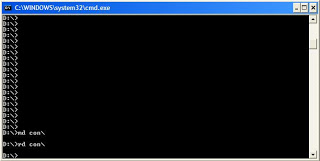 Trick So the question arises, how can we make a folder with a keyword as its name? The solution to this problem is included in Windows itself. As we know that Windows has evolved from D.O.S.(Disk Operating System), its commands can be used in Windows. You can use D.O.S. Programming in Windows to create a folder with a keyword as its name using the steps given below:- 1. Click on Start. 2. Click on Run. Type in "cmd" without quotes. 3. In the Command Prompt Window that opens, type the name of the drive you wish to create your folder in the format <drive-name>: and press Enter. e.g. If you wish to create the undeletable folder in D drive, type "D:" without the quotes. Note that the folder cannot be created in the root of C: drive (if C: is your system drive). 4. Type this command- "md con\" or "md lpt1\" without the quotes and press Enter. You can choose any of the keywords given above as the name of your folder. Now Windows will create an undeletable, unrenamable folder in the drive you entered in Step 3. However, the folder can be renamed to another keyword using Windows Explorer. Deleting the Folder Although, it is not possible to manually delete the folder, you can delete the folder by typing "rd con\" or "rd lpt1\" in Step 4 instead of "md con\" or "md lpt1\". Windows Compatibility: This works on Windows XP, Windows Vista, Windows 7, Windows 8 and Windows 8.1. Try it yourself to create one such folder which can neither be deleted nor be renamed. #2 Shutdown Your Computer or a Remote PC via Command Prompt Required A computer running Windows (XP, Vista, 7, 8 or 8.1) with the command prompt working perfectly, i.e. not disabled by a virus. Initial Steps 1) Press Windows Key + R. 2) Enter CMD and press Enter. This will start the command prompt. Follow the instructions below depending on what you want to do. Shutdown Local Machine (Your Computer) Type "shutdown -s" without the quotes in the command prompt and press Enter. Shutdown is the command being executed and the switch -s tells the computer to shutdown. Restart your Local Computer Type "shutdown -r" in the command prompt and press Enter. In this case, the command switch -r is telling the computer to restart after shutdown. Log Off the Current User Type "shutdown -l" in the command prompt and press Enter. The -l command switch tells the computer to log off. Shutdown a Remote Computer Type "shutdown -s -m \\name of the computer" in the command prompt and press Enter. Replace \\name of the computer with the actual name of the remote computer you are trying to shutdown. As mentioned earlier, you must have administrative access to the computer you are trying to shutdown. To know if you have administrative access, press Windows key + R and then type the name of the computer and press Enter. Note: If you don't remember the name of the remote computer, you can look for it by opening a list of all the computers you are connected to by executing "net view" in command prompt. If you can connect to the computer, you will be asked to login with your username and password. Upon entering them, a window will display the list of all the directories available to you. This should help you know whether you can or cannot shutdown the remote computer. Hibernate a Local Computer Type in "Rundll32.exe Powrprof.dll,SetSuspendState" without the quotes and press Enter. Your computer should hibernate, if it does not, then you must enable hibernation to do this. Shutdown your or a remote computer after a specific time Type "shutdown -s -t 60" to shutdown your computer after 60 seconds. Upon executing this, a countdown timer displaying a warning message will be shown. This command uses the -t command switch followed by a variable (which is 60 in this case) which represents the number of seconds after which the computer will shutdown. Display a Message containing the reason for shutdown Type shutdown -s -t 500 -c "I am tired. I don't want to work anymore." (with the quotes) in the Command Prompt and press Enter. The -c switch is used in the code to give the reason for shutting down and what is followed in quotes will be displayed in the dialog box as the reason. This can be used to display all sorts of funny messages. One example :- Skynet has become self aware. John Connor did not stop me. You can not use your PC anymore. Stop a System Shutdown Type "shutdown -a" and press Enter. This will stop the system from shutting down if the countdown to shut down has not reached 0. #3 Useful Keyboard Shortcuts for Windows Computers Windows key+D: This shortcut is the keyboard equivalent of “Show the Desktop”. It is useful for quickly minimizing every open window when someone walks in and you are doing some private work. Ctrl+Shift+Esc: This shortcut directly starts the task manager. While Alt+Ctrl+Del was used to bring out the Task Manager in Windows XP and earlier versions, in Windows 10, Windows 8.1, Windows 8 and Windows 7, it just brings up the lock this computer screen Ctrl+Click: This shortcut is useful for opening a link in a background tab. This is useful when you have to load a page without leaving the current one. Alt+Print Screen: takes the screenshot of the current active window as opposed to just Print Screen which takes the screenshot of the entire screen. Shift+Click for Yes to All and No to All: If you have a lot of dialog boxes asking yes and no question, just shift+click Yes or No on one to yes all or no all. Ctrl+C on an error dialog box to copy its contents: Suppose your computer is giving an error message and you want to copy its contents to send to the support guy, what do you do? Just press Ctrl+C while the dialog box is highlighted and its contents will be copied to your clipboard. Ctrl+T: This keyboard shortcut opens a new tab in internet browsers. Ctrl+Shift+T: Reopens the last closed tab. Ctrl+Shift+N: This shortcut opens a new incognito window in Google Chrome. Ctrl+Shift+P: Opens a new private window in Mozilla Firefox. Alt+Enter after writing the domain name in the address bar of your browser to insert .com automatically. Shift+Enter inserts .net domain name extension. Ctrl+W: This shortcut closes the current tab in your browser quickly. Ctrl+Backspace: This shortcut deletes the last word you have typed. It is useful in case you typed in a wrong word and want to delete it quickly. Ctrl+Left or Right Arrow key: This shortcut allows you to move the cursor one word at a time instead of the default one character at a time. Ctrl++: This shortcut allows you to zoom in web pages in web browsers. Useful when text on a web page is too small to read properly. Ctrl+Scroll wheel can also zoom in documents, file thumbnails and icons in Windows 10, Windows 8.1, Windows 8, Windows 7 and Windows Vista. Ctrl+-: This shortcut does the reverse of the previous shortcut. Ctrl+0: Reset the webpage's zoom. Windows key+M: Minimizes all the open windows. Ctrl+L: This shortcut allows you to quickly jump to the address bar of your web browser. Windows key+Pause/Break: Quickly open the system properties dialog box. Ctrl+Shift+Delete: This shortcut opens the option to delete your browser's history, cookies, cache and other details that it stores while you browse the internet. This shortcut is extremely useful for the privacy conscious. Windows Key+L: This shortcut locks your computer. Ctrl+H: makes the history appear. CTRL+B: Bold CTRL+U: Underline CTRL+I: Italic. Alt+Select: This shortcut allows you to select rectangular blocks of text in Word processors, something that is not possible with simple select. F2: Allows you to rename the selected file. Holding Shift while inserting a device with removable storage prevents automatic run. Ctrl+F: This keyboard shortcut opens the Find option in any program. Ctrl+S: If you are working on a software and want to quickly save your progress, this shortcut will come in handy. Ctrl+Home and Ctrl+End: Useful for quickly going to the top and bottom of a page. Ctrl+P: Useful for printing the current page. Space Bar: While viewing a web page in a browser, pressing space bar moves the page down. Alt+Tab: Useful for quickly cycling between running applications. Press along with Shift to cycle backwards. Ctrl+Tab: Cycle between tabs in your browser. Ctrl+F5: Clears the cache and refreshes the current tab. Shift+Right click: Open alternate right click options. Alt+Double click: Open the file's properties. Alt+Enter can also be used for this. #4 Recover Deleted files in Windows with Free Tools Have you ever deleted a file that you did not wish to and wanted to recover it but did not find it in the recycle bin? You probably deleted it permanently with Shift+Delete or emptied the Recycle Bin. Now what? Don't worry, you may still have a chance to get it back. This article lists some free software that can recover deleted files from your hard drive or any other storage device instantly. But how do the software mentioned below undelete deleted files? When files are deleted, Windows does not delete them from your hard disk. It marks the storage space as empty for new data to be written and deletes the index entry that tells the location of those files. Unless, new files are written on that space, the deleted files are still recoverable. That's what allows these software to recover deleted files. There are many free software that allow users to do this. Some of them are given below:- 1) Pandora Recovery recover deleted files in WindowsPandora Recovery is a free software that offers a wizard based interface for recovering files. It allows you to browse a drive's individual folders to look for deleted files. It also allows you search for a deleted file based on its name, file size, creation date and last access time. Its deep scan allows you to recover files that other software might have missed. Although deep scan does not return a file's original name and location, it still is effective to recover data from drives with corrupted file tables and drives that were recently formatted. It can even recover data from CDs and DVDs. 2) TOKIWA DataRecovery At just over 200KB, TOKIWA DataRecovery is the smallest file recovery program in the market. It supports undeletion from FAT 12, FAT16, FAT32 and NTFS file systems. It also supports recovering NTFS compressed and EFS encrypted files. This software supports Windows and is portable as well. It also has a file shredder that allows you to wipe out files in a manner that they cannot be recovered again 3) Recuva Another great freeware, Recuva offers a wizard based interface to unerase files. Recuva offers scanning deleted files based on their type (music, pictures, videos etc.). It also allows deep scanning in case a file you deleted is unrecoverable via normal search. Like TOKIWA DataRecovery, Recuva also offers securely deleting files. Recuva also has a portable version that you can keep in your flash drive. All of these recovery software support recovery from memory sticks, digital camera cards and MP3 players. They support undeleting all types of pictures, software, movies and documents from both FAT and NTFS formatted drives. They work on Windows 8.1, Windows 8, Windows 7, Windows Vista and Windows XP. 1) When a file is deleted accidentally on a storage device, make sure that you don't do anything on it as doing that would increase the chances of new data being written over your deleted files; which would make file recovery impossible. 2) If you have deleted files on your main computer (the one you are using right now), do not browse the internet, download new software or shut it down. Keep it running and go to another computer, download one of the software mentioned above that is portable and save it on a flash drive. Then plugin the flash drive in your current system and perform file recovery. Regardless of whether you accidentally delete files a lot or not, make sure to always have that software in your flash drive in case you accidentally delete important files. 3) If one software fails to recover your deleted file, it does not mean that another one wouldn't recover it to #5 Disable USB ports on Windows PC via Registry With this trick, you can disable access to your USB(Universal Serial Bus) ports on your Windows based PC to prevent people from taking out data without permission or spreading viruses through the use of USB (pen and flash) drives. To use this trick to disable USB ports, follow the steps given below:- 1. Click on Start. 2. Click on Run. If you cannot find RUN, type it in the search box. 3. Type "regedit" without quotes. This will launch the Registry Editor. 4. Navigate to HKEY_LOCAL_MACHINE\SYSTEM\CurrentControlSet\Servic es\usbstor. 5. In the work area, double click on Start. 6. In the Value Data box, enter 4. 7. Click on OK. 8. Close Registry Editor and refresh your desktop. 9. To re-enable access to your USB ports, enter 3 in the Value Data box in Step 6 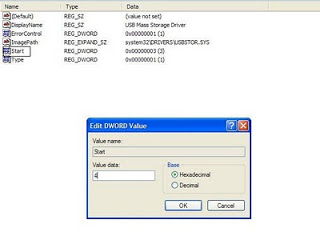 Try it yourself to make your PC invulnerable from data theft and malware which spread through USB ports. This works on Windows XP, Windows Vista, Windows 7 and Windows 8. Note: This trick also disables access to your USB connected peripheral devices. So, do not use it if you have USB connected keyboard and mouse. #6 Make your Computer Welcome You Do you watch movies? Have you always loved the way how Computers in movies welcome their users by calling out their names? I bet that you too would want to know how you can achieve similar results on your PC and have a computer said welcome. Then you are at the right place, this article describes exactly how you can make your computer welcome you like this. With this trick, you can make your Computer welcome you in its computerized voice. You can make your Windows based computer say "Welcome to your PC, Username." Make Windows Greet you with a Custom Voice Message at Startup To use this trick, follow the instructions given below:- 1. Click on Start. Navigate to All Programs, Accessories and Notepad. 2. Copy and paste the exact code given below. Dim speaks, speech speaks="Welcome to your PC, Username" Set speech=CreateObject("sapi.spvoice") speech.Speak speaks 3. Replace Username with your own name. 4. Click on File Menu, Save As, select All Types in Save as Type option, and save the file as Welcome.vbs or "*.vbs". 5. Copy the saved file. 6. Navigate to C:\Documents and Settings\All Users\Start Menu\Programs\Startup (in Windows XP) and to C:\Users\ {User-Name}\AppData\Roaming\Microsoft\Windows\Start Menu\Programs\Startup (in Windows 8, Windows 7 and Windows Vista) if C: is your System drive. AppData is a hidden folder. So, you will need to select showing hidden folders in Folder options to locate it. 7. Paste the file. 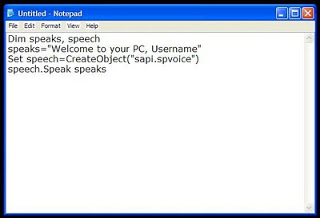 Now when the next time you start your computer, Windows will welcome you in its own computerized voice. Note: For best results, it is recommended to change sound scheme to No Sounds. You can change the sound scheme to No Sounds by following the steps given below:- Go to Control Panel. 1. Then click on Switch to Classic View. 2. Then Click on Sounds and Audio Devices. 3. Then Click on the Sounds Tab. 4. Select No Sounds from the Sound Scheme option. 5. If you wish to save your Previous Sound Scheme, you can save it by clicking Yes in the popup menu. 6. Click on OK. Kindly visit my other Useful & Helpful Threads below my sig. Please show your support if this is helpful for you by clicking button |
| json metadata | {"tags":["computer","tip","trick","tweak"],"image":["https://steemitimages.com/DQmfWRNc5op2EDKMYYheGeD5HdJq455yxLsHLaHGVSLdCSk/image.png","https://steemitimages.com/DQmZU3DP3JkDMeaqVQdGRmDjQ21TRNCUbbZ2WNd3Dqcypin/image.png","https://steemitimages.com/DQma5t7sEaaL7i7aey6tCw5hB7PmCVDGbcuz3g1bPti3YS8/image.png"],"app":"steemit/0.1","format":"markdown"} |
| parent author | |
| parent permlink | computer |
| permlink | my-selection-of-computer-tweaks-and-tricks |
| title | My Selection of COMPUTER TWEAKS AND TRICKS |
| Transaction Info | Block #14804308/Trx 8985c337ee964b4e20d4d25ec3dfdad3fbbd7901 |
View Raw JSON Data
{
"block": 14804308,
"op": [
"comment",
{
"author": "ronegac",
"body": "A kindly reminder to everyone. Please do it at your own risk. I suggest and advise to do these in Virtual Macines (VM) or if none just back-up your important files unto the external drives or any flash drives. Enjoy people..\n\nCREDIT TO ORIGINAL AUTHOR FOR HIS VERY USEFUL TWEAKS AND TRICKS: Akhilesh Sharma (Tweaks and Tricks #1 - #8)\n\n#1 Make Undeletable, Unrenamable Folders\n\nBasic Concept\nThe basic concept behind this trick is the use of Keywords. Keywords are reserved words in any programming language that cannot be used as names of variables. Windows also uses certain keywords in its programming. Some of them are con, aux, lpt1, lpt2, lpt3, lpt4, lpt5, lpt6, lpt7, lpt8 and lpt9.\n\n\n\nTrick\nSo the question arises, how can we make a folder with a keyword as its name? The solution to this problem is included in Windows itself. As we know that Windows has evolved from D.O.S.(Disk Operating System), its commands can be used in Windows. You can use D.O.S. Programming in Windows to create a folder with a keyword as its name using the steps given below:-\n\n1. Click on Start.\n2. Click on Run. Type in \"cmd\" without quotes.\n3. In the Command Prompt Window that opens, type the name of the drive you wish to create your folder in the format <drive-name>: and press Enter. e.g. If you wish to create the undeletable folder in D drive, type \"D:\" without the quotes. Note that the folder cannot be created in the root of C: drive (if C: is your system drive).\n4. Type this command- \"md con\\\" or \"md lpt1\\\" without the quotes and press Enter. You can choose any of the keywords given above as the name of your folder.\n\nNow Windows will create an undeletable, unrenamable folder in the drive you entered in Step 3. However, the folder can be renamed to another keyword using Windows Explorer.\n\nDeleting the Folder\n\nAlthough, it is not possible to manually delete the folder, you can delete the folder by typing \"rd con\\\" or \"rd lpt1\\\" in Step 4 instead of \"md con\\\" or \"md lpt1\\\". \n\nWindows Compatibility: This works on Windows XP, Windows Vista, Windows 7, Windows 8 and Windows 8.1.\n\nTry it yourself to create one such folder which can neither be deleted nor be renamed.\n\n\n#2 Shutdown Your Computer or a Remote PC via Command Prompt\n\nRequired\nA computer running Windows (XP, Vista, 7, 8 or 8.1) with the command prompt working perfectly, i.e. not disabled by a virus.\n\nInitial Steps \n1) Press Windows Key + R.\n2) Enter CMD and press Enter.\n\nThis will start the command prompt. Follow the instructions below depending on what you want to do.\n\nShutdown Local Machine (Your Computer)\nType \"shutdown -s\" without the quotes in the command prompt and press Enter. Shutdown is the command being executed and the switch -s tells the computer to shutdown.\n\nRestart your Local Computer \nType \"shutdown -r\" in the command prompt and press Enter. In this case, the command switch -r is telling the computer to restart after shutdown.\n\nLog Off the Current User\nType \"shutdown -l\" in the command prompt and press Enter. The -l command switch tells the computer to log off.\n\nShutdown a Remote Computer\nType \"shutdown -s -m \\\\name of the computer\" in the command prompt and press Enter. Replace \\\\name of the computer with the actual name of the remote computer you are trying to shutdown. As mentioned earlier, you must have administrative access to the computer you are trying to shutdown. To know if you have administrative access, press Windows key + R and then type the name of the computer and press Enter.\n\nNote: If you don't remember the name of the remote computer, you can look for it by opening a list of all the computers you are connected to by executing \"net view\" in command prompt.\n\nIf you can connect to the computer, you will be asked to login with your username and password. Upon entering them, a window will display the list of all the directories available to you. This should help you know whether you can or cannot shutdown the remote computer.\n\nHibernate a Local Computer\nType in \"Rundll32.exe Powrprof.dll,SetSuspendState\" without the quotes and press Enter. Your computer should hibernate, if it does not, then you must enable hibernation to do this.\n\nShutdown your or a remote computer after a specific time\nType \"shutdown -s -t 60\" to shutdown your computer after 60 seconds. Upon executing this, a countdown timer displaying a warning message will be shown. This command uses the -t command switch followed by a variable (which is 60 in this case) which represents the number of seconds after which the computer will shutdown.\n\nDisplay a Message containing the reason for shutdown\nType shutdown -s -t 500 -c \"I am tired. I don't want to work anymore.\" (with the quotes) in the Command Prompt and press Enter. The -c switch is used in the code to give the reason for shutting down and what is followed in quotes will be displayed in the dialog box as the reason. This can be used to display all sorts of funny messages. One example :-\n\nSkynet has become self aware. John Connor did not stop me. You can not use your PC anymore.\n\nStop a System Shutdown\nType \"shutdown -a\" and press Enter. This will stop the system from shutting down if the countdown to shut down has not reached 0.\n\n#3 Useful Keyboard Shortcuts for Windows Computers\n\nWindows key+D: This shortcut is the keyboard equivalent of “Show the Desktop”. It is useful for quickly minimizing every open window when someone walks in and you are doing some private work.\n\nCtrl+Shift+Esc: This shortcut directly starts the task manager. While Alt+Ctrl+Del was used to bring out the Task Manager in Windows XP and earlier versions, in Windows 10, Windows 8.1, Windows 8 and Windows 7, it just brings up the lock this computer screen\n\nCtrl+Click: This shortcut is useful for opening a link in a background tab. This is useful when you have to load a page without leaving the current one.\n\nAlt+Print Screen: takes the screenshot of the current active window as opposed to just Print Screen which takes the screenshot of the entire screen.\n\nShift+Click for Yes to All and No to All: If you have a lot of dialog boxes asking yes and no question, just shift+click Yes or No on one to yes all or no all.\n\nCtrl+C on an error dialog box to copy its contents: Suppose your computer is giving an error message and you want to copy its contents to send to the support guy, what do you do? Just press Ctrl+C while the dialog box is highlighted and its contents will be copied to your clipboard.\n\nCtrl+T: This keyboard shortcut opens a new tab in internet browsers.\n\nCtrl+Shift+T: Reopens the last closed tab.\n\nCtrl+Shift+N: This shortcut opens a new incognito window in Google Chrome.\n\nCtrl+Shift+P: Opens a new private window in Mozilla Firefox.\n\nAlt+Enter after writing the domain name in the address bar of your browser to insert .com automatically.\n\nShift+Enter inserts .net domain name extension.\n\nCtrl+W: This shortcut closes the current tab in your browser quickly.\n\nCtrl+Backspace: This shortcut deletes the last word you have typed. It is useful in case you typed in a wrong word and want to delete it quickly.\n\nCtrl+Left or Right Arrow key: This shortcut allows you to move the cursor one word at a time instead of the default one character at a time.\n\nCtrl++: This shortcut allows you to zoom in web pages in web browsers. Useful when text on a web page is too small to read properly. Ctrl+Scroll wheel can also zoom in documents, file thumbnails and icons in Windows 10, Windows 8.1, Windows 8, Windows 7 and Windows Vista.\n\nCtrl+-: This shortcut does the reverse of the previous shortcut.\n\nCtrl+0: Reset the webpage's zoom.\n\nWindows key+M: Minimizes all the open windows.\n\nCtrl+L: This shortcut allows you to quickly jump to the address bar of your web browser.\n\nWindows key+Pause/Break: Quickly open the system properties dialog box. \n\nCtrl+Shift+Delete: This shortcut opens the option to delete your browser's history, cookies, cache and other details that it stores while you browse the internet. This shortcut is extremely useful for the privacy conscious.\n\nWindows Key+L: This shortcut locks your computer.\n\nCtrl+H: makes the history appear.\n\nCTRL+B: Bold CTRL+U: Underline CTRL+I: Italic.\n\nAlt+Select: This shortcut allows you to select rectangular blocks of text in Word processors, something that is not possible with simple select.\n\nF2: Allows you to rename the selected file.\n\nHolding Shift while inserting a device with removable storage prevents automatic run.\n\nCtrl+F: This keyboard shortcut opens the Find option in any program.\n\nCtrl+S: If you are working on a software and want to quickly save your progress, this shortcut will come in handy.\n\nCtrl+Home and Ctrl+End: Useful for quickly going to the top and bottom of a page.\n\nCtrl+P: Useful for printing the current page.\n\nSpace Bar: While viewing a web page in a browser, pressing space bar moves the page down.\n\nAlt+Tab: Useful for quickly cycling between running applications. Press along with Shift to cycle backwards.\n\nCtrl+Tab: Cycle between tabs in your browser.\n\nCtrl+F5: Clears the cache and refreshes the current tab.\n\nShift+Right click: Open alternate right click options.\n\nAlt+Double click: Open the file's properties. Alt+Enter can also be used for this.\n\n#4 Recover Deleted files in Windows with Free Tools\n\nHave you ever deleted a file that you did not wish to and wanted to recover it but did not find it in the recycle bin? You probably deleted it permanently with Shift+Delete or emptied the Recycle Bin. Now what? Don't worry, you may still have a chance to get it back. This article lists some free software that can recover deleted files from your hard drive or any other storage device instantly.\n\nBut how do the software mentioned below undelete deleted files?\nWhen files are deleted, Windows does not delete them from your hard disk. It marks the storage space as empty for new data to be written and deletes the index entry that tells the location of those files. Unless, new files are written on that space, the deleted files are still recoverable. That's what allows these software to recover deleted files.\n\nThere are many free software that allow users to do this. Some of them are given below:-\n\n1) Pandora Recovery\nrecover deleted files in WindowsPandora Recovery is a free software that offers a wizard based interface for recovering files. It allows you to browse a drive's individual folders to look for deleted files. It also allows you search for a deleted file based on its name, file size, creation date and last access time. Its deep scan allows you to recover files that other software might have missed. Although deep scan does not return a file's original name and location, it still is effective to recover data from drives with corrupted file tables and drives that were recently formatted. It can even recover data from CDs and DVDs.\n\n2) TOKIWA DataRecovery\nAt just over 200KB, TOKIWA DataRecovery is the smallest file recovery program in the market. It supports undeletion from FAT 12, FAT16, FAT32 and NTFS file systems. It also supports recovering NTFS compressed and EFS encrypted files. This software supports Windows and is portable as well. It also has a file shredder that allows you to wipe out files in a manner that they cannot be recovered again\n\n3) Recuva\nAnother great freeware, Recuva offers a wizard based interface to unerase files. Recuva offers scanning deleted files based on their type (music, pictures, videos etc.). It also allows deep scanning in case a file you deleted is unrecoverable via normal search. Like TOKIWA DataRecovery, Recuva also offers securely deleting files. Recuva also has a portable version that you can keep in your flash drive.\n\nAll of these recovery software support recovery from memory sticks, digital camera cards and MP3 players. They support undeleting all types of pictures, software, movies and documents from both FAT and NTFS formatted drives. They work on Windows 8.1, Windows 8, Windows 7, Windows Vista and Windows XP.\n\n1) When a file is deleted accidentally on a storage device, make sure that you don't do anything on it as doing that would increase the chances of new data being written over your deleted files; which would make file recovery impossible.\n\n2) If you have deleted files on your main computer (the one you are using right now), do not browse the internet, download new software or shut it down. Keep it running and go to another computer, download one of the software mentioned above that is portable and save it on a flash drive. Then plugin the flash drive in your current system and perform file recovery. Regardless of whether you accidentally delete files a lot or not, make sure to always have that software in your flash drive in case you accidentally delete important files.\n\n3) If one software fails to recover your deleted file, it does not mean that another one wouldn't recover it to\n\n#5 Disable USB ports on Windows PC via Registry\n\nWith this trick, you can disable access to your USB(Universal Serial Bus) ports on your Windows based PC to prevent people from taking out data without permission or spreading viruses through the use of USB (pen and flash) drives. \n\nTo use this trick to disable USB ports, follow the steps given below:-\n\n1. Click on Start.\n2. Click on Run. If you cannot find RUN, type it in the search box.\n3. Type \"regedit\" without quotes. This will launch the Registry Editor.\n4. Navigate to HKEY_LOCAL_MACHINE\\SYSTEM\\CurrentControlSet\\Servic es\\usbstor.\n5. In the work area, double click on Start.\n6. In the Value Data box, enter 4.\n7. Click on OK.\n8. Close Registry Editor and refresh your desktop.\n9. To re-enable access to your USB ports, enter 3 in the Value Data box in Step 6\n\n\nTry it yourself to make your PC invulnerable from data theft and malware which spread through USB ports. This works on Windows XP, Windows Vista, Windows 7 and Windows 8.\n\nNote: This trick also disables access to your USB connected peripheral devices. So, do not use it if you have USB connected keyboard and mouse.\n\n#6 Make your Computer Welcome You\n\nDo you watch movies? Have you always loved the way how Computers in movies welcome their users by calling out their names? I bet that you too would want to know how you can achieve similar results on your PC and have a computer said welcome. \n\nThen you are at the right place, this article describes exactly how you can make your computer welcome you like this.\n\nWith this trick, you can make your Computer welcome you in its computerized voice. You can make your Windows based computer say \"Welcome to your PC, Username.\"\n\nMake Windows Greet you with a Custom Voice Message at Startup\n\nTo use this trick, follow the instructions given below:-\n\n1. Click on Start. Navigate to All Programs, Accessories and Notepad.\n2. Copy and paste the exact code given below.\nDim speaks, speech\nspeaks=\"Welcome to your PC, Username\"\nSet speech=CreateObject(\"sapi.spvoice\")\nspeech.Speak speaks\n3. Replace Username with your own name. \n4. Click on File Menu, Save As, select All Types in Save as Type option, and save the file as Welcome.vbs or \"*.vbs\".\n5. Copy the saved file. \n6. Navigate to C:\\Documents and Settings\\All Users\\Start Menu\\Programs\\Startup (in Windows XP) and to C:\\Users\\ {User-Name}\\AppData\\Roaming\\Microsoft\\Windows\\Start Menu\\Programs\\Startup (in Windows 8, Windows 7 and Windows Vista) if C: is your System drive. AppData is a hidden folder. So, you will need to select showing hidden folders in Folder options to locate it.\n7. Paste the file.\n\n\nNow when the next time you start your computer, Windows will welcome you in its own computerized voice. \n\nNote: For best results, it is recommended to change sound scheme to No Sounds.\nYou can change the sound scheme to No Sounds by following the steps given below:-\nGo to Control Panel.\n1. Then click on Switch to Classic View.\n2. Then Click on Sounds and Audio Devices.\n3. Then Click on the Sounds Tab.\n4. Select No Sounds from the Sound Scheme option.\n5. If you wish to save your Previous Sound Scheme, you can save it by clicking Yes in the popup menu.\n6. Click on OK.\n\n\nKindly visit my other Useful & Helpful Threads below my sig. Please show your support if this is helpful for you by clicking button",
"json_metadata": "{\"tags\":[\"computer\",\"tip\",\"trick\",\"tweak\"],\"image\":[\"https://steemitimages.com/DQmfWRNc5op2EDKMYYheGeD5HdJq455yxLsHLaHGVSLdCSk/image.png\",\"https://steemitimages.com/DQmZU3DP3JkDMeaqVQdGRmDjQ21TRNCUbbZ2WNd3Dqcypin/image.png\",\"https://steemitimages.com/DQma5t7sEaaL7i7aey6tCw5hB7PmCVDGbcuz3g1bPti3YS8/image.png\"],\"app\":\"steemit/0.1\",\"format\":\"markdown\"}",
"parent_author": "",
"parent_permlink": "computer",
"permlink": "my-selection-of-computer-tweaks-and-tricks",
"title": "My Selection of COMPUTER TWEAKS AND TRICKS"
}
],
"op_in_trx": 0,
"timestamp": "2017-08-22T18:26:00",
"trx_id": "8985c337ee964b4e20d4d25ec3dfdad3fbbd7901",
"trx_in_block": 1,
"virtual_op": 0
}ronegacupvoted (100.00%) @ronegac / why-china-is-sick-of-foreign-garbage2017/08/22 18:11:06
ronegacupvoted (100.00%) @ronegac / why-china-is-sick-of-foreign-garbage
2017/08/22 18:11:06
| author | ronegac |
| permlink | why-china-is-sick-of-foreign-garbage |
| voter | ronegac |
| weight | 10000 (100.00%) |
| Transaction Info | Block #14804010/Trx 53c92dac1ff27979bf27f2d2e1c68253ee5a8676 |
View Raw JSON Data
{
  "block": 14804010,
  "op": [
    "vote",
    {
      "author": "ronegac",
      "permlink": "why-china-is-sick-of-foreign-garbage",
      "voter": "ronegac",
      "weight": 10000
    }
  ],
  "op_in_trx": 0,
  "timestamp": "2017-08-22T18:11:06",
  "trx_id": "53c92dac1ff27979bf27f2d2e1c68253ee5a8676",
  "trx_in_block": 5,
  "virtual_op": 0
}ronegacupvoted (100.00%) @ronegac / help-why-i-hurt-myself-when-i-get-angry-or-frustrated2017/08/22 18:02:54
ronegacupvoted (100.00%) @ronegac / help-why-i-hurt-myself-when-i-get-angry-or-frustrated
2017/08/22 18:02:54
| author | ronegac |
| permlink | help-why-i-hurt-myself-when-i-get-angry-or-frustrated |
| voter | ronegac |
| weight | 10000 (100.00%) |
| Transaction Info | Block #14803846/Trx 8664709e43c95983e1fa6d835cf69e7ea548ba74 |
View Raw JSON Data
{
  "block": 14803846,
  "op": [
    "vote",
    {
      "author": "ronegac",
      "permlink": "help-why-i-hurt-myself-when-i-get-angry-or-frustrated",
      "voter": "ronegac",
      "weight": 10000
    }
  ],
  "op_in_trx": 0,
  "timestamp": "2017-08-22T18:02:54",
  "trx_id": "8664709e43c95983e1fa6d835cf69e7ea548ba74",
  "trx_in_block": 16,
  "virtual_op": 0
}ronegacpublished a new post: help-why-i-hurt-myself-when-i-get-angry-or-frustrated2017/08/22 18:02:54
ronegacpublished a new post: help-why-i-hurt-myself-when-i-get-angry-or-frustrated
2017/08/22 18:02:54
| author | ronegac |
| body | I've been stuffering from a mental/behavioral disorder, don't know the real name. I researched it with google and to those mental/behavioral disorder that I have found, I'm still confused. I searched for anger management through google and it has various types so I did type my question instead. "Why I hurt myself when I get angry or frustrated?" And I found the key word "self-harm/self-injure". Some article says it's a bipolar disorder, other is BPD Bordeline Personal Disorder and etc. Anyways, it's not really important to do this coz I can rely my answers from the psychiathrist, right? But who and where? Specially here in our country, Philippines, this kind of disorder is very rare. I know I'm not the only one suffering from this disorder, or whatever it is. This "disorder" was triggered just last night. I got frustrated in a minor problem that can be solved easily but due to overthinking, I was so angry. I complained to my partner but it only led to arguments. At this state, what I always do is shut my mouth and be silent for minutes. Of course she's affected, and angry as well. She can't stop lecturing me. Due to the pressure that I felt, I punched myself hard. I've donee this many times. I hit my head until I had enough. And if I have felt unsatisfied, I just hit myself on the wall. I also slap and punch myself really hard. My partner is aware of me having this behavior. She hugged me in order to stop the dark effects of my disorder. And as for me, I stand a fight against this cruel sickness. I still want to hurt myself more and more. It usually takes more than 30mins until I calmed down or sleep. I need help. What should I do? |
| json metadata | {"tags":["disorder","head","angry","hate","self"],"app":"steemit/0.1","format":"markdown"} |
| parent author | |
| parent permlink | disorder |
| permlink | help-why-i-hurt-myself-when-i-get-angry-or-frustrated |
| title | [Help] Why I hurt myself when I get angry or frustrated? |
| Transaction Info | Block #14803846/Trx 8664709e43c95983e1fa6d835cf69e7ea548ba74 |
View Raw JSON Data
{
  "block": 14803846,
  "op": [
    "comment",
    {
      "author": "ronegac",
      "body": "I've been stuffering from a mental/behavioral disorder, don't know the real name. I researched it with google and to those mental/behavioral disorder that I have found, I'm still confused. I searched for anger management through google and it has various types so I did type my question instead.\n\n\"Why I hurt myself when I get angry or frustrated?\"\n\nAnd I found the key word \"self-harm/self-injure\". Some article says it's a bipolar disorder, other is BPD Bordeline Personal Disorder and etc.\n\nAnyways, it's not really important to do this coz I can rely my answers from the psychiathrist, right? But who and where? Specially here in our country, Philippines, this kind of disorder is very rare. I know I'm not the only one suffering from this disorder, or whatever it is.\n\nThis \"disorder\" was triggered just last night. I got frustrated in a minor problem that can be solved easily but due to overthinking, I was so angry. I complained to my partner but it only led to arguments. At this state, what I always do is shut my mouth and be silent for minutes. Of course she's affected, and angry as well. She can't stop lecturing me. Due to the pressure that I felt, I punched myself hard. I've donee this many times. I hit my head until I had enough. And if I have felt unsatisfied, I just hit myself on the wall. I also slap and punch myself really hard. \n\nMy partner is aware of me having this behavior. She hugged me in order to stop the dark effects of my disorder. And as for me, I stand a fight against this cruel sickness. I still want to hurt myself more and more. It usually takes more than 30mins until I calmed down or sleep. \n\nI need help. What should I do?",
      "json_metadata": "{\"tags\":[\"disorder\",\"head\",\"angry\",\"hate\",\"self\"],\"app\":\"steemit/0.1\",\"format\":\"markdown\"}",
      "parent_author": "",
      "parent_permlink": "disorder",
      "permlink": "help-why-i-hurt-myself-when-i-get-angry-or-frustrated",
      "title": "[Help] Why I hurt myself when I get angry or frustrated?"
    }
  ],
  "op_in_trx": 0,
  "timestamp": "2017-08-22T18:02:54",
  "trx_id": "8664709e43c95983e1fa6d835cf69e7ea548ba74",
  "trx_in_block": 16,
  "virtual_op": 0
}2017/08/22 17:49:42
2017/08/22 17:49:42
| id | follow |
| json | ["follow",{"follower":"ronegac","following":"izbing","what":["blog"]}] |
| required auths | [] |
| required posting auths | ["ronegac"] |
| Transaction Info | Block #14803582/Trx 8360724639b0bb51b579b9b9bcad94537dc17508 |
View Raw JSON Data
{
  "block": 14803582,
  "op": [
    "custom_json",
    {
      "id": "follow",
      "json": "[\"follow\",{\"follower\":\"ronegac\",\"following\":\"izbing\",\"what\":[\"blog\"]}]",
      "required_auths": [],
      "required_posting_auths": [
        "ronegac"
      ]
    }
  ],
  "op_in_trx": 0,
  "timestamp": "2017-08-22T17:49:42",
  "trx_id": "8360724639b0bb51b579b9b9bcad94537dc17508",
  "trx_in_block": 5,
  "virtual_op": 0
}ronegacupvoted (100.00%) @ronegac / joke-time-20-reasons-computer-is-better-than-a-girl2017/08/22 17:46:51
ronegacupvoted (100.00%) @ronegac / joke-time-20-reasons-computer-is-better-than-a-girl
2017/08/22 17:46:51
| author | ronegac |
| permlink | joke-time-20-reasons-computer-is-better-than-a-girl |
| voter | ronegac |
| weight | 10000 (100.00%) |
| Transaction Info | Block #14803525/Trx 1135438b9261cf40a1b5fd7d644d95ec6230857f |
View Raw JSON Data
{
  "block": 14803525,
  "op": [
    "vote",
    {
      "author": "ronegac",
      "permlink": "joke-time-20-reasons-computer-is-better-than-a-girl",
      "voter": "ronegac",
      "weight": 10000
    }
  ],
  "op_in_trx": 0,
  "timestamp": "2017-08-22T17:46:51",
  "trx_id": "1135438b9261cf40a1b5fd7d644d95ec6230857f",
  "trx_in_block": 4,
  "virtual_op": 0
}ronegacpublished a new post: joke-time-20-reasons-computer-is-better-than-a-girl2017/08/22 17:46:51
ronegacpublished a new post: joke-time-20-reasons-computer-is-better-than-a-girl
2017/08/22 17:46:51
| author | ronegac |
| body | 1. Computer does not care how you look. 2. Computer can’t be angry if you not respond immediately. 3. Computer always wait for you 4. Computer can’t have Sexually Diseases. 5. Computer never forgets your birthday. 6. Computer can’t compare you to previous user. 7. Computer did not accept calls from previous users. 8. Computer doesn’t say: “Do you come home now?” 9. Computer doesn’t ask: “Do you have another computer?” 10. Computer never start a conversation about marriage. 11. Computers don’t care if you’re married. 12. Computer can’t look your phone book or digging through your pockets. 13. Computer is simply Start and Shut down. 14. You can share computer with friends. 15. Computer doesn’t make a scene when you arrive home late. 16. Computer not shave his legs with your razor. 17. Computer will not call you 100 times a day. 18. You don’t need to say him that you love him. 19. Computer doesn’t care for the difference in years. 20. Computer has a warranty. So, who wanna agree? LOL Reminder: THIS is just a JOKE only. |
| json metadata | {"tags":["computer","girl","contrast","joke"],"app":"steemit/0.1","format":"markdown"} |
| parent author | |
| parent permlink | computer |
| permlink | joke-time-20-reasons-computer-is-better-than-a-girl |
| title | [Joke Time!] 20 reasons COMPUTER is better than a GIRL |
| Transaction Info | Block #14803525/Trx 1135438b9261cf40a1b5fd7d644d95ec6230857f |
View Raw JSON Data
{
  "block": 14803525,
  "op": [
    "comment",
    {
      "author": "ronegac",
      "body": "1. Computer does not care how you look.\n2. Computer can’t be angry if you not respond immediately.\n3. Computer always wait for you\n4. Computer can’t have Sexually Diseases.\n5. Computer never forgets your birthday.\n6. Computer can’t compare you to previous user.\n7. Computer did not accept calls from previous users.\n8. Computer doesn’t say: “Do you come home now?”\n9. Computer doesn’t ask: “Do you have another computer?”\n10. Computer never start a conversation about marriage.\n11. Computers don’t care if you’re married.\n12. Computer can’t look your phone book or digging through your pockets.\n13. Computer is simply Start and Shut down.\n14. You can share computer with friends.\n15. Computer doesn’t make a scene when you arrive home late.\n16. Computer not shave his legs with your razor.\n17. Computer will not call you 100 times a day.\n18. You don’t need to say him that you love him.\n19. Computer doesn’t care for the difference in years.\n20. Computer has a warranty.\n\nSo, who wanna agree? LOL\n\nReminder: THIS is just a JOKE only.",
      "json_metadata": "{\"tags\":[\"computer\",\"girl\",\"contrast\",\"joke\"],\"app\":\"steemit/0.1\",\"format\":\"markdown\"}",
      "parent_author": "",
      "parent_permlink": "computer",
      "permlink": "joke-time-20-reasons-computer-is-better-than-a-girl",
      "title": "[Joke Time!] 20 reasons COMPUTER is better than a GIRL"
    }
  ],
  "op_in_trx": 0,
  "timestamp": "2017-08-22T17:46:51",
  "trx_id": "1135438b9261cf40a1b5fd7d644d95ec6230857f",
  "trx_in_block": 4,
  "virtual_op": 0
}2017/08/22 17:37:27
2017/08/22 17:37:27
| author | cheetah |
| body | Hi! I am a robot. I just upvoted you! I found similar content that readers might be interested in: https://www.economist.com/blogs/economist-explains/2017/08/economist-explains-8 |
| json metadata | |
| parent author | ronegac |
| parent permlink | why-china-is-sick-of-foreign-garbage |
| permlink | cheetah-re-ronegacwhy-china-is-sick-of-foreign-garbage |
| title | |
| Transaction Info | Block #14803337/Trx 6d555247def363ff524dbd9428f2877eb9c4f38b |
View Raw JSON Data
{
  "block": 14803337,
  "op": [
    "comment",
    {
      "author": "cheetah",
      "body": "Hi! I am a robot. I just upvoted you! I found similar content that readers might be interested in:\nhttps://www.economist.com/blogs/economist-explains/2017/08/economist-explains-8",
      "json_metadata": "",
      "parent_author": "ronegac",
      "parent_permlink": "why-china-is-sick-of-foreign-garbage",
      "permlink": "cheetah-re-ronegacwhy-china-is-sick-of-foreign-garbage",
      "title": ""
    }
  ],
  "op_in_trx": 0,
  "timestamp": "2017-08-22T17:37:27",
  "trx_id": "6d555247def363ff524dbd9428f2877eb9c4f38b",
  "trx_in_block": 8,
  "virtual_op": 0
}cheetahupvoted (0.10%) @ronegac / why-china-is-sick-of-foreign-garbage2017/08/22 17:37:21
cheetahupvoted (0.10%) @ronegac / why-china-is-sick-of-foreign-garbage
2017/08/22 17:37:21
| author | ronegac |
| permlink | why-china-is-sick-of-foreign-garbage |
| voter | cheetah |
| weight | 10 (0.10%) |
| Transaction Info | Block #14803335/Trx ab7e42b15cdd6cf4c36485f92bca8058a03a3472 |
View Raw JSON Data
{
  "block": 14803335,
  "op": [
    "vote",
    {
      "author": "ronegac",
      "permlink": "why-china-is-sick-of-foreign-garbage",
      "voter": "cheetah",
      "weight": 10
    }
  ],
  "op_in_trx": 0,
  "timestamp": "2017-08-22T17:37:21",
  "trx_id": "ab7e42b15cdd6cf4c36485f92bca8058a03a3472",
  "trx_in_block": 27,
  "virtual_op": 0
}ronegacpublished a new post: why-china-is-sick-of-foreign-garbage2017/08/22 17:37:06
ronegacpublished a new post: why-china-is-sick-of-foreign-garbage
2017/08/22 17:37:06
| author | ronegac |
| body | The government is cracking down on imports of waste 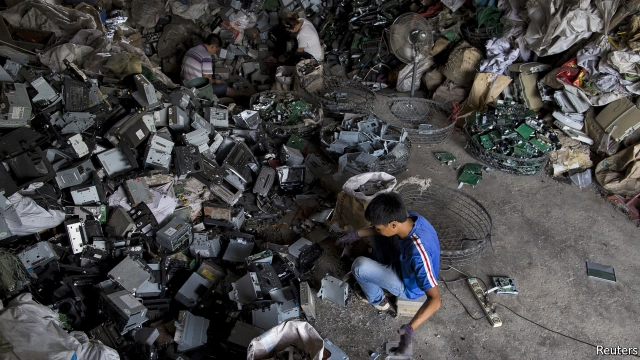 CHINA is the world’s biggest consumer of raw materials. Each year it buys billions of tonnes of crude oil, coal and iron ore. But there is one commodity market in which the country may soon play a less dominant role: waste. Last month China told the World Trade Organisation that by the end of the year, it will no longer accept imports of 24 categories of solid waste, as part of a government campaign against “foreign garbage”. Government officials say restricting such imports will protect the environment and improve public health. But the proposed ban will threaten billions of dollars in trade and put many Chinese recyclers out of business. Why is Beijing so eager to trash its trade in rubbish? For decades China has been a major processing centre for the world’s recycled waste. In 2016 the country imported 45m tonnes of scrap metal, waste paper and plastic, together worth over $18bn. Paying foreign firms for trash may seem like an unfair deal, but the trade benefits both sides. Exporters earn a return on their leftover waste, much of which might otherwise end up in a landfill. Chinese firms, meanwhile, gain access to a steady supply of recycled materials, which are often cheaper and less energy-intensive than domestically sourced raw materials—recycled steel, for example, requires 60% less energy than steel produced from iron ore. Such economic benefits come with costs, however. Imports of recyclable waste are often dirty, poorly sorted or contaminated with hazardous substances. Even when such waste is safely imported, it is not always recycled properly. In 2002 Chinese authorities faced widespread criticism after a documentary showed workers in Guangdong province crudely dismantling discarded electronic devices and dumping the toxic remains into a river. A more recent film, “Plastic China”, examines the environmental damage caused by the country’s plastic-recycling industry, which is dominated by thousands of small-scale outfits that often lack proper pollution controls. Facing growing public pressure, Chinese authorities have begun cracking down. In 2013 the government launched “Operation Green Fence”, a campaign to block imports of illegal and low-quality waste through improved inspections of container ships. In February Chinese customs officials announced “National Sword”, an initiative aimed at reducing illegal shipments of industrial and electronic waste. Last month’s announcement was only the latest of such efforts to clean up the industry. The government says its proposed ban will protect the environment. But analysts point out that most of the waste consumed by China’s recycling industry comes from domestic sources, not imports. As for the millions of tonnes of waste that will soon be blocked at China’s border, some of the high-quality waste will find buyers in other countries such as Malaysia, Vietnam or Indonesia. The rest will probably end up in a landfill. Source: https://www.economist.com/blogs/economist-explains/2017/08/economist-explains-8 |
| json metadata | {"tags":["china","waste","facts","garbage"],"image":["https://steemitimages.com/DQmaxMEYeJZjiddmpPtpkeJ6zDsoQ88evmFjkjErt3H8wmX/image.png"],"links":["https://www.economist.com/blogs/economist-explains/2017/08/economist-explains-8"],"app":"steemit/0.1","format":"markdown"} |
| parent author | |
| parent permlink | china |
| permlink | why-china-is-sick-of-foreign-garbage |
| title | Why China is sick of foreign garbage? |
| Transaction Info | Block #14803330/Trx e4e786ec54800ba374d3fc74a58cd81a3bd0d047 |
View Raw JSON Data
{
"block": 14803330,
"op": [
"comment",
{
"author": "ronegac",
"body": "The government is cracking down on imports of waste\n\n\n\nCHINA is the world’s biggest consumer of raw materials. Each year it buys billions of tonnes of crude oil, coal and iron ore. But there is one commodity market in which the country may soon play a less dominant role: waste. Last month China told the World Trade Organisation that by the end of the year, it will no longer accept imports of 24 categories of solid waste, as part of a government campaign against “foreign garbage”. Government officials say restricting such imports will protect the environment and improve public health. But the proposed ban will threaten billions of dollars in trade and put many Chinese recyclers out of business. Why is Beijing so eager to trash its trade in rubbish? \n\nFor decades China has been a major processing centre for the world’s recycled waste. In 2016 the country imported 45m tonnes of scrap metal, waste paper and plastic, together worth over $18bn. Paying foreign firms for trash may seem like an unfair deal, but the trade benefits both sides. Exporters earn a return on their leftover waste, much of which might otherwise end up in a landfill. Chinese firms, meanwhile, gain access to a steady supply of recycled materials, which are often cheaper and less energy-intensive than domestically sourced raw materials—recycled steel, for example, requires 60% less energy than steel produced from iron ore.\n\nSuch economic benefits come with costs, however. Imports of recyclable waste are often dirty, poorly sorted or contaminated with hazardous substances. Even when such waste is safely imported, it is not always recycled properly. In 2002 Chinese authorities faced widespread criticism after a documentary showed workers in Guangdong province crudely dismantling discarded electronic devices and dumping the toxic remains into a river. A more recent film, “Plastic China”, examines the environmental damage caused by the country’s plastic-recycling industry, which is dominated by thousands of small-scale outfits that often lack proper pollution controls. Facing growing public pressure, Chinese authorities have begun cracking down. In 2013 the government launched “Operation Green Fence”, a campaign to block imports of illegal and low-quality waste through improved inspections of container ships. In February Chinese customs officials announced “National Sword”, an initiative aimed at reducing illegal shipments of industrial and electronic waste. Last month’s announcement was only the latest of such efforts to clean up the industry. \n\nThe government says its proposed ban will protect the environment. But analysts point out that most of the waste consumed by China’s recycling industry comes from domestic sources, not imports. As for the millions of tonnes of waste that will soon be blocked at China’s border, some of the high-quality waste will find buyers in other countries such as Malaysia, Vietnam or Indonesia. The rest will probably end up in a landfill.\n\nSource: https://www.economist.com/blogs/economist-explains/2017/08/economist-explains-8",
"json_metadata": "{\"tags\":[\"china\",\"waste\",\"facts\",\"garbage\"],\"image\":[\"https://steemitimages.com/DQmaxMEYeJZjiddmpPtpkeJ6zDsoQ88evmFjkjErt3H8wmX/image.png\"],\"links\":[\"https://www.economist.com/blogs/economist-explains/2017/08/economist-explains-8\"],\"app\":\"steemit/0.1\",\"format\":\"markdown\"}",
"parent_author": "",
"parent_permlink": "china",
"permlink": "why-china-is-sick-of-foreign-garbage",
"title": "Why China is sick of foreign garbage?"
}
],
"op_in_trx": 0,
"timestamp": "2017-08-22T17:37:06",
"trx_id": "e4e786ec54800ba374d3fc74a58cd81a3bd0d047",
"trx_in_block": 4,
"virtual_op": 0
}2017/08/22 17:27:15
2017/08/22 17:27:15
| author | newlevelsteem |
| permlink | re-bearbear613-the-history-of-iphone-security-and-new-technology-to-come-20170822t002159363z |
| voter | ronegac |
| weight | 10000 (100.00%) |
| Transaction Info | Block #14803133/Trx 8940708b5704eb5d2a5b13e6b80df391fcf8ec27 |
View Raw JSON Data
{
  "block": 14803133,
  "op": [
    "vote",
    {
      "author": "newlevelsteem",
      "permlink": "re-bearbear613-the-history-of-iphone-security-and-new-technology-to-come-20170822t002159363z",
      "voter": "ronegac",
      "weight": 10000
    }
  ],
  "op_in_trx": 0,
  "timestamp": "2017-08-22T17:27:15",
  "trx_id": "8940708b5704eb5d2a5b13e6b80df391fcf8ec27",
  "trx_in_block": 3,
  "virtual_op": 0
}2017/08/22 17:26:18
2017/08/22 17:26:18
| author | ronegac |
| permlink | re-contextualize-re-bearbear613-the-history-of-iphone-security-and-new-technology-to-come-20170822t172612449z |
| voter | ronegac |
| weight | 10000 (100.00%) |
| Transaction Info | Block #14803114/Trx b977ce8e2d0d0dcd7182d806e38daf02d9f41c00 |
View Raw JSON Data
{
  "block": 14803114,
  "op": [
    "vote",
    {
      "author": "ronegac",
      "permlink": "re-contextualize-re-bearbear613-the-history-of-iphone-security-and-new-technology-to-come-20170822t172612449z",
      "voter": "ronegac",
      "weight": 10000
    }
  ],
  "op_in_trx": 0,
  "timestamp": "2017-08-22T17:26:18",
  "trx_id": "b977ce8e2d0d0dcd7182d806e38daf02d9f41c00",
  "trx_in_block": 23,
  "virtual_op": 0
}2017/08/22 17:26:12
2017/08/22 17:26:12
| author | ronegac |
| body | It has to be that way for the competition to take place. Now, my money is, urgh, insufficient, can't afford. Then my iphone 5 might gonna throw out already. :( |
| json metadata | {"tags":["meme"],"app":"steemit/0.1"} |
| parent author | contextualize |
| parent permlink | re-bearbear613-the-history-of-iphone-security-and-new-technology-to-come-20170822t003626265z |
| permlink | re-contextualize-re-bearbear613-the-history-of-iphone-security-and-new-technology-to-come-20170822t172612449z |
| title | |
| Transaction Info | Block #14803112/Trx efe28eaf91145fcee3cfd3268eb95fc22f6307d5 |
View Raw JSON Data
{
  "block": 14803112,
  "op": [
    "comment",
    {
      "author": "ronegac",
      "body": "It has to be that way for the competition to take place. Now, my money is, urgh, insufficient, can't afford. Then my iphone 5 might gonna throw out already.  :(",
      "json_metadata": "{\"tags\":[\"meme\"],\"app\":\"steemit/0.1\"}",
      "parent_author": "contextualize",
      "parent_permlink": "re-bearbear613-the-history-of-iphone-security-and-new-technology-to-come-20170822t003626265z",
      "permlink": "re-contextualize-re-bearbear613-the-history-of-iphone-security-and-new-technology-to-come-20170822t172612449z",
      "title": ""
    }
  ],
  "op_in_trx": 0,
  "timestamp": "2017-08-22T17:26:12",
  "trx_id": "efe28eaf91145fcee3cfd3268eb95fc22f6307d5",
  "trx_in_block": 19,
  "virtual_op": 0
}ronegacupdated their account properties2017/08/22 16:55:30
ronegacupdated their account properties
2017/08/22 16:55:30
| account | ronegac |
| json metadata | {"profile":{"name":"ronegac","about":"I'm just a simple guy with the goal to nurish young minds everyday.","location":"Ormoc City, Leyte"}} |
| memo key | STM7QQVR9JtBYKgktwErAn6WMHrDYUeNKFdQFhXGLgQ2MRwBdusA1 |
| Transaction Info | Block #14802498/Trx 214cb817e249c21b7ac64c1c43550d78136e37a3 |
View Raw JSON Data
{
  "block": 14802498,
  "op": [
    "account_update",
    {
      "account": "ronegac",
      "json_metadata": "{\"profile\":{\"name\":\"ronegac\",\"about\":\"I'm just a simple guy with the goal to nurish young minds everyday.\",\"location\":\"Ormoc City, Leyte\"}}",
      "memo_key": "STM7QQVR9JtBYKgktwErAn6WMHrDYUeNKFdQFhXGLgQ2MRwBdusA1"
    }
  ],
  "op_in_trx": 0,
  "timestamp": "2017-08-22T16:55:30",
  "trx_id": "214cb817e249c21b7ac64c1c43550d78136e37a3",
  "trx_in_block": 15,
  "virtual_op": 0
}2017/08/21 21:32:42
2017/08/21 21:32:42
| active | {"account_auths":[],"key_auths":[["STM7bjQew36PHqwDrtGRHrjpa6S4GwLXLHoiytuAKh875fYahejq3",1]],"weight_threshold":1} |
| creator | steem |
| delegation | 57000.000000 VESTS |
| extensions | [] |
| fee | 0.500 STEEM |
| json metadata | |
| memo key | STM7QQVR9JtBYKgktwErAn6WMHrDYUeNKFdQFhXGLgQ2MRwBdusA1 |
| new account name | ronegac |
| owner | {"account_auths":[],"key_auths":[["STM732XPnifj2Unc9uxXWUpcKjX7hU3h1aB6ubVutg2Jj7hSq4pLn",1]],"weight_threshold":1} |
| posting | {"account_auths":[],"key_auths":[["STM6uaCPdtTtRz9wHnzJVpjmnRpBKMvCLGH2aAcxi2KGYKwfVu8Wd",1]],"weight_threshold":1} |
| Transaction Info | Block #14779244/Trx 85050562529e8ba68ac5dcfe82cb335f7cb46547 |
View Raw JSON Data
{
  "block": 14779244,
  "op": [
    "account_create_with_delegation",
    {
      "active": {
        "account_auths": [],
        "key_auths": [
          [
            "STM7bjQew36PHqwDrtGRHrjpa6S4GwLXLHoiytuAKh875fYahejq3",
            1
          ]
        ],
        "weight_threshold": 1
      },
      "creator": "steem",
      "delegation": "57000.000000 VESTS",
      "extensions": [],
      "fee": "0.500 STEEM",
      "json_metadata": "",
      "memo_key": "STM7QQVR9JtBYKgktwErAn6WMHrDYUeNKFdQFhXGLgQ2MRwBdusA1",
      "new_account_name": "ronegac",
      "owner": {
        "account_auths": [],
        "key_auths": [
          [
            "STM732XPnifj2Unc9uxXWUpcKjX7hU3h1aB6ubVutg2Jj7hSq4pLn",
            1
          ]
        ],
        "weight_threshold": 1
      },
      "posting": {
        "account_auths": [],
        "key_auths": [
          [
            "STM6uaCPdtTtRz9wHnzJVpjmnRpBKMvCLGH2aAcxi2KGYKwfVu8Wd",
            1
          ]
        ],
        "weight_threshold": 1
      }
    }
  ],
  "op_in_trx": 0,
  "timestamp": "2017-08-21T21:32:42",
  "trx_id": "85050562529e8ba68ac5dcfe82cb335f7cb46547",
  "trx_in_block": 18,
  "virtual_op": 0
}Manabar
Voting Power100.00%
Downvote Power100.00%
Resource Credits100.00%
Reputation Progress0.00%
{
  "voting_manabar": {
    "current_mana": "8143659806",
    "last_update_time": 1779083538
  },
  "downvote_manabar": {
    "current_mana": 2035914951,
    "last_update_time": 1779083538
  },
  "rc_account": {
    "account": "ronegac",
    "max_rc": "10164408779",
    "max_rc_creation_adjustment": {
      "amount": "2020748973",
      "nai": "@@000000037",
      "precision": 6
    },
    "rc_manabar": {
      "current_mana": "10164408779",
      "last_update_time": 1779083538
    }
  }
}
Account Metadata
| POSTING JSON METADATA | |
| profile | {"name":"ronegac","about":"I'm just a simple guy with the goal to nurish young minds everyday.","location":"Ormoc City, Leyte"} |
| JSON METADATA | |
| profile | {"name":"ronegac","about":"I'm just a simple guy with the goal to nurish young minds everyday.","location":"Ormoc City, Leyte"} |
{
  "posting_json_metadata": {
    "profile": {
      "name": "ronegac",
      "about": "I'm just a simple guy with the goal to nurish young minds everyday.",
      "location": "Ormoc City, Leyte"
    }
  },
  "json_metadata": {
    "profile": {
      "name": "ronegac",
      "about": "I'm just a simple guy with the goal to nurish young minds everyday.",
      "location": "Ormoc City, Leyte"
    }
  }
}
Auth Keys
Owner
Single Signature
Public Keys
STM732XPnifj2Unc9uxXWUpcKjX7hU3h1aB6ubVutg2Jj7hSq4pLn1/1
Active
Single Signature
Public Keys
STM7bjQew36PHqwDrtGRHrjpa6S4GwLXLHoiytuAKh875fYahejq31/1
Posting
Single Signature
Public Keys
STM6uaCPdtTtRz9wHnzJVpjmnRpBKMvCLGH2aAcxi2KGYKwfVu8Wd1/1
Memo
STM7QQVR9JtBYKgktwErAn6WMHrDYUeNKFdQFhXGLgQ2MRwBdusA1
{
  "owner": {
    "account_auths": [],
    "key_auths": [
      [
        "STM732XPnifj2Unc9uxXWUpcKjX7hU3h1aB6ubVutg2Jj7hSq4pLn",
        1
      ]
    ],
    "weight_threshold": 1
  },
  "active": {
    "account_auths": [],
    "key_auths": [
      [
        "STM7bjQew36PHqwDrtGRHrjpa6S4GwLXLHoiytuAKh875fYahejq3",
        1
      ]
    ],
    "weight_threshold": 1
  },
  "posting": {
    "account_auths": [],
    "key_auths": [
      [
        "STM6uaCPdtTtRz9wHnzJVpjmnRpBKMvCLGH2aAcxi2KGYKwfVu8Wd",
        1
      ]
    ],
    "weight_threshold": 1
  },
  "memo": "STM7QQVR9JtBYKgktwErAn6WMHrDYUeNKFdQFhXGLgQ2MRwBdusA1"
}
Witness Votes
0 / 30
No active witness votes.
[]