


VOTING POWER96.04%
DOWNVOTE POWER0.00%
RESOURCE CREDITS100.00%
REPUTATION PROGRESS0.00%
Net Worth
0.000USD
HIVE
0.000HIVE
HBD
0.000HBD
Own HP
0.000HP
Detailed Balance
| HIVE | ||
| balance | 0.000HIVE | HIVE |
| market_balance | 0.000HIVE | HIVE |
| savings_balance | 0.000HIVE | HIVE |
| reward_hive_balance | 0.000HIVE | HIVE |
| HIVE POWER | ||
| Own HP | 0.000HP | HP |
| Delegated Out | 0.000HP | HP |
| Delegation In | 0.000HP | HP |
| Effective Power | 0.000HP | HP |
| Reward HP (pending) | 0.000HP | HP |
| HBD | ||
| hbd_balance | 0.000HBD | HBD |
| hbd_conversions | 0.000HBD | HBD |
| hbd_market_balance | 0.000HBD | HBD |
| savings_hbd_balance | 0.000HBD | HBD |
| reward_hbd_balance | 0.000HBD | HBD |
{
  "balance": "0.000 HIVE",
  "savings_balance": "0.000 HIVE",
  "reward_hive_balance": "0.000 HIVE",
  "vesting_shares": "0.000000 VESTS",
  "delegated_vesting_shares": "0.000000 VESTS",
  "received_vesting_shares": "0.000000 VESTS",
  "hbd_balance": "0.000 HBD",
  "savings_hbd_balance": "0.000 HBD",
  "reward_hbd_balance": "0.000 HBD"
}
Account Info
| name | dalao |
| id | 230005 |
| rank | 0 |
| reputation | 0 |
| created | 2017-06-28T12:57:15 |
| recovery_account | theking |
| proxy | None |
| invited_by | null |
| post_count | 108 |
| comment_count | 0 |
| lifetime_vote_count | 0 |
| witnesses_voted_for | 0 |
| last_post | 2018-01-16T14:57:12 |
| last_root_post | 2018-01-16T14:47:27 |
| last_vote_time | 2018-01-14T02:14:15 |
| proxied_vsf_votes | 0, 0, 0, 0 |
| can_vote | 1 |
| voting_power | 9,604 |
| delayed_votes | None |
| governance_vote_expiration_ts | 1969-12-31T23:59:59 |
| balance | 0.000 HIVE |
| savings_balance | 0.000 HIVE |
| hbd_balance | 0.000 HBD |
| savings_hbd_balance | 0.000 HBD |
| vesting_shares | 0.000000 VESTS |
| delegated_vesting_shares | 0.000000 VESTS |
| received_vesting_shares | 0.000000 VESTS |
| reward_vesting_balance | 0.000000 VESTS |
| vesting_balance | 0.000 HIVE |
| vesting_withdraw_rate | 0.000000 VESTS |
| next_vesting_withdrawal | 1969-12-31T23:59:59 |
| withdrawn | 0 |
| to_withdraw | 0 |
| withdraw_routes | 0 |
| savings_withdraw_requests | 0 |
| last_account_recovery | 1970-01-01T00:00:00 |
| reset_account | null |
| last_owner_update | 1970-01-01T00:00:00 |
| last_account_update | 2018-01-13T16:11:45 |
| mined | No |
| hbd_seconds | 16,740 |
| hbd_last_interest_payment | 2018-08-31T03:31:18 |
| savings_hbd_last_interest_payment | 1970-01-01T00:00:00 |
{
  "id": 230005,
  "name": "dalao",
  "owner": {
    "weight_threshold": 1,
    "account_auths": [],
    "key_auths": [
      [
        "STM8kzyqzc3V1Jqq2HCyLLWh8PPT3MQXRcogTDiopisPUb3jc6MR4",
        1
      ]
    ]
  },
  "active": {
    "weight_threshold": 1,
    "account_auths": [],
    "key_auths": [
      [
        "STM5Gs89QGioDAKUr2pEsbGafopGpjHXNdoFiVkMe1CfzG8MLYQWt",
        1
      ]
    ]
  },
  "posting": {
    "weight_threshold": 1,
    "account_auths": [
      [
        "dlive.app",
        1
      ],
      [
        "dmania.app",
        1
      ],
      [
        "utopian.app",
        1
      ]
    ],
    "key_auths": [
      [
        "STM6zAWgAbH1MGYC3SRU6N3p1EifKtuDSrtn953CeMst7zj1ibPxQ",
        1
      ]
    ]
  },
  "memo_key": "STM5QLwfHsYSryFNFz36Cn3NNoCW92p4me4ooR6oPQJi42NxncZ7A",
  "json_metadata": "{\"profile\":{\"profile_image\":\"https://steemitimages.com/DQmVGdqBmQ1oua9iaiC9RaAJXT4vcm9XwV9GgeKKiq4eWgu/u%3D2375034833%2C1226954603%26fm%3D26%26gp%3D0.jpg\",\"location\":\"Nantong\",\"about\":\"Take some photos with my phone. Life Food Cat ……\"}}",
  "posting_json_metadata": "{\"profile\":{\"profile_image\":\"https://steemitimages.com/DQmVGdqBmQ1oua9iaiC9RaAJXT4vcm9XwV9GgeKKiq4eWgu/u%3D2375034833%2C1226954603%26fm%3D26%26gp%3D0.jpg\",\"location\":\"Nantong\",\"about\":\"Take some photos with my phone. Life Food Cat ……\"}}",
  "proxy": "",
  "previous_owner_update": "1970-01-01T00:00:00",
  "last_owner_update": "1970-01-01T00:00:00",
  "last_account_update": "2018-01-13T16:11:45",
  "created": "2017-06-28T12:57:15",
  "mined": false,
  "recovery_account": "theking",
  "last_account_recovery": "1970-01-01T00:00:00",
  "reset_account": "null",
  "comment_count": 0,
  "lifetime_vote_count": 0,
  "post_count": 108,
  "can_vote": true,
  "voting_manabar": {
    "current_mana": 9604,
    "last_update_time": 1515896055
  },
  "downvote_manabar": {
    "current_mana": 0,
    "last_update_time": 1498654632
  },
  "voting_power": 9604,
  "balance": "0.000 HIVE",
  "savings_balance": "0.000 HIVE",
  "hbd_balance": "0.000 HBD",
  "hbd_seconds": "16740",
  "hbd_seconds_last_update": "2018-08-31T03:31:33",
  "hbd_last_interest_payment": "2018-08-31T03:31:18",
  "savings_hbd_balance": "0.000 HBD",
  "savings_hbd_seconds": "0",
  "savings_hbd_seconds_last_update": "1970-01-01T00:00:00",
  "savings_hbd_last_interest_payment": "1970-01-01T00:00:00",
  "savings_withdraw_requests": 0,
  "reward_hbd_balance": "0.000 HBD",
  "reward_hive_balance": "0.000 HIVE",
  "reward_vesting_balance": "0.000000 VESTS",
  "reward_vesting_hive": "0.000 HIVE",
  "vesting_shares": "0.000000 VESTS",
  "delegated_vesting_shares": "0.000000 VESTS",
  "received_vesting_shares": "0.000000 VESTS",
  "vesting_withdraw_rate": "0.000000 VESTS",
  "post_voting_power": "0.000000 VESTS",
  "next_vesting_withdrawal": "1969-12-31T23:59:59",
  "withdrawn": 0,
  "to_withdraw": 0,
  "withdraw_routes": 0,
  "pending_transfers": 0,
  "curation_rewards": 113,
  "posting_rewards": 240239,
  "proxied_vsf_votes": [
    0,
    0,
    0,
    0
  ],
  "witnesses_voted_for": 0,
  "last_post": "2018-01-16T14:57:12",
  "last_root_post": "2018-01-16T14:47:27",
  "last_vote_time": "2018-01-14T02:14:15",
  "post_bandwidth": 0,
  "pending_claimed_accounts": 0,
  "governance_vote_expiration_ts": "1969-12-31T23:59:59",
  "delayed_votes": [],
  "open_recurrent_transfers": 0,
  "vesting_balance": "0.000 HIVE",
  "reputation": 0,
  "transfer_history": [],
  "market_history": [],
  "post_history": [],
  "vote_history": [],
  "other_history": [],
  "witness_votes": [],
  "tags_usage": [],
  "guest_bloggers": [],
  "rank": 0
}
Withdraw Routes
| Incoming | Outgoing |
|---|---|
Empty | Empty |
{
  "incoming": [],
  "outgoing": []
}From Date
To Date
dalaosent 92.518 HIVE to @gateiodeposit- "0002bf410673a443"2021/05/07 14:22:27
dalaosent 92.518 HIVE to @gateiodeposit- "0002bf410673a443"
2021/05/07 14:22:27
| to | gateiodeposit |
| from | dalao |
| memo | 0002bf410673a443 |
| amount | 92.518 HIVE |
| Transaction Info | Block #53683096/Trx e57721f93ce65c81692292cce3d0cde4f17b6bd9 |
View Raw JSON Data
{
  "op": [
    "transfer",
    {
      "to": "gateiodeposit",
      "from": "dalao",
      "memo": "0002bf410673a443",
      "amount": "92.518 HIVE"
    }
  ],
  "block": 53683096,
  "trx_id": "e57721f93ce65c81692292cce3d0cde4f17b6bd9",
  "op_in_trx": 0,
  "timestamp": "2021-05-07T14:22:27",
  "virtual_op": false,
  "trx_in_block": 19
}2021/05/07 14:18:06
2021/05/07 14:18:06
| to | dalao |
| from | dapp.wang |
| memo | |
| amount | 32.372 HIVE |
| Transaction Info | Block #53683009/Trx 573144bcf8293ef405cc7ec4dbb6724383cdc905 |
View Raw JSON Data
{
  "op": [
    "transfer",
    {
      "to": "dalao",
      "from": "dapp.wang",
      "memo": "",
      "amount": "32.372 HIVE"
    }
  ],
  "block": 53683009,
  "trx_id": "573144bcf8293ef405cc7ec4dbb6724383cdc905",
  "op_in_trx": 0,
  "timestamp": "2021-05-07T14:18:06",
  "virtual_op": false,
  "trx_in_block": 45
}2021/05/07 13:59:15
2021/05/07 13:59:15
| to | dalao |
| from | xiaohuang |
| memo | |
| amount | 20.204 HIVE |
| Transaction Info | Block #53682632/Trx fe2e6db2bb9602f4563ddc22c083a405daaccedc |
View Raw JSON Data
{
  "op": [
    "transfer",
    {
      "to": "dalao",
      "from": "xiaohuang",
      "memo": "",
      "amount": "20.204 HIVE"
    }
  ],
  "block": 53682632,
  "trx_id": "fe2e6db2bb9602f4563ddc22c083a405daaccedc",
  "op_in_trx": 0,
  "timestamp": "2021-05-07T13:59:15",
  "virtual_op": false,
  "trx_in_block": 8
}2019/06/28 14:26:21
2019/06/28 14:26:21
| body | Congratulations @dalao! You received a personal award! <table><tr><td>https://steemitimages.com/70x70/http://steemitboard.com/@dalao/birthday2.png</td><td>Happy Birthday! - You are on the Steem blockchain for 2 years!</td></tr></table> <sub>_You can view [your badges on your Steem Board](https://steemitboard.com/@dalao) and compare to others on the [Steem Ranking](https://steemitboard.com/ranking/index.php?name=dalao)_</sub> ###### [Vote for @Steemitboard as a witness](https://v2.steemconnect.com/sign/account-witness-vote?witness=steemitboard&approve=1) to get one more award and increased upvotes! |
| title | |
| author | steemitboard |
| permlink | steemitboard-notify-dalao-20190628t142617000z |
| json metadata | {"image":["https://steemitboard.com/img/notify.png"]} |
| parent author | dalao |
| parent permlink | markdownplus-how-to-use-markdownplus-to-create-line-chart |
| Transaction Info | Block #34196940/Trx 81f7198353e31e09e8a127a0ed71fde2219246a6 |
View Raw JSON Data
{
  "op": [
    "comment",
    {
      "body": "Congratulations @dalao! You received a personal award!\n\n<table><tr><td>https://steemitimages.com/70x70/http://steemitboard.com/@dalao/birthday2.png</td><td>Happy Birthday! - You are on the Steem blockchain for 2 years!</td></tr></table>\n\n<sub>_You can view [your badges on your Steem Board](https://steemitboard.com/@dalao) and compare to others on the [Steem Ranking](https://steemitboard.com/ranking/index.php?name=dalao)_</sub>\n\n\n###### [Vote for @Steemitboard as a witness](https://v2.steemconnect.com/sign/account-witness-vote?witness=steemitboard&approve=1) to get one more award and increased upvotes!",
      "title": "",
      "author": "steemitboard",
      "permlink": "steemitboard-notify-dalao-20190628t142617000z",
      "json_metadata": "{\"image\":[\"https://steemitboard.com/img/notify.png\"]}",
      "parent_author": "dalao",
      "parent_permlink": "markdownplus-how-to-use-markdownplus-to-create-line-chart"
    }
  ],
  "block": 34196940,
  "trx_id": "81f7198353e31e09e8a127a0ed71fde2219246a6",
  "op_in_trx": 0,
  "timestamp": "2019-06-28T14:26:21",
  "virtual_op": false,
  "trx_in_block": 9
}dalaoreceived 0.000 HIVE from power down installment (0.000 HP)2018/12/07 03:31:57
dalaoreceived 0.000 HIVE from power down installment (0.000 HP)
2018/12/07 03:31:57
| deposited | 0.000 HIVE |
| withdrawn | 0.000007 VESTS |
| to account | dalao |
| from account | dalao |
| Transaction Info | Block #28343864/Virtual Operation 4294967295:8 |
View Raw JSON Data
{
  "op": [
    "fill_vesting_withdraw",
    {
      "deposited": "0.000 HIVE",
      "withdrawn": "0.000007 VESTS",
      "to_account": "dalao",
      "from_account": "dalao"
    }
  ],
  "block": 28343864,
  "trx_id": "0000000000000000000000000000000000000000",
  "op_in_trx": 8,
  "timestamp": "2018-12-07T03:31:57",
  "virtual_op": true,
  "trx_in_block": 4294967295
}dalaoreceived 3.076 HIVE from power down installment (3.818 HP)2018/11/30 03:31:57
dalaoreceived 3.076 HIVE from power down installment (3.818 HP)
2018/11/30 03:31:57
| deposited | 3.076 HIVE |
| withdrawn | 6195.440019 VESTS |
| to account | dalao |
| from account | dalao |
| Transaction Info | Block #28142343/Virtual Operation 4294967295:12 |
View Raw JSON Data
{
  "op": [
    "fill_vesting_withdraw",
    {
      "deposited": "3.076 HIVE",
      "withdrawn": "6195.440019 VESTS",
      "to_account": "dalao",
      "from_account": "dalao"
    }
  ],
  "block": 28142343,
  "trx_id": "0000000000000000000000000000000000000000",
  "op_in_trx": 12,
  "timestamp": "2018-11-30T03:31:57",
  "virtual_op": true,
  "trx_in_block": 4294967295
}dalaoreceived 3.075 HIVE from power down installment (3.818 HP)2018/11/23 03:31:57
dalaoreceived 3.075 HIVE from power down installment (3.818 HP)
2018/11/23 03:31:57
| deposited | 3.075 HIVE |
| withdrawn | 6195.440019 VESTS |
| to account | dalao |
| from account | dalao |
| Transaction Info | Block #27940850/Virtual Operation 4294967295:10 |
View Raw JSON Data
{
  "op": [
    "fill_vesting_withdraw",
    {
      "deposited": "3.075 HIVE",
      "withdrawn": "6195.440019 VESTS",
      "to_account": "dalao",
      "from_account": "dalao"
    }
  ],
  "block": 27940850,
  "trx_id": "0000000000000000000000000000000000000000",
  "op_in_trx": 10,
  "timestamp": "2018-11-23T03:31:57",
  "virtual_op": true,
  "trx_in_block": 4294967295
}dalaoreceived 3.074 HIVE from power down installment (3.818 HP)2018/11/16 03:31:57
dalaoreceived 3.074 HIVE from power down installment (3.818 HP)
2018/11/16 03:31:57
| deposited | 3.074 HIVE |
| withdrawn | 6195.440019 VESTS |
| to account | dalao |
| from account | dalao |
| Transaction Info | Block #27739327/Virtual Operation 4294967295:67 |
View Raw JSON Data
{
  "op": [
    "fill_vesting_withdraw",
    {
      "deposited": "3.074 HIVE",
      "withdrawn": "6195.440019 VESTS",
      "to_account": "dalao",
      "from_account": "dalao"
    }
  ],
  "block": 27739327,
  "trx_id": "0000000000000000000000000000000000000000",
  "op_in_trx": 67,
  "timestamp": "2018-11-16T03:31:57",
  "virtual_op": true,
  "trx_in_block": 4294967295
}dalaoreceived 3.073 HIVE from power down installment (3.818 HP)2018/11/09 03:31:57
dalaoreceived 3.073 HIVE from power down installment (3.818 HP)
2018/11/09 03:31:57
| deposited | 3.073 HIVE |
| withdrawn | 6195.440019 VESTS |
| to account | dalao |
| from account | dalao |
| Transaction Info | Block #27537875/Virtual Operation 4294967295:7 |
View Raw JSON Data
{
  "op": [
    "fill_vesting_withdraw",
    {
      "deposited": "3.073 HIVE",
      "withdrawn": "6195.440019 VESTS",
      "to_account": "dalao",
      "from_account": "dalao"
    }
  ],
  "block": 27537875,
  "trx_id": "0000000000000000000000000000000000000000",
  "op_in_trx": 7,
  "timestamp": "2018-11-09T03:31:57",
  "virtual_op": true,
  "trx_in_block": 4294967295
}dalaoreceived 3.072 HIVE from power down installment (3.818 HP)2018/11/02 03:31:57
dalaoreceived 3.072 HIVE from power down installment (3.818 HP)
2018/11/02 03:31:57
| deposited | 3.072 HIVE |
| withdrawn | 6195.440019 VESTS |
| to account | dalao |
| from account | dalao |
| Transaction Info | Block #27336446/Virtual Operation 4294967295:4 |
View Raw JSON Data
{
  "op": [
    "fill_vesting_withdraw",
    {
      "deposited": "3.072 HIVE",
      "withdrawn": "6195.440019 VESTS",
      "to_account": "dalao",
      "from_account": "dalao"
    }
  ],
  "block": 27336446,
  "trx_id": "0000000000000000000000000000000000000000",
  "op_in_trx": 4,
  "timestamp": "2018-11-02T03:31:57",
  "virtual_op": true,
  "trx_in_block": 4294967295
}dalaoreceived 3.070 HIVE from power down installment (3.818 HP)2018/10/26 03:31:57
dalaoreceived 3.070 HIVE from power down installment (3.818 HP)
2018/10/26 03:31:57
| deposited | 3.070 HIVE |
| withdrawn | 6195.440019 VESTS |
| to account | dalao |
| from account | dalao |
| Transaction Info | Block #27134981/Virtual Operation 4294967295:8 |
View Raw JSON Data
{
  "op": [
    "fill_vesting_withdraw",
    {
      "deposited": "3.070 HIVE",
      "withdrawn": "6195.440019 VESTS",
      "to_account": "dalao",
      "from_account": "dalao"
    }
  ],
  "block": 27134981,
  "trx_id": "0000000000000000000000000000000000000000",
  "op_in_trx": 8,
  "timestamp": "2018-10-26T03:31:57",
  "virtual_op": true,
  "trx_in_block": 4294967295
}dalaoreceived 3.069 HIVE from power down installment (3.818 HP)2018/10/19 03:31:57
dalaoreceived 3.069 HIVE from power down installment (3.818 HP)
2018/10/19 03:31:57
| deposited | 3.069 HIVE |
| withdrawn | 6195.440019 VESTS |
| to account | dalao |
| from account | dalao |
| Transaction Info | Block #26933533/Virtual Operation 4294967295:11 |
View Raw JSON Data
{
  "op": [
    "fill_vesting_withdraw",
    {
      "deposited": "3.069 HIVE",
      "withdrawn": "6195.440019 VESTS",
      "to_account": "dalao",
      "from_account": "dalao"
    }
  ],
  "block": 26933533,
  "trx_id": "0000000000000000000000000000000000000000",
  "op_in_trx": 11,
  "timestamp": "2018-10-19T03:31:57",
  "virtual_op": true,
  "trx_in_block": 4294967295
}dalaoreceived 3.068 HIVE from power down installment (3.818 HP)2018/10/12 03:31:57
dalaoreceived 3.068 HIVE from power down installment (3.818 HP)
2018/10/12 03:31:57
| deposited | 3.068 HIVE |
| withdrawn | 6195.440019 VESTS |
| to account | dalao |
| from account | dalao |
| Transaction Info | Block #26732085/Virtual Operation 4294967295:16 |
View Raw JSON Data
{
  "op": [
    "fill_vesting_withdraw",
    {
      "deposited": "3.068 HIVE",
      "withdrawn": "6195.440019 VESTS",
      "to_account": "dalao",
      "from_account": "dalao"
    }
  ],
  "block": 26732085,
  "trx_id": "0000000000000000000000000000000000000000",
  "op_in_trx": 16,
  "timestamp": "2018-10-12T03:31:57",
  "virtual_op": true,
  "trx_in_block": 4294967295
}dalaoreceived 3.067 HIVE from power down installment (3.818 HP)2018/10/05 03:31:57
dalaoreceived 3.067 HIVE from power down installment (3.818 HP)
2018/10/05 03:31:57
| deposited | 3.067 HIVE |
| withdrawn | 6195.440019 VESTS |
| to account | dalao |
| from account | dalao |
| Transaction Info | Block #26530626/Virtual Operation 4294967295:2 |
View Raw JSON Data
{
  "op": [
    "fill_vesting_withdraw",
    {
      "deposited": "3.067 HIVE",
      "withdrawn": "6195.440019 VESTS",
      "to_account": "dalao",
      "from_account": "dalao"
    }
  ],
  "block": 26530626,
  "trx_id": "0000000000000000000000000000000000000000",
  "op_in_trx": 2,
  "timestamp": "2018-10-05T03:31:57",
  "virtual_op": true,
  "trx_in_block": 4294967295
}dalaoreceived 3.066 HIVE from power down installment (3.818 HP)2018/09/28 03:31:57
dalaoreceived 3.066 HIVE from power down installment (3.818 HP)
2018/09/28 03:31:57
| deposited | 3.066 HIVE |
| withdrawn | 6195.440019 VESTS |
| to account | dalao |
| from account | dalao |
| Transaction Info | Block #26329200/Virtual Operation 4294967295:24 |
View Raw JSON Data
{
  "op": [
    "fill_vesting_withdraw",
    {
      "deposited": "3.066 HIVE",
      "withdrawn": "6195.440019 VESTS",
      "to_account": "dalao",
      "from_account": "dalao"
    }
  ],
  "block": 26329200,
  "trx_id": "0000000000000000000000000000000000000000",
  "op_in_trx": 24,
  "timestamp": "2018-09-28T03:31:57",
  "virtual_op": true,
  "trx_in_block": 4294967295
}dalaoreceived 3.065 HIVE from power down installment (3.818 HP)2018/09/21 03:31:57
dalaoreceived 3.065 HIVE from power down installment (3.818 HP)
2018/09/21 03:31:57
| deposited | 3.065 HIVE |
| withdrawn | 6195.440019 VESTS |
| to account | dalao |
| from account | dalao |
| Transaction Info | Block #26127922/Virtual Operation 4294967295:54 |
View Raw JSON Data
{
  "op": [
    "fill_vesting_withdraw",
    {
      "deposited": "3.065 HIVE",
      "withdrawn": "6195.440019 VESTS",
      "to_account": "dalao",
      "from_account": "dalao"
    }
  ],
  "block": 26127922,
  "trx_id": "0000000000000000000000000000000000000000",
  "op_in_trx": 54,
  "timestamp": "2018-09-21T03:31:57",
  "virtual_op": true,
  "trx_in_block": 4294967295
}dalaoreceived 3.064 HIVE from power down installment (3.818 HP)2018/09/14 03:31:57
dalaoreceived 3.064 HIVE from power down installment (3.818 HP)
2018/09/14 03:31:57
| deposited | 3.064 HIVE |
| withdrawn | 6195.440019 VESTS |
| to account | dalao |
| from account | dalao |
| Transaction Info | Block #25941964/Virtual Operation 4294967295:4 |
View Raw JSON Data
{
  "op": [
    "fill_vesting_withdraw",
    {
      "deposited": "3.064 HIVE",
      "withdrawn": "6195.440019 VESTS",
      "to_account": "dalao",
      "from_account": "dalao"
    }
  ],
  "block": 25941964,
  "trx_id": "0000000000000000000000000000000000000000",
  "op_in_trx": 4,
  "timestamp": "2018-09-14T03:31:57",
  "virtual_op": true,
  "trx_in_block": 4294967295
}dalaoreceived 3.062 HIVE from power down installment (3.818 HP)2018/09/07 03:31:57
dalaoreceived 3.062 HIVE from power down installment (3.818 HP)
2018/09/07 03:31:57
| deposited | 3.062 HIVE |
| withdrawn | 6195.440019 VESTS |
| to account | dalao |
| from account | dalao |
| Transaction Info | Block #25740430/Virtual Operation 4294967295:6 |
View Raw JSON Data
{
  "op": [
    "fill_vesting_withdraw",
    {
      "deposited": "3.062 HIVE",
      "withdrawn": "6195.440019 VESTS",
      "to_account": "dalao",
      "from_account": "dalao"
    }
  ],
  "block": 25740430,
  "trx_id": "0000000000000000000000000000000000000000",
  "op_in_trx": 6,
  "timestamp": "2018-09-07T03:31:57",
  "virtual_op": true,
  "trx_in_block": 4294967295
}dalaostarted power down of 49.632 HP2018/08/31 03:32:00
dalaostarted power down of 49.632 HP
2018/08/31 03:32:00
| account | dalao |
| vesting shares | 80540.720254 VESTS |
| Transaction Info | Block #25538945/Trx 98ac2e885ab24d7840a6efc2b7e313538b660631 |
View Raw JSON Data
{
  "op": [
    "withdraw_vesting",
    {
      "account": "dalao",
      "vesting_shares": "80540.720254 VESTS"
    }
  ],
  "block": 25538945,
  "trx_id": "98ac2e885ab24d7840a6efc2b7e313538b660631",
  "op_in_trx": 0,
  "timestamp": "2018-08-31T03:32:00",
  "virtual_op": false,
  "trx_in_block": 18
}dalaocancelled power down2018/08/31 03:31:51
dalaocancelled power down
2018/08/31 03:31:51
| account | dalao |
| vesting shares | 0.000000 VESTS |
| Transaction Info | Block #25538942/Trx 914ee5ea4c14526170330bdf2f02f1b504116964 |
View Raw JSON Data
{
  "op": [
    "withdraw_vesting",
    {
      "account": "dalao",
      "vesting_shares": "0.000000 VESTS"
    }
  ],
  "block": 25538942,
  "trx_id": "914ee5ea4c14526170330bdf2f02f1b504116964",
  "op_in_trx": 0,
  "timestamp": "2018-08-31T03:31:51",
  "virtual_op": false,
  "trx_in_block": 35
}dalaostarted power down of 43.396 HP2018/08/31 03:31:45
dalaostarted power down of 43.396 HP
2018/08/31 03:31:45
| account | dalao |
| vesting shares | 70421.397961 VESTS |
| Transaction Info | Block #25538940/Trx 95d907acc44fa89894ca57de7cad445de0e2cf3e |
View Raw JSON Data
{
  "op": [
    "withdraw_vesting",
    {
      "account": "dalao",
      "vesting_shares": "70421.397961 VESTS"
    }
  ],
  "block": 25538940,
  "trx_id": "95d907acc44fa89894ca57de7cad445de0e2cf3e",
  "op_in_trx": 0,
  "timestamp": "2018-08-31T03:31:45",
  "virtual_op": false,
  "trx_in_block": 12
}dalaosent 1.116 HBD to @dapp.wang2018/08/31 03:31:36
dalaosent 1.116 HBD to @dapp.wang
2018/08/31 03:31:36
| to | dapp.wang |
| from | dalao |
| memo | |
| amount | 1.116 HBD |
| Transaction Info | Block #25538937/Trx 5538cf094c39bd6f395e4624cc3884a219b13143 |
View Raw JSON Data
{
  "op": [
    "transfer",
    {
      "to": "dapp.wang",
      "from": "dalao",
      "memo": "",
      "amount": "1.116 HBD"
    }
  ],
  "block": 25538937,
  "trx_id": "5538cf094c39bd6f395e4624cc3884a219b13143",
  "op_in_trx": 0,
  "timestamp": "2018-08-31T03:31:36",
  "virtual_op": false,
  "trx_in_block": 1
}dalaoclaimed reward balance: 0.430 HBD, 0.165 HP2018/08/31 03:31:21
dalaoclaimed reward balance: 0.430 HBD, 0.165 HP
2018/08/31 03:31:21
| account | dalao |
| reward hbd | 0.430 HBD |
| reward hive | 0.000 HIVE |
| reward vests | 268.179736 VESTS |
| Transaction Info | Block #25538932/Trx a674f9d8b08f997793af563fa702fc80a444b80e |
View Raw JSON Data
{
  "op": [
    "claim_reward_balance",
    {
      "account": "dalao",
      "reward_hbd": "0.430 HBD",
      "reward_hive": "0.000 HIVE",
      "reward_vests": "268.179736 VESTS"
    }
  ],
  "block": 25538932,
  "trx_id": "a674f9d8b08f997793af563fa702fc80a444b80e",
  "op_in_trx": 0,
  "timestamp": "2018-08-31T03:31:21",
  "virtual_op": false,
  "trx_in_block": 19
}2018/06/28 15:17:36
2018/06/28 15:17:36
| body | Congratulations @dalao! You have received a personal award! [](http://steemitboard.com/@dalao) 1 Year on Steemit <sub>_Click on the badge to view your Board of Honor._</sub> **Do not miss the [last post](https://steemit.com/steemitboard/@steemitboard/steemitboard-world-cup-contest-results-of-day-14) from @steemitboard!** --- **Participate in the [SteemitBoard World Cup Contest](https://steemit.com/steemitboard/@steemitboard/steemitboard-world-cup-contest-collect-badges-and-win-free-sbd)!** Collect World Cup badges and win free SBD Support the Gold Sponsors of the contest: [@good-karma](https://v2.steemconnect.com/sign/account-witness-vote?witness=good-karma&approve=1) and [@lukestokes](https://v2.steemconnect.com/sign/account-witness-vote?witness=lukestokes.mhth&approve=1) --- > Do you like [SteemitBoard's project](https://steemit.com/@steemitboard)? Then **[Vote for its witness](https://v2.steemconnect.com/sign/account-witness-vote?witness=steemitboard&approve=1)** and **get one more award**! |
| title | |
| author | steemitboard |
| permlink | steemitboard-notify-dalao-20180628t151735000z |
| json metadata | {"image":["https://steemitboard.com/img/notify.png"]} |
| parent author | dalao |
| parent permlink | markdownplus-how-to-use-markdownplus-to-create-line-chart |
| Transaction Info | Block #23721021/Trx 9f92ab9cfa6048336adad3435c41b128f13ee8e8 |
View Raw JSON Data
{
"op": [
"comment",
{
"body": "Congratulations @dalao! You have received a personal award!\n\n[](http://steemitboard.com/@dalao) 1 Year on Steemit\n<sub>_Click on the badge to view your Board of Honor._</sub>\n\n\n**Do not miss the [last post](https://steemit.com/steemitboard/@steemitboard/steemitboard-world-cup-contest-results-of-day-14) from @steemitboard!**\n\n---\n**Participate in the [SteemitBoard World Cup Contest](https://steemit.com/steemitboard/@steemitboard/steemitboard-world-cup-contest-collect-badges-and-win-free-sbd)!**\nCollect World Cup badges and win free SBD\nSupport the Gold Sponsors of the contest: [@good-karma](https://v2.steemconnect.com/sign/account-witness-vote?witness=good-karma&approve=1) and [@lukestokes](https://v2.steemconnect.com/sign/account-witness-vote?witness=lukestokes.mhth&approve=1)\n\n---\n\n> Do you like [SteemitBoard's project](https://steemit.com/@steemitboard)? Then **[Vote for its witness](https://v2.steemconnect.com/sign/account-witness-vote?witness=steemitboard&approve=1)** and **get one more award**!",
"title": "",
"author": "steemitboard",
"permlink": "steemitboard-notify-dalao-20180628t151735000z",
"json_metadata": "{\"image\":[\"https://steemitboard.com/img/notify.png\"]}",
"parent_author": "dalao",
"parent_permlink": "markdownplus-how-to-use-markdownplus-to-create-line-chart"
}
],
"block": 23721021,
"trx_id": "9f92ab9cfa6048336adad3435c41b128f13ee8e8",
"op_in_trx": 0,
"timestamp": "2018-06-28T15:17:36",
"virtual_op": false,
"trx_in_block": 30
}2018/01/23 14:57:12
2018/01/23 14:57:12
| author | dalao |
| permlink | re-sachincool-re-dalao-steemit-only-allows-english-tag-but-also-can-add-chinese-japanese-and-other-tag-20180116t145500764z |
| Transaction Info | Block #19232482/Virtual Operation 4294967295:24 |
View Raw JSON Data
{
  "op": [
    "comment_payout_update",
    {
      "author": "dalao",
      "permlink": "re-sachincool-re-dalao-steemit-only-allows-english-tag-but-also-can-add-chinese-japanese-and-other-tag-20180116t145500764z"
    }
  ],
  "block": 19232482,
  "trx_id": "0000000000000000000000000000000000000000",
  "op_in_trx": 24,
  "timestamp": "2018-01-23T14:57:12",
  "virtual_op": true,
  "trx_in_block": 4294967295
}dalaoupdated payout for markdownplus-how-to-use-markdownplus-to-create-line-chart2018/01/23 14:47:27
dalaoupdated payout for markdownplus-how-to-use-markdownplus-to-create-line-chart
2018/01/23 14:47:27
| author | dalao |
| permlink | markdownplus-how-to-use-markdownplus-to-create-line-chart |
| Transaction Info | Block #19232287/Virtual Operation 4294967295:11 |
View Raw JSON Data
{
  "op": [
    "comment_payout_update",
    {
      "author": "dalao",
      "permlink": "markdownplus-how-to-use-markdownplus-to-create-line-chart"
    }
  ],
  "block": 19232287,
  "trx_id": "0000000000000000000000000000000000000000",
  "op_in_trx": 11,
  "timestamp": "2018-01-23T14:47:27",
  "virtual_op": true,
  "trx_in_block": 4294967295
}2018/01/22 13:10:12
2018/01/22 13:10:12
| author | dalao |
| permlink | steemit-only-allows-english-tag-but-also-can-add-chinese-japanese-and-other-tag |
| Transaction Info | Block #19201556/Virtual Operation 4294967295:7 |
View Raw JSON Data
{
  "op": [
    "comment_payout_update",
    {
      "author": "dalao",
      "permlink": "steemit-only-allows-english-tag-but-also-can-add-chinese-japanese-and-other-tag"
    }
  ],
  "block": 19201556,
  "trx_id": "0000000000000000000000000000000000000000",
  "op_in_trx": 7,
  "timestamp": "2018-01-22T13:10:12",
  "virtual_op": true,
  "trx_in_block": 4294967295
}dalaoreceived 0.077 HBD reward share for steemit-only-allows-english-tag-but-also-can-add-chinese-japanese-and-other-tag2018/01/22 13:10:12
dalaoreceived 0.077 HBD reward share for steemit-only-allows-english-tag-but-also-can-add-chinese-japanese-and-other-tag
2018/01/22 13:10:12
| author | dalao |
| payout | 0.077 HBD |
| permlink | steemit-only-allows-english-tag-but-also-can-add-chinese-japanese-and-other-tag |
| author rewards | 12 |
| total payout value | 0.058 HBD |
| curator payout value | 0.000 HBD |
| beneficiary payout value | 0.019 HBD |
| Transaction Info | Block #19201556/Virtual Operation 4294967295:6 |
View Raw JSON Data
{
  "op": [
    "comment_reward",
    {
      "author": "dalao",
      "payout": "0.077 HBD",
      "permlink": "steemit-only-allows-english-tag-but-also-can-add-chinese-japanese-and-other-tag",
      "author_rewards": 12,
      "total_payout_value": "0.058 HBD",
      "curator_payout_value": "0.000 HBD",
      "beneficiary_payout_value": "0.019 HBD"
    }
  ],
  "block": 19201556,
  "trx_id": "0000000000000000000000000000000000000000",
  "op_in_trx": 6,
  "timestamp": "2018-01-22T13:10:12",
  "virtual_op": true,
  "trx_in_block": 4294967295
}dalaoreceived 0.029 HBD, 0.008 HP author reward for @dalao / steemit-only-allows-english-tag-but-also-can-add-chinese-japanese-and-other-tag2018/01/22 13:10:12
dalaoreceived 0.029 HBD, 0.008 HP author reward for @dalao / steemit-only-allows-english-tag-but-also-can-add-chinese-japanese-and-other-tag
2018/01/22 13:10:12
| author | dalao |
| permlink | steemit-only-allows-english-tag-but-also-can-add-chinese-japanese-and-other-tag |
| hbd payout | 0.029 HBD |
| hive payout | 0.000 HIVE |
| vesting payout | 12.282085 VESTS |
| payout must be claimed | true |
| curators vesting payout | 0.000000 VESTS |
| Transaction Info | Block #19201556/Virtual Operation 4294967295:5 |
View Raw JSON Data
{
  "op": [
    "author_reward",
    {
      "author": "dalao",
      "permlink": "steemit-only-allows-english-tag-but-also-can-add-chinese-japanese-and-other-tag",
      "hbd_payout": "0.029 HBD",
      "hive_payout": "0.000 HIVE",
      "vesting_payout": "12.282085 VESTS",
      "payout_must_be_claimed": true,
      "curators_vesting_payout": "0.000000 VESTS"
    }
  ],
  "block": 19201556,
  "trx_id": "0000000000000000000000000000000000000000",
  "op_in_trx": 5,
  "timestamp": "2018-01-22T13:10:12",
  "virtual_op": true,
  "trx_in_block": 4294967295
}utopian.payreceived 0.005 HP benefactor reward from @dalao2018/01/22 13:10:12
utopian.payreceived 0.005 HP benefactor reward from @dalao
2018/01/22 13:10:12
| author | dalao |
| permlink | steemit-only-allows-english-tag-but-also-can-add-chinese-japanese-and-other-tag |
| benefactor | utopian.pay |
| hbd payout | 0.000 HBD |
| hive payout | 0.000 HIVE |
| vesting payout | 8.188057 VESTS |
| payout must be claimed | true |
| Transaction Info | Block #19201556/Virtual Operation 4294967295:4 |
View Raw JSON Data
{
  "op": [
    "comment_benefactor_reward",
    {
      "author": "dalao",
      "permlink": "steemit-only-allows-english-tag-but-also-can-add-chinese-japanese-and-other-tag",
      "benefactor": "utopian.pay",
      "hbd_payout": "0.000 HBD",
      "hive_payout": "0.000 HIVE",
      "vesting_payout": "8.188057 VESTS",
      "payout_must_be_claimed": true
    }
  ],
  "block": 19201556,
  "trx_id": "0000000000000000000000000000000000000000",
  "op_in_trx": 4,
  "timestamp": "2018-01-22T13:10:12",
  "virtual_op": true,
  "trx_in_block": 4294967295
}dalaoupdated payout for markdownplus-how-to-use-markdownplus-to-create-relation-diagram2018/01/22 03:41:18
dalaoupdated payout for markdownplus-how-to-use-markdownplus-to-create-relation-diagram
2018/01/22 03:41:18
| author | dalao |
| permlink | markdownplus-how-to-use-markdownplus-to-create-relation-diagram |
| Transaction Info | Block #19190182/Virtual Operation 4294967295:22 |
View Raw JSON Data
{
  "op": [
    "comment_payout_update",
    {
      "author": "dalao",
      "permlink": "markdownplus-how-to-use-markdownplus-to-create-relation-diagram"
    }
  ],
  "block": 19190182,
  "trx_id": "0000000000000000000000000000000000000000",
  "op_in_trx": 22,
  "timestamp": "2018-01-22T03:41:18",
  "virtual_op": true,
  "trx_in_block": 4294967295
}dalaoreceived 0.155 HBD reward share for markdownplus-how-to-use-markdownplus-to-create-relation-diagram2018/01/22 03:41:18
dalaoreceived 0.155 HBD reward share for markdownplus-how-to-use-markdownplus-to-create-relation-diagram
2018/01/22 03:41:18
| author | dalao |
| payout | 0.155 HBD |
| permlink | markdownplus-how-to-use-markdownplus-to-create-relation-diagram |
| author rewards | 24 |
| total payout value | 0.116 HBD |
| curator payout value | 0.004 HBD |
| beneficiary payout value | 0.034 HBD |
| Transaction Info | Block #19190182/Virtual Operation 4294967295:21 |
View Raw JSON Data
{
  "op": [
    "comment_reward",
    {
      "author": "dalao",
      "payout": "0.155 HBD",
      "permlink": "markdownplus-how-to-use-markdownplus-to-create-relation-diagram",
      "author_rewards": 24,
      "total_payout_value": "0.116 HBD",
      "curator_payout_value": "0.004 HBD",
      "beneficiary_payout_value": "0.034 HBD"
    }
  ],
  "block": 19190182,
  "trx_id": "0000000000000000000000000000000000000000",
  "op_in_trx": 21,
  "timestamp": "2018-01-22T03:41:18",
  "virtual_op": true,
  "trx_in_block": 4294967295
}dalaoreceived 0.058 HBD, 0.015 HP author reward for @dalao / markdownplus-how-to-use-markdownplus-to-create-relation-diagram2018/01/22 03:41:18
dalaoreceived 0.058 HBD, 0.015 HP author reward for @dalao / markdownplus-how-to-use-markdownplus-to-create-relation-diagram
2018/01/22 03:41:18
| author | dalao |
| permlink | markdownplus-how-to-use-markdownplus-to-create-relation-diagram |
| hbd payout | 0.058 HBD |
| hive payout | 0.000 HIVE |
| vesting payout | 24.564650 VESTS |
| payout must be claimed | true |
| curators vesting payout | 2.047054 VESTS |
| Transaction Info | Block #19190182/Virtual Operation 4294967295:20 |
View Raw JSON Data
{
  "op": [
    "author_reward",
    {
      "author": "dalao",
      "permlink": "markdownplus-how-to-use-markdownplus-to-create-relation-diagram",
      "hbd_payout": "0.058 HBD",
      "hive_payout": "0.000 HIVE",
      "vesting_payout": "24.564650 VESTS",
      "payout_must_be_claimed": true,
      "curators_vesting_payout": "2.047054 VESTS"
    }
  ],
  "block": 19190182,
  "trx_id": "0000000000000000000000000000000000000000",
  "op_in_trx": 20,
  "timestamp": "2018-01-22T03:41:18",
  "virtual_op": true,
  "trx_in_block": 4294967295
}utopian.payreceived 0.009 HP benefactor reward from @dalao2018/01/22 03:41:18
utopian.payreceived 0.009 HP benefactor reward from @dalao
2018/01/22 03:41:18
| author | dalao |
| permlink | markdownplus-how-to-use-markdownplus-to-create-relation-diagram |
| benefactor | utopian.pay |
| hbd payout | 0.000 HBD |
| hive payout | 0.000 HIVE |
| vesting payout | 14.329379 VESTS |
| payout must be claimed | true |
| Transaction Info | Block #19190182/Virtual Operation 4294967295:19 |
View Raw JSON Data
{
  "op": [
    "comment_benefactor_reward",
    {
      "author": "dalao",
      "permlink": "markdownplus-how-to-use-markdownplus-to-create-relation-diagram",
      "benefactor": "utopian.pay",
      "hbd_payout": "0.000 HBD",
      "hive_payout": "0.000 HIVE",
      "vesting_payout": "14.329379 VESTS",
      "payout_must_be_claimed": true
    }
  ],
  "block": 19190182,
  "trx_id": "0000000000000000000000000000000000000000",
  "op_in_trx": 19,
  "timestamp": "2018-01-22T03:41:18",
  "virtual_op": true,
  "trx_in_block": 4294967295
}dalaoupdated payout for markdownplus-how-to-use-markdownplus-to-create-work-schedule2018/01/21 01:57:39
dalaoupdated payout for markdownplus-how-to-use-markdownplus-to-create-work-schedule
2018/01/21 01:57:39
| author | dalao |
| permlink | markdownplus-how-to-use-markdownplus-to-create-work-schedule |
| Transaction Info | Block #19159319/Virtual Operation 4294967295:9 |
View Raw JSON Data
{
  "op": [
    "comment_payout_update",
    {
      "author": "dalao",
      "permlink": "markdownplus-how-to-use-markdownplus-to-create-work-schedule"
    }
  ],
  "block": 19159319,
  "trx_id": "0000000000000000000000000000000000000000",
  "op_in_trx": 9,
  "timestamp": "2018-01-21T01:57:39",
  "virtual_op": true,
  "trx_in_block": 4294967295
}dalaoreceived 0.233 HBD reward share for markdownplus-how-to-use-markdownplus-to-create-work-schedule2018/01/21 01:57:39
dalaoreceived 0.233 HBD reward share for markdownplus-how-to-use-markdownplus-to-create-work-schedule
2018/01/21 01:57:39
| author | dalao |
| payout | 0.233 HBD |
| permlink | markdownplus-how-to-use-markdownplus-to-create-work-schedule |
| author rewards | 37 |
| total payout value | 0.162 HBD |
| curator payout value | 0.017 HBD |
| beneficiary payout value | 0.052 HBD |
| Transaction Info | Block #19159319/Virtual Operation 4294967295:8 |
View Raw JSON Data
{
  "op": [
    "comment_reward",
    {
      "author": "dalao",
      "payout": "0.233 HBD",
      "permlink": "markdownplus-how-to-use-markdownplus-to-create-work-schedule",
      "author_rewards": 37,
      "total_payout_value": "0.162 HBD",
      "curator_payout_value": "0.017 HBD",
      "beneficiary_payout_value": "0.052 HBD"
    }
  ],
  "block": 19159319,
  "trx_id": "0000000000000000000000000000000000000000",
  "op_in_trx": 8,
  "timestamp": "2018-01-21T01:57:39",
  "virtual_op": true,
  "trx_in_block": 4294967295
}dalaoreceived 0.079 HBD, 0.024 HP author reward for @dalao / markdownplus-how-to-use-markdownplus-to-create-work-schedule2018/01/21 01:57:39
dalaoreceived 0.079 HBD, 0.024 HP author reward for @dalao / markdownplus-how-to-use-markdownplus-to-create-work-schedule
2018/01/21 01:57:39
| author | dalao |
| permlink | markdownplus-how-to-use-markdownplus-to-create-work-schedule |
| hbd payout | 0.079 HBD |
| hive payout | 0.000 HIVE |
| vesting payout | 38.896092 VESTS |
| payout must be claimed | true |
| curators vesting payout | 8.188651 VESTS |
| Transaction Info | Block #19159319/Virtual Operation 4294967295:7 |
View Raw JSON Data
{
  "op": [
    "author_reward",
    {
      "author": "dalao",
      "permlink": "markdownplus-how-to-use-markdownplus-to-create-work-schedule",
      "hbd_payout": "0.079 HBD",
      "hive_payout": "0.000 HIVE",
      "vesting_payout": "38.896092 VESTS",
      "payout_must_be_claimed": true,
      "curators_vesting_payout": "8.188651 VESTS"
    }
  ],
  "block": 19159319,
  "trx_id": "0000000000000000000000000000000000000000",
  "op_in_trx": 7,
  "timestamp": "2018-01-21T01:57:39",
  "virtual_op": true,
  "trx_in_block": 4294967295
}utopian.payreceived 0.015 HP benefactor reward from @dalao2018/01/21 01:57:39
utopian.payreceived 0.015 HP benefactor reward from @dalao
2018/01/21 01:57:39
| author | dalao |
| permlink | markdownplus-how-to-use-markdownplus-to-create-work-schedule |
| benefactor | utopian.pay |
| hbd payout | 0.000 HBD |
| hive payout | 0.000 HIVE |
| vesting payout | 24.565953 VESTS |
| payout must be claimed | true |
| Transaction Info | Block #19159319/Virtual Operation 4294967295:6 |
View Raw JSON Data
{
  "op": [
    "comment_benefactor_reward",
    {
      "author": "dalao",
      "permlink": "markdownplus-how-to-use-markdownplus-to-create-work-schedule",
      "benefactor": "utopian.pay",
      "hbd_payout": "0.000 HBD",
      "hive_payout": "0.000 HIVE",
      "vesting_payout": "24.565953 VESTS",
      "payout_must_be_claimed": true
    }
  ],
  "block": 19159319,
  "trx_id": "0000000000000000000000000000000000000000",
  "op_in_trx": 6,
  "timestamp": "2018-01-21T01:57:39",
  "virtual_op": true,
  "trx_in_block": 4294967295
}dalaoupdated payout for markdownplus-how-to-use-markdownplus-to-create-a-flow-chart2018/01/20 16:51:57
dalaoupdated payout for markdownplus-how-to-use-markdownplus-to-create-a-flow-chart
2018/01/20 16:51:57
| author | dalao |
| permlink | markdownplus-how-to-use-markdownplus-to-create-a-flow-chart |
| Transaction Info | Block #19148410/Virtual Operation 4294967295:28 |
View Raw JSON Data
{
  "op": [
    "comment_payout_update",
    {
      "author": "dalao",
      "permlink": "markdownplus-how-to-use-markdownplus-to-create-a-flow-chart"
    }
  ],
  "block": 19148410,
  "trx_id": "0000000000000000000000000000000000000000",
  "op_in_trx": 28,
  "timestamp": "2018-01-20T16:51:57",
  "virtual_op": true,
  "trx_in_block": 4294967295
}dalaoreceived 0.937 HBD reward share for markdownplus-how-to-use-markdownplus-to-create-a-flow-chart2018/01/20 16:51:57
dalaoreceived 0.937 HBD reward share for markdownplus-how-to-use-markdownplus-to-create-a-flow-chart
2018/01/20 16:51:57
| author | dalao |
| payout | 0.937 HBD |
| permlink | markdownplus-how-to-use-markdownplus-to-create-a-flow-chart |
| author rewards | 123 |
| total payout value | 0.533 HBD |
| curator payout value | 0.230 HBD |
| beneficiary payout value | 0.173 HBD |
| Transaction Info | Block #19148410/Virtual Operation 4294967295:27 |
View Raw JSON Data
{
  "op": [
    "comment_reward",
    {
      "author": "dalao",
      "payout": "0.937 HBD",
      "permlink": "markdownplus-how-to-use-markdownplus-to-create-a-flow-chart",
      "author_rewards": 123,
      "total_payout_value": "0.533 HBD",
      "curator_payout_value": "0.230 HBD",
      "beneficiary_payout_value": "0.173 HBD"
    }
  ],
  "block": 19148410,
  "trx_id": "0000000000000000000000000000000000000000",
  "op_in_trx": 27,
  "timestamp": "2018-01-20T16:51:57",
  "virtual_op": true,
  "trx_in_block": 4294967295
}dalaoreceived 0.264 HBD, 0.078 HP author reward for @dalao / markdownplus-how-to-use-markdownplus-to-create-a-flow-chart2018/01/20 16:51:57
dalaoreceived 0.264 HBD, 0.078 HP author reward for @dalao / markdownplus-how-to-use-markdownplus-to-create-a-flow-chart
2018/01/20 16:51:57
| author | dalao |
| permlink | markdownplus-how-to-use-markdownplus-to-create-a-flow-chart |
| hbd payout | 0.264 HBD |
| hive payout | 0.000 HIVE |
| vesting payout | 126.926472 VESTS |
| payout must be claimed | true |
| curators vesting payout | 108.501662 VESTS |
| Transaction Info | Block #19148410/Virtual Operation 4294967295:26 |
View Raw JSON Data
{
  "op": [
    "author_reward",
    {
      "author": "dalao",
      "permlink": "markdownplus-how-to-use-markdownplus-to-create-a-flow-chart",
      "hbd_payout": "0.264 HBD",
      "hive_payout": "0.000 HIVE",
      "vesting_payout": "126.926472 VESTS",
      "payout_must_be_claimed": true,
      "curators_vesting_payout": "108.501662 VESTS"
    }
  ],
  "block": 19148410,
  "trx_id": "0000000000000000000000000000000000000000",
  "op_in_trx": 26,
  "timestamp": "2018-01-20T16:51:57",
  "virtual_op": true,
  "trx_in_block": 4294967295
}utopian.payreceived 0.050 HP benefactor reward from @dalao2018/01/20 16:51:57
utopian.payreceived 0.050 HP benefactor reward from @dalao
2018/01/20 16:51:57
| author | dalao |
| permlink | markdownplus-how-to-use-markdownplus-to-create-a-flow-chart |
| benefactor | utopian.pay |
| hbd payout | 0.000 HBD |
| hive payout | 0.000 HIVE |
| vesting payout | 81.888047 VESTS |
| payout must be claimed | true |
| Transaction Info | Block #19148410/Virtual Operation 4294967295:25 |
View Raw JSON Data
{
  "op": [
    "comment_benefactor_reward",
    {
      "author": "dalao",
      "permlink": "markdownplus-how-to-use-markdownplus-to-create-a-flow-chart",
      "benefactor": "utopian.pay",
      "hbd_payout": "0.000 HBD",
      "hive_payout": "0.000 HIVE",
      "vesting_payout": "81.888047 VESTS",
      "payout_must_be_claimed": true
    }
  ],
  "block": 19148410,
  "trx_id": "0000000000000000000000000000000000000000",
  "op_in_trx": 25,
  "timestamp": "2018-01-20T16:51:57",
  "virtual_op": true,
  "trx_in_block": 4294967295
}dalaoreceived 0.040 HP curation reward for @dalao / markdownplus-how-to-use-markdownplus-to-create-a-flow-chart2018/01/20 16:51:57
dalaoreceived 0.040 HP curation reward for @dalao / markdownplus-how-to-use-markdownplus-to-create-a-flow-chart
2018/01/20 16:51:57
| author | dalao |
| reward | 65.510437 VESTS |
| curator | dalao |
| permlink | markdownplus-how-to-use-markdownplus-to-create-a-flow-chart |
| payout must be claimed | true |
| Transaction Info | Block #19148410/Virtual Operation 4294967295:23 |
View Raw JSON Data
{
  "op": [
    "curation_reward",
    {
      "author": "dalao",
      "reward": "65.510437 VESTS",
      "curator": "dalao",
      "permlink": "markdownplus-how-to-use-markdownplus-to-create-a-flow-chart",
      "payout_must_be_claimed": true
    }
  ],
  "block": 19148410,
  "trx_id": "0000000000000000000000000000000000000000",
  "op_in_trx": 23,
  "timestamp": "2018-01-20T16:51:57",
  "virtual_op": true,
  "trx_in_block": 4294967295
}jubieffective vote applied for @dalao / markdownplus-how-to-use-markdownplus-to-create-work-schedule2018/01/18 14:53:48
jubieffective vote applied for @dalao / markdownplus-how-to-use-markdownplus-to-create-work-schedule
2018/01/18 14:53:48
| voter | jubi |
| author | dalao |
| weight | 0 (0.00%) |
| rshares | 0 |
| permlink | markdownplus-how-to-use-markdownplus-to-create-work-schedule |
| pending payout | 0.223 HBD |
| total vote weight | 172467 |
| Transaction Info | Block #19088483/Trx 2c47a67a9fbf7301d7479638d2fc3b7351f8a3f1 |
View Raw JSON Data
{
  "op": [
    "effective_comment_vote",
    {
      "voter": "jubi",
      "author": "dalao",
      "weight": 0,
      "rshares": 0,
      "permlink": "markdownplus-how-to-use-markdownplus-to-create-work-schedule",
      "pending_payout": "0.223 HBD",
      "total_vote_weight": 172467
    }
  ],
  "block": 19088483,
  "trx_id": "2c47a67a9fbf7301d7479638d2fc3b7351f8a3f1",
  "op_in_trx": 1,
  "timestamp": "2018-01-18T14:53:48",
  "virtual_op": true,
  "trx_in_block": 15
}jubiremoved vote from (0.00%) @dalao / markdownplus-how-to-use-markdownplus-to-create-work-schedule2018/01/18 14:53:48
jubiremoved vote from (0.00%) @dalao / markdownplus-how-to-use-markdownplus-to-create-work-schedule
2018/01/18 14:53:48
| voter | jubi |
| author | dalao |
| weight | 0 (0.00%) |
| permlink | markdownplus-how-to-use-markdownplus-to-create-work-schedule |
| Transaction Info | Block #19088483/Trx 2c47a67a9fbf7301d7479638d2fc3b7351f8a3f1 |
View Raw JSON Data
{
  "op": [
    "vote",
    {
      "voter": "jubi",
      "author": "dalao",
      "weight": 0,
      "permlink": "markdownplus-how-to-use-markdownplus-to-create-work-schedule"
    }
  ],
  "block": 19088483,
  "trx_id": "2c47a67a9fbf7301d7479638d2fc3b7351f8a3f1",
  "op_in_trx": 0,
  "timestamp": "2018-01-18T14:53:48",
  "virtual_op": false,
  "trx_in_block": 15
}jubieffective vote applied for @dalao / markdownplus-how-to-use-markdownplus-to-create-relation-diagram2018/01/18 14:53:42
jubieffective vote applied for @dalao / markdownplus-how-to-use-markdownplus-to-create-relation-diagram
2018/01/18 14:53:42
| voter | jubi |
| author | dalao |
| weight | 0 (0.00%) |
| rshares | 0 |
| permlink | markdownplus-how-to-use-markdownplus-to-create-relation-diagram |
| pending payout | 0.135 HBD |
| total vote weight | 130292 |
| Transaction Info | Block #19088481/Trx 4675039c2d3ccd66d587b0ef267d7c274f6eecbb |
View Raw JSON Data
{
  "op": [
    "effective_comment_vote",
    {
      "voter": "jubi",
      "author": "dalao",
      "weight": 0,
      "rshares": 0,
      "permlink": "markdownplus-how-to-use-markdownplus-to-create-relation-diagram",
      "pending_payout": "0.135 HBD",
      "total_vote_weight": 130292
    }
  ],
  "block": 19088481,
  "trx_id": "4675039c2d3ccd66d587b0ef267d7c274f6eecbb",
  "op_in_trx": 1,
  "timestamp": "2018-01-18T14:53:42",
  "virtual_op": true,
  "trx_in_block": 53
}jubiremoved vote from (0.00%) @dalao / markdownplus-how-to-use-markdownplus-to-create-relation-diagram2018/01/18 14:53:42
jubiremoved vote from (0.00%) @dalao / markdownplus-how-to-use-markdownplus-to-create-relation-diagram
2018/01/18 14:53:42
| voter | jubi |
| author | dalao |
| weight | 0 (0.00%) |
| permlink | markdownplus-how-to-use-markdownplus-to-create-relation-diagram |
| Transaction Info | Block #19088481/Trx 4675039c2d3ccd66d587b0ef267d7c274f6eecbb |
View Raw JSON Data
{
  "op": [
    "vote",
    {
      "voter": "jubi",
      "author": "dalao",
      "weight": 0,
      "permlink": "markdownplus-how-to-use-markdownplus-to-create-relation-diagram"
    }
  ],
  "block": 19088481,
  "trx_id": "4675039c2d3ccd66d587b0ef267d7c274f6eecbb",
  "op_in_trx": 0,
  "timestamp": "2018-01-18T14:53:42",
  "virtual_op": false,
  "trx_in_block": 53
}2018/01/17 19:07:06
2018/01/17 19:07:06
| body | Your contribution cannot be approved because it does not follow the [Utopian Rules](https://utopian.io/rules). You can contact us on [Discord](https://discord.gg/uTyJkNm). **[[utopian-moderator]](https://utopian.io/moderators)** |
| title | |
| author | deathwing |
| permlink | re-dalao-markdownplus-how-to-use-markdownplus-to-create-a-flow-chart-20180117t190705406z |
| json metadata | {"tags":["utopian-io"],"community":"utopian","app":"utopian/1.0.0"} |
| parent author | dalao |
| parent permlink | markdownplus-how-to-use-markdownplus-to-create-a-flow-chart |
| Transaction Info | Block #19064763/Trx 3892a2e2471719c0470b500d1fe0363407f66119 |
View Raw JSON Data
{
  "op": [
    "comment",
    {
      "body": "Your contribution cannot be approved because it does not follow the [Utopian Rules](https://utopian.io/rules).\n\nYou can contact us on [Discord](https://discord.gg/uTyJkNm).\n**[[utopian-moderator]](https://utopian.io/moderators)**",
      "title": "",
      "author": "deathwing",
      "permlink": "re-dalao-markdownplus-how-to-use-markdownplus-to-create-a-flow-chart-20180117t190705406z",
      "json_metadata": "{\"tags\":[\"utopian-io\"],\"community\":\"utopian\",\"app\":\"utopian/1.0.0\"}",
      "parent_author": "dalao",
      "parent_permlink": "markdownplus-how-to-use-markdownplus-to-create-a-flow-chart"
    }
  ],
  "block": 19064763,
  "trx_id": "3892a2e2471719c0470b500d1fe0363407f66119",
  "op_in_trx": 0,
  "timestamp": "2018-01-17T19:07:06",
  "virtual_op": false,
  "trx_in_block": 37
}dalaopublished a new post: markdownplus-how-to-use-markdownplus-to-create-a-flow-chart2018/01/17 19:06:45
dalaopublished a new post: markdownplus-how-to-use-markdownplus-to-create-a-flow-chart
2018/01/17 19:06:45
| body | Summary: Markdown-plus is a markdown editor, but it also can help us to create a flow chart . Today i will show you how to use markdownplus to create a flow chart. Markdown-plus从名字看是markdown的升级版,不仅仅可以让我们用md语法写文章,同时支持让我们创建图表,今天我介绍如何使用markdown-plus 创建流程图。 #### What Will I Learn?/本教程知识点 - markdown代码如何输入 - markdown-plus 如何支持扩展语法 - mermaid流程图语法 #### Requirements/需要具备的条件 - 认识简单英文 - 知晓简单markdown语法 - 下载markdown-plus #### Difficulty/难度 简单 #### Tutorial Contents/教程内容 下面先看一个例子: 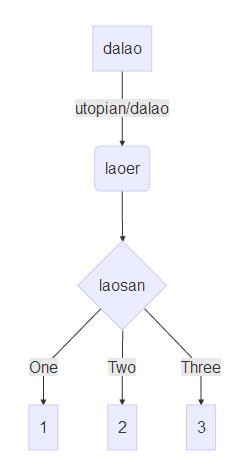 其实现的代码为: ```` ```mermaid graph TD A[dalao] -->|utopian/dalao| B(laoer) B --> C{laosan} C -->|One| D[1] C -->|Two| E[2] C -->|Three| F[3] ``` ```` ### 知识点1: markdown代码如何输入 markdown 里面代码是使用 英文状态下的4个顿号括起来的,如下: ```` ···· 代码 //此时,这部分内容是不被执行的,在markdown会直接显示出来。 ···· ```` 效果是代码高亮,区别于别的内容。 ### 知识点2:扩展语法如何支持 想要实现流程图,markdown语法是不支持的,而markdown-plus支持语法扩展,所以我们可以在markdown-plus输入别的语法来实现我们需要的功能。 ```` ····mermaid 代码区域 ···· ```` 这里我们使用扩展语法 mermaid来制作 流程图,此时,代码区域的内容会被执行。 ### 知识点3:mermaid绘制流程图语法 ```` graph TD ```` 这是定义图表,默认语句 3.1. 定义元素 ```` A[name] ```` 因为是流程图,所以每个元素都是按顺序定义的,第一个元素用A定义,以此类推,B,C……这个样子。每个元素的样式可以通过括号进行更改。 () 带圆角 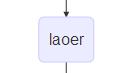 [] 长方形 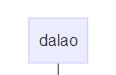 {} 菱形 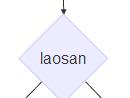 3.2 定义线上文字 ```` |text| ```` 使用2个竖线将文字括起来,这部分内容就是线上文字 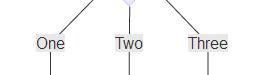 3.3 元素连接 ```` B --> C{laosan} ```` 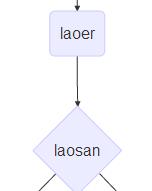 已经定义过的元素,可以直接使用序号标签代替, 使用-->进行连接、此时B直接指向到C ```` A[dalao] -->|utopian/dalao| B(laoer) ```` 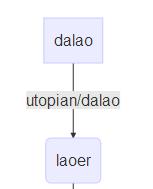 在AB之间连接线上添加文字。 ------------ 下面是一个稍微复杂的流程图: 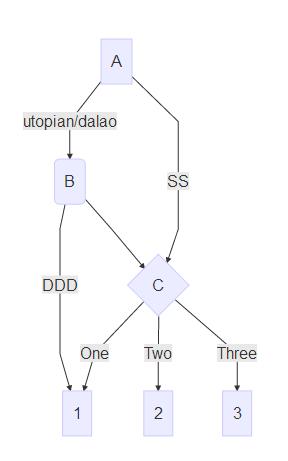 代码如下: ```mermaid graph TD A[A] -->|utopian/dalao| B(B) B --> C{C} B --> |DDD|D{C} A-->|SS|C C -->|One| D[1] C -->|Two| E[2] C -->|Three| F[3] ``` ---------------- 谢谢阅读 本教程! <br /><hr/><em>Posted on <a href="https://utopian.io/utopian-io/@dalao/markdownplus-how-to-use-markdownplus-to-create-a-flow-chart">Utopian.io - Rewarding Open Source Contributors</a></em><hr/> |
| title | 怎么使用markdownplus画流程图/How to use markdownplus to create a flow chart |
| author | dalao |
| permlink | markdownplus-how-to-use-markdownplus-to-create-a-flow-chart |
| json metadata | {"community":"utopian","app":"utopian/1.0.0","format":"markdown","repository":{"id":31993596,"name":"markdown-plus","full_name":"tylingsoft/markdown-plus","html_url":"https://github.com/tylingsoft/markdown-plus","fork":false,"owner":{"login":"tylingsoft"}},"pullRequests":[],"platform":"github","type":"tutorials","tags":["utopian-io"],"links":["https://utopian.io/utopian-io/@dalao/markdownplus-how-to-use-markdownplus-to-create-a-flow-chart"],"image":["https://steemitimages.com/DQmPNN9mo8zksoqRQKuCz6xFuVoQBeTRtrifh8pubJzC2i8/360%E6%88%AA%E5%9B%BE20180114002422264.jpg","https://steemitimages.com/DQmaaxewJeU1tDfQj2kLHNQVEqBgRVPqSviAdoNVx4tq1Jm/360%E6%88%AA%E5%9B%BE20180114004228425.jpg","https://steemitimages.com/DQmdvwXWXSToz4GCZn54YwhT5M1Ng6KkkMvtGgVk5W6WbSd/360%E6%88%AA%E5%9B%BE20180114004200495.jpg","https://steemitimages.com/DQmR3rH7tTxYr8kAq4dzpBvfi6axK662FEyEXvZZbyhZVKA/360%E6%88%AA%E5%9B%BE20180114004128560.jpg","https://steemitimages.com/DQmQSvH8dHBaJmSGNfYKwvemKirMJMU3CnUSv2JBS3CfpXQ/360%E6%88%AA%E5%9B%BE20180114004300866.jpg","https://steemitimages.com/DQmP3aVA8jCBjm4y8VbPVtdqGhbfFH2SSrcZtnwLx3SWoTq/360%E6%88%AA%E5%9B%BE20180114004420879.jpg","https://steemitimages.com/DQmaVAjKMsBWNYe178r5m9X2iRAiPvZrTPNUmrmagxkHFQW/360%E6%88%AA%E5%9B%BE20180114004501992.jpg","https://steemitimages.com/DQmUKMmhbjZceeRmeNKWcZ95A2M2gRB3eTj5Fr8iPJB6jiT/360%E6%88%AA%E5%9B%BE20180114004735117.jpg"],"moderator":{"account":"deathwing","time":"2018-01-17T19:06:42.442Z","reviewed":false,"pending":false,"flagged":true}} |
| parent author | |
| parent permlink | utopian-io |
| Transaction Info | Block #19064756/Trx 20c7fe617a88f1d4c2523dd23c90fbece3b333bc |
View Raw JSON Data
{
"op": [
"comment",
{
"body": "Summary:\nMarkdown-plus is a markdown editor, but it also can help us to create a flow chart . Today i will show you how to use markdownplus to create a flow chart.\nMarkdown-plus从名字看是markdown的升级版,不仅仅可以让我们用md语法写文章,同时支持让我们创建图表,今天我介绍如何使用markdown-plus 创建流程图。\n#### What Will I Learn?/本教程知识点\n- markdown代码如何输入\n- markdown-plus 如何支持扩展语法\n- mermaid流程图语法\n\n#### Requirements/需要具备的条件\n- 认识简单英文\n- 知晓简单markdown语法\n- 下载markdown-plus\n\n#### Difficulty/难度\n简单\n\n#### Tutorial Contents/教程内容\n下面先看一个例子:\n\n其实现的代码为:\n````\n```mermaid\ngraph TD\nA[dalao] -->|utopian/dalao| B(laoer)\nB --> C{laosan}\nC -->|One| D[1]\nC -->|Two| E[2]\nC -->|Three| F[3]\n```\n````\n### 知识点1: markdown代码如何输入\nmarkdown 里面代码是使用 英文状态下的4个顿号括起来的,如下:\n````\n····\n代码 //此时,这部分内容是不被执行的,在markdown会直接显示出来。\n····\n````\n效果是代码高亮,区别于别的内容。\n### 知识点2:扩展语法如何支持\n想要实现流程图,markdown语法是不支持的,而markdown-plus支持语法扩展,所以我们可以在markdown-plus输入别的语法来实现我们需要的功能。\n````\n····mermaid\n代码区域\n····\n````\n这里我们使用扩展语法 mermaid来制作 流程图,此时,代码区域的内容会被执行。\n### 知识点3:mermaid绘制流程图语法\n````\ngraph TD\n````\n这是定义图表,默认语句\n\n3.1. 定义元素\n````\nA[name]\n````\n因为是流程图,所以每个元素都是按顺序定义的,第一个元素用A定义,以此类推,B,C……这个样子。每个元素的样式可以通过括号进行更改。\n() 带圆角\n\n[] 长方形\n\n{} 菱形\n\n 3.2 定义线上文字\n````\n|text|\n````\n使用2个竖线将文字括起来,这部分内容就是线上文字\n\n3.3 元素连接\n````\nB --> C{laosan}\n````\n\n已经定义过的元素,可以直接使用序号标签代替, 使用-->进行连接、此时B直接指向到C\n\n````\nA[dalao] -->|utopian/dalao| B(laoer)\n````\n\n在AB之间连接线上添加文字。\n------------\n下面是一个稍微复杂的流程图:\n\n代码如下:\n```mermaid\ngraph TD\nA[A] -->|utopian/dalao| B(B)\nB --> C{C}\nB --> |DDD|D{C}\nA-->|SS|C\nC -->|One| D[1]\nC -->|Two| E[2]\nC -->|Three| F[3]\n```\n----------------\n谢谢阅读 本教程!\n\n<br /><hr/><em>Posted on <a href=\"https://utopian.io/utopian-io/@dalao/markdownplus-how-to-use-markdownplus-to-create-a-flow-chart\">Utopian.io - Rewarding Open Source Contributors</a></em><hr/>",
"title": "怎么使用markdownplus画流程图/How to use markdownplus to create a flow chart",
"author": "dalao",
"permlink": "markdownplus-how-to-use-markdownplus-to-create-a-flow-chart",
"json_metadata": "{\"community\":\"utopian\",\"app\":\"utopian/1.0.0\",\"format\":\"markdown\",\"repository\":{\"id\":31993596,\"name\":\"markdown-plus\",\"full_name\":\"tylingsoft/markdown-plus\",\"html_url\":\"https://github.com/tylingsoft/markdown-plus\",\"fork\":false,\"owner\":{\"login\":\"tylingsoft\"}},\"pullRequests\":[],\"platform\":\"github\",\"type\":\"tutorials\",\"tags\":[\"utopian-io\"],\"links\":[\"https://utopian.io/utopian-io/@dalao/markdownplus-how-to-use-markdownplus-to-create-a-flow-chart\"],\"image\":[\"https://steemitimages.com/DQmPNN9mo8zksoqRQKuCz6xFuVoQBeTRtrifh8pubJzC2i8/360%E6%88%AA%E5%9B%BE20180114002422264.jpg\",\"https://steemitimages.com/DQmaaxewJeU1tDfQj2kLHNQVEqBgRVPqSviAdoNVx4tq1Jm/360%E6%88%AA%E5%9B%BE20180114004228425.jpg\",\"https://steemitimages.com/DQmdvwXWXSToz4GCZn54YwhT5M1Ng6KkkMvtGgVk5W6WbSd/360%E6%88%AA%E5%9B%BE20180114004200495.jpg\",\"https://steemitimages.com/DQmR3rH7tTxYr8kAq4dzpBvfi6axK662FEyEXvZZbyhZVKA/360%E6%88%AA%E5%9B%BE20180114004128560.jpg\",\"https://steemitimages.com/DQmQSvH8dHBaJmSGNfYKwvemKirMJMU3CnUSv2JBS3CfpXQ/360%E6%88%AA%E5%9B%BE20180114004300866.jpg\",\"https://steemitimages.com/DQmP3aVA8jCBjm4y8VbPVtdqGhbfFH2SSrcZtnwLx3SWoTq/360%E6%88%AA%E5%9B%BE20180114004420879.jpg\",\"https://steemitimages.com/DQmaVAjKMsBWNYe178r5m9X2iRAiPvZrTPNUmrmagxkHFQW/360%E6%88%AA%E5%9B%BE20180114004501992.jpg\",\"https://steemitimages.com/DQmUKMmhbjZceeRmeNKWcZ95A2M2gRB3eTj5Fr8iPJB6jiT/360%E6%88%AA%E5%9B%BE20180114004735117.jpg\"],\"moderator\":{\"account\":\"deathwing\",\"time\":\"2018-01-17T19:06:42.442Z\",\"reviewed\":false,\"pending\":false,\"flagged\":true}}",
"parent_author": "",
"parent_permlink": "utopian-io"
}
],
"block": 19064756,
"trx_id": "20c7fe617a88f1d4c2523dd23c90fbece3b333bc",
"op_in_trx": 0,
"timestamp": "2018-01-17T19:06:45",
"virtual_op": false,
"trx_in_block": 39
}2018/01/17 19:06:36
2018/01/17 19:06:36
| body | Your contribution cannot be approved because it does not follow the [Utopian Rules](https://utopian.io/rules). You can contact us on [Discord](https://discord.gg/uTyJkNm). **[[utopian-moderator]](https://utopian.io/moderators)** |
| title | |
| author | deathwing |
| permlink | re-dalao-markdownplus-how-to-use-markdownplus-to-create-work-schedule-20180117t190634398z |
| json metadata | {"tags":["utopian-io"],"community":"utopian","app":"utopian/1.0.0"} |
| parent author | dalao |
| parent permlink | markdownplus-how-to-use-markdownplus-to-create-work-schedule |
| Transaction Info | Block #19064753/Trx 2154c10265da8197cb148cc7f84aee9bcbc49859 |
View Raw JSON Data
{
  "op": [
    "comment",
    {
      "body": "Your contribution cannot be approved because it does not follow the [Utopian Rules](https://utopian.io/rules).\n\nYou can contact us on [Discord](https://discord.gg/uTyJkNm).\n**[[utopian-moderator]](https://utopian.io/moderators)**",
      "title": "",
      "author": "deathwing",
      "permlink": "re-dalao-markdownplus-how-to-use-markdownplus-to-create-work-schedule-20180117t190634398z",
      "json_metadata": "{\"tags\":[\"utopian-io\"],\"community\":\"utopian\",\"app\":\"utopian/1.0.0\"}",
      "parent_author": "dalao",
      "parent_permlink": "markdownplus-how-to-use-markdownplus-to-create-work-schedule"
    }
  ],
  "block": 19064753,
  "trx_id": "2154c10265da8197cb148cc7f84aee9bcbc49859",
  "op_in_trx": 0,
  "timestamp": "2018-01-17T19:06:36",
  "virtual_op": false,
  "trx_in_block": 14
}2018/01/17 19:06:15
2018/01/17 19:06:15
| body | Your contribution cannot be approved because it does not follow the [Utopian Rules](https://utopian.io/rules). You can contact us on [Discord](https://discord.gg/uTyJkNm). **[[utopian-moderator]](https://utopian.io/moderators)** |
| title | |
| author | deathwing |
| permlink | re-dalao-markdownplus-how-to-use-markdownplus-to-create-relation-diagram-20180117t190615220z |
| json metadata | {"tags":["utopian-io"],"community":"utopian","app":"utopian/1.0.0"} |
| parent author | dalao |
| parent permlink | markdownplus-how-to-use-markdownplus-to-create-relation-diagram |
| Transaction Info | Block #19064746/Trx a207b0d3d74ca2937a0245bf001f0337a3c97b90 |
View Raw JSON Data
{
  "op": [
    "comment",
    {
      "body": "Your contribution cannot be approved because it does not follow the [Utopian Rules](https://utopian.io/rules).\n\nYou can contact us on [Discord](https://discord.gg/uTyJkNm).\n**[[utopian-moderator]](https://utopian.io/moderators)**",
      "title": "",
      "author": "deathwing",
      "permlink": "re-dalao-markdownplus-how-to-use-markdownplus-to-create-relation-diagram-20180117t190615220z",
      "json_metadata": "{\"tags\":[\"utopian-io\"],\"community\":\"utopian\",\"app\":\"utopian/1.0.0\"}",
      "parent_author": "dalao",
      "parent_permlink": "markdownplus-how-to-use-markdownplus-to-create-relation-diagram"
    }
  ],
  "block": 19064746,
  "trx_id": "a207b0d3d74ca2937a0245bf001f0337a3c97b90",
  "op_in_trx": 0,
  "timestamp": "2018-01-17T19:06:15",
  "virtual_op": false,
  "trx_in_block": 58
}dalaopublished a new post: markdownplus-how-to-use-markdownplus-to-create-relation-diagram2018/01/17 19:06:06
dalaopublished a new post: markdownplus-how-to-use-markdownplus-to-create-relation-diagram
2018/01/17 19:06:06
| body | Summary: Markdown-plus is a markdown editor, but it also can help us to create relation diagram . Today i will show you how to use markdownplus to create relation diagram. Markdown-plus从名字看是markdown的升级版,不仅仅可以让我们用md语法写文章,同时支持让我们创建图表,今天我介绍如何使用markdown-plus 创建关系图。 #### What Will I Learn?/教程知识点 - Markdown语法格式输入,以及如何支持扩展语言 - 声明时序图,定义时序图标题 - 定义具体事件 - 事件之间连接线、文字、箭头 - 状态文字设置 - 创建循环关系以及自我连接 #### Requirements/要求 - 简单英文基础 - 简单markdown语法基础 - 下载markdown-plus编辑器 #### Difficulty/难度 简单 #### Tutorial Contents/教程内容 下面先看一个简单例子: 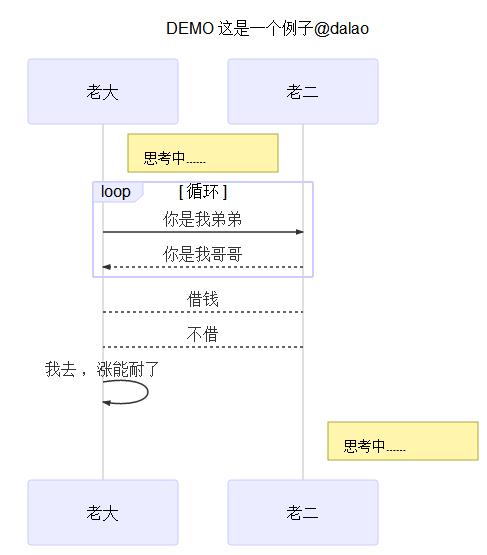 其实现的代码为: ```` sequenceDiagram Title:DEMO 这是一个例子@dalao Note right of 老大: 思考中…… loop 循环 老大->>老二: 你是我弟弟 老二-->>老大: 你是我哥哥 end 老大-->老二:借钱 老二-->老大:不借 老大->>老大:我去 ,涨能耐了 Note right of 老二: 思考中…… ```` ### 知识点1:Markdown语法格式输入,以及如何支持扩展语言 markdown 里面代码是使用 英文状态下的4个顿号括起来的,如下: ```` ···· 代码 //此时,这部分内容是不被执行的,在markdown会直接显示出来。 ···· ```` 效果是代码高亮,区别于别的内容。 想要实现进度图,markdown语法是不支持的,而markdown-plus支持语法扩展,所以我们可以在markdown-plus输入别的语法来实现我们需要的功能。 ```` ····mermaid 代码区域 ···· ```` 这里我们使用扩展语法 mermaid来制作进度图图,此时,代码区域的内容会被执行。 ### 知识点2:声明时序图,定义时序图标题 ```` sequenceDiagram Title:DEMO 这是一个例子@dalao ```` sequenceDiagram : 声明下面代码执行为时序图 Title:时序图标题, 不需要使用引号括起来 ### 知识点3:定义具体事件 ```` 老大->>老二: 你是我弟弟 老二-->>老大: 你是我哥哥 ````  格式 obj1->>obj2:text, 不需要声明事件,可以直接进行使用。obj1,obj2 可以是任意内容。 ### 知识点4:事件之间连接线、文字、箭头 ```` 老大->>老二: 你是我弟弟 老二-->>老大: 你是我哥哥 ```` ```` 老大-->老二:借钱 老二->老大:不借 ```` 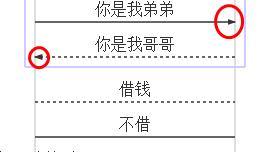 可以看出有四中连接: -> 实线 --> 虚线 ->> 实线带箭头 -->>虚线带箭头 ### 知识点5:状态文字设置 ```` Note right of 老大: 思考中…… ```` 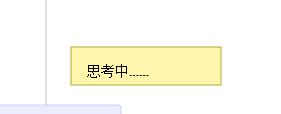 格式 Note [right,left] of obj: text right和left 任选 ### 知识点6:创建循环关系以及自我连接 ```` loop 循环 老大->>老二: 你是我弟弟 老二-->>老大: 你是我哥哥 end ```` 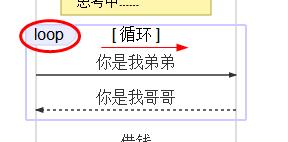 格式: ```` loop title obj1-->obj2 end ```` 也允许自己连接自己: 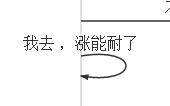 ```` 老大->>老大:我去 ,涨能耐了 ```` 格式: obj1->>obj1:text 下面是多个事件的时序图演示: 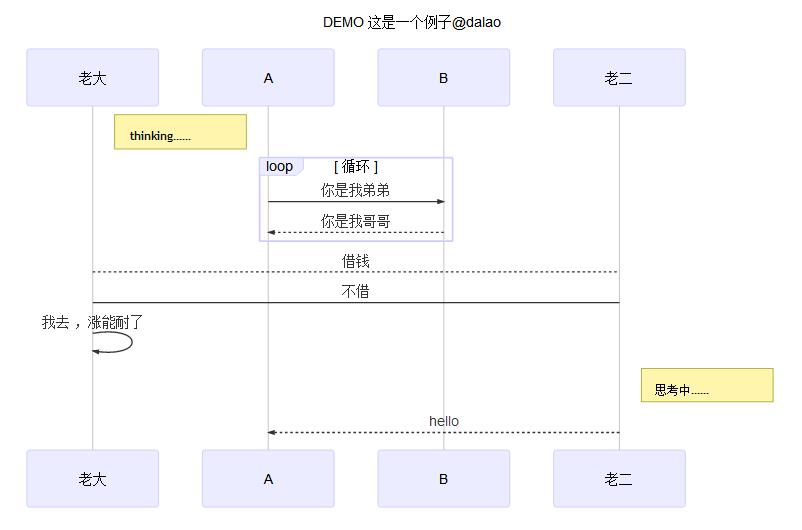 样例代码: ```` sequenceDiagram Title:DEMO 这是一个例子@dalao Note right of 老大: thinking…… loop 循环 A->>B: 你是我弟弟 B-->>A: 你是我哥哥 end 老大-->老二:借钱 老二->老大:不借 老大->>老大:我去 ,涨能耐了 Note right of 老二: 思考中…… 老二-->>A:hello ```` #### Curriculum/系列课程 - [怎么使用markdownplus画流程图/How to use markdownplus to create a flow chart](https://utopian.io/utopian-io/@dalao/markdownplus-how-to-use-markdownplus-to-create-a-flow-chart) - [怎么使用markdownplus画工作进度图/How to use markdownplus to create work schedule](https://utopian.io/utopian-io/@dalao/markdownplus-how-to-use-markdownplus-to-create-work-schedule) <br /><hr/><em>Posted on <a href="https://utopian.io/utopian-io/@dalao/markdownplus-how-to-use-markdownplus-to-create-relation-diagram">Utopian.io - Rewarding Open Source Contributors</a></em><hr/> |
| title | 怎么使用markdownplus画时序图/How to use markdownplus to create relation diagram |
| author | dalao |
| permlink | markdownplus-how-to-use-markdownplus-to-create-relation-diagram |
| json metadata | {"community":"utopian","app":"utopian/1.0.0","format":"markdown","repository":{"id":31993596,"name":"markdown-plus","full_name":"tylingsoft/markdown-plus","html_url":"https://github.com/tylingsoft/markdown-plus","fork":false,"owner":{"login":"tylingsoft"}},"pullRequests":[],"platform":"github","type":"tutorials","tags":["utopian-io","markdownplus"],"users":["dalao"],"links":["https://steemitimages.com/DQmaiPHe1GAZAZoAc5JEZfCTcbLmpPPkiiBKYJaiaZ2BtMu/360%E6%88%AA%E5%9B%BE20180115111206263.jpg","https://steemitimages.com/DQmeVYq9CMtP8brpvfb6Ee4AWg6EM9VFKHGgsuX7X1N81S8/360%E6%88%AA%E5%9B%BE20180115111947889.jpg","https://steemitimages.com/DQmPvQYf7yCTGdDwbvfonNV2RKf7DqUwhqkarG9jAanTziQ/360%E6%88%AA%E5%9B%BE20180115112132043.jpg","https://steemitimages.com/DQmTAWxAQ5HiTvpeBVoPFbj6KnTMVKQkdPMrvTUMTKoS1R3/360%E6%88%AA%E5%9B%BE20180115112520564.jpg","https://steemitimages.com/DQmQZwQzkFnjKAc9yTM2VrzCwWJ4xSgpmHECeCETJvejdn7/360%E6%88%AA%E5%9B%BE20180115112740601.jpg","https://steemitimages.com/DQmVdyZDdrSWy3QT2kuapQtfUGx25DBYMcyZNaQyaXxnd8c/360%E6%88%AA%E5%9B%BE20180115112933416.jpg","https://steemitimages.com/DQmbQwXfxQPupX7izagCmo2Rh18LRj5yk7Jn975x4UGoLx5/360%E6%88%AA%E5%9B%BE20180115113417847.jpg","https://utopian.io/utopian-io/@dalao/markdownplus-how-to-use-markdownplus-to-create-a-flow-chart","https://utopian.io/utopian-io/@dalao/markdownplus-how-to-use-markdownplus-to-create-work-schedule"],"image":["https://steemitimages.com/DQmaiPHe1GAZAZoAc5JEZfCTcbLmpPPkiiBKYJaiaZ2BtMu/360%E6%88%AA%E5%9B%BE20180115111206263.jpg","https://steemitimages.com/DQmeVYq9CMtP8brpvfb6Ee4AWg6EM9VFKHGgsuX7X1N81S8/360%E6%88%AA%E5%9B%BE20180115111947889.jpg","https://steemitimages.com/DQmPvQYf7yCTGdDwbvfonNV2RKf7DqUwhqkarG9jAanTziQ/360%E6%88%AA%E5%9B%BE20180115112132043.jpg","https://steemitimages.com/DQmTAWxAQ5HiTvpeBVoPFbj6KnTMVKQkdPMrvTUMTKoS1R3/360%E6%88%AA%E5%9B%BE20180115112520564.jpg","https://steemitimages.com/DQmQZwQzkFnjKAc9yTM2VrzCwWJ4xSgpmHECeCETJvejdn7/360%E6%88%AA%E5%9B%BE20180115112740601.jpg","https://steemitimages.com/DQmVdyZDdrSWy3QT2kuapQtfUGx25DBYMcyZNaQyaXxnd8c/360%E6%88%AA%E5%9B%BE20180115112933416.jpg","https://steemitimages.com/DQmbQwXfxQPupX7izagCmo2Rh18LRj5yk7Jn975x4UGoLx5/360%E6%88%AA%E5%9B%BE20180115113417847.jpg"],"moderator":{"account":"deathwing","time":"2018-01-17T19:06:03.262Z","reviewed":false,"pending":false,"flagged":true}} |
| parent author | |
| parent permlink | utopian-io |
| Transaction Info | Block #19064743/Trx 1203117fe2017ffa33a66a6fc39ae4660a483562 |
View Raw JSON Data
{
"op": [
"comment",
{
"body": "Summary:\nMarkdown-plus is a markdown editor, but it also can help us to create relation diagram . Today i will show you how to use markdownplus to create relation diagram.\nMarkdown-plus从名字看是markdown的升级版,不仅仅可以让我们用md语法写文章,同时支持让我们创建图表,今天我介绍如何使用markdown-plus 创建关系图。\n#### What Will I Learn?/教程知识点\n- Markdown语法格式输入,以及如何支持扩展语言\n- 声明时序图,定义时序图标题\n- 定义具体事件\n- 事件之间连接线、文字、箭头\n- 状态文字设置\n- 创建循环关系以及自我连接\n#### Requirements/要求\n- 简单英文基础\n- 简单markdown语法基础\n- 下载markdown-plus编辑器\n#### Difficulty/难度\n简单\n\n#### Tutorial Contents/教程内容\n下面先看一个简单例子:\n\n其实现的代码为:\n````\nsequenceDiagram\nTitle:DEMO 这是一个例子@dalao\nNote right of 老大: 思考中……\nloop 循环\n 老大->>老二: 你是我弟弟\n 老二-->>老大: 你是我哥哥\nend\n老大-->老二:借钱\n老二-->老大:不借\n老大->>老大:我去 ,涨能耐了\nNote right of 老二: 思考中……\n````\n\n### 知识点1:Markdown语法格式输入,以及如何支持扩展语言\nmarkdown 里面代码是使用 英文状态下的4个顿号括起来的,如下:\n````\n····\n代码 //此时,这部分内容是不被执行的,在markdown会直接显示出来。\n····\n````\n效果是代码高亮,区别于别的内容。\n\n想要实现进度图,markdown语法是不支持的,而markdown-plus支持语法扩展,所以我们可以在markdown-plus输入别的语法来实现我们需要的功能。\n````\n····mermaid\n代码区域\n····\n````\n这里我们使用扩展语法 mermaid来制作进度图图,此时,代码区域的内容会被执行。\n### 知识点2:声明时序图,定义时序图标题\n````\nsequenceDiagram\nTitle:DEMO 这是一个例子@dalao\n````\nsequenceDiagram : 声明下面代码执行为时序图\nTitle:时序图标题, 不需要使用引号括起来\n\n### 知识点3:定义具体事件\n````\n老大->>老二: 你是我弟弟\n老二-->>老大: 你是我哥哥\n````\n\n格式 obj1->>obj2:text, 不需要声明事件,可以直接进行使用。obj1,obj2 可以是任意内容。\n### 知识点4:事件之间连接线、文字、箭头\n````\n 老大->>老二: 你是我弟弟\n老二-->>老大: 你是我哥哥\n````\n````\n老大-->老二:借钱\n老二->老大:不借\n````\n\n可以看出有四中连接:\n-> 实线\n--> 虚线\n->> 实线带箭头\n-->>虚线带箭头\n### 知识点5:状态文字设置\n````\nNote right of 老大: 思考中……\n````\n\n格式 Note [right,left] of obj: text\nright和left 任选\n### 知识点6:创建循环关系以及自我连接\n````\nloop 循环\n 老大->>老二: 你是我弟弟\n 老二-->>老大: 你是我哥哥\nend\n````\n\n格式: \n````\nloop title\nobj1-->obj2\nend\n````\n也允许自己连接自己:\n\n````\n老大->>老大:我去 ,涨能耐了\n````\n格式: obj1->>obj1:text\n\n下面是多个事件的时序图演示:\n\n样例代码:\n````\nsequenceDiagram\nTitle:DEMO 这是一个例子@dalao\nNote right of 老大: thinking……\nloop 循环\n A->>B: 你是我弟弟\n B-->>A: 你是我哥哥\nend\n老大-->老二:借钱\n老二->老大:不借\n老大->>老大:我去 ,涨能耐了\nNote right of 老二: 思考中……\n老二-->>A:hello\n````\n\n#### Curriculum/系列课程\n- [怎么使用markdownplus画流程图/How to use markdownplus to create a flow chart](https://utopian.io/utopian-io/@dalao/markdownplus-how-to-use-markdownplus-to-create-a-flow-chart)\n- [怎么使用markdownplus画工作进度图/How to use markdownplus to create work schedule](https://utopian.io/utopian-io/@dalao/markdownplus-how-to-use-markdownplus-to-create-work-schedule)\n\n<br /><hr/><em>Posted on <a href=\"https://utopian.io/utopian-io/@dalao/markdownplus-how-to-use-markdownplus-to-create-relation-diagram\">Utopian.io - Rewarding Open Source Contributors</a></em><hr/>",
"title": "怎么使用markdownplus画时序图/How to use markdownplus to create relation diagram",
"author": "dalao",
"permlink": "markdownplus-how-to-use-markdownplus-to-create-relation-diagram",
"json_metadata": "{\"community\":\"utopian\",\"app\":\"utopian/1.0.0\",\"format\":\"markdown\",\"repository\":{\"id\":31993596,\"name\":\"markdown-plus\",\"full_name\":\"tylingsoft/markdown-plus\",\"html_url\":\"https://github.com/tylingsoft/markdown-plus\",\"fork\":false,\"owner\":{\"login\":\"tylingsoft\"}},\"pullRequests\":[],\"platform\":\"github\",\"type\":\"tutorials\",\"tags\":[\"utopian-io\",\"markdownplus\"],\"users\":[\"dalao\"],\"links\":[\"https://steemitimages.com/DQmaiPHe1GAZAZoAc5JEZfCTcbLmpPPkiiBKYJaiaZ2BtMu/360%E6%88%AA%E5%9B%BE20180115111206263.jpg\",\"https://steemitimages.com/DQmeVYq9CMtP8brpvfb6Ee4AWg6EM9VFKHGgsuX7X1N81S8/360%E6%88%AA%E5%9B%BE20180115111947889.jpg\",\"https://steemitimages.com/DQmPvQYf7yCTGdDwbvfonNV2RKf7DqUwhqkarG9jAanTziQ/360%E6%88%AA%E5%9B%BE20180115112132043.jpg\",\"https://steemitimages.com/DQmTAWxAQ5HiTvpeBVoPFbj6KnTMVKQkdPMrvTUMTKoS1R3/360%E6%88%AA%E5%9B%BE20180115112520564.jpg\",\"https://steemitimages.com/DQmQZwQzkFnjKAc9yTM2VrzCwWJ4xSgpmHECeCETJvejdn7/360%E6%88%AA%E5%9B%BE20180115112740601.jpg\",\"https://steemitimages.com/DQmVdyZDdrSWy3QT2kuapQtfUGx25DBYMcyZNaQyaXxnd8c/360%E6%88%AA%E5%9B%BE20180115112933416.jpg\",\"https://steemitimages.com/DQmbQwXfxQPupX7izagCmo2Rh18LRj5yk7Jn975x4UGoLx5/360%E6%88%AA%E5%9B%BE20180115113417847.jpg\",\"https://utopian.io/utopian-io/@dalao/markdownplus-how-to-use-markdownplus-to-create-a-flow-chart\",\"https://utopian.io/utopian-io/@dalao/markdownplus-how-to-use-markdownplus-to-create-work-schedule\"],\"image\":[\"https://steemitimages.com/DQmaiPHe1GAZAZoAc5JEZfCTcbLmpPPkiiBKYJaiaZ2BtMu/360%E6%88%AA%E5%9B%BE20180115111206263.jpg\",\"https://steemitimages.com/DQmeVYq9CMtP8brpvfb6Ee4AWg6EM9VFKHGgsuX7X1N81S8/360%E6%88%AA%E5%9B%BE20180115111947889.jpg\",\"https://steemitimages.com/DQmPvQYf7yCTGdDwbvfonNV2RKf7DqUwhqkarG9jAanTziQ/360%E6%88%AA%E5%9B%BE20180115112132043.jpg\",\"https://steemitimages.com/DQmTAWxAQ5HiTvpeBVoPFbj6KnTMVKQkdPMrvTUMTKoS1R3/360%E6%88%AA%E5%9B%BE20180115112520564.jpg\",\"https://steemitimages.com/DQmQZwQzkFnjKAc9yTM2VrzCwWJ4xSgpmHECeCETJvejdn7/360%E6%88%AA%E5%9B%BE20180115112740601.jpg\",\"https://steemitimages.com/DQmVdyZDdrSWy3QT2kuapQtfUGx25DBYMcyZNaQyaXxnd8c/360%E6%88%AA%E5%9B%BE20180115112933416.jpg\",\"https://steemitimages.com/DQmbQwXfxQPupX7izagCmo2Rh18LRj5yk7Jn975x4UGoLx5/360%E6%88%AA%E5%9B%BE20180115113417847.jpg\"],\"moderator\":{\"account\":\"deathwing\",\"time\":\"2018-01-17T19:06:03.262Z\",\"reviewed\":false,\"pending\":false,\"flagged\":true}}",
"parent_author": "",
"parent_permlink": "utopian-io"
}
],
"block": 19064743,
"trx_id": "1203117fe2017ffa33a66a6fc39ae4660a483562",
"op_in_trx": 0,
"timestamp": "2018-01-17T19:06:06",
"virtual_op": false,
"trx_in_block": 34
}dalaopublished a new post: markdownplus-how-to-use-markdownplus-to-create-work-schedule2018/01/17 19:06:03
dalaopublished a new post: markdownplus-how-to-use-markdownplus-to-create-work-schedule
2018/01/17 19:06:03
| body | Summary: Markdown-plus is a markdown editor, but it also can help us to create work schedule . Today i will show you how to use markdownplus to create work schedule. Markdown-plus从名字看是markdown的升级版,不仅仅可以让我们用md语法写文章,同时支持让我们创建图表,今天我介绍如何使用markdown-plus 创建工作进度图。 #### What Will I Learn?/教程知识点 - Markdown语法格式输入,以及如何支持扩展语言 - 声明进度图,定义进度图标题和时间格式 - 创建具体工作明细以及每个进度状态 - 创建多个工作明细以及每个进度状态 #### Requirements/要求 - 简单英文基础 - 简单markdown语法基础 - 下载markdown-plus编辑器 #### Difficulty/难度 简单 #### Tutorial Contents/教程内容 下面先看一个简单例子: 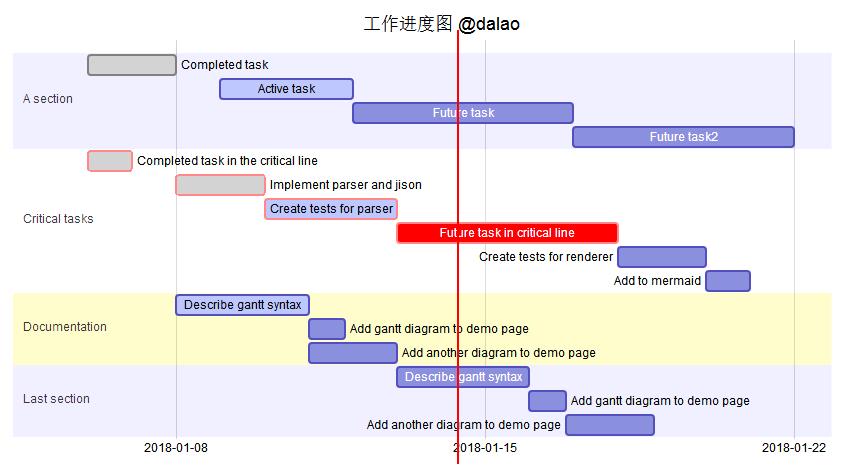 其实现的代码为: ```` gantt dateFormat YYYY-MM-DD title 工作进度图 @dalao section A section Completed task :done, des1, 2018-01-06,2018-01-08 Active task :active, des2, 2018-01-09, 3d Future task : des3, after des2, 5d Future task2 : des4, after des3, 5d section Critical tasks Completed task in the critical line :crit, done, 2018-01-06,24h Implement parser and jison :crit, done, after des1, 2d Create tests for parser :crit, active, 3d Future task in critical line :crit, 5d Create tests for renderer :2d Add to mermaid :1d section Documentation Describe gantt syntax :active, a1, after des1, 3d Add gantt diagram to demo page :after a1 , 20h Add another diagram to demo page :doc1, after a1 , 48h section Last section Describe gantt syntax :after doc1, 3d Add gantt diagram to demo page : 20h Add another diagram to demo page : 48h ```` ### 知识点1:Markdown语法格式输入,以及如何支持扩展语言 markdown 里面代码是使用 英文状态下的4个顿号括起来的,如下: ```` ···· 代码 //此时,这部分内容是不被执行的,在markdown会直接显示出来。 ···· ```` 效果是代码高亮,区别于别的内容。 想要实现进度图,markdown语法是不支持的,而markdown-plus支持语法扩展,所以我们可以在markdown-plus输入别的语法来实现我们需要的功能。 ```` ····mermaid 代码区域 ···· ```` 这里我们使用扩展语法 mermaid来制作进度图图,此时,代码区域的内容会被执行。 ### 知识点2:声明进度图,定义进度图标题和时间格式 mermaid语法不仅仅只是用来绘制进度图,所以在制作进度图之前,我们需要声明一下,下面的语法将被用来解析成进度图。 ```` gantt ```` 在代码第一行输入 gantt ,即代表本图表类型是 甘特图也就是进度图。 ```` dateFormat YYYY-MM-DD title 工作进度图 @dalao ```` dateFormat 定义时间格式, 年月日格式 title 图表标题,不需要使用引号 ### 知识点3:创建具体工作明细以及每个进度状态 ```` section A section Completed task :done, des1, 2018-01-06,2018-01-08 Active task :active, des2, 2018-01-09, 3d Future task : des3, after des2, 5d Future task2 : des4, after des3, 5d ```` section 定义进度的名称,比如,utopian功能开发, 例子中A section 就是名称 可以任意替换。 ```` Completed task :done, des1, 2018-01-06,2018-01-08 ```` 事件名:状态1,状态2,定义变量名称,开始时间,结束时间 状态包括:done(完成) active(进行中)crit(颜色) 不同工作进度 使用crit显示的样式是不一样的: 默认状态:  done状态:  active状态:  ```` Active task :active, des2, 2018-01-09, 3d ```` 也可以不定义具体结束日期,定义开始日期,以及需要的时间即可 ```` Future task : des3, after des2, 5d ```` 如果上一个进度已经定义,下一个进度可以使用after 直接接着后面。只需要声明需要时间。 下面就是单个事件进度的样例:  ### 知识点4:创建多个工作明细以及每个进度状态 如果几件事同时进行,我们就需要创建多个进度。单个进度使用Section, 多个进度就是重复多个section. ```` section A section Completed task :done, des1, 2018-01-06,2018-01-08 Active task :active, des2, 2018-01-09, 3d Future task : des3, after des2, 5d Future task2 : des4, after des3, 5d section Critical tasks Completed task in the critical line :crit, done, 2018-01-06,24h Implement parser and jison :crit, done, after des1, 2d Create tests for parser :crit, active, 3d Future task in critical line :crit, 5d Create tests for renderer :2d Add to mermaid :1d ```` 可以看出这2个事件进度是并列输入的。和单个创建没什么变化。显示如下: 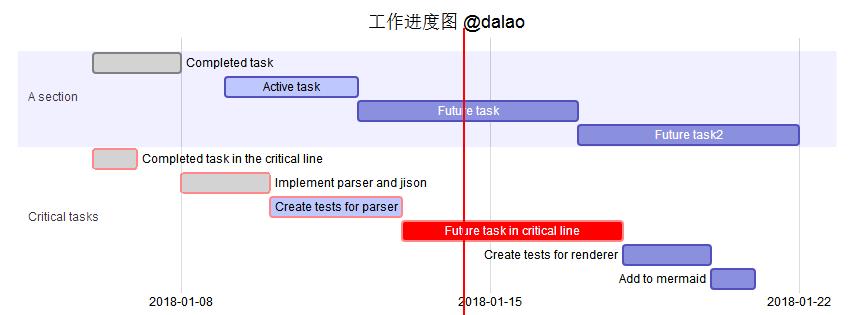 如果当前时间在进度条之内,那么会显示一条红竖线,提示当前时间。 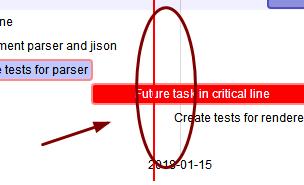 本教程到此结束,谢谢阅读! ## markdown-plus系列教程 [怎么使用markdownplus画流程图/How to use markdownplus to create a flow chart](https://utopian.io/utopian-io/@dalao/markdownplus-how-to-use-markdownplus-to-create-a-flow-chart) <br /><hr/><em>Posted on <a href="https://utopian.io/utopian-io/@dalao/markdownplus-how-to-use-markdownplus-to-create-work-schedule">Utopian.io - Rewarding Open Source Contributors</a></em><hr/> |
| title | 怎么使用markdownplus画工作进度图/How to use markdownplus to create work schedule |
| author | dalao |
| permlink | markdownplus-how-to-use-markdownplus-to-create-work-schedule |
| json metadata | {"community":"utopian","app":"utopian/1.0.0","format":"markdown","repository":{"id":31993596,"name":"markdown-plus","full_name":"tylingsoft/markdown-plus","html_url":"https://github.com/tylingsoft/markdown-plus","fork":false,"owner":{"login":"tylingsoft"}},"pullRequests":[],"platform":"github","type":"tutorials","tags":["utopian-io","markdownplus"],"users":["dalao"],"links":["https://steemitimages.com/DQmPtrAxQZWNwg9WzLzWmVVnp1UfYqUjgjyWT3TY1eJ9S5V/360%E6%88%AA%E5%9B%BE20180114091714810.jpg","https://steemitimages.com/DQmdADzMsmzmtSyC7YrJS87FRt4hYEZj5yzd1w3JHowgYjZ/360%E6%88%AA%E5%9B%BE20180114094800771.jpg","https://steemitimages.com/DQmdYocJ6uSPVAwMKPipS4z9Bumbu9Bk2DcWWtBd6sgXhho/360%E6%88%AA%E5%9B%BE20180114094807262.jpg","https://steemitimages.com/DQmP1PpDtn1nukzR3yabkuXhnaxPTXhaSyfMMmtr3cD2Gss/360%E6%88%AA%E5%9B%BE20180114094813047.jpg","https://steemitimages.com/DQmU1xAGx4Ys1SJ3TWmQnBgX7RHSHXob6fDF3exSyhWWgkX/360%E6%88%AA%E5%9B%BE20180114094556130.jpg","https://steemitimages.com/DQmXVwQLc5uSLooKmRhFY27miP4TknAG6HQ4wYxxo5m4tjZ/360%E6%88%AA%E5%9B%BE20180114095224921.jpg","https://steemitimages.com/DQmNi3cc7GqJwzjnKKpsLFik6rHxnUiNtpBQQPAR4fu5Lc7/360%E6%88%AA%E5%9B%BE20180114095343824.jpg","https://utopian.io/utopian-io/@dalao/markdownplus-how-to-use-markdownplus-to-create-a-flow-chart"],"image":["https://steemitimages.com/DQmPtrAxQZWNwg9WzLzWmVVnp1UfYqUjgjyWT3TY1eJ9S5V/360%E6%88%AA%E5%9B%BE20180114091714810.jpg","https://steemitimages.com/DQmdADzMsmzmtSyC7YrJS87FRt4hYEZj5yzd1w3JHowgYjZ/360%E6%88%AA%E5%9B%BE20180114094800771.jpg","https://steemitimages.com/DQmdYocJ6uSPVAwMKPipS4z9Bumbu9Bk2DcWWtBd6sgXhho/360%E6%88%AA%E5%9B%BE20180114094807262.jpg","https://steemitimages.com/DQmP1PpDtn1nukzR3yabkuXhnaxPTXhaSyfMMmtr3cD2Gss/360%E6%88%AA%E5%9B%BE20180114094813047.jpg","https://steemitimages.com/DQmU1xAGx4Ys1SJ3TWmQnBgX7RHSHXob6fDF3exSyhWWgkX/360%E6%88%AA%E5%9B%BE20180114094556130.jpg","https://steemitimages.com/DQmXVwQLc5uSLooKmRhFY27miP4TknAG6HQ4wYxxo5m4tjZ/360%E6%88%AA%E5%9B%BE20180114095224921.jpg","https://steemitimages.com/DQmNi3cc7GqJwzjnKKpsLFik6rHxnUiNtpBQQPAR4fu5Lc7/360%E6%88%AA%E5%9B%BE20180114095343824.jpg"],"moderator":{"account":"deathwing","time":"2018-01-17T19:06:00.822Z","reviewed":false,"pending":false,"flagged":true}} |
| parent author | |
| parent permlink | utopian-io |
| Transaction Info | Block #19064742/Trx da011358738b0f230d46d9c78b72945d803e3454 |
View Raw JSON Data
{
"op": [
"comment",
{
"body": "Summary:\nMarkdown-plus is a markdown editor, but it also can help us to create work schedule . Today i will show you how to use markdownplus to create work schedule.\nMarkdown-plus从名字看是markdown的升级版,不仅仅可以让我们用md语法写文章,同时支持让我们创建图表,今天我介绍如何使用markdown-plus 创建工作进度图。\n#### What Will I Learn?/教程知识点\n- Markdown语法格式输入,以及如何支持扩展语言\n- 声明进度图,定义进度图标题和时间格式\n- 创建具体工作明细以及每个进度状态\n- 创建多个工作明细以及每个进度状态\n\n#### Requirements/要求\n- 简单英文基础\n- 简单markdown语法基础\n- 下载markdown-plus编辑器\n#### Difficulty/难度\n简单\n\n#### Tutorial Contents/教程内容\n下面先看一个简单例子:\n\n其实现的代码为:\n````\ngantt\ndateFormat YYYY-MM-DD\ntitle 工作进度图 @dalao\nsection A section\nCompleted task :done, des1, 2018-01-06,2018-01-08\nActive task :active, des2, 2018-01-09, 3d\nFuture task : des3, after des2, 5d\nFuture task2 : des4, after des3, 5d\nsection Critical tasks\nCompleted task in the critical line :crit, done, 2018-01-06,24h\nImplement parser and jison :crit, done, after des1, 2d\nCreate tests for parser :crit, active, 3d\nFuture task in critical line :crit, 5d\nCreate tests for renderer :2d\nAdd to mermaid :1d\nsection Documentation\nDescribe gantt syntax :active, a1, after des1, 3d\nAdd gantt diagram to demo page :after a1 , 20h\nAdd another diagram to demo page :doc1, after a1 , 48h\nsection Last section\nDescribe gantt syntax :after doc1, 3d\nAdd gantt diagram to demo page : 20h\nAdd another diagram to demo page : 48h\n````\n### 知识点1:Markdown语法格式输入,以及如何支持扩展语言\nmarkdown 里面代码是使用 英文状态下的4个顿号括起来的,如下:\n````\n····\n代码 //此时,这部分内容是不被执行的,在markdown会直接显示出来。\n····\n````\n效果是代码高亮,区别于别的内容。\n\n想要实现进度图,markdown语法是不支持的,而markdown-plus支持语法扩展,所以我们可以在markdown-plus输入别的语法来实现我们需要的功能。\n````\n····mermaid\n代码区域\n····\n````\n这里我们使用扩展语法 mermaid来制作进度图图,此时,代码区域的内容会被执行。\n### 知识点2:声明进度图,定义进度图标题和时间格式\nmermaid语法不仅仅只是用来绘制进度图,所以在制作进度图之前,我们需要声明一下,下面的语法将被用来解析成进度图。\n````\ngantt\n````\n在代码第一行输入 gantt ,即代表本图表类型是 甘特图也就是进度图。\n````\ndateFormat YYYY-MM-DD\ntitle 工作进度图 @dalao\n````\ndateFormat 定义时间格式, 年月日格式\ntitle 图表标题,不需要使用引号\n### 知识点3:创建具体工作明细以及每个进度状态\n````\nsection A section\nCompleted task :done, des1, 2018-01-06,2018-01-08\nActive task :active, des2, 2018-01-09, 3d\nFuture task : des3, after des2, 5d\nFuture task2 : des4, after des3, 5d\n````\nsection 定义进度的名称,比如,utopian功能开发, 例子中A section 就是名称 可以任意替换。\n````\nCompleted task :done, des1, 2018-01-06,2018-01-08\n````\n事件名:状态1,状态2,定义变量名称,开始时间,结束时间\n状态包括:done(完成) active(进行中)crit(颜色)\n不同工作进度 使用crit显示的样式是不一样的:\n默认状态:\n\ndone状态:\n\nactive状态:\n\n````\nActive task :active, des2, 2018-01-09, 3d\n````\n也可以不定义具体结束日期,定义开始日期,以及需要的时间即可\n````\nFuture task : des3, after des2, 5d\n````\n如果上一个进度已经定义,下一个进度可以使用after 直接接着后面。只需要声明需要时间。\n下面就是单个事件进度的样例:\n\n### 知识点4:创建多个工作明细以及每个进度状态\n如果几件事同时进行,我们就需要创建多个进度。单个进度使用Section, 多个进度就是重复多个section.\n````\nsection A section\nCompleted task :done, des1, 2018-01-06,2018-01-08\nActive task :active, des2, 2018-01-09, 3d\nFuture task : des3, after des2, 5d\nFuture task2 : des4, after des3, 5d\nsection Critical tasks\nCompleted task in the critical line :crit, done, 2018-01-06,24h\nImplement parser and jison :crit, done, after des1, 2d\nCreate tests for parser :crit, active, 3d\nFuture task in critical line :crit, 5d\nCreate tests for renderer :2d\nAdd to mermaid :1d\n````\n可以看出这2个事件进度是并列输入的。和单个创建没什么变化。显示如下:\n\n\n如果当前时间在进度条之内,那么会显示一条红竖线,提示当前时间。\n\n\n本教程到此结束,谢谢阅读!\n\n## markdown-plus系列教程\n[怎么使用markdownplus画流程图/How to use markdownplus to create a flow chart](https://utopian.io/utopian-io/@dalao/markdownplus-how-to-use-markdownplus-to-create-a-flow-chart)\n\n<br /><hr/><em>Posted on <a href=\"https://utopian.io/utopian-io/@dalao/markdownplus-how-to-use-markdownplus-to-create-work-schedule\">Utopian.io - Rewarding Open Source Contributors</a></em><hr/>",
"title": "怎么使用markdownplus画工作进度图/How to use markdownplus to create work schedule",
"author": "dalao",
"permlink": "markdownplus-how-to-use-markdownplus-to-create-work-schedule",
"json_metadata": "{\"community\":\"utopian\",\"app\":\"utopian/1.0.0\",\"format\":\"markdown\",\"repository\":{\"id\":31993596,\"name\":\"markdown-plus\",\"full_name\":\"tylingsoft/markdown-plus\",\"html_url\":\"https://github.com/tylingsoft/markdown-plus\",\"fork\":false,\"owner\":{\"login\":\"tylingsoft\"}},\"pullRequests\":[],\"platform\":\"github\",\"type\":\"tutorials\",\"tags\":[\"utopian-io\",\"markdownplus\"],\"users\":[\"dalao\"],\"links\":[\"https://steemitimages.com/DQmPtrAxQZWNwg9WzLzWmVVnp1UfYqUjgjyWT3TY1eJ9S5V/360%E6%88%AA%E5%9B%BE20180114091714810.jpg\",\"https://steemitimages.com/DQmdADzMsmzmtSyC7YrJS87FRt4hYEZj5yzd1w3JHowgYjZ/360%E6%88%AA%E5%9B%BE20180114094800771.jpg\",\"https://steemitimages.com/DQmdYocJ6uSPVAwMKPipS4z9Bumbu9Bk2DcWWtBd6sgXhho/360%E6%88%AA%E5%9B%BE20180114094807262.jpg\",\"https://steemitimages.com/DQmP1PpDtn1nukzR3yabkuXhnaxPTXhaSyfMMmtr3cD2Gss/360%E6%88%AA%E5%9B%BE20180114094813047.jpg\",\"https://steemitimages.com/DQmU1xAGx4Ys1SJ3TWmQnBgX7RHSHXob6fDF3exSyhWWgkX/360%E6%88%AA%E5%9B%BE20180114094556130.jpg\",\"https://steemitimages.com/DQmXVwQLc5uSLooKmRhFY27miP4TknAG6HQ4wYxxo5m4tjZ/360%E6%88%AA%E5%9B%BE20180114095224921.jpg\",\"https://steemitimages.com/DQmNi3cc7GqJwzjnKKpsLFik6rHxnUiNtpBQQPAR4fu5Lc7/360%E6%88%AA%E5%9B%BE20180114095343824.jpg\",\"https://utopian.io/utopian-io/@dalao/markdownplus-how-to-use-markdownplus-to-create-a-flow-chart\"],\"image\":[\"https://steemitimages.com/DQmPtrAxQZWNwg9WzLzWmVVnp1UfYqUjgjyWT3TY1eJ9S5V/360%E6%88%AA%E5%9B%BE20180114091714810.jpg\",\"https://steemitimages.com/DQmdADzMsmzmtSyC7YrJS87FRt4hYEZj5yzd1w3JHowgYjZ/360%E6%88%AA%E5%9B%BE20180114094800771.jpg\",\"https://steemitimages.com/DQmdYocJ6uSPVAwMKPipS4z9Bumbu9Bk2DcWWtBd6sgXhho/360%E6%88%AA%E5%9B%BE20180114094807262.jpg\",\"https://steemitimages.com/DQmP1PpDtn1nukzR3yabkuXhnaxPTXhaSyfMMmtr3cD2Gss/360%E6%88%AA%E5%9B%BE20180114094813047.jpg\",\"https://steemitimages.com/DQmU1xAGx4Ys1SJ3TWmQnBgX7RHSHXob6fDF3exSyhWWgkX/360%E6%88%AA%E5%9B%BE20180114094556130.jpg\",\"https://steemitimages.com/DQmXVwQLc5uSLooKmRhFY27miP4TknAG6HQ4wYxxo5m4tjZ/360%E6%88%AA%E5%9B%BE20180114095224921.jpg\",\"https://steemitimages.com/DQmNi3cc7GqJwzjnKKpsLFik6rHxnUiNtpBQQPAR4fu5Lc7/360%E6%88%AA%E5%9B%BE20180114095343824.jpg\"],\"moderator\":{\"account\":\"deathwing\",\"time\":\"2018-01-17T19:06:00.822Z\",\"reviewed\":false,\"pending\":false,\"flagged\":true}}",
"parent_author": "",
"parent_permlink": "utopian-io"
}
],
"block": 19064742,
"trx_id": "da011358738b0f230d46d9c78b72945d803e3454",
"op_in_trx": 0,
"timestamp": "2018-01-17T19:06:03",
"virtual_op": false,
"trx_in_block": 17
}dalaopublished a new post: markdownplus-how-to-use-markdownplus-to-create-a-flow-chart2018/01/17 19:06:03
dalaopublished a new post: markdownplus-how-to-use-markdownplus-to-create-a-flow-chart
2018/01/17 19:06:03
| body | Summary: Markdown-plus is a markdown editor, but it also can help us to create a flow chart . Today i will show you how to use markdownplus to create a flow chart. Markdown-plus从名字看是markdown的升级版,不仅仅可以让我们用md语法写文章,同时支持让我们创建图表,今天我介绍如何使用markdown-plus 创建流程图。 #### What Will I Learn?/本教程知识点 - markdown代码如何输入 - markdown-plus 如何支持扩展语法 - mermaid流程图语法 #### Requirements/需要具备的条件 - 认识简单英文 - 知晓简单markdown语法 - 下载markdown-plus #### Difficulty/难度 简单 #### Tutorial Contents/教程内容 下面先看一个例子:  其实现的代码为: ```` ```mermaid graph TD A[dalao] -->|utopian/dalao| B(laoer) B --> C{laosan} C -->|One| D[1] C -->|Two| E[2] C -->|Three| F[3] ``` ```` ### 知识点1: markdown代码如何输入 markdown 里面代码是使用 英文状态下的4个顿号括起来的,如下: ```` ···· 代码 //此时,这部分内容是不被执行的,在markdown会直接显示出来。 ···· ```` 效果是代码高亮,区别于别的内容。 ### 知识点2:扩展语法如何支持 想要实现流程图,markdown语法是不支持的,而markdown-plus支持语法扩展,所以我们可以在markdown-plus输入别的语法来实现我们需要的功能。 ```` ····mermaid 代码区域 ···· ```` 这里我们使用扩展语法 mermaid来制作 流程图,此时,代码区域的内容会被执行。 ### 知识点3:mermaid绘制流程图语法 ```` graph TD ```` 这是定义图表,默认语句 3.1. 定义元素 ```` A[name] ```` 因为是流程图,所以每个元素都是按顺序定义的,第一个元素用A定义,以此类推,B,C……这个样子。每个元素的样式可以通过括号进行更改。 () 带圆角  [] 长方形  {} 菱形  3.2 定义线上文字 ```` |text| ```` 使用2个竖线将文字括起来,这部分内容就是线上文字  3.3 元素连接 ```` B --> C{laosan} ````  已经定义过的元素,可以直接使用序号标签代替, 使用-->进行连接、此时B直接指向到C ```` A[dalao] -->|utopian/dalao| B(laoer) ````  在AB之间连接线上添加文字。 ------------ 下面是一个稍微复杂的流程图:  代码如下: ```mermaid graph TD A[A] -->|utopian/dalao| B(B) B --> C{C} B --> |DDD|D{C} A-->|SS|C C -->|One| D[1] C -->|Two| E[2] C -->|Three| F[3] ``` ---------------- 谢谢阅读 本教程! <br /><hr/><em>Posted on <a href="https://utopian.io/utopian-io/@dalao/markdownplus-how-to-use-markdownplus-to-create-a-flow-chart">Utopian.io - Rewarding Open Source Contributors</a></em><hr/> |
| title | 怎么使用markdownplus画流程图/How to use markdownplus to create a flow chart |
| author | dalao |
| permlink | markdownplus-how-to-use-markdownplus-to-create-a-flow-chart |
| json metadata | {"community":"utopian","app":"utopian/1.0.0","format":"markdown","repository":{"id":31993596,"name":"markdown-plus","full_name":"tylingsoft/markdown-plus","html_url":"https://github.com/tylingsoft/markdown-plus","fork":false,"owner":{"login":"tylingsoft"}},"pullRequests":[],"platform":"github","type":"tutorials","tags":["utopian-io"],"links":["https://utopian.io/utopian-io/@dalao/markdownplus-how-to-use-markdownplus-to-create-a-flow-chart"],"image":["https://steemitimages.com/DQmPNN9mo8zksoqRQKuCz6xFuVoQBeTRtrifh8pubJzC2i8/360%E6%88%AA%E5%9B%BE20180114002422264.jpg","https://steemitimages.com/DQmaaxewJeU1tDfQj2kLHNQVEqBgRVPqSviAdoNVx4tq1Jm/360%E6%88%AA%E5%9B%BE20180114004228425.jpg","https://steemitimages.com/DQmdvwXWXSToz4GCZn54YwhT5M1Ng6KkkMvtGgVk5W6WbSd/360%E6%88%AA%E5%9B%BE20180114004200495.jpg","https://steemitimages.com/DQmR3rH7tTxYr8kAq4dzpBvfi6axK662FEyEXvZZbyhZVKA/360%E6%88%AA%E5%9B%BE20180114004128560.jpg","https://steemitimages.com/DQmQSvH8dHBaJmSGNfYKwvemKirMJMU3CnUSv2JBS3CfpXQ/360%E6%88%AA%E5%9B%BE20180114004300866.jpg","https://steemitimages.com/DQmP3aVA8jCBjm4y8VbPVtdqGhbfFH2SSrcZtnwLx3SWoTq/360%E6%88%AA%E5%9B%BE20180114004420879.jpg","https://steemitimages.com/DQmaVAjKMsBWNYe178r5m9X2iRAiPvZrTPNUmrmagxkHFQW/360%E6%88%AA%E5%9B%BE20180114004501992.jpg","https://steemitimages.com/DQmUKMmhbjZceeRmeNKWcZ95A2M2gRB3eTj5Fr8iPJB6jiT/360%E6%88%AA%E5%9B%BE20180114004735117.jpg"],"moderator":{"account":"deathwing","time":"2018-01-17T19:05:59.366Z","reviewed":false,"pending":false,"flagged":true}} |
| parent author | |
| parent permlink | utopian-io |
| Transaction Info | Block #19064742/Trx 1ac83d4fd813ce4e8251680c7e711f3e0e61fbaf |
View Raw JSON Data
{
"op": [
"comment",
{
"body": "Summary:\nMarkdown-plus is a markdown editor, but it also can help us to create a flow chart . Today i will show you how to use markdownplus to create a flow chart.\nMarkdown-plus从名字看是markdown的升级版,不仅仅可以让我们用md语法写文章,同时支持让我们创建图表,今天我介绍如何使用markdown-plus 创建流程图。\n#### What Will I Learn?/本教程知识点\n- markdown代码如何输入\n- markdown-plus 如何支持扩展语法\n- mermaid流程图语法\n\n#### Requirements/需要具备的条件\n- 认识简单英文\n- 知晓简单markdown语法\n- 下载markdown-plus\n\n#### Difficulty/难度\n简单\n\n#### Tutorial Contents/教程内容\n下面先看一个例子:\n\n其实现的代码为:\n````\n```mermaid\ngraph TD\nA[dalao] -->|utopian/dalao| B(laoer)\nB --> C{laosan}\nC -->|One| D[1]\nC -->|Two| E[2]\nC -->|Three| F[3]\n```\n````\n### 知识点1: markdown代码如何输入\nmarkdown 里面代码是使用 英文状态下的4个顿号括起来的,如下:\n````\n····\n代码 //此时,这部分内容是不被执行的,在markdown会直接显示出来。\n····\n````\n效果是代码高亮,区别于别的内容。\n### 知识点2:扩展语法如何支持\n想要实现流程图,markdown语法是不支持的,而markdown-plus支持语法扩展,所以我们可以在markdown-plus输入别的语法来实现我们需要的功能。\n````\n····mermaid\n代码区域\n····\n````\n这里我们使用扩展语法 mermaid来制作 流程图,此时,代码区域的内容会被执行。\n### 知识点3:mermaid绘制流程图语法\n````\ngraph TD\n````\n这是定义图表,默认语句\n\n3.1. 定义元素\n````\nA[name]\n````\n因为是流程图,所以每个元素都是按顺序定义的,第一个元素用A定义,以此类推,B,C……这个样子。每个元素的样式可以通过括号进行更改。\n() 带圆角\n\n[] 长方形\n\n{} 菱形\n\n 3.2 定义线上文字\n````\n|text|\n````\n使用2个竖线将文字括起来,这部分内容就是线上文字\n\n3.3 元素连接\n````\nB --> C{laosan}\n````\n\n已经定义过的元素,可以直接使用序号标签代替, 使用-->进行连接、此时B直接指向到C\n\n````\nA[dalao] -->|utopian/dalao| B(laoer)\n````\n\n在AB之间连接线上添加文字。\n------------\n下面是一个稍微复杂的流程图:\n\n代码如下:\n```mermaid\ngraph TD\nA[A] -->|utopian/dalao| B(B)\nB --> C{C}\nB --> |DDD|D{C}\nA-->|SS|C\nC -->|One| D[1]\nC -->|Two| E[2]\nC -->|Three| F[3]\n```\n----------------\n谢谢阅读 本教程!\n\n<br /><hr/><em>Posted on <a href=\"https://utopian.io/utopian-io/@dalao/markdownplus-how-to-use-markdownplus-to-create-a-flow-chart\">Utopian.io - Rewarding Open Source Contributors</a></em><hr/>",
"title": "怎么使用markdownplus画流程图/How to use markdownplus to create a flow chart",
"author": "dalao",
"permlink": "markdownplus-how-to-use-markdownplus-to-create-a-flow-chart",
"json_metadata": "{\"community\":\"utopian\",\"app\":\"utopian/1.0.0\",\"format\":\"markdown\",\"repository\":{\"id\":31993596,\"name\":\"markdown-plus\",\"full_name\":\"tylingsoft/markdown-plus\",\"html_url\":\"https://github.com/tylingsoft/markdown-plus\",\"fork\":false,\"owner\":{\"login\":\"tylingsoft\"}},\"pullRequests\":[],\"platform\":\"github\",\"type\":\"tutorials\",\"tags\":[\"utopian-io\"],\"links\":[\"https://utopian.io/utopian-io/@dalao/markdownplus-how-to-use-markdownplus-to-create-a-flow-chart\"],\"image\":[\"https://steemitimages.com/DQmPNN9mo8zksoqRQKuCz6xFuVoQBeTRtrifh8pubJzC2i8/360%E6%88%AA%E5%9B%BE20180114002422264.jpg\",\"https://steemitimages.com/DQmaaxewJeU1tDfQj2kLHNQVEqBgRVPqSviAdoNVx4tq1Jm/360%E6%88%AA%E5%9B%BE20180114004228425.jpg\",\"https://steemitimages.com/DQmdvwXWXSToz4GCZn54YwhT5M1Ng6KkkMvtGgVk5W6WbSd/360%E6%88%AA%E5%9B%BE20180114004200495.jpg\",\"https://steemitimages.com/DQmR3rH7tTxYr8kAq4dzpBvfi6axK662FEyEXvZZbyhZVKA/360%E6%88%AA%E5%9B%BE20180114004128560.jpg\",\"https://steemitimages.com/DQmQSvH8dHBaJmSGNfYKwvemKirMJMU3CnUSv2JBS3CfpXQ/360%E6%88%AA%E5%9B%BE20180114004300866.jpg\",\"https://steemitimages.com/DQmP3aVA8jCBjm4y8VbPVtdqGhbfFH2SSrcZtnwLx3SWoTq/360%E6%88%AA%E5%9B%BE20180114004420879.jpg\",\"https://steemitimages.com/DQmaVAjKMsBWNYe178r5m9X2iRAiPvZrTPNUmrmagxkHFQW/360%E6%88%AA%E5%9B%BE20180114004501992.jpg\",\"https://steemitimages.com/DQmUKMmhbjZceeRmeNKWcZ95A2M2gRB3eTj5Fr8iPJB6jiT/360%E6%88%AA%E5%9B%BE20180114004735117.jpg\"],\"moderator\":{\"account\":\"deathwing\",\"time\":\"2018-01-17T19:05:59.366Z\",\"reviewed\":false,\"pending\":false,\"flagged\":true}}",
"parent_author": "",
"parent_permlink": "utopian-io"
}
],
"block": 19064742,
"trx_id": "1ac83d4fd813ce4e8251680c7e711f3e0e61fbaf",
"op_in_trx": 0,
"timestamp": "2018-01-17T19:06:03",
"virtual_op": false,
"trx_in_block": 0
}utopian-ioeffective vote applied for @dalao / markdownplus-how-to-use-markdownplus-to-create-relation-diagram2018/01/17 18:50:12
utopian-ioeffective vote applied for @dalao / markdownplus-how-to-use-markdownplus-to-create-relation-diagram
2018/01/17 18:50:12
| voter | utopian-io |
| author | dalao |
| weight | 0 (0.00%) |
| rshares | 0 |
| permlink | markdownplus-how-to-use-markdownplus-to-create-relation-diagram |
| pending payout | 1.298 HBD |
| total vote weight | 156470 |
| Transaction Info | Block #19064425/Trx a507ec48c966006f13c3716732578dfc8d1cad03 |
View Raw JSON Data
{
  "op": [
    "effective_comment_vote",
    {
      "voter": "utopian-io",
      "author": "dalao",
      "weight": 0,
      "rshares": 0,
      "permlink": "markdownplus-how-to-use-markdownplus-to-create-relation-diagram",
      "pending_payout": "1.298 HBD",
      "total_vote_weight": 156470
    }
  ],
  "block": 19064425,
  "trx_id": "a507ec48c966006f13c3716732578dfc8d1cad03",
  "op_in_trx": 1,
  "timestamp": "2018-01-17T18:50:12",
  "virtual_op": true,
  "trx_in_block": 27
}utopian-ioremoved vote from (0.00%) @dalao / markdownplus-how-to-use-markdownplus-to-create-relation-diagram2018/01/17 18:50:12
utopian-ioremoved vote from (0.00%) @dalao / markdownplus-how-to-use-markdownplus-to-create-relation-diagram
2018/01/17 18:50:12
| voter | utopian-io |
| author | dalao |
| weight | 0 (0.00%) |
| permlink | markdownplus-how-to-use-markdownplus-to-create-relation-diagram |
| Transaction Info | Block #19064425/Trx a507ec48c966006f13c3716732578dfc8d1cad03 |
View Raw JSON Data
{
  "op": [
    "vote",
    {
      "voter": "utopian-io",
      "author": "dalao",
      "weight": 0,
      "permlink": "markdownplus-how-to-use-markdownplus-to-create-relation-diagram"
    }
  ],
  "block": 19064425,
  "trx_id": "a507ec48c966006f13c3716732578dfc8d1cad03",
  "op_in_trx": 0,
  "timestamp": "2018-01-17T18:50:12",
  "virtual_op": false,
  "trx_in_block": 27
}utopian-ioeffective vote applied for @dalao / markdownplus-how-to-use-markdownplus-to-create-work-schedule2018/01/17 18:49:48
utopian-ioeffective vote applied for @dalao / markdownplus-how-to-use-markdownplus-to-create-work-schedule
2018/01/17 18:49:48
| voter | utopian-io |
| author | dalao |
| weight | 0 (0.00%) |
| rshares | 0 |
| permlink | markdownplus-how-to-use-markdownplus-to-create-work-schedule |
| pending payout | 1.368 HBD |
| total vote weight | 385868 |
| Transaction Info | Block #19064417/Trx 39910ba8175d929a3a70a0bd0cd093f0550f47d6 |
View Raw JSON Data
{
  "op": [
    "effective_comment_vote",
    {
      "voter": "utopian-io",
      "author": "dalao",
      "weight": 0,
      "rshares": 0,
      "permlink": "markdownplus-how-to-use-markdownplus-to-create-work-schedule",
      "pending_payout": "1.368 HBD",
      "total_vote_weight": 385868
    }
  ],
  "block": 19064417,
  "trx_id": "39910ba8175d929a3a70a0bd0cd093f0550f47d6",
  "op_in_trx": 1,
  "timestamp": "2018-01-17T18:49:48",
  "virtual_op": true,
  "trx_in_block": 13
}utopian-ioremoved vote from (0.00%) @dalao / markdownplus-how-to-use-markdownplus-to-create-work-schedule2018/01/17 18:49:48
utopian-ioremoved vote from (0.00%) @dalao / markdownplus-how-to-use-markdownplus-to-create-work-schedule
2018/01/17 18:49:48
| voter | utopian-io |
| author | dalao |
| weight | 0 (0.00%) |
| permlink | markdownplus-how-to-use-markdownplus-to-create-work-schedule |
| Transaction Info | Block #19064417/Trx 39910ba8175d929a3a70a0bd0cd093f0550f47d6 |
View Raw JSON Data
{
  "op": [
    "vote",
    {
      "voter": "utopian-io",
      "author": "dalao",
      "weight": 0,
      "permlink": "markdownplus-how-to-use-markdownplus-to-create-work-schedule"
    }
  ],
  "block": 19064417,
  "trx_id": "39910ba8175d929a3a70a0bd0cd093f0550f47d6",
  "op_in_trx": 0,
  "timestamp": "2018-01-17T18:49:48",
  "virtual_op": false,
  "trx_in_block": 13
}utopian-ioeffective vote applied for @dalao / markdownplus-how-to-use-markdownplus-to-create-a-flow-chart2018/01/17 18:49:27
utopian-ioeffective vote applied for @dalao / markdownplus-how-to-use-markdownplus-to-create-a-flow-chart
2018/01/17 18:49:27
| voter | utopian-io |
| author | dalao |
| weight | 0 (0.00%) |
| rshares | 0 |
| permlink | markdownplus-how-to-use-markdownplus-to-create-a-flow-chart |
| pending payout | 1.154 HBD |
| total vote weight | 66904 |
| Transaction Info | Block #19064410/Trx 09d770149d30a670f47f56cb54dc967690a38a3e |
View Raw JSON Data
{
  "op": [
    "effective_comment_vote",
    {
      "voter": "utopian-io",
      "author": "dalao",
      "weight": 0,
      "rshares": 0,
      "permlink": "markdownplus-how-to-use-markdownplus-to-create-a-flow-chart",
      "pending_payout": "1.154 HBD",
      "total_vote_weight": 66904
    }
  ],
  "block": 19064410,
  "trx_id": "09d770149d30a670f47f56cb54dc967690a38a3e",
  "op_in_trx": 1,
  "timestamp": "2018-01-17T18:49:27",
  "virtual_op": true,
  "trx_in_block": 18
}utopian-ioremoved vote from (0.00%) @dalao / markdownplus-how-to-use-markdownplus-to-create-a-flow-chart2018/01/17 18:49:27
utopian-ioremoved vote from (0.00%) @dalao / markdownplus-how-to-use-markdownplus-to-create-a-flow-chart
2018/01/17 18:49:27
| voter | utopian-io |
| author | dalao |
| weight | 0 (0.00%) |
| permlink | markdownplus-how-to-use-markdownplus-to-create-a-flow-chart |
| Transaction Info | Block #19064410/Trx 09d770149d30a670f47f56cb54dc967690a38a3e |
View Raw JSON Data
{
  "op": [
    "vote",
    {
      "voter": "utopian-io",
      "author": "dalao",
      "weight": 0,
      "permlink": "markdownplus-how-to-use-markdownplus-to-create-a-flow-chart"
    }
  ],
  "block": 19064410,
  "trx_id": "09d770149d30a670f47f56cb54dc967690a38a3e",
  "op_in_trx": 0,
  "timestamp": "2018-01-17T18:49:27",
  "virtual_op": false,
  "trx_in_block": 18
}2018/01/17 10:33:39
2018/01/17 10:33:39
| body | Your contribution cannot be approved because it does not refer to or relate to an **open-source** repository. See [here](https://opensource.com/resources/what-open-source) for a definition of "open-source." Explanation: - Markdown Plus, as a product application, is **NOT** free to use, and can be bought [here](https://tylingsoft.com/markdown-plus/) ($14.99 on Mac Appstore); - the GitHub repo does however mention an MIT license, but also a copyright notice. - regarding the MIT license: _"The MIT license permits reuse within proprietary software provided that all copies of the licensed software include a copy of the MIT License terms and the copyright notice."_ => this means that it is possible to fork the GitHub repo, and embed (parts of) the Markdown Plus code inside other code, and release that as a free open source product, but Markdown Plus as a "bundled product" definitely is not free to use; - I'm not quite sure, but I'm suspecting that the repo owner doesn't quite understand the true legal nature of an MIT license; - your tutorial wouldn't qualify to my Utopian standards / rule interpretation, for your tutorial only describes adding a JSON config file, which only regards charts.js, and you don't explain all its components in a step-by-step fashion. - your other Markdown Plus tutorials shouldn't have been accepted either: I will notify the other Utopian mods about it. @scipio You can contact us on [Discord](https://discord.gg/uTyJkNm). **[[utopian-moderator]](https://utopian.io/moderators)** |
| title | |
| author | scipio |
| permlink | re-dalao-markdownplus-how-to-use-markdownplus-to-create-line-chart-20180117t103335182z |
| json metadata | {"tags":["utopian-io"],"community":"utopian","app":"utopian/1.0.0"} |
| parent author | dalao |
| parent permlink | markdownplus-how-to-use-markdownplus-to-create-line-chart |
| Transaction Info | Block #19054495/Trx 945c21f319101c6d3c72502e6c9838e7ad9fcece |
View Raw JSON Data
{
  "op": [
    "comment",
    {
      "body": "Your contribution cannot be approved because it does not refer to or relate to an **open-source** repository. See [here](https://opensource.com/resources/what-open-source) for a definition of \"open-source.\"\n\nExplanation:\n- Markdown Plus, as a product application, is **NOT** free to use, and can be bought [here](https://tylingsoft.com/markdown-plus/) ($14.99 on Mac Appstore);\n- the GitHub repo does however mention an MIT license, but also a copyright notice.\n- regarding the MIT license: _\"The MIT license permits reuse within proprietary software provided that all copies of the licensed software include a copy of the MIT License terms and the copyright notice.\"_ => this means that it is possible to fork the GitHub repo, and embed (parts of) the Markdown Plus code inside other code, and release that as a free open source product, but Markdown Plus as a \"bundled product\" definitely is not free to use;\n- I'm not quite sure, but I'm suspecting that the repo owner doesn't quite understand the true legal nature of an MIT license;\n- your tutorial wouldn't qualify to my Utopian standards / rule interpretation, for your tutorial only describes adding a JSON config file, which only regards charts.js, and you don't explain all its components in a step-by-step fashion.\n- your other Markdown Plus tutorials shouldn't have been accepted either: I will notify the other Utopian mods about it.\n@scipio\n\nYou can contact us on [Discord](https://discord.gg/uTyJkNm).\n**[[utopian-moderator]](https://utopian.io/moderators)**",
      "title": "",
      "author": "scipio",
      "permlink": "re-dalao-markdownplus-how-to-use-markdownplus-to-create-line-chart-20180117t103335182z",
      "json_metadata": "{\"tags\":[\"utopian-io\"],\"community\":\"utopian\",\"app\":\"utopian/1.0.0\"}",
      "parent_author": "dalao",
      "parent_permlink": "markdownplus-how-to-use-markdownplus-to-create-line-chart"
    }
  ],
  "block": 19054495,
  "trx_id": "945c21f319101c6d3c72502e6c9838e7ad9fcece",
  "op_in_trx": 0,
  "timestamp": "2018-01-17T10:33:39",
  "virtual_op": false,
  "trx_in_block": 8
}dalaopublished a new post: markdownplus-how-to-use-markdownplus-to-create-line-chart2018/01/17 10:26:33
dalaopublished a new post: markdownplus-how-to-use-markdownplus-to-create-line-chart
2018/01/17 10:26:33
| body | Summary: Markdown-plus is a markdown editor, but it also can help us to create charts . Today i will show you how to use markdownplus to create line chart. Markdown-plus从名字看是markdown的升级版,不仅仅可以让我们用md语法写文章,同时支持让我们创建图表,今天我介绍如何使用markdown-plus 创建连线图。 因为markdown-plus扩展支持了chart.js,所以我们只需要执行简短的代码就可以绘制精美的统计图,而不需要去学习太多chart.js的知识。 #### What Will I Learn?/教程知识点 - Markdown语法格式输入,以及如何支持扩展语言 - 声明连线图 - 设置X轴标签名称 - 设置连线图外观 - 录入数据 #### Requirements/要求 - 简单英文基础 - 简单markdown语法基础 - 下载markdown-plus编辑器 #### Difficulty/难度 简单 #### Tutorial Contents/教程内容 下面先看一个简单例子: 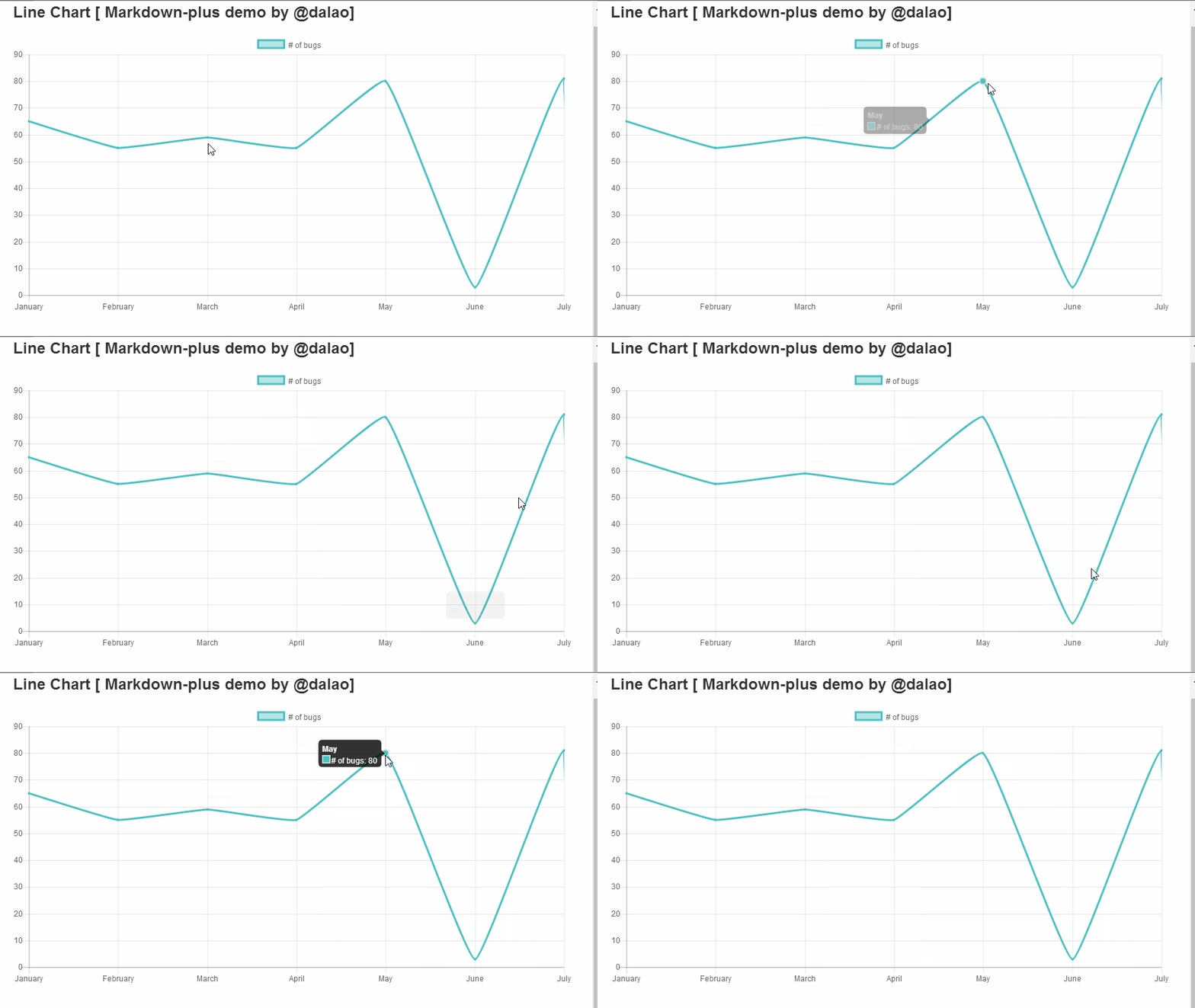 演示代码如下: ```` { "type": "line", "data": { "labels": [ "January", "February", "March", "April", "May", "June", "July" ], "datasets": [ { "label": "# of bugs", "fill": false, "lineTension": 0.1, "backgroundColor": "rgba(75,192,192,0.4)", "borderColor": "rgba(75,192,192,1)", "borderCapStyle": "butt", "borderDash": [], "borderDashOffset": 0, "borderJoinStyle": "miter", "pointBorderColor": "rgba(75,192,192,1)", "pointBackgroundColor": "#fff", "pointBorderWidth": 1, "pointHoverRadius": 5, "pointHoverBackgroundColor": "rgba(75,192,192,1)", "pointHoverBorderColor": "rgba(220,220,220,1)", "pointHoverBorderWidth": 2, "pointRadius": 1, "pointHitRadius": 10, "data": [ 65,55, 59,55, 80,3, 81,3, 56,4, 55.5, 40 ], "spanGaps": false } ] }, "options": {} } ```` ##### 知识点1:Markdown语法格式输入,以及如何支持扩展语言 markdown 里面代码是使用 英文状态下的4个顿号括起来的,如下: ```` ···· 代码 //此时,这部分内容是不被执行的,在markdown会直接显示出来。 ···· ```` 效果是代码高亮,区别于别的内容。 想要实现进度图,markdown语法是不支持的,而markdown-plus支持语法扩展,所以我们可以在markdown-plus输入别的语法来实现我们需要的功能。 ``` ····chart 代码区域 ···· ``` 这里我们使用扩展语法 chart来制作进度图图,此时,代码区域的内容会被执行。 ##### 知识点2:声明连线图 ```` "type": "line", ```` type为图表类型,line即为连线图。 ##### 知识点3:设置X轴标签名称 ```` "data": { "labels": [ "January", "February", "March", "April", "May", "June", "July" ], ```` labels即为标签,这里设置的是显示在X轴上面的各个标签名称。用双引号括起来,用逗号隔开。例子如下:  ##### 知识点4:设置连线图外观 ```` "datasets": [ { "label": "# of bugs", "fill": false, "lineTension": 0.1, "backgroundColor": "rgba(75,192,192,0.4)", "borderColor": "rgba(75,192,192,1)", "borderCapStyle": "butt", "borderDash": [], "borderDashOffset": 0, "borderJoinStyle": "miter", "pointBorderColor": "rgba(75,192,192,1)", "pointBackgroundColor": "#fff", "pointBorderWidth": 1, "pointHoverRadius": 5, "pointHoverBackgroundColor": "rgba(75,192,192,1)", "pointHoverBorderColor": "rgba(220,220,220,1)", "pointHoverBorderWidth": 2, "pointRadius": 1, "pointHitRadius": 10, } ] ```` label 图例,显示在表格上方,如下:  其余参数介绍: **Line Configuration 线性设置** | Name | Type | Default | Description | | ---------------- | ------- | ----------------- | ------------------------------- | | tension | Number | 0.4 | 默认贝塞尔曲线张力设置,设置为0时,没有曲线张力 | | backgroundColor | Color | 'rgba(0,0,0,0.1)' | 默认填充颜色 | | borderWidth | Number | 3 | 线的宽度 | | borderColor | Color | 'rgba(0,0,0,0.1)' | 默认线的颜色 | | borderCapStyle | String | 'butt' | 默认线的一端的样式 | | borderDash | Array | [] | 默认线条波折线样式 | | borderDashOffset | Number | 0.0 | 默认波折线间距 | | borderJoinStyle | String | 'miter' | 默认线波折连接样式 | | capBezierPoints | Boolean | true | 如果值为`true`则控制图表内部点,为`false`则不控制 | | fill | Boolean | true | 如果是true则为线填充颜色 | | stepped | Boolean | false | 如果是true则线的样式是折线,张力会无效 | **Point Configuration点型设置** | Name | Type | Default | Description | | ---------------- | ------ | ----------------- | ------------ | | radius | Number | 3 | 默认半径 | | pointStyle | String | 'circle' | 默认样式 | | backgroundColor | Color | 'rgba(0,0,0,0.1)' | 默认填充颜色 | | borderWidth | Number | 1 | 默认边的宽度 | | borderColor | Color | 'rgba(0,0,0,0.1)' | 默认边的颜色 | | hitRadius | Number | 1 | 鼠标悬浮时额外增加的半径 | | hoverRadius | Number | 4 | 鼠标放上去是的默认半径 | | hoverBorderWidth | Number | 1 | 鼠标放上去时默认线宽 | **Rectangle Configuration矩形设置** | Name | Type | Default | Description | | --------------- | ------ | ----------------- | ----------- | | backgroundColor | Color | 'rgba(0,0,0,0.1)' | 默认条颜色 | | borderWidth | Number | 0 | 默认条的线宽 | | borderColor | Color | 'rgba(0,0,0,0.1)' | 默认条的线的颜色 | | borderSkipped | String | 'bottom' | 默认的跳跃边界 | ##### 知识点5:录入数据 ```` "data": [ 65, 59, 80, 80, 50, 55, 40 ], ```` 此部分代码还是要写在dataset里,data:数据。格式 "data":{data1,data2,data3……} x轴标签有多少个就录入多少个数据。 下面是个简单实例: 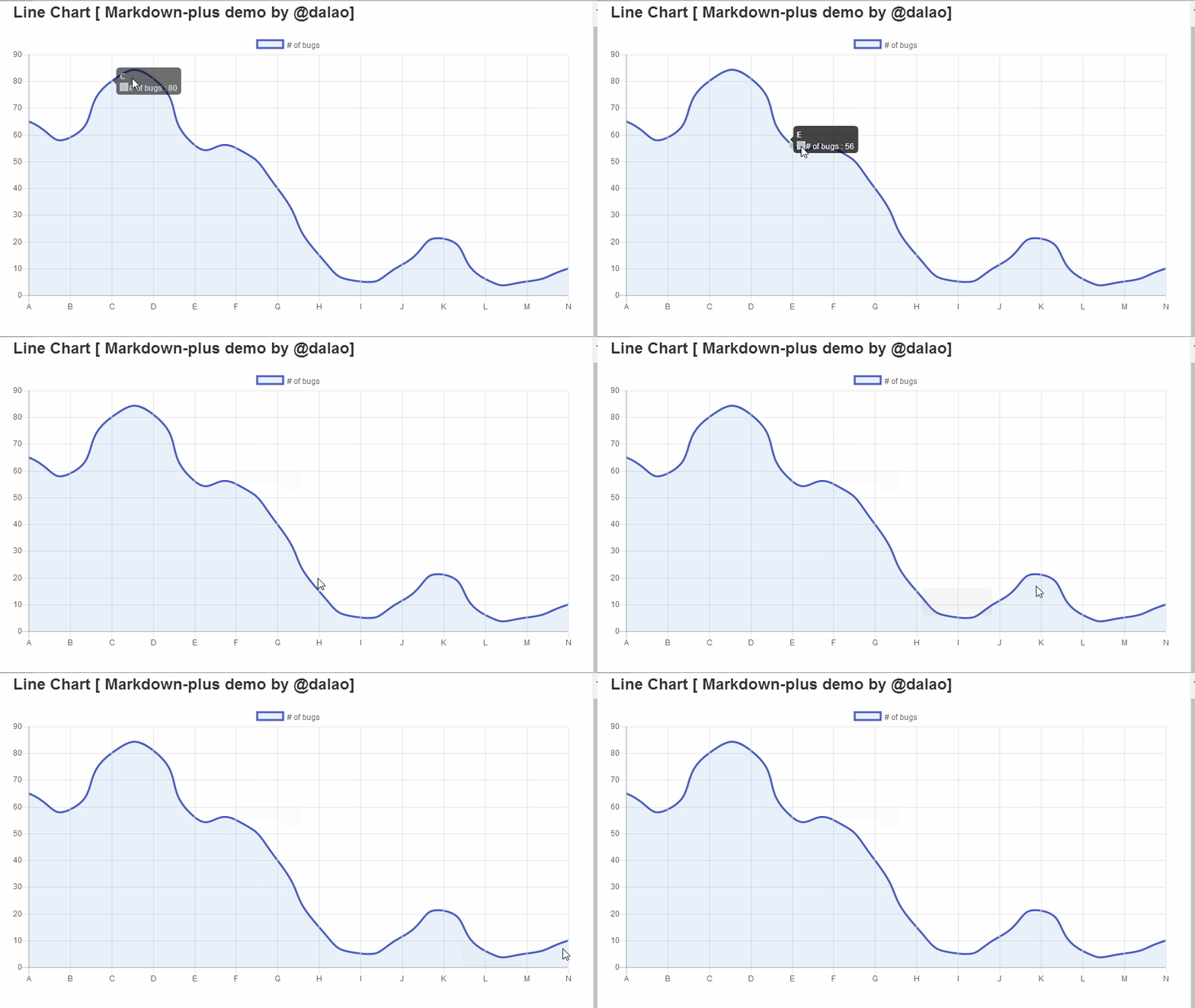 代码如下: ```` { "type": "line", "data": { "labels": [ "A", "B", "C", "D", "E", "F", "G", "H", "I", "J", "K", "L", "M", "N" ], "datasets": [ { "label": "# of bugs ", "fill": true, "lineTension": 0.6, "backgroundColor": "rgba(25,102,192,0.1)", "borderColor": "rgba(75,92,192,1)", "borderCapStyle": "butt", "borderDash": [], "borderDashOffset": 1, "borderJoinStyle": "miter", "pointBorderColor": "rgba(175,192,192,1)", "pointBackgroundColor": "#fff", "pointBorderWidth": 1, "pointHoverRadius": 5, "pointHoverBackgroundColor": "rgba(175,192,192,1)", "pointHoverBorderColor": "rgba(225,225,220,1)", "pointHoverBorderWidth": 2, "pointRadius": 1, "pointHitRadius": 11, "data": [ 65, 59, 80, 81, 56, 55, 40, 15, 5, 11.3, 21, 6, 5, 10 ], "spanGaps": false } ] }, "options": {} } ```` #### Curriculum/系列课程 - [怎么使用markdownplus画流程图/How to use markdownplus to create a flow chart](https://utopian.io/utopian-io/@dalao/markdownplus-how-to-use-markdownplus-to-create-a-flow-chart) - [怎么使用markdownplus画工作进度图/How to use markdownplus to create work schedule](https://utopian.io/utopian-io/@dalao/markdownplus-how-to-use-markdownplus-to-create-work-schedule) - [怎么使用markdownplus画时序图/How to use markdownplus to create relation diagram](https://utopian.io/utopian-io/@dalao/markdownplus-how-to-use-markdownplus-to-create-relation-diagram) <br /><hr/><em>Posted on <a href="https://utopian.io/utopian-io/@dalao/markdownplus-how-to-use-markdownplus-to-create-line-chart">Utopian.io - Rewarding Open Source Contributors</a></em><hr/> |
| title | 怎么使用markdownplus画线图/How to use markdownplus to create a line chart |
| author | dalao |
| permlink | markdownplus-how-to-use-markdownplus-to-create-line-chart |
| json metadata | {"community":"utopian","app":"utopian/1.0.0","format":"markdown","repository":{"id":31993596,"name":"markdown-plus","full_name":"tylingsoft/markdown-plus","html_url":"https://github.com/tylingsoft/markdown-plus","fork":false,"owner":{"login":"tylingsoft"}},"pullRequests":[],"platform":"github","type":"tutorials","tags":["utopian-io","mardownplus","markdown","chart"],"users":["dalao"],"links":["https://steemitimages.com/DQmUa79eB3nfisKDHMV7Rf4hTa6JxJdwg2qYvAVNo9rykvP/1.gif","https://steemitimages.com/DQmUMsJ5tK6fSUuX972L4wHG6gFUNG9kTtwKcJ6DvQKozzp/360%E6%88%AA%E5%9B%BE20180116215700252.jpg","https://steemitimages.com/DQmdZPKQnGJpYBhiMoMH6puQmfZyvZkcHF5muPknHNRhe2r/360%E6%88%AA%E5%9B%BE20180116215905927.jpg","https://steemitimages.com/DQmNb1ndC8enRLnCtG29PsQxy2HZNUUJwXbzHJ5FbGGwRQN/1.gif","https://utopian.io/utopian-io/@dalao/markdownplus-how-to-use-markdownplus-to-create-a-flow-chart","https://utopian.io/utopian-io/@dalao/markdownplus-how-to-use-markdownplus-to-create-work-schedule","https://utopian.io/utopian-io/@dalao/markdownplus-how-to-use-markdownplus-to-create-relation-diagram"],"image":["https://steemitimages.com/DQmUa79eB3nfisKDHMV7Rf4hTa6JxJdwg2qYvAVNo9rykvP/1.gif","https://steemitimages.com/DQmUMsJ5tK6fSUuX972L4wHG6gFUNG9kTtwKcJ6DvQKozzp/360%E6%88%AA%E5%9B%BE20180116215700252.jpg","https://steemitimages.com/DQmdZPKQnGJpYBhiMoMH6puQmfZyvZkcHF5muPknHNRhe2r/360%E6%88%AA%E5%9B%BE20180116215905927.jpg","https://steemitimages.com/DQmNb1ndC8enRLnCtG29PsQxy2HZNUUJwXbzHJ5FbGGwRQN/1.gif"],"moderator":{"account":"scipio","time":"2018-01-17T10:26:30.205Z","flagged":true,"reviewed":false,"pending":false}} |
| parent author | |
| parent permlink | utopian-io |
| Transaction Info | Block #19054353/Trx 86f9074260a5fa20bf4c1c9f338b410ddaea74b4 |
View Raw JSON Data
{
"op": [
"comment",
{
"body": "Summary:\nMarkdown-plus is a markdown editor, but it also can help us to create charts . Today i will show you how to use markdownplus to create line chart.\nMarkdown-plus从名字看是markdown的升级版,不仅仅可以让我们用md语法写文章,同时支持让我们创建图表,今天我介绍如何使用markdown-plus 创建连线图。\n\n因为markdown-plus扩展支持了chart.js,所以我们只需要执行简短的代码就可以绘制精美的统计图,而不需要去学习太多chart.js的知识。\n\n#### What Will I Learn?/教程知识点\n\n- Markdown语法格式输入,以及如何支持扩展语言\n- 声明连线图\n- 设置X轴标签名称\n- 设置连线图外观\n- 录入数据\n\n#### Requirements/要求\n\n- 简单英文基础\n- 简单markdown语法基础\n- 下载markdown-plus编辑器\n\n#### Difficulty/难度\n\n简单\n\n#### Tutorial Contents/教程内容\n\n下面先看一个简单例子:\n\n\n\n演示代码如下:\n\n````\n{\n \"type\": \"line\",\n \"data\": {\n \"labels\": [\n \"January\",\n \"February\",\n \"March\",\n \"April\",\n \"May\",\n \"June\",\n \"July\"\n ],\n \"datasets\": [\n {\n \"label\": \"# of bugs\",\n \"fill\": false,\n \"lineTension\": 0.1,\n \"backgroundColor\": \"rgba(75,192,192,0.4)\",\n \"borderColor\": \"rgba(75,192,192,1)\",\n \"borderCapStyle\": \"butt\",\n \"borderDash\": [],\n \"borderDashOffset\": 0,\n \"borderJoinStyle\": \"miter\",\n \"pointBorderColor\": \"rgba(75,192,192,1)\",\n \"pointBackgroundColor\": \"#fff\",\n \"pointBorderWidth\": 1,\n \"pointHoverRadius\": 5,\n \"pointHoverBackgroundColor\": \"rgba(75,192,192,1)\",\n \"pointHoverBorderColor\": \"rgba(220,220,220,1)\",\n \"pointHoverBorderWidth\": 2,\n \"pointRadius\": 1,\n \"pointHitRadius\": 10,\n \"data\": [\n 65,55,\n 59,55,\n 80,3,\n 81,3,\n 56,4,\n 55.5,\n 40\n ],\n \"spanGaps\": false\n }\n ]\n },\n \"options\": {}\n}\n````\n##### 知识点1:Markdown语法格式输入,以及如何支持扩展语言\n\nmarkdown 里面代码是使用 英文状态下的4个顿号括起来的,如下:\n\n````\n····\n代码 //此时,这部分内容是不被执行的,在markdown会直接显示出来。\n····\n````\n效果是代码高亮,区别于别的内容。\n\n想要实现进度图,markdown语法是不支持的,而markdown-plus支持语法扩展,所以我们可以在markdown-plus输入别的语法来实现我们需要的功能。\n\n```\n····chart\n代码区域\n····\n```\n\n这里我们使用扩展语法 chart来制作进度图图,此时,代码区域的内容会被执行。\n\n##### 知识点2:声明连线图\n\n````\n\"type\": \"line\",\n````\n\ntype为图表类型,line即为连线图。\n\n##### 知识点3:设置X轴标签名称\n\n````\n\"data\": {\n \"labels\": [\n \"January\",\n \"February\",\n \"March\",\n \"April\",\n \"May\",\n \"June\",\n \"July\"\n ],\n````\n\nlabels即为标签,这里设置的是显示在X轴上面的各个标签名称。用双引号括起来,用逗号隔开。例子如下:\n\n\n\n##### 知识点4:设置连线图外观\n\n````\n\"datasets\": [\n {\n \"label\": \"# of bugs\",\n \"fill\": false,\n \"lineTension\": 0.1,\n \"backgroundColor\": \"rgba(75,192,192,0.4)\",\n \"borderColor\": \"rgba(75,192,192,1)\",\n \"borderCapStyle\": \"butt\",\n \"borderDash\": [],\n \"borderDashOffset\": 0,\n \"borderJoinStyle\": \"miter\",\n \"pointBorderColor\": \"rgba(75,192,192,1)\",\n \"pointBackgroundColor\": \"#fff\",\n \"pointBorderWidth\": 1,\n \"pointHoverRadius\": 5,\n \"pointHoverBackgroundColor\": \"rgba(75,192,192,1)\",\n \"pointHoverBorderColor\": \"rgba(220,220,220,1)\",\n \"pointHoverBorderWidth\": 2,\n \"pointRadius\": 1,\n \"pointHitRadius\": 10,\n }\n ]\n````\n\nlabel 图例,显示在表格上方,如下:\n\n\n其余参数介绍:\n\n**Line Configuration 线性设置**\n\n| Name | Type | Default | Description |\n| ---------------- | ------- | ----------------- | ------------------------------- |\n| tension | Number | 0.4 | 默认贝塞尔曲线张力设置,设置为0时,没有曲线张力 |\n| backgroundColor | Color | 'rgba(0,0,0,0.1)' | 默认填充颜色 |\n| borderWidth | Number | 3 | 线的宽度 |\n| borderColor | Color | 'rgba(0,0,0,0.1)' | 默认线的颜色 |\n| borderCapStyle | String | 'butt' | 默认线的一端的样式 |\n| borderDash | Array | [] | 默认线条波折线样式 |\n| borderDashOffset | Number | 0.0 | 默认波折线间距 |\n| borderJoinStyle | String | 'miter' | 默认线波折连接样式 |\n| capBezierPoints | Boolean | true | 如果值为`true`则控制图表内部点,为`false`则不控制 |\n| fill | Boolean | true | 如果是true则为线填充颜色 |\n| stepped | Boolean | false | 如果是true则线的样式是折线,张力会无效 |\n\n **Point Configuration点型设置**\n\n| Name | Type | Default | Description |\n| ---------------- | ------ | ----------------- | ------------ |\n| radius | Number | 3 | 默认半径 |\n| pointStyle | String | 'circle' | 默认样式 |\n| backgroundColor | Color | 'rgba(0,0,0,0.1)' | 默认填充颜色 |\n| borderWidth | Number | 1 | 默认边的宽度 |\n| borderColor | Color | 'rgba(0,0,0,0.1)' | 默认边的颜色 |\n| hitRadius | Number | 1 | 鼠标悬浮时额外增加的半径 |\n| hoverRadius | Number | 4 | 鼠标放上去是的默认半径 |\n| hoverBorderWidth | Number | 1 | 鼠标放上去时默认线宽 |\n\n **Rectangle Configuration矩形设置**\n\n| Name | Type | Default | Description |\n| --------------- | ------ | ----------------- | ----------- |\n| backgroundColor | Color | 'rgba(0,0,0,0.1)' | 默认条颜色 |\n| borderWidth | Number | 0 | 默认条的线宽 |\n| borderColor | Color | 'rgba(0,0,0,0.1)' | 默认条的线的颜色 |\n| borderSkipped | String | 'bottom' | 默认的跳跃边界 |\n\n##### 知识点5:录入数据\n\n````\n\"data\": [\n 65,\n 59,\n 80,\n 80,\n 50,\n 55,\n 40\n ],\n````\n\n此部分代码还是要写在dataset里,data:数据。格式 \"data\":{data1,data2,data3……}\n\nx轴标签有多少个就录入多少个数据。\n\n\n\n下面是个简单实例:\n\n\n\n代码如下:\n\n````\n{\n \"type\": \"line\",\n \"data\": {\n \"labels\": [\n \"A\",\n \"B\",\n \"C\",\n \"D\",\n \"E\",\n \"F\",\n \"G\",\n \"H\",\n \"I\",\n \"J\",\n \"K\",\n \"L\",\n \"M\",\n \"N\"\n ],\n \"datasets\": [\n {\n \"label\": \"# of bugs \",\n \"fill\": true,\n \"lineTension\": 0.6,\n \"backgroundColor\": \"rgba(25,102,192,0.1)\",\n \"borderColor\": \"rgba(75,92,192,1)\",\n \"borderCapStyle\": \"butt\",\n \"borderDash\": [],\n \"borderDashOffset\": 1,\n \"borderJoinStyle\": \"miter\",\n \"pointBorderColor\": \"rgba(175,192,192,1)\",\n \"pointBackgroundColor\": \"#fff\",\n \"pointBorderWidth\": 1,\n \"pointHoverRadius\": 5,\n \"pointHoverBackgroundColor\": \"rgba(175,192,192,1)\",\n \"pointHoverBorderColor\": \"rgba(225,225,220,1)\",\n \"pointHoverBorderWidth\": 2,\n \"pointRadius\": 1,\n \"pointHitRadius\": 11,\n \"data\": [\n 65,\n 59,\n 80,\n 81,\n 56,\n 55,\n 40,\n 15,\n 5,\n 11.3,\n 21,\n 6,\n 5,\n 10\n ],\n \"spanGaps\": false\n }\n ]\n },\n \"options\": {}\n}\n````\n\n#### Curriculum/系列课程\n\n- [怎么使用markdownplus画流程图/How to use markdownplus to create a flow chart](https://utopian.io/utopian-io/@dalao/markdownplus-how-to-use-markdownplus-to-create-a-flow-chart)\n- [怎么使用markdownplus画工作进度图/How to use markdownplus to create work schedule](https://utopian.io/utopian-io/@dalao/markdownplus-how-to-use-markdownplus-to-create-work-schedule)\n- [怎么使用markdownplus画时序图/How to use markdownplus to create relation diagram](https://utopian.io/utopian-io/@dalao/markdownplus-how-to-use-markdownplus-to-create-relation-diagram)\n\n\n<br /><hr/><em>Posted on <a href=\"https://utopian.io/utopian-io/@dalao/markdownplus-how-to-use-markdownplus-to-create-line-chart\">Utopian.io - Rewarding Open Source Contributors</a></em><hr/>",
"title": "怎么使用markdownplus画线图/How to use markdownplus to create a line chart",
"author": "dalao",
"permlink": "markdownplus-how-to-use-markdownplus-to-create-line-chart",
"json_metadata": "{\"community\":\"utopian\",\"app\":\"utopian/1.0.0\",\"format\":\"markdown\",\"repository\":{\"id\":31993596,\"name\":\"markdown-plus\",\"full_name\":\"tylingsoft/markdown-plus\",\"html_url\":\"https://github.com/tylingsoft/markdown-plus\",\"fork\":false,\"owner\":{\"login\":\"tylingsoft\"}},\"pullRequests\":[],\"platform\":\"github\",\"type\":\"tutorials\",\"tags\":[\"utopian-io\",\"mardownplus\",\"markdown\",\"chart\"],\"users\":[\"dalao\"],\"links\":[\"https://steemitimages.com/DQmUa79eB3nfisKDHMV7Rf4hTa6JxJdwg2qYvAVNo9rykvP/1.gif\",\"https://steemitimages.com/DQmUMsJ5tK6fSUuX972L4wHG6gFUNG9kTtwKcJ6DvQKozzp/360%E6%88%AA%E5%9B%BE20180116215700252.jpg\",\"https://steemitimages.com/DQmdZPKQnGJpYBhiMoMH6puQmfZyvZkcHF5muPknHNRhe2r/360%E6%88%AA%E5%9B%BE20180116215905927.jpg\",\"https://steemitimages.com/DQmNb1ndC8enRLnCtG29PsQxy2HZNUUJwXbzHJ5FbGGwRQN/1.gif\",\"https://utopian.io/utopian-io/@dalao/markdownplus-how-to-use-markdownplus-to-create-a-flow-chart\",\"https://utopian.io/utopian-io/@dalao/markdownplus-how-to-use-markdownplus-to-create-work-schedule\",\"https://utopian.io/utopian-io/@dalao/markdownplus-how-to-use-markdownplus-to-create-relation-diagram\"],\"image\":[\"https://steemitimages.com/DQmUa79eB3nfisKDHMV7Rf4hTa6JxJdwg2qYvAVNo9rykvP/1.gif\",\"https://steemitimages.com/DQmUMsJ5tK6fSUuX972L4wHG6gFUNG9kTtwKcJ6DvQKozzp/360%E6%88%AA%E5%9B%BE20180116215700252.jpg\",\"https://steemitimages.com/DQmdZPKQnGJpYBhiMoMH6puQmfZyvZkcHF5muPknHNRhe2r/360%E6%88%AA%E5%9B%BE20180116215905927.jpg\",\"https://steemitimages.com/DQmNb1ndC8enRLnCtG29PsQxy2HZNUUJwXbzHJ5FbGGwRQN/1.gif\"],\"moderator\":{\"account\":\"scipio\",\"time\":\"2018-01-17T10:26:30.205Z\",\"flagged\":true,\"reviewed\":false,\"pending\":false}}",
"parent_author": "",
"parent_permlink": "utopian-io"
}
],
"block": 19054353,
"trx_id": "86f9074260a5fa20bf4c1c9f338b410ddaea74b4",
"op_in_trx": 0,
"timestamp": "2018-01-17T10:26:33",
"virtual_op": false,
"trx_in_block": 21
}2018/01/16 16:09:12
2018/01/16 16:09:12
| body | Your contribution cannot be approved because it does not follow the Utopian Rules. It is similar to the contribution [here](https://steemit.com/utopian-io/@justyy/invalid-tags-are-allowed-in-utopian) Welcome to utopian and thanks for contributing . I think this is not a bug, As a bug is `unintended function` or `layout issue` or a ` unexpected crash`. this falls under none of that. moreover i think tag functionality differs with every platform. You can contact us on [Discord](https://discord.gg/uTyJkNm). [utopian-moderator](https://utopian.io/moderators) |
| title | |
| author | sachincool |
| permlink | re-dalao-steemit-only-allows-english-tag-but-also-can-add-chinese-japanese-and-other-tag-20180116t160908779z |
| json metadata | {"tags":["utopian-io"],"community":"utopian","app":"utopian/1.0.0"} |
| parent author | dalao |
| parent permlink | steemit-only-allows-english-tag-but-also-can-add-chinese-japanese-and-other-tag |
| Transaction Info | Block #19032409/Trx 29bb030b22acb77152f46ed284e958cdc2c2ccb4 |
View Raw JSON Data
{
  "op": [
    "comment",
    {
      "body": "Your contribution cannot be approved because it does not follow the Utopian Rules.\nIt is similar to the contribution [here](https://steemit.com/utopian-io/@justyy/invalid-tags-are-allowed-in-utopian)\nWelcome to utopian and thanks for contributing .\nI think this is not a bug, As a bug is `unintended function` or `layout issue` or a ` unexpected crash`. this falls under none of that. moreover i think tag functionality differs with every platform. \n\nYou can contact us on [Discord](https://discord.gg/uTyJkNm).\n[utopian-moderator](https://utopian.io/moderators)",
      "title": "",
      "author": "sachincool",
      "permlink": "re-dalao-steemit-only-allows-english-tag-but-also-can-add-chinese-japanese-and-other-tag-20180116t160908779z",
      "json_metadata": "{\"tags\":[\"utopian-io\"],\"community\":\"utopian\",\"app\":\"utopian/1.0.0\"}",
      "parent_author": "dalao",
      "parent_permlink": "steemit-only-allows-english-tag-but-also-can-add-chinese-japanese-and-other-tag"
    }
  ],
  "block": 19032409,
  "trx_id": "29bb030b22acb77152f46ed284e958cdc2c2ccb4",
  "op_in_trx": 0,
  "timestamp": "2018-01-16T16:09:12",
  "virtual_op": false,
  "trx_in_block": 36
}dalaopublished a new post: steemit-only-allows-english-tag-but-also-can-add-chinese-japanese-and-other-tag2018/01/16 15:52:15
dalaopublished a new post: steemit-only-allows-english-tag-but-also-can-add-chinese-japanese-and-other-tag
2018/01/16 15:52:15
| body | #### Expected behavior When i add tags in steemit. I try to add Chinese tag or Korean tag #### Actual behavior we can add english tag, and if we enter Chinese or other language, it will tell me ,** its invalid** . but , i can add Chinese or other language. 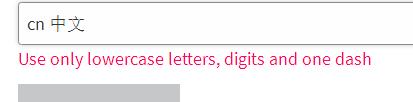  #### How to reproduce If you add two spaces before tag, you can enter Chinese or Japanese tag  * Browser: ALL * Operating system: ALL #### Recording Of The Bug gif record: 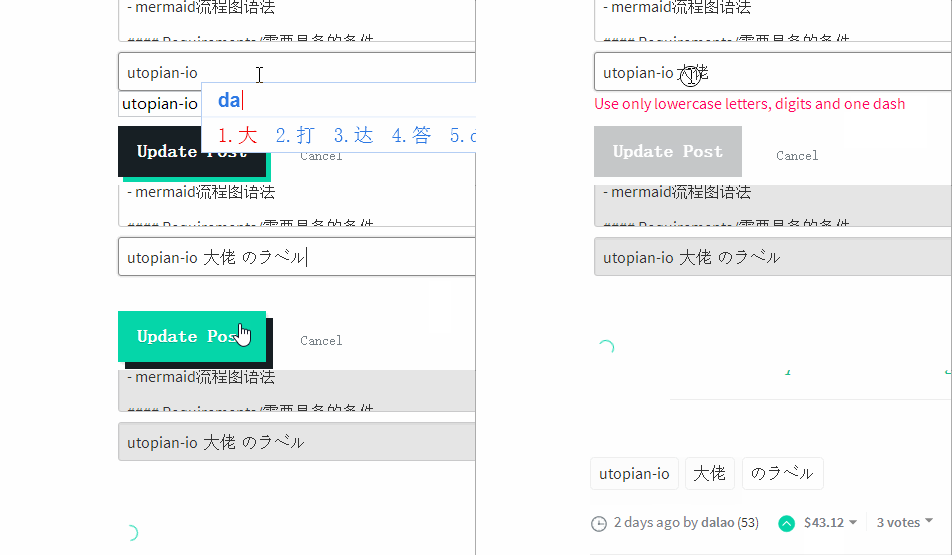 <br /><hr/><em>Posted on <a href="https://utopian.io/utopian-io/@dalao/steemit-only-allows-english-tag-but-also-can-add-chinese-japanese-and-other-tag">Utopian.io - Rewarding Open Source Contributors</a></em><hr/> |
| title | Steemit allows English tag, But also can add Chinese, Japanese and other tag |
| author | dalao |
| permlink | steemit-only-allows-english-tag-but-also-can-add-chinese-japanese-and-other-tag |
| json metadata | {"community":"utopian","app":"utopian/1.0.0","format":"markdown","repository":{"id":59213335,"name":"condenser","full_name":"steemit/condenser","html_url":"https://github.com/steemit/condenser","fork":false,"owner":{"login":"steemit"}},"pullRequests":[],"platform":"github","type":"bug-hunting","tags":["utopian-io","bug","steemit"],"users":["dalao"],"links":["https://steemitimages.com/DQmQeAwSnV2e2Dq2Xskszgr4R7rXLQBAa7Esn4jAjJqoeY2/360%E6%88%AA%E5%9B%BE20180115205309146.jpg","https://steemitimages.com/DQmQYCfEQtPsED5FbfSAhzeHpwKnaTB8dUrSz6n7uXrk4fe/360%E6%88%AA%E5%9B%BE20180115205408805.jpg","https://steemitimages.com/DQmZGSRd5N3bcvPszuC3asaR5BVEFzg3aoQzhkeXnRs1PZs/360%E6%88%AA%E5%9B%BE20180115205647332.jpg","https://steemitimages.com/DQmPEzGdp5f5KquyQtYBsSUFmHEHVh1cGZEeemXn7jP2t1P/1.gif"],"image":["https://steemitimages.com/DQmQeAwSnV2e2Dq2Xskszgr4R7rXLQBAa7Esn4jAjJqoeY2/360%E6%88%AA%E5%9B%BE20180115205309146.jpg","https://steemitimages.com/DQmQYCfEQtPsED5FbfSAhzeHpwKnaTB8dUrSz6n7uXrk4fe/360%E6%88%AA%E5%9B%BE20180115205408805.jpg","https://steemitimages.com/DQmZGSRd5N3bcvPszuC3asaR5BVEFzg3aoQzhkeXnRs1PZs/360%E6%88%AA%E5%9B%BE20180115205647332.jpg","https://steemitimages.com/DQmPEzGdp5f5KquyQtYBsSUFmHEHVh1cGZEeemXn7jP2t1P/1.gif"],"moderator":{"account":"sachincool","time":"2018-01-16T15:52:13.556Z","flagged":true,"reviewed":false,"pending":false}} |
| parent author | |
| parent permlink | utopian-io |
| Transaction Info | Block #19032070/Trx da1c8dcaeeac708b0ad4a3fc775281dc2b40e428 |
View Raw JSON Data
{
"op": [
"comment",
{
"body": "\n#### Expected behavior\nWhen i add tags in steemit. I try to add Chinese tag or Korean tag\n\n#### Actual behavior\nwe can add english tag, and if we enter Chinese or other language, it will tell me ,** its invalid** . but , i can add Chinese or other language.\n\n\n#### How to reproduce\n If you add two spaces before tag, you can enter Chinese or Japanese tag\n\n\n* Browser: ALL\n* Operating system: ALL\n\n#### Recording Of The Bug\ngif record:\n\n\n<br /><hr/><em>Posted on <a href=\"https://utopian.io/utopian-io/@dalao/steemit-only-allows-english-tag-but-also-can-add-chinese-japanese-and-other-tag\">Utopian.io - Rewarding Open Source Contributors</a></em><hr/>",
"title": "Steemit allows English tag, But also can add Chinese, Japanese and other tag",
"author": "dalao",
"permlink": "steemit-only-allows-english-tag-but-also-can-add-chinese-japanese-and-other-tag",
"json_metadata": "{\"community\":\"utopian\",\"app\":\"utopian/1.0.0\",\"format\":\"markdown\",\"repository\":{\"id\":59213335,\"name\":\"condenser\",\"full_name\":\"steemit/condenser\",\"html_url\":\"https://github.com/steemit/condenser\",\"fork\":false,\"owner\":{\"login\":\"steemit\"}},\"pullRequests\":[],\"platform\":\"github\",\"type\":\"bug-hunting\",\"tags\":[\"utopian-io\",\"bug\",\"steemit\"],\"users\":[\"dalao\"],\"links\":[\"https://steemitimages.com/DQmQeAwSnV2e2Dq2Xskszgr4R7rXLQBAa7Esn4jAjJqoeY2/360%E6%88%AA%E5%9B%BE20180115205309146.jpg\",\"https://steemitimages.com/DQmQYCfEQtPsED5FbfSAhzeHpwKnaTB8dUrSz6n7uXrk4fe/360%E6%88%AA%E5%9B%BE20180115205408805.jpg\",\"https://steemitimages.com/DQmZGSRd5N3bcvPszuC3asaR5BVEFzg3aoQzhkeXnRs1PZs/360%E6%88%AA%E5%9B%BE20180115205647332.jpg\",\"https://steemitimages.com/DQmPEzGdp5f5KquyQtYBsSUFmHEHVh1cGZEeemXn7jP2t1P/1.gif\"],\"image\":[\"https://steemitimages.com/DQmQeAwSnV2e2Dq2Xskszgr4R7rXLQBAa7Esn4jAjJqoeY2/360%E6%88%AA%E5%9B%BE20180115205309146.jpg\",\"https://steemitimages.com/DQmQYCfEQtPsED5FbfSAhzeHpwKnaTB8dUrSz6n7uXrk4fe/360%E6%88%AA%E5%9B%BE20180115205408805.jpg\",\"https://steemitimages.com/DQmZGSRd5N3bcvPszuC3asaR5BVEFzg3aoQzhkeXnRs1PZs/360%E6%88%AA%E5%9B%BE20180115205647332.jpg\",\"https://steemitimages.com/DQmPEzGdp5f5KquyQtYBsSUFmHEHVh1cGZEeemXn7jP2t1P/1.gif\"],\"moderator\":{\"account\":\"sachincool\",\"time\":\"2018-01-16T15:52:13.556Z\",\"flagged\":true,\"reviewed\":false,\"pending\":false}}",
"parent_author": "",
"parent_permlink": "utopian-io"
}
],
"block": 19032070,
"trx_id": "da1c8dcaeeac708b0ad4a3fc775281dc2b40e428",
"op_in_trx": 0,
"timestamp": "2018-01-16T15:52:15",
"virtual_op": false,
"trx_in_block": 41
}mvanyieffective vote applied for @dalao / markdownplus-how-to-use-markdownplus-to-create-line-chart2018/01/16 15:31:36
mvanyieffective vote applied for @dalao / markdownplus-how-to-use-markdownplus-to-create-line-chart
2018/01/16 15:31:36
| voter | mvanyi |
| author | dalao |
| weight | 24028 |
| rshares | 518938259 |
| permlink | markdownplus-how-to-use-markdownplus-to-create-line-chart |
| pending payout | 0.005 HBD |
| total vote weight | 24028 |
| Transaction Info | Block #19031657/Trx 2962c06aab03836771471311f2d99daba68b181d |
View Raw JSON Data
{
  "op": [
    "effective_comment_vote",
    {
      "voter": "mvanyi",
      "author": "dalao",
      "weight": 24028,
      "rshares": 518938259,
      "permlink": "markdownplus-how-to-use-markdownplus-to-create-line-chart",
      "pending_payout": "0.005 HBD",
      "total_vote_weight": 24028
    }
  ],
  "block": 19031657,
  "trx_id": "2962c06aab03836771471311f2d99daba68b181d",
  "op_in_trx": 1,
  "timestamp": "2018-01-16T15:31:36",
  "virtual_op": true,
  "trx_in_block": 0
}mvanyiupvoted (100.00%) @dalao / markdownplus-how-to-use-markdownplus-to-create-line-chart2018/01/16 15:31:36
mvanyiupvoted (100.00%) @dalao / markdownplus-how-to-use-markdownplus-to-create-line-chart
2018/01/16 15:31:36
| voter | mvanyi |
| author | dalao |
| weight | 10000 (100.00%) |
| permlink | markdownplus-how-to-use-markdownplus-to-create-line-chart |
| Transaction Info | Block #19031657/Trx 2962c06aab03836771471311f2d99daba68b181d |
View Raw JSON Data
{
  "op": [
    "vote",
    {
      "voter": "mvanyi",
      "author": "dalao",
      "weight": 10000,
      "permlink": "markdownplus-how-to-use-markdownplus-to-create-line-chart"
    }
  ],
  "block": 19031657,
  "trx_id": "2962c06aab03836771471311f2d99daba68b181d",
  "op_in_trx": 0,
  "timestamp": "2018-01-16T15:31:36",
  "virtual_op": false,
  "trx_in_block": 0
}2018/01/16 14:57:15
2018/01/16 14:57:15
| body | Thank you very much :) I have changed the repository, ple review. thank you very much ,again. |
| title | |
| author | dalao |
| permlink | re-sachincool-re-dalao-steemit-only-allows-english-tag-but-also-can-add-chinese-japanese-and-other-tag-20180116t145500764z |
| json metadata | {"tags":["utopian-io"],"community":"utopian","app":"utopian/1.0.0"} |
| parent author | sachincool |
| parent permlink | re-dalao-steemit-only-allows-english-tag-but-also-can-add-chinese-japanese-and-other-tag-20180116t141117985z |
| Transaction Info | Block #19030970/Trx f3ff7893f2c734ce448c527f33eb9643fa55a6ed |
View Raw JSON Data
{
  "op": [
    "comment",
    {
      "body": "Thank you very much :)\nI have changed the repository, ple review. thank you very much ,again.\n",
      "title": "",
      "author": "dalao",
      "permlink": "re-sachincool-re-dalao-steemit-only-allows-english-tag-but-also-can-add-chinese-japanese-and-other-tag-20180116t145500764z",
      "json_metadata": "{\"tags\":[\"utopian-io\"],\"community\":\"utopian\",\"app\":\"utopian/1.0.0\"}",
      "parent_author": "sachincool",
      "parent_permlink": "re-dalao-steemit-only-allows-english-tag-but-also-can-add-chinese-japanese-and-other-tag-20180116t141117985z"
    }
  ],
  "block": 19030970,
  "trx_id": "f3ff7893f2c734ce448c527f33eb9643fa55a6ed",
  "op_in_trx": 0,
  "timestamp": "2018-01-16T14:57:15",
  "virtual_op": false,
  "trx_in_block": 47
}dalaopublished a new post: steemit-only-allows-english-tag-but-also-can-add-chinese-japanese-and-other-tag2018/01/16 14:53:18
dalaopublished a new post: steemit-only-allows-english-tag-but-also-can-add-chinese-japanese-and-other-tag
2018/01/16 14:53:18
| body | #### Expected behavior When i add tags in steemit. I try to add Chinese tag or Korean tag #### Actual behavior we can add english tag, and if we enter Chinese or other language, it will tell me ,** its invalid** . but , i can add Chinese or other language.   #### How to reproduce If you add two spaces before tag, you can enter Chinese or Japanese tag  * Browser: ALL * Operating system: ALL #### Recording Of The Bug gif record:  <br /><hr/><em>Posted on <a href="https://utopian.io/utopian-io/@dalao/steemit-only-allows-english-tag-but-also-can-add-chinese-japanese-and-other-tag">Utopian.io - Rewarding Open Source Contributors</a></em><hr/> |
| title | Steemit allows English tag, But also can add Chinese, Japanese and other tag |
| author | dalao |
| permlink | steemit-only-allows-english-tag-but-also-can-add-chinese-japanese-and-other-tag |
| json metadata | {"community":"utopian","app":"utopian/1.0.0","format":"markdown","repository":{"id":59213335,"name":"condenser","full_name":"steemit/condenser","html_url":"https://github.com/steemit/condenser","fork":false,"owner":{"login":"steemit"}},"pullRequests":[],"platform":"github","type":"bug-hunting","tags":["utopian-io","bug","steemit"],"users":["dalao"],"links":["https://steemitimages.com/DQmQeAwSnV2e2Dq2Xskszgr4R7rXLQBAa7Esn4jAjJqoeY2/360%E6%88%AA%E5%9B%BE20180115205309146.jpg","https://steemitimages.com/DQmQYCfEQtPsED5FbfSAhzeHpwKnaTB8dUrSz6n7uXrk4fe/360%E6%88%AA%E5%9B%BE20180115205408805.jpg","https://steemitimages.com/DQmZGSRd5N3bcvPszuC3asaR5BVEFzg3aoQzhkeXnRs1PZs/360%E6%88%AA%E5%9B%BE20180115205647332.jpg","https://steemitimages.com/DQmPEzGdp5f5KquyQtYBsSUFmHEHVh1cGZEeemXn7jP2t1P/1.gif"],"image":["https://steemitimages.com/DQmQeAwSnV2e2Dq2Xskszgr4R7rXLQBAa7Esn4jAjJqoeY2/360%E6%88%AA%E5%9B%BE20180115205309146.jpg","https://steemitimages.com/DQmQYCfEQtPsED5FbfSAhzeHpwKnaTB8dUrSz6n7uXrk4fe/360%E6%88%AA%E5%9B%BE20180115205408805.jpg","https://steemitimages.com/DQmZGSRd5N3bcvPszuC3asaR5BVEFzg3aoQzhkeXnRs1PZs/360%E6%88%AA%E5%9B%BE20180115205647332.jpg","https://steemitimages.com/DQmPEzGdp5f5KquyQtYBsSUFmHEHVh1cGZEeemXn7jP2t1P/1.gif"],"moderator":{}} |
| parent author | |
| parent permlink | utopian-io |
| Transaction Info | Block #19030891/Trx 13a829c01116c98ff672d2b5566bad213d6496e2 |
View Raw JSON Data
{
"op": [
"comment",
{
"body": "\n#### Expected behavior\nWhen i add tags in steemit. I try to add Chinese tag or Korean tag\n\n#### Actual behavior\nwe can add english tag, and if we enter Chinese or other language, it will tell me ,** its invalid** . but , i can add Chinese or other language.\n\n\n#### How to reproduce\n If you add two spaces before tag, you can enter Chinese or Japanese tag\n\n\n* Browser: ALL\n* Operating system: ALL\n\n#### Recording Of The Bug\ngif record:\n\n\n<br /><hr/><em>Posted on <a href=\"https://utopian.io/utopian-io/@dalao/steemit-only-allows-english-tag-but-also-can-add-chinese-japanese-and-other-tag\">Utopian.io - Rewarding Open Source Contributors</a></em><hr/>",
"title": "Steemit allows English tag, But also can add Chinese, Japanese and other tag",
"author": "dalao",
"permlink": "steemit-only-allows-english-tag-but-also-can-add-chinese-japanese-and-other-tag",
"json_metadata": "{\"community\":\"utopian\",\"app\":\"utopian/1.0.0\",\"format\":\"markdown\",\"repository\":{\"id\":59213335,\"name\":\"condenser\",\"full_name\":\"steemit/condenser\",\"html_url\":\"https://github.com/steemit/condenser\",\"fork\":false,\"owner\":{\"login\":\"steemit\"}},\"pullRequests\":[],\"platform\":\"github\",\"type\":\"bug-hunting\",\"tags\":[\"utopian-io\",\"bug\",\"steemit\"],\"users\":[\"dalao\"],\"links\":[\"https://steemitimages.com/DQmQeAwSnV2e2Dq2Xskszgr4R7rXLQBAa7Esn4jAjJqoeY2/360%E6%88%AA%E5%9B%BE20180115205309146.jpg\",\"https://steemitimages.com/DQmQYCfEQtPsED5FbfSAhzeHpwKnaTB8dUrSz6n7uXrk4fe/360%E6%88%AA%E5%9B%BE20180115205408805.jpg\",\"https://steemitimages.com/DQmZGSRd5N3bcvPszuC3asaR5BVEFzg3aoQzhkeXnRs1PZs/360%E6%88%AA%E5%9B%BE20180115205647332.jpg\",\"https://steemitimages.com/DQmPEzGdp5f5KquyQtYBsSUFmHEHVh1cGZEeemXn7jP2t1P/1.gif\"],\"image\":[\"https://steemitimages.com/DQmQeAwSnV2e2Dq2Xskszgr4R7rXLQBAa7Esn4jAjJqoeY2/360%E6%88%AA%E5%9B%BE20180115205309146.jpg\",\"https://steemitimages.com/DQmQYCfEQtPsED5FbfSAhzeHpwKnaTB8dUrSz6n7uXrk4fe/360%E6%88%AA%E5%9B%BE20180115205408805.jpg\",\"https://steemitimages.com/DQmZGSRd5N3bcvPszuC3asaR5BVEFzg3aoQzhkeXnRs1PZs/360%E6%88%AA%E5%9B%BE20180115205647332.jpg\",\"https://steemitimages.com/DQmPEzGdp5f5KquyQtYBsSUFmHEHVh1cGZEeemXn7jP2t1P/1.gif\"],\"moderator\":{}}",
"parent_author": "",
"parent_permlink": "utopian-io"
}
],
"block": 19030891,
"trx_id": "13a829c01116c98ff672d2b5566bad213d6496e2",
"op_in_trx": 0,
"timestamp": "2018-01-16T14:53:18",
"virtual_op": false,
"trx_in_block": 6
}dalaopublished a new post: steemit-only-allows-english-tag-but-also-can-add-chinese-japanese-and-other-tag2018/01/16 14:53:12
dalaopublished a new post: steemit-only-allows-english-tag-but-also-can-add-chinese-japanese-and-other-tag
2018/01/16 14:53:12
| body | #### Expected behavior When i add tags in steemit. I try to add Chinese tag or Korean tag #### Actual behavior we can add english tag, and if we enter Chinese or other language, it will tell me ,** its invalid** . but , i can add Chinese or other language.   #### How to reproduce If you add two spaces before tag, you can enter Chinese or Japanese tag  * Browser: ALL * Operating system: ALL #### Recording Of The Bug gif record:  <br /><hr/><em>Posted on <a href="https://utopian.io/utopian-io/@dalao/steemit-only-allows-english-tag-but-also-can-add-chinese-japanese-and-other-tag">Utopian.io - Rewarding Open Source Contributors</a></em><hr/> |
| title | Steemit allows English tag, But also can add Chinese, Japanese and other tag |
| author | dalao |
| permlink | steemit-only-allows-english-tag-but-also-can-add-chinese-japanese-and-other-tag |
| json metadata | {"community":"utopian","app":"utopian/1.0.0","format":"markdown","repository":{"id":59213335,"name":"condenser","full_name":"steemit/condenser","html_url":"https://github.com/steemit/condenser","fork":false,"owner":{"login":"steemit"}},"pullRequests":[],"platform":"github","type":"bug-hunting","tags":["utopian-io","bug","steemit"],"users":["dalao"],"links":["https://steemitimages.com/DQmQeAwSnV2e2Dq2Xskszgr4R7rXLQBAa7Esn4jAjJqoeY2/360%E6%88%AA%E5%9B%BE20180115205309146.jpg","https://steemitimages.com/DQmQYCfEQtPsED5FbfSAhzeHpwKnaTB8dUrSz6n7uXrk4fe/360%E6%88%AA%E5%9B%BE20180115205408805.jpg","https://steemitimages.com/DQmZGSRd5N3bcvPszuC3asaR5BVEFzg3aoQzhkeXnRs1PZs/360%E6%88%AA%E5%9B%BE20180115205647332.jpg","https://steemitimages.com/DQmPEzGdp5f5KquyQtYBsSUFmHEHVh1cGZEeemXn7jP2t1P/1.gif"],"image":["https://steemitimages.com/DQmQeAwSnV2e2Dq2Xskszgr4R7rXLQBAa7Esn4jAjJqoeY2/360%E6%88%AA%E5%9B%BE20180115205309146.jpg","https://steemitimages.com/DQmQYCfEQtPsED5FbfSAhzeHpwKnaTB8dUrSz6n7uXrk4fe/360%E6%88%AA%E5%9B%BE20180115205408805.jpg","https://steemitimages.com/DQmZGSRd5N3bcvPszuC3asaR5BVEFzg3aoQzhkeXnRs1PZs/360%E6%88%AA%E5%9B%BE20180115205647332.jpg","https://steemitimages.com/DQmPEzGdp5f5KquyQtYBsSUFmHEHVh1cGZEeemXn7jP2t1P/1.gif"]} |
| parent author | |
| parent permlink | utopian-io |
| Transaction Info | Block #19030889/Trx 31487cfe6115b91bce23ed080e3c54d1a779dfcf |
View Raw JSON Data
{
"op": [
"comment",
{
"body": "\n#### Expected behavior\nWhen i add tags in steemit. I try to add Chinese tag or Korean tag\n\n#### Actual behavior\nwe can add english tag, and if we enter Chinese or other language, it will tell me ,** its invalid** . but , i can add Chinese or other language.\n\n\n#### How to reproduce\n If you add two spaces before tag, you can enter Chinese or Japanese tag\n\n\n* Browser: ALL\n* Operating system: ALL\n\n#### Recording Of The Bug\ngif record:\n\n\n<br /><hr/><em>Posted on <a href=\"https://utopian.io/utopian-io/@dalao/steemit-only-allows-english-tag-but-also-can-add-chinese-japanese-and-other-tag\">Utopian.io - Rewarding Open Source Contributors</a></em><hr/>",
"title": "Steemit allows English tag, But also can add Chinese, Japanese and other tag",
"author": "dalao",
"permlink": "steemit-only-allows-english-tag-but-also-can-add-chinese-japanese-and-other-tag",
"json_metadata": "{\"community\":\"utopian\",\"app\":\"utopian/1.0.0\",\"format\":\"markdown\",\"repository\":{\"id\":59213335,\"name\":\"condenser\",\"full_name\":\"steemit/condenser\",\"html_url\":\"https://github.com/steemit/condenser\",\"fork\":false,\"owner\":{\"login\":\"steemit\"}},\"pullRequests\":[],\"platform\":\"github\",\"type\":\"bug-hunting\",\"tags\":[\"utopian-io\",\"bug\",\"steemit\"],\"users\":[\"dalao\"],\"links\":[\"https://steemitimages.com/DQmQeAwSnV2e2Dq2Xskszgr4R7rXLQBAa7Esn4jAjJqoeY2/360%E6%88%AA%E5%9B%BE20180115205309146.jpg\",\"https://steemitimages.com/DQmQYCfEQtPsED5FbfSAhzeHpwKnaTB8dUrSz6n7uXrk4fe/360%E6%88%AA%E5%9B%BE20180115205408805.jpg\",\"https://steemitimages.com/DQmZGSRd5N3bcvPszuC3asaR5BVEFzg3aoQzhkeXnRs1PZs/360%E6%88%AA%E5%9B%BE20180115205647332.jpg\",\"https://steemitimages.com/DQmPEzGdp5f5KquyQtYBsSUFmHEHVh1cGZEeemXn7jP2t1P/1.gif\"],\"image\":[\"https://steemitimages.com/DQmQeAwSnV2e2Dq2Xskszgr4R7rXLQBAa7Esn4jAjJqoeY2/360%E6%88%AA%E5%9B%BE20180115205309146.jpg\",\"https://steemitimages.com/DQmQYCfEQtPsED5FbfSAhzeHpwKnaTB8dUrSz6n7uXrk4fe/360%E6%88%AA%E5%9B%BE20180115205408805.jpg\",\"https://steemitimages.com/DQmZGSRd5N3bcvPszuC3asaR5BVEFzg3aoQzhkeXnRs1PZs/360%E6%88%AA%E5%9B%BE20180115205647332.jpg\",\"https://steemitimages.com/DQmPEzGdp5f5KquyQtYBsSUFmHEHVh1cGZEeemXn7jP2t1P/1.gif\"]}",
"parent_author": "",
"parent_permlink": "utopian-io"
}
],
"block": 19030889,
"trx_id": "31487cfe6115b91bce23ed080e3c54d1a779dfcf",
"op_in_trx": 0,
"timestamp": "2018-01-16T14:53:12",
"virtual_op": false,
"trx_in_block": 40
}dalaopublished a new post: markdownplus-how-to-use-markdownplus-to-create-line-chart2018/01/16 14:48:39
dalaopublished a new post: markdownplus-how-to-use-markdownplus-to-create-line-chart
2018/01/16 14:48:39
| body | Summary: Markdown-plus is a markdown editor, but it also can help us to create charts . Today i will show you how to use markdownplus to create line chart. Markdown-plus从名字看是markdown的升级版,不仅仅可以让我们用md语法写文章,同时支持让我们创建图表,今天我介绍如何使用markdown-plus 创建连线图。 因为markdown-plus扩展支持了chart.js,所以我们只需要执行简短的代码就可以绘制精美的统计图,而不需要去学习太多chart.js的知识。 #### What Will I Learn?/教程知识点 - Markdown语法格式输入,以及如何支持扩展语言 - 声明连线图 - 设置X轴标签名称 - 设置连线图外观 - 录入数据 #### Requirements/要求 - 简单英文基础 - 简单markdown语法基础 - 下载markdown-plus编辑器 #### Difficulty/难度 简单 #### Tutorial Contents/教程内容 下面先看一个简单例子:  演示代码如下: ```` { "type": "line", "data": { "labels": [ "January", "February", "March", "April", "May", "June", "July" ], "datasets": [ { "label": "# of bugs", "fill": false, "lineTension": 0.1, "backgroundColor": "rgba(75,192,192,0.4)", "borderColor": "rgba(75,192,192,1)", "borderCapStyle": "butt", "borderDash": [], "borderDashOffset": 0, "borderJoinStyle": "miter", "pointBorderColor": "rgba(75,192,192,1)", "pointBackgroundColor": "#fff", "pointBorderWidth": 1, "pointHoverRadius": 5, "pointHoverBackgroundColor": "rgba(75,192,192,1)", "pointHoverBorderColor": "rgba(220,220,220,1)", "pointHoverBorderWidth": 2, "pointRadius": 1, "pointHitRadius": 10, "data": [ 65,55, 59,55, 80,3, 81,3, 56,4, 55.5, 40 ], "spanGaps": false } ] }, "options": {} } ```` ##### 知识点1:Markdown语法格式输入,以及如何支持扩展语言 markdown 里面代码是使用 英文状态下的4个顿号括起来的,如下: ```` ···· 代码 //此时,这部分内容是不被执行的,在markdown会直接显示出来。 ···· ```` 效果是代码高亮,区别于别的内容。 想要实现进度图,markdown语法是不支持的,而markdown-plus支持语法扩展,所以我们可以在markdown-plus输入别的语法来实现我们需要的功能。 ``` ····chart 代码区域 ···· ``` 这里我们使用扩展语法 chart来制作进度图图,此时,代码区域的内容会被执行。 ##### 知识点2:声明连线图 ```` "type": "line", ```` type为图表类型,line即为连线图。 ##### 知识点3:设置X轴标签名称 ```` "data": { "labels": [ "January", "February", "March", "April", "May", "June", "July" ], ```` labels即为标签,这里设置的是显示在X轴上面的各个标签名称。用双引号括起来,用逗号隔开。例子如下:  ##### 知识点4:设置连线图外观 ```` "datasets": [ { "label": "# of bugs", "fill": false, "lineTension": 0.1, "backgroundColor": "rgba(75,192,192,0.4)", "borderColor": "rgba(75,192,192,1)", "borderCapStyle": "butt", "borderDash": [], "borderDashOffset": 0, "borderJoinStyle": "miter", "pointBorderColor": "rgba(75,192,192,1)", "pointBackgroundColor": "#fff", "pointBorderWidth": 1, "pointHoverRadius": 5, "pointHoverBackgroundColor": "rgba(75,192,192,1)", "pointHoverBorderColor": "rgba(220,220,220,1)", "pointHoverBorderWidth": 2, "pointRadius": 1, "pointHitRadius": 10, } ] ```` label 图例,显示在表格上方,如下:  其余参数介绍: **Line Configuration 线性设置** | Name | Type | Default | Description | | ---------------- | ------- | ----------------- | ------------------------------- | | tension | Number | 0.4 | 默认贝塞尔曲线张力设置,设置为0时,没有曲线张力 | | backgroundColor | Color | 'rgba(0,0,0,0.1)' | 默认填充颜色 | | borderWidth | Number | 3 | 线的宽度 | | borderColor | Color | 'rgba(0,0,0,0.1)' | 默认线的颜色 | | borderCapStyle | String | 'butt' | 默认线的一端的样式 | | borderDash | Array | [] | 默认线条波折线样式 | | borderDashOffset | Number | 0.0 | 默认波折线间距 | | borderJoinStyle | String | 'miter' | 默认线波折连接样式 | | capBezierPoints | Boolean | true | 如果值为`true`则控制图表内部点,为`false`则不控制 | | fill | Boolean | true | 如果是true则为线填充颜色 | | stepped | Boolean | false | 如果是true则线的样式是折线,张力会无效 | **Point Configuration点型设置** | Name | Type | Default | Description | | ---------------- | ------ | ----------------- | ------------ | | radius | Number | 3 | 默认半径 | | pointStyle | String | 'circle' | 默认样式 | | backgroundColor | Color | 'rgba(0,0,0,0.1)' | 默认填充颜色 | | borderWidth | Number | 1 | 默认边的宽度 | | borderColor | Color | 'rgba(0,0,0,0.1)' | 默认边的颜色 | | hitRadius | Number | 1 | 鼠标悬浮时额外增加的半径 | | hoverRadius | Number | 4 | 鼠标放上去是的默认半径 | | hoverBorderWidth | Number | 1 | 鼠标放上去时默认线宽 | **Rectangle Configuration矩形设置** | Name | Type | Default | Description | | --------------- | ------ | ----------------- | ----------- | | backgroundColor | Color | 'rgba(0,0,0,0.1)' | 默认条颜色 | | borderWidth | Number | 0 | 默认条的线宽 | | borderColor | Color | 'rgba(0,0,0,0.1)' | 默认条的线的颜色 | | borderSkipped | String | 'bottom' | 默认的跳跃边界 | ##### 知识点5:录入数据 ```` "data": [ 65, 59, 80, 80, 50, 55, 40 ], ```` 此部分代码还是要写在dataset里,data:数据。格式 "data":{data1,data2,data3……} x轴标签有多少个就录入多少个数据。 下面是个简单实例:  代码如下: ```` { "type": "line", "data": { "labels": [ "A", "B", "C", "D", "E", "F", "G", "H", "I", "J", "K", "L", "M", "N" ], "datasets": [ { "label": "# of bugs ", "fill": true, "lineTension": 0.6, "backgroundColor": "rgba(25,102,192,0.1)", "borderColor": "rgba(75,92,192,1)", "borderCapStyle": "butt", "borderDash": [], "borderDashOffset": 1, "borderJoinStyle": "miter", "pointBorderColor": "rgba(175,192,192,1)", "pointBackgroundColor": "#fff", "pointBorderWidth": 1, "pointHoverRadius": 5, "pointHoverBackgroundColor": "rgba(175,192,192,1)", "pointHoverBorderColor": "rgba(225,225,220,1)", "pointHoverBorderWidth": 2, "pointRadius": 1, "pointHitRadius": 11, "data": [ 65, 59, 80, 81, 56, 55, 40, 15, 5, 11.3, 21, 6, 5, 10 ], "spanGaps": false } ] }, "options": {} } ```` #### Curriculum/系列课程 - [怎么使用markdownplus画流程图/How to use markdownplus to create a flow chart](https://utopian.io/utopian-io/@dalao/markdownplus-how-to-use-markdownplus-to-create-a-flow-chart) - [怎么使用markdownplus画工作进度图/How to use markdownplus to create work schedule](https://utopian.io/utopian-io/@dalao/markdownplus-how-to-use-markdownplus-to-create-work-schedule) - [怎么使用markdownplus画时序图/How to use markdownplus to create relation diagram](https://utopian.io/utopian-io/@dalao/markdownplus-how-to-use-markdownplus-to-create-relation-diagram) <br /><hr/><em>Posted on <a href="https://utopian.io/utopian-io/@dalao/markdownplus-how-to-use-markdownplus-to-create-line-chart">Utopian.io - Rewarding Open Source Contributors</a></em><hr/> |
| title | 怎么使用markdownplus画线图/How to use markdownplus to create a line chart |
| author | dalao |
| permlink | markdownplus-how-to-use-markdownplus-to-create-line-chart |
| json metadata | {"community":"utopian","app":"utopian/1.0.0","format":"markdown","repository":{"id":31993596,"name":"markdown-plus","full_name":"tylingsoft/markdown-plus","html_url":"https://github.com/tylingsoft/markdown-plus","fork":false,"owner":{"login":"tylingsoft"}},"pullRequests":[],"platform":"github","type":"tutorials","tags":["utopian-io","mardownplus","markdown","chart"],"users":["dalao"],"links":["https://steemitimages.com/DQmUa79eB3nfisKDHMV7Rf4hTa6JxJdwg2qYvAVNo9rykvP/1.gif","https://steemitimages.com/DQmUMsJ5tK6fSUuX972L4wHG6gFUNG9kTtwKcJ6DvQKozzp/360%E6%88%AA%E5%9B%BE20180116215700252.jpg","https://steemitimages.com/DQmdZPKQnGJpYBhiMoMH6puQmfZyvZkcHF5muPknHNRhe2r/360%E6%88%AA%E5%9B%BE20180116215905927.jpg","https://steemitimages.com/DQmNb1ndC8enRLnCtG29PsQxy2HZNUUJwXbzHJ5FbGGwRQN/1.gif","https://utopian.io/utopian-io/@dalao/markdownplus-how-to-use-markdownplus-to-create-a-flow-chart","https://utopian.io/utopian-io/@dalao/markdownplus-how-to-use-markdownplus-to-create-work-schedule","https://utopian.io/utopian-io/@dalao/markdownplus-how-to-use-markdownplus-to-create-relation-diagram"],"image":["https://steemitimages.com/DQmUa79eB3nfisKDHMV7Rf4hTa6JxJdwg2qYvAVNo9rykvP/1.gif","https://steemitimages.com/DQmUMsJ5tK6fSUuX972L4wHG6gFUNG9kTtwKcJ6DvQKozzp/360%E6%88%AA%E5%9B%BE20180116215700252.jpg","https://steemitimages.com/DQmdZPKQnGJpYBhiMoMH6puQmfZyvZkcHF5muPknHNRhe2r/360%E6%88%AA%E5%9B%BE20180116215905927.jpg","https://steemitimages.com/DQmNb1ndC8enRLnCtG29PsQxy2HZNUUJwXbzHJ5FbGGwRQN/1.gif"],"moderator":{}} |
| parent author | |
| parent permlink | utopian-io |
| Transaction Info | Block #19030798/Trx 51bb3890bfc65981a6f12859767f3fef5b48d010 |
View Raw JSON Data
{
"op": [
"comment",
{
"body": "Summary:\nMarkdown-plus is a markdown editor, but it also can help us to create charts . Today i will show you how to use markdownplus to create line chart.\nMarkdown-plus从名字看是markdown的升级版,不仅仅可以让我们用md语法写文章,同时支持让我们创建图表,今天我介绍如何使用markdown-plus 创建连线图。\n\n因为markdown-plus扩展支持了chart.js,所以我们只需要执行简短的代码就可以绘制精美的统计图,而不需要去学习太多chart.js的知识。\n\n#### What Will I Learn?/教程知识点\n\n- Markdown语法格式输入,以及如何支持扩展语言\n- 声明连线图\n- 设置X轴标签名称\n- 设置连线图外观\n- 录入数据\n\n#### Requirements/要求\n\n- 简单英文基础\n- 简单markdown语法基础\n- 下载markdown-plus编辑器\n\n#### Difficulty/难度\n\n简单\n\n#### Tutorial Contents/教程内容\n\n下面先看一个简单例子:\n\n\n\n演示代码如下:\n\n````\n{\n \"type\": \"line\",\n \"data\": {\n \"labels\": [\n \"January\",\n \"February\",\n \"March\",\n \"April\",\n \"May\",\n \"June\",\n \"July\"\n ],\n \"datasets\": [\n {\n \"label\": \"# of bugs\",\n \"fill\": false,\n \"lineTension\": 0.1,\n \"backgroundColor\": \"rgba(75,192,192,0.4)\",\n \"borderColor\": \"rgba(75,192,192,1)\",\n \"borderCapStyle\": \"butt\",\n \"borderDash\": [],\n \"borderDashOffset\": 0,\n \"borderJoinStyle\": \"miter\",\n \"pointBorderColor\": \"rgba(75,192,192,1)\",\n \"pointBackgroundColor\": \"#fff\",\n \"pointBorderWidth\": 1,\n \"pointHoverRadius\": 5,\n \"pointHoverBackgroundColor\": \"rgba(75,192,192,1)\",\n \"pointHoverBorderColor\": \"rgba(220,220,220,1)\",\n \"pointHoverBorderWidth\": 2,\n \"pointRadius\": 1,\n \"pointHitRadius\": 10,\n \"data\": [\n 65,55,\n 59,55,\n 80,3,\n 81,3,\n 56,4,\n 55.5,\n 40\n ],\n \"spanGaps\": false\n }\n ]\n },\n \"options\": {}\n}\n````\n##### 知识点1:Markdown语法格式输入,以及如何支持扩展语言\n\nmarkdown 里面代码是使用 英文状态下的4个顿号括起来的,如下:\n\n````\n····\n代码 //此时,这部分内容是不被执行的,在markdown会直接显示出来。\n····\n````\n效果是代码高亮,区别于别的内容。\n\n想要实现进度图,markdown语法是不支持的,而markdown-plus支持语法扩展,所以我们可以在markdown-plus输入别的语法来实现我们需要的功能。\n\n```\n····chart\n代码区域\n····\n```\n\n这里我们使用扩展语法 chart来制作进度图图,此时,代码区域的内容会被执行。\n\n##### 知识点2:声明连线图\n\n````\n\"type\": \"line\",\n````\n\ntype为图表类型,line即为连线图。\n\n##### 知识点3:设置X轴标签名称\n\n````\n\"data\": {\n \"labels\": [\n \"January\",\n \"February\",\n \"March\",\n \"April\",\n \"May\",\n \"June\",\n \"July\"\n ],\n````\n\nlabels即为标签,这里设置的是显示在X轴上面的各个标签名称。用双引号括起来,用逗号隔开。例子如下:\n\n\n\n##### 知识点4:设置连线图外观\n\n````\n\"datasets\": [\n {\n \"label\": \"# of bugs\",\n \"fill\": false,\n \"lineTension\": 0.1,\n \"backgroundColor\": \"rgba(75,192,192,0.4)\",\n \"borderColor\": \"rgba(75,192,192,1)\",\n \"borderCapStyle\": \"butt\",\n \"borderDash\": [],\n \"borderDashOffset\": 0,\n \"borderJoinStyle\": \"miter\",\n \"pointBorderColor\": \"rgba(75,192,192,1)\",\n \"pointBackgroundColor\": \"#fff\",\n \"pointBorderWidth\": 1,\n \"pointHoverRadius\": 5,\n \"pointHoverBackgroundColor\": \"rgba(75,192,192,1)\",\n \"pointHoverBorderColor\": \"rgba(220,220,220,1)\",\n \"pointHoverBorderWidth\": 2,\n \"pointRadius\": 1,\n \"pointHitRadius\": 10,\n }\n ]\n````\n\nlabel 图例,显示在表格上方,如下:\n\n\n其余参数介绍:\n\n**Line Configuration 线性设置**\n\n| Name | Type | Default | Description |\n| ---------------- | ------- | ----------------- | ------------------------------- |\n| tension | Number | 0.4 | 默认贝塞尔曲线张力设置,设置为0时,没有曲线张力 |\n| backgroundColor | Color | 'rgba(0,0,0,0.1)' | 默认填充颜色 |\n| borderWidth | Number | 3 | 线的宽度 |\n| borderColor | Color | 'rgba(0,0,0,0.1)' | 默认线的颜色 |\n| borderCapStyle | String | 'butt' | 默认线的一端的样式 |\n| borderDash | Array | [] | 默认线条波折线样式 |\n| borderDashOffset | Number | 0.0 | 默认波折线间距 |\n| borderJoinStyle | String | 'miter' | 默认线波折连接样式 |\n| capBezierPoints | Boolean | true | 如果值为`true`则控制图表内部点,为`false`则不控制 |\n| fill | Boolean | true | 如果是true则为线填充颜色 |\n| stepped | Boolean | false | 如果是true则线的样式是折线,张力会无效 |\n\n **Point Configuration点型设置**\n\n| Name | Type | Default | Description |\n| ---------------- | ------ | ----------------- | ------------ |\n| radius | Number | 3 | 默认半径 |\n| pointStyle | String | 'circle' | 默认样式 |\n| backgroundColor | Color | 'rgba(0,0,0,0.1)' | 默认填充颜色 |\n| borderWidth | Number | 1 | 默认边的宽度 |\n| borderColor | Color | 'rgba(0,0,0,0.1)' | 默认边的颜色 |\n| hitRadius | Number | 1 | 鼠标悬浮时额外增加的半径 |\n| hoverRadius | Number | 4 | 鼠标放上去是的默认半径 |\n| hoverBorderWidth | Number | 1 | 鼠标放上去时默认线宽 |\n\n **Rectangle Configuration矩形设置**\n\n| Name | Type | Default | Description |\n| --------------- | ------ | ----------------- | ----------- |\n| backgroundColor | Color | 'rgba(0,0,0,0.1)' | 默认条颜色 |\n| borderWidth | Number | 0 | 默认条的线宽 |\n| borderColor | Color | 'rgba(0,0,0,0.1)' | 默认条的线的颜色 |\n| borderSkipped | String | 'bottom' | 默认的跳跃边界 |\n\n##### 知识点5:录入数据\n\n````\n\"data\": [\n 65,\n 59,\n 80,\n 80,\n 50,\n 55,\n 40\n ],\n````\n\n此部分代码还是要写在dataset里,data:数据。格式 \"data\":{data1,data2,data3……}\n\nx轴标签有多少个就录入多少个数据。\n\n\n\n下面是个简单实例:\n\n\n\n代码如下:\n\n````\n{\n \"type\": \"line\",\n \"data\": {\n \"labels\": [\n \"A\",\n \"B\",\n \"C\",\n \"D\",\n \"E\",\n \"F\",\n \"G\",\n \"H\",\n \"I\",\n \"J\",\n \"K\",\n \"L\",\n \"M\",\n \"N\"\n ],\n \"datasets\": [\n {\n \"label\": \"# of bugs \",\n \"fill\": true,\n \"lineTension\": 0.6,\n \"backgroundColor\": \"rgba(25,102,192,0.1)\",\n \"borderColor\": \"rgba(75,92,192,1)\",\n \"borderCapStyle\": \"butt\",\n \"borderDash\": [],\n \"borderDashOffset\": 1,\n \"borderJoinStyle\": \"miter\",\n \"pointBorderColor\": \"rgba(175,192,192,1)\",\n \"pointBackgroundColor\": \"#fff\",\n \"pointBorderWidth\": 1,\n \"pointHoverRadius\": 5,\n \"pointHoverBackgroundColor\": \"rgba(175,192,192,1)\",\n \"pointHoverBorderColor\": \"rgba(225,225,220,1)\",\n \"pointHoverBorderWidth\": 2,\n \"pointRadius\": 1,\n \"pointHitRadius\": 11,\n \"data\": [\n 65,\n 59,\n 80,\n 81,\n 56,\n 55,\n 40,\n 15,\n 5,\n 11.3,\n 21,\n 6,\n 5,\n 10\n ],\n \"spanGaps\": false\n }\n ]\n },\n \"options\": {}\n}\n````\n\n#### Curriculum/系列课程\n\n- [怎么使用markdownplus画流程图/How to use markdownplus to create a flow chart](https://utopian.io/utopian-io/@dalao/markdownplus-how-to-use-markdownplus-to-create-a-flow-chart)\n- [怎么使用markdownplus画工作进度图/How to use markdownplus to create work schedule](https://utopian.io/utopian-io/@dalao/markdownplus-how-to-use-markdownplus-to-create-work-schedule)\n- [怎么使用markdownplus画时序图/How to use markdownplus to create relation diagram](https://utopian.io/utopian-io/@dalao/markdownplus-how-to-use-markdownplus-to-create-relation-diagram)\n\n\n<br /><hr/><em>Posted on <a href=\"https://utopian.io/utopian-io/@dalao/markdownplus-how-to-use-markdownplus-to-create-line-chart\">Utopian.io - Rewarding Open Source Contributors</a></em><hr/>",
"title": "怎么使用markdownplus画线图/How to use markdownplus to create a line chart",
"author": "dalao",
"permlink": "markdownplus-how-to-use-markdownplus-to-create-line-chart",
"json_metadata": "{\"community\":\"utopian\",\"app\":\"utopian/1.0.0\",\"format\":\"markdown\",\"repository\":{\"id\":31993596,\"name\":\"markdown-plus\",\"full_name\":\"tylingsoft/markdown-plus\",\"html_url\":\"https://github.com/tylingsoft/markdown-plus\",\"fork\":false,\"owner\":{\"login\":\"tylingsoft\"}},\"pullRequests\":[],\"platform\":\"github\",\"type\":\"tutorials\",\"tags\":[\"utopian-io\",\"mardownplus\",\"markdown\",\"chart\"],\"users\":[\"dalao\"],\"links\":[\"https://steemitimages.com/DQmUa79eB3nfisKDHMV7Rf4hTa6JxJdwg2qYvAVNo9rykvP/1.gif\",\"https://steemitimages.com/DQmUMsJ5tK6fSUuX972L4wHG6gFUNG9kTtwKcJ6DvQKozzp/360%E6%88%AA%E5%9B%BE20180116215700252.jpg\",\"https://steemitimages.com/DQmdZPKQnGJpYBhiMoMH6puQmfZyvZkcHF5muPknHNRhe2r/360%E6%88%AA%E5%9B%BE20180116215905927.jpg\",\"https://steemitimages.com/DQmNb1ndC8enRLnCtG29PsQxy2HZNUUJwXbzHJ5FbGGwRQN/1.gif\",\"https://utopian.io/utopian-io/@dalao/markdownplus-how-to-use-markdownplus-to-create-a-flow-chart\",\"https://utopian.io/utopian-io/@dalao/markdownplus-how-to-use-markdownplus-to-create-work-schedule\",\"https://utopian.io/utopian-io/@dalao/markdownplus-how-to-use-markdownplus-to-create-relation-diagram\"],\"image\":[\"https://steemitimages.com/DQmUa79eB3nfisKDHMV7Rf4hTa6JxJdwg2qYvAVNo9rykvP/1.gif\",\"https://steemitimages.com/DQmUMsJ5tK6fSUuX972L4wHG6gFUNG9kTtwKcJ6DvQKozzp/360%E6%88%AA%E5%9B%BE20180116215700252.jpg\",\"https://steemitimages.com/DQmdZPKQnGJpYBhiMoMH6puQmfZyvZkcHF5muPknHNRhe2r/360%E6%88%AA%E5%9B%BE20180116215905927.jpg\",\"https://steemitimages.com/DQmNb1ndC8enRLnCtG29PsQxy2HZNUUJwXbzHJ5FbGGwRQN/1.gif\"],\"moderator\":{}}",
"parent_author": "",
"parent_permlink": "utopian-io"
}
],
"block": 19030798,
"trx_id": "51bb3890bfc65981a6f12859767f3fef5b48d010",
"op_in_trx": 0,
"timestamp": "2018-01-16T14:48:39",
"virtual_op": false,
"trx_in_block": 3
}dalaopublished a new post: markdownplus-how-to-use-markdownplus-to-create-line-chart2018/01/16 14:48:33
dalaopublished a new post: markdownplus-how-to-use-markdownplus-to-create-line-chart
2018/01/16 14:48:33
| body | @@ -72,32 +72,22 @@ create -relation diagram +charts . Today |
| title | 怎么使用markdownplus画线图/How to use markdownplus to create a line chart |
| author | dalao |
| permlink | markdownplus-how-to-use-markdownplus-to-create-line-chart |
| json metadata | {"community":"utopian","app":"utopian/1.0.0","format":"markdown","repository":{"id":31993596,"name":"markdown-plus","full_name":"tylingsoft/markdown-plus","html_url":"https://github.com/tylingsoft/markdown-plus","fork":false,"owner":{"login":"tylingsoft"}},"pullRequests":[],"platform":"github","type":"tutorials","tags":["utopian-io","mardownplus","markdown","chart"],"users":["dalao"],"links":["https://steemitimages.com/DQmUa79eB3nfisKDHMV7Rf4hTa6JxJdwg2qYvAVNo9rykvP/1.gif","https://steemitimages.com/DQmUMsJ5tK6fSUuX972L4wHG6gFUNG9kTtwKcJ6DvQKozzp/360%E6%88%AA%E5%9B%BE20180116215700252.jpg","https://steemitimages.com/DQmdZPKQnGJpYBhiMoMH6puQmfZyvZkcHF5muPknHNRhe2r/360%E6%88%AA%E5%9B%BE20180116215905927.jpg","https://steemitimages.com/DQmNb1ndC8enRLnCtG29PsQxy2HZNUUJwXbzHJ5FbGGwRQN/1.gif","https://utopian.io/utopian-io/@dalao/markdownplus-how-to-use-markdownplus-to-create-a-flow-chart","https://utopian.io/utopian-io/@dalao/markdownplus-how-to-use-markdownplus-to-create-work-schedule","https://utopian.io/utopian-io/@dalao/markdownplus-how-to-use-markdownplus-to-create-relation-diagram"],"image":["https://steemitimages.com/DQmUa79eB3nfisKDHMV7Rf4hTa6JxJdwg2qYvAVNo9rykvP/1.gif","https://steemitimages.com/DQmUMsJ5tK6fSUuX972L4wHG6gFUNG9kTtwKcJ6DvQKozzp/360%E6%88%AA%E5%9B%BE20180116215700252.jpg","https://steemitimages.com/DQmdZPKQnGJpYBhiMoMH6puQmfZyvZkcHF5muPknHNRhe2r/360%E6%88%AA%E5%9B%BE20180116215905927.jpg","https://steemitimages.com/DQmNb1ndC8enRLnCtG29PsQxy2HZNUUJwXbzHJ5FbGGwRQN/1.gif"]} |
| parent author | |
| parent permlink | utopian-io |
| Transaction Info | Block #19030796/Trx dc42c10e27c9b5e11d483c2b3c0b9a50582e2bfe |
View Raw JSON Data
{
  "op": [
    "comment",
    {
      "body": "@@ -72,32 +72,22 @@\n  create \n-relation diagram\n+charts\n  . Today\n",
      "title": "怎么使用markdownplus画线图/How to use markdownplus to create a line chart",
      "author": "dalao",
      "permlink": "markdownplus-how-to-use-markdownplus-to-create-line-chart",
      "json_metadata": "{\"community\":\"utopian\",\"app\":\"utopian/1.0.0\",\"format\":\"markdown\",\"repository\":{\"id\":31993596,\"name\":\"markdown-plus\",\"full_name\":\"tylingsoft/markdown-plus\",\"html_url\":\"https://github.com/tylingsoft/markdown-plus\",\"fork\":false,\"owner\":{\"login\":\"tylingsoft\"}},\"pullRequests\":[],\"platform\":\"github\",\"type\":\"tutorials\",\"tags\":[\"utopian-io\",\"mardownplus\",\"markdown\",\"chart\"],\"users\":[\"dalao\"],\"links\":[\"https://steemitimages.com/DQmUa79eB3nfisKDHMV7Rf4hTa6JxJdwg2qYvAVNo9rykvP/1.gif\",\"https://steemitimages.com/DQmUMsJ5tK6fSUuX972L4wHG6gFUNG9kTtwKcJ6DvQKozzp/360%E6%88%AA%E5%9B%BE20180116215700252.jpg\",\"https://steemitimages.com/DQmdZPKQnGJpYBhiMoMH6puQmfZyvZkcHF5muPknHNRhe2r/360%E6%88%AA%E5%9B%BE20180116215905927.jpg\",\"https://steemitimages.com/DQmNb1ndC8enRLnCtG29PsQxy2HZNUUJwXbzHJ5FbGGwRQN/1.gif\",\"https://utopian.io/utopian-io/@dalao/markdownplus-how-to-use-markdownplus-to-create-a-flow-chart\",\"https://utopian.io/utopian-io/@dalao/markdownplus-how-to-use-markdownplus-to-create-work-schedule\",\"https://utopian.io/utopian-io/@dalao/markdownplus-how-to-use-markdownplus-to-create-relation-diagram\"],\"image\":[\"https://steemitimages.com/DQmUa79eB3nfisKDHMV7Rf4hTa6JxJdwg2qYvAVNo9rykvP/1.gif\",\"https://steemitimages.com/DQmUMsJ5tK6fSUuX972L4wHG6gFUNG9kTtwKcJ6DvQKozzp/360%E6%88%AA%E5%9B%BE20180116215700252.jpg\",\"https://steemitimages.com/DQmdZPKQnGJpYBhiMoMH6puQmfZyvZkcHF5muPknHNRhe2r/360%E6%88%AA%E5%9B%BE20180116215905927.jpg\",\"https://steemitimages.com/DQmNb1ndC8enRLnCtG29PsQxy2HZNUUJwXbzHJ5FbGGwRQN/1.gif\"]}",
      "parent_author": "",
      "parent_permlink": "utopian-io"
    }
  ],
  "block": 19030796,
  "trx_id": "dc42c10e27c9b5e11d483c2b3c0b9a50582e2bfe",
  "op_in_trx": 0,
  "timestamp": "2018-01-16T14:48:33",
  "virtual_op": false,
  "trx_in_block": 95
}dalaoupdated options for markdownplus-how-to-use-markdownplus-to-create-line-chart2018/01/16 14:47:30
dalaoupdated options for markdownplus-how-to-use-markdownplus-to-create-line-chart
2018/01/16 14:47:30
| author | dalao |
| permlink | markdownplus-how-to-use-markdownplus-to-create-line-chart |
| extensions | [[0,{"beneficiaries":[{"weight":2500,"account":"utopian.pay"}]}]] |
| allow votes | true |
| percent hbd | 10000 |
| max accepted payout | 1000000.000 HBD |
| allow curation rewards | true |
| Transaction Info | Block #19030776/Trx 519b85528692e98cfaf43e11f800306fc934ed1a |
View Raw JSON Data
{
  "op": [
    "comment_options",
    {
      "author": "dalao",
      "permlink": "markdownplus-how-to-use-markdownplus-to-create-line-chart",
      "extensions": [
        [
          0,
          {
            "beneficiaries": [
              {
                "weight": 2500,
                "account": "utopian.pay"
              }
            ]
          }
        ]
      ],
      "allow_votes": true,
      "percent_hbd": 10000,
      "max_accepted_payout": "1000000.000 HBD",
      "allow_curation_rewards": true
    }
  ],
  "block": 19030776,
  "trx_id": "519b85528692e98cfaf43e11f800306fc934ed1a",
  "op_in_trx": 1,
  "timestamp": "2018-01-16T14:47:30",
  "virtual_op": false,
  "trx_in_block": 14
}dalaopublished a new post: markdownplus-how-to-use-markdownplus-to-create-line-chart2018/01/16 14:47:30
dalaopublished a new post: markdownplus-how-to-use-markdownplus-to-create-line-chart
2018/01/16 14:47:30
| body | Summary: Markdown-plus is a markdown editor, but it also can help us to create relation diagram . Today i will show you how to use markdownplus to create line chart. Markdown-plus从名字看是markdown的升级版,不仅仅可以让我们用md语法写文章,同时支持让我们创建图表,今天我介绍如何使用markdown-plus 创建连线图。 因为markdown-plus扩展支持了chart.js,所以我们只需要执行简短的代码就可以绘制精美的统计图,而不需要去学习太多chart.js的知识。 #### What Will I Learn?/教程知识点 - Markdown语法格式输入,以及如何支持扩展语言 - 声明连线图 - 设置X轴标签名称 - 设置连线图外观 - 录入数据 #### Requirements/要求 - 简单英文基础 - 简单markdown语法基础 - 下载markdown-plus编辑器 #### Difficulty/难度 简单 #### Tutorial Contents/教程内容 下面先看一个简单例子:  演示代码如下: ```` { "type": "line", "data": { "labels": [ "January", "February", "March", "April", "May", "June", "July" ], "datasets": [ { "label": "# of bugs", "fill": false, "lineTension": 0.1, "backgroundColor": "rgba(75,192,192,0.4)", "borderColor": "rgba(75,192,192,1)", "borderCapStyle": "butt", "borderDash": [], "borderDashOffset": 0, "borderJoinStyle": "miter", "pointBorderColor": "rgba(75,192,192,1)", "pointBackgroundColor": "#fff", "pointBorderWidth": 1, "pointHoverRadius": 5, "pointHoverBackgroundColor": "rgba(75,192,192,1)", "pointHoverBorderColor": "rgba(220,220,220,1)", "pointHoverBorderWidth": 2, "pointRadius": 1, "pointHitRadius": 10, "data": [ 65,55, 59,55, 80,3, 81,3, 56,4, 55.5, 40 ], "spanGaps": false } ] }, "options": {} } ```` ##### 知识点1:Markdown语法格式输入,以及如何支持扩展语言 markdown 里面代码是使用 英文状态下的4个顿号括起来的,如下: ```` ···· 代码 //此时,这部分内容是不被执行的,在markdown会直接显示出来。 ···· ```` 效果是代码高亮,区别于别的内容。 想要实现进度图,markdown语法是不支持的,而markdown-plus支持语法扩展,所以我们可以在markdown-plus输入别的语法来实现我们需要的功能。 ``` ····chart 代码区域 ···· ``` 这里我们使用扩展语法 chart来制作进度图图,此时,代码区域的内容会被执行。 ##### 知识点2:声明连线图 ```` "type": "line", ```` type为图表类型,line即为连线图。 ##### 知识点3:设置X轴标签名称 ```` "data": { "labels": [ "January", "February", "March", "April", "May", "June", "July" ], ```` labels即为标签,这里设置的是显示在X轴上面的各个标签名称。用双引号括起来,用逗号隔开。例子如下:  ##### 知识点4:设置连线图外观 ```` "datasets": [ { "label": "# of bugs", "fill": false, "lineTension": 0.1, "backgroundColor": "rgba(75,192,192,0.4)", "borderColor": "rgba(75,192,192,1)", "borderCapStyle": "butt", "borderDash": [], "borderDashOffset": 0, "borderJoinStyle": "miter", "pointBorderColor": "rgba(75,192,192,1)", "pointBackgroundColor": "#fff", "pointBorderWidth": 1, "pointHoverRadius": 5, "pointHoverBackgroundColor": "rgba(75,192,192,1)", "pointHoverBorderColor": "rgba(220,220,220,1)", "pointHoverBorderWidth": 2, "pointRadius": 1, "pointHitRadius": 10, } ] ```` label 图例,显示在表格上方,如下:  其余参数介绍: **Line Configuration 线性设置** | Name | Type | Default | Description | | ---------------- | ------- | ----------------- | ------------------------------- | | tension | Number | 0.4 | 默认贝塞尔曲线张力设置,设置为0时,没有曲线张力 | | backgroundColor | Color | 'rgba(0,0,0,0.1)' | 默认填充颜色 | | borderWidth | Number | 3 | 线的宽度 | | borderColor | Color | 'rgba(0,0,0,0.1)' | 默认线的颜色 | | borderCapStyle | String | 'butt' | 默认线的一端的样式 | | borderDash | Array | [] | 默认线条波折线样式 | | borderDashOffset | Number | 0.0 | 默认波折线间距 | | borderJoinStyle | String | 'miter' | 默认线波折连接样式 | | capBezierPoints | Boolean | true | 如果值为`true`则控制图表内部点,为`false`则不控制 | | fill | Boolean | true | 如果是true则为线填充颜色 | | stepped | Boolean | false | 如果是true则线的样式是折线,张力会无效 | **Point Configuration点型设置** | Name | Type | Default | Description | | ---------------- | ------ | ----------------- | ------------ | | radius | Number | 3 | 默认半径 | | pointStyle | String | 'circle' | 默认样式 | | backgroundColor | Color | 'rgba(0,0,0,0.1)' | 默认填充颜色 | | borderWidth | Number | 1 | 默认边的宽度 | | borderColor | Color | 'rgba(0,0,0,0.1)' | 默认边的颜色 | | hitRadius | Number | 1 | 鼠标悬浮时额外增加的半径 | | hoverRadius | Number | 4 | 鼠标放上去是的默认半径 | | hoverBorderWidth | Number | 1 | 鼠标放上去时默认线宽 | **Rectangle Configuration矩形设置** | Name | Type | Default | Description | | --------------- | ------ | ----------------- | ----------- | | backgroundColor | Color | 'rgba(0,0,0,0.1)' | 默认条颜色 | | borderWidth | Number | 0 | 默认条的线宽 | | borderColor | Color | 'rgba(0,0,0,0.1)' | 默认条的线的颜色 | | borderSkipped | String | 'bottom' | 默认的跳跃边界 | ##### 知识点5:录入数据 ```` "data": [ 65, 59, 80, 80, 50, 55, 40 ], ```` 此部分代码还是要写在dataset里,data:数据。格式 "data":{data1,data2,data3……} x轴标签有多少个就录入多少个数据。 下面是个简单实例:  代码如下: ```` { "type": "line", "data": { "labels": [ "A", "B", "C", "D", "E", "F", "G", "H", "I", "J", "K", "L", "M", "N" ], "datasets": [ { "label": "# of bugs ", "fill": true, "lineTension": 0.6, "backgroundColor": "rgba(25,102,192,0.1)", "borderColor": "rgba(75,92,192,1)", "borderCapStyle": "butt", "borderDash": [], "borderDashOffset": 1, "borderJoinStyle": "miter", "pointBorderColor": "rgba(175,192,192,1)", "pointBackgroundColor": "#fff", "pointBorderWidth": 1, "pointHoverRadius": 5, "pointHoverBackgroundColor": "rgba(175,192,192,1)", "pointHoverBorderColor": "rgba(225,225,220,1)", "pointHoverBorderWidth": 2, "pointRadius": 1, "pointHitRadius": 11, "data": [ 65, 59, 80, 81, 56, 55, 40, 15, 5, 11.3, 21, 6, 5, 10 ], "spanGaps": false } ] }, "options": {} } ```` #### Curriculum/系列课程 - [怎么使用markdownplus画流程图/How to use markdownplus to create a flow chart](https://utopian.io/utopian-io/@dalao/markdownplus-how-to-use-markdownplus-to-create-a-flow-chart) - [怎么使用markdownplus画工作进度图/How to use markdownplus to create work schedule](https://utopian.io/utopian-io/@dalao/markdownplus-how-to-use-markdownplus-to-create-work-schedule) - [怎么使用markdownplus画时序图/How to use markdownplus to create relation diagram](https://utopian.io/utopian-io/@dalao/markdownplus-how-to-use-markdownplus-to-create-relation-diagram) <br /><hr/><em>Posted on <a href="https://utopian.io/utopian-io/@dalao/markdownplus-how-to-use-markdownplus-to-create-line-chart">Utopian.io - Rewarding Open Source Contributors</a></em><hr/> |
| title | 怎么使用markdownplus画线图/How to use markdownplus to create line chart |
| author | dalao |
| permlink | markdownplus-how-to-use-markdownplus-to-create-line-chart |
| json metadata | {"community":"utopian","app":"utopian/1.0.0","format":"markdown","repository":{"id":31993596,"name":"markdown-plus","full_name":"tylingsoft/markdown-plus","html_url":"https://github.com/tylingsoft/markdown-plus","fork":false,"owner":{"login":"tylingsoft"}},"pullRequests":[],"platform":"github","type":"tutorials","tags":["utopian-io","mardownplus","markdown","chart"],"users":["dalao"],"links":["https://steemitimages.com/DQmUa79eB3nfisKDHMV7Rf4hTa6JxJdwg2qYvAVNo9rykvP/1.gif","https://steemitimages.com/DQmUMsJ5tK6fSUuX972L4wHG6gFUNG9kTtwKcJ6DvQKozzp/360%E6%88%AA%E5%9B%BE20180116215700252.jpg","https://steemitimages.com/DQmdZPKQnGJpYBhiMoMH6puQmfZyvZkcHF5muPknHNRhe2r/360%E6%88%AA%E5%9B%BE20180116215905927.jpg","https://steemitimages.com/DQmNb1ndC8enRLnCtG29PsQxy2HZNUUJwXbzHJ5FbGGwRQN/1.gif","https://utopian.io/utopian-io/@dalao/markdownplus-how-to-use-markdownplus-to-create-a-flow-chart","https://utopian.io/utopian-io/@dalao/markdownplus-how-to-use-markdownplus-to-create-work-schedule","https://utopian.io/utopian-io/@dalao/markdownplus-how-to-use-markdownplus-to-create-relation-diagram"],"image":["https://steemitimages.com/DQmUa79eB3nfisKDHMV7Rf4hTa6JxJdwg2qYvAVNo9rykvP/1.gif","https://steemitimages.com/DQmUMsJ5tK6fSUuX972L4wHG6gFUNG9kTtwKcJ6DvQKozzp/360%E6%88%AA%E5%9B%BE20180116215700252.jpg","https://steemitimages.com/DQmdZPKQnGJpYBhiMoMH6puQmfZyvZkcHF5muPknHNRhe2r/360%E6%88%AA%E5%9B%BE20180116215905927.jpg","https://steemitimages.com/DQmNb1ndC8enRLnCtG29PsQxy2HZNUUJwXbzHJ5FbGGwRQN/1.gif"]} |
| parent author | |
| parent permlink | utopian-io |
| Transaction Info | Block #19030776/Trx 519b85528692e98cfaf43e11f800306fc934ed1a |
View Raw JSON Data
{
"op": [
"comment",
{
"body": "Summary:\nMarkdown-plus is a markdown editor, but it also can help us to create relation diagram . Today i will show you how to use markdownplus to create line chart.\nMarkdown-plus从名字看是markdown的升级版,不仅仅可以让我们用md语法写文章,同时支持让我们创建图表,今天我介绍如何使用markdown-plus 创建连线图。\n\n因为markdown-plus扩展支持了chart.js,所以我们只需要执行简短的代码就可以绘制精美的统计图,而不需要去学习太多chart.js的知识。\n\n#### What Will I Learn?/教程知识点\n\n- Markdown语法格式输入,以及如何支持扩展语言\n- 声明连线图\n- 设置X轴标签名称\n- 设置连线图外观\n- 录入数据\n\n#### Requirements/要求\n\n- 简单英文基础\n- 简单markdown语法基础\n- 下载markdown-plus编辑器\n\n#### Difficulty/难度\n\n简单\n\n#### Tutorial Contents/教程内容\n\n下面先看一个简单例子:\n\n\n\n演示代码如下:\n\n````\n{\n \"type\": \"line\",\n \"data\": {\n \"labels\": [\n \"January\",\n \"February\",\n \"March\",\n \"April\",\n \"May\",\n \"June\",\n \"July\"\n ],\n \"datasets\": [\n {\n \"label\": \"# of bugs\",\n \"fill\": false,\n \"lineTension\": 0.1,\n \"backgroundColor\": \"rgba(75,192,192,0.4)\",\n \"borderColor\": \"rgba(75,192,192,1)\",\n \"borderCapStyle\": \"butt\",\n \"borderDash\": [],\n \"borderDashOffset\": 0,\n \"borderJoinStyle\": \"miter\",\n \"pointBorderColor\": \"rgba(75,192,192,1)\",\n \"pointBackgroundColor\": \"#fff\",\n \"pointBorderWidth\": 1,\n \"pointHoverRadius\": 5,\n \"pointHoverBackgroundColor\": \"rgba(75,192,192,1)\",\n \"pointHoverBorderColor\": \"rgba(220,220,220,1)\",\n \"pointHoverBorderWidth\": 2,\n \"pointRadius\": 1,\n \"pointHitRadius\": 10,\n \"data\": [\n 65,55,\n 59,55,\n 80,3,\n 81,3,\n 56,4,\n 55.5,\n 40\n ],\n \"spanGaps\": false\n }\n ]\n },\n \"options\": {}\n}\n````\n##### 知识点1:Markdown语法格式输入,以及如何支持扩展语言\n\nmarkdown 里面代码是使用 英文状态下的4个顿号括起来的,如下:\n\n````\n····\n代码 //此时,这部分内容是不被执行的,在markdown会直接显示出来。\n····\n````\n效果是代码高亮,区别于别的内容。\n\n想要实现进度图,markdown语法是不支持的,而markdown-plus支持语法扩展,所以我们可以在markdown-plus输入别的语法来实现我们需要的功能。\n\n```\n····chart\n代码区域\n····\n```\n\n这里我们使用扩展语法 chart来制作进度图图,此时,代码区域的内容会被执行。\n\n##### 知识点2:声明连线图\n\n````\n\"type\": \"line\",\n````\n\ntype为图表类型,line即为连线图。\n\n##### 知识点3:设置X轴标签名称\n\n````\n\"data\": {\n \"labels\": [\n \"January\",\n \"February\",\n \"March\",\n \"April\",\n \"May\",\n \"June\",\n \"July\"\n ],\n````\n\nlabels即为标签,这里设置的是显示在X轴上面的各个标签名称。用双引号括起来,用逗号隔开。例子如下:\n\n\n\n##### 知识点4:设置连线图外观\n\n````\n\"datasets\": [\n {\n \"label\": \"# of bugs\",\n \"fill\": false,\n \"lineTension\": 0.1,\n \"backgroundColor\": \"rgba(75,192,192,0.4)\",\n \"borderColor\": \"rgba(75,192,192,1)\",\n \"borderCapStyle\": \"butt\",\n \"borderDash\": [],\n \"borderDashOffset\": 0,\n \"borderJoinStyle\": \"miter\",\n \"pointBorderColor\": \"rgba(75,192,192,1)\",\n \"pointBackgroundColor\": \"#fff\",\n \"pointBorderWidth\": 1,\n \"pointHoverRadius\": 5,\n \"pointHoverBackgroundColor\": \"rgba(75,192,192,1)\",\n \"pointHoverBorderColor\": \"rgba(220,220,220,1)\",\n \"pointHoverBorderWidth\": 2,\n \"pointRadius\": 1,\n \"pointHitRadius\": 10,\n }\n ]\n````\n\nlabel 图例,显示在表格上方,如下:\n\n\n其余参数介绍:\n\n**Line Configuration 线性设置**\n\n| Name | Type | Default | Description |\n| ---------------- | ------- | ----------------- | ------------------------------- |\n| tension | Number | 0.4 | 默认贝塞尔曲线张力设置,设置为0时,没有曲线张力 |\n| backgroundColor | Color | 'rgba(0,0,0,0.1)' | 默认填充颜色 |\n| borderWidth | Number | 3 | 线的宽度 |\n| borderColor | Color | 'rgba(0,0,0,0.1)' | 默认线的颜色 |\n| borderCapStyle | String | 'butt' | 默认线的一端的样式 |\n| borderDash | Array | [] | 默认线条波折线样式 |\n| borderDashOffset | Number | 0.0 | 默认波折线间距 |\n| borderJoinStyle | String | 'miter' | 默认线波折连接样式 |\n| capBezierPoints | Boolean | true | 如果值为`true`则控制图表内部点,为`false`则不控制 |\n| fill | Boolean | true | 如果是true则为线填充颜色 |\n| stepped | Boolean | false | 如果是true则线的样式是折线,张力会无效 |\n\n **Point Configuration点型设置**\n\n| Name | Type | Default | Description |\n| ---------------- | ------ | ----------------- | ------------ |\n| radius | Number | 3 | 默认半径 |\n| pointStyle | String | 'circle' | 默认样式 |\n| backgroundColor | Color | 'rgba(0,0,0,0.1)' | 默认填充颜色 |\n| borderWidth | Number | 1 | 默认边的宽度 |\n| borderColor | Color | 'rgba(0,0,0,0.1)' | 默认边的颜色 |\n| hitRadius | Number | 1 | 鼠标悬浮时额外增加的半径 |\n| hoverRadius | Number | 4 | 鼠标放上去是的默认半径 |\n| hoverBorderWidth | Number | 1 | 鼠标放上去时默认线宽 |\n\n **Rectangle Configuration矩形设置**\n\n| Name | Type | Default | Description |\n| --------------- | ------ | ----------------- | ----------- |\n| backgroundColor | Color | 'rgba(0,0,0,0.1)' | 默认条颜色 |\n| borderWidth | Number | 0 | 默认条的线宽 |\n| borderColor | Color | 'rgba(0,0,0,0.1)' | 默认条的线的颜色 |\n| borderSkipped | String | 'bottom' | 默认的跳跃边界 |\n\n##### 知识点5:录入数据\n\n````\n\"data\": [\n 65,\n 59,\n 80,\n 80,\n 50,\n 55,\n 40\n ],\n````\n\n此部分代码还是要写在dataset里,data:数据。格式 \"data\":{data1,data2,data3……}\n\nx轴标签有多少个就录入多少个数据。\n\n\n\n下面是个简单实例:\n\n\n\n代码如下:\n\n````\n{\n \"type\": \"line\",\n \"data\": {\n \"labels\": [\n \"A\",\n \"B\",\n \"C\",\n \"D\",\n \"E\",\n \"F\",\n \"G\",\n \"H\",\n \"I\",\n \"J\",\n \"K\",\n \"L\",\n \"M\",\n \"N\"\n ],\n \"datasets\": [\n {\n \"label\": \"# of bugs \",\n \"fill\": true,\n \"lineTension\": 0.6,\n \"backgroundColor\": \"rgba(25,102,192,0.1)\",\n \"borderColor\": \"rgba(75,92,192,1)\",\n \"borderCapStyle\": \"butt\",\n \"borderDash\": [],\n \"borderDashOffset\": 1,\n \"borderJoinStyle\": \"miter\",\n \"pointBorderColor\": \"rgba(175,192,192,1)\",\n \"pointBackgroundColor\": \"#fff\",\n \"pointBorderWidth\": 1,\n \"pointHoverRadius\": 5,\n \"pointHoverBackgroundColor\": \"rgba(175,192,192,1)\",\n \"pointHoverBorderColor\": \"rgba(225,225,220,1)\",\n \"pointHoverBorderWidth\": 2,\n \"pointRadius\": 1,\n \"pointHitRadius\": 11,\n \"data\": [\n 65,\n 59,\n 80,\n 81,\n 56,\n 55,\n 40,\n 15,\n 5,\n 11.3,\n 21,\n 6,\n 5,\n 10\n ],\n \"spanGaps\": false\n }\n ]\n },\n \"options\": {}\n}\n````\n\n#### Curriculum/系列课程\n\n- [怎么使用markdownplus画流程图/How to use markdownplus to create a flow chart](https://utopian.io/utopian-io/@dalao/markdownplus-how-to-use-markdownplus-to-create-a-flow-chart)\n- [怎么使用markdownplus画工作进度图/How to use markdownplus to create work schedule](https://utopian.io/utopian-io/@dalao/markdownplus-how-to-use-markdownplus-to-create-work-schedule)\n- [怎么使用markdownplus画时序图/How to use markdownplus to create relation diagram](https://utopian.io/utopian-io/@dalao/markdownplus-how-to-use-markdownplus-to-create-relation-diagram)\n\n\n<br /><hr/><em>Posted on <a href=\"https://utopian.io/utopian-io/@dalao/markdownplus-how-to-use-markdownplus-to-create-line-chart\">Utopian.io - Rewarding Open Source Contributors</a></em><hr/>",
"title": "怎么使用markdownplus画线图/How to use markdownplus to create line chart",
"author": "dalao",
"permlink": "markdownplus-how-to-use-markdownplus-to-create-line-chart",
"json_metadata": "{\"community\":\"utopian\",\"app\":\"utopian/1.0.0\",\"format\":\"markdown\",\"repository\":{\"id\":31993596,\"name\":\"markdown-plus\",\"full_name\":\"tylingsoft/markdown-plus\",\"html_url\":\"https://github.com/tylingsoft/markdown-plus\",\"fork\":false,\"owner\":{\"login\":\"tylingsoft\"}},\"pullRequests\":[],\"platform\":\"github\",\"type\":\"tutorials\",\"tags\":[\"utopian-io\",\"mardownplus\",\"markdown\",\"chart\"],\"users\":[\"dalao\"],\"links\":[\"https://steemitimages.com/DQmUa79eB3nfisKDHMV7Rf4hTa6JxJdwg2qYvAVNo9rykvP/1.gif\",\"https://steemitimages.com/DQmUMsJ5tK6fSUuX972L4wHG6gFUNG9kTtwKcJ6DvQKozzp/360%E6%88%AA%E5%9B%BE20180116215700252.jpg\",\"https://steemitimages.com/DQmdZPKQnGJpYBhiMoMH6puQmfZyvZkcHF5muPknHNRhe2r/360%E6%88%AA%E5%9B%BE20180116215905927.jpg\",\"https://steemitimages.com/DQmNb1ndC8enRLnCtG29PsQxy2HZNUUJwXbzHJ5FbGGwRQN/1.gif\",\"https://utopian.io/utopian-io/@dalao/markdownplus-how-to-use-markdownplus-to-create-a-flow-chart\",\"https://utopian.io/utopian-io/@dalao/markdownplus-how-to-use-markdownplus-to-create-work-schedule\",\"https://utopian.io/utopian-io/@dalao/markdownplus-how-to-use-markdownplus-to-create-relation-diagram\"],\"image\":[\"https://steemitimages.com/DQmUa79eB3nfisKDHMV7Rf4hTa6JxJdwg2qYvAVNo9rykvP/1.gif\",\"https://steemitimages.com/DQmUMsJ5tK6fSUuX972L4wHG6gFUNG9kTtwKcJ6DvQKozzp/360%E6%88%AA%E5%9B%BE20180116215700252.jpg\",\"https://steemitimages.com/DQmdZPKQnGJpYBhiMoMH6puQmfZyvZkcHF5muPknHNRhe2r/360%E6%88%AA%E5%9B%BE20180116215905927.jpg\",\"https://steemitimages.com/DQmNb1ndC8enRLnCtG29PsQxy2HZNUUJwXbzHJ5FbGGwRQN/1.gif\"]}",
"parent_author": "",
"parent_permlink": "utopian-io"
}
],
"block": 19030776,
"trx_id": "519b85528692e98cfaf43e11f800306fc934ed1a",
"op_in_trx": 0,
"timestamp": "2018-01-16T14:47:30",
"virtual_op": false,
"trx_in_block": 14
}2018/01/16 14:11:21
2018/01/16 14:11:21
| body | The repository is wrong. The steemit frontend is in Steemit/condeser. please update |
| title | |
| author | sachincool |
| permlink | re-dalao-steemit-only-allows-english-tag-but-also-can-add-chinese-japanese-and-other-tag-20180116t141117985z |
| json metadata | {"tags":["utopian-io"],"community":"utopian","app":"utopian/1.0.0"} |
| parent author | dalao |
| parent permlink | steemit-only-allows-english-tag-but-also-can-add-chinese-japanese-and-other-tag |
| Transaction Info | Block #19030053/Trx 4f82558b29aaf16f26e6deff59e32e5f25cc5e9d |
View Raw JSON Data
{
  "op": [
    "comment",
    {
      "body": "The repository is wrong.   The steemit   frontend is in Steemit/condeser. please update",
      "title": "",
      "author": "sachincool",
      "permlink": "re-dalao-steemit-only-allows-english-tag-but-also-can-add-chinese-japanese-and-other-tag-20180116t141117985z",
      "json_metadata": "{\"tags\":[\"utopian-io\"],\"community\":\"utopian\",\"app\":\"utopian/1.0.0\"}",
      "parent_author": "dalao",
      "parent_permlink": "steemit-only-allows-english-tag-but-also-can-add-chinese-japanese-and-other-tag"
    }
  ],
  "block": 19030053,
  "trx_id": "4f82558b29aaf16f26e6deff59e32e5f25cc5e9d",
  "op_in_trx": 0,
  "timestamp": "2018-01-16T14:11:21",
  "virtual_op": false,
  "trx_in_block": 25
}Manabar
Voting Power96.04%
Downvote Power0.00%
Resource Credits100.00%
Reputation Progress0.00%
{
  "voting_manabar": {
    "current_mana": 9604,
    "last_update_time": 1515896055
  },
  "downvote_manabar": {
    "current_mana": 0,
    "last_update_time": 1498654632
  },
  "rc_account": {
    "account": "dalao",
    "rc_manabar": {
      "current_mana": 1927802281,
      "last_update_time": 1620397344
    },
    "max_rc_creation_adjustment": {
      "amount": "2020748973",
      "precision": 6,
      "nai": "@@000000037"
    },
    "max_rc": 2020748973,
    "delegated_rc": 0,
    "received_delegated_rc": 0
  }
}
Account Metadata
| POSTING JSON METADATA | |
| profile | {"profile_image":"https://steemitimages.com/DQmVGdqBmQ1oua9iaiC9RaAJXT4vcm9XwV9GgeKKiq4eWgu/u%3D2375034833%2C1226954603%26fm%3D26%26gp%3D0.jpg","location":"Nantong","about":"Take some photos with my phone. Life Food Cat ……"} |
| JSON METADATA | |
| profile | {"profile_image":"https://steemitimages.com/DQmVGdqBmQ1oua9iaiC9RaAJXT4vcm9XwV9GgeKKiq4eWgu/u%3D2375034833%2C1226954603%26fm%3D26%26gp%3D0.jpg","location":"Nantong","about":"Take some photos with my phone. Life Food Cat ……"} |
{
  "posting_json_metadata": {
    "profile": {
      "profile_image": "https://steemitimages.com/DQmVGdqBmQ1oua9iaiC9RaAJXT4vcm9XwV9GgeKKiq4eWgu/u%3D2375034833%2C1226954603%26fm%3D26%26gp%3D0.jpg",
      "location": "Nantong",
      "about": "Take some photos with my phone. Life Food Cat ……"
    }
  },
  "json_metadata": {
    "profile": {
      "profile_image": "https://steemitimages.com/DQmVGdqBmQ1oua9iaiC9RaAJXT4vcm9XwV9GgeKKiq4eWgu/u%3D2375034833%2C1226954603%26fm%3D26%26gp%3D0.jpg",
      "location": "Nantong",
      "about": "Take some photos with my phone. Life Food Cat ……"
    }
  }
}
Auth Keys
Owner
Single Signature
Public Keys
STM8kzyqzc3V1Jqq2HCyLLWh8PPT3MQXRcogTDiopisPUb3jc6MR41/1
Active
Single Signature
Public Keys
STM5Gs89QGioDAKUr2pEsbGafopGpjHXNdoFiVkMe1CfzG8MLYQWt1/1
Posting
Single Signature
Public Keys
STM6zAWgAbH1MGYC3SRU6N3p1EifKtuDSrtn953CeMst7zj1ibPxQ1/1
Memo
STM5QLwfHsYSryFNFz36Cn3NNoCW92p4me4ooR6oPQJi42NxncZ7A
{
  "owner": {
    "weight_threshold": 1,
    "account_auths": [],
    "key_auths": [
      [
        "STM8kzyqzc3V1Jqq2HCyLLWh8PPT3MQXRcogTDiopisPUb3jc6MR4",
        1
      ]
    ]
  },
  "active": {
    "weight_threshold": 1,
    "account_auths": [],
    "key_auths": [
      [
        "STM5Gs89QGioDAKUr2pEsbGafopGpjHXNdoFiVkMe1CfzG8MLYQWt",
        1
      ]
    ]
  },
  "posting": {
    "weight_threshold": 1,
    "account_auths": [
      [
        "dlive.app",
        1
      ],
      [
        "dmania.app",
        1
      ],
      [
        "utopian.app",
        1
      ]
    ],
    "key_auths": [
      [
        "STM6zAWgAbH1MGYC3SRU6N3p1EifKtuDSrtn953CeMst7zj1ibPxQ",
        1
      ]
    ]
  },
  "memo": "STM5QLwfHsYSryFNFz36Cn3NNoCW92p4me4ooR6oPQJi42NxncZ7A"
}
Witness Votes
0 / 30
No active witness votes.
[]