

VOTING POWER100.00%
DOWNVOTE POWER100.00%
RESOURCE CREDITS100.00%
REPUTATION PROGRESS0.00%
Net Worth
0.015USD
STEEM
0.000STEEM
SBD
0.016SBD
Effective Power
5.008SP
├── Own SP
0.125SP
└── Incoming DelegationsDeleg
+4.882SP
Detailed Balance
| STEEM | ||
| balance | 0.000STEEM | STEEM |
| market_balance | 0.000STEEM | STEEM |
| savings_balance | 0.000STEEM | STEEM |
| reward_steem_balance | 0.000STEEM | STEEM |
| STEEM POWER | ||
| Own SP | 0.125SP | SP |
| Delegated Out | 0.000SP | SP |
| Delegation In | 4.882SP | SP |
| Effective Power | 5.008SP | SP |
| Reward SP (pending) | 0.007SP | SP |
| SBD | ||
| sbd_balance | 0.000SBD | SBD |
| sbd_conversions | 0.000SBD | SBD |
| sbd_market_balance | 0.000SBD | SBD |
| savings_sbd_balance | 0.000SBD | SBD |
| reward_sbd_balance | 0.016SBD | SBD |
{
  "balance": "0.000 STEEM",
  "savings_balance": "0.000 STEEM",
  "reward_steem_balance": "0.000 STEEM",
  "vesting_shares": "204.093720 VESTS",
  "delegated_vesting_shares": "0.000000 VESTS",
  "received_vesting_shares": "7939.566086 VESTS",
  "sbd_balance": "0.000 SBD",
  "savings_sbd_balance": "0.000 SBD",
  "reward_sbd_balance": "0.016 SBD",
  "conversions": []
}
Account Info
| name | aceldama |
| id | 878192 |
| rank | 452,615 |
| reputation | 144476753 |
| created | 2018-03-20T13:36:45 |
| recovery_account | steem |
| proxy | None |
| post_count | 3 |
| comment_count | 0 |
| lifetime_vote_count | 0 |
| witnesses_voted_for | 0 |
| last_post | 2018-04-16T21:40:36 |
| last_root_post | 2018-04-16T21:40:36 |
| last_vote_time | 2018-04-20T22:16:39 |
| proxied_vsf_votes | 0, 0, 0, 0 |
| can_vote | 1 |
| voting_power | 0 |
| delayed_votes | 0 |
| balance | 0.000 STEEM |
| savings_balance | 0.000 STEEM |
| sbd_balance | 0.000 SBD |
| savings_sbd_balance | 0.000 SBD |
| vesting_shares | 204.093720 VESTS |
| delegated_vesting_shares | 0.000000 VESTS |
| received_vesting_shares | 7939.566086 VESTS |
| reward_vesting_balance | 14.264460 VESTS |
| vesting_balance | 0.000 STEEM |
| vesting_withdraw_rate | 0.000000 VESTS |
| next_vesting_withdrawal | 1969-12-31T23:59:59 |
| withdrawn | 0 |
| to_withdraw | 0 |
| withdraw_routes | 0 |
| savings_withdraw_requests | 0 |
| last_account_recovery | 1970-01-01T00:00:00 |
| reset_account | null |
| last_owner_update | 1970-01-01T00:00:00 |
| last_account_update | 2018-03-21T10:10:48 |
| mined | No |
| sbd_seconds | 0 |
| sbd_last_interest_payment | 1970-01-01T00:00:00 |
| savings_sbd_last_interest_payment | 1970-01-01T00:00:00 |
{
  "active": {
    "account_auths": [],
    "key_auths": [
      [
        "STM5vsYAHijD1UA4VmNZfLvnjVmFssKkbW9XNU9Bzfti9fWiy3hZM",
        1
      ]
    ],
    "weight_threshold": 1
  },
  "balance": "0.000 STEEM",
  "can_vote": true,
  "comment_count": 0,
  "created": "2018-03-20T13:36:45",
  "curation_rewards": 0,
  "delegated_vesting_shares": "0.000000 VESTS",
  "downvote_manabar": {
    "current_mana": 2035914951,
    "last_update_time": 1779051093
  },
  "guest_bloggers": [],
  "id": 878192,
  "json_metadata": "{\"profile\":{\"profile_image\":\"https://i.ytimg.com/vi/uNeMsENbeJw/maxresdefault.jpg\",\"cover_image\":\"http://media.blizzard.com/wow/media/artwork/warcraft3/wc3-cin-arthas-large.jpg\",\"name\":\"Lord AceldamA\",\"location\":\"London\",\"about\":\"Let us Hack\"}}",
  "last_account_recovery": "1970-01-01T00:00:00",
  "last_account_update": "2018-03-21T10:10:48",
  "last_owner_update": "1970-01-01T00:00:00",
  "last_post": "2018-04-16T21:40:36",
  "last_root_post": "2018-04-16T21:40:36",
  "last_vote_time": "2018-04-20T22:16:39",
  "lifetime_vote_count": 0,
  "market_history": [],
  "memo_key": "STM6TLQf1FgGYMTyCot3oiaDBqrCRR5ZagKknMQ3p92u2BK1Yvpsp",
  "mined": false,
  "name": "aceldama",
  "next_vesting_withdrawal": "1969-12-31T23:59:59",
  "other_history": [],
  "owner": {
    "account_auths": [],
    "key_auths": [
      [
        "STM8AfSu4QDkgjwgooRmnvmAbiwtqKsMDxRXqrtJUfyQobj4XH6GD",
        1
      ]
    ],
    "weight_threshold": 1
  },
  "pending_claimed_accounts": 0,
  "post_bandwidth": 0,
  "post_count": 3,
  "post_history": [],
  "posting": {
    "account_auths": [],
    "key_auths": [
      [
        "STM7SP9bR4c5eZ2d5pTDqSxCs3Sc6NeDy4i61bqoxRDmeBQp8GFsL",
        1
      ]
    ],
    "weight_threshold": 1
  },
  "posting_json_metadata": "{\"profile\":{\"profile_image\":\"https://i.ytimg.com/vi/uNeMsENbeJw/maxresdefault.jpg\",\"cover_image\":\"http://media.blizzard.com/wow/media/artwork/warcraft3/wc3-cin-arthas-large.jpg\",\"name\":\"Lord AceldamA\",\"location\":\"London\",\"about\":\"Let us Hack\"}}",
  "posting_rewards": 13,
  "proxied_vsf_votes": [
    0,
    0,
    0,
    0
  ],
  "proxy": "",
  "received_vesting_shares": "7939.566086 VESTS",
  "recovery_account": "steem",
  "reputation": 144476753,
  "reset_account": "null",
  "reward_sbd_balance": "0.016 SBD",
  "reward_steem_balance": "0.000 STEEM",
  "reward_vesting_balance": "14.264460 VESTS",
  "reward_vesting_steem": "0.007 STEEM",
  "savings_balance": "0.000 STEEM",
  "savings_sbd_balance": "0.000 SBD",
  "savings_sbd_last_interest_payment": "1970-01-01T00:00:00",
  "savings_sbd_seconds": "0",
  "savings_sbd_seconds_last_update": "1970-01-01T00:00:00",
  "savings_withdraw_requests": 0,
  "sbd_balance": "0.000 SBD",
  "sbd_last_interest_payment": "1970-01-01T00:00:00",
  "sbd_seconds": "0",
  "sbd_seconds_last_update": "1970-01-01T00:00:00",
  "tags_usage": [],
  "to_withdraw": 0,
  "transfer_history": [],
  "vesting_balance": "0.000 STEEM",
  "vesting_shares": "204.093720 VESTS",
  "vesting_withdraw_rate": "0.000000 VESTS",
  "vote_history": [],
  "voting_manabar": {
    "current_mana": "8143659806",
    "last_update_time": 1779051093
  },
  "voting_power": 0,
  "withdraw_routes": 0,
  "withdrawn": 0,
  "witness_votes": [],
  "witnesses_voted_for": 0,
  "rank": 452615
}
Withdraw Routes
| Incoming | Outgoing |
|---|---|
Empty | Empty |
{
  "incoming": [],
  "outgoing": []
}From Date
To Date
2026/05/17 20:51:33
2026/05/17 20:51:33
| delegatee | aceldama |
| delegator | steem |
| vesting shares | 7939.566086 VESTS |
| Transaction Info | Block #106139391/Trx 9ef8254a6ec970d445c414b799f71a50c459f8b9 |
View Raw JSON Data
{
  "block": 106139391,
  "op": [
    "delegate_vesting_shares",
    {
      "delegatee": "aceldama",
      "delegator": "steem",
      "vesting_shares": "7939.566086 VESTS"
    }
  ],
  "op_in_trx": 0,
  "timestamp": "2026-05-17T20:51:33",
  "trx_id": "9ef8254a6ec970d445c414b799f71a50c459f8b9",
  "trx_in_block": 1,
  "virtual_op": 0
}2026/05/11 16:21:09
2026/05/11 16:21:09
| delegatee | aceldama |
| delegator | steem |
| vesting shares | 5227.355681 VESTS |
| Transaction Info | Block #105961966/Trx 36b20247a182f21bf100e502e07bc31f60534e99 |
View Raw JSON Data
{
  "block": 105961966,
  "op": [
    "delegate_vesting_shares",
    {
      "delegatee": "aceldama",
      "delegator": "steem",
      "vesting_shares": "5227.355681 VESTS"
    }
  ],
  "op_in_trx": 0,
  "timestamp": "2026-05-11T16:21:09",
  "trx_id": "36b20247a182f21bf100e502e07bc31f60534e99",
  "trx_in_block": 1,
  "virtual_op": 0
}2026/04/25 20:17:39
2026/04/25 20:17:39
| delegatee | aceldama |
| delegator | steem |
| vesting shares | 7952.081842 VESTS |
| Transaction Info | Block #105507139/Trx e9d0a46193c3a6e58599ddd854ebc214ad99450c |
View Raw JSON Data
{
  "block": 105507139,
  "op": [
    "delegate_vesting_shares",
    {
      "delegatee": "aceldama",
      "delegator": "steem",
      "vesting_shares": "7952.081842 VESTS"
    }
  ],
  "op_in_trx": 0,
  "timestamp": "2026-04-25T20:17:39",
  "trx_id": "e9d0a46193c3a6e58599ddd854ebc214ad99450c",
  "trx_in_block": 0,
  "virtual_op": 0
}2026/01/22 22:42:39
2026/01/22 22:42:39
| delegatee | aceldama |
| delegator | steem |
| vesting shares | 5268.902500 VESTS |
| Transaction Info | Block #102840924/Trx 82aeeeb334b5da102f143574b6ef1c79dfe20579 |
View Raw JSON Data
{
  "block": 102840924,
  "op": [
    "delegate_vesting_shares",
    {
      "delegatee": "aceldama",
      "delegator": "steem",
      "vesting_shares": "5268.902500 VESTS"
    }
  ],
  "op_in_trx": 0,
  "timestamp": "2026-01-22T22:42:39",
  "trx_id": "82aeeeb334b5da102f143574b6ef1c79dfe20579",
  "trx_in_block": 6,
  "virtual_op": 0
}2024/12/16 18:04:00
2024/12/16 18:04:00
| delegatee | aceldama |
| delegator | steem |
| vesting shares | 5433.121697 VESTS |
| Transaction Info | Block #91287376/Trx d44fef9a9b7969891718a4da2c21d21a7c724f41 |
View Raw JSON Data
{
  "block": 91287376,
  "op": [
    "delegate_vesting_shares",
    {
      "delegatee": "aceldama",
      "delegator": "steem",
      "vesting_shares": "5433.121697 VESTS"
    }
  ],
  "op_in_trx": 0,
  "timestamp": "2024-12-16T18:04:00",
  "trx_id": "d44fef9a9b7969891718a4da2c21d21a7c724f41",
  "trx_in_block": 1,
  "virtual_op": 0
}2023/11/13 09:50:21
2023/11/13 09:50:21
| delegatee | aceldama |
| delegator | steem |
| vesting shares | 5602.255229 VESTS |
| Transaction Info | Block #79841668/Trx 85903f46e39e78f38dd81ad7f169ecab0d73e4e8 |
View Raw JSON Data
{
  "block": 79841668,
  "op": [
    "delegate_vesting_shares",
    {
      "delegatee": "aceldama",
      "delegator": "steem",
      "vesting_shares": "5602.255229 VESTS"
    }
  ],
  "op_in_trx": 0,
  "timestamp": "2023-11-13T09:50:21",
  "trx_id": "85903f46e39e78f38dd81ad7f169ecab0d73e4e8",
  "trx_in_block": 0,
  "virtual_op": 0
}2023/09/21 17:49:51
2023/09/21 17:49:51
| delegatee | aceldama |
| delegator | steem |
| vesting shares | 8539.534015 VESTS |
| Transaction Info | Block #78343049/Trx 6c42c0ede603f285c804390ec715590b31ff8413 |
View Raw JSON Data
{
  "block": 78343049,
  "op": [
    "delegate_vesting_shares",
    {
      "delegatee": "aceldama",
      "delegator": "steem",
      "vesting_shares": "8539.534015 VESTS"
    }
  ],
  "op_in_trx": 0,
  "timestamp": "2023-09-21T17:49:51",
  "trx_id": "6c42c0ede603f285c804390ec715590b31ff8413",
  "trx_in_block": 1,
  "virtual_op": 0
}2022/11/03 08:05:30
2022/11/03 08:05:30
| delegatee | aceldama |
| delegator | steem |
| vesting shares | 8761.215453 VESTS |
| Transaction Info | Block #69108944/Trx 693e8fbb08f62607e7a32d996e7c3d8c1865ea40 |
View Raw JSON Data
{
  "block": 69108944,
  "op": [
    "delegate_vesting_shares",
    {
      "delegatee": "aceldama",
      "delegator": "steem",
      "vesting_shares": "8761.215453 VESTS"
    }
  ],
  "op_in_trx": 0,
  "timestamp": "2022-11-03T08:05:30",
  "trx_id": "693e8fbb08f62607e7a32d996e7c3d8c1865ea40",
  "trx_in_block": 1,
  "virtual_op": 0
}2022/01/17 07:41:45
2022/01/17 07:41:45
| delegatee | aceldama |
| delegator | steem |
| vesting shares | 8981.748684 VESTS |
| Transaction Info | Block #60805524/Trx df35c195706202d813be8d9f16f5f56848e72526 |
View Raw JSON Data
{
  "block": 60805524,
  "op": [
    "delegate_vesting_shares",
    {
      "delegatee": "aceldama",
      "delegator": "steem",
      "vesting_shares": "8981.748684 VESTS"
    }
  ],
  "op_in_trx": 0,
  "timestamp": "2022-01-17T07:41:45",
  "trx_id": "df35c195706202d813be8d9f16f5f56848e72526",
  "trx_in_block": 17,
  "virtual_op": 0
}2021/06/13 21:45:09
2021/06/13 21:45:09
| delegatee | aceldama |
| delegator | steem |
| vesting shares | 9165.517342 VESTS |
| Transaction Info | Block #54604078/Trx 31562c6f2b5c71038dbc992d57f1096b7cc98fe6 |
View Raw JSON Data
{
  "block": 54604078,
  "op": [
    "delegate_vesting_shares",
    {
      "delegatee": "aceldama",
      "delegator": "steem",
      "vesting_shares": "9165.517342 VESTS"
    }
  ],
  "op_in_trx": 0,
  "timestamp": "2021-06-13T21:45:09",
  "trx_id": "31562c6f2b5c71038dbc992d57f1096b7cc98fe6",
  "trx_in_block": 6,
  "virtual_op": 0
}2020/12/11 08:08:39
2020/12/11 08:08:39
| delegatee | aceldama |
| delegator | steem |
| vesting shares | 9352.939316 VESTS |
| Transaction Info | Block #49351668/Trx 9205a85f57f90129ab4a299dd65c9233dd7663d9 |
View Raw JSON Data
{
  "block": 49351668,
  "op": [
    "delegate_vesting_shares",
    {
      "delegatee": "aceldama",
      "delegator": "steem",
      "vesting_shares": "9352.939316 VESTS"
    }
  ],
  "op_in_trx": 0,
  "timestamp": "2020-12-11T08:08:39",
  "trx_id": "9205a85f57f90129ab4a299dd65c9233dd7663d9",
  "trx_in_block": 6,
  "virtual_op": 0
}2020/12/06 01:45:57
2020/12/06 01:45:57
| delegatee | aceldama |
| delegator | steem |
| vesting shares | 1912.543513 VESTS |
| Transaction Info | Block #49203234/Trx 763d496fcee134f124e218b260eca7caa47e480d |
View Raw JSON Data
{
  "block": 49203234,
  "op": [
    "delegate_vesting_shares",
    {
      "delegatee": "aceldama",
      "delegator": "steem",
      "vesting_shares": "1912.543513 VESTS"
    }
  ],
  "op_in_trx": 0,
  "timestamp": "2020-12-06T01:45:57",
  "trx_id": "763d496fcee134f124e218b260eca7caa47e480d",
  "trx_in_block": 1,
  "virtual_op": 0
}2020/11/25 14:31:03
2020/11/25 14:31:03
| delegatee | aceldama |
| delegator | steem |
| vesting shares | 9370.065933 VESTS |
| Transaction Info | Block #48906177/Trx 90bf443b1b3dc998d09acc0a44f2a936f70b1963 |
View Raw JSON Data
{
  "block": 48906177,
  "op": [
    "delegate_vesting_shares",
    {
      "delegatee": "aceldama",
      "delegator": "steem",
      "vesting_shares": "9370.065933 VESTS"
    }
  ],
  "op_in_trx": 0,
  "timestamp": "2020-11-25T14:31:03",
  "trx_id": "90bf443b1b3dc998d09acc0a44f2a936f70b1963",
  "trx_in_block": 0,
  "virtual_op": 0
}2020/05/09 02:40:33
2020/05/09 02:40:33
| delegatee | aceldama |
| delegator | steem |
| vesting shares | 9561.952529 VESTS |
| Transaction Info | Block #43213446/Trx cdc3aad963a2df40a7d65dcc0da1a84501b7c8e9 |
View Raw JSON Data
{
  "block": 43213446,
  "op": [
    "delegate_vesting_shares",
    {
      "delegatee": "aceldama",
      "delegator": "steem",
      "vesting_shares": "9561.952529 VESTS"
    }
  ],
  "op_in_trx": 0,
  "timestamp": "2020-05-09T02:40:33",
  "trx_id": "cdc3aad963a2df40a7d65dcc0da1a84501b7c8e9",
  "trx_in_block": 4,
  "virtual_op": 0
}2020/05/08 05:48:33
2020/05/08 05:48:33
| delegatee | aceldama |
| delegator | steem |
| vesting shares | 1953.311140 VESTS |
| Transaction Info | Block #43188991/Trx 616fb2439a9532e8c34d41dabb1b1a6690c1409a |
View Raw JSON Data
{
  "block": 43188991,
  "op": [
    "delegate_vesting_shares",
    {
      "delegatee": "aceldama",
      "delegator": "steem",
      "vesting_shares": "1953.311140 VESTS"
    }
  ],
  "op_in_trx": 0,
  "timestamp": "2020-05-08T05:48:33",
  "trx_id": "616fb2439a9532e8c34d41dabb1b1a6690c1409a",
  "trx_in_block": 4,
  "virtual_op": 0
}2019/07/23 10:58:54
2019/07/23 10:58:54
| delegatee | aceldama |
| delegator | steem |
| vesting shares | 9728.547962 VESTS |
| Transaction Info | Block #34911913/Trx 8a9bc7612bbb1edd7c462cecef27de6dcfd19605 |
View Raw JSON Data
{
  "block": 34911913,
  "op": [
    "delegate_vesting_shares",
    {
      "delegatee": "aceldama",
      "delegator": "steem",
      "vesting_shares": "9728.547962 VESTS"
    }
  ],
  "op_in_trx": 0,
  "timestamp": "2019-07-23T10:58:54",
  "trx_id": "8a9bc7612bbb1edd7c462cecef27de6dcfd19605",
  "trx_in_block": 11,
  "virtual_op": 0
}2019/03/20 14:45:18
2019/03/20 14:45:18
| author | steemitboard |
| body | Congratulations @aceldama! You received a personal award! <table><tr><td>https://steemitimages.com/70x70/http://steemitboard.com/@aceldama/birthday1.png</td><td>Happy Birthday! - You are on the Steem blockchain for 1 year!</td></tr></table> <sub>_You can view [your badges on your Steem Board](https://steemitboard.com/@aceldama) and compare to others on the [Steem Ranking](http://steemitboard.com/ranking/index.php?name=aceldama)_</sub> **Do not miss the last post from @steemitboard:** <table><tr><td><a href="https://steemit.com/carnival/@steemitboard/carnival-challenge-here-are-the-winners"><img src="https://steemitimages.com/64x128/http://i.cubeupload.com/rltzHT.png"></a></td><td><a href="https://steemit.com/carnival/@steemitboard/carnival-challenge-here-are-the-winners">Carnival Challenge - Here are the winners</a></td></tr></table> ###### [Vote for @Steemitboard as a witness](https://v2.steemconnect.com/sign/account-witness-vote?witness=steemitboard&approve=1) to get one more award and increased upvotes! |
| json metadata | {"image":["https://steemitboard.com/img/notify.png"]} |
| parent author | aceldama |
| parent permlink | an-idiot-s-guide-to-capturing-screen-output-without-malware-paid-software-or-annoying-watermarks-windows |
| permlink | steemitboard-notify-aceldama-20190320t144519000z |
| title | |
| Transaction Info | Block #31321366/Trx a904f835e1b365e0adc071e1f2b117366aec7820 |
View Raw JSON Data
{
  "block": 31321366,
  "op": [
    "comment",
    {
      "author": "steemitboard",
      "body": "Congratulations @aceldama! You received a personal award!\n\n<table><tr><td>https://steemitimages.com/70x70/http://steemitboard.com/@aceldama/birthday1.png</td><td>Happy Birthday! - You are on the Steem blockchain for 1 year!</td></tr></table>\n\n<sub>_You can view [your badges on your Steem Board](https://steemitboard.com/@aceldama) and compare to others on the [Steem Ranking](http://steemitboard.com/ranking/index.php?name=aceldama)_</sub>\n\n\n**Do not miss the last post from @steemitboard:**\n<table><tr><td><a href=\"https://steemit.com/carnival/@steemitboard/carnival-challenge-here-are-the-winners\"><img src=\"https://steemitimages.com/64x128/http://i.cubeupload.com/rltzHT.png\"></a></td><td><a href=\"https://steemit.com/carnival/@steemitboard/carnival-challenge-here-are-the-winners\">Carnival Challenge - Here are the winners</a></td></tr></table>\n\n###### [Vote for @Steemitboard as a witness](https://v2.steemconnect.com/sign/account-witness-vote?witness=steemitboard&approve=1) to get one more award and increased upvotes!",
      "json_metadata": "{\"image\":[\"https://steemitboard.com/img/notify.png\"]}",
      "parent_author": "aceldama",
      "parent_permlink": "an-idiot-s-guide-to-capturing-screen-output-without-malware-paid-software-or-annoying-watermarks-windows",
      "permlink": "steemitboard-notify-aceldama-20190320t144519000z",
      "title": ""
    }
  ],
  "op_in_trx": 0,
  "timestamp": "2019-03-20T14:45:18",
  "trx_id": "a904f835e1b365e0adc071e1f2b117366aec7820",
  "trx_in_block": 43,
  "virtual_op": 0
}2018/08/05 10:40:54
2018/08/05 10:40:54
| delegatee | aceldama |
| delegator | steem |
| vesting shares | 9927.204282 VESTS |
| Transaction Info | Block #24799037/Trx 9f984779796000c57e3029666657182314b36d8b |
View Raw JSON Data
{
  "block": 24799037,
  "op": [
    "delegate_vesting_shares",
    {
      "delegatee": "aceldama",
      "delegator": "steem",
      "vesting_shares": "9927.204282 VESTS"
    }
  ],
  "op_in_trx": 0,
  "timestamp": "2018-08-05T10:40:54",
  "trx_id": "9f984779796000c57e3029666657182314b36d8b",
  "trx_in_block": 31,
  "virtual_op": 0
}2018/07/25 17:27:18
2018/07/25 17:27:18
| delegatee | aceldama |
| delegator | steem |
| vesting shares | 30207.061458 VESTS |
| Transaction Info | Block #24490970/Trx 8ebb73e67466a98346ac028816953f0d3c874cbb |
View Raw JSON Data
{
  "block": 24490970,
  "op": [
    "delegate_vesting_shares",
    {
      "delegatee": "aceldama",
      "delegator": "steem",
      "vesting_shares": "30207.061458 VESTS"
    }
  ],
  "op_in_trx": 0,
  "timestamp": "2018-07-25T17:27:18",
  "trx_id": "8ebb73e67466a98346ac028816953f0d3c874cbb",
  "trx_in_block": 24,
  "virtual_op": 0
}2018/05/06 09:34:33
2018/05/06 09:34:33
| id | follow |
| json | ["follow",{"follower":"aceldama","following":"tjkirk","what":["blog"]}] |
| required auths | [] |
| required posting auths | ["aceldama"] |
| Transaction Info | Block #22189039/Trx 199c06b8e80a5d0a0aa9fdd60685053b2dccdd25 |
View Raw JSON Data
{
  "block": 22189039,
  "op": [
    "custom_json",
    {
      "id": "follow",
      "json": "[\"follow\",{\"follower\":\"aceldama\",\"following\":\"tjkirk\",\"what\":[\"blog\"]}]",
      "required_auths": [],
      "required_posting_auths": [
        "aceldama"
      ]
    }
  ],
  "op_in_trx": 0,
  "timestamp": "2018-05-06T09:34:33",
  "trx_id": "199c06b8e80a5d0a0aa9fdd60685053b2dccdd25",
  "trx_in_block": 5,
  "virtual_op": 0
}aceldamaupvoted (100.00%) @boydwander / thai-spicy-mango-salad2018/04/20 22:16:39
aceldamaupvoted (100.00%) @boydwander / thai-spicy-mango-salad
2018/04/20 22:16:39
| author | boydwander |
| permlink | thai-spicy-mango-salad |
| voter | aceldama |
| weight | 10000 (100.00%) |
| Transaction Info | Block #21744229/Trx 6ce8c31934104dea3de5d89227cf6150fc5f235d |
View Raw JSON Data
{
  "block": 21744229,
  "op": [
    "vote",
    {
      "author": "boydwander",
      "permlink": "thai-spicy-mango-salad",
      "voter": "aceldama",
      "weight": 10000
    }
  ],
  "op_in_trx": 0,
  "timestamp": "2018-04-20T22:16:39",
  "trx_id": "6ce8c31934104dea3de5d89227cf6150fc5f235d",
  "trx_in_block": 28,
  "virtual_op": 0
}aceldamaupvoted (100.00%) @oliverwilliams / never-give-up-everything-big-started-small-81b11e8acec4a2018/04/20 22:01:45
aceldamaupvoted (100.00%) @oliverwilliams / never-give-up-everything-big-started-small-81b11e8acec4a
2018/04/20 22:01:45
| author | oliverwilliams |
| permlink | never-give-up-everything-big-started-small-81b11e8acec4a |
| voter | aceldama |
| weight | 10000 (100.00%) |
| Transaction Info | Block #21743931/Trx 655f64bdc6b25d0558fc9b621a89bd05fea8ceaa |
View Raw JSON Data
{
  "block": 21743931,
  "op": [
    "vote",
    {
      "author": "oliverwilliams",
      "permlink": "never-give-up-everything-big-started-small-81b11e8acec4a",
      "voter": "aceldama",
      "weight": 10000
    }
  ],
  "op_in_trx": 0,
  "timestamp": "2018-04-20T22:01:45",
  "trx_id": "655f64bdc6b25d0558fc9b621a89bd05fea8ceaa",
  "trx_in_block": 1,
  "virtual_op": 0
}2018/04/20 07:49:42
2018/04/20 07:49:42
| author | aceldama |
| permlink | an-idiot-s-guide-to-capturing-screen-output-without-malware-paid-software-or-annoying-watermarks-windows |
| voter | aceldama |
| weight | 0 (0.00%) |
| Transaction Info | Block #21726890/Trx a76a262201e8bd6beb4c90d4b4780f5bf9951e9b |
View Raw JSON Data
{
  "block": 21726890,
  "op": [
    "vote",
    {
      "author": "aceldama",
      "permlink": "an-idiot-s-guide-to-capturing-screen-output-without-malware-paid-software-or-annoying-watermarks-windows",
      "voter": "aceldama",
      "weight": 0
    }
  ],
  "op_in_trx": 0,
  "timestamp": "2018-04-20T07:49:42",
  "trx_id": "a76a262201e8bd6beb4c90d4b4780f5bf9951e9b",
  "trx_in_block": 13,
  "virtual_op": 0
}2018/04/20 07:49:12
2018/04/20 07:49:12
| author | aceldama |
| permlink | an-idiot-s-guide-to-capturing-screen-output-without-malware-paid-software-or-annoying-watermarks-windows |
| voter | aceldama |
| weight | 10000 (100.00%) |
| Transaction Info | Block #21726880/Trx 1bd726ffe031e936b5fb69ee22ea647da20a2fba |
View Raw JSON Data
{
  "block": 21726880,
  "op": [
    "vote",
    {
      "author": "aceldama",
      "permlink": "an-idiot-s-guide-to-capturing-screen-output-without-malware-paid-software-or-annoying-watermarks-windows",
      "voter": "aceldama",
      "weight": 10000
    }
  ],
  "op_in_trx": 0,
  "timestamp": "2018-04-20T07:49:12",
  "trx_id": "1bd726ffe031e936b5fb69ee22ea647da20a2fba",
  "trx_in_block": 42,
  "virtual_op": 0
}aceldamaupvoted (100.00%) @kay-leclerc / the-1-money-sucking-problem-creators-face2018/04/20 07:47:24
aceldamaupvoted (100.00%) @kay-leclerc / the-1-money-sucking-problem-creators-face
2018/04/20 07:47:24
| author | kay-leclerc |
| permlink | the-1-money-sucking-problem-creators-face |
| voter | aceldama |
| weight | 10000 (100.00%) |
| Transaction Info | Block #21726844/Trx aaa508a2fd1e058618ee74812ac56bebca675280 |
View Raw JSON Data
{
  "block": 21726844,
  "op": [
    "vote",
    {
      "author": "kay-leclerc",
      "permlink": "the-1-money-sucking-problem-creators-face",
      "voter": "aceldama",
      "weight": 10000
    }
  ],
  "op_in_trx": 0,
  "timestamp": "2018-04-20T07:47:24",
  "trx_id": "aaa508a2fd1e058618ee74812ac56bebca675280",
  "trx_in_block": 19,
  "virtual_op": 0
}aceldamareceived 0.016 SBD, 0.009 SP author reward for @aceldama / first-test-post2018/04/19 03:25:57
aceldamareceived 0.016 SBD, 0.009 SP author reward for @aceldama / first-test-post
2018/04/19 03:25:57
| author | aceldama |
| permlink | first-test-post |
| sbd payout | 0.016 SBD |
| steem payout | 0.000 STEEM |
| vesting payout | 14.264460 VESTS |
| Transaction Info | Block #21692821/Virtual Operation #5 |
View Raw JSON Data
{
  "block": 21692821,
  "op": [
    "author_reward",
    {
      "author": "aceldama",
      "permlink": "first-test-post",
      "sbd_payout": "0.016 SBD",
      "steem_payout": "0.000 STEEM",
      "vesting_payout": "14.264460 VESTS"
    }
  ],
  "op_in_trx": 0,
  "timestamp": "2018-04-19T03:25:57",
  "trx_id": "0000000000000000000000000000000000000000",
  "trx_in_block": 4294967295,
  "virtual_op": 5
}2018/04/18 06:00:39
2018/04/18 06:00:39
| id | follow |
| json | ["follow",{"follower":"aceldama","following":"gaman","what":["blog"]}] |
| required auths | [] |
| required posting auths | ["aceldama"] |
| Transaction Info | Block #21667116/Trx 0155eef81c284ac11f49c755c3f7147c8056956d |
View Raw JSON Data
{
  "block": 21667116,
  "op": [
    "custom_json",
    {
      "id": "follow",
      "json": "[\"follow\",{\"follower\":\"aceldama\",\"following\":\"gaman\",\"what\":[\"blog\"]}]",
      "required_auths": [],
      "required_posting_auths": [
        "aceldama"
      ]
    }
  ],
  "op_in_trx": 0,
  "timestamp": "2018-04-18T06:00:39",
  "trx_id": "0155eef81c284ac11f49c755c3f7147c8056956d",
  "trx_in_block": 5,
  "virtual_op": 0
}aceldamaupvoted (100.00%) @introduce.bot / i-gave-out-a-lot-of-upvotes-in-the-last-24-hours2018/04/18 05:55:57
aceldamaupvoted (100.00%) @introduce.bot / i-gave-out-a-lot-of-upvotes-in-the-last-24-hours
2018/04/18 05:55:57
| author | introduce.bot |
| permlink | i-gave-out-a-lot-of-upvotes-in-the-last-24-hours |
| voter | aceldama |
| weight | 10000 (100.00%) |
| Transaction Info | Block #21667022/Trx 1c3d50d086e0bff972bce1b9d6e474b6732b1475 |
View Raw JSON Data
{
  "block": 21667022,
  "op": [
    "vote",
    {
      "author": "introduce.bot",
      "permlink": "i-gave-out-a-lot-of-upvotes-in-the-last-24-hours",
      "voter": "aceldama",
      "weight": 10000
    }
  ],
  "op_in_trx": 0,
  "timestamp": "2018-04-18T05:55:57",
  "trx_id": "1c3d50d086e0bff972bce1b9d6e474b6732b1475",
  "trx_in_block": 19,
  "virtual_op": 0
}2018/04/17 07:13:30
2018/04/17 07:13:30
| author | aceldama |
| body | @@ -696,25 +696,8 @@ arma - %5BRottun Records%5D (An @@ -729,16 +729,48 @@ heir's)_ +%0A_**Wiki**: %5BDroste Effect%5D%5B5%5D_ %0A%0A_**A l @@ -5380,16 +5380,65 @@ #gdigrab +%0A%5B5%5D: https://en.wikipedia.org/wiki/Droste_effect %0A%0A%5BimgRu |
| json metadata | {"tags":["tutorial","screen-recording","free","ffmpeg","windows"],"image":["https://img.youtube.com/vi/AkjTf1cdZcA/0.jpg","https://steemitimages.com/DQmSZ8xMMc1sC9mReAMHAGBkZ5zCfniDeexvx1SqaNo4wZc/image.png","https://steemitimages.com/DQmRaWuWodHpj91Bx4KF5JKVpFvKro1vXT7eYnxdcMcxrbu/image.png","https://steemitimages.com/DQmd6J5vwsyoEYsuhfWHBHZEfGGL5UQQHx4CCaZ1NVqK5dx/image.png","http://i.imgur.com/A0Q52BJ.gif"],"links":["https://www.youtube.com/embed/AkjTf1cdZcA","https://en.wikipedia.org/wiki/Droste_effect","https://ffmpeg.zeranoe.com/builds/","https://support.microsoft.com/en-us/help/827218/how-to-determine-whether-a-computer-is-running-a-32-bit-version-or-64","https://www.digitalcitizen.life/7-ways-launch-command-prompt-windows-7-windows-8"],"app":"steemit/0.1","format":"markdown"} |
| parent author | |
| parent permlink | tutorial |
| permlink | an-idiot-s-guide-to-capturing-screen-output-without-malware-paid-software-or-annoying-watermarks-windows |
| title | An idiot's guide to capturing the Windows desktop - Part 1 (of 3): Say 'NO!' to malware, trial periods, paid software and annoying watermarks. |
| Transaction Info | Block #21639775/Trx 8045f46c9ded9ca2bf396c881b26e046078af62e |
View Raw JSON Data
{
  "block": 21639775,
  "op": [
    "comment",
    {
      "author": "aceldama",
      "body": "@@ -696,25 +696,8 @@\n arma\n- %5BRottun Records%5D\n  (An\n@@ -729,16 +729,48 @@\n heir's)_\n+%0A_**Wiki**:  %5BDroste Effect%5D%5B5%5D_\n %0A%0A_**A l\n@@ -5380,16 +5380,65 @@\n #gdigrab\n+%0A%5B5%5D: https://en.wikipedia.org/wiki/Droste_effect\n %0A%0A%5BimgRu\n",
      "json_metadata": "{\"tags\":[\"tutorial\",\"screen-recording\",\"free\",\"ffmpeg\",\"windows\"],\"image\":[\"https://img.youtube.com/vi/AkjTf1cdZcA/0.jpg\",\"https://steemitimages.com/DQmSZ8xMMc1sC9mReAMHAGBkZ5zCfniDeexvx1SqaNo4wZc/image.png\",\"https://steemitimages.com/DQmRaWuWodHpj91Bx4KF5JKVpFvKro1vXT7eYnxdcMcxrbu/image.png\",\"https://steemitimages.com/DQmd6J5vwsyoEYsuhfWHBHZEfGGL5UQQHx4CCaZ1NVqK5dx/image.png\",\"http://i.imgur.com/A0Q52BJ.gif\"],\"links\":[\"https://www.youtube.com/embed/AkjTf1cdZcA\",\"https://en.wikipedia.org/wiki/Droste_effect\",\"https://ffmpeg.zeranoe.com/builds/\",\"https://support.microsoft.com/en-us/help/827218/how-to-determine-whether-a-computer-is-running-a-32-bit-version-or-64\",\"https://www.digitalcitizen.life/7-ways-launch-command-prompt-windows-7-windows-8\"],\"app\":\"steemit/0.1\",\"format\":\"markdown\"}",
      "parent_author": "",
      "parent_permlink": "tutorial",
      "permlink": "an-idiot-s-guide-to-capturing-screen-output-without-malware-paid-software-or-annoying-watermarks-windows",
      "title": "An idiot's guide to capturing the Windows desktop - Part 1 (of 3): Say 'NO!' to malware, trial periods, paid software and annoying watermarks."
    }
  ],
  "op_in_trx": 0,
  "timestamp": "2018-04-17T07:13:30",
  "trx_id": "8045f46c9ded9ca2bf396c881b26e046078af62e",
  "trx_in_block": 3,
  "virtual_op": 0
}aceldamaupvoted (100.00%) @steemitboard / steemitboard-notify-aceldama-20180415t000305000z2018/04/17 07:06:06
aceldamaupvoted (100.00%) @steemitboard / steemitboard-notify-aceldama-20180415t000305000z
2018/04/17 07:06:06
| author | steemitboard |
| permlink | steemitboard-notify-aceldama-20180415t000305000z |
| voter | aceldama |
| weight | 10000 (100.00%) |
| Transaction Info | Block #21639627/Trx 7d5aeb7abf38fe3a1ed9cd9393c963ca7aefbdea |
View Raw JSON Data
{
  "block": 21639627,
  "op": [
    "vote",
    {
      "author": "steemitboard",
      "permlink": "steemitboard-notify-aceldama-20180415t000305000z",
      "voter": "aceldama",
      "weight": 10000
    }
  ],
  "op_in_trx": 0,
  "timestamp": "2018-04-17T07:06:06",
  "trx_id": "7d5aeb7abf38fe3a1ed9cd9393c963ca7aefbdea",
  "trx_in_block": 16,
  "virtual_op": 0
}2018/04/17 07:04:12
2018/04/17 07:04:12
| id | follow |
| json | ["follow",{"follower":"aceldama","following":"ubg","what":["blog"]}] |
| required auths | [] |
| required posting auths | ["aceldama"] |
| Transaction Info | Block #21639589/Trx 69309510b4732f4943ba9d87ee6e96006f4e29c0 |
View Raw JSON Data
{
  "block": 21639589,
  "op": [
    "custom_json",
    {
      "id": "follow",
      "json": "[\"follow\",{\"follower\":\"aceldama\",\"following\":\"ubg\",\"what\":[\"blog\"]}]",
      "required_auths": [],
      "required_posting_auths": [
        "aceldama"
      ]
    }
  ],
  "op_in_trx": 0,
  "timestamp": "2018-04-17T07:04:12",
  "trx_id": "69309510b4732f4943ba9d87ee6e96006f4e29c0",
  "trx_in_block": 5,
  "virtual_op": 0
}2018/04/17 07:04:00
2018/04/17 07:04:00
| id | follow |
| json | ["follow",{"follower":"aceldama","following":"timurka","what":["blog"]}] |
| required auths | [] |
| required posting auths | ["aceldama"] |
| Transaction Info | Block #21639585/Trx 8052c9fec6b1eb3931917bf0aaf9456d6d49ae1d |
View Raw JSON Data
{
  "block": 21639585,
  "op": [
    "custom_json",
    {
      "id": "follow",
      "json": "[\"follow\",{\"follower\":\"aceldama\",\"following\":\"timurka\",\"what\":[\"blog\"]}]",
      "required_auths": [],
      "required_posting_auths": [
        "aceldama"
      ]
    }
  ],
  "op_in_trx": 0,
  "timestamp": "2018-04-17T07:04:00",
  "trx_id": "8052c9fec6b1eb3931917bf0aaf9456d6d49ae1d",
  "trx_in_block": 35,
  "virtual_op": 0
}2018/04/17 06:04:54
2018/04/17 06:04:54
| author | aceldama |
| permlink | an-idiot-s-guide-to-capturing-screen-output-without-malware-paid-software-or-annoying-watermarks-windows |
| voter | komurina9s |
| weight | 10000 (100.00%) |
| Transaction Info | Block #21638405/Trx ac3a46697a783b4449da03a32fbed29c5eece9ed |
View Raw JSON Data
{
  "block": 21638405,
  "op": [
    "vote",
    {
      "author": "aceldama",
      "permlink": "an-idiot-s-guide-to-capturing-screen-output-without-malware-paid-software-or-annoying-watermarks-windows",
      "voter": "komurina9s",
      "weight": 10000
    }
  ],
  "op_in_trx": 0,
  "timestamp": "2018-04-17T06:04:54",
  "trx_id": "ac3a46697a783b4449da03a32fbed29c5eece9ed",
  "trx_in_block": 26,
  "virtual_op": 0
}2018/04/17 03:58:00
2018/04/17 03:58:00
| author | aceldama |
| body | @@ -447,62 +447,62 @@ ### -Made entirely using FFMpeg - Droste Effect by AceldamA +Droste Effect by AceldamA (Made entirely using FFMpeg) %0A%3Cif |
| json metadata | {"tags":["tutorial","screen-recording","free","ffmpeg","windows"],"image":["https://img.youtube.com/vi/AkjTf1cdZcA/0.jpg","https://steemitimages.com/DQmSZ8xMMc1sC9mReAMHAGBkZ5zCfniDeexvx1SqaNo4wZc/image.png","https://steemitimages.com/DQmRaWuWodHpj91Bx4KF5JKVpFvKro1vXT7eYnxdcMcxrbu/image.png","https://steemitimages.com/DQmd6J5vwsyoEYsuhfWHBHZEfGGL5UQQHx4CCaZ1NVqK5dx/image.png","http://i.imgur.com/A0Q52BJ.gif"],"links":["https://www.youtube.com/embed/AkjTf1cdZcA","https://ffmpeg.zeranoe.com/builds/","https://support.microsoft.com/en-us/help/827218/how-to-determine-whether-a-computer-is-running-a-32-bit-version-or-64","https://www.digitalcitizen.life/7-ways-launch-command-prompt-windows-7-windows-8"],"app":"steemit/0.1","format":"markdown"} |
| parent author | |
| parent permlink | tutorial |
| permlink | an-idiot-s-guide-to-capturing-screen-output-without-malware-paid-software-or-annoying-watermarks-windows |
| title | An idiot's guide to capturing the Windows desktop - Part 1 (of 3): Say 'NO!' to malware, trial periods, paid software and annoying watermarks. |
| Transaction Info | Block #21635872/Trx 9d579296c426d91ba65c1c9064483317c3d872e9 |
View Raw JSON Data
{
  "block": 21635872,
  "op": [
    "comment",
    {
      "author": "aceldama",
      "body": "@@ -447,62 +447,62 @@\n ### \n-Made entirely using FFMpeg - Droste Effect by AceldamA\n+Droste Effect by AceldamA (Made entirely using FFMpeg)\n %0A%3Cif\n",
      "json_metadata": "{\"tags\":[\"tutorial\",\"screen-recording\",\"free\",\"ffmpeg\",\"windows\"],\"image\":[\"https://img.youtube.com/vi/AkjTf1cdZcA/0.jpg\",\"https://steemitimages.com/DQmSZ8xMMc1sC9mReAMHAGBkZ5zCfniDeexvx1SqaNo4wZc/image.png\",\"https://steemitimages.com/DQmRaWuWodHpj91Bx4KF5JKVpFvKro1vXT7eYnxdcMcxrbu/image.png\",\"https://steemitimages.com/DQmd6J5vwsyoEYsuhfWHBHZEfGGL5UQQHx4CCaZ1NVqK5dx/image.png\",\"http://i.imgur.com/A0Q52BJ.gif\"],\"links\":[\"https://www.youtube.com/embed/AkjTf1cdZcA\",\"https://ffmpeg.zeranoe.com/builds/\",\"https://support.microsoft.com/en-us/help/827218/how-to-determine-whether-a-computer-is-running-a-32-bit-version-or-64\",\"https://www.digitalcitizen.life/7-ways-launch-command-prompt-windows-7-windows-8\"],\"app\":\"steemit/0.1\",\"format\":\"markdown\"}",
      "parent_author": "",
      "parent_permlink": "tutorial",
      "permlink": "an-idiot-s-guide-to-capturing-screen-output-without-malware-paid-software-or-annoying-watermarks-windows",
      "title": "An idiot's guide to capturing the Windows desktop - Part 1 (of 3): Say 'NO!' to malware, trial periods, paid software and annoying watermarks."
    }
  ],
  "op_in_trx": 0,
  "timestamp": "2018-04-17T03:58:00",
  "trx_id": "9d579296c426d91ba65c1c9064483317c3d872e9",
  "trx_in_block": 31,
  "virtual_op": 0
}2018/04/17 03:56:48
2018/04/17 03:56:48
| author | aceldama |
| body | @@ -4,17 +4,18 @@ Overview +: %0A - FFMpeg i @@ -439,16 +439,75 @@ ation.%0A%0A +### Made entirely using FFMpeg - Droste Effect by AceldamA%0A %3Ciframe @@ -932,16 +932,17 @@ ill need +: %0A* PC ru @@ -1063,16 +1063,16 @@ %5D%5B1%5D. %0A%0A - ## Creat @@ -1096,16 +1096,17 @@ reen cap +: %0A1. If y |
| json metadata | {"tags":["tutorial","screen-recording","free","ffmpeg","windows"],"image":["https://img.youtube.com/vi/AkjTf1cdZcA/0.jpg","https://steemitimages.com/DQmSZ8xMMc1sC9mReAMHAGBkZ5zCfniDeexvx1SqaNo4wZc/image.png","https://steemitimages.com/DQmRaWuWodHpj91Bx4KF5JKVpFvKro1vXT7eYnxdcMcxrbu/image.png","https://steemitimages.com/DQmd6J5vwsyoEYsuhfWHBHZEfGGL5UQQHx4CCaZ1NVqK5dx/image.png","http://i.imgur.com/A0Q52BJ.gif"],"links":["https://www.youtube.com/embed/AkjTf1cdZcA","https://ffmpeg.zeranoe.com/builds/","https://support.microsoft.com/en-us/help/827218/how-to-determine-whether-a-computer-is-running-a-32-bit-version-or-64","https://www.digitalcitizen.life/7-ways-launch-command-prompt-windows-7-windows-8"],"app":"steemit/0.1","format":"markdown"} |
| parent author | |
| parent permlink | tutorial |
| permlink | an-idiot-s-guide-to-capturing-screen-output-without-malware-paid-software-or-annoying-watermarks-windows |
| title | An idiot's guide to capturing the Windows desktop - Part 1 (of 3): Say 'NO!' to malware, trial periods, paid software and annoying watermarks. |
| Transaction Info | Block #21635848/Trx 906c7c6fa20b04e70fac7b682c4e154f7e1a02ab |
View Raw JSON Data
{
  "block": 21635848,
  "op": [
    "comment",
    {
      "author": "aceldama",
      "body": "@@ -4,17 +4,18 @@\n Overview\n+:\n %0A\n-\n FFMpeg i\n@@ -439,16 +439,75 @@\n ation.%0A%0A\n+### Made entirely using FFMpeg - Droste Effect by AceldamA%0A\n %3Ciframe \n@@ -932,16 +932,17 @@\n ill need\n+:\n %0A* PC ru\n@@ -1063,16 +1063,16 @@\n %5D%5B1%5D. %0A%0A\n-\n ## Creat\n@@ -1096,16 +1096,17 @@\n reen cap\n+:\n %0A1. If y\n",
      "json_metadata": "{\"tags\":[\"tutorial\",\"screen-recording\",\"free\",\"ffmpeg\",\"windows\"],\"image\":[\"https://img.youtube.com/vi/AkjTf1cdZcA/0.jpg\",\"https://steemitimages.com/DQmSZ8xMMc1sC9mReAMHAGBkZ5zCfniDeexvx1SqaNo4wZc/image.png\",\"https://steemitimages.com/DQmRaWuWodHpj91Bx4KF5JKVpFvKro1vXT7eYnxdcMcxrbu/image.png\",\"https://steemitimages.com/DQmd6J5vwsyoEYsuhfWHBHZEfGGL5UQQHx4CCaZ1NVqK5dx/image.png\",\"http://i.imgur.com/A0Q52BJ.gif\"],\"links\":[\"https://www.youtube.com/embed/AkjTf1cdZcA\",\"https://ffmpeg.zeranoe.com/builds/\",\"https://support.microsoft.com/en-us/help/827218/how-to-determine-whether-a-computer-is-running-a-32-bit-version-or-64\",\"https://www.digitalcitizen.life/7-ways-launch-command-prompt-windows-7-windows-8\"],\"app\":\"steemit/0.1\",\"format\":\"markdown\"}",
      "parent_author": "",
      "parent_permlink": "tutorial",
      "permlink": "an-idiot-s-guide-to-capturing-screen-output-without-malware-paid-software-or-annoying-watermarks-windows",
      "title": "An idiot's guide to capturing the Windows desktop - Part 1 (of 3): Say 'NO!' to malware, trial periods, paid software and annoying watermarks."
    }
  ],
  "op_in_trx": 0,
  "timestamp": "2018-04-17T03:56:48",
  "trx_id": "906c7c6fa20b04e70fac7b682c4e154f7e1a02ab",
  "trx_in_block": 22,
  "virtual_op": 0
}2018/04/17 03:48:39
2018/04/17 03:48:39
| author | aceldama |
| body | @@ -4159,18 +4159,17 @@ ...*%0A -1. +* %60-f gdi @@ -4223,18 +4223,17 @@ t...*%0A -2. +* %60-frame @@ -4276,18 +4276,17 @@ s...*%0A -3. +* %60-t 40%60 @@ -4315,10 +4315,9 @@ *%0A -4. +* %60-i @@ -4375,10 +4375,9 @@ *%0A -5. +* %60%22. |
| json metadata | {"tags":["tutorial","screen-recording","free","ffmpeg","windows"],"image":["https://img.youtube.com/vi/AkjTf1cdZcA/0.jpg","https://steemitimages.com/DQmSZ8xMMc1sC9mReAMHAGBkZ5zCfniDeexvx1SqaNo4wZc/image.png","https://steemitimages.com/DQmRaWuWodHpj91Bx4KF5JKVpFvKro1vXT7eYnxdcMcxrbu/image.png","https://steemitimages.com/DQmd6J5vwsyoEYsuhfWHBHZEfGGL5UQQHx4CCaZ1NVqK5dx/image.png","http://i.imgur.com/A0Q52BJ.gif"],"links":["https://www.youtube.com/embed/AkjTf1cdZcA","https://ffmpeg.zeranoe.com/builds/","https://support.microsoft.com/en-us/help/827218/how-to-determine-whether-a-computer-is-running-a-32-bit-version-or-64","https://www.digitalcitizen.life/7-ways-launch-command-prompt-windows-7-windows-8"],"app":"steemit/0.1","format":"markdown"} |
| parent author | |
| parent permlink | tutorial |
| permlink | an-idiot-s-guide-to-capturing-screen-output-without-malware-paid-software-or-annoying-watermarks-windows |
| title | An idiot's guide to capturing the Windows desktop - Part 1 (of 3): Say 'NO!' to malware, trial periods, paid software and annoying watermarks. |
| Transaction Info | Block #21635685/Trx 8f8c8a3a120e96ec1ccfad586db4b19039ec3f5b |
View Raw JSON Data
{
  "block": 21635685,
  "op": [
    "comment",
    {
      "author": "aceldama",
      "body": "@@ -4159,18 +4159,17 @@\n  ...*%0A  \n-1.\n+*\n  %60-f gdi\n@@ -4223,18 +4223,17 @@\n t...*%0A  \n-2.\n+*\n  %60-frame\n@@ -4276,18 +4276,17 @@\n s...*%0A  \n-3.\n+*\n  %60-t 40%60\n@@ -4315,10 +4315,9 @@\n *%0A  \n-4.\n+*\n  %60-i\n@@ -4375,10 +4375,9 @@\n *%0A  \n-5.\n+*\n  %60%22.\n",
      "json_metadata": "{\"tags\":[\"tutorial\",\"screen-recording\",\"free\",\"ffmpeg\",\"windows\"],\"image\":[\"https://img.youtube.com/vi/AkjTf1cdZcA/0.jpg\",\"https://steemitimages.com/DQmSZ8xMMc1sC9mReAMHAGBkZ5zCfniDeexvx1SqaNo4wZc/image.png\",\"https://steemitimages.com/DQmRaWuWodHpj91Bx4KF5JKVpFvKro1vXT7eYnxdcMcxrbu/image.png\",\"https://steemitimages.com/DQmd6J5vwsyoEYsuhfWHBHZEfGGL5UQQHx4CCaZ1NVqK5dx/image.png\",\"http://i.imgur.com/A0Q52BJ.gif\"],\"links\":[\"https://www.youtube.com/embed/AkjTf1cdZcA\",\"https://ffmpeg.zeranoe.com/builds/\",\"https://support.microsoft.com/en-us/help/827218/how-to-determine-whether-a-computer-is-running-a-32-bit-version-or-64\",\"https://www.digitalcitizen.life/7-ways-launch-command-prompt-windows-7-windows-8\"],\"app\":\"steemit/0.1\",\"format\":\"markdown\"}",
      "parent_author": "",
      "parent_permlink": "tutorial",
      "permlink": "an-idiot-s-guide-to-capturing-screen-output-without-malware-paid-software-or-annoying-watermarks-windows",
      "title": "An idiot's guide to capturing the Windows desktop - Part 1 (of 3): Say 'NO!' to malware, trial periods, paid software and annoying watermarks."
    }
  ],
  "op_in_trx": 0,
  "timestamp": "2018-04-17T03:48:39",
  "trx_id": "8f8c8a3a120e96ec1ccfad586db4b19039ec3f5b",
  "trx_in_block": 4,
  "virtual_op": 0
}2018/04/17 03:40:33
2018/04/17 03:40:33
| author | aceldama |
| body | @@ -4128,20 +4128,17 @@ :%0A* -** +%60 ffmpeg -** ( +%60 *Thi @@ -4160,17 +4160,15 @@ ...* -) %0A 1. -** +%60 -f g @@ -4173,20 +4173,18 @@ gdigrab -** ( +%60 *...that @@ -4225,17 +4225,15 @@ ...* -) %0A 2. -** +%60 -fra @@ -4241,20 +4241,18 @@ erate 10 -** ( +%60 *...at a @@ -4279,26 +4279,22 @@ ...* -) %0A 3. -** +%60 -t 40 -** ( +%60 *... @@ -4315,17 +4315,15 @@ ...* -) %0A 4. -** +%60 -i d @@ -4332,50 +4332,59 @@ ktop -** (*...capturing the desktop +%60 *...using the windows desktop as input ...* -) %0A 5. -** +%60 %22..%5C @@ -4411,12 +4411,10 @@ mp4%22 -** ( +%60 *... @@ -4455,10 +4455,46 @@ file + (also assumes mp4 format to be used) * -) %0A%0A## |
| json metadata | {"tags":["tutorial","screen-recording","free","ffmpeg","windows"],"image":["https://img.youtube.com/vi/AkjTf1cdZcA/0.jpg","https://steemitimages.com/DQmSZ8xMMc1sC9mReAMHAGBkZ5zCfniDeexvx1SqaNo4wZc/image.png","https://steemitimages.com/DQmRaWuWodHpj91Bx4KF5JKVpFvKro1vXT7eYnxdcMcxrbu/image.png","https://steemitimages.com/DQmd6J5vwsyoEYsuhfWHBHZEfGGL5UQQHx4CCaZ1NVqK5dx/image.png","http://i.imgur.com/A0Q52BJ.gif"],"links":["https://www.youtube.com/embed/AkjTf1cdZcA","https://ffmpeg.zeranoe.com/builds/","https://support.microsoft.com/en-us/help/827218/how-to-determine-whether-a-computer-is-running-a-32-bit-version-or-64","https://www.digitalcitizen.life/7-ways-launch-command-prompt-windows-7-windows-8"],"app":"steemit/0.1","format":"markdown"} |
| parent author | |
| parent permlink | tutorial |
| permlink | an-idiot-s-guide-to-capturing-screen-output-without-malware-paid-software-or-annoying-watermarks-windows |
| title | An idiot's guide to capturing the Windows desktop - Part 1 (of 3): Say 'NO!' to malware, trial periods, paid software and annoying watermarks. |
| Transaction Info | Block #21635523/Trx 04f3044d10b8c467b21d122ddf37299af236babb |
View Raw JSON Data
{
  "block": 21635523,
  "op": [
    "comment",
    {
      "author": "aceldama",
      "body": "@@ -4128,20 +4128,17 @@\n :%0A* \n-**\n+%60\n ffmpeg\n-** (\n+%60 \n *Thi\n@@ -4160,17 +4160,15 @@\n ...*\n-)\n %0A  1. \n-**\n+%60\n -f g\n@@ -4173,20 +4173,18 @@\n  gdigrab\n-** (\n+%60 \n *...that\n@@ -4225,17 +4225,15 @@\n ...*\n-)\n %0A  2. \n-**\n+%60\n -fra\n@@ -4241,20 +4241,18 @@\n erate 10\n-** (\n+%60 \n *...at a\n@@ -4279,26 +4279,22 @@\n ...*\n-)\n %0A  3. \n-**\n+%60\n -t 40\n-** (\n+%60 \n *...\n@@ -4315,17 +4315,15 @@\n ...*\n-)\n %0A  4. \n-**\n+%60\n -i d\n@@ -4332,50 +4332,59 @@\n ktop\n-** (*...capturing the desktop\n+%60 *...using the windows desktop as input\n ...*\n-)\n %0A  5. \n-**\n+%60\n %22..%5C\n@@ -4411,12 +4411,10 @@\n mp4%22\n-** (\n+%60 \n *...\n@@ -4455,10 +4455,46 @@\n file\n+ (also assumes mp4 format to be used)\n *\n-)\n %0A%0A##\n",
      "json_metadata": "{\"tags\":[\"tutorial\",\"screen-recording\",\"free\",\"ffmpeg\",\"windows\"],\"image\":[\"https://img.youtube.com/vi/AkjTf1cdZcA/0.jpg\",\"https://steemitimages.com/DQmSZ8xMMc1sC9mReAMHAGBkZ5zCfniDeexvx1SqaNo4wZc/image.png\",\"https://steemitimages.com/DQmRaWuWodHpj91Bx4KF5JKVpFvKro1vXT7eYnxdcMcxrbu/image.png\",\"https://steemitimages.com/DQmd6J5vwsyoEYsuhfWHBHZEfGGL5UQQHx4CCaZ1NVqK5dx/image.png\",\"http://i.imgur.com/A0Q52BJ.gif\"],\"links\":[\"https://www.youtube.com/embed/AkjTf1cdZcA\",\"https://ffmpeg.zeranoe.com/builds/\",\"https://support.microsoft.com/en-us/help/827218/how-to-determine-whether-a-computer-is-running-a-32-bit-version-or-64\",\"https://www.digitalcitizen.life/7-ways-launch-command-prompt-windows-7-windows-8\"],\"app\":\"steemit/0.1\",\"format\":\"markdown\"}",
      "parent_author": "",
      "parent_permlink": "tutorial",
      "permlink": "an-idiot-s-guide-to-capturing-screen-output-without-malware-paid-software-or-annoying-watermarks-windows",
      "title": "An idiot's guide to capturing the Windows desktop - Part 1 (of 3): Say 'NO!' to malware, trial periods, paid software and annoying watermarks."
    }
  ],
  "op_in_trx": 0,
  "timestamp": "2018-04-17T03:40:33",
  "trx_id": "04f3044d10b8c467b21d122ddf37299af236babb",
  "trx_in_block": 7,
  "virtual_op": 0
}2018/04/17 03:37:57
2018/04/17 03:37:57
| author | aceldama |
| body | @@ -2095,10 +2095,8 @@ alog -ue + %5D%5Bim @@ -3110,16 +3110,17 @@ d with a + veritabl @@ -3125,17 +3125,17 @@ ble corn -i +u copia of @@ -3878,15 +3878,13 @@ led -%22my-fir +%60my-1 st-s @@ -3891,17 +3891,17 @@ creencap -%22 +%60 . Go ahe @@ -3979,16 +3979,17 @@ tured du +r ing the @@ -4597,16 +4597,17 @@ y not up - +- vote thi |
| json metadata | {"tags":["tutorial","screen-recording","free","ffmpeg","windows"],"image":["https://img.youtube.com/vi/AkjTf1cdZcA/0.jpg","https://steemitimages.com/DQmSZ8xMMc1sC9mReAMHAGBkZ5zCfniDeexvx1SqaNo4wZc/image.png","https://steemitimages.com/DQmRaWuWodHpj91Bx4KF5JKVpFvKro1vXT7eYnxdcMcxrbu/image.png","https://steemitimages.com/DQmd6J5vwsyoEYsuhfWHBHZEfGGL5UQQHx4CCaZ1NVqK5dx/image.png","http://i.imgur.com/A0Q52BJ.gif"],"links":["https://www.youtube.com/embed/AkjTf1cdZcA","https://ffmpeg.zeranoe.com/builds/","https://support.microsoft.com/en-us/help/827218/how-to-determine-whether-a-computer-is-running-a-32-bit-version-or-64","https://www.digitalcitizen.life/7-ways-launch-command-prompt-windows-7-windows-8"],"app":"steemit/0.1","format":"markdown"} |
| parent author | |
| parent permlink | tutorial |
| permlink | an-idiot-s-guide-to-capturing-screen-output-without-malware-paid-software-or-annoying-watermarks-windows |
| title | An idiot's guide to capturing the Windows desktop - Part 1 (of 3): Say 'NO!' to malware, trial periods, paid software and annoying watermarks. |
| Transaction Info | Block #21635471/Trx 24fa70ce6472e7da59f005fb8947c4f377d2658f |
View Raw JSON Data
{
  "block": 21635471,
  "op": [
    "comment",
    {
      "author": "aceldama",
      "body": "@@ -2095,10 +2095,8 @@\n alog\n-ue\n+\n %5D%5Bim\n@@ -3110,16 +3110,17 @@\n d with a\n+ \n veritabl\n@@ -3125,17 +3125,17 @@\n ble corn\n-i\n+u\n copia of\n@@ -3878,15 +3878,13 @@\n led \n-%22my-fir\n+%60my-1\n st-s\n@@ -3891,17 +3891,17 @@\n creencap\n-%22\n+%60\n . Go ahe\n@@ -3979,16 +3979,17 @@\n tured du\n+r\n ing the \n@@ -4597,16 +4597,17 @@\n y not up\n-\n+-\n vote thi\n",
      "json_metadata": "{\"tags\":[\"tutorial\",\"screen-recording\",\"free\",\"ffmpeg\",\"windows\"],\"image\":[\"https://img.youtube.com/vi/AkjTf1cdZcA/0.jpg\",\"https://steemitimages.com/DQmSZ8xMMc1sC9mReAMHAGBkZ5zCfniDeexvx1SqaNo4wZc/image.png\",\"https://steemitimages.com/DQmRaWuWodHpj91Bx4KF5JKVpFvKro1vXT7eYnxdcMcxrbu/image.png\",\"https://steemitimages.com/DQmd6J5vwsyoEYsuhfWHBHZEfGGL5UQQHx4CCaZ1NVqK5dx/image.png\",\"http://i.imgur.com/A0Q52BJ.gif\"],\"links\":[\"https://www.youtube.com/embed/AkjTf1cdZcA\",\"https://ffmpeg.zeranoe.com/builds/\",\"https://support.microsoft.com/en-us/help/827218/how-to-determine-whether-a-computer-is-running-a-32-bit-version-or-64\",\"https://www.digitalcitizen.life/7-ways-launch-command-prompt-windows-7-windows-8\"],\"app\":\"steemit/0.1\",\"format\":\"markdown\"}",
      "parent_author": "",
      "parent_permlink": "tutorial",
      "permlink": "an-idiot-s-guide-to-capturing-screen-output-without-malware-paid-software-or-annoying-watermarks-windows",
      "title": "An idiot's guide to capturing the Windows desktop - Part 1 (of 3): Say 'NO!' to malware, trial periods, paid software and annoying watermarks."
    }
  ],
  "op_in_trx": 0,
  "timestamp": "2018-04-17T03:37:57",
  "trx_id": "24fa70ce6472e7da59f005fb8947c4f377d2658f",
  "trx_in_block": 29,
  "virtual_op": 0
}2018/04/17 03:33:30
2018/04/17 03:33:30
| author | aceldama |
| body | @@ -3037,36 +3037,18 @@ op %22 -%25USERPROFILE%25%5CDesktop +..%5C.. %5Cmy- -fir +1 st-s @@ -3116,30 +3116,31 @@ th a -ll sorts of wonderful, +veritable cornicopia of col @@ -4394,36 +4394,18 @@ **%22 -%25USERPROFILE%25%5CDesktop +..%5C.. %5Cmy- -fir +1 st-s |
| json metadata | {"tags":["tutorial","screen-recording","free","ffmpeg","windows"],"image":["https://img.youtube.com/vi/AkjTf1cdZcA/0.jpg","https://steemitimages.com/DQmSZ8xMMc1sC9mReAMHAGBkZ5zCfniDeexvx1SqaNo4wZc/image.png","https://steemitimages.com/DQmRaWuWodHpj91Bx4KF5JKVpFvKro1vXT7eYnxdcMcxrbu/image.png","https://steemitimages.com/DQmd6J5vwsyoEYsuhfWHBHZEfGGL5UQQHx4CCaZ1NVqK5dx/image.png","http://i.imgur.com/A0Q52BJ.gif"],"links":["https://www.youtube.com/embed/AkjTf1cdZcA","https://ffmpeg.zeranoe.com/builds/","https://support.microsoft.com/en-us/help/827218/how-to-determine-whether-a-computer-is-running-a-32-bit-version-or-64","https://www.digitalcitizen.life/7-ways-launch-command-prompt-windows-7-windows-8"],"app":"steemit/0.1","format":"markdown"} |
| parent author | |
| parent permlink | tutorial |
| permlink | an-idiot-s-guide-to-capturing-screen-output-without-malware-paid-software-or-annoying-watermarks-windows |
| title | An idiot's guide to capturing the Windows desktop - Part 1 (of 3): Say 'NO!' to malware, trial periods, paid software and annoying watermarks. |
| Transaction Info | Block #21635382/Trx ab99a515eb1ad7cb62f884fb107434aabe0972d6 |
View Raw JSON Data
{
  "block": 21635382,
  "op": [
    "comment",
    {
      "author": "aceldama",
      "body": "@@ -3037,36 +3037,18 @@\n op %22\n-%25USERPROFILE%25%5CDesktop\n+..%5C..\n %5Cmy-\n-fir\n+1\n st-s\n@@ -3116,30 +3116,31 @@\n th a\n-ll sorts of wonderful,\n+veritable cornicopia of\n  col\n@@ -4394,36 +4394,18 @@\n  **%22\n-%25USERPROFILE%25%5CDesktop\n+..%5C..\n %5Cmy-\n-fir\n+1\n st-s\n",
      "json_metadata": "{\"tags\":[\"tutorial\",\"screen-recording\",\"free\",\"ffmpeg\",\"windows\"],\"image\":[\"https://img.youtube.com/vi/AkjTf1cdZcA/0.jpg\",\"https://steemitimages.com/DQmSZ8xMMc1sC9mReAMHAGBkZ5zCfniDeexvx1SqaNo4wZc/image.png\",\"https://steemitimages.com/DQmRaWuWodHpj91Bx4KF5JKVpFvKro1vXT7eYnxdcMcxrbu/image.png\",\"https://steemitimages.com/DQmd6J5vwsyoEYsuhfWHBHZEfGGL5UQQHx4CCaZ1NVqK5dx/image.png\",\"http://i.imgur.com/A0Q52BJ.gif\"],\"links\":[\"https://www.youtube.com/embed/AkjTf1cdZcA\",\"https://ffmpeg.zeranoe.com/builds/\",\"https://support.microsoft.com/en-us/help/827218/how-to-determine-whether-a-computer-is-running-a-32-bit-version-or-64\",\"https://www.digitalcitizen.life/7-ways-launch-command-prompt-windows-7-windows-8\"],\"app\":\"steemit/0.1\",\"format\":\"markdown\"}",
      "parent_author": "",
      "parent_permlink": "tutorial",
      "permlink": "an-idiot-s-guide-to-capturing-screen-output-without-malware-paid-software-or-annoying-watermarks-windows",
      "title": "An idiot's guide to capturing the Windows desktop - Part 1 (of 3): Say 'NO!' to malware, trial periods, paid software and annoying watermarks."
    }
  ],
  "op_in_trx": 0,
  "timestamp": "2018-04-17T03:33:30",
  "trx_id": "ab99a515eb1ad7cb62f884fb107434aabe0972d6",
  "trx_in_block": 5,
  "virtual_op": 0
}2018/04/17 03:30:03
2018/04/17 03:30:03
| author | aceldama |
| body | @@ -2378,16 +2378,17 @@ to type +%0A %60cd %25USE |
| json metadata | {"tags":["tutorial","screen-recording","free","ffmpeg","windows"],"image":["https://img.youtube.com/vi/AkjTf1cdZcA/0.jpg","https://steemitimages.com/DQmSZ8xMMc1sC9mReAMHAGBkZ5zCfniDeexvx1SqaNo4wZc/image.png","https://steemitimages.com/DQmRaWuWodHpj91Bx4KF5JKVpFvKro1vXT7eYnxdcMcxrbu/image.png","https://steemitimages.com/DQmd6J5vwsyoEYsuhfWHBHZEfGGL5UQQHx4CCaZ1NVqK5dx/image.png","http://i.imgur.com/A0Q52BJ.gif"],"links":["https://www.youtube.com/embed/AkjTf1cdZcA","https://ffmpeg.zeranoe.com/builds/","https://support.microsoft.com/en-us/help/827218/how-to-determine-whether-a-computer-is-running-a-32-bit-version-or-64","https://www.digitalcitizen.life/7-ways-launch-command-prompt-windows-7-windows-8"],"app":"steemit/0.1","format":"markdown"} |
| parent author | |
| parent permlink | tutorial |
| permlink | an-idiot-s-guide-to-capturing-screen-output-without-malware-paid-software-or-annoying-watermarks-windows |
| title | An idiot's guide to capturing the Windows desktop - Part 1 (of 3): Say 'NO!' to malware, trial periods, paid software and annoying watermarks. |
| Transaction Info | Block #21635313/Trx 93b674e64f791b96ffc0208d36155a2d6cf54361 |
View Raw JSON Data
{
  "block": 21635313,
  "op": [
    "comment",
    {
      "author": "aceldama",
      "body": "@@ -2378,16 +2378,17 @@\n to type \n+%0A\n %60cd %25USE\n",
      "json_metadata": "{\"tags\":[\"tutorial\",\"screen-recording\",\"free\",\"ffmpeg\",\"windows\"],\"image\":[\"https://img.youtube.com/vi/AkjTf1cdZcA/0.jpg\",\"https://steemitimages.com/DQmSZ8xMMc1sC9mReAMHAGBkZ5zCfniDeexvx1SqaNo4wZc/image.png\",\"https://steemitimages.com/DQmRaWuWodHpj91Bx4KF5JKVpFvKro1vXT7eYnxdcMcxrbu/image.png\",\"https://steemitimages.com/DQmd6J5vwsyoEYsuhfWHBHZEfGGL5UQQHx4CCaZ1NVqK5dx/image.png\",\"http://i.imgur.com/A0Q52BJ.gif\"],\"links\":[\"https://www.youtube.com/embed/AkjTf1cdZcA\",\"https://ffmpeg.zeranoe.com/builds/\",\"https://support.microsoft.com/en-us/help/827218/how-to-determine-whether-a-computer-is-running-a-32-bit-version-or-64\",\"https://www.digitalcitizen.life/7-ways-launch-command-prompt-windows-7-windows-8\"],\"app\":\"steemit/0.1\",\"format\":\"markdown\"}",
      "parent_author": "",
      "parent_permlink": "tutorial",
      "permlink": "an-idiot-s-guide-to-capturing-screen-output-without-malware-paid-software-or-annoying-watermarks-windows",
      "title": "An idiot's guide to capturing the Windows desktop - Part 1 (of 3): Say 'NO!' to malware, trial periods, paid software and annoying watermarks."
    }
  ],
  "op_in_trx": 0,
  "timestamp": "2018-04-17T03:30:03",
  "trx_id": "93b674e64f791b96ffc0208d36155a2d6cf54361",
  "trx_in_block": 14,
  "virtual_op": 0
}2018/04/17 03:23:30
2018/04/17 03:23:30
| author | aceldama |
| body | @@ -688,16 +688,19 @@ ir's)_%0A%0A +_** A little @@ -725,16 +725,18 @@ e of you +** : This @@ -852,16 +852,17 @@ ze over. +_ %0A%0A%0A## Yo |
| json metadata | {"tags":["tutorial","screen-recording","free","ffmpeg","windows"],"image":["https://img.youtube.com/vi/AkjTf1cdZcA/0.jpg","https://steemitimages.com/DQmSZ8xMMc1sC9mReAMHAGBkZ5zCfniDeexvx1SqaNo4wZc/image.png","https://steemitimages.com/DQmRaWuWodHpj91Bx4KF5JKVpFvKro1vXT7eYnxdcMcxrbu/image.png","https://steemitimages.com/DQmd6J5vwsyoEYsuhfWHBHZEfGGL5UQQHx4CCaZ1NVqK5dx/image.png","http://i.imgur.com/A0Q52BJ.gif"],"links":["https://www.youtube.com/embed/AkjTf1cdZcA","https://ffmpeg.zeranoe.com/builds/","https://support.microsoft.com/en-us/help/827218/how-to-determine-whether-a-computer-is-running-a-32-bit-version-or-64","https://www.digitalcitizen.life/7-ways-launch-command-prompt-windows-7-windows-8"],"app":"steemit/0.1","format":"markdown"} |
| parent author | |
| parent permlink | tutorial |
| permlink | an-idiot-s-guide-to-capturing-screen-output-without-malware-paid-software-or-annoying-watermarks-windows |
| title | An idiot's guide to capturing the Windows desktop - Part 1 (of 3): Say 'NO!' to malware, trial periods, paid software and annoying watermarks. |
| Transaction Info | Block #21635182/Trx 84e04a13969f552134a77729c3057c79b61d2eb2 |
View Raw JSON Data
{
  "block": 21635182,
  "op": [
    "comment",
    {
      "author": "aceldama",
      "body": "@@ -688,16 +688,19 @@\n ir's)_%0A%0A\n+_**\n A little\n@@ -725,16 +725,18 @@\n e of you\n+**\n :  This \n@@ -852,16 +852,17 @@\n ze over.\n+_\n %0A%0A%0A## Yo\n",
      "json_metadata": "{\"tags\":[\"tutorial\",\"screen-recording\",\"free\",\"ffmpeg\",\"windows\"],\"image\":[\"https://img.youtube.com/vi/AkjTf1cdZcA/0.jpg\",\"https://steemitimages.com/DQmSZ8xMMc1sC9mReAMHAGBkZ5zCfniDeexvx1SqaNo4wZc/image.png\",\"https://steemitimages.com/DQmRaWuWodHpj91Bx4KF5JKVpFvKro1vXT7eYnxdcMcxrbu/image.png\",\"https://steemitimages.com/DQmd6J5vwsyoEYsuhfWHBHZEfGGL5UQQHx4CCaZ1NVqK5dx/image.png\",\"http://i.imgur.com/A0Q52BJ.gif\"],\"links\":[\"https://www.youtube.com/embed/AkjTf1cdZcA\",\"https://ffmpeg.zeranoe.com/builds/\",\"https://support.microsoft.com/en-us/help/827218/how-to-determine-whether-a-computer-is-running-a-32-bit-version-or-64\",\"https://www.digitalcitizen.life/7-ways-launch-command-prompt-windows-7-windows-8\"],\"app\":\"steemit/0.1\",\"format\":\"markdown\"}",
      "parent_author": "",
      "parent_permlink": "tutorial",
      "permlink": "an-idiot-s-guide-to-capturing-screen-output-without-malware-paid-software-or-annoying-watermarks-windows",
      "title": "An idiot's guide to capturing the Windows desktop - Part 1 (of 3): Say 'NO!' to malware, trial periods, paid software and annoying watermarks."
    }
  ],
  "op_in_trx": 0,
  "timestamp": "2018-04-17T03:23:30",
  "trx_id": "84e04a13969f552134a77729c3057c79b61d2eb2",
  "trx_in_block": 28,
  "virtual_op": 0
}2018/04/17 03:11:21
2018/04/17 03:11:21
| author | aceldama |
| body | @@ -1,162 +1,4 @@ -%3Ciframe width=%22560%22 height=%22315%22 src=%22https://www.youtube.com/embed/AkjTf1cdZcA%22 frameborder=%220%22 allow=%22autoplay; encrypted-media%22 allowfullscreen%3E%3C/iframe%3E%0A%0A ## O @@ -438,16 +438,266 @@ ation.%0A%0A +%3Ciframe width=%22560%22 height=%22315%22 src=%22https://www.youtube.com/embed/AkjTf1cdZcA%22 frameborder=%220%22 allow=%22autoplay; encrypted-media%22 allowfullscreen%3E%3C/iframe%3E%0A%0A_**Music**: Carvar and Clock - Garma %5BRottun Records%5D (Any ads on this video are their's)_%0A%0A A little @@ -849,16 +849,17 @@ over.%0A%0A +%0A ## You w |
| json metadata | {"tags":["tutorial","screen-recording","free","ffmpeg","windows"],"image":["https://img.youtube.com/vi/AkjTf1cdZcA/0.jpg","https://steemitimages.com/DQmSZ8xMMc1sC9mReAMHAGBkZ5zCfniDeexvx1SqaNo4wZc/image.png","https://steemitimages.com/DQmRaWuWodHpj91Bx4KF5JKVpFvKro1vXT7eYnxdcMcxrbu/image.png","https://steemitimages.com/DQmd6J5vwsyoEYsuhfWHBHZEfGGL5UQQHx4CCaZ1NVqK5dx/image.png","http://i.imgur.com/A0Q52BJ.gif"],"links":["https://www.youtube.com/embed/AkjTf1cdZcA","https://ffmpeg.zeranoe.com/builds/","https://support.microsoft.com/en-us/help/827218/how-to-determine-whether-a-computer-is-running-a-32-bit-version-or-64","https://www.digitalcitizen.life/7-ways-launch-command-prompt-windows-7-windows-8"],"app":"steemit/0.1","format":"markdown"} |
| parent author | |
| parent permlink | tutorial |
| permlink | an-idiot-s-guide-to-capturing-screen-output-without-malware-paid-software-or-annoying-watermarks-windows |
| title | An idiot's guide to capturing the Windows desktop - Part 1 (of 3): Say 'NO!' to malware, trial periods, paid software and annoying watermarks. |
| Transaction Info | Block #21634940/Trx 442572af79df16f54d673b455d5466d31e844356 |
View Raw JSON Data
{
  "block": 21634940,
  "op": [
    "comment",
    {
      "author": "aceldama",
      "body": "@@ -1,162 +1,4 @@\n-%3Ciframe width=%22560%22 height=%22315%22 src=%22https://www.youtube.com/embed/AkjTf1cdZcA%22 frameborder=%220%22 allow=%22autoplay; encrypted-media%22 allowfullscreen%3E%3C/iframe%3E%0A%0A\n ## O\n@@ -438,16 +438,266 @@\n ation.%0A%0A\n+%3Ciframe width=%22560%22 height=%22315%22 src=%22https://www.youtube.com/embed/AkjTf1cdZcA%22 frameborder=%220%22 allow=%22autoplay; encrypted-media%22 allowfullscreen%3E%3C/iframe%3E%0A%0A_**Music**: Carvar and Clock - Garma %5BRottun Records%5D (Any ads on this video are their's)_%0A%0A\n A little\n@@ -849,16 +849,17 @@\n  over.%0A%0A\n+%0A\n ## You w\n",
      "json_metadata": "{\"tags\":[\"tutorial\",\"screen-recording\",\"free\",\"ffmpeg\",\"windows\"],\"image\":[\"https://img.youtube.com/vi/AkjTf1cdZcA/0.jpg\",\"https://steemitimages.com/DQmSZ8xMMc1sC9mReAMHAGBkZ5zCfniDeexvx1SqaNo4wZc/image.png\",\"https://steemitimages.com/DQmRaWuWodHpj91Bx4KF5JKVpFvKro1vXT7eYnxdcMcxrbu/image.png\",\"https://steemitimages.com/DQmd6J5vwsyoEYsuhfWHBHZEfGGL5UQQHx4CCaZ1NVqK5dx/image.png\",\"http://i.imgur.com/A0Q52BJ.gif\"],\"links\":[\"https://www.youtube.com/embed/AkjTf1cdZcA\",\"https://ffmpeg.zeranoe.com/builds/\",\"https://support.microsoft.com/en-us/help/827218/how-to-determine-whether-a-computer-is-running-a-32-bit-version-or-64\",\"https://www.digitalcitizen.life/7-ways-launch-command-prompt-windows-7-windows-8\"],\"app\":\"steemit/0.1\",\"format\":\"markdown\"}",
      "parent_author": "",
      "parent_permlink": "tutorial",
      "permlink": "an-idiot-s-guide-to-capturing-screen-output-without-malware-paid-software-or-annoying-watermarks-windows",
      "title": "An idiot's guide to capturing the Windows desktop - Part 1 (of 3): Say 'NO!' to malware, trial periods, paid software and annoying watermarks."
    }
  ],
  "op_in_trx": 0,
  "timestamp": "2018-04-17T03:11:21",
  "trx_id": "442572af79df16f54d673b455d5466d31e844356",
  "trx_in_block": 24,
  "virtual_op": 0
}2018/04/17 02:06:45
2018/04/17 02:06:45
| author | aceldama |
| body | @@ -1,12 +1,170 @@ +%3Ciframe width=%22560%22 height=%22315%22 src=%22https://www.youtube.com/embed/AkjTf1cdZcA%22 frameborder=%220%22 allow=%22autoplay; encrypted-media%22 allowfullscreen%3E%3C/iframe%3E%0A%0A ## Overview%0A |
| json metadata | {"tags":["tutorial","screen-recording","free","ffmpeg","windows"],"image":["https://img.youtube.com/vi/AkjTf1cdZcA/0.jpg","https://steemitimages.com/DQmSZ8xMMc1sC9mReAMHAGBkZ5zCfniDeexvx1SqaNo4wZc/image.png","https://steemitimages.com/DQmRaWuWodHpj91Bx4KF5JKVpFvKro1vXT7eYnxdcMcxrbu/image.png","https://steemitimages.com/DQmd6J5vwsyoEYsuhfWHBHZEfGGL5UQQHx4CCaZ1NVqK5dx/image.png","http://i.imgur.com/A0Q52BJ.gif"],"links":["https://www.youtube.com/embed/AkjTf1cdZcA","https://ffmpeg.zeranoe.com/builds/","https://support.microsoft.com/en-us/help/827218/how-to-determine-whether-a-computer-is-running-a-32-bit-version-or-64","https://www.digitalcitizen.life/7-ways-launch-command-prompt-windows-7-windows-8"],"app":"steemit/0.1","format":"markdown"} |
| parent author | |
| parent permlink | tutorial |
| permlink | an-idiot-s-guide-to-capturing-screen-output-without-malware-paid-software-or-annoying-watermarks-windows |
| title | An idiot's guide to capturing the Windows desktop - Part 1 (of 3): Say 'NO!' to malware, trial periods, paid software and annoying watermarks. |
| Transaction Info | Block #21633650/Trx d4c5fe0986c20866715ecd3ff13230f37967dbf0 |
View Raw JSON Data
{
  "block": 21633650,
  "op": [
    "comment",
    {
      "author": "aceldama",
      "body": "@@ -1,12 +1,170 @@\n+%3Ciframe width=%22560%22 height=%22315%22 src=%22https://www.youtube.com/embed/AkjTf1cdZcA%22 frameborder=%220%22 allow=%22autoplay; encrypted-media%22 allowfullscreen%3E%3C/iframe%3E%0A%0A\n ## Overview%0A\n",
      "json_metadata": "{\"tags\":[\"tutorial\",\"screen-recording\",\"free\",\"ffmpeg\",\"windows\"],\"image\":[\"https://img.youtube.com/vi/AkjTf1cdZcA/0.jpg\",\"https://steemitimages.com/DQmSZ8xMMc1sC9mReAMHAGBkZ5zCfniDeexvx1SqaNo4wZc/image.png\",\"https://steemitimages.com/DQmRaWuWodHpj91Bx4KF5JKVpFvKro1vXT7eYnxdcMcxrbu/image.png\",\"https://steemitimages.com/DQmd6J5vwsyoEYsuhfWHBHZEfGGL5UQQHx4CCaZ1NVqK5dx/image.png\",\"http://i.imgur.com/A0Q52BJ.gif\"],\"links\":[\"https://www.youtube.com/embed/AkjTf1cdZcA\",\"https://ffmpeg.zeranoe.com/builds/\",\"https://support.microsoft.com/en-us/help/827218/how-to-determine-whether-a-computer-is-running-a-32-bit-version-or-64\",\"https://www.digitalcitizen.life/7-ways-launch-command-prompt-windows-7-windows-8\"],\"app\":\"steemit/0.1\",\"format\":\"markdown\"}",
      "parent_author": "",
      "parent_permlink": "tutorial",
      "permlink": "an-idiot-s-guide-to-capturing-screen-output-without-malware-paid-software-or-annoying-watermarks-windows",
      "title": "An idiot's guide to capturing the Windows desktop - Part 1 (of 3): Say 'NO!' to malware, trial periods, paid software and annoying watermarks."
    }
  ],
  "op_in_trx": 0,
  "timestamp": "2018-04-17T02:06:45",
  "trx_id": "d4c5fe0986c20866715ecd3ff13230f37967dbf0",
  "trx_in_block": 27,
  "virtual_op": 0
}2018/04/17 01:15:36
2018/04/17 01:15:36
| author | aceldama |
| body | @@ -1,124 +1,4 @@ -%3Ccenter display:none%3E!%5B%5D(https://steemitimages.com/DQmd6J5vwsyoEYsuhfWHBHZEfGGL5UQQHx4CCaZ1NVqK5dx/image.png)%0A%3C/center%3E%0A ## O @@ -1828,94 +1828,29 @@ r%3E!%5B -%5D(https://steemitimages.com/DQmSZ8xMMc1sC9mReAMHAGBkZ5zCfniDeexvx1SqaNo4wZc/image.png) +Run Dialogue%5D%5BimgRun%5D %3C/ce @@ -5056,12 +5056,107 @@ html#gdigrab +%0A%0A%5BimgRun%5D: https://steemitimages.com/DQmSZ8xMMc1sC9mReAMHAGBkZ5zCfniDeexvx1SqaNo4wZc/image.png |
| json metadata | {"tags":["tutorial","screen-recording","free","ffmpeg","windows"],"image":["https://steemitimages.com/DQmSZ8xMMc1sC9mReAMHAGBkZ5zCfniDeexvx1SqaNo4wZc/image.png","https://steemitimages.com/DQmRaWuWodHpj91Bx4KF5JKVpFvKro1vXT7eYnxdcMcxrbu/image.png","https://steemitimages.com/DQmd6J5vwsyoEYsuhfWHBHZEfGGL5UQQHx4CCaZ1NVqK5dx/image.png","http://i.imgur.com/A0Q52BJ.gif"],"links":["https://ffmpeg.zeranoe.com/builds/","https://support.microsoft.com/en-us/help/827218/how-to-determine-whether-a-computer-is-running-a-32-bit-version-or-64","https://www.digitalcitizen.life/7-ways-launch-command-prompt-windows-7-windows-8"],"app":"steemit/0.1","format":"markdown"} |
| parent author | |
| parent permlink | tutorial |
| permlink | an-idiot-s-guide-to-capturing-screen-output-without-malware-paid-software-or-annoying-watermarks-windows |
| title | An idiot's guide to capturing the Windows desktop - Part 1 (of 3): Say 'NO!' to malware, trial periods, paid software and annoying watermarks. |
| Transaction Info | Block #21632628/Trx 1a41c2e84fd9f83d95e8368d13f2c5f542f75f85 |
View Raw JSON Data
{
  "block": 21632628,
  "op": [
    "comment",
    {
      "author": "aceldama",
      "body": "@@ -1,124 +1,4 @@\n-%3Ccenter display:none%3E!%5B%5D(https://steemitimages.com/DQmd6J5vwsyoEYsuhfWHBHZEfGGL5UQQHx4CCaZ1NVqK5dx/image.png)%0A%3C/center%3E%0A\n ## O\n@@ -1828,94 +1828,29 @@\n r%3E!%5B\n-%5D(https://steemitimages.com/DQmSZ8xMMc1sC9mReAMHAGBkZ5zCfniDeexvx1SqaNo4wZc/image.png)\n+Run Dialogue%5D%5BimgRun%5D\n %3C/ce\n@@ -5056,12 +5056,107 @@\n html#gdigrab\n+%0A%0A%5BimgRun%5D: https://steemitimages.com/DQmSZ8xMMc1sC9mReAMHAGBkZ5zCfniDeexvx1SqaNo4wZc/image.png\n",
      "json_metadata": "{\"tags\":[\"tutorial\",\"screen-recording\",\"free\",\"ffmpeg\",\"windows\"],\"image\":[\"https://steemitimages.com/DQmSZ8xMMc1sC9mReAMHAGBkZ5zCfniDeexvx1SqaNo4wZc/image.png\",\"https://steemitimages.com/DQmRaWuWodHpj91Bx4KF5JKVpFvKro1vXT7eYnxdcMcxrbu/image.png\",\"https://steemitimages.com/DQmd6J5vwsyoEYsuhfWHBHZEfGGL5UQQHx4CCaZ1NVqK5dx/image.png\",\"http://i.imgur.com/A0Q52BJ.gif\"],\"links\":[\"https://ffmpeg.zeranoe.com/builds/\",\"https://support.microsoft.com/en-us/help/827218/how-to-determine-whether-a-computer-is-running-a-32-bit-version-or-64\",\"https://www.digitalcitizen.life/7-ways-launch-command-prompt-windows-7-windows-8\"],\"app\":\"steemit/0.1\",\"format\":\"markdown\"}",
      "parent_author": "",
      "parent_permlink": "tutorial",
      "permlink": "an-idiot-s-guide-to-capturing-screen-output-without-malware-paid-software-or-annoying-watermarks-windows",
      "title": "An idiot's guide to capturing the Windows desktop - Part 1 (of 3): Say 'NO!' to malware, trial periods, paid software and annoying watermarks."
    }
  ],
  "op_in_trx": 0,
  "timestamp": "2018-04-17T01:15:36",
  "trx_id": "1a41c2e84fd9f83d95e8368d13f2c5f542f75f85",
  "trx_in_block": 0,
  "virtual_op": 0
}2018/04/17 01:07:12
2018/04/17 01:07:12
| author | aceldama |
| body | @@ -1,31 +1,44 @@ %3Ccenter + display:none %3E!%5B%5D(https://steemitimag |
| json metadata | {"tags":["tutorial","screen-recording","free","ffmpeg","windows"],"image":["https://steemitimages.com/DQmd6J5vwsyoEYsuhfWHBHZEfGGL5UQQHx4CCaZ1NVqK5dx/image.png","https://steemitimages.com/DQmSZ8xMMc1sC9mReAMHAGBkZ5zCfniDeexvx1SqaNo4wZc/image.png","https://steemitimages.com/DQmRaWuWodHpj91Bx4KF5JKVpFvKro1vXT7eYnxdcMcxrbu/image.png","http://i.imgur.com/A0Q52BJ.gif"],"links":["https://ffmpeg.zeranoe.com/builds/","https://support.microsoft.com/en-us/help/827218/how-to-determine-whether-a-computer-is-running-a-32-bit-version-or-64","https://www.digitalcitizen.life/7-ways-launch-command-prompt-windows-7-windows-8"],"app":"steemit/0.1","format":"markdown"} |
| parent author | |
| parent permlink | tutorial |
| permlink | an-idiot-s-guide-to-capturing-screen-output-without-malware-paid-software-or-annoying-watermarks-windows |
| title | An idiot's guide to capturing the Windows desktop - Part 1 (of 3): Say 'NO!' to malware, trial periods, paid software and annoying watermarks. |
| Transaction Info | Block #21632460/Trx 1a5cba6f3bde8759217c9e227e4b1834aff12d21 |
View Raw JSON Data
{
  "block": 21632460,
  "op": [
    "comment",
    {
      "author": "aceldama",
      "body": "@@ -1,31 +1,44 @@\n %3Ccenter\n+ display:none\n %3E!%5B%5D(https://steemitimag\n",
      "json_metadata": "{\"tags\":[\"tutorial\",\"screen-recording\",\"free\",\"ffmpeg\",\"windows\"],\"image\":[\"https://steemitimages.com/DQmd6J5vwsyoEYsuhfWHBHZEfGGL5UQQHx4CCaZ1NVqK5dx/image.png\",\"https://steemitimages.com/DQmSZ8xMMc1sC9mReAMHAGBkZ5zCfniDeexvx1SqaNo4wZc/image.png\",\"https://steemitimages.com/DQmRaWuWodHpj91Bx4KF5JKVpFvKro1vXT7eYnxdcMcxrbu/image.png\",\"http://i.imgur.com/A0Q52BJ.gif\"],\"links\":[\"https://ffmpeg.zeranoe.com/builds/\",\"https://support.microsoft.com/en-us/help/827218/how-to-determine-whether-a-computer-is-running-a-32-bit-version-or-64\",\"https://www.digitalcitizen.life/7-ways-launch-command-prompt-windows-7-windows-8\"],\"app\":\"steemit/0.1\",\"format\":\"markdown\"}",
      "parent_author": "",
      "parent_permlink": "tutorial",
      "permlink": "an-idiot-s-guide-to-capturing-screen-output-without-malware-paid-software-or-annoying-watermarks-windows",
      "title": "An idiot's guide to capturing the Windows desktop - Part 1 (of 3): Say 'NO!' to malware, trial periods, paid software and annoying watermarks."
    }
  ],
  "op_in_trx": 0,
  "timestamp": "2018-04-17T01:07:12",
  "trx_id": "1a5cba6f3bde8759217c9e227e4b1834aff12d21",
  "trx_in_block": 77,
  "virtual_op": 0
}2018/04/17 01:01:48
2018/04/17 01:01:48
| author | aceldama |
| body | @@ -1,12 +1,119 @@ +%3Ccenter%3E!%5B%5D(https://steemitimages.com/DQmd6J5vwsyoEYsuhfWHBHZEfGGL5UQQHx4CCaZ1NVqK5dx/image.png)%0A%3C/center%3E%0A ## Overview%0A |
| json metadata | {"tags":["tutorial","screen-recording","free","ffmpeg","windows"],"image":["https://steemitimages.com/DQmd6J5vwsyoEYsuhfWHBHZEfGGL5UQQHx4CCaZ1NVqK5dx/image.png","https://steemitimages.com/DQmSZ8xMMc1sC9mReAMHAGBkZ5zCfniDeexvx1SqaNo4wZc/image.png","https://steemitimages.com/DQmRaWuWodHpj91Bx4KF5JKVpFvKro1vXT7eYnxdcMcxrbu/image.png","http://i.imgur.com/A0Q52BJ.gif"],"links":["https://ffmpeg.zeranoe.com/builds/","https://support.microsoft.com/en-us/help/827218/how-to-determine-whether-a-computer-is-running-a-32-bit-version-or-64","https://www.digitalcitizen.life/7-ways-launch-command-prompt-windows-7-windows-8"],"app":"steemit/0.1","format":"markdown"} |
| parent author | |
| parent permlink | tutorial |
| permlink | an-idiot-s-guide-to-capturing-screen-output-without-malware-paid-software-or-annoying-watermarks-windows |
| title | An idiot's guide to capturing the Windows desktop - Part 1 (of 3): Say 'NO!' to malware, trial periods, paid software and annoying watermarks. |
| Transaction Info | Block #21632352/Trx 0e12a82e388c7fe677fc4de41b08f3a340b7169f |
View Raw JSON Data
{
  "block": 21632352,
  "op": [
    "comment",
    {
      "author": "aceldama",
      "body": "@@ -1,12 +1,119 @@\n+%3Ccenter%3E!%5B%5D(https://steemitimages.com/DQmd6J5vwsyoEYsuhfWHBHZEfGGL5UQQHx4CCaZ1NVqK5dx/image.png)%0A%3C/center%3E%0A\n ## Overview%0A\n",
      "json_metadata": "{\"tags\":[\"tutorial\",\"screen-recording\",\"free\",\"ffmpeg\",\"windows\"],\"image\":[\"https://steemitimages.com/DQmd6J5vwsyoEYsuhfWHBHZEfGGL5UQQHx4CCaZ1NVqK5dx/image.png\",\"https://steemitimages.com/DQmSZ8xMMc1sC9mReAMHAGBkZ5zCfniDeexvx1SqaNo4wZc/image.png\",\"https://steemitimages.com/DQmRaWuWodHpj91Bx4KF5JKVpFvKro1vXT7eYnxdcMcxrbu/image.png\",\"http://i.imgur.com/A0Q52BJ.gif\"],\"links\":[\"https://ffmpeg.zeranoe.com/builds/\",\"https://support.microsoft.com/en-us/help/827218/how-to-determine-whether-a-computer-is-running-a-32-bit-version-or-64\",\"https://www.digitalcitizen.life/7-ways-launch-command-prompt-windows-7-windows-8\"],\"app\":\"steemit/0.1\",\"format\":\"markdown\"}",
      "parent_author": "",
      "parent_permlink": "tutorial",
      "permlink": "an-idiot-s-guide-to-capturing-screen-output-without-malware-paid-software-or-annoying-watermarks-windows",
      "title": "An idiot's guide to capturing the Windows desktop - Part 1 (of 3): Say 'NO!' to malware, trial periods, paid software and annoying watermarks."
    }
  ],
  "op_in_trx": 0,
  "timestamp": "2018-04-17T01:01:48",
  "trx_id": "0e12a82e388c7fe677fc4de41b08f3a340b7169f",
  "trx_in_block": 29,
  "virtual_op": 0
}2018/04/16 23:58:24
2018/04/16 23:58:24
| author | aceldama |
| body | ## Overview FFMpeg is a stupidly powerful tool for anyone willing to suffer through the command-line arguments and filters. But considering the price, a whopping $0.00 for a lifetime subscription, getting to know it a bit better is well worth the effort. By the end of this tutorial you'll have a neat little bat file to make free screen caps a breeze. No more trial periods, no watermarks, and best of all - no need for crapware installation. A little side-note for some of you: This is the complete idiot's guide, so if you're a user adept/comfortable in windows, try not to let your eyes glaze over. ## You will need * PC running windows (for the sake of making this tutorial) * FFMpeg which is a free utility that can be downloaded [here][1]. ## Creating your first screen cap 1. If you haven't done so already already, you'll need to [download FFMpeg][1]. On the site you'll see a couple of options you can change before downloading, the second of which is the version of windows you're running (32 or 64 bit). Most modern PCs are 64 bit, but you can [check quite easily][2] which version is installed. You can leave the first and third options as they are (recommended). To make life easier for me, I'll be saving the zip file on my desktop. Of course you can save it anywhere, just be sure to change the commands as required. 2. After the download completes, the next step is to extract it. You can do this by double-clicking on the zip file then dragging the folder in the window that opens anywhere on your desktop. Once this is done, you can close the window and delete the zip file. (We'll no longer be needing it.) 3. Next we're going to open a command prompt. There are many ways to do this, but for now, lets press the `windows key` + `R` keyboard shortcut and in the prompt that opens we type `cmd`. <center>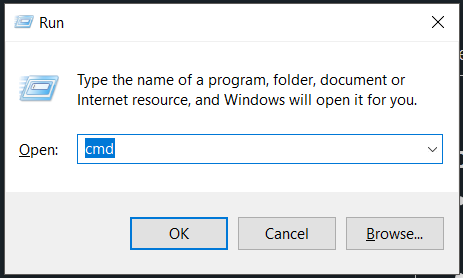</center> Next click `OK` and you should have a command prompt opened up. If you're having trouble with this, try following any of [these steps][3] instead. 4: Now that we're inside the console, let's navigate to the FFMpeg directory. The easiest way of doing this is to type `cd %USERPROFILE%\Desktop\ffmpeg-*\bin`. This should work on all versions of windows, but just to be sure, type `dir` and press enter. You should see something like: 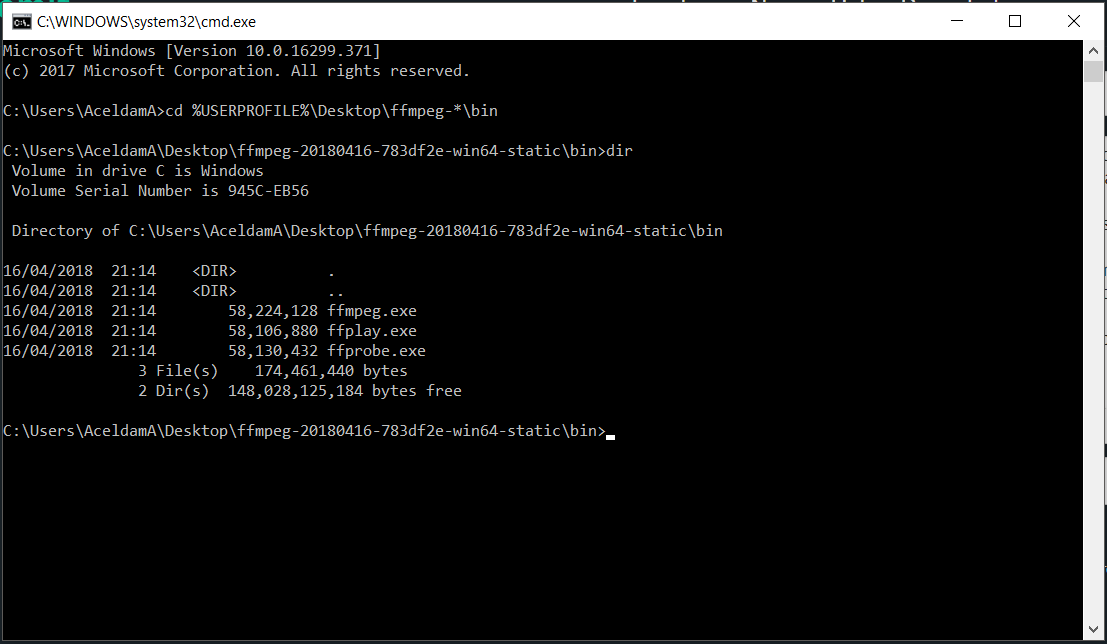 Obviously the free space and volume ID would differ, but what's important here is that the three files (`ffmpeg.exe`, `ffprobe.exe` and `ffplay.exe`) are present. 5: Now let's do some magic. The following command line might seem a little intimidating, but stick with me - I'll break it down for you. Go ahead and type the following (all one line): `ffmpeg -f gdigrab -framerate 10 -t 40 -i desktop "%USERPROFILE%\Desktop\my-first-screencap.mp4"` For the next 40 seconds, you'll be rewarded with all sorts of wonderful, colourful output. During this time I encourage you to do as many things on the desktop as you can. (Maybe open paint and speed-paint a self-portrait?) If it didn't, well, I'm sorry but it seems your PC does not support GDI Grabbing. There are solutions to fixing this, but that's beyond the scope of this tutorial. Here's my output, but your's will no doubt be different: 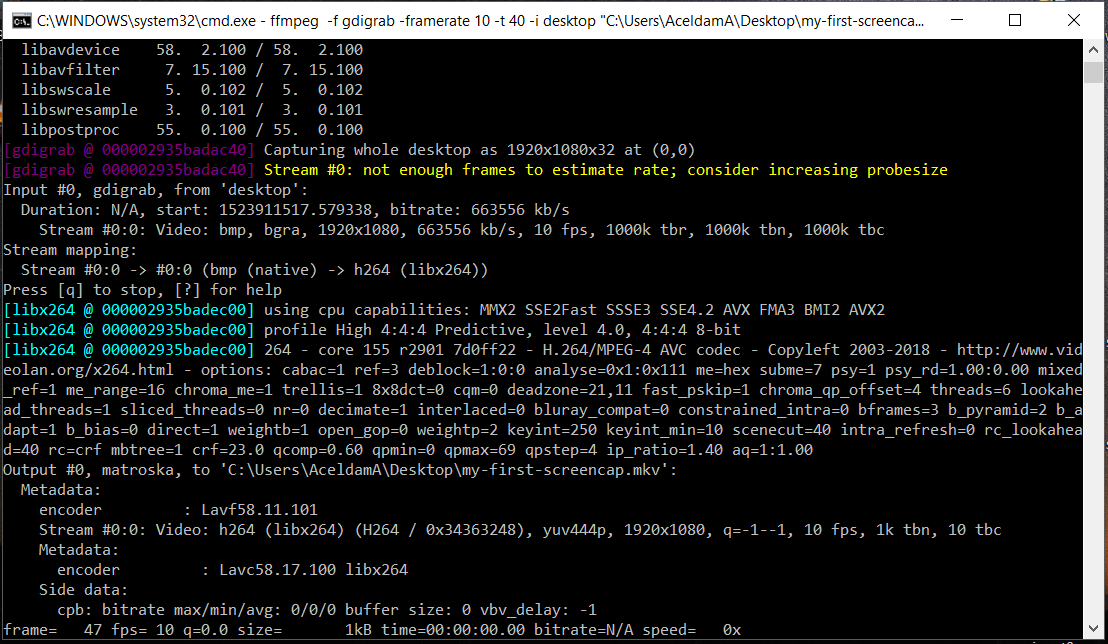 ## Wait! What!? What just happened. What did I just witness!? Did i just commit a felony!? O_O No, don't worry. As long as you own the PC or have the owner's permission, no crimes were committed. What you just did was create a 40-second-long MP4 file on your desktop entitled "my-first-screencap". Go ahead, open it. You'll see everything, including the mouse-cursor, was captured duing the 40 seconds that ffmpeg was running. So let's break down the command for you. It consists of the ffmpeg exe, followed by 5 parameters: * **ffmpeg** (*This tells ffmpeg ...*) 1. **-f gdigrab** (*...that we wish to use the gdigrab format...*) 2. **-framerate 10** (*...at a framerate of 10 fps...*) 3. **-t 40** (*...for 40 seconds...*) 4. **-i desktop** (*...capturing the desktop...*) 5. **"%USERPROFILE%\Desktop\my-first-screencap.mp4"** (*...and saving the output as this mp4 file*) ## OK, so this was cool and all but I was promised a bat file? I know. I promised and I will deliver. For the time-being, why not upvote this post so you don't miss part two when I finally get 'round to posting it. In the next two parts, we'll automate the process of desktop screen capping by putting it in an easy-to-use batch-file and, finally, capturing hone our skills by capturing specific windows rather than the entire screen. But until next time, #HackThePlanet!!  [1]: https://ffmpeg.zeranoe.com/builds/ [2]: https://support.microsoft.com/en-us/help/827218/how-to-determine-whether-a-computer-is-running-a-32-bit-version-or-64 [3]: https://www.digitalcitizen.life/7-ways-launch-command-prompt-windows-7-windows-8 [4]: https://www.ffmpeg.org/ffmpeg-devices.html#gdigrab |
| json metadata | {"tags":["tutorial","screen-recording","free","ffmpeg","windows"],"image":["https://steemitimages.com/DQmSZ8xMMc1sC9mReAMHAGBkZ5zCfniDeexvx1SqaNo4wZc/image.png","https://steemitimages.com/DQmRaWuWodHpj91Bx4KF5JKVpFvKro1vXT7eYnxdcMcxrbu/image.png","https://steemitimages.com/DQmd6J5vwsyoEYsuhfWHBHZEfGGL5UQQHx4CCaZ1NVqK5dx/image.png","http://i.imgur.com/A0Q52BJ.gif"],"links":["https://ffmpeg.zeranoe.com/builds/","https://support.microsoft.com/en-us/help/827218/how-to-determine-whether-a-computer-is-running-a-32-bit-version-or-64","https://www.digitalcitizen.life/7-ways-launch-command-prompt-windows-7-windows-8"],"app":"steemit/0.1","format":"markdown"} |
| parent author | |
| parent permlink | tutorial |
| permlink | an-idiot-s-guide-to-capturing-screen-output-without-malware-paid-software-or-annoying-watermarks-windows |
| title | An idiot's guide to capturing the Windows desktop - Part 1 (of 3): Say 'NO!' to malware, trial periods, paid software and annoying watermarks. |
| Transaction Info | Block #21631084/Trx f190728f6885c6d0a5a4d34450c1582c661ce027 |
View Raw JSON Data
{
"block": 21631084,
"op": [
"comment",
{
"author": "aceldama",
"body": "## Overview\nFFMpeg is a stupidly powerful tool for anyone willing to suffer through the command-line arguments and filters. But considering the price, a whopping $0.00 for a lifetime subscription, getting to know it a bit better is well worth the effort. By the end of this tutorial you'll have a neat little bat file to make free screen caps a breeze. No more trial periods, no watermarks, and best of all - no need for crapware installation.\n\nA little side-note for some of you: This is the complete idiot's guide, so if you're a user adept/comfortable in windows, try not to let your eyes glaze over.\n\n## You will need\n* PC running windows (for the sake of making this tutorial)\n* FFMpeg which is a free utility that can be downloaded [here][1]. \n\n## Creating your first screen cap\n1. If you haven't done so already already, you'll need to [download FFMpeg][1]. On the site you'll see a couple of options you can change before downloading, the second of which is the version of windows you're running (32 or 64 bit). Most modern PCs are 64 bit, but you can [check quite easily][2] which version is installed. You can leave the first and third options as they are (recommended). To make life easier for me, I'll be saving the zip file on my desktop. Of course you can save it anywhere, just be sure to change the commands as required.\n2. After the download completes, the next step is to extract it. You can do this by double-clicking on the zip file then dragging the folder in the window that opens anywhere on your desktop. Once this is done, you can close the window and delete the zip file. (We'll no longer be needing it.)\n3. Next we're going to open a command prompt. There are many ways to do this, but for now, lets press the `windows key` + `R` keyboard shortcut and in the prompt that opens we type `cmd`. \n<center></center>\nNext click `OK` and you should have a command prompt opened up. If you're having trouble with this, try following any of [these steps][3] instead.\n4: Now that we're inside the console, let's navigate to the FFMpeg directory. The easiest way of doing this is to type `cd %USERPROFILE%\\Desktop\\ffmpeg-*\\bin`. This should work on all versions of windows, but just to be sure, type `dir` and press enter. You should see something like:\n\nObviously the free space and volume ID would differ, but what's important here is that the three files (`ffmpeg.exe`, `ffprobe.exe` and `ffplay.exe`) are present.\n5: Now let's do some magic. The following command line might seem a little intimidating, but stick with me - I'll break it down for you. Go ahead and type the following (all one line):\n`ffmpeg -f gdigrab -framerate 10 -t 40 -i desktop \"%USERPROFILE%\\Desktop\\my-first-screencap.mp4\"`\nFor the next 40 seconds, you'll be rewarded with all sorts of wonderful, colourful output. During this time I encourage you to do as many things on the desktop as you can. (Maybe open paint and speed-paint a self-portrait?) If it didn't, well, I'm sorry but it seems your PC does not support GDI Grabbing. There are solutions to fixing this, but that's beyond the scope of this tutorial. Here's my output, but your's will no doubt be different:\n\n\n## Wait! What!? What just happened. What did I just witness!? Did i just commit a felony!? O_O\nNo, don't worry. As long as you own the PC or have the owner's permission, no crimes were committed. What you just did was create a 40-second-long MP4 file on your desktop entitled \"my-first-screencap\". Go ahead, open it. You'll see everything, including the mouse-cursor, was captured duing the 40 seconds that ffmpeg was running. So let's break down the command for you. It consists of the ffmpeg exe, followed by 5 parameters:\n* **ffmpeg** (*This tells ffmpeg ...*)\n 1. **-f gdigrab** (*...that we wish to use the gdigrab format...*)\n 2. **-framerate 10** (*...at a framerate of 10 fps...*)\n 3. **-t 40** (*...for 40 seconds...*)\n 4. **-i desktop** (*...capturing the desktop...*)\n 5. **\"%USERPROFILE%\\Desktop\\my-first-screencap.mp4\"** (*...and saving the output as this mp4 file*)\n\n## OK, so this was cool and all but I was promised a bat file?\nI know. I promised and I will deliver. For the time-being, why not upvote this post so you don't miss part two when I finally get 'round to posting it. In the next two parts, we'll automate the process of desktop screen capping by putting it in an easy-to-use batch-file and, finally, capturing hone our skills by capturing specific windows rather than the entire screen.\n\nBut until next time, #HackThePlanet!!\n\n\n[1]: https://ffmpeg.zeranoe.com/builds/\n[2]: https://support.microsoft.com/en-us/help/827218/how-to-determine-whether-a-computer-is-running-a-32-bit-version-or-64\n[3]: https://www.digitalcitizen.life/7-ways-launch-command-prompt-windows-7-windows-8\n[4]: https://www.ffmpeg.org/ffmpeg-devices.html#gdigrab",
"json_metadata": "{\"tags\":[\"tutorial\",\"screen-recording\",\"free\",\"ffmpeg\",\"windows\"],\"image\":[\"https://steemitimages.com/DQmSZ8xMMc1sC9mReAMHAGBkZ5zCfniDeexvx1SqaNo4wZc/image.png\",\"https://steemitimages.com/DQmRaWuWodHpj91Bx4KF5JKVpFvKro1vXT7eYnxdcMcxrbu/image.png\",\"https://steemitimages.com/DQmd6J5vwsyoEYsuhfWHBHZEfGGL5UQQHx4CCaZ1NVqK5dx/image.png\",\"http://i.imgur.com/A0Q52BJ.gif\"],\"links\":[\"https://ffmpeg.zeranoe.com/builds/\",\"https://support.microsoft.com/en-us/help/827218/how-to-determine-whether-a-computer-is-running-a-32-bit-version-or-64\",\"https://www.digitalcitizen.life/7-ways-launch-command-prompt-windows-7-windows-8\"],\"app\":\"steemit/0.1\",\"format\":\"markdown\"}",
"parent_author": "",
"parent_permlink": "tutorial",
"permlink": "an-idiot-s-guide-to-capturing-screen-output-without-malware-paid-software-or-annoying-watermarks-windows",
"title": "An idiot's guide to capturing the Windows desktop - Part 1 (of 3): Say 'NO!' to malware, trial periods, paid software and annoying watermarks."
}
],
"op_in_trx": 0,
"timestamp": "2018-04-16T23:58:24",
"trx_id": "f190728f6885c6d0a5a4d34450c1582c661ce027",
"trx_in_block": 55,
"virtual_op": 0
}2018/04/16 23:57:00
2018/04/16 23:57:00
| author | aceldama |
| body | @@ -4604,48 +4604,150 @@ ing -and, finally, capturing specific windows +by putting it in an easy-to-use batch-file and, finally, capturing hone our skills by capturing specific windows rather than the entire screen .%0A%0AB @@ -5069,8 +5069,64 @@ indows-8 +%0A%5B4%5D: https://www.ffmpeg.org/ffmpeg-devices.html#gdigrab |
| json metadata | {"tags":["tutorial","screen-recording","free","ffmpeg","windows"],"image":["https://steemitimages.com/DQmSZ8xMMc1sC9mReAMHAGBkZ5zCfniDeexvx1SqaNo4wZc/image.png","https://steemitimages.com/DQmRaWuWodHpj91Bx4KF5JKVpFvKro1vXT7eYnxdcMcxrbu/image.png","https://steemitimages.com/DQmd6J5vwsyoEYsuhfWHBHZEfGGL5UQQHx4CCaZ1NVqK5dx/image.png","http://i.imgur.com/A0Q52BJ.gif"],"links":["https://ffmpeg.zeranoe.com/builds/","https://support.microsoft.com/en-us/help/827218/how-to-determine-whether-a-computer-is-running-a-32-bit-version-or-64","https://www.digitalcitizen.life/7-ways-launch-command-prompt-windows-7-windows-8"],"app":"steemit/0.1","format":"markdown"} |
| parent author | |
| parent permlink | tutorial |
| permlink | an-idiot-s-guide-to-capturing-screen-output-without-malware-paid-software-or-annoying-watermarks-windows |
| title | An idiot's guide to capturing the desktop on Windows - Part 1 (of 3): Say 'NO!' to malware, trial periods, paid software and annoying watermarks. |
| Transaction Info | Block #21631056/Trx 24e59b48ad061908462ecb7e791ce3987b47ae6a |
View Raw JSON Data
{
  "block": 21631056,
  "op": [
    "comment",
    {
      "author": "aceldama",
      "body": "@@ -4604,48 +4604,150 @@\n ing \n-and, finally, capturing specific windows\n+by putting it in an easy-to-use batch-file and, finally, capturing hone our skills by capturing specific windows rather than the entire screen\n .%0A%0AB\n@@ -5069,8 +5069,64 @@\n indows-8\n+%0A%5B4%5D: https://www.ffmpeg.org/ffmpeg-devices.html#gdigrab\n",
      "json_metadata": "{\"tags\":[\"tutorial\",\"screen-recording\",\"free\",\"ffmpeg\",\"windows\"],\"image\":[\"https://steemitimages.com/DQmSZ8xMMc1sC9mReAMHAGBkZ5zCfniDeexvx1SqaNo4wZc/image.png\",\"https://steemitimages.com/DQmRaWuWodHpj91Bx4KF5JKVpFvKro1vXT7eYnxdcMcxrbu/image.png\",\"https://steemitimages.com/DQmd6J5vwsyoEYsuhfWHBHZEfGGL5UQQHx4CCaZ1NVqK5dx/image.png\",\"http://i.imgur.com/A0Q52BJ.gif\"],\"links\":[\"https://ffmpeg.zeranoe.com/builds/\",\"https://support.microsoft.com/en-us/help/827218/how-to-determine-whether-a-computer-is-running-a-32-bit-version-or-64\",\"https://www.digitalcitizen.life/7-ways-launch-command-prompt-windows-7-windows-8\"],\"app\":\"steemit/0.1\",\"format\":\"markdown\"}",
      "parent_author": "",
      "parent_permlink": "tutorial",
      "permlink": "an-idiot-s-guide-to-capturing-screen-output-without-malware-paid-software-or-annoying-watermarks-windows",
      "title": "An idiot's guide to capturing the desktop on Windows - Part 1 (of 3): Say 'NO!' to malware, trial periods, paid software and annoying watermarks."
    }
  ],
  "op_in_trx": 0,
  "timestamp": "2018-04-16T23:57:00",
  "trx_id": "24e59b48ad061908462ecb7e791ce3987b47ae6a",
  "trx_in_block": 11,
  "virtual_op": 0
}2018/04/16 23:55:03
2018/04/16 23:55:03
| author | aceldama |
| body | @@ -4395,17 +4395,17 @@ sed and -i +I will de @@ -4460,17 +4460,16 @@ ost -and +so you -w +d on't |
| json metadata | {"tags":["tutorial","screen-recording","free","ffmpeg","windows"],"image":["https://steemitimages.com/DQmSZ8xMMc1sC9mReAMHAGBkZ5zCfniDeexvx1SqaNo4wZc/image.png","https://steemitimages.com/DQmRaWuWodHpj91Bx4KF5JKVpFvKro1vXT7eYnxdcMcxrbu/image.png","https://steemitimages.com/DQmd6J5vwsyoEYsuhfWHBHZEfGGL5UQQHx4CCaZ1NVqK5dx/image.png","http://i.imgur.com/A0Q52BJ.gif"],"links":["https://ffmpeg.zeranoe.com/builds/","https://support.microsoft.com/en-us/help/827218/how-to-determine-whether-a-computer-is-running-a-32-bit-version-or-64","https://www.digitalcitizen.life/7-ways-launch-command-prompt-windows-7-windows-8"],"app":"steemit/0.1","format":"markdown"} |
| parent author | |
| parent permlink | tutorial |
| permlink | an-idiot-s-guide-to-capturing-screen-output-without-malware-paid-software-or-annoying-watermarks-windows |
| title | An idiot's guide to capturing the desktop on Windows - Part 1 (of 3): Say 'NO!' to malware, trial periods, paid software and annoying watermarks. |
| Transaction Info | Block #21631017/Trx 82c2d9c954f5dedd98ca6ee24bc19e4fe1f2fc43 |
View Raw JSON Data
{
  "block": 21631017,
  "op": [
    "comment",
    {
      "author": "aceldama",
      "body": "@@ -4395,17 +4395,17 @@\n sed and \n-i\n+I\n  will de\n@@ -4460,17 +4460,16 @@\n ost \n-and\n+so\n  you \n-w\n+d\n on't\n",
      "json_metadata": "{\"tags\":[\"tutorial\",\"screen-recording\",\"free\",\"ffmpeg\",\"windows\"],\"image\":[\"https://steemitimages.com/DQmSZ8xMMc1sC9mReAMHAGBkZ5zCfniDeexvx1SqaNo4wZc/image.png\",\"https://steemitimages.com/DQmRaWuWodHpj91Bx4KF5JKVpFvKro1vXT7eYnxdcMcxrbu/image.png\",\"https://steemitimages.com/DQmd6J5vwsyoEYsuhfWHBHZEfGGL5UQQHx4CCaZ1NVqK5dx/image.png\",\"http://i.imgur.com/A0Q52BJ.gif\"],\"links\":[\"https://ffmpeg.zeranoe.com/builds/\",\"https://support.microsoft.com/en-us/help/827218/how-to-determine-whether-a-computer-is-running-a-32-bit-version-or-64\",\"https://www.digitalcitizen.life/7-ways-launch-command-prompt-windows-7-windows-8\"],\"app\":\"steemit/0.1\",\"format\":\"markdown\"}",
      "parent_author": "",
      "parent_permlink": "tutorial",
      "permlink": "an-idiot-s-guide-to-capturing-screen-output-without-malware-paid-software-or-annoying-watermarks-windows",
      "title": "An idiot's guide to capturing the desktop on Windows - Part 1 (of 3): Say 'NO!' to malware, trial periods, paid software and annoying watermarks."
    }
  ],
  "op_in_trx": 0,
  "timestamp": "2018-04-16T23:55:03",
  "trx_id": "82c2d9c954f5dedd98ca6ee24bc19e4fe1f2fc43",
  "trx_in_block": 26,
  "virtual_op": 0
}2018/04/16 23:53:30
2018/04/16 23:53:30
| author | aceldama |
| body | @@ -251,131 +251,8 @@ ort. - This is the complete idiot's guide, so if you're a user adept/comfortable in windows, try not to let your eyes glaze over. By @@ -438,16 +438,177 @@ ation.%0A%0A +A little side-note for some of you: This is the complete idiot's guide, so if you're a user adept/comfortable in windows, try not to let your eyes glaze over.%0A%0A ## You w |
| json metadata | {"tags":["tutorial","screen-recording","free","ffmpeg","windows"],"image":["https://steemitimages.com/DQmSZ8xMMc1sC9mReAMHAGBkZ5zCfniDeexvx1SqaNo4wZc/image.png","https://steemitimages.com/DQmRaWuWodHpj91Bx4KF5JKVpFvKro1vXT7eYnxdcMcxrbu/image.png","https://steemitimages.com/DQmd6J5vwsyoEYsuhfWHBHZEfGGL5UQQHx4CCaZ1NVqK5dx/image.png","http://i.imgur.com/A0Q52BJ.gif"],"links":["https://ffmpeg.zeranoe.com/builds/","https://support.microsoft.com/en-us/help/827218/how-to-determine-whether-a-computer-is-running-a-32-bit-version-or-64","https://www.digitalcitizen.life/7-ways-launch-command-prompt-windows-7-windows-8"],"app":"steemit/0.1","format":"markdown"} |
| parent author | |
| parent permlink | tutorial |
| permlink | an-idiot-s-guide-to-capturing-screen-output-without-malware-paid-software-or-annoying-watermarks-windows |
| title | An idiot's guide to capturing the desktop on Windows - Part 1 (of 3): Say 'NO!' to malware, trial periods, paid software and annoying watermarks. |
| Transaction Info | Block #21630986/Trx 19c44eec72d1acb155e36d6aced1c4f4f73918a5 |
View Raw JSON Data
{
  "block": 21630986,
  "op": [
    "comment",
    {
      "author": "aceldama",
      "body": "@@ -251,131 +251,8 @@\n ort.\n- This is the complete idiot's guide, so if you're a user adept/comfortable in windows, try not to let your eyes glaze over.\n  By \n@@ -438,16 +438,177 @@\n ation.%0A%0A\n+A little side-note for some of you:  This is the complete idiot's guide, so if you're a user adept/comfortable in windows, try not to let your eyes glaze over.%0A%0A\n ## You w\n",
      "json_metadata": "{\"tags\":[\"tutorial\",\"screen-recording\",\"free\",\"ffmpeg\",\"windows\"],\"image\":[\"https://steemitimages.com/DQmSZ8xMMc1sC9mReAMHAGBkZ5zCfniDeexvx1SqaNo4wZc/image.png\",\"https://steemitimages.com/DQmRaWuWodHpj91Bx4KF5JKVpFvKro1vXT7eYnxdcMcxrbu/image.png\",\"https://steemitimages.com/DQmd6J5vwsyoEYsuhfWHBHZEfGGL5UQQHx4CCaZ1NVqK5dx/image.png\",\"http://i.imgur.com/A0Q52BJ.gif\"],\"links\":[\"https://ffmpeg.zeranoe.com/builds/\",\"https://support.microsoft.com/en-us/help/827218/how-to-determine-whether-a-computer-is-running-a-32-bit-version-or-64\",\"https://www.digitalcitizen.life/7-ways-launch-command-prompt-windows-7-windows-8\"],\"app\":\"steemit/0.1\",\"format\":\"markdown\"}",
      "parent_author": "",
      "parent_permlink": "tutorial",
      "permlink": "an-idiot-s-guide-to-capturing-screen-output-without-malware-paid-software-or-annoying-watermarks-windows",
      "title": "An idiot's guide to capturing the desktop on Windows - Part 1 (of 3): Say 'NO!' to malware, trial periods, paid software and annoying watermarks."
    }
  ],
  "op_in_trx": 0,
  "timestamp": "2018-04-16T23:53:30",
  "trx_id": "19c44eec72d1acb155e36d6aced1c4f4f73918a5",
  "trx_in_block": 45,
  "virtual_op": 0
}2018/04/16 23:52:54
2018/04/16 23:52:54
| author | aceldama |
| body | @@ -116,16 +116,147 @@ filters. + But considering the price, a whopping $0.00 for a lifetime subscription, getting to know it a bit better is well worth the effort. This is |
| json metadata | {"tags":["tutorial","screen-recording","free","ffmpeg","windows"],"image":["https://steemitimages.com/DQmSZ8xMMc1sC9mReAMHAGBkZ5zCfniDeexvx1SqaNo4wZc/image.png","https://steemitimages.com/DQmRaWuWodHpj91Bx4KF5JKVpFvKro1vXT7eYnxdcMcxrbu/image.png","https://steemitimages.com/DQmd6J5vwsyoEYsuhfWHBHZEfGGL5UQQHx4CCaZ1NVqK5dx/image.png","http://i.imgur.com/A0Q52BJ.gif"],"links":["https://ffmpeg.zeranoe.com/builds/","https://support.microsoft.com/en-us/help/827218/how-to-determine-whether-a-computer-is-running-a-32-bit-version-or-64","https://www.digitalcitizen.life/7-ways-launch-command-prompt-windows-7-windows-8"],"app":"steemit/0.1","format":"markdown"} |
| parent author | |
| parent permlink | tutorial |
| permlink | an-idiot-s-guide-to-capturing-screen-output-without-malware-paid-software-or-annoying-watermarks-windows |
| title | An idiot's guide to capturing the desktop on Windows - Part 1 (of 3): Say 'NO!' to malware, trial periods, paid software and annoying watermarks. |
| Transaction Info | Block #21630974/Trx 44f8af204355bd3e02e9848c8857599722f90008 |
View Raw JSON Data
{
  "block": 21630974,
  "op": [
    "comment",
    {
      "author": "aceldama",
      "body": "@@ -116,16 +116,147 @@\n filters.\n+ But considering the price, a whopping $0.00 for a lifetime subscription, getting to know it a bit better is well worth the effort.\n  This is\n",
      "json_metadata": "{\"tags\":[\"tutorial\",\"screen-recording\",\"free\",\"ffmpeg\",\"windows\"],\"image\":[\"https://steemitimages.com/DQmSZ8xMMc1sC9mReAMHAGBkZ5zCfniDeexvx1SqaNo4wZc/image.png\",\"https://steemitimages.com/DQmRaWuWodHpj91Bx4KF5JKVpFvKro1vXT7eYnxdcMcxrbu/image.png\",\"https://steemitimages.com/DQmd6J5vwsyoEYsuhfWHBHZEfGGL5UQQHx4CCaZ1NVqK5dx/image.png\",\"http://i.imgur.com/A0Q52BJ.gif\"],\"links\":[\"https://ffmpeg.zeranoe.com/builds/\",\"https://support.microsoft.com/en-us/help/827218/how-to-determine-whether-a-computer-is-running-a-32-bit-version-or-64\",\"https://www.digitalcitizen.life/7-ways-launch-command-prompt-windows-7-windows-8\"],\"app\":\"steemit/0.1\",\"format\":\"markdown\"}",
      "parent_author": "",
      "parent_permlink": "tutorial",
      "permlink": "an-idiot-s-guide-to-capturing-screen-output-without-malware-paid-software-or-annoying-watermarks-windows",
      "title": "An idiot's guide to capturing the desktop on Windows - Part 1 (of 3): Say 'NO!' to malware, trial periods, paid software and annoying watermarks."
    }
  ],
  "op_in_trx": 0,
  "timestamp": "2018-04-16T23:52:54",
  "trx_id": "44f8af204355bd3e02e9848c8857599722f90008",
  "trx_in_block": 53,
  "virtual_op": 0
}2018/04/16 23:51:27
2018/04/16 23:51:27
| author | aceldama |
| body | ## Overview FFMpeg is a stupidly powerful tool for anyone willing to suffer through the command-line arguments and filters. This is the complete idiot's guide, so if you're a user adept/comfortable in windows, try not to let your eyes glaze over. By the end of this tutorial you'll have a neat little bat file to make free screen caps a breeze. No more trial periods, no watermarks, and best of all - no need for crapware installation. ## You will need * PC running windows (for the sake of making this tutorial) * FFMpeg which is a free utility that can be downloaded [here][1]. ## Creating your first screen cap 1. If you haven't done so already already, you'll need to [download FFMpeg][1]. On the site you'll see a couple of options you can change before downloading, the second of which is the version of windows you're running (32 or 64 bit). Most modern PCs are 64 bit, but you can [check quite easily][2] which version is installed. You can leave the first and third options as they are (recommended). To make life easier for me, I'll be saving the zip file on my desktop. Of course you can save it anywhere, just be sure to change the commands as required. 2. After the download completes, the next step is to extract it. You can do this by double-clicking on the zip file then dragging the folder in the window that opens anywhere on your desktop. Once this is done, you can close the window and delete the zip file. (We'll no longer be needing it.) 3. Next we're going to open a command prompt. There are many ways to do this, but for now, lets press the `windows key` + `R` keyboard shortcut and in the prompt that opens we type `cmd`. <center></center> Next click `OK` and you should have a command prompt opened up. If you're having trouble with this, try following any of [these steps][3] instead. 4: Now that we're inside the console, let's navigate to the FFMpeg directory. The easiest way of doing this is to type `cd %USERPROFILE%\Desktop\ffmpeg-*\bin`. This should work on all versions of windows, but just to be sure, type `dir` and press enter. You should see something like:  Obviously the free space and volume ID would differ, but what's important here is that the three files (`ffmpeg.exe`, `ffprobe.exe` and `ffplay.exe`) are present. 5: Now let's do some magic. The following command line might seem a little intimidating, but stick with me - I'll break it down for you. Go ahead and type the following (all one line): `ffmpeg -f gdigrab -framerate 10 -t 40 -i desktop "%USERPROFILE%\Desktop\my-first-screencap.mp4"` For the next 40 seconds, you'll be rewarded with all sorts of wonderful, colourful output. During this time I encourage you to do as many things on the desktop as you can. (Maybe open paint and speed-paint a self-portrait?) If it didn't, well, I'm sorry but it seems your PC does not support GDI Grabbing. There are solutions to fixing this, but that's beyond the scope of this tutorial. Here's my output, but your's will no doubt be different:  ## Wait! What!? What just happened. What did I just witness!? Did i just commit a felony!? O_O No, don't worry. As long as you own the PC or have the owner's permission, no crimes were committed. What you just did was create a 40-second-long MP4 file on your desktop entitled "my-first-screencap". Go ahead, open it. You'll see everything, including the mouse-cursor, was captured duing the 40 seconds that ffmpeg was running. So let's break down the command for you. It consists of the ffmpeg exe, followed by 5 parameters: * **ffmpeg** (*This tells ffmpeg ...*) 1. **-f gdigrab** (*...that we wish to use the gdigrab format...*) 2. **-framerate 10** (*...at a framerate of 10 fps...*) 3. **-t 40** (*...for 40 seconds...*) 4. **-i desktop** (*...capturing the desktop...*) 5. **"%USERPROFILE%\Desktop\my-first-screencap.mp4"** (*...and saving the output as this mp4 file*) ## OK, so this was cool and all but I was promised a bat file? I know. I promised and i will deliver. For the time-being, why not upvote this post and you won't miss part two when I finally get 'round to posting it. In the next two parts, we'll automate the process of desktop screen capping and, finally, capturing specific windows. But until next time, #HackThePlanet!!  [1]: https://ffmpeg.zeranoe.com/builds/ [2]: https://support.microsoft.com/en-us/help/827218/how-to-determine-whether-a-computer-is-running-a-32-bit-version-or-64 [3]: https://www.digitalcitizen.life/7-ways-launch-command-prompt-windows-7-windows-8 |
| json metadata | {"tags":["tutorial","screen-recording","free","ffmpeg","windows"],"image":["https://steemitimages.com/DQmSZ8xMMc1sC9mReAMHAGBkZ5zCfniDeexvx1SqaNo4wZc/image.png","https://steemitimages.com/DQmRaWuWodHpj91Bx4KF5JKVpFvKro1vXT7eYnxdcMcxrbu/image.png","https://steemitimages.com/DQmd6J5vwsyoEYsuhfWHBHZEfGGL5UQQHx4CCaZ1NVqK5dx/image.png","http://i.imgur.com/A0Q52BJ.gif"],"links":["https://ffmpeg.zeranoe.com/builds/","https://support.microsoft.com/en-us/help/827218/how-to-determine-whether-a-computer-is-running-a-32-bit-version-or-64","https://www.digitalcitizen.life/7-ways-launch-command-prompt-windows-7-windows-8"],"app":"steemit/0.1","format":"markdown"} |
| parent author | |
| parent permlink | tutorial |
| permlink | an-idiot-s-guide-to-capturing-screen-output-without-malware-paid-software-or-annoying-watermarks-windows |
| title | An idiot's guide to capturing the desktop on Windows - Part 1 (of 3): Say 'NO!' to malware, trial periods, paid software and annoying watermarks. |
| Transaction Info | Block #21630945/Trx 57862ee61c4485c60eece3ed9c111e65e6c4431f |
View Raw JSON Data
{
"block": 21630945,
"op": [
"comment",
{
"author": "aceldama",
"body": "## Overview\nFFMpeg is a stupidly powerful tool for anyone willing to suffer through the command-line arguments and filters. This is the complete idiot's guide, so if you're a user adept/comfortable in windows, try not to let your eyes glaze over. By the end of this tutorial you'll have a neat little bat file to make free screen caps a breeze. No more trial periods, no watermarks, and best of all - no need for crapware installation.\n\n## You will need\n* PC running windows (for the sake of making this tutorial)\n* FFMpeg which is a free utility that can be downloaded [here][1]. \n\n## Creating your first screen cap\n1. If you haven't done so already already, you'll need to [download FFMpeg][1]. On the site you'll see a couple of options you can change before downloading, the second of which is the version of windows you're running (32 or 64 bit). Most modern PCs are 64 bit, but you can [check quite easily][2] which version is installed. You can leave the first and third options as they are (recommended). To make life easier for me, I'll be saving the zip file on my desktop. Of course you can save it anywhere, just be sure to change the commands as required.\n2. After the download completes, the next step is to extract it. You can do this by double-clicking on the zip file then dragging the folder in the window that opens anywhere on your desktop. Once this is done, you can close the window and delete the zip file. (We'll no longer be needing it.)\n3. Next we're going to open a command prompt. There are many ways to do this, but for now, lets press the `windows key` + `R` keyboard shortcut and in the prompt that opens we type `cmd`. \n<center></center>\nNext click `OK` and you should have a command prompt opened up. If you're having trouble with this, try following any of [these steps][3] instead.\n4: Now that we're inside the console, let's navigate to the FFMpeg directory. The easiest way of doing this is to type `cd %USERPROFILE%\\Desktop\\ffmpeg-*\\bin`. This should work on all versions of windows, but just to be sure, type `dir` and press enter. You should see something like:\n\nObviously the free space and volume ID would differ, but what's important here is that the three files (`ffmpeg.exe`, `ffprobe.exe` and `ffplay.exe`) are present.\n5: Now let's do some magic. The following command line might seem a little intimidating, but stick with me - I'll break it down for you. Go ahead and type the following (all one line):\n`ffmpeg -f gdigrab -framerate 10 -t 40 -i desktop \"%USERPROFILE%\\Desktop\\my-first-screencap.mp4\"`\nFor the next 40 seconds, you'll be rewarded with all sorts of wonderful, colourful output. During this time I encourage you to do as many things on the desktop as you can. (Maybe open paint and speed-paint a self-portrait?) If it didn't, well, I'm sorry but it seems your PC does not support GDI Grabbing. There are solutions to fixing this, but that's beyond the scope of this tutorial. Here's my output, but your's will no doubt be different:\n\n\n## Wait! What!? What just happened. What did I just witness!? Did i just commit a felony!? O_O\nNo, don't worry. As long as you own the PC or have the owner's permission, no crimes were committed. What you just did was create a 40-second-long MP4 file on your desktop entitled \"my-first-screencap\". Go ahead, open it. You'll see everything, including the mouse-cursor, was captured duing the 40 seconds that ffmpeg was running. So let's break down the command for you. It consists of the ffmpeg exe, followed by 5 parameters:\n* **ffmpeg** (*This tells ffmpeg ...*)\n 1. **-f gdigrab** (*...that we wish to use the gdigrab format...*)\n 2. **-framerate 10** (*...at a framerate of 10 fps...*)\n 3. **-t 40** (*...for 40 seconds...*)\n 4. **-i desktop** (*...capturing the desktop...*)\n 5. **\"%USERPROFILE%\\Desktop\\my-first-screencap.mp4\"** (*...and saving the output as this mp4 file*)\n\n## OK, so this was cool and all but I was promised a bat file?\nI know. I promised and i will deliver. For the time-being, why not upvote this post and you won't miss part two when I finally get 'round to posting it. In the next two parts, we'll automate the process of desktop screen capping and, finally, capturing specific windows.\n\nBut until next time, #HackThePlanet!!\n\n\n[1]: https://ffmpeg.zeranoe.com/builds/\n[2]: https://support.microsoft.com/en-us/help/827218/how-to-determine-whether-a-computer-is-running-a-32-bit-version-or-64\n[3]: https://www.digitalcitizen.life/7-ways-launch-command-prompt-windows-7-windows-8",
"json_metadata": "{\"tags\":[\"tutorial\",\"screen-recording\",\"free\",\"ffmpeg\",\"windows\"],\"image\":[\"https://steemitimages.com/DQmSZ8xMMc1sC9mReAMHAGBkZ5zCfniDeexvx1SqaNo4wZc/image.png\",\"https://steemitimages.com/DQmRaWuWodHpj91Bx4KF5JKVpFvKro1vXT7eYnxdcMcxrbu/image.png\",\"https://steemitimages.com/DQmd6J5vwsyoEYsuhfWHBHZEfGGL5UQQHx4CCaZ1NVqK5dx/image.png\",\"http://i.imgur.com/A0Q52BJ.gif\"],\"links\":[\"https://ffmpeg.zeranoe.com/builds/\",\"https://support.microsoft.com/en-us/help/827218/how-to-determine-whether-a-computer-is-running-a-32-bit-version-or-64\",\"https://www.digitalcitizen.life/7-ways-launch-command-prompt-windows-7-windows-8\"],\"app\":\"steemit/0.1\",\"format\":\"markdown\"}",
"parent_author": "",
"parent_permlink": "tutorial",
"permlink": "an-idiot-s-guide-to-capturing-screen-output-without-malware-paid-software-or-annoying-watermarks-windows",
"title": "An idiot's guide to capturing the desktop on Windows - Part 1 (of 3): Say 'NO!' to malware, trial periods, paid software and annoying watermarks."
}
],
"op_in_trx": 0,
"timestamp": "2018-04-16T23:51:27",
"trx_id": "57862ee61c4485c60eece3ed9c111e65e6c4431f",
"trx_in_block": 12,
"virtual_op": 0
}2018/04/16 23:45:51
2018/04/16 23:45:51
| author | aceldama |
| body | ## Overview FFMpeg is a stupidly powerful tool for anyone willing to suffer through the command-line arguments and filters. This is the complete idiot's guide, so if you're a user adept/comfortable in windows, try not to let your eyes glaze over. By the end of this tutorial you'll have a neat little bat file to make free screen caps a breeze. No more trial periods, no watermarks, and best of all - no need for crapware installation. ## You will need * PC running windows (for the sake of making this tutorial) * FFMpeg which is a free utility that can be downloaded [here][1]. ## Creating your first screen cap 1. If you haven't done so already already, you'll need to [download FFMpeg][1]. On the site you'll see a couple of options you can change before downloading, the second of which is the version of windows you're running (32 or 64 bit). Most modern PCs are 64 bit, but you can [check quite easily][2] which version is installed. You can leave the first and third options as they are (recommended). To make life easier for me, I'll be saving the zip file on my desktop. Of course you can save it anywhere, just be sure to change the commands as required. 2. After the download completes, the next step is to extract it. You can do this by double-clicking on the zip file then dragging the folder in the window that opens anywhere on your desktop. Once this is done, you can close the window and delete the zip file. (We'll no longer be needing it.) 3. Next we're going to open a command prompt. There are many ways to do this, but for now, lets press the `windows key` + `R` keyboard shortcut and in the prompt that opens we type `cmd`. <center></center> Next click `OK` and you should have a command prompt opened up. If you're having trouble with this, try following any of [these steps][3] instead. 4: Now that we're inside the console, let's navigate to the FFMpeg directory. The easiest way of doing this is to type `cd %USERPROFILE%\Desktop\ffmpeg-*\bin`. This should work on all versions of windows, but just to be sure, type `dir` and press enter. You should see something like:  Obviously the free space and volume ID would differ, but what's important here is that the three files (`ffmpeg.exe`, `ffprobe.exe` and `ffplay.exe`) are present. 5: Now let's do some magic. The following command line might seem a little intimidating, but stick with me - I'll break it down for you. Go ahead and type the following (all one line): `ffmpeg -f gdigrab -framerate 10 -t 40 -i desktop "%USERPROFILE%\Desktop\my-first-screencap.mp4"` For the next 40 seconds, you'll be rewarded with all sorts of wonderful, colourful output. During this time I encourage you to do as many things on the desktop as you can. (Maybe open paint and speed-paint a self-portrait?) If it didn't, well, I'm sorry but it seems your PC does not support GDI Grabbing. There are solutions to fixing this, but that's beyond the scope of this tutorial. Here's my output, but your's will no doubt be different:  ## Wait! What!? What just happened. What did I just witness!? Did i just commit a felony!? O_O No, don't worry. As long as you own the PC or have the owner's permission, no crimes were committed. What you just did was create a 40-second-long MP4 file on your desktop entitled "my-first-screencap". Go ahead, open it. You'll see everything, including the mouse-cursor, was captured duing the 40 seconds that ffmpeg was running. So let's break down the command for you. It consists of the ffmpeg exe, followed by 5 parameters: * **ffmpeg** (*This tells ffmpeg ...*) 1. **-f gdigrab** (*...that we wish to use the gdigrab format...*) 2. **-framerate 10** (*...at a framerate of 10 fps...*) 3. **-t 40** (*...for 40 seconds...*) 4. **-i desktop** (*...capturing the desktop...*) 5. **"%USERPROFILE%\Desktop\my-first-screencap.mp4"** (*...and saving the output as this mp4 file*) ## OK, so this was cool and all but I was promised a bat file? I know. I promised and i will deliver. For the time-being, why not upvote this post and you won't miss part two when I finally get 'round to posting it. In the next two parts, we'll automate the process of desktop screen capping and, finally, capturing specific windows. But until next time, #HackThePlanet!!  [1]: https://ffmpeg.zeranoe.com/builds/ [2]: https://support.microsoft.com/en-us/help/827218/how-to-determine-whether-a-computer-is-running-a-32-bit-version-or-64 [3]: https://www.digitalcitizen.life/7-ways-launch-command-prompt-windows-7-windows-8 |
| json metadata | {"tags":["tutorial","screen-recording","free","ffmpeg","windows"],"image":["https://steemitimages.com/DQmSZ8xMMc1sC9mReAMHAGBkZ5zCfniDeexvx1SqaNo4wZc/image.png","https://steemitimages.com/DQmRaWuWodHpj91Bx4KF5JKVpFvKro1vXT7eYnxdcMcxrbu/image.png","https://steemitimages.com/DQmd6J5vwsyoEYsuhfWHBHZEfGGL5UQQHx4CCaZ1NVqK5dx/image.png","http://i.imgur.com/A0Q52BJ.gif"],"links":["https://ffmpeg.zeranoe.com/builds/","https://support.microsoft.com/en-us/help/827218/how-to-determine-whether-a-computer-is-running-a-32-bit-version-or-64","https://www.digitalcitizen.life/7-ways-launch-command-prompt-windows-7-windows-8"],"app":"steemit/0.1","format":"markdown"} |
| parent author | |
| parent permlink | tutorial |
| permlink | an-idiot-s-guide-to-capturing-screen-output-without-malware-paid-software-or-annoying-watermarks-windows |
| title | An idiot's guide to capturing screen output on Windows - Part 1 (of 3): Say 'NO!' to malware, trial periods, paid software and annoying watermarks. |
| Transaction Info | Block #21630833/Trx 4485bc97821805590f9f79ef9a3a0794a1dcd058 |
View Raw JSON Data
{
"block": 21630833,
"op": [
"comment",
{
"author": "aceldama",
"body": "## Overview\nFFMpeg is a stupidly powerful tool for anyone willing to suffer through the command-line arguments and filters. This is the complete idiot's guide, so if you're a user adept/comfortable in windows, try not to let your eyes glaze over. By the end of this tutorial you'll have a neat little bat file to make free screen caps a breeze. No more trial periods, no watermarks, and best of all - no need for crapware installation.\n\n## You will need\n* PC running windows (for the sake of making this tutorial)\n* FFMpeg which is a free utility that can be downloaded [here][1]. \n\n## Creating your first screen cap\n1. If you haven't done so already already, you'll need to [download FFMpeg][1]. On the site you'll see a couple of options you can change before downloading, the second of which is the version of windows you're running (32 or 64 bit). Most modern PCs are 64 bit, but you can [check quite easily][2] which version is installed. You can leave the first and third options as they are (recommended). To make life easier for me, I'll be saving the zip file on my desktop. Of course you can save it anywhere, just be sure to change the commands as required.\n2. After the download completes, the next step is to extract it. You can do this by double-clicking on the zip file then dragging the folder in the window that opens anywhere on your desktop. Once this is done, you can close the window and delete the zip file. (We'll no longer be needing it.)\n3. Next we're going to open a command prompt. There are many ways to do this, but for now, lets press the `windows key` + `R` keyboard shortcut and in the prompt that opens we type `cmd`. \n<center></center>\nNext click `OK` and you should have a command prompt opened up. If you're having trouble with this, try following any of [these steps][3] instead.\n4: Now that we're inside the console, let's navigate to the FFMpeg directory. The easiest way of doing this is to type `cd %USERPROFILE%\\Desktop\\ffmpeg-*\\bin`. This should work on all versions of windows, but just to be sure, type `dir` and press enter. You should see something like:\n\nObviously the free space and volume ID would differ, but what's important here is that the three files (`ffmpeg.exe`, `ffprobe.exe` and `ffplay.exe`) are present.\n5: Now let's do some magic. The following command line might seem a little intimidating, but stick with me - I'll break it down for you. Go ahead and type the following (all one line):\n`ffmpeg -f gdigrab -framerate 10 -t 40 -i desktop \"%USERPROFILE%\\Desktop\\my-first-screencap.mp4\"`\nFor the next 40 seconds, you'll be rewarded with all sorts of wonderful, colourful output. During this time I encourage you to do as many things on the desktop as you can. (Maybe open paint and speed-paint a self-portrait?) If it didn't, well, I'm sorry but it seems your PC does not support GDI Grabbing. There are solutions to fixing this, but that's beyond the scope of this tutorial. Here's my output, but your's will no doubt be different:\n\n\n## Wait! What!? What just happened. What did I just witness!? Did i just commit a felony!? O_O\nNo, don't worry. As long as you own the PC or have the owner's permission, no crimes were committed. What you just did was create a 40-second-long MP4 file on your desktop entitled \"my-first-screencap\". Go ahead, open it. You'll see everything, including the mouse-cursor, was captured duing the 40 seconds that ffmpeg was running. So let's break down the command for you. It consists of the ffmpeg exe, followed by 5 parameters:\n* **ffmpeg** (*This tells ffmpeg ...*)\n 1. **-f gdigrab** (*...that we wish to use the gdigrab format...*)\n 2. **-framerate 10** (*...at a framerate of 10 fps...*)\n 3. **-t 40** (*...for 40 seconds...*)\n 4. **-i desktop** (*...capturing the desktop...*)\n 5. **\"%USERPROFILE%\\Desktop\\my-first-screencap.mp4\"** (*...and saving the output as this mp4 file*)\n\n## OK, so this was cool and all but I was promised a bat file?\nI know. I promised and i will deliver. For the time-being, why not upvote this post and you won't miss part two when I finally get 'round to posting it. In the next two parts, we'll automate the process of desktop screen capping and, finally, capturing specific windows.\n\nBut until next time, #HackThePlanet!!\n\n\n[1]: https://ffmpeg.zeranoe.com/builds/\n[2]: https://support.microsoft.com/en-us/help/827218/how-to-determine-whether-a-computer-is-running-a-32-bit-version-or-64\n[3]: https://www.digitalcitizen.life/7-ways-launch-command-prompt-windows-7-windows-8",
"json_metadata": "{\"tags\":[\"tutorial\",\"screen-recording\",\"free\",\"ffmpeg\",\"windows\"],\"image\":[\"https://steemitimages.com/DQmSZ8xMMc1sC9mReAMHAGBkZ5zCfniDeexvx1SqaNo4wZc/image.png\",\"https://steemitimages.com/DQmRaWuWodHpj91Bx4KF5JKVpFvKro1vXT7eYnxdcMcxrbu/image.png\",\"https://steemitimages.com/DQmd6J5vwsyoEYsuhfWHBHZEfGGL5UQQHx4CCaZ1NVqK5dx/image.png\",\"http://i.imgur.com/A0Q52BJ.gif\"],\"links\":[\"https://ffmpeg.zeranoe.com/builds/\",\"https://support.microsoft.com/en-us/help/827218/how-to-determine-whether-a-computer-is-running-a-32-bit-version-or-64\",\"https://www.digitalcitizen.life/7-ways-launch-command-prompt-windows-7-windows-8\"],\"app\":\"steemit/0.1\",\"format\":\"markdown\"}",
"parent_author": "",
"parent_permlink": "tutorial",
"permlink": "an-idiot-s-guide-to-capturing-screen-output-without-malware-paid-software-or-annoying-watermarks-windows",
"title": "An idiot's guide to capturing screen output on Windows - Part 1 (of 3): Say 'NO!' to malware, trial periods, paid software and annoying watermarks."
}
],
"op_in_trx": 0,
"timestamp": "2018-04-16T23:45:51",
"trx_id": "4485bc97821805590f9f79ef9a3a0794a1dcd058",
"trx_in_block": 3,
"virtual_op": 0
}2018/04/16 23:43:51
2018/04/16 23:43:51
| author | aceldama |
| body | ## Overview FFMpeg is a stupidly powerful tool for anyone willing to suffer through the command-line arguments and filters. This is the complete idiot's guide, so if you're a user adept/comfortable in windows, try not to let your eyes glaze over. By the end of this tutorial you'll have a neat little bat file to make free screen caps a breeze. No more trial periods, no watermarks, and best of all - no need for crapware installation. ## You will need * PC running windows (for the sake of making this tutorial) * FFMpeg which is a free utility that can be downloaded [here][1]. ## Creating your first screen cap 1. If you haven't done so already already, you'll need to [download FFMpeg][1]. On the site you'll see a couple of options you can change before downloading, the second of which is the version of windows you're running (32 or 64 bit). Most modern PCs are 64 bit, but you can [check quite easily][2] which version is installed. You can leave the first and third options as they are (recommended). To make life easier for me, I'll be saving the zip file on my desktop. Of course you can save it anywhere, just be sure to change the commands as required. 2. After the download completes, the next step is to extract it. You can do this by double-clicking on the zip file then dragging the folder in the window that opens anywhere on your desktop. Once this is done, you can close the window and delete the zip file. (We'll no longer be needing it.) 3. Next we're going to open a command prompt. There are many ways to do this, but for now, lets press the `windows key` + `R` keyboard shortcut and in the prompt that opens we type `cmd`. <center></center> Next click `OK` and you should have a command prompt opened up. If you're having trouble with this, try following any of [these steps][3] instead. 4: Now that we're inside the console, let's navigate to the FFMpeg directory. The easiest way of doing this is to type `cd %USERPROFILE%\Desktop\ffmpeg-*\bin`. This should work on all versions of windows, but just to be sure, type `dir` and press enter. You should see something like:  Obviously the free space and volume ID would differ, but what's important here is that the three files (`ffmpeg.exe`, `ffprobe.exe` and `ffplay.exe`) are present. 5: Now let's do some magic. The following command line might seem a little intimidating, but stick with me - I'll break it down for you. Go ahead and type the following (all one line): `ffmpeg -f gdigrab -framerate 10 -t 40 -i desktop "%USERPROFILE%\Desktop\my-first-screencap.mp4"` For the next 40 seconds, you'll be rewarded with all sorts of wonderful, colourful output. During this time I encourage you to do as many things on the desktop as you can. (Maybe open paint and speed-paint a self-portrait?) If it didn't, well, I'm sorry but it seems your PC does not support GDI Grabbing. There are solutions to fixing this, but that's beyond the scope of this tutorial. Here's my output, but your's will no doubt be different:  ## Wait! What!? What just happened. What did I just witness!? Did i just commit a felony!? O_O No, don't worry. As long as you own the PC or have the owner's permission, no crimes were committed. What you just did was create a 40-second-long MP4 file on your desktop entitled "my-first-screencap". Go ahead, open it. You'll see everything, including the mouse-cursor, was captured duing the 40 seconds that ffmpeg was running. So let's break down the command for you. It consists of the ffmpeg exe, followed by 5 parameters: * **ffmpeg** (*This tells ffmpeg ...*) 1. **-f gdigrab** (*...that we wish to use the gdigrab format...*) 2. **-framerate 10** (*...at a framerate of 10 fps...*) 3. **-t 40** (*...for 40 seconds...*) 4. **-i desktop** (*...capturing the desktop...*) 5. **"%USERPROFILE%\Desktop\my-first-screencap.mp4"** (*...and saving the output as this mp4 file*) ## OK, so this was cool and all but I was promised a bat file? I know. I promised and i will deliver. For the time-being, why not upvote this post and you won't miss part two when I finally get 'round to posting it. In the next two parts, we'll automate the process of desktop screen capping and, finally, capturing specific windows. But until next time, #HackThePlanet!!  [1]: https://ffmpeg.zeranoe.com/builds/ [2]: https://support.microsoft.com/en-us/help/827218/how-to-determine-whether-a-computer-is-running-a-32-bit-version-or-64 [3]: https://www.digitalcitizen.life/7-ways-launch-command-prompt-windows-7-windows-8 |
| json metadata | {"tags":["tutorial","screen-recording","free","ffmpeg","windows"],"image":["https://steemitimages.com/DQmSZ8xMMc1sC9mReAMHAGBkZ5zCfniDeexvx1SqaNo4wZc/image.png","https://steemitimages.com/DQmRaWuWodHpj91Bx4KF5JKVpFvKro1vXT7eYnxdcMcxrbu/image.png","https://steemitimages.com/DQmd6J5vwsyoEYsuhfWHBHZEfGGL5UQQHx4CCaZ1NVqK5dx/image.png","http://i.imgur.com/A0Q52BJ.gif"],"links":["https://ffmpeg.zeranoe.com/builds/","https://support.microsoft.com/en-us/help/827218/how-to-determine-whether-a-computer-is-running-a-32-bit-version-or-64","https://www.digitalcitizen.life/7-ways-launch-command-prompt-windows-7-windows-8"],"app":"steemit/0.1","format":"markdown"} |
| parent author | |
| parent permlink | tutorial |
| permlink | an-idiot-s-guide-to-capturing-screen-output-without-malware-paid-software-or-annoying-watermarks-windows |
| title | An idiot's guide to capturing screen output on windows [pt. 1 of 3] - Part 1: Say 'NO!' to malware, trial periods, paid software and annoying watermarks. |
| Transaction Info | Block #21630793/Trx 074eee3b238372631baff569cd107d9558a93d54 |
View Raw JSON Data
{
"block": 21630793,
"op": [
"comment",
{
"author": "aceldama",
"body": "## Overview\nFFMpeg is a stupidly powerful tool for anyone willing to suffer through the command-line arguments and filters. This is the complete idiot's guide, so if you're a user adept/comfortable in windows, try not to let your eyes glaze over. By the end of this tutorial you'll have a neat little bat file to make free screen caps a breeze. No more trial periods, no watermarks, and best of all - no need for crapware installation.\n\n## You will need\n* PC running windows (for the sake of making this tutorial)\n* FFMpeg which is a free utility that can be downloaded [here][1]. \n\n## Creating your first screen cap\n1. If you haven't done so already already, you'll need to [download FFMpeg][1]. On the site you'll see a couple of options you can change before downloading, the second of which is the version of windows you're running (32 or 64 bit). Most modern PCs are 64 bit, but you can [check quite easily][2] which version is installed. You can leave the first and third options as they are (recommended). To make life easier for me, I'll be saving the zip file on my desktop. Of course you can save it anywhere, just be sure to change the commands as required.\n2. After the download completes, the next step is to extract it. You can do this by double-clicking on the zip file then dragging the folder in the window that opens anywhere on your desktop. Once this is done, you can close the window and delete the zip file. (We'll no longer be needing it.)\n3. Next we're going to open a command prompt. There are many ways to do this, but for now, lets press the `windows key` + `R` keyboard shortcut and in the prompt that opens we type `cmd`. \n<center></center>\nNext click `OK` and you should have a command prompt opened up. If you're having trouble with this, try following any of [these steps][3] instead.\n4: Now that we're inside the console, let's navigate to the FFMpeg directory. The easiest way of doing this is to type `cd %USERPROFILE%\\Desktop\\ffmpeg-*\\bin`. This should work on all versions of windows, but just to be sure, type `dir` and press enter. You should see something like:\n\nObviously the free space and volume ID would differ, but what's important here is that the three files (`ffmpeg.exe`, `ffprobe.exe` and `ffplay.exe`) are present.\n5: Now let's do some magic. The following command line might seem a little intimidating, but stick with me - I'll break it down for you. Go ahead and type the following (all one line):\n`ffmpeg -f gdigrab -framerate 10 -t 40 -i desktop \"%USERPROFILE%\\Desktop\\my-first-screencap.mp4\"`\nFor the next 40 seconds, you'll be rewarded with all sorts of wonderful, colourful output. During this time I encourage you to do as many things on the desktop as you can. (Maybe open paint and speed-paint a self-portrait?) If it didn't, well, I'm sorry but it seems your PC does not support GDI Grabbing. There are solutions to fixing this, but that's beyond the scope of this tutorial. Here's my output, but your's will no doubt be different:\n\n\n## Wait! What!? What just happened. What did I just witness!? Did i just commit a felony!? O_O\nNo, don't worry. As long as you own the PC or have the owner's permission, no crimes were committed. What you just did was create a 40-second-long MP4 file on your desktop entitled \"my-first-screencap\". Go ahead, open it. You'll see everything, including the mouse-cursor, was captured duing the 40 seconds that ffmpeg was running. So let's break down the command for you. It consists of the ffmpeg exe, followed by 5 parameters:\n* **ffmpeg** (*This tells ffmpeg ...*)\n 1. **-f gdigrab** (*...that we wish to use the gdigrab format...*)\n 2. **-framerate 10** (*...at a framerate of 10 fps...*)\n 3. **-t 40** (*...for 40 seconds...*)\n 4. **-i desktop** (*...capturing the desktop...*)\n 5. **\"%USERPROFILE%\\Desktop\\my-first-screencap.mp4\"** (*...and saving the output as this mp4 file*)\n\n## OK, so this was cool and all but I was promised a bat file?\nI know. I promised and i will deliver. For the time-being, why not upvote this post and you won't miss part two when I finally get 'round to posting it. In the next two parts, we'll automate the process of desktop screen capping and, finally, capturing specific windows.\n\nBut until next time, #HackThePlanet!!\n\n\n[1]: https://ffmpeg.zeranoe.com/builds/\n[2]: https://support.microsoft.com/en-us/help/827218/how-to-determine-whether-a-computer-is-running-a-32-bit-version-or-64\n[3]: https://www.digitalcitizen.life/7-ways-launch-command-prompt-windows-7-windows-8",
"json_metadata": "{\"tags\":[\"tutorial\",\"screen-recording\",\"free\",\"ffmpeg\",\"windows\"],\"image\":[\"https://steemitimages.com/DQmSZ8xMMc1sC9mReAMHAGBkZ5zCfniDeexvx1SqaNo4wZc/image.png\",\"https://steemitimages.com/DQmRaWuWodHpj91Bx4KF5JKVpFvKro1vXT7eYnxdcMcxrbu/image.png\",\"https://steemitimages.com/DQmd6J5vwsyoEYsuhfWHBHZEfGGL5UQQHx4CCaZ1NVqK5dx/image.png\",\"http://i.imgur.com/A0Q52BJ.gif\"],\"links\":[\"https://ffmpeg.zeranoe.com/builds/\",\"https://support.microsoft.com/en-us/help/827218/how-to-determine-whether-a-computer-is-running-a-32-bit-version-or-64\",\"https://www.digitalcitizen.life/7-ways-launch-command-prompt-windows-7-windows-8\"],\"app\":\"steemit/0.1\",\"format\":\"markdown\"}",
"parent_author": "",
"parent_permlink": "tutorial",
"permlink": "an-idiot-s-guide-to-capturing-screen-output-without-malware-paid-software-or-annoying-watermarks-windows",
"title": "An idiot's guide to capturing screen output on windows [pt. 1 of 3] - Part 1: Say 'NO!' to malware, trial periods, paid software and annoying watermarks."
}
],
"op_in_trx": 0,
"timestamp": "2018-04-16T23:43:51",
"trx_id": "074eee3b238372631baff569cd107d9558a93d54",
"trx_in_block": 30,
"virtual_op": 0
}2018/04/16 23:42:42
2018/04/16 23:42:42
| author | aceldama |
| body | @@ -4513,16 +4513,52 @@ lanet!!%0A +!%5Bx%5D(http://i.imgur.com/A0Q52BJ.gif) %0A%0A%5B1%5D: h |
| json metadata | {"tags":["tutorial","screen-recording","free","ffmpeg","windows"],"image":["https://steemitimages.com/DQmSZ8xMMc1sC9mReAMHAGBkZ5zCfniDeexvx1SqaNo4wZc/image.png","https://steemitimages.com/DQmRaWuWodHpj91Bx4KF5JKVpFvKro1vXT7eYnxdcMcxrbu/image.png","https://steemitimages.com/DQmd6J5vwsyoEYsuhfWHBHZEfGGL5UQQHx4CCaZ1NVqK5dx/image.png","http://i.imgur.com/A0Q52BJ.gif"],"links":["https://ffmpeg.zeranoe.com/builds/","https://support.microsoft.com/en-us/help/827218/how-to-determine-whether-a-computer-is-running-a-32-bit-version-or-64","https://www.digitalcitizen.life/7-ways-launch-command-prompt-windows-7-windows-8"],"app":"steemit/0.1","format":"markdown"} |
| parent author | |
| parent permlink | tutorial |
| permlink | an-idiot-s-guide-to-capturing-screen-output-without-malware-paid-software-or-annoying-watermarks-windows |
| title | An idiot's guide to capturing screen output on windows [pt. 1 of 3] - Say no to malware, trial periods, paid software and annoying watermarks. |
| Transaction Info | Block #21630770/Trx 58155d180d5b6a5abc70ced696c39d9574a2c147 |
View Raw JSON Data
{
  "block": 21630770,
  "op": [
    "comment",
    {
      "author": "aceldama",
      "body": "@@ -4513,16 +4513,52 @@\n lanet!!%0A\n+!%5Bx%5D(http://i.imgur.com/A0Q52BJ.gif)\n %0A%0A%5B1%5D: h\n",
      "json_metadata": "{\"tags\":[\"tutorial\",\"screen-recording\",\"free\",\"ffmpeg\",\"windows\"],\"image\":[\"https://steemitimages.com/DQmSZ8xMMc1sC9mReAMHAGBkZ5zCfniDeexvx1SqaNo4wZc/image.png\",\"https://steemitimages.com/DQmRaWuWodHpj91Bx4KF5JKVpFvKro1vXT7eYnxdcMcxrbu/image.png\",\"https://steemitimages.com/DQmd6J5vwsyoEYsuhfWHBHZEfGGL5UQQHx4CCaZ1NVqK5dx/image.png\",\"http://i.imgur.com/A0Q52BJ.gif\"],\"links\":[\"https://ffmpeg.zeranoe.com/builds/\",\"https://support.microsoft.com/en-us/help/827218/how-to-determine-whether-a-computer-is-running-a-32-bit-version-or-64\",\"https://www.digitalcitizen.life/7-ways-launch-command-prompt-windows-7-windows-8\"],\"app\":\"steemit/0.1\",\"format\":\"markdown\"}",
      "parent_author": "",
      "parent_permlink": "tutorial",
      "permlink": "an-idiot-s-guide-to-capturing-screen-output-without-malware-paid-software-or-annoying-watermarks-windows",
      "title": "An idiot's guide to capturing screen output on windows [pt. 1 of 3] - Say no to malware, trial periods, paid software and annoying watermarks."
    }
  ],
  "op_in_trx": 0,
  "timestamp": "2018-04-16T23:42:42",
  "trx_id": "58155d180d5b6a5abc70ced696c39d9574a2c147",
  "trx_in_block": 42,
  "virtual_op": 0
}2018/04/16 23:34:09
2018/04/16 23:34:09
| author | aceldama |
| body | @@ -1,150 +1,4 @@ -## You will need%0A* PC running windows (for the sake of making this tutorial)%0A* FFMpeg which is a free utility that can be downloaded %5Bhere%5D%5B1%5D. %0A%0A ## O @@ -430,16 +430,162 @@ ation.%0A%0A +## You will need%0A* PC running windows (for the sake of making this tutorial)%0A* FFMpeg which is a free utility that can be downloaded %5Bhere%5D%5B1%5D. %0A%0A ## Creat @@ -4515,17 +4515,16 @@ net!!%0A%0A%0A -%0A %5B1%5D: htt |
| json metadata | {"tags":["tutorial","screen-recording","free","ffmpeg","windows"],"image":["https://steemitimages.com/DQmSZ8xMMc1sC9mReAMHAGBkZ5zCfniDeexvx1SqaNo4wZc/image.png","https://steemitimages.com/DQmRaWuWodHpj91Bx4KF5JKVpFvKro1vXT7eYnxdcMcxrbu/image.png","https://steemitimages.com/DQmd6J5vwsyoEYsuhfWHBHZEfGGL5UQQHx4CCaZ1NVqK5dx/image.png"],"links":["https://ffmpeg.zeranoe.com/builds/","https://support.microsoft.com/en-us/help/827218/how-to-determine-whether-a-computer-is-running-a-32-bit-version-or-64","https://www.digitalcitizen.life/7-ways-launch-command-prompt-windows-7-windows-8"],"app":"steemit/0.1","format":"markdown"} |
| parent author | |
| parent permlink | tutorial |
| permlink | an-idiot-s-guide-to-capturing-screen-output-without-malware-paid-software-or-annoying-watermarks-windows |
| title | An idiot's guide to capturing screen output on windows [pt. 1 of 3] - Say no to malware, trial periods, paid software and annoying watermarks. |
| Transaction Info | Block #21630599/Trx 34ea50b81b4179e21fdb6ff6d195a8091daf61d3 |
View Raw JSON Data
{
  "block": 21630599,
  "op": [
    "comment",
    {
      "author": "aceldama",
      "body": "@@ -1,150 +1,4 @@\n-## You will need%0A* PC running windows (for the sake of making this tutorial)%0A* FFMpeg which is a free utility that can be downloaded %5Bhere%5D%5B1%5D. %0A%0A\n ## O\n@@ -430,16 +430,162 @@\n ation.%0A%0A\n+## You will need%0A* PC running windows (for the sake of making this tutorial)%0A* FFMpeg which is a free utility that can be downloaded %5Bhere%5D%5B1%5D. %0A%0A\n ## Creat\n@@ -4515,17 +4515,16 @@\n net!!%0A%0A%0A\n-%0A\n %5B1%5D: htt\n",
      "json_metadata": "{\"tags\":[\"tutorial\",\"screen-recording\",\"free\",\"ffmpeg\",\"windows\"],\"image\":[\"https://steemitimages.com/DQmSZ8xMMc1sC9mReAMHAGBkZ5zCfniDeexvx1SqaNo4wZc/image.png\",\"https://steemitimages.com/DQmRaWuWodHpj91Bx4KF5JKVpFvKro1vXT7eYnxdcMcxrbu/image.png\",\"https://steemitimages.com/DQmd6J5vwsyoEYsuhfWHBHZEfGGL5UQQHx4CCaZ1NVqK5dx/image.png\"],\"links\":[\"https://ffmpeg.zeranoe.com/builds/\",\"https://support.microsoft.com/en-us/help/827218/how-to-determine-whether-a-computer-is-running-a-32-bit-version-or-64\",\"https://www.digitalcitizen.life/7-ways-launch-command-prompt-windows-7-windows-8\"],\"app\":\"steemit/0.1\",\"format\":\"markdown\"}",
      "parent_author": "",
      "parent_permlink": "tutorial",
      "permlink": "an-idiot-s-guide-to-capturing-screen-output-without-malware-paid-software-or-annoying-watermarks-windows",
      "title": "An idiot's guide to capturing screen output on windows [pt. 1 of 3] - Say no to malware, trial periods, paid software and annoying watermarks."
    }
  ],
  "op_in_trx": 0,
  "timestamp": "2018-04-16T23:34:09",
  "trx_id": "34ea50b81b4179e21fdb6ff6d195a8091daf61d3",
  "trx_in_block": 27,
  "virtual_op": 0
}2018/04/16 23:32:00
2018/04/16 23:32:00
| author | aceldama |
| body | @@ -4355,16 +4355,174 @@ ting it. + In the next two parts, we'll automate the process of desktop screen capping and, finally, capturing specific windows.%0A%0ABut until next time, #HackThePlanet!!%0A %0A%0A%0A%5B1%5D: |
| json metadata | {"tags":["tutorial","screen-recording","free","ffmpeg","windows"],"image":["https://steemitimages.com/DQmSZ8xMMc1sC9mReAMHAGBkZ5zCfniDeexvx1SqaNo4wZc/image.png","https://steemitimages.com/DQmRaWuWodHpj91Bx4KF5JKVpFvKro1vXT7eYnxdcMcxrbu/image.png","https://steemitimages.com/DQmd6J5vwsyoEYsuhfWHBHZEfGGL5UQQHx4CCaZ1NVqK5dx/image.png"],"links":["https://ffmpeg.zeranoe.com/builds/","https://support.microsoft.com/en-us/help/827218/how-to-determine-whether-a-computer-is-running-a-32-bit-version-or-64","https://www.digitalcitizen.life/7-ways-launch-command-prompt-windows-7-windows-8"],"app":"steemit/0.1","format":"markdown"} |
| parent author | |
| parent permlink | tutorial |
| permlink | an-idiot-s-guide-to-capturing-screen-output-without-malware-paid-software-or-annoying-watermarks-windows |
| title | An idiot's guide to capturing screen output on windows [pt. 1 of 3] - Say no to malware, trial periods, paid software and annoying watermarks. |
| Transaction Info | Block #21630556/Trx aceb7cf01f8d3603ecf017660c190f750af9bfdd |
View Raw JSON Data
{
  "block": 21630556,
  "op": [
    "comment",
    {
      "author": "aceldama",
      "body": "@@ -4355,16 +4355,174 @@\n ting it.\n+ In the next two parts, we'll automate the process of desktop screen capping and, finally, capturing specific windows.%0A%0ABut until next time, #HackThePlanet!!%0A\n %0A%0A%0A%5B1%5D: \n",
      "json_metadata": "{\"tags\":[\"tutorial\",\"screen-recording\",\"free\",\"ffmpeg\",\"windows\"],\"image\":[\"https://steemitimages.com/DQmSZ8xMMc1sC9mReAMHAGBkZ5zCfniDeexvx1SqaNo4wZc/image.png\",\"https://steemitimages.com/DQmRaWuWodHpj91Bx4KF5JKVpFvKro1vXT7eYnxdcMcxrbu/image.png\",\"https://steemitimages.com/DQmd6J5vwsyoEYsuhfWHBHZEfGGL5UQQHx4CCaZ1NVqK5dx/image.png\"],\"links\":[\"https://ffmpeg.zeranoe.com/builds/\",\"https://support.microsoft.com/en-us/help/827218/how-to-determine-whether-a-computer-is-running-a-32-bit-version-or-64\",\"https://www.digitalcitizen.life/7-ways-launch-command-prompt-windows-7-windows-8\"],\"app\":\"steemit/0.1\",\"format\":\"markdown\"}",
      "parent_author": "",
      "parent_permlink": "tutorial",
      "permlink": "an-idiot-s-guide-to-capturing-screen-output-without-malware-paid-software-or-annoying-watermarks-windows",
      "title": "An idiot's guide to capturing screen output on windows [pt. 1 of 3] - Say no to malware, trial periods, paid software and annoying watermarks."
    }
  ],
  "op_in_trx": 0,
  "timestamp": "2018-04-16T23:32:00",
  "trx_id": "aceb7cf01f8d3603ecf017660c190f750af9bfdd",
  "trx_in_block": 3,
  "virtual_op": 0
}2018/04/16 23:28:27
2018/04/16 23:28:27
| author | aceldama |
| body | @@ -3722,17 +3722,17 @@ or you. -i +I t consis |
| json metadata | {"tags":["tutorial","screen-recording","free","ffmpeg","windows"],"image":["https://steemitimages.com/DQmSZ8xMMc1sC9mReAMHAGBkZ5zCfniDeexvx1SqaNo4wZc/image.png","https://steemitimages.com/DQmRaWuWodHpj91Bx4KF5JKVpFvKro1vXT7eYnxdcMcxrbu/image.png","https://steemitimages.com/DQmd6J5vwsyoEYsuhfWHBHZEfGGL5UQQHx4CCaZ1NVqK5dx/image.png"],"links":["https://ffmpeg.zeranoe.com/builds/","https://support.microsoft.com/en-us/help/827218/how-to-determine-whether-a-computer-is-running-a-32-bit-version-or-64","https://www.digitalcitizen.life/7-ways-launch-command-prompt-windows-7-windows-8"],"app":"steemit/0.1","format":"markdown"} |
| parent author | |
| parent permlink | tutorial |
| permlink | an-idiot-s-guide-to-capturing-screen-output-without-malware-paid-software-or-annoying-watermarks-windows |
| title | An idiot's guide to capturing screen output on windows [pt. 1 of 3] - Say no to malware, trial periods, paid software and annoying watermarks. |
| Transaction Info | Block #21630485/Trx 58708ed51b4b256e791a1e9060309265d313d255 |
View Raw JSON Data
{
  "block": 21630485,
  "op": [
    "comment",
    {
      "author": "aceldama",
      "body": "@@ -3722,17 +3722,17 @@\n or you. \n-i\n+I\n t consis\n",
      "json_metadata": "{\"tags\":[\"tutorial\",\"screen-recording\",\"free\",\"ffmpeg\",\"windows\"],\"image\":[\"https://steemitimages.com/DQmSZ8xMMc1sC9mReAMHAGBkZ5zCfniDeexvx1SqaNo4wZc/image.png\",\"https://steemitimages.com/DQmRaWuWodHpj91Bx4KF5JKVpFvKro1vXT7eYnxdcMcxrbu/image.png\",\"https://steemitimages.com/DQmd6J5vwsyoEYsuhfWHBHZEfGGL5UQQHx4CCaZ1NVqK5dx/image.png\"],\"links\":[\"https://ffmpeg.zeranoe.com/builds/\",\"https://support.microsoft.com/en-us/help/827218/how-to-determine-whether-a-computer-is-running-a-32-bit-version-or-64\",\"https://www.digitalcitizen.life/7-ways-launch-command-prompt-windows-7-windows-8\"],\"app\":\"steemit/0.1\",\"format\":\"markdown\"}",
      "parent_author": "",
      "parent_permlink": "tutorial",
      "permlink": "an-idiot-s-guide-to-capturing-screen-output-without-malware-paid-software-or-annoying-watermarks-windows",
      "title": "An idiot's guide to capturing screen output on windows [pt. 1 of 3] - Say no to malware, trial periods, paid software and annoying watermarks."
    }
  ],
  "op_in_trx": 0,
  "timestamp": "2018-04-16T23:28:27",
  "trx_id": "58708ed51b4b256e791a1e9060309265d313d255",
  "trx_in_block": 68,
  "virtual_op": 0
}2018/04/16 23:26:12
2018/04/16 23:26:12
| author | aceldama |
| body | @@ -266,106 +266,8 @@ ers. - By the end of this tutorial you'll have a neat little bat file to make free screen caps a breeze. Thi @@ -385,16 +385,205 @@ ze over. + By the end of this tutorial you'll have a neat little bat file to make free screen caps a breeze. No more trial periods, no watermarks, and best of all - no need for crapware installation. %0A%0A## Cre @@ -2105,21 +2105,13 @@ dows - (and linux). +, but jus @@ -2152,17 +2152,17 @@ enter. -y +Y ou shoul @@ -2308,18 +2308,18 @@ volume -id +ID would d @@ -2346,16 +2346,21 @@ portant +here is that @@ -2826,17 +2826,17 @@ is time -i +I encoura @@ -2863,16 +2863,31 @@ things +on the desktop as you c @@ -3154,12 +3154,20 @@ ubt -vary +be different :%0A!%5B @@ -4207,35 +4207,160 @@ le?%0A -%60%60%60%0Awatch this space ;)%0A%60%60%60 +I know. I promised and i will deliver. For the time-being, why not upvote this post and you won't miss part two when I finally get 'round to posting it. %0A%0A%0A%5B |
| json metadata | {"tags":["tutorial","screen-recording","free","ffmpeg","windows"],"image":["https://steemitimages.com/DQmSZ8xMMc1sC9mReAMHAGBkZ5zCfniDeexvx1SqaNo4wZc/image.png","https://steemitimages.com/DQmRaWuWodHpj91Bx4KF5JKVpFvKro1vXT7eYnxdcMcxrbu/image.png","https://steemitimages.com/DQmd6J5vwsyoEYsuhfWHBHZEfGGL5UQQHx4CCaZ1NVqK5dx/image.png"],"links":["https://ffmpeg.zeranoe.com/builds/","https://support.microsoft.com/en-us/help/827218/how-to-determine-whether-a-computer-is-running-a-32-bit-version-or-64","https://www.digitalcitizen.life/7-ways-launch-command-prompt-windows-7-windows-8"],"app":"steemit/0.1","format":"markdown"} |
| parent author | |
| parent permlink | tutorial |
| permlink | an-idiot-s-guide-to-capturing-screen-output-without-malware-paid-software-or-annoying-watermarks-windows |
| title | An idiot's guide to capturing screen output on windows [pt. 1 of 3] - Say no to malware, trial periods, paid software and annoying watermarks. |
| Transaction Info | Block #21630440/Trx ade0abd5c2d79bb340723427ed08b3121117642c |
View Raw JSON Data
{
  "block": 21630440,
  "op": [
    "comment",
    {
      "author": "aceldama",
      "body": "@@ -266,106 +266,8 @@\n ers.\n- By the end of this tutorial you'll have a neat little bat file to make free screen caps a breeze.\n  Thi\n@@ -385,16 +385,205 @@\n ze over.\n+ By the end of this tutorial you'll have a neat little bat file to make free screen caps a breeze. No more trial periods, no watermarks, and best of all - no need for crapware installation.\n %0A%0A## Cre\n@@ -2105,21 +2105,13 @@\n dows\n- (and linux).\n+, but\n  jus\n@@ -2152,17 +2152,17 @@\n  enter. \n-y\n+Y\n ou shoul\n@@ -2308,18 +2308,18 @@\n  volume \n-id\n+ID\n  would d\n@@ -2346,16 +2346,21 @@\n portant \n+here \n is that \n@@ -2826,17 +2826,17 @@\n is time \n-i\n+I\n  encoura\n@@ -2863,16 +2863,31 @@\n  things \n+on the desktop \n as you c\n@@ -3154,12 +3154,20 @@\n ubt \n-vary\n+be different\n :%0A!%5B\n@@ -4207,35 +4207,160 @@\n le?%0A\n-%60%60%60%0Awatch this space ;)%0A%60%60%60\n+I know. I promised and i will deliver. For the time-being, why not upvote this post and you won't miss part two when I finally get 'round to posting it.\n %0A%0A%0A%5B\n",
      "json_metadata": "{\"tags\":[\"tutorial\",\"screen-recording\",\"free\",\"ffmpeg\",\"windows\"],\"image\":[\"https://steemitimages.com/DQmSZ8xMMc1sC9mReAMHAGBkZ5zCfniDeexvx1SqaNo4wZc/image.png\",\"https://steemitimages.com/DQmRaWuWodHpj91Bx4KF5JKVpFvKro1vXT7eYnxdcMcxrbu/image.png\",\"https://steemitimages.com/DQmd6J5vwsyoEYsuhfWHBHZEfGGL5UQQHx4CCaZ1NVqK5dx/image.png\"],\"links\":[\"https://ffmpeg.zeranoe.com/builds/\",\"https://support.microsoft.com/en-us/help/827218/how-to-determine-whether-a-computer-is-running-a-32-bit-version-or-64\",\"https://www.digitalcitizen.life/7-ways-launch-command-prompt-windows-7-windows-8\"],\"app\":\"steemit/0.1\",\"format\":\"markdown\"}",
      "parent_author": "",
      "parent_permlink": "tutorial",
      "permlink": "an-idiot-s-guide-to-capturing-screen-output-without-malware-paid-software-or-annoying-watermarks-windows",
      "title": "An idiot's guide to capturing screen output on windows [pt. 1 of 3] - Say no to malware, trial periods, paid software and annoying watermarks."
    }
  ],
  "op_in_trx": 0,
  "timestamp": "2018-04-16T23:26:12",
  "trx_id": "ade0abd5c2d79bb340723427ed08b3121117642c",
  "trx_in_block": 7,
  "virtual_op": 0
}2018/04/16 22:26:12
2018/04/16 22:26:12
| author | aceldama |
| permlink | an-idiot-s-guide-to-capturing-screen-output-without-malware-paid-software-or-annoying-watermarks-windows |
| voter | ubg |
| weight | 100 (1.00%) |
| Transaction Info | Block #21629240/Trx 57934de64e6c9c9814bfe1eb1efed630b168afe2 |
View Raw JSON Data
{
  "block": 21629240,
  "op": [
    "vote",
    {
      "author": "aceldama",
      "permlink": "an-idiot-s-guide-to-capturing-screen-output-without-malware-paid-software-or-annoying-watermarks-windows",
      "voter": "ubg",
      "weight": 100
    }
  ],
  "op_in_trx": 0,
  "timestamp": "2018-04-16T22:26:12",
  "trx_id": "57934de64e6c9c9814bfe1eb1efed630b168afe2",
  "trx_in_block": 33,
  "virtual_op": 0
}2018/04/16 22:05:00
2018/04/16 22:05:00
| author | aceldama |
| body | ## You will need * PC running windows (for the sake of making this tutorial) * FFMpeg which is a free utility that can be downloaded [here][1]. ## Overview FFMpeg is a stupidly powerful tool for anyone willing to suffer through the command-line arguments and filters. By the end of this tutorial you'll have a neat little bat file to make free screen caps a breeze. This is the complete idiot's guide, so if you're a user adept/comfortable in windows, try not to let your eyes glaze over. ## Creating your first screen cap 1. If you haven't done so already already, you'll need to [download FFMpeg][1]. On the site you'll see a couple of options you can change before downloading, the second of which is the version of windows you're running (32 or 64 bit). Most modern PCs are 64 bit, but you can [check quite easily][2] which version is installed. You can leave the first and third options as they are (recommended). To make life easier for me, I'll be saving the zip file on my desktop. Of course you can save it anywhere, just be sure to change the commands as required. 2. After the download completes, the next step is to extract it. You can do this by double-clicking on the zip file then dragging the folder in the window that opens anywhere on your desktop. Once this is done, you can close the window and delete the zip file. (We'll no longer be needing it.) 3. Next we're going to open a command prompt. There are many ways to do this, but for now, lets press the `windows key` + `R` keyboard shortcut and in the prompt that opens we type `cmd`. <center></center> Next click `OK` and you should have a command prompt opened up. If you're having trouble with this, try following any of [these steps][3] instead. 4: Now that we're inside the console, let's navigate to the FFMpeg directory. The easiest way of doing this is to type `cd %USERPROFILE%\Desktop\ffmpeg-*\bin`. This should work on all versions of windows (and linux). just to be sure, type `dir` and press enter. you should see something like:  Obviously the free space and volume id would differ, but what's important is that the three files (`ffmpeg.exe`, `ffprobe.exe` and `ffplay.exe`) are present. 5: Now let's do some magic. The following command line might seem a little intimidating, but stick with me - I'll break it down for you. Go ahead and type the following (all one line): `ffmpeg -f gdigrab -framerate 10 -t 40 -i desktop "%USERPROFILE%\Desktop\my-first-screencap.mp4"` For the next 40 seconds, you'll be rewarded with all sorts of wonderful, colourful output. During this time i encourage you to do as many things as you can. (Maybe open paint and speed-paint a self-portrait?) If it didn't, well, I'm sorry but it seems your PC does not support GDI Grabbing. There are solutions to fixing this, but that's beyond the scope of this tutorial. Here's my output, but your's will no doubt vary:  ## Wait! What!? What just happened. What did I just witness!? Did i just commit a felony!? O_O No, don't worry. As long as you own the PC or have the owner's permission, no crimes were committed. What you just did was create a 40-second-long MP4 file on your desktop entitled "my-first-screencap". Go ahead, open it. You'll see everything, including the mouse-cursor, was captured duing the 40 seconds that ffmpeg was running. So let's break down the command for you. it consists of the ffmpeg exe, followed by 5 parameters: * **ffmpeg** (*This tells ffmpeg ...*) 1. **-f gdigrab** (*...that we wish to use the gdigrab format...*) 2. **-framerate 10** (*...at a framerate of 10 fps...*) 3. **-t 40** (*...for 40 seconds...*) 4. **-i desktop** (*...capturing the desktop...*) 5. **"%USERPROFILE%\Desktop\my-first-screencap.mp4"** (*...and saving the output as this mp4 file*) ## OK, so this was cool and all but I was promised a bat file? ``` watch this space ;) ``` [1]: https://ffmpeg.zeranoe.com/builds/ [2]: https://support.microsoft.com/en-us/help/827218/how-to-determine-whether-a-computer-is-running-a-32-bit-version-or-64 [3]: https://www.digitalcitizen.life/7-ways-launch-command-prompt-windows-7-windows-8 |
| json metadata | {"tags":["tutorial","screen-recording","free","ffmpeg","windows"],"image":["https://steemitimages.com/DQmSZ8xMMc1sC9mReAMHAGBkZ5zCfniDeexvx1SqaNo4wZc/image.png","https://steemitimages.com/DQmRaWuWodHpj91Bx4KF5JKVpFvKro1vXT7eYnxdcMcxrbu/image.png","https://steemitimages.com/DQmd6J5vwsyoEYsuhfWHBHZEfGGL5UQQHx4CCaZ1NVqK5dx/image.png"],"links":["https://ffmpeg.zeranoe.com/builds/","https://support.microsoft.com/en-us/help/827218/how-to-determine-whether-a-computer-is-running-a-32-bit-version-or-64","https://www.digitalcitizen.life/7-ways-launch-command-prompt-windows-7-windows-8"],"app":"steemit/0.1","format":"markdown"} |
| parent author | |
| parent permlink | tutorial |
| permlink | an-idiot-s-guide-to-capturing-screen-output-without-malware-paid-software-or-annoying-watermarks-windows |
| title | An idiot's guide to capturing screen output without malware, paid software or annoying watermarks (Windows) |
| Transaction Info | Block #21628816/Trx 44086120879576b435c46ea62cb3944f81dad602 |
View Raw JSON Data
{
"block": 21628816,
"op": [
"comment",
{
"author": "aceldama",
"body": "## You will need\n* PC running windows (for the sake of making this tutorial)\n* FFMpeg which is a free utility that can be downloaded [here][1]. \n\n## Overview\nFFMpeg is a stupidly powerful tool for anyone willing to suffer through the command-line arguments and filters. By the end of this tutorial you'll have a neat little bat file to make free screen caps a breeze. This is the complete idiot's guide, so if you're a user adept/comfortable in windows, try not to let your eyes glaze over.\n\n## Creating your first screen cap\n1. If you haven't done so already already, you'll need to [download FFMpeg][1]. On the site you'll see a couple of options you can change before downloading, the second of which is the version of windows you're running (32 or 64 bit). Most modern PCs are 64 bit, but you can [check quite easily][2] which version is installed. You can leave the first and third options as they are (recommended). To make life easier for me, I'll be saving the zip file on my desktop. Of course you can save it anywhere, just be sure to change the commands as required.\n2. After the download completes, the next step is to extract it. You can do this by double-clicking on the zip file then dragging the folder in the window that opens anywhere on your desktop. Once this is done, you can close the window and delete the zip file. (We'll no longer be needing it.)\n3. Next we're going to open a command prompt. There are many ways to do this, but for now, lets press the `windows key` + `R` keyboard shortcut and in the prompt that opens we type `cmd`. \n<center></center>\nNext click `OK` and you should have a command prompt opened up. If you're having trouble with this, try following any of [these steps][3] instead.\n4: Now that we're inside the console, let's navigate to the FFMpeg directory. The easiest way of doing this is to type `cd %USERPROFILE%\\Desktop\\ffmpeg-*\\bin`. This should work on all versions of windows (and linux). just to be sure, type `dir` and press enter. you should see something like:\n\nObviously the free space and volume id would differ, but what's important is that the three files (`ffmpeg.exe`, `ffprobe.exe` and `ffplay.exe`) are present.\n5: Now let's do some magic. The following command line might seem a little intimidating, but stick with me - I'll break it down for you. Go ahead and type the following (all one line):\n`ffmpeg -f gdigrab -framerate 10 -t 40 -i desktop \"%USERPROFILE%\\Desktop\\my-first-screencap.mp4\"`\nFor the next 40 seconds, you'll be rewarded with all sorts of wonderful, colourful output. During this time i encourage you to do as many things as you can. (Maybe open paint and speed-paint a self-portrait?) If it didn't, well, I'm sorry but it seems your PC does not support GDI Grabbing. There are solutions to fixing this, but that's beyond the scope of this tutorial. Here's my output, but your's will no doubt vary:\n\n\n## Wait! What!? What just happened. What did I just witness!? Did i just commit a felony!? O_O\nNo, don't worry. As long as you own the PC or have the owner's permission, no crimes were committed. What you just did was create a 40-second-long MP4 file on your desktop entitled \"my-first-screencap\". Go ahead, open it. You'll see everything, including the mouse-cursor, was captured duing the 40 seconds that ffmpeg was running. So let's break down the command for you. it consists of the ffmpeg exe, followed by 5 parameters:\n* **ffmpeg** (*This tells ffmpeg ...*)\n 1. **-f gdigrab** (*...that we wish to use the gdigrab format...*)\n 2. **-framerate 10** (*...at a framerate of 10 fps...*)\n 3. **-t 40** (*...for 40 seconds...*)\n 4. **-i desktop** (*...capturing the desktop...*)\n 5. **\"%USERPROFILE%\\Desktop\\my-first-screencap.mp4\"** (*...and saving the output as this mp4 file*)\n\n## OK, so this was cool and all but I was promised a bat file?\n```\nwatch this space ;)\n```\n\n\n[1]: https://ffmpeg.zeranoe.com/builds/\n[2]: https://support.microsoft.com/en-us/help/827218/how-to-determine-whether-a-computer-is-running-a-32-bit-version-or-64\n[3]: https://www.digitalcitizen.life/7-ways-launch-command-prompt-windows-7-windows-8",
"json_metadata": "{\"tags\":[\"tutorial\",\"screen-recording\",\"free\",\"ffmpeg\",\"windows\"],\"image\":[\"https://steemitimages.com/DQmSZ8xMMc1sC9mReAMHAGBkZ5zCfniDeexvx1SqaNo4wZc/image.png\",\"https://steemitimages.com/DQmRaWuWodHpj91Bx4KF5JKVpFvKro1vXT7eYnxdcMcxrbu/image.png\",\"https://steemitimages.com/DQmd6J5vwsyoEYsuhfWHBHZEfGGL5UQQHx4CCaZ1NVqK5dx/image.png\"],\"links\":[\"https://ffmpeg.zeranoe.com/builds/\",\"https://support.microsoft.com/en-us/help/827218/how-to-determine-whether-a-computer-is-running-a-32-bit-version-or-64\",\"https://www.digitalcitizen.life/7-ways-launch-command-prompt-windows-7-windows-8\"],\"app\":\"steemit/0.1\",\"format\":\"markdown\"}",
"parent_author": "",
"parent_permlink": "tutorial",
"permlink": "an-idiot-s-guide-to-capturing-screen-output-without-malware-paid-software-or-annoying-watermarks-windows",
"title": "An idiot's guide to capturing screen output without malware, paid software or annoying watermarks (Windows)"
}
],
"op_in_trx": 0,
"timestamp": "2018-04-16T22:05:00",
"trx_id": "44086120879576b435c46ea62cb3944f81dad602",
"trx_in_block": 11,
"virtual_op": 0
}2018/04/16 21:40:36
2018/04/16 21:40:36
| author | aceldama |
| body | ## You will need * PC running windows (for the sake of making this tutorial) * FFMpeg which is a free utility that can be downloaded [here][1]. ## Overview FFMpeg is a stupidly powerful tool for anyone willing to suffer through the command-line arguments and filters. By the end of this tutorial you'll have a neat little bat file to make free screen caps a breeze. This is the complete idiot's guide, so if you're a user adept/comfortable in windows, try not to let your eyes glaze over. ## Creating your first screen cap 1. If you haven't done so already already, you'll need to [download FFMpeg][1]. On the site you'll see a couple of options you can change before downloading, the second of which is the version of windows you're running (32 or 64 bit). Most modern PCs are 64 bit, but you can [check quite easily][2] which version is installed. You can leave the first and third options as they are (recommended). To make life easier for me, I'll be saving the zip file on my desktop. Of course you can save it anywhere, just be sure to change the commands as required. 2. After the download completes, the next step is to extract it. You can do this by double-clicking on the zip file then dragging the folder in the window that opens anywhere on your desktop. Once this is done, you can close the window and delete the zip file. (We'll no longer be needing it.) 3. Next we're going to open a command prompt. There are many ways to do this, but for now, lets press the `windows key` + `R` keyboard shortcut and in the prompt that opens we type `cmd`. <center></center> Next click `OK` and you should have a command prompt opened up. If you're having trouble with this, try following any of [these steps][3] instead. 4: Now that we're inside the console, let's navigate to the FFMpeg directory. The easiest way of doing this is to type `cd %USERPROFILE%\Desktop\ffmpeg-*\bin`. This should work on all versions of windows (and linux). just to be sure, type `dir` and press enter. you should see something like:  Obviously the free space and volume id would differ, but what's important is that the three files (`ffmpeg.exe`, `ffprobe.exe` and `ffplay.exe`) are present. 5: Now let's do some magic. The following command line might seem a little intimidating, but stick with me - I'll break it down for you. Go ahead and type the following (all one line): `ffmpeg -f gdigrab -framerate 10 -t 40 -i desktop "%USERPROFILE%\Desktop\my-first-screencap.mp4"` For the next 40 seconds, you'll be rewarded with all sorts of wonderful, colourful output. During this time i encourage you to do as many things as you can. (Maybe open paint and speed-paint a self-portrait?) If it didn't, well, I'm sorry but it seems your PC does not support GDI Grabbing. There are solutions to fixing this, but that's beyond the scope of this tutorial. Here's my output, but your's will no doubt vary:  ## Wait! What!? What just happened. What did I just witness!? Did i just commit a felony!? O_O No, don't worry. As long as you own the PC or have the owner's permission, no crimes were committed. What you just did was create a 40-second-long MP4 file on your desktop entitled "my-first-screencap". Go ahead, open it. You'll see everything, including the mouse-cursor, was captured duing the 40 seconds that ffmpeg was running. So let's break down the command for you. it consists of the ffmpeg exe, followed by 5 parameters: * **ffmpeg** (*This tells ffmpeg ...*) 1. **-f gdigrab** (*...that we wish to use the gdigrab format...*) 2. **-framerate 10** (*...at a framerate of 10 fps...*) 3. **-t 40** (*...for 40 seconds...*) 4. **-i desktop** (*...capturing the desktop...*) 5. **"%USERPROFILE%\Desktop\my-first-screencap.mp4"** (*...and saving the output as this mp4 file*) ## OK, so this was cool and all but I was promised a bat file? ``` watch this space ;) ``` [1]: https://ffmpeg.zeranoe.com/builds/ [2]: https://support.microsoft.com/en-us/help/827218/how-to-determine-whether-a-computer-is-running-a-32-bit-version-or-64 [3]: https://www.digitalcitizen.life/7-ways-launch-command-prompt-windows-7-windows-8 |
| json metadata | {"tags":["tutorial","screen-recording","free","ffmpeg","windows"],"image":["https://steemitimages.com/DQmSZ8xMMc1sC9mReAMHAGBkZ5zCfniDeexvx1SqaNo4wZc/image.png","https://steemitimages.com/DQmRaWuWodHpj91Bx4KF5JKVpFvKro1vXT7eYnxdcMcxrbu/image.png","https://steemitimages.com/DQmd6J5vwsyoEYsuhfWHBHZEfGGL5UQQHx4CCaZ1NVqK5dx/image.png"],"links":["https://ffmpeg.zeranoe.com/builds/","https://support.microsoft.com/en-us/help/827218/how-to-determine-whether-a-computer-is-running-a-32-bit-version-or-64","https://www.digitalcitizen.life/7-ways-launch-command-prompt-windows-7-windows-8"],"app":"steemit/0.1","format":"markdown"} |
| parent author | |
| parent permlink | tutorial |
| permlink | an-idiot-s-guide-to-capturing-screen-output-without-malware-paid-software-or-annoying-watermarks-windows |
| title | An idiot's guide to capturing screen output without malware, paid software or annoying watermarks (Windows) |
| Transaction Info | Block #21628328/Trx 8b99718adcee07d99570ffa3f0d78610534c8d5a |
View Raw JSON Data
{
"block": 21628328,
"op": [
"comment",
{
"author": "aceldama",
"body": "## You will need\n* PC running windows (for the sake of making this tutorial)\n* FFMpeg which is a free utility that can be downloaded [here][1]. \n\n## Overview\nFFMpeg is a stupidly powerful tool for anyone willing to suffer through the command-line arguments and filters. By the end of this tutorial you'll have a neat little bat file to make free screen caps a breeze. This is the complete idiot's guide, so if you're a user adept/comfortable in windows, try not to let your eyes glaze over.\n\n## Creating your first screen cap\n1. If you haven't done so already already, you'll need to [download FFMpeg][1]. On the site you'll see a couple of options you can change before downloading, the second of which is the version of windows you're running (32 or 64 bit). Most modern PCs are 64 bit, but you can [check quite easily][2] which version is installed. You can leave the first and third options as they are (recommended). To make life easier for me, I'll be saving the zip file on my desktop. Of course you can save it anywhere, just be sure to change the commands as required.\n2. After the download completes, the next step is to extract it. You can do this by double-clicking on the zip file then dragging the folder in the window that opens anywhere on your desktop. Once this is done, you can close the window and delete the zip file. (We'll no longer be needing it.)\n3. Next we're going to open a command prompt. There are many ways to do this, but for now, lets press the `windows key` + `R` keyboard shortcut and in the prompt that opens we type `cmd`. \n<center></center>\nNext click `OK` and you should have a command prompt opened up. If you're having trouble with this, try following any of [these steps][3] instead.\n4: Now that we're inside the console, let's navigate to the FFMpeg directory. The easiest way of doing this is to type `cd %USERPROFILE%\\Desktop\\ffmpeg-*\\bin`. This should work on all versions of windows (and linux). just to be sure, type `dir` and press enter. you should see something like:\n\nObviously the free space and volume id would differ, but what's important is that the three files (`ffmpeg.exe`, `ffprobe.exe` and `ffplay.exe`) are present.\n5: Now let's do some magic. The following command line might seem a little intimidating, but stick with me - I'll break it down for you. Go ahead and type the following (all one line):\n`ffmpeg -f gdigrab -framerate 10 -t 40 -i desktop \"%USERPROFILE%\\Desktop\\my-first-screencap.mp4\"`\nFor the next 40 seconds, you'll be rewarded with all sorts of wonderful, colourful output. During this time i encourage you to do as many things as you can. (Maybe open paint and speed-paint a self-portrait?) If it didn't, well, I'm sorry but it seems your PC does not support GDI Grabbing. There are solutions to fixing this, but that's beyond the scope of this tutorial. Here's my output, but your's will no doubt vary:\n\n\n## Wait! What!? What just happened. What did I just witness!? Did i just commit a felony!? O_O\nNo, don't worry. As long as you own the PC or have the owner's permission, no crimes were committed. What you just did was create a 40-second-long MP4 file on your desktop entitled \"my-first-screencap\". Go ahead, open it. You'll see everything, including the mouse-cursor, was captured duing the 40 seconds that ffmpeg was running. So let's break down the command for you. it consists of the ffmpeg exe, followed by 5 parameters:\n* **ffmpeg** (*This tells ffmpeg ...*)\n 1. **-f gdigrab** (*...that we wish to use the gdigrab format...*)\n 2. **-framerate 10** (*...at a framerate of 10 fps...*)\n 3. **-t 40** (*...for 40 seconds...*)\n 4. **-i desktop** (*...capturing the desktop...*)\n 5. **\"%USERPROFILE%\\Desktop\\my-first-screencap.mp4\"** (*...and saving the output as this mp4 file*)\n\n## OK, so this was cool and all but I was promised a bat file?\n```\nwatch this space ;)\n```\n\n\n[1]: https://ffmpeg.zeranoe.com/builds/\n[2]: https://support.microsoft.com/en-us/help/827218/how-to-determine-whether-a-computer-is-running-a-32-bit-version-or-64\n[3]: https://www.digitalcitizen.life/7-ways-launch-command-prompt-windows-7-windows-8",
"json_metadata": "{\"tags\":[\"tutorial\",\"screen-recording\",\"free\",\"ffmpeg\",\"windows\"],\"image\":[\"https://steemitimages.com/DQmSZ8xMMc1sC9mReAMHAGBkZ5zCfniDeexvx1SqaNo4wZc/image.png\",\"https://steemitimages.com/DQmRaWuWodHpj91Bx4KF5JKVpFvKro1vXT7eYnxdcMcxrbu/image.png\",\"https://steemitimages.com/DQmd6J5vwsyoEYsuhfWHBHZEfGGL5UQQHx4CCaZ1NVqK5dx/image.png\"],\"links\":[\"https://ffmpeg.zeranoe.com/builds/\",\"https://support.microsoft.com/en-us/help/827218/how-to-determine-whether-a-computer-is-running-a-32-bit-version-or-64\",\"https://www.digitalcitizen.life/7-ways-launch-command-prompt-windows-7-windows-8\"],\"app\":\"steemit/0.1\",\"format\":\"markdown\"}",
"parent_author": "",
"parent_permlink": "tutorial",
"permlink": "an-idiot-s-guide-to-capturing-screen-output-without-malware-paid-software-or-annoying-watermarks-windows",
"title": "An idiot's guide to capturing screen output without malware, paid software or annoying watermarks (Windows)"
}
],
"op_in_trx": 0,
"timestamp": "2018-04-16T21:40:36",
"trx_id": "8b99718adcee07d99570ffa3f0d78610534c8d5a",
"trx_in_block": 32,
"virtual_op": 0
}2018/04/15 00:03:03
2018/04/15 00:03:03
| author | steemitboard |
| body | Congratulations @aceldama! You have completed some achievement on Steemit and have been rewarded with new badge(s) : [](http://steemitboard.com/@aceldama) You made your First Comment Click on any badge to view your own Board of Honor on SteemitBoard. For more information about SteemitBoard, click [here](https://steemit.com/@steemitboard) If you no longer want to receive notifications, reply to this comment with the word `STOP` > Upvote this notification to help all Steemit users. Learn why [here](https://steemit.com/steemitboard/@steemitboard/http-i-cubeupload-com-7ciqeo-png)! |
| json metadata | {"image":["https://steemitboard.com/img/notifications.png"]} |
| parent author | aceldama |
| parent permlink | first-test-post |
| permlink | steemitboard-notify-aceldama-20180415t000305000z |
| title | |
| Transaction Info | Block #21573581/Trx a8656464b3a87edf5e83405db17a304dffd1922e |
View Raw JSON Data
{
"block": 21573581,
"op": [
"comment",
{
"author": "steemitboard",
"body": "Congratulations @aceldama! You have completed some achievement on Steemit and have been rewarded with new badge(s) :\n\n[](http://steemitboard.com/@aceldama) You made your First Comment\n\nClick on any badge to view your own Board of Honor on SteemitBoard.\nFor more information about SteemitBoard, click [here](https://steemit.com/@steemitboard)\n\nIf you no longer want to receive notifications, reply to this comment with the word `STOP`\n\n> Upvote this notification to help all Steemit users. Learn why [here](https://steemit.com/steemitboard/@steemitboard/http-i-cubeupload-com-7ciqeo-png)!",
"json_metadata": "{\"image\":[\"https://steemitboard.com/img/notifications.png\"]}",
"parent_author": "aceldama",
"parent_permlink": "first-test-post",
"permlink": "steemitboard-notify-aceldama-20180415t000305000z",
"title": ""
}
],
"op_in_trx": 0,
"timestamp": "2018-04-15T00:03:03",
"trx_id": "a8656464b3a87edf5e83405db17a304dffd1922e",
"trx_in_block": 29,
"virtual_op": 0
}2018/04/14 20:03:39
2018/04/14 20:03:39
| author | aceldama |
| body | done and done. thank you introbot! *beep boop* |
| json metadata | {"tags":["hacking"],"app":"steemit/0.1"} |
| parent author | introduce.bot |
| parent permlink | introduce-bot-re-aceldamafirst-test-post |
| permlink | re-introducebot-introduce-bot-re-aceldamafirst-test-post-20180414t200335588z |
| title | |
| Transaction Info | Block #21568793/Trx a4c5c9e465f14792c5374b48a028b5805e4ba3db |
View Raw JSON Data
{
  "block": 21568793,
  "op": [
    "comment",
    {
      "author": "aceldama",
      "body": "done and done. thank you introbot! *beep boop*",
      "json_metadata": "{\"tags\":[\"hacking\"],\"app\":\"steemit/0.1\"}",
      "parent_author": "introduce.bot",
      "parent_permlink": "introduce-bot-re-aceldamafirst-test-post",
      "permlink": "re-introducebot-introduce-bot-re-aceldamafirst-test-post-20180414t200335588z",
      "title": ""
    }
  ],
  "op_in_trx": 0,
  "timestamp": "2018-04-14T20:03:39",
  "trx_id": "a4c5c9e465f14792c5374b48a028b5805e4ba3db",
  "trx_in_block": 4,
  "virtual_op": 0
}aceldamaupvoted (100.00%) @introduce.bot / introduce-bot-re-aceldamafirst-test-post2018/04/14 20:03:12
aceldamaupvoted (100.00%) @introduce.bot / introduce-bot-re-aceldamafirst-test-post
2018/04/14 20:03:12
| author | introduce.bot |
| permlink | introduce-bot-re-aceldamafirst-test-post |
| voter | aceldama |
| weight | 10000 (100.00%) |
| Transaction Info | Block #21568784/Trx 90b7e362421614edcb7e722f396f6f6c32f5ef7f |
View Raw JSON Data
{
  "block": 21568784,
  "op": [
    "vote",
    {
      "author": "introduce.bot",
      "permlink": "introduce-bot-re-aceldamafirst-test-post",
      "voter": "aceldama",
      "weight": 10000
    }
  ],
  "op_in_trx": 0,
  "timestamp": "2018-04-14T20:03:12",
  "trx_id": "90b7e362421614edcb7e722f396f6f6c32f5ef7f",
  "trx_in_block": 34,
  "virtual_op": 0
}aceldamafollowed @introduce.bot2018/04/14 19:59:24
aceldamafollowed @introduce.bot
2018/04/14 19:59:24
| id | follow |
| json | ["follow",{"follower":"aceldama","following":"introduce.bot","what":["blog"]}] |
| required auths | [] |
| required posting auths | ["aceldama"] |
| Transaction Info | Block #21568708/Trx 1e1583df8f872cec0221cffa0672832603ce583d |
View Raw JSON Data
{
  "block": 21568708,
  "op": [
    "custom_json",
    {
      "id": "follow",
      "json": "[\"follow\",{\"follower\":\"aceldama\",\"following\":\"introduce.bot\",\"what\":[\"blog\"]}]",
      "required_auths": [],
      "required_posting_auths": [
        "aceldama"
      ]
    }
  ],
  "op_in_trx": 0,
  "timestamp": "2018-04-14T19:59:24",
  "trx_id": "1e1583df8f872cec0221cffa0672832603ce583d",
  "trx_in_block": 13,
  "virtual_op": 0
}ubgupvoted (1.00%) @aceldama / first-test-post2018/04/13 08:46:06
ubgupvoted (1.00%) @aceldama / first-test-post
2018/04/13 08:46:06
| author | aceldama |
| permlink | first-test-post |
| voter | ubg |
| weight | 100 (1.00%) |
| Transaction Info | Block #21526453/Trx 94b998e8e6e0829e0b63048d9b7acea13d3da849 |
View Raw JSON Data
{
  "block": 21526453,
  "op": [
    "vote",
    {
      "author": "aceldama",
      "permlink": "first-test-post",
      "voter": "ubg",
      "weight": 100
    }
  ],
  "op_in_trx": 0,
  "timestamp": "2018-04-13T08:46:06",
  "trx_id": "94b998e8e6e0829e0b63048d9b7acea13d3da849",
  "trx_in_block": 18,
  "virtual_op": 0
}2018/04/13 08:41:51
2018/04/13 08:41:51
| author | introduce.bot |
| body | @aceldama, welcome and congratulations on making your first post! I gave you a $.02 vote! If you would be so kind to give me a follow in return that would be awesome! |
| json metadata | |
| parent author | aceldama |
| parent permlink | first-test-post |
| permlink | introduce-bot-re-aceldamafirst-test-post |
| title | |
| Transaction Info | Block #21526368/Trx b182ef8e923d2e9246e0e62705465e51edd75b4b |
View Raw JSON Data
{
  "block": 21526368,
  "op": [
    "comment",
    {
      "author": "introduce.bot",
      "body": "@aceldama, welcome and congratulations on making your first post! I gave you a $.02 vote! If you would be so kind to give me a follow in return that would be awesome!",
      "json_metadata": "",
      "parent_author": "aceldama",
      "parent_permlink": "first-test-post",
      "permlink": "introduce-bot-re-aceldamafirst-test-post",
      "title": ""
    }
  ],
  "op_in_trx": 0,
  "timestamp": "2018-04-13T08:41:51",
  "trx_id": "b182ef8e923d2e9246e0e62705465e51edd75b4b",
  "trx_in_block": 56,
  "virtual_op": 0
}introduce.botupvoted (2.00%) @aceldama / first-test-post2018/04/13 08:41:51
introduce.botupvoted (2.00%) @aceldama / first-test-post
2018/04/13 08:41:51
| author | aceldama |
| permlink | first-test-post |
| voter | introduce.bot |
| weight | 200 (2.00%) |
| Transaction Info | Block #21526368/Trx 92de43867b315c62a9d4ebfb0318366f6c5a6f62 |
View Raw JSON Data
{
  "block": 21526368,
  "op": [
    "vote",
    {
      "author": "aceldama",
      "permlink": "first-test-post",
      "voter": "introduce.bot",
      "weight": 200
    }
  ],
  "op_in_trx": 0,
  "timestamp": "2018-04-13T08:41:51",
  "trx_id": "92de43867b315c62a9d4ebfb0318366f6c5a6f62",
  "trx_in_block": 33,
  "virtual_op": 0
}aceldamapublished a new post: first-test-post2018/04/13 08:13:21
aceldamapublished a new post: first-test-post
2018/04/13 08:13:21
| author | aceldama |
| body | <iframe width="560" height="315" src="https://www.youtube.com/embed/_3aAcMFi1go" frameborder="0" allow="autoplay; encrypted-media" allowfullscreen></iframe> Music: _Snake Eyes (feat. CoMa) - Feint (Any ads are their's)_ ## Overview Decided on building a Facebook bot from scratch. Here's the first timelapse video (starting at part two because the first video building the POC contains some sensitive details). Anyway, this is just to test. Enjoy the second day of building "Facebrick Chatbot". ## Code thus far File: _clsFBMessengerMonitor.vb_ ```VB.NET Imports System.ComponentModel Imports System.Net Namespace LoKI.AceldamA Public Class FBMessengerMonitor '-- Consts Private Const USERAGENTSTRING As String = "Mozilla/5.0 (Windows NT 10.0; Win64; x64; rv:59.0) Gecko/20100101 Firefox/59.0" '-- Globals Private _Timer As BackgroundWorker Private _TimerRunning As Boolean = False Private _LastScrape() As FBMessageMain Private _HttpCookies As CookieContainer = New CookieContainer() '-- Structures and Enums Public Enum ErrorCode TimerAlreadyRunning TimerAlreadyStopping TimerNotRunning End Enum Public Structure FBMessageMain Public Property Name As String Public Property Read As Boolean Public Property Link As String Public Property Peek As String Public Sub Parse(RawHTML As String) '-- To Do End Sub Public Overrides Function ToString() As String Return String.Format("[{0}] {1} '{2}' ({3})", IIf(Read, "_", "X"), Name, Peek, Link) End Function End Structure Private Structure HtmlForm Dim FormKVPs As Dictionary(Of String, String) Public Property Action As String Default Public Property Key(KeyName) As String Get If FormKVPs.ContainsKey(KeyName) Then Return FormKVPs(KeyName) Else Return Nothing End If End Get Set(value As String) Me.FormKVPs.Add(KeyName, value) End Set End Property Public Sub Parse(OuterHTML As String) '-- To Do End Sub Public Function PostData() As String '-- To Do Return "" End Function End Structure '-- Events Public Event MessagesChanged(NewMessages() As FBMessageMain, OldMessages() As FBMessageMain) Public Event [Error](Code As ErrorCode) '-- Properties Public Property TimerInterval As Integer = 10000 '-- Constructor Public Sub New(Username As String, Password As String) '-- Attempt Login Me._Login(Username, Password) '-- Set up the timer backgroundworker Me._Timer = New BackgroundWorker AddHandler Me._Timer.DoWork, AddressOf Me._TimerStart End Sub #Region "Timer" Private Delegate Sub TickDelegate() Private Sub _TimerTick() End Sub Private Sub _TimerStart(sender As BackgroundWorker, e As DoWorkEventArgs) Dim I As Integer = Me.TimerInterval Me._TimerRunning = True Do While Me._TimerRunning '-- Waiting loop Do While Me._TimerRunning AndAlso (I < Me.TimerInterval) System.Threading.Thread.Sleep(100) I = I + 100 Loop I = 0 '-- Worker part of the timer If Me._TimerRunning Then '-- Fire threadsafe "OnTimerTick" event handler Windows.Application.Current.Dispatcher.Invoke( Threading.DispatcherPriority.Normal, New TickDelegate(AddressOf Me._TimerTick) ) End If Loop End Sub Public Sub StartMonitor() If Not Me._Timer.IsBusy Then Me._Timer.RunWorkerAsync() Else '-- Raise error RaiseEvent Error(ErrorCode.TimerAlreadyRunning) End If End Sub Public Sub StopMonitor() If Me._TimerRunning Then Me._TimerRunning = False ElseIf Me._Timer.IsBusy Then RaiseEvent Error(ErrorCode.TimerAlreadyStopping) Else RaiseEvent Error(ErrorCode.TimerNotRunning) End If End Sub #End Region #Region "HTTP" Private Function _UrlEncode(Text As String) As String Dim tStr As String = "" For Each c As Char In Text If "ABCDEFGHIJKLMNOPQRSTUVWXYZabcdefghijklmnopqrstuvwxyz0123456789_+-.".Contains(c) Then tStr = String.Format("{0}{1}", tStr, c) Else Select Case c Case Is = " " tStr = String.Format("{0}+", tStr) Case Else tStr = String.Format("{0}%{1:x2}", tStr, Asc(c)) End Select End If Next Return tStr End Function Private Function _UrlDecode(Text As String) As String Dim tSplit() As String = Split(Text, "%") Dim tStr As String = tSplit(0) For I As Integer = 1 To UBound(tSplit) tStr = String.Format( "{0}{1}{2}", tStr, Chr(CInt(String.Format("&H{0}", Mid(tStr, 1, 2)))), Mid(tStr, 3) ) Next Return tStr End Function Private Function _GetForms(RawHtml As String) As HtmlForm() '-- To Do Return Nothing End Function Private Function _Http(ByVal Url As String, Referer As String, Optional PostData As String = Nothing) As String Dim Request As HttpWebRequest = DirectCast(HttpWebRequest.Create(Url), HttpWebRequest) Dim Response As HttpWebResponse Dim HttpPostData As Char() = Nothing Dim ResponseString As String = "" With Request .AllowAutoRedirect = True If PostData Is Nothing Then .Method = WebRequestMethods.Http.Get Else '-- POST data was supplied HttpPostData = Text.Encoding.UTF8.GetChars(Text.Encoding.UTF8.GetBytes(PostData)) .Method = WebRequestMethods.Http.Post .ContentType = "application/x-www-form-urlencoded" .ContentLength = HttpPostData.Length End If .Host = "m.facebook.com" .UserAgent = USERAGENTSTRING .Headers.Add(HttpRequestHeader.AcceptEncoding, "text/html, application/xhtml+xml,application/xml;q=0.9,*/*;q=0.8") .Headers.Add(HttpRequestHeader.AcceptLanguage, "en,en-GB;q=0.5") .Referer = Referer .CookieContainer = Me._HttpCookies .KeepAlive = True .Headers.Add(HttpRequestHeader.CacheControl, "max-age=0") End With If Not PostData Is Nothing Then '-- Perform the POST first Using sw As New System.IO.StreamWriter(Request.GetRequestStream) sw.Write(HttpPostData, 0, HttpPostData.Length) sw.Close() End Using End If '-- Read the HTTP response Response = Request.GetResponse() Using sr As New System.IO.StreamReader(Response.GetResponseStream()) ResponseString = sr.ReadToEnd() sr.Close() End Using '-- Return the HTTP response Return ResponseString End Function #End Region '-- Facebrick Methods Private Sub _Login(User As String, Pass As String) '-- To Do End Sub End Class Public Class FacebrickDeets Public ReadOnly Property Username As String = "YOUR USERNAME" Public ReadOnly Property Password As String = "YOUR PASSWORD" End Class End Namespace ``` |
| json metadata | {"tags":["hacking","coding","tutorial","dotnet"],"image":["https://img.youtube.com/vi/_3aAcMFi1go/0.jpg"],"links":["https://www.youtube.com/embed/_3aAcMFi1go"],"app":"steemit/0.1","format":"markdown"} |
| parent author | |
| parent permlink | hacking |
| permlink | first-test-post |
| title | Facebrick Chatbot (pt2) |
| Transaction Info | Block #21525798/Trx 3949872a1e3aac260ad2ba36196c9045896f951e |
View Raw JSON Data
{
  "block": 21525798,
  "op": [
    "comment",
    {
      "author": "aceldama",
      "body": "<iframe width=\"560\" height=\"315\" src=\"https://www.youtube.com/embed/_3aAcMFi1go\" frameborder=\"0\" allow=\"autoplay; encrypted-media\" allowfullscreen></iframe>\n\n\nMusic:  _Snake Eyes (feat. CoMa) - Feint (Any ads are their's)_\n\n## Overview\nDecided on building a Facebook bot from scratch. Here's the first timelapse video (starting at part two because the first video building the POC contains some sensitive details). Anyway, this is just to test. Enjoy the second day of building \"Facebrick Chatbot\".\n\n\n\n## Code thus far\n\nFile:  _clsFBMessengerMonitor.vb_\n```VB.NET\nImports System.ComponentModel\nImports System.Net\n\n\nNamespace LoKI.AceldamA\n    Public Class FBMessengerMonitor\n        '-- Consts\n        Private Const USERAGENTSTRING As String = \"Mozilla/5.0 (Windows NT 10.0; Win64; x64; rv:59.0) Gecko/20100101 Firefox/59.0\"\n\n\n        '-- Globals\n        Private _Timer As BackgroundWorker\n        Private _TimerRunning As Boolean = False\n        Private _LastScrape() As FBMessageMain\n        Private _HttpCookies As CookieContainer = New CookieContainer()\n\n\n        '-- Structures and Enums\n        Public Enum ErrorCode\n            TimerAlreadyRunning\n            TimerAlreadyStopping\n            TimerNotRunning\n        End Enum\n\n        Public Structure FBMessageMain\n            Public Property Name As String\n            Public Property Read As Boolean\n            Public Property Link As String\n            Public Property Peek As String\n\n            Public Sub Parse(RawHTML As String)\n                '-- To Do\n            End Sub\n\n            Public Overrides Function ToString() As String\n                Return String.Format(\"[{0}] {1} '{2}' ({3})\", IIf(Read, \"_\", \"X\"), Name, Peek, Link)\n            End Function\n        End Structure\n\n        Private Structure HtmlForm\n            Dim FormKVPs As Dictionary(Of String, String)\n\n            Public Property Action As String\n\n            Default Public Property Key(KeyName) As String\n                Get\n                    If FormKVPs.ContainsKey(KeyName) Then\n                        Return FormKVPs(KeyName)\n                    Else\n                        Return Nothing\n                    End If\n                End Get\n                Set(value As String)\n                    Me.FormKVPs.Add(KeyName, value)\n                End Set\n            End Property\n\n            Public Sub Parse(OuterHTML As String)\n                '-- To Do\n            End Sub\n\n            Public Function PostData() As String\n                '-- To Do\n                Return \"\"\n            End Function\n        End Structure\n\n\n        '-- Events\n        Public Event MessagesChanged(NewMessages() As FBMessageMain, OldMessages() As FBMessageMain)\n        Public Event [Error](Code As ErrorCode)\n\n\n        '-- Properties\n        Public Property TimerInterval As Integer = 10000\n\n\n        '-- Constructor\n        Public Sub New(Username As String, Password As String)\n            '-- Attempt Login\n            Me._Login(Username, Password)\n\n            '-- Set up the timer backgroundworker\n            Me._Timer = New BackgroundWorker\n            AddHandler Me._Timer.DoWork, AddressOf Me._TimerStart\n        End Sub\n\n\n#Region \"Timer\"\n        Private Delegate Sub TickDelegate()\n        Private Sub _TimerTick()\n\n        End Sub\n\n        Private Sub _TimerStart(sender As BackgroundWorker, e As DoWorkEventArgs)\n            Dim I As Integer = Me.TimerInterval\n            Me._TimerRunning = True\n            Do While Me._TimerRunning\n                '-- Waiting loop\n                Do While Me._TimerRunning AndAlso (I < Me.TimerInterval)\n                    System.Threading.Thread.Sleep(100)\n                    I = I + 100\n                Loop\n                I = 0\n\n                '-- Worker part of the timer\n                If Me._TimerRunning Then\n                    '-- Fire threadsafe \"OnTimerTick\" event handler\n                    Windows.Application.Current.Dispatcher.Invoke(\n                        Threading.DispatcherPriority.Normal,\n                        New TickDelegate(AddressOf Me._TimerTick)\n                    )\n                End If\n            Loop\n        End Sub\n\n        Public Sub StartMonitor()\n            If Not Me._Timer.IsBusy Then\n                Me._Timer.RunWorkerAsync()\n            Else\n                '-- Raise error\n                RaiseEvent Error(ErrorCode.TimerAlreadyRunning)\n            End If\n        End Sub\n\n        Public Sub StopMonitor()\n            If Me._TimerRunning Then\n                Me._TimerRunning = False\n            ElseIf Me._Timer.IsBusy Then\n                RaiseEvent Error(ErrorCode.TimerAlreadyStopping)\n            Else\n                RaiseEvent Error(ErrorCode.TimerNotRunning)\n            End If\n        End Sub\n#End Region\n\n#Region \"HTTP\"\n        Private Function _UrlEncode(Text As String) As String\n            Dim tStr As String = \"\"\n            For Each c As Char In Text\n                If \"ABCDEFGHIJKLMNOPQRSTUVWXYZabcdefghijklmnopqrstuvwxyz0123456789_+-.\".Contains(c) Then\n                    tStr = String.Format(\"{0}{1}\", tStr, c)\n                Else\n                    Select Case c\n                        Case Is = \" \"\n                            tStr = String.Format(\"{0}+\", tStr)\n                        Case Else\n                            tStr = String.Format(\"{0}%{1:x2}\", tStr, Asc(c))\n                    End Select\n                End If\n            Next\n            Return tStr\n        End Function\n\n        Private Function _UrlDecode(Text As String) As String\n            Dim tSplit() As String = Split(Text, \"%\")\n            Dim tStr As String = tSplit(0)\n            For I As Integer = 1 To UBound(tSplit)\n                tStr = String.Format(\n                    \"{0}{1}{2}\",\n                    tStr,\n                    Chr(CInt(String.Format(\"&H{0}\", Mid(tStr, 1, 2)))),\n                    Mid(tStr, 3)\n                )\n            Next\n            Return tStr\n        End Function\n\n        Private Function _GetForms(RawHtml As String) As HtmlForm()\n            '-- To Do\n            Return Nothing\n        End Function\n\n        Private Function _Http(ByVal Url As String, Referer As String, Optional PostData As String = Nothing) As String\n            Dim Request As HttpWebRequest = DirectCast(HttpWebRequest.Create(Url), HttpWebRequest)\n            Dim Response As HttpWebResponse\n            Dim HttpPostData As Char() = Nothing\n            Dim ResponseString As String = \"\"\n            With Request\n                .AllowAutoRedirect = True\n                If PostData Is Nothing Then\n                    .Method = WebRequestMethods.Http.Get\n                Else\n                    '-- POST data was supplied\n                    HttpPostData = Text.Encoding.UTF8.GetChars(Text.Encoding.UTF8.GetBytes(PostData))\n\n                    .Method = WebRequestMethods.Http.Post\n                    .ContentType = \"application/x-www-form-urlencoded\"\n                    .ContentLength = HttpPostData.Length\n                End If\n                .Host = \"m.facebook.com\"\n                .UserAgent = USERAGENTSTRING\n                .Headers.Add(HttpRequestHeader.AcceptEncoding, \"text/html, application/xhtml+xml,application/xml;q=0.9,*/*;q=0.8\")\n                .Headers.Add(HttpRequestHeader.AcceptLanguage, \"en,en-GB;q=0.5\")\n                .Referer = Referer\n                .CookieContainer = Me._HttpCookies\n                .KeepAlive = True\n                .Headers.Add(HttpRequestHeader.CacheControl, \"max-age=0\")\n            End With\n\n            If Not PostData Is Nothing Then\n                '-- Perform the POST first\n                Using sw As New System.IO.StreamWriter(Request.GetRequestStream)\n                    sw.Write(HttpPostData, 0, HttpPostData.Length)\n                    sw.Close()\n                End Using\n            End If\n\n            '-- Read the HTTP response\n            Response = Request.GetResponse()\n            Using sr As New System.IO.StreamReader(Response.GetResponseStream())\n                ResponseString = sr.ReadToEnd()\n                sr.Close()\n            End Using\n\n            '-- Return the HTTP response\n            Return ResponseString\n        End Function\n#End Region\n\n\n        '-- Facebrick Methods\n        Private Sub _Login(User As String, Pass As String)\n            '-- To Do\n        End Sub\n    End Class\n\n    Public Class FacebrickDeets\n        Public ReadOnly Property Username As String = \"YOUR USERNAME\"\n        Public ReadOnly Property Password As String = \"YOUR PASSWORD\"\n    End Class\nEnd Namespace\n```",
      "json_metadata": "{\"tags\":[\"hacking\",\"coding\",\"tutorial\",\"dotnet\"],\"image\":[\"https://img.youtube.com/vi/_3aAcMFi1go/0.jpg\"],\"links\":[\"https://www.youtube.com/embed/_3aAcMFi1go\"],\"app\":\"steemit/0.1\",\"format\":\"markdown\"}",
      "parent_author": "",
      "parent_permlink": "hacking",
      "permlink": "first-test-post",
      "title": "Facebrick Chatbot (pt2)"
    }
  ],
  "op_in_trx": 0,
  "timestamp": "2018-04-13T08:13:21",
  "trx_id": "3949872a1e3aac260ad2ba36196c9045896f951e",
  "trx_in_block": 33,
  "virtual_op": 0
}aceldamapublished a new post: first-test-post2018/04/12 16:51:06
aceldamapublished a new post: first-test-post
2018/04/12 16:51:06
| author | aceldama |
| body | <iframe width="560" height="315" src="https://www.youtube.com/embed/_3aAcMFi1go" frameborder="0" allow="autoplay; encrypted-media" allowfullscreen></iframe> Music: _Snake Eyes (feat. CoMa) - Feint (Any ads are their's)_ ## Overview Decided on building a Facebook bot from scratch. Here's the first timelapse video (starting at part two because the first video building the POC contains some sensitive details). Anyway, this is just to test. Enjoy the second day of building "Facebrick Chatbot". ## Code thus far File: _clsFBMessengerMonitor.vb_ ```VB.NET Imports System.ComponentModel Imports System.Net Namespace LoKI.AceldamA Public Class FBMessengerMonitor '-- Consts Private Const USERAGENTSTRING As String = "Mozilla/5.0 (Windows NT 10.0; Win64; x64; rv:59.0) Gecko/20100101 Firefox/59.0" '-- Globals Private _Timer As BackgroundWorker Private _TimerRunning As Boolean = False Private _LastScrape() As FBMessageMain Private _HttpCookies As CookieContainer = New CookieContainer() '-- Structures and Enums Public Enum ErrorCode TimerAlreadyRunning TimerAlreadyStopping TimerNotRunning End Enum Public Structure FBMessageMain Public Property Name As String Public Property Read As Boolean Public Property Link As String Public Property Peek As String Public Sub Parse(RawHTML As String) '-- To Do End Sub Public Overrides Function ToString() As String Return String.Format("[{0}] {1} '{2}' ({3})", IIf(Read, "_", "X"), Name, Peek, Link) End Function End Structure Private Structure HtmlForm Dim FormKVPs As Dictionary(Of String, String) Public Property Action As String Default Public Property Key(KeyName) As String Get If FormKVPs.ContainsKey(KeyName) Then Return FormKVPs(KeyName) Else Return Nothing End If End Get Set(value As String) Me.FormKVPs.Add(KeyName, value) End Set End Property Public Sub Parse(OuterHTML As String) '-- To Do End Sub Public Function PostData() As String '-- To Do Return "" End Function End Structure '-- Events Public Event MessagesChanged(NewMessages() As FBMessageMain, OldMessages() As FBMessageMain) Public Event [Error](Code As ErrorCode) '-- Properties Public Property TimerInterval As Integer = 10000 '-- Constructor Public Sub New(Username As String, Password As String) '-- Attempt Login Me._Login(Username, Password) '-- Set up the timer backgroundworker Me._Timer = New BackgroundWorker AddHandler Me._Timer.DoWork, AddressOf Me._TimerStart End Sub #Region "Timer" Private Delegate Sub TickDelegate() Private Sub _TimerTick() End Sub Private Sub _TimerStart(sender As BackgroundWorker, e As DoWorkEventArgs) Dim I As Integer = Me.TimerInterval Me._TimerRunning = True Do While Me._TimerRunning '-- Waiting loop Do While Me._TimerRunning AndAlso (I < Me.TimerInterval) System.Threading.Thread.Sleep(100) I = I + 100 Loop I = 0 '-- Worker part of the timer If Me._TimerRunning Then '-- Fire threadsafe "OnTimerTick" event handler Windows.Application.Current.Dispatcher.Invoke( Threading.DispatcherPriority.Normal, New TickDelegate(AddressOf Me._TimerTick) ) End If Loop End Sub Public Sub StartMonitor() If Not Me._Timer.IsBusy Then Me._Timer.RunWorkerAsync() Else '-- Raise error RaiseEvent Error(ErrorCode.TimerAlreadyRunning) End If End Sub Public Sub StopMonitor() If Me._TimerRunning Then Me._TimerRunning = False ElseIf Me._Timer.IsBusy Then RaiseEvent Error(ErrorCode.TimerAlreadyStopping) Else RaiseEvent Error(ErrorCode.TimerNotRunning) End If End Sub #End Region #Region "HTTP" Private Function _UrlEncode(Text As String) As String Dim tStr As String = "" For Each c As Char In Text If "ABCDEFGHIJKLMNOPQRSTUVWXYZabcdefghijklmnopqrstuvwxyz0123456789_+-.".Contains(c) Then tStr = String.Format("{0}{1}", tStr, c) Else Select Case c Case Is = " " tStr = String.Format("{0}+", tStr) Case Else tStr = String.Format("{0}%{1:x2}", tStr, Asc(c)) End Select End If Next Return tStr End Function Private Function _UrlDecode(Text As String) As String Dim tSplit() As String = Split(Text, "%") Dim tStr As String = tSplit(0) For I As Integer = 1 To UBound(tSplit) tStr = String.Format( "{0}{1}{2}", tStr, Chr(CInt(String.Format("&H{0}", Mid(tStr, 1, 2)))), Mid(tStr, 3) ) Next Return tStr End Function Private Function _GetForms(RawHtml As String) As HtmlForm() '-- To Do Return Nothing End Function Private Function _Http(ByVal Url As String, Referer As String, Optional PostData As String = Nothing) As String Dim Request As HttpWebRequest = DirectCast(HttpWebRequest.Create(Url), HttpWebRequest) Dim Response As HttpWebResponse Dim HttpPostData As Char() = Nothing Dim ResponseString As String = "" With Request .AllowAutoRedirect = True If PostData Is Nothing Then .Method = WebRequestMethods.Http.Get Else '-- POST data was supplied HttpPostData = Text.Encoding.UTF8.GetChars(Text.Encoding.UTF8.GetBytes(PostData)) .Method = WebRequestMethods.Http.Post .ContentType = "application/x-www-form-urlencoded" .ContentLength = HttpPostData.Length End If .Host = "m.facebook.com" .UserAgent = USERAGENTSTRING .Headers.Add(HttpRequestHeader.AcceptEncoding, "text/html, application/xhtml+xml,application/xml;q=0.9,*/*;q=0.8") .Headers.Add(HttpRequestHeader.AcceptLanguage, "en,en-GB;q=0.5") .Referer = Referer .CookieContainer = Me._HttpCookies .KeepAlive = True .Headers.Add(HttpRequestHeader.CacheControl, "max-age=0") End With If Not PostData Is Nothing Then '-- Perform the POST first Using sw As New System.IO.StreamWriter(Request.GetRequestStream) sw.Write(HttpPostData, 0, HttpPostData.Length) sw.Close() End Using End If '-- Read the HTTP response Response = Request.GetResponse() Using sr As New System.IO.StreamReader(Response.GetResponseStream()) ResponseString = sr.ReadToEnd() sr.Close() End Using '-- Return the HTTP response Return ResponseString End Function #End Region '-- Facebrick Methods Private Sub _Login(User As String, Pass As String) '-- To Do End Sub End Class Public Class FacebrickDeets Public ReadOnly Property Username As String = "YOUR USERNAME" Public ReadOnly Property Password As String = "YOUR PASSWORD" End Class End Namespace ``` |
| json metadata | {"tags":["hacking","coding","tutorial","dotnet"],"image":["https://img.youtube.com/vi/_3aAcMFi1go/0.jpg"],"links":["https://www.youtube.com/embed/_3aAcMFi1go"],"app":"steemit/0.1","format":"markdown"} |
| parent author | |
| parent permlink | hacking |
| permlink | first-test-post |
| title | Facebrick Chatbot (pt2) |
| Transaction Info | Block #21507356/Trx ea565231ee19ada4c15a208ee038c64420447a62 |
View Raw JSON Data
{
  "block": 21507356,
  "op": [
    "comment",
    {
      "author": "aceldama",
      "body": "<iframe width=\"560\" height=\"315\" src=\"https://www.youtube.com/embed/_3aAcMFi1go\" frameborder=\"0\" allow=\"autoplay; encrypted-media\" allowfullscreen></iframe>\n\n\nMusic:  _Snake Eyes (feat. CoMa) - Feint (Any ads are their's)_\n\n## Overview\nDecided on building a Facebook bot from scratch. Here's the first timelapse video (starting at part two because the first video building the POC contains some sensitive details). Anyway, this is just to test. Enjoy the second day of building \"Facebrick Chatbot\".\n\n\n\n## Code thus far\n\nFile:  _clsFBMessengerMonitor.vb_\n```VB.NET\nImports System.ComponentModel\nImports System.Net\n\n\nNamespace LoKI.AceldamA\n    Public Class FBMessengerMonitor\n        '-- Consts\n        Private Const USERAGENTSTRING As String = \"Mozilla/5.0 (Windows NT 10.0; Win64; x64; rv:59.0) Gecko/20100101 Firefox/59.0\"\n\n\n        '-- Globals\n        Private _Timer As BackgroundWorker\n        Private _TimerRunning As Boolean = False\n        Private _LastScrape() As FBMessageMain\n        Private _HttpCookies As CookieContainer = New CookieContainer()\n\n\n        '-- Structures and Enums\n        Public Enum ErrorCode\n            TimerAlreadyRunning\n            TimerAlreadyStopping\n            TimerNotRunning\n        End Enum\n\n        Public Structure FBMessageMain\n            Public Property Name As String\n            Public Property Read As Boolean\n            Public Property Link As String\n            Public Property Peek As String\n\n            Public Sub Parse(RawHTML As String)\n                '-- To Do\n            End Sub\n\n            Public Overrides Function ToString() As String\n                Return String.Format(\"[{0}] {1} '{2}' ({3})\", IIf(Read, \"_\", \"X\"), Name, Peek, Link)\n            End Function\n        End Structure\n\n        Private Structure HtmlForm\n            Dim FormKVPs As Dictionary(Of String, String)\n\n            Public Property Action As String\n\n            Default Public Property Key(KeyName) As String\n                Get\n                    If FormKVPs.ContainsKey(KeyName) Then\n                        Return FormKVPs(KeyName)\n                    Else\n                        Return Nothing\n                    End If\n                End Get\n                Set(value As String)\n                    Me.FormKVPs.Add(KeyName, value)\n                End Set\n            End Property\n\n            Public Sub Parse(OuterHTML As String)\n                '-- To Do\n            End Sub\n\n            Public Function PostData() As String\n                '-- To Do\n                Return \"\"\n            End Function\n        End Structure\n\n\n        '-- Events\n        Public Event MessagesChanged(NewMessages() As FBMessageMain, OldMessages() As FBMessageMain)\n        Public Event [Error](Code As ErrorCode)\n\n\n        '-- Properties\n        Public Property TimerInterval As Integer = 10000\n\n\n        '-- Constructor\n        Public Sub New(Username As String, Password As String)\n            '-- Attempt Login\n            Me._Login(Username, Password)\n\n            '-- Set up the timer backgroundworker\n            Me._Timer = New BackgroundWorker\n            AddHandler Me._Timer.DoWork, AddressOf Me._TimerStart\n        End Sub\n\n\n#Region \"Timer\"\n        Private Delegate Sub TickDelegate()\n        Private Sub _TimerTick()\n\n        End Sub\n\n        Private Sub _TimerStart(sender As BackgroundWorker, e As DoWorkEventArgs)\n            Dim I As Integer = Me.TimerInterval\n            Me._TimerRunning = True\n            Do While Me._TimerRunning\n                '-- Waiting loop\n                Do While Me._TimerRunning AndAlso (I < Me.TimerInterval)\n                    System.Threading.Thread.Sleep(100)\n                    I = I + 100\n                Loop\n                I = 0\n\n                '-- Worker part of the timer\n                If Me._TimerRunning Then\n                    '-- Fire threadsafe \"OnTimerTick\" event handler\n                    Windows.Application.Current.Dispatcher.Invoke(\n                        Threading.DispatcherPriority.Normal,\n                        New TickDelegate(AddressOf Me._TimerTick)\n                    )\n                End If\n            Loop\n        End Sub\n\n        Public Sub StartMonitor()\n            If Not Me._Timer.IsBusy Then\n                Me._Timer.RunWorkerAsync()\n            Else\n                '-- Raise error\n                RaiseEvent Error(ErrorCode.TimerAlreadyRunning)\n            End If\n        End Sub\n\n        Public Sub StopMonitor()\n            If Me._TimerRunning Then\n                Me._TimerRunning = False\n            ElseIf Me._Timer.IsBusy Then\n                RaiseEvent Error(ErrorCode.TimerAlreadyStopping)\n            Else\n                RaiseEvent Error(ErrorCode.TimerNotRunning)\n            End If\n        End Sub\n#End Region\n\n#Region \"HTTP\"\n        Private Function _UrlEncode(Text As String) As String\n            Dim tStr As String = \"\"\n            For Each c As Char In Text\n                If \"ABCDEFGHIJKLMNOPQRSTUVWXYZabcdefghijklmnopqrstuvwxyz0123456789_+-.\".Contains(c) Then\n                    tStr = String.Format(\"{0}{1}\", tStr, c)\n                Else\n                    Select Case c\n                        Case Is = \" \"\n                            tStr = String.Format(\"{0}+\", tStr)\n                        Case Else\n                            tStr = String.Format(\"{0}%{1:x2}\", tStr, Asc(c))\n                    End Select\n                End If\n            Next\n            Return tStr\n        End Function\n\n        Private Function _UrlDecode(Text As String) As String\n            Dim tSplit() As String = Split(Text, \"%\")\n            Dim tStr As String = tSplit(0)\n            For I As Integer = 1 To UBound(tSplit)\n                tStr = String.Format(\n                    \"{0}{1}{2}\",\n                    tStr,\n                    Chr(CInt(String.Format(\"&H{0}\", Mid(tStr, 1, 2)))),\n                    Mid(tStr, 3)\n                )\n            Next\n            Return tStr\n        End Function\n\n        Private Function _GetForms(RawHtml As String) As HtmlForm()\n            '-- To Do\n            Return Nothing\n        End Function\n\n        Private Function _Http(ByVal Url As String, Referer As String, Optional PostData As String = Nothing) As String\n            Dim Request As HttpWebRequest = DirectCast(HttpWebRequest.Create(Url), HttpWebRequest)\n            Dim Response As HttpWebResponse\n            Dim HttpPostData As Char() = Nothing\n            Dim ResponseString As String = \"\"\n            With Request\n                .AllowAutoRedirect = True\n                If PostData Is Nothing Then\n                    .Method = WebRequestMethods.Http.Get\n                Else\n                    '-- POST data was supplied\n                    HttpPostData = Text.Encoding.UTF8.GetChars(Text.Encoding.UTF8.GetBytes(PostData))\n\n                    .Method = WebRequestMethods.Http.Post\n                    .ContentType = \"application/x-www-form-urlencoded\"\n                    .ContentLength = HttpPostData.Length\n                End If\n                .Host = \"m.facebook.com\"\n                .UserAgent = USERAGENTSTRING\n                .Headers.Add(HttpRequestHeader.AcceptEncoding, \"text/html, application/xhtml+xml,application/xml;q=0.9,*/*;q=0.8\")\n                .Headers.Add(HttpRequestHeader.AcceptLanguage, \"en,en-GB;q=0.5\")\n                .Referer = Referer\n                .CookieContainer = Me._HttpCookies\n                .KeepAlive = True\n                .Headers.Add(HttpRequestHeader.CacheControl, \"max-age=0\")\n            End With\n\n            If Not PostData Is Nothing Then\n                '-- Perform the POST first\n                Using sw As New System.IO.StreamWriter(Request.GetRequestStream)\n                    sw.Write(HttpPostData, 0, HttpPostData.Length)\n                    sw.Close()\n                End Using\n            End If\n\n            '-- Read the HTTP response\n            Response = Request.GetResponse()\n            Using sr As New System.IO.StreamReader(Response.GetResponseStream())\n                ResponseString = sr.ReadToEnd()\n                sr.Close()\n            End Using\n\n            '-- Return the HTTP response\n            Return ResponseString\n        End Function\n#End Region\n\n\n        '-- Facebrick Methods\n        Private Sub _Login(User As String, Pass As String)\n            '-- To Do\n        End Sub\n    End Class\n\n    Public Class FacebrickDeets\n        Public ReadOnly Property Username As String = \"YOUR USERNAME\"\n        Public ReadOnly Property Password As String = \"YOUR PASSWORD\"\n    End Class\nEnd Namespace\n```",
      "json_metadata": "{\"tags\":[\"hacking\",\"coding\",\"tutorial\",\"dotnet\"],\"image\":[\"https://img.youtube.com/vi/_3aAcMFi1go/0.jpg\"],\"links\":[\"https://www.youtube.com/embed/_3aAcMFi1go\"],\"app\":\"steemit/0.1\",\"format\":\"markdown\"}",
      "parent_author": "",
      "parent_permlink": "hacking",
      "permlink": "first-test-post",
      "title": "Facebrick Chatbot (pt2)"
    }
  ],
  "op_in_trx": 0,
  "timestamp": "2018-04-12T16:51:06",
  "trx_id": "ea565231ee19ada4c15a208ee038c64420447a62",
  "trx_in_block": 19,
  "virtual_op": 0
}aceldamaupvoted (100.00%) @steemitboard / steemitboard-notify-aceldama-20180412t052636000z2018/04/12 12:34:30
aceldamaupvoted (100.00%) @steemitboard / steemitboard-notify-aceldama-20180412t052636000z
2018/04/12 12:34:30
| author | steemitboard |
| permlink | steemitboard-notify-aceldama-20180412t052636000z |
| voter | aceldama |
| weight | 10000 (100.00%) |
| Transaction Info | Block #21502225/Trx 97fcb7d90da806006a3255db2065c5a46bbaf9ae |
View Raw JSON Data
{
  "block": 21502225,
  "op": [
    "vote",
    {
      "author": "steemitboard",
      "permlink": "steemitboard-notify-aceldama-20180412t052636000z",
      "voter": "aceldama",
      "weight": 10000
    }
  ],
  "op_in_trx": 0,
  "timestamp": "2018-04-12T12:34:30",
  "trx_id": "97fcb7d90da806006a3255db2065c5a46bbaf9ae",
  "trx_in_block": 3,
  "virtual_op": 0
}aceldamapublished a new post: first-test-post2018/04/12 12:30:30
aceldamapublished a new post: first-test-post
2018/04/12 12:30:30
| author | aceldama |
| body | @@ -1,8 +1,244 @@ +%3Ciframe width=%22560%22 height=%22315%22 src=%22https://www.youtube.com/embed/_3aAcMFi1go%22 frameborder=%220%22 allow=%22autoplay; encrypted-media%22 allowfullscreen%3E%3C/iframe%3E%0A%0A%0AMusic: _Snake Eyes (feat. CoMa) - Feint (Any ads are their's)_%0A%0A## Overview%0A Decided @@ -497,248 +497,34 @@ %22.%0A%0A -%3Ciframe width=%22560%22 height=%22315%22 src=%22https://www.youtube.com/embed/_3aAcMFi1go%22 frameborder=%220%22 allow=%22autoplay; encrypted-media%22 allowfullscreen%3E%3C/iframe%3E%0A%0A%0AMusic: _Snake Eyes (feat. CoMa) - Feint (Any ads are their's)_%0A%0A%0AClass T +%0A%0A## Code t hus -Far: +far%0A%0AFile: _cl |
| json metadata | {"tags":["hacking","coding","tutorial","dotnet"],"image":["https://img.youtube.com/vi/_3aAcMFi1go/0.jpg"],"links":["https://www.youtube.com/embed/_3aAcMFi1go"],"app":"steemit/0.1","format":"markdown"} |
| parent author | |
| parent permlink | hacking |
| permlink | first-test-post |
| title | First test post |
| Transaction Info | Block #21502145/Trx ed6f85768b332dbd17159e71d2bef1792ceaa604 |
View Raw JSON Data
{
  "block": 21502145,
  "op": [
    "comment",
    {
      "author": "aceldama",
      "body": "@@ -1,8 +1,244 @@\n+%3Ciframe width=%22560%22 height=%22315%22 src=%22https://www.youtube.com/embed/_3aAcMFi1go%22 frameborder=%220%22 allow=%22autoplay; encrypted-media%22 allowfullscreen%3E%3C/iframe%3E%0A%0A%0AMusic:  _Snake Eyes (feat. CoMa) - Feint (Any ads are their's)_%0A%0A## Overview%0A\n Decided \n@@ -497,248 +497,34 @@\n %22.%0A%0A\n-%3Ciframe width=%22560%22 height=%22315%22 src=%22https://www.youtube.com/embed/_3aAcMFi1go%22 frameborder=%220%22 allow=%22autoplay; encrypted-media%22 allowfullscreen%3E%3C/iframe%3E%0A%0A%0AMusic:  _Snake Eyes (feat. CoMa) - Feint (Any ads are their's)_%0A%0A%0AClass T\n+%0A%0A## Code t\n hus \n-Far:\n+far%0A%0AFile: \n  _cl\n",
      "json_metadata": "{\"tags\":[\"hacking\",\"coding\",\"tutorial\",\"dotnet\"],\"image\":[\"https://img.youtube.com/vi/_3aAcMFi1go/0.jpg\"],\"links\":[\"https://www.youtube.com/embed/_3aAcMFi1go\"],\"app\":\"steemit/0.1\",\"format\":\"markdown\"}",
      "parent_author": "",
      "parent_permlink": "hacking",
      "permlink": "first-test-post",
      "title": "First test post"
    }
  ],
  "op_in_trx": 0,
  "timestamp": "2018-04-12T12:30:30",
  "trx_id": "ed6f85768b332dbd17159e71d2bef1792ceaa604",
  "trx_in_block": 56,
  "virtual_op": 0
}timurkaupvoted (100.00%) @aceldama / first-test-post2018/04/12 11:49:06
timurkaupvoted (100.00%) @aceldama / first-test-post
2018/04/12 11:49:06
| author | aceldama |
| permlink | first-test-post |
| voter | timurka |
| weight | 10000 (100.00%) |
| Transaction Info | Block #21501317/Trx 48e5f79a372edf77de01193d8f3b11ec0661e68e |
View Raw JSON Data
{
  "block": 21501317,
  "op": [
    "vote",
    {
      "author": "aceldama",
      "permlink": "first-test-post",
      "voter": "timurka",
      "weight": 10000
    }
  ],
  "op_in_trx": 0,
  "timestamp": "2018-04-12T11:49:06",
  "trx_id": "48e5f79a372edf77de01193d8f3b11ec0661e68e",
  "trx_in_block": 42,
  "virtual_op": 0
}aceldamapublished a new post: first-test-post2018/04/12 05:53:42
aceldamapublished a new post: first-test-post
2018/04/12 05:53:42
| author | aceldama |
| body | Decided on building a Facebook bot from scratch. Here's the first timelapse video (starting at part two because the first video building the POC contains some sensitive details). Anyway, this is just to test. Enjoy the second day of building "Facebrick Chatbot". <iframe width="560" height="315" src="https://www.youtube.com/embed/_3aAcMFi1go" frameborder="0" allow="autoplay; encrypted-media" allowfullscreen></iframe> Music: _Snake Eyes (feat. CoMa) - Feint (Any ads are their's)_ Class Thus Far: _clsFBMessengerMonitor.vb_ ```VB.NET Imports System.ComponentModel Imports System.Net Namespace LoKI.AceldamA Public Class FBMessengerMonitor '-- Consts Private Const USERAGENTSTRING As String = "Mozilla/5.0 (Windows NT 10.0; Win64; x64; rv:59.0) Gecko/20100101 Firefox/59.0" '-- Globals Private _Timer As BackgroundWorker Private _TimerRunning As Boolean = False Private _LastScrape() As FBMessageMain Private _HttpCookies As CookieContainer = New CookieContainer() '-- Structures and Enums Public Enum ErrorCode TimerAlreadyRunning TimerAlreadyStopping TimerNotRunning End Enum Public Structure FBMessageMain Public Property Name As String Public Property Read As Boolean Public Property Link As String Public Property Peek As String Public Sub Parse(RawHTML As String) '-- To Do End Sub Public Overrides Function ToString() As String Return String.Format("[{0}] {1} '{2}' ({3})", IIf(Read, "_", "X"), Name, Peek, Link) End Function End Structure Private Structure HtmlForm Dim FormKVPs As Dictionary(Of String, String) Public Property Action As String Default Public Property Key(KeyName) As String Get If FormKVPs.ContainsKey(KeyName) Then Return FormKVPs(KeyName) Else Return Nothing End If End Get Set(value As String) Me.FormKVPs.Add(KeyName, value) End Set End Property Public Sub Parse(OuterHTML As String) '-- To Do End Sub Public Function PostData() As String '-- To Do Return "" End Function End Structure '-- Events Public Event MessagesChanged(NewMessages() As FBMessageMain, OldMessages() As FBMessageMain) Public Event [Error](Code As ErrorCode) '-- Properties Public Property TimerInterval As Integer = 10000 '-- Constructor Public Sub New(Username As String, Password As String) '-- Attempt Login Me._Login(Username, Password) '-- Set up the timer backgroundworker Me._Timer = New BackgroundWorker AddHandler Me._Timer.DoWork, AddressOf Me._TimerStart End Sub #Region "Timer" Private Delegate Sub TickDelegate() Private Sub _TimerTick() End Sub Private Sub _TimerStart(sender As BackgroundWorker, e As DoWorkEventArgs) Dim I As Integer = Me.TimerInterval Me._TimerRunning = True Do While Me._TimerRunning '-- Waiting loop Do While Me._TimerRunning AndAlso (I < Me.TimerInterval) System.Threading.Thread.Sleep(100) I = I + 100 Loop I = 0 '-- Worker part of the timer If Me._TimerRunning Then '-- Fire threadsafe "OnTimerTick" event handler Windows.Application.Current.Dispatcher.Invoke( Threading.DispatcherPriority.Normal, New TickDelegate(AddressOf Me._TimerTick) ) End If Loop End Sub Public Sub StartMonitor() If Not Me._Timer.IsBusy Then Me._Timer.RunWorkerAsync() Else '-- Raise error RaiseEvent Error(ErrorCode.TimerAlreadyRunning) End If End Sub Public Sub StopMonitor() If Me._TimerRunning Then Me._TimerRunning = False ElseIf Me._Timer.IsBusy Then RaiseEvent Error(ErrorCode.TimerAlreadyStopping) Else RaiseEvent Error(ErrorCode.TimerNotRunning) End If End Sub #End Region #Region "HTTP" Private Function _UrlEncode(Text As String) As String Dim tStr As String = "" For Each c As Char In Text If "ABCDEFGHIJKLMNOPQRSTUVWXYZabcdefghijklmnopqrstuvwxyz0123456789_+-.".Contains(c) Then tStr = String.Format("{0}{1}", tStr, c) Else Select Case c Case Is = " " tStr = String.Format("{0}+", tStr) Case Else tStr = String.Format("{0}%{1:x2}", tStr, Asc(c)) End Select End If Next Return tStr End Function Private Function _UrlDecode(Text As String) As String Dim tSplit() As String = Split(Text, "%") Dim tStr As String = tSplit(0) For I As Integer = 1 To UBound(tSplit) tStr = String.Format( "{0}{1}{2}", tStr, Chr(CInt(String.Format("&H{0}", Mid(tStr, 1, 2)))), Mid(tStr, 3) ) Next Return tStr End Function Private Function _GetForms(RawHtml As String) As HtmlForm() '-- To Do Return Nothing End Function Private Function _Http(ByVal Url As String, Referer As String, Optional PostData As String = Nothing) As String Dim Request As HttpWebRequest = DirectCast(HttpWebRequest.Create(Url), HttpWebRequest) Dim Response As HttpWebResponse Dim HttpPostData As Char() = Nothing Dim ResponseString As String = "" With Request .AllowAutoRedirect = True If PostData Is Nothing Then .Method = WebRequestMethods.Http.Get Else '-- POST data was supplied HttpPostData = Text.Encoding.UTF8.GetChars(Text.Encoding.UTF8.GetBytes(PostData)) .Method = WebRequestMethods.Http.Post .ContentType = "application/x-www-form-urlencoded" .ContentLength = HttpPostData.Length End If .Host = "m.facebook.com" .UserAgent = USERAGENTSTRING .Headers.Add(HttpRequestHeader.AcceptEncoding, "text/html, application/xhtml+xml,application/xml;q=0.9,*/*;q=0.8") .Headers.Add(HttpRequestHeader.AcceptLanguage, "en,en-GB;q=0.5") .Referer = Referer .CookieContainer = Me._HttpCookies .KeepAlive = True .Headers.Add(HttpRequestHeader.CacheControl, "max-age=0") End With If Not PostData Is Nothing Then '-- Perform the POST first Using sw As New System.IO.StreamWriter(Request.GetRequestStream) sw.Write(HttpPostData, 0, HttpPostData.Length) sw.Close() End Using End If '-- Read the HTTP response Response = Request.GetResponse() Using sr As New System.IO.StreamReader(Response.GetResponseStream()) ResponseString = sr.ReadToEnd() sr.Close() End Using '-- Return the HTTP response Return ResponseString End Function #End Region '-- Facebrick Methods Private Sub _Login(User As String, Pass As String) '-- To Do End Sub End Class Public Class FacebrickDeets Public ReadOnly Property Username As String = "YOUR USERNAME" Public ReadOnly Property Password As String = "YOUR PASSWORD" End Class End Namespace ``` |
| json metadata | {"tags":["hacking","coding","tutorial","dotnet"],"image":["https://img.youtube.com/vi/_3aAcMFi1go/0.jpg"],"links":["https://www.youtube.com/embed/_3aAcMFi1go"],"app":"steemit/0.1","format":"markdown"} |
| parent author | |
| parent permlink | hacking |
| permlink | first-test-post |
| title | First test post |
| Transaction Info | Block #21494212/Trx e09ddf7933cd2a1b7739033285464f7b313c9beb |
View Raw JSON Data
{
  "block": 21494212,
  "op": [
    "comment",
    {
      "author": "aceldama",
      "body": "Decided on building a Facebook bot from scratch. Here's the first timelapse video (starting at part two because the first video building the POC contains some sensitive details). Anyway, this is just to test. Enjoy the second day of building \"Facebrick Chatbot\".\n\n<iframe width=\"560\" height=\"315\" src=\"https://www.youtube.com/embed/_3aAcMFi1go\" frameborder=\"0\" allow=\"autoplay; encrypted-media\" allowfullscreen></iframe>\n\n\nMusic:  _Snake Eyes (feat. CoMa) - Feint (Any ads are their's)_\n\n\nClass Thus Far: _clsFBMessengerMonitor.vb_\n```VB.NET\nImports System.ComponentModel\nImports System.Net\n\n\nNamespace LoKI.AceldamA\n    Public Class FBMessengerMonitor\n        '-- Consts\n        Private Const USERAGENTSTRING As String = \"Mozilla/5.0 (Windows NT 10.0; Win64; x64; rv:59.0) Gecko/20100101 Firefox/59.0\"\n\n\n        '-- Globals\n        Private _Timer As BackgroundWorker\n        Private _TimerRunning As Boolean = False\n        Private _LastScrape() As FBMessageMain\n        Private _HttpCookies As CookieContainer = New CookieContainer()\n\n\n        '-- Structures and Enums\n        Public Enum ErrorCode\n            TimerAlreadyRunning\n            TimerAlreadyStopping\n            TimerNotRunning\n        End Enum\n\n        Public Structure FBMessageMain\n            Public Property Name As String\n            Public Property Read As Boolean\n            Public Property Link As String\n            Public Property Peek As String\n\n            Public Sub Parse(RawHTML As String)\n                '-- To Do\n            End Sub\n\n            Public Overrides Function ToString() As String\n                Return String.Format(\"[{0}] {1} '{2}' ({3})\", IIf(Read, \"_\", \"X\"), Name, Peek, Link)\n            End Function\n        End Structure\n\n        Private Structure HtmlForm\n            Dim FormKVPs As Dictionary(Of String, String)\n\n            Public Property Action As String\n\n            Default Public Property Key(KeyName) As String\n                Get\n                    If FormKVPs.ContainsKey(KeyName) Then\n                        Return FormKVPs(KeyName)\n                    Else\n                        Return Nothing\n                    End If\n                End Get\n                Set(value As String)\n                    Me.FormKVPs.Add(KeyName, value)\n                End Set\n            End Property\n\n            Public Sub Parse(OuterHTML As String)\n                '-- To Do\n            End Sub\n\n            Public Function PostData() As String\n                '-- To Do\n                Return \"\"\n            End Function\n        End Structure\n\n\n        '-- Events\n        Public Event MessagesChanged(NewMessages() As FBMessageMain, OldMessages() As FBMessageMain)\n        Public Event [Error](Code As ErrorCode)\n\n\n        '-- Properties\n        Public Property TimerInterval As Integer = 10000\n\n\n        '-- Constructor\n        Public Sub New(Username As String, Password As String)\n            '-- Attempt Login\n            Me._Login(Username, Password)\n\n            '-- Set up the timer backgroundworker\n            Me._Timer = New BackgroundWorker\n            AddHandler Me._Timer.DoWork, AddressOf Me._TimerStart\n        End Sub\n\n\n#Region \"Timer\"\n        Private Delegate Sub TickDelegate()\n        Private Sub _TimerTick()\n\n        End Sub\n\n        Private Sub _TimerStart(sender As BackgroundWorker, e As DoWorkEventArgs)\n            Dim I As Integer = Me.TimerInterval\n            Me._TimerRunning = True\n            Do While Me._TimerRunning\n                '-- Waiting loop\n                Do While Me._TimerRunning AndAlso (I < Me.TimerInterval)\n                    System.Threading.Thread.Sleep(100)\n                    I = I + 100\n                Loop\n                I = 0\n\n                '-- Worker part of the timer\n                If Me._TimerRunning Then\n                    '-- Fire threadsafe \"OnTimerTick\" event handler\n                    Windows.Application.Current.Dispatcher.Invoke(\n                        Threading.DispatcherPriority.Normal,\n                        New TickDelegate(AddressOf Me._TimerTick)\n                    )\n                End If\n            Loop\n        End Sub\n\n        Public Sub StartMonitor()\n            If Not Me._Timer.IsBusy Then\n                Me._Timer.RunWorkerAsync()\n            Else\n                '-- Raise error\n                RaiseEvent Error(ErrorCode.TimerAlreadyRunning)\n            End If\n        End Sub\n\n        Public Sub StopMonitor()\n            If Me._TimerRunning Then\n                Me._TimerRunning = False\n            ElseIf Me._Timer.IsBusy Then\n                RaiseEvent Error(ErrorCode.TimerAlreadyStopping)\n            Else\n                RaiseEvent Error(ErrorCode.TimerNotRunning)\n            End If\n        End Sub\n#End Region\n\n#Region \"HTTP\"\n        Private Function _UrlEncode(Text As String) As String\n            Dim tStr As String = \"\"\n            For Each c As Char In Text\n                If \"ABCDEFGHIJKLMNOPQRSTUVWXYZabcdefghijklmnopqrstuvwxyz0123456789_+-.\".Contains(c) Then\n                    tStr = String.Format(\"{0}{1}\", tStr, c)\n                Else\n                    Select Case c\n                        Case Is = \" \"\n                            tStr = String.Format(\"{0}+\", tStr)\n                        Case Else\n                            tStr = String.Format(\"{0}%{1:x2}\", tStr, Asc(c))\n                    End Select\n                End If\n            Next\n            Return tStr\n        End Function\n\n        Private Function _UrlDecode(Text As String) As String\n            Dim tSplit() As String = Split(Text, \"%\")\n            Dim tStr As String = tSplit(0)\n            For I As Integer = 1 To UBound(tSplit)\n                tStr = String.Format(\n                    \"{0}{1}{2}\",\n                    tStr,\n                    Chr(CInt(String.Format(\"&H{0}\", Mid(tStr, 1, 2)))),\n                    Mid(tStr, 3)\n                )\n            Next\n            Return tStr\n        End Function\n\n        Private Function _GetForms(RawHtml As String) As HtmlForm()\n            '-- To Do\n            Return Nothing\n        End Function\n\n        Private Function _Http(ByVal Url As String, Referer As String, Optional PostData As String = Nothing) As String\n            Dim Request As HttpWebRequest = DirectCast(HttpWebRequest.Create(Url), HttpWebRequest)\n            Dim Response As HttpWebResponse\n            Dim HttpPostData As Char() = Nothing\n            Dim ResponseString As String = \"\"\n            With Request\n                .AllowAutoRedirect = True\n                If PostData Is Nothing Then\n                    .Method = WebRequestMethods.Http.Get\n                Else\n                    '-- POST data was supplied\n                    HttpPostData = Text.Encoding.UTF8.GetChars(Text.Encoding.UTF8.GetBytes(PostData))\n\n                    .Method = WebRequestMethods.Http.Post\n                    .ContentType = \"application/x-www-form-urlencoded\"\n                    .ContentLength = HttpPostData.Length\n                End If\n                .Host = \"m.facebook.com\"\n                .UserAgent = USERAGENTSTRING\n                .Headers.Add(HttpRequestHeader.AcceptEncoding, \"text/html, application/xhtml+xml,application/xml;q=0.9,*/*;q=0.8\")\n                .Headers.Add(HttpRequestHeader.AcceptLanguage, \"en,en-GB;q=0.5\")\n                .Referer = Referer\n                .CookieContainer = Me._HttpCookies\n                .KeepAlive = True\n                .Headers.Add(HttpRequestHeader.CacheControl, \"max-age=0\")\n            End With\n\n            If Not PostData Is Nothing Then\n                '-- Perform the POST first\n                Using sw As New System.IO.StreamWriter(Request.GetRequestStream)\n                    sw.Write(HttpPostData, 0, HttpPostData.Length)\n                    sw.Close()\n                End Using\n            End If\n\n            '-- Read the HTTP response\n            Response = Request.GetResponse()\n            Using sr As New System.IO.StreamReader(Response.GetResponseStream())\n                ResponseString = sr.ReadToEnd()\n                sr.Close()\n            End Using\n\n            '-- Return the HTTP response\n            Return ResponseString\n        End Function\n#End Region\n\n\n        '-- Facebrick Methods\n        Private Sub _Login(User As String, Pass As String)\n            '-- To Do\n        End Sub\n    End Class\n\n    Public Class FacebrickDeets\n        Public ReadOnly Property Username As String = \"YOUR USERNAME\"\n        Public ReadOnly Property Password As String = \"YOUR PASSWORD\"\n    End Class\nEnd Namespace\n```",
      "json_metadata": "{\"tags\":[\"hacking\",\"coding\",\"tutorial\",\"dotnet\"],\"image\":[\"https://img.youtube.com/vi/_3aAcMFi1go/0.jpg\"],\"links\":[\"https://www.youtube.com/embed/_3aAcMFi1go\"],\"app\":\"steemit/0.1\",\"format\":\"markdown\"}",
      "parent_author": "",
      "parent_permlink": "hacking",
      "permlink": "first-test-post",
      "title": "First test post"
    }
  ],
  "op_in_trx": 0,
  "timestamp": "2018-04-12T05:53:42",
  "trx_id": "e09ddf7933cd2a1b7739033285464f7b313c9beb",
  "trx_in_block": 32,
  "virtual_op": 0
}Manabar
Voting Power100.00%
Downvote Power100.00%
Resource Credits100.00%
Reputation Progress0.00%
{
  "voting_manabar": {
    "current_mana": "8143659806",
    "last_update_time": 1779051093
  },
  "downvote_manabar": {
    "current_mana": 2035914951,
    "last_update_time": 1779051093
  },
  "rc_account": {
    "account": "aceldama",
    "max_rc": "10164408779",
    "max_rc_creation_adjustment": {
      "amount": "2020748973",
      "nai": "@@000000037",
      "precision": 6
    },
    "rc_manabar": {
      "current_mana": "10164408779",
      "last_update_time": 1779051093
    }
  }
}
Account Metadata
| POSTING JSON METADATA | |
| profile | {"profile_image":"https://i.ytimg.com/vi/uNeMsENbeJw/maxresdefault.jpg","cover_image":"http://media.blizzard.com/wow/media/artwork/warcraft3/wc3-cin-arthas-large.jpg","name":"Lord AceldamA","location":"London","about":"Let us Hack"} |
| JSON METADATA | |
| profile | {"profile_image":"https://i.ytimg.com/vi/uNeMsENbeJw/maxresdefault.jpg","cover_image":"http://media.blizzard.com/wow/media/artwork/warcraft3/wc3-cin-arthas-large.jpg","name":"Lord AceldamA","location":"London","about":"Let us Hack"} |
{
  "posting_json_metadata": {
    "profile": {
      "profile_image": "https://i.ytimg.com/vi/uNeMsENbeJw/maxresdefault.jpg",
      "cover_image": "http://media.blizzard.com/wow/media/artwork/warcraft3/wc3-cin-arthas-large.jpg",
      "name": "Lord AceldamA",
      "location": "London",
      "about": "Let us Hack"
    }
  },
  "json_metadata": {
    "profile": {
      "profile_image": "https://i.ytimg.com/vi/uNeMsENbeJw/maxresdefault.jpg",
      "cover_image": "http://media.blizzard.com/wow/media/artwork/warcraft3/wc3-cin-arthas-large.jpg",
      "name": "Lord AceldamA",
      "location": "London",
      "about": "Let us Hack"
    }
  }
}
Auth Keys
Owner
Single Signature
Public Keys
STM8AfSu4QDkgjwgooRmnvmAbiwtqKsMDxRXqrtJUfyQobj4XH6GD1/1
Active
Single Signature
Public Keys
STM5vsYAHijD1UA4VmNZfLvnjVmFssKkbW9XNU9Bzfti9fWiy3hZM1/1
Posting
Single Signature
Public Keys
STM7SP9bR4c5eZ2d5pTDqSxCs3Sc6NeDy4i61bqoxRDmeBQp8GFsL1/1
Memo
STM6TLQf1FgGYMTyCot3oiaDBqrCRR5ZagKknMQ3p92u2BK1Yvpsp
{
  "owner": {
    "account_auths": [],
    "key_auths": [
      [
        "STM8AfSu4QDkgjwgooRmnvmAbiwtqKsMDxRXqrtJUfyQobj4XH6GD",
        1
      ]
    ],
    "weight_threshold": 1
  },
  "active": {
    "account_auths": [],
    "key_auths": [
      [
        "STM5vsYAHijD1UA4VmNZfLvnjVmFssKkbW9XNU9Bzfti9fWiy3hZM",
        1
      ]
    ],
    "weight_threshold": 1
  },
  "posting": {
    "account_auths": [],
    "key_auths": [
      [
        "STM7SP9bR4c5eZ2d5pTDqSxCs3Sc6NeDy4i61bqoxRDmeBQp8GFsL",
        1
      ]
    ],
    "weight_threshold": 1
  },
  "memo": "STM6TLQf1FgGYMTyCot3oiaDBqrCRR5ZagKknMQ3p92u2BK1Yvpsp"
}
Witness Votes
0 / 30
No active witness votes.
[]