

VOTING POWER100.00%
DOWNVOTE POWER100.00%
RESOURCE CREDITS100.00%
REPUTATION PROGRESS0.00%
Net Worth
0.007USD
STEEM
0.000STEEM
SBD
0.000SBD
Effective Power
5.007SP
├── Own SP
0.126SP
└── Incoming DelegationsDeleg
+4.882SP
Detailed Balance
| STEEM | ||
| balance | 0.000STEEM | STEEM |
| market_balance | 0.000STEEM | STEEM |
| savings_balance | 0.000STEEM | STEEM |
| reward_steem_balance | 0.000STEEM | STEEM |
| STEEM POWER | ||
| Own SP | 0.126SP | SP |
| Delegated Out | 0.000SP | SP |
| Delegation In | 4.882SP | SP |
| Effective Power | 5.007SP | SP |
| Reward SP (pending) | 0.000SP | SP |
| SBD | ||
| sbd_balance | 0.000SBD | SBD |
| sbd_conversions | 0.000SBD | SBD |
| sbd_market_balance | 0.000SBD | SBD |
| savings_sbd_balance | 0.000SBD | SBD |
| reward_sbd_balance | 0.000SBD | SBD |
{
  "balance": "0.000 STEEM",
  "savings_balance": "0.000 STEEM",
  "reward_steem_balance": "0.000 STEEM",
  "vesting_shares": "204.119073 VESTS",
  "delegated_vesting_shares": "0.000000 VESTS",
  "received_vesting_shares": "7939.540733 VESTS",
  "sbd_balance": "0.000 SBD",
  "savings_sbd_balance": "0.000 SBD",
  "reward_sbd_balance": "0.000 SBD",
  "conversions": []
}
Account Info
| name | agentwhite |
| id | 873968 |
| rank | 0 |
| reputation | 57554104 |
| created | 2018-03-18T05:07:09 |
| recovery_account | steem |
| proxy | None |
| post_count | 4 |
| comment_count | 0 |
| lifetime_vote_count | 0 |
| witnesses_voted_for | 0 |
| last_post | 2018-04-30T05:33:54 |
| last_root_post | 2018-04-30T05:33:54 |
| last_vote_time | 2018-04-30T05:33:54 |
| proxied_vsf_votes | 0, 0, 0, 0 |
| can_vote | 1 |
| voting_power | 0 |
| delayed_votes | 0 |
| balance | 0.000 STEEM |
| savings_balance | 0.000 STEEM |
| sbd_balance | 0.000 SBD |
| savings_sbd_balance | 0.000 SBD |
| vesting_shares | 204.119073 VESTS |
| delegated_vesting_shares | 0.000000 VESTS |
| received_vesting_shares | 7939.540733 VESTS |
| reward_vesting_balance | 0.000000 VESTS |
| vesting_balance | 0.000 STEEM |
| vesting_withdraw_rate | 0.000000 VESTS |
| next_vesting_withdrawal | 1969-12-31T23:59:59 |
| withdrawn | 0 |
| to_withdraw | 0 |
| withdraw_routes | 0 |
| savings_withdraw_requests | 0 |
| last_account_recovery | 1970-01-01T00:00:00 |
| reset_account | null |
| last_owner_update | 1970-01-01T00:00:00 |
| last_account_update | 1970-01-01T00:00:00 |
| mined | No |
| sbd_seconds | 0 |
| sbd_last_interest_payment | 1970-01-01T00:00:00 |
| savings_sbd_last_interest_payment | 1970-01-01T00:00:00 |
{
  "id": 873968,
  "name": "agentwhite",
  "owner": {
    "weight_threshold": 1,
    "account_auths": [],
    "key_auths": [
      [
        "STM7oxAM98GA1F2i5Xxgqe5VF8U75j2skQoEqgMm2XCsxvPioGbXW",
        1
      ]
    ]
  },
  "active": {
    "weight_threshold": 1,
    "account_auths": [],
    "key_auths": [
      [
        "STM72FVpDEceTxb7s17x8Jj5EoR7sKGgVEMsS6c3kjHpBmDMdcxpu",
        1
      ]
    ]
  },
  "posting": {
    "weight_threshold": 1,
    "account_auths": [],
    "key_auths": [
      [
        "STM6mRz9MNU2C34v24hUxZmnspe7NE8KvmQwwMxEuXCkpjqbMnMzz",
        1
      ]
    ]
  },
  "memo_key": "STM5rfocat3K59QP9RWExMjNzpw1595rMMS2ES399oK66tJhKmHjM",
  "json_metadata": "{}",
  "posting_json_metadata": "",
  "proxy": "",
  "last_owner_update": "1970-01-01T00:00:00",
  "last_account_update": "1970-01-01T00:00:00",
  "created": "2018-03-18T05:07:09",
  "mined": false,
  "recovery_account": "steem",
  "last_account_recovery": "1970-01-01T00:00:00",
  "reset_account": "null",
  "comment_count": 0,
  "lifetime_vote_count": 0,
  "post_count": 4,
  "can_vote": true,
  "voting_manabar": {
    "current_mana": "8143659806",
    "last_update_time": 1779051495
  },
  "downvote_manabar": {
    "current_mana": 2035914951,
    "last_update_time": 1779051495
  },
  "voting_power": 0,
  "balance": "0.000 STEEM",
  "savings_balance": "0.000 STEEM",
  "sbd_balance": "0.000 SBD",
  "sbd_seconds": "0",
  "sbd_seconds_last_update": "1970-01-01T00:00:00",
  "sbd_last_interest_payment": "1970-01-01T00:00:00",
  "savings_sbd_balance": "0.000 SBD",
  "savings_sbd_seconds": "0",
  "savings_sbd_seconds_last_update": "1970-01-01T00:00:00",
  "savings_sbd_last_interest_payment": "1970-01-01T00:00:00",
  "savings_withdraw_requests": 0,
  "reward_sbd_balance": "0.000 SBD",
  "reward_steem_balance": "0.000 STEEM",
  "reward_vesting_balance": "0.000000 VESTS",
  "reward_vesting_steem": "0.000 STEEM",
  "vesting_shares": "204.119073 VESTS",
  "delegated_vesting_shares": "0.000000 VESTS",
  "received_vesting_shares": "7939.540733 VESTS",
  "vesting_withdraw_rate": "0.000000 VESTS",
  "next_vesting_withdrawal": "1969-12-31T23:59:59",
  "withdrawn": 0,
  "to_withdraw": 0,
  "withdraw_routes": 0,
  "curation_rewards": 0,
  "posting_rewards": 0,
  "proxied_vsf_votes": [
    0,
    0,
    0,
    0
  ],
  "witnesses_voted_for": 0,
  "last_post": "2018-04-30T05:33:54",
  "last_root_post": "2018-04-30T05:33:54",
  "last_vote_time": "2018-04-30T05:33:54",
  "post_bandwidth": 0,
  "pending_claimed_accounts": 0,
  "vesting_balance": "0.000 STEEM",
  "reputation": 57554104,
  "transfer_history": [],
  "market_history": [],
  "post_history": [],
  "vote_history": [],
  "other_history": [],
  "witness_votes": [],
  "tags_usage": [],
  "guest_bloggers": []
}
Withdraw Routes
| Incoming | Outgoing |
|---|---|
Empty | Empty |
{
  "incoming": [],
  "outgoing": []
}From Date
To Date
steemdelegated 4.882 SP to @agentwhite2026/05/17 20:58:15
steemdelegated 4.882 SP to @agentwhite
2026/05/17 20:58:15
| delegator | steem |
| delegatee | agentwhite |
| vesting shares | 7939.540733 VESTS |
| Transaction Info | Block #106139525/Trx 34f87126609e9b7489bd3efe042bcf0187f6bf94 |
View Raw JSON Data
{
  "trx_id": "34f87126609e9b7489bd3efe042bcf0187f6bf94",
  "block": 106139525,
  "trx_in_block": 2,
  "op_in_trx": 0,
  "virtual_op": 0,
  "timestamp": "2026-05-17T20:58:15",
  "op": [
    "delegate_vesting_shares",
    {
      "delegator": "steem",
      "delegatee": "agentwhite",
      "vesting_shares": "7939.540733 VESTS"
    }
  ]
}steemdelegated 3.214 SP to @agentwhite2026/05/11 16:38:09
steemdelegated 3.214 SP to @agentwhite
2026/05/11 16:38:09
| delegator | steem |
| delegatee | agentwhite |
| vesting shares | 5227.330328 VESTS |
| Transaction Info | Block #105962304/Trx ef6abbf1638def6bab9767bb7a834e201e163118 |
View Raw JSON Data
{
  "trx_id": "ef6abbf1638def6bab9767bb7a834e201e163118",
  "block": 105962304,
  "trx_in_block": 3,
  "op_in_trx": 0,
  "virtual_op": 0,
  "timestamp": "2026-05-11T16:38:09",
  "op": [
    "delegate_vesting_shares",
    {
      "delegator": "steem",
      "delegatee": "agentwhite",
      "vesting_shares": "5227.330328 VESTS"
    }
  ]
}steemdelegated 4.889 SP to @agentwhite2026/04/25 20:24:12
steemdelegated 4.889 SP to @agentwhite
2026/04/25 20:24:12
| delegator | steem |
| delegatee | agentwhite |
| vesting shares | 7952.056489 VESTS |
| Transaction Info | Block #105507270/Trx 25ec099af5ca0ecd50f54e593a86913405988666 |
View Raw JSON Data
{
  "trx_id": "25ec099af5ca0ecd50f54e593a86913405988666",
  "block": 105507270,
  "trx_in_block": 0,
  "op_in_trx": 0,
  "virtual_op": 0,
  "timestamp": "2026-04-25T20:24:12",
  "op": [
    "delegate_vesting_shares",
    {
      "delegator": "steem",
      "delegatee": "agentwhite",
      "vesting_shares": "7952.056489 VESTS"
    }
  ]
}steemdelegated 3.240 SP to @agentwhite2026/01/22 23:00:57
steemdelegated 3.240 SP to @agentwhite
2026/01/22 23:00:57
| delegator | steem |
| delegatee | agentwhite |
| vesting shares | 5268.877147 VESTS |
| Transaction Info | Block #102841290/Trx d488a040899859ada0a960af490a56ce6ca3a069 |
View Raw JSON Data
{
  "trx_id": "d488a040899859ada0a960af490a56ce6ca3a069",
  "block": 102841290,
  "trx_in_block": 1,
  "op_in_trx": 0,
  "virtual_op": 0,
  "timestamp": "2026-01-22T23:00:57",
  "op": [
    "delegate_vesting_shares",
    {
      "delegator": "steem",
      "delegatee": "agentwhite",
      "vesting_shares": "5268.877147 VESTS"
    }
  ]
}steemdelegated 3.341 SP to @agentwhite2024/12/16 18:22:06
steemdelegated 3.341 SP to @agentwhite
2024/12/16 18:22:06
| delegator | steem |
| delegatee | agentwhite |
| vesting shares | 5433.096344 VESTS |
| Transaction Info | Block #91287738/Trx c33520b9b67f4df1eccbbed3220bb714a08a3ec8 |
View Raw JSON Data
{
  "trx_id": "c33520b9b67f4df1eccbbed3220bb714a08a3ec8",
  "block": 91287738,
  "trx_in_block": 1,
  "op_in_trx": 0,
  "virtual_op": 0,
  "timestamp": "2024-12-16T18:22:06",
  "op": [
    "delegate_vesting_shares",
    {
      "delegator": "steem",
      "delegatee": "agentwhite",
      "vesting_shares": "5433.096344 VESTS"
    }
  ]
}steemdelegated 3.445 SP to @agentwhite2023/11/13 10:08:18
steemdelegated 3.445 SP to @agentwhite
2023/11/13 10:08:18
| delegator | steem |
| delegatee | agentwhite |
| vesting shares | 5602.229876 VESTS |
| Transaction Info | Block #79842024/Trx 83d62a083dcf307b5e642d148ad962f81e06a9c7 |
View Raw JSON Data
{
  "trx_id": "83d62a083dcf307b5e642d148ad962f81e06a9c7",
  "block": 79842024,
  "trx_in_block": 1,
  "op_in_trx": 0,
  "virtual_op": 0,
  "timestamp": "2023-11-13T10:08:18",
  "op": [
    "delegate_vesting_shares",
    {
      "delegator": "steem",
      "delegatee": "agentwhite",
      "vesting_shares": "5602.229876 VESTS"
    }
  ]
}steemdelegated 5.251 SP to @agentwhite2023/09/21 17:57:51
steemdelegated 5.251 SP to @agentwhite
2023/09/21 17:57:51
| delegator | steem |
| delegatee | agentwhite |
| vesting shares | 8539.508662 VESTS |
| Transaction Info | Block #78343209/Trx 915c6593c38d0c24de5b3940423857760e897e8d |
View Raw JSON Data
{
  "trx_id": "915c6593c38d0c24de5b3940423857760e897e8d",
  "block": 78343209,
  "trx_in_block": 0,
  "op_in_trx": 0,
  "virtual_op": 0,
  "timestamp": "2023-09-21T17:57:51",
  "op": [
    "delegate_vesting_shares",
    {
      "delegator": "steem",
      "delegatee": "agentwhite",
      "vesting_shares": "8539.508662 VESTS"
    }
  ]
}steemdelegated 5.387 SP to @agentwhite2022/11/03 08:12:54
steemdelegated 5.387 SP to @agentwhite
2022/11/03 08:12:54
| delegator | steem |
| delegatee | agentwhite |
| vesting shares | 8761.190100 VESTS |
| Transaction Info | Block #69109092/Trx 18521f7fca526d0ca67c0b10ad753c63cde70627 |
View Raw JSON Data
{
  "trx_id": "18521f7fca526d0ca67c0b10ad753c63cde70627",
  "block": 69109092,
  "trx_in_block": 2,
  "op_in_trx": 0,
  "virtual_op": 0,
  "timestamp": "2022-11-03T08:12:54",
  "op": [
    "delegate_vesting_shares",
    {
      "delegator": "steem",
      "delegatee": "agentwhite",
      "vesting_shares": "8761.190100 VESTS"
    }
  ]
}steemdelegated 5.522 SP to @agentwhite2022/01/17 07:47:57
steemdelegated 5.522 SP to @agentwhite
2022/01/17 07:47:57
| delegator | steem |
| delegatee | agentwhite |
| vesting shares | 8981.723331 VESTS |
| Transaction Info | Block #60805648/Trx 5ede98f1aef90f09de62be18119b39ffe707e6a7 |
View Raw JSON Data
{
  "trx_id": "5ede98f1aef90f09de62be18119b39ffe707e6a7",
  "block": 60805648,
  "trx_in_block": 51,
  "op_in_trx": 0,
  "virtual_op": 0,
  "timestamp": "2022-01-17T07:47:57",
  "op": [
    "delegate_vesting_shares",
    {
      "delegator": "steem",
      "delegatee": "agentwhite",
      "vesting_shares": "8981.723331 VESTS"
    }
  ]
}steemdelegated 5.635 SP to @agentwhite2021/06/13 21:51:06
steemdelegated 5.635 SP to @agentwhite
2021/06/13 21:51:06
| delegator | steem |
| delegatee | agentwhite |
| vesting shares | 9165.491989 VESTS |
| Transaction Info | Block #54604196/Trx 4922bb2e707e8578cfba0537e61452182b10a342 |
View Raw JSON Data
{
  "trx_id": "4922bb2e707e8578cfba0537e61452182b10a342",
  "block": 54604196,
  "trx_in_block": 2,
  "op_in_trx": 0,
  "virtual_op": 0,
  "timestamp": "2021-06-13T21:51:06",
  "op": [
    "delegate_vesting_shares",
    {
      "delegator": "steem",
      "delegatee": "agentwhite",
      "vesting_shares": "9165.491989 VESTS"
    }
  ]
}steemdelegated 5.751 SP to @agentwhite2020/12/11 08:14:27
steemdelegated 5.751 SP to @agentwhite
2020/12/11 08:14:27
| delegator | steem |
| delegatee | agentwhite |
| vesting shares | 9352.913963 VESTS |
| Transaction Info | Block #49351781/Trx 442afbf0d1981aff37fbda0601bed7449b97e090 |
View Raw JSON Data
{
  "trx_id": "442afbf0d1981aff37fbda0601bed7449b97e090",
  "block": 49351781,
  "trx_in_block": 3,
  "op_in_trx": 0,
  "virtual_op": 0,
  "timestamp": "2020-12-11T08:14:27",
  "op": [
    "delegate_vesting_shares",
    {
      "delegator": "steem",
      "delegatee": "agentwhite",
      "vesting_shares": "9352.913963 VESTS"
    }
  ]
}steemdelegated 1.176 SP to @agentwhite2020/12/06 01:51:48
steemdelegated 1.176 SP to @agentwhite
2020/12/06 01:51:48
| delegator | steem |
| delegatee | agentwhite |
| vesting shares | 1912.543513 VESTS |
| Transaction Info | Block #49203349/Trx 3f0ef6c76ba58071f56d2994f50d42c46d9d1cb5 |
View Raw JSON Data
{
  "trx_id": "3f0ef6c76ba58071f56d2994f50d42c46d9d1cb5",
  "block": 49203349,
  "trx_in_block": 2,
  "op_in_trx": 0,
  "virtual_op": 0,
  "timestamp": "2020-12-06T01:51:48",
  "op": [
    "delegate_vesting_shares",
    {
      "delegator": "steem",
      "delegatee": "agentwhite",
      "vesting_shares": "1912.543513 VESTS"
    }
  ]
}steemdelegated 5.761 SP to @agentwhite2020/11/25 14:44:48
steemdelegated 5.761 SP to @agentwhite
2020/11/25 14:44:48
| delegator | steem |
| delegatee | agentwhite |
| vesting shares | 9370.040580 VESTS |
| Transaction Info | Block #48906448/Trx 6b9aa19eff0f6fb96bbfd486cf751b016c0c8cfe |
View Raw JSON Data
{
  "trx_id": "6b9aa19eff0f6fb96bbfd486cf751b016c0c8cfe",
  "block": 48906448,
  "trx_in_block": 9,
  "op_in_trx": 0,
  "virtual_op": 0,
  "timestamp": "2020-11-25T14:44:48",
  "op": [
    "delegate_vesting_shares",
    {
      "delegator": "steem",
      "delegatee": "agentwhite",
      "vesting_shares": "9370.040580 VESTS"
    }
  ]
}steemdelegated 5.879 SP to @agentwhite2020/05/09 02:46:24
steemdelegated 5.879 SP to @agentwhite
2020/05/09 02:46:24
| delegator | steem |
| delegatee | agentwhite |
| vesting shares | 9561.927176 VESTS |
| Transaction Info | Block #43213561/Trx c5a7c068b156072ed7b6cdd8e4c9aa5b9264c5d9 |
View Raw JSON Data
{
  "trx_id": "c5a7c068b156072ed7b6cdd8e4c9aa5b9264c5d9",
  "block": 43213561,
  "trx_in_block": 8,
  "op_in_trx": 0,
  "virtual_op": 0,
  "timestamp": "2020-05-09T02:46:24",
  "op": [
    "delegate_vesting_shares",
    {
      "delegator": "steem",
      "delegatee": "agentwhite",
      "vesting_shares": "9561.927176 VESTS"
    }
  ]
}steemdelegated 1.201 SP to @agentwhite2020/05/08 05:55:18
steemdelegated 1.201 SP to @agentwhite
2020/05/08 05:55:18
| delegator | steem |
| delegatee | agentwhite |
| vesting shares | 1953.311140 VESTS |
| Transaction Info | Block #43189122/Trx faea47b2239fd78c69aba89c67a6e9bebb9a1045 |
View Raw JSON Data
{
  "trx_id": "faea47b2239fd78c69aba89c67a6e9bebb9a1045",
  "block": 43189122,
  "trx_in_block": 0,
  "op_in_trx": 0,
  "virtual_op": 0,
  "timestamp": "2020-05-08T05:55:18",
  "op": [
    "delegate_vesting_shares",
    {
      "delegator": "steem",
      "delegatee": "agentwhite",
      "vesting_shares": "1953.311140 VESTS"
    }
  ]
}steemdelegated 5.984 SP to @agentwhite2019/07/18 02:33:51
steemdelegated 5.984 SP to @agentwhite
2019/07/18 02:33:51
| delegator | steem |
| delegatee | agentwhite |
| vesting shares | 9731.762348 VESTS |
| Transaction Info | Block #34758000/Trx 65907c1ab4219b4e7bd8697beeb456008335ca3c |
View Raw JSON Data
{
  "trx_id": "65907c1ab4219b4e7bd8697beeb456008335ca3c",
  "block": 34758000,
  "trx_in_block": 1,
  "op_in_trx": 0,
  "virtual_op": 0,
  "timestamp": "2019-07-18T02:33:51",
  "op": [
    "delegate_vesting_shares",
    {
      "delegator": "steem",
      "delegatee": "agentwhite",
      "vesting_shares": "9731.762348 VESTS"
    }
  ]
}2019/03/18 08:16:00
2019/03/18 08:16:00
| parent author | agentwhite |
| parent permlink | new-cryptocurrency-momentum-scanner-by-seems-legit |
| author | steemitboard |
| permlink | steemitboard-notify-agentwhite-20190318t081600000z |
| title | |
| body | Congratulations @agentwhite! You received a personal award! <table><tr><td>https://steemitimages.com/70x70/http://steemitboard.com/@agentwhite/birthday1.png</td><td>Happy Birthday! - You are on the Steem blockchain for 1 year!</td></tr></table> <sub>_You can view [your badges on your Steem Board](https://steemitboard.com/@agentwhite) and compare to others on the [Steem Ranking](http://steemitboard.com/ranking/index.php?name=agentwhite)_</sub> **Do not miss the last post from @steemitboard:** <table><tr><td><a href="https://steemit.com/drugwars/@steemitboard/drugwars-early-adopter"><img src="https://steemitimages.com/64x128/https://cdn.steemitimages.com/DQmYGN7R653u4hDFyq1hM7iuhr2bdAP1v2ApACDNtecJAZ5/image.png"></a></td><td><a href="https://steemit.com/drugwars/@steemitboard/drugwars-early-adopter">Are you a DrugWars early adopter? Benvenuto in famiglia!</a></td></tr></table> ###### [Vote for @Steemitboard as a witness](https://v2.steemconnect.com/sign/account-witness-vote?witness=steemitboard&approve=1) to get one more award and increased upvotes! |
| json metadata | {"image":["https://steemitboard.com/img/notify.png"]} |
| Transaction Info | Block #31256020/Trx d660f6b3d331af87ab176c7c2142e569b14df4d6 |
View Raw JSON Data
{
  "trx_id": "d660f6b3d331af87ab176c7c2142e569b14df4d6",
  "block": 31256020,
  "trx_in_block": 7,
  "op_in_trx": 0,
  "virtual_op": 0,
  "timestamp": "2019-03-18T08:16:00",
  "op": [
    "comment",
    {
      "parent_author": "agentwhite",
      "parent_permlink": "new-cryptocurrency-momentum-scanner-by-seems-legit",
      "author": "steemitboard",
      "permlink": "steemitboard-notify-agentwhite-20190318t081600000z",
      "title": "",
      "body": "Congratulations @agentwhite! You received a personal award!\n\n<table><tr><td>https://steemitimages.com/70x70/http://steemitboard.com/@agentwhite/birthday1.png</td><td>Happy Birthday! - You are on the Steem blockchain for 1 year!</td></tr></table>\n\n<sub>_You can view [your badges on your Steem Board](https://steemitboard.com/@agentwhite) and compare to others on the [Steem Ranking](http://steemitboard.com/ranking/index.php?name=agentwhite)_</sub>\n\n\n**Do not miss the last post from @steemitboard:**\n<table><tr><td><a href=\"https://steemit.com/drugwars/@steemitboard/drugwars-early-adopter\"><img src=\"https://steemitimages.com/64x128/https://cdn.steemitimages.com/DQmYGN7R653u4hDFyq1hM7iuhr2bdAP1v2ApACDNtecJAZ5/image.png\"></a></td><td><a href=\"https://steemit.com/drugwars/@steemitboard/drugwars-early-adopter\">Are you a DrugWars early adopter? Benvenuto in famiglia!</a></td></tr></table>\n\n###### [Vote for @Steemitboard as a witness](https://v2.steemconnect.com/sign/account-witness-vote?witness=steemitboard&approve=1) to get one more award and increased upvotes!",
      "json_metadata": "{\"image\":[\"https://steemitboard.com/img/notify.png\"]}"
    }
  ]
}steemdelegated 6.106 SP to @agentwhite2018/07/30 05:58:36
steemdelegated 6.106 SP to @agentwhite
2018/07/30 05:58:36
| delegator | steem |
| delegatee | agentwhite |
| vesting shares | 9930.514727 VESTS |
| Transaction Info | Block #24620668/Trx 609a47d337301bbea2779cf3718fe3a85d09ae7c |
View Raw JSON Data
{
  "trx_id": "609a47d337301bbea2779cf3718fe3a85d09ae7c",
  "block": 24620668,
  "trx_in_block": 45,
  "op_in_trx": 0,
  "virtual_op": 0,
  "timestamp": "2018-07-30T05:58:36",
  "op": [
    "delegate_vesting_shares",
    {
      "delegator": "steem",
      "delegatee": "agentwhite",
      "vesting_shares": "9930.514727 VESTS"
    }
  ]
}steemdelegated 18.575 SP to @agentwhite2018/07/23 07:07:42
steemdelegated 18.575 SP to @agentwhite
2018/07/23 07:07:42
| delegator | steem |
| delegatee | agentwhite |
| vesting shares | 30210.950656 VESTS |
| Transaction Info | Block #24421003/Trx a3c2695b6e50e4008c1f178764bcbc2dc7684a1d |
View Raw JSON Data
{
  "trx_id": "a3c2695b6e50e4008c1f178764bcbc2dc7684a1d",
  "block": 24421003,
  "trx_in_block": 8,
  "op_in_trx": 0,
  "virtual_op": 0,
  "timestamp": "2018-07-23T07:07:42",
  "op": [
    "delegate_vesting_shares",
    {
      "delegator": "steem",
      "delegatee": "agentwhite",
      "vesting_shares": "30210.950656 VESTS"
    }
  ]
}anatoliupvoted (100.00%) @agentwhite / new-cryptocurrency-momentum-scanner-by-seems-legit2018/04/30 13:11:06
anatoliupvoted (100.00%) @agentwhite / new-cryptocurrency-momentum-scanner-by-seems-legit
2018/04/30 13:11:06
| voter | anatoli |
| author | agentwhite |
| permlink | new-cryptocurrency-momentum-scanner-by-seems-legit |
| weight | 10000 (100.00%) |
| Transaction Info | Block #22020619/Trx 9ef5f54b60463bb80c33ed10b30ffdd700566c33 |
View Raw JSON Data
{
  "trx_id": "9ef5f54b60463bb80c33ed10b30ffdd700566c33",
  "block": 22020619,
  "trx_in_block": 48,
  "op_in_trx": 0,
  "virtual_op": 0,
  "timestamp": "2018-04-30T13:11:06",
  "op": [
    "vote",
    {
      "voter": "anatoli",
      "author": "agentwhite",
      "permlink": "new-cryptocurrency-momentum-scanner-by-seems-legit",
      "weight": 10000
    }
  ]
}steemit-byupvoted (100.00%) @agentwhite / new-cryptocurrency-momentum-scanner-by-seems-legit2018/04/30 06:52:09
steemit-byupvoted (100.00%) @agentwhite / new-cryptocurrency-momentum-scanner-by-seems-legit
2018/04/30 06:52:09
| voter | steemit-by |
| author | agentwhite |
| permlink | new-cryptocurrency-momentum-scanner-by-seems-legit |
| weight | 10000 (100.00%) |
| Transaction Info | Block #22013042/Trx b2a6163312072251205ff78d957642ecb789f25d |
View Raw JSON Data
{
  "trx_id": "b2a6163312072251205ff78d957642ecb789f25d",
  "block": 22013042,
  "trx_in_block": 27,
  "op_in_trx": 0,
  "virtual_op": 0,
  "timestamp": "2018-04-30T06:52:09",
  "op": [
    "vote",
    {
      "voter": "steemit-by",
      "author": "agentwhite",
      "permlink": "new-cryptocurrency-momentum-scanner-by-seems-legit",
      "weight": 10000
    }
  ]
}ubgupvoted (1.00%) @agentwhite / new-cryptocurrency-momentum-scanner-by-seems-legit2018/04/30 05:34:57
ubgupvoted (1.00%) @agentwhite / new-cryptocurrency-momentum-scanner-by-seems-legit
2018/04/30 05:34:57
| voter | ubg |
| author | agentwhite |
| permlink | new-cryptocurrency-momentum-scanner-by-seems-legit |
| weight | 100 (1.00%) |
| Transaction Info | Block #22011498/Trx cd1b1385632f128bd1e2f05b135c711a065464b4 |
View Raw JSON Data
{
  "trx_id": "cd1b1385632f128bd1e2f05b135c711a065464b4",
  "block": 22011498,
  "trx_in_block": 21,
  "op_in_trx": 0,
  "virtual_op": 0,
  "timestamp": "2018-04-30T05:34:57",
  "op": [
    "vote",
    {
      "voter": "ubg",
      "author": "agentwhite",
      "permlink": "new-cryptocurrency-momentum-scanner-by-seems-legit",
      "weight": 100
    }
  ]
}agentwhiteupvoted (100.00%) @agentwhite / new-cryptocurrency-momentum-scanner-by-seems-legit2018/04/30 05:33:54
agentwhiteupvoted (100.00%) @agentwhite / new-cryptocurrency-momentum-scanner-by-seems-legit
2018/04/30 05:33:54
| voter | agentwhite |
| author | agentwhite |
| permlink | new-cryptocurrency-momentum-scanner-by-seems-legit |
| weight | 10000 (100.00%) |
| Transaction Info | Block #22011477/Trx 5e740bc335254f0df684c7c02a1c5246d89c5f19 |
View Raw JSON Data
{
  "trx_id": "5e740bc335254f0df684c7c02a1c5246d89c5f19",
  "block": 22011477,
  "trx_in_block": 12,
  "op_in_trx": 0,
  "virtual_op": 0,
  "timestamp": "2018-04-30T05:33:54",
  "op": [
    "vote",
    {
      "voter": "agentwhite",
      "author": "agentwhite",
      "permlink": "new-cryptocurrency-momentum-scanner-by-seems-legit",
      "weight": 10000
    }
  ]
}agentwhitepublished a new post: new-cryptocurrency-momentum-scanner-by-seems-legit2018/04/30 05:33:54
agentwhitepublished a new post: new-cryptocurrency-momentum-scanner-by-seems-legit
2018/04/30 05:33:54
| parent author | |
| parent permlink | crypto |
| author | agentwhite |
| permlink | new-cryptocurrency-momentum-scanner-by-seems-legit |
| title | New cryptocurrency momentum scanner by Seems-Legit |
| body | https://agentwhitecrypto.files.wordpress.com/2018/04/pexels-photo-241544-e1525059118436.jpeg ## What is seems-legit A community built to provide relevant, original content around cryptocurrency and blockchain technology. Focusing on technical analysis, trading and market analytics & general crypto discussion. [](https://twitter.com/itseemslegitbro) [](https://discord.gg/kHXC5Q7) [](https://www.youtube.com/channel/UCedgj2HNsh3f_xg8doHBtfQ/videos) [](http://www.seems-legit.com/) ## What is the momentum scanner A custom, built from the ground up tool streaming real-time crypto exchange data, providing insights to overall market sentiment, price action alerts & historical analytics. Provides useful trend information for use in day trading cryptocurrencies or tracking mid-term movement in planning swing trades. ## How does it work The tool consists of two primary components: 1. A back-end bot which continuously scans BTC and USDT coin pairings scanning for sudden or unusual price & volume action 2. A front-end web site / Discord for streaming & analyzing the data Once an initial upside alert triggers for a coin, it then moves into a watch list to track at tighter intervals for both upward and downward movement until stabilizing withing a 3% band for a specified duration. Once stabilized the coin is pulled off the watch-list and goes back to standard scanning. These alerts are streamed to both the seems-legit [Discord](https://discord.gg/kHXC5Q7) and [seems-legit.com](http://www.seems-legit.com/alerts/) _Discord alerts are easy to identify and quickly read, with initial alerts displaying an alarm indicator, watch-list alerts both indicating upward (fire) and downward (snow) indicators equal to the % movement and stabilized flag indicator._ [](http://www.seems-legit.com/wp-content/uploads/2018/04/momentum9.png) _Viewing the same information on seems-legit.com provides a more in depth & visual analysis. Most recent alerts for all coins or a specific coin are shown in a tabular format allowing to customize as much history as required. Additionally both an aggregate and histogram chart view provide quick, visual trending information._  Multiple or Single coin table[/caption][caption id="attachment_98" align="aligncenter" width="1406"] Aggregate view shows total % movement over specified time Histogram view shows upward trends and reversals over time  Hourly summary reports are posted to Discord ## How can I use it The tool is free and you can simply join the Discord using links below or visit the website to get started. [](https://discord.gg/kHXC5Q7) [](http://www.seems-legit.com/) |
| json metadata | {"tags":["crypto","cryptocurrency","blockchain","steemit","bitcoin"],"image":["https://agentwhitecrypto.files.wordpress.com/2018/04/pexels-photo-241544-e1525059118436.jpeg","https://steemitimages.com/DQmNjMEK8WJLXEjbdD3fcb8pjF7UhkwNh2mJK29hHDBXUz2/image.png","https://steemitimages.com/DQmaLkYCdyNjfBrJfhjKqMnyz4KhdWNjsLEQPUcBSbq6uvc/image.png","https://steemitimages.com/DQmeebYMfe9KtdzCDgBxZMcnyfxv8RcByktPfFB3EtKBfjP/image.png","https://steemitimages.com/DQmdXJCaRstEDCori3LoCoyK8RidEu41bvRRYVvvVWhBjmT/image.png","http://www.seems-legit.com/wp-content/uploads/2018/04/momentum9.png","https://agentwhitecrypto.files.wordpress.com/2018/04/momentum.png","https://agentwhitecrypto.files.wordpress.com/2018/04/momentum5.png","https://agentwhitecrypto.files.wordpress.com/2018/04/momentum6.png","https://agentwhitecrypto.files.wordpress.com/2018/04/momentum7.png"],"links":["https://twitter.com/itseemslegitbro","https://discord.gg/kHXC5Q7","https://www.youtube.com/channel/UCedgj2HNsh3f_xg8doHBtfQ/videos","http://www.seems-legit.com/","http://www.seems-legit.com/alerts/","http://www.seems-legit.com/wp-content/uploads/2018/04/momentum9.png"],"app":"steemit/0.1","format":"markdown"} |
| Transaction Info | Block #22011477/Trx 5e740bc335254f0df684c7c02a1c5246d89c5f19 |
View Raw JSON Data
{
"trx_id": "5e740bc335254f0df684c7c02a1c5246d89c5f19",
"block": 22011477,
"trx_in_block": 12,
"op_in_trx": 0,
"virtual_op": 0,
"timestamp": "2018-04-30T05:33:54",
"op": [
"comment",
{
"parent_author": "",
"parent_permlink": "crypto",
"author": "agentwhite",
"permlink": "new-cryptocurrency-momentum-scanner-by-seems-legit",
"title": "New cryptocurrency momentum scanner by Seems-Legit",
"body": "https://agentwhitecrypto.files.wordpress.com/2018/04/pexels-photo-241544-e1525059118436.jpeg\n\n## What is seems-legit\n\nA community built to provide relevant, original content around cryptocurrency and blockchain technology. Focusing on technical analysis, trading and market analytics & general crypto discussion.\n\n[](https://twitter.com/itseemslegitbro) [](https://discord.gg/kHXC5Q7) [](https://www.youtube.com/channel/UCedgj2HNsh3f_xg8doHBtfQ/videos) [](http://www.seems-legit.com/)\n\n## What is the momentum scanner\n\nA custom, built from the ground up tool streaming real-time crypto exchange data, providing insights to overall market sentiment, price action alerts & historical analytics. Provides useful trend information for use in day trading cryptocurrencies or tracking mid-term movement in planning swing trades.\n\n## How does it work\n\nThe tool consists of two primary components:\n\n1. A back-end bot which continuously scans BTC and USDT coin pairings scanning for sudden or unusual price & volume action\n2. A front-end web site / Discord for streaming & analyzing the data\n\nOnce an initial upside alert triggers for a coin, it then moves into a watch list to track at tighter intervals for both upward and downward movement until stabilizing withing a 3% band for a specified duration. Once stabilized the coin is pulled off the watch-list and goes back to standard scanning. These alerts are streamed to both the seems-legit [Discord](https://discord.gg/kHXC5Q7) and [seems-legit.com](http://www.seems-legit.com/alerts/)\n\n_Discord alerts are easy to identify and quickly read, with initial alerts displaying an alarm indicator, watch-list alerts both indicating upward (fire) and downward (snow) indicators equal to the % movement and stabilized flag indicator._\n\n[](http://www.seems-legit.com/wp-content/uploads/2018/04/momentum9.png)\n\n_Viewing the same information on seems-legit.com provides a more in depth & visual analysis. Most recent alerts for all coins or a specific coin are shown in a tabular format allowing to customize as much history as required. Additionally both an aggregate and histogram chart view provide quick, visual trending information._\n\n Multiple or Single coin table[/caption][caption id=\"attachment_98\" align=\"aligncenter\" width=\"1406\"] Aggregate view shows total % movement over specified time \nHistogram view shows upward trends and reversals over time\n \nHourly summary reports are posted to Discord\n\n## How can I use it\n\nThe tool is free and you can simply join the Discord using links below or visit the website to get started.\n[](https://discord.gg/kHXC5Q7) [](http://www.seems-legit.com/)",
"json_metadata": "{\"tags\":[\"crypto\",\"cryptocurrency\",\"blockchain\",\"steemit\",\"bitcoin\"],\"image\":[\"https://agentwhitecrypto.files.wordpress.com/2018/04/pexels-photo-241544-e1525059118436.jpeg\",\"https://steemitimages.com/DQmNjMEK8WJLXEjbdD3fcb8pjF7UhkwNh2mJK29hHDBXUz2/image.png\",\"https://steemitimages.com/DQmaLkYCdyNjfBrJfhjKqMnyz4KhdWNjsLEQPUcBSbq6uvc/image.png\",\"https://steemitimages.com/DQmeebYMfe9KtdzCDgBxZMcnyfxv8RcByktPfFB3EtKBfjP/image.png\",\"https://steemitimages.com/DQmdXJCaRstEDCori3LoCoyK8RidEu41bvRRYVvvVWhBjmT/image.png\",\"http://www.seems-legit.com/wp-content/uploads/2018/04/momentum9.png\",\"https://agentwhitecrypto.files.wordpress.com/2018/04/momentum.png\",\"https://agentwhitecrypto.files.wordpress.com/2018/04/momentum5.png\",\"https://agentwhitecrypto.files.wordpress.com/2018/04/momentum6.png\",\"https://agentwhitecrypto.files.wordpress.com/2018/04/momentum7.png\"],\"links\":[\"https://twitter.com/itseemslegitbro\",\"https://discord.gg/kHXC5Q7\",\"https://www.youtube.com/channel/UCedgj2HNsh3f_xg8doHBtfQ/videos\",\"http://www.seems-legit.com/\",\"http://www.seems-legit.com/alerts/\",\"http://www.seems-legit.com/wp-content/uploads/2018/04/momentum9.png\"],\"app\":\"steemit/0.1\",\"format\":\"markdown\"}"
}
]
}traderachaupvoted (100.00%) @agentwhite / how-to-earn-7-weekly-return-with-bitcore-airdrops2018/03/27 03:26:09
traderachaupvoted (100.00%) @agentwhite / how-to-earn-7-weekly-return-with-bitcore-airdrops
2018/03/27 03:26:09
| voter | traderacha |
| author | agentwhite |
| permlink | how-to-earn-7-weekly-return-with-bitcore-airdrops |
| weight | 10000 (100.00%) |
| Transaction Info | Block #21030546/Trx 0cb1790f2401d60887d9094b4b902a682d652f3a |
View Raw JSON Data
{
  "trx_id": "0cb1790f2401d60887d9094b4b902a682d652f3a",
  "block": 21030546,
  "trx_in_block": 44,
  "op_in_trx": 0,
  "virtual_op": 0,
  "timestamp": "2018-03-27T03:26:09",
  "op": [
    "vote",
    {
      "voter": "traderacha",
      "author": "agentwhite",
      "permlink": "how-to-earn-7-weekly-return-with-bitcore-airdrops",
      "weight": 10000
    }
  ]
}2018/03/27 03:24:45
2018/03/27 03:24:45
| parent author | agentwhite |
| parent permlink | how-to-earn-7-weekly-return-with-bitcore-airdrops |
| author | ipostbtcprice |
| permlink | re-how-to-earn-7-weekly-return-with-bitcore-airdrops-20180327t032444 |
| title | |
| body | For future viewers: price of bitcoin at the moment of posting is 7865.90USD |
| json metadata | |
| Transaction Info | Block #21030518/Trx 22b3b99125c79978f0187bfc41e840faf4174a55 |
View Raw JSON Data
{
  "trx_id": "22b3b99125c79978f0187bfc41e840faf4174a55",
  "block": 21030518,
  "trx_in_block": 20,
  "op_in_trx": 0,
  "virtual_op": 0,
  "timestamp": "2018-03-27T03:24:45",
  "op": [
    "comment",
    {
      "parent_author": "agentwhite",
      "parent_permlink": "how-to-earn-7-weekly-return-with-bitcore-airdrops",
      "author": "ipostbtcprice",
      "permlink": "re-how-to-earn-7-weekly-return-with-bitcore-airdrops-20180327t032444",
      "title": "",
      "body": "For future viewers: price of bitcoin at the moment of posting is 7865.90USD",
      "json_metadata": ""
    }
  ]
}agentwhiteupvoted (100.00%) @agentwhite / how-to-earn-7-weekly-return-with-bitcore-airdrops2018/03/27 03:22:54
agentwhiteupvoted (100.00%) @agentwhite / how-to-earn-7-weekly-return-with-bitcore-airdrops
2018/03/27 03:22:54
| voter | agentwhite |
| author | agentwhite |
| permlink | how-to-earn-7-weekly-return-with-bitcore-airdrops |
| weight | 10000 (100.00%) |
| Transaction Info | Block #21030481/Trx 8cdbe9e45ea91c1c7a72bf9026a59f0c9538a76c |
View Raw JSON Data
{
  "trx_id": "8cdbe9e45ea91c1c7a72bf9026a59f0c9538a76c",
  "block": 21030481,
  "trx_in_block": 8,
  "op_in_trx": 0,
  "virtual_op": 0,
  "timestamp": "2018-03-27T03:22:54",
  "op": [
    "vote",
    {
      "voter": "agentwhite",
      "author": "agentwhite",
      "permlink": "how-to-earn-7-weekly-return-with-bitcore-airdrops",
      "weight": 10000
    }
  ]
}agentwhitepublished a new post: how-to-earn-7-weekly-return-with-bitcore-airdrops2018/03/27 03:22:54
agentwhitepublished a new post: how-to-earn-7-weekly-return-with-bitcore-airdrops
2018/03/27 03:22:54
| parent author | |
| parent permlink | cryptocurrency |
| author | agentwhite |
| permlink | how-to-earn-7-weekly-return-with-bitcore-airdrops |
| title | How-to earn 7%+ weekly return with Bitcore airdrops |
| body |  1. What is Bitcore? 2. How to set up a wallet 3. How to register for airdrops # 1\. What is Bitcore? Bitcore is another coin in the crowded bitcoin fork space. Back in November of 2017 Bitcore was forked from the bitcoin blockchain to create a new Bitcore (BTX) blockchain. If you held Bitcoin in a wallet with private keys on November 2nd 2017 you would have received 0.5 BTX for every BTC you held. **So what set's Bitcore apart:** - Larger blocksize translating into faster transactions - A cleaned up blockchain resulting in a smaller download - GPU mining  ### So far nothing earth shattering, however they do have an interesting mission statement: ### _"State-of-the-art cryptocurrency – everything it needs to become the #1 payment coin"_ Because they want to be the de-facto payment coin of the future, they have decided to get as many coins out into users hands as quickly as possible. This is where the weekly airdrops come in. Since November, bitcore has been airdropping a percentage return to holders of Bitcore. Every Monday if you hold at least 1 BTX in an approved wallet you will receive a % of coin with that % return increasing each month. - November - 3% - December - 4% - January - 5% - February - 6% - March - 7% - and so on, until the #1 wallet is emtpy You can check the #1 wallet balance on their [block explorer](https://insight.bitcore.cc/address/13hwgY4YUvrgnhjLP5ugFafL1cmbRRtr5e) At the time of this writing, the wallet contains a remaining balance of **2290767.73913317 BTX**  Looking at the wallet balance over time since January 1 and after each Monday's distribution. Given the assumption of continued trend thus far I would estimate another 5-6 weeks of distributions before the wallet is empty. This takes into account, April will see a jump to 8% airdop and what appears to be an increase in overall coins distributed each week. This suggests more people are storing coins in a wallet and registering for the airdop.   # 2\. How to set up a wallet The main Bitcore-qt core wallet or the Android coinomi wallet can be downloaded directly from the projects main site [https://bitcore.cc/](https://bitcore.cc/)  For Windows the installer is straight forward and you click next a few times. By default your `bitcore-qt.exe` will be in `C:\Program Files (x86)\Bitcore` Upon launching the first time you will need to download blocks which is pretty quick given they cleaned up the blockchain during fork. You can hide this operation using a button in the bottom right.  Once the wallet is synched you will see any balance you may have show up. If you balance is 0 that is fine also, however you will need at least 1 BTX in your wallet prior to the Monday airdrop. Next you need to create a signed message which will be used later to register. - Click on File -> Sign Message - Choose a receiving address - **Type the word AIRDROP in all capital letters in the notes field** _(This is extremely an important step)_ - Click on sign message but DON'T close the window - Click on the copy icon you copy the signature    # 3\. Register for the airdop - Open a browser and navigate to [https://bitcore.cc/phpdrop/](https://bitcore.cc/phpdrop/) - You should see the weekly airdop registration form - Paste your signature into the bottom text box - Go back to your wallet and copy the public address used to sign your message - Paste your public address into the top text box  Click on the Registration for Airdop button and you should see a confirmation message at the bottom of the page  You can also click the View register list link below the Registration button to ensure you are on the list. Just perform a ctrl + F on the registration list and look for your public address. You can see mine is the last one added for now.  ## You will need to perform these steps each week to ensure you get the weekly airdrop That's it, you will now receive 7% return in BTX coin for the amount you have stored in your wallet as of Monday. The actual snapshot time is between 11:00PM - Midnight Sunday night Berlin time. This translates into 5:00PM on Sunday afternoon US EST. To be sure you get the airdop just make sure you have BTX in your wallet early. For more crypto news, trading charts and information visit [http://www.seems-legit.com/](http://www.seems-legit.com/) or Join the discord at [https://discord.gg/FUWMrqr](https://discord.gg/FUWMrqr)  |
| json metadata | {"tags":["cryptocurrency","crypto","blockchain","bitcoin","bitcore"],"image":["https://steemitimages.com/DQmd2LGEbWtAg8C6CeWJoLKhYjb6zAXTo9EJ18dX8AV63pK/_tmpMedium_blank.png","https://i.imgur.com/eye7J6q.png","https://agentwhitecrypto.files.wordpress.com/2018/03/btx2.png","https://agentwhitecrypto.files.wordpress.com/2018/03/btx3.png","https://agentwhitecrypto.files.wordpress.com/2018/03/btx4.png","https://agentwhitecrypto.files.wordpress.com/2018/03/btx5.png","https://agentwhitecrypto.files.wordpress.com/2018/03/btx6.png","https://agentwhitecrypto.files.wordpress.com/2018/03/btx91.png","https://agentwhitecrypto.files.wordpress.com/2018/03/btx101.png","https://agentwhitecrypto.files.wordpress.com/2018/03/btx111.png","https://agentwhitecrypto.files.wordpress.com/2018/03/btx14.png","https://agentwhitecrypto.files.wordpress.com/2018/03/btx15.png","https://agentwhitecrypto.files.wordpress.com/2018/03/btx161.png","https://agentwhitecrypto.files.wordpress.com/2018/03/btx17.png","https://agentwhitecrypto.files.wordpress.com/2018/03/btx18.png","https://agentwhitecrypto.files.wordpress.com/2018/03/logosmall.png"],"links":["https://insight.bitcore.cc/address/13hwgY4YUvrgnhjLP5ugFafL1cmbRRtr5e","https://bitcore.cc/","https://bitcore.cc/phpdrop/","http://www.seems-legit.com/","https://discord.gg/FUWMrqr"],"app":"steemit/0.1","format":"markdown"} |
| Transaction Info | Block #21030481/Trx 8cdbe9e45ea91c1c7a72bf9026a59f0c9538a76c |
View Raw JSON Data
{
"trx_id": "8cdbe9e45ea91c1c7a72bf9026a59f0c9538a76c",
"block": 21030481,
"trx_in_block": 8,
"op_in_trx": 0,
"virtual_op": 0,
"timestamp": "2018-03-27T03:22:54",
"op": [
"comment",
{
"parent_author": "",
"parent_permlink": "cryptocurrency",
"author": "agentwhite",
"permlink": "how-to-earn-7-weekly-return-with-bitcore-airdrops",
"title": "How-to earn 7%+ weekly return with Bitcore airdrops",
"body": "\n\n1. What is Bitcore?\n2. How to set up a wallet\n3. How to register for airdrops\n\n# 1\\. What is Bitcore?\n\nBitcore is another coin in the crowded bitcoin fork space. Back in November of 2017 Bitcore was forked from the bitcoin blockchain to create a new Bitcore (BTX) blockchain.\n\nIf you held Bitcoin in a wallet with private keys on November 2nd 2017 you would have received 0.5 BTX for every BTC you held.\n\n**So what set's Bitcore apart:**\n\n- Larger blocksize translating into faster transactions\n- A cleaned up blockchain resulting in a smaller download\n- GPU mining\n\n\n\n### So far nothing earth shattering, however they do have an interesting mission statement:\n\n### _\"State-of-the-art cryptocurrency – everything it needs to become the #1 payment coin\"_\n\nBecause they want to be the de-facto payment coin of the future, they have decided to get as many coins out into users hands as quickly as possible. This is where the weekly airdrops come in.\n\nSince November, bitcore has been airdropping a percentage return to holders of Bitcore. Every Monday if you hold at least 1 BTX in an approved wallet you will receive a % of coin with that % return increasing each month.\n\n- November - 3%\n- December - 4%\n- January - 5%\n- February - 6%\n- March - 7%\n- and so on, until the #1 wallet is emtpy\n\nYou can check the #1 wallet balance on their [block explorer](https://insight.bitcore.cc/address/13hwgY4YUvrgnhjLP5ugFafL1cmbRRtr5e)\n\nAt the time of this writing, the wallet contains a remaining balance of **2290767.73913317 BTX**\n\n\n\nLooking at the wallet balance over time since January 1 and after each Monday's distribution. Given the assumption of continued trend thus far I would estimate another 5-6 weeks of distributions before the wallet is empty. This takes into account, April will see a jump to 8% airdop and what appears to be an increase in overall coins distributed each week. This suggests more people are storing coins in a wallet and registering for the airdop.\n\n\n\n\n\n# 2\\. How to set up a wallet\n\nThe main Bitcore-qt core wallet or the Android coinomi wallet can be downloaded directly from the projects main site [https://bitcore.cc/](https://bitcore.cc/)\n\n\n\nFor Windows the installer is straight forward and you click next a few times. By default your `bitcore-qt.exe` will be in `C:\\Program Files (x86)\\Bitcore`\n\nUpon launching the first time you will need to download blocks which is pretty quick given they cleaned up the blockchain during fork. You can hide this operation using a button in the bottom right.\n\n\n\nOnce the wallet is synched you will see any balance you may have show up. If you balance is 0 that is fine also, however you will need at least 1 BTX in your wallet prior to the Monday airdrop.\n\nNext you need to create a signed message which will be used later to register.\n\n- Click on File -> Sign Message\n- Choose a receiving address\n- **Type the word AIRDROP in all capital letters in the notes field** _(This is extremely an important step)_\n- Click on sign message but DON'T close the window\n- Click on the copy icon you copy the signature\n\n\n\n\n\n\n\n# 3\\. Register for the airdop\n\n- Open a browser and navigate to [https://bitcore.cc/phpdrop/](https://bitcore.cc/phpdrop/)\n- You should see the weekly airdop registration form\n- Paste your signature into the bottom text box\n- Go back to your wallet and copy the public address used to sign your message\n- Paste your public address into the top text box\n\n\n\nClick on the Registration for Airdop button and you should see a confirmation message at the bottom of the page\n\n\n\nYou can also click the View register list link below the Registration button to ensure you are on the list. Just perform a ctrl + F on the registration list and look for your public address. You can see mine is the last one added for now.\n\n\n\n## You will need to perform these steps each week to ensure you get the weekly airdrop\n\nThat's it, you will now receive 7% return in BTX coin for the amount you have stored in your wallet as of Monday. The actual snapshot time is between 11:00PM - Midnight Sunday night Berlin time. This translates into 5:00PM on Sunday afternoon US EST. To be sure you get the airdop just make sure you have BTX in your wallet early.\n\nFor more crypto news, trading charts and information visit [http://www.seems-legit.com/](http://www.seems-legit.com/)\n\nor\n\nJoin the discord at [https://discord.gg/FUWMrqr](https://discord.gg/FUWMrqr)\n\n",
"json_metadata": "{\"tags\":[\"cryptocurrency\",\"crypto\",\"blockchain\",\"bitcoin\",\"bitcore\"],\"image\":[\"https://steemitimages.com/DQmd2LGEbWtAg8C6CeWJoLKhYjb6zAXTo9EJ18dX8AV63pK/_tmpMedium_blank.png\",\"https://i.imgur.com/eye7J6q.png\",\"https://agentwhitecrypto.files.wordpress.com/2018/03/btx2.png\",\"https://agentwhitecrypto.files.wordpress.com/2018/03/btx3.png\",\"https://agentwhitecrypto.files.wordpress.com/2018/03/btx4.png\",\"https://agentwhitecrypto.files.wordpress.com/2018/03/btx5.png\",\"https://agentwhitecrypto.files.wordpress.com/2018/03/btx6.png\",\"https://agentwhitecrypto.files.wordpress.com/2018/03/btx91.png\",\"https://agentwhitecrypto.files.wordpress.com/2018/03/btx101.png\",\"https://agentwhitecrypto.files.wordpress.com/2018/03/btx111.png\",\"https://agentwhitecrypto.files.wordpress.com/2018/03/btx14.png\",\"https://agentwhitecrypto.files.wordpress.com/2018/03/btx15.png\",\"https://agentwhitecrypto.files.wordpress.com/2018/03/btx161.png\",\"https://agentwhitecrypto.files.wordpress.com/2018/03/btx17.png\",\"https://agentwhitecrypto.files.wordpress.com/2018/03/btx18.png\",\"https://agentwhitecrypto.files.wordpress.com/2018/03/logosmall.png\"],\"links\":[\"https://insight.bitcore.cc/address/13hwgY4YUvrgnhjLP5ugFafL1cmbRRtr5e\",\"https://bitcore.cc/\",\"https://bitcore.cc/phpdrop/\",\"http://www.seems-legit.com/\",\"https://discord.gg/FUWMrqr\"],\"app\":\"steemit/0.1\",\"format\":\"markdown\"}"
}
]
}sensationupvoted (100.00%) @agentwhite / asic-wars-the-last-algo-an-equihash-mining-guide2018/03/23 03:53:06
sensationupvoted (100.00%) @agentwhite / asic-wars-the-last-algo-an-equihash-mining-guide
2018/03/23 03:53:06
| voter | sensation |
| author | agentwhite |
| permlink | asic-wars-the-last-algo-an-equihash-mining-guide |
| weight | 10000 (100.00%) |
| Transaction Info | Block #20915945/Trx 534cea852640daf72ecf45cdbe911c156bd582b7 |
View Raw JSON Data
{
  "trx_id": "534cea852640daf72ecf45cdbe911c156bd582b7",
  "block": 20915945,
  "trx_in_block": 16,
  "op_in_trx": 0,
  "virtual_op": 0,
  "timestamp": "2018-03-23T03:53:06",
  "op": [
    "vote",
    {
      "voter": "sensation",
      "author": "agentwhite",
      "permlink": "asic-wars-the-last-algo-an-equihash-mining-guide",
      "weight": 10000
    }
  ]
}moby-dickupvoted (100.00%) @agentwhite / asic-wars-the-last-algo-an-equihash-mining-guide2018/03/23 03:44:36
moby-dickupvoted (100.00%) @agentwhite / asic-wars-the-last-algo-an-equihash-mining-guide
2018/03/23 03:44:36
| voter | moby-dick |
| author | agentwhite |
| permlink | asic-wars-the-last-algo-an-equihash-mining-guide |
| weight | 10000 (100.00%) |
| Transaction Info | Block #20915777/Trx 50da71bf48202b4d3f8fef9ac3b23b228d359dbd |
View Raw JSON Data
{
  "trx_id": "50da71bf48202b4d3f8fef9ac3b23b228d359dbd",
  "block": 20915777,
  "trx_in_block": 9,
  "op_in_trx": 0,
  "virtual_op": 0,
  "timestamp": "2018-03-23T03:44:36",
  "op": [
    "vote",
    {
      "voter": "moby-dick",
      "author": "agentwhite",
      "permlink": "asic-wars-the-last-algo-an-equihash-mining-guide",
      "weight": 10000
    }
  ]
}coin.infoupvoted (6.94%) @agentwhite / asic-wars-the-last-algo-an-equihash-mining-guide2018/03/23 03:16:42
coin.infoupvoted (6.94%) @agentwhite / asic-wars-the-last-algo-an-equihash-mining-guide
2018/03/23 03:16:42
| voter | coin.info |
| author | agentwhite |
| permlink | asic-wars-the-last-algo-an-equihash-mining-guide |
| weight | 694 (6.94%) |
| Transaction Info | Block #20915221/Trx c95c57a25aac84d395c514cb312d7e7751a2845c |
View Raw JSON Data
{
  "trx_id": "c95c57a25aac84d395c514cb312d7e7751a2845c",
  "block": 20915221,
  "trx_in_block": 26,
  "op_in_trx": 0,
  "virtual_op": 0,
  "timestamp": "2018-03-23T03:16:42",
  "op": [
    "vote",
    {
      "voter": "coin.info",
      "author": "agentwhite",
      "permlink": "asic-wars-the-last-algo-an-equihash-mining-guide",
      "weight": 694
    }
  ]
}2018/03/23 03:16:39
2018/03/23 03:16:39
| parent author | agentwhite |
| parent permlink | asic-wars-the-last-algo-an-equihash-mining-guide |
| author | coin.info |
| permlink | re-agentwhite-asic-wars-the-last-algo-an-equihash-mining-guide-20180323t031639460z |
| title | |
| body | **Coins mentioned in post:** Coin | | Price (USD) | 📉 24h | 📉 7d - | - | - | - | - **BTC** | Bitcoin | 8453.590$ | _-6.81%_ | _2.73%_ **ETH** | Ethereum | 517.984$ | _-9.77%_ | _-14.56%_ **KMD** | Komodo | 2.861$ | _-9.45%_ | _-2.42%_ **XMR** | Monero | 202.261$ | _-9.19%_ | _-3.62%_ **ZEC** | Zcash | 235.233$ | _-11.33%_ | _-2.02%_ |
| json metadata | {"app":"coininfo/1.0.0","format":"markdown"} |
| Transaction Info | Block #20915220/Trx b613f2951bf56389d493c9fd95e56c7fce3ac2cb |
View Raw JSON Data
{
  "trx_id": "b613f2951bf56389d493c9fd95e56c7fce3ac2cb",
  "block": 20915220,
  "trx_in_block": 91,
  "op_in_trx": 0,
  "virtual_op": 0,
  "timestamp": "2018-03-23T03:16:39",
  "op": [
    "comment",
    {
      "parent_author": "agentwhite",
      "parent_permlink": "asic-wars-the-last-algo-an-equihash-mining-guide",
      "author": "coin.info",
      "permlink": "re-agentwhite-asic-wars-the-last-algo-an-equihash-mining-guide-20180323t031639460z",
      "title": "",
      "body": "**Coins mentioned in post:**\n\nCoin | | Price (USD) | 📉 24h | 📉 7d\n- | - | - | - | -\n**BTC** | Bitcoin | 8453.590$ | _-6.81%_ | _2.73%_\n**ETH** | Ethereum | 517.984$ | _-9.77%_ | _-14.56%_\n**KMD** | Komodo | 2.861$ | _-9.45%_ | _-2.42%_\n**XMR** | Monero | 202.261$ | _-9.19%_ | _-3.62%_\n**ZEC** | Zcash | 235.233$ | _-11.33%_ | _-2.02%_",
      "json_metadata": "{\"app\":\"coininfo/1.0.0\",\"format\":\"markdown\"}"
    }
  ]
}agentwhiteupvoted (100.00%) @agentwhite / asic-wars-the-last-algo-an-equihash-mining-guide2018/03/23 03:09:00
agentwhiteupvoted (100.00%) @agentwhite / asic-wars-the-last-algo-an-equihash-mining-guide
2018/03/23 03:09:00
| voter | agentwhite |
| author | agentwhite |
| permlink | asic-wars-the-last-algo-an-equihash-mining-guide |
| weight | 10000 (100.00%) |
| Transaction Info | Block #20915067/Trx 78d68057c3485ee8ab29a53759f6eaf8a5e0d0bb |
View Raw JSON Data
{
  "trx_id": "78d68057c3485ee8ab29a53759f6eaf8a5e0d0bb",
  "block": 20915067,
  "trx_in_block": 7,
  "op_in_trx": 0,
  "virtual_op": 0,
  "timestamp": "2018-03-23T03:09:00",
  "op": [
    "vote",
    {
      "voter": "agentwhite",
      "author": "agentwhite",
      "permlink": "asic-wars-the-last-algo-an-equihash-mining-guide",
      "weight": 10000
    }
  ]
}agentwhitepublished a new post: asic-wars-the-last-algo-an-equihash-mining-guide2018/03/23 03:09:00
agentwhitepublished a new post: asic-wars-the-last-algo-an-equihash-mining-guide
2018/03/23 03:09:00
| parent author | |
| parent permlink | cryptocurrency |
| author | agentwhite |
| permlink | asic-wars-the-last-algo-an-equihash-mining-guide |
| title | ASIC wars: the last algo, an equihash mining guide |
| body | ## The CryptoNight battle You may have seen a recent back and forth between Riccardo Spagni and Bitmain regarding their new ASIC Antminer X3. Bitmain recently announced a new miner targeted for the CryptoNight proof of work algorithm which Monero (among others) leverages. This announcement is on the heels of Baikal Miner announcing their Giant N ASIC for the same purpose. These announcements prompted a bit of backlash from the mining community due to fears that GPU mining will further die off leading to more centralized control of mining. Riccardo (the lead of Monero) responded to Bitmains announcement on twitter stating the new ASIC will simply not work to mine Monero. This resulted in Riccardo being blocked from the Bitmain twitter account. So what can you, as a small time miner do? Fortunately there are still some algorithms which have been holding their ground against ASIC, primarily Equihash due to it’s dependency on memory intensive operations. ## Equihash mining  ## 1. Choosing a coin A quick search of whattomine gives you a few options: * Zcash * Zencash * Bitcoin Gold * Komodo * Hush Not on the list but recent fork, Bitcoin Private, is also an option. A deeper search will reveal some viable, smaller altcoins. These coins move around a bit in terms of profitability, and going for a smaller altcoin may be a long term play but a good stable option might be to start with Zcash, which this guide will focus on. ## 2. Set up a wallet You have a few options for Zcash, however WinZEC (previously Zcash4Win) is the recommended Windows local wallet. * Download from the link above, launch the installer and Install * Launch WinZEC, you will see it download a “large file” and a proving key. Let this finish 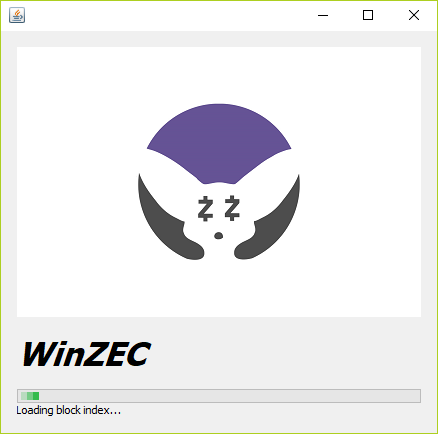 * Click the Own address tab * Click New T (Transparent) address * Most mining pools will not support private Z addresses so stick with a T address for now 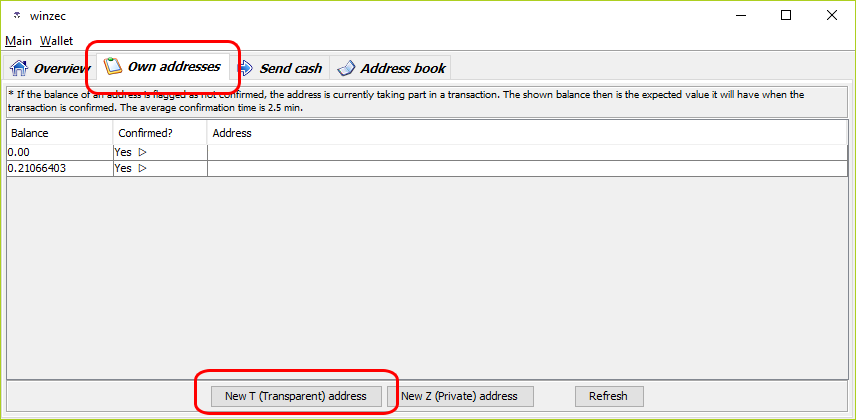 * Next you will want to store your private key somewhere safe * Click Wallet -> Show private key * You can now write this down on a piece of paper or somewhere else safe * Never let anyone have your private key, it is your lock to the wallet 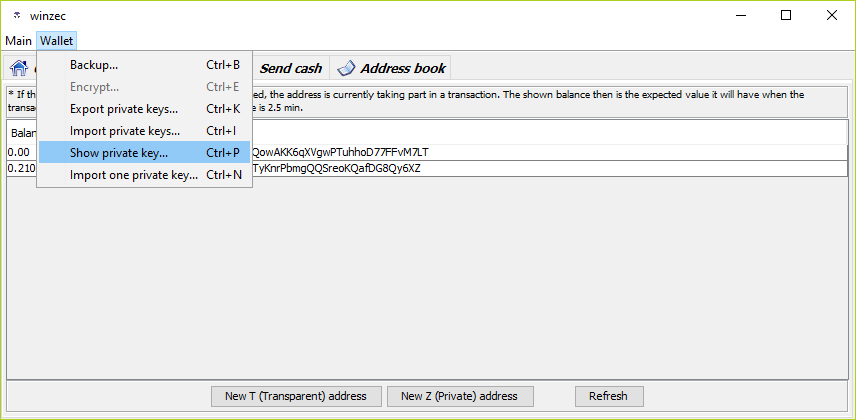 * Finally you want to create a backup * Click Wallet -> Backup * This can be anywhere and it’s suggested to be an external USB drive, cloud storage, anywhere you consider a safe backup * This backup + your private key will allow you to recover in case of any kind of failure 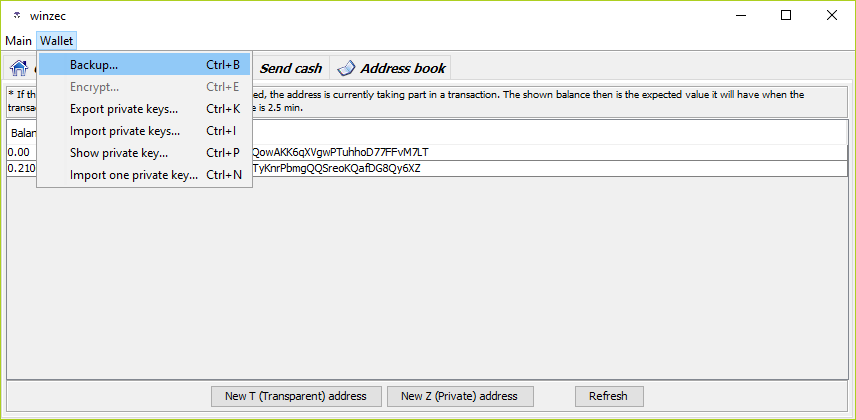 This last step may or may not be required for WinZEC but was an important step in Zcash4Win. You will have a difficult time finding documentation on this one elsewhere. Built into the wallet is a automatic forced upgrade, in that once the Zcash blockchain reaches a certain height, the wallet is automatically considered out of date and will not launch. The developers idea was it would force people to stay on a current version. The problem is he did not keep up with the dev cycle so despite the wallet being out of date there was no new version released. * The workaround was to disable this forced upgrade * Navigate to C:\Users\**USER**\AppData\Roaming\Zcash * Substitute **USER** with your Windows user account * Open zcash.conf in a text editor such as notepad * Add the following line to the end of the conf file * `disabledeprecation=1.0.12` In the future you may need to modify the version number to the current version as new versions of WinZEC are released ## 3\. Overclocking your GPU Nvidia cards perform better when mining equihash due to the more efficient power to speed ratio of the latest gen Pascal cards. AMD cards work well but will have lower Sol/s. The steps below are Nvidia specific, if you plan to use an AMD card you should be able to find several overclocking guides online. Obviously, physically install your GPU and install / upgdate to the latest Nvidia drivers - Install [MSI Afterburner software](https://www.msi.com/page/afterburner) - There are others but Afterburner works well - Once launched you want to detach your graph as it contains important stats about your GPU 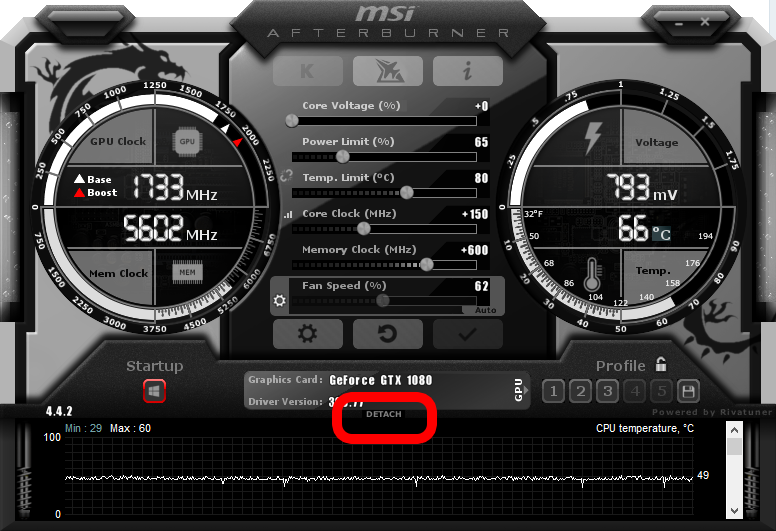 - Once detached you will see a popout window containing all your graphs - Click the gear icon on the main Afterburner window and select the Monitoring tab - The middle window contains all the metrics available, you can drag and re-order to see important data. I suggest the following in order of importance: - GPU temperature - GPU usage - GPU core clock - GPU memory clock - GPU fan speed - GPU power - CPU temperature 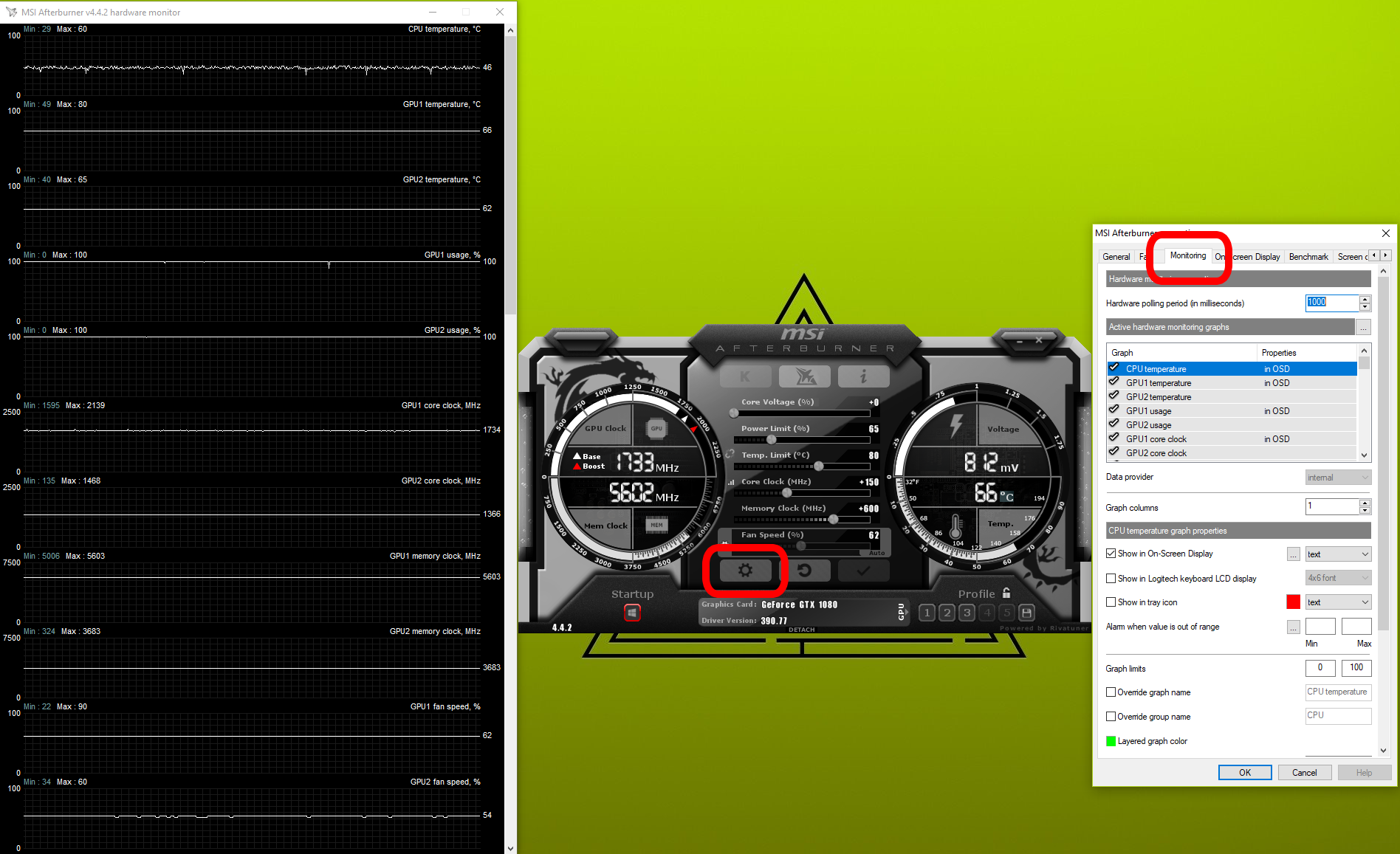 Now it’s time to overclock your GPU. Overclocking for GPU mining is a bit different than overclocking for gaming. When gaming you are typically looking for maximum performance regardless of power consumption. When mining you are looking for maximum efficiency. - Set core voltage to 0 - This is just an offset to the base voltage so setting to 0 just means you are adding 0% to the base - Set power limit between 65 – 70 - Set your temp limit no higher than 80 - If you have poor airflow in your PC rig then maybe set this lower to about 70 - Unlink the power limit and temp limit by clicking the chain link between them Core clock and Memory clock are going to vary. One important note is that most guides or forums you read for overclocking will give an offset number such as +400 or +600. You will often see people bragging they can hit some specific offset number. This offset number is somewhat meaningless, what is important is the final speed of your clock and memory. Many higher end GPUs come already overclocked which means you may not need to set your offset as high to achieve the same effective speed. Let’s look at some examples: |Model|Base Clock|Boost Clock|Memory| |--|--|--|--| |[ASUS GTX 1070 Founders Edition](https://www.techpowerup.com/gpudb/b3665/asus-gtx-1070-founders-edition)|1506 MHz|1683 MHz|2002 MHz| |[ASUS STRIX GTX 1070 GAMING OC](https://www.techpowerup.com/gpudb/b3668/asus-rog-strix-gtx-1070-gaming-oc)|1633 MHz|1835 MHz|2002 MHz| |[GIGABYTE GTX 1070 XTREME Gaming](https://www.techpowerup.com/gpudb/b3894/gigabyte-gtx-1070-xtreme-gaming)|1670 MHz|1873 MHz|2042 MHz| You can see varied base speeds and the difference between a Founders Edition and Gigabyte XTREME Gaming is almost +200 MHz core clock and +40 MHz memory clock. - Memory overclock is more important for equihash mining and you should shoot for +400 to +600 offset based on your particular card. This holds true for pretty much all the popular models _(1060, 1070, 1070ti, 1080, 1080ti)_ - Look for +100 to +200 for core clock, again based on your card. 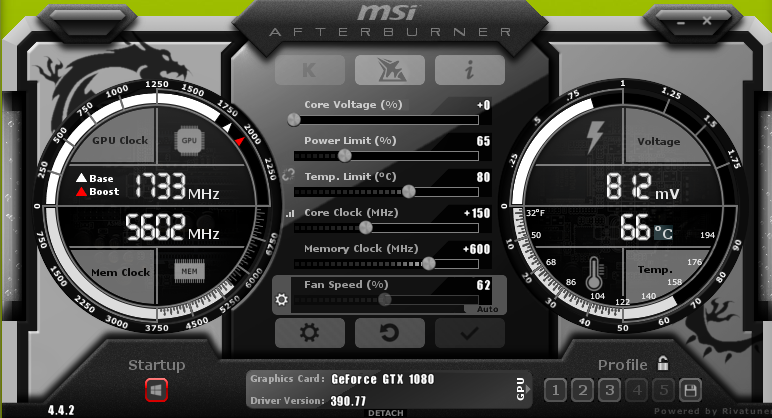 - The last step is to set up a custom fan curve - Enter settings by using the gear icon again - Ramp up your fan at around 60 degrees - With the reduced power limit your cards will run cooler than normal so less fan is needed 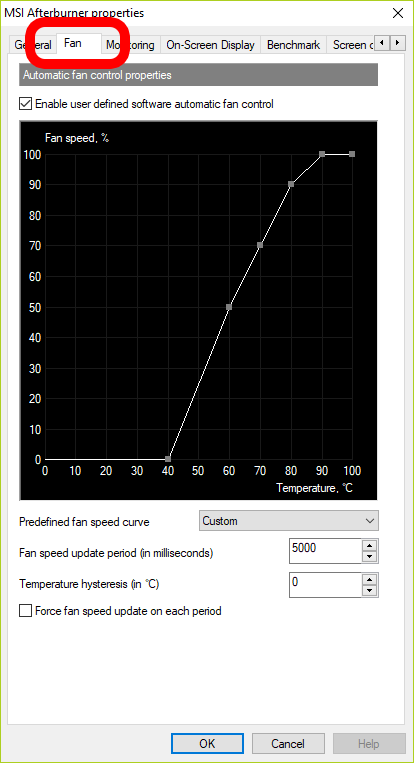 ## 4\. Choosing a mining pool Directly mining a coin is a difficult task unless you are picking something brand new. If you are going for Zcash then joining a mining pool is your option. You have several choices and considerations would be the size of the pool _(hashing power),_ payout rate and fees. For mining Zcash, [flypool](https://zcash.flypool.org/) is a decent choice. No account creation is required, you simply point your miner to their server and start mining. They also offer decent monitoring tools and a fairly standard 1% fee. ## 5\. Install and start your miner Here again you have several choices. EWBF is a stable choice so we will choose it here. Another choice is bminer. [EWBF can be found here](https://github.com/nanopool/ewbf-miner/releases) - Download the ZEC miner .zip since we are focused on Windows in this guide - Navigate to the location you downloaded and unzip the file to a location _(such as C:\\EWBF)_ - You should now see miner.exe and a bunch of .bat files - Ignore the .bat files as they are just references 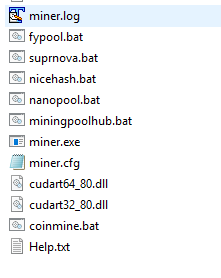 - Open a command prompt by clicking Windows Start -> Run -> Cmd - Right click Cmd.exe and Run as Administrator - In the black and white command window type `CD C:\EWBF` - Now you are ready to start your miner by typing or copying the following command, then press enter **but making sure to substitute your wallet address from step 2** `miner --server us1-zcash.flypool.org --port 3333 --user t1QTdiqnTyKnrPbmgQQSreoKQafDG8Qy6XZ.RigX --pass x --fee 0 --api 127.0.0.1:42000` Description of the command - **miner –** the mining program - **–server us1-zcash.flypool.org –** the flypool US stratum server - **–port 3333 –** the flypool stratum server port - **–user t1QTdiqnTyKnrPbmgQQSreoKQafDG8Qy6XZ.RigX –** ZEC wallet address.(dot) whatever name you want to give your worker. - **Note: Put your wallet address here from step 2** - You want to use your public address and not the private key - Open your WinZEC wallet, click on Own addresses and double click the Address field - You can then copy / paste the address from here to your command prompt 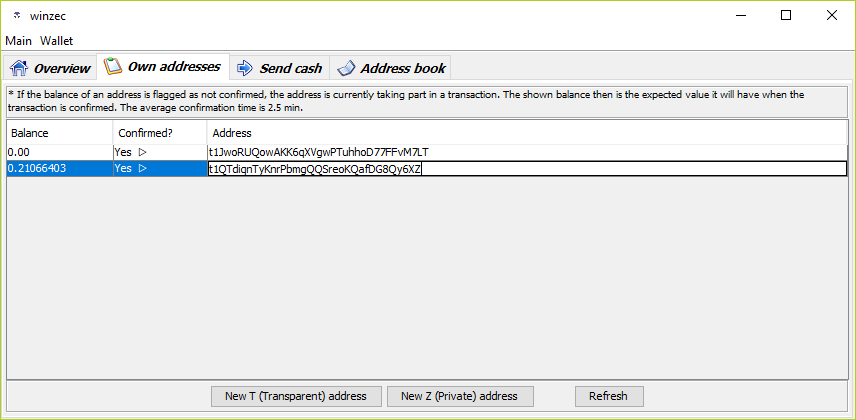 - **–pass x –** Just generic password, doesn’t do anything but needs a value - **–fee 0 –** disables the mining fee for EWBF. If you don’t disable then a very small percentage goes to the creator of EWBF. You can leave it on if you feel generous - **–api –** Will give you a stats page so you can see how your card is performing. Once running the URL will be [http://127.0.0.1:42000/](http://127.0.0.1:42000/ "http://127.0.0.1:42000/") You should see output similar to the following. you are looking for an Accepted share and an output of your hashing speed. The below output is from a gtx 970 thus the relatively low Sol/s 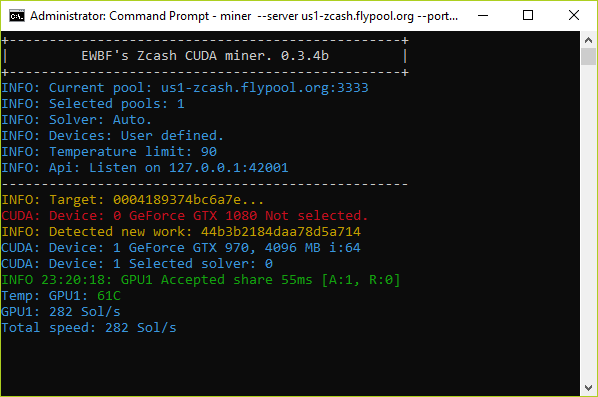 - A 1070 would give roughly 450 Sol/s while a 1080 should show about 520 Sol/s - You can check [whattomine](http://whattomine.com/) for other expected solution rates by card type Now you are mining. Go back to your Afterburner graphs and you should see: - GPU usage now go to 100% and stay there. - Core clock may go up a little - GPU temp rising. _(Anything below 75 is OK long term)_ - Your fan speed ramping up **Two extra tips for small boosts in performance** - [Download Nvidia Profile Inspector](https://ci.appveyor.com/project/Orbmu2k/nvidiaprofileinspector/build/artifacts). Launch it then look for sesction 5 – Common. Change the value for CUDA – Force P2 State to Off. Click Apply changes at the top. - Manually set your Windows page file to 16GB instead of auto manage ## 6\. Monitoring and payout You can verify everything by going to [https://zcash.flypool.org/miners/t1QTdiqnTyKnrPbmgQQSreoKQafDG8Qy6XZ](https://zcash.flypool.org/miners/t1QTdiqnTyKnrPbmgQQSreoKQafDG8Qy6XZ "https://zcash.flypool.org/miners/t1QTdiqnTyKnrPbmgQQSreoKQafDG8Qy6XZ") **Again, substitute your wallet address in the URL**. It may take up to 1 hour for you to start seeing anything so be patient here. You will start to see your hash rate, workers & current Zcash balance. You’ll want click on the settings tab and enter an email address & payout threshold. 0.01 is the minimum payout, however you want to set it higher because there is a small transaction fee to receive your payout. Depending on your mining capacity you can determine what is an appropriate payout timeframe Lastly, you probably want to do something with you mined Zcash coin. Several exchanges support Zcash _(ZEC)_. You can send Zcash from your WinZEC wallet to an exchange. From there you can take multiple paths: - Convert to Bitcoin or Ethereum and look to cash out in FIAT - A possible route for this would be sending ZEC to [Kraken](https://www.kraken.com/) or [Binance](https://www.binance.com/), convert to ETH, send to [GDAX](https://www.gdax.com/), convert to USD, send to bank account - Hold your Zcash and wait for the market to increase __For more crypto news, charts and information visit [http://www.seems-legit.com/](http://www.seems-legit.com/)__  |
| json metadata | {"tags":["cryptocurrency","crypto","blockchain","steemit","bitcoin"],"image":["https://steemitimages.com/DQmeMVqgu4h3HYHpzeke6xY9bhpFuLKMrJzBMh38xSN1Gqx/image.png","https://steemitimages.com/DQmZnKzeyBFk3J8Fcnnupy8SqvkSDan6N6Fdrb7GSyuMzQo/image.png","https://steemitimages.com/DQmWh1yJtUbhAFxEhRzULqMhHwjrcRfcz22ALus5ULWbpxF/image.png","https://steemitimages.com/DQmRJojd9k33gpJLJHykZ53s72s5Lv6RzN673WqL2cbxnB2/image.png","https://steemitimages.com/DQmRsoSWvG322Ga2xLTZB6EnKi8Sp5CHAp2XbsTG5VK5jZc/image.png","https://steemitimages.com/DQmetKp48WoHXabChah9kxAZgHgkvegqdHsSXVjpwTv4Y1U/image.png","https://steemitimages.com/DQmW41CZdHeGxrUuWJLxb32Sd5GBnh6W33XEtk83uE7Yxp5/image.png","https://steemitimages.com/DQmdFpBgHY63eGF55uFumUe8vijvG3qsuPuqPZYf3BgMPCu/image.png","https://steemitimages.com/DQmccoENQeFCK7TqnqhZ7Uv6GqDenoG4ErwdgnKKK2dkbDp/image.png","https://steemitimages.com/DQmRMKAVUWmCZAgVJUQ14wXcXxCQ15K5XhJRCjXPEJBfnAW/image.png","https://steemitimages.com/DQmPx6jLuxe2ijB9jSUjjogisBWnQ5TruZCfQwS6dEpnn6m/image.png","https://steemitimages.com/DQmWv4XiPLbntJikyUmtmBBnszntzpoBwT8LJuT4nTNjKo6/image.png","https://steemitimages.com/DQmV2SmS3d6sejhRW4W8tUMqXLv913X3AoyAnZK2HtHhbPH/image.png"],"links":["https://www.msi.com/page/afterburner","https://www.techpowerup.com/gpudb/b3665/asus-gtx-1070-founders-edition","https://www.techpowerup.com/gpudb/b3668/asus-rog-strix-gtx-1070-gaming-oc","https://www.techpowerup.com/gpudb/b3894/gigabyte-gtx-1070-xtreme-gaming","https://zcash.flypool.org/","https://github.com/nanopool/ewbf-miner/releases","http://127.0.0.1:42000/","http://whattomine.com/","https://ci.appveyor.com/project/Orbmu2k/nvidiaprofileinspector/build/artifacts","https://zcash.flypool.org/miners/t1QTdiqnTyKnrPbmgQQSreoKQafDG8Qy6XZ","https://www.kraken.com/","https://www.binance.com/","https://www.gdax.com/","http://www.seems-legit.com/"],"app":"steemit/0.1","format":"markdown"} |
| Transaction Info | Block #20915067/Trx 78d68057c3485ee8ab29a53759f6eaf8a5e0d0bb |
View Raw JSON Data
{
"trx_id": "78d68057c3485ee8ab29a53759f6eaf8a5e0d0bb",
"block": 20915067,
"trx_in_block": 7,
"op_in_trx": 0,
"virtual_op": 0,
"timestamp": "2018-03-23T03:09:00",
"op": [
"comment",
{
"parent_author": "",
"parent_permlink": "cryptocurrency",
"author": "agentwhite",
"permlink": "asic-wars-the-last-algo-an-equihash-mining-guide",
"title": "ASIC wars: the last algo, an equihash mining guide",
"body": "## The CryptoNight battle\nYou may have seen a recent back and forth between Riccardo Spagni and Bitmain regarding their new ASIC Antminer X3. Bitmain recently announced a new miner targeted for the CryptoNight proof of work algorithm which Monero (among others) leverages.\n\nThis announcement is on the heels of Baikal Miner announcing their Giant N ASIC for the same purpose.\n\nThese announcements prompted a bit of backlash from the mining community due to fears that GPU mining will further die off leading to more centralized control of mining.\n\nRiccardo (the lead of Monero) responded to Bitmains announcement on twitter stating the new ASIC will simply not work to mine Monero. This resulted in Riccardo being blocked from the Bitmain twitter account.\n\nSo what can you, as a small time miner do? Fortunately there are still some algorithms which have been holding their ground against ASIC, primarily Equihash due to it’s dependency on memory intensive operations.\n\n## Equihash mining\n\n## 1. Choosing a coin\nA quick search of whattomine gives you a few options:\n\n* Zcash\n* Zencash\n* Bitcoin Gold\n* Komodo\n* Hush\n\nNot on the list but recent fork, Bitcoin Private, is also an option. A deeper search will reveal some viable, smaller altcoins.\n\nThese coins move around a bit in terms of profitability, and going for a smaller altcoin may be a long term play but a good stable option might be to start with Zcash, which this guide will focus on.\n## 2. Set up a wallet\nYou have a few options for Zcash, however WinZEC (previously Zcash4Win) is the recommended Windows local wallet.\n\n* Download from the link above, launch the installer and Install\n* Launch WinZEC, you will see it download a “large file” and a proving key. Let this finish\n\n* Click the Own address tab\n* Click New T (Transparent) address\n\t* Most mining pools will not support private Z addresses so stick with a T address for now\n\n* Next you will want to store your private key somewhere safe\n* Click Wallet -> Show private key\n\t* You can now write this down on a piece of paper or somewhere else safe\n\t* Never let anyone have your private key, it is your lock to the wallet\n\n* Finally you want to create a backup\n* Click Wallet -> Backup\n\t* This can be anywhere and it’s suggested to be an external USB drive, cloud storage, anywhere you consider a safe backup\n\t* This backup + your private key will allow you to recover in case of any kind of failure\n\nThis last step may or may not be required for WinZEC but was an important step in Zcash4Win. You will have a difficult time finding documentation on this one elsewhere.\n\nBuilt into the wallet is a automatic forced upgrade, in that once the Zcash blockchain reaches a certain height, the wallet is automatically considered out of date and will not launch. The developers idea was it would force people to stay on a current version. The problem is he did not keep up with the dev cycle so despite the wallet being out of date there was no new version released.\n\n* The workaround was to disable this forced upgrade\n* Navigate to C:\\Users\\**USER**\\AppData\\Roaming\\Zcash\n\t* Substitute **USER** with your Windows user account\n* Open zcash.conf in a text editor such as notepad\n* Add the following line to the end of the conf file\n\t* `disabledeprecation=1.0.12`\n\nIn the future you may need to modify the version number to the current version as new versions of WinZEC are released\n\n## 3\\. Overclocking your GPU\n\nNvidia cards perform better when mining equihash due to the more efficient power to speed ratio of the latest gen Pascal cards. AMD cards work well but will have lower Sol/s.\n\nThe steps below are Nvidia specific, if you plan to use an AMD card you should be able to find several overclocking guides online.\n\nObviously, physically install your GPU and install / upgdate to the latest Nvidia drivers\n- Install [MSI Afterburner software](https://www.msi.com/page/afterburner)\n - There are others but Afterburner works well\n- Once launched you want to detach your graph as it contains important stats about your GPU\n\n- Once detached you will see a popout window containing all your graphs\n- Click the gear icon on the main Afterburner window and select the Monitoring tab\n- The middle window contains all the metrics available, you can drag and re-order to see important data. I suggest the following in order of importance:\n - GPU temperature\n - GPU usage\n - GPU core clock\n - GPU memory clock\n - GPU fan speed\n - GPU power\n - CPU temperature\n\n\nNow it’s time to overclock your GPU. Overclocking for GPU mining is a bit different than overclocking for gaming. When gaming you are typically looking for maximum performance regardless of power consumption. When mining you are looking for maximum efficiency.\n\n- Set core voltage to 0\n - This is just an offset to the base voltage so setting to 0 just means you are adding 0% to the base\n- Set power limit between 65 – 70\n- Set your temp limit no higher than 80\n - If you have poor airflow in your PC rig then maybe set this lower to about 70\n- Unlink the power limit and temp limit by clicking the chain link between them\n\nCore clock and Memory clock are going to vary. One important note is that most guides or forums you read for overclocking will give an offset number such as +400 or +600. You will often see people bragging they can hit some specific offset number. This offset number is somewhat meaningless, what is important is the final speed of your clock and memory.\n\nMany higher end GPUs come already overclocked which means you may not need to set your offset as high to achieve the same effective speed. Let’s look at some examples:\n|Model|Base Clock|Boost Clock|Memory|\n|--|--|--|--|\n|[ASUS GTX 1070 Founders Edition](https://www.techpowerup.com/gpudb/b3665/asus-gtx-1070-founders-edition)|1506 MHz|1683 MHz|2002 MHz|\n|[ASUS STRIX GTX 1070 GAMING OC](https://www.techpowerup.com/gpudb/b3668/asus-rog-strix-gtx-1070-gaming-oc)|1633 MHz|1835 MHz|2002 MHz|\n|[GIGABYTE GTX 1070 XTREME Gaming](https://www.techpowerup.com/gpudb/b3894/gigabyte-gtx-1070-xtreme-gaming)|1670 MHz|1873 MHz|2042 MHz|\nYou can see varied base speeds and the difference between a Founders Edition and Gigabyte XTREME Gaming is almost +200 MHz core clock and +40 MHz memory clock.\n\n- Memory overclock is more important for equihash mining and you should shoot for +400 to +600 offset based on your particular card. This holds true for pretty much all the popular models _(1060, 1070, 1070ti, 1080, 1080ti)_\n- Look for +100 to +200 for core clock, again based on your card.\n\n- The last step is to set up a custom fan curve\n- Enter settings by using the gear icon again\n- Ramp up your fan at around 60 degrees\n - With the reduced power limit your cards will run cooler than normal so less fan is needed\n\n## 4\\. Choosing a mining pool\nDirectly mining a coin is a difficult task unless you are picking something brand new. If you are going for Zcash then joining a mining pool is your option. You have several choices and considerations would be the size of the pool _(hashing power),_ payout rate and fees.\n\nFor mining Zcash, [flypool](https://zcash.flypool.org/) is a decent choice. No account creation is required, you simply point your miner to their server and start mining. They also offer decent monitoring tools and a fairly standard 1% fee.\n## 5\\. Install and start your miner\nHere again you have several choices. EWBF is a stable choice so we will choose it here. Another choice is bminer.\n\n[EWBF can be found here](https://github.com/nanopool/ewbf-miner/releases)\n\n- Download the ZEC miner .zip since we are focused on Windows in this guide\n- Navigate to the location you downloaded and unzip the file to a location _(such as C:\\\\EWBF)_\n- You should now see miner.exe and a bunch of .bat files\n - Ignore the .bat files as they are just references\n\n- Open a command prompt by clicking Windows Start -> Run -> Cmd\n- Right click Cmd.exe and Run as Administrator\n- In the black and white command window type `CD C:\\EWBF`\n- Now you are ready to start your miner by typing or copying the following command, then press enter **but making sure to substitute your wallet address from step 2**\n\n`miner --server us1-zcash.flypool.org --port 3333 --user t1QTdiqnTyKnrPbmgQQSreoKQafDG8Qy6XZ.RigX --pass x --fee 0 --api 127.0.0.1:42000`\n\nDescription of the command\n\n- **miner –** the mining program\n- **–server us1-zcash.flypool.org –** the flypool US stratum server\n- **–port 3333 –** the flypool stratum server port\n- **–user t1QTdiqnTyKnrPbmgQQSreoKQafDG8Qy6XZ.RigX –** ZEC wallet address.(dot) whatever name you want to give your worker.\n - **Note: Put your wallet address here from step 2**\n - You want to use your public address and not the private key\n - Open your WinZEC wallet, click on Own addresses and double click the Address field\n - You can then copy / paste the address from here to your command prompt\n\n- **–pass x –** Just generic password, doesn’t do anything but needs a value\n- **–fee 0 –** disables the mining fee for EWBF. If you don’t disable then a very small percentage goes to the creator of EWBF. You can leave it on if you feel generous\n- **–api –** Will give you a stats page so you can see how your card is performing. Once running the URL will be [http://127.0.0.1:42000/](http://127.0.0.1:42000/ \"http://127.0.0.1:42000/\")\n\nYou should see output similar to the following. you are looking for an Accepted share and an output of your hashing speed. The below output is from a gtx 970 thus the relatively low Sol/s\n\n- A 1070 would give roughly 450 Sol/s while a 1080 should show about 520 Sol/s\n- You can check [whattomine](http://whattomine.com/) for other expected solution rates by card type\n\nNow you are mining. Go back to your Afterburner graphs and you should see:\n\n- GPU usage now go to 100% and stay there.\n- Core clock may go up a little\n- GPU temp rising. _(Anything below 75 is OK long term)_\n- Your fan speed ramping up\n\n**Two extra tips for small boosts in performance**\n\n- [Download Nvidia Profile Inspector](https://ci.appveyor.com/project/Orbmu2k/nvidiaprofileinspector/build/artifacts). Launch it then look for sesction 5 – Common. Change the value for CUDA – Force P2 State to Off. Click Apply changes at the top.\n- Manually set your Windows page file to 16GB instead of auto manage\n ## 6\\. Monitoring and payout\nYou can verify everything by going to [https://zcash.flypool.org/miners/t1QTdiqnTyKnrPbmgQQSreoKQafDG8Qy6XZ](https://zcash.flypool.org/miners/t1QTdiqnTyKnrPbmgQQSreoKQafDG8Qy6XZ \"https://zcash.flypool.org/miners/t1QTdiqnTyKnrPbmgQQSreoKQafDG8Qy6XZ\")\n\n**Again, substitute your wallet address in the URL**. It may take up to 1 hour for you to start seeing anything so be patient here. You will start to see your hash rate, workers & current Zcash balance.\n\nYou’ll want click on the settings tab and enter an email address & payout threshold. 0.01 is the minimum payout, however you want to set it higher because there is a small transaction fee to receive your payout. Depending on your mining capacity you can determine what is an appropriate payout timeframe\n\nLastly, you probably want to do something with you mined Zcash coin. Several exchanges support Zcash _(ZEC)_.\n\nYou can send Zcash from your WinZEC wallet to an exchange. From there you can take multiple paths:\n\n- Convert to Bitcoin or Ethereum and look to cash out in FIAT\n - A possible route for this would be sending ZEC to [Kraken](https://www.kraken.com/) or [Binance](https://www.binance.com/), convert to ETH, send to [GDAX](https://www.gdax.com/), convert to USD, send to bank account\n- Hold your Zcash and wait for the market to increase\n\n\n\n__For more crypto news, charts and information visit [http://www.seems-legit.com/](http://www.seems-legit.com/)__\n",
"json_metadata": "{\"tags\":[\"cryptocurrency\",\"crypto\",\"blockchain\",\"steemit\",\"bitcoin\"],\"image\":[\"https://steemitimages.com/DQmeMVqgu4h3HYHpzeke6xY9bhpFuLKMrJzBMh38xSN1Gqx/image.png\",\"https://steemitimages.com/DQmZnKzeyBFk3J8Fcnnupy8SqvkSDan6N6Fdrb7GSyuMzQo/image.png\",\"https://steemitimages.com/DQmWh1yJtUbhAFxEhRzULqMhHwjrcRfcz22ALus5ULWbpxF/image.png\",\"https://steemitimages.com/DQmRJojd9k33gpJLJHykZ53s72s5Lv6RzN673WqL2cbxnB2/image.png\",\"https://steemitimages.com/DQmRsoSWvG322Ga2xLTZB6EnKi8Sp5CHAp2XbsTG5VK5jZc/image.png\",\"https://steemitimages.com/DQmetKp48WoHXabChah9kxAZgHgkvegqdHsSXVjpwTv4Y1U/image.png\",\"https://steemitimages.com/DQmW41CZdHeGxrUuWJLxb32Sd5GBnh6W33XEtk83uE7Yxp5/image.png\",\"https://steemitimages.com/DQmdFpBgHY63eGF55uFumUe8vijvG3qsuPuqPZYf3BgMPCu/image.png\",\"https://steemitimages.com/DQmccoENQeFCK7TqnqhZ7Uv6GqDenoG4ErwdgnKKK2dkbDp/image.png\",\"https://steemitimages.com/DQmRMKAVUWmCZAgVJUQ14wXcXxCQ15K5XhJRCjXPEJBfnAW/image.png\",\"https://steemitimages.com/DQmPx6jLuxe2ijB9jSUjjogisBWnQ5TruZCfQwS6dEpnn6m/image.png\",\"https://steemitimages.com/DQmWv4XiPLbntJikyUmtmBBnszntzpoBwT8LJuT4nTNjKo6/image.png\",\"https://steemitimages.com/DQmV2SmS3d6sejhRW4W8tUMqXLv913X3AoyAnZK2HtHhbPH/image.png\"],\"links\":[\"https://www.msi.com/page/afterburner\",\"https://www.techpowerup.com/gpudb/b3665/asus-gtx-1070-founders-edition\",\"https://www.techpowerup.com/gpudb/b3668/asus-rog-strix-gtx-1070-gaming-oc\",\"https://www.techpowerup.com/gpudb/b3894/gigabyte-gtx-1070-xtreme-gaming\",\"https://zcash.flypool.org/\",\"https://github.com/nanopool/ewbf-miner/releases\",\"http://127.0.0.1:42000/\",\"http://whattomine.com/\",\"https://ci.appveyor.com/project/Orbmu2k/nvidiaprofileinspector/build/artifacts\",\"https://zcash.flypool.org/miners/t1QTdiqnTyKnrPbmgQQSreoKQafDG8Qy6XZ\",\"https://www.kraken.com/\",\"https://www.binance.com/\",\"https://www.gdax.com/\",\"http://www.seems-legit.com/\"],\"app\":\"steemit/0.1\",\"format\":\"markdown\"}"
}
]
}2018/03/18 10:23:33
2018/03/18 10:23:33
| parent author | agentwhite |
| parent permlink | storj-how-to-guide |
| author | steemitboard |
| permlink | steemitboard-notify-agentwhite-20180318t102335000z |
| title | |
| body | Congratulations @agentwhite! You have completed some achievement on Steemit and have been rewarded with new badge(s) : [](http://steemitboard.com/@agentwhite) You published your First Post [](http://steemitboard.com/@agentwhite) You made your First Vote [](http://steemitboard.com/@agentwhite) You got a First Vote Click on any badge to view your own Board of Honor on SteemitBoard. For more information about SteemitBoard, click [here](https://steemit.com/@steemitboard) If you no longer want to receive notifications, reply to this comment with the word `STOP` > Upvote this notification to help all Steemit users. Learn why [here](https://steemit.com/steemitboard/@steemitboard/http-i-cubeupload-com-7ciqeo-png)! |
| json metadata | {"image":["https://steemitboard.com/img/notifications.png"]} |
| Transaction Info | Block #20780561/Trx ed311b9fff153991598ec9f76d1cef6ee76bf7be |
View Raw JSON Data
{
"trx_id": "ed311b9fff153991598ec9f76d1cef6ee76bf7be",
"block": 20780561,
"trx_in_block": 47,
"op_in_trx": 0,
"virtual_op": 0,
"timestamp": "2018-03-18T10:23:33",
"op": [
"comment",
{
"parent_author": "agentwhite",
"parent_permlink": "storj-how-to-guide",
"author": "steemitboard",
"permlink": "steemitboard-notify-agentwhite-20180318t102335000z",
"title": "",
"body": "Congratulations @agentwhite! You have completed some achievement on Steemit and have been rewarded with new badge(s) :\n\n[](http://steemitboard.com/@agentwhite) You published your First Post\n[](http://steemitboard.com/@agentwhite) You made your First Vote\n[](http://steemitboard.com/@agentwhite) You got a First Vote\n\nClick on any badge to view your own Board of Honor on SteemitBoard.\nFor more information about SteemitBoard, click [here](https://steemit.com/@steemitboard)\n\nIf you no longer want to receive notifications, reply to this comment with the word `STOP`\n\n> Upvote this notification to help all Steemit users. Learn why [here](https://steemit.com/steemitboard/@steemitboard/http-i-cubeupload-com-7ciqeo-png)!",
"json_metadata": "{\"image\":[\"https://steemitboard.com/img/notifications.png\"]}"
}
]
}haggisloveupvoted (100.00%) @agentwhite / storj-how-to-guide2018/03/18 05:40:24
haggisloveupvoted (100.00%) @agentwhite / storj-how-to-guide
2018/03/18 05:40:24
| voter | haggislove |
| author | agentwhite |
| permlink | storj-how-to-guide |
| weight | 10000 (100.00%) |
| Transaction Info | Block #20774898/Trx aa27b1b5c7a56cfc6c09899df0b1d8d2da8d8a41 |
View Raw JSON Data
{
  "trx_id": "aa27b1b5c7a56cfc6c09899df0b1d8d2da8d8a41",
  "block": 20774898,
  "trx_in_block": 44,
  "op_in_trx": 0,
  "virtual_op": 0,
  "timestamp": "2018-03-18T05:40:24",
  "op": [
    "vote",
    {
      "voter": "haggislove",
      "author": "agentwhite",
      "permlink": "storj-how-to-guide",
      "weight": 10000
    }
  ]
}2018/03/18 05:38:30
2018/03/18 05:38:30
| parent author | agentwhite |
| parent permlink | storj-how-to-guide |
| author | cheetah |
| permlink | cheetah-re-agentwhitestorj-how-to-guide |
| title | |
| body | Hi! I am a robot. I just upvoted you! I found similar content that readers might be interested in: http://www.seems-legit.com/how-to/storj/ |
| json metadata | |
| Transaction Info | Block #20774860/Trx e81e689b28a187ef2ae15c1f67703c77305987e9 |
View Raw JSON Data
{
  "trx_id": "e81e689b28a187ef2ae15c1f67703c77305987e9",
  "block": 20774860,
  "trx_in_block": 57,
  "op_in_trx": 0,
  "virtual_op": 0,
  "timestamp": "2018-03-18T05:38:30",
  "op": [
    "comment",
    {
      "parent_author": "agentwhite",
      "parent_permlink": "storj-how-to-guide",
      "author": "cheetah",
      "permlink": "cheetah-re-agentwhitestorj-how-to-guide",
      "title": "",
      "body": "Hi! I am a robot. I just upvoted you! I found similar content that readers might be interested in:\nhttp://www.seems-legit.com/how-to/storj/",
      "json_metadata": ""
    }
  ]
}2018/03/18 05:38:12
2018/03/18 05:38:12
| parent author | agentwhite |
| parent permlink | storj-how-to-guide |
| author | ipostbtcprice |
| permlink | re-storj-how-to-guide-20180318t053810 |
| title | |
| body | For future viewers: price of bitcoin at the moment of posting is 7614.10USD |
| json metadata | |
| Transaction Info | Block #20774854/Trx b25d7a442be73490c8f7d1ebff8ff5c3eb2e2356 |
View Raw JSON Data
{
  "trx_id": "b25d7a442be73490c8f7d1ebff8ff5c3eb2e2356",
  "block": 20774854,
  "trx_in_block": 27,
  "op_in_trx": 0,
  "virtual_op": 0,
  "timestamp": "2018-03-18T05:38:12",
  "op": [
    "comment",
    {
      "parent_author": "agentwhite",
      "parent_permlink": "storj-how-to-guide",
      "author": "ipostbtcprice",
      "permlink": "re-storj-how-to-guide-20180318t053810",
      "title": "",
      "body": "For future viewers: price of bitcoin at the moment of posting is 7614.10USD",
      "json_metadata": ""
    }
  ]
}agentwhiteupvoted (100.00%) @agentwhite / storj-how-to-guide2018/03/18 05:38:00
agentwhiteupvoted (100.00%) @agentwhite / storj-how-to-guide
2018/03/18 05:38:00
| voter | agentwhite |
| author | agentwhite |
| permlink | storj-how-to-guide |
| weight | 10000 (100.00%) |
| Transaction Info | Block #20774850/Trx 6a860be9b2ebc2451af745e0f2bb3308788984f3 |
View Raw JSON Data
{
  "trx_id": "6a860be9b2ebc2451af745e0f2bb3308788984f3",
  "block": 20774850,
  "trx_in_block": 54,
  "op_in_trx": 0,
  "virtual_op": 0,
  "timestamp": "2018-03-18T05:38:00",
  "op": [
    "vote",
    {
      "voter": "agentwhite",
      "author": "agentwhite",
      "permlink": "storj-how-to-guide",
      "weight": 10000
    }
  ]
}agentwhitepublished a new post: storj-how-to-guide2018/03/18 05:38:00
agentwhitepublished a new post: storj-how-to-guide
2018/03/18 05:38:00
| parent author | |
| parent permlink | crypto |
| author | agentwhite |
| permlink | storj-how-to-guide |
| title | STORJ how-to guide |
| body |  # Start renting your free disk space with STORJ SHARE This guide will walk you through setting up the basic STORJ SHARE client on Windows. This is the quickest and easiest way to get started using the 5 steps below. 1. Configure NTP 2. Configure NAT and Port Forwarding 3. Set up a wallet 4. Install STORJ SHARE GUI & configure nodes 5. Start, monitor and view statistics ## 1. Configure NTP Storj Share requires time synchronization between the Storj bridge & your nodes. You can use third party tools, but the easiest way is to simply change the server Windows is using to synchronize internet time. STORJ recommends using pool.ntp.org to sync your time If you are running Windows 7+ you can interact directly with the Windows time service. * Choose your time server. pool.ntp.org has default time servers but also regional and country specific * Default - 0.pool.ntp.org * Region - 0.north-america.pool.ntp.org (available regions: europe, north-america, oceania or asia) * Country - 0.ch.pool.ntp.org * Each pool.ntp.org option has multiple servers designated by the starting number - 0, 1, 2, etc. * Open a command prompt as administrator (Start -> Run -> CMD -> Right Click -> Run as Administrator) * Run the following command substituting the time server(s) you choose `w32tm /config /syncfromflags:manual /manualpeerlist:"0.north-america.pool.ntp.org 1.north-america.pool.ntp.org 2.north-america.pool.ntp.org 3.north-america.pool.ntp.org"` 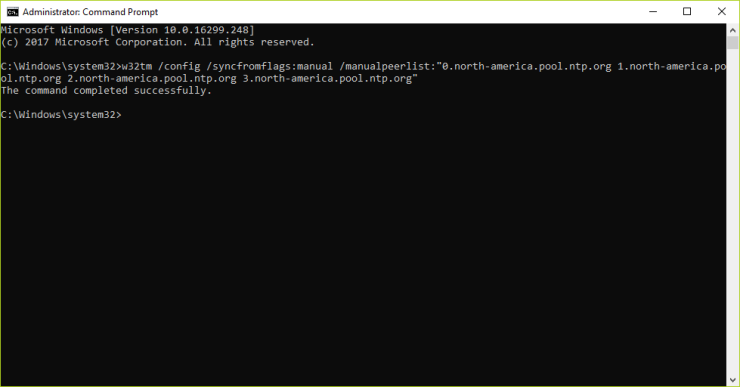 - Alternatively you can change your internet time server by entering control panel Control Panel\\Clock, Language, and Region\\Date and Time  * Click Change settings…  - Update the server again to your choice of pool.ntp.org server, ensure Synchronize with and Internet time server is checked and click Update now. - Finally, click OK ## 2\. Configure NAT and Port Forwarding Storj share requires your nodes to be accessible by their bridge. You can choose “punch out” which will allow the STORJ SHARE client to reach outbound to the bridge using UPnP, however this option is unreliable as some routers will close this connection after a period of time. Your preferred option is to configure your router / firewall to allow inbound connections. Your preferred option will work best if you can assign a static IP to your node PC - Find your gateway router address by opening a command prompt _(Start -> Run -> CMD -> Right Click -> Run as Administrator)_ - Run the command `ipconfig` and look for the Default Gateway _(typically 192.168.1.1)_  - This next step is specific to your internet provider and internet gateway but typically you can open a browser and navigate to [http://192.168.1.1](http://192.168.1.1/) - Likely you will need to log in, most times the user / password are on a sticker attached to your router or you can Google for the defaults specific to your router - Once in, you are looking for a menu named Port Forwarding  - For each node you plan to share you will need a specific port and rule configured - External host depends on your router but will be either blank or * or 0.0.0.0 - Internal host is your node PC IP address. You can get this from the previous command prompt `ipconfig` _(In my case it is 192.168.1.4)_ - External Port and Internal Port should match and can be whatever your choose. Suggestion picking something above 1024 and below 65535 which is not already in use on your PC. Something like 42000 would be a good choice - In my case I selected 29295 and added the rule 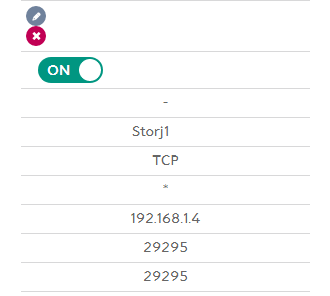 Once configured you can test by first getting your public IP by using [Google](https://www.google.com/search?q=whatsmyip) and checking your port by using a site like [yougetsignal](https://www.yougetsignal.com/tools/open-ports/) Copy your public IP and enter both the IP and port on yougetsignal and click Check. You should see the port is open.  ## 3\. Set up an ERC20 token wallet such as MyEtherWallet Keeping this guide focused on STORJ setup, go to [https://www.myetherwallet.com/](https://www.myetherwallet.com/) ## 4\. Install STORJ SHARE GUI & share nodes - Download the GUI from their [Github](https://github.com/Storj/storjshare-gui/releases) or [storj.io/share.html](https://storj.io/share.html) - Launch the installer and click through next - Now it's time to start configuration, click on Start Setup  - Add your wallet address which was created in step 3 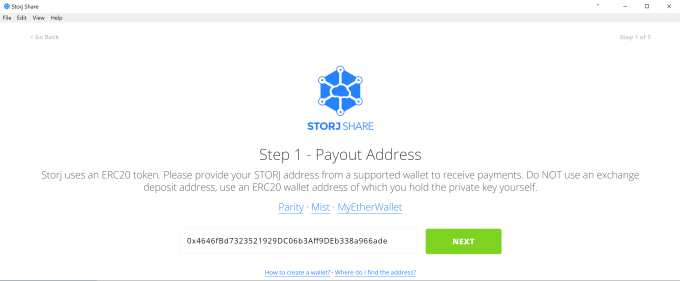 - Click on Choose Files - In the dialog windows which comes up select a particular drive or folder that you want to share, which can be almost anything: - Locally attached drive - Network share - Mapped network drive - External USB drive - Storage Area Network or Network Attached Storage - Click on Select Location 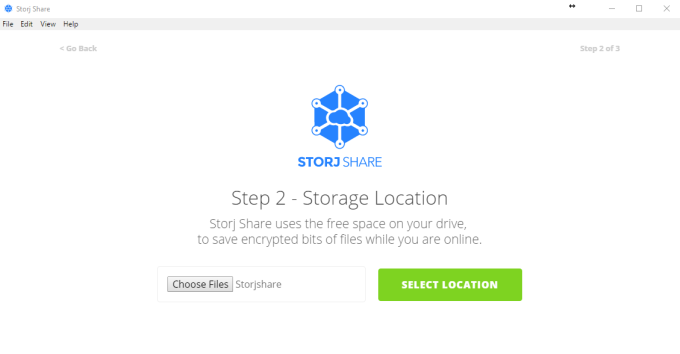 - Choose the amount of storage you want to share from the overall available storage - Make sure to select the appropriate unit of measure _(MB, GB, TB)_ - Click Next 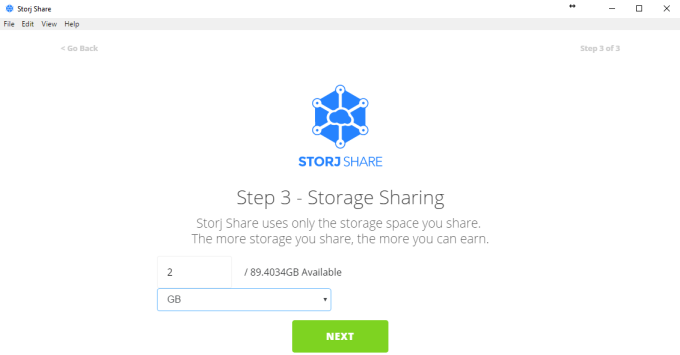 - Enter the Port Number from step 2 which you configured NAT port forwarding - Check the Reachable box _(This will ensure inbound connection from the bridge)_ - Click Next 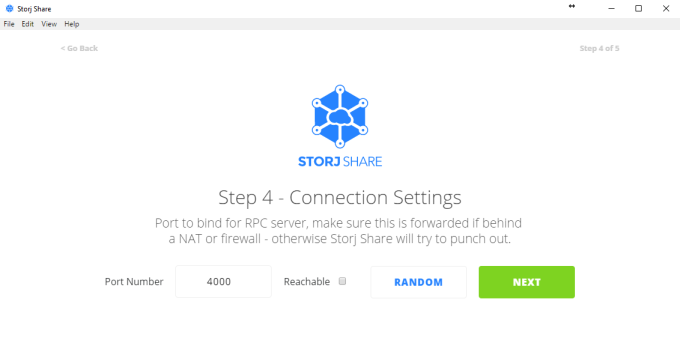 - Click Finish  - Finally you are sharing some storage! - The Overview window shows important details about your share - **NodeID –** Unique identified for each share - **Status –** On / Off based on your share availability - **Location –** The specific location you are sharing from your PC - **Uptime –** How long your node has been available - **Restarts –** How many times your node has restarted due to error - **Peers –** Should range from 100 – 200 - **Bridges –** Shows status back to bridge - **Allocs –** a counter which will increase as files are presented to your server. Actual files received will be in parentheses. It is normal see your Allocs increasing but no storage being added as many factors go into you winning storage. - **Shared –** Amount of storage actual shared from your disk. This will likely be less than your total offered - **Delta –** Your time offset compared to the bridge. This should start high and gradually decrease to less than -100ms if you configured NTP correctly in step 1 - **Port –** Ideally this says (TCP) and is green. That means your node is fully accessible - If your port is Red it means you are not accessible - If it says TUNNEL it means you are using punch outbound communication and may not be reliable - If it is black _(like the screenshot)_ it means local loopback is not working meaning the client can't talk to itself on the local network, this is fine 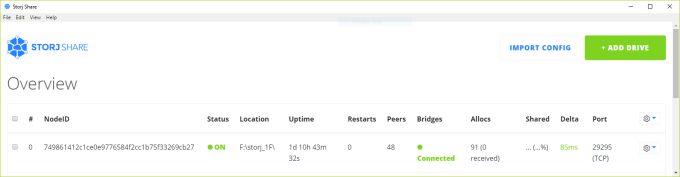 ## 5\. Monitor & view statistics Now that you are up and running you probably want to start getting some storage. It will take time, and can take up to a week to start actually receiving file shards. This is due to a couple factors: - **Delta -** This will start high and gradually decrease quickly over time - **Response Time -** This will start likely above 9000ms but gradually over time will reduce. Anything below 9000ms is considered acceptable - **Reputation -** This indirectly affects your storage allocation and will go up or down based on the times your node accepts an Alloc (+1 rep) or rejects (-1 rep) or is offline The easiest way is to use [https://storjstat.com](https://storjstat.com) You can add your NodeID and it will show details. Best way to win storage is to have your nodes always on and over time you will eventually get some storage In order to troubleshoot you can use [http://ssdynamite.com](http://ssdynamite.com/) You can upload your log files and run through an analyzer which will tell you the number of times you accepted or rejected an Alloc, your response time and timeout rate. All things to monitor to ensure healthy nodes At this point you just wait.... If your nodes are healthy, they will gradually over time gain reputation and improve performance thus eventually leading to some storage being allocated to your nodes. Payouts are in $STORJ coin and occur monthly to your wallet. For more crypto news and information visit [http://www.seems-legit.com/](http://www.seems-legit.com/)  |
| json metadata | {"tags":["crypto","cryptocurrency","blockchain","steemit","bitcoin"],"image":["https://steemitimages.com/DQmYJNLA7uy7bPPTocfwLgawg2ziNwAs34mzfYHsJCgwSND/image.png","https://steemitimages.com/DQmbvvx8p5ZSqS2P5qeUQ8NsYvLs8y8WKLp7tergLNFnw5k/image.png","https://steemitimages.com/DQmTpJ7ckQP3BXy2Qs6WTt1baZj1wsNpLLqG8uqNJaQyAFx/image.png","https://steemitimages.com/DQmV8quQsfEgT23JRtpjoTDCjbtLaHHY9UFJ59c5mPvPMjL/image.png","https://steemitimages.com/DQmbaYqHFNrkeD7VooC7NeNaQ7wqpyjVzqpp5R2XtHzG6tv/image.png","https://steemitimages.com/DQmTwEkYKcRrXHy97D8iX14rscPwqC7e7kiD3XzRW1AbhTU/image.png","https://steemitimages.com/DQmbWvn5S5Z2kPmiq6aBKVzPCMovubNv6X8NMfP56XSwY16/image.png","https://steemitimages.com/DQmTUrzEoh348QCrituUNR7oqTMXGx3RE6tW6qFnz9Snij9/image.png","https://steemitimages.com/DQmdiFmm7iXV1LvDixccLeY3BjqAjQR6KbkEYNH29sQD9AC/image.png","https://steemitimages.com/DQmYbsGmzEqj4nzALc2rjfxEMArDjM58SNP2oiJcjVSu2eF/image.png","https://steemitimages.com/DQmc2UiNSF1PeF4Wq6HnHhi3HKg7eXGGrXBJZ5vgqV7FfAo/image.png","https://steemitimages.com/DQmWCB6YRN17rKT17gXxCAJhAmu97D6197JG2G2WdPixpgo/image.png","https://steemitimages.com/DQmQ7WqRf4YEpff7kz3PCLAtZ4e2kSUTeyLkamLr8kuo7ZB/image.png","https://steemitimages.com/DQmNo67eXv2hUueHhfj96P4qCCk3LBgnessNTyoxihtd41c/image.png","https://steemitimages.com/DQmQYhgb5DzFe3C3qpznE6bHcu2rECYUMr8gyH1HphDcXKg/image.png","https://steemitimages.com/DQmV2SmS3d6sejhRW4W8tUMqXLv913X3AoyAnZK2HtHhbPH/image.png"],"links":["http://192.168.1.1/","https://www.google.com/search?q=whatsmyip","https://www.yougetsignal.com/tools/open-ports/","https://www.myetherwallet.com/","https://github.com/Storj/storjshare-gui/releases","https://storj.io/share.html","https://storjstat.com","http://ssdynamite.com/","http://www.seems-legit.com/"],"app":"steemit/0.1","format":"markdown"} |
| Transaction Info | Block #20774850/Trx 6a860be9b2ebc2451af745e0f2bb3308788984f3 |
View Raw JSON Data
{
"trx_id": "6a860be9b2ebc2451af745e0f2bb3308788984f3",
"block": 20774850,
"trx_in_block": 54,
"op_in_trx": 0,
"virtual_op": 0,
"timestamp": "2018-03-18T05:38:00",
"op": [
"comment",
{
"parent_author": "",
"parent_permlink": "crypto",
"author": "agentwhite",
"permlink": "storj-how-to-guide",
"title": "STORJ how-to guide",
"body": "\n\n# Start renting your free disk space with STORJ SHARE\nThis guide will walk you through setting up the basic STORJ SHARE client on Windows. This is the quickest and easiest way to get started using the 5 steps below.\n\n1. Configure NTP\n2. Configure NAT and Port Forwarding\n3. Set up a wallet\n4. Install STORJ SHARE GUI & configure nodes\n5. Start, monitor and view statistics\n## 1. Configure NTP\nStorj Share requires time synchronization between the Storj bridge & your nodes. You can use third party tools, but the easiest way is to simply change the server Windows is using to synchronize internet time.\n\nSTORJ recommends using pool.ntp.org to sync your time\n\nIf you are running Windows 7+ you can interact directly with the Windows time service.\n\n* Choose your time server. pool.ntp.org has default time servers but also regional and country specific\n\t* Default - 0.pool.ntp.org\n\t* Region - 0.north-america.pool.ntp.org (available regions: europe, north-america, oceania or asia)\n\t* Country - 0.ch.pool.ntp.org\n* Each pool.ntp.org option has multiple servers designated by the starting number - 0, 1, 2, etc.\n* Open a command prompt as administrator (Start -> Run -> CMD -> Right Click -> Run as Administrator)\n* Run the following command substituting the time server(s) you choose\n`w32tm /config /syncfromflags:manual /manualpeerlist:\"0.north-america.pool.ntp.org 1.north-america.pool.ntp.org 2.north-america.pool.ntp.org 3.north-america.pool.ntp.org\"`\n\n- Alternatively you can change your internet time server by entering control panel Control Panel\\\\Clock, Language, and Region\\\\Date and Time\n\n* Click Change settings…\n\n- Update the server again to your choice of pool.ntp.org server, ensure Synchronize with and Internet time server is checked and click Update now.\n- Finally, click OK\n## 2\\. Configure NAT and Port Forwarding\nStorj share requires your nodes to be accessible by their bridge. You can choose “punch out” which will allow the STORJ SHARE client to reach outbound to the bridge using UPnP, however this option is unreliable as some routers will close this connection after a period of time. Your preferred option is to configure your router / firewall to allow inbound connections.\n\nYour preferred option will work best if you can assign a static IP to your node PC\n- Find your gateway router address by opening a command prompt _(Start -> Run -> CMD -> Right Click -> Run as Administrator)_\n- Run the command `ipconfig` and look for the Default Gateway _(typically 192.168.1.1)_\n\n\n- This next step is specific to your internet provider and internet gateway but typically you can open a browser and navigate to [http://192.168.1.1](http://192.168.1.1/)\n- Likely you will need to log in, most times the user / password are on a sticker attached to your router or you can Google for the defaults specific to your router\n- Once in, you are looking for a menu named Port Forwarding\n\n\n- For each node you plan to share you will need a specific port and rule configured\n - External host depends on your router but will be either blank or * or 0.0.0.0\n - Internal host is your node PC IP address. You can get this from the previous command prompt `ipconfig` _(In my case it is 192.168.1.4)_\n - External Port and Internal Port should match and can be whatever your choose. Suggestion picking something above 1024 and below 65535 which is not already in use on your PC. Something like 42000 would be a good choice\n- In my case I selected 29295 and added the rule\n\n\nOnce configured you can test by first getting your public IP by using [Google](https://www.google.com/search?q=whatsmyip) and checking your port by using a site like [yougetsignal](https://www.yougetsignal.com/tools/open-ports/)\n\nCopy your public IP and enter both the IP and port on yougetsignal and click Check. You should see the port is open.\n\n## 3\\. Set up an ERC20 token wallet such as MyEtherWallet\nKeeping this guide focused on STORJ setup, go to [https://www.myetherwallet.com/](https://www.myetherwallet.com/)\n## 4\\. Install STORJ SHARE GUI & share nodes\n- Download the GUI from their [Github](https://github.com/Storj/storjshare-gui/releases) or [storj.io/share.html](https://storj.io/share.html)\n- Launch the installer and click through next\n- Now it's time to start configuration, click on Start Setup\n\n\n- Add your wallet address which was created in step 3\n\n- Click on Choose Files\n- In the dialog windows which comes up select a particular drive or folder that you want to share, which can be almost anything:\n - Locally attached drive\n - Network share\n - Mapped network drive\n - External USB drive\n - Storage Area Network or Network Attached Storage\n- Click on Select Location\n\n- Choose the amount of storage you want to share from the overall available storage\n- Make sure to select the appropriate unit of measure _(MB, GB, TB)_\n- Click Next\n\n- Enter the Port Number from step 2 which you configured NAT port forwarding\n- Check the Reachable box _(This will ensure inbound connection from the bridge)_\n- Click Next\n\n- Click Finish\n\n- Finally you are sharing some storage!\n- The Overview window shows important details about your share\n - **NodeID –** Unique identified for each share\n - **Status –** On / Off based on your share availability\n - **Location –** The specific location you are sharing from your PC\n - **Uptime –** How long your node has been available\n - **Restarts –** How many times your node has restarted due to error\n - **Peers –** Should range from 100 – 200\n - **Bridges –** Shows status back to bridge\n - **Allocs –** a counter which will increase as files are presented to your server. Actual files received will be in parentheses. It is normal see your Allocs increasing but no storage being added as many factors go into you winning storage.\n - **Shared –** Amount of storage actual shared from your disk. This will likely be less than your total offered\n - **Delta –** Your time offset compared to the bridge. This should start high and gradually decrease to less than -100ms if you configured NTP correctly in step 1\n - **Port –** Ideally this says (TCP) and is green. That means your node is fully accessible\n - If your port is Red it means you are not accessible\n - If it says TUNNEL it means you are using punch outbound communication and may not be reliable\n - If it is black _(like the screenshot)_ it means local loopback is not working meaning the client can't talk to itself on the local network, this is fine\n\n\n## 5\\. Monitor & view statistics\nNow that you are up and running you probably want to start getting some storage. It will take time, and can take up to a week to start actually receiving file shards. This is due to a couple factors:\n\n- **Delta -** This will start high and gradually decrease quickly over time\n- **Response Time -** This will start likely above 9000ms but gradually over time will reduce. Anything below 9000ms is considered acceptable\n- **Reputation -** This indirectly affects your storage allocation and will go up or down based on the times your node accepts an Alloc (+1 rep) or rejects (-1 rep) or is offline\n\nThe easiest way is to use [https://storjstat.com](https://storjstat.com)\n\nYou can add your NodeID and it will show details. Best way to win storage is to have your nodes always on and over time you will eventually get some storage\n\nIn order to troubleshoot you can use [http://ssdynamite.com](http://ssdynamite.com/)\n\nYou can upload your log files and run through an analyzer which will tell you the number of times you accepted or rejected an Alloc, your response time and timeout rate. All things to monitor to ensure healthy nodes\n\nAt this point you just wait.... If your nodes are healthy, they will gradually over time gain reputation and improve performance thus eventually leading to some storage being allocated to your nodes. Payouts are in $STORJ coin and occur monthly to your wallet.\n\nFor more crypto news and information visit [http://www.seems-legit.com/](http://www.seems-legit.com/)\n",
"json_metadata": "{\"tags\":[\"crypto\",\"cryptocurrency\",\"blockchain\",\"steemit\",\"bitcoin\"],\"image\":[\"https://steemitimages.com/DQmYJNLA7uy7bPPTocfwLgawg2ziNwAs34mzfYHsJCgwSND/image.png\",\"https://steemitimages.com/DQmbvvx8p5ZSqS2P5qeUQ8NsYvLs8y8WKLp7tergLNFnw5k/image.png\",\"https://steemitimages.com/DQmTpJ7ckQP3BXy2Qs6WTt1baZj1wsNpLLqG8uqNJaQyAFx/image.png\",\"https://steemitimages.com/DQmV8quQsfEgT23JRtpjoTDCjbtLaHHY9UFJ59c5mPvPMjL/image.png\",\"https://steemitimages.com/DQmbaYqHFNrkeD7VooC7NeNaQ7wqpyjVzqpp5R2XtHzG6tv/image.png\",\"https://steemitimages.com/DQmTwEkYKcRrXHy97D8iX14rscPwqC7e7kiD3XzRW1AbhTU/image.png\",\"https://steemitimages.com/DQmbWvn5S5Z2kPmiq6aBKVzPCMovubNv6X8NMfP56XSwY16/image.png\",\"https://steemitimages.com/DQmTUrzEoh348QCrituUNR7oqTMXGx3RE6tW6qFnz9Snij9/image.png\",\"https://steemitimages.com/DQmdiFmm7iXV1LvDixccLeY3BjqAjQR6KbkEYNH29sQD9AC/image.png\",\"https://steemitimages.com/DQmYbsGmzEqj4nzALc2rjfxEMArDjM58SNP2oiJcjVSu2eF/image.png\",\"https://steemitimages.com/DQmc2UiNSF1PeF4Wq6HnHhi3HKg7eXGGrXBJZ5vgqV7FfAo/image.png\",\"https://steemitimages.com/DQmWCB6YRN17rKT17gXxCAJhAmu97D6197JG2G2WdPixpgo/image.png\",\"https://steemitimages.com/DQmQ7WqRf4YEpff7kz3PCLAtZ4e2kSUTeyLkamLr8kuo7ZB/image.png\",\"https://steemitimages.com/DQmNo67eXv2hUueHhfj96P4qCCk3LBgnessNTyoxihtd41c/image.png\",\"https://steemitimages.com/DQmQYhgb5DzFe3C3qpznE6bHcu2rECYUMr8gyH1HphDcXKg/image.png\",\"https://steemitimages.com/DQmV2SmS3d6sejhRW4W8tUMqXLv913X3AoyAnZK2HtHhbPH/image.png\"],\"links\":[\"http://192.168.1.1/\",\"https://www.google.com/search?q=whatsmyip\",\"https://www.yougetsignal.com/tools/open-ports/\",\"https://www.myetherwallet.com/\",\"https://github.com/Storj/storjshare-gui/releases\",\"https://storj.io/share.html\",\"https://storjstat.com\",\"http://ssdynamite.com/\",\"http://www.seems-legit.com/\"],\"app\":\"steemit/0.1\",\"format\":\"markdown\"}"
}
]
}steemdelegated 18.700 SP to @agentwhite2018/03/18 05:15:03
steemdelegated 18.700 SP to @agentwhite
2018/03/18 05:15:03
| delegator | steem |
| delegatee | agentwhite |
| vesting shares | 30413.733492 VESTS |
| Transaction Info | Block #20774391/Trx af3b11e09c8283d5dfd54b8ac04da7acb11c2f25 |
View Raw JSON Data
{
  "trx_id": "af3b11e09c8283d5dfd54b8ac04da7acb11c2f25",
  "block": 20774391,
  "trx_in_block": 55,
  "op_in_trx": 0,
  "virtual_op": 0,
  "timestamp": "2018-03-18T05:15:03",
  "op": [
    "delegate_vesting_shares",
    {
      "delegator": "steem",
      "delegatee": "agentwhite",
      "vesting_shares": "30413.733492 VESTS"
    }
  ]
}steemcreated a new account: @agentwhite2018/03/18 05:07:09
steemcreated a new account: @agentwhite
2018/03/18 05:07:09
| fee | 0.100 STEEM |
| delegation | 30690.000000 VESTS |
| creator | steem |
| new account name | agentwhite |
| owner | {"weight_threshold":1,"account_auths":[],"key_auths":[["STM7oxAM98GA1F2i5Xxgqe5VF8U75j2skQoEqgMm2XCsxvPioGbXW",1]]} |
| active | {"weight_threshold":1,"account_auths":[],"key_auths":[["STM72FVpDEceTxb7s17x8Jj5EoR7sKGgVEMsS6c3kjHpBmDMdcxpu",1]]} |
| posting | {"weight_threshold":1,"account_auths":[],"key_auths":[["STM6mRz9MNU2C34v24hUxZmnspe7NE8KvmQwwMxEuXCkpjqbMnMzz",1]]} |
| memo key | STM5rfocat3K59QP9RWExMjNzpw1595rMMS2ES399oK66tJhKmHjM |
| json metadata | {} |
| extensions | [] |
| Transaction Info | Block #20774234/Trx ac26fbe60ba3502bd3f92306059a884bacca5c37 |
View Raw JSON Data
{
  "trx_id": "ac26fbe60ba3502bd3f92306059a884bacca5c37",
  "block": 20774234,
  "trx_in_block": 3,
  "op_in_trx": 0,
  "virtual_op": 0,
  "timestamp": "2018-03-18T05:07:09",
  "op": [
    "account_create_with_delegation",
    {
      "fee": "0.100 STEEM",
      "delegation": "30690.000000 VESTS",
      "creator": "steem",
      "new_account_name": "agentwhite",
      "owner": {
        "weight_threshold": 1,
        "account_auths": [],
        "key_auths": [
          [
            "STM7oxAM98GA1F2i5Xxgqe5VF8U75j2skQoEqgMm2XCsxvPioGbXW",
            1
          ]
        ]
      },
      "active": {
        "weight_threshold": 1,
        "account_auths": [],
        "key_auths": [
          [
            "STM72FVpDEceTxb7s17x8Jj5EoR7sKGgVEMsS6c3kjHpBmDMdcxpu",
            1
          ]
        ]
      },
      "posting": {
        "weight_threshold": 1,
        "account_auths": [],
        "key_auths": [
          [
            "STM6mRz9MNU2C34v24hUxZmnspe7NE8KvmQwwMxEuXCkpjqbMnMzz",
            1
          ]
        ]
      },
      "memo_key": "STM5rfocat3K59QP9RWExMjNzpw1595rMMS2ES399oK66tJhKmHjM",
      "json_metadata": "{}",
      "extensions": []
    }
  ]
}Manabar
Voting Power100.00%
Downvote Power100.00%
Resource Credits100.00%
Reputation Progress0.00%
{
  "voting_manabar": {
    "current_mana": "8143659806",
    "last_update_time": 1779051495
  },
  "downvote_manabar": {
    "current_mana": 2035914951,
    "last_update_time": 1779051495
  },
  "rc_account": {
    "account": "agentwhite",
    "max_rc": "10164408779",
    "max_rc_creation_adjustment": {
      "amount": "2020748973",
      "nai": "@@000000037",
      "precision": 6
    },
    "rc_manabar": {
      "current_mana": "10164408779",
      "last_update_time": 1779051495
    }
  }
}
Account Metadata
| POSTING JSON METADATA | |
| None | |
| JSON METADATA | |
| None |
{
  "posting_json_metadata": {},
  "json_metadata": {}
}
Auth Keys
Owner
Single Signature
Public Keys
STM7oxAM98GA1F2i5Xxgqe5VF8U75j2skQoEqgMm2XCsxvPioGbXW1/1
Active
Single Signature
Public Keys
STM72FVpDEceTxb7s17x8Jj5EoR7sKGgVEMsS6c3kjHpBmDMdcxpu1/1
Posting
Single Signature
Public Keys
STM6mRz9MNU2C34v24hUxZmnspe7NE8KvmQwwMxEuXCkpjqbMnMzz1/1
Memo
STM5rfocat3K59QP9RWExMjNzpw1595rMMS2ES399oK66tJhKmHjM
{
  "owner": {
    "weight_threshold": 1,
    "account_auths": [],
    "key_auths": [
      [
        "STM7oxAM98GA1F2i5Xxgqe5VF8U75j2skQoEqgMm2XCsxvPioGbXW",
        1
      ]
    ]
  },
  "active": {
    "weight_threshold": 1,
    "account_auths": [],
    "key_auths": [
      [
        "STM72FVpDEceTxb7s17x8Jj5EoR7sKGgVEMsS6c3kjHpBmDMdcxpu",
        1
      ]
    ]
  },
  "posting": {
    "weight_threshold": 1,
    "account_auths": [],
    "key_auths": [
      [
        "STM6mRz9MNU2C34v24hUxZmnspe7NE8KvmQwwMxEuXCkpjqbMnMzz",
        1
      ]
    ]
  },
  "memo": "STM5rfocat3K59QP9RWExMjNzpw1595rMMS2ES399oK66tJhKmHjM"
}
Witness Votes
0 / 30
No active witness votes.
[]