

VOTING POWER100.00%
DOWNVOTE POWER100.00%
RESOURCE CREDITS100.00%
REPUTATION PROGRESS0.00%
Net Worth
0.037USD
STEEM
0.000STEEM
SBD
0.000SBD
Effective Power
5.007SP
├── Own SP
0.629SP
└── Incoming DelegationsDeleg
+4.378SP
Detailed Balance
| STEEM | ||
| balance | 0.000STEEM | STEEM |
| market_balance | 0.000STEEM | STEEM |
| savings_balance | 0.000STEEM | STEEM |
| reward_steem_balance | 0.000STEEM | STEEM |
| STEEM POWER | ||
| Own SP | 0.629SP | SP |
| Delegated Out | 0.000SP | SP |
| Delegation In | 4.378SP | SP |
| Effective Power | 5.007SP | SP |
| Reward SP (pending) | 0.000SP | SP |
| SBD | ||
| sbd_balance | 0.000SBD | SBD |
| sbd_conversions | 0.000SBD | SBD |
| sbd_market_balance | 0.000SBD | SBD |
| savings_sbd_balance | 0.000SBD | SBD |
| reward_sbd_balance | 0.000SBD | SBD |
{
  "balance": "0.000 STEEM",
  "savings_balance": "0.000 STEEM",
  "reward_steem_balance": "0.000 STEEM",
  "vesting_shares": "1023.721994 VESTS",
  "delegated_vesting_shares": "0.000000 VESTS",
  "received_vesting_shares": "7119.937812 VESTS",
  "sbd_balance": "0.000 SBD",
  "savings_sbd_balance": "0.000 SBD",
  "reward_sbd_balance": "0.000 SBD",
  "conversions": []
}
Account Info
| name | codeastar |
| id | 609654 |
| rank | 687,983 |
| reputation | 0 |
| created | 2018-01-18T05:34:12 |
| recovery_account | steem |
| proxy | None |
| post_count | 1 |
| comment_count | 0 |
| lifetime_vote_count | 0 |
| witnesses_voted_for | 0 |
| last_post | 2018-01-19T15:27:15 |
| last_root_post | 2018-01-19T15:27:15 |
| last_vote_time | 1970-01-01T00:00:00 |
| proxied_vsf_votes | 0, 0, 0, 0 |
| can_vote | 1 |
| voting_power | 0 |
| delayed_votes | 0 |
| balance | 0.000 STEEM |
| savings_balance | 0.000 STEEM |
| sbd_balance | 0.000 SBD |
| savings_sbd_balance | 0.000 SBD |
| vesting_shares | 1023.721994 VESTS |
| delegated_vesting_shares | 0.000000 VESTS |
| received_vesting_shares | 7119.937812 VESTS |
| reward_vesting_balance | 0.000000 VESTS |
| vesting_balance | 0.000 STEEM |
| vesting_withdraw_rate | 0.000000 VESTS |
| next_vesting_withdrawal | 1969-12-31T23:59:59 |
| withdrawn | 0 |
| to_withdraw | 0 |
| withdraw_routes | 0 |
| savings_withdraw_requests | 0 |
| last_account_recovery | 1970-01-01T00:00:00 |
| reset_account | null |
| last_owner_update | 1970-01-01T00:00:00 |
| last_account_update | 2018-01-19T15:36:39 |
| mined | No |
| sbd_seconds | 0 |
| sbd_last_interest_payment | 1970-01-01T00:00:00 |
| savings_sbd_last_interest_payment | 1970-01-01T00:00:00 |
{
  "active": {
    "account_auths": [],
    "key_auths": [
      [
        "STM694dL71u2bR5Xyh5G36av4s9MFsuVPufTySSUh1BeWqxtfPUAB",
        1
      ]
    ],
    "weight_threshold": 1
  },
  "balance": "0.000 STEEM",
  "can_vote": true,
  "comment_count": 0,
  "created": "2018-01-18T05:34:12",
  "curation_rewards": 0,
  "delegated_vesting_shares": "0.000000 VESTS",
  "downvote_manabar": {
    "current_mana": 2035914951,
    "last_update_time": 1779058119
  },
  "guest_bloggers": [],
  "id": 609654,
  "json_metadata": "{\"profile\":{\"profile_image\":\"https://s.gravatar.com/avatar/aa85f115d711e43610670e7a4f6c8ff2\",\"name\":\"Raven Hon\",\"about\":\"I code for fun @ codeastar.com\",\"website\":\"http://www.codeastar.com\",\"cover_image\":\"http://www.codeastar.com/wp-content/uploads/2018/01/sbg.png\"}}",
  "last_account_recovery": "1970-01-01T00:00:00",
  "last_account_update": "2018-01-19T15:36:39",
  "last_owner_update": "1970-01-01T00:00:00",
  "last_post": "2018-01-19T15:27:15",
  "last_root_post": "2018-01-19T15:27:15",
  "last_vote_time": "1970-01-01T00:00:00",
  "lifetime_vote_count": 0,
  "market_history": [],
  "memo_key": "STM5V2YS7nqgxiU9Zz7rYVPFxeLSYf7DFjc7xqdbxsmS4QU1uaDmM",
  "mined": false,
  "name": "codeastar",
  "next_vesting_withdrawal": "1969-12-31T23:59:59",
  "other_history": [],
  "owner": {
    "account_auths": [],
    "key_auths": [
      [
        "STM6cP8oyqapzXcdJKXZedXuAAHuYUYMnpPGvjrTFrji9FL8JNyGf",
        1
      ]
    ],
    "weight_threshold": 1
  },
  "pending_claimed_accounts": 0,
  "post_bandwidth": 0,
  "post_count": 1,
  "post_history": [],
  "posting": {
    "account_auths": [],
    "key_auths": [
      [
        "STM6mv2bKqJ1KsKaEkPcsGR5wpzYq6bNwFXe3Rfwprt6qSkd64LS7",
        1
      ]
    ],
    "weight_threshold": 1
  },
  "posting_json_metadata": "{\"profile\":{\"profile_image\":\"https://s.gravatar.com/avatar/aa85f115d711e43610670e7a4f6c8ff2\",\"name\":\"Raven Hon\",\"about\":\"I code for fun @ codeastar.com\",\"website\":\"http://www.codeastar.com\",\"cover_image\":\"http://www.codeastar.com/wp-content/uploads/2018/01/sbg.png\"}}",
  "posting_rewards": 0,
  "proxied_vsf_votes": [
    0,
    0,
    0,
    0
  ],
  "proxy": "",
  "received_vesting_shares": "7119.937812 VESTS",
  "recovery_account": "steem",
  "reputation": 0,
  "reset_account": "null",
  "reward_sbd_balance": "0.000 SBD",
  "reward_steem_balance": "0.000 STEEM",
  "reward_vesting_balance": "0.000000 VESTS",
  "reward_vesting_steem": "0.000 STEEM",
  "savings_balance": "0.000 STEEM",
  "savings_sbd_balance": "0.000 SBD",
  "savings_sbd_last_interest_payment": "1970-01-01T00:00:00",
  "savings_sbd_seconds": "0",
  "savings_sbd_seconds_last_update": "1970-01-01T00:00:00",
  "savings_withdraw_requests": 0,
  "sbd_balance": "0.000 SBD",
  "sbd_last_interest_payment": "1970-01-01T00:00:00",
  "sbd_seconds": "0",
  "sbd_seconds_last_update": "1970-01-01T00:00:00",
  "tags_usage": [],
  "to_withdraw": 0,
  "transfer_history": [],
  "vesting_balance": "0.000 STEEM",
  "vesting_shares": "1023.721994 VESTS",
  "vesting_withdraw_rate": "0.000000 VESTS",
  "vote_history": [],
  "voting_manabar": {
    "current_mana": "8143659806",
    "last_update_time": 1779058119
  },
  "voting_power": 0,
  "withdraw_routes": 0,
  "withdrawn": 0,
  "witness_votes": [],
  "witnesses_voted_for": 0,
  "rank": 687983
}
Withdraw Routes
| Incoming | Outgoing |
|---|---|
Empty | Empty |
{
  "incoming": [],
  "outgoing": []
}From Date
To Date
steemdelegated 4.378 SP to @codeastar2026/05/17 22:48:39
steemdelegated 4.378 SP to @codeastar
2026/05/17 22:48:39
| delegatee | codeastar |
| delegator | steem |
| vesting shares | 7119.937812 VESTS |
| Transaction Info | Block #106141725/Trx 534cf70561f12df3684440c4c3e54526a93acfcd |
View Raw JSON Data
{
  "block": 106141725,
  "op": [
    "delegate_vesting_shares",
    {
      "delegatee": "codeastar",
      "delegator": "steem",
      "vesting_shares": "7119.937812 VESTS"
    }
  ],
  "op_in_trx": 0,
  "timestamp": "2026-05-17T22:48:39",
  "trx_id": "534cf70561f12df3684440c4c3e54526a93acfcd",
  "trx_in_block": 0,
  "virtual_op": 0
}steemdelegated 2.710 SP to @codeastar2026/05/11 22:06:27
steemdelegated 2.710 SP to @codeastar
2026/05/11 22:06:27
| delegatee | codeastar |
| delegator | steem |
| vesting shares | 4407.727407 VESTS |
| Transaction Info | Block #105968846/Trx ceda4ba91a1c31b1e6968a5701a80f9072f39cff |
View Raw JSON Data
{
  "block": 105968846,
  "op": [
    "delegate_vesting_shares",
    {
      "delegatee": "codeastar",
      "delegator": "steem",
      "vesting_shares": "4407.727407 VESTS"
    }
  ],
  "op_in_trx": 0,
  "timestamp": "2026-05-11T22:06:27",
  "trx_id": "ceda4ba91a1c31b1e6968a5701a80f9072f39cff",
  "trx_in_block": 0,
  "virtual_op": 0
}steemdelegated 4.386 SP to @codeastar2026/04/25 22:11:51
steemdelegated 4.386 SP to @codeastar
2026/04/25 22:11:51
| delegatee | codeastar |
| delegator | steem |
| vesting shares | 7132.453568 VESTS |
| Transaction Info | Block #105509417/Trx 57d4ffb0253dc10d01a3a46c176954edd61fa2d4 |
View Raw JSON Data
{
  "block": 105509417,
  "op": [
    "delegate_vesting_shares",
    {
      "delegatee": "codeastar",
      "delegator": "steem",
      "vesting_shares": "7132.453568 VESTS"
    }
  ],
  "op_in_trx": 0,
  "timestamp": "2026-04-25T22:11:51",
  "trx_id": "57d4ffb0253dc10d01a3a46c176954edd61fa2d4",
  "trx_in_block": 1,
  "virtual_op": 0
}steemdelegated 2.736 SP to @codeastar2026/01/23 04:00:21
steemdelegated 2.736 SP to @codeastar
2026/01/23 04:00:21
| delegatee | codeastar |
| delegator | steem |
| vesting shares | 4449.274226 VESTS |
| Transaction Info | Block #102847267/Trx 8087fa60e57ce82dd9e8186576b87c8f52c7256d |
View Raw JSON Data
{
  "block": 102847267,
  "op": [
    "delegate_vesting_shares",
    {
      "delegatee": "codeastar",
      "delegator": "steem",
      "vesting_shares": "4449.274226 VESTS"
    }
  ],
  "op_in_trx": 0,
  "timestamp": "2026-01-23T04:00:21",
  "trx_id": "8087fa60e57ce82dd9e8186576b87c8f52c7256d",
  "trx_in_block": 0,
  "virtual_op": 0
}steemdelegated 2.837 SP to @codeastar2024/12/16 23:19:15
steemdelegated 2.837 SP to @codeastar
2024/12/16 23:19:15
| delegatee | codeastar |
| delegator | steem |
| vesting shares | 4613.493423 VESTS |
| Transaction Info | Block #91293665/Trx bae99ed4a708859eaa42a1928e5a4564f40c789d |
View Raw JSON Data
{
  "block": 91293665,
  "op": [
    "delegate_vesting_shares",
    {
      "delegatee": "codeastar",
      "delegator": "steem",
      "vesting_shares": "4613.493423 VESTS"
    }
  ],
  "op_in_trx": 0,
  "timestamp": "2024-12-16T23:19:15",
  "trx_id": "bae99ed4a708859eaa42a1928e5a4564f40c789d",
  "trx_in_block": 2,
  "virtual_op": 0
}steemdelegated 2.941 SP to @codeastar2023/11/13 15:03:57
steemdelegated 2.941 SP to @codeastar
2023/11/13 15:03:57
| delegatee | codeastar |
| delegator | steem |
| vesting shares | 4782.626955 VESTS |
| Transaction Info | Block #79847919/Trx 636eec7108e7133b5c0d03c9e0a5e24b88dab427 |
View Raw JSON Data
{
  "block": 79847919,
  "op": [
    "delegate_vesting_shares",
    {
      "delegatee": "codeastar",
      "delegator": "steem",
      "vesting_shares": "4782.626955 VESTS"
    }
  ],
  "op_in_trx": 0,
  "timestamp": "2023-11-13T15:03:57",
  "trx_id": "636eec7108e7133b5c0d03c9e0a5e24b88dab427",
  "trx_in_block": 0,
  "virtual_op": 0
}steemdelegated 4.747 SP to @codeastar2023/09/21 20:09:18
steemdelegated 4.747 SP to @codeastar
2023/09/21 20:09:18
| delegatee | codeastar |
| delegator | steem |
| vesting shares | 7719.905741 VESTS |
| Transaction Info | Block #78345830/Trx c42726dc32790ccad0fb0f11b439185633eb729f |
View Raw JSON Data
{
  "block": 78345830,
  "op": [
    "delegate_vesting_shares",
    {
      "delegatee": "codeastar",
      "delegator": "steem",
      "vesting_shares": "7719.905741 VESTS"
    }
  ],
  "op_in_trx": 0,
  "timestamp": "2023-09-21T20:09:18",
  "trx_id": "c42726dc32790ccad0fb0f11b439185633eb729f",
  "trx_in_block": 8,
  "virtual_op": 0
}steemdelegated 4.883 SP to @codeastar2022/11/03 10:08:33
steemdelegated 4.883 SP to @codeastar
2022/11/03 10:08:33
| delegatee | codeastar |
| delegator | steem |
| vesting shares | 7941.587179 VESTS |
| Transaction Info | Block #69111398/Trx a7f5ff119245e04bef8aab69b03a40929fa86f7a |
View Raw JSON Data
{
  "block": 69111398,
  "op": [
    "delegate_vesting_shares",
    {
      "delegatee": "codeastar",
      "delegator": "steem",
      "vesting_shares": "7941.587179 VESTS"
    }
  ],
  "op_in_trx": 0,
  "timestamp": "2022-11-03T10:08:33",
  "trx_id": "a7f5ff119245e04bef8aab69b03a40929fa86f7a",
  "trx_in_block": 3,
  "virtual_op": 0
}steemdelegated 5.019 SP to @codeastar2022/01/17 09:31:57
steemdelegated 5.019 SP to @codeastar
2022/01/17 09:31:57
| delegatee | codeastar |
| delegator | steem |
| vesting shares | 8162.120410 VESTS |
| Transaction Info | Block #60807715/Trx f75b6583af80e62b806656dd5cc2963bedc14e67 |
View Raw JSON Data
{
  "block": 60807715,
  "op": [
    "delegate_vesting_shares",
    {
      "delegatee": "codeastar",
      "delegator": "steem",
      "vesting_shares": "8162.120410 VESTS"
    }
  ],
  "op_in_trx": 0,
  "timestamp": "2022-01-17T09:31:57",
  "trx_id": "f75b6583af80e62b806656dd5cc2963bedc14e67",
  "trx_in_block": 57,
  "virtual_op": 0
}steemdelegated 5.132 SP to @codeastar2021/06/13 23:30:27
steemdelegated 5.132 SP to @codeastar
2021/06/13 23:30:27
| delegatee | codeastar |
| delegator | steem |
| vesting shares | 8345.889068 VESTS |
| Transaction Info | Block #54606170/Trx 36e312677a6e53f94f05d719798bd1a25f1fc6d0 |
View Raw JSON Data
{
  "block": 54606170,
  "op": [
    "delegate_vesting_shares",
    {
      "delegatee": "codeastar",
      "delegator": "steem",
      "vesting_shares": "8345.889068 VESTS"
    }
  ],
  "op_in_trx": 0,
  "timestamp": "2021-06-13T23:30:27",
  "trx_id": "36e312677a6e53f94f05d719798bd1a25f1fc6d0",
  "trx_in_block": 2,
  "virtual_op": 0
}steemdelegated 5.247 SP to @codeastar2020/12/11 09:51:15
steemdelegated 5.247 SP to @codeastar
2020/12/11 09:51:15
| delegatee | codeastar |
| delegator | steem |
| vesting shares | 8533.311042 VESTS |
| Transaction Info | Block #49353682/Trx 57656b9f41ca4ba6bbd7c44fd825cc7da50b1dc3 |
View Raw JSON Data
{
  "block": 49353682,
  "op": [
    "delegate_vesting_shares",
    {
      "delegatee": "codeastar",
      "delegator": "steem",
      "vesting_shares": "8533.311042 VESTS"
    }
  ],
  "op_in_trx": 0,
  "timestamp": "2020-12-11T09:51:15",
  "trx_id": "57656b9f41ca4ba6bbd7c44fd825cc7da50b1dc3",
  "trx_in_block": 1,
  "virtual_op": 0
}steemdelegated 1.176 SP to @codeastar2020/12/06 03:28:24
steemdelegated 1.176 SP to @codeastar
2020/12/06 03:28:24
| delegatee | codeastar |
| delegator | steem |
| vesting shares | 1912.543513 VESTS |
| Transaction Info | Block #49205246/Trx 172728c32dda548a475c98df729083a03fba74bd |
View Raw JSON Data
{
  "block": 49205246,
  "op": [
    "delegate_vesting_shares",
    {
      "delegatee": "codeastar",
      "delegator": "steem",
      "vesting_shares": "1912.543513 VESTS"
    }
  ],
  "op_in_trx": 0,
  "timestamp": "2020-12-06T03:28:24",
  "trx_id": "172728c32dda548a475c98df729083a03fba74bd",
  "trx_in_block": 4,
  "virtual_op": 0
}steemdelegated 5.251 SP to @codeastar2020/12/05 11:25:36
steemdelegated 5.251 SP to @codeastar
2020/12/05 11:25:36
| delegatee | codeastar |
| delegator | steem |
| vesting shares | 8539.677681 VESTS |
| Transaction Info | Block #49186353/Trx 0edc7fd9606ff5d79b2ac89b54c475c6ecc5f0c3 |
View Raw JSON Data
{
  "block": 49186353,
  "op": [
    "delegate_vesting_shares",
    {
      "delegatee": "codeastar",
      "delegator": "steem",
      "vesting_shares": "8539.677681 VESTS"
    }
  ],
  "op_in_trx": 0,
  "timestamp": "2020-12-05T11:25:36",
  "trx_id": "0edc7fd9606ff5d79b2ac89b54c475c6ecc5f0c3",
  "trx_in_block": 2,
  "virtual_op": 0
}steemdelegated 1.181 SP to @codeastar2020/11/02 12:49:30
steemdelegated 1.181 SP to @codeastar
2020/11/02 12:49:30
| delegatee | codeastar |
| delegator | steem |
| vesting shares | 1920.017158 VESTS |
| Transaction Info | Block #48254492/Trx 677de11209ea6828f4b0880d42f59dee39828482 |
View Raw JSON Data
{
  "block": 48254492,
  "op": [
    "delegate_vesting_shares",
    {
      "delegatee": "codeastar",
      "delegator": "steem",
      "vesting_shares": "1920.017158 VESTS"
    }
  ],
  "op_in_trx": 0,
  "timestamp": "2020-11-02T12:49:30",
  "trx_id": "677de11209ea6828f4b0880d42f59dee39828482",
  "trx_in_block": 2,
  "virtual_op": 0
}steemdelegated 5.376 SP to @codeastar2020/05/09 04:24:24
steemdelegated 5.376 SP to @codeastar
2020/05/09 04:24:24
| delegatee | codeastar |
| delegator | steem |
| vesting shares | 8742.324255 VESTS |
| Transaction Info | Block #43215475/Trx 5daf3812172c13a50b528dfc6ab768762aebdaab |
View Raw JSON Data
{
  "block": 43215475,
  "op": [
    "delegate_vesting_shares",
    {
      "delegatee": "codeastar",
      "delegator": "steem",
      "vesting_shares": "8742.324255 VESTS"
    }
  ],
  "op_in_trx": 0,
  "timestamp": "2020-05-09T04:24:24",
  "trx_id": "5daf3812172c13a50b528dfc6ab768762aebdaab",
  "trx_in_block": 9,
  "virtual_op": 0
}steemdelegated 1.201 SP to @codeastar2020/05/08 07:48:57
steemdelegated 1.201 SP to @codeastar
2020/05/08 07:48:57
| delegatee | codeastar |
| delegator | steem |
| vesting shares | 1953.311140 VESTS |
| Transaction Info | Block #43191346/Trx d2bcf6eaa4309a39d72736bdefe2c82f3fdc524a |
View Raw JSON Data
{
  "block": 43191346,
  "op": [
    "delegate_vesting_shares",
    {
      "delegatee": "codeastar",
      "delegator": "steem",
      "vesting_shares": "1953.311140 VESTS"
    }
  ],
  "op_in_trx": 0,
  "timestamp": "2020-05-08T07:48:57",
  "trx_id": "d2bcf6eaa4309a39d72736bdefe2c82f3fdc524a",
  "trx_in_block": 29,
  "virtual_op": 0
}steemdelegated 5.384 SP to @codeastar2020/04/15 20:46:27
steemdelegated 5.384 SP to @codeastar
2020/04/15 20:46:27
| delegatee | codeastar |
| delegator | steem |
| vesting shares | 8755.301674 VESTS |
| Transaction Info | Block #42561583/Trx 0ec8bd1a52edc331c9baeb837a9ac3ed4eac1fe9 |
View Raw JSON Data
{
  "block": 42561583,
  "op": [
    "delegate_vesting_shares",
    {
      "delegatee": "codeastar",
      "delegator": "steem",
      "vesting_shares": "8755.301674 VESTS"
    }
  ],
  "op_in_trx": 0,
  "timestamp": "2020-04-15T20:46:27",
  "trx_id": "0ec8bd1a52edc331c9baeb837a9ac3ed4eac1fe9",
  "trx_in_block": 17,
  "virtual_op": 0
}2020/01/18 06:43:21
2020/01/18 06:43:21
| author | steemitboard |
| body | Congratulations @codeastar! You received a personal award! <table><tr><td>https://steemitimages.com/70x70/http://steemitboard.com/@codeastar/birthday2.png</td><td>Happy Birthday! - You are on the Steem blockchain for 2 years!</td></tr></table> <sub>_You can view [your badges on your Steem Board](https://steemitboard.com/@codeastar) and compare to others on the [Steem Ranking](https://steemitboard.com/ranking/index.php?name=codeastar)_</sub> ###### [Vote for @Steemitboard as a witness](https://v2.steemconnect.com/sign/account-witness-vote?witness=steemitboard&approve=1) to get one more award and increased upvotes! |
| json metadata | {"image":["https://steemitboard.com/img/notify.png"]} |
| parent author | codeastar |
| parent permlink | tutorial-how-to-do-web-scraping-in-python |
| permlink | steemitboard-notify-codeastar-20200118t064320000z |
| title | |
| Transaction Info | Block #40029037/Trx 5ad5603eca01139be6052c19b5bd80eba10b271d |
View Raw JSON Data
{
  "block": 40029037,
  "op": [
    "comment",
    {
      "author": "steemitboard",
      "body": "Congratulations @codeastar! You received a personal award!\n\n<table><tr><td>https://steemitimages.com/70x70/http://steemitboard.com/@codeastar/birthday2.png</td><td>Happy Birthday! - You are on the Steem blockchain for 2 years!</td></tr></table>\n\n<sub>_You can view [your badges on your Steem Board](https://steemitboard.com/@codeastar) and compare to others on the [Steem Ranking](https://steemitboard.com/ranking/index.php?name=codeastar)_</sub>\n\n\n###### [Vote for @Steemitboard as a witness](https://v2.steemconnect.com/sign/account-witness-vote?witness=steemitboard&approve=1) to get one more award and increased upvotes!",
      "json_metadata": "{\"image\":[\"https://steemitboard.com/img/notify.png\"]}",
      "parent_author": "codeastar",
      "parent_permlink": "tutorial-how-to-do-web-scraping-in-python",
      "permlink": "steemitboard-notify-codeastar-20200118t064320000z",
      "title": ""
    }
  ],
  "op_in_trx": 0,
  "timestamp": "2020-01-18T06:43:21",
  "trx_id": "5ad5603eca01139be6052c19b5bd80eba10b271d",
  "trx_in_block": 2,
  "virtual_op": 0
}steemdelegated 5.504 SP to @codeastar2019/05/12 14:01:09
steemdelegated 5.504 SP to @codeastar
2019/05/12 14:01:09
| delegatee | codeastar |
| delegator | steem |
| vesting shares | 8950.924479 VESTS |
| Transaction Info | Block #32844426/Trx 2fad99aaad7412558a8e88724c202395b8cae5e2 |
View Raw JSON Data
{
  "block": 32844426,
  "op": [
    "delegate_vesting_shares",
    {
      "delegatee": "codeastar",
      "delegator": "steem",
      "vesting_shares": "8950.924479 VESTS"
    }
  ],
  "op_in_trx": 0,
  "timestamp": "2019-05-12T14:01:09",
  "trx_id": "2fad99aaad7412558a8e88724c202395b8cae5e2",
  "trx_in_block": 6,
  "virtual_op": 0
}2019/01/18 06:49:54
2019/01/18 06:49:54
| author | steemitboard |
| body | Congratulations @codeastar! You received a personal award! <table><tr><td>https://steemitimages.com/70x70/http://steemitboard.com/@codeastar/birthday1.png</td><td>1 Year on Steemit</td></tr></table> <sub>_[Click here to view your Board](https://steemitboard.com/@codeastar)_</sub> > Support [SteemitBoard's project](https://steemit.com/@steemitboard)! **[Vote for its witness](https://v2.steemconnect.com/sign/account-witness-vote?witness=steemitboard&approve=1)** and **get one more award**! |
| json metadata | {"image":["https://steemitboard.com/img/notify.png"]} |
| parent author | codeastar |
| parent permlink | tutorial-how-to-do-web-scraping-in-python |
| permlink | steemitboard-notify-codeastar-20190118t064954000z |
| title | |
| Transaction Info | Block #29556503/Trx c8a4c2c61c8f62543916e935907abcd64d136d22 |
View Raw JSON Data
{
  "block": 29556503,
  "op": [
    "comment",
    {
      "author": "steemitboard",
      "body": "Congratulations @codeastar! You received a personal award!\n\n<table><tr><td>https://steemitimages.com/70x70/http://steemitboard.com/@codeastar/birthday1.png</td><td>1 Year on Steemit</td></tr></table>\n\n<sub>_[Click here to view your Board](https://steemitboard.com/@codeastar)_</sub>\n\n\n> Support [SteemitBoard's project](https://steemit.com/@steemitboard)! **[Vote for its witness](https://v2.steemconnect.com/sign/account-witness-vote?witness=steemitboard&approve=1)** and **get one more award**!",
      "json_metadata": "{\"image\":[\"https://steemitboard.com/img/notify.png\"]}",
      "parent_author": "codeastar",
      "parent_permlink": "tutorial-how-to-do-web-scraping-in-python",
      "permlink": "steemitboard-notify-codeastar-20190118t064954000z",
      "title": ""
    }
  ],
  "op_in_trx": 0,
  "timestamp": "2019-01-18T06:49:54",
  "trx_id": "c8a4c2c61c8f62543916e935907abcd64d136d22",
  "trx_in_block": 15,
  "virtual_op": 0
}steemdelegated 5.627 SP to @codeastar2018/05/16 20:11:15
steemdelegated 5.627 SP to @codeastar
2018/05/16 20:11:15
| delegatee | codeastar |
| delegator | steem |
| vesting shares | 9150.476914 VESTS |
| Transaction Info | Block #22489726/Trx ce7f022c1b217ab0492d29cd8a41647e32df5fd3 |
View Raw JSON Data
{
  "block": 22489726,
  "op": [
    "delegate_vesting_shares",
    {
      "delegatee": "codeastar",
      "delegator": "steem",
      "vesting_shares": "9150.476914 VESTS"
    }
  ],
  "op_in_trx": 0,
  "timestamp": "2018-05-16T20:11:15",
  "trx_id": "ce7f022c1b217ab0492d29cd8a41647e32df5fd3",
  "trx_in_block": 23,
  "virtual_op": 0
}2018/01/20 08:19:24
2018/01/20 08:19:24
| author | steem-network |
| body | <html> <p>Congratulations <a href="/@codeastar" target="_blank">@codeastar</a>, you have decided to take the next big step with your first post! The Steem Network Team wishes you a great time among this awesome community.</p> <hr> <div class="pull-left"><img src="https://steemitimages.com/DQmaAdLUJ3yaSkmcmWECWyPGPWcjfbCoZ8Tu4RM6H4DbjCi/steem-network-thumbs-up.gif" alt="Thumbs up for Steem Network´s strategy" title="I suggest Steem Network´s strategy" width="320" height="222"></div> <h1>The proven road to boost your personal success in this amazing Steem Network</h1> <p>Do you already know that awesome content will get great profits by following these <a href="/steem-network/@steem-network/spread-your-posts-through-this-proven-strategy-and-get-great-profits-in-return--for-posts-created-at-2018-01-19" target="_blank" alt="Steem Network" title="Follow Steem Network´s suggestions to boost your success">simple steps</a>, that have been worked out by experts?</p> </html> |
| json metadata | {"tags": ["steem-network"], "users": ["steem-network", "codeastar"], "image": ["https://steemitimages.com/DQmaAdLUJ3yaSkmcmWECWyPGPWcjfbCoZ8Tu4RM6H4DbjCi/steem-network-thumbs-up.gif"], "links": ["/@codeastar", "/steem-network/@steem-network/spread-your-posts-through-this-proven-strategy-and-get-great-profits-in-return--for-posts-created-at-2018-01-19"], "community": "steem-network", "app": "steem-network/1.0.1", "format": "html"} |
| parent author | codeastar |
| parent permlink | tutorial-how-to-do-web-scraping-in-python |
| permlink | re-tutorial-how-to-do-web-scraping-in-python-20180120t081922 |
| title | |
| Transaction Info | Block #19138162/Trx fa352a00677f78280154fe12a2ee3cee7288f289 |
View Raw JSON Data
{
  "block": 19138162,
  "op": [
    "comment",
    {
      "author": "steem-network",
      "body": "<html>\n<p>Congratulations <a href=\"/@codeastar\" target=\"_blank\">@codeastar</a>, you have decided to take the next big step with your first post! The Steem Network Team wishes you a great time among this awesome community.</p>\n<hr>\n<div class=\"pull-left\"><img src=\"https://steemitimages.com/DQmaAdLUJ3yaSkmcmWECWyPGPWcjfbCoZ8Tu4RM6H4DbjCi/steem-network-thumbs-up.gif\" alt=\"Thumbs up for Steem Network´s strategy\" title=\"I suggest Steem Network´s strategy\" width=\"320\" height=\"222\"></div>\n<h1>The proven road to boost your personal success in this amazing Steem Network</h1>\n<p>Do you already know that awesome content will get great profits by following these <a href=\"/steem-network/@steem-network/spread-your-posts-through-this-proven-strategy-and-get-great-profits-in-return--for-posts-created-at-2018-01-19\" target=\"_blank\" alt=\"Steem Network\" title=\"Follow Steem Network´s suggestions to boost your success\">simple steps</a>, that have been worked out by experts?</p>\n</html>",
      "json_metadata": "{\"tags\": [\"steem-network\"], \"users\": [\"steem-network\", \"codeastar\"], \"image\": [\"https://steemitimages.com/DQmaAdLUJ3yaSkmcmWECWyPGPWcjfbCoZ8Tu4RM6H4DbjCi/steem-network-thumbs-up.gif\"], \"links\": [\"/@codeastar\", \"/steem-network/@steem-network/spread-your-posts-through-this-proven-strategy-and-get-great-profits-in-return--for-posts-created-at-2018-01-19\"], \"community\": \"steem-network\", \"app\": \"steem-network/1.0.1\", \"format\": \"html\"}",
      "parent_author": "codeastar",
      "parent_permlink": "tutorial-how-to-do-web-scraping-in-python",
      "permlink": "re-tutorial-how-to-do-web-scraping-in-python-20180120t081922",
      "title": ""
    }
  ],
  "op_in_trx": 0,
  "timestamp": "2018-01-20T08:19:24",
  "trx_id": "fa352a00677f78280154fe12a2ee3cee7288f289",
  "trx_in_block": 19,
  "virtual_op": 0
}codeastarfollowed @cryptoriddler2018/01/20 02:20:54
codeastarfollowed @cryptoriddler
2018/01/20 02:20:54
| id | follow |
| json | ["follow",{"follower":"codeastar","following":"cryptoriddler","what":["blog"]}] |
| required auths | [] |
| required posting auths | ["codeastar"] |
| Transaction Info | Block #19130998/Trx 3c5fc9c2584f60eb939f5aa937d9d09d11c1d5ed |
View Raw JSON Data
{
  "block": 19130998,
  "op": [
    "custom_json",
    {
      "id": "follow",
      "json": "[\"follow\",{\"follower\":\"codeastar\",\"following\":\"cryptoriddler\",\"what\":[\"blog\"]}]",
      "required_auths": [],
      "required_posting_auths": [
        "codeastar"
      ]
    }
  ],
  "op_in_trx": 0,
  "timestamp": "2018-01-20T02:20:54",
  "trx_id": "3c5fc9c2584f60eb939f5aa937d9d09d11c1d5ed",
  "trx_in_block": 19,
  "virtual_op": 0
}codeastarupdated their account properties2018/01/19 15:36:39
codeastarupdated their account properties
2018/01/19 15:36:39
| account | codeastar |
| json metadata | {"profile":{"profile_image":"https://s.gravatar.com/avatar/aa85f115d711e43610670e7a4f6c8ff2","name":"Raven Hon","about":"I code for fun @ codeastar.com","website":"http://www.codeastar.com","cover_image":"http://www.codeastar.com/wp-content/uploads/2018/01/sbg.png"}} |
| memo key | STM5V2YS7nqgxiU9Zz7rYVPFxeLSYf7DFjc7xqdbxsmS4QU1uaDmM |
| Transaction Info | Block #19118133/Trx d940f4f2237bdbc5905b0a1b56216714af9a8200 |
View Raw JSON Data
{
  "block": 19118133,
  "op": [
    "account_update",
    {
      "account": "codeastar",
      "json_metadata": "{\"profile\":{\"profile_image\":\"https://s.gravatar.com/avatar/aa85f115d711e43610670e7a4f6c8ff2\",\"name\":\"Raven Hon\",\"about\":\"I code for fun @ codeastar.com\",\"website\":\"http://www.codeastar.com\",\"cover_image\":\"http://www.codeastar.com/wp-content/uploads/2018/01/sbg.png\"}}",
      "memo_key": "STM5V2YS7nqgxiU9Zz7rYVPFxeLSYf7DFjc7xqdbxsmS4QU1uaDmM"
    }
  ],
  "op_in_trx": 0,
  "timestamp": "2018-01-19T15:36:39",
  "trx_id": "d940f4f2237bdbc5905b0a1b56216714af9a8200",
  "trx_in_block": 33,
  "virtual_op": 0
}codeastarpublished a new post: tutorial-how-to-do-web-scraping-in-python2018/01/19 15:27:15
codeastarpublished a new post: tutorial-how-to-do-web-scraping-in-python
2018/01/19 15:27:15
| author | codeastar |
| body |  When we go for data science projects, like the [Titanic Survivors](http://www.codeastar.com/data-wrangling/) and [Iowa House Prices](http://www.codeastar.com/win-big-real-estate-market-data-science/) projects, we need data sets to process our predictions. In above cases, those data sets have already been collected and prepared. We only need to download the data set files then start our projects. But when we want to work for our own data science projects, we need to prepare data sets ourselves. It would be easy if we can find free and public data sets from [UCI Machine Learning Repository](http://mlr.cs.umass.edu/ml/) or [Kaggle Data Sets](https://www.kaggle.com/datasets). But, what If there is no suitable data set found? Don’t worry, let’s create one for ourselves, by web scraping. ### Tools for Web Scraping: Scrapy vs Beautiful Soup There are plenty of choices for web scraping tools on the internet. Since we have used Python for most of our projects here, we will focus on a Python one: [Scrapy](https://scrapy.org/). Then it comes another debate topic, “Why don’t you use [Beautiful Soup](https://www.crummy.com/software/BeautifulSoup/), when Beautiful Soup can do the web scraping task as well?” Yes, both Scrapy and Beautiful Soup can do the web scraping job. It all depends on **how you want to scrape the data from the internet**. Scrapy is a web scraping **framework** while Beautiful Soup is a **library**. You can use Scrapy to create **bots (spiders)** to crawl web content **alone**, and you can **import** Beautiful Soup in your code to **work with other libraries** (e.g. requests) for web scraping. Scrapy provides you a **complete solution**. On the other hand, Beautiful Soup can be **quick and handy**. When you try to scrape **massive data or multiple pages** from a web site, Scrapy would be your choice. If you just want to scrape **certain elements** from a page, Beautiful Soup can bring you what you wanted. We can visualize the differences between Scrapy and Beautiful Soup in following pictures: 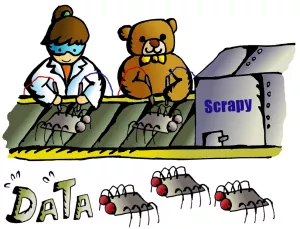 ### Web Scraping in Action In this post, we are going to do a web scraping demonstration on eBay Daily Deals. We can expect we scrape around 3000 eBay items a time from the daily deals main page, plus its linked category pages. Since we are scraping 3000 items from eBay Daily Deals, we will use Scrapy as our scraping tool. First thing first, let’s get Scrapy to our environment with our good old [pip](http://www.codeastar.com/must-know-command-python-pip/) command. ``` pip install Scrapy ``` Once Scrapy is installed we can run following command to get our scraping files framework (or, *spider egg sac!*) ``` scrapy startproject ebaybd ``` The “ebaybd” is our project/spider name and the *startproject* keyword will create our ~~spider egg sac~~ files framework with following content: ``` ebaybd/ # our project folder scrapy.cfg # scrapy configuration file (just leave it there, we won't touch it) ebaybd/ # project's Python module (there is where we code our spider) items.py # project items definition file (the item we ask our spider to scrape) pipelines.py # project pipelines file (the process we let our spider do after getting the item) settings.py # project settings file spiders/ # our spider folder (the place where we code our core logic) ``` Are you ready? Let’s hatch a spider! ### eBay Daily Deals spider hatching First, we go to edit the items.py file, as we need to tell our spider what to scrape for us. We then create the EBayItem class and add our desired eBay fields there. ```python class EBayItem(scrapy.Item): name = scrapy.Field() category = scrapy.Field() link = scrapy.Field() img_path = scrapy.Field() currency = scrapy.Field() price = scrapy.Field() orignal_price = scrapy.Field() ``` Second, we need to tell our spider what to do once it has scrapped the data we wanted. So we edit the *pipelines.py* file with following content: ```python import csv class EBayBDPipeline(object): def open_spider(self, spider): self.file = csv.writer(open(spider.file_name, 'w', newline='', encoding = 'utf8') ) fieldnames = ['Item_name', 'Category', 'Link', 'Image_path', 'Curreny', 'Price', 'Original_price'] self.file.writerow(fieldnames) def process_item(self, item, spider): self.file.writerow([item['name'], item['category'],item['link'], item['img_path'] , item['currency'],item['price'], item['orignal_price']]) return item ``` We create an *EBayBDPipeline* class to ask the spider saving scraped data into a CSV file. Although Scrapy has its built-in [CSV exporter](https://doc.scrapy.org/en/latest/topics/feed-exports.html), making our own exporter can provide better customization. We have our scraped item class and the scraper pipline class, then we need to connect two classes together. So we work on the *settings.py* file by adding: ```python ITEM_PIPELINES = { 'ebaybd.pipelines.EBayBDPipeline': 300 } ``` It will tell our spider to run the *EBayBDPipeline* class after scraping an item. The number 300 after the pipeline class is the value to determinate the processing sequence in multiple pipeline environment. The value can be ranged from 0 – 1000, since we only have one pipeline class in this project, the value can be ignored here. ### Build a Spider After setting up those item and pipeline classes, it is time for our main event — build a spider. We create a spider file, *ebay_deals_spider.py*, in our “spiders” folder: ``` ebaybd/ ebaybd/ spiders/ ebay_deals_spider.py #our newly created spider core logic file ``` Inside the spider file, we import required classes/modules. ```python import scrapy from scrapy.http import HtmlResponse #Scrapy's html response class import json, re, datetime #for json, regular expression and date time functions from ebaybd.items import EBayItem #the item class we created in items.py ``` Add a function to remove currency and thousand separator from scraped item price. ```python def formatPrice(price, currency): if price is None: return None price = price.replace(currency, "") price = price.replace(",", "") price = price.strip() return price ``` And add a function to scrape html content into our *EBayItem* class. ```python def getItemInfo(htmlResponse, category): eBayItem = EBayItem() name = htmlResponse.css(".ebayui-ellipsis-2::text").extract_first() if name is None: name = htmlResponse.css(".ebayui-ellipsis-3::text").extract_first() link = htmlResponse.css("h3.dne-itemtile-title.ellipse-2 a::attr(href)").extract_first() if link is None: link = htmlResponse.css("h3.dne-itemtile-title.ellipse-3 a::attr(href)").extract_first() eBayItem['name'] = name eBayItem['category'] = category eBayItem['link'] = link eBayItem['img_path'] = htmlResponse.css("div.slashui-image-cntr img::attr(src)").extract_first() currency = htmlResponse.css(".dne-itemtile-price meta::attr(content)").extract_first() if currency is None: currency = htmlResponse.css(".dne-itemtile-original-price span::text").extract_first()[:3] eBayItem['currency'] = currency eBayItem['price'] = formatPrice(htmlResponse.css(".dne-itemtile-price span::text").extract_first(), currency) eBayItem['orignal_price'] = formatPrice(htmlResponse.css(".dne-itemtile-original-price span::text").extract_first(), currency) return eBayItem ``` We use Scrapy’ selectors to extract data with the same CSS expressions. For example, we scrape an item name with: ```python name = htmlResponse.css(".ebayui-ellipsis-2::text").extract_first() ``` That means we scrape the text of the first element with “ebayui-ellipsis-2” CSS class, as the item name. (You can use your browser, right click an eBay daily deals page, select “Inspect” to get following screen) 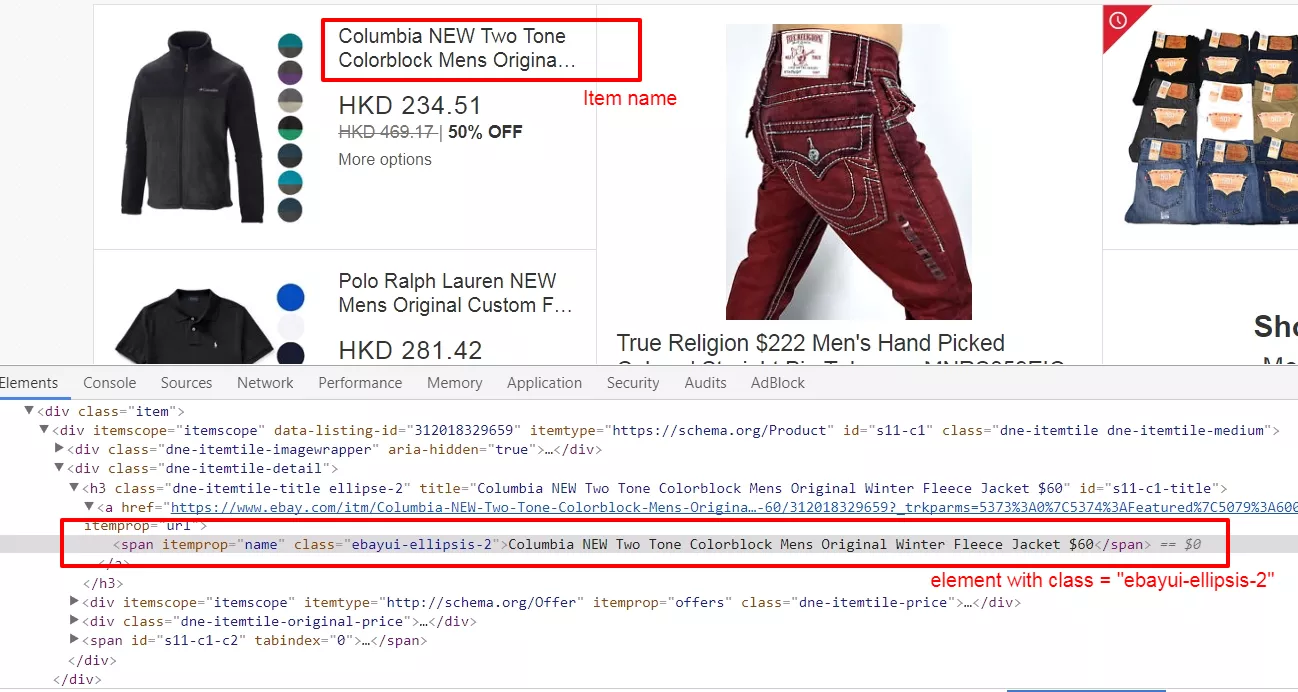 ### Inside the spider’s brain For our spider class, where we code the core logic, we have 2 major types of function, “start request” (*start_requests*) and “parse response” (*parse and parse_cat_listing*). ```python class BDSpider(scrapy.Spider): name = "ebaybd" file_name = datetime.datetime.now().strftime("%F") +".csv" #use current date as file name def start_requests(self): ... def parse(self, response): ... def parse_cat_listing(self, response): ... ``` The *start_requests* function is pretty straight forward, we tell our spider where (urls) to start scraping. ```python def start_requests(self): urls = [ 'https://www.ebay.com/globaldeals' ] for url in urls: yield scrapy.Request(url=url, callback=self.parse) ``` In our case, the global deals url (https://www.ebay.com/globaldeals) is used, thus people from anywhere, the US, Germany, India, South Korea, etc, can all get their eBay daily deals. After getting the url request, we ask the spider to parse the url content under the *parse* function. You may notice the keyword *yield* is used instead of *return* in the spider. Unlike the *return* keyword which sends back an entire list in memory at once. The *yield* keyword returns a generator object, which let the spider handle the parse request one by one. We will see more on the *yield* keyword in our *parse* function: ```python def parse(self, response): #spotlight deals spl_deal = response.css(".ebayui-dne-summary-card.card.ebayui-dne-item-featured-card--topDeals") spl_title = spl_deal.css("h2 span::text").extract_first() eBayItem = getItemInfo(spl_deal, spl_title) yield eBayItem #feature deals feature_deal_title = response.css(".ebayui-dne-banner-text h2 span::text").extract_first() feature_deals_card = response.css(".ebayui-dne-item-featured-card") feature_deals = feature_deals_card.css(".col") for feature in feature_deals: eBayItem = getItemInfo(feature, feature_deal_title) yield eBayItem #card deals cards = response.css(".ebayui-dne-item-pattern-card.ebayui-dne-item-pattern-card-no-padding") for card in cards: title = card.css("h2 span::text").extract_first() more_link = card.css(".dne-show-more-link a::attr(href)").extract_first() if more_link is not None: cat_id = re.sub(r"^https://www.ebay.com/globaldeals/|featured/|/all$","",more_link) cat_id = re.sub("/",",",cat_id) cat_listing = "https://www.ebay.com/globaldeals/spoke/ajax/listings?_ofs=0&category_path_seo={}&deal_type=featured".format(cat_id) request = scrapy.Request(cat_listing, callback=self.parse_cat_listing) request.meta['category'] = title request.meta['page_index'] = 1 request.meta['cat_id'] = cat_id yield request else: self.log("Get item on page for {}".format(title)) category_deals = card.css(".item") for c_item in category_deals: eBayItem = getItemInfo(c_item, title) yield eBayItem ``` When there is a spotlight deal, our spider will scrape the item and process the item pipeline task. The same workflow happens on featured deals. The difference is, there are more than one item in featured deals. Since we are using the *yield* keyword, we can call the item pipeline one by one without stopping the iteration. Then on the category items, if there is a categorized daily deals link within the displayed categories, our spider will scrape daily deals items from the categorized page instead. And in those categorized daily deals pages, a tricky situation is happened there — infinite scrolling. ### Infinite Scroll Pagination Handling The eBay categorized deals pages use infinite scrolling to display daily deals items. There is no “next” button for showing more items, the categorized deals page will display more items once a user has scrolled down the page a little bit. Since there is no pagination element on the page, we can not assign CSS or Xpath selector to our spider. But items do not come from no where, there should be somewhere to load new items. Infinite scrolling uses ajax to make it scroll infinity, so we should inspect the page’s network performance. (Right click on your browser, select “Inspect” and click “Network” tab) 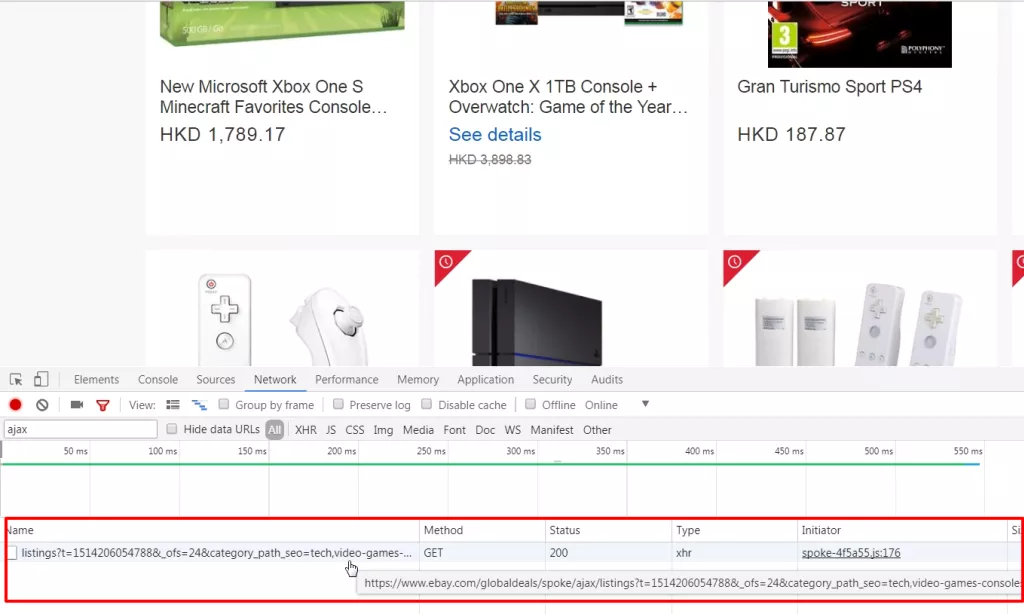 Try scrolling your page and see rather any JavaScript call is processed. And Ding! An ajax call to https://www.ebay.com/globaldeals/spoke/ajax/listings is found. It will return 24 eBay items under a given category per call. We then request this JavaScript call and handle it in our other parse function, *parse_cat_listing*. ### Scrapy and JavaScript The *parse_cat_listing* function is the place where we handle response from JavaScript and transform it into *EBayItem*. ```python def parse_cat_listing(self, response): category = response.meta['category'] page_index = response.meta['page_index'] cat_id = response.meta['cat_id'] data = json.loads(response.body) fulfillment_value = data.get('fulfillmentValue') listing_html = fulfillment_value['listingsHtml'] is_last_page = fulfillment_value['pagination']['isLastPage'] json_response = HtmlResponse(url="json response", body=listing_html, encoding='utf-8') items_on_cat = json_response.css(".col") for item in items_on_cat: eBayItem = getItemInfo(item, category) yield eBayItem if (is_last_page == False): item_starting_index = page_index * 24 cat_listing = "https://www.ebay.com/globaldeals/spoke/ajax/listings?_ofs={}&category_path_seo={}&deal_type=featured".format(item_starting_index, cat_id) request = scrapy.Request(cat_listing, callback=self.parse_cat_listing) request.meta['category'] = category request.meta['page_index'] = page_index+1 request.meta['cat_id'] = cat_id yield request ``` Since the JavaScript returns a JSON object containing the item listing html content, we first obtain the html content in text. ```python data = json.loads(response.body) fulfillment_value = data.get('fulfillmentValue') listing_html = fulfillment_value['listingsHtml'] ``` Then use Scrapy’s *HtmlResponse* class to encode the text to HTML. We apply UTF-8 encoding for cases with special characters appearing in an item name. ```python json_response = HtmlResponse(url="json response", body=listing_html, encoding='utf-8') ``` After that, we can apply the same *getItemInfo* logic we have done in the *parse* function. As it is an infinite scrolling, we keep requesting the JavaScript call recurringly until the JSON object returns a last page flag. ### The Scraping Result We have set all our spider files, it is time to let it scrape by running following command: ``` scrapy crawl ebaybd ``` Our “ebaybd” spider then scrapes and saves the result in a “YYYY-MM-DD.csv” file. Below is the result I run with about 3000 records in 1 minute processing time. 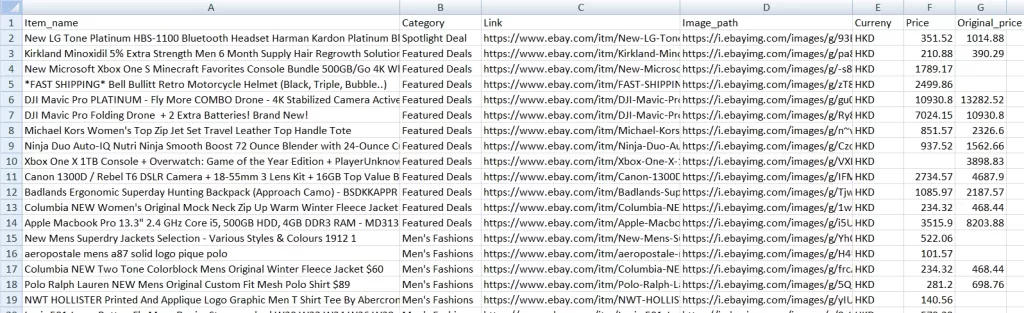 Our spider is done here, you may extend its functionality by scraping other categories / item attributes, or store the result in MongoDB, cloud service, etc. Happy Scraping! ### What have we learnt in this post? 1. Differences between Scrapy and BeautifulSoup 2. Building our own Scrapy spider 3. Using our own item pipeline processor 4. Handling infinite scrolling The source code package can be found at https://github.com/codeastar/ebay-daily-deals-scraper. |
| json metadata | {"tags":["python","scraping","scrapy","tutorial"],"image":["https://steemitimages.com/DQmd7idYJaxxf3DzWopr8bvQfrFaNcnNEk54LwRmMWXxhr2/image.png","https://steemitimages.com/DQmV9iomQRB8DwnVeXtNbs7aZcbzSbMkntXJoTswAEz5Ahm/image.png","https://steemitimages.com/DQmWKyWQWge1PLFKThZtNK2qs7ibkTVEoCnnUhcA6LAjyEM/image.png","https://steemitimages.com/DQmc6hfzTLLNwTQin5vrwLyong6aZpRqUjQzJMeQLSEgN44/image.png","https://steemitimages.com/DQmXUZaKruEM8MLDBsR2SWNijhjEunwUTeKKwevjNwVG4sK/image.png","https://steemitimages.com/DQmYFzXhamxLuArvQYx8UcniSdEoPc5eoR9owTLq3jPCaxP/image.png","https://steemitimages.com/DQmVchtLb3Pc7rHLjW5fDrnzxH8WoUMyBDBAVwpbCctUafd/image.png"],"links":["http://www.codeastar.com/data-wrangling/","http://www.codeastar.com/win-big-real-estate-market-data-science/","http://mlr.cs.umass.edu/ml/","https://www.kaggle.com/datasets","https://scrapy.org/","https://www.crummy.com/software/BeautifulSoup/","http://www.codeastar.com/must-know-command-python-pip/","https://doc.scrapy.org/en/latest/topics/feed-exports.html","https://www.ebay.com/globaldeals","https://www.ebay.com/globaldeals/spoke/ajax/listings","https://github.com/codeastar/ebay-daily-deals-scraper"],"app":"steemit/0.1","format":"markdown"} |
| parent author | |
| parent permlink | python |
| permlink | tutorial-how-to-do-web-scraping-in-python |
| title | Tutorial: How to do web scraping in Python? |
| Transaction Info | Block #19117945/Trx 30d52ede95907b523a94a0863d9153e7e9b57ed1 |
View Raw JSON Data
{
"block": 19117945,
"op": [
"comment",
{
"author": "codeastar",
"body": "\n\nWhen we go for data science projects, like the [Titanic Survivors](http://www.codeastar.com/data-wrangling/) and [Iowa House Prices](http://www.codeastar.com/win-big-real-estate-market-data-science/) projects, we need data sets to process our predictions. In above cases, those data sets have already been collected and prepared. We only need to download the data set files then start our projects. But when we want to work for our own data science projects, we need to prepare data sets ourselves. It would be easy if we can find free and public data sets from [UCI Machine Learning Repository](http://mlr.cs.umass.edu/ml/) or [Kaggle Data Sets](https://www.kaggle.com/datasets). But, what If there is no suitable data set found? Don’t worry, let’s create one for ourselves, by web scraping.\n\n\n### Tools for Web Scraping: Scrapy vs Beautiful Soup\n\nThere are plenty of choices for web scraping tools on the internet. Since we have used Python for most of our projects here, we will focus on a Python one: [Scrapy](https://scrapy.org/). Then it comes another debate topic, “Why don’t you use [Beautiful Soup](https://www.crummy.com/software/BeautifulSoup/), when Beautiful Soup can do the web scraping task as well?”\n\nYes, both Scrapy and Beautiful Soup can do the web scraping job. It all depends on **how you want to scrape the data from the internet**. Scrapy is a web scraping **framework** while Beautiful Soup is a **library**. You can use Scrapy to create **bots (spiders)** to crawl web content **alone**, and you can **import** Beautiful Soup in your code to **work with other libraries** (e.g. requests) for web scraping. Scrapy provides you a **complete solution**. On the other hand, Beautiful Soup can be **quick and handy**. When you try to scrape **massive data or multiple pages** from a web site, Scrapy would be your choice. If you just want to scrape **certain elements** from a page, Beautiful Soup can bring you what you wanted.\n\nWe can visualize the differences between Scrapy and Beautiful Soup in following pictures:\n\n\n\n### Web Scraping in Action\nIn this post, we are going to do a web scraping demonstration on eBay Daily Deals. We can expect we scrape around 3000 eBay items a time from the daily deals main page, plus its linked category pages.\n\nSince we are scraping 3000 items from eBay Daily Deals, we will use Scrapy as our scraping tool. First thing first, let’s get Scrapy to our environment with our good old [pip](http://www.codeastar.com/must-know-command-python-pip/) command.\n```\npip install Scrapy\n```\nOnce Scrapy is installed we can run following command to get our scraping files framework (or, *spider egg sac!*)\n```\nscrapy startproject ebaybd\n```\nThe “ebaybd” is our project/spider name and the *startproject* keyword will create our ~~spider egg sac~~ files framework with following content:\n```\nebaybd/ # our project folder\n scrapy.cfg # scrapy configuration file (just leave it there, we won't touch it) \n ebaybd/ # project's Python module (there is where we code our spider)\n items.py # project items definition file (the item we ask our spider to scrape) \n pipelines.py # project pipelines file (the process we let our spider do after getting the item) \n settings.py # project settings file \n spiders/ # our spider folder (the place where we code our core logic) \n```\nAre you ready? Let’s hatch a spider!\n\n### eBay Daily Deals spider hatching\nFirst, we go to edit the items.py file, as we need to tell our spider what to scrape for us. We then create the EBayItem class and add our desired eBay fields there.\n\n```python\nclass EBayItem(scrapy.Item):\n name = scrapy.Field()\n category = scrapy.Field()\n link = scrapy.Field()\n img_path = scrapy.Field() \n currency = scrapy.Field() \n price = scrapy.Field() \n orignal_price = scrapy.Field()\n```\n\nSecond, we need to tell our spider what to do once it has scrapped the data we wanted. So we edit the *pipelines.py* file with following content:\n```python\nimport csv\n \nclass EBayBDPipeline(object):\n \n def open_spider(self, spider):\n self.file = csv.writer(open(spider.file_name, 'w', newline='', encoding = 'utf8') )\n fieldnames = ['Item_name', 'Category', 'Link', 'Image_path', 'Curreny', 'Price', 'Original_price']\n self.file.writerow(fieldnames)\n \n def process_item(self, item, spider):\n self.file.writerow([item['name'], item['category'],item['link'], \n item['img_path'] , item['currency'],item['price'], \n item['orignal_price']])\n return item\n```\nWe create an *EBayBDPipeline* class to ask the spider saving scraped data into a CSV file. Although Scrapy has its built-in [CSV exporter](https://doc.scrapy.org/en/latest/topics/feed-exports.html), making our own exporter can provide better customization.\n\nWe have our scraped item class and the scraper pipline class, then we need to connect two classes together. So we work on the *settings.py* file by adding:\n\n```python\nITEM_PIPELINES = {\n 'ebaybd.pipelines.EBayBDPipeline': 300\n}\n```\nIt will tell our spider to run the *EBayBDPipeline* class after scraping an item. The number 300 after the pipeline class is the value to determinate the processing sequence in multiple pipeline environment. The value can be ranged from 0 – 1000, since we only have one pipeline class in this project, the value can be ignored here.\n\n### Build a Spider\nAfter setting up those item and pipeline classes, it is time for our main event — build a spider. We create a spider file, *ebay_deals_spider.py*, in our “spiders” folder:\n```\nebaybd/\n ebaybd/\n spiders/ \n ebay_deals_spider.py #our newly created spider core logic file\n```\nInside the spider file, we import required classes/modules.\n\n```python\nimport scrapy\nfrom scrapy.http import HtmlResponse #Scrapy's html response class\nimport json, re, datetime #for json, regular expression and date time functions \nfrom ebaybd.items import EBayItem #the item class we created in items.py\n```\nAdd a function to remove currency and thousand separator from scraped item price.\n```python\ndef formatPrice(price, currency):\n if price is None:\n return None\n \n price = price.replace(currency, \"\")\n price = price.replace(\",\", \"\")\n price = price.strip()\n return price\n```\nAnd add a function to scrape html content into our *EBayItem* class.\n\n```python\ndef getItemInfo(htmlResponse, category):\n eBayItem = EBayItem()\n \n name = htmlResponse.css(\".ebayui-ellipsis-2::text\").extract_first()\n if name is None: \n name = htmlResponse.css(\".ebayui-ellipsis-3::text\").extract_first()\n link = htmlResponse.css(\"h3.dne-itemtile-title.ellipse-2 a::attr(href)\").extract_first()\n if link is None: \n link = htmlResponse.css(\"h3.dne-itemtile-title.ellipse-3 a::attr(href)\").extract_first()\n eBayItem['name'] = name \n eBayItem['category'] = category\n eBayItem['link'] = link\n eBayItem['img_path'] = htmlResponse.css(\"div.slashui-image-cntr img::attr(src)\").extract_first()\n currency = htmlResponse.css(\".dne-itemtile-price meta::attr(content)\").extract_first()\n if currency is None: \n currency = htmlResponse.css(\".dne-itemtile-original-price span::text\").extract_first()[:3]\n eBayItem['currency'] = currency\n eBayItem['price'] = formatPrice(htmlResponse.css(\".dne-itemtile-price span::text\").extract_first(), currency)\n eBayItem['orignal_price'] = formatPrice(htmlResponse.css(\".dne-itemtile-original-price span::text\").extract_first(), currency)\n \n return eBayItem\n```\nWe use Scrapy’ selectors to extract data with the same CSS expressions. For example, we scrape an item name with:\n\n```python\nname = htmlResponse.css(\".ebayui-ellipsis-2::text\").extract_first()\n```\nThat means we scrape the text of the first element with “ebayui-ellipsis-2” CSS class, as the item name.\n(You can use your browser, right click an eBay daily deals page, select “Inspect” to get following screen)\n\n\n\n### Inside the spider’s brain\nFor our spider class, where we code the core logic, we have 2 major types of function, “start request” (*start_requests*) and “parse response” (*parse and parse_cat_listing*).\n\n```python\nclass BDSpider(scrapy.Spider):\n name = \"ebaybd\"\n file_name = datetime.datetime.now().strftime(\"%F\") +\".csv\" #use current date as file name\n \n def start_requests(self):\n ...\n \n def parse(self, response):\n ...\n \n def parse_cat_listing(self, response):\n ...\n```\nThe *start_requests* function is pretty straight forward, we tell our spider where (urls) to start scraping.\n\n```python\n def start_requests(self):\n urls = [\n 'https://www.ebay.com/globaldeals'\n ]\n for url in urls:\n yield scrapy.Request(url=url, callback=self.parse)\n```\nIn our case, the global deals url (https://www.ebay.com/globaldeals) is used, thus people from anywhere, the US, Germany, India, South Korea, etc, can all get their eBay daily deals. After getting the url request, we ask the spider to parse the url content under the *parse* function. You may notice the keyword *yield* is used instead of *return* in the spider. Unlike the *return* keyword which sends back an entire list in memory at once. The *yield* keyword returns a generator object, which let the spider handle the parse request one by one. We will see more on the *yield* keyword in our *parse* function:\n\n```python\ndef parse(self, response):\n #spotlight deals\n spl_deal = response.css(\".ebayui-dne-summary-card.card.ebayui-dne-item-featured-card--topDeals\")\n spl_title = spl_deal.css(\"h2 span::text\").extract_first()\n eBayItem = getItemInfo(spl_deal, spl_title)\n yield eBayItem \n \n #feature deals\n feature_deal_title = response.css(\".ebayui-dne-banner-text h2 span::text\").extract_first()\n feature_deals_card = response.css(\".ebayui-dne-item-featured-card\")\n feature_deals = feature_deals_card.css(\".col\")\n for feature in feature_deals:\n eBayItem = getItemInfo(feature, feature_deal_title)\n yield eBayItem \n \n #card deals\n cards = response.css(\".ebayui-dne-item-pattern-card.ebayui-dne-item-pattern-card-no-padding\") \n for card in cards:\n title = card.css(\"h2 span::text\").extract_first()\n more_link = card.css(\".dne-show-more-link a::attr(href)\").extract_first()\n if more_link is not None:\n cat_id = re.sub(r\"^https://www.ebay.com/globaldeals/|featured/|/all$\",\"\",more_link)\n cat_id = re.sub(\"/\",\",\",cat_id)\n cat_listing = \"https://www.ebay.com/globaldeals/spoke/ajax/listings?_ofs=0&category_path_seo={}&deal_type=featured\".format(cat_id)\n \n request = scrapy.Request(cat_listing, callback=self.parse_cat_listing)\n request.meta['category'] = title\n request.meta['page_index'] = 1\n request.meta['cat_id'] = cat_id\n yield request\n else:\n self.log(\"Get item on page for {}\".format(title))\n category_deals = card.css(\".item\")\n for c_item in category_deals:\n eBayItem = getItemInfo(c_item, title)\n yield eBayItem\n```\nWhen there is a spotlight deal, our spider will scrape the item and process the item pipeline task. The same workflow happens on featured deals. The difference is, there are more than one item in featured deals. Since we are using the *yield* keyword, we can call the item pipeline one by one without stopping the iteration.\n\nThen on the category items, if there is a categorized daily deals link within the displayed categories, our spider will scrape daily deals items from the categorized page instead. And in those categorized daily deals pages, a tricky situation is happened there — infinite scrolling.\n\n### Infinite Scroll Pagination Handling\nThe eBay categorized deals pages use infinite scrolling to display daily deals items. There is no “next” button for showing more items, the categorized deals page will display more items once a user has scrolled down the page a little bit. Since there is no pagination element on the page, we can not assign CSS or Xpath selector to our spider. But items do not come from no where, there should be somewhere to load new items. Infinite scrolling uses ajax to make it scroll infinity, so we should inspect the page’s network performance.\n(Right click on your browser, select “Inspect” and click “Network” tab)\n\n\n\nTry scrolling your page and see rather any JavaScript call is processed. And Ding! An ajax call to https://www.ebay.com/globaldeals/spoke/ajax/listings is found. It will return 24 eBay items under a given category per call. We then request this JavaScript call and handle it in our other parse function, *parse_cat_listing*.\n\n### Scrapy and JavaScript\n The *parse_cat_listing* function is the place where we handle response from JavaScript and transform it into *EBayItem*. \n```python\n def parse_cat_listing(self, response):\n category = response.meta['category']\n page_index = response.meta['page_index']\n cat_id = response.meta['cat_id']\n \n data = json.loads(response.body)\n fulfillment_value = data.get('fulfillmentValue')\n listing_html = fulfillment_value['listingsHtml']\n is_last_page = fulfillment_value['pagination']['isLastPage']\n json_response = HtmlResponse(url=\"json response\", body=listing_html, encoding='utf-8')\n items_on_cat = json_response.css(\".col\")\n \n for item in items_on_cat:\n eBayItem = getItemInfo(item, category)\n yield eBayItem\n \n if (is_last_page == False): \n item_starting_index = page_index * 24\n cat_listing = \"https://www.ebay.com/globaldeals/spoke/ajax/listings?_ofs={}&category_path_seo={}&deal_type=featured\".format(item_starting_index, cat_id)\n request = scrapy.Request(cat_listing, callback=self.parse_cat_listing)\n request.meta['category'] = category\n request.meta['page_index'] = page_index+1\n request.meta['cat_id'] = cat_id\n yield request\n```\nSince the JavaScript returns a JSON object containing the item listing html content, we first obtain the html content in text.\n```python\ndata = json.loads(response.body)\nfulfillment_value = data.get('fulfillmentValue')\nlisting_html = fulfillment_value['listingsHtml']\n```\nThen use Scrapy’s *HtmlResponse* class to encode the text to HTML. We apply UTF-8 encoding for cases with special characters appearing in an item name.\n```python\njson_response = HtmlResponse(url=\"json response\", body=listing_html, encoding='utf-8')\n```\nAfter that, we can apply the same *getItemInfo* logic we have done in the *parse* function.\n\nAs it is an infinite scrolling, we keep requesting the JavaScript call recurringly until the JSON object returns a last page flag.\n\n### The Scraping Result\nWe have set all our spider files, it is time to let it scrape by running following command:\n```\nscrapy crawl ebaybd\n```\nOur “ebaybd” spider then scrapes and saves the result in a “YYYY-MM-DD.csv” file. Below is the result I run with about 3000 records in 1 minute processing time.\n\n\n\nOur spider is done here, you may extend its functionality by scraping other categories / item attributes, or store the result in MongoDB, cloud service, etc. Happy Scraping!\n\n### What have we learnt in this post?\n1. Differences between Scrapy and BeautifulSoup\n2. Building our own Scrapy spider\n3. Using our own item pipeline processor\n4. Handling infinite scrolling\n \n\nThe source code package can be found at https://github.com/codeastar/ebay-daily-deals-scraper.",
"json_metadata": "{\"tags\":[\"python\",\"scraping\",\"scrapy\",\"tutorial\"],\"image\":[\"https://steemitimages.com/DQmd7idYJaxxf3DzWopr8bvQfrFaNcnNEk54LwRmMWXxhr2/image.png\",\"https://steemitimages.com/DQmV9iomQRB8DwnVeXtNbs7aZcbzSbMkntXJoTswAEz5Ahm/image.png\",\"https://steemitimages.com/DQmWKyWQWge1PLFKThZtNK2qs7ibkTVEoCnnUhcA6LAjyEM/image.png\",\"https://steemitimages.com/DQmc6hfzTLLNwTQin5vrwLyong6aZpRqUjQzJMeQLSEgN44/image.png\",\"https://steemitimages.com/DQmXUZaKruEM8MLDBsR2SWNijhjEunwUTeKKwevjNwVG4sK/image.png\",\"https://steemitimages.com/DQmYFzXhamxLuArvQYx8UcniSdEoPc5eoR9owTLq3jPCaxP/image.png\",\"https://steemitimages.com/DQmVchtLb3Pc7rHLjW5fDrnzxH8WoUMyBDBAVwpbCctUafd/image.png\"],\"links\":[\"http://www.codeastar.com/data-wrangling/\",\"http://www.codeastar.com/win-big-real-estate-market-data-science/\",\"http://mlr.cs.umass.edu/ml/\",\"https://www.kaggle.com/datasets\",\"https://scrapy.org/\",\"https://www.crummy.com/software/BeautifulSoup/\",\"http://www.codeastar.com/must-know-command-python-pip/\",\"https://doc.scrapy.org/en/latest/topics/feed-exports.html\",\"https://www.ebay.com/globaldeals\",\"https://www.ebay.com/globaldeals/spoke/ajax/listings\",\"https://github.com/codeastar/ebay-daily-deals-scraper\"],\"app\":\"steemit/0.1\",\"format\":\"markdown\"}",
"parent_author": "",
"parent_permlink": "python",
"permlink": "tutorial-how-to-do-web-scraping-in-python",
"title": "Tutorial: How to do web scraping in Python?"
}
],
"op_in_trx": 0,
"timestamp": "2018-01-19T15:27:15",
"trx_id": "30d52ede95907b523a94a0863d9153e7e9b57ed1",
"trx_in_block": 6,
"virtual_op": 0
}codeastarupdated their account properties2018/01/18 05:54:42
codeastarupdated their account properties
2018/01/18 05:54:42
| account | codeastar |
| json metadata | {"profile":{"profile_image":"https://s.gravatar.com/avatar/aa85f115d711e43610670e7a4f6c8ff2","name":"Raven Hon","about":"I code for fun @ codeastar.com","website":"http://www.codeastar.com"}} |
| memo key | STM5V2YS7nqgxiU9Zz7rYVPFxeLSYf7DFjc7xqdbxsmS4QU1uaDmM |
| Transaction Info | Block #19077712/Trx 1a5fa5124e8b6292f6155d17313fb9563c6e1445 |
View Raw JSON Data
{
  "block": 19077712,
  "op": [
    "account_update",
    {
      "account": "codeastar",
      "json_metadata": "{\"profile\":{\"profile_image\":\"https://s.gravatar.com/avatar/aa85f115d711e43610670e7a4f6c8ff2\",\"name\":\"Raven Hon\",\"about\":\"I code for fun @ codeastar.com\",\"website\":\"http://www.codeastar.com\"}}",
      "memo_key": "STM5V2YS7nqgxiU9Zz7rYVPFxeLSYf7DFjc7xqdbxsmS4QU1uaDmM"
    }
  ],
  "op_in_trx": 0,
  "timestamp": "2018-01-18T05:54:42",
  "trx_id": "1a5fa5124e8b6292f6155d17313fb9563c6e1445",
  "trx_in_block": 4,
  "virtual_op": 0
}codeastarupdated their account properties2018/01/18 05:53:12
codeastarupdated their account properties
2018/01/18 05:53:12
| account | codeastar |
| json metadata | {"profile":{"cover_image":"https://pbs.twimg.com/profile_banners/869602101843730432/1516127967/1500x500"}} |
| memo key | STM5V2YS7nqgxiU9Zz7rYVPFxeLSYf7DFjc7xqdbxsmS4QU1uaDmM |
| Transaction Info | Block #19077682/Trx d139c033c4a54ab54857b3a81469a4e074607566 |
View Raw JSON Data
{
  "block": 19077682,
  "op": [
    "account_update",
    {
      "account": "codeastar",
      "json_metadata": "{\"profile\":{\"cover_image\":\"https://pbs.twimg.com/profile_banners/869602101843730432/1516127967/1500x500\"}}",
      "memo_key": "STM5V2YS7nqgxiU9Zz7rYVPFxeLSYf7DFjc7xqdbxsmS4QU1uaDmM"
    }
  ],
  "op_in_trx": 0,
  "timestamp": "2018-01-18T05:53:12",
  "trx_id": "d139c033c4a54ab54857b3a81469a4e074607566",
  "trx_in_block": 0,
  "virtual_op": 0
}codeastarupdated their account properties2018/01/18 05:41:30
codeastarupdated their account properties
2018/01/18 05:41:30
| account | codeastar |
| json metadata | {"profile":{"profile_image":"https://s.gravatar.com/avatar/aa85f115d711e43610670e7a4f6c8ff2","name":"Raven Hon","about":"I code for fun @ codeastar.com","website":"http://www.codeastar.com"}} |
| memo key | STM5V2YS7nqgxiU9Zz7rYVPFxeLSYf7DFjc7xqdbxsmS4QU1uaDmM |
| Transaction Info | Block #19077449/Trx 7ed5dbbcb305676bb6593431ffa4d67b3d4029bc |
View Raw JSON Data
{
  "block": 19077449,
  "op": [
    "account_update",
    {
      "account": "codeastar",
      "json_metadata": "{\"profile\":{\"profile_image\":\"https://s.gravatar.com/avatar/aa85f115d711e43610670e7a4f6c8ff2\",\"name\":\"Raven Hon\",\"about\":\"I code for fun @ codeastar.com\",\"website\":\"http://www.codeastar.com\"}}",
      "memo_key": "STM5V2YS7nqgxiU9Zz7rYVPFxeLSYf7DFjc7xqdbxsmS4QU1uaDmM"
    }
  ],
  "op_in_trx": 0,
  "timestamp": "2018-01-18T05:41:30",
  "trx_id": "7ed5dbbcb305676bb6593431ffa4d67b3d4029bc",
  "trx_in_block": 28,
  "virtual_op": 0
}steemcreated a new account: @codeastar2018/01/18 05:34:12
steemcreated a new account: @codeastar
2018/01/18 05:34:12
| active | {"account_auths":[],"key_auths":[["STM694dL71u2bR5Xyh5G36av4s9MFsuVPufTySSUh1BeWqxtfPUAB",1]],"weight_threshold":1} |
| creator | steem |
| delegation | 29700.000000 VESTS |
| extensions | [] |
| fee | 0.500 STEEM |
| json metadata | |
| memo key | STM5V2YS7nqgxiU9Zz7rYVPFxeLSYf7DFjc7xqdbxsmS4QU1uaDmM |
| new account name | codeastar |
| owner | {"account_auths":[],"key_auths":[["STM6cP8oyqapzXcdJKXZedXuAAHuYUYMnpPGvjrTFrji9FL8JNyGf",1]],"weight_threshold":1} |
| posting | {"account_auths":[],"key_auths":[["STM6mv2bKqJ1KsKaEkPcsGR5wpzYq6bNwFXe3Rfwprt6qSkd64LS7",1]],"weight_threshold":1} |
| Transaction Info | Block #19077304/Trx f8fcf7e5353a1a2b19f14698d8c45b77edf7c705 |
View Raw JSON Data
{
  "block": 19077304,
  "op": [
    "account_create_with_delegation",
    {
      "active": {
        "account_auths": [],
        "key_auths": [
          [
            "STM694dL71u2bR5Xyh5G36av4s9MFsuVPufTySSUh1BeWqxtfPUAB",
            1
          ]
        ],
        "weight_threshold": 1
      },
      "creator": "steem",
      "delegation": "29700.000000 VESTS",
      "extensions": [],
      "fee": "0.500 STEEM",
      "json_metadata": "",
      "memo_key": "STM5V2YS7nqgxiU9Zz7rYVPFxeLSYf7DFjc7xqdbxsmS4QU1uaDmM",
      "new_account_name": "codeastar",
      "owner": {
        "account_auths": [],
        "key_auths": [
          [
            "STM6cP8oyqapzXcdJKXZedXuAAHuYUYMnpPGvjrTFrji9FL8JNyGf",
            1
          ]
        ],
        "weight_threshold": 1
      },
      "posting": {
        "account_auths": [],
        "key_auths": [
          [
            "STM6mv2bKqJ1KsKaEkPcsGR5wpzYq6bNwFXe3Rfwprt6qSkd64LS7",
            1
          ]
        ],
        "weight_threshold": 1
      }
    }
  ],
  "op_in_trx": 0,
  "timestamp": "2018-01-18T05:34:12",
  "trx_id": "f8fcf7e5353a1a2b19f14698d8c45b77edf7c705",
  "trx_in_block": 4,
  "virtual_op": 0
}Manabar
Voting Power100.00%
Downvote Power100.00%
Resource Credits100.00%
Reputation Progress0.00%
{
  "voting_manabar": {
    "current_mana": "8143659806",
    "last_update_time": 1779058119
  },
  "downvote_manabar": {
    "current_mana": 2035914951,
    "last_update_time": 1779058119
  },
  "rc_account": {
    "account": "codeastar",
    "max_rc": "10164408779",
    "max_rc_creation_adjustment": {
      "amount": "2020748973",
      "nai": "@@000000037",
      "precision": 6
    },
    "rc_manabar": {
      "current_mana": "10164408779",
      "last_update_time": 1779058119
    }
  }
}
Account Metadata
| POSTING JSON METADATA | |
| profile | {"profile_image":"https://s.gravatar.com/avatar/aa85f115d711e43610670e7a4f6c8ff2","name":"Raven Hon","about":"I code for fun @ codeastar.com","website":"http://www.codeastar.com","cover_image":"http://www.codeastar.com/wp-content/uploads/2018/01/sbg.png"} |
| JSON METADATA | |
| profile | {"profile_image":"https://s.gravatar.com/avatar/aa85f115d711e43610670e7a4f6c8ff2","name":"Raven Hon","about":"I code for fun @ codeastar.com","website":"http://www.codeastar.com","cover_image":"http://www.codeastar.com/wp-content/uploads/2018/01/sbg.png"} |
{
  "posting_json_metadata": {
    "profile": {
      "profile_image": "https://s.gravatar.com/avatar/aa85f115d711e43610670e7a4f6c8ff2",
      "name": "Raven Hon",
      "about": "I code for fun @ codeastar.com",
      "website": "http://www.codeastar.com",
      "cover_image": "http://www.codeastar.com/wp-content/uploads/2018/01/sbg.png"
    }
  },
  "json_metadata": {
    "profile": {
      "profile_image": "https://s.gravatar.com/avatar/aa85f115d711e43610670e7a4f6c8ff2",
      "name": "Raven Hon",
      "about": "I code for fun @ codeastar.com",
      "website": "http://www.codeastar.com",
      "cover_image": "http://www.codeastar.com/wp-content/uploads/2018/01/sbg.png"
    }
  }
}
Auth Keys
Owner
Single Signature
Public Keys
STM6cP8oyqapzXcdJKXZedXuAAHuYUYMnpPGvjrTFrji9FL8JNyGf1/1
Active
Single Signature
Public Keys
STM694dL71u2bR5Xyh5G36av4s9MFsuVPufTySSUh1BeWqxtfPUAB1/1
Posting
Single Signature
Public Keys
STM6mv2bKqJ1KsKaEkPcsGR5wpzYq6bNwFXe3Rfwprt6qSkd64LS71/1
Memo
STM5V2YS7nqgxiU9Zz7rYVPFxeLSYf7DFjc7xqdbxsmS4QU1uaDmM
{
  "owner": {
    "account_auths": [],
    "key_auths": [
      [
        "STM6cP8oyqapzXcdJKXZedXuAAHuYUYMnpPGvjrTFrji9FL8JNyGf",
        1
      ]
    ],
    "weight_threshold": 1
  },
  "active": {
    "account_auths": [],
    "key_auths": [
      [
        "STM694dL71u2bR5Xyh5G36av4s9MFsuVPufTySSUh1BeWqxtfPUAB",
        1
      ]
    ],
    "weight_threshold": 1
  },
  "posting": {
    "account_auths": [],
    "key_auths": [
      [
        "STM6mv2bKqJ1KsKaEkPcsGR5wpzYq6bNwFXe3Rfwprt6qSkd64LS7",
        1
      ]
    ],
    "weight_threshold": 1
  },
  "memo": "STM5V2YS7nqgxiU9Zz7rYVPFxeLSYf7DFjc7xqdbxsmS4QU1uaDmM"
}
Witness Votes
0 / 30
No active witness votes.
[]