

@cosmoduende
25#G3ekArmy, Web Developer & Data Enthusiast. Coordinador académico & Instructor en KMMX. #KotlinCDMX Organizer.
steemit.com/@cosmoduendeVOTING POWER100.00%
DOWNVOTE POWER100.00%
RESOURCE CREDITS100.00%
REPUTATION PROGRESS0.00%
Net Worth
0.000USD
STEEM
0.001STEEM
SBD
0.000SBD
Effective Power
3.365SP
├── Own SP
0.000SP
└── Incoming DelegationsDeleg
+3.365SP
Detailed Balance
| STEEM | ||
| balance | 0.001STEEM | STEEM |
| market_balance | 0.000STEEM | STEEM |
| savings_balance | 0.000STEEM | STEEM |
| reward_steem_balance | 0.000STEEM | STEEM |
| STEEM POWER | ||
| Own SP | 0.000SP | SP |
| Delegated Out | 0.000SP | SP |
| Delegation In | 3.365SP | SP |
| Effective Power | 3.365SP | SP |
| Reward SP (pending) | 0.000SP | SP |
| SBD | ||
| sbd_balance | 0.000SBD | SBD |
| sbd_conversions | 0.000SBD | SBD |
| sbd_market_balance | 0.000SBD | SBD |
| savings_sbd_balance | 0.000SBD | SBD |
| reward_sbd_balance | 0.000SBD | SBD |
{
  "balance": "0.001 STEEM",
  "savings_balance": "0.000 STEEM",
  "reward_steem_balance": "0.000 STEEM",
  "vesting_shares": "0.000000 VESTS",
  "delegated_vesting_shares": "0.000000 VESTS",
  "received_vesting_shares": "5472.996220 VESTS",
  "sbd_balance": "0.000 SBD",
  "savings_sbd_balance": "0.000 SBD",
  "reward_sbd_balance": "0.000 SBD",
  "conversions": []
}
Account Info
| name | cosmoduende |
| id | 1666880 |
| rank | 0 |
| reputation | 223990835 |
| created | 2021-12-26T03:31:15 |
| recovery_account | steem |
| proxy | None |
| post_count | 1 |
| comment_count | 0 |
| lifetime_vote_count | 0 |
| witnesses_voted_for | 0 |
| last_post | 2021-12-26T04:49:09 |
| last_root_post | 2021-12-26T04:49:09 |
| last_vote_time | 1970-01-01T00:00:00 |
| proxied_vsf_votes | 0, 0, 0, 0 |
| can_vote | 1 |
| voting_power | 0 |
| delayed_votes | 0 |
| balance | 0.001 STEEM |
| savings_balance | 0.000 STEEM |
| sbd_balance | 0.000 SBD |
| savings_sbd_balance | 0.000 SBD |
| vesting_shares | 0.000000 VESTS |
| delegated_vesting_shares | 0.000000 VESTS |
| received_vesting_shares | 5472.996220 VESTS |
| reward_vesting_balance | 0.000000 VESTS |
| vesting_balance | 0.000 STEEM |
| vesting_withdraw_rate | 0.000000 VESTS |
| next_vesting_withdrawal | 1969-12-31T23:59:59 |
| withdrawn | 0 |
| to_withdraw | 0 |
| withdraw_routes | 0 |
| savings_withdraw_requests | 0 |
| last_account_recovery | 1970-01-01T00:00:00 |
| reset_account | null |
| last_owner_update | 1970-01-01T00:00:00 |
| last_account_update | 2021-12-26T03:38:27 |
| mined | No |
| sbd_seconds | 0 |
| sbd_last_interest_payment | 1970-01-01T00:00:00 |
| savings_sbd_last_interest_payment | 1970-01-01T00:00:00 |
{
  "active": {
    "account_auths": [],
    "key_auths": [
      [
        "STM5Tau5GZ6HrhkVwJxKc1Kv3RtHM5gYTEGwZYrCkrN5za3zJEypz",
        1
      ]
    ],
    "weight_threshold": 1
  },
  "balance": "0.001 STEEM",
  "can_vote": true,
  "comment_count": 0,
  "created": "2021-12-26T03:31:15",
  "curation_rewards": 0,
  "delegated_vesting_shares": "0.000000 VESTS",
  "downvote_manabar": {
    "current_mana": 1368249055,
    "last_update_time": 1769141577
  },
  "guest_bloggers": [],
  "id": 1666880,
  "json_metadata": "{}",
  "last_account_recovery": "1970-01-01T00:00:00",
  "last_account_update": "2021-12-26T03:38:27",
  "last_owner_update": "1970-01-01T00:00:00",
  "last_post": "2021-12-26T04:49:09",
  "last_root_post": "2021-12-26T04:49:09",
  "last_vote_time": "1970-01-01T00:00:00",
  "lifetime_vote_count": 0,
  "market_history": [],
  "memo_key": "STM8QuRZpDu5BPKbZ8qe9Uhz3QnY1z8WshZyEVBQP8LZBWHJQHcxJ",
  "mined": false,
  "name": "cosmoduende",
  "next_vesting_withdrawal": "1969-12-31T23:59:59",
  "other_history": [],
  "owner": {
    "account_auths": [],
    "key_auths": [
      [
        "STM8KmkcJezrrXQSXHdeKqWi2Vi9SKYfw6j8wYR928ARdJ5PM6iyp",
        1
      ]
    ],
    "weight_threshold": 1
  },
  "pending_claimed_accounts": 0,
  "post_bandwidth": 0,
  "post_count": 1,
  "post_history": [],
  "posting": {
    "account_auths": [],
    "key_auths": [
      [
        "STM6SPZWq4TU9AVogQJeME5nXVhcxKnppLnWfmwXnutdQbXVj7Rek",
        1
      ]
    ],
    "weight_threshold": 1
  },
  "posting_json_metadata": "{\"profile\":{\"profile_image\":\"https://cdn.steemitimages.com/DQmRnq2CK4sbsPkBoCiB1mRWaUqHCdNPzWhr3sBZwEYXBYy/125781824_10164813861705790_1072496714080998247_n.jpeg\",\"name\":\"Saúl Buentello\",\"about\":\"#G3ekArmy, Web Developer & Data Enthusiast. Coordinador académico & Instructor en KMMX. #KotlinCDMX Organizer.\",\"location\":\"Mexico City\",\"website\":\"https://www.linkedin.com/in/sbuentello/\",\"version\":2}}",
  "posting_rewards": 0,
  "proxied_vsf_votes": [
    0,
    0,
    0,
    0
  ],
  "proxy": "",
  "received_vesting_shares": "5472.996220 VESTS",
  "recovery_account": "steem",
  "reputation": 223990835,
  "reset_account": "null",
  "reward_sbd_balance": "0.000 SBD",
  "reward_steem_balance": "0.000 STEEM",
  "reward_vesting_balance": "0.000000 VESTS",
  "reward_vesting_steem": "0.000 STEEM",
  "savings_balance": "0.000 STEEM",
  "savings_sbd_balance": "0.000 SBD",
  "savings_sbd_last_interest_payment": "1970-01-01T00:00:00",
  "savings_sbd_seconds": "0",
  "savings_sbd_seconds_last_update": "1970-01-01T00:00:00",
  "savings_withdraw_requests": 0,
  "sbd_balance": "0.000 SBD",
  "sbd_last_interest_payment": "1970-01-01T00:00:00",
  "sbd_seconds": "0",
  "sbd_seconds_last_update": "1970-01-01T00:00:00",
  "tags_usage": [],
  "to_withdraw": 0,
  "transfer_history": [],
  "vesting_balance": "0.000 STEEM",
  "vesting_shares": "0.000000 VESTS",
  "vesting_withdraw_rate": "0.000000 VESTS",
  "vote_history": [],
  "voting_manabar": {
    "current_mana": "5472996220",
    "last_update_time": 1769141577
  },
  "voting_power": 0,
  "withdraw_routes": 0,
  "withdrawn": 0,
  "witness_votes": [],
  "witnesses_voted_for": 0
}
Withdraw Routes
| Incoming | Outgoing |
|---|---|
Empty | Empty |
{
  "incoming": [],
  "outgoing": []
}From Date
To Date
steemdelegated 3.365 SP to @cosmoduende2026/01/23 04:12:57
steemdelegated 3.365 SP to @cosmoduende
2026/01/23 04:12:57
| delegatee | cosmoduende |
| delegator | steem |
| vesting shares | 5472.996220 VESTS |
| Transaction Info | Block #102847518/Trx 71a9fe7fc62289091605fb0cfec2828f802b4167 |
View Raw JSON Data
{
  "block": 102847518,
  "op": [
    "delegate_vesting_shares",
    {
      "delegatee": "cosmoduende",
      "delegator": "steem",
      "vesting_shares": "5472.996220 VESTS"
    }
  ],
  "op_in_trx": 0,
  "timestamp": "2026-01-23T04:12:57",
  "trx_id": "71a9fe7fc62289091605fb0cfec2828f802b4167",
  "trx_in_block": 3,
  "virtual_op": 0
}steemdelegated 3.466 SP to @cosmoduende2024/12/16 23:32:03
steemdelegated 3.466 SP to @cosmoduende
2024/12/16 23:32:03
| delegatee | cosmoduende |
| delegator | steem |
| vesting shares | 5637.215417 VESTS |
| Transaction Info | Block #91293921/Trx 5bdbf4e2b0b53fb6b9fdf835b9c633d81f98f292 |
View Raw JSON Data
{
  "block": 91293921,
  "op": [
    "delegate_vesting_shares",
    {
      "delegatee": "cosmoduende",
      "delegator": "steem",
      "vesting_shares": "5637.215417 VESTS"
    }
  ],
  "op_in_trx": 0,
  "timestamp": "2024-12-16T23:32:03",
  "trx_id": "5bdbf4e2b0b53fb6b9fdf835b9c633d81f98f292",
  "trx_in_block": 3,
  "virtual_op": 0
}steemdelegated 3.570 SP to @cosmoduende2023/11/13 15:16:33
steemdelegated 3.570 SP to @cosmoduende
2023/11/13 15:16:33
| delegatee | cosmoduende |
| delegator | steem |
| vesting shares | 5806.348949 VESTS |
| Transaction Info | Block #79848170/Trx b7925439d0f7022d0788bb23a15d1d24bc76c9fd |
View Raw JSON Data
{
  "block": 79848170,
  "op": [
    "delegate_vesting_shares",
    {
      "delegatee": "cosmoduende",
      "delegator": "steem",
      "vesting_shares": "5806.348949 VESTS"
    }
  ],
  "op_in_trx": 0,
  "timestamp": "2023-11-13T15:16:33",
  "trx_id": "b7925439d0f7022d0788bb23a15d1d24bc76c9fd",
  "trx_in_block": 5,
  "virtual_op": 0
}steemdelegated 5.376 SP to @cosmoduende2023/09/21 20:14:57
steemdelegated 5.376 SP to @cosmoduende
2023/09/21 20:14:57
| delegatee | cosmoduende |
| delegator | steem |
| vesting shares | 8743.627735 VESTS |
| Transaction Info | Block #78345940/Trx 46265c3c455d669f42b54d5168138303421a435a |
View Raw JSON Data
{
  "block": 78345940,
  "op": [
    "delegate_vesting_shares",
    {
      "delegatee": "cosmoduende",
      "delegator": "steem",
      "vesting_shares": "8743.627735 VESTS"
    }
  ],
  "op_in_trx": 0,
  "timestamp": "2023-09-21T20:14:57",
  "trx_id": "46265c3c455d669f42b54d5168138303421a435a",
  "trx_in_block": 0,
  "virtual_op": 0
}steemdelegated 5.504 SP to @cosmoduende2022/11/21 16:49:45
steemdelegated 5.504 SP to @cosmoduende
2022/11/21 16:49:45
| delegatee | cosmoduende |
| delegator | steem |
| vesting shares | 8952.137536 VESTS |
| Transaction Info | Block #69635371/Trx 6a5401750a9d4da8dafa1c64ac56351e5fc6dbf9 |
View Raw JSON Data
{
  "block": 69635371,
  "op": [
    "delegate_vesting_shares",
    {
      "delegatee": "cosmoduende",
      "delegator": "steem",
      "vesting_shares": "8952.137536 VESTS"
    }
  ],
  "op_in_trx": 0,
  "timestamp": "2022-11-21T16:49:45",
  "trx_id": "6a5401750a9d4da8dafa1c64ac56351e5fc6dbf9",
  "trx_in_block": 2,
  "virtual_op": 0
}steemdelegated 5.614 SP to @cosmoduende2022/03/27 06:19:54
steemdelegated 5.614 SP to @cosmoduende
2022/03/27 06:19:54
| delegatee | cosmoduende |
| delegator | steem |
| vesting shares | 9131.236254 VESTS |
| Transaction Info | Block #62778964/Trx 9b6da0b9cf3673dba33891a38da3ed8323088c2b |
View Raw JSON Data
{
  "block": 62778964,
  "op": [
    "delegate_vesting_shares",
    {
      "delegatee": "cosmoduende",
      "delegator": "steem",
      "vesting_shares": "9131.236254 VESTS"
    }
  ],
  "op_in_trx": 0,
  "timestamp": "2022-03-27T06:19:54",
  "trx_id": "9b6da0b9cf3673dba33891a38da3ed8323088c2b",
  "trx_in_block": 8,
  "virtual_op": 0
}steemdelegated 16.865 SP to @cosmoduende2022/03/12 07:09:42
steemdelegated 16.865 SP to @cosmoduende
2022/03/12 07:09:42
| delegatee | cosmoduende |
| delegator | steem |
| vesting shares | 27428.271676 VESTS |
| Transaction Info | Block #62350077/Trx 4bfd9301ff33607558cb0e618019cbe5de71155e |
View Raw JSON Data
{
  "block": 62350077,
  "op": [
    "delegate_vesting_shares",
    {
      "delegatee": "cosmoduende",
      "delegator": "steem",
      "vesting_shares": "27428.271676 VESTS"
    }
  ],
  "op_in_trx": 0,
  "timestamp": "2022-03-12T07:09:42",
  "trx_id": "4bfd9301ff33607558cb0e618019cbe5de71155e",
  "trx_in_block": 3,
  "virtual_op": 0
}2022/01/04 22:02:51
2022/01/04 22:02:51
| author | cosmoduende |
| permlink | chat-analysis-on-whatsapp-part-1-text-analysis-and-data-visualization-with-r |
| voter | drafic |
| weight | 10000 (100.00%) |
| Transaction Info | Block #60450381/Trx 2d71d2f514fc3821066f1bcc9bf0211198dcc151 |
View Raw JSON Data
{
  "block": 60450381,
  "op": [
    "vote",
    {
      "author": "cosmoduende",
      "permlink": "chat-analysis-on-whatsapp-part-1-text-analysis-and-data-visualization-with-r",
      "voter": "drafic",
      "weight": 10000
    }
  ],
  "op_in_trx": 0,
  "timestamp": "2022-01-04T22:02:51",
  "trx_id": "2d71d2f514fc3821066f1bcc9bf0211198dcc151",
  "trx_in_block": 5,
  "virtual_op": 0
}2022/01/02 07:17:57
2022/01/02 07:17:57
| author | cosmoduende |
| permlink | chat-analysis-on-whatsapp-part-1-text-analysis-and-data-visualization-with-r |
| voter | cosmoduende |
| weight | 10000 (100.00%) |
| Transaction Info | Block #60375503/Trx 558eec7e428099d93418b359bf812c0c4511e5d0 |
View Raw JSON Data
{
  "block": 60375503,
  "op": [
    "vote",
    {
      "author": "cosmoduende",
      "permlink": "chat-analysis-on-whatsapp-part-1-text-analysis-and-data-visualization-with-r",
      "voter": "cosmoduende",
      "weight": 10000
    }
  ],
  "op_in_trx": 0,
  "timestamp": "2022-01-02T07:17:57",
  "trx_id": "558eec7e428099d93418b359bf812c0c4511e5d0",
  "trx_in_block": 17,
  "virtual_op": 0
}2022/01/02 07:17:51
2022/01/02 07:17:51
| author | cosmoduende |
| permlink | chat-analysis-on-whatsapp-part-1-text-analysis-and-data-visualization-with-r |
| voter | cosmoduende |
| weight | 10000 (100.00%) |
| Transaction Info | Block #60375501/Trx 73342f1c26d61b574317bab1d24884270391f0ba |
View Raw JSON Data
{
  "block": 60375501,
  "op": [
    "vote",
    {
      "author": "cosmoduende",
      "permlink": "chat-analysis-on-whatsapp-part-1-text-analysis-and-data-visualization-with-r",
      "voter": "cosmoduende",
      "weight": 10000
    }
  ],
  "op_in_trx": 0,
  "timestamp": "2022-01-02T07:17:51",
  "trx_id": "73342f1c26d61b574317bab1d24884270391f0ba",
  "trx_in_block": 0,
  "virtual_op": 0
}2021/12/26 11:22:54
2021/12/26 11:22:54
| author | cosmoduende |
| permlink | chat-analysis-on-whatsapp-part-1-text-analysis-and-data-visualization-with-r |
| voter | cricklu |
| weight | -10000 (-100.00%) |
| Transaction Info | Block #60179879/Trx 1be790b84e9d8d3a7468ecb08677334fdf9e280a |
View Raw JSON Data
{
  "block": 60179879,
  "op": [
    "vote",
    {
      "author": "cosmoduende",
      "permlink": "chat-analysis-on-whatsapp-part-1-text-analysis-and-data-visualization-with-r",
      "voter": "cricklu",
      "weight": -10000
    }
  ],
  "op_in_trx": 0,
  "timestamp": "2021-12-26T11:22:54",
  "trx_id": "1be790b84e9d8d3a7468ecb08677334fdf9e280a",
  "trx_in_block": 9,
  "virtual_op": 0
}steemdelegated 16.977 SP to @cosmoduende2021/12/26 05:48:42
steemdelegated 16.977 SP to @cosmoduende
2021/12/26 05:48:42
| delegatee | cosmoduende |
| delegator | steem |
| vesting shares | 27611.305937 VESTS |
| Transaction Info | Block #60173247/Trx 3f6a98158f46cda33697310d9e4901be1564920b |
View Raw JSON Data
{
  "block": 60173247,
  "op": [
    "delegate_vesting_shares",
    {
      "delegatee": "cosmoduende",
      "delegator": "steem",
      "vesting_shares": "27611.305937 VESTS"
    }
  ],
  "op_in_trx": 0,
  "timestamp": "2021-12-26T05:48:42",
  "trx_id": "3f6a98158f46cda33697310d9e4901be1564920b",
  "trx_in_block": 28,
  "virtual_op": 0
}2021/12/26 05:13:09
2021/12/26 05:13:09
| author | cosmoduende |
| permlink | chat-analysis-on-whatsapp-part-1-text-analysis-and-data-visualization-with-r |
| voter | inertia |
| weight | 10000 (100.00%) |
| Transaction Info | Block #60172539/Trx d4d5510e529ddd6240cc1c6832dc6ac9150713b5 |
View Raw JSON Data
{
  "block": 60172539,
  "op": [
    "vote",
    {
      "author": "cosmoduende",
      "permlink": "chat-analysis-on-whatsapp-part-1-text-analysis-and-data-visualization-with-r",
      "voter": "inertia",
      "weight": 10000
    }
  ],
  "op_in_trx": 0,
  "timestamp": "2021-12-26T05:13:09",
  "trx_id": "d4d5510e529ddd6240cc1c6832dc6ac9150713b5",
  "trx_in_block": 8,
  "virtual_op": 0
}cosmoduendeupvoted (100.00%) @mohamed0 / 6pehtq2021/12/26 04:49:42
cosmoduendeupvoted (100.00%) @mohamed0 / 6pehtq
2021/12/26 04:49:42
| author | mohamed0 |
| permlink | 6pehtq |
| voter | cosmoduende |
| weight | 10000 (100.00%) |
| Transaction Info | Block #60172075/Trx 67b06358248654f75f538db458145de9dca5c114 |
View Raw JSON Data
{
  "block": 60172075,
  "op": [
    "vote",
    {
      "author": "mohamed0",
      "permlink": "6pehtq",
      "voter": "cosmoduende",
      "weight": 10000
    }
  ],
  "op_in_trx": 0,
  "timestamp": "2021-12-26T04:49:42",
  "trx_id": "67b06358248654f75f538db458145de9dca5c114",
  "trx_in_block": 21,
  "virtual_op": 0
}2021/12/26 04:49:18
2021/12/26 04:49:18
| author | cosmoduende |
| permlink | chat-analysis-on-whatsapp-part-1-text-analysis-and-data-visualization-with-r |
| voter | steem.history |
| weight | 1000 (10.00%) |
| Transaction Info | Block #60172067/Trx bad43ec7f8ffc78c6cccd2c9b22d3d4ee94e7e5a |
View Raw JSON Data
{
  "block": 60172067,
  "op": [
    "vote",
    {
      "author": "cosmoduende",
      "permlink": "chat-analysis-on-whatsapp-part-1-text-analysis-and-data-visualization-with-r",
      "voter": "steem.history",
      "weight": 1000
    }
  ],
  "op_in_trx": 0,
  "timestamp": "2021-12-26T04:49:18",
  "trx_id": "bad43ec7f8ffc78c6cccd2c9b22d3d4ee94e7e5a",
  "trx_in_block": 14,
  "virtual_op": 0
}2021/12/26 04:49:15
2021/12/26 04:49:15
| author | steem.history |
| body | Hello welcome to Steemit world! I'm @steem.history, who is steem witness. This is a recommended post for you.[Newcomers Guide](https://steemitdev.com/guide/@steemitblog/steemit-a-guide-for-newcomers) and [The Complete Steemit Etiquette Guide (Revision 2.0)](https://steemit.com/steem/@steem.history/the-complete-steemit-etiquette-guide-revision-20-homage-1598425779) and, recommended community [Newcomers Community](https://steemit.com/trending/hive-172186) I wish you luck to your steemit activities.<center> https://cdn.steemitimages.com/DQmXHwdcNs5VPcBft1iSosPdHLpBNBfjuG84g3ffWhMw5JQ/image.png <sub>(The bots avatar has been created using https://robohash.org/)</sub> @steem.history ### My witness activity - [My aspiration for STEEM witness](https://steemit.com/hive-185836/@steem.history/my-aspiration-for-steem-witness-1601280729) - Provides information on Steem. [Reference](https://steemit.com/trending/hive-130095) - Supporting the Steem project. [SPUD4STEEM project](https://steemit.com/trending/spud4steem) - Supporting the community. [Newcomers Community](https://steemit.com/trending/hive-172186),[Steem Sri Lanka](https://steemit.com/trending/hive-133716) ,[WORLD OF XPILAR](https://steemit.com/trending/hive-185836), [GLOBAL STEEM](https://steemit.com/trending/hive-145160), [Scouts](https://steemit.com/trending/hive-181136), [Latino Community](https://steemit.com/trending/hive-188619) ### My featured posts - [The Complete Steemit Etiquette Guide (Revision 2.0) -Homage](https://steemit.com/steem/@steem.history/the-complete-steemit-etiquette-guide-revision-20-homage-1598425779) [](https://steemlogin.com/sign/account-witness-vote?witness=steem.history&approve=1) <sub>please click it!</sub>  <sub>(Go to https://steemit.com/~witnesses and type fbslo at the bottom of the page)</sub> </center> |
| json metadata | {"tsgs":["hello"]} |
| parent author | cosmoduende |
| parent permlink | chat-analysis-on-whatsapp-part-1-text-analysis-and-data-visualization-with-r |
| permlink | re-cosmoduende-chat-analysis-on-whatsapp-part-1-text-analysis-and-data-visualization-with-r-20211226t044915098z |
| title | |
| Transaction Info | Block #60172066/Trx 3df82dcb82f3fa97d9540d9edf9895357cc4950a |
View Raw JSON Data
{
"block": 60172066,
"op": [
"comment",
{
"author": "steem.history",
"body": "Hello welcome to Steemit world! \n I'm @steem.history, who is steem witness. \n This is a recommended post for you.[Newcomers Guide](https://steemitdev.com/guide/@steemitblog/steemit-a-guide-for-newcomers) and [The Complete Steemit Etiquette Guide (Revision 2.0)](https://steemit.com/steem/@steem.history/the-complete-steemit-etiquette-guide-revision-20-homage-1598425779) and, recommended community [Newcomers Community](https://steemit.com/trending/hive-172186) \n I wish you luck to your steemit activities.<center> \n \n \n https://cdn.steemitimages.com/DQmXHwdcNs5VPcBft1iSosPdHLpBNBfjuG84g3ffWhMw5JQ/image.png \n <sub>(The bots avatar has been created using https://robohash.org/)</sub> \n @steem.history \n \n ### My witness activity \n - [My aspiration for STEEM witness](https://steemit.com/hive-185836/@steem.history/my-aspiration-for-steem-witness-1601280729) \n - Provides information on Steem. \n [Reference](https://steemit.com/trending/hive-130095) \n - Supporting the Steem project. \n [SPUD4STEEM project](https://steemit.com/trending/spud4steem) \n - Supporting the community. \n [Newcomers Community](https://steemit.com/trending/hive-172186),[Steem Sri Lanka](https://steemit.com/trending/hive-133716) ,[WORLD OF XPILAR](https://steemit.com/trending/hive-185836), [GLOBAL STEEM](https://steemit.com/trending/hive-145160), [Scouts](https://steemit.com/trending/hive-181136), [Latino Community](https://steemit.com/trending/hive-188619) \n \n ### My featured posts \n - [The Complete Steemit Etiquette Guide (Revision 2.0) -Homage](https://steemit.com/steem/@steem.history/the-complete-steemit-etiquette-guide-revision-20-homage-1598425779) \n \n [](https://steemlogin.com/sign/account-witness-vote?witness=steem.history&approve=1) \n <sub>please click it!</sub> \n \n  \n <sub>(Go to https://steemit.com/~witnesses and type fbslo at the bottom of the page)</sub> \n \n </center>",
"json_metadata": "{\"tsgs\":[\"hello\"]}",
"parent_author": "cosmoduende",
"parent_permlink": "chat-analysis-on-whatsapp-part-1-text-analysis-and-data-visualization-with-r",
"permlink": "re-cosmoduende-chat-analysis-on-whatsapp-part-1-text-analysis-and-data-visualization-with-r-20211226t044915098z",
"title": ""
}
],
"op_in_trx": 0,
"timestamp": "2021-12-26T04:49:15",
"trx_id": "3df82dcb82f3fa97d9540d9edf9895357cc4950a",
"trx_in_block": 14,
"virtual_op": 0
}cosmoduendepublished a new post: chat-analysis-on-whatsapp-part-1-text-analysis-and-data-visualization-with-r2021/12/26 04:49:09
cosmoduendepublished a new post: chat-analysis-on-whatsapp-part-1-text-analysis-and-data-visualization-with-r
2021/12/26 04:49:09
| author | cosmoduende |
| body | Today, anything we can get data from can be measurable with the right knowledge and tools. WhatsApp is not the exception, thanks to the possibility that it offers us, to export complete conversations. I want to introduce you to rwhatsapp, a small but very useful package, which provides what is necessary to work with WhatsApp text data in R as Data Frame. ## Beginning. How do I export my conversations? You can export every conversation in a very simple way, from your WhatsApp in any open conversation, from the options menu / More / Export chat. Immediately after this, you can send the complete history as a text file with the extension “.txt”. The main function in the package is the rwa_read() function, which allows you to import TXT files directly, so you just need to provide the path to a file to load the messages directly as a Data Frame. For this post, a friend very kindly (whom I thank for the trust) has shared her txt file of the chat with a person with whom she usually has a “casual relationship without commitments” for two years or more. For practical purposes we will analyze this conversation, visualizing some relevant data. 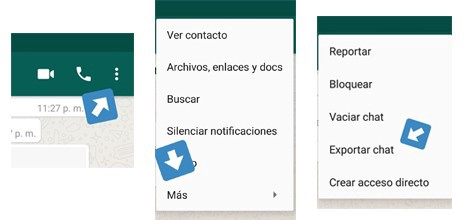 ## Preparation and reading data We will import some of the libraries that we will use, we will establish the text file that we will read, and to make this a little more interesting, we will segment by seasons of the year, from the summer of 2018 to the spring of 2020. ``` library(rwhatsapp) library(lubridate) library(tidyverse) library(tidytext) library(kableExtra) library(RColorBrewer) library(knitr)# LEEMOS EL CHAT A TRAVÉS DEL TXT EXPORTADO DESDE LA APP miChat <- rwa_read(“miChat_1.txt”)# PREPARACIÓN DE DATOS PARA ANÁLISIS POR DATE/TIME miChat <- miChat %>% mutate(day = date(time)) %>% mutate( # SEGMENTACIÓN POR MES estacion = case_when( day >= dmy(18082018) & day <= dmy(22092018) ~ “Verano 2018”, day >= dmy(23092018) & day <= dmy(20122018) ~ “Otoño 2018”, day >= dmy(21122018) & day <= dmy(20032019) ~ “Invierno 2018”, day >= dmy(21032019) & day <= dmy(21062019) ~ “Primavera 2019”, day >= dmy(22062019) & day <= dmy(23092019) ~ “Verano 2019”, day >= dmy(23092019) & day <= dmy(20122019) ~ “Otoño 2019”, day >= dmy(21122019) & day <= dmy(20032020) ~ “Invierno 2020”, day >= dmy(21032020) ~ “Primavera 2020”, T ~ “Fuera de rango”) ) %>% mutate( estacion = factor(estacion) ) %>% filter(!is.na(author)) ``` ## Daily message frequency Let’s look at the daily frequency of messages, assigning a personalized color palette for a first graph that shows the messages per day in a very visual way during the established seasons of the year. ``` # COLOR PALETTE paleta.estaciones <- brewer.pal(8,"Set1")[c(7,5,1,3,4,2,6,8)] # VERIFYING HOW MANY MESSAGES WERE SENT DURING THE PERIOD OF TIME miChat %>% group_by(estacion) %>% count(day) %>% ggplot(aes(x = day, y = n, fill=estacion)) + geom_bar(stat = "identity") + scale_fill_manual(values=paleta.estaciones) + ylab("Número de mensajes") + xlab("Fecha") + ggtitle("Mensajes por día", "Frecuencia por estación del año") + theme_minimal() + theme( legend.title = element_blank(), legend.position = "bottom") ``` We will obtain the following plot as a result. Something happened in Fall 2019, they stopped talking so often huh! 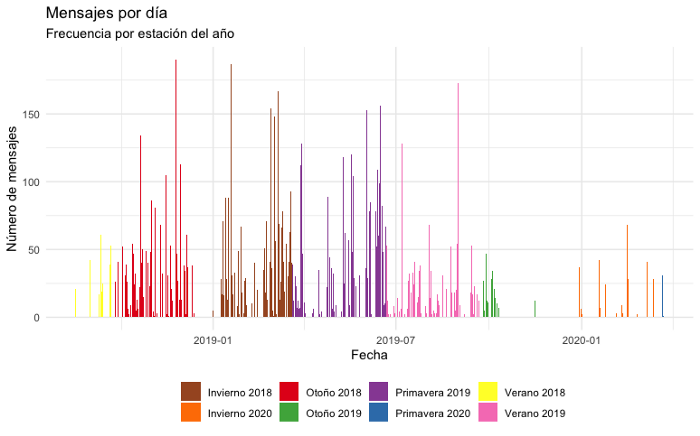 ## Message frequency by day of the week Let’s see the daily frequency of messages, but in addition to viewing by season, let’s find out the specific day of the week in which there has been the most interaction. ``` # MESSAGES PER DAY OF THE WEEK miChat %>% mutate( wday.num = wday(day), wday.name = weekdays(day)) %>% group_by(estacion, wday.num, wday.name) %>% count() %>% ggplot(aes(x = reorder(wday.name, -wday.num), y = n, fill=estacion)) + geom_bar(stat = “identity”) + scale_fill_manual(values=paleta.estaciones) + ylab(“”) + xlab(“”) + coord_flip() + ggtitle(“Número de mensajes por día de la semana”, “Frecuencia por estación del año”) + theme_minimal() + theme( legend.title = element_blank(), legend.position = “bottom”) ``` We will obtain the following plot as a result. On Saturdays and Sundays, there have been more interaction! 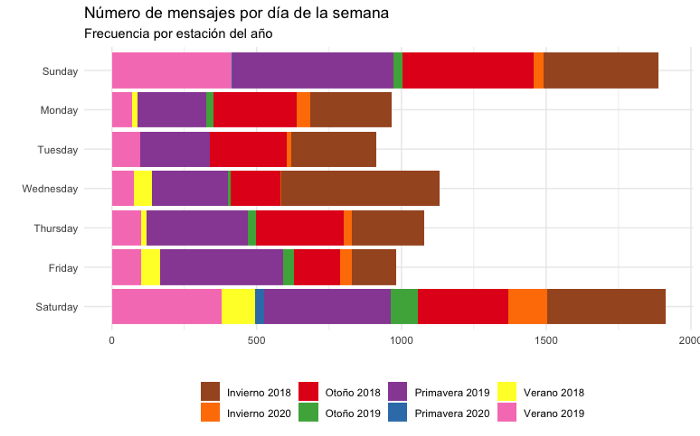 ## Message frequency by the time of day Now let’s look at the daily frequency of messages, but let’s delve into visualizing the most recurring recorded time of interaction. ``` # KEEP THE WEEKEND OF THE WEEK AND RENAME THEM diasemana <- c(“domingo”,”lunes”,”martes”,”miércoles”,”jueves”,”viernes”,”sábado”,”domingo”) names(diasemana) <- 1:7# MENSAJES POR HORA DEL DÍA miChat %>% mutate( hour = hour(time), wday.num = wday(day), wday.name = weekdays(day)) %>% count(estacion, wday.num, wday.name, hour) %>% ggplot(aes(x = hour, y = n, fill=estacion)) + geom_bar(stat = “identity”) + scale_fill_manual(values=paleta.estaciones) + ylab(“Número de mensajes”) + xlab(“Horario”) + ggtitle(“Número de mensajes por hora del día”, “Frecuencia según estación del año”) + facet_wrap(~wday.num, ncol=7, labeller = labeller(wday.num=diasemana))+ theme_minimal() + theme( legend.title = element_blank(), legend.position = “bottom”, panel.spacing.x=unit(0.0, “lines”)) ``` We will obtain the following plot as a result. Between 8 p.m. and 9 p.m., We observe that there is mostly a habit of interaction. 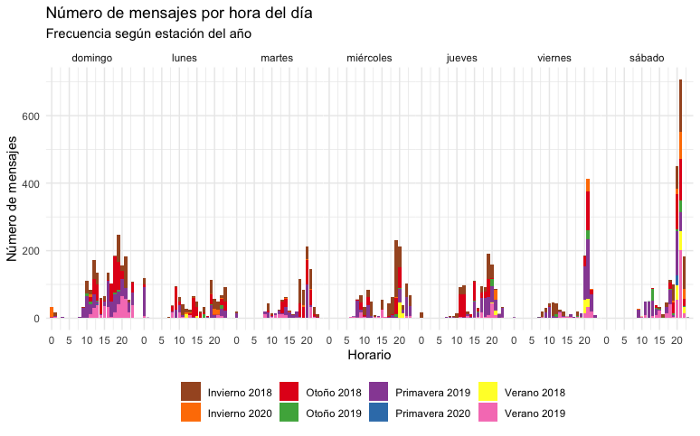 ## Who has sent the most messages? Let us now analyze which of our users has shown a greater intention of interaction, according to the number of messages sent. To preserve the confidentiality of the subjects, we will also change the names of the users to “Él” (He) and “Ella” (She) simply. ``` # CHANGE THE NAME OF USERS FOR CONFIDENTIALITY levels(miChat$author)[2] <- “Ella” levels(miChat$author)[1] <- “Él # MESSAGES PER USER miChat %>% mutate(day = date(time)) %>% group_by(estacion) %>% count(author) %>% ggplot(aes(x = reorder(author, n), y = n, fill=estacion)) + geom_bar(stat = "identity") + scale_fill_manual(values=paleta.estaciones) + ylab("Número total de mensajes") + xlab("Usuario") + coord_flip() + ggtitle("Número total de mensajes por usuario.", "¿Quién es más comunicativo? Frecuencia por estación del año") + theme_minimal() + theme( legend.title = element_blank(), legend.position = "bottom") ``` We will have the next plot, clearly noting that slightly, but for a little more, He has sent more messages to Her. 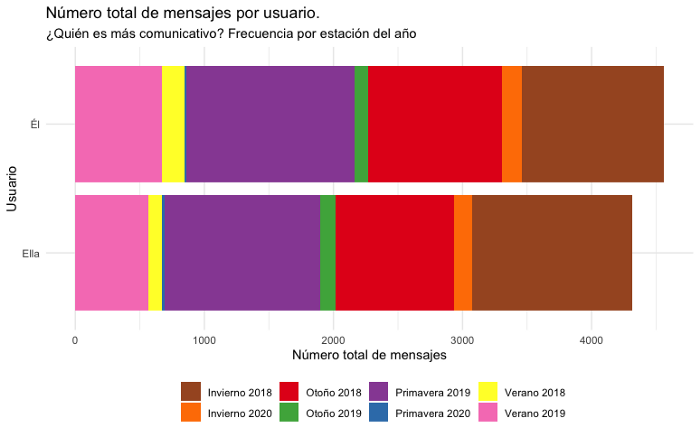 ## What are the most used emojis in chat? Emojis are Unicode graphic symbols, which are currently used as an abbreviation to express concepts and ideas, there are hundreds of emojis and rwhatsapp allows us to explore the popularity in the message exchanges of any conversation. Before sorting Emojis, let’s remove its variations. Variations are when, for example, skin or hair color changes, these variations are encoded by the composition of various Unicode characters. When a device reads these characters, it is composed and displayed as one. This process is called “ligation” and it has some interesting implications. Before sorting, we will keep only the first Unicode of the Emoji, removing everything else. ``` # LIBRARY FOR EMOJI PNG IMAGE FETCH FROM https://abs.twimg.com library(ggimage)# EMOJI RANKING plotEmojis <- miChat %>% unnest(emoji, emoji_name) %>% mutate( emoji = str_sub(emoji, end = 1)) %>% mutate( emoji_name = str_remove(emoji_name, “:.*”)) %>% count(emoji, emoji_name) %>% # PLOT TOP 30 EMOJIS top_n(30, n) %>% arrange(desc(n)) %>% # CREA UNA URL DE IMAGEN CON EL UNICODE DE EMOJI mutate( emoji_url = map_chr(emoji, ~paste0( “https://abs.twimg.com/emoji/v2/72x72/”, as.hexmode(utf8ToInt(.x)),”.png”)) ) # PLOT OF THE RANKING OF MOST USED EMOJIS plotEmojis %>% ggplot(aes(x=reorder(emoji_name, n), y=n)) + geom_col(aes(fill=n), show.legend = FALSE, width = .2) + geom_point(aes(color=n), show.legend = FALSE, size = 3) + geom_image(aes(image=emoji_url), size=.045) + scale_fill_gradient(low=”#2b83ba”,high=”#d7191c”) + scale_color_gradient(low=”#2b83ba”,high=”#d7191c”) + ylab(“Número de veces que el emoji fue usado”) + xlab(“Emoji y significado”) + ggtitle(“Emojis más utilizados de manera general”, “Emojis más usados por todos”) + coord_flip() + theme_minimal() + theme() ``` Now we will have the following plot, showing punctually which have been the 30 most used emojis in the chat of our users. After all, today an emoji says more than a thousand words, huh! 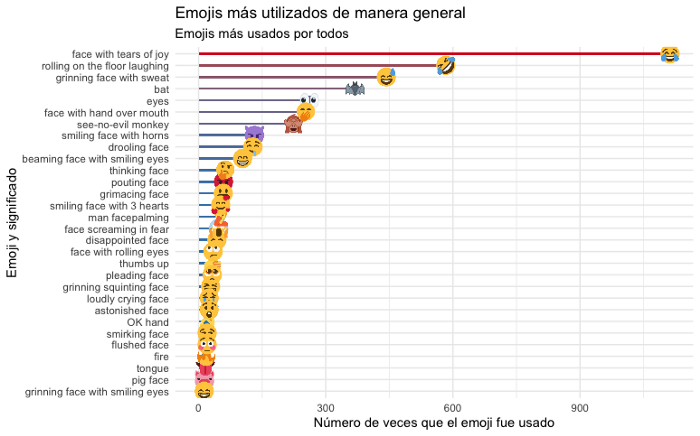 ``` ## Most used emojis in chat, per user We can do the same analysis above, but specifically per chat user, showing which Emojis are most used by each one. # EMOJI RANK PER USER plotEmojis <- miChat %>% unnest(emoji, emoji_name) %>% mutate( emoji = str_sub(emoji, end = 1)) %>% # count(author, emoji, emoji_name, sort = TRUE) %>% # PLOT TOP 8 EMOJIS PER USER group_by(author) %>% top_n(n = 8, n) %>% slice(1:8) %>% # CREATE AN IMAGE URL WITH THE EMOJI UNICODE mutate( emoji_url = map_chr(emoji, ~paste0(“https://abs.twimg.com/emoji/v2/72x72/”,as.hexmode(utf8ToInt(.x)),".png")) ) # PLOT DATA plotEmojis %>% ggplot(aes(x = reorder(emoji, -n), y = n)) + geom_col(aes(fill = author, group=author), show.legend = FALSE, width = .20) + # USE TO FETCH AN EMOJI PNG IMAGE https://abs.twimg.com geom_image(aes(image=emoji_url), size=.13) + ylab(“Número de veces que se usó el emoji”) + xlab(“Emoji”) + facet_wrap(~author, ncol = 5, scales = “free”) + ggtitle(“Emojis más usados en la conversación, por usuario”) + theme_minimal() + theme(axis.text.x = element_blank()) ``` We will obtain the following plot with the top 8 most used emojis. They both have a lot of fun huh! 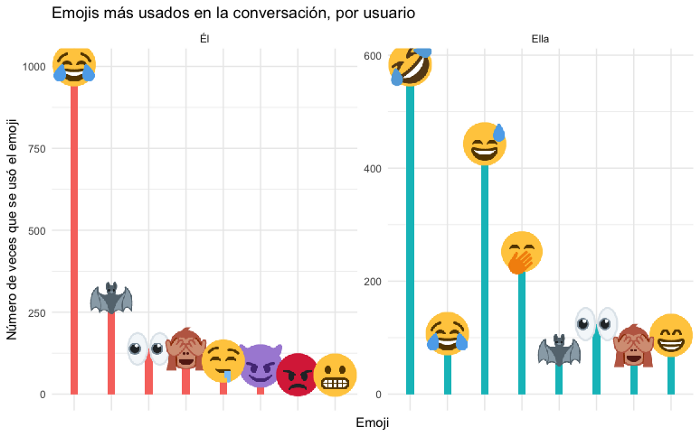 ## What are the most used words in chat? As we did with the Emojis, we can also do the frequency analysis of the most used words in the chat, as well as for each of the users. The tidytext package makes this analysis very simple and easy to apply. We will carry out the classification of words, adding all those that we wish to discriminate, that may not be relevant, such as articles, pronouns, etc. ``` library(tidytext) library(stopwords) # REMOVE WORDS WITHOUT RELEVANT MEANING, SUCH AS PRONOUNS, ETC. remover_palabras <- c(stopwords(language = “pt”), “multimedia”, “y”, “la”, “el”,”en”, “es”, “si”, “lo”, “ya”, “pero”, “esa”, “los”,”yo”,”mi”, “un”, “con”, “las”, “omitido”, “más”,”eso”, “al”, “una”, “del”, “qué”, “todo”, “así”, “le”, “su”, “va”, “porque”, “todos”, “hay”, “les”, “pue”, “ese”, “son”, “está”, “pues”, “ahí”, “sí”,”ver”, “estás”, “algo”, “vas”, “ir”,”voy”, “creo”,”fue”,”solo”, “ni”,”sólo”,”nada”, “aqui”, “q”, “tú”) # WORD COUNT miChat %>% unnest_tokens(input = text, output = word) %>% filter(!word %in% remover_palabras) %>% count(word) %>% # PLOT TOP 30 MOST USED WORDS IN CONVERSATION top_n(30,n) %>% arrange(desc(n)) %>% ggplot(aes(x=reorder(word,n), y=n, fill=n, color=n)) + geom_col(show.legend = FALSE, width = .1) + geom_point(show.legend = FALSE, size = 3) + scale_fill_gradient(low=”#2b83ba”,high=”#d7191c”) + scale_color_gradient(low=”#2b83ba”,high=”#d7191c”) + ggtitle(“Palabras más usadas en la conversación de manera general”) + xlab(“Palabras”) + ylab(“Número de veces que se usó la palabra”) + coord_flip() + theme_minimal() ``` So now we will get the following plot, showing the 30 most used words. What the hell will “murci” be, a keyword to refer to Batman? (In spanish “bat” is “murciélago”) 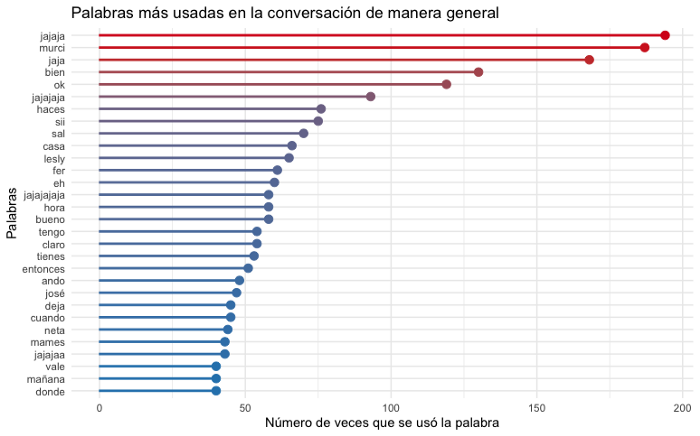 ``` ## Most used words in chat, by user Now let’s do the same analysis that we have done, but per user of the conversation, showing which are the words that are mostly expressed by each one. # WORD COUNT PER USER miChat %>% unnest_tokens(input = text, output = word) %>% filter(!word %in% remover_palabras) %>% count(author, word, sort = TRUE) %>% # TOP 20 MOST USED WORDS BY USER group_by(author) %>% top_n(n = 20, n) %>% slice(1:20) %>% ungroup() %>% arrange(author, desc(n)) %>% mutate(order=row_number()) %>% ggplot(aes(x = reorder(word, n), y = n, fill = author, color = author)) + geom_col(show.legend = FALSE, width = .1) + geom_point(show.legend = FALSE, size = 3) + xlab(“Palabras”) + ylab(“Número de veces que se usó la palabra”) + coord_flip() + facet_wrap(~author, ncol = 3, scales = “free”) + ggtitle(“Palabras más usadas por usuario en la conversación”) + theme_minimal() ``` Now we will have the following plot with the top 20 words expressed by each user. 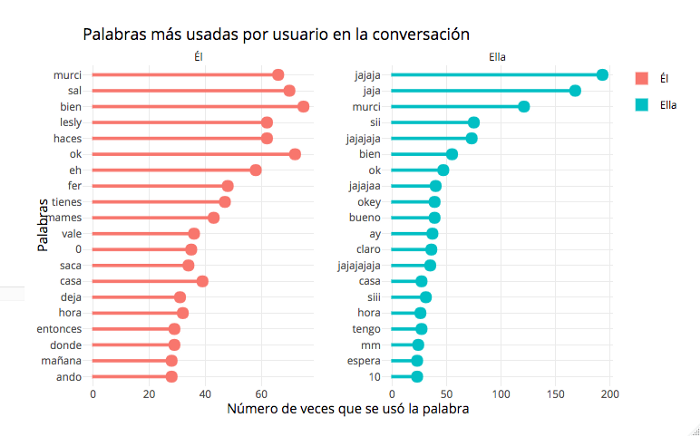 I would like to leave this first part up to here, friends, to make what follows more digestible, which will be lexicon analysis and sentiment analysis, using the same conversation. If you want to see elegant, you can use “plotly” to give your plots a little more life. Here I leave a sample of it on a flexdashboard that I put together to present the plots in a more attractive way for this article: https://rpubs.com/cosmoduende/whatsapp-data-analysis-r-part1 So, to implement data analysis with your groups, family, or whoever you want. You can find very interesting data. Here you can find the complete code: https://github.com/cosmoduende/r-whatsapp-analysis-parte1 Thank you and see you next time. |
| json metadata | {"tags":["datascience","programming","coding","rstudio","rstats","dataanalysis","datavisualization","dataviz"],"image":["https://cdn.steemitimages.com/DQmYj2hFiHgm3dA8PJuMnWhiDB6tZazVdLTWaFuYvAJ5ynV/image.png","https://cdn.steemitimages.com/DQma6BTZoXTuQERDgmqrKob4kU9nQwFpBnX4YN4ZfbEoD3U/image.png","https://cdn.steemitimages.com/DQmVW17xFKG4FqrU4padEFCnDZKQCRU9ZKaYGmD9SBaggYr/image.png","https://cdn.steemitimages.com/DQmcyAy4VhMzHMMKhocG11JCYE7B46Aj2ZmzqN8jsUqMsQt/image.png","https://cdn.steemitimages.com/DQmQ3B4EQu7T6xEKkgWeZEJ6NmvShFKwtBTg4aEpL8xSxx4/image.png","https://cdn.steemitimages.com/DQmZCg9xSX3bC7YaKEZX5m6sjGHQzWsyNETmKXrTmRLfnu7/image.png","https://cdn.steemitimages.com/DQmdbi5R9Zkn4ZsiXCiUSi49xGpwtoo4uujC1XSbe18pb8v/image.png","https://cdn.steemitimages.com/DQmSZPEzcygRuCLeQJnzWqPJC5uAd7tDvwszLkBXk7Ru9bj/image.png","https://cdn.steemitimages.com/DQmWLNttq1VLVdkS24fGiNQNLqk6vMXQRJMZRsXKzpNYPD3/image.png"],"links":["https://rpubs.com/cosmoduende/whatsapp-data-analysis-r-part1","https://github.com/cosmoduende/r-whatsapp-analysis-parte1"],"app":"steemit/0.2","format":"markdown"} |
| parent author | |
| parent permlink | datascience |
| permlink | chat-analysis-on-whatsapp-part-1-text-analysis-and-data-visualization-with-r |
| title | Chat Analysis on WhatsApp: Part 1 — Text Analysis and Data visualization with R |
| Transaction Info | Block #60172064/Trx 9a9a39d4eac970b9da9ba48ee9ba695b5d42df54 |
View Raw JSON Data
{
"block": 60172064,
"op": [
"comment",
{
"author": "cosmoduende",
"body": "Today, anything we can get data from can be measurable with the right knowledge and tools. WhatsApp is not the exception, thanks to the possibility that it offers us, to export complete conversations. I want to introduce you to rwhatsapp, a small but very useful package, which provides what is necessary to work with WhatsApp text data in R as Data Frame.\n\n## Beginning. How do I export my conversations?\n\nYou can export every conversation in a very simple way, from your WhatsApp in any open conversation, from the options menu / More / Export chat. Immediately after this, you can send the complete history as a text file with the extension “.txt”.\n\nThe main function in the package is the rwa_read() function, which allows you to import TXT files directly, so you just need to provide the path to a file to load the messages directly as a Data Frame.\n\nFor this post, a friend very kindly (whom I thank for the trust) has shared her txt file of the chat with a person with whom she usually has a “casual relationship without commitments” for two years or more. For practical purposes we will analyze this conversation, visualizing some relevant data.\n\n\n\n## Preparation and reading data\nWe will import some of the libraries that we will use, we will establish the text file that we will read, and to make this a little more interesting, we will segment by seasons of the year, from the summer of 2018 to the spring of 2020.\n\n```\nlibrary(rwhatsapp)\nlibrary(lubridate)\nlibrary(tidyverse)\nlibrary(tidytext)\nlibrary(kableExtra)\nlibrary(RColorBrewer)\nlibrary(knitr)# LEEMOS EL CHAT A TRAVÉS DEL TXT EXPORTADO DESDE LA APP\nmiChat <- rwa_read(“miChat_1.txt”)# PREPARACIÓN DE DATOS PARA ANÁLISIS POR DATE/TIME\nmiChat <- miChat %>% \n mutate(day = date(time)) %>% \n mutate(\n # SEGMENTACIÓN POR MES\n estacion = case_when(\n day >= dmy(18082018) & day <= dmy(22092018) ~ “Verano 2018”,\n day >= dmy(23092018) & day <= dmy(20122018) ~ “Otoño 2018”,\n day >= dmy(21122018) & day <= dmy(20032019) ~ “Invierno 2018”,\n day >= dmy(21032019) & day <= dmy(21062019) ~ “Primavera 2019”,\n day >= dmy(22062019) & day <= dmy(23092019) ~ “Verano 2019”,\n day >= dmy(23092019) & day <= dmy(20122019) ~ “Otoño 2019”,\n day >= dmy(21122019) & day <= dmy(20032020) ~ “Invierno 2020”,\n day >= dmy(21032020) ~ “Primavera 2020”,\n T ~ “Fuera de rango”)\n ) %>% \n mutate( estacion = factor(estacion) ) %>% \n filter(!is.na(author)) \n```\n\n## Daily message frequency\nLet’s look at the daily frequency of messages, assigning a personalized color palette for a first graph that shows the messages per day in a very visual way during the established seasons of the year.\n\n```\n# COLOR PALETTE\npaleta.estaciones <- brewer.pal(8,\"Set1\")[c(7,5,1,3,4,2,6,8)]\n# VERIFYING HOW MANY MESSAGES WERE SENT DURING THE PERIOD OF TIME\nmiChat %>% \n group_by(estacion) %>% \n count(day) %>%\n ggplot(aes(x = day, y = n, fill=estacion)) +\n geom_bar(stat = \"identity\") +\n scale_fill_manual(values=paleta.estaciones) +\n ylab(\"Número de mensajes\") + xlab(\"Fecha\") +\n ggtitle(\"Mensajes por día\", \"Frecuencia por estación del año\") +\n theme_minimal() +\n theme( legend.title = element_blank(), \n legend.position = \"bottom\")\n\n```\n\n\nWe will obtain the following plot as a result. Something happened in Fall 2019, they stopped talking so often huh!\n\n\n\n\n\n## Message frequency by day of the week\nLet’s see the daily frequency of messages, but in addition to viewing by season, let’s find out the specific day of the week in which there has been the most interaction.\n\n```\n# MESSAGES PER DAY OF THE WEEK\nmiChat %>% \n mutate( wday.num = wday(day),\n wday.name = weekdays(day)) %>% \n group_by(estacion, wday.num, wday.name) %>% \n count() %>% \n ggplot(aes(x = reorder(wday.name, -wday.num), y = n, fill=estacion)) +\n geom_bar(stat = “identity”) +\n scale_fill_manual(values=paleta.estaciones) +\n ylab(“”) + xlab(“”) +\n coord_flip() +\n ggtitle(“Número de mensajes por día de la semana”, “Frecuencia por estación del año”) +\n theme_minimal() +\n theme( legend.title = element_blank(), \n legend.position = “bottom”)\n\n```\n\nWe will obtain the following plot as a result. On Saturdays and Sundays, there have been more interaction!\n\n\n\n\n## Message frequency by the time of day\nNow let’s look at the daily frequency of messages, but let’s delve into visualizing the most recurring recorded time of interaction.\n\n```\n# KEEP THE WEEKEND OF THE WEEK AND RENAME THEM\ndiasemana <- c(“domingo”,”lunes”,”martes”,”miércoles”,”jueves”,”viernes”,”sábado”,”domingo”)\nnames(diasemana) <- 1:7# MENSAJES POR HORA DEL DÍA\nmiChat %>% \n mutate( hour = hour(time), \n wday.num = wday(day),\n wday.name = weekdays(day)) %>% \n count(estacion, wday.num, wday.name, hour) %>% \n ggplot(aes(x = hour, y = n, fill=estacion)) +\n geom_bar(stat = “identity”) +\n scale_fill_manual(values=paleta.estaciones) +\n ylab(“Número de mensajes”) + xlab(“Horario”) +\n ggtitle(“Número de mensajes por hora del día”, “Frecuencia según estación del año”) +\n facet_wrap(~wday.num, ncol=7, labeller = labeller(wday.num=diasemana))+\n theme_minimal() +\n theme( legend.title = element_blank(), \n legend.position = “bottom”,\n panel.spacing.x=unit(0.0, “lines”))\n\n```\n\nWe will obtain the following plot as a result. Between 8 p.m. and 9 p.m., We observe that there is mostly a habit of interaction.\n\n\n\n\n\n## Who has sent the most messages?\nLet us now analyze which of our users has shown a greater intention of interaction, according to the number of messages sent. To preserve the confidentiality of the subjects, we will also change the names of the users to “Él” (He) and “Ella” (She) simply.\n\n```\n# CHANGE THE NAME OF USERS FOR CONFIDENTIALITY\nlevels(miChat$author)[2] <- “Ella”\nlevels(miChat$author)[1] <- “Él\n# MESSAGES PER USER\nmiChat %>%\n mutate(day = date(time)) %>%\n group_by(estacion) %>% \n count(author) %>% \n ggplot(aes(x = reorder(author, n), y = n, fill=estacion)) +\n geom_bar(stat = \"identity\") +\n scale_fill_manual(values=paleta.estaciones) +\n ylab(\"Número total de mensajes\") + xlab(\"Usuario\") +\n coord_flip() +\n ggtitle(\"Número total de mensajes por usuario.\", \"¿Quién es más comunicativo? Frecuencia por estación del año\") +\n theme_minimal() +\n theme( legend.title = element_blank(), \n legend.position = \"bottom\")\n\n```\n\nWe will have the next plot, clearly noting that slightly, but for a little more, He has sent more messages to Her.\n\n\n\n\n\n## What are the most used emojis in chat?\nEmojis are Unicode graphic symbols, which are currently used as an abbreviation to express concepts and ideas, there are hundreds of emojis and rwhatsapp allows us to explore the popularity in the message exchanges of any conversation.\n\nBefore sorting Emojis, let’s remove its variations. Variations are when, for example, skin or hair color changes, these variations are encoded by the composition of various Unicode characters. When a device reads these characters, it is composed and displayed as one. This process is called “ligation” and it has some interesting implications. Before sorting, we will keep only the first Unicode of the Emoji, removing everything else.\n\n```\n# LIBRARY FOR EMOJI PNG IMAGE FETCH FROM https://abs.twimg.com\nlibrary(ggimage)# EMOJI RANKING\nplotEmojis <- miChat %>% \n unnest(emoji, emoji_name) %>% \n mutate( emoji = str_sub(emoji, end = 1)) %>% \n mutate( emoji_name = str_remove(emoji_name, “:.*”)) %>% \n count(emoji, emoji_name) %>% \n \n# PLOT TOP 30 EMOJIS\n top_n(30, n) %>% \n arrange(desc(n)) %>% # CREA UNA URL DE IMAGEN CON EL UNICODE DE EMOJI\n mutate( emoji_url = map_chr(emoji, \n ~paste0( “https://abs.twimg.com/emoji/v2/72x72/”, as.hexmode(utf8ToInt(.x)),”.png”)) \n )\n# PLOT OF THE RANKING OF MOST USED EMOJIS\nplotEmojis %>% \n ggplot(aes(x=reorder(emoji_name, n), y=n)) +\n geom_col(aes(fill=n), show.legend = FALSE, width = .2) +\n geom_point(aes(color=n), show.legend = FALSE, size = 3) +\n geom_image(aes(image=emoji_url), size=.045) +\n scale_fill_gradient(low=”#2b83ba”,high=”#d7191c”) +\n scale_color_gradient(low=”#2b83ba”,high=”#d7191c”) +\n ylab(“Número de veces que el emoji fue usado”) +\n xlab(“Emoji y significado”) +\n ggtitle(“Emojis más utilizados de manera general”, “Emojis más usados por todos”) +\n coord_flip() +\n theme_minimal() +\n theme()\n\n```\n\nNow we will have the following plot, showing punctually which have been the 30 most used emojis in the chat of our users. After all, today an emoji says more than a thousand words, huh!\n\n\n\n\n```\n## Most used emojis in chat, per user\nWe can do the same analysis above, but specifically per chat user, showing which Emojis are most used by each one.\n\n# EMOJI RANK PER USER\nplotEmojis <- miChat %>%\n unnest(emoji, emoji_name) %>%\n mutate( emoji = str_sub(emoji, end = 1)) %>% # \n count(author, emoji, emoji_name, sort = TRUE) %>%\n# PLOT TOP 8 EMOJIS PER USER\n group_by(author) %>%\n top_n(n = 8, n) %>%\n slice(1:8) %>% \n \n# CREATE AN IMAGE URL WITH THE EMOJI UNICODE\n mutate( emoji_url = map_chr(emoji, \n ~paste0(“https://abs.twimg.com/emoji/v2/72x72/”,as.hexmode(utf8ToInt(.x)),\".png\")) )\n# PLOT DATA\nplotEmojis %>% \n ggplot(aes(x = reorder(emoji, -n), y = n)) +\n geom_col(aes(fill = author, group=author), show.legend = FALSE, width = .20) +\n# USE TO FETCH AN EMOJI PNG IMAGE https://abs.twimg.com\n geom_image(aes(image=emoji_url), size=.13) +\n ylab(“Número de veces que se usó el emoji”) +\n xlab(“Emoji”) +\n facet_wrap(~author, ncol = 5, scales = “free”) +\n ggtitle(“Emojis más usados en la conversación, por usuario”) +\n theme_minimal() +\n theme(axis.text.x = element_blank())\n\n```\n\nWe will obtain the following plot with the top 8 most used emojis. They both have a lot of fun huh!\n\n\n\n\n## What are the most used words in chat?\nAs we did with the Emojis, we can also do the frequency analysis of the most used words in the chat, as well as for each of the users. The tidytext package makes this analysis very simple and easy to apply. We will carry out the classification of words, adding all those that we wish to discriminate, that may not be relevant, such as articles, pronouns, etc.\n\n```\nlibrary(tidytext)\nlibrary(stopwords)\n# REMOVE WORDS WITHOUT RELEVANT MEANING, SUCH AS PRONOUNS, ETC.\nremover_palabras <- c(stopwords(language = “pt”),\n “multimedia”, “y”, “la”, “el”,”en”, “es”, “si”, “lo”, “ya”, “pero”, “esa”, “los”,”yo”,”mi”, “un”, “con”, “las”, “omitido”, “más”,”eso”, “al”, “una”, “del”, “qué”, “todo”, “así”, “le”, “su”, “va”, “porque”, “todos”, “hay”, “les”, “pue”, “ese”, “son”, “está”, “pues”, “ahí”, “sí”,”ver”, “estás”, “algo”, “vas”, “ir”,”voy”, “creo”,”fue”,”solo”, “ni”,”sólo”,”nada”, “aqui”, “q”, “tú”)\n# WORD COUNT\nmiChat %>%\n unnest_tokens(input = text, output = word) %>%\n filter(!word %in% remover_palabras) %>% \n count(word) %>% \n# PLOT TOP 30 MOST USED WORDS IN CONVERSATION\n top_n(30,n) %>% \n arrange(desc(n)) %>% \n ggplot(aes(x=reorder(word,n), y=n, fill=n, color=n)) +\n geom_col(show.legend = FALSE, width = .1) +\n geom_point(show.legend = FALSE, size = 3) +\n scale_fill_gradient(low=”#2b83ba”,high=”#d7191c”) +\n scale_color_gradient(low=”#2b83ba”,high=”#d7191c”) +\n ggtitle(“Palabras más usadas en la conversación de manera general”) +\n xlab(“Palabras”) +\n ylab(“Número de veces que se usó la palabra”) +\n coord_flip() +\n theme_minimal()\n\n```\n\nSo now we will get the following plot, showing the 30 most used words. What the hell will “murci” be, a keyword to refer to Batman? (In spanish “bat” is “murciélago”)\n\n\n\n\n\n```\n## Most used words in chat, by user\nNow let’s do the same analysis that we have done, but per user of the conversation, showing which are the words that are mostly expressed by each one.\n\n# WORD COUNT PER USER\nmiChat %>%\n unnest_tokens(input = text,\n output = word) %>%\n filter(!word %in% remover_palabras) %>%\n count(author, word, sort = TRUE) %>%\n \n# TOP 20 MOST USED WORDS BY USER\n group_by(author) %>%\n top_n(n = 20, n) %>%\n slice(1:20) %>%\n ungroup() %>% \n arrange(author, desc(n)) %>% \n mutate(order=row_number()) %>% \n ggplot(aes(x = reorder(word, n), y = n, fill = author, color = author)) +\n geom_col(show.legend = FALSE, width = .1) +\n geom_point(show.legend = FALSE, size = 3) +\n xlab(“Palabras”) +\n ylab(“Número de veces que se usó la palabra”) +\n coord_flip() +\n facet_wrap(~author, ncol = 3, scales = “free”) +\n ggtitle(“Palabras más usadas por usuario en la conversación”) +\n theme_minimal()\n\n```\n\nNow we will have the following plot with the top 20 words expressed by each user.\n\n\n\n\n\nI would like to leave this first part up to here, friends, to make what follows more digestible, which will be lexicon analysis and sentiment analysis, using the same conversation.\n\nIf you want to see elegant, you can use “plotly” to give your plots a little more life. Here I leave a sample of it on a flexdashboard that I put together to present the plots in a more attractive way for this article: https://rpubs.com/cosmoduende/whatsapp-data-analysis-r-part1\n\nSo, to implement data analysis with your groups, family, or whoever you want. You can find very interesting data.\nHere you can find the complete code: https://github.com/cosmoduende/r-whatsapp-analysis-parte1\n\nThank you and see you next time.",
"json_metadata": "{\"tags\":[\"datascience\",\"programming\",\"coding\",\"rstudio\",\"rstats\",\"dataanalysis\",\"datavisualization\",\"dataviz\"],\"image\":[\"https://cdn.steemitimages.com/DQmYj2hFiHgm3dA8PJuMnWhiDB6tZazVdLTWaFuYvAJ5ynV/image.png\",\"https://cdn.steemitimages.com/DQma6BTZoXTuQERDgmqrKob4kU9nQwFpBnX4YN4ZfbEoD3U/image.png\",\"https://cdn.steemitimages.com/DQmVW17xFKG4FqrU4padEFCnDZKQCRU9ZKaYGmD9SBaggYr/image.png\",\"https://cdn.steemitimages.com/DQmcyAy4VhMzHMMKhocG11JCYE7B46Aj2ZmzqN8jsUqMsQt/image.png\",\"https://cdn.steemitimages.com/DQmQ3B4EQu7T6xEKkgWeZEJ6NmvShFKwtBTg4aEpL8xSxx4/image.png\",\"https://cdn.steemitimages.com/DQmZCg9xSX3bC7YaKEZX5m6sjGHQzWsyNETmKXrTmRLfnu7/image.png\",\"https://cdn.steemitimages.com/DQmdbi5R9Zkn4ZsiXCiUSi49xGpwtoo4uujC1XSbe18pb8v/image.png\",\"https://cdn.steemitimages.com/DQmSZPEzcygRuCLeQJnzWqPJC5uAd7tDvwszLkBXk7Ru9bj/image.png\",\"https://cdn.steemitimages.com/DQmWLNttq1VLVdkS24fGiNQNLqk6vMXQRJMZRsXKzpNYPD3/image.png\"],\"links\":[\"https://rpubs.com/cosmoduende/whatsapp-data-analysis-r-part1\",\"https://github.com/cosmoduende/r-whatsapp-analysis-parte1\"],\"app\":\"steemit/0.2\",\"format\":\"markdown\"}",
"parent_author": "",
"parent_permlink": "datascience",
"permlink": "chat-analysis-on-whatsapp-part-1-text-analysis-and-data-visualization-with-r",
"title": "Chat Analysis on WhatsApp: Part 1 — Text Analysis and Data visualization with R"
}
],
"op_in_trx": 0,
"timestamp": "2021-12-26T04:49:09",
"trx_id": "9a9a39d4eac970b9da9ba48ee9ba695b5d42df54",
"trx_in_block": 1,
"virtual_op": 0
}cosmoduendecustom json: community2021/12/26 03:39:54
cosmoduendecustom json: community
2021/12/26 03:39:54
| id | community |
| json | ["subscribe",{"community":"hive-141434"}] |
| required auths | [] |
| required posting auths | ["cosmoduende"] |
| Transaction Info | Block #60170686/Trx 864a6df7e6e8a30fcfce00ae4253132f7b283130 |
View Raw JSON Data
{
  "block": 60170686,
  "op": [
    "custom_json",
    {
      "id": "community",
      "json": "[\"subscribe\",{\"community\":\"hive-141434\"}]",
      "required_auths": [],
      "required_posting_auths": [
        "cosmoduende"
      ]
    }
  ],
  "op_in_trx": 0,
  "timestamp": "2021-12-26T03:39:54",
  "trx_id": "864a6df7e6e8a30fcfce00ae4253132f7b283130",
  "trx_in_block": 3,
  "virtual_op": 0
}cosmoduendecustom json: community2021/12/26 03:39:15
cosmoduendecustom json: community
2021/12/26 03:39:15
| id | community |
| json | ["subscribe",{"community":"hive-101145"}] |
| required auths | [] |
| required posting auths | ["cosmoduende"] |
| Transaction Info | Block #60170673/Trx f14e1fc972002deb144f541b3f3d267be8081e13 |
View Raw JSON Data
{
  "block": 60170673,
  "op": [
    "custom_json",
    {
      "id": "community",
      "json": "[\"subscribe\",{\"community\":\"hive-101145\"}]",
      "required_auths": [],
      "required_posting_auths": [
        "cosmoduende"
      ]
    }
  ],
  "op_in_trx": 0,
  "timestamp": "2021-12-26T03:39:15",
  "trx_id": "f14e1fc972002deb144f541b3f3d267be8081e13",
  "trx_in_block": 7,
  "virtual_op": 0
}cosmoduendeupdated their account properties2021/12/26 03:38:27
cosmoduendeupdated their account properties
2021/12/26 03:38:27
| account | cosmoduende |
| extensions | [] |
| json metadata | |
| posting json metadata | {"profile":{"profile_image":"https://cdn.steemitimages.com/DQmRnq2CK4sbsPkBoCiB1mRWaUqHCdNPzWhr3sBZwEYXBYy/125781824_10164813861705790_1072496714080998247_n.jpeg","name":"Saúl Buentello","about":"#G3ekArmy, Web Developer & Data Enthusiast. Coordinador académico & Instructor en KMMX. #KotlinCDMX Organizer.","location":"Mexico City","website":"https://www.linkedin.com/in/sbuentello/","version":2}} |
| Transaction Info | Block #60170657/Trx 741eaad57d9c1737b44e0de17e5cf06cadbf0afe |
View Raw JSON Data
{
  "block": 60170657,
  "op": [
    "account_update2",
    {
      "account": "cosmoduende",
      "extensions": [],
      "json_metadata": "",
      "posting_json_metadata": "{\"profile\":{\"profile_image\":\"https://cdn.steemitimages.com/DQmRnq2CK4sbsPkBoCiB1mRWaUqHCdNPzWhr3sBZwEYXBYy/125781824_10164813861705790_1072496714080998247_n.jpeg\",\"name\":\"Saúl Buentello\",\"about\":\"#G3ekArmy, Web Developer & Data Enthusiast. Coordinador académico & Instructor en KMMX. #KotlinCDMX Organizer.\",\"location\":\"Mexico City\",\"website\":\"https://www.linkedin.com/in/sbuentello/\",\"version\":2}}"
    }
  ],
  "op_in_trx": 0,
  "timestamp": "2021-12-26T03:38:27",
  "trx_id": "741eaad57d9c1737b44e0de17e5cf06cadbf0afe",
  "trx_in_block": 23,
  "virtual_op": 0
}executive-boardsent 0.001 STEEM to @cosmoduende- "❗ Hello cosmoduende, welcome to the STEEM ecosystem. The Executive Board is publishing insider infos at https://discord.gg/KyBbmhh on how you will be earning the most coins. It's easy, just follow the..."2021/12/26 03:33:06
executive-boardsent 0.001 STEEM to @cosmoduende- "❗ Hello cosmoduende, welcome to the STEEM ecosystem. The Executive Board is publishing insider infos at https://discord.gg/KyBbmhh on how you will be earning the most coins. It's easy, just follow the..."
2021/12/26 03:33:06
| amount | 0.001 STEEM |
| from | executive-board |
| memo | ❗ Hello cosmoduende, welcome to the STEEM ecosystem. The Executive Board is publishing insider infos at https://discord.gg/KyBbmhh on how you will be earning the most coins. It's easy, just follow the instructions. THE 1000X BOOSTER KEY is already waiting for you over there too. 😉 Warm regards, The Executive Board. |
| to | cosmoduende |
| Transaction Info | Block #60170551/Trx 0551dcce7d444cbaaa4a3a875490727d86093fe5 |
View Raw JSON Data
{
  "block": 60170551,
  "op": [
    "transfer",
    {
      "amount": "0.001 STEEM",
      "from": "executive-board",
      "memo": "❗ Hello cosmoduende, welcome to the STEEM ecosystem. The Executive Board is publishing insider infos at https://discord.gg/KyBbmhh on how you will be earning the most coins. It's easy, just follow the instructions. THE 1000X BOOSTER KEY is already waiting for you over there too. 😉 Warm regards, The Executive Board.",
      "to": "cosmoduende"
    }
  ],
  "op_in_trx": 0,
  "timestamp": "2021-12-26T03:33:06",
  "trx_id": "0551dcce7d444cbaaa4a3a875490727d86093fe5",
  "trx_in_block": 10,
  "virtual_op": 0
}steemdelegated 18.630 SP to @cosmoduende2021/12/26 03:31:15
steemdelegated 18.630 SP to @cosmoduende
2021/12/26 03:31:15
| delegatee | cosmoduende |
| delegator | steem |
| vesting shares | 30300.000000 VESTS |
| Transaction Info | Block #60170514/Trx 9eac964c644b29378fd5c5f8f3f84becef97e1fc |
View Raw JSON Data
{
  "block": 60170514,
  "op": [
    "delegate_vesting_shares",
    {
      "delegatee": "cosmoduende",
      "delegator": "steem",
      "vesting_shares": "30300.000000 VESTS"
    }
  ],
  "op_in_trx": 0,
  "timestamp": "2021-12-26T03:31:15",
  "trx_id": "9eac964c644b29378fd5c5f8f3f84becef97e1fc",
  "trx_in_block": 12,
  "virtual_op": 0
}steemcreated a new account: @cosmoduende2021/12/26 03:31:15
steemcreated a new account: @cosmoduende
2021/12/26 03:31:15
| active | {"account_auths":[],"key_auths":[["STM5Tau5GZ6HrhkVwJxKc1Kv3RtHM5gYTEGwZYrCkrN5za3zJEypz",1]],"weight_threshold":1} |
| creator | steem |
| extensions | [] |
| json metadata | {} |
| memo key | STM8QuRZpDu5BPKbZ8qe9Uhz3QnY1z8WshZyEVBQP8LZBWHJQHcxJ |
| new account name | cosmoduende |
| owner | {"account_auths":[],"key_auths":[["STM8KmkcJezrrXQSXHdeKqWi2Vi9SKYfw6j8wYR928ARdJ5PM6iyp",1]],"weight_threshold":1} |
| posting | {"account_auths":[],"key_auths":[["STM6SPZWq4TU9AVogQJeME5nXVhcxKnppLnWfmwXnutdQbXVj7Rek",1]],"weight_threshold":1} |
| Transaction Info | Block #60170514/Trx 9eac964c644b29378fd5c5f8f3f84becef97e1fc |
View Raw JSON Data
{
  "block": 60170514,
  "op": [
    "create_claimed_account",
    {
      "active": {
        "account_auths": [],
        "key_auths": [
          [
            "STM5Tau5GZ6HrhkVwJxKc1Kv3RtHM5gYTEGwZYrCkrN5za3zJEypz",
            1
          ]
        ],
        "weight_threshold": 1
      },
      "creator": "steem",
      "extensions": [],
      "json_metadata": "{}",
      "memo_key": "STM8QuRZpDu5BPKbZ8qe9Uhz3QnY1z8WshZyEVBQP8LZBWHJQHcxJ",
      "new_account_name": "cosmoduende",
      "owner": {
        "account_auths": [],
        "key_auths": [
          [
            "STM8KmkcJezrrXQSXHdeKqWi2Vi9SKYfw6j8wYR928ARdJ5PM6iyp",
            1
          ]
        ],
        "weight_threshold": 1
      },
      "posting": {
        "account_auths": [],
        "key_auths": [
          [
            "STM6SPZWq4TU9AVogQJeME5nXVhcxKnppLnWfmwXnutdQbXVj7Rek",
            1
          ]
        ],
        "weight_threshold": 1
      }
    }
  ],
  "op_in_trx": 0,
  "timestamp": "2021-12-26T03:31:15",
  "trx_id": "9eac964c644b29378fd5c5f8f3f84becef97e1fc",
  "trx_in_block": 12,
  "virtual_op": 0
}Manabar
Voting Power100.00%
Downvote Power100.00%
Resource Credits100.00%
Reputation Progress0.00%
{
  "voting_manabar": {
    "current_mana": "5472996220",
    "last_update_time": 1769141577
  },
  "downvote_manabar": {
    "current_mana": 1368249055,
    "last_update_time": 1769141577
  },
  "rc_account": {
    "account": "cosmoduende",
    "max_rc": "10995301649",
    "max_rc_creation_adjustment": {
      "amount": "5522305429",
      "nai": "@@000000037",
      "precision": 6
    },
    "rc_manabar": {
      "current_mana": "11159520846",
      "last_update_time": 1769141577
    }
  }
}
Account Metadata
| POSTING JSON METADATA | |
| profile | {"profile_image":"https://cdn.steemitimages.com/DQmRnq2CK4sbsPkBoCiB1mRWaUqHCdNPzWhr3sBZwEYXBYy/125781824_10164813861705790_1072496714080998247_n.jpeg","name":"Saúl Buentello","about":"#G3ekArmy, Web Developer & Data Enthusiast. Coordinador académico & Instructor en KMMX. #KotlinCDMX Organizer.","location":"Mexico City","website":"https://www.linkedin.com/in/sbuentello/","version":2} |
| JSON METADATA | |
| None | |
{
  "posting_json_metadata": {
    "profile": {
      "profile_image": "https://cdn.steemitimages.com/DQmRnq2CK4sbsPkBoCiB1mRWaUqHCdNPzWhr3sBZwEYXBYy/125781824_10164813861705790_1072496714080998247_n.jpeg",
      "name": "Saúl Buentello",
      "about": "#G3ekArmy, Web Developer & Data Enthusiast. Coordinador académico & Instructor en KMMX. #KotlinCDMX Organizer.",
      "location": "Mexico City",
      "website": "https://www.linkedin.com/in/sbuentello/",
      "version": 2
    }
  },
  "json_metadata": {}
}
Auth Keys
Owner
Single Signature
Public Keys
STM8KmkcJezrrXQSXHdeKqWi2Vi9SKYfw6j8wYR928ARdJ5PM6iyp1/1
Active
Single Signature
Public Keys
STM5Tau5GZ6HrhkVwJxKc1Kv3RtHM5gYTEGwZYrCkrN5za3zJEypz1/1
Posting
Single Signature
Public Keys
STM6SPZWq4TU9AVogQJeME5nXVhcxKnppLnWfmwXnutdQbXVj7Rek1/1
Memo
STM8QuRZpDu5BPKbZ8qe9Uhz3QnY1z8WshZyEVBQP8LZBWHJQHcxJ
{
  "owner": {
    "account_auths": [],
    "key_auths": [
      [
        "STM8KmkcJezrrXQSXHdeKqWi2Vi9SKYfw6j8wYR928ARdJ5PM6iyp",
        1
      ]
    ],
    "weight_threshold": 1
  },
  "active": {
    "account_auths": [],
    "key_auths": [
      [
        "STM5Tau5GZ6HrhkVwJxKc1Kv3RtHM5gYTEGwZYrCkrN5za3zJEypz",
        1
      ]
    ],
    "weight_threshold": 1
  },
  "posting": {
    "account_auths": [],
    "key_auths": [
      [
        "STM6SPZWq4TU9AVogQJeME5nXVhcxKnppLnWfmwXnutdQbXVj7Rek",
        1
      ]
    ],
    "weight_threshold": 1
  },
  "memo": "STM8QuRZpDu5BPKbZ8qe9Uhz3QnY1z8WshZyEVBQP8LZBWHJQHcxJ"
}
Witness Votes
0 / 30
No active witness votes.
[]