

@cydera
25Cydera is a team of cryptocurrency consultants focused on helping you secure your digital assets and services around developing and auditing smart contracts.
steemit.com/@cyderaVOTING POWER100.00%
DOWNVOTE POWER100.00%
RESOURCE CREDITS100.00%
REPUTATION PROGRESS0.00%
Net Worth
0.056USD
STEEM
0.000STEEM
SBD
0.040SBD
Effective Power
5.007SP
├── Own SP
0.629SP
└── Incoming DelegationsDeleg
+4.378SP
Detailed Balance
| STEEM | ||
| balance | 0.000STEEM | STEEM |
| market_balance | 0.000STEEM | STEEM |
| savings_balance | 0.000STEEM | STEEM |
| reward_steem_balance | 0.000STEEM | STEEM |
| STEEM POWER | ||
| Own SP | 0.629SP | SP |
| Delegated Out | 0.000SP | SP |
| Delegation In | 4.378SP | SP |
| Effective Power | 5.007SP | SP |
| Reward SP (pending) | 0.007SP | SP |
| SBD | ||
| sbd_balance | 0.000SBD | SBD |
| sbd_conversions | 0.000SBD | SBD |
| sbd_market_balance | 0.000SBD | SBD |
| savings_sbd_balance | 0.000SBD | SBD |
| reward_sbd_balance | 0.040SBD | SBD |
{
  "balance": "0.000 STEEM",
  "savings_balance": "0.000 STEEM",
  "reward_steem_balance": "0.000 STEEM",
  "vesting_shares": "1023.431465 VESTS",
  "delegated_vesting_shares": "0.000000 VESTS",
  "received_vesting_shares": "7120.228341 VESTS",
  "sbd_balance": "0.000 SBD",
  "savings_sbd_balance": "0.000 SBD",
  "reward_sbd_balance": "0.040 SBD",
  "conversions": []
}
Account Info
| name | cydera |
| id | 650949 |
| rank | 1,455,377 |
| reputation | 158459279 |
| created | 2018-01-23T22:42:06 |
| recovery_account | steem |
| proxy | None |
| post_count | 3 |
| comment_count | 0 |
| lifetime_vote_count | 0 |
| witnesses_voted_for | 0 |
| last_post | 2018-07-15T03:16:57 |
| last_root_post | 2018-07-15T03:16:57 |
| last_vote_time | 2018-01-26T07:34:36 |
| proxied_vsf_votes | 0, 0, 0, 0 |
| can_vote | 1 |
| voting_power | 0 |
| delayed_votes | 0 |
| balance | 0.000 STEEM |
| savings_balance | 0.000 STEEM |
| sbd_balance | 0.000 SBD |
| savings_sbd_balance | 0.000 SBD |
| vesting_shares | 1023.431465 VESTS |
| delegated_vesting_shares | 0.000000 VESTS |
| received_vesting_shares | 7120.228341 VESTS |
| reward_vesting_balance | 14.322958 VESTS |
| vesting_balance | 0.000 STEEM |
| vesting_withdraw_rate | 0.000000 VESTS |
| next_vesting_withdrawal | 1969-12-31T23:59:59 |
| withdrawn | 0 |
| to_withdraw | 0 |
| withdraw_routes | 0 |
| savings_withdraw_requests | 0 |
| last_account_recovery | 1970-01-01T00:00:00 |
| reset_account | null |
| last_owner_update | 1970-01-01T00:00:00 |
| last_account_update | 2018-01-23T22:56:42 |
| mined | No |
| sbd_seconds | 0 |
| sbd_last_interest_payment | 1970-01-01T00:00:00 |
| savings_sbd_last_interest_payment | 1970-01-01T00:00:00 |
{
  "id": 650949,
  "name": "cydera",
  "owner": {
    "weight_threshold": 1,
    "account_auths": [],
    "key_auths": [
      [
        "STM7n1tDPMKn4oXdKxgvKzjYPnRtbewTGsmDDTkZsB3eXkC4RSv1V",
        1
      ]
    ]
  },
  "active": {
    "weight_threshold": 1,
    "account_auths": [],
    "key_auths": [
      [
        "STM69ye1NgVbmbkU8edQ3WirbZPFMbZceAcDdU7k3Yzbm2GbJpNGX",
        1
      ]
    ]
  },
  "posting": {
    "weight_threshold": 1,
    "account_auths": [],
    "key_auths": [
      [
        "STM7RaUXSP8QWSnFKHG5NzboUh7ksH7kTP67FHCGVcLUk9aiFzN5o",
        1
      ]
    ]
  },
  "memo_key": "STM8e3p7h5vo6uNAWtL7hqzPPDs1vacrd3st7koS8MaCZRiy3revz",
  "json_metadata": "{\"profile\":{\"profile_image\":\"https://cydera.tech/favicon.ico\",\"cover_image\":\"https://cydera.tech/img/connected-world.jpg\",\"name\":\"cydera\",\"about\":\"Cydera is a team of cryptocurrency consultants focused on helping you secure your digital assets and services around developing and auditing smart contracts.\",\"location\":\"Australia\",\"website\":\"https://cydera.tech\"}}",
  "posting_json_metadata": "{\"profile\":{\"profile_image\":\"https://cydera.tech/favicon.ico\",\"cover_image\":\"https://cydera.tech/img/connected-world.jpg\",\"name\":\"cydera\",\"about\":\"Cydera is a team of cryptocurrency consultants focused on helping you secure your digital assets and services around developing and auditing smart contracts.\",\"location\":\"Australia\",\"website\":\"https://cydera.tech\"}}",
  "proxy": "",
  "last_owner_update": "1970-01-01T00:00:00",
  "last_account_update": "2018-01-23T22:56:42",
  "created": "2018-01-23T22:42:06",
  "mined": false,
  "recovery_account": "steem",
  "last_account_recovery": "1970-01-01T00:00:00",
  "reset_account": "null",
  "comment_count": 0,
  "lifetime_vote_count": 0,
  "post_count": 3,
  "can_vote": true,
  "voting_manabar": {
    "current_mana": "8143659806",
    "last_update_time": 1779059184
  },
  "downvote_manabar": {
    "current_mana": 2035914951,
    "last_update_time": 1779059184
  },
  "voting_power": 0,
  "balance": "0.000 STEEM",
  "savings_balance": "0.000 STEEM",
  "sbd_balance": "0.000 SBD",
  "sbd_seconds": "0",
  "sbd_seconds_last_update": "1970-01-01T00:00:00",
  "sbd_last_interest_payment": "1970-01-01T00:00:00",
  "savings_sbd_balance": "0.000 SBD",
  "savings_sbd_seconds": "0",
  "savings_sbd_seconds_last_update": "1970-01-01T00:00:00",
  "savings_sbd_last_interest_payment": "1970-01-01T00:00:00",
  "savings_withdraw_requests": 0,
  "reward_sbd_balance": "0.040 SBD",
  "reward_steem_balance": "0.000 STEEM",
  "reward_vesting_balance": "14.322958 VESTS",
  "reward_vesting_steem": "0.007 STEEM",
  "vesting_shares": "1023.431465 VESTS",
  "delegated_vesting_shares": "0.000000 VESTS",
  "received_vesting_shares": "7120.228341 VESTS",
  "vesting_withdraw_rate": "0.000000 VESTS",
  "next_vesting_withdrawal": "1969-12-31T23:59:59",
  "withdrawn": 0,
  "to_withdraw": 0,
  "withdraw_routes": 0,
  "curation_rewards": 0,
  "posting_rewards": 14,
  "proxied_vsf_votes": [
    0,
    0,
    0,
    0
  ],
  "witnesses_voted_for": 0,
  "last_post": "2018-07-15T03:16:57",
  "last_root_post": "2018-07-15T03:16:57",
  "last_vote_time": "2018-01-26T07:34:36",
  "post_bandwidth": 0,
  "pending_claimed_accounts": 0,
  "vesting_balance": "0.000 STEEM",
  "reputation": 158459279,
  "transfer_history": [],
  "market_history": [],
  "post_history": [],
  "vote_history": [],
  "other_history": [],
  "witness_votes": [],
  "tags_usage": [],
  "guest_bloggers": [],
  "rank": 1455377
}
Withdraw Routes
| Incoming | Outgoing |
|---|---|
Empty | Empty |
{
  "incoming": [],
  "outgoing": []
}From Date
To Date
2026/05/17 23:06:24
2026/05/17 23:06:24
| delegatee | cydera |
| delegator | steem |
| vesting shares | 7120.228341 VESTS |
| Transaction Info | Block #106142079/Trx 5679929a4c4d11d152368b63a6806e7c7fb903b2 |
View Raw JSON Data
{
  "block": 106142079,
  "op": [
    "delegate_vesting_shares",
    {
      "delegatee": "cydera",
      "delegator": "steem",
      "vesting_shares": "7120.228341 VESTS"
    }
  ],
  "op_in_trx": 0,
  "timestamp": "2026-05-17T23:06:24",
  "trx_id": "5679929a4c4d11d152368b63a6806e7c7fb903b2",
  "trx_in_block": 0,
  "virtual_op": 0
}2026/05/11 23:14:21
2026/05/11 23:14:21
| delegatee | cydera |
| delegator | steem |
| vesting shares | 4408.017936 VESTS |
| Transaction Info | Block #105970202/Trx 1df02a1117b5cc92ab811e7d4eb4a3b13be230ce |
View Raw JSON Data
{
  "block": 105970202,
  "op": [
    "delegate_vesting_shares",
    {
      "delegatee": "cydera",
      "delegator": "steem",
      "vesting_shares": "4408.017936 VESTS"
    }
  ],
  "op_in_trx": 0,
  "timestamp": "2026-05-11T23:14:21",
  "trx_id": "1df02a1117b5cc92ab811e7d4eb4a3b13be230ce",
  "trx_in_block": 0,
  "virtual_op": 0
}2026/04/25 22:29:12
2026/04/25 22:29:12
| delegatee | cydera |
| delegator | steem |
| vesting shares | 7132.744097 VESTS |
| Transaction Info | Block #105509764/Trx c1b59d54609d8032f64e722d49daa5f083b74b44 |
View Raw JSON Data
{
  "block": 105509764,
  "op": [
    "delegate_vesting_shares",
    {
      "delegatee": "cydera",
      "delegator": "steem",
      "vesting_shares": "7132.744097 VESTS"
    }
  ],
  "op_in_trx": 0,
  "timestamp": "2026-04-25T22:29:12",
  "trx_id": "c1b59d54609d8032f64e722d49daa5f083b74b44",
  "trx_in_block": 1,
  "virtual_op": 0
}2026/01/23 04:44:27
2026/01/23 04:44:27
| delegatee | cydera |
| delegator | steem |
| vesting shares | 4449.564755 VESTS |
| Transaction Info | Block #102848145/Trx b1773587514f4c9904f32923239753d2dec1baa6 |
View Raw JSON Data
{
  "block": 102848145,
  "op": [
    "delegate_vesting_shares",
    {
      "delegatee": "cydera",
      "delegator": "steem",
      "vesting_shares": "4449.564755 VESTS"
    }
  ],
  "op_in_trx": 0,
  "timestamp": "2026-01-23T04:44:27",
  "trx_id": "b1773587514f4c9904f32923239753d2dec1baa6",
  "trx_in_block": 3,
  "virtual_op": 0
}2024/12/17 00:03:45
2024/12/17 00:03:45
| delegatee | cydera |
| delegator | steem |
| vesting shares | 4613.783952 VESTS |
| Transaction Info | Block #91294555/Trx 3754f25314369d2691140bfcdf6f49a987125a8f |
View Raw JSON Data
{
  "block": 91294555,
  "op": [
    "delegate_vesting_shares",
    {
      "delegatee": "cydera",
      "delegator": "steem",
      "vesting_shares": "4613.783952 VESTS"
    }
  ],
  "op_in_trx": 0,
  "timestamp": "2024-12-17T00:03:45",
  "trx_id": "3754f25314369d2691140bfcdf6f49a987125a8f",
  "trx_in_block": 2,
  "virtual_op": 0
}2023/11/13 15:48:00
2023/11/13 15:48:00
| delegatee | cydera |
| delegator | steem |
| vesting shares | 4782.917484 VESTS |
| Transaction Info | Block #79848796/Trx 79fd502f392a10df92087e2a0e70c84129b06291 |
View Raw JSON Data
{
  "block": 79848796,
  "op": [
    "delegate_vesting_shares",
    {
      "delegatee": "cydera",
      "delegator": "steem",
      "vesting_shares": "4782.917484 VESTS"
    }
  ],
  "op_in_trx": 0,
  "timestamp": "2023-11-13T15:48:00",
  "trx_id": "79fd502f392a10df92087e2a0e70c84129b06291",
  "trx_in_block": 2,
  "virtual_op": 0
}2023/09/21 20:29:09
2023/09/21 20:29:09
| delegatee | cydera |
| delegator | steem |
| vesting shares | 7720.196270 VESTS |
| Transaction Info | Block #78346222/Trx c673b4c92409cf28fbe3f414e417d60d0e17666e |
View Raw JSON Data
{
  "block": 78346222,
  "op": [
    "delegate_vesting_shares",
    {
      "delegatee": "cydera",
      "delegator": "steem",
      "vesting_shares": "7720.196270 VESTS"
    }
  ],
  "op_in_trx": 0,
  "timestamp": "2023-09-21T20:29:09",
  "trx_id": "c673b4c92409cf28fbe3f414e417d60d0e17666e",
  "trx_in_block": 1,
  "virtual_op": 0
}henry23thomasreplied to @cydera / rsniim2023/04/05 16:44:48
henry23thomasreplied to @cydera / rsniim
2023/04/05 16:44:48
| author | henry23thomas |
| body | Thanks for sharing it. To be honest, I've tried following your guidelines, and they don't seem to be working on my machine. |
| json metadata | {"app":"steemit/0.2"} |
| parent author | cydera |
| parent permlink | spunk-7-installation-on-centos-7 |
| permlink | rsniim |
| title | |
| Transaction Info | Block #73501929/Trx 8d96376b808c776d3e869d901be871d1162ef701 |
View Raw JSON Data
{
  "block": 73501929,
  "op": [
    "comment",
    {
      "author": "henry23thomas",
      "body": "Thanks for sharing it. To be honest, I've tried following your guidelines, and they don't seem to be working on my machine.",
      "json_metadata": "{\"app\":\"steemit/0.2\"}",
      "parent_author": "cydera",
      "parent_permlink": "spunk-7-installation-on-centos-7",
      "permlink": "rsniim",
      "title": ""
    }
  ],
  "op_in_trx": 0,
  "timestamp": "2023-04-05T16:44:48",
  "trx_id": "8d96376b808c776d3e869d901be871d1162ef701",
  "trx_in_block": 2,
  "virtual_op": 0
}2022/11/03 10:26:57
2022/11/03 10:26:57
| delegatee | cydera |
| delegator | steem |
| vesting shares | 7941.877708 VESTS |
| Transaction Info | Block #69111764/Trx 8229aa00c4746bab9889879c2f4b0f9b7a7eacb8 |
View Raw JSON Data
{
  "block": 69111764,
  "op": [
    "delegate_vesting_shares",
    {
      "delegatee": "cydera",
      "delegator": "steem",
      "vesting_shares": "7941.877708 VESTS"
    }
  ],
  "op_in_trx": 0,
  "timestamp": "2022-11-03T10:26:57",
  "trx_id": "8229aa00c4746bab9889879c2f4b0f9b7a7eacb8",
  "trx_in_block": 1,
  "virtual_op": 0
}2022/01/17 09:49:06
2022/01/17 09:49:06
| delegatee | cydera |
| delegator | steem |
| vesting shares | 8162.410939 VESTS |
| Transaction Info | Block #60808056/Trx d8d2a52c257a24b991acd227e79668a8b9ebb928 |
View Raw JSON Data
{
  "block": 60808056,
  "op": [
    "delegate_vesting_shares",
    {
      "delegatee": "cydera",
      "delegator": "steem",
      "vesting_shares": "8162.410939 VESTS"
    }
  ],
  "op_in_trx": 0,
  "timestamp": "2022-01-17T09:49:06",
  "trx_id": "d8d2a52c257a24b991acd227e79668a8b9ebb928",
  "trx_in_block": 33,
  "virtual_op": 0
}2021/06/13 23:47:00
2021/06/13 23:47:00
| delegatee | cydera |
| delegator | steem |
| vesting shares | 8346.179597 VESTS |
| Transaction Info | Block #54606500/Trx 531560628fd511f4ff209d8cbd3d56e32976973e |
View Raw JSON Data
{
  "block": 54606500,
  "op": [
    "delegate_vesting_shares",
    {
      "delegatee": "cydera",
      "delegator": "steem",
      "vesting_shares": "8346.179597 VESTS"
    }
  ],
  "op_in_trx": 0,
  "timestamp": "2021-06-13T23:47:00",
  "trx_id": "531560628fd511f4ff209d8cbd3d56e32976973e",
  "trx_in_block": 2,
  "virtual_op": 0
}2020/12/11 10:07:33
2020/12/11 10:07:33
| delegatee | cydera |
| delegator | steem |
| vesting shares | 8533.601571 VESTS |
| Transaction Info | Block #49354002/Trx b496175ca4acf8b6dce929257536b51199cf1531 |
View Raw JSON Data
{
  "block": 49354002,
  "op": [
    "delegate_vesting_shares",
    {
      "delegatee": "cydera",
      "delegator": "steem",
      "vesting_shares": "8533.601571 VESTS"
    }
  ],
  "op_in_trx": 0,
  "timestamp": "2020-12-11T10:07:33",
  "trx_id": "b496175ca4acf8b6dce929257536b51199cf1531",
  "trx_in_block": 2,
  "virtual_op": 0
}2020/12/06 03:44:42
2020/12/06 03:44:42
| delegatee | cydera |
| delegator | steem |
| vesting shares | 1912.543513 VESTS |
| Transaction Info | Block #49205565/Trx 55f39c41ff4871ffc5b5e4e97bc5584951217665 |
View Raw JSON Data
{
  "block": 49205565,
  "op": [
    "delegate_vesting_shares",
    {
      "delegatee": "cydera",
      "delegator": "steem",
      "vesting_shares": "1912.543513 VESTS"
    }
  ],
  "op_in_trx": 0,
  "timestamp": "2020-12-06T03:44:42",
  "trx_id": "55f39c41ff4871ffc5b5e4e97bc5584951217665",
  "trx_in_block": 0,
  "virtual_op": 0
}2020/12/05 11:41:57
2020/12/05 11:41:57
| delegatee | cydera |
| delegator | steem |
| vesting shares | 8539.968210 VESTS |
| Transaction Info | Block #49186672/Trx 49421c61b6ffa3813e7c04b4fedf1e2469c2f373 |
View Raw JSON Data
{
  "block": 49186672,
  "op": [
    "delegate_vesting_shares",
    {
      "delegatee": "cydera",
      "delegator": "steem",
      "vesting_shares": "8539.968210 VESTS"
    }
  ],
  "op_in_trx": 0,
  "timestamp": "2020-12-05T11:41:57",
  "trx_id": "49421c61b6ffa3813e7c04b4fedf1e2469c2f373",
  "trx_in_block": 3,
  "virtual_op": 0
}2020/11/02 13:24:03
2020/11/02 13:24:03
| delegatee | cydera |
| delegator | steem |
| vesting shares | 1920.017158 VESTS |
| Transaction Info | Block #48255168/Trx 3a3c153821f76152716a8e807f49fb434adbb99d |
View Raw JSON Data
{
  "block": 48255168,
  "op": [
    "delegate_vesting_shares",
    {
      "delegatee": "cydera",
      "delegator": "steem",
      "vesting_shares": "1920.017158 VESTS"
    }
  ],
  "op_in_trx": 0,
  "timestamp": "2020-11-02T13:24:03",
  "trx_id": "3a3c153821f76152716a8e807f49fb434adbb99d",
  "trx_in_block": 3,
  "virtual_op": 0
}2020/05/09 04:41:00
2020/05/09 04:41:00
| delegatee | cydera |
| delegator | steem |
| vesting shares | 8742.614784 VESTS |
| Transaction Info | Block #43215801/Trx b29b01dec7eb94f5fd88c8ca4d33c5bd49680d3b |
View Raw JSON Data
{
  "block": 43215801,
  "op": [
    "delegate_vesting_shares",
    {
      "delegatee": "cydera",
      "delegator": "steem",
      "vesting_shares": "8742.614784 VESTS"
    }
  ],
  "op_in_trx": 0,
  "timestamp": "2020-05-09T04:41:00",
  "trx_id": "b29b01dec7eb94f5fd88c8ca4d33c5bd49680d3b",
  "trx_in_block": 8,
  "virtual_op": 0
}2020/05/08 08:07:48
2020/05/08 08:07:48
| delegatee | cydera |
| delegator | steem |
| vesting shares | 1953.311140 VESTS |
| Transaction Info | Block #43191712/Trx 2cb5d2eec4965f1de8123004205c8fb6fc426db5 |
View Raw JSON Data
{
  "block": 43191712,
  "op": [
    "delegate_vesting_shares",
    {
      "delegatee": "cydera",
      "delegator": "steem",
      "vesting_shares": "1953.311140 VESTS"
    }
  ],
  "op_in_trx": 0,
  "timestamp": "2020-05-08T08:07:48",
  "trx_id": "2cb5d2eec4965f1de8123004205c8fb6fc426db5",
  "trx_in_block": 3,
  "virtual_op": 0
}2020/01/24 01:56:24
2020/01/24 01:56:24
| author | steemitboard |
| body | Congratulations @cydera! You received a personal award! <table><tr><td>https://steemitimages.com/70x70/http://steemitboard.com/@cydera/birthday2.png</td><td>Happy Birthday! - You are on the Steem blockchain for 2 years!</td></tr></table> <sub>_You can view [your badges on your Steem Board](https://steemitboard.com/@cydera) and compare to others on the [Steem Ranking](https://steemitboard.com/ranking/index.php?name=cydera)_</sub> ###### [Vote for @Steemitboard as a witness](https://v2.steemconnect.com/sign/account-witness-vote?witness=steemitboard&approve=1) to get one more award and increased upvotes! |
| json metadata | {"image":["https://steemitboard.com/img/notify.png"]} |
| parent author | cydera |
| parent permlink | how-to-use-cisco-threat-intelligence-director-on-the-firepower-management-center |
| permlink | steemitboard-notify-cydera-20200124t015615000z |
| title | |
| Transaction Info | Block #40195777/Trx f5123b70d157f449456fd45ef63996933bf401ec |
View Raw JSON Data
{
  "block": 40195777,
  "op": [
    "comment",
    {
      "author": "steemitboard",
      "body": "Congratulations @cydera! You received a personal award!\n\n<table><tr><td>https://steemitimages.com/70x70/http://steemitboard.com/@cydera/birthday2.png</td><td>Happy Birthday! - You are on the Steem blockchain for 2 years!</td></tr></table>\n\n<sub>_You can view [your badges on your Steem Board](https://steemitboard.com/@cydera) and compare to others on the [Steem Ranking](https://steemitboard.com/ranking/index.php?name=cydera)_</sub>\n\n\n###### [Vote for @Steemitboard as a witness](https://v2.steemconnect.com/sign/account-witness-vote?witness=steemitboard&approve=1) to get one more award and increased upvotes!",
      "json_metadata": "{\"image\":[\"https://steemitboard.com/img/notify.png\"]}",
      "parent_author": "cydera",
      "parent_permlink": "how-to-use-cisco-threat-intelligence-director-on-the-firepower-management-center",
      "permlink": "steemitboard-notify-cydera-20200124t015615000z",
      "title": ""
    }
  ],
  "op_in_trx": 0,
  "timestamp": "2020-01-24T01:56:24",
  "trx_id": "f5123b70d157f449456fd45ef63996933bf401ec",
  "trx_in_block": 13,
  "virtual_op": 0
}2019/09/25 21:01:36
2019/09/25 21:01:36
| delegatee | cydera |
| delegator | steem |
| vesting shares | 8870.607687 VESTS |
| Transaction Info | Block #36740551/Trx bb8e2b05b787f2641bcf42554454ba99999dd95c |
View Raw JSON Data
{
  "block": 36740551,
  "op": [
    "delegate_vesting_shares",
    {
      "delegatee": "cydera",
      "delegator": "steem",
      "vesting_shares": "8870.607687 VESTS"
    }
  ],
  "op_in_trx": 0,
  "timestamp": "2019-09-25T21:01:36",
  "trx_id": "bb8e2b05b787f2641bcf42554454ba99999dd95c",
  "trx_in_block": 13,
  "virtual_op": 0
}2019/01/24 02:17:21
2019/01/24 02:17:21
| author | steemitboard |
| body | Congratulations @cydera! You received a personal award! <table><tr><td>https://steemitimages.com/70x70/http://steemitboard.com/@cydera/birthday1.png</td><td>Happy Birthday! - You are on the Steem blockchain for 1 year!</td></tr></table> <sub>_[Click here to view your Board](https://steemitboard.com/@cydera)_</sub> > Support [SteemitBoard's project](https://steemit.com/@steemitboard)! **[Vote for its witness](https://v2.steemconnect.com/sign/account-witness-vote?witness=steemitboard&approve=1)** and **get one more award**! |
| json metadata | {"image":["https://steemitboard.com/img/notify.png"]} |
| parent author | cydera |
| parent permlink | how-to-use-cisco-threat-intelligence-director-on-the-firepower-management-center |
| permlink | steemitboard-notify-cydera-20190124t021720000z |
| title | |
| Transaction Info | Block #29723679/Trx d09254b49bc2f47840c291e7b7e9bc6cc80cec14 |
View Raw JSON Data
{
  "block": 29723679,
  "op": [
    "comment",
    {
      "author": "steemitboard",
      "body": "Congratulations @cydera! You received a personal award!\n\n<table><tr><td>https://steemitimages.com/70x70/http://steemitboard.com/@cydera/birthday1.png</td><td>Happy Birthday! - You are on the Steem blockchain for 1 year!</td></tr></table>\n\n<sub>_[Click here to view your Board](https://steemitboard.com/@cydera)_</sub>\n\n\n> Support [SteemitBoard's project](https://steemit.com/@steemitboard)! **[Vote for its witness](https://v2.steemconnect.com/sign/account-witness-vote?witness=steemitboard&approve=1)** and **get one more award**!",
      "json_metadata": "{\"image\":[\"https://steemitboard.com/img/notify.png\"]}",
      "parent_author": "cydera",
      "parent_permlink": "how-to-use-cisco-threat-intelligence-director-on-the-firepower-management-center",
      "permlink": "steemitboard-notify-cydera-20190124t021720000z",
      "title": ""
    }
  ],
  "op_in_trx": 0,
  "timestamp": "2019-01-24T02:17:21",
  "trx_id": "d09254b49bc2f47840c291e7b7e9bc6cc80cec14",
  "trx_in_block": 2,
  "virtual_op": 0
}2018/10/17 09:10:24
2018/10/17 09:10:24
| delegatee | cydera |
| delegator | steem |
| vesting shares | 9068.498208 VESTS |
| Transaction Info | Block #26882750/Trx d0fb8681212df3137c12baee92109a5118b0233e |
View Raw JSON Data
{
  "block": 26882750,
  "op": [
    "delegate_vesting_shares",
    {
      "delegatee": "cydera",
      "delegator": "steem",
      "vesting_shares": "9068.498208 VESTS"
    }
  ],
  "op_in_trx": 0,
  "timestamp": "2018-10-17T09:10:24",
  "trx_id": "d0fb8681212df3137c12baee92109a5118b0233e",
  "trx_in_block": 0,
  "virtual_op": 0
}buzmanupvoted (100.00%) @cydera / spunk-7-installation-on-centos-72018/10/06 20:57:33
buzmanupvoted (100.00%) @cydera / spunk-7-installation-on-centos-7
2018/10/06 20:57:33
| author | cydera |
| permlink | spunk-7-installation-on-centos-7 |
| voter | buzman |
| weight | 10000 (100.00%) |
| Transaction Info | Block #26580308/Trx 4602cb8b753780fba586bb54ebcbe4cd7fd1bb82 |
View Raw JSON Data
{
  "block": 26580308,
  "op": [
    "vote",
    {
      "author": "cydera",
      "permlink": "spunk-7-installation-on-centos-7",
      "voter": "buzman",
      "weight": 10000
    }
  ],
  "op_in_trx": 0,
  "timestamp": "2018-10-06T20:57:33",
  "trx_id": "4602cb8b753780fba586bb54ebcbe4cd7fd1bb82",
  "trx_in_block": 5,
  "virtual_op": 0
}hackerzizonupvoted (1.00%) @cydera / spunk-7-installation-on-centos-72018/07/18 08:46:00
hackerzizonupvoted (1.00%) @cydera / spunk-7-installation-on-centos-7
2018/07/18 08:46:00
| author | cydera |
| permlink | spunk-7-installation-on-centos-7 |
| voter | hackerzizon |
| weight | 100 (1.00%) |
| Transaction Info | Block #24279075/Trx c98d521ba0c88e7ede022b082ce12704bc4bf54f |
View Raw JSON Data
{
  "block": 24279075,
  "op": [
    "vote",
    {
      "author": "cydera",
      "permlink": "spunk-7-installation-on-centos-7",
      "voter": "hackerzizon",
      "weight": 100
    }
  ],
  "op_in_trx": 0,
  "timestamp": "2018-07-18T08:46:00",
  "trx_id": "c98d521ba0c88e7ede022b082ce12704bc4bf54f",
  "trx_in_block": 19,
  "virtual_op": 0
}cyderapublished a new post: spunk-7-installation-on-centos-72018/07/18 08:43:33
cyderapublished a new post: spunk-7-installation-on-centos-7
2018/07/18 08:43:33
| author | cydera |
| body | <html> <h1><strong>CentOS7 Configuration</strong></h1> <p>Use this guide for setting up Splunk Enterprise on CentOS7. I use the minimal CD for installing CentOS7.</p> <h2><strong>Configure a Hostname</strong></h2> <p>Check the current hostname</p> <pre><code># hostnamectl status</code></pre> <p>Set the hostname</p> <pre><code># hostnamectl set-hostname splunk.server.local</code></pre> <p>Verify the hostname change</p> <pre><code># hostnamectl status</code></pre> <p>Log out and log back in to ensure the hostname is displaying correctly.</p> <h2><strong>Configure NTP</strong></h2> <p>Configure NTP on the server.</p> <pre><code># yum install -y ntp ntpdate</code></pre> <p>Edit the NTP configuration file. Replace the current NTP server addresses with localised Australian servers or the closest NTP server to your host.</p> <pre><code># vi /etc/ntp.conf<br> <br> server 0.au.pool.ntp.org<br> server 1.au.pool.ntp.org<br> server 2.au.pool.ntp.org<br> server 3.au.pool.ntp.org</code></pre> <p>Turn on the NTP daemon.</p> <pre><code># systemctl start ntpd<br> # systemctl enable ntpd.service</code></pre> <p>Check the status of the NTP daemon</p> <pre><code># systemctl status ntpd</code></pre> <p>Update the time at the command line if the NTP daemon has yet to be started.</p> <pre><code># ntpdate 0.au.pool.ntp.org</code></pre> <h2><strong>Install the Time zone Package</strong></h2> <p>Installing tzdata.noarch through yum will install the latest version. </p> <pre><code>yum install -y tzdata.noarch</code></pre> <p>You should also check to make sure that the <em>/etc/localtime</em> link is pointing to a valid time zone. To do that, run the following command:</p> <pre><code>ls -altrh /etc/localtime</code></pre> <p>You should get a response similar to this (below), where<em> <ZONE></em> is your time zone such as:</p> <pre><code>lrwxrwxrwx. 1 root root 39 Jan 19 15:57 /etc/localtime -> /usr/share/zoneinfo/Australia/Melbourne</code></pre> <p>If this is not correct, run the following commands as user root:</p> <pre><code># source /etc/sysconfig/clock<br> # mv /etc/localtime /etc/localtime.old<br> # ln -s /usr/share/zoneinfo/Australia/Melbourne /etc/localtime<br> # ls -altrh /etc/localtime</code></pre> <h2><strong>Increase File descriptor limits (FDs) on *nix systems</strong></h2> <p>Usually, the default file descriptor limit (controlled by the ulimit -n command on a *nix-based OS) is 1024. Your Splunk administrator should determine the correct level. View the current settings with: </p> <pre><code># umlimit -a</code></pre> <p>I have seen the values change with different versions of Splunk so ensure you read Splunks documentation to ensure you have the correct minimum values.</p> <p>Source: <a href="http://docs.splunk.com/Documentation/Splunk/7.1.2/Installation/Systemrequirements">http://docs.splunk.com/Documentation/Splunk/7.1.2/Installation/Systemrequirements</a>O</p> <p>n the default version of CentOS 7 I need to change the Open Files and User Processes.</p> <pre><code># vi /etc/security/limits.conf<br> <br> * soft nproc 16000<br> * hard nproc 16000<br> * soft nofile 64000<br> * hard nofile 64000</code></pre> <h2><strong>Update the OS</strong></h2> <pre><code>$ sudo yum update -y</code></pre> <h1><strong>Splunk Installation</strong></h1> <h2><strong>Download Splunk</strong></h2> <ul> <li><a href="https://www.splunk.com/en_us/download/splunk-enterprise.html#tabs/linux">https://www.splunk.com/en_us/download/splunk-enterprise.html#tabs/linux</a></li> </ul> <h2><strong>Create the Splunk User</strong></h2> <pre><code># groupadd splunk<br> # useradd -c splunk_software_owner -g splunk -d /home/splunk -m -s /bin/bash splunk<br> # passwd splunk<br> # gpasswd -a splunk wheel</code></pre> <h2><strong>Create the Splunk Directory</strong></h2> <p>The default installation directory is /opt/splunk/.Make sure that the user splunk has write and execute permission for the /opt/splunk/ directory. Change the owner and group of /opt/splunk/ to the splunk user and group by issuing the following commands while logged in as root:</p> <pre><code># mkdir /opt/splunk<br> # chown splunk:splunk /opt/splunk</code></pre> <h2><strong>RPM Installation</strong></h2> <p>Logon to the server as the splunk user and add execute the following:Verify the binary's hash.</p> <pre><code>[splunk@splunk ~]$ sudo yum install -y wget<br> [splunk@splunk ~]$ openssl dgst -md5 <filename-splunk-downloaded.zip></code></pre> <p>or</p> <pre><code>[splunk@splunk ~]$ openssl dgst -sha512 <filename-splunk-downloaded.zip><br> [splunk@splunk ~]$ chmod 744 splunk-*.rpm<br> [splunk@splunk ~]$ sudo rpm -i splunk-*.rpm<br> [splunk@splunk bin]$ sudo -H -u splunk /opt/splunk/bin/splunk start --accept-license</code></pre> <h2><strong>Firewall Modifications</strong></h2> <ul> <li>splunkd runs a Web server on port 8089 with SSL/HTTPS turned on by default.</li> <li>It also runs a Web server on port 8000 with SSL/HTTPS turned off by default.</li> </ul> <p>Allow web access on port tcp 8000, syslog on udp 5514</p> <pre><code># firewall-cmd --zone=public --permanent --add-port=8000/tcp<br> # firewall-cmd --zone=public --permanent --add-port=5514/udp</code></pre> <p>Forward syslog input to high port for non-root, allow port 80 for http</p> <pre><code># firewall-cmd --direct --permanent --add-rule ipv4 nat PREROUTING 0 -p udp -m udp --dport 514 -j REDIRECT --to-ports 5514<br> # firewall-cmd --direct --permanent --add-rule ipv4 nat PREROUTING 0 -p tcp -m tcp --dport 80 -j REDIRECT --to-ports 8000</code></pre> <p>Reload firewall</p> <pre><code># firewall-cmd --reload</code></pre> <h2><strong>First Time Login</strong></h2> <p>U/N: admin </p> </html> |
| json metadata | {"tags":["splunk","centos","linux","howto"],"links":["http://docs.splunk.com/Documentation/Splunk/7.1.2/Installation/Systemrequirements","https://www.splunk.com/en_us/download/splunk-enterprise.html#tabs/linux"],"app":"steemit/0.1","format":"html"} |
| parent author | |
| parent permlink | splunk |
| permlink | spunk-7-installation-on-centos-7 |
| title | How to Install Splunk 7 on CentOS 7 |
| Transaction Info | Block #24279026/Trx 2b4d44410e7008346068997b9bc3f8000f86086b |
View Raw JSON Data
{
"block": 24279026,
"op": [
"comment",
{
"author": "cydera",
"body": "<html>\n<h1><strong>CentOS7 Configuration</strong></h1>\n<p>Use this guide for setting up Splunk Enterprise on CentOS7. I use the minimal CD for installing CentOS7.</p>\n<h2><strong>Configure a Hostname</strong></h2>\n<p>Check the current hostname</p>\n<pre><code># hostnamectl status</code></pre>\n<p>Set the hostname</p>\n<pre><code># hostnamectl set-hostname splunk.server.local</code></pre>\n<p>Verify the hostname change</p>\n<pre><code># hostnamectl status</code></pre>\n<p>Log out and log back in to ensure the hostname is displaying correctly.</p>\n<h2><strong>Configure NTP</strong></h2>\n<p>Configure NTP on the server.</p>\n<pre><code># yum install -y ntp ntpdate</code></pre>\n<p>Edit the NTP configuration file. Replace the current NTP server addresses with localised Australian servers or the closest NTP server to your host.</p>\n<pre><code># vi /etc/ntp.conf<br>\n<br>\nserver 0.au.pool.ntp.org<br>\nserver 1.au.pool.ntp.org<br>\nserver 2.au.pool.ntp.org<br>\nserver 3.au.pool.ntp.org</code></pre>\n<p>Turn on the NTP daemon.</p>\n<pre><code># systemctl start ntpd<br>\n# systemctl enable ntpd.service</code></pre>\n<p>Check the status of the NTP daemon</p>\n<pre><code># systemctl status ntpd</code></pre>\n<p>Update the time at the command line if the NTP daemon has yet to be started.</p>\n<pre><code># ntpdate 0.au.pool.ntp.org</code></pre>\n<h2><strong>Install the Time zone Package</strong></h2>\n<p>Installing tzdata.noarch through yum will install the latest version. </p>\n<pre><code>yum install -y tzdata.noarch</code></pre>\n<p>You should also check to make sure that the <em>/etc/localtime</em> link is pointing to a valid time zone. To do that, run the following command:</p>\n<pre><code>ls -altrh /etc/localtime</code></pre>\n<p>You should get a response similar to this (below), where<em> <ZONE></em> is your time zone such as:</p>\n<pre><code>lrwxrwxrwx. 1 root root 39 Jan 19 15:57 /etc/localtime -> /usr/share/zoneinfo/Australia/Melbourne</code></pre>\n<p>If this is not correct, run the following commands as user root:</p>\n<pre><code># source /etc/sysconfig/clock<br>\n# mv /etc/localtime /etc/localtime.old<br>\n# ln -s /usr/share/zoneinfo/Australia/Melbourne /etc/localtime<br>\n# ls -altrh /etc/localtime</code></pre>\n<h2><strong>Increase File descriptor limits (FDs) on *nix systems</strong></h2>\n<p>Usually, the default file descriptor limit (controlled by the ulimit -n command on a *nix-based OS) is 1024. Your Splunk administrator should determine the correct level. View the current settings with: </p>\n<pre><code># umlimit -a</code></pre>\n<p>I have seen the values change with different versions of Splunk so ensure you read Splunks documentation to ensure you have the correct minimum values.</p>\n<p>Source: <a href=\"http://docs.splunk.com/Documentation/Splunk/7.1.2/Installation/Systemrequirements\">http://docs.splunk.com/Documentation/Splunk/7.1.2/Installation/Systemrequirements</a>O</p>\n<p>n the default version of CentOS 7 I need to change the Open Files and User Processes.</p>\n<pre><code># vi /etc/security/limits.conf<br>\n<br>\n* soft nproc 16000<br>\n* hard nproc 16000<br>\n* soft nofile 64000<br>\n* hard nofile 64000</code></pre>\n<h2><strong>Update the OS</strong></h2>\n<pre><code>$ sudo yum update -y</code></pre>\n<h1><strong>Splunk Installation</strong></h1>\n<h2><strong>Download Splunk</strong></h2>\n<ul>\n <li><a href=\"https://www.splunk.com/en_us/download/splunk-enterprise.html#tabs/linux\">https://www.splunk.com/en_us/download/splunk-enterprise.html#tabs/linux</a></li>\n</ul>\n<h2><strong>Create the Splunk User</strong></h2>\n<pre><code># groupadd splunk<br>\n# useradd -c splunk_software_owner -g splunk -d /home/splunk -m -s /bin/bash splunk<br>\n# passwd splunk<br>\n# gpasswd -a splunk wheel</code></pre>\n<h2><strong>Create the Splunk Directory</strong></h2>\n<p>The default installation directory is /opt/splunk/.Make sure that the user splunk has write and execute permission for the /opt/splunk/ directory. Change the owner and group of /opt/splunk/ to the splunk user and group by issuing the following commands while logged in as root:</p>\n<pre><code># mkdir /opt/splunk<br>\n# chown splunk:splunk /opt/splunk</code></pre>\n<h2><strong>RPM Installation</strong></h2>\n<p>Logon to the server as the splunk user and add execute the following:Verify the binary's hash.</p>\n<pre><code>[splunk@splunk ~]$ sudo yum install -y wget<br>\n[splunk@splunk ~]$ openssl dgst -md5 <filename-splunk-downloaded.zip></code></pre>\n<p>or</p>\n<pre><code>[splunk@splunk ~]$ openssl dgst -sha512 <filename-splunk-downloaded.zip><br>\n[splunk@splunk ~]$ chmod 744 splunk-*.rpm<br>\n[splunk@splunk ~]$ sudo rpm -i splunk-*.rpm<br>\n[splunk@splunk bin]$ sudo -H -u splunk /opt/splunk/bin/splunk start --accept-license</code></pre>\n<h2><strong>Firewall Modifications</strong></h2>\n<ul>\n <li>splunkd runs a Web server on port 8089 with SSL/HTTPS turned on by default.</li>\n <li>It also runs a Web server on port 8000 with SSL/HTTPS turned off by default.</li>\n</ul>\n<p>Allow web access on port tcp 8000, syslog on udp 5514</p>\n<pre><code># firewall-cmd --zone=public --permanent --add-port=8000/tcp<br>\n# firewall-cmd --zone=public --permanent --add-port=5514/udp</code></pre>\n<p>Forward syslog input to high port for non-root, allow port 80 for http</p>\n<pre><code># firewall-cmd --direct --permanent --add-rule ipv4 nat PREROUTING 0 -p udp -m udp --dport 514 -j REDIRECT --to-ports 5514<br>\n# firewall-cmd --direct --permanent --add-rule ipv4 nat PREROUTING 0 -p tcp -m tcp --dport 80 -j REDIRECT --to-ports 8000</code></pre>\n<p>Reload firewall</p>\n<pre><code># firewall-cmd --reload</code></pre>\n<h2><strong>First Time Login</strong></h2>\n<p>U/N: admin </p>\n</html>",
"json_metadata": "{\"tags\":[\"splunk\",\"centos\",\"linux\",\"howto\"],\"links\":[\"http://docs.splunk.com/Documentation/Splunk/7.1.2/Installation/Systemrequirements\",\"https://www.splunk.com/en_us/download/splunk-enterprise.html#tabs/linux\"],\"app\":\"steemit/0.1\",\"format\":\"html\"}",
"parent_author": "",
"parent_permlink": "splunk",
"permlink": "spunk-7-installation-on-centos-7",
"title": "How to Install Splunk 7 on CentOS 7"
}
],
"op_in_trx": 0,
"timestamp": "2018-07-18T08:43:33",
"trx_id": "2b4d44410e7008346068997b9bc3f8000f86086b",
"trx_in_block": 17,
"virtual_op": 0
}2018/07/16 03:21:42
2018/07/16 03:21:42
| author | cydera |
| permlink | how-to-use-cisco-threat-intelligence-director-on-the-firepower-management-center |
| voter | fastresteem |
| weight | 100 (1.00%) |
| Transaction Info | Block #24215059/Trx eb2e3cd6d14117413b53a5a19808202e903183a4 |
View Raw JSON Data
{
  "block": 24215059,
  "op": [
    "vote",
    {
      "author": "cydera",
      "permlink": "how-to-use-cisco-threat-intelligence-director-on-the-firepower-management-center",
      "voter": "fastresteem",
      "weight": 100
    }
  ],
  "op_in_trx": 0,
  "timestamp": "2018-07-16T03:21:42",
  "trx_id": "eb2e3cd6d14117413b53a5a19808202e903183a4",
  "trx_in_block": 8,
  "virtual_op": 0
}cyderapublished a new post: how-to-use-cisco-threat-intelligence-director-on-the-firepower-management-center2018/07/16 03:21:33
cyderapublished a new post: how-to-use-cisco-threat-intelligence-director-on-the-firepower-management-center
2018/07/16 03:21:33
| author | cydera |
| body | @@ -1,12 +1,90 @@ +The opinions expressed in this blog are my own views and not those of Cisco.%0A%0A # Introducti |
| json metadata | {"tags":["cisco","threatintell","cybersecurity","firepower","howto"],"image":["https://i.imgur.com/3dVM3FE.png","https://i.imgur.com/L8MfVPt.png","https://i.imgur.com/QKqslAD.png","https://i.imgur.com/1XNcgTk.png","https://i.imgur.com/F5iqyKd.png","https://i.imgur.com/DyrSBDd.png","https://i.imgur.com/SjGZaWQ.png","https://i.imgur.com/YYOHnet.png","https://i.imgur.com/h4IsFs9.png","https://i.imgur.com/f5Mi82V.png","https://i.imgur.com/A1FGWO4.png","https://i.imgur.com/3cQWflK.png","https://i.imgur.com/BnxwuLY.png","https://i.imgur.com/knmAHBE.png"],"links":["https://www.cyberthreatalliance.org/","https://www.fsisac.com/","https://r-cisc.org/","https://github.com/hslatman","https://github.com/hslatman/awesome-threat-intelligence","https://www.alienvault.com/open-threat-exchange","http://hailataxii.com","https://abuse.ch/","http://osint.bambenekconsulting.com/feeds","http://www.blocklist.de/","http://botscout.com/","https://botvrij.eu/","http://danger.rulez.sk/index.php/bruteforceblocker","https://app.threatconnect.com/auth/ciarmy.com","http://www.malwaretracker.com/","https://www.dan.me.uk/","https://greensnow.co/","http://emergingthreats.net/open-source/etopen-ruleset/","https://www.hybrid-analysis.com/","http://malwaredb.malekal.com/","http://malshare.com./","http://www.malwaredomains.com/","http://www.malwaredomainlist.com/","http://www.phishtank.com/index.php","http://report.cs.rutgers.edu/mrtg/index.html","http://sarvam.ece.ucsb.edu/","http://www.threatexpert.com/","http://www.virusign.com/","http://vxvault.net/","https://github.com/WSTNPHX/scripts-n-tools/blob/master/malware-email-addresses.txt","https://www.accenture.com/us-en/service-idefense-security-intelligence","https://www.anomali.com/","https://www.boozallen.com/s/product/cyber4sight.html","https://cofense.com/product-services/phishing-intelligence/","https://www.talosintelligence.com/","https://www.crowdstrike.com/solutions/threat-intelligence-solutions/","https://www.dhs.gov/ais","http://digitalshadows.com/our-solutions/digital-shadows-searchlight-/","https://www.eclecticiq.com","https://www.flashpoint-intel.com/","https://www.fireeye.com/solutions/isight-cyber-threat-intelligence-subscriptions.html","https://www.infoblox.com/","https://intel471.com/","https://www.kaspersky.com.au/enterprise-security/cybersecurity-services","https://www.lookingglasscyber.com/","https://www.recordedfuture.com/","https://www.symantec.com/services/cyber-security-services/deepsight-intelligence","https://www.threatq.com/","https://www.threatconnect.com/","https://www.cisco.com/c/en/us/td/docs/security/firepower/623/configuration/guide/fpmc-config-guide-v623/cisco_threat_intelligence_director__tid_.html?bookSearch=true","https://www.youtube.com/redirect?redir_token=anp7dRztRvZs9KiKkAnTcRI7s6t8MTUzMTY1NDIwMUAxNTMxNTY3ODAx&q=https%3A%2F%2Fwww.cisco.com%2Fc%2Fen%2Fus%2Ftd%2Fdocs%2Fsecurity%2Ffirepower%2F623%2Fconfiguration%2Fguide%2Ffpmc-config-guide-v623%2Flicensing_the_firepower_system.html%3FbookSearch%3Dtrue&event=comments","http://stixproject.github.io/documentation/suggested-practices/","https://otx.alienvault.com/","https://otx.alienvault.com/taxii/discovery","http://hailataxii.com/","http://hailataxii.com/taxii-discovery-service","https://www.threatconnect.com/free/","https://kb.threatconnect.com/customer/en/portal/articles/2781866-creating-an-outbound-taxii-exchange-feed","https://community.riskiq.com/registration","https://www.criticalstack.com/","https://intel.criticalstack.com/","https://intel.criticalstack.com/user/sign_up","https://www.youtube.com/watch?v=0usmyIrA0fA&t=95s","https://www.youtube.com/watch?v=s-laX74reXo","https://www.youtube.com/watch?v=DsOkgB8BFzk"],"app":"steemit/0.1","format":"markdown"} |
| parent author | |
| parent permlink | cisco |
| permlink | how-to-use-cisco-threat-intelligence-director-on-the-firepower-management-center |
| title | How to use Cisco Threat Intelligence Director on the Firepower Management Center |
| Transaction Info | Block #24215056/Trx 16f0b3114e9c6e4813b320ded84395b3f7304937 |
View Raw JSON Data
{
  "block": 24215056,
  "op": [
    "comment",
    {
      "author": "cydera",
      "body": "@@ -1,12 +1,90 @@\n+The opinions expressed in this blog are my own views and not those of Cisco.%0A%0A\n # Introducti\n",
      "json_metadata": "{\"tags\":[\"cisco\",\"threatintell\",\"cybersecurity\",\"firepower\",\"howto\"],\"image\":[\"https://i.imgur.com/3dVM3FE.png\",\"https://i.imgur.com/L8MfVPt.png\",\"https://i.imgur.com/QKqslAD.png\",\"https://i.imgur.com/1XNcgTk.png\",\"https://i.imgur.com/F5iqyKd.png\",\"https://i.imgur.com/DyrSBDd.png\",\"https://i.imgur.com/SjGZaWQ.png\",\"https://i.imgur.com/YYOHnet.png\",\"https://i.imgur.com/h4IsFs9.png\",\"https://i.imgur.com/f5Mi82V.png\",\"https://i.imgur.com/A1FGWO4.png\",\"https://i.imgur.com/3cQWflK.png\",\"https://i.imgur.com/BnxwuLY.png\",\"https://i.imgur.com/knmAHBE.png\"],\"links\":[\"https://www.cyberthreatalliance.org/\",\"https://www.fsisac.com/\",\"https://r-cisc.org/\",\"https://github.com/hslatman\",\"https://github.com/hslatman/awesome-threat-intelligence\",\"https://www.alienvault.com/open-threat-exchange\",\"http://hailataxii.com\",\"https://abuse.ch/\",\"http://osint.bambenekconsulting.com/feeds\",\"http://www.blocklist.de/\",\"http://botscout.com/\",\"https://botvrij.eu/\",\"http://danger.rulez.sk/index.php/bruteforceblocker\",\"https://app.threatconnect.com/auth/ciarmy.com\",\"http://www.malwaretracker.com/\",\"https://www.dan.me.uk/\",\"https://greensnow.co/\",\"http://emergingthreats.net/open-source/etopen-ruleset/\",\"https://www.hybrid-analysis.com/\",\"http://malwaredb.malekal.com/\",\"http://malshare.com./\",\"http://www.malwaredomains.com/\",\"http://www.malwaredomainlist.com/\",\"http://www.phishtank.com/index.php\",\"http://report.cs.rutgers.edu/mrtg/index.html\",\"http://sarvam.ece.ucsb.edu/\",\"http://www.threatexpert.com/\",\"http://www.virusign.com/\",\"http://vxvault.net/\",\"https://github.com/WSTNPHX/scripts-n-tools/blob/master/malware-email-addresses.txt\",\"https://www.accenture.com/us-en/service-idefense-security-intelligence\",\"https://www.anomali.com/\",\"https://www.boozallen.com/s/product/cyber4sight.html\",\"https://cofense.com/product-services/phishing-intelligence/\",\"https://www.talosintelligence.com/\",\"https://www.crowdstrike.com/solutions/threat-intelligence-solutions/\",\"https://www.dhs.gov/ais\",\"http://digitalshadows.com/our-solutions/digital-shadows-searchlight-/\",\"https://www.eclecticiq.com\",\"https://www.flashpoint-intel.com/\",\"https://www.fireeye.com/solutions/isight-cyber-threat-intelligence-subscriptions.html\",\"https://www.infoblox.com/\",\"https://intel471.com/\",\"https://www.kaspersky.com.au/enterprise-security/cybersecurity-services\",\"https://www.lookingglasscyber.com/\",\"https://www.recordedfuture.com/\",\"https://www.symantec.com/services/cyber-security-services/deepsight-intelligence\",\"https://www.threatq.com/\",\"https://www.threatconnect.com/\",\"https://www.cisco.com/c/en/us/td/docs/security/firepower/623/configuration/guide/fpmc-config-guide-v623/cisco_threat_intelligence_director__tid_.html?bookSearch=true\",\"https://www.youtube.com/redirect?redir_token=anp7dRztRvZs9KiKkAnTcRI7s6t8MTUzMTY1NDIwMUAxNTMxNTY3ODAx&q=https%3A%2F%2Fwww.cisco.com%2Fc%2Fen%2Fus%2Ftd%2Fdocs%2Fsecurity%2Ffirepower%2F623%2Fconfiguration%2Fguide%2Ffpmc-config-guide-v623%2Flicensing_the_firepower_system.html%3FbookSearch%3Dtrue&event=comments\",\"http://stixproject.github.io/documentation/suggested-practices/\",\"https://otx.alienvault.com/\",\"https://otx.alienvault.com/taxii/discovery\",\"http://hailataxii.com/\",\"http://hailataxii.com/taxii-discovery-service\",\"https://www.threatconnect.com/free/\",\"https://kb.threatconnect.com/customer/en/portal/articles/2781866-creating-an-outbound-taxii-exchange-feed\",\"https://community.riskiq.com/registration\",\"https://www.criticalstack.com/\",\"https://intel.criticalstack.com/\",\"https://intel.criticalstack.com/user/sign_up\",\"https://www.youtube.com/watch?v=0usmyIrA0fA&t=95s\",\"https://www.youtube.com/watch?v=s-laX74reXo\",\"https://www.youtube.com/watch?v=DsOkgB8BFzk\"],\"app\":\"steemit/0.1\",\"format\":\"markdown\"}",
      "parent_author": "",
      "parent_permlink": "cisco",
      "permlink": "how-to-use-cisco-threat-intelligence-director-on-the-firepower-management-center",
      "title": "How to use Cisco Threat Intelligence Director on the Firepower Management Center"
    }
  ],
  "op_in_trx": 0,
  "timestamp": "2018-07-16T03:21:33",
  "trx_id": "16f0b3114e9c6e4813b320ded84395b3f7304937",
  "trx_in_block": 18,
  "virtual_op": 0
}cyderapublished a new post: how-to-use-cisco-threat-intelligence-director-on-the-firepower-management-center2018/07/15 03:16:57
cyderapublished a new post: how-to-use-cisco-threat-intelligence-director-on-the-firepower-management-center
2018/07/15 03:16:57
| author | cydera |
| body | # Introduction  Cisco's Threat Intelligence Director runs on Cisco's Firepower Management Center. It is used to ingest threat intelligence using open standards. Firepower sensors (essentially Cisco's NGFW or NGIPS) provide a rich source of information that includes host and user information, traffic flows from source & destination IP's, port and protocol. Utilising this existing information and leveraging the Threat Intelligence Director you are able to expand your security effectiveness by detecting actionable indicators of compromise from those threat feeds. ## What is the Firepower Management Center  The Firepower Management Center provides unified management of Cisco's NGFW and NGIPS known as Firepower Threat Defence. ## Why Use Threat Intelligence Director? Cyber Security teams are typically ingesting threat intelligence from multiple sources. They then try to operationalise that threat intelligence information in their environment which can present challenges. By using the Threat Intelligence Director on the Firepower Management Center you are able to leverage threat intelligence information leveraging the existing intelligence in Firepower Management Center. # Threat Intelligence Sources ## Industry Organisations There are a number of commercial organisations that provide threat intelligence information for specific industries. Some of these organisations offer threat feeds but may not support STIX/TAXII. --- **[Cyber Threat Alliance](https://www.cyberthreatalliance.org/)** - The CTA is a not-for-profit organization that is working to improve the cybersecurity of our global digital ecosystem by enabling near real-time, high-quality cyber threat information sharing among companies and organizations in the cybersecurity field.  --- [**Financial Services Information Sharing and Analysis Center**](https://www.fsisac.com/) - FS-ISAC was established by the financial services sector in response to government directives mandating that the public and private sectors share information about physical and cyber security threats to help protect the U.S. critical infrastructure. --- **[R-CISC](https://r-cisc.org/)** - Cyber intelligence sharing for the for the Retail Industry. Membership fees are based on the companies revenue. ## Open Source STIX/TAXII Threat Intelligence Feeds I found a one-stop shop for a list of threat intelligence feeds on GitHub by Herman Slatman aka [hslatman](https://github.com/hslatman) titled [awesome-threat-intelligence](https://github.com/hslatman/awesome-threat-intelligence). This begs the ultimate question. Which threat feed will give me the most value. With so many open source threat feeds do I still need to procure a threat intelligence feed from a vendor? Further analysis is required to answer this question. The below open source feeds look like a great starting point providing STIX/TAXII support. - [AlienVault Open Threat Exchange (OTX)](https://www.alienvault.com/open-threat-exchange) - [Hail A Taxii](http://hailataxii.com) ## Open Source Threat Intelligence Feeds These feeds may not provide native STIX/TAXII support so you have two options. Build your own server that downloads the feeds, normalise/parse that feed then provides the data to FMC via your own TAXII server. Procure a threat intelligence platform that utilises the feeds you require and provides you with a STIX/TAXII feed. - [Abuse.ch Trackers](https://abuse.ch/) - [Bambenek Source](http://osint.bambenekconsulting.com/feeds) - [Blocklist.de](http://www.blocklist.de/) - [BotScout Bot List](http://botscout.com/) - [Botvrij](https://botvrij.eu/) - [BruteForceBlocker](http://danger.rulez.sk/index.php/bruteforceblocker) - [CI Army List](https://app.threatconnect.com/auth/ciarmy.com) - [Cryptam](http://www.malwaretracker.com/) - [Dan.me Tor List](https://www.dan.me.uk/) - [GreenSnow Blocklist](https://greensnow.co/) - [ETOpen Compromised IPs](http://emergingthreats.net/open-source/etopen-ruleset/) - [Hybrid Analysis](https://www.hybrid-analysis.com/) - [Liste Malware](http://malwaredb.malekal.com/) - [Malshare Daily Malware List](http://malshare.com./) - [Malware Domain Blocklist](http://www.malwaredomains.com/) - [Malware Domain List](http://www.malwaredomainlist.com/) - [PDF Examiner](http://www.phishtank.com/index.php) - [PhishTank](http://www.phishtank.com/index.php) - [Rutgers Attacker IPs](http://report.cs.rutgers.edu/mrtg/index.html) - [SARVAM](http://sarvam.ece.ucsb.edu/) - [ThreatExpert](http://www.threatexpert.com/) - [ViruSign](http://www.virusign.com/) - [VX Vault Source](http://vxvault.net/) - [WSTNPHX Malware Email Addresses](https://github.com/WSTNPHX/scripts-n-tools/blob/master/malware-email-addresses.txt) ## Threat Intelligence Vendors & Platforms A threat intelligence feed may be included in a security product you procure from a vendor an additional paid subscription or an entire threat intelligence platform. Some players in the commercial market are: - [Accenture iDefense](https://www.accenture.com/us-en/service-idefense-security-intelligence) - [Anomali](https://www.anomali.com/) - [Booz Allen Hamilton Cyber4Sight](https://www.boozallen.com/s/product/cyber4sight.html) - [Cofense Intelligence](https://cofense.com/product-services/phishing-intelligence/) - [Cisco Talos](https://www.talosintelligence.com/) - [Crowdstrike Faalcon Intelligence](https://www.crowdstrike.com/solutions/threat-intelligence-solutions/) - [Department of Homeland Security](https://www.dhs.gov/ais) - [Digital Shadows](http://digitalshadows.com/our-solutions/digital-shadows-searchlight-/) - [EclesticIQ](https://www.eclecticiq.com) - [Flashpoint](https://www.flashpoint-intel.com/) - [FireEye iSIGHT Intelligence Subscription](https://www.fireeye.com/solutions/isight-cyber-threat-intelligence-subscriptions.html) - [Infoblox](https://www.infoblox.com/) - [Intel 471](https://intel471.com/) - [Kapersky](https://www.kaspersky.com.au/enterprise-security/cybersecurity-services) - [Lookingglass](https://www.lookingglasscyber.com/) - [Recorded Future RiskList](https://www.recordedfuture.com/) - [Symantec DeepSight](https://www.symantec.com/services/cyber-security-services/deepsight-intelligence) - [TheatQuotient](https://www.threatq.com/) - [ThreatConnect](https://www.threatconnect.com/) # Threat Intelligence Director Configuration ## Requirements The Threat Intelligence Director requires Firepower Management Center to have: - over 15GB of RAM to operate - FMC and FTD running version 6.2.2 or later - REST API Access enabled - Enable the REST API. *System -> Configuration -> Rest API Preferences*  The [Firepower Management Center Configuration Guide, Version 6.2.3](https://www.cisco.com/c/en/us/td/docs/security/firepower/623/configuration/guide/fpmc-config-guide-v623/cisco_threat_intelligence_director__tid_.html?bookSearch=true) states there is no performance impact on managed devices. If you host TID on the active Firepower Management Center in a high availability configuration, the system does not synchronize TID configurations and TID data to the standby Firepower Management Center. We recommend performing regular backups of TID data on your active Firepower Management Center so that you can restore the data after failover. ## Threat Intelligence Director Terminology ### Indicators and Observables *Observables* is an IOC. The IOC can be a: - SHA-256 - Domain - URL - IPv4 - IPv6 - Email To - Email From - Email Sender - Email Subject  | Observables Bar | Definition | | :-------------: | ------------------------------------------------------------ | | Type | The IOC. See the list of supported IOCs above | | Value | The value or string of the IOC Type | | Indicators | The number of Indicators using this Observable | | Action | The action of the observable. This can be Monitor or Block | | Publish | Pause or enable publishing of observables to elements | | Updated At | The last time the observable was updated | | Expires | The timestamp of when the Observable will expire | | Whitelist | That icon at the very end allows you to add or remove the Observable from a whitelist | After the *Observables* are published to the elements, the elements monitor traffic and report observations to the Firepower Management Center when the system identifies *Observables* in traffic. *Indicators* contain one or more *Observables*. *Indicators* convey all the IOCs associated with a known threat. An Incident is created by the Threat Intelligence Director and an event is generated in FMC if an observable meets the conditions of an *Indicator*. Upon adding the source, you cant change the whole feed to block. This has to be done individually on *Indicators* and *Observables*. ### Elements An *Elements* is a managed Firepower Threat Defense device.  ### Licensing TID requires the Threat Defence License for Security Intelligence Filtering. A Malware license is required to configure file policies for SHA-256 observable publishing. Source: [https://www.cisco.com/c/en/us/td/docs/security/firepower/623/configuration/guide/fpmc-config-guide-v623/licensing_the_firepower_system.html?bookSearch=true](https://www.youtube.com/redirect?redir_token=anp7dRztRvZs9KiKkAnTcRI7s6t8MTUzMTY1NDIwMUAxNTMxNTY3ODAx&q=https%3A%2F%2Fwww.cisco.com%2Fc%2Fen%2Fus%2Ftd%2Fdocs%2Fsecurity%2Ffirepower%2F623%2Fconfiguration%2Fguide%2Ffpmc-config-guide-v623%2Flicensing_the_firepower_system.html%3FbookSearch%3Dtrue&event=comments) ### STIX Requirements STIX Files must be STIX Version 1.0, 1.1, 1.1.1, or 1.2 and adhere to the guidelines in the STIX documentation: http://stixproject.github.io/documentation/suggested-practices/. STIX files can include complex indicators. ### Flat File Upload Requirements Files must be ASCII text files with one observable value per line. Each file should contain only one type of content: - SHA-256 - SHA-256 hash values. - Domain - Domain names as defined in RFC 1035. - URL - URLs as defined in RFC 1738. - IPv4— IPv4 addresses as defined in RFC 791. (CIDR blocks are unsupported) - IPv6— IPv6 addresses as defined in RFC 4291. ## Ingesting Feeds *Intelligence -> Sources -> Add Source* Threat Intelligence Director supports the following feeds: - STIX/TAXII - URL (STIX or Flat File) - File Upload (STIX or Flat File) The minimum update time of a feed is 30 minutes imposed by FMC.  ### AlienVault Open Threat Exchange (OTX) 1. Create an account and login to [AlienVault OTX](https://otx.alienvault.com/) 2. Click on *API* 1.  3. Click on *TAXII*. You will be presented with the instructions on how to set up the STIX/TAXII feed. 4. The discovery URL is: https://otx.alienvault.com/taxii/discovery 5. The username is your API key. This is your OTX Key. There is no password needed. 6. Go to Firepower Management Center and click on *Intelligence -> Sources -> Add Source (+)* 7. Enter in the details and you should see the selectable feed populate. 1.  8. Click on *Save* 9. You now have your feed added. At the time of this post, the feed had 5,233 indicators and 4,937 observables. 1.  10. The import did complete although with errors as some information was invalid or unsupported. 1.  ### Hail A TAXII 1. Go to Firepower Management Center and click on *Intelligence -> Sources -> Add Source (+)* 2. Enter in the [Hail A TAXII](http://hailataxii.com/) discovery URL in the URL field. <http://hailataxii.com/taxii-discovery-service> 3. A username and password is required. Use *guest/guest* 4. Select your desired feeds. 1.  5. Click on Save.  ### Threatconnect I registered an account with Threatconnect at https://www.threatconnect.com/free/. The verification email took a few hours to arrive. One of my pet hates is for an email to arrive in my inbox with a password, even if it is randomly generated and requires me to change it on my first login.  You need to create your STIX/TAXII feed on Threatconnect. I completed these steps following the [CREATING AN OUTBOUND TAXII EXCHANGE FEED](https://kb.threatconnect.com/customer/en/portal/articles/2781866-creating-an-outbound-taxii-exchange-feed) on their website. I contacted their support team to find it if the guide was out of date. ### RiskIQ I registered an account with RiskIQ to access their Community API. Unfortunately, it was exactly that. There was no STIX/TAXII feed for me to utilise. For those interested, you can create an account at https://community.riskiq.com/registration. ### Critical Stack From [hslatman](https://github.com/hslatman)'s' [awesome-threat-intelligence](https://github.com/hslatman/awesome-threat-intelligence) I discovered [Critical Stack's](https://www.criticalstack.com/) free [intelligence feed](https://intel.criticalstack.com/). Critical Stack is a secure container orchestration platform. 1. Sign up at https://intel.criticalstack.com/user/sign_up 2. Critical Stack will email you with an activation link. You have three hours to click on the activation link. Unfortunately, this platform only provided API access. At this stage, I gave up on some other sites that said they provided free feeds as there was no information if they supported STIX/TAXII. # Benefits of Threat Intelligence Director - Detect and block *Indicators* and *Observables* with automated actions - Accurate detection and incident reporting - Improve your time to detection and time to respond to threats on your network - Provides a single integration point for all STIX/TAXII and flat file intelligence sources # Closing Thoughts After writing this documentation I walked away with a few questions and thoughts: - Does the threat protection I obtain in Cisco's Firepower devices protected by Cisco's threat intelligence research centre Cisco Talos provide me with adequate protection without the need for Threat Feeds? Another argument could be made that if you are using open source threat feeds wouldn't Talos be using them as well? Let us suppose they do I would imagine there is curation done before disseminating this information down into their products. - Are organisations benefiting from using commercial threat feeds? If so what security technologies are they using for threat protection that utilize those feeds and how are they correlating intelligence to search for IOC's across their enterprise? - How often are organisations looking for IOC's specific to their environment and what tools are they using to do so? - Another how-to post I am considering is utilising threat feed API's to download the data, parse/normalise the data to create my own local STIX/TAXII feed for FMC/Threat Intelligence Director. - I contemplated doing a bake-off to see which threat intelligence feeds detect threats sooner than the other and the efficacy of their IOC's published. The pitfall of doing this review is that I would only analyse a small sample size based on the time I have and a feed/source that scored poorly this month could score higher in the following month. # Definitions FMC - Firepower Management Center FTD - Firepower Threat Defense STIX - Structured Threat Information eXpression TAXII - Trusted Automated eXchange of Indicator Information IOC - Indicator of Compromise # Source Information - [Firepower Management Center Configuration Guide, Version 6.2.3 - Cisco Threat Intelligence Director](https://www.cisco.com/c/en/us/td/docs/security/firepower/623/configuration/guide/fpmc-config-guide-v623/cisco_threat_intelligence_director__tid_.html?bookSearch=true) - [YouTube - Cisco Firepower Threat Defense 6 2 2: Threat Intelligence Director (Hail A TAXII)](https://www.youtube.com/watch?v=0usmyIrA0fA&t=95s) - [YouTube - Cisco Firepower Threat Defense 6 2 2 : Threat Intelligence Director (Flat File)](https://www.youtube.com/watch?v=s-laX74reXo) - [YouTube - CTID](https://www.youtube.com/watch?v=DsOkgB8BFzk) |
| json metadata | {"tags":["cisco","threatintell","cybersecurity","firepower","howto"],"image":["https://i.imgur.com/3dVM3FE.png","https://i.imgur.com/L8MfVPt.png","https://i.imgur.com/QKqslAD.png","https://i.imgur.com/1XNcgTk.png","https://i.imgur.com/F5iqyKd.png","https://i.imgur.com/DyrSBDd.png","https://i.imgur.com/SjGZaWQ.png","https://i.imgur.com/YYOHnet.png","https://i.imgur.com/h4IsFs9.png","https://i.imgur.com/f5Mi82V.png","https://i.imgur.com/A1FGWO4.png","https://i.imgur.com/3cQWflK.png","https://i.imgur.com/BnxwuLY.png","https://i.imgur.com/knmAHBE.png"],"links":["https://www.cyberthreatalliance.org/","https://www.fsisac.com/","https://r-cisc.org/","https://github.com/hslatman","https://github.com/hslatman/awesome-threat-intelligence","https://www.alienvault.com/open-threat-exchange","http://hailataxii.com","https://abuse.ch/","http://osint.bambenekconsulting.com/feeds","http://www.blocklist.de/","http://botscout.com/","https://botvrij.eu/","http://danger.rulez.sk/index.php/bruteforceblocker","https://app.threatconnect.com/auth/ciarmy.com","http://www.malwaretracker.com/","https://www.dan.me.uk/","https://greensnow.co/","http://emergingthreats.net/open-source/etopen-ruleset/","https://www.hybrid-analysis.com/","http://malwaredb.malekal.com/","http://malshare.com./","http://www.malwaredomains.com/","http://www.malwaredomainlist.com/","http://www.phishtank.com/index.php","http://report.cs.rutgers.edu/mrtg/index.html","http://sarvam.ece.ucsb.edu/","http://www.threatexpert.com/","http://www.virusign.com/","http://vxvault.net/","https://github.com/WSTNPHX/scripts-n-tools/blob/master/malware-email-addresses.txt","https://www.accenture.com/us-en/service-idefense-security-intelligence","https://www.anomali.com/","https://www.boozallen.com/s/product/cyber4sight.html","https://cofense.com/product-services/phishing-intelligence/","https://www.talosintelligence.com/","https://www.crowdstrike.com/solutions/threat-intelligence-solutions/","https://www.dhs.gov/ais","http://digitalshadows.com/our-solutions/digital-shadows-searchlight-/","https://www.eclecticiq.com","https://www.flashpoint-intel.com/","https://www.fireeye.com/solutions/isight-cyber-threat-intelligence-subscriptions.html","https://www.infoblox.com/","https://intel471.com/","https://www.kaspersky.com.au/enterprise-security/cybersecurity-services","https://www.lookingglasscyber.com/","https://www.recordedfuture.com/","https://www.symantec.com/services/cyber-security-services/deepsight-intelligence","https://www.threatq.com/","https://www.threatconnect.com/","https://www.cisco.com/c/en/us/td/docs/security/firepower/623/configuration/guide/fpmc-config-guide-v623/cisco_threat_intelligence_director__tid_.html?bookSearch=true","https://www.youtube.com/redirect?redir_token=anp7dRztRvZs9KiKkAnTcRI7s6t8MTUzMTY1NDIwMUAxNTMxNTY3ODAx&q=https%3A%2F%2Fwww.cisco.com%2Fc%2Fen%2Fus%2Ftd%2Fdocs%2Fsecurity%2Ffirepower%2F623%2Fconfiguration%2Fguide%2Ffpmc-config-guide-v623%2Flicensing_the_firepower_system.html%3FbookSearch%3Dtrue&event=comments","http://stixproject.github.io/documentation/suggested-practices/","https://otx.alienvault.com/","https://otx.alienvault.com/taxii/discovery","http://hailataxii.com/","http://hailataxii.com/taxii-discovery-service","https://www.threatconnect.com/free/","https://kb.threatconnect.com/customer/en/portal/articles/2781866-creating-an-outbound-taxii-exchange-feed","https://community.riskiq.com/registration","https://www.criticalstack.com/","https://intel.criticalstack.com/","https://intel.criticalstack.com/user/sign_up","https://www.youtube.com/watch?v=0usmyIrA0fA&t=95s","https://www.youtube.com/watch?v=s-laX74reXo","https://www.youtube.com/watch?v=DsOkgB8BFzk"],"app":"steemit/0.1","format":"markdown"} |
| parent author | |
| parent permlink | cisco |
| permlink | how-to-use-cisco-threat-intelligence-director-on-the-firepower-management-center |
| title | How to use Cisco Threat Intelligence Director on the Firepower Management Center |
| Transaction Info | Block #24186168/Trx 779c3f9f4aba6d1c703330822486a34a3a8c7466 |
View Raw JSON Data
{
"block": 24186168,
"op": [
"comment",
{
"author": "cydera",
"body": "# Introduction\n\nCisco's Threat Intelligence Director runs on Cisco's Firepower Management Center. It is used to ingest threat intelligence using open standards. Firepower sensors (essentially Cisco's NGFW or NGIPS) provide a rich source of information that includes host and user information, traffic flows from source & destination IP's, port and protocol. Utilising this existing information and leveraging the Threat Intelligence Director you are able to expand your security effectiveness by detecting actionable indicators of compromise from those threat feeds.\n\n## What is the Firepower Management Center\n\nThe Firepower Management Center provides unified management of Cisco's NGFW and NGIPS known as Firepower Threat Defence.\n\n## Why Use Threat Intelligence Director?\n\nCyber Security teams are typically ingesting threat intelligence from multiple sources. They then try to operationalise that threat intelligence information in their environment which can present challenges. By using the Threat Intelligence Director on the Firepower Management Center you are able to leverage threat intelligence information leveraging the existing intelligence in Firepower Management Center.\n\n# Threat Intelligence Sources\n## Industry Organisations\nThere are a number of commercial organisations that provide threat intelligence information for specific industries. Some of these organisations offer threat feeds but may not support STIX/TAXII.\n\n---\n\n**[Cyber Threat Alliance](https://www.cyberthreatalliance.org/)** - The CTA is a not-for-profit organization that is working to improve the cybersecurity of our global digital ecosystem by enabling near real-time, high-quality cyber threat information sharing among companies and organizations in the cybersecurity field. \n\n\n\n---\n\n[**Financial Services Information Sharing and Analysis Center**](https://www.fsisac.com/) - FS-ISAC was established by the financial services sector in response to government directives mandating that the public and private sectors share information about physical and cyber security threats to help protect the U.S. critical infrastructure.\n\n---\n\n**[R-CISC](https://r-cisc.org/)** - Cyber intelligence sharing for the for the Retail Industry. Membership fees are based on the companies revenue.\n\n## Open Source STIX/TAXII Threat Intelligence Feeds\n\nI found a one-stop shop for a list of threat intelligence feeds on GitHub by Herman Slatman aka [hslatman](https://github.com/hslatman) titled [awesome-threat-intelligence](https://github.com/hslatman/awesome-threat-intelligence). This begs the ultimate question. Which threat feed will give me the most value. With so many open source threat feeds do I still need to procure a threat intelligence feed from a vendor? Further analysis is required to answer this question.\n\nThe below open source feeds look like a great starting point providing STIX/TAXII support.\n- [AlienVault Open Threat Exchange (OTX)](https://www.alienvault.com/open-threat-exchange)\n- [Hail A Taxii](http://hailataxii.com)\n\n## Open Source Threat Intelligence Feeds\n\nThese feeds may not provide native STIX/TAXII support so you have two options. Build your own server that downloads the feeds, normalise/parse that feed then provides the data to FMC via your own TAXII server. Procure a threat intelligence platform that utilises the feeds you require and provides you with a STIX/TAXII feed.\n\n- [Abuse.ch Trackers](https://abuse.ch/)\n- [Bambenek Source](http://osint.bambenekconsulting.com/feeds)\n- [Blocklist.de](http://www.blocklist.de/)\n- [BotScout Bot List](http://botscout.com/)\n- [Botvrij](https://botvrij.eu/)\n- [BruteForceBlocker](http://danger.rulez.sk/index.php/bruteforceblocker)\n- [CI Army List](https://app.threatconnect.com/auth/ciarmy.com)\n- [Cryptam](http://www.malwaretracker.com/)\n- [Dan.me Tor List](https://www.dan.me.uk/)\n- [GreenSnow Blocklist](https://greensnow.co/)\n- [ETOpen Compromised IPs](http://emergingthreats.net/open-source/etopen-ruleset/)\n- [Hybrid Analysis](https://www.hybrid-analysis.com/)\n- [Liste Malware](http://malwaredb.malekal.com/)\n- [Malshare Daily Malware List](http://malshare.com./)\n- [Malware Domain Blocklist](http://www.malwaredomains.com/)\n- [Malware Domain List](http://www.malwaredomainlist.com/)\n- [PDF Examiner](http://www.phishtank.com/index.php)\n- [PhishTank](http://www.phishtank.com/index.php)\n- [Rutgers Attacker IPs](http://report.cs.rutgers.edu/mrtg/index.html)\n- [SARVAM](http://sarvam.ece.ucsb.edu/)\n- [ThreatExpert](http://www.threatexpert.com/)\n- [ViruSign](http://www.virusign.com/)\n- [VX Vault Source](http://vxvault.net/)\n- [WSTNPHX Malware Email Addresses](https://github.com/WSTNPHX/scripts-n-tools/blob/master/malware-email-addresses.txt)\n\n## Threat Intelligence Vendors & Platforms \n\nA threat intelligence feed may be included in a security product you procure from a vendor an additional paid subscription or an entire threat intelligence platform. Some players in the commercial market are:\n\n- [Accenture iDefense](https://www.accenture.com/us-en/service-idefense-security-intelligence)\n- [Anomali](https://www.anomali.com/)\n- [Booz Allen Hamilton Cyber4Sight](https://www.boozallen.com/s/product/cyber4sight.html)\n- [Cofense Intelligence](https://cofense.com/product-services/phishing-intelligence/)\n- [Cisco Talos](https://www.talosintelligence.com/)\n- [Crowdstrike Faalcon Intelligence](https://www.crowdstrike.com/solutions/threat-intelligence-solutions/)\n- [Department of Homeland Security](https://www.dhs.gov/ais)\n- [Digital Shadows](http://digitalshadows.com/our-solutions/digital-shadows-searchlight-/)\n- [EclesticIQ](https://www.eclecticiq.com)\n- [Flashpoint](https://www.flashpoint-intel.com/)\n- [FireEye iSIGHT Intelligence Subscription](https://www.fireeye.com/solutions/isight-cyber-threat-intelligence-subscriptions.html)\n- [Infoblox](https://www.infoblox.com/)\n- [Intel 471](https://intel471.com/)\n- [Kapersky](https://www.kaspersky.com.au/enterprise-security/cybersecurity-services)\n- [Lookingglass](https://www.lookingglasscyber.com/)\n- [Recorded Future RiskList](https://www.recordedfuture.com/)\n- [Symantec DeepSight](https://www.symantec.com/services/cyber-security-services/deepsight-intelligence)\n- [TheatQuotient](https://www.threatq.com/)\n- [ThreatConnect](https://www.threatconnect.com/)\n\n# Threat Intelligence Director Configuration\n\n## Requirements\n\nThe Threat Intelligence Director requires Firepower Management Center to have:\n\n- over 15GB of RAM to operate\n- FMC and FTD running version 6.2.2 or later\n- REST API Access enabled \n - Enable the REST API. *System -> Configuration -> Rest API Preferences*\n\n\n\nThe [Firepower Management Center Configuration Guide, Version 6.2.3](https://www.cisco.com/c/en/us/td/docs/security/firepower/623/configuration/guide/fpmc-config-guide-v623/cisco_threat_intelligence_director__tid_.html?bookSearch=true) states there is no performance impact on managed devices.\n\nIf you host TID on the active Firepower Management Center in a high availability configuration, the system does not synchronize TID configurations and TID data to the standby Firepower Management Center. We recommend performing regular backups of TID data on your active Firepower Management Center so that you can restore the data after failover. \n\n## Threat Intelligence Director Terminology\n\n### Indicators and Observables\n\n*Observables* is an IOC. The IOC can be a:\n\n- SHA-256\n\n- Domain\n- URL\n- IPv4\n- IPv6\n- Email To\n- Email From\n- Email Sender\n- Email Subject\n\n\n\n \n\n| Observables Bar | Definition |\n| :-------------: | ------------------------------------------------------------ |\n| Type | The IOC. See the list of supported IOCs above |\n| Value | The value or string of the IOC Type |\n| Indicators | The number of Indicators using this Observable |\n| Action | The action of the observable. This can be Monitor or Block |\n| Publish | Pause or enable publishing of observables to elements |\n| Updated At | The last time the observable was updated |\n| Expires | The timestamp of when the Observable will expire |\n| Whitelist | That icon at the very end allows you to add or remove the Observable from a whitelist |\n\nAfter the *Observables* are published to the elements, the elements monitor traffic and report observations to the Firepower Management Center when the system identifies *Observables* in traffic.\n\n*Indicators* contain one or more *Observables*. *Indicators* convey all the IOCs associated with a known threat. An Incident is created by the Threat Intelligence Director and an event is generated in FMC if an observable meets the conditions of an *Indicator*.\n\nUpon adding the source, you cant change the whole feed to block. This has to be done individually on *Indicators* and *Observables*.\n\n### Elements\n\nAn *Elements* is a managed Firepower Threat Defense device.\n\n\n\n### Licensing\n\nTID requires the Threat Defence License for Security Intelligence Filtering. A Malware license is required to configure file policies for SHA-256 observable publishing.\n\nSource: [https://www.cisco.com/c/en/us/td/docs/security/firepower/623/configuration/guide/fpmc-config-guide-v623/licensing_the_firepower_system.html?bookSearch=true](https://www.youtube.com/redirect?redir_token=anp7dRztRvZs9KiKkAnTcRI7s6t8MTUzMTY1NDIwMUAxNTMxNTY3ODAx&q=https%3A%2F%2Fwww.cisco.com%2Fc%2Fen%2Fus%2Ftd%2Fdocs%2Fsecurity%2Ffirepower%2F623%2Fconfiguration%2Fguide%2Ffpmc-config-guide-v623%2Flicensing_the_firepower_system.html%3FbookSearch%3Dtrue&event=comments) \n\n### STIX Requirements\n\nSTIX Files must be STIX Version 1.0, 1.1, 1.1.1, or 1.2 and adhere to the guidelines in the STIX documentation: http://stixproject.github.io/documentation/suggested-practices/. STIX files can include complex indicators. \n\n### Flat File Upload Requirements\n\nFiles must be ASCII text files with one observable value per line. Each file should contain only one type of content: \n\n- SHA-256 - SHA-256 hash values.\n\n- Domain - Domain names as defined in RFC 1035.\n- URL - URLs as defined in RFC 1738.\n- IPv4— IPv4 addresses as defined in RFC 791. (CIDR blocks are unsupported)\n- IPv6— IPv6 addresses as defined in RFC 4291.\n\n## Ingesting Feeds\n\n*Intelligence -> Sources -> Add Source*\n\nThreat Intelligence Director supports the following feeds:\n\n- STIX/TAXII\n- URL (STIX or Flat File)\n- File Upload (STIX or Flat File)\n\nThe minimum update time of a feed is 30 minutes imposed by FMC.\n\n\n\n### AlienVault Open Threat Exchange (OTX)\n\n1. Create an account and login to [AlienVault OTX](https://otx.alienvault.com/)\n2. Click on *API*\n 1. \n3. Click on *TAXII*. You will be presented with the instructions on how to set up the STIX/TAXII feed.\n4. The discovery URL is: https://otx.alienvault.com/taxii/discovery \n5. The username is your API key. This is your OTX Key. There is no password needed.\n6. Go to Firepower Management Center and click on *Intelligence -> Sources -> Add Source (+)*\n7. Enter in the details and you should see the selectable feed populate.\n 1. \n8. Click on *Save*\n9. You now have your feed added. At the time of this post, the feed had 5,233 indicators and 4,937 observables.\n 1. \n10. The import did complete although with errors as some information was invalid or unsupported.\n 1. \n\n### Hail A TAXII\n\n1. Go to Firepower Management Center and click on *Intelligence -> Sources -> Add Source (+)*\n2. Enter in the [Hail A TAXII](http://hailataxii.com/) discovery URL in the URL field. <http://hailataxii.com/taxii-discovery-service> \n3. A username and password is required. Use *guest/guest* \n4. Select your desired feeds.\n 1. \n5. Click on Save.\n\n\n\n### Threatconnect\nI registered an account with Threatconnect at https://www.threatconnect.com/free/. The verification email took a few hours to arrive. \n\nOne of my pet hates is for an email to arrive in my inbox with a password, even if it is randomly generated and requires me to change it on my first login.\n\n\n\nYou need to create your STIX/TAXII feed on Threatconnect. I completed these steps following the [CREATING AN OUTBOUND TAXII EXCHANGE FEED](https://kb.threatconnect.com/customer/en/portal/articles/2781866-creating-an-outbound-taxii-exchange-feed) on their website. I contacted their support team to find it if the guide was out of date.\n\n### RiskIQ\n\nI registered an account with RiskIQ to access their Community API. Unfortunately, it was exactly that. There was no STIX/TAXII feed for me to utilise. For those interested, you can create an account at https://community.riskiq.com/registration.\n\n### Critical Stack\n\nFrom [hslatman](https://github.com/hslatman)'s' [awesome-threat-intelligence](https://github.com/hslatman/awesome-threat-intelligence) I discovered [Critical Stack's](https://www.criticalstack.com/) free [intelligence feed](https://intel.criticalstack.com/). Critical Stack is a secure container orchestration platform.\n\n1. Sign up at https://intel.criticalstack.com/user/sign_up\n2. Critical Stack will email you with an activation link. You have three hours to click on the activation link.\n\nUnfortunately, this platform only provided API access. At this stage, I gave up on some other sites that said they provided free feeds as there was no information if they supported STIX/TAXII. \n\n\n# Benefits of Threat Intelligence Director\n\n- Detect and block *Indicators* and *Observables* with automated actions\n- Accurate detection and incident reporting\n- Improve your time to detection and time to respond to threats on your network\n- Provides a single integration point for all STIX/TAXII and flat file intelligence sources\n\n# Closing Thoughts\n\nAfter writing this documentation I walked away with a few questions and thoughts:\n\n- Does the threat protection I obtain in Cisco's Firepower devices protected by Cisco's threat intelligence research centre Cisco Talos provide me with adequate protection without the need for Threat Feeds? Another argument could be made that if you are using open source threat feeds wouldn't Talos be using them as well? Let us suppose they do I would imagine there is curation done before disseminating this information down into their products.\n- Are organisations benefiting from using commercial threat feeds? If so what security technologies are they using for threat protection that utilize those feeds and how are they correlating intelligence to search for IOC's across their enterprise?\n- How often are organisations looking for IOC's specific to their environment and what tools are they using to do so?\n- Another how-to post I am considering is utilising threat feed API's to download the data, parse/normalise the data to create my own local STIX/TAXII feed for FMC/Threat Intelligence Director.\n- I contemplated doing a bake-off to see which threat intelligence feeds detect threats sooner than the other and the efficacy of their IOC's published. The pitfall of doing this review is that I would only analyse a small sample size based on the time I have and a feed/source that scored poorly this month could score higher in the following month. \n\n# Definitions\n\nFMC - Firepower Management Center\n\nFTD - Firepower Threat Defense\n\nSTIX - Structured Threat Information eXpression\n\nTAXII - Trusted Automated eXchange of Indicator Information\n\nIOC - Indicator of Compromise\n\n# Source Information\n\n- [Firepower Management Center Configuration Guide, Version 6.2.3 - Cisco Threat Intelligence Director](https://www.cisco.com/c/en/us/td/docs/security/firepower/623/configuration/guide/fpmc-config-guide-v623/cisco_threat_intelligence_director__tid_.html?bookSearch=true)\n- [YouTube - Cisco Firepower Threat Defense 6 2 2: Threat Intelligence Director (Hail A TAXII)](https://www.youtube.com/watch?v=0usmyIrA0fA&t=95s)\n- [YouTube - Cisco Firepower Threat Defense 6 2 2 : Threat Intelligence Director (Flat File)](https://www.youtube.com/watch?v=s-laX74reXo)\n- [YouTube - CTID](https://www.youtube.com/watch?v=DsOkgB8BFzk)",
"json_metadata": "{\"tags\":[\"cisco\",\"threatintell\",\"cybersecurity\",\"firepower\",\"howto\"],\"image\":[\"https://i.imgur.com/3dVM3FE.png\",\"https://i.imgur.com/L8MfVPt.png\",\"https://i.imgur.com/QKqslAD.png\",\"https://i.imgur.com/1XNcgTk.png\",\"https://i.imgur.com/F5iqyKd.png\",\"https://i.imgur.com/DyrSBDd.png\",\"https://i.imgur.com/SjGZaWQ.png\",\"https://i.imgur.com/YYOHnet.png\",\"https://i.imgur.com/h4IsFs9.png\",\"https://i.imgur.com/f5Mi82V.png\",\"https://i.imgur.com/A1FGWO4.png\",\"https://i.imgur.com/3cQWflK.png\",\"https://i.imgur.com/BnxwuLY.png\",\"https://i.imgur.com/knmAHBE.png\"],\"links\":[\"https://www.cyberthreatalliance.org/\",\"https://www.fsisac.com/\",\"https://r-cisc.org/\",\"https://github.com/hslatman\",\"https://github.com/hslatman/awesome-threat-intelligence\",\"https://www.alienvault.com/open-threat-exchange\",\"http://hailataxii.com\",\"https://abuse.ch/\",\"http://osint.bambenekconsulting.com/feeds\",\"http://www.blocklist.de/\",\"http://botscout.com/\",\"https://botvrij.eu/\",\"http://danger.rulez.sk/index.php/bruteforceblocker\",\"https://app.threatconnect.com/auth/ciarmy.com\",\"http://www.malwaretracker.com/\",\"https://www.dan.me.uk/\",\"https://greensnow.co/\",\"http://emergingthreats.net/open-source/etopen-ruleset/\",\"https://www.hybrid-analysis.com/\",\"http://malwaredb.malekal.com/\",\"http://malshare.com./\",\"http://www.malwaredomains.com/\",\"http://www.malwaredomainlist.com/\",\"http://www.phishtank.com/index.php\",\"http://report.cs.rutgers.edu/mrtg/index.html\",\"http://sarvam.ece.ucsb.edu/\",\"http://www.threatexpert.com/\",\"http://www.virusign.com/\",\"http://vxvault.net/\",\"https://github.com/WSTNPHX/scripts-n-tools/blob/master/malware-email-addresses.txt\",\"https://www.accenture.com/us-en/service-idefense-security-intelligence\",\"https://www.anomali.com/\",\"https://www.boozallen.com/s/product/cyber4sight.html\",\"https://cofense.com/product-services/phishing-intelligence/\",\"https://www.talosintelligence.com/\",\"https://www.crowdstrike.com/solutions/threat-intelligence-solutions/\",\"https://www.dhs.gov/ais\",\"http://digitalshadows.com/our-solutions/digital-shadows-searchlight-/\",\"https://www.eclecticiq.com\",\"https://www.flashpoint-intel.com/\",\"https://www.fireeye.com/solutions/isight-cyber-threat-intelligence-subscriptions.html\",\"https://www.infoblox.com/\",\"https://intel471.com/\",\"https://www.kaspersky.com.au/enterprise-security/cybersecurity-services\",\"https://www.lookingglasscyber.com/\",\"https://www.recordedfuture.com/\",\"https://www.symantec.com/services/cyber-security-services/deepsight-intelligence\",\"https://www.threatq.com/\",\"https://www.threatconnect.com/\",\"https://www.cisco.com/c/en/us/td/docs/security/firepower/623/configuration/guide/fpmc-config-guide-v623/cisco_threat_intelligence_director__tid_.html?bookSearch=true\",\"https://www.youtube.com/redirect?redir_token=anp7dRztRvZs9KiKkAnTcRI7s6t8MTUzMTY1NDIwMUAxNTMxNTY3ODAx&q=https%3A%2F%2Fwww.cisco.com%2Fc%2Fen%2Fus%2Ftd%2Fdocs%2Fsecurity%2Ffirepower%2F623%2Fconfiguration%2Fguide%2Ffpmc-config-guide-v623%2Flicensing_the_firepower_system.html%3FbookSearch%3Dtrue&event=comments\",\"http://stixproject.github.io/documentation/suggested-practices/\",\"https://otx.alienvault.com/\",\"https://otx.alienvault.com/taxii/discovery\",\"http://hailataxii.com/\",\"http://hailataxii.com/taxii-discovery-service\",\"https://www.threatconnect.com/free/\",\"https://kb.threatconnect.com/customer/en/portal/articles/2781866-creating-an-outbound-taxii-exchange-feed\",\"https://community.riskiq.com/registration\",\"https://www.criticalstack.com/\",\"https://intel.criticalstack.com/\",\"https://intel.criticalstack.com/user/sign_up\",\"https://www.youtube.com/watch?v=0usmyIrA0fA&t=95s\",\"https://www.youtube.com/watch?v=s-laX74reXo\",\"https://www.youtube.com/watch?v=DsOkgB8BFzk\"],\"app\":\"steemit/0.1\",\"format\":\"markdown\"}",
"parent_author": "",
"parent_permlink": "cisco",
"permlink": "how-to-use-cisco-threat-intelligence-director-on-the-firepower-management-center",
"title": "How to use Cisco Threat Intelligence Director on the Firepower Management Center"
}
],
"op_in_trx": 0,
"timestamp": "2018-07-15T03:16:57",
"trx_id": "779c3f9f4aba6d1c703330822486a34a3a8c7466",
"trx_in_block": 31,
"virtual_op": 0
}cyderapublished a new post: spunk-7-installation-on-centos-72018/07/14 08:43:06
cyderapublished a new post: spunk-7-installation-on-centos-7
2018/07/14 08:43:06
| author | cydera |
| body | @@ -857,16 +857,21 @@ onf%3Cbr%3E%0A +%3Cbr%3E%0A server 0 @@ -878,32 +878,36 @@ .au.pool.ntp.org +%3Cbr%3E %0Aserver 1.au.poo @@ -907,32 +907,36 @@ .au.pool.ntp.org +%3Cbr%3E %0Aserver 2.au.poo @@ -944,16 +944,20 @@ .ntp.org +%3Cbr%3E %0Aserver @@ -1056,31 +1056,16 @@ tpd%3Cbr%3E%0A -%3Cbr%3E%0A%3Cbr%3E%0A%3Cbr%3E%0A # system @@ -2076,31 +2076,16 @@ ock%3Cbr%3E%0A -%3Cbr%3E%0A%3Cbr%3E%0A%3Cbr%3E%0A # mv /et @@ -2119,31 +2119,16 @@ old%3Cbr%3E%0A -%3Cbr%3E%0A%3Cbr%3E%0A%3Cbr%3E%0A # ln -s @@ -2186,31 +2186,16 @@ ime%3Cbr%3E%0A -%3Cbr%3E%0A%3Cbr%3E%0A%3Cbr%3E%0A # ls -al @@ -3058,34 +3058,24 @@ nf%3Cbr%3E%0A%3Cbr%3E%0A -%3Cbr%3E%0A%3Cbr%3E%0A * soft nproc @@ -3081,39 +3081,24 @@ c 16000%3Cbr%3E%0A -%3Cbr%3E%0A%3Cbr%3E%0A%3Cbr%3E%0A * hard nproc @@ -3108,31 +3108,16 @@ 000%3Cbr%3E%0A -%3Cbr%3E%0A%3Cbr%3E%0A%3Cbr%3E%0A * soft n @@ -3132,31 +3132,16 @@ 000%3Cbr%3E%0A -%3Cbr%3E%0A%3Cbr%3E%0A%3Cbr%3E%0A * hard n @@ -3600,31 +3600,16 @@ unk%3Cbr%3E%0A -%3Cbr%3E%0A%3Cbr%3E%0A%3Cbr%3E%0A # userad @@ -3688,31 +3688,16 @@ unk%3Cbr%3E%0A -%3Cbr%3E%0A%3Cbr%3E%0A%3Cbr%3E%0A # passwd @@ -3708,31 +3708,16 @@ unk%3Cbr%3E%0A -%3Cbr%3E%0A%3Cbr%3E%0A%3Cbr%3E%0A # gpassw @@ -4121,31 +4121,16 @@ unk%3Cbr%3E%0A -%3Cbr%3E%0A%3Cbr%3E%0A%3Cbr%3E%0A # chown @@ -4368,39 +4368,24 @@ -y wget%3Cbr%3E%0A -%3Cbr%3E%0A%3Cbr%3E%0A%3Cbr%3E%0A %5Bsplunk@splu @@ -4561,39 +4561,24 @@ zip>%3Cbr%3E%0A -%3Cbr%3E%0A%3Cbr%3E%0A%3Cbr%3E%0A %5Bsplunk@splu @@ -4607,39 +4607,24 @@ k-*.rpm%3Cbr%3E%0A -%3Cbr%3E%0A%3Cbr%3E%0A%3Cbr%3E%0A %5Bsplunk@splu @@ -4659,31 +4659,16 @@ rpm%3Cbr%3E%0A -%3Cbr%3E%0A%3Cbr%3E%0A%3Cbr%3E%0A %5Bsplunk@ @@ -5056,32 +5056,34 @@ %3C/p%3E%0A%3Cpre%3E%3Ccode%3E +# firewall-cmd --z @@ -5129,31 +5129,18 @@ tcp%3Cbr%3E%0A -%3Cbr%3E%0A%3Cbr%3E%0A%3Cbr%3E%0A +# firewall @@ -5419,21 +5419,16 @@ 514%3Cbr%3E%0A -%3Cbr%3E%0A # firewa @@ -5573,24 +5573,24 @@ irewall%3C/p%3E%0A - %3Cpre%3E%3Ccode%3Ef @@ -5588,16 +5588,18 @@ e%3E%3Ccode%3E +# firewall |
| json metadata | {"tags":["splunk","centos","linux","howto"],"links":["http://docs.splunk.com/Documentation/Splunk/7.1.2/Installation/Systemrequirements","https://www.splunk.com/en_us/download/splunk-enterprise.html#tabs/linux"],"app":"steemit/0.1","format":"html"} |
| parent author | |
| parent permlink | splunk |
| permlink | spunk-7-installation-on-centos-7 |
| title | How to Install Spunk 7 on CentOS 7 |
| Transaction Info | Block #24163895/Trx 463762eef6847d81afceaf8d5e95460f73cfaaf4 |
View Raw JSON Data
{
  "block": 24163895,
  "op": [
    "comment",
    {
      "author": "cydera",
      "body": "@@ -857,16 +857,21 @@\n onf%3Cbr%3E%0A\n+%3Cbr%3E%0A\n server 0\n@@ -878,32 +878,36 @@\n .au.pool.ntp.org\n+%3Cbr%3E\n %0Aserver 1.au.poo\n@@ -907,32 +907,36 @@\n .au.pool.ntp.org\n+%3Cbr%3E\n %0Aserver 2.au.poo\n@@ -944,16 +944,20 @@\n .ntp.org\n+%3Cbr%3E\n %0Aserver \n@@ -1056,31 +1056,16 @@\n tpd%3Cbr%3E%0A\n-%3Cbr%3E%0A%3Cbr%3E%0A%3Cbr%3E%0A\n # system\n@@ -2076,31 +2076,16 @@\n ock%3Cbr%3E%0A\n-%3Cbr%3E%0A%3Cbr%3E%0A%3Cbr%3E%0A\n # mv /et\n@@ -2119,31 +2119,16 @@\n old%3Cbr%3E%0A\n-%3Cbr%3E%0A%3Cbr%3E%0A%3Cbr%3E%0A\n # ln -s \n@@ -2186,31 +2186,16 @@\n ime%3Cbr%3E%0A\n-%3Cbr%3E%0A%3Cbr%3E%0A%3Cbr%3E%0A\n # ls -al\n@@ -3058,34 +3058,24 @@\n nf%3Cbr%3E%0A%3Cbr%3E%0A\n-%3Cbr%3E%0A%3Cbr%3E%0A\n * soft nproc\n@@ -3081,39 +3081,24 @@\n c 16000%3Cbr%3E%0A\n-%3Cbr%3E%0A%3Cbr%3E%0A%3Cbr%3E%0A\n * hard nproc\n@@ -3108,31 +3108,16 @@\n 000%3Cbr%3E%0A\n-%3Cbr%3E%0A%3Cbr%3E%0A%3Cbr%3E%0A\n * soft n\n@@ -3132,31 +3132,16 @@\n 000%3Cbr%3E%0A\n-%3Cbr%3E%0A%3Cbr%3E%0A%3Cbr%3E%0A\n * hard n\n@@ -3600,31 +3600,16 @@\n unk%3Cbr%3E%0A\n-%3Cbr%3E%0A%3Cbr%3E%0A%3Cbr%3E%0A\n # userad\n@@ -3688,31 +3688,16 @@\n unk%3Cbr%3E%0A\n-%3Cbr%3E%0A%3Cbr%3E%0A%3Cbr%3E%0A\n # passwd\n@@ -3708,31 +3708,16 @@\n unk%3Cbr%3E%0A\n-%3Cbr%3E%0A%3Cbr%3E%0A%3Cbr%3E%0A\n # gpassw\n@@ -4121,31 +4121,16 @@\n unk%3Cbr%3E%0A\n-%3Cbr%3E%0A%3Cbr%3E%0A%3Cbr%3E%0A\n # chown \n@@ -4368,39 +4368,24 @@\n -y wget%3Cbr%3E%0A\n-%3Cbr%3E%0A%3Cbr%3E%0A%3Cbr%3E%0A\n %5Bsplunk@splu\n@@ -4561,39 +4561,24 @@\n zip>%3Cbr%3E%0A\n-%3Cbr%3E%0A%3Cbr%3E%0A%3Cbr%3E%0A\n %5Bsplunk@splu\n@@ -4607,39 +4607,24 @@\n k-*.rpm%3Cbr%3E%0A\n-%3Cbr%3E%0A%3Cbr%3E%0A%3Cbr%3E%0A\n %5Bsplunk@splu\n@@ -4659,31 +4659,16 @@\n rpm%3Cbr%3E%0A\n-%3Cbr%3E%0A%3Cbr%3E%0A%3Cbr%3E%0A\n %5Bsplunk@\n@@ -5056,32 +5056,34 @@\n %3C/p%3E%0A%3Cpre%3E%3Ccode%3E\n+# \n firewall-cmd --z\n@@ -5129,31 +5129,18 @@\n tcp%3Cbr%3E%0A\n-%3Cbr%3E%0A%3Cbr%3E%0A%3Cbr%3E%0A\n+# \n firewall\n@@ -5419,21 +5419,16 @@\n 514%3Cbr%3E%0A\n-%3Cbr%3E%0A\n # firewa\n@@ -5573,24 +5573,24 @@\n irewall%3C/p%3E%0A\n-\n %3Cpre%3E%3Ccode%3Ef\n@@ -5588,16 +5588,18 @@\n e%3E%3Ccode%3E\n+# \n firewall\n",
      "json_metadata": "{\"tags\":[\"splunk\",\"centos\",\"linux\",\"howto\"],\"links\":[\"http://docs.splunk.com/Documentation/Splunk/7.1.2/Installation/Systemrequirements\",\"https://www.splunk.com/en_us/download/splunk-enterprise.html#tabs/linux\"],\"app\":\"steemit/0.1\",\"format\":\"html\"}",
      "parent_author": "",
      "parent_permlink": "splunk",
      "permlink": "spunk-7-installation-on-centos-7",
      "title": "How to Install Spunk 7 on CentOS 7"
    }
  ],
  "op_in_trx": 0,
  "timestamp": "2018-07-14T08:43:06",
  "trx_id": "463762eef6847d81afceaf8d5e95460f73cfaaf4",
  "trx_in_block": 28,
  "virtual_op": 0
}cyderapublished a new post: spunk-7-installation-on-centos-72018/07/14 08:41:12
cyderapublished a new post: spunk-7-installation-on-centos-7
2018/07/14 08:41:12
| author | cydera |
| body | @@ -857,21 +857,16 @@ onf%3Cbr%3E%0A -%3Cbr%3E%0A server 0 @@ -873,36 +873,32 @@ .au.pool.ntp.org -%3Cbr%3E %0Aserver 1.au.poo @@ -898,36 +898,32 @@ .au.pool.ntp.org -%3Cbr%3E %0Aserver 2.au.poo @@ -931,20 +931,16 @@ .ntp.org -%3Cbr%3E %0Aserver |
| json metadata | {"tags":["splunk","centos","linux","howto"],"links":["http://docs.splunk.com/Documentation/Splunk/7.1.2/Installation/Systemrequirements","https://www.splunk.com/en_us/download/splunk-enterprise.html#tabs/linux"],"app":"steemit/0.1","format":"html"} |
| parent author | |
| parent permlink | splunk |
| permlink | spunk-7-installation-on-centos-7 |
| title | How to Install Spunk 7 on CentOS 7 |
| Transaction Info | Block #24163857/Trx e456a22753869d105457b74ee9284641c2aa3321 |
View Raw JSON Data
{
  "block": 24163857,
  "op": [
    "comment",
    {
      "author": "cydera",
      "body": "@@ -857,21 +857,16 @@\n onf%3Cbr%3E%0A\n-%3Cbr%3E%0A\n server 0\n@@ -873,36 +873,32 @@\n .au.pool.ntp.org\n-%3Cbr%3E\n %0Aserver 1.au.poo\n@@ -898,36 +898,32 @@\n .au.pool.ntp.org\n-%3Cbr%3E\n %0Aserver 2.au.poo\n@@ -931,20 +931,16 @@\n .ntp.org\n-%3Cbr%3E\n %0Aserver \n",
      "json_metadata": "{\"tags\":[\"splunk\",\"centos\",\"linux\",\"howto\"],\"links\":[\"http://docs.splunk.com/Documentation/Splunk/7.1.2/Installation/Systemrequirements\",\"https://www.splunk.com/en_us/download/splunk-enterprise.html#tabs/linux\"],\"app\":\"steemit/0.1\",\"format\":\"html\"}",
      "parent_author": "",
      "parent_permlink": "splunk",
      "permlink": "spunk-7-installation-on-centos-7",
      "title": "How to Install Spunk 7 on CentOS 7"
    }
  ],
  "op_in_trx": 0,
  "timestamp": "2018-07-14T08:41:12",
  "trx_id": "e456a22753869d105457b74ee9284641c2aa3321",
  "trx_in_block": 19,
  "virtual_op": 0
}cyderapublished a new post: spunk-7-installation-on-centos-72018/07/14 08:40:12
cyderapublished a new post: spunk-7-installation-on-centos-7
2018/07/14 08:40:12
| author | cydera |
| body | @@ -887,29 +887,24 @@ ntp.org%3Cbr%3E%0A -%3Cbr%3E%0A server 1.au. @@ -916,29 +916,24 @@ ntp.org%3Cbr%3E%0A -%3Cbr%3E%0A server 2.au. @@ -945,29 +945,24 @@ ntp.org%3Cbr%3E%0A -%3Cbr%3E%0A server 3.au. @@ -1061,16 +1061,26 @@ r%3E%0A%3Cbr%3E%0A +%3Cbr%3E%0A%3Cbr%3E%0A # system @@ -2096,16 +2096,26 @@ r%3E%0A%3Cbr%3E%0A +%3Cbr%3E%0A%3Cbr%3E%0A # mv /et @@ -2154,16 +2154,26 @@ r%3E%0A%3Cbr%3E%0A +%3Cbr%3E%0A%3Cbr%3E%0A # ln -s @@ -2236,16 +2236,26 @@ r%3E%0A%3Cbr%3E%0A +%3Cbr%3E%0A%3Cbr%3E%0A # ls -al @@ -3114,32 +3114,42 @@ s.conf%3Cbr%3E%0A%3Cbr%3E%0A +%3Cbr%3E%0A%3Cbr%3E%0A * soft nproc 160 @@ -3152,32 +3152,42 @@ 16000%3Cbr%3E%0A%3Cbr%3E%0A +%3Cbr%3E%0A%3Cbr%3E%0A * hard nproc 160 @@ -3190,32 +3190,42 @@ 16000%3Cbr%3E%0A%3Cbr%3E%0A +%3Cbr%3E%0A%3Cbr%3E%0A * soft nofile 64 @@ -3229,32 +3229,42 @@ 64000%3Cbr%3E%0A%3Cbr%3E%0A +%3Cbr%3E%0A%3Cbr%3E%0A * hard nofile 64 @@ -3720,16 +3720,26 @@ r%3E%0A%3Cbr%3E%0A +%3Cbr%3E%0A%3Cbr%3E%0A # userad @@ -3823,16 +3823,26 @@ r%3E%0A%3Cbr%3E%0A +%3Cbr%3E%0A%3Cbr%3E%0A # passwd @@ -3858,16 +3858,26 @@ r%3E%0A%3Cbr%3E%0A +%3Cbr%3E%0A%3Cbr%3E%0A # gpassw @@ -4286,16 +4286,26 @@ r%3E%0A%3Cbr%3E%0A +%3Cbr%3E%0A%3Cbr%3E%0A # chown @@ -4544,32 +4544,42 @@ y wget%3Cbr%3E%0A%3Cbr%3E%0A +%3Cbr%3E%0A%3Cbr%3E%0A %5Bsplunk@splunk ~ @@ -4752,32 +4752,42 @@ ip>%3Cbr%3E%0A%3Cbr%3E%0A +%3Cbr%3E%0A%3Cbr%3E%0A %5Bsplunk@splunk ~ @@ -4813,32 +4813,42 @@ -*.rpm%3Cbr%3E%0A%3Cbr%3E%0A +%3Cbr%3E%0A%3Cbr%3E%0A %5Bsplunk@splunk ~ @@ -4876,32 +4876,42 @@ -*.rpm%3Cbr%3E%0A%3Cbr%3E%0A +%3Cbr%3E%0A%3Cbr%3E%0A %5Bsplunk@splunk b @@ -5367,16 +5367,26 @@ r%3E%0A%3Cbr%3E%0A +%3Cbr%3E%0A%3Cbr%3E%0A firewall @@ -5523,24 +5523,24 @@ or http%3C/p%3E%0A - %3Cpre%3E%3Ccode%3E# @@ -5665,16 +5665,21 @@ 514%3Cbr%3E%0A +%3Cbr%3E%0A # firewa |
| json metadata | {"tags":["splunk","centos","linux","howto"],"links":["http://docs.splunk.com/Documentation/Splunk/7.1.2/Installation/Systemrequirements","https://www.splunk.com/en_us/download/splunk-enterprise.html#tabs/linux"],"app":"steemit/0.1","format":"html"} |
| parent author | |
| parent permlink | splunk |
| permlink | spunk-7-installation-on-centos-7 |
| title | How to Install Spunk 7 on CentOS 7 |
| Transaction Info | Block #24163837/Trx 1cc637c4001f996c1cbfb410427606c40e5265b8 |
View Raw JSON Data
{
  "block": 24163837,
  "op": [
    "comment",
    {
      "author": "cydera",
      "body": "@@ -887,29 +887,24 @@\n ntp.org%3Cbr%3E%0A\n-%3Cbr%3E%0A\n server 1.au.\n@@ -916,29 +916,24 @@\n ntp.org%3Cbr%3E%0A\n-%3Cbr%3E%0A\n server 2.au.\n@@ -945,29 +945,24 @@\n ntp.org%3Cbr%3E%0A\n-%3Cbr%3E%0A\n server 3.au.\n@@ -1061,16 +1061,26 @@\n r%3E%0A%3Cbr%3E%0A\n+%3Cbr%3E%0A%3Cbr%3E%0A\n # system\n@@ -2096,16 +2096,26 @@\n r%3E%0A%3Cbr%3E%0A\n+%3Cbr%3E%0A%3Cbr%3E%0A\n # mv /et\n@@ -2154,16 +2154,26 @@\n r%3E%0A%3Cbr%3E%0A\n+%3Cbr%3E%0A%3Cbr%3E%0A\n # ln -s \n@@ -2236,16 +2236,26 @@\n r%3E%0A%3Cbr%3E%0A\n+%3Cbr%3E%0A%3Cbr%3E%0A\n # ls -al\n@@ -3114,32 +3114,42 @@\n s.conf%3Cbr%3E%0A%3Cbr%3E%0A\n+%3Cbr%3E%0A%3Cbr%3E%0A\n * soft nproc 160\n@@ -3152,32 +3152,42 @@\n  16000%3Cbr%3E%0A%3Cbr%3E%0A\n+%3Cbr%3E%0A%3Cbr%3E%0A\n * hard nproc 160\n@@ -3190,32 +3190,42 @@\n  16000%3Cbr%3E%0A%3Cbr%3E%0A\n+%3Cbr%3E%0A%3Cbr%3E%0A\n * soft nofile 64\n@@ -3229,32 +3229,42 @@\n  64000%3Cbr%3E%0A%3Cbr%3E%0A\n+%3Cbr%3E%0A%3Cbr%3E%0A\n * hard nofile 64\n@@ -3720,16 +3720,26 @@\n r%3E%0A%3Cbr%3E%0A\n+%3Cbr%3E%0A%3Cbr%3E%0A\n # userad\n@@ -3823,16 +3823,26 @@\n r%3E%0A%3Cbr%3E%0A\n+%3Cbr%3E%0A%3Cbr%3E%0A\n # passwd\n@@ -3858,16 +3858,26 @@\n r%3E%0A%3Cbr%3E%0A\n+%3Cbr%3E%0A%3Cbr%3E%0A\n # gpassw\n@@ -4286,16 +4286,26 @@\n r%3E%0A%3Cbr%3E%0A\n+%3Cbr%3E%0A%3Cbr%3E%0A\n # chown \n@@ -4544,32 +4544,42 @@\n y wget%3Cbr%3E%0A%3Cbr%3E%0A\n+%3Cbr%3E%0A%3Cbr%3E%0A\n %5Bsplunk@splunk ~\n@@ -4752,32 +4752,42 @@\n ip>%3Cbr%3E%0A%3Cbr%3E%0A\n+%3Cbr%3E%0A%3Cbr%3E%0A\n %5Bsplunk@splunk ~\n@@ -4813,32 +4813,42 @@\n -*.rpm%3Cbr%3E%0A%3Cbr%3E%0A\n+%3Cbr%3E%0A%3Cbr%3E%0A\n %5Bsplunk@splunk ~\n@@ -4876,32 +4876,42 @@\n -*.rpm%3Cbr%3E%0A%3Cbr%3E%0A\n+%3Cbr%3E%0A%3Cbr%3E%0A\n %5Bsplunk@splunk b\n@@ -5367,16 +5367,26 @@\n r%3E%0A%3Cbr%3E%0A\n+%3Cbr%3E%0A%3Cbr%3E%0A\n firewall\n@@ -5523,24 +5523,24 @@\n or http%3C/p%3E%0A\n-\n %3Cpre%3E%3Ccode%3E#\n@@ -5665,16 +5665,21 @@\n 514%3Cbr%3E%0A\n+%3Cbr%3E%0A\n # firewa\n",
      "json_metadata": "{\"tags\":[\"splunk\",\"centos\",\"linux\",\"howto\"],\"links\":[\"http://docs.splunk.com/Documentation/Splunk/7.1.2/Installation/Systemrequirements\",\"https://www.splunk.com/en_us/download/splunk-enterprise.html#tabs/linux\"],\"app\":\"steemit/0.1\",\"format\":\"html\"}",
      "parent_author": "",
      "parent_permlink": "splunk",
      "permlink": "spunk-7-installation-on-centos-7",
      "title": "How to Install Spunk 7 on CentOS 7"
    }
  ],
  "op_in_trx": 0,
  "timestamp": "2018-07-14T08:40:12",
  "trx_id": "1cc637c4001f996c1cbfb410427606c40e5265b8",
  "trx_in_block": 50,
  "virtual_op": 0
}youngogmarqsupvoted (0.02%) @cydera / spunk-7-installation-on-centos-72018/07/14 07:25:36
youngogmarqsupvoted (0.02%) @cydera / spunk-7-installation-on-centos-7
2018/07/14 07:25:36
| author | cydera |
| permlink | spunk-7-installation-on-centos-7 |
| voter | youngogmarqs |
| weight | 2 (0.02%) |
| Transaction Info | Block #24162345/Trx 90bef397c37ab49ae1b2ee5a194caa599cd12ae0 |
View Raw JSON Data
{
  "block": 24162345,
  "op": [
    "vote",
    {
      "author": "cydera",
      "permlink": "spunk-7-installation-on-centos-7",
      "voter": "youngogmarqs",
      "weight": 2
    }
  ],
  "op_in_trx": 0,
  "timestamp": "2018-07-14T07:25:36",
  "trx_id": "90bef397c37ab49ae1b2ee5a194caa599cd12ae0",
  "trx_in_block": 18,
  "virtual_op": 0
}ubgupvoted (1.00%) @cydera / spunk-7-installation-on-centos-72018/07/14 07:25:36
ubgupvoted (1.00%) @cydera / spunk-7-installation-on-centos-7
2018/07/14 07:25:36
| author | cydera |
| permlink | spunk-7-installation-on-centos-7 |
| voter | ubg |
| weight | 100 (1.00%) |
| Transaction Info | Block #24162345/Trx 61eb13430dcc95866d857a45bf401757c053c9cb |
View Raw JSON Data
{
  "block": 24162345,
  "op": [
    "vote",
    {
      "author": "cydera",
      "permlink": "spunk-7-installation-on-centos-7",
      "voter": "ubg",
      "weight": 100
    }
  ],
  "op_in_trx": 0,
  "timestamp": "2018-07-14T07:25:36",
  "trx_id": "61eb13430dcc95866d857a45bf401757c053c9cb",
  "trx_in_block": 3,
  "virtual_op": 0
}cyderapublished a new post: spunk-7-installation-on-centos-72018/07/14 07:24:48
cyderapublished a new post: spunk-7-installation-on-centos-7
2018/07/14 07:24:48
| author | cydera |
| body | @@ -853,24 +853,29 @@ tp.conf%3Cbr%3E%0A +%3Cbr%3E%0A server 0.au. @@ -887,24 +887,29 @@ ntp.org%3Cbr%3E%0A +%3Cbr%3E%0A server 1.au. @@ -921,24 +921,29 @@ ntp.org%3Cbr%3E%0A +%3Cbr%3E%0A server 2.au. @@ -955,24 +955,29 @@ ntp.org%3Cbr%3E%0A +%3Cbr%3E%0A server 3.au. @@ -1071,16 +1071,21 @@ tpd%3Cbr%3E%0A +%3Cbr%3E%0A # system @@ -2096,16 +2096,21 @@ ock%3Cbr%3E%0A +%3Cbr%3E%0A # mv /et @@ -2144,16 +2144,21 @@ old%3Cbr%3E%0A +%3Cbr%3E%0A # ln -s @@ -2216,16 +2216,21 @@ ime%3Cbr%3E%0A +%3Cbr%3E%0A # ls -al @@ -3088,24 +3088,29 @@ ts.conf%3Cbr%3E%0A +%3Cbr%3E%0A * soft nproc @@ -3112,32 +3112,37 @@ nproc 16000%3Cbr%3E%0A +%3Cbr%3E%0A * hard nproc 160 @@ -3144,24 +3144,29 @@ c 16000%3Cbr%3E%0A +%3Cbr%3E%0A * soft nofil @@ -3173,24 +3173,29 @@ e 64000%3Cbr%3E%0A +%3Cbr%3E%0A * hard nofil @@ -3650,16 +3650,21 @@ unk%3Cbr%3E%0A +%3Cbr%3E%0A # userad @@ -3743,16 +3743,21 @@ unk%3Cbr%3E%0A +%3Cbr%3E%0A # passwd @@ -3768,16 +3768,21 @@ unk%3Cbr%3E%0A +%3Cbr%3E%0A # gpassw @@ -4186,16 +4186,21 @@ unk%3Cbr%3E%0A +%3Cbr%3E%0A # chown @@ -4438,24 +4438,29 @@ -y wget%3Cbr%3E%0A +%3Cbr%3E%0A %5Bsplunk@splu @@ -4636,24 +4636,29 @@ zip>%3Cbr%3E%0A +%3Cbr%3E%0A %5Bsplunk@splu @@ -4683,32 +4683,37 @@ plunk-*.rpm%3Cbr%3E%0A +%3Cbr%3E%0A %5Bsplunk@splunk ~ @@ -4740,24 +4740,29 @@ k-*.rpm%3Cbr%3E%0A +%3Cbr%3E%0A %5Bsplunk@splu @@ -5213,24 +5213,29 @@ 000/tcp%3Cbr%3E%0A +%3Cbr%3E%0A firewall-cmd @@ -5375,32 +5375,34 @@ %3C/p%3E%0A%3Cpre%3E%3Ccode%3E +# firewall-cmd --d @@ -5506,29 +5506,26 @@ ts 5514%3Cbr%3E%0A -%3Cbr%3E%0A +# firewall-cmd |
| json metadata | {"tags":["splunk","centos","linux","howto"],"links":["http://docs.splunk.com/Documentation/Splunk/7.1.2/Installation/Systemrequirements","https://www.splunk.com/en_us/download/splunk-enterprise.html#tabs/linux"],"app":"steemit/0.1","format":"html"} |
| parent author | |
| parent permlink | splunk |
| permlink | spunk-7-installation-on-centos-7 |
| title | How to Install Spunk 7 on CentOS 7 |
| Transaction Info | Block #24162329/Trx f90b9676b8fdb844ac46ddb809484e478e05aac5 |
View Raw JSON Data
{
  "block": 24162329,
  "op": [
    "comment",
    {
      "author": "cydera",
      "body": "@@ -853,24 +853,29 @@\n tp.conf%3Cbr%3E%0A\n+%3Cbr%3E%0A\n server 0.au.\n@@ -887,24 +887,29 @@\n ntp.org%3Cbr%3E%0A\n+%3Cbr%3E%0A\n server 1.au.\n@@ -921,24 +921,29 @@\n ntp.org%3Cbr%3E%0A\n+%3Cbr%3E%0A\n server 2.au.\n@@ -955,24 +955,29 @@\n ntp.org%3Cbr%3E%0A\n+%3Cbr%3E%0A\n server 3.au.\n@@ -1071,16 +1071,21 @@\n tpd%3Cbr%3E%0A\n+%3Cbr%3E%0A\n # system\n@@ -2096,16 +2096,21 @@\n ock%3Cbr%3E%0A\n+%3Cbr%3E%0A\n # mv /et\n@@ -2144,16 +2144,21 @@\n old%3Cbr%3E%0A\n+%3Cbr%3E%0A\n # ln -s \n@@ -2216,16 +2216,21 @@\n ime%3Cbr%3E%0A\n+%3Cbr%3E%0A\n # ls -al\n@@ -3088,24 +3088,29 @@\n ts.conf%3Cbr%3E%0A\n+%3Cbr%3E%0A\n * soft nproc\n@@ -3112,32 +3112,37 @@\n nproc 16000%3Cbr%3E%0A\n+%3Cbr%3E%0A\n * hard nproc 160\n@@ -3144,24 +3144,29 @@\n c 16000%3Cbr%3E%0A\n+%3Cbr%3E%0A\n * soft nofil\n@@ -3173,24 +3173,29 @@\n e 64000%3Cbr%3E%0A\n+%3Cbr%3E%0A\n * hard nofil\n@@ -3650,16 +3650,21 @@\n unk%3Cbr%3E%0A\n+%3Cbr%3E%0A\n # userad\n@@ -3743,16 +3743,21 @@\n unk%3Cbr%3E%0A\n+%3Cbr%3E%0A\n # passwd\n@@ -3768,16 +3768,21 @@\n unk%3Cbr%3E%0A\n+%3Cbr%3E%0A\n # gpassw\n@@ -4186,16 +4186,21 @@\n unk%3Cbr%3E%0A\n+%3Cbr%3E%0A\n # chown \n@@ -4438,24 +4438,29 @@\n -y wget%3Cbr%3E%0A\n+%3Cbr%3E%0A\n %5Bsplunk@splu\n@@ -4636,24 +4636,29 @@\n zip>%3Cbr%3E%0A\n+%3Cbr%3E%0A\n %5Bsplunk@splu\n@@ -4683,32 +4683,37 @@\n plunk-*.rpm%3Cbr%3E%0A\n+%3Cbr%3E%0A\n %5Bsplunk@splunk ~\n@@ -4740,24 +4740,29 @@\n k-*.rpm%3Cbr%3E%0A\n+%3Cbr%3E%0A\n %5Bsplunk@splu\n@@ -5213,24 +5213,29 @@\n 000/tcp%3Cbr%3E%0A\n+%3Cbr%3E%0A\n firewall-cmd\n@@ -5375,32 +5375,34 @@\n %3C/p%3E%0A%3Cpre%3E%3Ccode%3E\n+# \n firewall-cmd --d\n@@ -5506,29 +5506,26 @@\n ts 5514%3Cbr%3E%0A\n-%3Cbr%3E%0A\n+# \n firewall-cmd\n",
      "json_metadata": "{\"tags\":[\"splunk\",\"centos\",\"linux\",\"howto\"],\"links\":[\"http://docs.splunk.com/Documentation/Splunk/7.1.2/Installation/Systemrequirements\",\"https://www.splunk.com/en_us/download/splunk-enterprise.html#tabs/linux\"],\"app\":\"steemit/0.1\",\"format\":\"html\"}",
      "parent_author": "",
      "parent_permlink": "splunk",
      "permlink": "spunk-7-installation-on-centos-7",
      "title": "How to Install Spunk 7 on CentOS 7"
    }
  ],
  "op_in_trx": 0,
  "timestamp": "2018-07-14T07:24:48",
  "trx_id": "f90b9676b8fdb844ac46ddb809484e478e05aac5",
  "trx_in_block": 31,
  "virtual_op": 0
}cyderapublished a new post: spunk-7-installation-on-centos-72018/07/14 07:24:24
cyderapublished a new post: spunk-7-installation-on-centos-7
2018/07/14 07:24:24
| author | cydera |
| body | @@ -4,22 +4,8 @@ ml%3E%0A -%3Cp%3E %3C/p%3E%0A %3Ch1%3E @@ -40,32 +40,144 @@ n%3C/strong%3E%3C/h1%3E%0A +%3Cp%3EUse this guide for setting up Splunk Enterprise on CentOS7. I use the minimal CD for installing CentOS7.%3C/p%3E%0A %3Ch2%3E%3Cstrong%3EConf @@ -220,17 +220,21 @@ eck +the current -H +h ostn @@ -613,35 +613,9 @@ rver - before installation. +. %3C/p%3E @@ -680,19 +680,19 @@ dit the -ntp +NTP configu @@ -778,16 +778,55 @@ servers + or the closest NTP server to your host .%3C/p%3E%0A%3Cp @@ -857,22 +857,16 @@ onf%3Cbr%3E%0A -%E2%80%8B%3Cbr%3E%0A server 0 @@ -1115,16 +1115,34 @@ e status - + of the NTP daemon %3C/p%3E%0A%3Cpr @@ -1189,17 +1189,17 @@ pre%3E%0A%3Cp%3E -u +U pdate th @@ -1229,31 +1229,47 @@ ine -without configuring NTP +if the NTP daemon has yet to be started .%3C/p @@ -1450,16 +1450,22 @@ version. + %3C/p%3E%0A%3Cpr @@ -1561,16 +1561,20 @@ hat the +%3Cem%3E /etc/loc @@ -1579,16 +1579,21 @@ ocaltime +%3C/em%3E link is @@ -1775,16 +1775,20 @@ ), where +%3Cem%3E <ZON @@ -1792,16 +1792,21 @@ ZONE> +%3C/em%3E is your @@ -1823,16 +1823,17 @@ such as +: %3C/p%3E%0A%3Cpr @@ -2037,16 +2037,18 @@ e%3E%3Ccode%3E +# source / @@ -2071,16 +2071,18 @@ ock%3Cbr%3E%0A +# mv /etc/ @@ -2114,16 +2114,18 @@ old%3Cbr%3E%0A +# ln -s /u @@ -2181,16 +2181,18 @@ ime%3Cbr%3E%0A +# ls -altr @@ -2477,987 +2477,257 @@ evel -, but it should be at least 8192. The critical values are:%E2%80%A2 The file size (ulimit -f). The size of an uncompressed bucket file can be very high.%E2%80%A2 The data segment size (ulimit -d). With Splunk 4.2+, increase the value to at least 1 GB = 1073741824 bytes.%E2%80%A2 The number of open files (ulimit -n), sometimes called the number of file descriptors. Increase the value to at least 8192 (depending on your server capacity).%E2%80%A2 The max user processes (ulimit -u). Increase to match the file descriptors. (it limits the number of http threads)To ensure that the system has adequate processing capacity, increase this default limit, while logged in as user root:In CentOS 7 I just changed the nofile limits.%3C/p%3E%0A%3Cpre%3E%3Ccode%3E# ulimit -n%3Cbr%3E%0A# vi /etc/security/limits.conf%3Cbr%3E%0A* soft nproc 8192%3Cbr%3E%0A* hard nproc 8192%3Cbr%3E%0A* soft nofile 8192%3Cbr%3E%0A* hard nofile 8192%3C/code%3E%3C/pre%3E%0A%3Cp%3EVerify your settings with:%3C/p%3E%0A%3Cpre%3E%3Ccode%3E# umlimit -a%3C/code%3E%3C/pre%3E%0A%3Cp%3EThese values have gone up in Splunk Version 7 +. View the current settings with: %3C/p%3E%0A%3Cpre%3E%3Ccode%3E# umlimit -a%3C/code%3E%3C/pre%3E%0A%3Cp%3EI have seen the values change with different versions of Splunk so ensure you read Splunks documentation to ensure you have the correct minimum values.%3C/p%3E%0A%3Cp%3E Sour @@ -2908,16 +2908,24 @@ nts%3C/a%3EO +%3C/p%3E%0A%3Cp%3E n the de @@ -3306,16 +3306,23 @@ Download - + Splunk %3C/strong @@ -3568,16 +3568,18 @@ e%3E%3Ccode%3E +# groupadd @@ -3590,16 +3590,18 @@ unk%3Cbr%3E%0A +# useradd @@ -3678,16 +3678,18 @@ unk%3Cbr%3E%0A +# passwd s @@ -3698,16 +3698,18 @@ unk%3Cbr%3E%0A +# gpasswd @@ -4087,16 +4087,18 @@ e%3E%3Ccode%3E +# mkdir /o @@ -4111,16 +4111,18 @@ unk%3Cbr%3E%0A +# chown sp @@ -4559,20 +4559,8 @@ br%3E%0A -%E2%80%8B%3Cbr%3E%0A %3Cbr%3E%0A %5Bspl @@ -5407,9 +5407,8 @@ br%3E%0A -%E2%80%8B %3Cbr%3E |
| json metadata | {"tags":["splunk","centos","linux","howto"],"links":["http://docs.splunk.com/Documentation/Splunk/7.1.2/Installation/Systemrequirements","https://www.splunk.com/en_us/download/splunk-enterprise.html#tabs/linux"],"app":"steemit/0.1","format":"html"} |
| parent author | |
| parent permlink | splunk |
| permlink | spunk-7-installation-on-centos-7 |
| title | How to Install Spunk 7 on CentOS 7 |
| Transaction Info | Block #24162321/Trx e7c0391dab24a5d92061fdbe56247fcbdf6b6b26 |
View Raw JSON Data
{
  "block": 24162321,
  "op": [
    "comment",
    {
      "author": "cydera",
      "body": "@@ -4,22 +4,8 @@\n ml%3E%0A\n-%3Cp%3E %3C/p%3E%0A\n %3Ch1%3E\n@@ -40,32 +40,144 @@\n n%3C/strong%3E%3C/h1%3E%0A\n+%3Cp%3EUse this guide for setting up Splunk Enterprise on CentOS7. I use the minimal CD for installing CentOS7.%3C/p%3E%0A\n %3Ch2%3E%3Cstrong%3EConf\n@@ -220,17 +220,21 @@\n eck \n+the \n current \n-H\n+h\n ostn\n@@ -613,35 +613,9 @@\n rver\n- before installation. \n+.\n %3C/p%3E\n@@ -680,19 +680,19 @@\n dit the \n-ntp\n+NTP\n  configu\n@@ -778,16 +778,55 @@\n  servers\n+ or the closest NTP server to your host\n .%3C/p%3E%0A%3Cp\n@@ -857,22 +857,16 @@\n onf%3Cbr%3E%0A\n-%E2%80%8B%3Cbr%3E%0A\n server 0\n@@ -1115,16 +1115,34 @@\n e status\n-\n \n+ of the NTP daemon\n %3C/p%3E%0A%3Cpr\n@@ -1189,17 +1189,17 @@\n pre%3E%0A%3Cp%3E\n-u\n+U\n pdate th\n@@ -1229,31 +1229,47 @@\n ine \n-without configuring NTP\n+if the NTP daemon has yet to be started\n .%3C/p\n@@ -1450,16 +1450,22 @@\n version.\n+ \n %3C/p%3E%0A%3Cpr\n@@ -1561,16 +1561,20 @@\n hat the \n+%3Cem%3E\n /etc/loc\n@@ -1579,16 +1579,21 @@\n ocaltime\n+%3C/em%3E\n  link is\n@@ -1775,16 +1775,20 @@\n ), where\n+%3Cem%3E\n  <ZON\n@@ -1792,16 +1792,21 @@\n ZONE>\n+%3C/em%3E\n  is your\n@@ -1823,16 +1823,17 @@\n  such as\n+:\n %3C/p%3E%0A%3Cpr\n@@ -2037,16 +2037,18 @@\n e%3E%3Ccode%3E\n+# \n source /\n@@ -2071,16 +2071,18 @@\n ock%3Cbr%3E%0A\n+# \n mv /etc/\n@@ -2114,16 +2114,18 @@\n old%3Cbr%3E%0A\n+# \n ln -s /u\n@@ -2181,16 +2181,18 @@\n ime%3Cbr%3E%0A\n+# \n ls -altr\n@@ -2477,987 +2477,257 @@\n evel\n-, but it should be at least 8192. The critical values are:%E2%80%A2 The file size (ulimit -f). The size of an uncompressed bucket file can be very high.%E2%80%A2 The data segment size (ulimit -d). With Splunk 4.2+, increase the value to at least 1 GB = 1073741824 bytes.%E2%80%A2 The number of open files (ulimit -n), sometimes called the number of file descriptors. Increase the value to at least 8192 (depending on your server capacity).%E2%80%A2 The max user processes (ulimit -u). Increase to match the file descriptors. (it limits the number of http threads)To ensure that the system has adequate processing capacity, increase this default limit, while logged in as user root:In CentOS 7 I just changed the nofile limits.%3C/p%3E%0A%3Cpre%3E%3Ccode%3E# ulimit -n%3Cbr%3E%0A# vi /etc/security/limits.conf%3Cbr%3E%0A* soft nproc 8192%3Cbr%3E%0A* hard nproc 8192%3Cbr%3E%0A* soft nofile 8192%3Cbr%3E%0A* hard nofile 8192%3C/code%3E%3C/pre%3E%0A%3Cp%3EVerify your settings with:%3C/p%3E%0A%3Cpre%3E%3Ccode%3E# umlimit -a%3C/code%3E%3C/pre%3E%0A%3Cp%3EThese values have gone up in Splunk Version 7\n+. View the current settings  with: %3C/p%3E%0A%3Cpre%3E%3Ccode%3E# umlimit -a%3C/code%3E%3C/pre%3E%0A%3Cp%3EI have seen the values change with different versions of Splunk so ensure you read Splunks documentation to ensure you have the correct minimum values.%3C/p%3E%0A%3Cp%3E\n Sour\n@@ -2908,16 +2908,24 @@\n nts%3C/a%3EO\n+%3C/p%3E%0A%3Cp%3E\n n the de\n@@ -3306,16 +3306,23 @@\n Download\n-\n \n+ Splunk\n %3C/strong\n@@ -3568,16 +3568,18 @@\n e%3E%3Ccode%3E\n+# \n groupadd\n@@ -3590,16 +3590,18 @@\n unk%3Cbr%3E%0A\n+# \n useradd \n@@ -3678,16 +3678,18 @@\n unk%3Cbr%3E%0A\n+# \n passwd s\n@@ -3698,16 +3698,18 @@\n unk%3Cbr%3E%0A\n+# \n gpasswd \n@@ -4087,16 +4087,18 @@\n e%3E%3Ccode%3E\n+# \n mkdir /o\n@@ -4111,16 +4111,18 @@\n unk%3Cbr%3E%0A\n+# \n chown sp\n@@ -4559,20 +4559,8 @@\n br%3E%0A\n-%E2%80%8B%3Cbr%3E%0A %3Cbr%3E%0A\n %5Bspl\n@@ -5407,9 +5407,8 @@\n br%3E%0A\n-%E2%80%8B\n %3Cbr%3E\n",
      "json_metadata": "{\"tags\":[\"splunk\",\"centos\",\"linux\",\"howto\"],\"links\":[\"http://docs.splunk.com/Documentation/Splunk/7.1.2/Installation/Systemrequirements\",\"https://www.splunk.com/en_us/download/splunk-enterprise.html#tabs/linux\"],\"app\":\"steemit/0.1\",\"format\":\"html\"}",
      "parent_author": "",
      "parent_permlink": "splunk",
      "permlink": "spunk-7-installation-on-centos-7",
      "title": "How to Install Spunk 7 on CentOS 7"
    }
  ],
  "op_in_trx": 0,
  "timestamp": "2018-07-14T07:24:24",
  "trx_id": "e7c0391dab24a5d92061fdbe56247fcbdf6b6b26",
  "trx_in_block": 6,
  "virtual_op": 0
}2018/07/13 11:10:27
2018/07/13 11:10:27
| delegatee | cydera |
| delegator | steem |
| vesting shares | 29407.492131 VESTS |
| Transaction Info | Block #24138048/Trx a81ac9ed5dc32f09788ac53964101b1bc7dc7a1e |
View Raw JSON Data
{
  "block": 24138048,
  "op": [
    "delegate_vesting_shares",
    {
      "delegatee": "cydera",
      "delegator": "steem",
      "vesting_shares": "29407.492131 VESTS"
    }
  ],
  "op_in_trx": 0,
  "timestamp": "2018-07-13T11:10:27",
  "trx_id": "a81ac9ed5dc32f09788ac53964101b1bc7dc7a1e",
  "trx_in_block": 37,
  "virtual_op": 0
}ax3upvoted (1.00%) @cydera / spunk-7-installation-on-centos-72018/07/13 09:11:09
ax3upvoted (1.00%) @cydera / spunk-7-installation-on-centos-7
2018/07/13 09:11:09
| author | cydera |
| permlink | spunk-7-installation-on-centos-7 |
| voter | ax3 |
| weight | 100 (1.00%) |
| Transaction Info | Block #24135662/Trx 57ce207efcae82117cb488faeccf4f93ce7b11fe |
View Raw JSON Data
{
  "block": 24135662,
  "op": [
    "vote",
    {
      "author": "cydera",
      "permlink": "spunk-7-installation-on-centos-7",
      "voter": "ax3",
      "weight": 100
    }
  ],
  "op_in_trx": 0,
  "timestamp": "2018-07-13T09:11:09",
  "trx_id": "57ce207efcae82117cb488faeccf4f93ce7b11fe",
  "trx_in_block": 40,
  "virtual_op": 0
}cyderapublished a new post: spunk-7-installation-on-centos-72018/07/13 09:11:00
cyderapublished a new post: spunk-7-installation-on-centos-7
2018/07/13 09:11:00
| author | cydera |
| body | <html> <p> </p> <h1><strong>CentOS7 Configuration</strong></h1> <h2><strong>Configure a Hostname</strong></h2> <p>Check current Hostname</p> <pre><code># hostnamectl status</code></pre> <p>Set the hostname</p> <pre><code># hostnamectl set-hostname splunk.server.local</code></pre> <p>Verify the hostname change</p> <pre><code># hostnamectl status</code></pre> <p>Log out and log back in to ensure the hostname is displaying correctly.</p> <h2><strong>Configure NTP</strong></h2> <p>Configure NTP on the server before installation. </p> <pre><code># yum install -y ntp ntpdate</code></pre> <p>Edit the ntp configuration file. Replace the current NTP server addresses with localised Australian servers.</p> <pre><code># vi /etc/ntp.conf<br> <br> server 0.au.pool.ntp.org<br> server 1.au.pool.ntp.org<br> server 2.au.pool.ntp.org<br> server 3.au.pool.ntp.org</code></pre> <p>Turn on the NTP daemon.</p> <pre><code># systemctl start ntpd<br> # systemctl enable ntpd.service</code></pre> <p>Check the status</p> <pre><code># systemctl status ntpd</code></pre> <p>update the time at the command line without configuring NTP.</p> <pre><code># ntpdate 0.au.pool.ntp.org</code></pre> <h2><strong>Install the Time zone Package</strong></h2> <p>Installing tzdata.noarch through yum will install the latest version.</p> <pre><code>yum install -y tzdata.noarch</code></pre> <p>You should also check to make sure that the /etc/localtime link is pointing to a valid time zone. To do that, run the following command:</p> <pre><code>ls -altrh /etc/localtime</code></pre> <p>You should get a response similar to this (below), where <ZONE> is your time zone such as</p> <pre><code>lrwxrwxrwx. 1 root root 39 Jan 19 15:57 /etc/localtime -> /usr/share/zoneinfo/Australia/Melbourne</code></pre> <p>If this is not correct, run the following commands as user root:</p> <pre><code>source /etc/sysconfig/clock<br> mv /etc/localtime /etc/localtime.old<br> ln -s /usr/share/zoneinfo/Australia/Melbourne /etc/localtime<br> ls -altrh /etc/localtime</code></pre> <h2><strong>Increase File descriptor limits (FDs) on *nix systems</strong></h2> <p>Usually, the default file descriptor limit (controlled by the ulimit -n command on a *nix-based OS) is 1024. Your Splunk administrator should determine the correct level, but it should be at least 8192. The critical values are:• The file size (ulimit -f). The size of an uncompressed bucket file can be very high.• The data segment size (ulimit -d). With Splunk 4.2+, increase the value to at least 1 GB = 1073741824 bytes.• The number of open files (ulimit -n), sometimes called the number of file descriptors. Increase the value to at least 8192 (depending on your server capacity).• The max user processes (ulimit -u). Increase to match the file descriptors. (it limits the number of http threads)To ensure that the system has adequate processing capacity, increase this default limit, while logged in as user root:In CentOS 7 I just changed the nofile limits.</p> <pre><code># ulimit -n<br> # vi /etc/security/limits.conf<br> * soft nproc 8192<br> * hard nproc 8192<br> * soft nofile 8192<br> * hard nofile 8192</code></pre> <p>Verify your settings with:</p> <pre><code># umlimit -a</code></pre> <p>These values have gone up in Splunk Version 7Source: <a href="http://docs.splunk.com/Documentation/Splunk/7.1.2/Installation/Systemrequirements">http://docs.splunk.com/Documentation/Splunk/7.1.2/Installation/Systemrequirements</a>On the default version of CentOS 7 I need to change the Open Files and User Processes.</p> <pre><code># vi /etc/security/limits.conf<br> * soft nproc 16000<br> * hard nproc 16000<br> * soft nofile 64000<br> * hard nofile 64000</code></pre> <h2><strong>Update the OS</strong></h2> <pre><code>$ sudo yum update -y</code></pre> <h1><strong>Splunk Installation</strong></h1> <h2><strong>Download</strong></h2> <ul> <li><a href="https://www.splunk.com/en_us/download/splunk-enterprise.html#tabs/linux">https://www.splunk.com/en_us/download/splunk-enterprise.html#tabs/linux</a></li> </ul> <h2><strong>Create the Splunk User</strong></h2> <pre><code>groupadd splunk<br> useradd -c splunk_software_owner -g splunk -d /home/splunk -m -s /bin/bash splunk<br> passwd splunk<br> gpasswd -a splunk wheel</code></pre> <h2><strong>Create the Splunk Directory</strong></h2> <p>The default installation directory is /opt/splunk/.Make sure that the user splunk has write and execute permission for the /opt/splunk/ directory. Change the owner and group of /opt/splunk/ to the splunk user and group by issuing the following commands while logged in as root:</p> <pre><code>mkdir /opt/splunk<br> chown splunk:splunk /opt/splunk</code></pre> <h2><strong>RPM Installation</strong></h2> <p>Logon to the server as the splunk user and add execute the following:Verify the binary's hash.</p> <pre><code>[splunk@splunk ~]$ sudo yum install -y wget<br> [splunk@splunk ~]$ openssl dgst -md5 <filename-splunk-downloaded.zip></code></pre> <p>or</p> <pre><code>[splunk@splunk ~]$ openssl dgst -sha512 <filename-splunk-downloaded.zip><br> <br> <br> [splunk@splunk ~]$ chmod 744 splunk-*.rpm<br> [splunk@splunk ~]$ sudo rpm -i splunk-*.rpm<br> [splunk@splunk bin]$ sudo -H -u splunk /opt/splunk/bin/splunk start --accept-license</code></pre> <h2><strong>Firewall Modifications</strong></h2> <ul> <li>splunkd runs a Web server on port 8089 with SSL/HTTPS turned on by default.</li> <li>It also runs a Web server on port 8000 with SSL/HTTPS turned off by default.</li> </ul> <p>Allow web access on port tcp 8000, syslog on udp 5514</p> <pre><code>firewall-cmd --zone=public --permanent --add-port=8000/tcp<br> firewall-cmd --zone=public --permanent --add-port=5514/udp</code></pre> <p>Forward syslog input to high port for non-root, allow port 80 for http</p> <pre><code>firewall-cmd --direct --permanent --add-rule ipv4 nat PREROUTING 0 -p udp -m udp --dport 514 -j REDIRECT --to-ports 5514<br> <br> firewall-cmd --direct --permanent --add-rule ipv4 nat PREROUTING 0 -p tcp -m tcp --dport 80 -j REDIRECT --to-ports 8000</code></pre> <p>Reload firewall</p> <pre><code>firewall-cmd --reload</code></pre> <h2><strong>First Time Login</strong></h2> <p>U/N: admin </p> </html> |
| json metadata | {"tags":["splunk","centos","linux","howto"],"links":["http://docs.splunk.com/Documentation/Splunk/7.1.2/Installation/Systemrequirements","https://www.splunk.com/en_us/download/splunk-enterprise.html#tabs/linux"],"app":"steemit/0.1","format":"html"} |
| parent author | |
| parent permlink | splunk |
| permlink | spunk-7-installation-on-centos-7 |
| title | Spunk 7 Installation on CentOS 7 |
| Transaction Info | Block #24135659/Trx 7082da90ba4d5603f4e4a3c07b750d2fc88e30e5 |
View Raw JSON Data
{
"block": 24135659,
"op": [
"comment",
{
"author": "cydera",
"body": "<html>\n<p> </p>\n<h1><strong>CentOS7 Configuration</strong></h1>\n<h2><strong>Configure a Hostname</strong></h2>\n<p>Check current Hostname</p>\n<pre><code># hostnamectl status</code></pre>\n<p>Set the hostname</p>\n<pre><code># hostnamectl set-hostname splunk.server.local</code></pre>\n<p>Verify the hostname change</p>\n<pre><code># hostnamectl status</code></pre>\n<p>Log out and log back in to ensure the hostname is displaying correctly.</p>\n<h2><strong>Configure NTP</strong></h2>\n<p>Configure NTP on the server before installation. </p>\n<pre><code># yum install -y ntp ntpdate</code></pre>\n<p>Edit the ntp configuration file. Replace the current NTP server addresses with localised Australian servers.</p>\n<pre><code># vi /etc/ntp.conf<br>\n<br>\nserver 0.au.pool.ntp.org<br>\nserver 1.au.pool.ntp.org<br>\nserver 2.au.pool.ntp.org<br>\nserver 3.au.pool.ntp.org</code></pre>\n<p>Turn on the NTP daemon.</p>\n<pre><code># systemctl start ntpd<br>\n# systemctl enable ntpd.service</code></pre>\n<p>Check the status</p>\n<pre><code># systemctl status ntpd</code></pre>\n<p>update the time at the command line without configuring NTP.</p>\n<pre><code># ntpdate 0.au.pool.ntp.org</code></pre>\n<h2><strong>Install the Time zone Package</strong></h2>\n<p>Installing tzdata.noarch through yum will install the latest version.</p>\n<pre><code>yum install -y tzdata.noarch</code></pre>\n<p>You should also check to make sure that the /etc/localtime link is pointing to a valid time zone. To do that, run the following command:</p>\n<pre><code>ls -altrh /etc/localtime</code></pre>\n<p>You should get a response similar to this (below), where <ZONE> is your time zone such as</p>\n<pre><code>lrwxrwxrwx. 1 root root 39 Jan 19 15:57 /etc/localtime -> /usr/share/zoneinfo/Australia/Melbourne</code></pre>\n<p>If this is not correct, run the following commands as user root:</p>\n<pre><code>source /etc/sysconfig/clock<br>\nmv /etc/localtime /etc/localtime.old<br>\nln -s /usr/share/zoneinfo/Australia/Melbourne /etc/localtime<br>\nls -altrh /etc/localtime</code></pre>\n<h2><strong>Increase File descriptor limits (FDs) on *nix systems</strong></h2>\n<p>Usually, the default file descriptor limit (controlled by the ulimit -n command on a *nix-based OS) is 1024. Your Splunk administrator should determine the correct level, but it should be at least 8192. The critical values are:• The file size (ulimit -f). The size of an uncompressed bucket file can be very high.• The data segment size (ulimit -d). With Splunk 4.2+, increase the value to at least 1 GB = 1073741824 bytes.• The number of open files (ulimit -n), sometimes called the number of file descriptors. Increase the value to at least 8192 (depending on your server capacity).• The max user processes (ulimit -u). Increase to match the file descriptors. (it limits the number of http threads)To ensure that the system has adequate processing capacity, increase this default limit, while logged in as user root:In CentOS 7 I just changed the nofile limits.</p>\n<pre><code># ulimit -n<br>\n# vi /etc/security/limits.conf<br>\n* soft nproc 8192<br>\n* hard nproc 8192<br>\n* soft nofile 8192<br>\n* hard nofile 8192</code></pre>\n<p>Verify your settings with:</p>\n<pre><code># umlimit -a</code></pre>\n<p>These values have gone up in Splunk Version 7Source: <a href=\"http://docs.splunk.com/Documentation/Splunk/7.1.2/Installation/Systemrequirements\">http://docs.splunk.com/Documentation/Splunk/7.1.2/Installation/Systemrequirements</a>On the default version of CentOS 7 I need to change the Open Files and User Processes.</p>\n<pre><code># vi /etc/security/limits.conf<br>\n* soft nproc 16000<br>\n* hard nproc 16000<br>\n* soft nofile 64000<br>\n* hard nofile 64000</code></pre>\n<h2><strong>Update the OS</strong></h2>\n<pre><code>$ sudo yum update -y</code></pre>\n<h1><strong>Splunk Installation</strong></h1>\n<h2><strong>Download</strong></h2>\n<ul>\n <li><a href=\"https://www.splunk.com/en_us/download/splunk-enterprise.html#tabs/linux\">https://www.splunk.com/en_us/download/splunk-enterprise.html#tabs/linux</a></li>\n</ul>\n<h2><strong>Create the Splunk User</strong></h2>\n<pre><code>groupadd splunk<br>\nuseradd -c splunk_software_owner -g splunk -d /home/splunk -m -s /bin/bash splunk<br>\npasswd splunk<br>\ngpasswd -a splunk wheel</code></pre>\n<h2><strong>Create the Splunk Directory</strong></h2>\n<p>The default installation directory is /opt/splunk/.Make sure that the user splunk has write and execute permission for the /opt/splunk/ directory. Change the owner and group of /opt/splunk/ to the splunk user and group by issuing the following commands while logged in as root:</p>\n<pre><code>mkdir /opt/splunk<br>\nchown splunk:splunk /opt/splunk</code></pre>\n<h2><strong>RPM Installation</strong></h2>\n<p>Logon to the server as the splunk user and add execute the following:Verify the binary's hash.</p>\n<pre><code>[splunk@splunk ~]$ sudo yum install -y wget<br>\n[splunk@splunk ~]$ openssl dgst -md5 <filename-splunk-downloaded.zip></code></pre>\n<p>or</p>\n<pre><code>[splunk@splunk ~]$ openssl dgst -sha512 <filename-splunk-downloaded.zip><br>\n<br>\n <br>\n[splunk@splunk ~]$ chmod 744 splunk-*.rpm<br>\n[splunk@splunk ~]$ sudo rpm -i splunk-*.rpm<br>\n[splunk@splunk bin]$ sudo -H -u splunk /opt/splunk/bin/splunk start --accept-license</code></pre>\n<h2><strong>Firewall Modifications</strong></h2>\n<ul>\n <li>splunkd runs a Web server on port 8089 with SSL/HTTPS turned on by default.</li>\n <li>It also runs a Web server on port 8000 with SSL/HTTPS turned off by default.</li>\n</ul>\n<p>Allow web access on port tcp 8000, syslog on udp 5514</p>\n<pre><code>firewall-cmd --zone=public --permanent --add-port=8000/tcp<br>\nfirewall-cmd --zone=public --permanent --add-port=5514/udp</code></pre>\n<p>Forward syslog input to high port for non-root, allow port 80 for http</p>\n<pre><code>firewall-cmd --direct --permanent --add-rule ipv4 nat PREROUTING 0 -p udp -m udp --dport 514 -j REDIRECT --to-ports 5514<br>\n<br>\nfirewall-cmd --direct --permanent --add-rule ipv4 nat PREROUTING 0 -p tcp -m tcp --dport 80 -j REDIRECT --to-ports 8000</code></pre>\n<p>Reload firewall</p>\n<pre><code>firewall-cmd --reload</code></pre>\n<h2><strong>First Time Login</strong></h2>\n<p>U/N: admin </p>\n</html>",
"json_metadata": "{\"tags\":[\"splunk\",\"centos\",\"linux\",\"howto\"],\"links\":[\"http://docs.splunk.com/Documentation/Splunk/7.1.2/Installation/Systemrequirements\",\"https://www.splunk.com/en_us/download/splunk-enterprise.html#tabs/linux\"],\"app\":\"steemit/0.1\",\"format\":\"html\"}",
"parent_author": "",
"parent_permlink": "splunk",
"permlink": "spunk-7-installation-on-centos-7",
"title": "Spunk 7 Installation on CentOS 7"
}
],
"op_in_trx": 0,
"timestamp": "2018-07-13T09:11:00",
"trx_id": "7082da90ba4d5603f4e4a3c07b750d2fc88e30e5",
"trx_in_block": 21,
"virtual_op": 0
}2018/05/16 20:12:33
2018/05/16 20:12:33
| delegatee | cydera |
| delegator | steem |
| vesting shares | 9150.767443 VESTS |
| Transaction Info | Block #22489752/Trx 9cb38d45212c946fb9b1ccbe35cbbe631f582e71 |
View Raw JSON Data
{
  "block": 22489752,
  "op": [
    "delegate_vesting_shares",
    {
      "delegatee": "cydera",
      "delegator": "steem",
      "vesting_shares": "9150.767443 VESTS"
    }
  ],
  "op_in_trx": 0,
  "timestamp": "2018-05-16T20:12:33",
  "trx_id": "9cb38d45212c946fb9b1ccbe35cbbe631f582e71",
  "trx_in_block": 42,
  "virtual_op": 0
}mikeybenupvoted (100.00%) @cydera / cryptocurrency-exchange-security2018/02/06 09:14:36
mikeybenupvoted (100.00%) @cydera / cryptocurrency-exchange-security
2018/02/06 09:14:36
| author | cydera |
| permlink | cryptocurrency-exchange-security |
| voter | mikeyben |
| weight | 10000 (100.00%) |
| Transaction Info | Block #19628433/Trx 5bb8430a072039070b968ac9df78c1b3ad7123b8 |
View Raw JSON Data
{
  "block": 19628433,
  "op": [
    "vote",
    {
      "author": "cydera",
      "permlink": "cryptocurrency-exchange-security",
      "voter": "mikeyben",
      "weight": 10000
    }
  ],
  "op_in_trx": 0,
  "timestamp": "2018-02-06T09:14:36",
  "trx_id": "5bb8430a072039070b968ac9df78c1b3ad7123b8",
  "trx_in_block": 22,
  "virtual_op": 0
}cyderareceived 0.040 SBD, 0.009 SP author reward for @cydera / cryptocurrency-exchange-security2018/01/30 23:46:36
cyderareceived 0.040 SBD, 0.009 SP author reward for @cydera / cryptocurrency-exchange-security
2018/01/30 23:46:36
| author | cydera |
| permlink | cryptocurrency-exchange-security |
| sbd payout | 0.040 SBD |
| steem payout | 0.000 STEEM |
| vesting payout | 14.322958 VESTS |
| Transaction Info | Block #19444539/Virtual Operation #6 |
View Raw JSON Data
{
  "block": 19444539,
  "op": [
    "author_reward",
    {
      "author": "cydera",
      "permlink": "cryptocurrency-exchange-security",
      "sbd_payout": "0.040 SBD",
      "steem_payout": "0.000 STEEM",
      "vesting_payout": "14.322958 VESTS"
    }
  ],
  "op_in_trx": 0,
  "timestamp": "2018-01-30T23:46:36",
  "trx_id": "0000000000000000000000000000000000000000",
  "trx_in_block": 4294967295,
  "virtual_op": 6
}2018/01/26 07:47:03
2018/01/26 07:47:03
| id | follow |
| json | ["follow",{"follower":"cydera","following":"adzytho","what":["blog"]}] |
| required auths | [] |
| required posting auths | ["cydera"] |
| Transaction Info | Block #19310251/Trx 8999ca517d0e4505f993c838268fcd6ca73e29d1 |
View Raw JSON Data
{
  "block": 19310251,
  "op": [
    "custom_json",
    {
      "id": "follow",
      "json": "[\"follow\",{\"follower\":\"cydera\",\"following\":\"adzytho\",\"what\":[\"blog\"]}]",
      "required_auths": [],
      "required_posting_auths": [
        "cydera"
      ]
    }
  ],
  "op_in_trx": 0,
  "timestamp": "2018-01-26T07:47:03",
  "trx_id": "8999ca517d0e4505f993c838268fcd6ca73e29d1",
  "trx_in_block": 33,
  "virtual_op": 0
}cyderaupvoted (100.00%) @adzytho / re-cydera-cryptocurrency-exchange-security-20180126t055941846z2018/01/26 07:34:36
cyderaupvoted (100.00%) @adzytho / re-cydera-cryptocurrency-exchange-security-20180126t055941846z
2018/01/26 07:34:36
| author | adzytho |
| permlink | re-cydera-cryptocurrency-exchange-security-20180126t055941846z |
| voter | cydera |
| weight | 10000 (100.00%) |
| Transaction Info | Block #19310003/Trx 6058acfe6a4577ff4e33f11807802ce707765f7d |
View Raw JSON Data
{
  "block": 19310003,
  "op": [
    "vote",
    {
      "author": "adzytho",
      "permlink": "re-cydera-cryptocurrency-exchange-security-20180126t055941846z",
      "voter": "cydera",
      "weight": 10000
    }
  ],
  "op_in_trx": 0,
  "timestamp": "2018-01-26T07:34:36",
  "trx_id": "6058acfe6a4577ff4e33f11807802ce707765f7d",
  "trx_in_block": 17,
  "virtual_op": 0
}2018/01/26 05:59:42
2018/01/26 05:59:42
| author | adzytho |
| body | Very well researched article. Thanks. Liked and shared. |
| json metadata | {"tags":["cryptocurrency"],"app":"steemit/0.1"} |
| parent author | cydera |
| parent permlink | cryptocurrency-exchange-security |
| permlink | re-cydera-cryptocurrency-exchange-security-20180126t055941846z |
| title | |
| Transaction Info | Block #19308105/Trx 191f00887c333cf19a7eda995ad64cc953b2fb03 |
View Raw JSON Data
{
  "block": 19308105,
  "op": [
    "comment",
    {
      "author": "adzytho",
      "body": "Very well researched article. Thanks. Liked and shared.",
      "json_metadata": "{\"tags\":[\"cryptocurrency\"],\"app\":\"steemit/0.1\"}",
      "parent_author": "cydera",
      "parent_permlink": "cryptocurrency-exchange-security",
      "permlink": "re-cydera-cryptocurrency-exchange-security-20180126t055941846z",
      "title": ""
    }
  ],
  "op_in_trx": 0,
  "timestamp": "2018-01-26T05:59:42",
  "trx_id": "191f00887c333cf19a7eda995ad64cc953b2fb03",
  "trx_in_block": 53,
  "virtual_op": 0
}adzythoupvoted (100.00%) @cydera / cryptocurrency-exchange-security2018/01/26 05:55:15
adzythoupvoted (100.00%) @cydera / cryptocurrency-exchange-security
2018/01/26 05:55:15
| author | cydera |
| permlink | cryptocurrency-exchange-security |
| voter | adzytho |
| weight | 10000 (100.00%) |
| Transaction Info | Block #19308016/Trx 54da3ce5e11b709896a89d60c98693713accbe9d |
View Raw JSON Data
{
  "block": 19308016,
  "op": [
    "vote",
    {
      "author": "cydera",
      "permlink": "cryptocurrency-exchange-security",
      "voter": "adzytho",
      "weight": 10000
    }
  ],
  "op_in_trx": 0,
  "timestamp": "2018-01-26T05:55:15",
  "trx_id": "54da3ce5e11b709896a89d60c98693713accbe9d",
  "trx_in_block": 14,
  "virtual_op": 0
}cyderapublished a new post: cryptocurrency-exchange-security2018/01/26 05:50:03
cyderapublished a new post: cryptocurrency-exchange-security
2018/01/26 05:50:03
| author | cydera |
| body | @@ -898,47 +898,8 @@ 1):- -%0A%0A- %5BBinance%5D(https://www.binance.com/) %0A- %5B @@ -932,24 +932,98 @@ inex.com/) %0A +- %5BBinance%5D(https://www.binance.com/)%0A- %5BBitMex%5D(https://www.bitmex.com/)%0A - %5BBittrex%5D( @@ -1045,29 +1045,33 @@ .com/) %0A- %5BB -itMex +TCMarkets %5D(https://ww @@ -1069,35 +1069,81 @@ ttps://www.b -itmex +tcmarkets.net/) %0A- %5BCoinbase%5D(https://www.coinbase .com/) + %0A- %5BHitBTC%5D( @@ -1868,25 +1868,26 @@ ed%0A%0A +%5B !%5B -E +e xchange_ -U +u ser_ -S +s ecur @@ -1908,88 +1908,48 @@ ://s -teemitimages.com/DQmPpDSqHNeDAeDLFbh9MNo9fmknRXa2YHoN1i5t8dz5UVk/E +13.postimg.org/q8e8oz5wn/e xchange_ -U +u ser_ -S +s ecur @@ -1956,16 +1956,56 @@ ity.png) +%5D(https://postimg.org/image/497u1rp2b/)%0A %0A%0A# Conc @@ -3114,8 +3114,56 @@ ontrols. - +%0A%0AEDIT:%0A2018/01/26%0A- Added BTCMarkets & Coinbase |
| json metadata | {"tags":["cryptocurrency","crypto","bitcoin","blockchain","technology"],"image":["https://s13.postimg.org/q8e8oz5wn/exchange_user_security.png"],"links":["https://www.bitfinex.com/","https://www.binance.com/","https://www.bitmex.com/","https://bittrex.com/","https://www.btcmarkets.net/","https://www.coinbase.com/","https://hitbtc.com/","https://www.huobi.pro/","https://www.kraken.com/","https://www.okex.com/","https://poloniex.com/","https://en.wikipedia.org/wiki/Universal_2nd_Factor","https://postimg.org/image/497u1rp2b/","https://en.wikipedia.org/wiki/Bitfinex_hack","https://en.wikipedia.org/wiki/Tether_(cryptocurrency)","https://www.coindesk.com/tether-claims-30-million-stable-token-stolen-attacker/"],"app":"steemit/0.1","format":"markdown"} |
| parent author | |
| parent permlink | cryptocurrency |
| permlink | cryptocurrency-exchange-security |
| title | Cryptocurrency Exchange Security |
| Transaction Info | Block #19307912/Trx c45051ee447bc41b2f53efdb8f76c8e51d7484bb |
View Raw JSON Data
{
  "block": 19307912,
  "op": [
    "comment",
    {
      "author": "cydera",
      "body": "@@ -898,47 +898,8 @@\n 1):-\n-%0A%0A- %5BBinance%5D(https://www.binance.com/)\n %0A- %5B\n@@ -932,24 +932,98 @@\n inex.com/) %0A\n+- %5BBinance%5D(https://www.binance.com/)%0A- %5BBitMex%5D(https://www.bitmex.com/)%0A\n - %5BBittrex%5D(\n@@ -1045,29 +1045,33 @@\n .com/) %0A- %5BB\n-itMex\n+TCMarkets\n %5D(https://ww\n@@ -1069,35 +1069,81 @@\n ttps://www.b\n-itmex\n+tcmarkets.net/) %0A- %5BCoinbase%5D(https://www.coinbase\n .com/)\n+ \n %0A- %5BHitBTC%5D(\n@@ -1868,25 +1868,26 @@\n ed%0A%0A\n+%5B\n !%5B\n-E\n+e\n xchange_\n-U\n+u\n ser_\n-S\n+s\n ecur\n@@ -1908,88 +1908,48 @@\n ://s\n-teemitimages.com/DQmPpDSqHNeDAeDLFbh9MNo9fmknRXa2YHoN1i5t8dz5UVk/E\n+13.postimg.org/q8e8oz5wn/e\n xchange_\n-U\n+u\n ser_\n-S\n+s\n ecur\n@@ -1956,16 +1956,56 @@\n ity.png)\n+%5D(https://postimg.org/image/497u1rp2b/)%0A\n %0A%0A# Conc\n@@ -3114,8 +3114,56 @@\n ontrols.\n-\n \n+%0A%0AEDIT:%0A2018/01/26%0A- Added BTCMarkets & Coinbase\n",
      "json_metadata": "{\"tags\":[\"cryptocurrency\",\"crypto\",\"bitcoin\",\"blockchain\",\"technology\"],\"image\":[\"https://s13.postimg.org/q8e8oz5wn/exchange_user_security.png\"],\"links\":[\"https://www.bitfinex.com/\",\"https://www.binance.com/\",\"https://www.bitmex.com/\",\"https://bittrex.com/\",\"https://www.btcmarkets.net/\",\"https://www.coinbase.com/\",\"https://hitbtc.com/\",\"https://www.huobi.pro/\",\"https://www.kraken.com/\",\"https://www.okex.com/\",\"https://poloniex.com/\",\"https://en.wikipedia.org/wiki/Universal_2nd_Factor\",\"https://postimg.org/image/497u1rp2b/\",\"https://en.wikipedia.org/wiki/Bitfinex_hack\",\"https://en.wikipedia.org/wiki/Tether_(cryptocurrency)\",\"https://www.coindesk.com/tether-claims-30-million-stable-token-stolen-attacker/\"],\"app\":\"steemit/0.1\",\"format\":\"markdown\"}",
      "parent_author": "",
      "parent_permlink": "cryptocurrency",
      "permlink": "cryptocurrency-exchange-security",
      "title": "Cryptocurrency Exchange Security"
    }
  ],
  "op_in_trx": 0,
  "timestamp": "2018-01-26T05:50:03",
  "trx_id": "c45051ee447bc41b2f53efdb8f76c8e51d7484bb",
  "trx_in_block": 35,
  "virtual_op": 0
}2018/01/25 04:20:48
2018/01/25 04:20:48
| author | steem-network |
| body | <html> <p>Congratulations <a href="/@cydera" target="_blank">@cydera</a>, you have decided to take the next big step with your first post! The Steem Network Team wishes you a great time among this awesome community.</p> <hr> <div class="pull-left"><img src="https://steemitimages.com/DQmaAdLUJ3yaSkmcmWECWyPGPWcjfbCoZ8Tu4RM6H4DbjCi/steem-network-thumbs-up.gif" alt="Thumbs up for Steem Network´s strategy" title="I suggest Steem Network´s strategy" width="320" height="222"></div> <h1>The proven road to boost your personal success in this amazing Steem Network</h1> <p>Do you already know that awesome content will get great profits by following these <a href="/steem-network/@steem-network/spread-your-posts-through-this-proven-strategy-and-get-great-profits-in-return--for-posts-created-at-2018-01-23" target="_blank" alt="Steem Network" title="Follow Steem Network´s suggestions to boost your success">simple steps</a>, that have been worked out by experts?</p> </html> |
| json metadata | {"tags": ["steem-network"], "users": ["steem-network", "cydera"], "image": ["https://steemitimages.com/DQmaAdLUJ3yaSkmcmWECWyPGPWcjfbCoZ8Tu4RM6H4DbjCi/steem-network-thumbs-up.gif"], "links": ["/@cydera", "/steem-network/@steem-network/spread-your-posts-through-this-proven-strategy-and-get-great-profits-in-return--for-posts-created-at-2018-01-23"], "community": "steem-network", "app": "steem-network/1.0.1", "format": "html"} |
| parent author | cydera |
| parent permlink | cryptocurrency-exchange-security |
| permlink | re-cryptocurrency-exchange-security-20180125t042048 |
| title | |
| Transaction Info | Block #19277340/Trx dbff565309197961bf594ec1f7c56b4aa2abf726 |
View Raw JSON Data
{
  "block": 19277340,
  "op": [
    "comment",
    {
      "author": "steem-network",
      "body": "<html>\n<p>Congratulations <a href=\"/@cydera\" target=\"_blank\">@cydera</a>, you have decided to take the next big step with your first post! The Steem Network Team wishes you a great time among this awesome community.</p>\n<hr>\n<div class=\"pull-left\"><img src=\"https://steemitimages.com/DQmaAdLUJ3yaSkmcmWECWyPGPWcjfbCoZ8Tu4RM6H4DbjCi/steem-network-thumbs-up.gif\" alt=\"Thumbs up for Steem Network´s strategy\" title=\"I suggest Steem Network´s strategy\" width=\"320\" height=\"222\"></div>\n<h1>The proven road to boost your personal success in this amazing Steem Network</h1>\n<p>Do you already know that awesome content will get great profits by following these <a href=\"/steem-network/@steem-network/spread-your-posts-through-this-proven-strategy-and-get-great-profits-in-return--for-posts-created-at-2018-01-23\" target=\"_blank\" alt=\"Steem Network\" title=\"Follow Steem Network´s suggestions to boost your success\">simple steps</a>, that have been worked out by experts?</p>\n</html>",
      "json_metadata": "{\"tags\": [\"steem-network\"], \"users\": [\"steem-network\", \"cydera\"], \"image\": [\"https://steemitimages.com/DQmaAdLUJ3yaSkmcmWECWyPGPWcjfbCoZ8Tu4RM6H4DbjCi/steem-network-thumbs-up.gif\"], \"links\": [\"/@cydera\", \"/steem-network/@steem-network/spread-your-posts-through-this-proven-strategy-and-get-great-profits-in-return--for-posts-created-at-2018-01-23\"], \"community\": \"steem-network\", \"app\": \"steem-network/1.0.1\", \"format\": \"html\"}",
      "parent_author": "cydera",
      "parent_permlink": "cryptocurrency-exchange-security",
      "permlink": "re-cryptocurrency-exchange-security-20180125t042048",
      "title": ""
    }
  ],
  "op_in_trx": 0,
  "timestamp": "2018-01-25T04:20:48",
  "trx_id": "dbff565309197961bf594ec1f7c56b4aa2abf726",
  "trx_in_block": 39,
  "virtual_op": 0
}2018/01/24 11:20:51
2018/01/24 11:20:51
| author | steemitboard |
| body | Congratulations @cydera! You have completed some achievement on Steemit and have been rewarded with new badge(s) : [](http://steemitboard.com/@cydera) You published your First Post [](http://steemitboard.com/@cydera) You got a First Vote Click on any badge to view your own Board of Honor on SteemitBoard. For more information about SteemitBoard, click [here](https://steemit.com/@steemitboard) If you no longer want to receive notifications, reply to this comment with the word `STOP` > By upvoting this notification, you can help all Steemit users. Learn how [here](https://steemit.com/steemitboard/@steemitboard/http-i-cubeupload-com-7ciqeo-png)! |
| json metadata | {"image":["https://steemitboard.com/img/notifications.png"]} |
| parent author | cydera |
| parent permlink | cryptocurrency-exchange-security |
| permlink | steemitboard-notify-cydera-20180124t112053000z |
| title | |
| Transaction Info | Block #19256945/Trx b708eb86cdc247865b9b7f154daf4d9ffe13691b |
View Raw JSON Data
{
"block": 19256945,
"op": [
"comment",
{
"author": "steemitboard",
"body": "Congratulations @cydera! You have completed some achievement on Steemit and have been rewarded with new badge(s) :\n\n[](http://steemitboard.com/@cydera) You published your First Post\n[](http://steemitboard.com/@cydera) You got a First Vote\n\nClick on any badge to view your own Board of Honor on SteemitBoard.\nFor more information about SteemitBoard, click [here](https://steemit.com/@steemitboard)\n\nIf you no longer want to receive notifications, reply to this comment with the word `STOP`\n\n> By upvoting this notification, you can help all Steemit users. Learn how [here](https://steemit.com/steemitboard/@steemitboard/http-i-cubeupload-com-7ciqeo-png)!",
"json_metadata": "{\"image\":[\"https://steemitboard.com/img/notifications.png\"]}",
"parent_author": "cydera",
"parent_permlink": "cryptocurrency-exchange-security",
"permlink": "steemitboard-notify-cydera-20180124t112053000z",
"title": ""
}
],
"op_in_trx": 0,
"timestamp": "2018-01-24T11:20:51",
"trx_id": "b708eb86cdc247865b9b7f154daf4d9ffe13691b",
"trx_in_block": 41,
"virtual_op": 0
}cyderapublished a new post: cryptocurrency-exchange-security2018/01/24 01:36:57
cyderapublished a new post: cryptocurrency-exchange-security
2018/01/24 01:36:57
| author | cydera |
| body | @@ -1842,52 +1842,52 @@ /DQm -UMPhFLgtS1eLtSebUNvZquXrgr861f7pvwXJTLWbgrRm +PpDSqHNeDAeDLFbh9MNo9fmknRXa2YHoN1i5t8dz5UVk /Exc |
| json metadata | {"tags":["cryptocurrency","crypto","bitcoin","blockchain","technology"],"image":["https://steemitimages.com/DQmPpDSqHNeDAeDLFbh9MNo9fmknRXa2YHoN1i5t8dz5UVk/Exchange_User_Security.png"],"links":["https://www.binance.com/","https://www.bitfinex.com/","https://bittrex.com/","https://www.bitmex.com/","https://hitbtc.com/","https://www.huobi.pro/","https://www.kraken.com/","https://www.okex.com/","https://poloniex.com/","https://en.wikipedia.org/wiki/Universal_2nd_Factor","https://en.wikipedia.org/wiki/Bitfinex_hack","https://en.wikipedia.org/wiki/Tether_(cryptocurrency)","https://www.coindesk.com/tether-claims-30-million-stable-token-stolen-attacker/"],"app":"steemit/0.1","format":"markdown"} |
| parent author | |
| parent permlink | cryptocurrency |
| permlink | cryptocurrency-exchange-security |
| title | Cryptocurrency Exchange Security |
| Transaction Info | Block #19245270/Trx 1ff092c835bc60b4d724ef2e1f67c1046d0bd6f8 |
View Raw JSON Data
{
  "block": 19245270,
  "op": [
    "comment",
    {
      "author": "cydera",
      "body": "@@ -1842,52 +1842,52 @@\n /DQm\n-UMPhFLgtS1eLtSebUNvZquXrgr861f7pvwXJTLWbgrRm\n+PpDSqHNeDAeDLFbh9MNo9fmknRXa2YHoN1i5t8dz5UVk\n /Exc\n",
      "json_metadata": "{\"tags\":[\"cryptocurrency\",\"crypto\",\"bitcoin\",\"blockchain\",\"technology\"],\"image\":[\"https://steemitimages.com/DQmPpDSqHNeDAeDLFbh9MNo9fmknRXa2YHoN1i5t8dz5UVk/Exchange_User_Security.png\"],\"links\":[\"https://www.binance.com/\",\"https://www.bitfinex.com/\",\"https://bittrex.com/\",\"https://www.bitmex.com/\",\"https://hitbtc.com/\",\"https://www.huobi.pro/\",\"https://www.kraken.com/\",\"https://www.okex.com/\",\"https://poloniex.com/\",\"https://en.wikipedia.org/wiki/Universal_2nd_Factor\",\"https://en.wikipedia.org/wiki/Bitfinex_hack\",\"https://en.wikipedia.org/wiki/Tether_(cryptocurrency)\",\"https://www.coindesk.com/tether-claims-30-million-stable-token-stolen-attacker/\"],\"app\":\"steemit/0.1\",\"format\":\"markdown\"}",
      "parent_author": "",
      "parent_permlink": "cryptocurrency",
      "permlink": "cryptocurrency-exchange-security",
      "title": "Cryptocurrency Exchange Security"
    }
  ],
  "op_in_trx": 0,
  "timestamp": "2018-01-24T01:36:57",
  "trx_id": "1ff092c835bc60b4d724ef2e1f67c1046d0bd6f8",
  "trx_in_block": 33,
  "virtual_op": 0
}zapperupvoted (1.00%) @cydera / cryptocurrency-exchange-security2018/01/24 01:25:27
zapperupvoted (1.00%) @cydera / cryptocurrency-exchange-security
2018/01/24 01:25:27
| author | cydera |
| permlink | cryptocurrency-exchange-security |
| voter | zapper |
| weight | 100 (1.00%) |
| Transaction Info | Block #19245040/Trx 3475d1e6ba1a0aaef62c17ea39c7c430877a8ac4 |
View Raw JSON Data
{
  "block": 19245040,
  "op": [
    "vote",
    {
      "author": "cydera",
      "permlink": "cryptocurrency-exchange-security",
      "voter": "zapper",
      "weight": 100
    }
  ],
  "op_in_trx": 0,
  "timestamp": "2018-01-24T01:25:27",
  "trx_id": "3475d1e6ba1a0aaef62c17ea39c7c430877a8ac4",
  "trx_in_block": 26,
  "virtual_op": 0
}cyderapublished a new post: cryptocurrency-exchange-security2018/01/24 01:24:27
cyderapublished a new post: cryptocurrency-exchange-security
2018/01/24 01:24:27
| author | cydera |
| body | @@ -488,16 +488,17 @@ e in, it +' s countr @@ -576,16 +576,17 @@ well.%0A%0A +%0A A better @@ -1785,66 +1785,30 @@ %0A%0A!%5B -2018-01-24 10_39_13- Exchange - +_ User - +_ Security - - Google Sheets .png @@ -1842,123 +1842,75 @@ /DQm -bMDapKrhEEWfV7dEAs8vMus6N5RAePJ7MMhAewWY9Cqu/2018-01-24%252010_39_13- +UMPhFLgtS1eLtSebUNvZquXrgr861f7pvwXJTLWbgrRm/ Exchange -%2520 +_ User -%2520 +_ Security -%2520-%2520Google%2520Sheets .png |
| json metadata | {"tags":["cryptocurrency","crypto","bitcoin","blockchain","technology"],"image":["https://steemitimages.com/DQmUMPhFLgtS1eLtSebUNvZquXrgr861f7pvwXJTLWbgrRm/Exchange_User_Security.png"],"links":["https://www.binance.com/","https://www.bitfinex.com/","https://bittrex.com/","https://www.bitmex.com/","https://hitbtc.com/","https://www.huobi.pro/","https://www.kraken.com/","https://www.okex.com/","https://poloniex.com/","https://en.wikipedia.org/wiki/Universal_2nd_Factor","https://en.wikipedia.org/wiki/Bitfinex_hack","https://en.wikipedia.org/wiki/Tether_(cryptocurrency)","https://www.coindesk.com/tether-claims-30-million-stable-token-stolen-attacker/"],"app":"steemit/0.1","format":"markdown"} |
| parent author | |
| parent permlink | cryptocurrency |
| permlink | cryptocurrency-exchange-security |
| title | Cryptocurrency Exchange Security |
| Transaction Info | Block #19245020/Trx 560e76f34503c07dabb167a99232be7895797ca4 |
View Raw JSON Data
{
  "block": 19245020,
  "op": [
    "comment",
    {
      "author": "cydera",
      "body": "@@ -488,16 +488,17 @@\n e in, it\n+'\n s countr\n@@ -576,16 +576,17 @@\n  well.%0A%0A\n+%0A\n A better\n@@ -1785,66 +1785,30 @@\n %0A%0A!%5B\n-2018-01-24 10_39_13-\n Exchange\n- \n+_\n User\n- \n+_\n Security\n- - Google Sheets\n .png\n@@ -1842,123 +1842,75 @@\n /DQm\n-bMDapKrhEEWfV7dEAs8vMus6N5RAePJ7MMhAewWY9Cqu/2018-01-24%252010_39_13-\n+UMPhFLgtS1eLtSebUNvZquXrgr861f7pvwXJTLWbgrRm/\n Exchange\n-%2520\n+_\n User\n-%2520\n+_\n Security\n-%2520-%2520Google%2520Sheets\n .png\n",
      "json_metadata": "{\"tags\":[\"cryptocurrency\",\"crypto\",\"bitcoin\",\"blockchain\",\"technology\"],\"image\":[\"https://steemitimages.com/DQmUMPhFLgtS1eLtSebUNvZquXrgr861f7pvwXJTLWbgrRm/Exchange_User_Security.png\"],\"links\":[\"https://www.binance.com/\",\"https://www.bitfinex.com/\",\"https://bittrex.com/\",\"https://www.bitmex.com/\",\"https://hitbtc.com/\",\"https://www.huobi.pro/\",\"https://www.kraken.com/\",\"https://www.okex.com/\",\"https://poloniex.com/\",\"https://en.wikipedia.org/wiki/Universal_2nd_Factor\",\"https://en.wikipedia.org/wiki/Bitfinex_hack\",\"https://en.wikipedia.org/wiki/Tether_(cryptocurrency)\",\"https://www.coindesk.com/tether-claims-30-million-stable-token-stolen-attacker/\"],\"app\":\"steemit/0.1\",\"format\":\"markdown\"}",
      "parent_author": "",
      "parent_permlink": "cryptocurrency",
      "permlink": "cryptocurrency-exchange-security",
      "title": "Cryptocurrency Exchange Security"
    }
  ],
  "op_in_trx": 0,
  "timestamp": "2018-01-24T01:24:27",
  "trx_id": "560e76f34503c07dabb167a99232be7895797ca4",
  "trx_in_block": 42,
  "virtual_op": 0
}cyderapublished a new post: cryptocurrency-exchange-security2018/01/23 23:55:39
cyderapublished a new post: cryptocurrency-exchange-security
2018/01/23 23:55:39
| author | cydera |
| body | @@ -488,17 +488,16 @@ e in, it -' s countr |
| json metadata | {"tags":["cryptocurrency","crypto","bitcoin","blockchain","technology"],"image":["https://steemitimages.com/DQmbMDapKrhEEWfV7dEAs8vMus6N5RAePJ7MMhAewWY9Cqu/2018-01-24%2010_39_13-Exchange%20User%20Security%20-%20Google%20Sheets.png"],"links":["https://www.binance.com/","https://www.bitfinex.com/","https://bittrex.com/","https://www.bitmex.com/","https://hitbtc.com/","https://www.huobi.pro/","https://www.kraken.com/","https://www.okex.com/","https://poloniex.com/","https://en.wikipedia.org/wiki/Universal_2nd_Factor","https://en.wikipedia.org/wiki/Bitfinex_hack","https://en.wikipedia.org/wiki/Tether_(cryptocurrency)","https://www.coindesk.com/tether-claims-30-million-stable-token-stolen-attacker/"],"app":"steemit/0.1","format":"markdown"} |
| parent author | |
| parent permlink | cryptocurrency |
| permlink | cryptocurrency-exchange-security |
| title | Cryptocurrency Exchange Security |
| Transaction Info | Block #19243245/Trx b5d63a0cbbc4eae49eae9416879e8188558a14dd |
View Raw JSON Data
{
  "block": 19243245,
  "op": [
    "comment",
    {
      "author": "cydera",
      "body": "@@ -488,17 +488,16 @@\n e in, it\n-'\n s countr\n",
      "json_metadata": "{\"tags\":[\"cryptocurrency\",\"crypto\",\"bitcoin\",\"blockchain\",\"technology\"],\"image\":[\"https://steemitimages.com/DQmbMDapKrhEEWfV7dEAs8vMus6N5RAePJ7MMhAewWY9Cqu/2018-01-24%2010_39_13-Exchange%20User%20Security%20-%20Google%20Sheets.png\"],\"links\":[\"https://www.binance.com/\",\"https://www.bitfinex.com/\",\"https://bittrex.com/\",\"https://www.bitmex.com/\",\"https://hitbtc.com/\",\"https://www.huobi.pro/\",\"https://www.kraken.com/\",\"https://www.okex.com/\",\"https://poloniex.com/\",\"https://en.wikipedia.org/wiki/Universal_2nd_Factor\",\"https://en.wikipedia.org/wiki/Bitfinex_hack\",\"https://en.wikipedia.org/wiki/Tether_(cryptocurrency)\",\"https://www.coindesk.com/tether-claims-30-million-stable-token-stolen-attacker/\"],\"app\":\"steemit/0.1\",\"format\":\"markdown\"}",
      "parent_author": "",
      "parent_permlink": "cryptocurrency",
      "permlink": "cryptocurrency-exchange-security",
      "title": "Cryptocurrency Exchange Security"
    }
  ],
  "op_in_trx": 0,
  "timestamp": "2018-01-23T23:55:39",
  "trx_id": "b5d63a0cbbc4eae49eae9416879e8188558a14dd",
  "trx_in_block": 8,
  "virtual_op": 0
}cyderapublished a new post: cryptocurrency-exchange-security2018/01/23 23:46:36
cyderapublished a new post: cryptocurrency-exchange-security
2018/01/23 23:46:36
| author | cydera |
| body | # Introduction I am often asked which exchange is the most secure. Well that question can be hard to answer as the security of a system can only be measured at a point in time as the security of a system is in a constant state of flux. It is never static and what may be secure today may have multiple vulnerabilities the next. Exchanges also don't give any insight into their internal architecture, security controls, audits, penetration tests etc.. The country's in which they operate in, it's country's regulations could also attribute to the security of the exchange as well. A better question to ask is which exchange gives me the most controls to secure my account and assets. ## Cryptocurrency Exchange Security I went through the security settings of nine different exchanges to draw a heat map of which security controls each exchange gives you. In this review are (as of 2018/01/21):- - [Binance](https://www.binance.com/) - [Bitfinex](https://www.bitfinex.com/) - [Bittrex](https://bittrex.com/) - [BitMex](https://www.bitmex.com/) - [HitBTC](https://hitbtc.com/) - [Huobi](https://www.huobi.pro/) - [Kraken](https://www.kraken.com/) - [OKEx](https://www.okex.com/) - [Poloniex](https://poloniex.com/) One exchange may have more green than the other but that doesn't mean the exchange provides more protection. The value of the security control needs to be weighted for an accurate metric comparison. For example, 2-Step-Verification via SMS would have a lower rating than 2-factor-authentication using a [Universal 2nd Factor](https://en.wikipedia.org/wiki/Universal_2nd_Factor) device. **Legend** - Green - Option is available - Red - Option is not available - Orange - There is a caveat to the control - White - I was unable to verify if the control existed 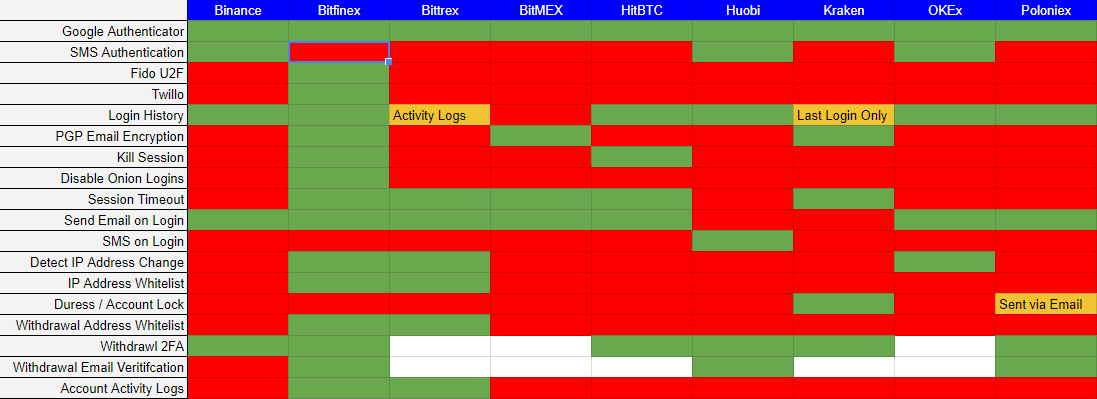 # Conclusion From looking at the heat map you can see [Bitfinex](https://www.bitfinex.com/) give you the largest amount of security controls to secure your account. This is not a recommendation to go out and use them. In August 2016 [Bitfix announced it was hacked](https://en.wikipedia.org/wiki/Bitfinex_hack), with 120,000 units of bitcoin stolen. [Bitfinex](https://www.bitfinex.com/) did offer to pay users back in the form of a token. [Tether](https://en.wikipedia.org/wiki/Tether_(cryptocurrency)) the cryptocurrency backed by one USD held in reserve by Tether limited was also [hacked](https://www.coindesk.com/tether-claims-30-million-stable-token-stolen-attacker/) which has ties to Bitfinex. You must conduct your own research on exchanges before you use them and then assess your risk appetite before moving forward. Is [Bitfinex](https://www.bitfinex.com/) security controls a result from previous incidents providing its users more controls to protect their account and assets? Please provide me feedback if you would like this article expanded or if corrections need to be made in the controls. |
| json metadata | {"tags":["cryptocurrency","crypto","bitcoin","blockchain","technology"],"image":["https://steemitimages.com/DQmbMDapKrhEEWfV7dEAs8vMus6N5RAePJ7MMhAewWY9Cqu/2018-01-24%2010_39_13-Exchange%20User%20Security%20-%20Google%20Sheets.png"],"links":["https://www.binance.com/","https://www.bitfinex.com/","https://bittrex.com/","https://www.bitmex.com/","https://hitbtc.com/","https://www.huobi.pro/","https://www.kraken.com/","https://www.okex.com/","https://poloniex.com/","https://en.wikipedia.org/wiki/Universal_2nd_Factor","https://en.wikipedia.org/wiki/Bitfinex_hack","https://en.wikipedia.org/wiki/Tether_(cryptocurrency)","https://www.coindesk.com/tether-claims-30-million-stable-token-stolen-attacker/"],"app":"steemit/0.1","format":"markdown"} |
| parent author | |
| parent permlink | cryptocurrency |
| permlink | cryptocurrency-exchange-security |
| title | Cryptocurrency Exchange Security |
| Transaction Info | Block #19243064/Trx e96f24ac1a81e55ca4843b8de85fe6d6043e13b0 |
View Raw JSON Data
{
"block": 19243064,
"op": [
"comment",
{
"author": "cydera",
"body": "# Introduction\n\nI am often asked which exchange is the most secure. Well that question can be hard to answer as the security of a system can only be measured at a point in time as the security of a system is in a constant state of flux. It is never static and what may be secure today may have multiple vulnerabilities the next.\n\nExchanges also don't give any insight into their internal architecture, security controls, audits, penetration tests etc.. The country's in which they operate in, it's country's regulations could also attribute to the security of the exchange as well.\n\nA better question to ask is which exchange gives me the most controls to secure my account and assets.\n\n## Cryptocurrency Exchange Security\n\nI went through the security settings of nine different exchanges to draw a heat map of which security controls each exchange gives you.\n\nIn this review are (as of 2018/01/21):-\n\n- [Binance](https://www.binance.com/)\n- [Bitfinex](https://www.bitfinex.com/) \n- [Bittrex](https://bittrex.com/) \n- [BitMex](https://www.bitmex.com/)\n- [HitBTC](https://hitbtc.com/)\n- [Huobi](https://www.huobi.pro/)\n- [Kraken](https://www.kraken.com/)\n- [OKEx](https://www.okex.com/)\n- [Poloniex](https://poloniex.com/)\n\nOne exchange may have more green than the other but that doesn't mean the exchange provides more protection. The value of the security control needs to be weighted for an accurate metric comparison. For example, 2-Step-Verification via SMS would have a lower rating than 2-factor-authentication using a [Universal 2nd Factor](https://en.wikipedia.org/wiki/Universal_2nd_Factor) device.\n\n**Legend**\n\n- Green - Option is available\n- Red - Option is not available\n- Orange - There is a caveat to the control\n- White - I was unable to verify if the control existed\n\n\n\n# Conclusion\n\nFrom looking at the heat map you can see [Bitfinex](https://www.bitfinex.com/) give you the largest amount of security controls to secure your account. This is not a recommendation to go out and use them. In August 2016 [Bitfix announced it was hacked](https://en.wikipedia.org/wiki/Bitfinex_hack), with 120,000 units of bitcoin stolen. [Bitfinex](https://www.bitfinex.com/) did offer to pay users back in the form of a token. [Tether](https://en.wikipedia.org/wiki/Tether_(cryptocurrency)) the cryptocurrency backed by one USD held in reserve by Tether limited was also [hacked](https://www.coindesk.com/tether-claims-30-million-stable-token-stolen-attacker/) which has ties to Bitfinex. \n\nYou must conduct your own research on exchanges before you use them and then assess your risk appetite before moving forward. Is [Bitfinex](https://www.bitfinex.com/) security controls a result from previous incidents providing its users more controls to protect their account and assets? \n\n\nPlease provide me feedback if you would like this article expanded or if corrections need to be made in the controls.",
"json_metadata": "{\"tags\":[\"cryptocurrency\",\"crypto\",\"bitcoin\",\"blockchain\",\"technology\"],\"image\":[\"https://steemitimages.com/DQmbMDapKrhEEWfV7dEAs8vMus6N5RAePJ7MMhAewWY9Cqu/2018-01-24%2010_39_13-Exchange%20User%20Security%20-%20Google%20Sheets.png\"],\"links\":[\"https://www.binance.com/\",\"https://www.bitfinex.com/\",\"https://bittrex.com/\",\"https://www.bitmex.com/\",\"https://hitbtc.com/\",\"https://www.huobi.pro/\",\"https://www.kraken.com/\",\"https://www.okex.com/\",\"https://poloniex.com/\",\"https://en.wikipedia.org/wiki/Universal_2nd_Factor\",\"https://en.wikipedia.org/wiki/Bitfinex_hack\",\"https://en.wikipedia.org/wiki/Tether_(cryptocurrency)\",\"https://www.coindesk.com/tether-claims-30-million-stable-token-stolen-attacker/\"],\"app\":\"steemit/0.1\",\"format\":\"markdown\"}",
"parent_author": "",
"parent_permlink": "cryptocurrency",
"permlink": "cryptocurrency-exchange-security",
"title": "Cryptocurrency Exchange Security"
}
],
"op_in_trx": 0,
"timestamp": "2018-01-23T23:46:36",
"trx_id": "e96f24ac1a81e55ca4843b8de85fe6d6043e13b0",
"trx_in_block": 22,
"virtual_op": 0
}cyderaupdated their account properties2018/01/23 22:56:42
cyderaupdated their account properties
2018/01/23 22:56:42
| account | cydera |
| json metadata | {"profile":{"profile_image":"https://cydera.tech/favicon.ico","cover_image":"https://cydera.tech/img/connected-world.jpg","name":"cydera","about":"Cydera is a team of cryptocurrency consultants focused on helping you secure your digital assets and services around developing and auditing smart contracts.","location":"Australia","website":"https://cydera.tech"}} |
| memo key | STM8e3p7h5vo6uNAWtL7hqzPPDs1vacrd3st7koS8MaCZRiy3revz |
| Transaction Info | Block #19242067/Trx 4e6df90fec397b77bf8807ca2ca121c5a9880f99 |
View Raw JSON Data
{
  "block": 19242067,
  "op": [
    "account_update",
    {
      "account": "cydera",
      "json_metadata": "{\"profile\":{\"profile_image\":\"https://cydera.tech/favicon.ico\",\"cover_image\":\"https://cydera.tech/img/connected-world.jpg\",\"name\":\"cydera\",\"about\":\"Cydera is a team of cryptocurrency consultants focused on helping you secure your digital assets and services around developing and auditing smart contracts.\",\"location\":\"Australia\",\"website\":\"https://cydera.tech\"}}",
      "memo_key": "STM8e3p7h5vo6uNAWtL7hqzPPDs1vacrd3st7koS8MaCZRiy3revz"
    }
  ],
  "op_in_trx": 0,
  "timestamp": "2018-01-23T22:56:42",
  "trx_id": "4e6df90fec397b77bf8807ca2ca121c5a9880f99",
  "trx_in_block": 6,
  "virtual_op": 0
}cyderaupdated their account properties2018/01/23 22:49:33
cyderaupdated their account properties
2018/01/23 22:49:33
| account | cydera |
| json metadata | {"profile":{"profile_image":"https://cydera.tech/img/cydera_logo_55x57.png","cover_image":"https://cydera.tech/img/connected-world.jpg","name":"cydera","about":"Cydera is a team of cryptocurrency consultants focused on helping you secure your digital assets and services around developing and auditing smart contracts.","location":"Australia","website":"https://cydera.tech"}} |
| memo key | STM8e3p7h5vo6uNAWtL7hqzPPDs1vacrd3st7koS8MaCZRiy3revz |
| Transaction Info | Block #19241924/Trx 07adaa31ebed6dd70dbe55b20ff6d3736c0b57c4 |
View Raw JSON Data
{
  "block": 19241924,
  "op": [
    "account_update",
    {
      "account": "cydera",
      "json_metadata": "{\"profile\":{\"profile_image\":\"https://cydera.tech/img/cydera_logo_55x57.png\",\"cover_image\":\"https://cydera.tech/img/connected-world.jpg\",\"name\":\"cydera\",\"about\":\"Cydera is a team of cryptocurrency consultants focused on helping you secure your digital assets and services around developing and auditing smart contracts.\",\"location\":\"Australia\",\"website\":\"https://cydera.tech\"}}",
      "memo_key": "STM8e3p7h5vo6uNAWtL7hqzPPDs1vacrd3st7koS8MaCZRiy3revz"
    }
  ],
  "op_in_trx": 0,
  "timestamp": "2018-01-23T22:49:33",
  "trx_id": "07adaa31ebed6dd70dbe55b20ff6d3736c0b57c4",
  "trx_in_block": 11,
  "virtual_op": 0
}cyderaupdated their account properties2018/01/23 22:47:48
cyderaupdated their account properties
2018/01/23 22:47:48
| account | cydera |
| json metadata | {"profile":{"profile_image":"https://cydera.tech/img/cydera_logo_55x57.png","cover_image":"https://cydera.tech/img/connected-world.jpg","name":"cydera","about":"Cydera is a team of cryptocurrency consultants focused on helping you secure your digital assets and services around creating and auditing smart contracts.","location":"Australia","website":"https://cydera.tech"}} |
| memo key | STM8e3p7h5vo6uNAWtL7hqzPPDs1vacrd3st7koS8MaCZRiy3revz |
| Transaction Info | Block #19241889/Trx 1f529d46dc6d8017ebb76c107df20bb1dba8e08e |
View Raw JSON Data
{
  "block": 19241889,
  "op": [
    "account_update",
    {
      "account": "cydera",
      "json_metadata": "{\"profile\":{\"profile_image\":\"https://cydera.tech/img/cydera_logo_55x57.png\",\"cover_image\":\"https://cydera.tech/img/connected-world.jpg\",\"name\":\"cydera\",\"about\":\"Cydera is a team of cryptocurrency consultants focused on helping you secure your digital assets and services around creating and auditing smart contracts.\",\"location\":\"Australia\",\"website\":\"https://cydera.tech\"}}",
      "memo_key": "STM8e3p7h5vo6uNAWtL7hqzPPDs1vacrd3st7koS8MaCZRiy3revz"
    }
  ],
  "op_in_trx": 0,
  "timestamp": "2018-01-23T22:47:48",
  "trx_id": "1f529d46dc6d8017ebb76c107df20bb1dba8e08e",
  "trx_in_block": 11,
  "virtual_op": 0
}cyderaupdated their account properties2018/01/23 22:47:06
cyderaupdated their account properties
2018/01/23 22:47:06
| account | cydera |
| json metadata | {"profile":{"profile_image":"https://cydera.tech/img/cydera_logo_130x133.png","cover_image":"https://cydera.tech/img/connected-world.jpg","name":"Cydera","about":"Cydera is a team of cryptocurrency consultants focused on helping you secure your digital assets and services around creating and auditing smart contracts.","location":"Australia","website":"https://cydera.tech"}} |
| memo key | STM8e3p7h5vo6uNAWtL7hqzPPDs1vacrd3st7koS8MaCZRiy3revz |
| Transaction Info | Block #19241875/Trx 9f70974f41d4ed202fc73711ee17ef25641f7869 |
View Raw JSON Data
{
  "block": 19241875,
  "op": [
    "account_update",
    {
      "account": "cydera",
      "json_metadata": "{\"profile\":{\"profile_image\":\"https://cydera.tech/img/cydera_logo_130x133.png\",\"cover_image\":\"https://cydera.tech/img/connected-world.jpg\",\"name\":\"Cydera\",\"about\":\"Cydera is a team of cryptocurrency consultants focused on helping you secure your digital assets and services around creating and auditing smart contracts.\",\"location\":\"Australia\",\"website\":\"https://cydera.tech\"}}",
      "memo_key": "STM8e3p7h5vo6uNAWtL7hqzPPDs1vacrd3st7koS8MaCZRiy3revz"
    }
  ],
  "op_in_trx": 0,
  "timestamp": "2018-01-23T22:47:06",
  "trx_id": "9f70974f41d4ed202fc73711ee17ef25641f7869",
  "trx_in_block": 8,
  "virtual_op": 0
}2018/01/23 22:42:06
2018/01/23 22:42:06
| active | {"account_auths":[],"key_auths":[["STM69ye1NgVbmbkU8edQ3WirbZPFMbZceAcDdU7k3Yzbm2GbJpNGX",1]],"weight_threshold":1} |
| creator | steem |
| delegation | 29700.000000 VESTS |
| extensions | [] |
| fee | 0.500 STEEM |
| json metadata | |
| memo key | STM8e3p7h5vo6uNAWtL7hqzPPDs1vacrd3st7koS8MaCZRiy3revz |
| new account name | cydera |
| owner | {"account_auths":[],"key_auths":[["STM7n1tDPMKn4oXdKxgvKzjYPnRtbewTGsmDDTkZsB3eXkC4RSv1V",1]],"weight_threshold":1} |
| posting | {"account_auths":[],"key_auths":[["STM7RaUXSP8QWSnFKHG5NzboUh7ksH7kTP67FHCGVcLUk9aiFzN5o",1]],"weight_threshold":1} |
| Transaction Info | Block #19241775/Trx a6ff0ab408adab0b2c15b3fd29953d02e7d08e86 |
View Raw JSON Data
{
  "block": 19241775,
  "op": [
    "account_create_with_delegation",
    {
      "active": {
        "account_auths": [],
        "key_auths": [
          [
            "STM69ye1NgVbmbkU8edQ3WirbZPFMbZceAcDdU7k3Yzbm2GbJpNGX",
            1
          ]
        ],
        "weight_threshold": 1
      },
      "creator": "steem",
      "delegation": "29700.000000 VESTS",
      "extensions": [],
      "fee": "0.500 STEEM",
      "json_metadata": "",
      "memo_key": "STM8e3p7h5vo6uNAWtL7hqzPPDs1vacrd3st7koS8MaCZRiy3revz",
      "new_account_name": "cydera",
      "owner": {
        "account_auths": [],
        "key_auths": [
          [
            "STM7n1tDPMKn4oXdKxgvKzjYPnRtbewTGsmDDTkZsB3eXkC4RSv1V",
            1
          ]
        ],
        "weight_threshold": 1
      },
      "posting": {
        "account_auths": [],
        "key_auths": [
          [
            "STM7RaUXSP8QWSnFKHG5NzboUh7ksH7kTP67FHCGVcLUk9aiFzN5o",
            1
          ]
        ],
        "weight_threshold": 1
      }
    }
  ],
  "op_in_trx": 0,
  "timestamp": "2018-01-23T22:42:06",
  "trx_id": "a6ff0ab408adab0b2c15b3fd29953d02e7d08e86",
  "trx_in_block": 43,
  "virtual_op": 0
}Manabar
Voting Power100.00%
Downvote Power100.00%
Resource Credits100.00%
Reputation Progress0.00%
{
  "voting_manabar": {
    "current_mana": "8143659806",
    "last_update_time": 1779059184
  },
  "downvote_manabar": {
    "current_mana": 2035914951,
    "last_update_time": 1779059184
  },
  "rc_account": {
    "account": "cydera",
    "rc_manabar": {
      "current_mana": "10164408779",
      "last_update_time": 1779059184
    },
    "max_rc_creation_adjustment": {
      "amount": "2020748973",
      "precision": 6,
      "nai": "@@000000037"
    },
    "max_rc": "10164408779"
  }
}
Account Metadata
| POSTING JSON METADATA | |
| profile | {"profile_image":"https://cydera.tech/favicon.ico","cover_image":"https://cydera.tech/img/connected-world.jpg","name":"cydera","about":"Cydera is a team of cryptocurrency consultants focused on helping you secure your digital assets and services around developing and auditing smart contracts.","location":"Australia","website":"https://cydera.tech"} |
| JSON METADATA | |
| profile | {"profile_image":"https://cydera.tech/favicon.ico","cover_image":"https://cydera.tech/img/connected-world.jpg","name":"cydera","about":"Cydera is a team of cryptocurrency consultants focused on helping you secure your digital assets and services around developing and auditing smart contracts.","location":"Australia","website":"https://cydera.tech"} |
{
  "posting_json_metadata": {
    "profile": {
      "profile_image": "https://cydera.tech/favicon.ico",
      "cover_image": "https://cydera.tech/img/connected-world.jpg",
      "name": "cydera",
      "about": "Cydera is a team of cryptocurrency consultants focused on helping you secure your digital assets and services around developing and auditing smart contracts.",
      "location": "Australia",
      "website": "https://cydera.tech"
    }
  },
  "json_metadata": {
    "profile": {
      "profile_image": "https://cydera.tech/favicon.ico",
      "cover_image": "https://cydera.tech/img/connected-world.jpg",
      "name": "cydera",
      "about": "Cydera is a team of cryptocurrency consultants focused on helping you secure your digital assets and services around developing and auditing smart contracts.",
      "location": "Australia",
      "website": "https://cydera.tech"
    }
  }
}
Auth Keys
Owner
Single Signature
Public Keys
STM7n1tDPMKn4oXdKxgvKzjYPnRtbewTGsmDDTkZsB3eXkC4RSv1V1/1
Active
Single Signature
Public Keys
STM69ye1NgVbmbkU8edQ3WirbZPFMbZceAcDdU7k3Yzbm2GbJpNGX1/1
Posting
Single Signature
Public Keys
STM7RaUXSP8QWSnFKHG5NzboUh7ksH7kTP67FHCGVcLUk9aiFzN5o1/1
Memo
STM8e3p7h5vo6uNAWtL7hqzPPDs1vacrd3st7koS8MaCZRiy3revz
{
  "owner": {
    "weight_threshold": 1,
    "account_auths": [],
    "key_auths": [
      [
        "STM7n1tDPMKn4oXdKxgvKzjYPnRtbewTGsmDDTkZsB3eXkC4RSv1V",
        1
      ]
    ]
  },
  "active": {
    "weight_threshold": 1,
    "account_auths": [],
    "key_auths": [
      [
        "STM69ye1NgVbmbkU8edQ3WirbZPFMbZceAcDdU7k3Yzbm2GbJpNGX",
        1
      ]
    ]
  },
  "posting": {
    "weight_threshold": 1,
    "account_auths": [],
    "key_auths": [
      [
        "STM7RaUXSP8QWSnFKHG5NzboUh7ksH7kTP67FHCGVcLUk9aiFzN5o",
        1
      ]
    ]
  },
  "memo": "STM8e3p7h5vo6uNAWtL7hqzPPDs1vacrd3st7koS8MaCZRiy3revz"
}
Witness Votes
0 / 30
No active witness votes.
[]