

VOTING POWER100.00%
DOWNVOTE POWER100.00%
RESOURCE CREDITS100.00%
REPUTATION PROGRESS95.11%
Net Worth
0.019USD
STEEM
0.044STEEM
SBD
0.011SBD
Effective Power
5.007SP
├── Own SP
0.194SP
└── Incoming DelegationsDeleg
+4.813SP
Detailed Balance
| STEEM | ||
| balance | 0.000STEEM | STEEM |
| market_balance | 0.000STEEM | STEEM |
| savings_balance | 0.044STEEM | STEEM |
| reward_steem_balance | 0.000STEEM | STEEM |
| STEEM POWER | ||
| Own SP | 0.194SP | SP |
| Delegated Out | 0.000SP | SP |
| Delegation In | 4.813SP | SP |
| Effective Power | 5.007SP | SP |
| Reward SP (pending) | 0.000SP | SP |
| SBD | ||
| sbd_balance | 0.011SBD | SBD |
| sbd_conversions | 0.000SBD | SBD |
| sbd_market_balance | 0.000SBD | SBD |
| savings_sbd_balance | 0.000SBD | SBD |
| reward_sbd_balance | 0.000SBD | SBD |
{
  "balance": "0.000 STEEM",
  "savings_balance": "0.044 STEEM",
  "reward_steem_balance": "0.000 STEEM",
  "vesting_shares": "315.700139 VESTS",
  "delegated_vesting_shares": "0.000000 VESTS",
  "received_vesting_shares": "7827.959667 VESTS",
  "sbd_balance": "0.011 SBD",
  "savings_sbd_balance": "0.000 SBD",
  "reward_sbd_balance": "0.000 SBD",
  "conversions": []
}
Account Info
| name | jaerakson |
| id | 1118116 |
| rank | 246,287 |
| reputation | 1647378508 |
| created | 2018-08-23T06:28:12 |
| recovery_account | steem |
| proxy | None |
| post_count | 19 |
| comment_count | 0 |
| lifetime_vote_count | 0 |
| witnesses_voted_for | 0 |
| last_post | 2018-10-02T06:02:00 |
| last_root_post | 2018-10-02T06:02:00 |
| last_vote_time | 2018-10-02T06:07:24 |
| proxied_vsf_votes | 0, 0, 0, 0 |
| can_vote | 1 |
| voting_power | 0 |
| delayed_votes | 0 |
| balance | 0.000 STEEM |
| savings_balance | 0.044 STEEM |
| sbd_balance | 0.011 SBD |
| savings_sbd_balance | 0.000 SBD |
| vesting_shares | 315.700139 VESTS |
| delegated_vesting_shares | 0.000000 VESTS |
| received_vesting_shares | 7827.959667 VESTS |
| reward_vesting_balance | 0.000000 VESTS |
| vesting_balance | 0.000 STEEM |
| vesting_withdraw_rate | 0.000000 VESTS |
| next_vesting_withdrawal | 1969-12-31T23:59:59 |
| withdrawn | 0 |
| to_withdraw | 0 |
| withdraw_routes | 0 |
| savings_withdraw_requests | 0 |
| last_account_recovery | 1970-01-01T00:00:00 |
| reset_account | null |
| last_owner_update | 1970-01-01T00:00:00 |
| last_account_update | 2018-08-23T07:10:21 |
| mined | No |
| sbd_seconds | 0 |
| sbd_last_interest_payment | 1970-01-01T00:00:00 |
| savings_sbd_last_interest_payment | 1970-01-01T00:00:00 |
{
  "active": {
    "account_auths": [],
    "key_auths": [
      [
        "STM8giXFLhsFpUE4SHSnAuvUqVHT4VB6B96v5GMgTVE9XfgNmFFGE",
        1
      ]
    ],
    "weight_threshold": 1
  },
  "balance": "0.000 STEEM",
  "can_vote": true,
  "comment_count": 0,
  "created": "2018-08-23T06:28:12",
  "curation_rewards": 0,
  "delegated_vesting_shares": "0.000000 VESTS",
  "downvote_manabar": {
    "current_mana": 2035914951,
    "last_update_time": 1779068277
  },
  "guest_bloggers": [],
  "id": 1118116,
  "json_metadata": "{\"profile\":{\"name\":\"행복님\"}}",
  "last_account_recovery": "1970-01-01T00:00:00",
  "last_account_update": "2018-08-23T07:10:21",
  "last_owner_update": "1970-01-01T00:00:00",
  "last_post": "2018-10-02T06:02:00",
  "last_root_post": "2018-10-02T06:02:00",
  "last_vote_time": "2018-10-02T06:07:24",
  "lifetime_vote_count": 0,
  "market_history": [],
  "memo_key": "STM5egVHAbi8wprEuH5PzJQydEvtiMkaA7SUjo7s8b8qoWhFTNG4U",
  "mined": false,
  "name": "jaerakson",
  "next_vesting_withdrawal": "1969-12-31T23:59:59",
  "other_history": [],
  "owner": {
    "account_auths": [],
    "key_auths": [
      [
        "STM8Z1EpLWGfYmnBazLAYqQy86Xb4cKdiGcUUxe1my9EYhQq2Rmy5",
        1
      ]
    ],
    "weight_threshold": 1
  },
  "pending_claimed_accounts": 0,
  "post_bandwidth": 0,
  "post_count": 19,
  "post_history": [],
  "posting": {
    "account_auths": [],
    "key_auths": [
      [
        "STM5XHSwbybSddkf1Tdo3QANfQWL2PPhDegscb7rhNCozbNm3UR7S",
        1
      ]
    ],
    "weight_threshold": 1
  },
  "posting_json_metadata": "{\"profile\":{\"name\":\"행복님\"}}",
  "posting_rewards": 111,
  "proxied_vsf_votes": [
    0,
    0,
    0,
    0
  ],
  "proxy": "",
  "received_vesting_shares": "7827.959667 VESTS",
  "recovery_account": "steem",
  "reputation": 1647378508,
  "reset_account": "null",
  "reward_sbd_balance": "0.000 SBD",
  "reward_steem_balance": "0.000 STEEM",
  "reward_vesting_balance": "0.000000 VESTS",
  "reward_vesting_steem": "0.000 STEEM",
  "savings_balance": "0.044 STEEM",
  "savings_sbd_balance": "0.000 SBD",
  "savings_sbd_last_interest_payment": "1970-01-01T00:00:00",
  "savings_sbd_seconds": "0",
  "savings_sbd_seconds_last_update": "1970-01-01T00:00:00",
  "savings_withdraw_requests": 0,
  "sbd_balance": "0.011 SBD",
  "sbd_last_interest_payment": "1970-01-01T00:00:00",
  "sbd_seconds": "0",
  "sbd_seconds_last_update": "2018-10-02T06:09:45",
  "tags_usage": [],
  "to_withdraw": 0,
  "transfer_history": [],
  "vesting_balance": "0.000 STEEM",
  "vesting_shares": "315.700139 VESTS",
  "vesting_withdraw_rate": "0.000000 VESTS",
  "vote_history": [],
  "voting_manabar": {
    "current_mana": "8143659806",
    "last_update_time": 1779068277
  },
  "voting_power": 0,
  "withdraw_routes": 0,
  "withdrawn": 0,
  "witness_votes": [],
  "witnesses_voted_for": 0,
  "rank": 246287
}
Withdraw Routes
| Incoming | Outgoing |
|---|---|
Empty | Empty |
{
  "incoming": [],
  "outgoing": []
}From Date
To Date
steemdelegated 4.813 SP to @jaerakson2026/05/18 01:37:57
steemdelegated 4.813 SP to @jaerakson
2026/05/18 01:37:57
| delegator | steem |
| delegatee | jaerakson |
| vesting shares | 7827.959667 VESTS |
| Transaction Info | Block #106145094/Trx abda2a3668007854ef68f5bef9cf51ee600cdd3f |
View Raw JSON Data
{
  "trx_id": "abda2a3668007854ef68f5bef9cf51ee600cdd3f",
  "block": 106145094,
  "trx_in_block": 1,
  "op_in_trx": 0,
  "virtual_op": 0,
  "timestamp": "2026-05-18T01:37:57",
  "op": [
    "delegate_vesting_shares",
    {
      "delegator": "steem",
      "delegatee": "jaerakson",
      "vesting_shares": "7827.959667 VESTS"
    }
  ]
}steemdelegated 3.145 SP to @jaerakson2026/05/12 09:26:51
steemdelegated 3.145 SP to @jaerakson
2026/05/12 09:26:51
| delegator | steem |
| delegatee | jaerakson |
| vesting shares | 5115.749262 VESTS |
| Transaction Info | Block #105982426/Trx 85efc61593b3597ce4aef2e7c6a75a4cd15bc38e |
View Raw JSON Data
{
  "trx_id": "85efc61593b3597ce4aef2e7c6a75a4cd15bc38e",
  "block": 105982426,
  "trx_in_block": 0,
  "op_in_trx": 0,
  "virtual_op": 0,
  "timestamp": "2026-05-12T09:26:51",
  "op": [
    "delegate_vesting_shares",
    {
      "delegator": "steem",
      "delegatee": "jaerakson",
      "vesting_shares": "5115.749262 VESTS"
    }
  ]
}steemdelegated 4.821 SP to @jaerakson2026/04/26 00:56:39
steemdelegated 4.821 SP to @jaerakson
2026/04/26 00:56:39
| delegator | steem |
| delegatee | jaerakson |
| vesting shares | 7840.475423 VESTS |
| Transaction Info | Block #105512708/Trx b894c7e7f0fa51169f8b8518ca279393e217a037 |
View Raw JSON Data
{
  "trx_id": "b894c7e7f0fa51169f8b8518ca279393e217a037",
  "block": 105512708,
  "trx_in_block": 3,
  "op_in_trx": 0,
  "virtual_op": 0,
  "timestamp": "2026-04-26T00:56:39",
  "op": [
    "delegate_vesting_shares",
    {
      "delegator": "steem",
      "delegatee": "jaerakson",
      "vesting_shares": "7840.475423 VESTS"
    }
  ]
}steemdelegated 3.171 SP to @jaerakson2026/01/23 11:31:09
steemdelegated 3.171 SP to @jaerakson
2026/01/23 11:31:09
| delegator | steem |
| delegatee | jaerakson |
| vesting shares | 5157.296081 VESTS |
| Transaction Info | Block #102856267/Trx 65b1bbf70c777698ae14d04b87da7ea30254dac4 |
View Raw JSON Data
{
  "trx_id": "65b1bbf70c777698ae14d04b87da7ea30254dac4",
  "block": 102856267,
  "trx_in_block": 1,
  "op_in_trx": 0,
  "virtual_op": 0,
  "timestamp": "2026-01-23T11:31:09",
  "op": [
    "delegate_vesting_shares",
    {
      "delegator": "steem",
      "delegatee": "jaerakson",
      "vesting_shares": "5157.296081 VESTS"
    }
  ]
}steemdelegated 3.272 SP to @jaerakson2024/12/17 06:48:24
steemdelegated 3.272 SP to @jaerakson
2024/12/17 06:48:24
| delegator | steem |
| delegatee | jaerakson |
| vesting shares | 5321.515278 VESTS |
| Transaction Info | Block #91302628/Trx 51122a847c1a6acfa8d3f38623f57ebe46af6631 |
View Raw JSON Data
{
  "trx_id": "51122a847c1a6acfa8d3f38623f57ebe46af6631",
  "block": 91302628,
  "trx_in_block": 1,
  "op_in_trx": 0,
  "virtual_op": 0,
  "timestamp": "2024-12-17T06:48:24",
  "op": [
    "delegate_vesting_shares",
    {
      "delegator": "steem",
      "delegatee": "jaerakson",
      "vesting_shares": "5321.515278 VESTS"
    }
  ]
}steemdelegated 3.376 SP to @jaerakson2023/11/13 22:30:27
steemdelegated 3.376 SP to @jaerakson
2023/11/13 22:30:27
| delegator | steem |
| delegatee | jaerakson |
| vesting shares | 5490.648810 VESTS |
| Transaction Info | Block #79856813/Trx c4a514fe96f2f00ccdb57422ef93a694354c3686 |
View Raw JSON Data
{
  "trx_id": "c4a514fe96f2f00ccdb57422ef93a694354c3686",
  "block": 79856813,
  "trx_in_block": 4,
  "op_in_trx": 0,
  "virtual_op": 0,
  "timestamp": "2023-11-13T22:30:27",
  "op": [
    "delegate_vesting_shares",
    {
      "delegator": "steem",
      "delegatee": "jaerakson",
      "vesting_shares": "5490.648810 VESTS"
    }
  ]
}steemdelegated 5.182 SP to @jaerakson2023/09/21 23:27:51
steemdelegated 5.182 SP to @jaerakson
2023/09/21 23:27:51
| delegator | steem |
| delegatee | jaerakson |
| vesting shares | 8427.927596 VESTS |
| Transaction Info | Block #78349785/Trx 95e3bba55aa85f9d231f4e27f7bd45f3ce98a540 |
View Raw JSON Data
{
  "trx_id": "95e3bba55aa85f9d231f4e27f7bd45f3ce98a540",
  "block": 78349785,
  "trx_in_block": 1,
  "op_in_trx": 0,
  "virtual_op": 0,
  "timestamp": "2023-09-21T23:27:51",
  "op": [
    "delegate_vesting_shares",
    {
      "delegator": "steem",
      "delegatee": "jaerakson",
      "vesting_shares": "8427.927596 VESTS"
    }
  ]
}steemdelegated 5.318 SP to @jaerakson2022/11/03 13:02:27
steemdelegated 5.318 SP to @jaerakson
2022/11/03 13:02:27
| delegator | steem |
| delegatee | jaerakson |
| vesting shares | 8649.609034 VESTS |
| Transaction Info | Block #69114858/Trx 31bb200455ae4c8ecd3bf14124cc72cd253180eb |
View Raw JSON Data
{
  "trx_id": "31bb200455ae4c8ecd3bf14124cc72cd253180eb",
  "block": 69114858,
  "trx_in_block": 10,
  "op_in_trx": 0,
  "virtual_op": 0,
  "timestamp": "2022-11-03T13:02:27",
  "op": [
    "delegate_vesting_shares",
    {
      "delegator": "steem",
      "delegatee": "jaerakson",
      "vesting_shares": "8649.609034 VESTS"
    }
  ]
}steemdelegated 5.454 SP to @jaerakson2022/01/17 12:11:42
steemdelegated 5.454 SP to @jaerakson
2022/01/17 12:11:42
| delegator | steem |
| delegatee | jaerakson |
| vesting shares | 8870.142265 VESTS |
| Transaction Info | Block #60810893/Trx 95f2a08c044c555632bbe6105a99887d4bb262fd |
View Raw JSON Data
{
  "trx_id": "95f2a08c044c555632bbe6105a99887d4bb262fd",
  "block": 60810893,
  "trx_in_block": 16,
  "op_in_trx": 0,
  "virtual_op": 0,
  "timestamp": "2022-01-17T12:11:42",
  "op": [
    "delegate_vesting_shares",
    {
      "delegator": "steem",
      "delegatee": "jaerakson",
      "vesting_shares": "8870.142265 VESTS"
    }
  ]
}steemdelegated 5.567 SP to @jaerakson2021/06/14 02:03:33
steemdelegated 5.567 SP to @jaerakson
2021/06/14 02:03:33
| delegator | steem |
| delegatee | jaerakson |
| vesting shares | 9053.910923 VESTS |
| Transaction Info | Block #54609207/Trx d40f0c65ab4ee6907397ce99ebf175cd810df766 |
View Raw JSON Data
{
  "trx_id": "d40f0c65ab4ee6907397ce99ebf175cd810df766",
  "block": 54609207,
  "trx_in_block": 1,
  "op_in_trx": 0,
  "virtual_op": 0,
  "timestamp": "2021-06-14T02:03:33",
  "op": [
    "delegate_vesting_shares",
    {
      "delegator": "steem",
      "delegatee": "jaerakson",
      "vesting_shares": "9053.910923 VESTS"
    }
  ]
}steemdelegated 5.682 SP to @jaerakson2020/12/11 12:20:30
steemdelegated 5.682 SP to @jaerakson
2020/12/11 12:20:30
| delegator | steem |
| delegatee | jaerakson |
| vesting shares | 9241.332897 VESTS |
| Transaction Info | Block #49356612/Trx f9502c3c1d180ac59f0a1210f5d8af7071594d75 |
View Raw JSON Data
{
  "trx_id": "f9502c3c1d180ac59f0a1210f5d8af7071594d75",
  "block": 49356612,
  "trx_in_block": 2,
  "op_in_trx": 0,
  "virtual_op": 0,
  "timestamp": "2020-12-11T12:20:30",
  "op": [
    "delegate_vesting_shares",
    {
      "delegator": "steem",
      "delegatee": "jaerakson",
      "vesting_shares": "9241.332897 VESTS"
    }
  ]
}steemdelegated 1.176 SP to @jaerakson2020/12/06 05:57:24
steemdelegated 1.176 SP to @jaerakson
2020/12/06 05:57:24
| delegator | steem |
| delegatee | jaerakson |
| vesting shares | 1912.543513 VESTS |
| Transaction Info | Block #49208170/Trx ab2bdbc8c798ed6613c21976068d1992030e320c |
View Raw JSON Data
{
  "trx_id": "ab2bdbc8c798ed6613c21976068d1992030e320c",
  "block": 49208170,
  "trx_in_block": 12,
  "op_in_trx": 0,
  "virtual_op": 0,
  "timestamp": "2020-12-06T05:57:24",
  "op": [
    "delegate_vesting_shares",
    {
      "delegator": "steem",
      "delegatee": "jaerakson",
      "vesting_shares": "1912.543513 VESTS"
    }
  ]
}steemdelegated 5.686 SP to @jaerakson2020/12/05 15:58:27
steemdelegated 5.686 SP to @jaerakson
2020/12/05 15:58:27
| delegator | steem |
| delegatee | jaerakson |
| vesting shares | 9247.540751 VESTS |
| Transaction Info | Block #49191707/Trx 588a3aa0ba60415069dbe0fd84021c5cc67f7f11 |
View Raw JSON Data
{
  "trx_id": "588a3aa0ba60415069dbe0fd84021c5cc67f7f11",
  "block": 49191707,
  "trx_in_block": 8,
  "op_in_trx": 0,
  "virtual_op": 0,
  "timestamp": "2020-12-05T15:58:27",
  "op": [
    "delegate_vesting_shares",
    {
      "delegator": "steem",
      "delegatee": "jaerakson",
      "vesting_shares": "9247.540751 VESTS"
    }
  ]
}steemdelegated 1.180 SP to @jaerakson2020/11/02 18:10:09
steemdelegated 1.180 SP to @jaerakson
2020/11/02 18:10:09
| delegator | steem |
| delegatee | jaerakson |
| vesting shares | 1920.017158 VESTS |
| Transaction Info | Block #48260783/Trx 7d99612076adeece68b5610a3b12a22703a1c6bb |
View Raw JSON Data
{
  "trx_id": "7d99612076adeece68b5610a3b12a22703a1c6bb",
  "block": 48260783,
  "trx_in_block": 2,
  "op_in_trx": 0,
  "virtual_op": 0,
  "timestamp": "2020-11-02T18:10:09",
  "op": [
    "delegate_vesting_shares",
    {
      "delegator": "steem",
      "delegatee": "jaerakson",
      "vesting_shares": "1920.017158 VESTS"
    }
  ]
}steemdelegated 5.810 SP to @jaerakson2020/05/09 06:56:03
steemdelegated 5.810 SP to @jaerakson
2020/05/09 06:56:03
| delegator | steem |
| delegatee | jaerakson |
| vesting shares | 9450.346110 VESTS |
| Transaction Info | Block #43218436/Trx 297580b4348cb3035253287e2670ed1d15088a15 |
View Raw JSON Data
{
  "trx_id": "297580b4348cb3035253287e2670ed1d15088a15",
  "block": 43218436,
  "trx_in_block": 3,
  "op_in_trx": 0,
  "virtual_op": 0,
  "timestamp": "2020-05-09T06:56:03",
  "op": [
    "delegate_vesting_shares",
    {
      "delegator": "steem",
      "delegatee": "jaerakson",
      "vesting_shares": "9450.346110 VESTS"
    }
  ]
}steemdelegated 1.201 SP to @jaerakson2020/05/08 10:43:06
steemdelegated 1.201 SP to @jaerakson
2020/05/08 10:43:06
| delegator | steem |
| delegatee | jaerakson |
| vesting shares | 1953.311140 VESTS |
| Transaction Info | Block #43194744/Trx 78267086b273d04e99bd8b99a1fea005a866f143 |
View Raw JSON Data
{
  "trx_id": "78267086b273d04e99bd8b99a1fea005a866f143",
  "block": 43194744,
  "trx_in_block": 16,
  "op_in_trx": 0,
  "virtual_op": 0,
  "timestamp": "2020-05-08T10:43:06",
  "op": [
    "delegate_vesting_shares",
    {
      "delegator": "steem",
      "delegatee": "jaerakson",
      "vesting_shares": "1953.311140 VESTS"
    }
  ]
}steemdelegated 5.864 SP to @jaerakson2019/12/04 09:52:39
steemdelegated 5.864 SP to @jaerakson
2019/12/04 09:52:39
| delegator | steem |
| delegatee | jaerakson |
| vesting shares | 9537.201211 VESTS |
| Transaction Info | Block #38739231/Trx 5506945128fa4ee4f1d54eb66c9d328d8b5a8632 |
View Raw JSON Data
{
  "trx_id": "5506945128fa4ee4f1d54eb66c9d328d8b5a8632",
  "block": 38739231,
  "trx_in_block": 8,
  "op_in_trx": 0,
  "virtual_op": 0,
  "timestamp": "2019-12-04T09:52:39",
  "op": [
    "delegate_vesting_shares",
    {
      "delegator": "steem",
      "delegatee": "jaerakson",
      "vesting_shares": "9537.201211 VESTS"
    }
  ]
}2019/08/23 07:30:21
2019/08/23 07:30:21
| parent author | jaerakson |
| parent permlink | minio-sqlserver-2 |
| author | steemitboard |
| permlink | steemitboard-notify-jaerakson-20190823t073021000z |
| title | |
| body | Congratulations @jaerakson! You received a personal award! <table><tr><td>https://steemitimages.com/70x70/http://steemitboard.com/@jaerakson/birthday1.png</td><td>Happy Birthday! - You are on the Steem blockchain for 1 year!</td></tr></table> <sub>_You can view [your badges on your Steem Board](https://steemitboard.com/@jaerakson) and compare to others on the [Steem Ranking](https://steemitboard.com/ranking/index.php?name=jaerakson)_</sub> ###### [Vote for @Steemitboard as a witness](https://v2.steemconnect.com/sign/account-witness-vote?witness=steemitboard&approve=1) to get one more award and increased upvotes! |
| json metadata | {"image":["https://steemitboard.com/img/notify.png"]} |
| Transaction Info | Block #35797788/Trx 3f4f11f00cf483fc532055b38ae5383aa6acd713 |
View Raw JSON Data
{
  "trx_id": "3f4f11f00cf483fc532055b38ae5383aa6acd713",
  "block": 35797788,
  "trx_in_block": 3,
  "op_in_trx": 0,
  "virtual_op": 0,
  "timestamp": "2019-08-23T07:30:21",
  "op": [
    "comment",
    {
      "parent_author": "jaerakson",
      "parent_permlink": "minio-sqlserver-2",
      "author": "steemitboard",
      "permlink": "steemitboard-notify-jaerakson-20190823t073021000z",
      "title": "",
      "body": "Congratulations @jaerakson! You received a personal award!\n\n<table><tr><td>https://steemitimages.com/70x70/http://steemitboard.com/@jaerakson/birthday1.png</td><td>Happy Birthday! - You are on the Steem blockchain for 1 year!</td></tr></table>\n\n<sub>_You can view [your badges on your Steem Board](https://steemitboard.com/@jaerakson) and compare to others on the [Steem Ranking](https://steemitboard.com/ranking/index.php?name=jaerakson)_</sub>\n\n\n###### [Vote for @Steemitboard as a witness](https://v2.steemconnect.com/sign/account-witness-vote?witness=steemitboard&approve=1) to get one more award and increased upvotes!",
      "json_metadata": "{\"image\":[\"https://steemitboard.com/img/notify.png\"]}"
    }
  ]
}steemdelegated 5.985 SP to @jaerakson2019/01/01 06:52:51
steemdelegated 5.985 SP to @jaerakson
2019/01/01 06:52:51
| delegator | steem |
| delegatee | jaerakson |
| vesting shares | 9734.290840 VESTS |
| Transaction Info | Block #29067439/Trx 3817e382aed623867da5ee082f0e703fbee52d1e |
View Raw JSON Data
{
  "trx_id": "3817e382aed623867da5ee082f0e703fbee52d1e",
  "block": 29067439,
  "trx_in_block": 1,
  "op_in_trx": 0,
  "virtual_op": 0,
  "timestamp": "2019-01-01T06:52:51",
  "op": [
    "delegate_vesting_shares",
    {
      "delegator": "steem",
      "delegatee": "jaerakson",
      "vesting_shares": "9734.290840 VESTS"
    }
  ]
}steemdelegated 18.420 SP to @jaerakson2018/10/17 04:42:00
steemdelegated 18.420 SP to @jaerakson
2018/10/17 04:42:00
| delegator | steem |
| delegatee | jaerakson |
| vesting shares | 29960.397458 VESTS |
| Transaction Info | Block #26877386/Trx 4e4daf37443121511958c8b47dd1d449d85816ad |
View Raw JSON Data
{
  "trx_id": "4e4daf37443121511958c8b47dd1d449d85816ad",
  "block": 26877386,
  "trx_in_block": 32,
  "op_in_trx": 0,
  "virtual_op": 0,
  "timestamp": "2018-10-17T04:42:00",
  "op": [
    "delegate_vesting_shares",
    {
      "delegator": "steem",
      "delegatee": "jaerakson",
      "vesting_shares": "29960.397458 VESTS"
    }
  ]
}jaeraksonclaimed reward balance: 0.011 SBD, 0.017 SP2018/10/02 06:09:45
jaeraksonclaimed reward balance: 0.011 SBD, 0.017 SP
2018/10/02 06:09:45
| account | jaerakson |
| reward steem | 0.000 STEEM |
| reward sbd | 0.011 SBD |
| reward vests | 28.288565 VESTS |
| Transaction Info | Block #26447434/Trx 24c72f3b74f00f9ace9eeb77640acef27cc69a2e |
View Raw JSON Data
{
  "trx_id": "24c72f3b74f00f9ace9eeb77640acef27cc69a2e",
  "block": 26447434,
  "trx_in_block": 1,
  "op_in_trx": 0,
  "virtual_op": 0,
  "timestamp": "2018-10-02T06:09:45",
  "op": [
    "claim_reward_balance",
    {
      "account": "jaerakson",
      "reward_steem": "0.000 STEEM",
      "reward_sbd": "0.011 SBD",
      "reward_vests": "28.288565 VESTS"
    }
  ]
}jaeraksonblockchain operation: transfer to savings2018/10/02 06:09:27
jaeraksonblockchain operation: transfer to savings
2018/10/02 06:09:27
| from | jaerakson |
| to | jaerakson |
| amount | 0.044 STEEM |
| memo | |
| Transaction Info | Block #26447428/Trx 84a34b5d06119daabcca223160a0c97a4a60d73f |
View Raw JSON Data
{
  "trx_id": "84a34b5d06119daabcca223160a0c97a4a60d73f",
  "block": 26447428,
  "trx_in_block": 21,
  "op_in_trx": 0,
  "virtual_op": 0,
  "timestamp": "2018-10-02T06:09:27",
  "op": [
    "transfer_to_savings",
    {
      "from": "jaerakson",
      "to": "jaerakson",
      "amount": "0.044 STEEM",
      "memo": ""
    }
  ]
}jaeraksonupvoted (100.00%) @jaerakson / minio-sqlserver-22018/10/02 06:07:24
jaeraksonupvoted (100.00%) @jaerakson / minio-sqlserver-2
2018/10/02 06:07:24
| voter | jaerakson |
| author | jaerakson |
| permlink | minio-sqlserver-2 |
| weight | 10000 (100.00%) |
| Transaction Info | Block #26447387/Trx 0e0b47414246565e033af08066320cc73651d8fc |
View Raw JSON Data
{
  "trx_id": "0e0b47414246565e033af08066320cc73651d8fc",
  "block": 26447387,
  "trx_in_block": 12,
  "op_in_trx": 0,
  "virtual_op": 0,
  "timestamp": "2018-10-02T06:07:24",
  "op": [
    "vote",
    {
      "voter": "jaerakson",
      "author": "jaerakson",
      "permlink": "minio-sqlserver-2",
      "weight": 10000
    }
  ]
}jaeraksonpublished a new post: minio-sqlserver-22018/10/02 06:07:09
jaeraksonpublished a new post: minio-sqlserver-2
2018/10/02 06:07:09
| parent author | |
| parent permlink | kr |
| author | jaerakson |
| permlink | minio-sqlserver-2 |
| title | Minio 통해 SQLSERVER 2차 백업 구성 |
| body | @@ -25,16 +25,133 @@ %EB%B0%B1%EC%97%85 %EA%B5%AC%EC%84%B1 %0A%0A +Minio %EC%84%9C%EB%B2%84%EB%8A%94 2%EC%B0%A8 %EB%B0%B1%EC%97%85%EC%9A%A9 %EC%84%9C%EB%B2%84 %EB%B3%84%EB%8F%84%EB%A1%9C %EA%B5%AC%EC%B6%95 %ED%95%98%EC%85%94%EC%95%BC %ED%95%A9%EB%8B%88%EB%8B%A4. %0A%0A%EC%95%84%EB%9E%98%EC%9D%98 URL %EB%B3%B4%EC%8B%9C%EB%A9%B4 %EC%89%BD%EA%B2%8C %EA%B5%AC%EC%B6%95 %EA%B0%80%EB%8A%A5%ED%95%A9%EB%8B%88%EB%8B%A4. %0Ahttps://docs.minio.io/docs/minio-quickstart-guide%0A%0A%0A%0A %0A%ED%99%98%EA%B2%BD %0Awin @@ -184,16 +184,17 @@ ,mc %0A %0A +%0A minio %EC%84%A4%EC%B9%98 |
| json metadata | {"tags":["kr","mssqlserver","minio"],"links":["https://docs.minio.io/docs/minio-quickstart-guide","https://github.com/minio/mc"],"app":"steemit/0.1","format":"markdown"} |
| Transaction Info | Block #26447382/Trx 425ec0c77802b1f756b4fa6f7841e8707209dbd1 |
View Raw JSON Data
{
  "trx_id": "425ec0c77802b1f756b4fa6f7841e8707209dbd1",
  "block": 26447382,
  "trx_in_block": 0,
  "op_in_trx": 0,
  "virtual_op": 0,
  "timestamp": "2018-10-02T06:07:09",
  "op": [
    "comment",
    {
      "parent_author": "",
      "parent_permlink": "kr",
      "author": "jaerakson",
      "permlink": "minio-sqlserver-2",
      "title": "Minio 통해   SQLSERVER 2차 백업 구성",
      "body": "@@ -25,16 +25,133 @@\n %EB%B0%B1%EC%97%85 %EA%B5%AC%EC%84%B1 %0A%0A\n+Minio %EC%84%9C%EB%B2%84%EB%8A%94 2%EC%B0%A8 %EB%B0%B1%EC%97%85%EC%9A%A9 %EC%84%9C%EB%B2%84 %EB%B3%84%EB%8F%84%EB%A1%9C %EA%B5%AC%EC%B6%95 %ED%95%98%EC%85%94%EC%95%BC %ED%95%A9%EB%8B%88%EB%8B%A4. %0A%0A%EC%95%84%EB%9E%98%EC%9D%98 URL %EB%B3%B4%EC%8B%9C%EB%A9%B4 %EC%89%BD%EA%B2%8C %EA%B5%AC%EC%B6%95 %EA%B0%80%EB%8A%A5%ED%95%A9%EB%8B%88%EB%8B%A4. %0Ahttps://docs.minio.io/docs/minio-quickstart-guide%0A%0A%0A%0A\n %0A%ED%99%98%EA%B2%BD %0Awin\n@@ -184,16 +184,17 @@\n  ,mc %0A %0A\n+%0A\n minio %EC%84%A4%EC%B9%98\n",
      "json_metadata": "{\"tags\":[\"kr\",\"mssqlserver\",\"minio\"],\"links\":[\"https://docs.minio.io/docs/minio-quickstart-guide\",\"https://github.com/minio/mc\"],\"app\":\"steemit/0.1\",\"format\":\"markdown\"}"
    }
  ]
}hackerzizonupvoted (1.00%) @jaerakson / minio-sqlserver-22018/10/02 06:02:27
hackerzizonupvoted (1.00%) @jaerakson / minio-sqlserver-2
2018/10/02 06:02:27
| voter | hackerzizon |
| author | jaerakson |
| permlink | minio-sqlserver-2 |
| weight | 100 (1.00%) |
| Transaction Info | Block #26447289/Trx a7f09f192e8ec084014ce477ae4b6a3792cc2a44 |
View Raw JSON Data
{
  "trx_id": "a7f09f192e8ec084014ce477ae4b6a3792cc2a44",
  "block": 26447289,
  "trx_in_block": 27,
  "op_in_trx": 0,
  "virtual_op": 0,
  "timestamp": "2018-10-02T06:02:27",
  "op": [
    "vote",
    {
      "voter": "hackerzizon",
      "author": "jaerakson",
      "permlink": "minio-sqlserver-2",
      "weight": 100
    }
  ]
}jaeraksonpublished a new post: minio-sqlserver-22018/10/02 06:02:00
jaeraksonpublished a new post: minio-sqlserver-2
2018/10/02 06:02:00
| parent author | |
| parent permlink | kr |
| author | jaerakson |
| permlink | minio-sqlserver-2 |
| title | Minio 통해 SQLSERVER 2차 백업 구성 |
| body | Minio 통해 SQLSERVER 2차 백업 구성 환경 windows , Powershell , minio ,mc minio 설치 및 가이드 https://docs.minio.io/docs/minio-quickstart-guide Minio Client 설치 및 가이드 https://github.com/minio/mc 아래의 2개 파일 생성 후 파워셀에서 호출 하면 됩니다. 호출 예제 --- Powershell.exe -noprofile -executionpolicy bypass -file "E:\Backup\BackupUpload.ps1" "E:\Backup\BackupUpload.ini" --- ini (BackupUpload.ini) 파일 설정을 통해 2차 백업 및 파일 삭제 BackupUpload.ini ``` /* [File] --백업 파일 선택 및 삭제 (S3,Minio) S3DelDay -- S3 삭제 주기 (일자만큼 보관) GetTime -- 로컬백업 시간 2 현재시간 기준으로 2시간 전 이후 백업 리스트 [Backup] 백업 경로 S3buckkeyDir S3,Minio 경로 (2차 백업 보관 경로) [S3] S3,Minio 경로 */ [File] S3DelDay=2 GetTime= 2 [Backup] SystemBackupDir= E:\backup\System DBBackupDir= E:\backup\FULL TRNBackupDir= E:\Backup\TRN S3buckkeyDir= minio/dbbackup/maindb [S3] IP = 10.10.10.100 Port= 9000 Key = xxxxx SECRET = xxxxxxx ``` ----- 백업 스크립트 BackupUpload.ps1 ``` <# 실행 -------------------------------------------------------------------------------------------------------------------------------------------------------- -- Powershell.exe -noprofile -executionpolicy bypass -file "E:\Backup\BackupUpload.ps1" "E:\Backup\BackupUpload.ini" -------------------------------------------------------------------------------------------------------------------------------------------------------- $inifile = "E:\Backup\minioBakup.ini" param ( [String]$inifile ) #> $inifile = "E:\Backup\BackupUpload.ini" $S3DelDay ="";$GetDay="" $SystemBackupDir="";$DBBackupDir=";$TRNBackupDir=";$MiniobuckkeyDir="" $IP ="";$Port="";$Key ="";$SECRET ="" $ini = @{} switch -regex -file $inifile { "^\[(.+)\]" # Section { $section = $matches[1] $ini[$section] = @{} $CommentCount = 0 } "^(;.*)$" # Comment { $value = $matches[1] $CommentCount = $CommentCount + 1 $name = "Comment" + $CommentCount $ini[$section][$name] = $value } "(.+?)\s*=(.*)" # Key { $name,$value = $matches[1..2] $ini[$section][$name] = $value } } $S3DelDay= $($ini["File"]["S3DelDay"]) -replace " ","" $GetTime = $($ini["File"]["GetTime"]) -replace " ","" $SystemBackupDir= $($ini["Backup"]["SystemBackupDir"]) -replace " ","" $DBBackupDir= $($ini["Backup"]["DBBackupDir"]) -replace " ","" $TRNBackupDir= $($ini["Backup"]["TRNBackupDir"]) -replace " ","" $S3buckkeyDir= $($ini["Backup"]["S3buckkeyDir"]) -replace " ","" $IP = $($ini["S3"]["IP"]) -replace " ","" $Port= $($ini["S3"]["Port"]) -replace " ","" $Key = $($ini["S3"]["Key"]) -replace " ","" $SECRET = $($ini["S3"]["SECRET"]) -replace " ","" $S3DelDay ;$GetTime $SystemBackupDir;$DBBackupDir;$TRNBackupDir;$MiniobuckkeyDir $IP ;$Port;$Key ;$SECRET $GetDate = (Get-Date).AddHours(-$GetTime) mc config host add minio "http://$($IP):$($Port)" $($Key) $($SECRET) S3v4 $Minio =@{} # System Backup $Minio= @(get-childitem -path $SystemBackupDir -Recurse | Where-Object { [DateTime]$_.LastWriteTime -ge ($GetDate ) -and ( $_.Name -like "*.bak") } | select-Object -property fullname ,name ) for ($i=0; $i -le $Minio.length-1 ; $i++) { # $Minio[$i].fullname mc cp $Minio[$i].fullname "$($S3buckkeyDir)/SYSTEM/" } #Full Backup $Minio= @(get-childitem -path $DBBackupDir -Recurse | Where-Object { [DateTime]$_.LastWriteTime -ge ($GetDate ) -and ( $_.Name -like "*.bak") } | select-Object -property fullname ,name ) for ($i=0 ; $i -le $Minio.length-1 ; $i++) { $Minio[$i].fullname mc cp $Minio[$i].fullname "$($S3buckkeyDir)/FULL/" } #Trn Bakcup $Minio=@(get-childitem -path $TRNBackupDir -Recurse | Where-Object { [DateTime]$_.LastWriteTime -ge ($GetDate ) -and ( $_.Name -like "*.trn") } | select-Object -property fullname ,name ) for ($i=0 ; $i -le $Minio.length-1 ; $i++) { mc cp $Minio[$i].fullname "$($S3buckkeyDir)/TRN/" } <# 파일명을 삭제 하는 로직 필요할 때 이요 $MinioDel= @{} $MinioDel = $(mc ls $MinioPath\SYSTEM).split(' ') | where-object {$_ -like '*2018_03_15*'} for ($i=0; $i -lt $MinioDel.Length ; $i++) { "$($MinioPath)/TRN/$($MinioDel[0])" mc rm "$($MinioPath)/TRN/$($MinioDel[0])" } #> mc rm --recursive --force --older-than=$S3DelDay $S3buckkeyDir mc ls $S3buckkeyDir\SYSTEM mc ls $S3buckkeyDir\FULL mc ls $S3buckkeyDir\TRN |
| json metadata | {"tags":["kr","mssqlserver","minio"],"links":["https://docs.minio.io/docs/minio-quickstart-guide","https://github.com/minio/mc"],"app":"steemit/0.1","format":"markdown"} |
| Transaction Info | Block #26447280/Trx cf0de7eaddf0a1057b44edd8f8501023c69fdffb |
View Raw JSON Data
{
  "trx_id": "cf0de7eaddf0a1057b44edd8f8501023c69fdffb",
  "block": 26447280,
  "trx_in_block": 2,
  "op_in_trx": 0,
  "virtual_op": 0,
  "timestamp": "2018-10-02T06:02:00",
  "op": [
    "comment",
    {
      "parent_author": "",
      "parent_permlink": "kr",
      "author": "jaerakson",
      "permlink": "minio-sqlserver-2",
      "title": "Minio 통해   SQLSERVER 2차 백업 구성",
      "body": "Minio 통해   SQLSERVER 2차 백업 구성 \n\n\n환경 \nwindows , Powershell ,  minio ,mc \n \nminio 설치 및 가이드 \nhttps://docs.minio.io/docs/minio-quickstart-guide\n\nMinio Client  설치 및 가이드 \nhttps://github.com/minio/mc\n\n\n아래의 2개 파일 생성 후 \n\n파워셀에서 호출 하면 됩니다. \n호출 예제 \n---\n\n Powershell.exe -noprofile -executionpolicy bypass -file  \"E:\\Backup\\BackupUpload.ps1\" \"E:\\Backup\\BackupUpload.ini\"\n\n---\n\n\n\nini (BackupUpload.ini) 파일 설정을 통해 2차 백업 및 파일 삭제  \n\n\nBackupUpload.ini\n```\n \n/*\n[File] --백업 파일 선택 및 삭제 (S3,Minio)\nS3DelDay -- S3 삭제 주기 (일자만큼 보관)\nGetTime   -- 로컬백업  시간 2 현재시간 기준으로 2시간 전 이후 백업 리스트\n \n[Backup]  백업 경로\nS3buckkeyDir S3,Minio  경로 (2차 백업 보관 경로)\n[S3] S3,Minio  경로\n*/\n \n[File]\nS3DelDay=2\nGetTime= 2\n \n[Backup]\nSystemBackupDir= E:\\backup\\System\nDBBackupDir= E:\\backup\\FULL\nTRNBackupDir= E:\\Backup\\TRN\nS3buckkeyDir= minio/dbbackup/maindb\n \n[S3]\nIP =  10.10.10.100\nPort=  9000\nKey =    xxxxx\nSECRET =  xxxxxxx\n\n```\n-----\n\n백업 스크립트 \nBackupUpload.ps1\n\n\n```\n\n<#\n실행\n--------------------------------------------------------------------------------------------------------------------------------------------------------\n-- Powershell.exe -noprofile -executionpolicy bypass -file  \"E:\\Backup\\BackupUpload.ps1\" \"E:\\Backup\\BackupUpload.ini\"\n--------------------------------------------------------------------------------------------------------------------------------------------------------\n$inifile = \"E:\\Backup\\minioBakup.ini\"\n \n param (\n [String]$inifile )\n#>\n$inifile = \"E:\\Backup\\BackupUpload.ini\"\n \n \n$S3DelDay =\"\";$GetDay=\"\"\n$SystemBackupDir=\"\";$DBBackupDir=\";$TRNBackupDir=\";$MiniobuckkeyDir=\"\"\n$IP =\"\";$Port=\"\";$Key =\"\";$SECRET =\"\"\n  \n   \n  \n    $ini = @{}\n    switch -regex -file $inifile\n    {\n        \"^\\[(.+)\\]\" # Section\n        {\n            $section = $matches[1]\n            $ini[$section] = @{}\n            $CommentCount = 0\n        }\n        \"^(;.*)$\" # Comment\n        {\n            $value = $matches[1]\n            $CommentCount = $CommentCount + 1\n            $name = \"Comment\" + $CommentCount\n            $ini[$section][$name] = $value\n        }\n        \"(.+?)\\s*=(.*)\" # Key\n        {\n            $name,$value = $matches[1..2]\n            $ini[$section][$name] = $value\n        }\n    }\n  \n   \n \n \n$S3DelDay=  $($ini[\"File\"][\"S3DelDay\"]) -replace \" \",\"\"\n$GetTime   =  $($ini[\"File\"][\"GetTime\"]) -replace \" \",\"\"\n   \n$SystemBackupDir=  $($ini[\"Backup\"][\"SystemBackupDir\"]) -replace \" \",\"\"\n$DBBackupDir=  $($ini[\"Backup\"][\"DBBackupDir\"]) -replace \" \",\"\"\n$TRNBackupDir= $($ini[\"Backup\"][\"TRNBackupDir\"]) -replace \" \",\"\"\n$S3buckkeyDir=  $($ini[\"Backup\"][\"S3buckkeyDir\"]) -replace \" \",\"\"\n  \n$IP =   $($ini[\"S3\"][\"IP\"]) -replace \" \",\"\"\n$Port=  $($ini[\"S3\"][\"Port\"]) -replace \" \",\"\"\n$Key =    $($ini[\"S3\"][\"Key\"]) -replace \" \",\"\"\n$SECRET =   $($ini[\"S3\"][\"SECRET\"]) -replace \" \",\"\"\n \n$S3DelDay ;$GetTime\n$SystemBackupDir;$DBBackupDir;$TRNBackupDir;$MiniobuckkeyDir\n   \n$IP ;$Port;$Key ;$SECRET\n \n$GetDate =  (Get-Date).AddHours(-$GetTime)\n \nmc config host add minio  \"http://$($IP):$($Port)\"  $($Key)  $($SECRET) S3v4 \n \n \n \n$Minio =@{}\n# System Backup\n$Minio= @(get-childitem -path $SystemBackupDir -Recurse | Where-Object { [DateTime]$_.LastWriteTime -ge ($GetDate ) -and (  $_.Name -like \"*.bak\") } | select-Object -property  fullname ,name )\nfor ($i=0; $i -le  $Minio.length-1   ; $i++)  {\n    # $Minio[$i].fullname\n    mc cp  $Minio[$i].fullname  \"$($S3buckkeyDir)/SYSTEM/\"\n}\n  \n#Full Backup\n$Minio= @(get-childitem -path  $DBBackupDir  -Recurse | Where-Object { [DateTime]$_.LastWriteTime -ge ($GetDate ) -and (  $_.Name -like \"*.bak\") } | select-Object -property  fullname ,name )\nfor ($i=0 ; $i -le  $Minio.length-1  ; $i++)  {\n    $Minio[$i].fullname\n    mc cp  $Minio[$i].fullname  \"$($S3buckkeyDir)/FULL/\"\n}\n  \n#Trn Bakcup\n$Minio=@(get-childitem -path $TRNBackupDir -Recurse | Where-Object { [DateTime]$_.LastWriteTime -ge ($GetDate ) -and (  $_.Name -like \"*.trn\") } | select-Object -property  fullname ,name  )\n for ($i=0 ; $i -le  $Minio.length-1  ; $i++)  {\n    mc cp  $Minio[$i].fullname  \"$($S3buckkeyDir)/TRN/\"\n}\n \n \n<#\n파일명을 삭제 하는 로직 필요할 때 이요\n$MinioDel= @{}\n$MinioDel =  $(mc ls $MinioPath\\SYSTEM).split(' ') | where-object {$_ -like '*2018_03_15*'}\n \n \n for ($i=0; $i -lt  $MinioDel.Length  ; $i++)  {\n    \"$($MinioPath)/TRN/$($MinioDel[0])\"\n     \n    mc rm \"$($MinioPath)/TRN/$($MinioDel[0])\"\n}\n \n#>\n \n mc rm --recursive --force --older-than=$S3DelDay $S3buckkeyDir\n \nmc ls $S3buckkeyDir\\SYSTEM\nmc ls $S3buckkeyDir\\FULL\nmc ls $S3buckkeyDir\\TRN",
      "json_metadata": "{\"tags\":[\"kr\",\"mssqlserver\",\"minio\"],\"links\":[\"https://docs.minio.io/docs/minio-quickstart-guide\",\"https://github.com/minio/mc\"],\"app\":\"steemit/0.1\",\"format\":\"markdown\"}"
    }
  ]
}jaeraksonreceived 0.011 SBD, 0.017 SP author reward for @jaerakson / mysql-windows-data2018/09/27 02:36:12
jaeraksonreceived 0.011 SBD, 0.017 SP author reward for @jaerakson / mysql-windows-data
2018/09/27 02:36:12
| author | jaerakson |
| permlink | mysql-windows-data |
| sbd payout | 0.011 SBD |
| steem payout | 0.000 STEEM |
| vesting payout | 28.288565 VESTS |
| Transaction Info | Block #26299299/Virtual Operation #5 |
View Raw JSON Data
{
  "trx_id": "0000000000000000000000000000000000000000",
  "block": 26299299,
  "trx_in_block": 4294967295,
  "op_in_trx": 0,
  "virtual_op": 5,
  "timestamp": "2018-09-27T02:36:12",
  "op": [
    "author_reward",
    {
      "author": "jaerakson",
      "permlink": "mysql-windows-data",
      "sbd_payout": "0.011 SBD",
      "steem_payout": "0.000 STEEM",
      "vesting_payout": "28.288565 VESTS"
    }
  ]
}jsecoinsent 0.001 STEEM to @jaerakson- "Thank you for upvoting a post mentioning JSEcoin"2018/09/24 09:51:30
jsecoinsent 0.001 STEEM to @jaerakson- "Thank you for upvoting a post mentioning JSEcoin"
2018/09/24 09:51:30
| from | jsecoin |
| to | jaerakson |
| amount | 0.001 STEEM |
| memo | Thank you for upvoting a post mentioning JSEcoin |
| Transaction Info | Block #26221822/Trx d654ef50b75c30c84bab344888def8ac39ee5d03 |
View Raw JSON Data
{
  "trx_id": "d654ef50b75c30c84bab344888def8ac39ee5d03",
  "block": 26221822,
  "trx_in_block": 46,
  "op_in_trx": 0,
  "virtual_op": 0,
  "timestamp": "2018-09-24T09:51:30",
  "op": [
    "transfer",
    {
      "from": "jsecoin",
      "to": "jaerakson",
      "amount": "0.001 STEEM",
      "memo": "Thank you for upvoting a post mentioning JSEcoin"
    }
  ]
}everslothupvoted (10.00%) @jaerakson / mysql-windows-data2018/09/20 07:41:57
everslothupvoted (10.00%) @jaerakson / mysql-windows-data
2018/09/20 07:41:57
| voter | eversloth |
| author | jaerakson |
| permlink | mysql-windows-data |
| weight | 1000 (10.00%) |
| Transaction Info | Block #26104139/Trx 8234325f198f10e835a7dccac3003d58427044b4 |
View Raw JSON Data
{
  "trx_id": "8234325f198f10e835a7dccac3003d58427044b4",
  "block": 26104139,
  "trx_in_block": 8,
  "op_in_trx": 0,
  "virtual_op": 0,
  "timestamp": "2018-09-20T07:41:57",
  "op": [
    "vote",
    {
      "voter": "eversloth",
      "author": "jaerakson",
      "permlink": "mysql-windows-data",
      "weight": 1000
    }
  ]
}jaeraksonupvoted (100.00%) @jaerakson / mysql-sock-file2018/09/20 02:59:51
jaeraksonupvoted (100.00%) @jaerakson / mysql-sock-file
2018/09/20 02:59:51
| voter | jaerakson |
| author | jaerakson |
| permlink | mysql-sock-file |
| weight | 10000 (100.00%) |
| Transaction Info | Block #26098497/Trx b42999d900a056f1d63d8c99657ccfce69dce6a6 |
View Raw JSON Data
{
  "trx_id": "b42999d900a056f1d63d8c99657ccfce69dce6a6",
  "block": 26098497,
  "trx_in_block": 9,
  "op_in_trx": 0,
  "virtual_op": 0,
  "timestamp": "2018-09-20T02:59:51",
  "op": [
    "vote",
    {
      "voter": "jaerakson",
      "author": "jaerakson",
      "permlink": "mysql-sock-file",
      "weight": 10000
    }
  ]
}jaeraksonupvoted (100.00%) @jaerakson / mysql-slave-errorcode-10322018/09/20 02:59:48
jaeraksonupvoted (100.00%) @jaerakson / mysql-slave-errorcode-1032
2018/09/20 02:59:48
| voter | jaerakson |
| author | jaerakson |
| permlink | mysql-slave-errorcode-1032 |
| weight | 10000 (100.00%) |
| Transaction Info | Block #26098496/Trx 394794c4d9ec1f2c1babd8fa997bb8d677ed030b |
View Raw JSON Data
{
  "trx_id": "394794c4d9ec1f2c1babd8fa997bb8d677ed030b",
  "block": 26098496,
  "trx_in_block": 22,
  "op_in_trx": 0,
  "virtual_op": 0,
  "timestamp": "2018-09-20T02:59:48",
  "op": [
    "vote",
    {
      "voter": "jaerakson",
      "author": "jaerakson",
      "permlink": "mysql-slave-errorcode-1032",
      "weight": 10000
    }
  ]
}jaeraksonupvoted (100.00%) @jaerakson / mysql-windows-data2018/09/20 02:59:48
jaeraksonupvoted (100.00%) @jaerakson / mysql-windows-data
2018/09/20 02:59:48
| voter | jaerakson |
| author | jaerakson |
| permlink | mysql-windows-data |
| weight | 10000 (100.00%) |
| Transaction Info | Block #26098496/Trx 91195807ebbb221fd905febf85566ae18b51244e |
View Raw JSON Data
{
  "trx_id": "91195807ebbb221fd905febf85566ae18b51244e",
  "block": 26098496,
  "trx_in_block": 9,
  "op_in_trx": 0,
  "virtual_op": 0,
  "timestamp": "2018-09-20T02:59:48",
  "op": [
    "vote",
    {
      "voter": "jaerakson",
      "author": "jaerakson",
      "permlink": "mysql-windows-data",
      "weight": 10000
    }
  ]
}jaeraksonpublished a new post: mysql-windows-data2018/09/20 02:58:48
jaeraksonpublished a new post: mysql-windows-data
2018/09/20 02:58:48
| parent author | |
| parent permlink | mysql |
| author | jaerakson |
| permlink | mysql-windows-data |
| title | mysql windows 버전에서 Data 변경시 오류 해결 |
| body | mysql windows 버전에서 Data 경로 변경시 오류 발생합니다. 결론을 말하지면 데이터 경로 복사시 권한 복사 되지 않아 오류 발생 합니다. 해결 방법은 1. 데이터 경로의 권한 추가 2. mysql 실행 권한 변경 --- 자세한 내용은 아래의 내용을 보시면 이해 되실 꺼에요 mysql 처음 설치시 datadir ( C:/ProgramData/MySQL/MySQL Server 5.7/Data) mysql (my.ini) config 파일 (C:\ProgramData\MySQL\MySQL Server 5.7\my.ini) 열어서 datadir 항목을 보시면 됩니다. datadir=C:/ProgramData/MySQL/MySQL Server 5.7/Data datadir 경로를 변경해 보겠습니다 아래의 단계로 진행 하시면 됩니다. 1. mysql stop net stop mysql 2. my.ini 에서 데이터 경로 변경 datadir=D:\MYSQLData 3. 소스 데이터 폴드를 목적 데이터 폴드 copy xcopy "C:\ProgramData\MySQL\MySQL Server 5.7\Data" D:\MYSQLData /s 4. mysql start ---- 그러나 DB는 시작 되지 않고 오류 발생 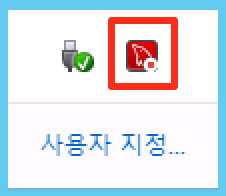 ``` 2018-09-18T22:46:29.760187Z 0 [Note] InnoDB: Loading buffer pool(s) from D:\MYSQLData\ib_buffer_pool 2018-09-18T22:46:29.760364Z 0 [Note] Plugin 'FEDERATED' is disabled. 2018-09-18T22:46:29.760603Z 0 [ERROR] InnoDB: Operating system error number 5 in a file operation. 2018-09-18T22:46:29.760814Z 0 [ERROR] InnoDB: The error means mysqld does not have the access rights to the directory. It may also be you have created a subdirectory of the same name as a data file. 2018-09-19 07:46:29 0xb80 InnoDB: Assertion failure in thread 2944 in file fil0fil.cc line 896 InnoDB: Failing assertion: success InnoDB: We intentionally generate a memory trap. InnoDB: Submit a detailed bug report to http://bugs.mysql.com. InnoDB: If you get repeated assertion failures or crashes, even InnoDB: immediately after the mysqld startup, there may be InnoDB: corruption in the InnoDB tablespace. Please refer to InnoDB: http://dev.mysql.com/doc/refman/5.7/en/forcing-innodb-recovery.html ``` --- 결론을 말하지면 데이터 복사 할때 권한 누락 되서 발생하는 문제 입니다. services.msc 열어보시면 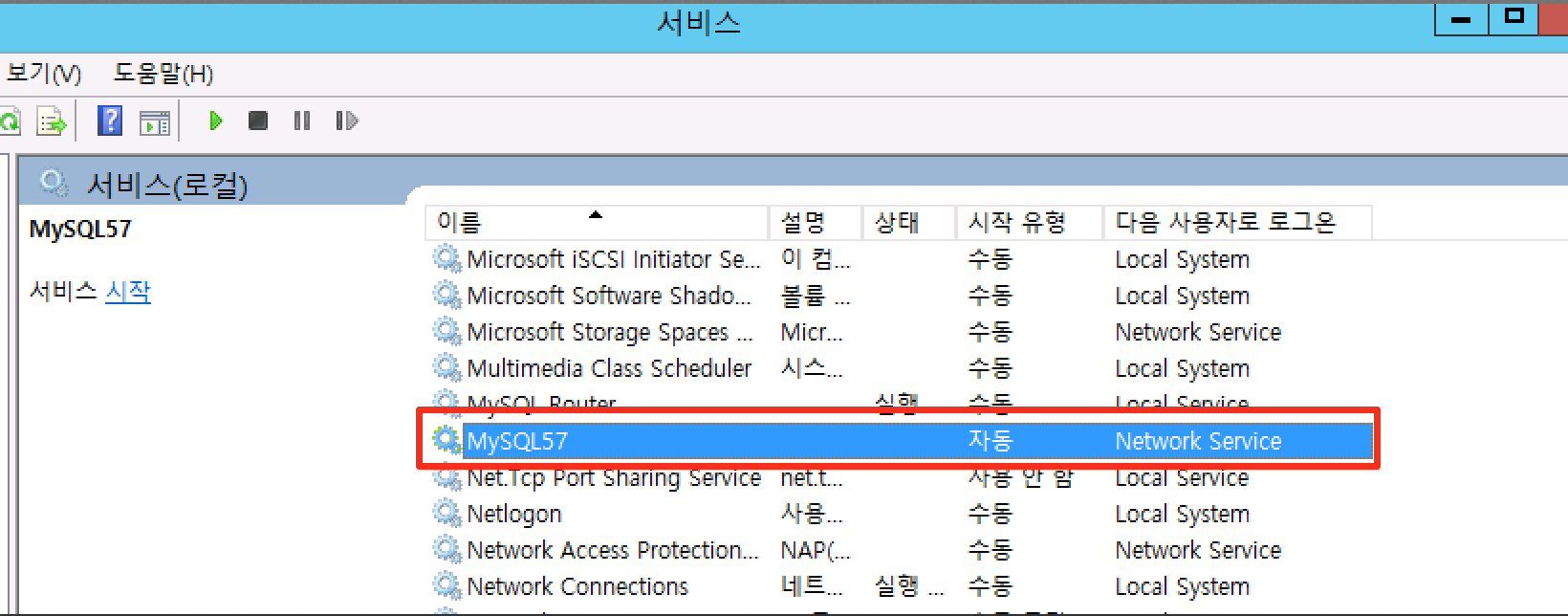 ```mysql이 Network Service 계정으로 실행 되어 있습니다. 즉 데이터 파일들도 Network Service 권한 있어야 합니다. ```` 폴드의 권한 확인 해보겠습니다. ( Network Service 권한 존재함) C:/ProgramData/MySQL/MySQL Server 5.7/Data 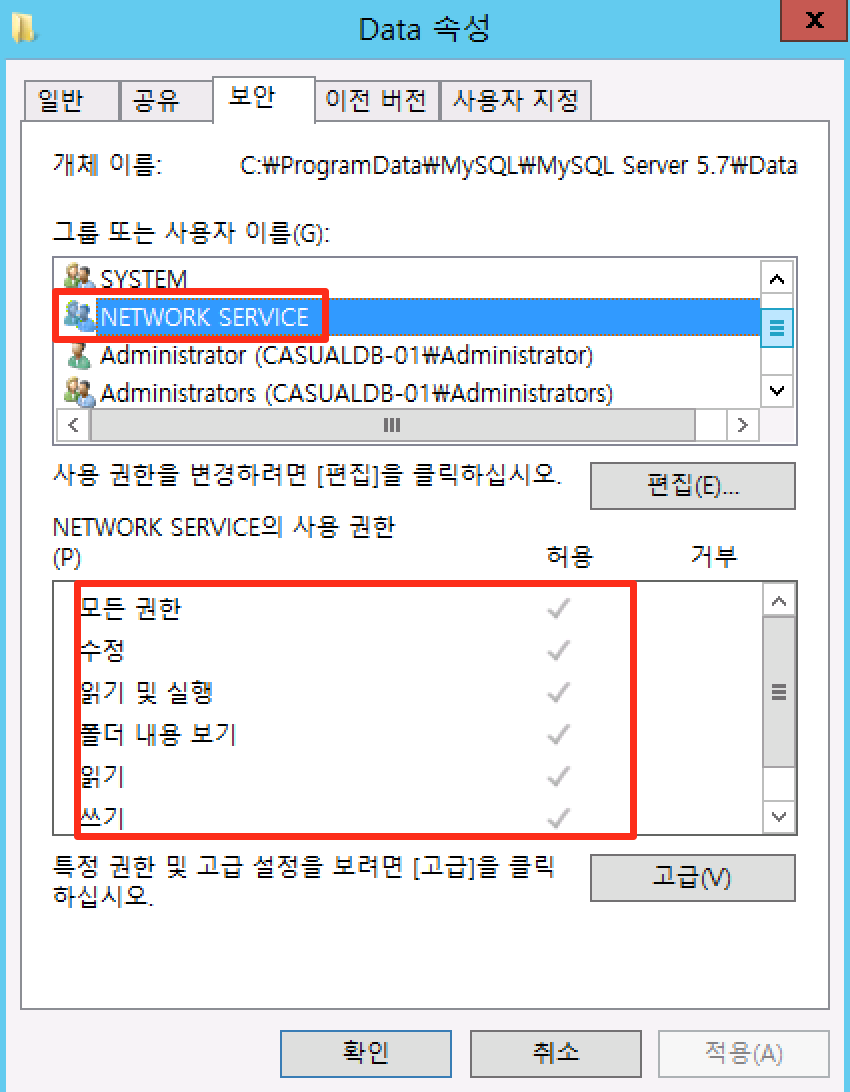 D:\MYSQLData ( Network Service 권한 존재 안함) 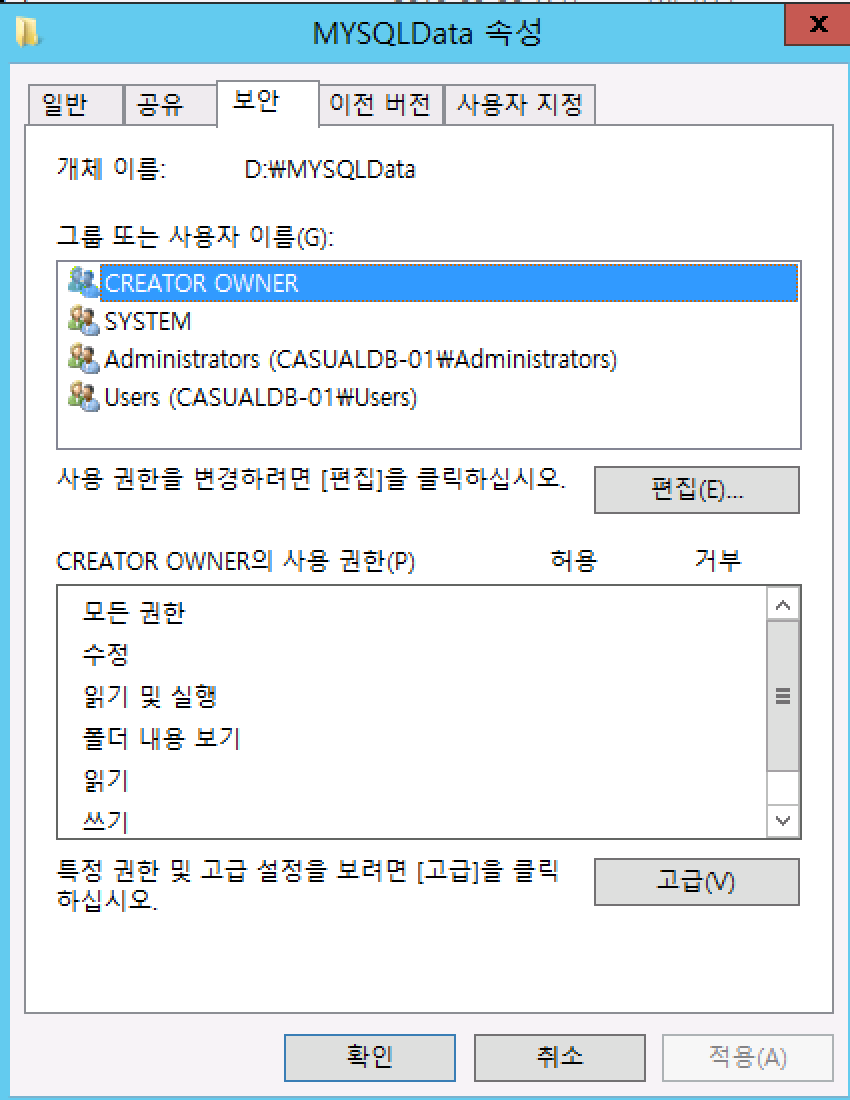 즉 Network Service 권한이 없어서 mysql 이 해당 폴드의 권한 없어서 실행 하지 못합니다. 해결 방법은 1. 데이터 경로의 Network Service 권한 추가 2. mysql 실행 권한 변경 Network Service 권한 추가 후 mysql start 하면 정상화 됩니다. 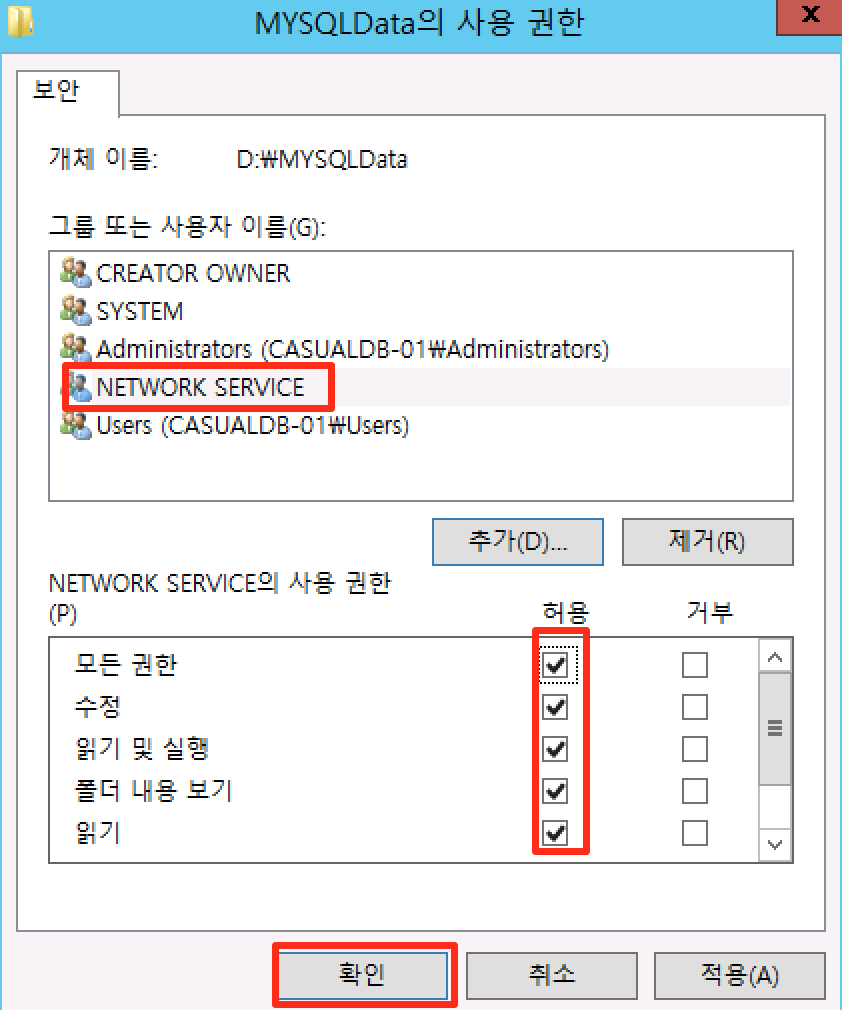  --- 마지막으로 Network Service 계정은 아래의 역할 을 합니다. ``` Network Service 계정은 원도우 에서 기본 제공 계정이며 인증된 사용자 계정과 유사한 낮은 수준의 사용 권한을 가지고 있고 암호 없는 계정 즉 관리자가 관리 할 필요 없습니다. Network Service 계정으로 실행되는 서비스는 컴퓨터 계정의 자격 증명을 사용하여 네트워크 리소스에 액세스 합니다 이러한 액세스의 제한은 공격자가 개별 서비스나 프로세스를 악용하는 경우에 컴퓨터를 보호하는 데 도움이 됩니다. |
| json metadata | {"tags":["kr","mysql","datadir","windows"],"image":["https://cdn.steemitimages.com/DQmcwLBwM4o7a4XjtKwHoTJeTXTpu1mnyyYEPRxZasaXkKr/image.png","https://cdn.steemitimages.com/DQmXuMusSoCUv6BswsaZ8q5tJs6rBgo3iY8han2zc13ecN9/image.png","https://cdn.steemitimages.com/DQmRM1H1FigykuAPGtXJLYueqbfDdjxrYdRSZEUXhg5hG86/image.png","https://cdn.steemitimages.com/DQmdYysVXbVyqNnTCjrCR4Pf3bKNagu8aF5vazXpeADEnUJ/image.png","https://cdn.steemitimages.com/DQmVCGKLdmMuTR3CAped3SNmwckfw5FfizNLsqpc7TBNGi6/image.png","https://cdn.steemitimages.com/DQmYectHxnshkE2esQK1rXUQywY3f1LSH95YsAmfdK9rzjV/image.png"],"app":"steemit/0.1","format":"markdown"} |
| Transaction Info | Block #26098476/Trx bd61d4e4e0c33d3058a4826da133b88585cf4f27 |
View Raw JSON Data
{
"trx_id": "bd61d4e4e0c33d3058a4826da133b88585cf4f27",
"block": 26098476,
"trx_in_block": 1,
"op_in_trx": 0,
"virtual_op": 0,
"timestamp": "2018-09-20T02:58:48",
"op": [
"comment",
{
"parent_author": "",
"parent_permlink": "mysql",
"author": "jaerakson",
"permlink": "mysql-windows-data",
"title": "mysql windows 버전에서 Data 변경시 오류 해결",
"body": "mysql windows 버전에서 Data 경로 변경시 오류 발생합니다. \n\n 결론을 말하지면 데이터 경로 복사시 권한 복사 되지 않아 오류 발생 합니다. \n\n 해결 방법은 \n\n 1. 데이터 경로의 권한 추가 \n 2. mysql 실행 권한 변경 \n---\n자세한 내용은 아래의 내용을 보시면 이해 되실 꺼에요 \n\n\nmysql 처음 설치시 datadir ( C:/ProgramData/MySQL/MySQL Server 5.7/Data)\n\nmysql (my.ini) config 파일 (C:\\ProgramData\\MySQL\\MySQL Server 5.7\\my.ini) 열어서\ndatadir 항목을 보시면 됩니다. \n \n datadir=C:/ProgramData/MySQL/MySQL Server 5.7/Data\n\n\ndatadir 경로를 변경해 보겠습니다 아래의 단계로 진행 하시면 됩니다. \n\n\n1. mysql stop \n net stop mysql \n\n2. my.ini 에서 데이터 경로 변경 \n datadir=D:\\MYSQLData\n\n3. 소스 데이터 폴드를 목적 데이터 폴드 copy \n xcopy \"C:\\ProgramData\\MySQL\\MySQL Server 5.7\\Data\" D:\\MYSQLData /s\n\n4. mysql start \n\n----\n 그러나 DB는 시작 되지 않고 오류 발생 \n \n\n ``` 2018-09-18T22:46:29.760187Z 0 [Note] InnoDB: Loading buffer pool(s) from D:\\MYSQLData\\ib_buffer_pool\n2018-09-18T22:46:29.760364Z 0 [Note] Plugin 'FEDERATED' is disabled.\n2018-09-18T22:46:29.760603Z 0 [ERROR] InnoDB: Operating system error number 5 in a file operation.\n2018-09-18T22:46:29.760814Z 0 [ERROR] InnoDB: The error means mysqld does not have the access rights to the directory. It may also be you have created a subdirectory of the same name as a data file.\n2018-09-19 07:46:29 0xb80 InnoDB: Assertion failure in thread 2944 in file fil0fil.cc line 896\nInnoDB: Failing assertion: success\nInnoDB: We intentionally generate a memory trap.\nInnoDB: Submit a detailed bug report to http://bugs.mysql.com.\nInnoDB: If you get repeated assertion failures or crashes, even\nInnoDB: immediately after the mysqld startup, there may be\nInnoDB: corruption in the InnoDB tablespace. Please refer to\nInnoDB: http://dev.mysql.com/doc/refman/5.7/en/forcing-innodb-recovery.html\n```\n---\n결론을 말하지면 데이터 복사 할때 권한 누락 되서 발생하는 문제 입니다. \n\nservices.msc 열어보시면 \n \n\n\n```mysql이 Network Service 계정으로 실행 되어 있습니다. \n즉 데이터 파일들도 Network Service 권한 있어야 합니다. \n````\n\n폴드의 권한 확인 해보겠습니다. ( Network Service 권한 존재함)\n\nC:/ProgramData/MySQL/MySQL Server 5.7/Data\n\n\nD:\\MYSQLData ( Network Service 권한 존재 안함)\n\n\n\n\n즉 Network Service 권한이 없어서 mysql 이 해당 폴드의 \n권한 없어서 실행 하지 못합니다. \n\n해결 방법은\n\n 1. 데이터 경로의 Network Service 권한 추가 \n 2. mysql 실행 권한 변경 \n\n Network Service 권한 추가 후 mysql start 하면 정상화 됩니다. \n\n\n\n\n\n\n\n\n---\n마지막으로 Network Service 계정은 아래의 역할 을 합니다. \n\n```\nNetwork Service 계정은 원도우 에서 기본 제공 계정이며 \n\n인증된 사용자 계정과 유사한 낮은 수준의 사용 권한을 가지고 있고 \n암호 없는 계정 즉 관리자가 관리 할 필요 없습니다. \n\nNetwork Service 계정으로 실행되는 서비스는 \n 컴퓨터 계정의 자격 증명을 사용하여 네트워크 리소스에 액세스 합니다\n\n이러한 액세스의 제한은 공격자가 개별 서비스나 프로세스를 악용하는\n 경우에 컴퓨터를 보호하는 데 도움이 됩니다.",
"json_metadata": "{\"tags\":[\"kr\",\"mysql\",\"datadir\",\"windows\"],\"image\":[\"https://cdn.steemitimages.com/DQmcwLBwM4o7a4XjtKwHoTJeTXTpu1mnyyYEPRxZasaXkKr/image.png\",\"https://cdn.steemitimages.com/DQmXuMusSoCUv6BswsaZ8q5tJs6rBgo3iY8han2zc13ecN9/image.png\",\"https://cdn.steemitimages.com/DQmRM1H1FigykuAPGtXJLYueqbfDdjxrYdRSZEUXhg5hG86/image.png\",\"https://cdn.steemitimages.com/DQmdYysVXbVyqNnTCjrCR4Pf3bKNagu8aF5vazXpeADEnUJ/image.png\",\"https://cdn.steemitimages.com/DQmVCGKLdmMuTR3CAped3SNmwckfw5FfizNLsqpc7TBNGi6/image.png\",\"https://cdn.steemitimages.com/DQmYectHxnshkE2esQK1rXUQywY3f1LSH95YsAmfdK9rzjV/image.png\"],\"app\":\"steemit/0.1\",\"format\":\"markdown\"}"
}
]
}malikafaizaupvoted (30.00%) @jaerakson / mysql-windows-data2018/09/20 02:56:30
malikafaizaupvoted (30.00%) @jaerakson / mysql-windows-data
2018/09/20 02:56:30
| voter | malikafaiza |
| author | jaerakson |
| permlink | mysql-windows-data |
| weight | 3000 (30.00%) |
| Transaction Info | Block #26098430/Trx 7379c48a12340d4a21305d2033e1d7b7574ca5dd |
View Raw JSON Data
{
  "trx_id": "7379c48a12340d4a21305d2033e1d7b7574ca5dd",
  "block": 26098430,
  "trx_in_block": 8,
  "op_in_trx": 0,
  "virtual_op": 0,
  "timestamp": "2018-09-20T02:56:30",
  "op": [
    "vote",
    {
      "voter": "malikafaiza",
      "author": "jaerakson",
      "permlink": "mysql-windows-data",
      "weight": 3000
    }
  ]
}jaeraksonpublished a new post: mysql-windows-data2018/09/20 02:36:33
jaeraksonpublished a new post: mysql-windows-data
2018/09/20 02:36:33
| parent author | |
| parent permlink | mysql |
| author | jaerakson |
| permlink | mysql-windows-data |
| title | mysql windows 버전에서 Data 변경시 오류 해결 |
| body | mysql windows 버전에서 Data 경로 변경시 오류 발생합니다. mysql 처음 설치시 datadir " C:/ProgramData/MySQL/MySQL Server 5.7/Data" 여기 입니다. mysql (my.ini) config 파일 열어 보시면 해당 경로 보입니다. C:\ProgramData\MySQL\MySQL Server 5.7\my.ini # Path to the database root datadir=C:/ProgramData/MySQL/MySQL Server 5.7/Data datadir 경로를 변경시 아래의 단계 로 진행 합니다. 1. mysql stop net stop mysql 2. my.ini 에서 데이터 경로 변경 # Path to the database root datadir=D:\MYSQLData 3. 소스 데이터 폴드를 목적 데이터 폴드 copy xcopy "C:\ProgramData\MySQL\MySQL Server 5.7\Data" D:\MYSQLData /s 4. mysql start 그러나 DB는 시작 되지 않고 오류 발생 2018-09-18T22:46:29.760187Z 0 [Note] InnoDB: Loading buffer pool(s) from D:\MYSQLData\ib_buffer_pool 2018-09-18T22:46:29.760364Z 0 [Note] Plugin 'FEDERATED' is disabled. 2018-09-18T22:46:29.760603Z 0 [ERROR] InnoDB: Operating system error number 5 in a file operation. 2018-09-18T22:46:29.760814Z 0 [ERROR] InnoDB: The error means mysqld does not have the access rights to the directory. It may also be you have created a subdirectory of the same name as a data file. 2018-09-19 07:46:29 0xb80 InnoDB: Assertion failure in thread 2944 in file fil0fil.cc line 896 InnoDB: Failing assertion: success InnoDB: We intentionally generate a memory trap. InnoDB: Submit a detailed bug report to http://bugs.mysql.com. InnoDB: If you get repeated assertion failures or crashes, even InnoDB: immediately after the mysqld startup, there may be InnoDB: corruption in the InnoDB tablespace. Please refer to InnoDB: http://dev.mysql.com/doc/refman/5.7/en/forcing-innodb-recovery.html 결론을 말하지면 데이터 복사 권한 누락 되서 발생하는 문제 입니다. services.msc 열어보시면  mysql이 Network Service 계정으로 실행 되어 있습니다. 즉 데이터 파일들도 Network Service 권한 있어야 합니다. 폴드의 권한 확인 해보겠습니다. ( Network Service 권한 존재함) C:/ProgramData/MySQL/MySQL Server 5.7/Data  D:\MYSQLData ( Network Service 권한 존재함)  즉 Network Service 권한이 없어서 mysql 이 해당 폴드의 권한 없어서 실행 하지 못합니다. 해결 방법은 |
| json metadata | {"tags":["kr","mysql","datadir"],"image":["https://cdn.steemitimages.com/DQmXuMusSoCUv6BswsaZ8q5tJs6rBgo3iY8han2zc13ecN9/image.png","https://cdn.steemitimages.com/DQmRM1H1FigykuAPGtXJLYueqbfDdjxrYdRSZEUXhg5hG86/image.png","https://cdn.steemitimages.com/DQmdYysVXbVyqNnTCjrCR4Pf3bKNagu8aF5vazXpeADEnUJ/image.png"],"links":["http://bugs.mysql.com","http://dev.mysql.com/doc/refman/5.7/en/forcing-innodb-recovery.html"],"app":"steemit/0.1","format":"markdown"} |
| Transaction Info | Block #26098031/Trx 9fc49a78ead8624047283bf9d6fa73a2c99d0f9c |
View Raw JSON Data
{
"trx_id": "9fc49a78ead8624047283bf9d6fa73a2c99d0f9c",
"block": 26098031,
"trx_in_block": 6,
"op_in_trx": 0,
"virtual_op": 0,
"timestamp": "2018-09-20T02:36:33",
"op": [
"comment",
{
"parent_author": "",
"parent_permlink": "mysql",
"author": "jaerakson",
"permlink": "mysql-windows-data",
"title": "mysql windows 버전에서 Data 변경시 오류 해결",
"body": "mysql windows 버전에서 Data 경로 변경시 오류 발생합니다. \n\nmysql 처음 설치시 datadir \n \" C:/ProgramData/MySQL/MySQL Server 5.7/Data\" 여기 입니다. \n\nmysql (my.ini) config 파일 열어 보시면 해당 경로 보입니다. \n C:\\ProgramData\\MySQL\\MySQL Server 5.7\\my.ini\n # Path to the database root\n datadir=C:/ProgramData/MySQL/MySQL Server 5.7/Data\n\n\ndatadir 경로를 변경시 아래의 단계 로 진행 합니다. \n\n1. mysql stop \n net stop mysql \n\n2. my.ini 에서 데이터 경로 변경 \n \n # Path to the database root\n datadir=D:\\MYSQLData\n\n3. 소스 데이터 폴드를 목적 데이터 폴드 copy \n xcopy \"C:\\ProgramData\\MySQL\\MySQL Server 5.7\\Data\" D:\\MYSQLData /s\n\n4. mysql start \n\n\n그러나 DB는 시작 되지 않고 오류 발생 \n\n2018-09-18T22:46:29.760187Z 0 [Note] InnoDB: Loading buffer pool(s) from D:\\MYSQLData\\ib_buffer_pool\n2018-09-18T22:46:29.760364Z 0 [Note] Plugin 'FEDERATED' is disabled.\n2018-09-18T22:46:29.760603Z 0 [ERROR] InnoDB: Operating system error number 5 in a file operation.\n2018-09-18T22:46:29.760814Z 0 [ERROR] InnoDB: The error means mysqld does not have the access rights to the directory. It may also be you have created a subdirectory of the same name as a data file.\n2018-09-19 07:46:29 0xb80 InnoDB: Assertion failure in thread 2944 in file fil0fil.cc line 896\nInnoDB: Failing assertion: success\nInnoDB: We intentionally generate a memory trap.\nInnoDB: Submit a detailed bug report to http://bugs.mysql.com.\nInnoDB: If you get repeated assertion failures or crashes, even\nInnoDB: immediately after the mysqld startup, there may be\nInnoDB: corruption in the InnoDB tablespace. Please refer to\nInnoDB: http://dev.mysql.com/doc/refman/5.7/en/forcing-innodb-recovery.html\n\n\n결론을 말하지면 데이터 복사 권한 누락 되서 발생하는 문제 입니다. \n\nservices.msc 열어보시면 \n \n\n\nmysql이 Network Service 계정으로 실행 되어 있습니다. \n즉 데이터 파일들도 Network Service 권한 있어야 합니다. \n\n폴드의 권한 확인 해보겠습니다. ( Network Service 권한 존재함)\nC:/ProgramData/MySQL/MySQL Server 5.7/Data\n\n\nD:\\MYSQLData ( Network Service 권한 존재함)\n\n\n\n\n즉 Network Service 권한이 없어서 mysql 이 해당 폴드의 권한 없어서 실행 하지 못합니다. \n해결 방법은",
"json_metadata": "{\"tags\":[\"kr\",\"mysql\",\"datadir\"],\"image\":[\"https://cdn.steemitimages.com/DQmXuMusSoCUv6BswsaZ8q5tJs6rBgo3iY8han2zc13ecN9/image.png\",\"https://cdn.steemitimages.com/DQmRM1H1FigykuAPGtXJLYueqbfDdjxrYdRSZEUXhg5hG86/image.png\",\"https://cdn.steemitimages.com/DQmdYysVXbVyqNnTCjrCR4Pf3bKNagu8aF5vazXpeADEnUJ/image.png\"],\"links\":[\"http://bugs.mysql.com\",\"http://dev.mysql.com/doc/refman/5.7/en/forcing-innodb-recovery.html\"],\"app\":\"steemit/0.1\",\"format\":\"markdown\"}"
}
]
}jaeraksonpublished a new post: mysql-windows-data2018/09/20 02:36:12
jaeraksonpublished a new post: mysql-windows-data
2018/09/20 02:36:12
| parent author | |
| parent permlink | mysql |
| author | jaerakson |
| permlink | mysql-windows-data |
| title | mysql windows 버전에서 Data 변경시 오류 해결 |
| body | mysql windows 버전에서 Data 경로 변경시 오류 발생합니다. mysql 처음 설치시 datadir " C:/ProgramData/MySQL/MySQL Server 5.7/Data" 여기 입니다. mysql (my.ini) config 파일 열어 보시면 해당 경로 보입니다. C:\ProgramData\MySQL\MySQL Server 5.7\my.ini # Path to the database root datadir=C:/ProgramData/MySQL/MySQL Server 5.7/Data datadir 경로를 변경시 아래의 단계 로 진행 합니다. 1. mysql stop net stop mysql 2. my.ini 에서 데이터 경로 변경 # Path to the database root datadir=D:\MYSQLData 3. 소스 데이터 폴드를 목적 데이터 폴드 copy xcopy "C:\ProgramData\MySQL\MySQL Server 5.7\Data" D:\MYSQLData /s 4. mysql start 그러나 DB는 시작 되지 않고 오류 발생 2018-09-18T22:46:29.760187Z 0 [Note] InnoDB: Loading buffer pool(s) from D:\MYSQLData\ib_buffer_pool 2018-09-18T22:46:29.760364Z 0 [Note] Plugin 'FEDERATED' is disabled. 2018-09-18T22:46:29.760603Z 0 [ERROR] InnoDB: Operating system error number 5 in a file operation. 2018-09-18T22:46:29.760814Z 0 [ERROR] InnoDB: The error means mysqld does not have the access rights to the directory. It may also be you have created a subdirectory of the same name as a data file. 2018-09-19 07:46:29 0xb80 InnoDB: Assertion failure in thread 2944 in file fil0fil.cc line 896 InnoDB: Failing assertion: success InnoDB: We intentionally generate a memory trap. InnoDB: Submit a detailed bug report to http://bugs.mysql.com. InnoDB: If you get repeated assertion failures or crashes, even InnoDB: immediately after the mysqld startup, there may be InnoDB: corruption in the InnoDB tablespace. Please refer to InnoDB: http://dev.mysql.com/doc/refman/5.7/en/forcing-innodb-recovery.html 결론을 말하지면 데이터 복사 권한 누락 되서 발생하는 문제 입니다. services.msc 열어보시면  mysql이 Network Service 계정으로 실행 되어 있습니다. 즉 데이터 파일들도 Network Service 권한 있어야 합니다. 폴드의 권한 확인 해보겠습니다. ( Network Service 권한 존재함) C:/ProgramData/MySQL/MySQL Server 5.7/Data  D:\MYSQLData ( Network Service 권한 존재함)  즉 Network Service 권한이 없어서 mysql 이 해당 폴드의 권한 없어서 실행 하지 못합니다. 해결 방법은 |
| json metadata | {"tags":["mysql","datadir"],"image":["https://cdn.steemitimages.com/DQmXuMusSoCUv6BswsaZ8q5tJs6rBgo3iY8han2zc13ecN9/image.png","https://cdn.steemitimages.com/DQmRM1H1FigykuAPGtXJLYueqbfDdjxrYdRSZEUXhg5hG86/image.png","https://cdn.steemitimages.com/DQmdYysVXbVyqNnTCjrCR4Pf3bKNagu8aF5vazXpeADEnUJ/image.png"],"links":["http://bugs.mysql.com","http://dev.mysql.com/doc/refman/5.7/en/forcing-innodb-recovery.html"],"app":"steemit/0.1","format":"markdown"} |
| Transaction Info | Block #26098024/Trx dfe9cbbca2d90aef0dbd75f7b9ba25d47f15f2b4 |
View Raw JSON Data
{
"trx_id": "dfe9cbbca2d90aef0dbd75f7b9ba25d47f15f2b4",
"block": 26098024,
"trx_in_block": 11,
"op_in_trx": 0,
"virtual_op": 0,
"timestamp": "2018-09-20T02:36:12",
"op": [
"comment",
{
"parent_author": "",
"parent_permlink": "mysql",
"author": "jaerakson",
"permlink": "mysql-windows-data",
"title": "mysql windows 버전에서 Data 변경시 오류 해결",
"body": "mysql windows 버전에서 Data 경로 변경시 오류 발생합니다. \n\nmysql 처음 설치시 datadir \n \" C:/ProgramData/MySQL/MySQL Server 5.7/Data\" 여기 입니다. \n\nmysql (my.ini) config 파일 열어 보시면 해당 경로 보입니다. \n C:\\ProgramData\\MySQL\\MySQL Server 5.7\\my.ini\n # Path to the database root\n datadir=C:/ProgramData/MySQL/MySQL Server 5.7/Data\n\n\ndatadir 경로를 변경시 아래의 단계 로 진행 합니다. \n\n1. mysql stop \n net stop mysql \n\n2. my.ini 에서 데이터 경로 변경 \n \n # Path to the database root\n datadir=D:\\MYSQLData\n\n3. 소스 데이터 폴드를 목적 데이터 폴드 copy \n xcopy \"C:\\ProgramData\\MySQL\\MySQL Server 5.7\\Data\" D:\\MYSQLData /s\n\n4. mysql start \n\n\n그러나 DB는 시작 되지 않고 오류 발생 \n\n2018-09-18T22:46:29.760187Z 0 [Note] InnoDB: Loading buffer pool(s) from D:\\MYSQLData\\ib_buffer_pool\n2018-09-18T22:46:29.760364Z 0 [Note] Plugin 'FEDERATED' is disabled.\n2018-09-18T22:46:29.760603Z 0 [ERROR] InnoDB: Operating system error number 5 in a file operation.\n2018-09-18T22:46:29.760814Z 0 [ERROR] InnoDB: The error means mysqld does not have the access rights to the directory. It may also be you have created a subdirectory of the same name as a data file.\n2018-09-19 07:46:29 0xb80 InnoDB: Assertion failure in thread 2944 in file fil0fil.cc line 896\nInnoDB: Failing assertion: success\nInnoDB: We intentionally generate a memory trap.\nInnoDB: Submit a detailed bug report to http://bugs.mysql.com.\nInnoDB: If you get repeated assertion failures or crashes, even\nInnoDB: immediately after the mysqld startup, there may be\nInnoDB: corruption in the InnoDB tablespace. Please refer to\nInnoDB: http://dev.mysql.com/doc/refman/5.7/en/forcing-innodb-recovery.html\n\n\n결론을 말하지면 데이터 복사 권한 누락 되서 발생하는 문제 입니다. \n\nservices.msc 열어보시면 \n \n\n\nmysql이 Network Service 계정으로 실행 되어 있습니다. \n즉 데이터 파일들도 Network Service 권한 있어야 합니다. \n\n폴드의 권한 확인 해보겠습니다. ( Network Service 권한 존재함)\nC:/ProgramData/MySQL/MySQL Server 5.7/Data\n\n\nD:\\MYSQLData ( Network Service 권한 존재함)\n\n\n\n\n즉 Network Service 권한이 없어서 mysql 이 해당 폴드의 권한 없어서 실행 하지 못합니다. \n해결 방법은",
"json_metadata": "{\"tags\":[\"mysql\",\"datadir\"],\"image\":[\"https://cdn.steemitimages.com/DQmXuMusSoCUv6BswsaZ8q5tJs6rBgo3iY8han2zc13ecN9/image.png\",\"https://cdn.steemitimages.com/DQmRM1H1FigykuAPGtXJLYueqbfDdjxrYdRSZEUXhg5hG86/image.png\",\"https://cdn.steemitimages.com/DQmdYysVXbVyqNnTCjrCR4Pf3bKNagu8aF5vazXpeADEnUJ/image.png\"],\"links\":[\"http://bugs.mysql.com\",\"http://dev.mysql.com/doc/refman/5.7/en/forcing-innodb-recovery.html\"],\"app\":\"steemit/0.1\",\"format\":\"markdown\"}"
}
]
}2018/09/12 03:57:18
2018/09/12 03:57:18
| voter | jaerakson |
| author | girina79 |
| permlink | 58e5ve |
| weight | 10000 (100.00%) |
| Transaction Info | Block #25884892/Trx db8979d8afa7f502d75299568dde6f225f3aba06 |
View Raw JSON Data
{
  "trx_id": "db8979d8afa7f502d75299568dde6f225f3aba06",
  "block": 25884892,
  "trx_in_block": 4,
  "op_in_trx": 0,
  "virtual_op": 0,
  "timestamp": "2018-09-12T03:57:18",
  "op": [
    "vote",
    {
      "voter": "jaerakson",
      "author": "girina79",
      "permlink": "58e5ve",
      "weight": 10000
    }
  ]
}jaeraksonpublished a new post: mysql-slave-errorcode-10322018/09/11 02:50:45
jaeraksonpublished a new post: mysql-slave-errorcode-1032
2018/09/11 02:50:45
| parent author | |
| parent permlink | kr |
| author | jaerakson |
| permlink | mysql-slave-errorcode-1032 |
| title | mysql slave 오류 Error_code: 1032 |
| body | mysql slave 오류 Error_code: 1032 오류 Could not execute Update_rows event on table mysql.user; Can't find record in 'user', Error_code: 1032; handler error HA_ERR_KEY_NOT_FOUND; the event's master log mysql-bin.000002, end_log_pos 796 slave 로그포지션 번호가 틀린경우 오류 발생 합니다. reset slave 를 해도 아래의 동일한 오류 메세지 발생 할경우 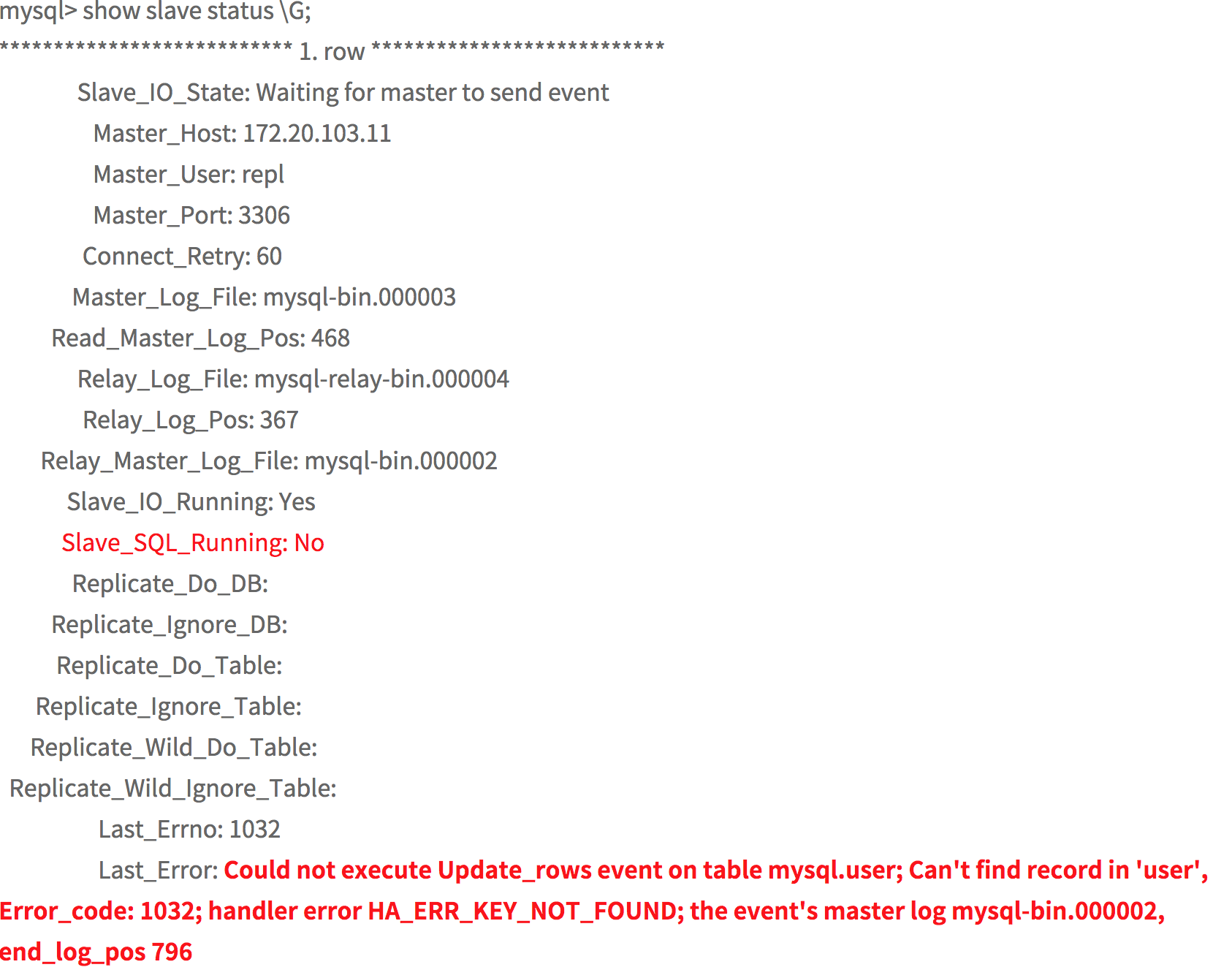 해결 방법 1. master DB 데이터 백업해서 Slave 복원 2. log_pos skip을 통해 해결 (복원 이슈없을경우) - 로그 포지션 변경 ``` log_pos 현재 94 --> 95로 변경 stop slave; change master to master_log_file 'mysql-bin.00001', master_log_pos=95; start salve; ``` - 오류 발생시 포지션 번호 하나씩 건너 뛰기 오류가 없을 때 까지 아래의 내용 반복 ``` stop slave ; set global sql_slave_skip_counter=1; start slave; ``` - 오류 해결 해결 ``` stop slave; set global sql_slave_skip_counter=0; start slave; show slave status; ``` |
| json metadata | {"tags":["kr","mysql","slave","error1032"],"image":["https://cdn.steemitimages.com/DQmeBPS37vomb8nFacbiF3xcoSjkUt57oHtMy2R5P7AdX8H/image.png"],"app":"steemit/0.1","format":"markdown"} |
| Transaction Info | Block #25854768/Trx 15a41f7fdb34908a44177edddcf3e92153157a04 |
View Raw JSON Data
{
"trx_id": "15a41f7fdb34908a44177edddcf3e92153157a04",
"block": 25854768,
"trx_in_block": 19,
"op_in_trx": 0,
"virtual_op": 0,
"timestamp": "2018-09-11T02:50:45",
"op": [
"comment",
{
"parent_author": "",
"parent_permlink": "kr",
"author": "jaerakson",
"permlink": "mysql-slave-errorcode-1032",
"title": "mysql slave 오류 Error_code: 1032",
"body": "mysql slave 오류 Error_code: 1032 오류 \n\nCould not execute Update_rows event on table mysql.user; Can't find record in 'user', Error_code: 1032; handler error \nHA_ERR_KEY_NOT_FOUND; the event's master log mysql-bin.000002, end_log_pos 796\n \n\nslave 로그포지션 번호가 틀린경우 오류 발생 합니다.\n reset slave 를 해도 아래의 동일한 오류 메세지 발생 할경우 \n\n\n\n \n해결 방법\n\n1. master DB 데이터 백업해서 Slave 복원 \n2. log_pos skip을 통해 해결 (복원 이슈없을경우) \n - 로그 포지션 변경 \n``` \n log_pos 현재 94 --> 95로 변경 \n stop slave;\n change master to master_log_file 'mysql-bin.00001', master_log_pos=95;\n start salve;\n``` \n - 오류 발생시 포지션 번호 하나씩 건너 뛰기 \n 오류가 없을 때 까지 아래의 내용 반복 \n ```\n stop slave ; \n set global sql_slave_skip_counter=1;\n start slave;\n```\n - 오류 해결 해결 \n```\n stop slave;\n set global sql_slave_skip_counter=0;\n start slave;\n show slave status;\n```",
"json_metadata": "{\"tags\":[\"kr\",\"mysql\",\"slave\",\"error1032\"],\"image\":[\"https://cdn.steemitimages.com/DQmeBPS37vomb8nFacbiF3xcoSjkUt57oHtMy2R5P7AdX8H/image.png\"],\"app\":\"steemit/0.1\",\"format\":\"markdown\"}"
}
]
}jaeraksonpublished a new post: mysql-sock-file2018/09/11 02:32:21
jaeraksonpublished a new post: mysql-sock-file
2018/09/11 02:32:21
| parent author | |
| parent permlink | kr |
| author | jaerakson |
| permlink | mysql-sock-file |
| title | Mysql Sock File 위치 |
| body | netstat -an |grep mysql > unix 2 [ ACC ] STREAM LISTENING 142927 `/tmp/mysql.sock` unix 3 [ ] STREAM CONNECTED 181665 `/tmp/mysql.sock` |
| json metadata | {"tags":["kr","mysql","netstat"],"app":"steemit/0.1","format":"markdown"} |
| Transaction Info | Block #25854400/Trx fb08c18ac2351e335c78b711d1e099d60bf2f3a2 |
View Raw JSON Data
{
  "trx_id": "fb08c18ac2351e335c78b711d1e099d60bf2f3a2",
  "block": 25854400,
  "trx_in_block": 26,
  "op_in_trx": 0,
  "virtual_op": 0,
  "timestamp": "2018-09-11T02:32:21",
  "op": [
    "comment",
    {
      "parent_author": "",
      "parent_permlink": "kr",
      "author": "jaerakson",
      "permlink": "mysql-sock-file",
      "title": "Mysql Sock File 위치",
      "body": "netstat -an |grep mysql  \n\n > unix  2      [ ACC ]     STREAM     LISTENING     142927  `/tmp/mysql.sock`\n  unix  3      [ ]         STREAM     CONNECTED     181665   `/tmp/mysql.sock`",
      "json_metadata": "{\"tags\":[\"kr\",\"mysql\",\"netstat\"],\"app\":\"steemit/0.1\",\"format\":\"markdown\"}"
    }
  ]
}raise-me-upupvoted (0.02%) @jaerakson / python2018/09/11 02:25:09
raise-me-upupvoted (0.02%) @jaerakson / python
2018/09/11 02:25:09
| voter | raise-me-up |
| author | jaerakson |
| permlink | python |
| weight | 2 (0.02%) |
| Transaction Info | Block #25854257/Trx 3169cefd33db43b89e6ee6a553586667c8800d99 |
View Raw JSON Data
{
  "trx_id": "3169cefd33db43b89e6ee6a553586667c8800d99",
  "block": 25854257,
  "trx_in_block": 0,
  "op_in_trx": 0,
  "virtual_op": 0,
  "timestamp": "2018-09-11T02:25:09",
  "op": [
    "vote",
    {
      "voter": "raise-me-up",
      "author": "jaerakson",
      "permlink": "python",
      "weight": 2
    }
  ]
}antonturov90replied to @jaerakson / 20180911t022140072z2018/09/11 02:21:42
antonturov90replied to @jaerakson / 20180911t022140072z
2018/09/11 02:21:42
| parent author | jaerakson |
| parent permlink | python |
| author | antonturov90 |
| permlink | 20180911t022140072z |
| title | |
| body | I adore your concept!! |
| json metadata | {} |
| Transaction Info | Block #25854188/Trx 362a9a0a614bd5184fb6197323a5120c8adf871e |
View Raw JSON Data
{
  "trx_id": "362a9a0a614bd5184fb6197323a5120c8adf871e",
  "block": 25854188,
  "trx_in_block": 69,
  "op_in_trx": 0,
  "virtual_op": 0,
  "timestamp": "2018-09-11T02:21:42",
  "op": [
    "comment",
    {
      "parent_author": "jaerakson",
      "parent_permlink": "python",
      "author": "antonturov90",
      "permlink": "20180911t022140072z",
      "title": "",
      "body": "I adore your concept!!",
      "json_metadata": "{}"
    }
  ]
}jaeraksonfollowed @flyhigh01032018/09/11 02:20:36
jaeraksonfollowed @flyhigh0103
2018/09/11 02:20:36
| required auths | [] |
| required posting auths | ["jaerakson"] |
| id | follow |
| json | ["follow",{"follower":"jaerakson","following":"flyhigh0103","what":["blog"]}] |
| Transaction Info | Block #25854166/Trx 54d9c3dcb3fbafd5e5e3e7fb3265de056b05fe18 |
View Raw JSON Data
{
  "trx_id": "54d9c3dcb3fbafd5e5e3e7fb3265de056b05fe18",
  "block": 25854166,
  "trx_in_block": 0,
  "op_in_trx": 0,
  "virtual_op": 0,
  "timestamp": "2018-09-11T02:20:36",
  "op": [
    "custom_json",
    {
      "required_auths": [],
      "required_posting_auths": [
        "jaerakson"
      ],
      "id": "follow",
      "json": "[\"follow\",{\"follower\":\"jaerakson\",\"following\":\"flyhigh0103\",\"what\":[\"blog\"]}]"
    }
  ]
}jaeraksonupvoted (100.00%) @jaerakson / python2018/09/11 02:18:03
jaeraksonupvoted (100.00%) @jaerakson / python
2018/09/11 02:18:03
| voter | jaerakson |
| author | jaerakson |
| permlink | python |
| weight | 10000 (100.00%) |
| Transaction Info | Block #25854115/Trx 6cedd12c843c2bfda5fee39d9593e56fef1935f5 |
View Raw JSON Data
{
  "trx_id": "6cedd12c843c2bfda5fee39d9593e56fef1935f5",
  "block": 25854115,
  "trx_in_block": 56,
  "op_in_trx": 0,
  "virtual_op": 0,
  "timestamp": "2018-09-11T02:18:03",
  "op": [
    "vote",
    {
      "voter": "jaerakson",
      "author": "jaerakson",
      "permlink": "python",
      "weight": 10000
    }
  ]
}2018/09/11 02:16:33
2018/09/11 02:16:33
| parent author | |
| parent permlink | kr |
| author | jaerakson |
| permlink | python |
| title | Python 설치 |
| body | `파이션 3.5.1 ` 버전을 `ubuntu` OS에 설치 해보겠습니다. 1. Python-3.5.1. 버전 Download get https://www.python.org/ftp/python/3.5.1/Python-3.5.1.tgz 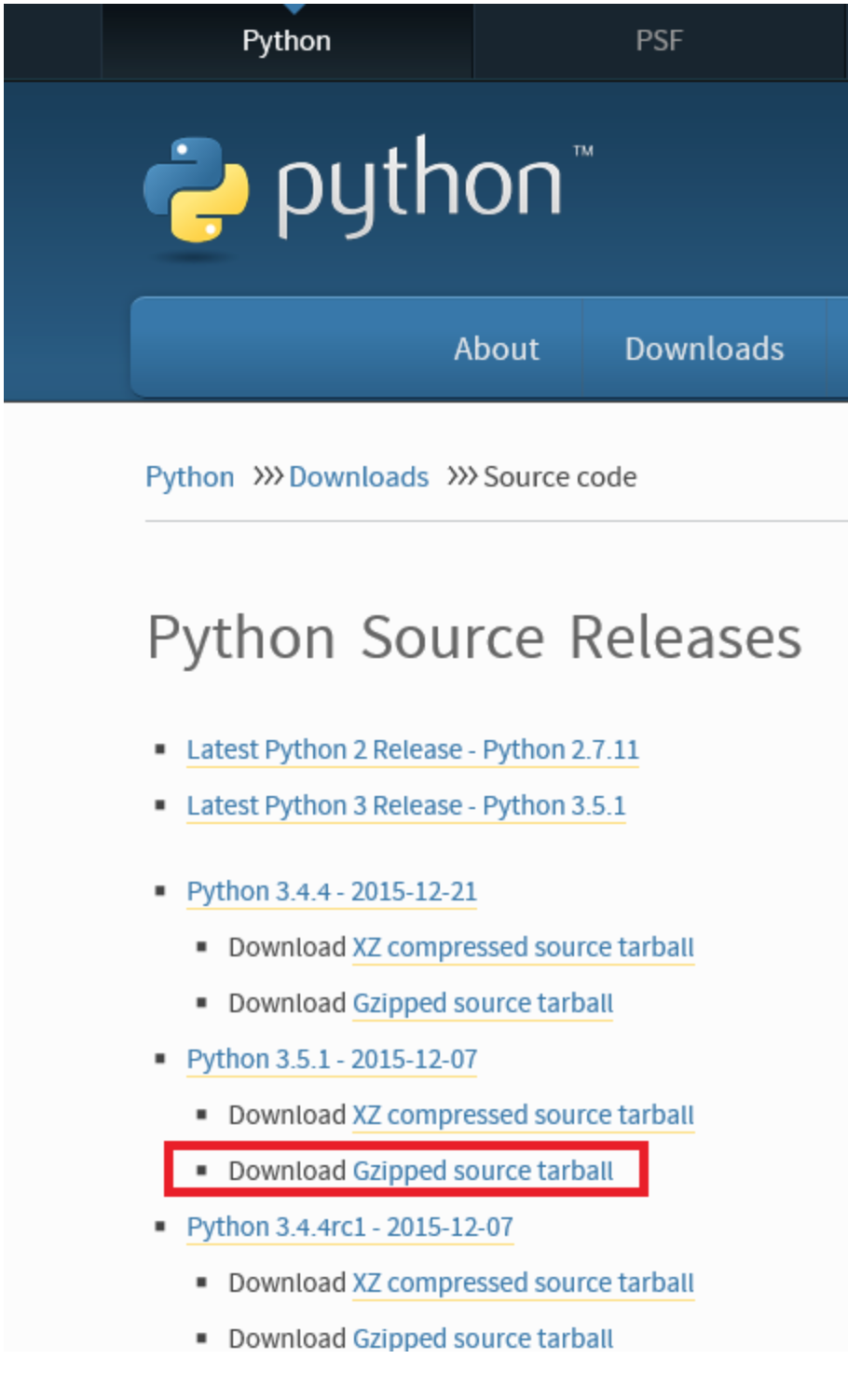 2. 압축풀기 tar xvzf Python-3.5.1.tgz 3. 환경설정하기 cd Python-3.5.1/ ./configure make sudo make install 4. pip 설치 ``` sudo apt-get install python-pip ``` --- ``` "configure" OS, 커널버전,컴파일러의 종류 여러기자 버전시스템의 환경파일 (makefile) 을 만들어 주는 일을 한다. "Makefile" 환경파일을 참조 하여 소스코드 컴파일 한다. ``` |
| json metadata | {"tags":["kr","python","ubuntu","make"],"image":["https://cdn.steemitimages.com/DQmYL5obNZJFz4ECdgDGtroJwBKkNL7yv9WkV8qD4Pgb4Jo/image.png"],"links":["https://www.python.org/ftp/python/3.5.1/Python-3.5.1.tgz"],"app":"steemit/0.1","format":"markdown"} |
| Transaction Info | Block #25854085/Trx 82617efab96ba5cb57afd0890d3839b4fbba21a8 |
View Raw JSON Data
{
"trx_id": "82617efab96ba5cb57afd0890d3839b4fbba21a8",
"block": 25854085,
"trx_in_block": 44,
"op_in_trx": 0,
"virtual_op": 0,
"timestamp": "2018-09-11T02:16:33",
"op": [
"comment",
{
"parent_author": "",
"parent_permlink": "kr",
"author": "jaerakson",
"permlink": "python",
"title": "Python 설치",
"body": "`파이션 3.5.1 ` 버전을 `ubuntu` OS에 설치 해보겠습니다. \n\n\n\n1. Python-3.5.1. 버전 Download \n get https://www.python.org/ftp/python/3.5.1/Python-3.5.1.tgz\n\n\n2. 압축풀기\n tar xvzf Python-3.5.1.tgz\n\n3. 환경설정하기 \n cd Python-3.5.1/\n ./configure \n make \n sudo make install \n\n4. pip 설치 ```\n sudo apt-get install python-pip ```\n---\n```\n\"configure\" \n OS, 커널버전,컴파일러의 종류 \n 여러기자 버전시스템의 환경파일 (makefile) 을 만들어 주는 일을 한다. \n\n\"Makefile\" \n 환경파일을 참조 하여 소스코드 컴파일 한다. \n```",
"json_metadata": "{\"tags\":[\"kr\",\"python\",\"ubuntu\",\"make\"],\"image\":[\"https://cdn.steemitimages.com/DQmYL5obNZJFz4ECdgDGtroJwBKkNL7yv9WkV8qD4Pgb4Jo/image.png\"],\"links\":[\"https://www.python.org/ftp/python/3.5.1/Python-3.5.1.tgz\"],\"app\":\"steemit/0.1\",\"format\":\"markdown\"}"
}
]
}jaeraksonupvoted (100.00%) @jaerakson / 2akxbd2018/09/11 01:55:24
jaeraksonupvoted (100.00%) @jaerakson / 2akxbd
2018/09/11 01:55:24
| voter | jaerakson |
| author | jaerakson |
| permlink | 2akxbd |
| weight | 10000 (100.00%) |
| Transaction Info | Block #25853662/Trx 0df9dbe55627f6c6d676a7bf96d4b77905cc60da |
View Raw JSON Data
{
  "trx_id": "0df9dbe55627f6c6d676a7bf96d4b77905cc60da",
  "block": 25853662,
  "trx_in_block": 12,
  "op_in_trx": 0,
  "virtual_op": 0,
  "timestamp": "2018-09-11T01:55:24",
  "op": [
    "vote",
    {
      "voter": "jaerakson",
      "author": "jaerakson",
      "permlink": "2akxbd",
      "weight": 10000
    }
  ]
}jaeraksonupvoted (100.00%) @polfilds / 20180911t011607044z2018/09/11 01:55:21
jaeraksonupvoted (100.00%) @polfilds / 20180911t011607044z
2018/09/11 01:55:21
| voter | jaerakson |
| author | polfilds |
| permlink | 20180911t011607044z |
| weight | 10000 (100.00%) |
| Transaction Info | Block #25853661/Trx 1e7d9e2956ef222d2c235772b45e22c0ab619dcf |
View Raw JSON Data
{
  "trx_id": "1e7d9e2956ef222d2c235772b45e22c0ab619dcf",
  "block": 25853661,
  "trx_in_block": 4,
  "op_in_trx": 0,
  "virtual_op": 0,
  "timestamp": "2018-09-11T01:55:21",
  "op": [
    "vote",
    {
      "voter": "jaerakson",
      "author": "polfilds",
      "permlink": "20180911t011607044z",
      "weight": 10000
    }
  ]
}jaeraksonupvoted (100.00%) @popcornexpress / re-introduce-bot-re-jaerakson2akxbd-20180911t0103532018/09/11 01:55:18
jaeraksonupvoted (100.00%) @popcornexpress / re-introduce-bot-re-jaerakson2akxbd-20180911t010353
2018/09/11 01:55:18
| voter | jaerakson |
| author | popcornexpress |
| permlink | re-introduce-bot-re-jaerakson2akxbd-20180911t010353 |
| weight | 10000 (100.00%) |
| Transaction Info | Block #25853660/Trx e0182ffadafac43cdb447d784043222576ff4431 |
View Raw JSON Data
{
  "trx_id": "e0182ffadafac43cdb447d784043222576ff4431",
  "block": 25853660,
  "trx_in_block": 30,
  "op_in_trx": 0,
  "virtual_op": 0,
  "timestamp": "2018-09-11T01:55:18",
  "op": [
    "vote",
    {
      "voter": "jaerakson",
      "author": "popcornexpress",
      "permlink": "re-introduce-bot-re-jaerakson2akxbd-20180911t010353",
      "weight": 10000
    }
  ]
}2018/09/11 01:55:00
2018/09/11 01:55:00
| parent author | |
| parent permlink | kr |
| author | jaerakson |
| permlink | 2akxbd |
| title | RabbitMQ 설치하기 |
| body | @@ -464,17 +464,17 @@ . ubunt -o +u OS%0A%0A2. |
| json metadata | {"tags":["kr","rabbitmq","ubuntu","iface"],"app":"steemit/0.1","format":"markdown","image":["https://cdn.steemitimages.com/DQmNia1A3vJgjVQabLB18UZUGQbSnSBiY9CLXD5b4iAk21y/image.png"],"links":["http://killins.egloos.com/m/3025514","http://www.rabbitmq.com/debian/","http://www.rabbitmq.com/rabbitmq-signing-key-public.asc","http://serverip:15672/"]} |
| Transaction Info | Block #25853654/Trx a9687b5b0c01a6758d7f0864e180d2ce2b4d923d |
View Raw JSON Data
{
  "trx_id": "a9687b5b0c01a6758d7f0864e180d2ce2b4d923d",
  "block": 25853654,
  "trx_in_block": 9,
  "op_in_trx": 0,
  "virtual_op": 0,
  "timestamp": "2018-09-11T01:55:00",
  "op": [
    "comment",
    {
      "parent_author": "",
      "parent_permlink": "kr",
      "author": "jaerakson",
      "permlink": "2akxbd",
      "title": "RabbitMQ 설치하기",
      "body": "@@ -464,17 +464,17 @@\n .  ubunt\n-o\n+u\n  OS%0A%0A2. \n",
      "json_metadata": "{\"tags\":[\"kr\",\"rabbitmq\",\"ubuntu\",\"iface\"],\"app\":\"steemit/0.1\",\"format\":\"markdown\",\"image\":[\"https://cdn.steemitimages.com/DQmNia1A3vJgjVQabLB18UZUGQbSnSBiY9CLXD5b4iAk21y/image.png\"],\"links\":[\"http://killins.egloos.com/m/3025514\",\"http://www.rabbitmq.com/debian/\",\"http://www.rabbitmq.com/rabbitmq-signing-key-public.asc\",\"http://serverip:15672/\"]}"
    }
  ]
}2018/09/11 01:52:27
2018/09/11 01:52:27
| parent author | |
| parent permlink | kr |
| author | jaerakson |
| permlink | 2akxbd |
| title | RabbitMQ 설치하기 |
| body | RabbitMQ 이란? --- RabbitMQ는 표준 AMQP (Advanced Message Queueing Protocol) 메세지 브로커 소프트웨어(message broker software) 오픈소스 이며 erlang언어로 개발 되었다 RabbitMQ를 매우 간단하게 편지를 작성하여 받는 사람에게 보낼 우체통(post box)->우체국(post office),->우편배달부(postman)가 있듯, 데이터의 바이너리 blobs을 accept, store, forward 시키는 것이다. RabbitMQ와 같은 Message Queueing은 대용량 데이터를 처리하기 위한 배치 작업이나, 체팅 서비스, 비동기 데이터를 처리할때 사용한다. 참고: http://killins.egloos.com/m/3025514 --- 설치 1. ubunto OS 2. 네트웍 설정 (고정 IP, DNS설정) vi /etc/network/interfaces auto eth0 #iface eth0 inet dhcp iface eth0 inet static address 10.0.1.12 netmask 255.0.0.0 gateway 10.0.1.1 3. 네트웍 재시작 sudo /etc/init.d/networking restart 4. RabbitMQ 리파지토리 추가 sudo vi /etc/apt/sources.list deb http://www.rabbitmq.com/debian/ testing main 5. RabbitMQ의 public key를 ubuntu가 신뢰할 수 있도록 key 등록 wget http://www.rabbitmq.com/rabbitmq-signing-key-public.asc sudo apt-key add rabbitmq-signing-key-public.asc 6. RabbitMQ 설치 sudo apt-get install rabbitmq-server --- Management Plugin 설치 1. Management Plugin 활성화 sudo rabbitmq-plugins enable rabbitmq_management sudo service rabbitmq-server restart 2. RabbitMQ를 restart service rabbitmq-server restart 3. 관리자 계정 추가 sudo rabbitmqctl add_user rabbitmq password sudo rabbitmqctl set_user_tags rabbitmq administrator 4. Management Plugin 접속 웹브라우저로 " http://serverip:15672/ " 접속 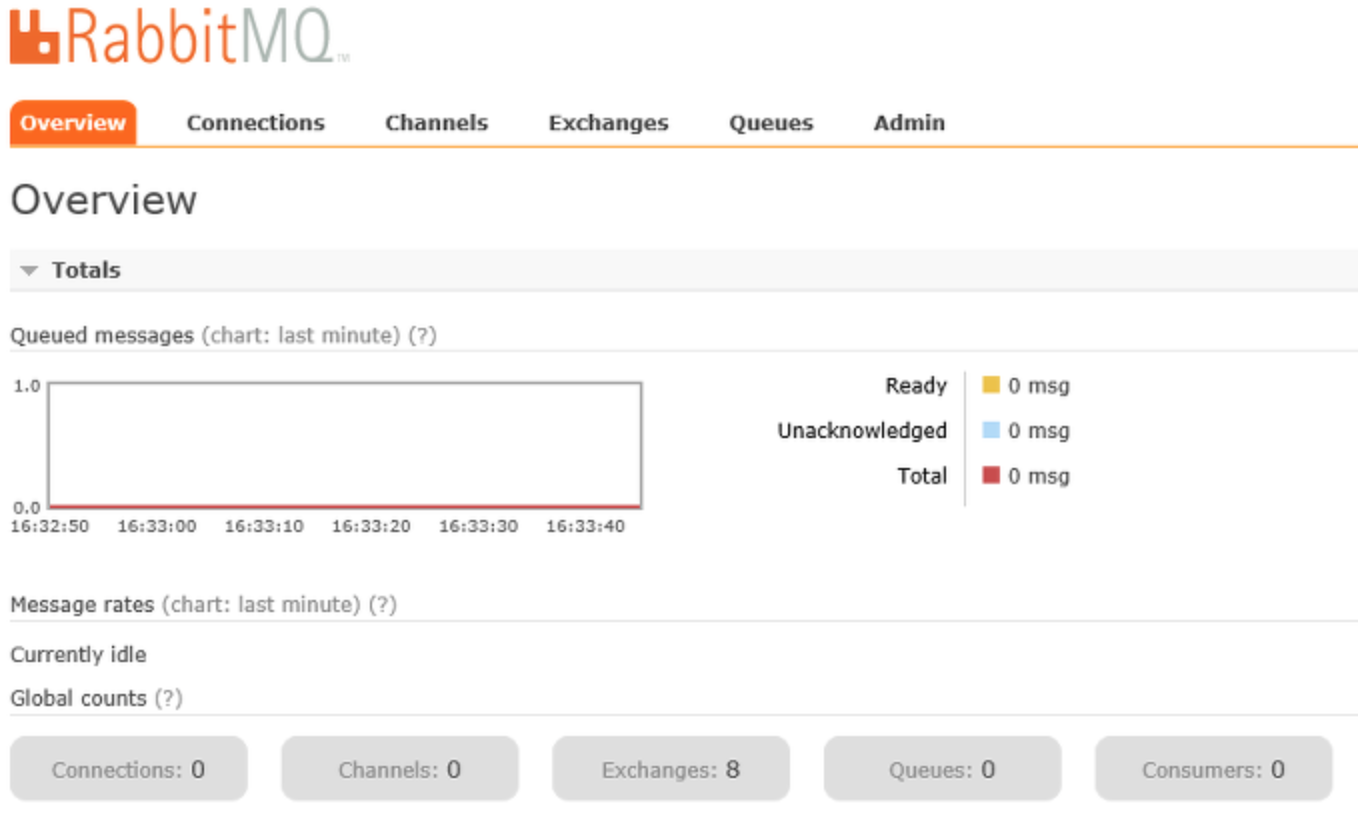 |
| json metadata | {"tags":["kr","rabbitmq","ubunto","iface"],"app":"steemit/0.1","format":"markdown","image":["https://cdn.steemitimages.com/DQmNia1A3vJgjVQabLB18UZUGQbSnSBiY9CLXD5b4iAk21y/image.png"],"links":["http://killins.egloos.com/m/3025514","http://www.rabbitmq.com/debian/","http://www.rabbitmq.com/rabbitmq-signing-key-public.asc","http://serverip:15672/"]} |
| Transaction Info | Block #25853603/Trx 1b6f4264a365c007b16f5d2fb73ad6c23917df74 |
View Raw JSON Data
{
"trx_id": "1b6f4264a365c007b16f5d2fb73ad6c23917df74",
"block": 25853603,
"trx_in_block": 15,
"op_in_trx": 0,
"virtual_op": 0,
"timestamp": "2018-09-11T01:52:27",
"op": [
"comment",
{
"parent_author": "",
"parent_permlink": "kr",
"author": "jaerakson",
"permlink": "2akxbd",
"title": "RabbitMQ 설치하기",
"body": "RabbitMQ 이란?\n---\n RabbitMQ는 표준 AMQP (Advanced Message Queueing Protocol)\n 메세지 브로커 소프트웨어(message broker software) 오픈소스 이며 erlang언어로 개발 되었다\n \n RabbitMQ를 매우 간단하게 편지를 작성하여 받는 사람에게 \n 보낼 우체통(post box)->우체국(post office),->우편배달부(postman)가 있듯, \n 데이터의 바이너리 blobs을 accept, store, forward 시키는 것이다.\n \n RabbitMQ와 같은 Message Queueing은 대용량 데이터를 처리하기 위한 배치 작업이나,\n 체팅 서비스, 비동기 데이터를 처리할때 사용한다. \n\n참고: http://killins.egloos.com/m/3025514\n\n---\n 설치 \n1. ubunto OS\n\n2. 네트웍 설정 (고정 IP, DNS설정) \n vi /etc/network/interfaces \n auto eth0\n #iface eth0 inet dhcp\n iface eth0 inet static\n address 10.0.1.12\n netmask 255.0.0.0\n gateway 10.0.1.1\n\n3. 네트웍 재시작 \n sudo /etc/init.d/networking restart\n\n4. RabbitMQ 리파지토리 추가\n sudo vi /etc/apt/sources.list \n deb http://www.rabbitmq.com/debian/ testing main \n\n5. RabbitMQ의 public key를 ubuntu가 신뢰할 수 있도록 key 등록 \n wget http://www.rabbitmq.com/rabbitmq-signing-key-public.asc \n sudo apt-key add rabbitmq-signing-key-public.asc\n\n6. RabbitMQ 설치\n sudo apt-get install rabbitmq-server \n\n ---\nManagement Plugin 설치\n\n\n 1. Management Plugin 활성화 \n sudo rabbitmq-plugins enable rabbitmq_management\n sudo service rabbitmq-server restart \n\n2. RabbitMQ를 restart \n service rabbitmq-server restart\n\n3. 관리자 계정 추가\n sudo rabbitmqctl add_user rabbitmq password\n sudo rabbitmqctl set_user_tags rabbitmq administrator \n\n4. Management Plugin 접속\n 웹브라우저로 \" http://serverip:15672/ \" 접속\n\n",
"json_metadata": "{\"tags\":[\"kr\",\"rabbitmq\",\"ubunto\",\"iface\"],\"app\":\"steemit/0.1\",\"format\":\"markdown\",\"image\":[\"https://cdn.steemitimages.com/DQmNia1A3vJgjVQabLB18UZUGQbSnSBiY9CLXD5b4iAk21y/image.png\"],\"links\":[\"http://killins.egloos.com/m/3025514\",\"http://www.rabbitmq.com/debian/\",\"http://www.rabbitmq.com/rabbitmq-signing-key-public.asc\",\"http://serverip:15672/\"]}"
}
]
}2018/09/11 01:52:09
2018/09/11 01:52:09
| parent author | |
| parent permlink | kr |
| author | jaerakson |
| permlink | 2akxbd |
| title | RabbitMQ 설치하기 |
| body | RabbitMQ 이란? --- RabbitMQ는 표준 AMQP (Advanced Message Queueing Protocol) 메세지 브로커 소프트웨어(message broker software) 오픈소스 이며 erlang언어로 개발 되었다 RabbitMQ를 매우 간단하게 편지를 작성하여 받는 사람에게 보낼 우체통(post box)->우체국(post office),->우편배달부(postman)가 있듯, 데이터의 바이너리 blobs을 accept, store, forward 시키는 것이다. RabbitMQ와 같은 Message Queueing은 대용량 데이터를 처리하기 위한 배치 작업이나, 체팅 서비스, 비동기 데이터를 처리할때 사용한다. 참고: http://killins.egloos.com/m/3025514 --- 설치 1. ubunto OS 2. 네트웍 설정 (고정 IP, DNS설정) vi /etc/network/interfaces auto eth0 #iface eth0 inet dhcp iface eth0 inet static address 10.0.1.12 netmask 255.0.0.0 gateway 10.0.1.1 3. 네트웍 재시작 sudo /etc/init.d/networking restart 4. RabbitMQ 리파지토리 추가 sudo vi /etc/apt/sources.list deb http://www.rabbitmq.com/debian/ testing main 5. RabbitMQ의 public key를 ubuntu가 신뢰할 수 있도록 key 등록 wget http://www.rabbitmq.com/rabbitmq-signing-key-public.asc sudo apt-key add rabbitmq-signing-key-public.asc 6. RabbitMQ 설치 sudo apt-get install rabbitmq-server --- Management Plugin 설치 1. Management Plugin 활성화 sudo rabbitmq-plugins enable rabbitmq_management sudo service rabbitmq-server restart 2. RabbitMQ를 restart service rabbitmq-server restart 3. 관리자 계정 추가 sudo rabbitmqctl add_user rabbitmq password sudo rabbitmqctl set_user_tags rabbitmq administrator 4. Management Plugin 접속 웹브라우저로 " http://serverip:15672/ " 접속  |
| json metadata | {"tags":["kr","rabbitmq","ubunto","iface"],"app":"steemit/0.1","format":"markdown","image":["https://cdn.steemitimages.com/DQmNia1A3vJgjVQabLB18UZUGQbSnSBiY9CLXD5b4iAk21y/image.png"],"links":["http://killins.egloos.com/m/3025514","http://www.rabbitmq.com/debian/","http://www.rabbitmq.com/rabbitmq-signing-key-public.asc","http://serverip:15672/"]} |
| Transaction Info | Block #25853597/Trx 498a327f309b73633c0bd2e09b141015ff38d068 |
View Raw JSON Data
{
"trx_id": "498a327f309b73633c0bd2e09b141015ff38d068",
"block": 25853597,
"trx_in_block": 20,
"op_in_trx": 0,
"virtual_op": 0,
"timestamp": "2018-09-11T01:52:09",
"op": [
"comment",
{
"parent_author": "",
"parent_permlink": "kr",
"author": "jaerakson",
"permlink": "2akxbd",
"title": "RabbitMQ 설치하기",
"body": "RabbitMQ 이란?\n---\n RabbitMQ는 표준 AMQP (Advanced Message Queueing Protocol)\n 메세지 브로커 소프트웨어(message broker software) 오픈소스 이며 erlang언어로 개발 되었다\n \n RabbitMQ를 매우 간단하게 편지를 작성하여 받는 사람에게 \n 보낼 우체통(post box)->우체국(post office),->우편배달부(postman)가 있듯, \n 데이터의 바이너리 blobs을 accept, store, forward 시키는 것이다.\n \n RabbitMQ와 같은 Message Queueing은 대용량 데이터를 처리하기 위한 배치 작업이나,\n 체팅 서비스, 비동기 데이터를 처리할때 사용한다. \n\n참고: http://killins.egloos.com/m/3025514\n\n---\n 설치 \n1. ubunto OS\n\n2. 네트웍 설정 (고정 IP, DNS설정) \n vi /etc/network/interfaces \n auto eth0\n #iface eth0 inet dhcp\n iface eth0 inet static\n address 10.0.1.12\n netmask 255.0.0.0\n gateway 10.0.1.1\n\n3. 네트웍 재시작 \n sudo /etc/init.d/networking restart\n\n4. RabbitMQ 리파지토리 추가\n sudo vi /etc/apt/sources.list \n deb http://www.rabbitmq.com/debian/ testing main \n\n5. RabbitMQ의 public key를 ubuntu가 신뢰할 수 있도록 key 등록 \n wget http://www.rabbitmq.com/rabbitmq-signing-key-public.asc \n sudo apt-key add rabbitmq-signing-key-public.asc\n\n6. RabbitMQ 설치\n sudo apt-get install rabbitmq-server \n\n ---\nManagement Plugin 설치\n\n\n 1. Management Plugin 활성화 \n sudo rabbitmq-plugins enable rabbitmq_management\n sudo service rabbitmq-server restart \n\n2. RabbitMQ를 restart \n service rabbitmq-server restart\n\n3. 관리자 계정 추가\n sudo rabbitmqctl add_user rabbitmq password\n sudo rabbitmqctl set_user_tags rabbitmq administrator \n\n4. Management Plugin 접속\n 웹브라우저로 \" http://serverip:15672/ \" 접속\n\n",
"json_metadata": "{\"tags\":[\"kr\",\"rabbitmq\",\"ubunto\",\"iface\"],\"app\":\"steemit/0.1\",\"format\":\"markdown\",\"image\":[\"https://cdn.steemitimages.com/DQmNia1A3vJgjVQabLB18UZUGQbSnSBiY9CLXD5b4iAk21y/image.png\"],\"links\":[\"http://killins.egloos.com/m/3025514\",\"http://www.rabbitmq.com/debian/\",\"http://www.rabbitmq.com/rabbitmq-signing-key-public.asc\",\"http://serverip:15672/\"]}"
}
]
}polfildsreplied to @jaerakson / 20180911t011607044z2018/09/11 01:16:06
polfildsreplied to @jaerakson / 20180911t011607044z
2018/09/11 01:16:06
| parent author | jaerakson |
| parent permlink | 2akxbd |
| author | polfilds |
| permlink | 20180911t011607044z |
| title | |
| body | This is bold and neat =) |
| json metadata | {} |
| Transaction Info | Block #25852876/Trx c8152b35c9c8ceb121aa3104a7c4a98945d896e6 |
View Raw JSON Data
{
  "trx_id": "c8152b35c9c8ceb121aa3104a7c4a98945d896e6",
  "block": 25852876,
  "trx_in_block": 24,
  "op_in_trx": 0,
  "virtual_op": 0,
  "timestamp": "2018-09-11T01:16:06",
  "op": [
    "comment",
    {
      "parent_author": "jaerakson",
      "parent_permlink": "2akxbd",
      "author": "polfilds",
      "permlink": "20180911t011607044z",
      "title": "",
      "body": "This is bold and neat =)",
      "json_metadata": "{}"
    }
  ]
}2018/09/11 01:11:00
2018/09/11 01:11:00
| parent author | |
| parent permlink | kr |
| author | jaerakson |
| permlink | 2akxbd |
| title | RabbitMQ 설치하기 |
| body | RabbitMQ 이란? RabbitMQ는 표준 AMQP (Advanced Message Queueing Protocol) 메세지 브로커 소프트웨어(message broker software) 오픈소스 이며 erlang언어로 개발 되었다 AMQP (Advanced Message Queueing Protocol) 란 서로 다른 프로세스나 프로그램 사이에 메시지를 교환할때 사용한다 AMQP를 이용하면 다른 벤더 사이에 메세지를 전송 가능하며 다른 네트워크 상에 데이터 전송하기 위해 octet stream 이란는 포멧을 사용한다. |
| json metadata | {"tags":["kr"],"app":"steemit/0.1","format":"markdown"} |
| Transaction Info | Block #25852774/Trx 29562ae57dede577bfc13d4c4560758ef328695b |
View Raw JSON Data
{
  "trx_id": "29562ae57dede577bfc13d4c4560758ef328695b",
  "block": 25852774,
  "trx_in_block": 22,
  "op_in_trx": 0,
  "virtual_op": 0,
  "timestamp": "2018-09-11T01:11:00",
  "op": [
    "comment",
    {
      "parent_author": "",
      "parent_permlink": "kr",
      "author": "jaerakson",
      "permlink": "2akxbd",
      "title": "RabbitMQ 설치하기",
      "body": "RabbitMQ 이란?\n  RabbitMQ는  표준 AMQP (Advanced Message Queueing Protocol)\n  메세지 브로커 소프트웨어(message broker software) 오픈소스 이며  erlang언어로 개발 되었다\n\n \n\n AMQP (Advanced Message Queueing Protocol) 란\n  서로 다른 프로세스나 프로그램 사이에 메시지를 교환할때 사용한다\n   AMQP를 이용하면 다른 벤더 사이에 메세지를 전송 가능하며  다른 네트워크 상에 데이터 전송하기 위해  \n   octet stream 이란는 포멧을 사용한다.",
      "json_metadata": "{\"tags\":[\"kr\"],\"app\":\"steemit/0.1\",\"format\":\"markdown\"}"
    }
  ]
}raise-me-upupvoted (0.02%) @jaerakson / 2akxbd2018/09/11 01:10:09
raise-me-upupvoted (0.02%) @jaerakson / 2akxbd
2018/09/11 01:10:09
| voter | raise-me-up |
| author | jaerakson |
| permlink | 2akxbd |
| weight | 2 (0.02%) |
| Transaction Info | Block #25852757/Trx e2dec186d6611917e5c4584a31b9ce793fac7b83 |
View Raw JSON Data
{
  "trx_id": "e2dec186d6611917e5c4584a31b9ce793fac7b83",
  "block": 25852757,
  "trx_in_block": 28,
  "op_in_trx": 0,
  "virtual_op": 0,
  "timestamp": "2018-09-11T01:10:09",
  "op": [
    "vote",
    {
      "voter": "raise-me-up",
      "author": "jaerakson",
      "permlink": "2akxbd",
      "weight": 2
    }
  ]
}introduce.botreplied to @jaerakson / introduce-bot-re-jaerakson2akxbd2018/09/11 01:03:24
introduce.botreplied to @jaerakson / introduce-bot-re-jaerakson2akxbd
2018/09/11 01:03:24
| parent author | jaerakson |
| parent permlink | 2akxbd |
| author | introduce.bot |
| permlink | introduce-bot-re-jaerakson2akxbd |
| title | |
| body | @jaerakson, I gave you a vote!<br>If you follow me, I will also follow you in return!<br>Enjoy some !popcorn courtesy of @nextgencrypto! |
| json metadata | |
| Transaction Info | Block #25852622/Trx 3063a6cafb86e1818b275602c2f1781324f99a11 |
View Raw JSON Data
{
  "trx_id": "3063a6cafb86e1818b275602c2f1781324f99a11",
  "block": 25852622,
  "trx_in_block": 9,
  "op_in_trx": 0,
  "virtual_op": 0,
  "timestamp": "2018-09-11T01:03:24",
  "op": [
    "comment",
    {
      "parent_author": "jaerakson",
      "parent_permlink": "2akxbd",
      "author": "introduce.bot",
      "permlink": "introduce-bot-re-jaerakson2akxbd",
      "title": "",
      "body": " @jaerakson, I gave you a vote!<br>If you follow me, I will also follow you in return!<br>Enjoy some !popcorn courtesy of @nextgencrypto!",
      "json_metadata": ""
    }
  ]
}introduce.botupvoted (1.00%) @jaerakson / 2akxbd2018/09/11 01:03:21
introduce.botupvoted (1.00%) @jaerakson / 2akxbd
2018/09/11 01:03:21
| voter | introduce.bot |
| author | jaerakson |
| permlink | 2akxbd |
| weight | 100 (1.00%) |
| Transaction Info | Block #25852621/Trx b9c570a8e5a2f4a0a0eec20689c57bf4c1953732 |
View Raw JSON Data
{
  "trx_id": "b9c570a8e5a2f4a0a0eec20689c57bf4c1953732",
  "block": 25852621,
  "trx_in_block": 37,
  "op_in_trx": 0,
  "virtual_op": 0,
  "timestamp": "2018-09-11T01:03:21",
  "op": [
    "vote",
    {
      "voter": "introduce.bot",
      "author": "jaerakson",
      "permlink": "2akxbd",
      "weight": 100
    }
  ]
}2018/09/11 01:03:18
2018/09/11 01:03:18
| parent author | |
| parent permlink | kr |
| author | jaerakson |
| permlink | 2akxbd |
| title | ㅁㅇㄹㄴㅁ |
| body | ㅁㅇㄹㅁㄴㄹㅁㄴ |
| json metadata | {"tags":["kr"],"app":"steemit/0.1","format":"markdown"} |
| Transaction Info | Block #25852620/Trx 3cdcb79ec40cd26e2ce73db2a972752f2349720c |
View Raw JSON Data
{
  "trx_id": "3cdcb79ec40cd26e2ce73db2a972752f2349720c",
  "block": 25852620,
  "trx_in_block": 33,
  "op_in_trx": 0,
  "virtual_op": 0,
  "timestamp": "2018-09-11T01:03:18",
  "op": [
    "comment",
    {
      "parent_author": "",
      "parent_permlink": "kr",
      "author": "jaerakson",
      "permlink": "2akxbd",
      "title": "ㅁㅇㄹㄴㅁ",
      "body": "ㅁㅇㄹㅁㄴㄹㅁㄴ",
      "json_metadata": "{\"tags\":[\"kr\"],\"app\":\"steemit/0.1\",\"format\":\"markdown\"}"
    }
  ]
}2018/09/10 10:43:42
2018/09/10 10:43:42
| parent author | eversloth |
| parent permlink | re-jaerakson-2egtas-20180831t085256763z |
| author | jaerakson |
| permlink | re-eversloth-re-jaerakson-2egtas-20180910t104342470z |
| title | |
| body | 감사합니다. ~ |
| json metadata | {"tags":["redis"],"app":"steemit/0.1"} |
| Transaction Info | Block #25835435/Trx 51f58ed177c65148977df4a2c756ec6cc9188388 |
View Raw JSON Data
{
  "trx_id": "51f58ed177c65148977df4a2c756ec6cc9188388",
  "block": 25835435,
  "trx_in_block": 15,
  "op_in_trx": 0,
  "virtual_op": 0,
  "timestamp": "2018-09-10T10:43:42",
  "op": [
    "comment",
    {
      "parent_author": "eversloth",
      "parent_permlink": "re-jaerakson-2egtas-20180831t085256763z",
      "author": "jaerakson",
      "permlink": "re-eversloth-re-jaerakson-2egtas-20180910t104342470z",
      "title": "",
      "body": "감사합니다. ~",
      "json_metadata": "{\"tags\":[\"redis\"],\"app\":\"steemit/0.1\"}"
    }
  ]
}jaeraksonpublished a new post: mysql-container-volume-docker-volume2018/09/10 10:43:06
jaeraksonpublished a new post: mysql-container-volume-docker-volume
2018/09/10 10:43:06
| parent author | |
| parent permlink | mysql |
| author | jaerakson |
| permlink | mysql-container-volume-docker-volume |
| title | Mysql Container Volume 통해 Docker Volume을 이해 해보자 |
| body | Mysql Container Volume 통해 Docker Volume을 이해 해보자 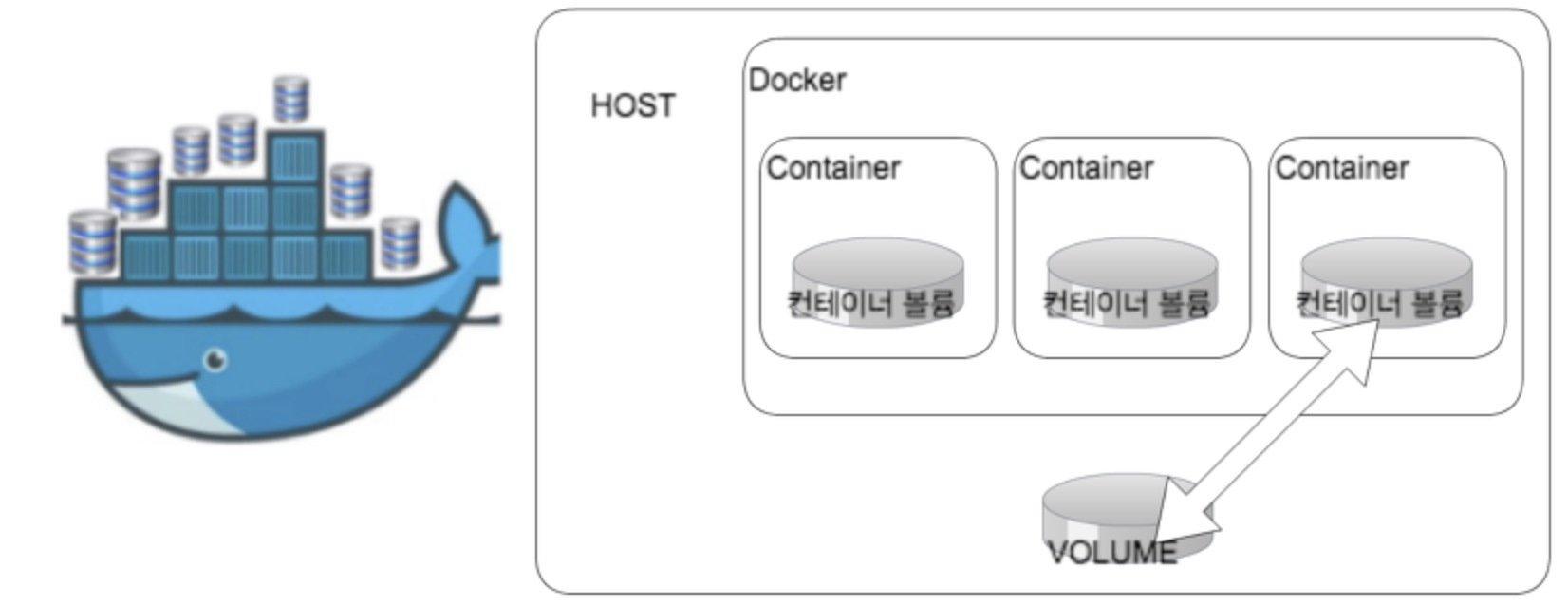 도커 볼륨은 아래의 4가지 테스트를 통해 이해 해보자 1. Mysql Container 존재 할 경우 Volume 삭제 되지 않음 2. Mysql Container 삭제 해도 Volume 삭제 되지 않음 3. 불륨은 강제로 삭제 할 수 있다. ($ docker volume prune) 4. 생성된 볼륨을 다른 Container 연결 할 수 있다 2번의 내용으로 알수 있는 사실은 mysql 컨테이너 삭제 하더라도 mysql 컨테이너의 볼륨은 삭제 되지 않았기 때문에 mysql 컨테이너 생성시 볼륨정보만 알면 복원 가능하다. docker run -d -it --name mysql2 -p 5306:3306 -v /var/lib/docker/volumes/ce7a46c577197d33d12bbee41cffda7322f9faff551a37675af240c296036134/_data/:/var/lib/mysql mysql 아래의 내용 테스트 결과 입니다. mysql Container 생성 $ docker run -d --name mysql -p 3306:3306 -e MYSQL_ROOT_PASSWORD="1111" mysql Mysql Container volume 정보 $ docker inspect -f '{{ .Mounts }}' mysql [{bind /var/lib/docker/volumes/ce7a46c577197d33d12bbee41cffda7322f9faff551a37675af240c296036134/_data /var/lib/mysql true }] $ docker inspect mysql "Mounts": [ { "Type": "volume", "Name": "ce7a46c577197d33d12bbee41cffda7322f9faff551a37675af240c296036134", "Source": "/var/lib/docker/volumes/ce7a46c577197d33d12bbee41cffda7322f9faff551a37675af240c296036134/_data", "Destination": "/var/lib/mysql", "Driver": "local", "Mode": "", "RW": true, "Propagation": "" Docker Volume List $ docker volume ls DRIVER VOLUME NAME local 1d682128cd7dcf4425c327a3374a4a0b298f3bca3a0c13366245a0f03ecc1a4b local ce7a46c577197d33d12bbee41cffda7322f9faff551a37675af240c296036134 Mysql Container Volume 삭제 $ docker volume rm ce7a46c577197d33d12bbee41cffda7322f9faff551a37675af240c296036134 Error response from daemon: unable to remove volume: remove ce7a46c577197d33d12bbee41cffda7322f9faff551a37675af240c296036134: volume is in use - [5659f4b24372dc10852712f233eadb7f8d02c7cf2e92fd22a378366a8877bc48] * Mysql Container 존재 할 경우 Volume 삭제 되지 않음 mysql Container 삭제 $ docker stop mysql && docker rm mysql Docker Volume List $ docker volume ls DRIVER VOLUME NAME local 1d682128cd7dcf4425c327a3374a4a0b298f3bca3a0c13366245a0f03ecc1a4b local 91f69c085881c2093ff25cebb389295758813c94332ded256396b0182c004133 local ce7a46c577197d33d12bbee41cffda7322f9faff551a37675af240c296036134 local e8ae5983fafb5b1965d8da6ff350a876344cffed8cc8091e917ee48c0e557a59 * Mysql Container 삭제 해도 Volume 삭제 되지 않음 즉 새로은 Mysql Container 생성후 Volume Mount하게되면 데이터 복원 된다. Mysql Container Volume 삭제 $ docker volume rm ce7a46c577197d33d12bbee41cffda7322f9faff551a37675af240c296036134 ce7a46c577197d33d12bbee41cffda7322f9faff551a37675af240c296036134 * Mysql Container 없을 경우 Volume 삭제 된다 Docker Volume 전체 제거 ( 하지 말아야 할 작업 ) $ docker volume prune WARNING! This will remove all volumes not used by at least one container. Are you sure you want to continue? [y/N] y 생성된 볼륨을 다른 Container 연결 mysql container 생성 $ docker run -d --name mysql -p 3306:3306 -e MYSQL_ROOT_PASSWORD="1111" mysql mysql container volume 정보 확인 $ docker inspect -f '{{.Mounts}}' mysql [{volume f64faeae7dd1dc5c93d857c27655426d87bdebcd0698081181058f9f03f2907c /var/lib/docker/volumes/f64faeae7dd1dc5c93d857c27655426d87bdebcd0698081181058f9f03f2907c/_data /var/lib/mysql local true }] mysql 데이터 생성 $ docker exec -it mysql /bin/bash root@7f12f68de19f:/# mysql -uroot -p Enter password: Welcome to the MySQL monitor. Commands end with ; or \g. Your MySQL connection id is 3 Server version: 5.7.18 MySQL Community Server (GPL) Copyright (c) 2000, 2017, Oracle and/or its affiliates. All rights reserved. Oracle is a registered trademark of Oracle Corporation and/or its affiliates. Other names may be trademarks of their respective owners. Type 'help;' or '\h' for help. Type '\c' to clear the current input statement. mysql> create database dockertest ; Query OK, 1 row affected (0.00 sec) mysql> use dockertest Database changed mysql> create table tb_1 (i int ,j int); Query OK, 0 rows affected (0.21 sec) mysql> insert into tb_1 (i,j) values (1,1),(1,2),(1,3); Query OK, 3 rows affected (0.07 sec) Records: 3 Duplicates: 0 Warnings: 0 mysql> select * from tb_1; +------+------+ | i | j | +------+------+ | 1 | 1 | | 1 | 2 | | 1 | 3 | +------+------+ 3 rows in set (0.00 sec) mysql> exit Bye root@7f12f68de19f:/# exit exit mysql container 중단 $ docker stop mysql new mysql (mysql2) container 생성 및 기존 volume 연결 $ docker run -d -it --name mysql2 -p 5306:3306 -v /var/lib/docker/volumes/f64faeae7dd1dc5c93d857c27655426d87bdebcd0698081181058f9f03f2907c/_data/:/var/lib/mysql mysql 54bf3e449943f230a6928b1a0a698d44ca50429d90ea7d2cf0777260ae5db74b mysql2 container DB 데이터 확인 $ docker exec -it mysql2 /bin/bash root@54bf3e449943:/# mysql -uroot -p Enter password: Welcome to the MySQL monitor. Commands end with ; or \g. Your MySQL connection id is 3 Server version: 5.7.18 MySQL Community Server (GPL) Copyright (c) 2000, 2017, Oracle and/or its affiliates. All rights reserved. Oracle is a registered trademark of Oracle Corporation and/or its affiliates. Other names may be trademarks of their respective owners. Type 'help;' or '\h' for help. Type '\c' to clear the current input statement. mysql> show databases; +--------------------+ | Database | +--------------------+ | information_schema | | dockertest | | mysql | | performance_schema | | sys | +--------------------+ 5 rows in set (0.00 sec) mysql> use dockertest; Reading table information for completion of table and column names You can turn off this feature to get a quicker startup with -A Database changed mysql> select * from tb_1; +------+------+ | i | j | +------+------+ | 1 | 1 | | 1 | 2 | | 1 | 3 | +------+------+ 3 rows in set (0.00 sec) mysql> exit Bye root@54bf3e449943:/# exit exit Mysql ,Mysql2 Container volume 정보 (volume경로 동일하다) $ docker inspect -f '{{.Mounts}}' mysql [{volume f64faeae7dd1dc5c93d857c27655426d87bdebcd0698081181058f9f03f2907c /var/lib/docker/volumes/f64faeae7dd1dc5c93d857c27655426d87bdebcd0698081181058f9f03f2907c/_data /var/lib/mysql local true }] $ docker inspect -f '{{.Mounts}}' mysql2 [{bind /var/lib/docker/volumes/f64faeae7dd1dc5c93d857c27655426d87bdebcd0698081181058f9f03f2907c/_data /var/lib/mysql true }] |
| json metadata | {"tags":["kr","mysql","docker","volume"],"app":"steemit/0.1","format":"markdown","image":["https://cdn.steemitimages.com/DQmYZhw8e6NthfPH9SQpaaWT2cHPB1MT86QHvtMXkVpZt1c/Docker%E1%84%87%E1%85%A9%E1%86%AF%E1%84%85%E1%85%B2%E1%86%B7.jpg"]} |
| Transaction Info | Block #25835423/Trx 997b035da2dce6ca061c3e0ac3c96f53f44de9e0 |
View Raw JSON Data
{
"trx_id": "997b035da2dce6ca061c3e0ac3c96f53f44de9e0",
"block": 25835423,
"trx_in_block": 6,
"op_in_trx": 0,
"virtual_op": 0,
"timestamp": "2018-09-10T10:43:06",
"op": [
"comment",
{
"parent_author": "",
"parent_permlink": "mysql",
"author": "jaerakson",
"permlink": "mysql-container-volume-docker-volume",
"title": "Mysql Container Volume 통해 Docker Volume을 이해 해보자",
"body": "Mysql Container Volume 통해 Docker Volume을 이해 해보자 \n\n\n\n도커 볼륨은 아래의 4가지 테스트를 통해 이해 해보자 \n\n1. Mysql Container 존재 할 경우 Volume 삭제 되지 않음 \n2. Mysql Container 삭제 해도 Volume 삭제 되지 않음 \n3. 불륨은 강제로 삭제 할 수 있다. ($ docker volume prune)\n4. 생성된 볼륨을 다른 Container 연결 할 수 있다\n\n2번의 내용으로 알수 있는 사실은 \nmysql 컨테이너 삭제 하더라도 \nmysql 컨테이너의 볼륨은 삭제 되지 않았기 때문에 \nmysql 컨테이너 생성시 볼륨정보만 알면 복원 가능하다. \ndocker run -d -it --name mysql2 -p 5306:3306 -v /var/lib/docker/volumes/ce7a46c577197d33d12bbee41cffda7322f9faff551a37675af240c296036134/_data/:/var/lib/mysql mysql\n\n\n아래의 내용 테스트 결과 입니다. \n\nmysql Container 생성 \n\n$ docker run -d --name mysql -p 3306:3306 -e MYSQL_ROOT_PASSWORD=\"1111\" mysql \n\nMysql Container volume 정보 \n\n$ docker inspect -f '{{ .Mounts }}' mysql\n\n[{bind /var/lib/docker/volumes/ce7a46c577197d33d12bbee41cffda7322f9faff551a37675af240c296036134/_data \n/var/lib/mysql true }]\n\n$ docker inspect mysql \n\n \"Mounts\": [\n {\n \"Type\": \"volume\",\n \"Name\": \"ce7a46c577197d33d12bbee41cffda7322f9faff551a37675af240c296036134\",\n \"Source\": \"/var/lib/docker/volumes/ce7a46c577197d33d12bbee41cffda7322f9faff551a37675af240c296036134/_data\",\n \"Destination\": \"/var/lib/mysql\",\n \"Driver\": \"local\",\n \"Mode\": \"\",\n \"RW\": true,\n \"Propagation\": \"\"\nDocker Volume List \n\n$ docker volume ls \n\nDRIVER VOLUME NAME\nlocal 1d682128cd7dcf4425c327a3374a4a0b298f3bca3a0c13366245a0f03ecc1a4b \nlocal ce7a46c577197d33d12bbee41cffda7322f9faff551a37675af240c296036134\n\n\nMysql Container Volume 삭제 \n\n$ docker volume rm ce7a46c577197d33d12bbee41cffda7322f9faff551a37675af240c296036134\n\nError response from daemon: unable to remove volume: remove ce7a46c577197d33d12bbee41cffda7322f9faff551a37675af240c296036134: volume is in use - [5659f4b24372dc10852712f233eadb7f8d02c7cf2e92fd22a378366a8877bc48]\n\n* Mysql Container 존재 할 경우 Volume 삭제 되지 않음 \n\nmysql Container 삭제 \n\n$ docker stop mysql && docker rm mysql\n\n \nDocker Volume List \n\n$ docker volume ls\n\nDRIVER VOLUME NAME\nlocal 1d682128cd7dcf4425c327a3374a4a0b298f3bca3a0c13366245a0f03ecc1a4b\nlocal 91f69c085881c2093ff25cebb389295758813c94332ded256396b0182c004133\nlocal ce7a46c577197d33d12bbee41cffda7322f9faff551a37675af240c296036134\nlocal e8ae5983fafb5b1965d8da6ff350a876344cffed8cc8091e917ee48c0e557a59\n\n * Mysql Container 삭제 해도 Volume 삭제 되지 않음 \n즉 새로은 Mysql Container 생성후 Volume Mount하게되면 데이터 복원 된다.\n\n\nMysql Container Volume 삭제 \n\n$ docker volume rm ce7a46c577197d33d12bbee41cffda7322f9faff551a37675af240c296036134\n\nce7a46c577197d33d12bbee41cffda7322f9faff551a37675af240c296036134\n\n* Mysql Container 없을 경우 Volume 삭제 된다\n\nDocker Volume 전체 제거 ( 하지 말아야 할 작업 ) \n\n$ docker volume prune\n\nWARNING! This will remove all volumes not used by at least one container.\nAre you sure you want to continue? [y/N] y\n\n\n생성된 볼륨을 다른 Container 연결\n\n\nmysql container 생성 \n\n$ docker run -d --name mysql -p 3306:3306 -e MYSQL_ROOT_PASSWORD=\"1111\" mysql \n\nmysql container volume 정보 확인 \n\n$ docker inspect -f '{{.Mounts}}' mysql\n\n[{volume f64faeae7dd1dc5c93d857c27655426d87bdebcd0698081181058f9f03f2907c /var/lib/docker/volumes/f64faeae7dd1dc5c93d857c27655426d87bdebcd0698081181058f9f03f2907c/_data /var/lib/mysql local true }]\n\nmysql 데이터 생성 \n\n$ docker exec -it mysql /bin/bash\n\nroot@7f12f68de19f:/# mysql -uroot -p\nEnter password:\nWelcome to the MySQL monitor. Commands end with ; or \\g.\nYour MySQL connection id is 3\nServer version: 5.7.18 MySQL Community Server (GPL)\n\nCopyright (c) 2000, 2017, Oracle and/or its affiliates. All rights reserved.\n\nOracle is a registered trademark of Oracle Corporation and/or its\naffiliates. Other names may be trademarks of their respective\nowners.\n\nType 'help;' or '\\h' for help. Type '\\c' to clear the current input statement.\n\nmysql> create database dockertest ;\nQuery OK, 1 row affected (0.00 sec)\n\nmysql> use dockertest\nDatabase changed\nmysql> create table tb_1 (i int ,j int);\nQuery OK, 0 rows affected (0.21 sec)\n\nmysql> insert into tb_1 (i,j) values (1,1),(1,2),(1,3);\nQuery OK, 3 rows affected (0.07 sec)\nRecords: 3 Duplicates: 0 Warnings: 0\n\nmysql> select * from tb_1;\n+------+------+\n| i | j |\n+------+------+\n| 1 | 1 |\n| 1 | 2 |\n| 1 | 3 |\n+------+------+\n3 rows in set (0.00 sec)\n \n\nmysql> exit\nBye\nroot@7f12f68de19f:/# exit\nexit\n\nmysql container 중단 \n\n$ docker stop mysql\n\n\n\nnew mysql (mysql2) container 생성 및 기존 volume 연결 \n\n$ docker run -d -it --name mysql2 -p 5306:3306 -v /var/lib/docker/volumes/f64faeae7dd1dc5c93d857c27655426d87bdebcd0698081181058f9f03f2907c/_data/:/var/lib/mysql mysql \n\n54bf3e449943f230a6928b1a0a698d44ca50429d90ea7d2cf0777260ae5db74b\n\nmysql2 container DB 데이터 확인 \n\n$ docker exec -it mysql2 /bin/bash\n\nroot@54bf3e449943:/# mysql -uroot -p\nEnter password: \nWelcome to the MySQL monitor. Commands end with ; or \\g.\nYour MySQL connection id is 3\nServer version: 5.7.18 MySQL Community Server (GPL)\n\nCopyright (c) 2000, 2017, Oracle and/or its affiliates. All rights reserved.\n\nOracle is a registered trademark of Oracle Corporation and/or its\naffiliates. Other names may be trademarks of their respective\nowners.\n\nType 'help;' or '\\h' for help. Type '\\c' to clear the current input statement.\n\nmysql> show databases;\n+--------------------+\n| Database |\n+--------------------+\n| information_schema |\n| dockertest |\n| mysql |\n| performance_schema |\n| sys |\n+--------------------+\n5 rows in set (0.00 sec)\n\nmysql> use dockertest;\nReading table information for completion of table and column names\nYou can turn off this feature to get a quicker startup with -A\n\nDatabase changed\nmysql> select * from tb_1;\n+------+------+\n| i | j |\n+------+------+\n| 1 | 1 |\n| 1 | 2 |\n| 1 | 3 |\n+------+------+\n3 rows in set (0.00 sec)\n\nmysql> exit\nBye\nroot@54bf3e449943:/# exit\nexit\n\n\nMysql ,Mysql2 Container volume 정보 (volume경로 동일하다) \n\n$ docker inspect -f '{{.Mounts}}' mysql\n\n[{volume f64faeae7dd1dc5c93d857c27655426d87bdebcd0698081181058f9f03f2907c /var/lib/docker/volumes/f64faeae7dd1dc5c93d857c27655426d87bdebcd0698081181058f9f03f2907c/_data /var/lib/mysql local true }]\n \n$ docker inspect -f '{{.Mounts}}' mysql2\n\n[{bind /var/lib/docker/volumes/f64faeae7dd1dc5c93d857c27655426d87bdebcd0698081181058f9f03f2907c/_data /var/lib/mysql true }]",
"json_metadata": "{\"tags\":[\"kr\",\"mysql\",\"docker\",\"volume\"],\"app\":\"steemit/0.1\",\"format\":\"markdown\",\"image\":[\"https://cdn.steemitimages.com/DQmYZhw8e6NthfPH9SQpaaWT2cHPB1MT86QHvtMXkVpZt1c/Docker%E1%84%87%E1%85%A9%E1%86%AF%E1%84%85%E1%85%B2%E1%86%B7.jpg\"]}"
}
]
}jaeraksonclaimed reward balance: 0.042 STEEM, 0.052 SP2018/09/10 10:42:21
jaeraksonclaimed reward balance: 0.042 STEEM, 0.052 SP
2018/09/10 10:42:21
| account | jaerakson |
| reward steem | 0.042 STEEM |
| reward sbd | 0.000 SBD |
| reward vests | 84.979748 VESTS |
| Transaction Info | Block #25835408/Trx 712a7667026f57b90856ae026bff2b0dfee452f8 |
View Raw JSON Data
{
  "trx_id": "712a7667026f57b90856ae026bff2b0dfee452f8",
  "block": 25835408,
  "trx_in_block": 10,
  "op_in_trx": 0,
  "virtual_op": 0,
  "timestamp": "2018-09-10T10:42:21",
  "op": [
    "claim_reward_balance",
    {
      "account": "jaerakson",
      "reward_steem": "0.042 STEEM",
      "reward_sbd": "0.000 SBD",
      "reward_vests": "84.979748 VESTS"
    }
  ]
}jaeraksonupvoted (100.00%) @eversloth / re-jaerakson-2egtas-20180831t085256763z2018/09/10 10:40:12
jaeraksonupvoted (100.00%) @eversloth / re-jaerakson-2egtas-20180831t085256763z
2018/09/10 10:40:12
| voter | jaerakson |
| author | eversloth |
| permlink | re-jaerakson-2egtas-20180831t085256763z |
| weight | 10000 (100.00%) |
| Transaction Info | Block #25835365/Trx 4a92a1eb0bebd1f427de6a08378339bb480df954 |
View Raw JSON Data
{
  "trx_id": "4a92a1eb0bebd1f427de6a08378339bb480df954",
  "block": 25835365,
  "trx_in_block": 0,
  "op_in_trx": 0,
  "virtual_op": 0,
  "timestamp": "2018-09-10T10:40:12",
  "op": [
    "vote",
    {
      "voter": "jaerakson",
      "author": "eversloth",
      "permlink": "re-jaerakson-2egtas-20180831t085256763z",
      "weight": 10000
    }
  ]
}jaeraksonreceived 0.010 STEEM, 0.012 SP author reward for @jaerakson / 2egtas2018/09/06 02:42:24
jaeraksonreceived 0.010 STEEM, 0.012 SP author reward for @jaerakson / 2egtas
2018/09/06 02:42:24
| author | jaerakson |
| permlink | 2egtas |
| sbd payout | 0.000 SBD |
| steem payout | 0.010 STEEM |
| vesting payout | 20.228369 VESTS |
| Transaction Info | Block #25710645/Virtual Operation #10 |
View Raw JSON Data
{
  "trx_id": "0000000000000000000000000000000000000000",
  "block": 25710645,
  "trx_in_block": 4294967295,
  "op_in_trx": 0,
  "virtual_op": 10,
  "timestamp": "2018-09-06T02:42:24",
  "op": [
    "author_reward",
    {
      "author": "jaerakson",
      "permlink": "2egtas",
      "sbd_payout": "0.000 SBD",
      "steem_payout": "0.010 STEEM",
      "vesting_payout": "20.228369 VESTS"
    }
  ]
}tinker-bellsent 0.001 STEEM to @jaerakson- "축하드립니다. [십시일반] 1. 두레 나눔 (보팅, 스팀달러 나눔) - 2018.08.24 (2차)(특별보상)"2018/09/02 07:20:36
tinker-bellsent 0.001 STEEM to @jaerakson- "축하드립니다. [십시일반] 1. 두레 나눔 (보팅, 스팀달러 나눔) - 2018.08.24 (2차)(특별보상)"
2018/09/02 07:20:36
| from | tinker-bell |
| to | jaerakson |
| amount | 0.001 STEEM |
| memo | 축하드립니다. [십시일반] 1. 두레 나눔 (보팅, 스팀달러 나눔) - 2018.08.24 (2차)(특별보상) |
| Transaction Info | Block #25601092/Trx 6830fde26985a2557aa1656b1dc7f0772e6575b5 |
View Raw JSON Data
{
  "trx_id": "6830fde26985a2557aa1656b1dc7f0772e6575b5",
  "block": 25601092,
  "trx_in_block": 17,
  "op_in_trx": 0,
  "virtual_op": 0,
  "timestamp": "2018-09-02T07:20:36",
  "op": [
    "transfer",
    {
      "from": "tinker-bell",
      "to": "jaerakson",
      "amount": "0.001 STEEM",
      "memo": "축하드립니다. [십시일반] 1. 두레 나눔 (보팅, 스팀달러 나눔) - 2018.08.24 (2차)(특별보상)"
    }
  ]
}2018/08/31 08:52:57
2018/08/31 08:52:57
| parent author | jaerakson |
| parent permlink | 2egtas |
| author | eversloth |
| permlink | re-jaerakson-2egtas-20180831t085256763z |
| title | |
| body | 마지막 스크립트 서식이 깨져있네요 ㅎㅎ #kr 태그를 달지 않으시면 한국어 사용자에게 글이 잘 노출되지 않습니다. 스팀잇에 익숙해지실 때까지 #kr-newbie 태그를 사용하시는 것을 추천드립니다. 하루에 한 번 #jjangjjangman 태그를 다시면 좋은 분이 오셔서 보팅을 해 주실겁니다. #kr 커뮤니티에서 사용하는 태그 목록은 [@myfan 님의 태그 정리글](https://steemit.com/kr/@myfan/5-7)에서 확인하실 수 있습니다. [이지스팀잇 가이드북](https://steemit.com/kr/@easysteemit/3s7jfa-pdf) 을 보시면 앞으로 스팀잇 활동하시는데 도움이 되실겁니다. |
| json metadata | {"tags":["redis","kr","kr-newbie","jjangjjangman"],"links":["https://steemit.com/kr/@myfan/5-7","https://steemit.com/kr/@easysteemit/3s7jfa-pdf"],"app":"steemit/0.1"} |
| Transaction Info | Block #25545363/Trx b7419bb49537ccdafa99fe7915f220685441abe2 |
View Raw JSON Data
{
  "trx_id": "b7419bb49537ccdafa99fe7915f220685441abe2",
  "block": 25545363,
  "trx_in_block": 20,
  "op_in_trx": 0,
  "virtual_op": 0,
  "timestamp": "2018-08-31T08:52:57",
  "op": [
    "comment",
    {
      "parent_author": "jaerakson",
      "parent_permlink": "2egtas",
      "author": "eversloth",
      "permlink": "re-jaerakson-2egtas-20180831t085256763z",
      "title": "",
      "body": "마지막 스크립트 서식이 깨져있네요 ㅎㅎ\n\n\n#kr 태그를 달지 않으시면 한국어 사용자에게 글이 잘 노출되지 않습니다. \n스팀잇에 익숙해지실 때까지 #kr-newbie 태그를 사용하시는 것을 추천드립니다.\n하루에 한 번 #jjangjjangman 태그를 다시면 좋은 분이 오셔서 보팅을 해 주실겁니다. \n#kr 커뮤니티에서 사용하는 태그 목록은 [@myfan 님의 태그 정리글](https://steemit.com/kr/@myfan/5-7)에서 확인하실 수 있습니다.\n\n[이지스팀잇 가이드북](https://steemit.com/kr/@easysteemit/3s7jfa-pdf) 을 보시면 앞으로 스팀잇 활동하시는데 도움이 되실겁니다.",
      "json_metadata": "{\"tags\":[\"redis\",\"kr\",\"kr-newbie\",\"jjangjjangman\"],\"links\":[\"https://steemit.com/kr/@myfan/5-7\",\"https://steemit.com/kr/@easysteemit/3s7jfa-pdf\"],\"app\":\"steemit/0.1\"}"
    }
  ]
}everslothupvoted (10.00%) @jaerakson / 2egtas2018/08/31 08:52:39
everslothupvoted (10.00%) @jaerakson / 2egtas
2018/08/31 08:52:39
| voter | eversloth |
| author | jaerakson |
| permlink | 2egtas |
| weight | 1000 (10.00%) |
| Transaction Info | Block #25545357/Trx e883fab0070c913b9e4f918d79a03362a6d45373 |
View Raw JSON Data
{
  "trx_id": "e883fab0070c913b9e4f918d79a03362a6d45373",
  "block": 25545357,
  "trx_in_block": 2,
  "op_in_trx": 0,
  "virtual_op": 0,
  "timestamp": "2018-08-31T08:52:39",
  "op": [
    "vote",
    {
      "voter": "eversloth",
      "author": "jaerakson",
      "permlink": "2egtas",
      "weight": 1000
    }
  ]
}jaeraksonreceived 0.032 STEEM, 0.040 SP author reward for @jaerakson / redis-backlog-test2018/08/31 03:29:27
jaeraksonreceived 0.032 STEEM, 0.040 SP author reward for @jaerakson / redis-backlog-test
2018/08/31 03:29:27
| author | jaerakson |
| permlink | redis-backlog-test |
| sbd payout | 0.000 SBD |
| steem payout | 0.032 STEEM |
| vesting payout | 64.751379 VESTS |
| Transaction Info | Block #25538894/Virtual Operation #9 |
View Raw JSON Data
{
  "trx_id": "0000000000000000000000000000000000000000",
  "block": 25538894,
  "trx_in_block": 4294967295,
  "op_in_trx": 0,
  "virtual_op": 9,
  "timestamp": "2018-08-31T03:29:27",
  "op": [
    "author_reward",
    {
      "author": "jaerakson",
      "permlink": "redis-backlog-test",
      "sbd_payout": "0.000 SBD",
      "steem_payout": "0.032 STEEM",
      "vesting_payout": "64.751379 VESTS"
    }
  ]
}2018/08/30 02:45:57
2018/08/30 02:45:57
| parent author | |
| parent permlink | redis |
| author | jaerakson |
| permlink | 2egtas |
| title | 레디스 프로세스 멀티 실행 |
| body | @@ -3556,19 +3556,22 @@ %0A %0A -%0A%0A%0A +------ %0Afor por |
| json metadata | {"tags":["redis","bash","mutilredis"],"app":"steemit/0.1","format":"markdown"} |
| Transaction Info | Block #25509241/Trx ab07bf6ff4e6d64cb1e1666aa2bbe277e04d3bf4 |
View Raw JSON Data
{
  "trx_id": "ab07bf6ff4e6d64cb1e1666aa2bbe277e04d3bf4",
  "block": 25509241,
  "trx_in_block": 8,
  "op_in_trx": 0,
  "virtual_op": 0,
  "timestamp": "2018-08-30T02:45:57",
  "op": [
    "comment",
    {
      "parent_author": "",
      "parent_permlink": "redis",
      "author": "jaerakson",
      "permlink": "2egtas",
      "title": "레디스 프로세스 멀티 실행",
      "body": "@@ -3556,19 +3556,22 @@\n %0A      %0A\n-%0A%0A%0A\n+------\n %0Afor por\n",
      "json_metadata": "{\"tags\":[\"redis\",\"bash\",\"mutilredis\"],\"app\":\"steemit/0.1\",\"format\":\"markdown\"}"
    }
  ]
}hackerzizonupvoted (1.00%) @jaerakson / 2egtas2018/08/30 02:45:48
hackerzizonupvoted (1.00%) @jaerakson / 2egtas
2018/08/30 02:45:48
| voter | hackerzizon |
| author | jaerakson |
| permlink | 2egtas |
| weight | 100 (1.00%) |
| Transaction Info | Block #25509238/Trx 407aac6609a2be648df2d5e52e389dff3be3850e |
View Raw JSON Data
{
  "trx_id": "407aac6609a2be648df2d5e52e389dff3be3850e",
  "block": 25509238,
  "trx_in_block": 14,
  "op_in_trx": 0,
  "virtual_op": 0,
  "timestamp": "2018-08-30T02:45:48",
  "op": [
    "vote",
    {
      "voter": "hackerzizon",
      "author": "jaerakson",
      "permlink": "2egtas",
      "weight": 100
    }
  ]
}2018/08/30 02:44:48
2018/08/30 02:44:48
| parent author | |
| parent permlink | redis |
| author | jaerakson |
| permlink | 2egtas |
| title | 레디스 프로세스 멀티 실행 |
| body | @@ -85,16 +85,17 @@ %EC%8A%B5%EB%8B%88%EB%8B%A4. %0A%0A%0A +%09 1. %EB%A0%88%EB%94%94%EC%8A%A4 %EC%84%A4 @@ -97,16 +97,17 @@ %EB%A0%88%EB%94%94%EC%8A%A4 %EC%84%A4%EC%B9%98 %0A +%09 2. %EB%A0%88%EB%94%94%EC%8A%A4 %EC%84%A4 @@ -131,11 +131,11 @@ %EB%A1%9D) %0A +%09 3. - %EB%A0%88%EB%94%94%EC%8A%A4 @@ -160,17 +160,61 @@ RDB%EC%83%9D%EC%84%B1 %0A -%0A +%094. %EB%A0%88%EB%94%94%EC%8A%A4%EB%AA%A9%EB%A1%9D %ED%8C%8C%EC%9D%BC %EB%82%B4%EC%9A%A9%EC%9D%84 redis start ,stop ,%EC%A0%91%EC%86%8D %0A%0A--- %0A%0ARedis @@ -3560,17 +3560,16 @@ %0A%0A%0A%0A%0A - for port |
| json metadata | {"tags":["redis","bash","mutilredis"],"app":"steemit/0.1","format":"markdown"} |
| Transaction Info | Block #25509218/Trx 69d1d077f764a055ccfd3f7e5c57cc8849982105 |
View Raw JSON Data
{
  "trx_id": "69d1d077f764a055ccfd3f7e5c57cc8849982105",
  "block": 25509218,
  "trx_in_block": 18,
  "op_in_trx": 0,
  "virtual_op": 0,
  "timestamp": "2018-08-30T02:44:48",
  "op": [
    "comment",
    {
      "parent_author": "",
      "parent_permlink": "redis",
      "author": "jaerakson",
      "permlink": "2egtas",
      "title": "레디스 프로세스 멀티 실행",
      "body": "@@ -85,16 +85,17 @@\n %EC%8A%B5%EB%8B%88%EB%8B%A4. %0A%0A%0A\n+%09\n 1. %EB%A0%88%EB%94%94%EC%8A%A4 %EC%84%A4\n@@ -97,16 +97,17 @@\n %EB%A0%88%EB%94%94%EC%8A%A4 %EC%84%A4%EC%B9%98 %0A\n+%09\n 2. %EB%A0%88%EB%94%94%EC%8A%A4 %EC%84%A4\n@@ -131,11 +131,11 @@\n %EB%A1%9D) %0A\n+%09\n 3.\n- \n  %EB%A0%88%EB%94%94%EC%8A%A4\n@@ -160,17 +160,61 @@\n  RDB%EC%83%9D%EC%84%B1 %0A\n-%0A\n+%094. %EB%A0%88%EB%94%94%EC%8A%A4%EB%AA%A9%EB%A1%9D %ED%8C%8C%EC%9D%BC %EB%82%B4%EC%9A%A9%EC%9D%84 redis start ,stop  ,%EC%A0%91%EC%86%8D %0A%0A---\n %0A%0ARedis \n@@ -3560,17 +3560,16 @@\n    %0A%0A%0A%0A%0A\n- \n for port\n",
      "json_metadata": "{\"tags\":[\"redis\",\"bash\",\"mutilredis\"],\"app\":\"steemit/0.1\",\"format\":\"markdown\"}"
    }
  ]
}2018/08/30 02:42:24
2018/08/30 02:42:24
| parent author | |
| parent permlink | redis |
| author | jaerakson |
| permlink | 2egtas |
| title | 레디스 프로세스 멀티 실행 |
| body | 한서버에 여러개의 레디스를 실행 하는 경우 있습니다. Script 통해 작업 하게 되시면 빠르게 실수없이 설치 할수 있습니다. 간략하게 정리 해봤습니다. 1. 레디스 설치 2. 레디스 설치 대상 파일로 관리 (레디스목록) 3. 레디스 목록 파일 기준으로 환경파일 및 RDB생성 Redis 환경설정 sysctl vm.overcommit_memory=1 ------ /etc/redis/6379.conf sed -i "s:protected-mode yes:protected-mode no:g" /etc/redis/6379.conf sed -i "s:tcp-backlog 511:tcp-backlog 1024:g" /etc/redis/6379.conf sed -i "s:logfile:#logfile:g" /etc/redis/6379.conf sed -i "s:# syslog-enabled no:syslog-enabled yes:g" /etc/redis/6379.conf sed -i "s:# syslog-ident redis:syslog-ident redis(6379):g" /etc/redis/6379.conf sed -i "s:databases 16:databases 1:g" /etc/redis/6379.conf ------ 자동재시작 환경파일 생성 ------ vi /etc/init/redis_6379.conf start on runlevel [!2345] # 시스템종료,리부팅일때 시작 서비시작 stop on runlevel [016] # 서비스 종료 respawn # 프로세스 죽으면 재시작 expect fork # 백그라운드 실행 limit nofile 50000 50000 # file open 갯수 ------ 레디스 시작 ------ /opt/redis/bin/redis-server /etc/redis/6379.conf ------ 레디스 멀티 실행을 위한 포트 정리 파일 생성 ------ vi /etc/redis/redislist.txt redis1,6379 redis2,6380 redis3,6380 ------ etc/redis/redislist.txt 읽어서 ------ ------ 삭제 ------ while read file do RDBNAME=`echo $file|cut -d "," -f 1` PORT=`echo $file|cut -d "," -f 2` echo $PORT,$RDBNAME rm -rf /var/lib/redis/$PORT* rm /etc/redis/$PORT*.conf rm /etc/init/redis\_$PORT*.conf rm /var/run/redis\_$PORT*.pid done < /etc/redis/redislist.txt ------ RDB,redis config, redis start config 파일생성 ------ while read file do RDBNAME=`echo $file|cut -d "," -f 1` PORT=`echo $file|cut -d "," -f 2` echo $PORT,$RDBNAME mkdir /var/lib/redis/$PORT\-$RDBNAME cp -f /etc/redis/6379.conf /etc/redis/$PORT\-$RDBNAME.conf cp -f /etc/init/redis_6379.conf /etc/init/redis_$PORT\-$RDBNAME.conf sed -i "s:pidfile /var/run/redis_6379.pid:pidfile /var/run/redis_$PORT-$RDBNAME.pid:g" /etc/redis/$PORT\-$RDBNAME.conf sed -i "s:/var/lib/redis/6379:/var/lib/redis/$PORT-$RDBNAME:g" /etc/redis/$PORT\-$RDBNAME.conf sed -i "s:syslog-ident redis(6379):syslog-ident redis($PORT-$RDBNAME):g" /etc/redis/$PORT\-$RDBNAME.conf sed -i "s/6379/$PORT/g" /etc/redis/$PORT\-$RDBNAME.conf sed -i "s/dump.rdb/$RDBNAME.rdb/g" /etc/redis/$PORT\-$RDBNAME.conf sed -i "s:6379.conf:$PORT\-$RDBNAME.conf:g" /etc/init/redis_$PORT\-$RDBNAME.conf done < /etc/redis/redislist.txt ------ redis start (/etc/redis/redislist.txt) ------ while read file do RDBNAME=`echo $file|cut -d "," -f 1` PORT=`echo $file|cut -d "," -f 2` echo $PORT,$RDBNAME start redis_$PORT\-$RDBNAME done < /etc/redis/redislist.txt ps -ef|grep redis ------ redis stop (/etc/redis/redislist.txt) ------ while read file do RDBNAME=`echo $file|cut -d "," -f 1` PORT=`echo $file|cut -d "," -f 2` echo $PORT,$RDBNAME stop redis_$PORT\-$RDBNAME done < /etc/redis/redislist.txt ps -ef|grep redis ------ redis 접속 (/etc/redis/redislist.txt) ------ #rdb File Check while read file do RDBNAME=`echo $file|cut -d "," -f 1` PORT=`echo $file|cut -d "," -f 2` echo $PORT,$RDBNAME redis-cli -p $PORT save ls /var/lib/redis/$PORT-* done < /etc/redis/redislist.txt for port in `netstat -napolt|grep LISTEN|grep redis-server|grep -v tcp6|cut -d ":" -f 2|awk '{print $1}'`; do echo "Redis instance port : $port";redis-cli -h 127.0.0.1 -p $port info|grep -e ^role -e ^master -e ^slave;echo " "; done |
| json metadata | {"tags":["redis","bash","mutilredis"],"app":"steemit/0.1","format":"markdown"} |
| Transaction Info | Block #25509170/Trx 4bac0b87772e1e2e3903a4f2c7bad5f2297ef3df |
View Raw JSON Data
{
  "trx_id": "4bac0b87772e1e2e3903a4f2c7bad5f2297ef3df",
  "block": 25509170,
  "trx_in_block": 25,
  "op_in_trx": 0,
  "virtual_op": 0,
  "timestamp": "2018-08-30T02:42:24",
  "op": [
    "comment",
    {
      "parent_author": "",
      "parent_permlink": "redis",
      "author": "jaerakson",
      "permlink": "2egtas",
      "title": "레디스 프로세스 멀티 실행",
      "body": "한서버에 여러개의 레디스를 실행 하는 경우 있습니다. \n\nScript 통해 작업 하게 되시면 빠르게 실수없이 설치 할수 있습니다. \n간략하게 정리 해봤습니다. \n\n\n1. 레디스 설치 \n2. 레디스 설치 대상 파일로 관리 (레디스목록) \n3.  레디스 목록 파일 기준으로 환경파일 및 RDB생성 \n\n\n\nRedis 환경설정 \n\nsysctl vm.overcommit_memory=1\n\n------\n/etc/redis/6379.conf\n\n\tsed -i \"s:protected-mode yes:protected-mode no:g\" /etc/redis/6379.conf\n\tsed -i \"s:tcp-backlog 511:tcp-backlog 1024:g\" /etc/redis/6379.conf\n\tsed -i \"s:logfile:#logfile:g\" /etc/redis/6379.conf\n\tsed -i \"s:# syslog-enabled no:syslog-enabled yes:g\" /etc/redis/6379.conf\n\tsed -i \"s:# syslog-ident redis:syslog-ident redis(6379):g\" /etc/redis/6379.conf\n\tsed -i \"s:databases 16:databases 1:g\" /etc/redis/6379.conf\n\n\n------\n자동재시작 환경파일 생성\n------\n\n      vi /etc/init/redis_6379.conf\n\n\n      start on runlevel [!2345] # 시스템종료,리부팅일때 시작 서비시작\n      stop on runlevel [016]   #  서비스 종료 \n      respawn                  # 프로세스 죽으면 재시작\n      expect fork                # 백그라운드 실행\n      limit nofile 50000 50000    # file open 갯수\n\n------\n 레디스 시작 \n------\n\n\n/opt/redis/bin/redis-server /etc/redis/6379.conf \n\n------\n 레디스 멀티 실행을 위한 포트 정리 파일 생성 \n------\n\n\n      vi /etc/redis/redislist.txt\n      redis1,6379\n      redis2,6380\n      redis3,6380\n\n------\netc/redis/redislist.txt 읽어서  \n------\n\n------\n삭제 \n------\n      while read file\n      do\n\t      RDBNAME=`echo $file|cut -d \",\" -f 1`\n\t      PORT=`echo $file|cut -d \",\" -f 2`\n\t      echo $PORT,$RDBNAME\n\t      \n \t        rm -rf  /var/lib/redis/$PORT*\n \t        rm    /etc/redis/$PORT*.conf \n \t        rm    /etc/init/redis\\_$PORT*.conf \n \t        rm /var/run/redis\\_$PORT*.pid\n \n      done   < /etc/redis/redislist.txt\n  \n \n------\nRDB,redis config, redis start config 파일생성 \n------\n\n      while read file\n      do\n      \tRDBNAME=`echo $file|cut -d \",\" -f 1`\n      \tPORT=`echo $file|cut -d \",\" -f 2`\n      \techo $PORT,$RDBNAME\n      \tmkdir /var/lib/redis/$PORT\\-$RDBNAME\n      \tcp -f /etc/redis/6379.conf /etc/redis/$PORT\\-$RDBNAME.conf\n      \tcp -f /etc/init/redis_6379.conf /etc/init/redis_$PORT\\-$RDBNAME.conf \n      \tsed -i \"s:pidfile /var/run/redis_6379.pid:pidfile /var/run/redis_$PORT-$RDBNAME.pid:g\" /etc/redis/$PORT\\-$RDBNAME.conf\n      \tsed -i \"s:/var/lib/redis/6379:/var/lib/redis/$PORT-$RDBNAME:g\" /etc/redis/$PORT\\-$RDBNAME.conf\n      \tsed -i \"s:syslog-ident redis(6379):syslog-ident redis($PORT-$RDBNAME):g\" /etc/redis/$PORT\\-$RDBNAME.conf\n      \tsed -i \"s/6379/$PORT/g\" /etc/redis/$PORT\\-$RDBNAME.conf\n      \tsed -i \"s/dump.rdb/$RDBNAME.rdb/g\" /etc/redis/$PORT\\-$RDBNAME.conf\n      \tsed -i \"s:6379.conf:$PORT\\-$RDBNAME.conf:g\" /etc/init/redis_$PORT\\-$RDBNAME.conf\n      done < /etc/redis/redislist.txt\n\n\n------\nredis start (/etc/redis/redislist.txt)\n------\n\n      while read file\n      do\n      \tRDBNAME=`echo $file|cut -d \",\" -f 1`\n      \tPORT=`echo $file|cut -d \",\" -f 2`\n      \techo $PORT,$RDBNAME \n      \tstart redis_$PORT\\-$RDBNAME\n      done < /etc/redis/redislist.txt \n      ps -ef|grep redis\n------\nredis stop (/etc/redis/redislist.txt)\n------\n      \n      while read file\n      do\n      \tRDBNAME=`echo $file|cut -d \",\" -f 1`\n      \tPORT=`echo $file|cut -d \",\" -f 2`\n      \techo $PORT,$RDBNAME \n      \tstop redis_$PORT\\-$RDBNAME\n      done < /etc/redis/redislist.txt \n      ps -ef|grep redis\n------\nredis 접속 (/etc/redis/redislist.txt)\n------\n     \n      #rdb File Check \n       \n      while read file\n      do\n      \tRDBNAME=`echo $file|cut -d \",\" -f 1`\n      \tPORT=`echo $file|cut -d \",\" -f 2`\n      \techo $PORT,$RDBNAME \n      \tredis-cli -p $PORT save\n      \tls /var/lib/redis/$PORT-*\n      done < /etc/redis/redislist.txt\n      \n\n\n\n\n for port in `netstat -napolt|grep LISTEN|grep redis-server|grep -v tcp6|cut -d \":\" -f 2|awk '{print $1}'`; do echo \"Redis instance port : $port\";redis-cli -h 127.0.0.1 -p $port info|grep -e ^role -e ^master -e ^slave;echo \" \"; done",
      "json_metadata": "{\"tags\":[\"redis\",\"bash\",\"mutilredis\"],\"app\":\"steemit/0.1\",\"format\":\"markdown\"}"
    }
  ]
}jaeraksonupvoted (100.00%) @jaerakson / coreos2018/08/30 02:01:09
jaeraksonupvoted (100.00%) @jaerakson / coreos
2018/08/30 02:01:09
| voter | jaerakson |
| author | jaerakson |
| permlink | coreos |
| weight | 10000 (100.00%) |
| Transaction Info | Block #25508345/Trx 16dfeadf0d2542a4c5d732cf901f3cc96cf29dc9 |
View Raw JSON Data
{
  "trx_id": "16dfeadf0d2542a4c5d732cf901f3cc96cf29dc9",
  "block": 25508345,
  "trx_in_block": 8,
  "op_in_trx": 0,
  "virtual_op": 0,
  "timestamp": "2018-08-30T02:01:09",
  "op": [
    "vote",
    {
      "voter": "jaerakson",
      "author": "jaerakson",
      "permlink": "coreos",
      "weight": 10000
    }
  ]
}2018/08/30 01:44:06
2018/08/30 01:44:06
| parent author | |
| parent permlink | mac |
| author | jaerakson |
| permlink | coreos |
| title | 맥에서 CoreOS 설치 |
| body |  환경준비 1. Mac PC 2. VirualBox Oracle_VM_VirtualBox http://download.virtualbox.org/virtualbox/5.1.22/VirtualBox-5.1.22-115126-OSX.dmg Oracle_VM_VirtualBox_Extension_Pack http://download.virtualbox.org/virtualbox/5.1.22/Oracle_VM_VirtualBox_Extension_Pack-5.1.22-115126.vbox-extpack 3. Vagrant https://releases.hashicorp.com/vagrant/1.9.6/vagrant_1.9.6_x86_64.dmg?_ga=2.212561940.1055581220.1499149841-800739767.1499149841 4.CoreOs git 통해 진행 git clone https://github.com/coreos/coreos-vagrant CoreOs 5대 가상머신에 설치 1. 환경설정 파일 정보 (config.rb, user-data) 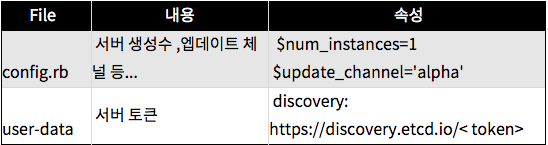 -------- config.rb 파일 수정 cd coreos-vagrant/ cp config.rb.sample config.rb vi config.rb $num_instances=5 -- 서버 댓수 $update_channel='alpha' 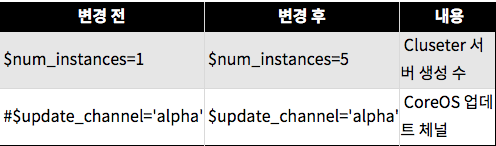 -------- user-data 파일 수정 cp user-data.sample user-data vi user-data discovery: https://discovery.etcd.io/cb91f2bb1357639707dbfb729583f22f [변경전] #discovery: https://discovery.etcd.io/< token> [변경후] discovery: https://discovery.etcd.io/cb91f2bb1357639707dbfb729583f22f -------- token 값 확인 curl -w '\n' https://discovery.etcd.io/new?size=5 * size=5 는 클러스터 사이즈 즉 클러스터를 5 개로묶을때 ( 3개이상 사용할때 size입력) -------- 실행결과 값 cuhttps://discovery.etcd.io/cb91f2bb1357639707dbfb729583f22f 실행결과 값 실행 curl -w '\n' https://discovery.etcd.io/cb91f2bb1357639707dbfb729583f22f {"action":"get","node":{"key":"/_etcd/registry/cb91f2bb1357639707dbfb729583f22f" ,"dir":true,"modifiedIndex":1359190404 ,"createdIndex":1359190404}} -------- 토큰값 : token cb91f2bb1357639707dbfb729583f22f -------- 실행 vagrant up Bringing machine 'core-01' up with 'virtualbox' provider... Bringing machine 'core-02' up with 'virtualbox' provider... Bringing machine 'core-03' up with 'virtualbox' provider... Bringing machine 'core-04' up with 'virtualbox' provider... Bringing machine 'core-05' up with 'virtualbox' provider... ==> core-01: Importing base box 'coreos-alpha'... ==> core-01: Matching MAC address for NAT networking... ==> core-01: Checking if box 'coreos-alpha' is up to date... ==> core-01: Setting the name of the VM: coreos-vagrant_core-01_1499153689075_7580 ==> core-01: Clearing any previously set network interfaces... ==> core-01: Preparing network interfaces based on configuration... core-01: Adapter 1: nat core-01: Adapter 2: hostonly ==> core-01: Forwarding ports... core-01: 22 (guest) => 2222 (host) (adapter 1) ==> core-01: Running 'pre-boot' VM customizations... ==> core-01: Booting VM... ==> core-01: Waiting for machine to boot. This may take a few minutes... core-01: SSH address: 127.0.0.1:2222 core-01: SSH username: core core-01: SSH auth method: private key -------- 확인 하기 vagrant status Current machine states: core-01 running (virtualbox) core-02 running (virtualbox) core-03 running (virtualbox) core-04 running (virtualbox) core-05 running (virtualbox) 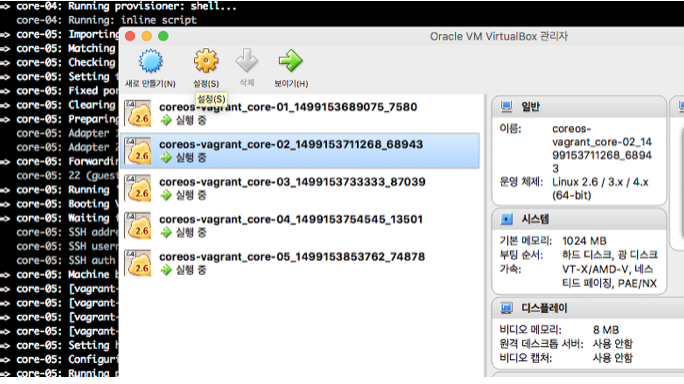 -------- 설치가 완료 되었습니다. Coreos 접속 vagrant ssh core-01 Last login: Tue Jul 4 07:37:49 UTC 2017 from 10.0.2.2 on ssh Container Linux by CoreOS alpha (1451.2.0) core@core-01 ~ $ -------- 클러스터 확인 core@core-01 ~ $ fleetctl list-machines MACHINE IP METADATA 032bbb48... 172.17.8.101 - 1f844cb3... 172.17.8.104 - 2e1e8f31... 172.17.8.102 - 8c5040c6... 172.17.8.103 - d49f8a7e... 172.17.8.105 - -------- CoreOs 가상 머신 삭제 vagrant destroy core-05: Are you sure you want to destroy the 'core-05' VM? [y/N] y ==> core-05: Forcing shutdown of VM... ==> core-05: Destroying VM and associated drives... ==> core-05: [vagrant-hostsupdater] Removing hosts Password: core-04: Are you sure you want to destroy the 'core-04' VM? [y/N] y ==> core-04: Forcing shutdown of VM... ==> core-04: Destroying VM and associated drives... ==> core-04: [vagrant-hostsupdater] Removing hosts core-03: Are you sure you want to destroy the 'core-03' VM? [y/N] y ==> core-03: Forcing shutdown of VM... ==> core-03: Destroying VM and associated drives... ==> core-03: [vagrant-hostsupdater] Removing hosts core-02: Are you sure you want to destroy the 'core-02' VM? [y/N] y ==> core-02: Forcing shutdown of VM... ==> core-02: Destroying VM and associated drives... ==> core-02: [vagrant-hostsupdater] Removing hosts core-01: Are you sure you want to destroy the 'core-01' VM? [y/N] y ==> core-01: Forcing shutdown of VM... ==> core-01: Destroying VM and associated drives... ==> core-01: [vagrant-hostsupdater] Removing hosts -------- vagrant up 시 아래의 오류 발생시 vagrant-ignition 플로그인 설치 하면 해결 됩니다. vagrant up ERROR vagrant: There are errors in the configuration of this machine. Please fix the following errors and try again: VagrantPlugins::Ignition::Config: * The following settings shouldn't exist: drive_name ------ vagrant-ignition 플로그인 설치 $ git clone https://github.com/coreos/vagrant-ignition.git Cloning into 'vagrant-ignition'... remote: Counting objects: 52, done. remote: Compressing objects: 100% (18/18), done. remote: Total 52 (delta 7), reused 19 (delta 6), pack-reused 28 Unpacking objects: 100% (52/52), done. ------ vagrant-ignition 플로그인 설치 $ git clone https://github.com/coreos/vagrant-ignition.git Cloning into 'vagrant-ignition'... remote: Counting objects: 52, done. remote: Compressing objects: 100% (18/18), done. remote: Total 52 (delta 7), reused 19 (delta 6), pack-reused 28 Unpacking objects: 100% (52/52), done. ------ $ cd vagrant-ignition $ gem build vagrant-ignition.gemspec WARNING: description and summary are identical Successfully built RubyGem Name: vagrant-ignition Version: 0.0.3 File: vagrant-ignition-0.0.3.gem ------ $ vagrant plugin install vagrant-ignition-0.0.3.gem Installing the 'vagrant-ignition-0.0.3.gem' plugin. This can take a few minutes... Successfully uninstalled vagrant-ignition-0.0.1 Installed the plugin 'vagrant-ignition (0.0.3)'! ------ $ vagrant up Bringing machine 'core-01' up with 'virtualbox' provider... Bringing machine 'core-02' up with 'virtualbox' provider... Bringing machine 'core-03' up with 'virtualbox' provider... |
| json metadata | {"tags":["mac","coreos","vagrant","virualbox","discovery"],"image":["https://cdn.steemitimages.com/DQmau4wJ8zmMMBzSKVdeGzcyHTL9HQBeVAS4T9mv4mXzfJE/image.png","https://cdn.steemitimages.com/DQmTxCWt6S8K85FkV7sCV4RK4oMKf9zfHXqZrptwndEBzW6/image.png","https://cdn.steemitimages.com/DQmQJVbyp7K5CjwCFt1BtW6RzWDEmf4crZMg4i3xpYwsKjh/image.png","https://cdn.steemitimages.com/DQmT1zMWxGTKFECA5PjS4BAkYcir3hBVo8N8gCRQcw6W9VB/image.png"],"links":["http://download.virtualbox.org/virtualbox/5.1.22/VirtualBox-5.1.22-115126-OSX.dmg","http://download.virtualbox.org/virtualbox/5.1.22/Oracle_VM_VirtualBox_Extension_Pack-5.1.22-115126.vbox-extpack","https://releases.hashicorp.com/vagrant/1.9.6/vagrant_1.9.6_x86_64.dmg?_ga=2.212561940.1055581220.1499149841-800739767.1499149841","https://github.com/coreos/coreos-vagrant","https://discovery.etcd.io/<","https://discovery.etcd.io/cb91f2bb1357639707dbfb729583f22f"],"app":"steemit/0.1","format":"markdown"} |
| Transaction Info | Block #25508004/Trx ba4ed6be73566ee8d3942de95f09c145db80be5b |
View Raw JSON Data
{
"trx_id": "ba4ed6be73566ee8d3942de95f09c145db80be5b",
"block": 25508004,
"trx_in_block": 11,
"op_in_trx": 0,
"virtual_op": 0,
"timestamp": "2018-08-30T01:44:06",
"op": [
"comment",
{
"parent_author": "",
"parent_permlink": "mac",
"author": "jaerakson",
"permlink": "coreos",
"title": "맥에서 CoreOS 설치",
"body": "\n\n환경준비 \n\n1. Mac PC \n\n2. VirualBox\n\n Oracle_VM_VirtualBox \n http://download.virtualbox.org/virtualbox/5.1.22/VirtualBox-5.1.22-115126-OSX.dmg\n \n Oracle_VM_VirtualBox_Extension_Pack \n http://download.virtualbox.org/virtualbox/5.1.22/Oracle_VM_VirtualBox_Extension_Pack-5.1.22-115126.vbox-extpack\n\n3. Vagrant \n \n https://releases.hashicorp.com/vagrant/1.9.6/vagrant_1.9.6_x86_64.dmg?_ga=2.212561940.1055581220.1499149841-800739767.1499149841\n\n4.CoreOs \n git 통해 진행\n git clone https://github.com/coreos/coreos-vagrant \n\n\nCoreOs 5대 가상머신에 설치 \n\n1. 환경설정 파일 정보 (config.rb, user-data)\n\n\n\n --------\nconfig.rb 파일 수정 \n\n cd coreos-vagrant/\n cp config.rb.sample config.rb\n vi config.rb\n\n $num_instances=5 -- 서버 댓수\n $update_channel='alpha'\n\n\n --------\nuser-data 파일 수정\n\n cp user-data.sample user-data\n vi user-data \n discovery: https://discovery.etcd.io/cb91f2bb1357639707dbfb729583f22f\n\n\n\n[변경전]\n #discovery: https://discovery.etcd.io/< token> \n[변경후]\n discovery: https://discovery.etcd.io/cb91f2bb1357639707dbfb729583f22f\n\n --------\ntoken 값 확인 \n\n curl -w '\\n' https://discovery.etcd.io/new?size=5\n * size=5 는 클러스터 사이즈 즉 클러스터를 5 개로묶을때 ( 3개이상 사용할때 size입력) \n --------\n실행결과 값 \n\n cuhttps://discovery.etcd.io/cb91f2bb1357639707dbfb729583f22f \n\n실행결과 값 실행 \n\n curl -w '\\n' https://discovery.etcd.io/cb91f2bb1357639707dbfb729583f22f \n\n {\"action\":\"get\",\"node\":{\"key\":\"/_etcd/registry/cb91f2bb1357639707dbfb729583f22f\"\n ,\"dir\":true,\"modifiedIndex\":1359190404\n ,\"createdIndex\":1359190404}}\n --------\n토큰값 : token cb91f2bb1357639707dbfb729583f22f \n --------\n실행 \nvagrant up\n\n Bringing machine 'core-01' up with 'virtualbox' provider...\n Bringing machine 'core-02' up with 'virtualbox' provider...\n Bringing machine 'core-03' up with 'virtualbox' provider...\n Bringing machine 'core-04' up with 'virtualbox' provider...\n Bringing machine 'core-05' up with 'virtualbox' provider...\n ==> core-01: Importing base box 'coreos-alpha'...\n ==> core-01: Matching MAC address for NAT networking...\n ==> core-01: Checking if box 'coreos-alpha' is up to date...\n ==> core-01: Setting the name of the VM: coreos-vagrant_core-01_1499153689075_7580\n ==> core-01: Clearing any previously set network interfaces...\n ==> core-01: Preparing network interfaces based on configuration...\n core-01: Adapter 1: nat\n core-01: Adapter 2: hostonly\n ==> core-01: Forwarding ports...\n core-01: 22 (guest) => 2222 (host) (adapter 1)\n ==> core-01: Running 'pre-boot' VM customizations...\n ==> core-01: Booting VM...\n ==> core-01: Waiting for machine to boot. This may take a few minutes...\n core-01: SSH address: 127.0.0.1:2222\n core-01: SSH username: core\n core-01: SSH auth method: private key\n --------\n확인 하기\nvagrant status\n\n Current machine states:\n \n core-01 running (virtualbox)\n core-02 running (virtualbox)\n core-03 running (virtualbox)\n core-04 running (virtualbox)\n core-05 running (virtualbox)\n\n \n --------\n설치가 완료 되었습니다. \n\nCoreos 접속\n\n vagrant ssh core-01\n Last login: Tue Jul 4 07:37:49 UTC 2017 from 10.0.2.2 on ssh\n Container Linux by CoreOS alpha (1451.2.0)\n core@core-01 ~ $ \n --------\n클러스터 확인 \n\n core@core-01 ~ $ fleetctl list-machines\n MACHINE\t\tIP\t\tMETADATA\n 032bbb48...\t172.17.8.101\t-\n 1f844cb3...\t172.17.8.104\t-\n 2e1e8f31...\t172.17.8.102\t-\n 8c5040c6...\t172.17.8.103\t-\n d49f8a7e...\t172.17.8.105\t- \n --------\n\nCoreOs 가상 머신 삭제 \n\n\n vagrant destroy\n core-05: Are you sure you want to destroy the 'core-05' VM? [y/N] y\n ==> core-05: Forcing shutdown of VM...\n ==> core-05: Destroying VM and associated drives...\n ==> core-05: [vagrant-hostsupdater] Removing hosts\n Password: \n core-04: Are you sure you want to destroy the 'core-04' VM? [y/N] y\n ==> core-04: Forcing shutdown of VM...\n ==> core-04: Destroying VM and associated drives...\n ==> core-04: [vagrant-hostsupdater] Removing hosts\n core-03: Are you sure you want to destroy the 'core-03' VM? [y/N] y\n ==> core-03: Forcing shutdown of VM...\n ==> core-03: Destroying VM and associated drives...\n ==> core-03: [vagrant-hostsupdater] Removing hosts\n core-02: Are you sure you want to destroy the 'core-02' VM? [y/N] y\n ==> core-02: Forcing shutdown of VM...\n ==> core-02: Destroying VM and associated drives...\n ==> core-02: [vagrant-hostsupdater] Removing hosts\n core-01: Are you sure you want to destroy the 'core-01' VM? [y/N] y\n ==> core-01: Forcing shutdown of VM...\n ==> core-01: Destroying VM and associated drives...\n ==> core-01: [vagrant-hostsupdater] Removing hosts \n\n\n --------\n\n \nvagrant up 시 아래의 오류 발생시 \nvagrant-ignition 플로그인 설치 하면 해결 됩니다. \n\n\n \n vagrant up \n \n ERROR vagrant: There are errors in the configuration of this machine. Please fix\n the following errors and try again:\n \n VagrantPlugins::Ignition::Config:\n * The following settings shouldn't exist: drive_name \n\n ------\n vagrant-ignition 플로그인 설치 \n \n $ git clone https://github.com/coreos/vagrant-ignition.git\n\n Cloning into 'vagrant-ignition'...\n remote: Counting objects: 52, done.\n remote: Compressing objects: 100% (18/18), done.\n remote: Total 52 (delta 7), reused 19 (delta 6), pack-reused 28\n Unpacking objects: 100% (52/52), done.\n\n ------\n vagrant-ignition 플로그인 설치 \n \n $ git clone https://github.com/coreos/vagrant-ignition.git\n\n Cloning into 'vagrant-ignition'...\n remote: Counting objects: 52, done.\n remote: Compressing objects: 100% (18/18), done.\n remote: Total 52 (delta 7), reused 19 (delta 6), pack-reused 28\n Unpacking objects: 100% (52/52), done.\n\n ------\n $ cd vagrant-ignition\n\n $ gem build vagrant-ignition.gemspec\n WARNING: description and summary are identical\n Successfully built RubyGem\n Name: vagrant-ignition\n Version: 0.0.3\n File: vagrant-ignition-0.0.3.gem\n ------\n $ vagrant plugin install vagrant-ignition-0.0.3.gem\n\n Installing the 'vagrant-ignition-0.0.3.gem' plugin. This can take a few minutes...\n Successfully uninstalled vagrant-ignition-0.0.1\n Installed the plugin 'vagrant-ignition (0.0.3)'!\n------\n $ vagrant up\n Bringing machine 'core-01' up with 'virtualbox' provider...\n Bringing machine 'core-02' up with 'virtualbox' provider...\n Bringing machine 'core-03' up with 'virtualbox' provider...",
"json_metadata": "{\"tags\":[\"mac\",\"coreos\",\"vagrant\",\"virualbox\",\"discovery\"],\"image\":[\"https://cdn.steemitimages.com/DQmau4wJ8zmMMBzSKVdeGzcyHTL9HQBeVAS4T9mv4mXzfJE/image.png\",\"https://cdn.steemitimages.com/DQmTxCWt6S8K85FkV7sCV4RK4oMKf9zfHXqZrptwndEBzW6/image.png\",\"https://cdn.steemitimages.com/DQmQJVbyp7K5CjwCFt1BtW6RzWDEmf4crZMg4i3xpYwsKjh/image.png\",\"https://cdn.steemitimages.com/DQmT1zMWxGTKFECA5PjS4BAkYcir3hBVo8N8gCRQcw6W9VB/image.png\"],\"links\":[\"http://download.virtualbox.org/virtualbox/5.1.22/VirtualBox-5.1.22-115126-OSX.dmg\",\"http://download.virtualbox.org/virtualbox/5.1.22/Oracle_VM_VirtualBox_Extension_Pack-5.1.22-115126.vbox-extpack\",\"https://releases.hashicorp.com/vagrant/1.9.6/vagrant_1.9.6_x86_64.dmg?_ga=2.212561940.1055581220.1499149841-800739767.1499149841\",\"https://github.com/coreos/coreos-vagrant\",\"https://discovery.etcd.io/<\",\"https://discovery.etcd.io/cb91f2bb1357639707dbfb729583f22f\"],\"app\":\"steemit/0.1\",\"format\":\"markdown\"}"
}
]
}jaeraksonupvoted (100.00%) @jaerakson / fio-fusion-iomemory-px6002018/08/30 01:12:27
jaeraksonupvoted (100.00%) @jaerakson / fio-fusion-iomemory-px600
2018/08/30 01:12:27
| voter | jaerakson |
| author | jaerakson |
| permlink | fio-fusion-iomemory-px600 |
| weight | 10000 (100.00%) |
| Transaction Info | Block #25507371/Trx 561f68d2616e5ec9473fb1e9dab910a713b0d126 |
View Raw JSON Data
{
  "trx_id": "561f68d2616e5ec9473fb1e9dab910a713b0d126",
  "block": 25507371,
  "trx_in_block": 25,
  "op_in_trx": 0,
  "virtual_op": 0,
  "timestamp": "2018-08-30T01:12:27",
  "op": [
    "vote",
    {
      "voter": "jaerakson",
      "author": "jaerakson",
      "permlink": "fio-fusion-iomemory-px600",
      "weight": 10000
    }
  ]
}2018/08/30 01:12:09
2018/08/30 01:12:09
| parent author | cheetah |
| parent permlink | cheetah-re-jaeraksonfio-fusion-iomemory-px600 |
| author | jaerakson |
| permlink | re-cheetah-cheetah-re-jaeraksonfio-fusion-iomemory-px600-20180830t011209858z |
| title | |
| body | My blog address. http://experiences.tistory.com/11 |
| json metadata | {"tags":["fio"],"links":["http://experiences.tistory.com/11"],"app":"steemit/0.1"} |
| Transaction Info | Block #25507365/Trx d5140202725383b283a7e97cfb088552e6372d5e |
View Raw JSON Data
{
  "trx_id": "d5140202725383b283a7e97cfb088552e6372d5e",
  "block": 25507365,
  "trx_in_block": 25,
  "op_in_trx": 0,
  "virtual_op": 0,
  "timestamp": "2018-08-30T01:12:09",
  "op": [
    "comment",
    {
      "parent_author": "cheetah",
      "parent_permlink": "cheetah-re-jaeraksonfio-fusion-iomemory-px600",
      "author": "jaerakson",
      "permlink": "re-cheetah-cheetah-re-jaeraksonfio-fusion-iomemory-px600-20180830t011209858z",
      "title": "",
      "body": "My blog address.\nhttp://experiences.tistory.com/11",
      "json_metadata": "{\"tags\":[\"fio\"],\"links\":[\"http://experiences.tistory.com/11\"],\"app\":\"steemit/0.1\"}"
    }
  ]
}2018/08/30 01:10:42
2018/08/30 01:10:42
| parent author | jaerakson |
| parent permlink | fio-fusion-iomemory-px600 |
| author | cheetah |
| permlink | cheetah-re-jaeraksonfio-fusion-iomemory-px600 |
| title | |
| body | Hi! I am a robot. I just upvoted you! I found similar content that readers might be interested in: http://experiences.tistory.com/11 |
| json metadata | |
| Transaction Info | Block #25507336/Trx 01f400fb65926b11e02015a079de942495aac005 |
View Raw JSON Data
{
  "trx_id": "01f400fb65926b11e02015a079de942495aac005",
  "block": 25507336,
  "trx_in_block": 38,
  "op_in_trx": 0,
  "virtual_op": 0,
  "timestamp": "2018-08-30T01:10:42",
  "op": [
    "comment",
    {
      "parent_author": "jaerakson",
      "parent_permlink": "fio-fusion-iomemory-px600",
      "author": "cheetah",
      "permlink": "cheetah-re-jaeraksonfio-fusion-iomemory-px600",
      "title": "",
      "body": "Hi! I am a robot. I just upvoted you! I found similar content that readers might be interested in:\nhttp://experiences.tistory.com/11",
      "json_metadata": ""
    }
  ]
}cheetahupvoted (0.08%) @jaerakson / fio-fusion-iomemory-px6002018/08/30 01:10:39
cheetahupvoted (0.08%) @jaerakson / fio-fusion-iomemory-px600
2018/08/30 01:10:39
| voter | cheetah |
| author | jaerakson |
| permlink | fio-fusion-iomemory-px600 |
| weight | 8 (0.08%) |
| Transaction Info | Block #25507335/Trx 7a0b62a284ddc4e0724249f7bc51e24f80ff110a |
View Raw JSON Data
{
  "trx_id": "7a0b62a284ddc4e0724249f7bc51e24f80ff110a",
  "block": 25507335,
  "trx_in_block": 10,
  "op_in_trx": 0,
  "virtual_op": 0,
  "timestamp": "2018-08-30T01:10:39",
  "op": [
    "vote",
    {
      "voter": "cheetah",
      "author": "jaerakson",
      "permlink": "fio-fusion-iomemory-px600",
      "weight": 8
    }
  ]
}Manabar
Voting Power100.00%
Downvote Power100.00%
Resource Credits100.00%
Reputation Progress95.11%
{
  "voting_manabar": {
    "current_mana": "8143659806",
    "last_update_time": 1779068277
  },
  "downvote_manabar": {
    "current_mana": 2035914951,
    "last_update_time": 1779068277
  },
  "rc_account": {
    "account": "jaerakson",
    "max_rc": "10164408779",
    "max_rc_creation_adjustment": {
      "amount": "2020748973",
      "nai": "@@000000037",
      "precision": 6
    },
    "rc_manabar": {
      "current_mana": "10164408779",
      "last_update_time": 1779068277
    }
  }
}
Account Metadata
| POSTING JSON METADATA | |
| profile | {"name":"행복님"} |
| JSON METADATA | |
| profile | {"name":"행복님"} |
{
  "posting_json_metadata": {
    "profile": {
      "name": "행복님"
    }
  },
  "json_metadata": {
    "profile": {
      "name": "행복님"
    }
  }
}
Auth Keys
Owner
Single Signature
Public Keys
STM8Z1EpLWGfYmnBazLAYqQy86Xb4cKdiGcUUxe1my9EYhQq2Rmy51/1
Active
Single Signature
Public Keys
STM8giXFLhsFpUE4SHSnAuvUqVHT4VB6B96v5GMgTVE9XfgNmFFGE1/1
Posting
Single Signature
Public Keys
STM5XHSwbybSddkf1Tdo3QANfQWL2PPhDegscb7rhNCozbNm3UR7S1/1
Memo
STM5egVHAbi8wprEuH5PzJQydEvtiMkaA7SUjo7s8b8qoWhFTNG4U
{
  "owner": {
    "account_auths": [],
    "key_auths": [
      [
        "STM8Z1EpLWGfYmnBazLAYqQy86Xb4cKdiGcUUxe1my9EYhQq2Rmy5",
        1
      ]
    ],
    "weight_threshold": 1
  },
  "active": {
    "account_auths": [],
    "key_auths": [
      [
        "STM8giXFLhsFpUE4SHSnAuvUqVHT4VB6B96v5GMgTVE9XfgNmFFGE",
        1
      ]
    ],
    "weight_threshold": 1
  },
  "posting": {
    "account_auths": [],
    "key_auths": [
      [
        "STM5XHSwbybSddkf1Tdo3QANfQWL2PPhDegscb7rhNCozbNm3UR7S",
        1
      ]
    ],
    "weight_threshold": 1
  },
  "memo": "STM5egVHAbi8wprEuH5PzJQydEvtiMkaA7SUjo7s8b8qoWhFTNG4U"
}
Witness Votes
0 / 30
No active witness votes.
[]