

VOTING POWER100.00%
DOWNVOTE POWER100.00%
RESOURCE CREDITS100.00%
REPUTATION PROGRESS0.00%
Net Worth
0.037USD
STEEM
0.004STEEM
SBD
0.000SBD
Effective Power
5.007SP
├── Own SP
0.628SP
└── Incoming DelegationsDeleg
+4.379SP
Detailed Balance
| STEEM | ||
| balance | 0.004STEEM | STEEM |
| market_balance | 0.000STEEM | STEEM |
| savings_balance | 0.000STEEM | STEEM |
| reward_steem_balance | 0.000STEEM | STEEM |
| STEEM POWER | ||
| Own SP | 0.628SP | SP |
| Delegated Out | 0.000SP | SP |
| Delegation In | 4.379SP | SP |
| Effective Power | 5.007SP | SP |
| Reward SP (pending) | 0.000SP | SP |
| SBD | ||
| sbd_balance | 0.000SBD | SBD |
| sbd_conversions | 0.000SBD | SBD |
| sbd_market_balance | 0.000SBD | SBD |
| savings_sbd_balance | 0.000SBD | SBD |
| reward_sbd_balance | 0.000SBD | SBD |
{
  "balance": "0.004 STEEM",
  "savings_balance": "0.000 STEEM",
  "reward_steem_balance": "0.000 STEEM",
  "vesting_shares": "1021.776814 VESTS",
  "delegated_vesting_shares": "0.000000 VESTS",
  "received_vesting_shares": "7121.882992 VESTS",
  "sbd_balance": "0.000 SBD",
  "savings_sbd_balance": "0.000 SBD",
  "reward_sbd_balance": "0.000 SBD",
  "conversions": []
}
Account Info
| name | jerometash |
| id | 774763 |
| rank | 0 |
| reputation | 108927466 |
| created | 2018-02-24T05:58:57 |
| recovery_account | steem |
| proxy | None |
| post_count | 3 |
| comment_count | 0 |
| lifetime_vote_count | 0 |
| witnesses_voted_for | 0 |
| last_post | 2019-06-30T16:51:27 |
| last_root_post | 2019-06-30T16:51:27 |
| last_vote_time | 2019-06-30T17:04:33 |
| proxied_vsf_votes | 0, 0, 0, 0 |
| can_vote | 1 |
| voting_power | 0 |
| delayed_votes | 0 |
| balance | 0.004 STEEM |
| savings_balance | 0.000 STEEM |
| sbd_balance | 0.000 SBD |
| savings_sbd_balance | 0.000 SBD |
| vesting_shares | 1021.776814 VESTS |
| delegated_vesting_shares | 0.000000 VESTS |
| received_vesting_shares | 7121.882992 VESTS |
| reward_vesting_balance | 0.000000 VESTS |
| vesting_balance | 0.000 STEEM |
| vesting_withdraw_rate | 0.000000 VESTS |
| next_vesting_withdrawal | 1969-12-31T23:59:59 |
| withdrawn | 0 |
| to_withdraw | 0 |
| withdraw_routes | 0 |
| savings_withdraw_requests | 0 |
| last_account_recovery | 1970-01-01T00:00:00 |
| reset_account | null |
| last_owner_update | 1970-01-01T00:00:00 |
| last_account_update | 2019-06-30T17:03:30 |
| mined | No |
| sbd_seconds | 0 |
| sbd_last_interest_payment | 1970-01-01T00:00:00 |
| savings_sbd_last_interest_payment | 1970-01-01T00:00:00 |
{
  "active": {
    "account_auths": [],
    "key_auths": [
      [
        "STM6HA8bLYwT9jMD8F2nU8DZBRfVSxZCFyT56soY6nMVxFQp2wXev",
        1
      ]
    ],
    "weight_threshold": 1
  },
  "balance": "0.004 STEEM",
  "can_vote": true,
  "comment_count": 0,
  "created": "2018-02-24T05:58:57",
  "curation_rewards": 0,
  "delegated_vesting_shares": "0.000000 VESTS",
  "downvote_manabar": {
    "current_mana": 2035914951,
    "last_update_time": 1779069000
  },
  "guest_bloggers": [],
  "id": 774763,
  "json_metadata": "{\"profile\":{\"name\":\"Jerome Tash\",\"cover_image\":\"https://cdn.steemitimages.com/DQmSHANbLChRU4er6XrRqqbHfiBVgB3PYFrsWW8NePHXgZs/58463024_2118191711631032_6004623713012547584_o.jpg\",\"profile_image\":\"https://cdn.steemitimages.com/DQmc8fAqjkzhXnkhB3g1unnU9ksArHurcZC6dfektHsZpAW/62522543_714660728971813_2481818913231339520_o.jpg\"}}",
  "last_account_recovery": "1970-01-01T00:00:00",
  "last_account_update": "2019-06-30T17:03:30",
  "last_owner_update": "1970-01-01T00:00:00",
  "last_post": "2019-06-30T16:51:27",
  "last_root_post": "2019-06-30T16:51:27",
  "last_vote_time": "2019-06-30T17:04:33",
  "lifetime_vote_count": 0,
  "market_history": [],
  "memo_key": "STM8Y4LQcLnYC2zNosJLRz5mks5QW1NNx9qtNeM31qbxAJkg1oJzX",
  "mined": false,
  "name": "jerometash",
  "next_vesting_withdrawal": "1969-12-31T23:59:59",
  "other_history": [],
  "owner": {
    "account_auths": [],
    "key_auths": [
      [
        "STM6x9tsM9VQGzUyux8ihLSkTCoEn8MscLmXjeMV6AhbvEBXbm81U",
        1
      ]
    ],
    "weight_threshold": 1
  },
  "pending_claimed_accounts": 0,
  "post_bandwidth": 0,
  "post_count": 3,
  "post_history": [],
  "posting": {
    "account_auths": [],
    "key_auths": [
      [
        "STM5tAq3zH5fzG1L3tM3dVSCRjfcekFtxzpab2bymsxCTm2C2fsTF",
        1
      ]
    ],
    "weight_threshold": 1
  },
  "posting_json_metadata": "{\"profile\":{\"name\":\"Jerome Tash\",\"cover_image\":\"https://cdn.steemitimages.com/DQmSHANbLChRU4er6XrRqqbHfiBVgB3PYFrsWW8NePHXgZs/58463024_2118191711631032_6004623713012547584_o.jpg\",\"profile_image\":\"https://cdn.steemitimages.com/DQmc8fAqjkzhXnkhB3g1unnU9ksArHurcZC6dfektHsZpAW/62522543_714660728971813_2481818913231339520_o.jpg\"}}",
  "posting_rewards": 0,
  "proxied_vsf_votes": [
    0,
    0,
    0,
    0
  ],
  "proxy": "",
  "received_vesting_shares": "7121.882992 VESTS",
  "recovery_account": "steem",
  "reputation": 108927466,
  "reset_account": "null",
  "reward_sbd_balance": "0.000 SBD",
  "reward_steem_balance": "0.000 STEEM",
  "reward_vesting_balance": "0.000000 VESTS",
  "reward_vesting_steem": "0.000 STEEM",
  "savings_balance": "0.000 STEEM",
  "savings_sbd_balance": "0.000 SBD",
  "savings_sbd_last_interest_payment": "1970-01-01T00:00:00",
  "savings_sbd_seconds": "0",
  "savings_sbd_seconds_last_update": "1970-01-01T00:00:00",
  "savings_withdraw_requests": 0,
  "sbd_balance": "0.000 SBD",
  "sbd_last_interest_payment": "1970-01-01T00:00:00",
  "sbd_seconds": "0",
  "sbd_seconds_last_update": "1970-01-01T00:00:00",
  "tags_usage": [],
  "to_withdraw": 0,
  "transfer_history": [],
  "vesting_balance": "0.000 STEEM",
  "vesting_shares": "1021.776814 VESTS",
  "vesting_withdraw_rate": "0.000000 VESTS",
  "vote_history": [],
  "voting_manabar": {
    "current_mana": "8143659806",
    "last_update_time": 1779069000
  },
  "voting_power": 0,
  "withdraw_routes": 0,
  "withdrawn": 0,
  "witness_votes": [],
  "witnesses_voted_for": 0
}
Withdraw Routes
| Incoming | Outgoing |
|---|---|
Empty | Empty |
{
  "incoming": [],
  "outgoing": []
}From Date
To Date
steemdelegated 4.379 SP to @jerometash2026/05/18 01:50:00
steemdelegated 4.379 SP to @jerometash
2026/05/18 01:50:00
| delegatee | jerometash |
| delegator | steem |
| vesting shares | 7121.882992 VESTS |
| Transaction Info | Block #106145334/Trx d61bc35f98c4fffe4b26e462d028af202b3e4b2e |
View Raw JSON Data
{
  "block": 106145334,
  "op": [
    "delegate_vesting_shares",
    {
      "delegatee": "jerometash",
      "delegator": "steem",
      "vesting_shares": "7121.882992 VESTS"
    }
  ],
  "op_in_trx": 0,
  "timestamp": "2026-05-18T01:50:00",
  "trx_id": "d61bc35f98c4fffe4b26e462d028af202b3e4b2e",
  "trx_in_block": 1,
  "virtual_op": 0
}steemdelegated 2.711 SP to @jerometash2026/05/12 10:15:39
steemdelegated 2.711 SP to @jerometash
2026/05/12 10:15:39
| delegatee | jerometash |
| delegator | steem |
| vesting shares | 4409.672587 VESTS |
| Transaction Info | Block #105983400/Trx 79fab274be417c4d4bd63af487e47fa5ab285976 |
View Raw JSON Data
{
  "block": 105983400,
  "op": [
    "delegate_vesting_shares",
    {
      "delegatee": "jerometash",
      "delegator": "steem",
      "vesting_shares": "4409.672587 VESTS"
    }
  ],
  "op_in_trx": 0,
  "timestamp": "2026-05-12T10:15:39",
  "trx_id": "79fab274be417c4d4bd63af487e47fa5ab285976",
  "trx_in_block": 4,
  "virtual_op": 0
}steemdelegated 4.387 SP to @jerometash2026/04/26 01:08:24
steemdelegated 4.387 SP to @jerometash
2026/04/26 01:08:24
| delegatee | jerometash |
| delegator | steem |
| vesting shares | 7134.398748 VESTS |
| Transaction Info | Block #105512942/Trx b2389628d83fbab89befe8660d505a06a99a5ed7 |
View Raw JSON Data
{
  "block": 105512942,
  "op": [
    "delegate_vesting_shares",
    {
      "delegatee": "jerometash",
      "delegator": "steem",
      "vesting_shares": "7134.398748 VESTS"
    }
  ],
  "op_in_trx": 0,
  "timestamp": "2026-04-26T01:08:24",
  "trx_id": "b2389628d83fbab89befe8660d505a06a99a5ed7",
  "trx_in_block": 0,
  "virtual_op": 0
}steemdelegated 2.737 SP to @jerometash2026/01/23 12:02:54
steemdelegated 2.737 SP to @jerometash
2026/01/23 12:02:54
| delegatee | jerometash |
| delegator | steem |
| vesting shares | 4451.219406 VESTS |
| Transaction Info | Block #102856901/Trx 302825f7a0d90dbd986484df1bca77e8fcf716ff |
View Raw JSON Data
{
  "block": 102856901,
  "op": [
    "delegate_vesting_shares",
    {
      "delegatee": "jerometash",
      "delegator": "steem",
      "vesting_shares": "4451.219406 VESTS"
    }
  ],
  "op_in_trx": 0,
  "timestamp": "2026-01-23T12:02:54",
  "trx_id": "302825f7a0d90dbd986484df1bca77e8fcf716ff",
  "trx_in_block": 1,
  "virtual_op": 0
}steemdelegated 2.838 SP to @jerometash2024/12/17 07:19:33
steemdelegated 2.838 SP to @jerometash
2024/12/17 07:19:33
| delegatee | jerometash |
| delegator | steem |
| vesting shares | 4615.438603 VESTS |
| Transaction Info | Block #91303250/Trx 4e8bc263b2511214d3459e9a6bcea16d338c35e6 |
View Raw JSON Data
{
  "block": 91303250,
  "op": [
    "delegate_vesting_shares",
    {
      "delegatee": "jerometash",
      "delegator": "steem",
      "vesting_shares": "4615.438603 VESTS"
    }
  ],
  "op_in_trx": 0,
  "timestamp": "2024-12-17T07:19:33",
  "trx_id": "4e8bc263b2511214d3459e9a6bcea16d338c35e6",
  "trx_in_block": 2,
  "virtual_op": 0
}steemdelegated 2.942 SP to @jerometash2023/11/13 23:01:54
steemdelegated 2.942 SP to @jerometash
2023/11/13 23:01:54
| delegatee | jerometash |
| delegator | steem |
| vesting shares | 4784.572135 VESTS |
| Transaction Info | Block #79857441/Trx 499c9e2f3c091d140fc4cf27743dd7bd87d5cf39 |
View Raw JSON Data
{
  "block": 79857441,
  "op": [
    "delegate_vesting_shares",
    {
      "delegatee": "jerometash",
      "delegator": "steem",
      "vesting_shares": "4784.572135 VESTS"
    }
  ],
  "op_in_trx": 0,
  "timestamp": "2023-11-13T23:01:54",
  "trx_id": "499c9e2f3c091d140fc4cf27743dd7bd87d5cf39",
  "trx_in_block": 4,
  "virtual_op": 0
}steemdelegated 4.748 SP to @jerometash2023/09/21 23:41:54
steemdelegated 4.748 SP to @jerometash
2023/09/21 23:41:54
| delegatee | jerometash |
| delegator | steem |
| vesting shares | 7721.850921 VESTS |
| Transaction Info | Block #78350066/Trx 60728e057404e1710555bc4c9e895f815f670f34 |
View Raw JSON Data
{
  "block": 78350066,
  "op": [
    "delegate_vesting_shares",
    {
      "delegatee": "jerometash",
      "delegator": "steem",
      "vesting_shares": "7721.850921 VESTS"
    }
  ],
  "op_in_trx": 0,
  "timestamp": "2023-09-21T23:41:54",
  "trx_id": "60728e057404e1710555bc4c9e895f815f670f34",
  "trx_in_block": 2,
  "virtual_op": 0
}steemdelegated 4.884 SP to @jerometash2022/11/03 13:14:48
steemdelegated 4.884 SP to @jerometash
2022/11/03 13:14:48
| delegatee | jerometash |
| delegator | steem |
| vesting shares | 7943.532359 VESTS |
| Transaction Info | Block #69115104/Trx 9a027d0788c30644c03ffbbe8f0a802fec55b166 |
View Raw JSON Data
{
  "block": 69115104,
  "op": [
    "delegate_vesting_shares",
    {
      "delegatee": "jerometash",
      "delegator": "steem",
      "vesting_shares": "7943.532359 VESTS"
    }
  ],
  "op_in_trx": 0,
  "timestamp": "2022-11-03T13:14:48",
  "trx_id": "9a027d0788c30644c03ffbbe8f0a802fec55b166",
  "trx_in_block": 12,
  "virtual_op": 0
}steemdelegated 5.020 SP to @jerometash2022/01/17 12:22:54
steemdelegated 5.020 SP to @jerometash
2022/01/17 12:22:54
| delegatee | jerometash |
| delegator | steem |
| vesting shares | 8164.065590 VESTS |
| Transaction Info | Block #60811116/Trx 58bca9e224a81db80aa22a68eacd2d4ba374c052 |
View Raw JSON Data
{
  "block": 60811116,
  "op": [
    "delegate_vesting_shares",
    {
      "delegatee": "jerometash",
      "delegator": "steem",
      "vesting_shares": "8164.065590 VESTS"
    }
  ],
  "op_in_trx": 0,
  "timestamp": "2022-01-17T12:22:54",
  "trx_id": "58bca9e224a81db80aa22a68eacd2d4ba374c052",
  "trx_in_block": 11,
  "virtual_op": 0
}steemdelegated 5.133 SP to @jerometash2021/06/14 02:14:24
steemdelegated 5.133 SP to @jerometash
2021/06/14 02:14:24
| delegatee | jerometash |
| delegator | steem |
| vesting shares | 8347.834248 VESTS |
| Transaction Info | Block #54609424/Trx 2119f3766db63ddb5da614563e45235a7727da96 |
View Raw JSON Data
{
  "block": 54609424,
  "op": [
    "delegate_vesting_shares",
    {
      "delegatee": "jerometash",
      "delegator": "steem",
      "vesting_shares": "8347.834248 VESTS"
    }
  ],
  "op_in_trx": 0,
  "timestamp": "2021-06-14T02:14:24",
  "trx_id": "2119f3766db63ddb5da614563e45235a7727da96",
  "trx_in_block": 2,
  "virtual_op": 0
}steemdelegated 5.248 SP to @jerometash2020/12/11 12:31:15
steemdelegated 5.248 SP to @jerometash
2020/12/11 12:31:15
| delegatee | jerometash |
| delegator | steem |
| vesting shares | 8535.256222 VESTS |
| Transaction Info | Block #49356825/Trx aa19596fa4c15802c7191030f6f8d3e7cd726d29 |
View Raw JSON Data
{
  "block": 49356825,
  "op": [
    "delegate_vesting_shares",
    {
      "delegatee": "jerometash",
      "delegator": "steem",
      "vesting_shares": "8535.256222 VESTS"
    }
  ],
  "op_in_trx": 0,
  "timestamp": "2020-12-11T12:31:15",
  "trx_id": "aa19596fa4c15802c7191030f6f8d3e7cd726d29",
  "trx_in_block": 18,
  "virtual_op": 0
}steemdelegated 1.176 SP to @jerometash2020/12/06 06:07:57
steemdelegated 1.176 SP to @jerometash
2020/12/06 06:07:57
| delegatee | jerometash |
| delegator | steem |
| vesting shares | 1912.543513 VESTS |
| Transaction Info | Block #49208377/Trx cb3812b066b91de1b0c0cbced1a03794a4a6e971 |
View Raw JSON Data
{
  "block": 49208377,
  "op": [
    "delegate_vesting_shares",
    {
      "delegatee": "jerometash",
      "delegator": "steem",
      "vesting_shares": "1912.543513 VESTS"
    }
  ],
  "op_in_trx": 0,
  "timestamp": "2020-12-06T06:07:57",
  "trx_id": "cb3812b066b91de1b0c0cbced1a03794a4a6e971",
  "trx_in_block": 9,
  "virtual_op": 0
}steemdelegated 5.252 SP to @jerometash2020/12/05 16:09:30
steemdelegated 5.252 SP to @jerometash
2020/12/05 16:09:30
| delegatee | jerometash |
| delegator | steem |
| vesting shares | 8541.464076 VESTS |
| Transaction Info | Block #49191924/Trx 44580730293a2055d1ce462601097f88425d19d8 |
View Raw JSON Data
{
  "block": 49191924,
  "op": [
    "delegate_vesting_shares",
    {
      "delegatee": "jerometash",
      "delegator": "steem",
      "vesting_shares": "8541.464076 VESTS"
    }
  ],
  "op_in_trx": 0,
  "timestamp": "2020-12-05T16:09:30",
  "trx_id": "44580730293a2055d1ce462601097f88425d19d8",
  "trx_in_block": 1,
  "virtual_op": 0
}steemdelegated 1.181 SP to @jerometash2020/11/02 18:31:09
steemdelegated 1.181 SP to @jerometash
2020/11/02 18:31:09
| delegatee | jerometash |
| delegator | steem |
| vesting shares | 1920.017158 VESTS |
| Transaction Info | Block #48261195/Trx 3e56978f11f52cc941d5d0e1bb98af4b96b3d03d |
View Raw JSON Data
{
  "block": 48261195,
  "op": [
    "delegate_vesting_shares",
    {
      "delegatee": "jerometash",
      "delegator": "steem",
      "vesting_shares": "1920.017158 VESTS"
    }
  ],
  "op_in_trx": 0,
  "timestamp": "2020-11-02T18:31:09",
  "trx_id": "3e56978f11f52cc941d5d0e1bb98af4b96b3d03d",
  "trx_in_block": 2,
  "virtual_op": 0
}steemdelegated 5.376 SP to @jerometash2020/05/09 07:06:48
steemdelegated 5.376 SP to @jerometash
2020/05/09 07:06:48
| delegatee | jerometash |
| delegator | steem |
| vesting shares | 8744.269435 VESTS |
| Transaction Info | Block #43218648/Trx 1291549e29135b05f69e368e88c7f87dbcca7348 |
View Raw JSON Data
{
  "block": 43218648,
  "op": [
    "delegate_vesting_shares",
    {
      "delegatee": "jerometash",
      "delegator": "steem",
      "vesting_shares": "8744.269435 VESTS"
    }
  ],
  "op_in_trx": 0,
  "timestamp": "2020-05-09T07:06:48",
  "trx_id": "1291549e29135b05f69e368e88c7f87dbcca7348",
  "trx_in_block": 18,
  "virtual_op": 0
}steemdelegated 1.201 SP to @jerometash2020/05/08 10:55:24
steemdelegated 1.201 SP to @jerometash
2020/05/08 10:55:24
| delegatee | jerometash |
| delegator | steem |
| vesting shares | 1953.311140 VESTS |
| Transaction Info | Block #43194985/Trx e1ef9345e171c707f8a91afc4c561aab87d3fd35 |
View Raw JSON Data
{
  "block": 43194985,
  "op": [
    "delegate_vesting_shares",
    {
      "delegatee": "jerometash",
      "delegator": "steem",
      "vesting_shares": "1953.311140 VESTS"
    }
  ],
  "op_in_trx": 0,
  "timestamp": "2020-05-08T10:55:24",
  "trx_id": "e1ef9345e171c707f8a91afc4c561aab87d3fd35",
  "trx_in_block": 3,
  "virtual_op": 0
}2020/02/24 06:33:45
2020/02/24 06:33:45
| author | steemitboard |
| body | Congratulations @jerometash! You received a personal award! <table><tr><td>https://steemitimages.com/70x70/http://steemitboard.com/@jerometash/birthday2.png</td><td>Happy Birthday! - You are on the Steem blockchain for 2 years!</td></tr></table> <sub>_You can view [your badges on your Steem Board](https://steemitboard.com/@jerometash) and compare to others on the [Steem Ranking](https://steemitboard.com/ranking/index.php?name=jerometash)_</sub> ###### [Vote for @Steemitboard as a witness](https://v2.steemconnect.com/sign/account-witness-vote?witness=steemitboard&approve=1) to get one more award and increased upvotes! |
| json metadata | {"image":["https://steemitboard.com/img/notify.png"]} |
| parent author | jerometash |
| parent permlink | a-guide-on-how-to-store-dct-safely |
| permlink | steemitboard-notify-jerometash-20200224t063345000z |
| title | |
| Transaction Info | Block #41092185/Trx 5d671b55dc5713b661f58c82d8fd7d9565808b17 |
View Raw JSON Data
{
  "block": 41092185,
  "op": [
    "comment",
    {
      "author": "steemitboard",
      "body": "Congratulations @jerometash! You received a personal award!\n\n<table><tr><td>https://steemitimages.com/70x70/http://steemitboard.com/@jerometash/birthday2.png</td><td>Happy Birthday! - You are on the Steem blockchain for 2 years!</td></tr></table>\n\n<sub>_You can view [your badges on your Steem Board](https://steemitboard.com/@jerometash) and compare to others on the [Steem Ranking](https://steemitboard.com/ranking/index.php?name=jerometash)_</sub>\n\n\n###### [Vote for @Steemitboard as a witness](https://v2.steemconnect.com/sign/account-witness-vote?witness=steemitboard&approve=1) to get one more award and increased upvotes!",
      "json_metadata": "{\"image\":[\"https://steemitboard.com/img/notify.png\"]}",
      "parent_author": "jerometash",
      "parent_permlink": "a-guide-on-how-to-store-dct-safely",
      "permlink": "steemitboard-notify-jerometash-20200224t063345000z",
      "title": ""
    }
  ],
  "op_in_trx": 0,
  "timestamp": "2020-02-24T06:33:45",
  "trx_id": "5d671b55dc5713b661f58c82d8fd7d9565808b17",
  "trx_in_block": 7,
  "virtual_op": 0
}steemdelegated 5.454 SP to @jerometash2019/09/29 18:21:51
steemdelegated 5.454 SP to @jerometash
2019/09/29 18:21:51
| delegatee | jerometash |
| delegator | steem |
| vesting shares | 8869.944652 VESTS |
| Transaction Info | Block #36852316/Trx b27ca264d734cbc35163a7cf9760162eac4c2cad |
View Raw JSON Data
{
  "block": 36852316,
  "op": [
    "delegate_vesting_shares",
    {
      "delegatee": "jerometash",
      "delegator": "steem",
      "vesting_shares": "8869.944652 VESTS"
    }
  ],
  "op_in_trx": 0,
  "timestamp": "2019-09-29T18:21:51",
  "trx_id": "b27ca264d734cbc35163a7cf9760162eac4c2cad",
  "trx_in_block": 8,
  "virtual_op": 0
}steemdelegated 17.957 SP to @jerometash2019/09/06 15:16:24
steemdelegated 17.957 SP to @jerometash
2019/09/06 15:16:24
| delegatee | jerometash |
| delegator | steem |
| vesting shares | 29206.163773 VESTS |
| Transaction Info | Block #36187956/Trx 487494149df9b95adcb8ec176d9dba419fd07375 |
View Raw JSON Data
{
  "block": 36187956,
  "op": [
    "delegate_vesting_shares",
    {
      "delegatee": "jerometash",
      "delegator": "steem",
      "vesting_shares": "29206.163773 VESTS"
    }
  ],
  "op_in_trx": 0,
  "timestamp": "2019-09-06T15:16:24",
  "trx_id": "487494149df9b95adcb8ec176d9dba419fd07375",
  "trx_in_block": 9,
  "virtual_op": 0
}crypto.piotrsent 0.001 STEEM to @jerometash- "Dear @jerometash. I hope you don't mind this little memo. Every week I'm trying to help and promote content published by few selected authors and today I would like to share with you post published by..."2019/08/30 08:59:42
crypto.piotrsent 0.001 STEEM to @jerometash- "Dear @jerometash. I hope you don't mind this little memo. Every week I'm trying to help and promote content published by few selected authors and today I would like to share with you post published by..."
2019/08/30 08:59:42
| amount | 0.001 STEEM |
| from | crypto.piotr |
| memo | Dear @jerometash. I hope you don't mind this little memo. Every week I'm trying to help and promote content published by few selected authors and today I would like to share with you post published by my friend @honarparvar: "WARNING: This might not be a trend!". I'm curious if you believe in TA and what's your opinion on using indicators while trading crypto. Share your opinion, I read all valuable comments. Piotr // LINK: https://steemit.com/trading/@honarparvar/warning-this-might-not-be-a-trend |
| to | jerometash |
| Transaction Info | Block #35995730/Trx 56c1ec151389bb57827d05b48998b7d90cb526d5 |
View Raw JSON Data
{
  "block": 35995730,
  "op": [
    "transfer",
    {
      "amount": "0.001 STEEM",
      "from": "crypto.piotr",
      "memo": "Dear @jerometash. I hope you don't mind this little memo. Every week I'm trying to help and promote content published by few selected authors and today I would like to share with you post published by my friend @honarparvar: \"WARNING: This might not be a trend!\". I'm curious if you believe in TA and what's your opinion on using indicators while trading crypto. Share your opinion, I read all valuable comments. Piotr // LINK: https://steemit.com/trading/@honarparvar/warning-this-might-not-be-a-trend",
      "to": "jerometash"
    }
  ],
  "op_in_trx": 0,
  "timestamp": "2019-08-30T08:59:42",
  "trx_id": "56c1ec151389bb57827d05b48998b7d90cb526d5",
  "trx_in_block": 24,
  "virtual_op": 0
}crypto.piotrsent 0.003 STEEM to @jerometash- "Dear @jerometash, I hope you don't mind this little memo. If you do then please let me know. // Good friend of mine is looking for "dedicated Steemians interested in AI, VR, robotics, blockchain". The..."2019/08/21 10:47:12
crypto.piotrsent 0.003 STEEM to @jerometash- "Dear @jerometash, I hope you don't mind this little memo. If you do then please let me know. // Good friend of mine is looking for "dedicated Steemians interested in AI, VR, robotics, blockchain". The..."
2019/08/21 10:47:12
| amount | 0.003 STEEM |
| from | crypto.piotr |
| memo | Dear @jerometash, I hope you don't mind this little memo. If you do then please let me know. // Good friend of mine is looking for "dedicated Steemians interested in AI, VR, robotics, blockchain". They would help him with small paid research. Perhaps this is something that could interest you. He explained quite in details what kind of tasks he needs to be performed (check out also comment section between and author and @creativeblue). Yours, LINK // https://steemit.com/ftin/@varioso/paid-research-looking-for-a-few-dedicated-steemians-interested-in-ai-vr-robotics-blockchain |
| to | jerometash |
| Transaction Info | Block #35744206/Trx 8a14e93adec9e9652f916c9218e1c2bd348cc973 |
View Raw JSON Data
{
  "block": 35744206,
  "op": [
    "transfer",
    {
      "amount": "0.003 STEEM",
      "from": "crypto.piotr",
      "memo": "Dear @jerometash, I hope you don't mind this little memo. If you do then please let me know. // Good friend of mine is looking for \"dedicated Steemians interested in AI, VR, robotics, blockchain\". They would help him with small paid research. Perhaps this is something that could interest you. He explained quite in details what kind of tasks he needs to be performed (check out also comment section between and author and @creativeblue). Yours, LINK // https://steemit.com/ftin/@varioso/paid-research-looking-for-a-few-dedicated-steemians-interested-in-ai-vr-robotics-blockchain",
      "to": "jerometash"
    }
  ],
  "op_in_trx": 0,
  "timestamp": "2019-08-21T10:47:12",
  "trx_id": "8a14e93adec9e9652f916c9218e1c2bd348cc973",
  "trx_in_block": 30,
  "virtual_op": 0
}jerometashpublished a new post: a-guide-on-how-to-store-dct-safely2019/06/30 19:28:00
jerometashpublished a new post: a-guide-on-how-to-store-dct-safely
2019/06/30 19:28:00
| author | jerometash |
| body | @@ -4846,21 +4846,16 @@ h. The %22 -#### + confirm%22 @@ -5284,21 +5284,16 @@ ck the %22 -#### + Generate @@ -5516,21 +5516,16 @@ green %22 -#### + confirm%22 @@ -6308,21 +6308,16 @@ on the %22 -#### continue @@ -6555,21 +6555,16 @@ on the %22 -#### verify%22 @@ -7109,21 +7109,16 @@ ick on %22 -#### + show%22 pr @@ -7467,21 +7467,16 @@ ick on %22 -#### Export W @@ -7794,21 +7794,16 @@ on the %22 -#### Export%22 @@ -8063,21 +8063,16 @@ ick on %22 -#### + Go to wa @@ -8579,21 +8579,16 @@ on the %22 -#### + Receive%22 @@ -8928,21 +8928,16 @@ on the %22 -#### + OK%22 butt @@ -9445,21 +9445,16 @@ on the %22 -#### + Withdraw @@ -9985,13 +9985,8 @@ he %22 - #### + Wit |
| json metadata | {"tags":["blockchain","cryptocurrency","entertainment","art","investment"],"image":["https://cdn.steemitimages.com/DQmawfCTudvd6aKxpN7jJhfZBy9VbwC5eRkjq8EY7LHuzQS/0_YF2se1ms4T-SnINV.png","https://cdn.steemitimages.com/DQmRtpBjmFGj4sjiyoVke6CmQqbtKQ3ikTFThvrQb52wehV/chrome_3HZEasx80Y.png","https://cdn.steemitimages.com/DQmNZZH2tFxwNVopLCdpvrLodRaxqQajMa5VBN8GQxJMDoT/chrome_DUK1xmLyTn.png","https://cdn.steemitimages.com/DQmY5ph1gAbvqhnZ7BAdkY971M1JCC16tjB88CUUnaVG6CC/chrome_sc1fXjQy0J.png","https://cdn.steemitimages.com/DQmUMr9Zm8HhXTYptXeFB3NLHpG3N5DBzRpsNjnsuLvQVaQ/chrome_Kr5qxFsHcH.png","https://cdn.steemitimages.com/DQmNcM1zDvqhFkz9rkGjTW8BAvrHSSBNyY6naUtieiXszBc/chrome_NXlHplcNeA.png","https://cdn.steemitimages.com/DQmSgavvJPT1GWHzR1LAFsbZ67TypSQMpPyJ7qp6YtczTfC/chrome_pWy9eOhugo.png","https://cdn.steemitimages.com/DQmQZpobRTWpcnh9BLyvnbcYRs4cwKGiLErxMFZzxy1R369/chrome_3Bt9dAP2fg.png","https://cdn.steemitimages.com/DQmXC8Bp5TkSLHE94zpX7BBHfs8i7t5W9stmWd2g2V72FFb/chrome_KPMU2UNBmo.png","https://cdn.steemitimages.com/DQmRCvMJFbXrzrse2gNw22gGN4nTjAZUWFd125gwUN4a1ac/chrome_92UDt5hDjZ.png","https://cdn.steemitimages.com/DQmSmDEzzuwbKW4LUb7odi8aMNXkZNAJPzdv9jiZS9LfGsE/chrome_3Bw5q9qdow.png","https://cdn.steemitimages.com/DQmcCFBhXxrhv4LSAXgMNzjiw7fzJT9zdGqdZt5gGaQ2YcC/chrome_TWecRUIGwQ.png"],"links":["https://wallet.decent.ch/","https://explorer.decent.ch/","https://decent.ch/","https://t.me/decentch","https://twitter.com/DECENTplatform","https://www.reddit.com/r/Decentplatform/","https://www.linkedin.com/company/decent-ngo-/","https://www.facebook.com/DECENTplatform/"],"app":"steemit/0.1","format":"markdown"} |
| parent author | |
| parent permlink | blockchain |
| permlink | a-guide-on-how-to-store-dct-safely |
| title | A GUIDE ON HOW TO STORE DCT SAFELY |
| Transaction Info | Block #34260511/Trx b2a1ad04c59b28832f2d6c79f3b537a498ae24e3 |
View Raw JSON Data
{
  "block": 34260511,
  "op": [
    "comment",
    {
      "author": "jerometash",
      "body": "@@ -4846,21 +4846,16 @@\n h. The %22\n-#### \n \n+\n confirm%22\n@@ -5284,21 +5284,16 @@\n ck the %22\n-#### \n \n+\n Generate\n@@ -5516,21 +5516,16 @@\n  green %22\n-#### \n \n+\n confirm%22\n@@ -6308,21 +6308,16 @@\n on the %22\n-#### \n continue\n@@ -6555,21 +6555,16 @@\n on the %22\n-#### \n verify%22 \n@@ -7109,21 +7109,16 @@\n ick on %22\n-#### \n \n+\n show%22 pr\n@@ -7467,21 +7467,16 @@\n ick on %22\n-#### \n Export W\n@@ -7794,21 +7794,16 @@\n on the %22\n-#### \n Export%22 \n@@ -8063,21 +8063,16 @@\n ick on %22\n-#### \n \n+\n Go to wa\n@@ -8579,21 +8579,16 @@\n on the %22\n-#### \n \n+\n Receive%22\n@@ -8928,21 +8928,16 @@\n on the %22\n-#### \n \n+\n OK%22 butt\n@@ -9445,21 +9445,16 @@\n on the %22\n-#### \n \n+\n Withdraw\n@@ -9985,13 +9985,8 @@\n he %22\n- ####\n \n+\n  Wit\n",
      "json_metadata": "{\"tags\":[\"blockchain\",\"cryptocurrency\",\"entertainment\",\"art\",\"investment\"],\"image\":[\"https://cdn.steemitimages.com/DQmawfCTudvd6aKxpN7jJhfZBy9VbwC5eRkjq8EY7LHuzQS/0_YF2se1ms4T-SnINV.png\",\"https://cdn.steemitimages.com/DQmRtpBjmFGj4sjiyoVke6CmQqbtKQ3ikTFThvrQb52wehV/chrome_3HZEasx80Y.png\",\"https://cdn.steemitimages.com/DQmNZZH2tFxwNVopLCdpvrLodRaxqQajMa5VBN8GQxJMDoT/chrome_DUK1xmLyTn.png\",\"https://cdn.steemitimages.com/DQmY5ph1gAbvqhnZ7BAdkY971M1JCC16tjB88CUUnaVG6CC/chrome_sc1fXjQy0J.png\",\"https://cdn.steemitimages.com/DQmUMr9Zm8HhXTYptXeFB3NLHpG3N5DBzRpsNjnsuLvQVaQ/chrome_Kr5qxFsHcH.png\",\"https://cdn.steemitimages.com/DQmNcM1zDvqhFkz9rkGjTW8BAvrHSSBNyY6naUtieiXszBc/chrome_NXlHplcNeA.png\",\"https://cdn.steemitimages.com/DQmSgavvJPT1GWHzR1LAFsbZ67TypSQMpPyJ7qp6YtczTfC/chrome_pWy9eOhugo.png\",\"https://cdn.steemitimages.com/DQmQZpobRTWpcnh9BLyvnbcYRs4cwKGiLErxMFZzxy1R369/chrome_3Bt9dAP2fg.png\",\"https://cdn.steemitimages.com/DQmXC8Bp5TkSLHE94zpX7BBHfs8i7t5W9stmWd2g2V72FFb/chrome_KPMU2UNBmo.png\",\"https://cdn.steemitimages.com/DQmRCvMJFbXrzrse2gNw22gGN4nTjAZUWFd125gwUN4a1ac/chrome_92UDt5hDjZ.png\",\"https://cdn.steemitimages.com/DQmSmDEzzuwbKW4LUb7odi8aMNXkZNAJPzdv9jiZS9LfGsE/chrome_3Bw5q9qdow.png\",\"https://cdn.steemitimages.com/DQmcCFBhXxrhv4LSAXgMNzjiw7fzJT9zdGqdZt5gGaQ2YcC/chrome_TWecRUIGwQ.png\"],\"links\":[\"https://wallet.decent.ch/\",\"https://explorer.decent.ch/\",\"https://decent.ch/\",\"https://t.me/decentch\",\"https://twitter.com/DECENTplatform\",\"https://www.reddit.com/r/Decentplatform/\",\"https://www.linkedin.com/company/decent-ngo-/\",\"https://www.facebook.com/DECENTplatform/\"],\"app\":\"steemit/0.1\",\"format\":\"markdown\"}",
      "parent_author": "",
      "parent_permlink": "blockchain",
      "permlink": "a-guide-on-how-to-store-dct-safely",
      "title": "A GUIDE ON HOW TO STORE DCT SAFELY"
    }
  ],
  "op_in_trx": 0,
  "timestamp": "2019-06-30T19:28:00",
  "trx_id": "b2a1ad04c59b28832f2d6c79f3b537a498ae24e3",
  "trx_in_block": 2,
  "virtual_op": 0
}dmitonupvoted (5.00%) @jerometash / a-guide-on-how-to-store-dct-safely2019/06/30 17:22:36
dmitonupvoted (5.00%) @jerometash / a-guide-on-how-to-store-dct-safely
2019/06/30 17:22:36
| author | jerometash |
| permlink | a-guide-on-how-to-store-dct-safely |
| voter | dmiton |
| weight | 500 (5.00%) |
| Transaction Info | Block #34258004/Trx ef9a5bd76f6572ec15138a5f20483da9f695d38e |
View Raw JSON Data
{
  "block": 34258004,
  "op": [
    "vote",
    {
      "author": "jerometash",
      "permlink": "a-guide-on-how-to-store-dct-safely",
      "voter": "dmiton",
      "weight": 500
    }
  ],
  "op_in_trx": 0,
  "timestamp": "2019-06-30T17:22:36",
  "trx_id": "ef9a5bd76f6572ec15138a5f20483da9f695d38e",
  "trx_in_block": 2,
  "virtual_op": 0
}jerometashupvoted (100.00%) @steemitblog / smart-media-tokens-are-coming2019/06/30 17:04:33
jerometashupvoted (100.00%) @steemitblog / smart-media-tokens-are-coming
2019/06/30 17:04:33
| author | steemitblog |
| permlink | smart-media-tokens-are-coming |
| voter | jerometash |
| weight | 10000 (100.00%) |
| Transaction Info | Block #34257644/Trx d9bf61022af6730a757960adb8137655ccbc350a |
View Raw JSON Data
{
  "block": 34257644,
  "op": [
    "vote",
    {
      "author": "steemitblog",
      "permlink": "smart-media-tokens-are-coming",
      "voter": "jerometash",
      "weight": 10000
    }
  ],
  "op_in_trx": 0,
  "timestamp": "2019-06-30T17:04:33",
  "trx_id": "d9bf61022af6730a757960adb8137655ccbc350a",
  "trx_in_block": 10,
  "virtual_op": 0
}jerometashupdated their account properties2019/06/30 17:03:30
jerometashupdated their account properties
2019/06/30 17:03:30
| account | jerometash |
| json metadata | {"profile":{"name":"Jerome Tash","cover_image":"https://cdn.steemitimages.com/DQmSHANbLChRU4er6XrRqqbHfiBVgB3PYFrsWW8NePHXgZs/58463024_2118191711631032_6004623713012547584_o.jpg","profile_image":"https://cdn.steemitimages.com/DQmc8fAqjkzhXnkhB3g1unnU9ksArHurcZC6dfektHsZpAW/62522543_714660728971813_2481818913231339520_o.jpg"}} |
| memo key | STM8Y4LQcLnYC2zNosJLRz5mks5QW1NNx9qtNeM31qbxAJkg1oJzX |
| Transaction Info | Block #34257623/Trx 069f0666a4458ce4f48040de53185fb549456884 |
View Raw JSON Data
{
  "block": 34257623,
  "op": [
    "account_update",
    {
      "account": "jerometash",
      "json_metadata": "{\"profile\":{\"name\":\"Jerome Tash\",\"cover_image\":\"https://cdn.steemitimages.com/DQmSHANbLChRU4er6XrRqqbHfiBVgB3PYFrsWW8NePHXgZs/58463024_2118191711631032_6004623713012547584_o.jpg\",\"profile_image\":\"https://cdn.steemitimages.com/DQmc8fAqjkzhXnkhB3g1unnU9ksArHurcZC6dfektHsZpAW/62522543_714660728971813_2481818913231339520_o.jpg\"}}",
      "memo_key": "STM8Y4LQcLnYC2zNosJLRz5mks5QW1NNx9qtNeM31qbxAJkg1oJzX"
    }
  ],
  "op_in_trx": 0,
  "timestamp": "2019-06-30T17:03:30",
  "trx_id": "069f0666a4458ce4f48040de53185fb549456884",
  "trx_in_block": 3,
  "virtual_op": 0
}steemdelegated 17.718 SP to @jerometash2019/06/30 16:57:51
steemdelegated 17.718 SP to @jerometash
2019/06/30 16:57:51
| delegatee | jerometash |
| delegator | steem |
| vesting shares | 28816.686664 VESTS |
| Transaction Info | Block #34257510/Trx 2d3ea8149483afe70b30ce10e982d5bcbaf61a11 |
View Raw JSON Data
{
  "block": 34257510,
  "op": [
    "delegate_vesting_shares",
    {
      "delegatee": "jerometash",
      "delegator": "steem",
      "vesting_shares": "28816.686664 VESTS"
    }
  ],
  "op_in_trx": 0,
  "timestamp": "2019-06-30T16:57:51",
  "trx_id": "2d3ea8149483afe70b30ce10e982d5bcbaf61a11",
  "trx_in_block": 6,
  "virtual_op": 0
}jerometashpublished a new post: a-guide-on-how-to-store-dct-safely2019/06/30 16:51:27
jerometashpublished a new post: a-guide-on-how-to-store-dct-safely
2019/06/30 16:51:27
| author | jerometash |
| body |  ## INTRODUCTION Being a platform that encourages users to create or migrate applications into a blockchain environment. DECENT makes it easy for developers and businesses to embrace decentralization especially for the media and entertainment industries and grow in the process through its Dcore blockchain structure. Different users can earn DCT, which is a native coin of the Dcore blockchain through different activities such as seeding, voting, uploading and selling content, mining or buying from an exchange. It's therefore important to safely store some DCT for long-term use. There are many forms in which the DCT is stored, these include; - ### In an exchange wallet One of the ways of storing DCT is by leaving them in your personal exchange account after buying. But this method is highly not recommended as it's very easy to lose your DCT. _Pros_ 1. It helps avoid transaction costs in and out of the exchange and eases trade if you are an active trader. _Cons_ 1. You can easily lose DCT if the exchange gets hacked or shuts down. 2. You are not in total control of your account's private keys, and you can not import them in any other software wallet. - ### Web Wallet You can access this online through web browsers. The correct URL for the web wallet of the Decent blockchain is https://wallet.decent.ch/ This application can also be used to create your personal account for sending and receiving DCT. _Pros_ 1. You can use it for creating a new account. 2. You are in total control of your private keys. 3. There is no need for any form of wallet installation. All you need is a web browser to access your account both on mobile and computer. 4. It does not need any updating by the user. _Cons_ 1. It is prone to phishing attacks by hackers if you don't carefully check the URL you are visiting thereby giving away your account credentials to hackers. - ### Software wallets (Windows, Linux, Android or iOS wallet) These are in the form of software applications that are available for Desktop(Windows, Linux, MacOS) and Mobile(iOS and Android) platforms. _Pros_ 1. They make it easier to send DCT on the go. 2. You are in control of your private keys and DCT. _Cons_ 1. You can easily lose DCT if you download malicious apps from the Play Store and App Store. 2. They require regular updates to remain secure. - ### Paper wallet This is an offline method for storing your DCT. The process of creating a paper wallet involves writing down or printing of private keys and brain keys of your account and storing them in a very secure place no one can get access to. If the account is properly created and stored with extra precautions, it will be impossible to have your DCT stolen. _Pros_ 1. A very safe and effective way of keeping your DCT away from online hackers. 2. Does not need wallet software installation or constant updates. 3. Much cheaper than the hardware storage method. 4. Very good for long-term coin storage. _Cons_ 1. Not so good, if you are a daily trader as it's hectic and costly to transfer DCT in and out of the exchange every time you are trading. ## ACCOUNT CREATION In order to safely store your DCT, you will need an account where to keep them, so the first step is creating an account. You can create an account through the web wallet platform or the wallet software. The process is similar. We shall look at account creation on the Decent web wallet platform ### Creating an account on the web wallet A. Visit the [Web Wallet page](https://wallet.decent.ch/). On the page, you will see two options, which are "Login" and "Create New wallet". Click on "Create New Account" button 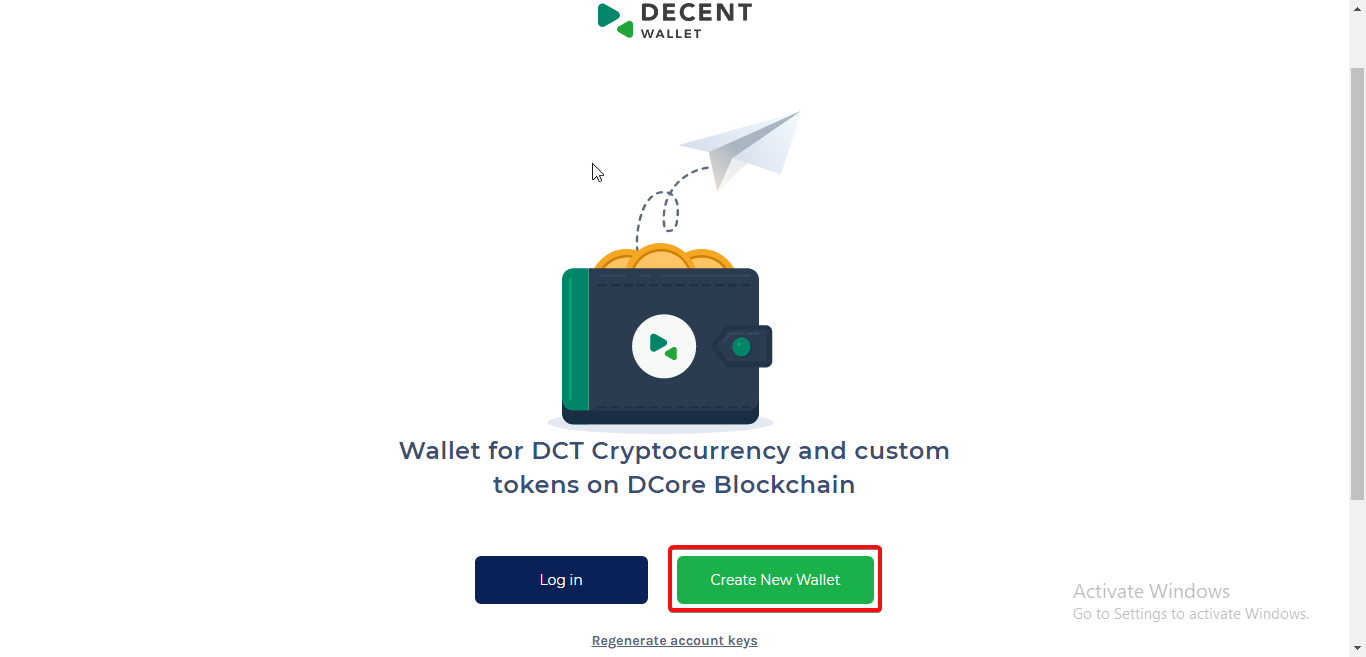 B. The next page will present a reCAPTCHA box, Click in the checkbox to confirm that you are not a robot. 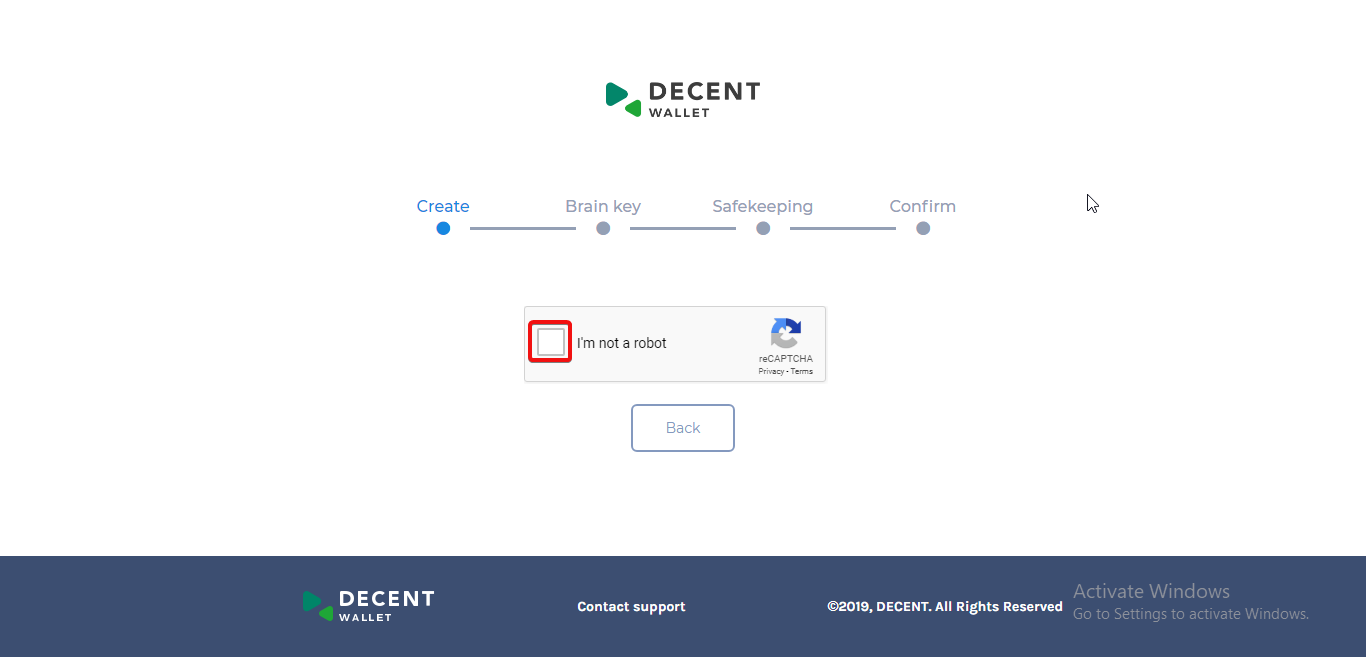 C. Once it's confirmed that you are human, this will then show a part which you are to use to create your account name. There are two options for creating an account name. Either through creating it using a custom name of your preference or by automatically generating the name. The account name will uniquely identify your presence on the DCore blockchain. When someone sends you DCT or custom tokens, the sender will use your account name as a recipient address. When creating an account using the custom name option, you can enter their favourite name into the box, after the predetermined 'dw-' prefix, but you must have in mind that; - The name, including the prefix, must be more than four characters in length. The "#### confirm" button will not be active and the green tick will not appear unless you meet this rule. - Choosing an invalid or an already created account name will prompt a red warning message to be displayed under the text field. You must change the name to a valid, or an available one and then try again. When creating the account name through the other option of generating the account name automatically, you will simply just click the "#### Generate Automatically" button. The generated name should be valid and can be edited as per the rules for custom named accounts (more than four characters, including the 'dw-' prefix). Once the name is valid, then click the green "#### confirm" button below 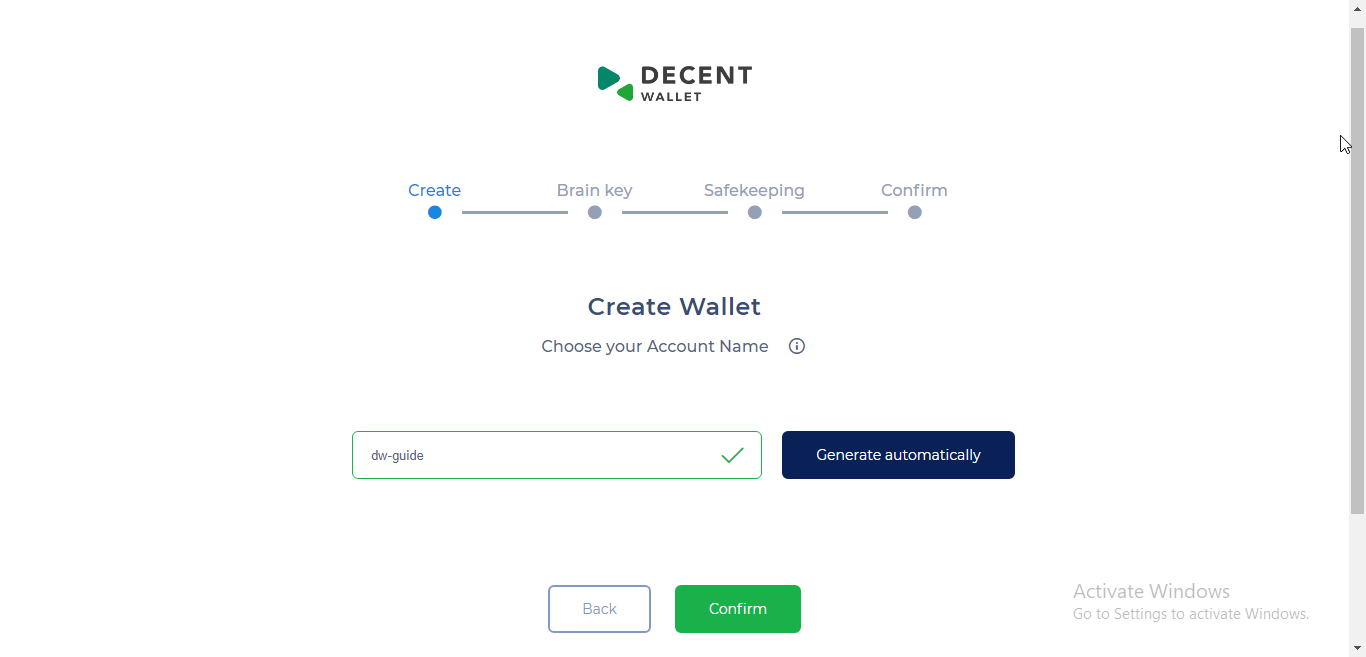 D. A new page is displayed containing your account's brain key. You must write your account's brain key on a piece of paper or copy it to a document. When writing the brain key, you must ensure that the words you write are in the same order and spelling as seen on the screen. This brain key is very important as it is a requirement to complete creating your wallet, and regenerating the account should you ever lose the private key or try to login again later. 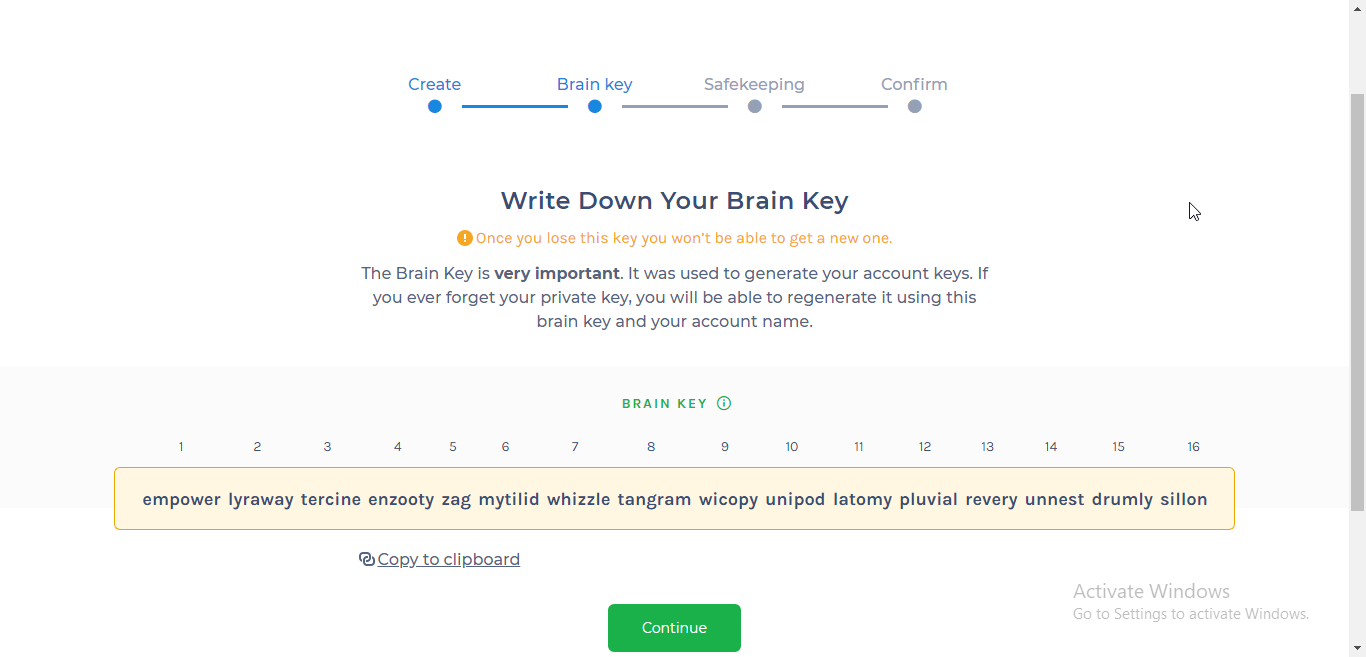 E. After writing down the brain key, click on the "#### continue" button. F. You will then be asked to verify whether you saved your account's brain key by selecting two correct words that are in the brain key but are missing in the challenge. If these are not answered correctly and you click on the "#### verify" button below, it will return you to step D to try again. 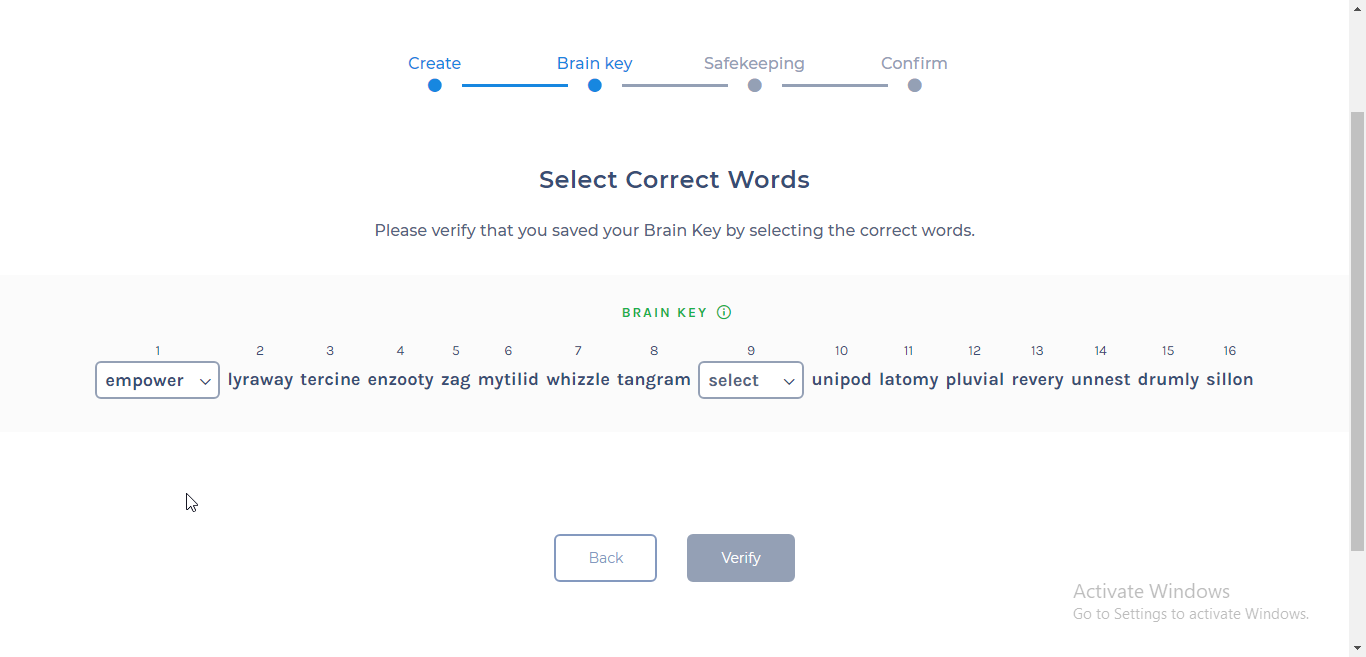 G. If the answer to the challenge is correct upon verification, this will mean completion of your wallet creation and you will see the account overview information on the next page. 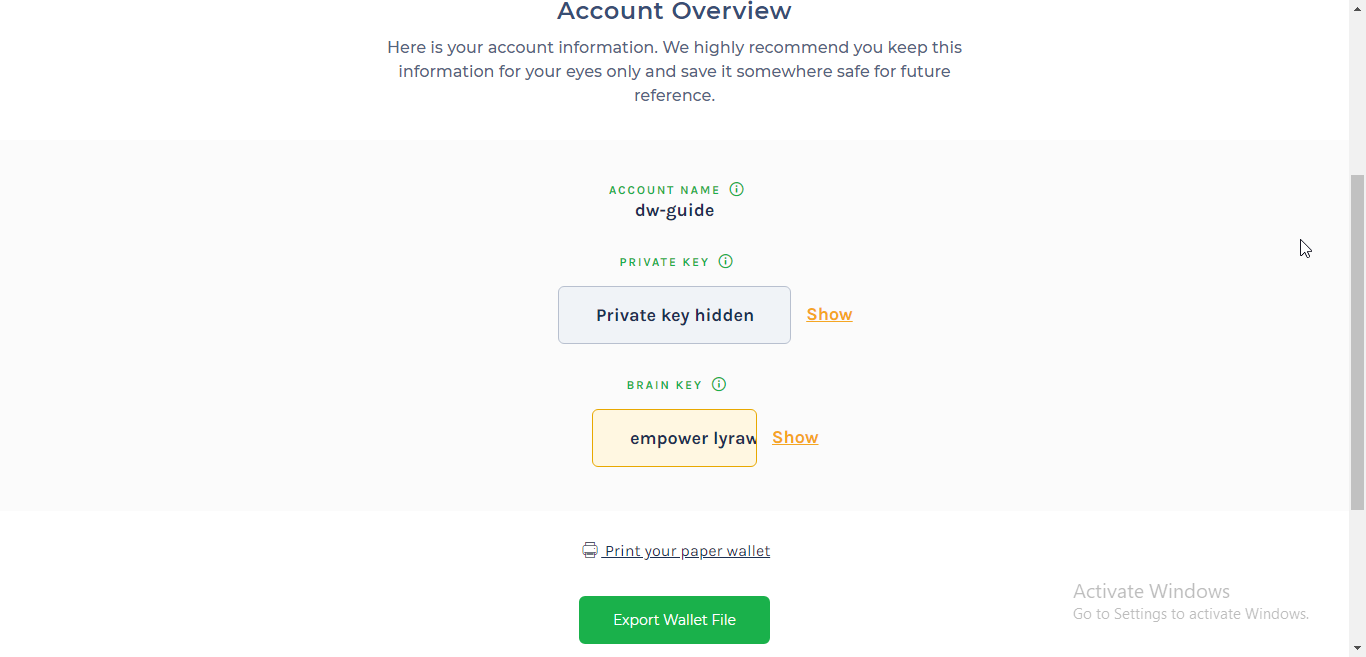 H. On the account overview page, you can click on "#### show" private key and brain key if you want to show them, copy and save in a secure offline location for future use. I. You can also print your paper wallet that you can keep securely offline or export the wallet file in JSON format which can then be stored on the computer for use when logging into your account later. J. Exporting Wallet file. Click on "#### Export Wallet File" option and on the next page, enter a strong password of your choice to keep the private key in the wallet file encrypted. Use a password with more than eight characters, containing at least one number and one special character. After confirming your password by repeating it in the next box, click on the "#### Export" button below to download the JSON file into your computer 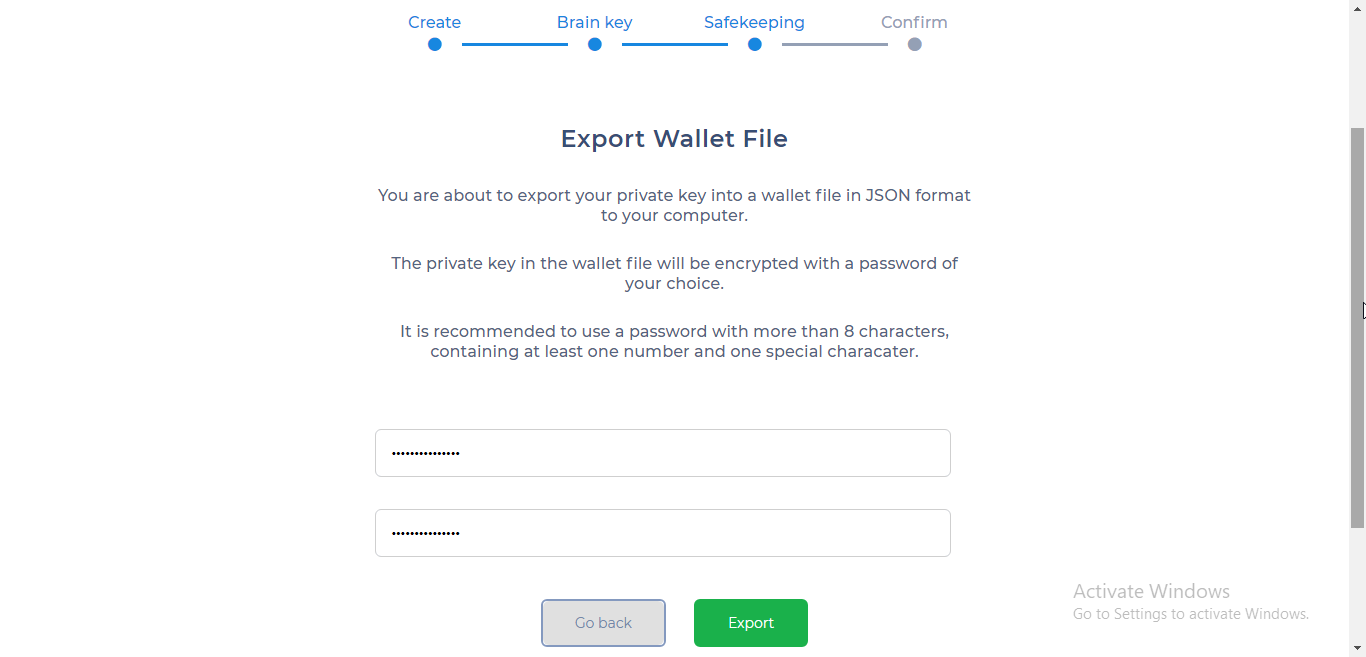 K. Account creation costs 0.005 DCT but it's free at the moment. Click on "#### Go to wallet" button below the page. 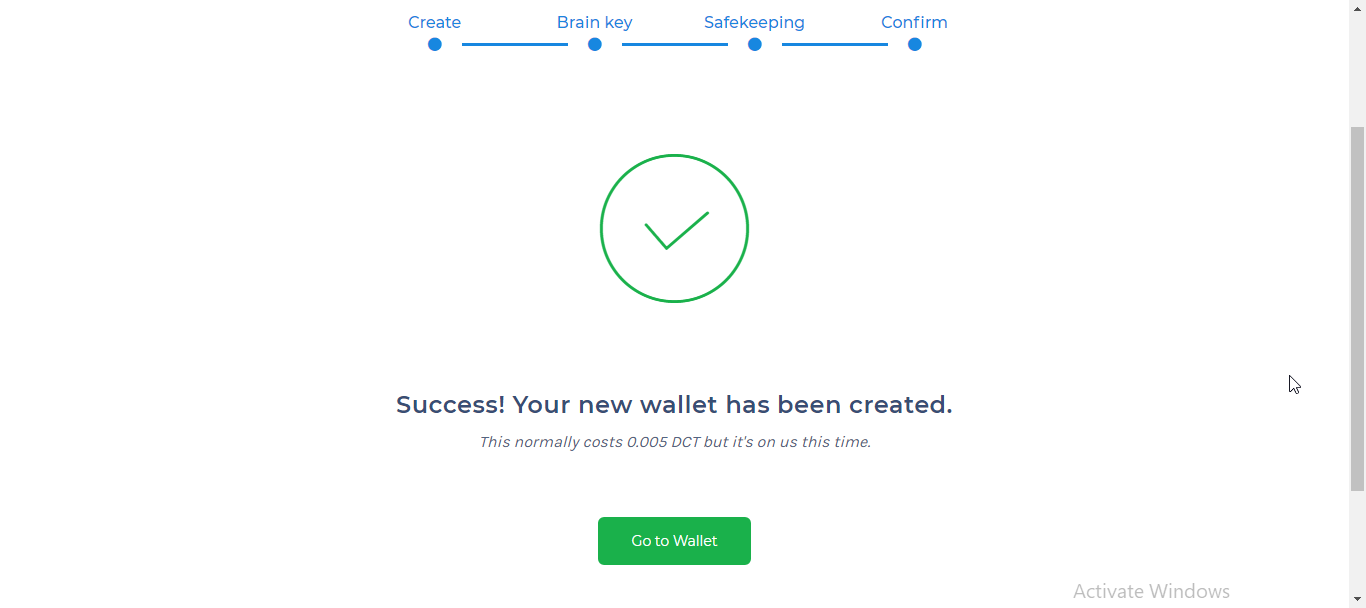 L. On the next page shown, you will be able to view your account's dashboard with account information such as current DCT and token balance, transaction history, etc. 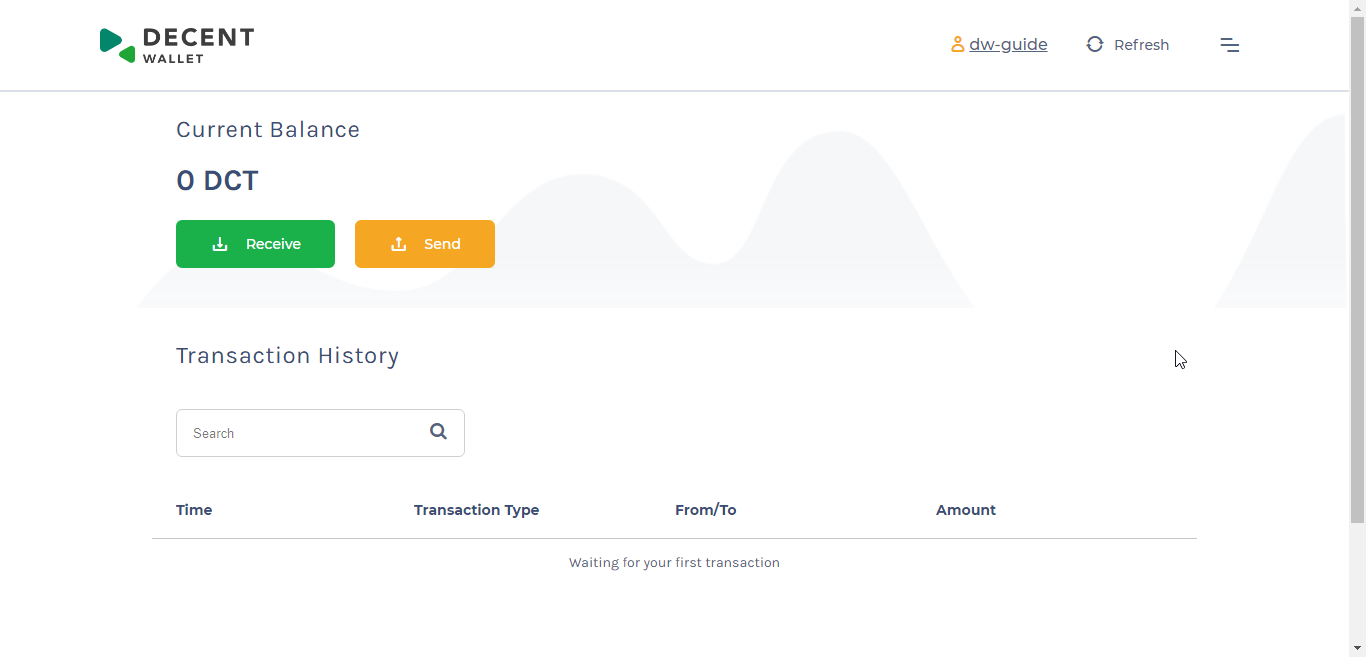 M. To receive the DCT, you want to store, click on the "#### Receive" button and a window where to fill up the details of the funds' request will pop up. You can then fill in the amount of DCT you want to receive in the account and the Memo(The memo is optional, so you can leave it out if it's not necessary.) After filling the details, copy the account name, scroll down the pop-up window and click on the "#### OK" button. 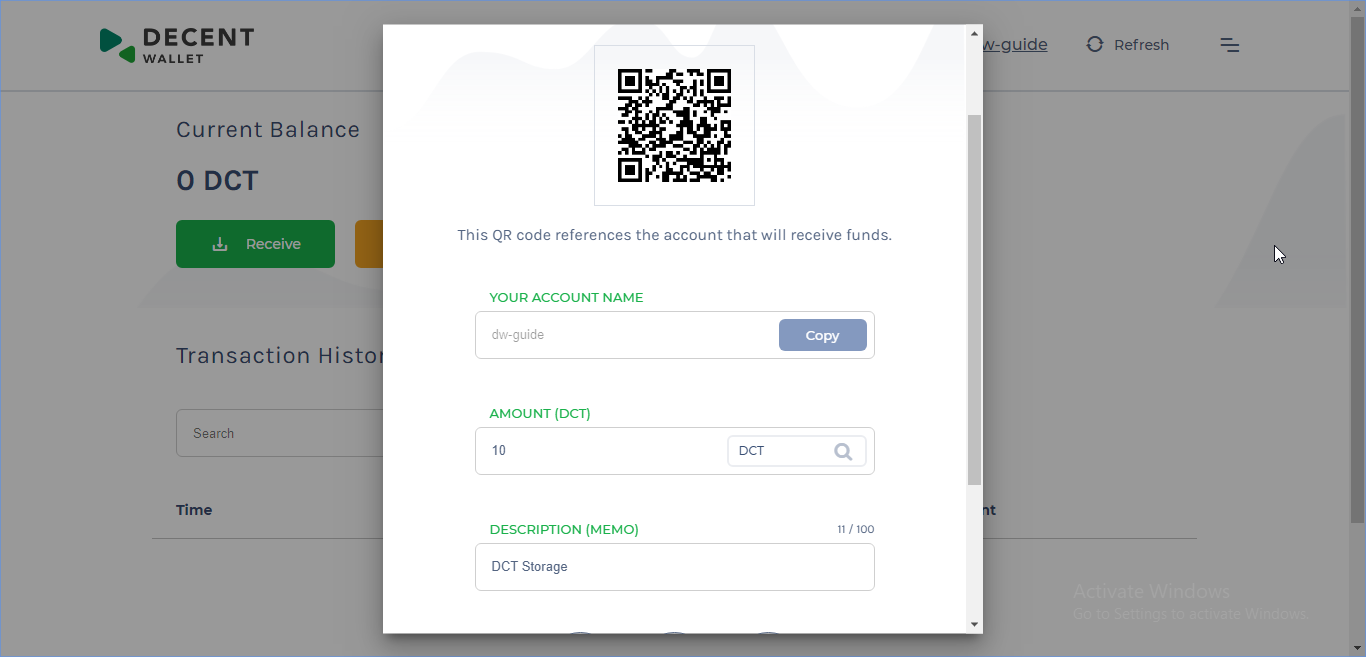 N. Withdrawing DCT from an exchange; Log into one of the exchanges where you have bought the DCT from and then request for a withdraw. Exchanges that trade DCT are; Bcex Bittrex Bit-Z Coinbene ChangeNOW Chaoex Gbcax HitBTC Rudex UPbit In this case. I used Bittrex. After logging in, you can request for withdrawal of DCT under the wallets option. Select DCT and click on the "#### Withdraw" button. A withdraw window will pop up where you will fill in the details as per the request funds details you had filled up earlier on in your Dcore Account Mark the checkbox if the receiving account doesn't need any memo otherwise fill in the correct memo to avoid losing funds. Fill in the recipient account name and the amount requested for the deposit into the account. Make sure you take into account the transaction too when filling in the amount to withdraw. On confirming that the details are correct. Click on the " #### Withdraw DCT" button. 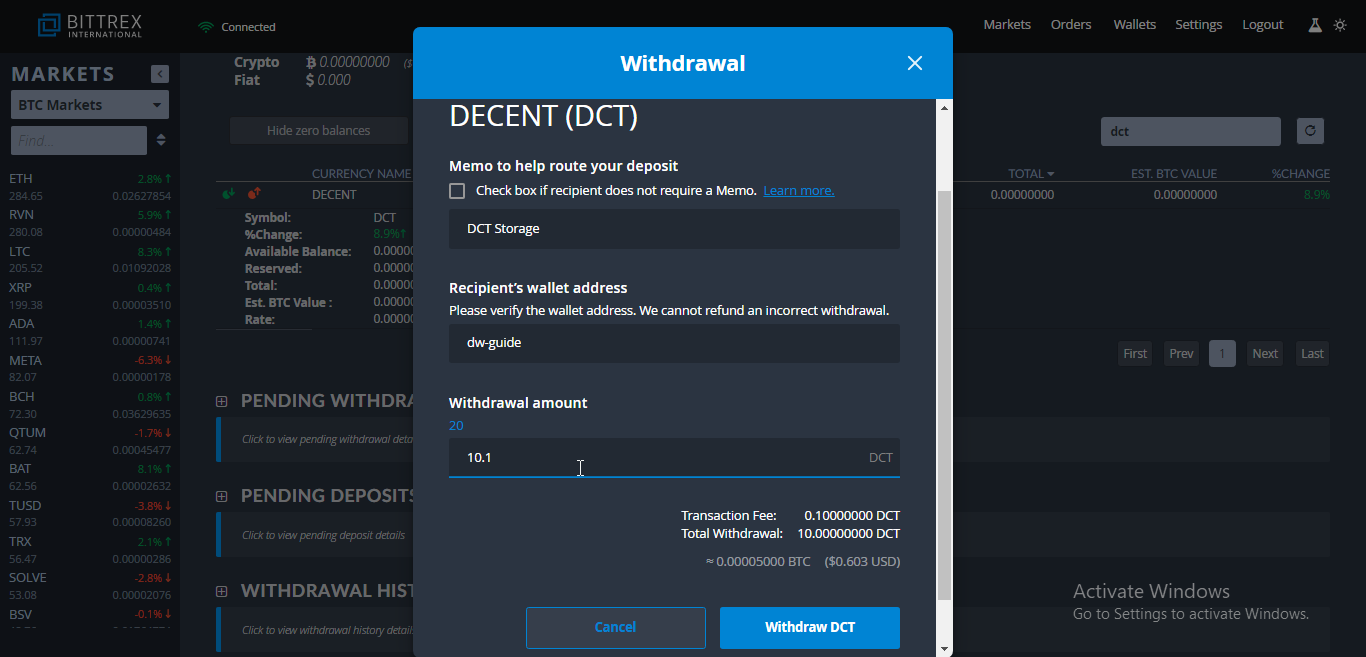 After a number of confirmations, the DCT will arrive in the recipient account. You can always use the Decent blockchain explorer https://explorer.decent.ch/ to check for the progress of your transactions. This marks the end of a successful process of account creation and DCT storage. ## CONCLUSION ### Safety precautions to take when creating your account and storing your DCT. 1. Always look out for the official URL of the Decent web wallet. Check each letter of the address to avoid using phishing websites to create and import your account. This can prevent you from losing your DCT if you send them into your account. 2. Back up your newly created wallet regularly to avoid loss of your funds. You should store the backups in many secure offline locations to avoid single points of failure which are bad for your funds' security and make sure you always encrypt your online backups. 3. Always keep your wallet software updated. Keep your computer, browsers and mobile phones updated too to avoid any malicious attempts to steal your stored DCT. 4. Ensure offline storage such as paper wallet as your first choice storage method if you have large amounts of DCT are going to keep over a very long period. 5. Make sure you use official websites of exchanges which trade in DCT to avoid getting phished and losing your funds. ## Decent community links. [Website](https://decent.ch/) [Telegram](https://t.me/decentch) [Twitter](https://twitter.com/DECENTplatform) [Reddit](https://www.reddit.com/r/Decentplatform/) [LinkedIn](https://www.linkedin.com/company/decent-ngo-/) [Facebook](https://www.facebook.com/DECENTplatform/) |
| json metadata | {"tags":["blockchain","cryptocurrency","entertainment","art","investment"],"image":["https://cdn.steemitimages.com/DQmawfCTudvd6aKxpN7jJhfZBy9VbwC5eRkjq8EY7LHuzQS/0_YF2se1ms4T-SnINV.png","https://cdn.steemitimages.com/DQmRtpBjmFGj4sjiyoVke6CmQqbtKQ3ikTFThvrQb52wehV/chrome_3HZEasx80Y.png","https://cdn.steemitimages.com/DQmNZZH2tFxwNVopLCdpvrLodRaxqQajMa5VBN8GQxJMDoT/chrome_DUK1xmLyTn.png","https://cdn.steemitimages.com/DQmY5ph1gAbvqhnZ7BAdkY971M1JCC16tjB88CUUnaVG6CC/chrome_sc1fXjQy0J.png","https://cdn.steemitimages.com/DQmUMr9Zm8HhXTYptXeFB3NLHpG3N5DBzRpsNjnsuLvQVaQ/chrome_Kr5qxFsHcH.png","https://cdn.steemitimages.com/DQmNcM1zDvqhFkz9rkGjTW8BAvrHSSBNyY6naUtieiXszBc/chrome_NXlHplcNeA.png","https://cdn.steemitimages.com/DQmSgavvJPT1GWHzR1LAFsbZ67TypSQMpPyJ7qp6YtczTfC/chrome_pWy9eOhugo.png","https://cdn.steemitimages.com/DQmQZpobRTWpcnh9BLyvnbcYRs4cwKGiLErxMFZzxy1R369/chrome_3Bt9dAP2fg.png","https://cdn.steemitimages.com/DQmXC8Bp5TkSLHE94zpX7BBHfs8i7t5W9stmWd2g2V72FFb/chrome_KPMU2UNBmo.png","https://cdn.steemitimages.com/DQmRCvMJFbXrzrse2gNw22gGN4nTjAZUWFd125gwUN4a1ac/chrome_92UDt5hDjZ.png","https://cdn.steemitimages.com/DQmSmDEzzuwbKW4LUb7odi8aMNXkZNAJPzdv9jiZS9LfGsE/chrome_3Bw5q9qdow.png","https://cdn.steemitimages.com/DQmcCFBhXxrhv4LSAXgMNzjiw7fzJT9zdGqdZt5gGaQ2YcC/chrome_TWecRUIGwQ.png"],"links":["https://wallet.decent.ch/","https://explorer.decent.ch/","https://decent.ch/","https://t.me/decentch","https://twitter.com/DECENTplatform","https://www.reddit.com/r/Decentplatform/","https://www.linkedin.com/company/decent-ngo-/","https://www.facebook.com/DECENTplatform/"],"app":"steemit/0.1","format":"markdown"} |
| parent author | |
| parent permlink | blockchain |
| permlink | a-guide-on-how-to-store-dct-safely |
| title | A GUIDE ON HOW TO STORE DCT SAFELY |
| Transaction Info | Block #34257382/Trx d157107254031636ff69240ad1c4a2ade909ff8d |
View Raw JSON Data
{
"block": 34257382,
"op": [
"comment",
{
"author": "jerometash",
"body": "\n\n## INTRODUCTION\n\nBeing a platform that encourages users to create or migrate applications into a blockchain environment. DECENT makes it easy for developers and businesses to embrace decentralization especially for the media and entertainment industries and grow in the process through its Dcore blockchain structure.\n\nDifferent users can earn DCT, which is a native coin of the Dcore blockchain through different activities such as seeding, voting, uploading and selling content, mining or buying from an exchange. It's therefore important to safely store some DCT for long-term use.\n\nThere are many forms in which the DCT is stored, these include;\n\n- ### In an exchange wallet\nOne of the ways of storing DCT is by leaving them in your personal exchange account after buying. But this method is highly not recommended as it's very easy to lose your DCT.\n_Pros_\n1. It helps avoid transaction costs in and out of the exchange and eases trade if you are an active trader.\n_Cons_\n1. You can easily lose DCT if the exchange gets hacked or shuts down.\n2. You are not in total control of your account's private keys, and you can not import them in any other software wallet.\n\n- ### Web Wallet\nYou can access this online through web browsers. The correct URL for the web wallet of the Decent blockchain is https://wallet.decent.ch/\nThis application can also be used to create your personal account for sending and receiving DCT.\n_Pros_\n1. You can use it for creating a new account.\n2. You are in total control of your private keys.\n3. There is no need for any form of wallet installation. All you need is a web browser to access your account both on mobile and computer.\n4. It does not need any updating by the user.\n_Cons_\n1. It is prone to phishing attacks by hackers if you don't carefully check the URL you are visiting thereby giving away your account credentials to hackers.\n\n- ### Software wallets (Windows, Linux, Android or iOS wallet)\nThese are in the form of software applications that are available for Desktop(Windows, Linux, MacOS) and Mobile(iOS and Android) platforms.\n_Pros_\n1. They make it easier to send DCT on the go.\n2. You are in control of your private keys and DCT.\n_Cons_\n1. You can easily lose DCT if you download malicious apps from the Play Store and App Store.\n2. They require regular updates to remain secure.\n\n- ### Paper wallet\nThis is an offline method for storing your DCT. The process of creating a paper wallet involves writing down or printing of private keys and brain keys of your account and storing them in a very secure place no one can get access to. If the account is properly created and stored with extra precautions, it will be impossible to have your DCT stolen.\n_Pros_\n1. A very safe and effective way of keeping your DCT away from online hackers.\n2. Does not need wallet software installation or constant updates.\n3. Much cheaper than the hardware storage method.\n4. Very good for long-term coin storage.\n_Cons_\n1. Not so good, if you are a daily trader as it's hectic and costly to transfer DCT in and out of the exchange every time you are trading.\n\n## ACCOUNT CREATION\n\nIn order to safely store your DCT, you will need an account where to keep them, so the first step is creating an account.\nYou can create an account through the web wallet platform or the wallet software. The process is similar. We shall look at account creation on the Decent web wallet platform\n\n### Creating an account on the web wallet\n\nA. Visit the [Web Wallet page](https://wallet.decent.ch/). On the page, you will see two options, which are \"Login\" and \"Create New wallet\". Click on \"Create New Account\" button\n\n\n\nB. The next page will present a reCAPTCHA box, Click in the checkbox to confirm that you are not a robot.\n\n\n\nC. Once it's confirmed that you are human, this will then show a part which you are to use to create your account name. There are two options for creating an account name.\nEither through creating it using a custom name of your preference or by automatically generating the name.\n\nThe account name will uniquely identify your presence on the DCore blockchain. When someone sends you DCT or custom tokens, the sender will use your account name as a recipient address.\nWhen creating an account using the custom name option, you can enter their favourite name into the box, after the predetermined 'dw-' prefix, but you must have in mind that;\n\n- The name, including the prefix, must be more than four characters in length. The \"#### confirm\" button will not be active and the green tick will not appear unless you meet this rule.\n- Choosing an invalid or an already created account name will prompt a red warning message to be displayed under the text field. You must change the name to a valid, or an available one and then try again.\n\nWhen creating the account name through the other option of generating the account name automatically, you will simply just click the \"#### Generate Automatically\" button.\nThe generated name should be valid and can be edited as per the rules for custom named accounts (more than four characters, including the 'dw-' prefix).\n\nOnce the name is valid, then click the green \"#### confirm\" button below\n\n\n\nD. A new page is displayed containing your account's brain key. You must write your account's brain key on a piece of paper or copy it to a document. When writing the brain key, you must ensure that the words you write are in the same order and spelling as seen on the screen.\n\nThis brain key is very important as it is a requirement to complete creating your wallet, and regenerating the account should you ever lose the private key or try to login again later.\n\n\n\nE. After writing down the brain key, click on the \"#### continue\" button.\n\nF. You will then be asked to verify whether you saved your account's brain key by selecting two correct words that are in the brain key but are missing in the challenge. If these are not answered correctly and you click on the \"#### verify\" button below, it will return you to step D to try again.\n\n\n\nG. If the answer to the challenge is correct upon verification, this will mean completion of your wallet creation and you will see the account overview information on the next page.\n\n\n\nH. On the account overview page, you can click on \"#### show\" private key and brain key if you want to show them, copy and save in a secure offline location for future use.\n\nI. You can also print your paper wallet that you can keep securely offline or export the wallet file in JSON format which can then be stored on the computer for use when logging into your account later.\n\nJ. Exporting Wallet file.\nClick on \"#### Export Wallet File\" option and on the next page, enter a strong password of your choice to keep the private key in the wallet file encrypted.\n\nUse a password with more than eight characters, containing at least one number and one special character.\nAfter confirming your password by repeating it in the next box, click on the \"#### Export\" button below to download the JSON file into your computer\n\n\n\nK. Account creation costs 0.005 DCT but it's free at the moment. Click on \"#### Go to wallet\" button below the page.\n\n\n\nL. On the next page shown, you will be able to view your account's dashboard with account information such as current DCT and token balance, transaction history, etc.\n\n\n\nM. To receive the DCT, you want to store, click on the \"#### Receive\" button and a window where to fill up the details of the funds' request will pop up.\n\nYou can then fill in the amount of DCT you want to receive in the account and the Memo(The memo is optional, so you can leave it out if it's not necessary.)\nAfter filling the details, copy the account name, scroll down the pop-up window and click on the \"#### OK\" button.\n\n\n\nN. Withdrawing DCT from an exchange;\nLog into one of the exchanges where you have bought the DCT from and then request for a withdraw.\nExchanges that trade DCT are;\nBcex\nBittrex\nBit-Z\nCoinbene\nChangeNOW\nChaoex\nGbcax\nHitBTC\nRudex\nUPbit\n\nIn this case. I used Bittrex. After logging in, you can request for withdrawal of DCT under the wallets option. Select DCT and click on the \"#### Withdraw\" button.\n\nA withdraw window will pop up where you will fill in the details as per the request funds details you had filled up earlier on in your Dcore Account\nMark the checkbox if the receiving account doesn't need any memo otherwise fill in the correct memo to avoid losing funds.\n\nFill in the recipient account name and the amount requested for the deposit into the account.\nMake sure you take into account the transaction too when filling in the amount to withdraw. On confirming that the details are correct. Click on the \" #### Withdraw DCT\" button.\n\n\n\nAfter a number of confirmations, the DCT will arrive in the recipient account.\nYou can always use the Decent blockchain explorer https://explorer.decent.ch/ to check for the progress of your transactions.\nThis marks the end of a successful process of account creation and DCT storage.\n\n## CONCLUSION\n### Safety precautions to take when creating your account and storing your DCT.\n\n1. Always look out for the official URL of the Decent web wallet. Check each letter of the address to avoid using phishing websites to create and import your account. This can prevent you from losing your DCT if you send them into your account.\n\n2. Back up your newly created wallet regularly to avoid loss of your funds. You should store the backups in many secure offline locations to avoid single points of failure which are bad for your funds' security and make sure you always encrypt your online backups.\n\n3. Always keep your wallet software updated. Keep your computer, browsers and mobile phones updated too to avoid any malicious attempts to steal your stored DCT.\n4. Ensure offline storage such as paper wallet as your first choice storage method if you have large amounts of DCT are going to keep over a very long period.\n\n5. Make sure you use official websites of exchanges which trade in DCT to avoid getting phished and losing your funds.\n\n## Decent community links.\n[Website](https://decent.ch/)\n[Telegram](https://t.me/decentch)\n[Twitter](https://twitter.com/DECENTplatform)\n[Reddit](https://www.reddit.com/r/Decentplatform/)\n[LinkedIn](https://www.linkedin.com/company/decent-ngo-/)\n[Facebook](https://www.facebook.com/DECENTplatform/)",
"json_metadata": "{\"tags\":[\"blockchain\",\"cryptocurrency\",\"entertainment\",\"art\",\"investment\"],\"image\":[\"https://cdn.steemitimages.com/DQmawfCTudvd6aKxpN7jJhfZBy9VbwC5eRkjq8EY7LHuzQS/0_YF2se1ms4T-SnINV.png\",\"https://cdn.steemitimages.com/DQmRtpBjmFGj4sjiyoVke6CmQqbtKQ3ikTFThvrQb52wehV/chrome_3HZEasx80Y.png\",\"https://cdn.steemitimages.com/DQmNZZH2tFxwNVopLCdpvrLodRaxqQajMa5VBN8GQxJMDoT/chrome_DUK1xmLyTn.png\",\"https://cdn.steemitimages.com/DQmY5ph1gAbvqhnZ7BAdkY971M1JCC16tjB88CUUnaVG6CC/chrome_sc1fXjQy0J.png\",\"https://cdn.steemitimages.com/DQmUMr9Zm8HhXTYptXeFB3NLHpG3N5DBzRpsNjnsuLvQVaQ/chrome_Kr5qxFsHcH.png\",\"https://cdn.steemitimages.com/DQmNcM1zDvqhFkz9rkGjTW8BAvrHSSBNyY6naUtieiXszBc/chrome_NXlHplcNeA.png\",\"https://cdn.steemitimages.com/DQmSgavvJPT1GWHzR1LAFsbZ67TypSQMpPyJ7qp6YtczTfC/chrome_pWy9eOhugo.png\",\"https://cdn.steemitimages.com/DQmQZpobRTWpcnh9BLyvnbcYRs4cwKGiLErxMFZzxy1R369/chrome_3Bt9dAP2fg.png\",\"https://cdn.steemitimages.com/DQmXC8Bp5TkSLHE94zpX7BBHfs8i7t5W9stmWd2g2V72FFb/chrome_KPMU2UNBmo.png\",\"https://cdn.steemitimages.com/DQmRCvMJFbXrzrse2gNw22gGN4nTjAZUWFd125gwUN4a1ac/chrome_92UDt5hDjZ.png\",\"https://cdn.steemitimages.com/DQmSmDEzzuwbKW4LUb7odi8aMNXkZNAJPzdv9jiZS9LfGsE/chrome_3Bw5q9qdow.png\",\"https://cdn.steemitimages.com/DQmcCFBhXxrhv4LSAXgMNzjiw7fzJT9zdGqdZt5gGaQ2YcC/chrome_TWecRUIGwQ.png\"],\"links\":[\"https://wallet.decent.ch/\",\"https://explorer.decent.ch/\",\"https://decent.ch/\",\"https://t.me/decentch\",\"https://twitter.com/DECENTplatform\",\"https://www.reddit.com/r/Decentplatform/\",\"https://www.linkedin.com/company/decent-ngo-/\",\"https://www.facebook.com/DECENTplatform/\"],\"app\":\"steemit/0.1\",\"format\":\"markdown\"}",
"parent_author": "",
"parent_permlink": "blockchain",
"permlink": "a-guide-on-how-to-store-dct-safely",
"title": "A GUIDE ON HOW TO STORE DCT SAFELY"
}
],
"op_in_trx": 0,
"timestamp": "2019-06-30T16:51:27",
"trx_id": "d157107254031636ff69240ad1c4a2ade909ff8d",
"trx_in_block": 26,
"virtual_op": 0
}steemdelegated 5.500 SP to @jerometash2019/05/25 03:29:36
steemdelegated 5.500 SP to @jerometash
2019/05/25 03:29:36
| delegatee | jerometash |
| delegator | steem |
| vesting shares | 8945.509198 VESTS |
| Transaction Info | Block #33205956/Trx f1d5c646bea8acc6f5a5fe31faa02c01efbdaeda |
View Raw JSON Data
{
  "block": 33205956,
  "op": [
    "delegate_vesting_shares",
    {
      "delegatee": "jerometash",
      "delegator": "steem",
      "vesting_shares": "8945.509198 VESTS"
    }
  ],
  "op_in_trx": 0,
  "timestamp": "2019-05-25T03:29:36",
  "trx_id": "f1d5c646bea8acc6f5a5fe31faa02c01efbdaeda",
  "trx_in_block": 12,
  "virtual_op": 0
}2019/02/26 04:51:03
2019/02/26 04:51:03
| author | partiko |
| body | Hello @jerometash! This is a friendly reminder that you have 3000 Partiko Points unclaimed in your Partiko account! Partiko is a fast and beautiful mobile app for Steem, and it’s the most popular Steem mobile app out there! Download Partiko using the link below and login using SteemConnect to claim your 3000 Partiko points! You can easily convert them into Steem token! https://partiko.app/referral/partiko |
| json metadata | {"app":"partiko"} |
| parent author | jerometash |
| parent permlink | tutorial-on-how-to-invest-using-mybit-go |
| permlink | partiko-re-jerometash-tutorial-on-how-to-invest-using-mybit-go-20190226t045103081z |
| title | |
| Transaction Info | Block #30676341/Trx 5ec1fe92c79fb16a8e172444be0ce72fab274881 |
View Raw JSON Data
{
  "block": 30676341,
  "op": [
    "comment",
    {
      "author": "partiko",
      "body": "Hello @jerometash! This is a friendly reminder that you have 3000 Partiko Points unclaimed in your Partiko account!\n\nPartiko is a fast and beautiful mobile app for Steem, and it’s the most popular Steem mobile app out there! Download Partiko using the link below and login using SteemConnect to claim your 3000 Partiko points! You can easily convert them into Steem token!\n\nhttps://partiko.app/referral/partiko",
      "json_metadata": "{\"app\":\"partiko\"}",
      "parent_author": "jerometash",
      "parent_permlink": "tutorial-on-how-to-invest-using-mybit-go",
      "permlink": "partiko-re-jerometash-tutorial-on-how-to-invest-using-mybit-go-20190226t045103081z",
      "title": ""
    }
  ],
  "op_in_trx": 0,
  "timestamp": "2019-02-26T04:51:03",
  "trx_id": "5ec1fe92c79fb16a8e172444be0ce72fab274881",
  "trx_in_block": 12,
  "virtual_op": 0
}2019/02/24 06:28:18
2019/02/24 06:28:18
| author | steemitboard |
| body | Congratulations @jerometash! You received a personal award! <table><tr><td>https://steemitimages.com/70x70/http://steemitboard.com/@jerometash/birthday1.png</td><td>Happy Birthday! - You are on the Steem blockchain for 1 year!</td></tr></table> <sub>_[Click here to view your Board](https://steemitboard.com/@jerometash)_</sub> > Support [SteemitBoard's project](https://steemit.com/@steemitboard)! **[Vote for its witness](https://v2.steemconnect.com/sign/account-witness-vote?witness=steemitboard&approve=1)** and **get one more award**! |
| json metadata | {"image":["https://steemitboard.com/img/notify.png"]} |
| parent author | jerometash |
| parent permlink | tutorial-on-how-to-invest-using-mybit-go |
| permlink | steemitboard-notify-jerometash-20190224t062818000z |
| title | |
| Transaction Info | Block #30620743/Trx 07135723a0d986f0e6ae13c336f3c246cd980c04 |
View Raw JSON Data
{
  "block": 30620743,
  "op": [
    "comment",
    {
      "author": "steemitboard",
      "body": "Congratulations @jerometash! You received a personal award!\n\n<table><tr><td>https://steemitimages.com/70x70/http://steemitboard.com/@jerometash/birthday1.png</td><td>Happy Birthday! - You are on the Steem blockchain for 1 year!</td></tr></table>\n\n<sub>_[Click here to view your Board](https://steemitboard.com/@jerometash)_</sub>\n\n\n> Support [SteemitBoard's project](https://steemit.com/@steemitboard)! **[Vote for its witness](https://v2.steemconnect.com/sign/account-witness-vote?witness=steemitboard&approve=1)** and **get one more award**!",
      "json_metadata": "{\"image\":[\"https://steemitboard.com/img/notify.png\"]}",
      "parent_author": "jerometash",
      "parent_permlink": "tutorial-on-how-to-invest-using-mybit-go",
      "permlink": "steemitboard-notify-jerometash-20190224t062818000z",
      "title": ""
    }
  ],
  "op_in_trx": 0,
  "timestamp": "2019-02-24T06:28:18",
  "trx_id": "07135723a0d986f0e6ae13c336f3c246cd980c04",
  "trx_in_block": 7,
  "virtual_op": 0
}steemdelegated 17.854 SP to @jerometash2019/02/23 04:08:09
steemdelegated 17.854 SP to @jerometash
2019/02/23 04:08:09
| delegatee | jerometash |
| delegator | steem |
| vesting shares | 29037.671502 VESTS |
| Transaction Info | Block #30589156/Trx e9a4199cf568d6b141440c51c68f66ab3c912608 |
View Raw JSON Data
{
  "block": 30589156,
  "op": [
    "delegate_vesting_shares",
    {
      "delegatee": "jerometash",
      "delegator": "steem",
      "vesting_shares": "29037.671502 VESTS"
    }
  ],
  "op_in_trx": 0,
  "timestamp": "2019-02-23T04:08:09",
  "trx_id": "e9a4199cf568d6b141440c51c68f66ab3c912608",
  "trx_in_block": 10,
  "virtual_op": 0
}filipinoupvoted (10.00%) @jerometash / tutorial-on-how-to-invest-using-mybit-go2019/02/23 03:32:06
filipinoupvoted (10.00%) @jerometash / tutorial-on-how-to-invest-using-mybit-go
2019/02/23 03:32:06
| author | jerometash |
| permlink | tutorial-on-how-to-invest-using-mybit-go |
| voter | filipino |
| weight | 1000 (10.00%) |
| Transaction Info | Block #30588435/Trx 112ccbdfb17eb674dc6ff14c3d78602c5109f4c0 |
View Raw JSON Data
{
  "block": 30588435,
  "op": [
    "vote",
    {
      "author": "jerometash",
      "permlink": "tutorial-on-how-to-invest-using-mybit-go",
      "voter": "filipino",
      "weight": 1000
    }
  ],
  "op_in_trx": 0,
  "timestamp": "2019-02-23T03:32:06",
  "trx_id": "112ccbdfb17eb674dc6ff14c3d78602c5109f4c0",
  "trx_in_block": 28,
  "virtual_op": 0
}jerometashpublished a new post: tutorial-on-how-to-invest-using-mybit-go2019/02/23 03:21:39
jerometashpublished a new post: tutorial-on-how-to-invest-using-mybit-go
2019/02/23 03:21:39
| author | jerometash |
| body | @@ -1,12 +1,217 @@ +!%5B33817364_10212397558118476_6278768280060559360_n-696x348.png%5D(https://cdn.steemitimages.com/DQmaEN8EuZYRC4cdk3uMFKLpc4aWMZYFmBE1QeGrzXBWU3c/33817364_10212397558118476_6278768280060559360_n-696x348.png)%0A%0A ### WHAT IS |
| json metadata | {"tags":["cryptocurrency","investment","iot","blockchain","ethereum"],"image":["https://cdn.steemitimages.com/DQmaEN8EuZYRC4cdk3uMFKLpc4aWMZYFmBE1QeGrzXBWU3c/33817364_10212397558118476_6278768280060559360_n-696x348.png","https://cdn.steemitimages.com/DQmW2oQTnkQMJtspJU6smnRJXbftEDGvR6LpSVNtQWvnojK/1.%20Mybit%20onboarding.png","https://cdn.steemitimages.com/DQmZBrHuamvyC9iQuBrRihCThEauPyW4HntxnmMLNz3LBfA/3.%20Log%20into%20Metamask.png","https://cdn.steemitimages.com/DQmQBxkeXkBPhh4CueGwdxWNijDtRdxu2BNQap1SaTBAnYV/4.%20MybitGo%20contribute%20Edit.png","https://cdn.steemitimages.com/DQmVKcWx5D3pJEXyEDkaZ8ETBWamhtpyaqcWM2Zy9g1dPbh/5.%20Mybit%20Go%20details%20EDIT.png","https://cdn.steemitimages.com/DQmX6zSoGM7jtXJAuUR9bQQNfbuDct7svFyLWsaP5pFQmUW/6.Mybit%20Go%20confirm.png","https://cdn.steemitimages.com/DQmXtfmwp1RfijrUNJU4oDG1bpoeiv8KYQi1yf1FD24F2zj/7.%20Metamask%20popup.png","https://cdn.steemitimages.com/DQmdWDVdraigDnkm12KEVCW6LnFoMeT878LTiQ8npdAWjWj/8.%20Transactions%20history.png","https://cdn.steemitimages.com/DQmegU8pxRYvsede97KTmyG3aLSMeDtUeLQKV1kREdGR3KH/9.%20Portifolio%202.png"],"links":["https://metamask.io","https://app.mybit.io","https://t.me/mybitio","https://mybit.io/"],"app":"steemit/0.1","format":"markdown"} |
| parent author | |
| parent permlink | cryptocurrency |
| permlink | tutorial-on-how-to-invest-using-mybit-go |
| title | TUTORIAL ON HOW TO INVEST USING MYBIT GO |
| Transaction Info | Block #30588226/Trx 6a4a392f47aabf92f05f01061a28223b4b71a203 |
View Raw JSON Data
{
  "block": 30588226,
  "op": [
    "comment",
    {
      "author": "jerometash",
      "body": "@@ -1,12 +1,217 @@\n+!%5B33817364_10212397558118476_6278768280060559360_n-696x348.png%5D(https://cdn.steemitimages.com/DQmaEN8EuZYRC4cdk3uMFKLpc4aWMZYFmBE1QeGrzXBWU3c/33817364_10212397558118476_6278768280060559360_n-696x348.png)%0A%0A\n ### WHAT IS \n",
      "json_metadata": "{\"tags\":[\"cryptocurrency\",\"investment\",\"iot\",\"blockchain\",\"ethereum\"],\"image\":[\"https://cdn.steemitimages.com/DQmaEN8EuZYRC4cdk3uMFKLpc4aWMZYFmBE1QeGrzXBWU3c/33817364_10212397558118476_6278768280060559360_n-696x348.png\",\"https://cdn.steemitimages.com/DQmW2oQTnkQMJtspJU6smnRJXbftEDGvR6LpSVNtQWvnojK/1.%20Mybit%20onboarding.png\",\"https://cdn.steemitimages.com/DQmZBrHuamvyC9iQuBrRihCThEauPyW4HntxnmMLNz3LBfA/3.%20Log%20into%20Metamask.png\",\"https://cdn.steemitimages.com/DQmQBxkeXkBPhh4CueGwdxWNijDtRdxu2BNQap1SaTBAnYV/4.%20MybitGo%20contribute%20Edit.png\",\"https://cdn.steemitimages.com/DQmVKcWx5D3pJEXyEDkaZ8ETBWamhtpyaqcWM2Zy9g1dPbh/5.%20Mybit%20Go%20details%20EDIT.png\",\"https://cdn.steemitimages.com/DQmX6zSoGM7jtXJAuUR9bQQNfbuDct7svFyLWsaP5pFQmUW/6.Mybit%20Go%20confirm.png\",\"https://cdn.steemitimages.com/DQmXtfmwp1RfijrUNJU4oDG1bpoeiv8KYQi1yf1FD24F2zj/7.%20Metamask%20popup.png\",\"https://cdn.steemitimages.com/DQmdWDVdraigDnkm12KEVCW6LnFoMeT878LTiQ8npdAWjWj/8.%20Transactions%20history.png\",\"https://cdn.steemitimages.com/DQmegU8pxRYvsede97KTmyG3aLSMeDtUeLQKV1kREdGR3KH/9.%20Portifolio%202.png\"],\"links\":[\"https://metamask.io\",\"https://app.mybit.io\",\"https://t.me/mybitio\",\"https://mybit.io/\"],\"app\":\"steemit/0.1\",\"format\":\"markdown\"}",
      "parent_author": "",
      "parent_permlink": "cryptocurrency",
      "permlink": "tutorial-on-how-to-invest-using-mybit-go",
      "title": "TUTORIAL ON HOW TO INVEST USING MYBIT GO"
    }
  ],
  "op_in_trx": 0,
  "timestamp": "2019-02-23T03:21:39",
  "trx_id": "6a4a392f47aabf92f05f01061a28223b4b71a203",
  "trx_in_block": 22,
  "virtual_op": 0
}airdropgodupvoted (100.00%) @jerometash / tutorial-on-how-to-invest-using-mybit-go2019/02/23 02:47:30
airdropgodupvoted (100.00%) @jerometash / tutorial-on-how-to-invest-using-mybit-go
2019/02/23 02:47:30
| author | jerometash |
| permlink | tutorial-on-how-to-invest-using-mybit-go |
| voter | airdropgod |
| weight | 10000 (100.00%) |
| Transaction Info | Block #30587543/Trx e37f5be794a3e2dcd1aa44b178159d60cb9a7494 |
View Raw JSON Data
{
  "block": 30587543,
  "op": [
    "vote",
    {
      "author": "jerometash",
      "permlink": "tutorial-on-how-to-invest-using-mybit-go",
      "voter": "airdropgod",
      "weight": 10000
    }
  ],
  "op_in_trx": 0,
  "timestamp": "2019-02-23T02:47:30",
  "trx_id": "e37f5be794a3e2dcd1aa44b178159d60cb9a7494",
  "trx_in_block": 12,
  "virtual_op": 0
}jerometashpublished a new post: tutorial-on-how-to-invest-using-mybit-go2019/02/23 02:44:39
jerometashpublished a new post: tutorial-on-how-to-invest-using-mybit-go
2019/02/23 02:44:39
| author | jerometash |
| body | ### WHAT IS MYBIT GO? MyBit Go is an investment platform that offers users the ability to invest in Internet of Things (IoT) devices from anywhere in the world without the need for a middleman or broker. IoT devices are machine assets, such as Bitcoin ATMs, 3d Printers, Smart Lock enabled devices and real estate, etc., that connect to the internet and generate revenue by providing a good or service. IOT devices are quickly overtaking many functions of the human labour market, creating the necessity for MyBit GO to create access to investment in machine assets. MyBit GO doesn’t use brokers which means that: 1. Anyone is eligible to invest in his/her asset of choice without having to fulfil accredited investor requirements as seen in traditional funds. 2. There will be much lower fees incurred when attempting to make an investment. 3. There will be no single counterparty risk as all investment will be handled through a smart contract. 4. The investors will be able to get real-time revenue distributions paid from anywhere to anywhere in the world. ### GETTING STARTED. Before using the MyBit Go platform to invest, there are a couple of things you need to set up. - **MetaMask Wallet.** MetaMask is a lite Ethereum based wallet which acts as a bridge allowing a user to run Ethereum based decentralised apps (like MyBit Go platform) right in one’s browser without running a full Ethereum node. This is the most important requirement because it acts as your wallet for keeping the funds that you will use to buy assets as well as hold ownership of the asset and its distributed revenue. You will never have to fill in your personal information when signing up for the platform or enter payment information when attempting to make a purchase. Everything will be linked to your MetaMask account. MetaMask is also a very secure wallet as it will keep your private keys safe from phishing attacks by hackers. In order to download the extension into your browser, visit https://metamask.io on your browser and click on the download button specifically for your browser. After downloading the wallet, set it either by importing your ether address or by creating a new ether address. You will use this address to deposit ether and also receive revenue. - **Ether.** Before investing, you need to have the ETH you wish to invest in your MetaMask wallet. ### INVESTING A. Visit https://app.mybit.io, you will be directed to the onboarding page where you will be prompted to ‘Connect your MetaMask account to get started’. Below the prompt message, you will find cards containing a welcoming message and summarised information about the MyBit Go platform and how it operates. 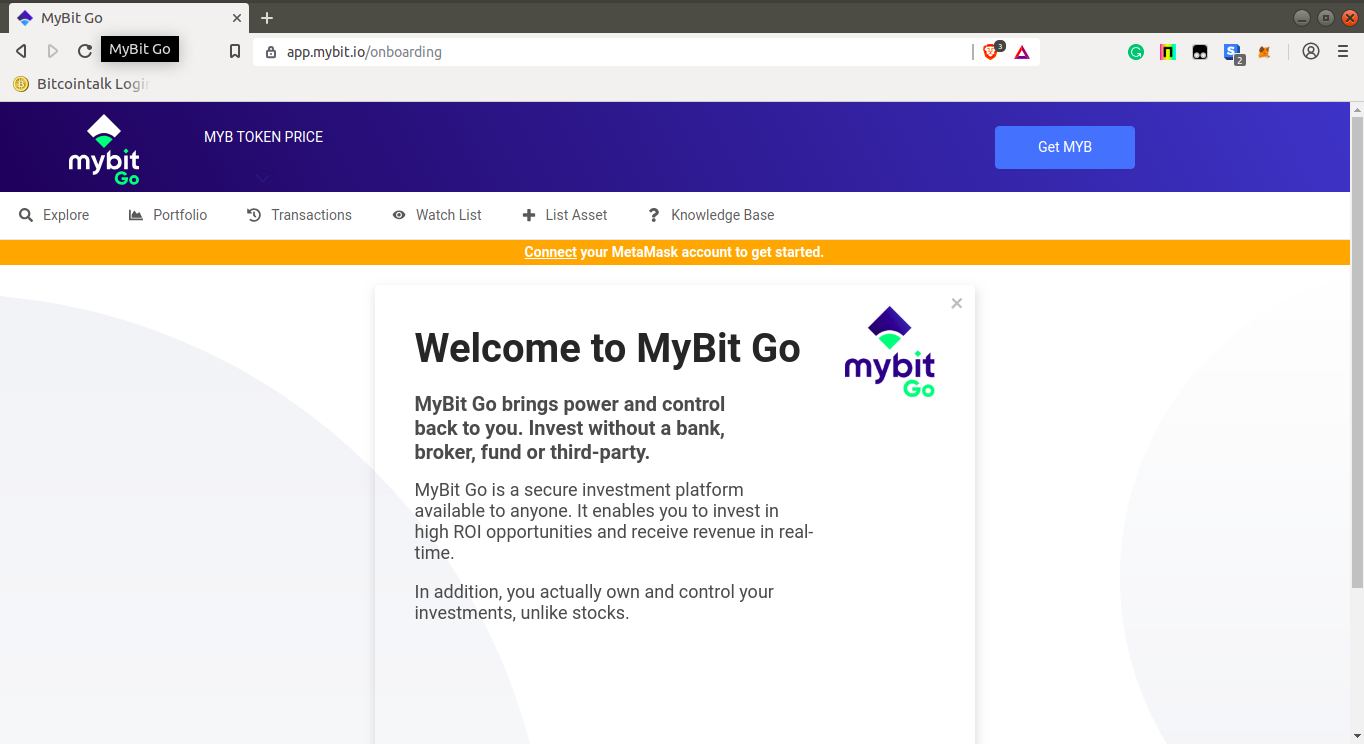 You can read the information on each card by pressing the next button below each card or if you are an experienced user, you can simply click the close button at the top of the information card which will redirect you to the explore page. B. Connect your MetaMask account by clicking on the MetaMask extension button on the extension bar. A MetaMask window will open prompting you to enter your password or restore your account using a seed phrase. 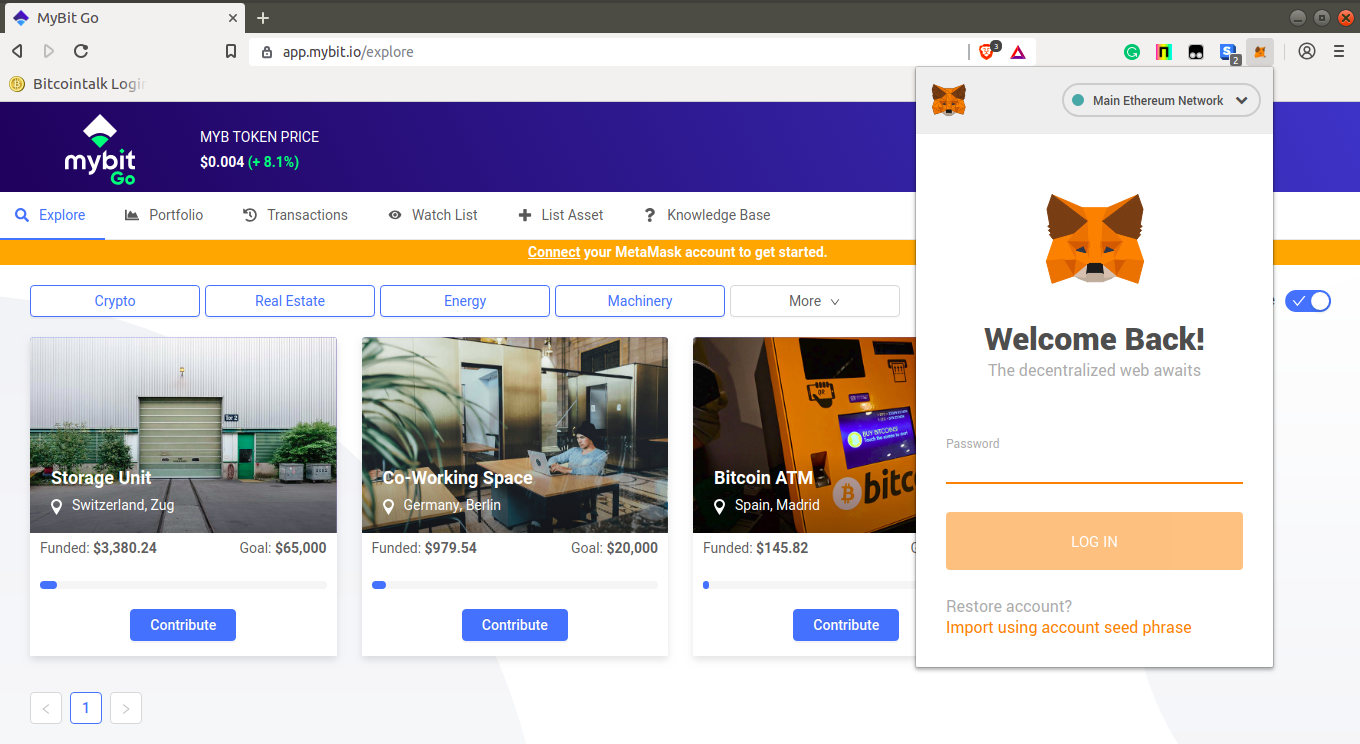 C. Once you have logged into your MetaMask account, the explore page will automatically reload showing your account balance in Ether and MyBit tokens. To toggle between investments of which the funding process has ended and those which are still active, click on the toggle button marked in a red rectangle on the screenshot below. Otherwise, investments still actively being funded will show up by default on the explore page. You will also see a **Watchlist**. This section is where you add assets that you want to keep a close eye on before investing in them. The **Transactions** section shows all your transaction history including your ether contributions towards the asset and your revenue transactions. In the explore page, look through the asset you would like to invest in and then click on **Contribute** button below your asset of interest. 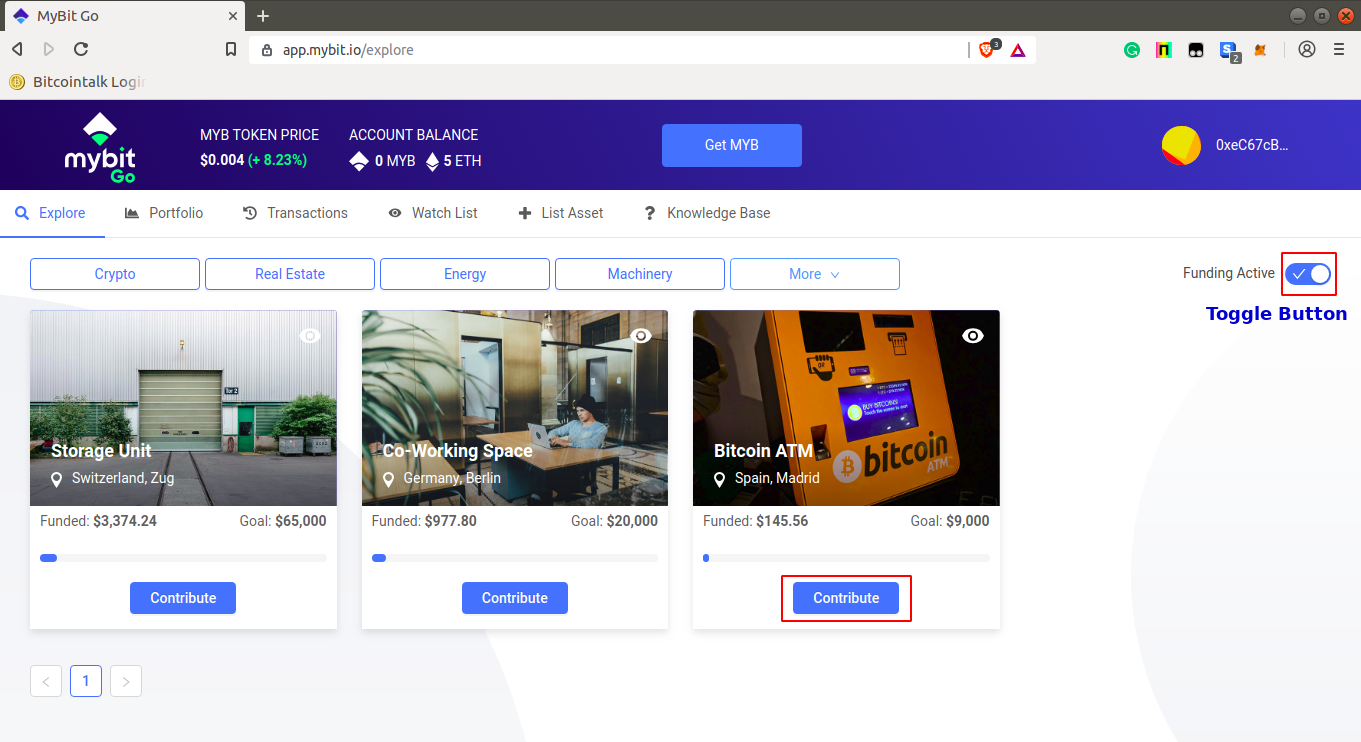 D. This will provide a detailed description of the asset and other details relating to its management. Carefully read through the details to be sure of what you are about to invest in. 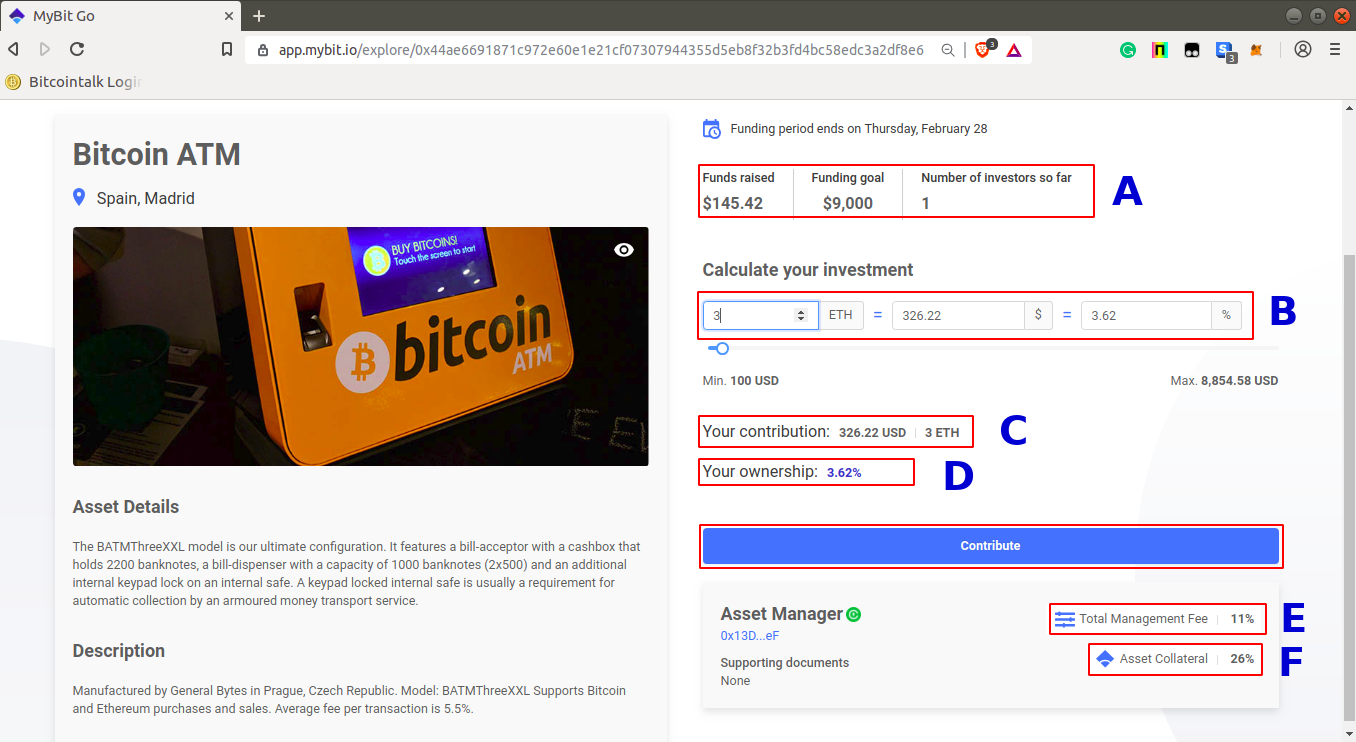 - **Area A** represents the progress in terms of funds that have been raised so far, the funding goal of the asset, and the number of people who have invested in the asset so far. - **Area B** is the where you can enter the amount of Ether you would like to invest into the asset and also be able to view the percentage of the asset you will be able to own if you invested a given amount. - **Area C** will show the amount of your contribution both in US Dollars and Ether. - **Area D** will show your percentage ownership of the asset according to the amount you have invested in it. - **Area E** will show the total management fee in percentage; This is a fee that is charged by the asset manager for looking after investors’ and organizations’ assets and trying to obtain the best possible return or profit for them. - **Area F** will show the asset collateral in percentage; This is an insurance that the Asset Manager must stake (in MYB) when setting the percentage of the asset’s revenue they will receive when listing an asset on the platform. This collateral limits risk for investors because if the Asset Manager does not fulfil his duties, their collateral will be burnt. After looking at the details and entering the desired amount you are going to spend on the asset, Click on the **Contribute** button. E. A dialogue box titled “Confirm with MetaMask” will pop up. Mark the checkbox confirming that you have read and agreed with the terms and conditions then click **Confirm**. 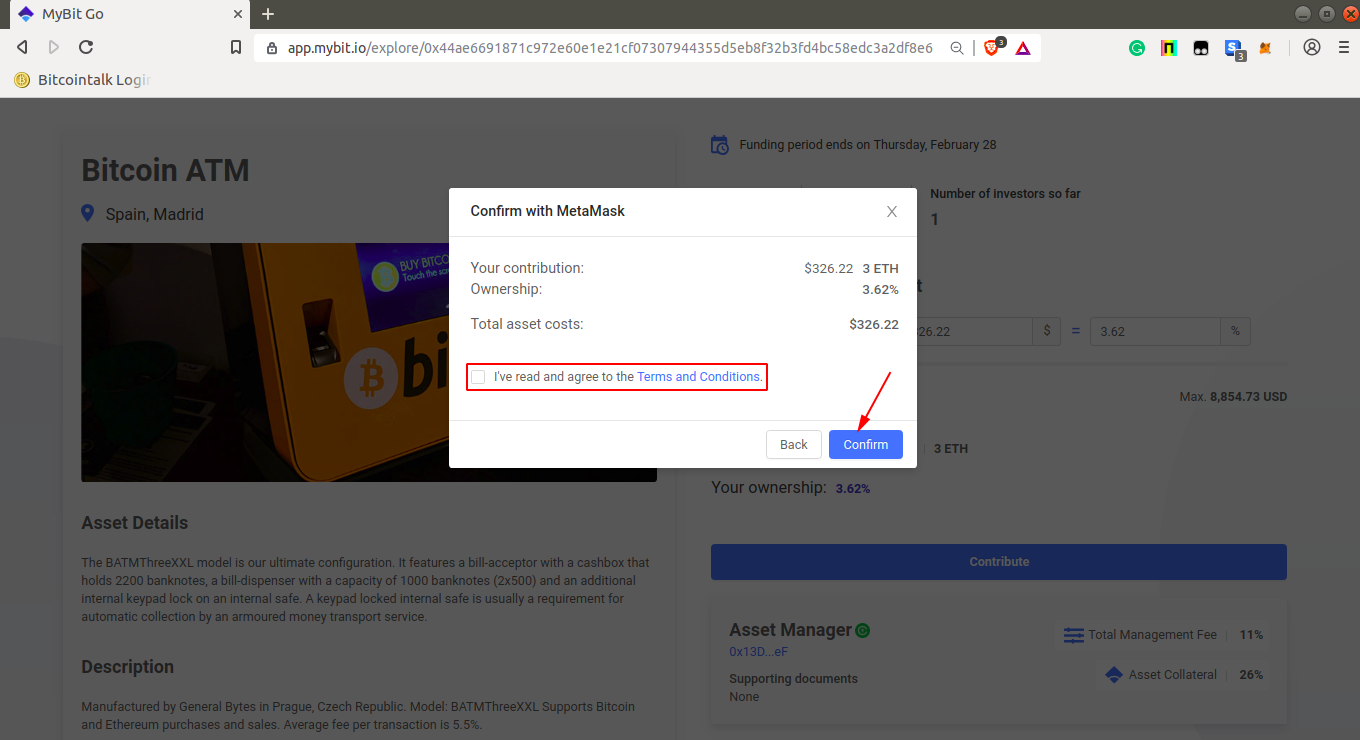 F. A MetaMask confirmation window containing transaction details and gas fee will then pop up. Click **Confirm**. 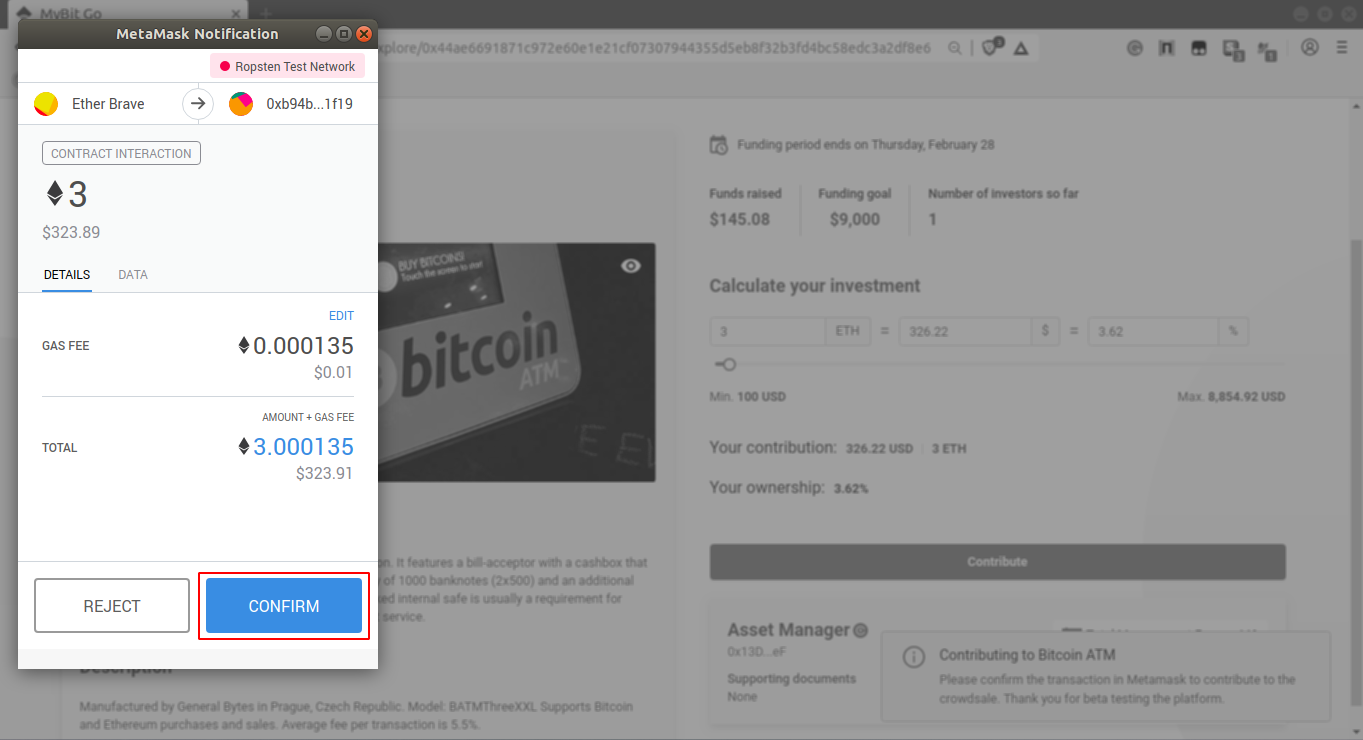 G. After the previous step, wait for the transaction to be confirmed on the Ethereum network. It usually takes about a minute and on rare instances, it can take hours depending on the network congestion and the gas fee you used for the transaction. Meanwhile, you can click on the transactions tab to see your transaction history and also find out if your transaction has been confirmed. Once your transaction has been confirmed, a text box will appear at the bottom right of the page informing you that your contribution has been successful. 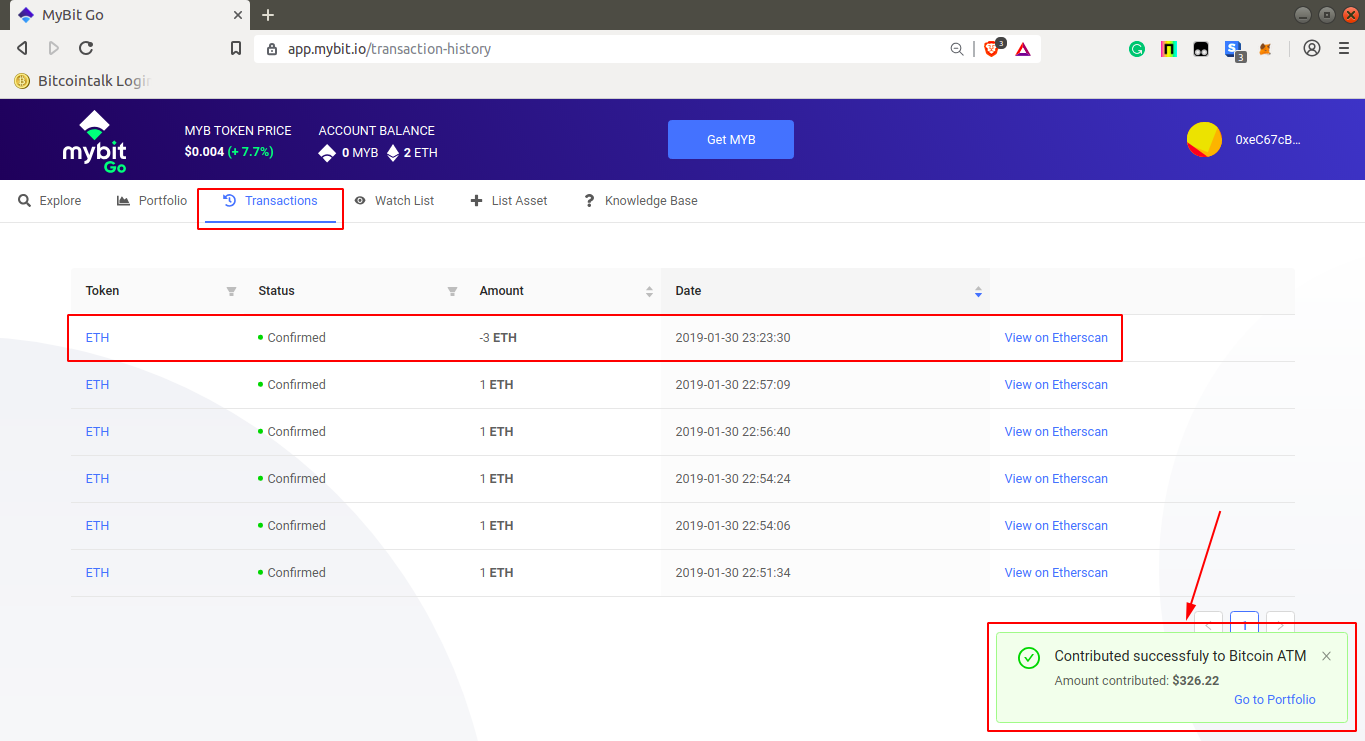 H. After this, head over to your **Portfolio** page. You will be able to see the asset you have just contributed to clicking on the **Investments** button as indicated in the next screenshot. It’s important to note that the funding period for each asset is limited to a thirty day period. This means that if the investment target is not reached by that time, funds are automatically returned to investors via the Ethereum smart contract which governs the process. If the investment goal is reached before the funding period ends, the asset is closed off from additional investors and the funds are automatically transferred to the asset partner (in this scenario, an IoT asset manufacturer). They work with the Asset Manager to deliver, install and otherwise make the asset fully functional in a defined location. After this is complete, the asset will go online and revenue will begin to be distributed to investors as it is generated. At this point, your total portfolio value and total revenue generated will be shown in the area marked by a red rectangle. You will use this area to keep track of revenue generated by your assets over a given period. 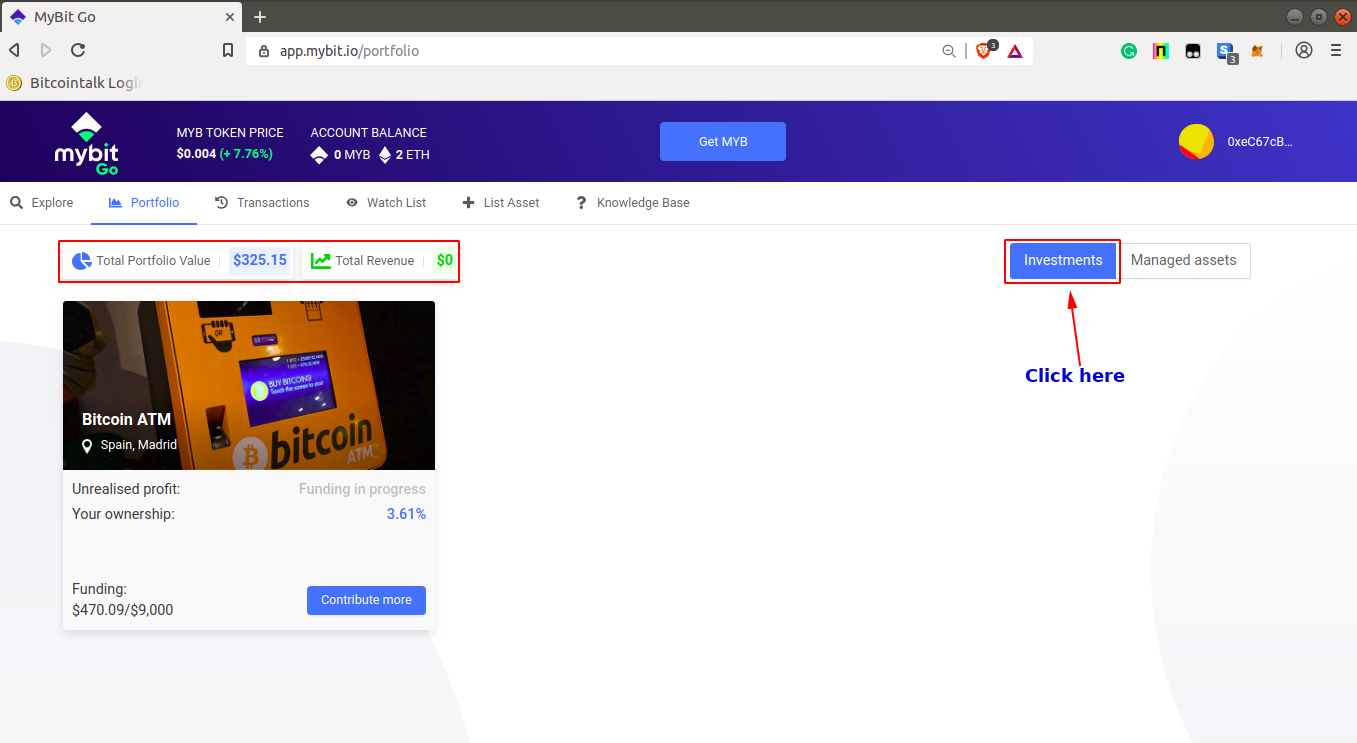 That concludes an overall summary of how to get started using MyBit GO. For more information or if you have any further questions, join our [Telegram](https://t.me/mybitio) and check out our [website](https://mybit.io/). |
| json metadata | {"tags":["cryptocurrency","investment","iot","blockchain","ethereum"],"image":["https://cdn.steemitimages.com/DQmW2oQTnkQMJtspJU6smnRJXbftEDGvR6LpSVNtQWvnojK/1.%20Mybit%20onboarding.png","https://cdn.steemitimages.com/DQmZBrHuamvyC9iQuBrRihCThEauPyW4HntxnmMLNz3LBfA/3.%20Log%20into%20Metamask.png","https://cdn.steemitimages.com/DQmQBxkeXkBPhh4CueGwdxWNijDtRdxu2BNQap1SaTBAnYV/4.%20MybitGo%20contribute%20Edit.png","https://cdn.steemitimages.com/DQmVKcWx5D3pJEXyEDkaZ8ETBWamhtpyaqcWM2Zy9g1dPbh/5.%20Mybit%20Go%20details%20EDIT.png","https://cdn.steemitimages.com/DQmX6zSoGM7jtXJAuUR9bQQNfbuDct7svFyLWsaP5pFQmUW/6.Mybit%20Go%20confirm.png","https://cdn.steemitimages.com/DQmXtfmwp1RfijrUNJU4oDG1bpoeiv8KYQi1yf1FD24F2zj/7.%20Metamask%20popup.png","https://cdn.steemitimages.com/DQmdWDVdraigDnkm12KEVCW6LnFoMeT878LTiQ8npdAWjWj/8.%20Transactions%20history.png","https://cdn.steemitimages.com/DQmegU8pxRYvsede97KTmyG3aLSMeDtUeLQKV1kREdGR3KH/9.%20Portifolio%202.png"],"links":["https://metamask.io","https://app.mybit.io","https://t.me/mybitio","https://mybit.io/"],"app":"steemit/0.1","format":"markdown"} |
| parent author | |
| parent permlink | cryptocurrency |
| permlink | tutorial-on-how-to-invest-using-mybit-go |
| title | TUTORIAL ON HOW TO INVEST USING MYBIT GO |
| Transaction Info | Block #30587486/Trx 4b520b8a80c3a9d2f93fea3e4d091867055f22bb |
View Raw JSON Data
{
"block": 30587486,
"op": [
"comment",
{
"author": "jerometash",
"body": "### WHAT IS MYBIT GO?\n\nMyBit Go is an investment platform that offers users the ability to invest in Internet of Things (IoT) devices from anywhere in the world without the need for a middleman or broker.\n\nIoT devices are machine assets, such as Bitcoin ATMs, 3d Printers, Smart Lock enabled devices and real estate, etc., that connect to the internet and generate revenue by providing a good or service. IOT devices are quickly overtaking many functions of the human labour market, creating the necessity for MyBit GO to create access to investment in machine assets.\n\nMyBit GO doesn’t use brokers which means that:\n1. Anyone is eligible to invest in his/her asset of choice without having to fulfil accredited investor requirements as seen in traditional funds.\n2. There will be much lower fees incurred when attempting to make an investment.\n3. There will be no single counterparty risk as all investment will be handled through a smart contract.\n4. The investors will be able to get real-time revenue distributions paid from anywhere to anywhere in the world.\n\n### GETTING STARTED.\nBefore using the MyBit Go platform to invest, there are a couple of things you need to set up.\n\n- **MetaMask Wallet.**\n\nMetaMask is a lite Ethereum based wallet which acts as a bridge allowing a user to run Ethereum based decentralised apps (like MyBit Go platform) right in one’s browser without running a full Ethereum node.\n\nThis is the most important requirement because it acts as your wallet for keeping the funds that you will use to buy assets as well as hold ownership of the asset and its distributed revenue.\n\nYou will never have to fill in your personal information when signing up for the platform or enter payment information when attempting to make a purchase. Everything will be linked to your MetaMask account.\n\nMetaMask is also a very secure wallet as it will keep your private keys safe from phishing attacks by hackers.\nIn order to download the extension into your browser, visit https://metamask.io on your browser and click on the download button specifically for your browser.\n\nAfter downloading the wallet, set it either by importing your ether address or by creating a new ether address. You will use this address to deposit ether and also receive revenue.\n\n- **Ether.**\n\nBefore investing, you need to have the ETH you wish to invest in your MetaMask wallet. \n\n### INVESTING\n\nA. Visit https://app.mybit.io, you will be directed to the onboarding page where you will be prompted to ‘Connect your MetaMask account to get started’. Below the prompt message, you will find cards containing a welcoming message and summarised information about the MyBit Go platform and how it operates.\n\n\n\nYou can read the information on each card by pressing the next button below each card or if you are an experienced user, you can simply click the close button at the top of the information card which will redirect you to the explore page.\n\nB. Connect your MetaMask account by clicking on the MetaMask extension button on the extension bar. A MetaMask window will open prompting you to enter your password or restore your account using a seed phrase.\n\n\n\nC. Once you have logged into your MetaMask account, the explore page will automatically reload showing your account balance in Ether and MyBit tokens.\n\nTo toggle between investments of which the funding process has ended and those which are still active, click on the toggle button marked in a red rectangle on the screenshot below. Otherwise, investments still actively being funded will show up by default on the explore page.\n\nYou will also see a **Watchlist**. This section is where you add assets that you want to keep a close eye on before investing in them.\n\nThe **Transactions** section shows all your transaction history including your ether contributions towards the asset and your revenue transactions.\n\nIn the explore page, look through the asset you would like to invest in and then click on **Contribute** button below your asset of interest.\n\n\n\nD. This will provide a detailed description of the asset and other details relating to its management. Carefully read through the details to be sure of what you are about to invest in.\n\n\n\n- **Area A** represents the progress in terms of funds that have been raised so far, the funding goal of the asset, and the number of people who have invested in the asset so far.\n- **Area B** is the where you can enter the amount of Ether you would like to invest into the asset and also be able to view the percentage of the asset you will be able to own if you invested a given amount.\n- **Area C** will show the amount of your contribution both in US Dollars and Ether.\n- **Area D** will show your percentage ownership of the asset according to the amount you have invested in it.\n- **Area E** will show the total management fee in percentage; This is a fee that is charged by the asset manager for looking after investors’ and organizations’ assets and trying to obtain the best possible return or profit for them.\n- **Area F** will show the asset collateral in percentage; This is an insurance that the Asset Manager must stake (in MYB) when setting the percentage of the asset’s revenue they will receive when listing an asset on the platform. This collateral limits risk for investors because if the Asset Manager does not fulfil his duties, their collateral will be burnt.\n\nAfter looking at the details and entering the desired amount you are going to spend on the asset, Click on the **Contribute** button.\n\nE. A dialogue box titled “Confirm with MetaMask” will pop up. Mark the checkbox confirming that you have read and agreed with the terms and conditions then click **Confirm**.\n\n\n\nF. A MetaMask confirmation window containing transaction details and gas fee will then pop up. Click **Confirm**.\n\n\n\nG. After the previous step, wait for the transaction to be confirmed on the Ethereum network. It usually takes about a minute and on rare instances, it can take hours depending on the network congestion and the gas fee you used for the transaction.\n\nMeanwhile, you can click on the transactions tab to see your transaction history and also find out if your transaction has been confirmed.\nOnce your transaction has been confirmed, a text box will appear at the bottom right of the page informing you that your contribution has been successful.\n\n\n\nH. After this, head over to your **Portfolio** page.\nYou will be able to see the asset you have just contributed to clicking on the **Investments** button as indicated in the next screenshot.\n\nIt’s important to note that the funding period for each asset is limited to a thirty day period. This means that if the investment target is not reached by that time, funds are automatically returned to investors via the Ethereum smart contract which governs the process.\n\nIf the investment goal is reached before the funding period ends, the asset is closed off from additional investors and the funds are automatically transferred to the asset partner (in this scenario, an IoT asset manufacturer). They work with the Asset Manager to deliver, install and otherwise make the asset fully functional in a defined location. After this is complete, the asset will go online and revenue will begin to be distributed to investors as it is generated.\n\nAt this point, your total portfolio value and total revenue generated will be shown in the area marked by a red rectangle. You will use this area to keep track of revenue generated by your assets over a given period.\n\n\n\nThat concludes an overall summary of how to get started using MyBit GO. For more information or if you have any further questions, join our [Telegram](https://t.me/mybitio) and check out our [website](https://mybit.io/).",
"json_metadata": "{\"tags\":[\"cryptocurrency\",\"investment\",\"iot\",\"blockchain\",\"ethereum\"],\"image\":[\"https://cdn.steemitimages.com/DQmW2oQTnkQMJtspJU6smnRJXbftEDGvR6LpSVNtQWvnojK/1.%20Mybit%20onboarding.png\",\"https://cdn.steemitimages.com/DQmZBrHuamvyC9iQuBrRihCThEauPyW4HntxnmMLNz3LBfA/3.%20Log%20into%20Metamask.png\",\"https://cdn.steemitimages.com/DQmQBxkeXkBPhh4CueGwdxWNijDtRdxu2BNQap1SaTBAnYV/4.%20MybitGo%20contribute%20Edit.png\",\"https://cdn.steemitimages.com/DQmVKcWx5D3pJEXyEDkaZ8ETBWamhtpyaqcWM2Zy9g1dPbh/5.%20Mybit%20Go%20details%20EDIT.png\",\"https://cdn.steemitimages.com/DQmX6zSoGM7jtXJAuUR9bQQNfbuDct7svFyLWsaP5pFQmUW/6.Mybit%20Go%20confirm.png\",\"https://cdn.steemitimages.com/DQmXtfmwp1RfijrUNJU4oDG1bpoeiv8KYQi1yf1FD24F2zj/7.%20Metamask%20popup.png\",\"https://cdn.steemitimages.com/DQmdWDVdraigDnkm12KEVCW6LnFoMeT878LTiQ8npdAWjWj/8.%20Transactions%20history.png\",\"https://cdn.steemitimages.com/DQmegU8pxRYvsede97KTmyG3aLSMeDtUeLQKV1kREdGR3KH/9.%20Portifolio%202.png\"],\"links\":[\"https://metamask.io\",\"https://app.mybit.io\",\"https://t.me/mybitio\",\"https://mybit.io/\"],\"app\":\"steemit/0.1\",\"format\":\"markdown\"}",
"parent_author": "",
"parent_permlink": "cryptocurrency",
"permlink": "tutorial-on-how-to-invest-using-mybit-go",
"title": "TUTORIAL ON HOW TO INVEST USING MYBIT GO"
}
],
"op_in_trx": 0,
"timestamp": "2019-02-23T02:44:39",
"trx_id": "4b520b8a80c3a9d2f93fea3e4d091867055f22bb",
"trx_in_block": 8,
"virtual_op": 0
}jerometashupvoted (100.00%) @sandalphon / tips-on-formatting-and-styling-your-post-on-steemit2019/02/23 01:28:03
jerometashupvoted (100.00%) @sandalphon / tips-on-formatting-and-styling-your-post-on-steemit
2019/02/23 01:28:03
| author | sandalphon |
| permlink | tips-on-formatting-and-styling-your-post-on-steemit |
| voter | jerometash |
| weight | 10000 (100.00%) |
| Transaction Info | Block #30585955/Trx a56e2a3468647b774d3c5900da778266da9454e2 |
View Raw JSON Data
{
  "block": 30585955,
  "op": [
    "vote",
    {
      "author": "sandalphon",
      "permlink": "tips-on-formatting-and-styling-your-post-on-steemit",
      "voter": "jerometash",
      "weight": 10000
    }
  ],
  "op_in_trx": 0,
  "timestamp": "2019-02-23T01:28:03",
  "trx_id": "a56e2a3468647b774d3c5900da778266da9454e2",
  "trx_in_block": 22,
  "virtual_op": 0
}steemdelegated 5.624 SP to @jerometash2018/05/27 17:36:03
steemdelegated 5.624 SP to @jerometash
2018/05/27 17:36:03
| delegatee | jerometash |
| delegator | steem |
| vesting shares | 9146.675416 VESTS |
| Transaction Info | Block #22802994/Trx bddb0a231eea6b36e5f659e5fd88dad577359d49 |
View Raw JSON Data
{
  "block": 22802994,
  "op": [
    "delegate_vesting_shares",
    {
      "delegatee": "jerometash",
      "delegator": "steem",
      "vesting_shares": "9146.675416 VESTS"
    }
  ],
  "op_in_trx": 0,
  "timestamp": "2018-05-27T17:36:03",
  "trx_id": "bddb0a231eea6b36e5f659e5fd88dad577359d49",
  "trx_in_block": 40,
  "virtual_op": 0
}steemdelegated 18.136 SP to @jerometash2018/05/19 17:16:21
steemdelegated 18.136 SP to @jerometash
2018/05/19 17:16:21
| delegatee | jerometash |
| delegator | steem |
| vesting shares | 29496.276919 VESTS |
| Transaction Info | Block #22572612/Trx 11520d230fbaacd64ec0a8f3b6988eec995ef39f |
View Raw JSON Data
{
  "block": 22572612,
  "op": [
    "delegate_vesting_shares",
    {
      "delegatee": "jerometash",
      "delegator": "steem",
      "vesting_shares": "29496.276919 VESTS"
    }
  ],
  "op_in_trx": 0,
  "timestamp": "2018-05-19T17:16:21",
  "trx_id": "11520d230fbaacd64ec0a8f3b6988eec995ef39f",
  "trx_in_block": 25,
  "virtual_op": 0
}2018/02/24 06:07:18
2018/02/24 06:07:18
| author | jerometash |
| body | Thanks for the summarised article about open platform, it was a great red through |
| json metadata | {"tags":["bitcoin"],"app":"steemit/0.1"} |
| parent author | dennishlewis |
| parent permlink | a-future-of-unchained-applications |
| permlink | re-dennishlewis-a-future-of-unchained-applications-20180224t060711350z |
| title | |
| Transaction Info | Block #20142567/Trx 65d2d8b6c0c9edbbcf46f3c2bca4d6364d8533d4 |
View Raw JSON Data
{
  "block": 20142567,
  "op": [
    "comment",
    {
      "author": "jerometash",
      "body": "Thanks for the summarised article about open platform, it was a great red through",
      "json_metadata": "{\"tags\":[\"bitcoin\"],\"app\":\"steemit/0.1\"}",
      "parent_author": "dennishlewis",
      "parent_permlink": "a-future-of-unchained-applications",
      "permlink": "re-dennishlewis-a-future-of-unchained-applications-20180224t060711350z",
      "title": ""
    }
  ],
  "op_in_trx": 0,
  "timestamp": "2018-02-24T06:07:18",
  "trx_id": "65d2d8b6c0c9edbbcf46f3c2bca4d6364d8533d4",
  "trx_in_block": 11,
  "virtual_op": 0
}jerometashcustom json: follow2018/02/24 06:05:27
jerometashcustom json: follow
2018/02/24 06:05:27
| id | follow |
| json | ["reblog",{"account":"jerometash","author":"dennishlewis","permlink":"a-future-of-unchained-applications"}] |
| required auths | [] |
| required posting auths | ["jerometash"] |
| Transaction Info | Block #20142530/Trx a087f400c19c9311d57f5e08235fc49e0b9400d9 |
View Raw JSON Data
{
  "block": 20142530,
  "op": [
    "custom_json",
    {
      "id": "follow",
      "json": "[\"reblog\",{\"account\":\"jerometash\",\"author\":\"dennishlewis\",\"permlink\":\"a-future-of-unchained-applications\"}]",
      "required_auths": [],
      "required_posting_auths": [
        "jerometash"
      ]
    }
  ],
  "op_in_trx": 0,
  "timestamp": "2018-02-24T06:05:27",
  "trx_id": "a087f400c19c9311d57f5e08235fc49e0b9400d9",
  "trx_in_block": 60,
  "virtual_op": 0
}2018/02/24 06:05:06
2018/02/24 06:05:06
| author | loran1 |
| permlink | re-dennishlewis-a-future-of-unchained-applications-20180220t204830267z |
| voter | jerometash |
| weight | 10000 (100.00%) |
| Transaction Info | Block #20142523/Trx 3f6063e80f3713c68a9f0d48f318fe5204e07ee1 |
View Raw JSON Data
{
  "block": 20142523,
  "op": [
    "vote",
    {
      "author": "loran1",
      "permlink": "re-dennishlewis-a-future-of-unchained-applications-20180220t204830267z",
      "voter": "jerometash",
      "weight": 10000
    }
  ],
  "op_in_trx": 0,
  "timestamp": "2018-02-24T06:05:06",
  "trx_id": "3f6063e80f3713c68a9f0d48f318fe5204e07ee1",
  "trx_in_block": 4,
  "virtual_op": 0
}jerometashupvoted (100.00%) @dennishlewis / a-future-of-unchained-applications2018/02/24 06:02:54
jerometashupvoted (100.00%) @dennishlewis / a-future-of-unchained-applications
2018/02/24 06:02:54
| author | dennishlewis |
| permlink | a-future-of-unchained-applications |
| voter | jerometash |
| weight | 10000 (100.00%) |
| Transaction Info | Block #20142479/Trx 9e33ad828838a158ddb90f40c444dc014cccbe21 |
View Raw JSON Data
{
  "block": 20142479,
  "op": [
    "vote",
    {
      "author": "dennishlewis",
      "permlink": "a-future-of-unchained-applications",
      "voter": "jerometash",
      "weight": 10000
    }
  ],
  "op_in_trx": 0,
  "timestamp": "2018-02-24T06:02:54",
  "trx_id": "9e33ad828838a158ddb90f40c444dc014cccbe21",
  "trx_in_block": 45,
  "virtual_op": 0
}jerometashfollowed @dennishlewis2018/02/24 06:01:15
jerometashfollowed @dennishlewis
2018/02/24 06:01:15
| id | follow |
| json | ["follow",{"follower":"jerometash","following":"dennishlewis","what":["blog"]}] |
| required auths | [] |
| required posting auths | ["jerometash"] |
| Transaction Info | Block #20142446/Trx 4d1159d28fa40fd92d6e8ca2d41971d974e65327 |
View Raw JSON Data
{
  "block": 20142446,
  "op": [
    "custom_json",
    {
      "id": "follow",
      "json": "[\"follow\",{\"follower\":\"jerometash\",\"following\":\"dennishlewis\",\"what\":[\"blog\"]}]",
      "required_auths": [],
      "required_posting_auths": [
        "jerometash"
      ]
    }
  ],
  "op_in_trx": 0,
  "timestamp": "2018-02-24T06:01:15",
  "trx_id": "4d1159d28fa40fd92d6e8ca2d41971d974e65327",
  "trx_in_block": 3,
  "virtual_op": 0
}jerometashfollowed @dennishlewis2018/02/24 06:01:03
jerometashfollowed @dennishlewis
2018/02/24 06:01:03
| id | follow |
| json | ["follow",{"follower":"jerometash","following":"dennishlewis","what":["blog"]}] |
| required auths | [] |
| required posting auths | ["jerometash"] |
| Transaction Info | Block #20142442/Trx bc8be2e06d6d311cb29be4457c68ef39e77bdf71 |
View Raw JSON Data
{
  "block": 20142442,
  "op": [
    "custom_json",
    {
      "id": "follow",
      "json": "[\"follow\",{\"follower\":\"jerometash\",\"following\":\"dennishlewis\",\"what\":[\"blog\"]}]",
      "required_auths": [],
      "required_posting_auths": [
        "jerometash"
      ]
    }
  ],
  "op_in_trx": 0,
  "timestamp": "2018-02-24T06:01:03",
  "trx_id": "bc8be2e06d6d311cb29be4457c68ef39e77bdf71",
  "trx_in_block": 3,
  "virtual_op": 0
}steemcreated a new account: @jerometash2018/02/24 05:58:57
steemcreated a new account: @jerometash
2018/02/24 05:58:57
| active | {"account_auths":[],"key_auths":[["STM6HA8bLYwT9jMD8F2nU8DZBRfVSxZCFyT56soY6nMVxFQp2wXev",1]],"weight_threshold":1} |
| creator | steem |
| delegation | 29700.000000 VESTS |
| extensions | [] |
| fee | 0.500 STEEM |
| json metadata | |
| memo key | STM8Y4LQcLnYC2zNosJLRz5mks5QW1NNx9qtNeM31qbxAJkg1oJzX |
| new account name | jerometash |
| owner | {"account_auths":[],"key_auths":[["STM6x9tsM9VQGzUyux8ihLSkTCoEn8MscLmXjeMV6AhbvEBXbm81U",1]],"weight_threshold":1} |
| posting | {"account_auths":[],"key_auths":[["STM5tAq3zH5fzG1L3tM3dVSCRjfcekFtxzpab2bymsxCTm2C2fsTF",1]],"weight_threshold":1} |
| Transaction Info | Block #20142400/Trx fabc08455ab9e82559a9cd99de78ed19806a1211 |
View Raw JSON Data
{
  "block": 20142400,
  "op": [
    "account_create_with_delegation",
    {
      "active": {
        "account_auths": [],
        "key_auths": [
          [
            "STM6HA8bLYwT9jMD8F2nU8DZBRfVSxZCFyT56soY6nMVxFQp2wXev",
            1
          ]
        ],
        "weight_threshold": 1
      },
      "creator": "steem",
      "delegation": "29700.000000 VESTS",
      "extensions": [],
      "fee": "0.500 STEEM",
      "json_metadata": "",
      "memo_key": "STM8Y4LQcLnYC2zNosJLRz5mks5QW1NNx9qtNeM31qbxAJkg1oJzX",
      "new_account_name": "jerometash",
      "owner": {
        "account_auths": [],
        "key_auths": [
          [
            "STM6x9tsM9VQGzUyux8ihLSkTCoEn8MscLmXjeMV6AhbvEBXbm81U",
            1
          ]
        ],
        "weight_threshold": 1
      },
      "posting": {
        "account_auths": [],
        "key_auths": [
          [
            "STM5tAq3zH5fzG1L3tM3dVSCRjfcekFtxzpab2bymsxCTm2C2fsTF",
            1
          ]
        ],
        "weight_threshold": 1
      }
    }
  ],
  "op_in_trx": 0,
  "timestamp": "2018-02-24T05:58:57",
  "trx_id": "fabc08455ab9e82559a9cd99de78ed19806a1211",
  "trx_in_block": 33,
  "virtual_op": 0
}Manabar
Voting Power100.00%
Downvote Power100.00%
Resource Credits100.00%
Reputation Progress0.00%
{
  "voting_manabar": {
    "current_mana": "8143659806",
    "last_update_time": 1779069000
  },
  "downvote_manabar": {
    "current_mana": 2035914951,
    "last_update_time": 1779069000
  },
  "rc_account": {
    "account": "jerometash",
    "max_rc": "10164408779",
    "max_rc_creation_adjustment": {
      "amount": "2020748973",
      "nai": "@@000000037",
      "precision": 6
    },
    "rc_manabar": {
      "current_mana": "10164408779",
      "last_update_time": 1779069000
    }
  }
}
Account Metadata
| POSTING JSON METADATA | |
| profile | {"name":"Jerome Tash","cover_image":"https://cdn.steemitimages.com/DQmSHANbLChRU4er6XrRqqbHfiBVgB3PYFrsWW8NePHXgZs/58463024_2118191711631032_6004623713012547584_o.jpg","profile_image":"https://cdn.steemitimages.com/DQmc8fAqjkzhXnkhB3g1unnU9ksArHurcZC6dfektHsZpAW/62522543_714660728971813_2481818913231339520_o.jpg"} |
| JSON METADATA | |
| profile | {"name":"Jerome Tash","cover_image":"https://cdn.steemitimages.com/DQmSHANbLChRU4er6XrRqqbHfiBVgB3PYFrsWW8NePHXgZs/58463024_2118191711631032_6004623713012547584_o.jpg","profile_image":"https://cdn.steemitimages.com/DQmc8fAqjkzhXnkhB3g1unnU9ksArHurcZC6dfektHsZpAW/62522543_714660728971813_2481818913231339520_o.jpg"} |
{
  "posting_json_metadata": {
    "profile": {
      "name": "Jerome Tash",
      "cover_image": "https://cdn.steemitimages.com/DQmSHANbLChRU4er6XrRqqbHfiBVgB3PYFrsWW8NePHXgZs/58463024_2118191711631032_6004623713012547584_o.jpg",
      "profile_image": "https://cdn.steemitimages.com/DQmc8fAqjkzhXnkhB3g1unnU9ksArHurcZC6dfektHsZpAW/62522543_714660728971813_2481818913231339520_o.jpg"
    }
  },
  "json_metadata": {
    "profile": {
      "name": "Jerome Tash",
      "cover_image": "https://cdn.steemitimages.com/DQmSHANbLChRU4er6XrRqqbHfiBVgB3PYFrsWW8NePHXgZs/58463024_2118191711631032_6004623713012547584_o.jpg",
      "profile_image": "https://cdn.steemitimages.com/DQmc8fAqjkzhXnkhB3g1unnU9ksArHurcZC6dfektHsZpAW/62522543_714660728971813_2481818913231339520_o.jpg"
    }
  }
}
Auth Keys
Owner
Single Signature
Public Keys
STM6x9tsM9VQGzUyux8ihLSkTCoEn8MscLmXjeMV6AhbvEBXbm81U1/1
Active
Single Signature
Public Keys
STM6HA8bLYwT9jMD8F2nU8DZBRfVSxZCFyT56soY6nMVxFQp2wXev1/1
Posting
Single Signature
Public Keys
STM5tAq3zH5fzG1L3tM3dVSCRjfcekFtxzpab2bymsxCTm2C2fsTF1/1
Memo
STM8Y4LQcLnYC2zNosJLRz5mks5QW1NNx9qtNeM31qbxAJkg1oJzX
{
  "owner": {
    "account_auths": [],
    "key_auths": [
      [
        "STM6x9tsM9VQGzUyux8ihLSkTCoEn8MscLmXjeMV6AhbvEBXbm81U",
        1
      ]
    ],
    "weight_threshold": 1
  },
  "active": {
    "account_auths": [],
    "key_auths": [
      [
        "STM6HA8bLYwT9jMD8F2nU8DZBRfVSxZCFyT56soY6nMVxFQp2wXev",
        1
      ]
    ],
    "weight_threshold": 1
  },
  "posting": {
    "account_auths": [],
    "key_auths": [
      [
        "STM5tAq3zH5fzG1L3tM3dVSCRjfcekFtxzpab2bymsxCTm2C2fsTF",
        1
      ]
    ],
    "weight_threshold": 1
  },
  "memo": "STM8Y4LQcLnYC2zNosJLRz5mks5QW1NNx9qtNeM31qbxAJkg1oJzX"
}
Witness Votes
0 / 30
No active witness votes.
[]