

VOTING POWER100.00%
DOWNVOTE POWER100.00%
RESOURCE CREDITS100.00%
REPUTATION PROGRESS99.12%
Net Worth
0.235USD
STEEM
0.049STEEM
SBD
0.408SBD
Effective Power
5.007SP
├── Own SP
0.629SP
└── Incoming DelegationsDeleg
+4.378SP
Detailed Balance
| STEEM | ||
| balance | 0.001STEEM | STEEM |
| market_balance | 0.000STEEM | STEEM |
| savings_balance | 0.000STEEM | STEEM |
| reward_steem_balance | 0.048STEEM | STEEM |
| STEEM POWER | ||
| Own SP | 0.629SP | SP |
| Delegated Out | 0.000SP | SP |
| Delegation In | 4.378SP | SP |
| Effective Power | 5.007SP | SP |
| Reward SP (pending) | 0.355SP | SP |
| SBD | ||
| sbd_balance | 0.000SBD | SBD |
| sbd_conversions | 0.000SBD | SBD |
| sbd_market_balance | 0.000SBD | SBD |
| savings_sbd_balance | 0.000SBD | SBD |
| reward_sbd_balance | 0.408SBD | SBD |
{
  "balance": "0.001 STEEM",
  "savings_balance": "0.000 STEEM",
  "reward_steem_balance": "0.048 STEEM",
  "vesting_shares": "1022.461318 VESTS",
  "delegated_vesting_shares": "0.000000 VESTS",
  "received_vesting_shares": "7121.198488 VESTS",
  "sbd_balance": "0.000 SBD",
  "savings_sbd_balance": "0.000 SBD",
  "reward_sbd_balance": "0.408 SBD",
  "conversions": []
}
Account Info
| name | kingori2 |
| id | 754015 |
| rank | 1,349,973 |
| reputation | 9977584851 |
| created | 2018-02-11T13:07:15 |
| recovery_account | steem |
| proxy | None |
| post_count | 15 |
| comment_count | 0 |
| lifetime_vote_count | 0 |
| witnesses_voted_for | 0 |
| last_post | 2019-05-09T13:45:42 |
| last_root_post | 2019-05-09T13:45:42 |
| last_vote_time | 2018-04-09T15:52:03 |
| proxied_vsf_votes | 0, 0, 0, 0 |
| can_vote | 1 |
| voting_power | 0 |
| delayed_votes | 0 |
| balance | 0.001 STEEM |
| savings_balance | 0.000 STEEM |
| sbd_balance | 0.000 SBD |
| savings_sbd_balance | 0.000 SBD |
| vesting_shares | 1022.461318 VESTS |
| delegated_vesting_shares | 0.000000 VESTS |
| received_vesting_shares | 7121.198488 VESTS |
| reward_vesting_balance | 716.455436 VESTS |
| vesting_balance | 0.000 STEEM |
| vesting_withdraw_rate | 0.000000 VESTS |
| next_vesting_withdrawal | 1969-12-31T23:59:59 |
| withdrawn | 0 |
| to_withdraw | 0 |
| withdraw_routes | 0 |
| savings_withdraw_requests | 0 |
| last_account_recovery | 1970-01-01T00:00:00 |
| reset_account | null |
| last_owner_update | 1970-01-01T00:00:00 |
| last_account_update | 2018-03-23T04:29:18 |
| mined | No |
| sbd_seconds | 0 |
| sbd_last_interest_payment | 1970-01-01T00:00:00 |
| savings_sbd_last_interest_payment | 1970-01-01T00:00:00 |
{
  "id": 754015,
  "name": "kingori2",
  "owner": {
    "weight_threshold": 1,
    "account_auths": [],
    "key_auths": [
      [
        "STM7hYavnM8KZpcAfbre5Yyp9GiykkhhgUpATZR2ecEoZEJrYxuFG",
        1
      ]
    ]
  },
  "active": {
    "weight_threshold": 1,
    "account_auths": [],
    "key_auths": [
      [
        "STM5agG7xZJzmr5AgJ3x9WxHNVPJA9EzWRjADC7LgVwZDpvCUAckw",
        1
      ]
    ]
  },
  "posting": {
    "weight_threshold": 1,
    "account_auths": [],
    "key_auths": [
      [
        "STM7dckFvfb6N4FroA5AJtAtacdFwthz6vZvYfGBapcXq45NnCWht",
        1
      ]
    ]
  },
  "memo_key": "STM5pE81uyQuTwMZ2n4GKz1Cxst7wfXS7G8BF9ErdcChWmh7LrbGd",
  "json_metadata": "{\"profile\":{\"profile_image\":\"https://avatars3.githubusercontent.com/u/520510?s=400&v=4\",\"name\":\"오리대마왕\",\"about\":\"Android, Programming, Guitar\",\"location\":\"Korea\"}}",
  "posting_json_metadata": "{\"profile\":{\"profile_image\":\"https://avatars3.githubusercontent.com/u/520510?s=400&v=4\",\"name\":\"오리대마왕\",\"about\":\"Android, Programming, Guitar\",\"location\":\"Korea\"}}",
  "proxy": "",
  "last_owner_update": "1970-01-01T00:00:00",
  "last_account_update": "2018-03-23T04:29:18",
  "created": "2018-02-11T13:07:15",
  "mined": false,
  "recovery_account": "steem",
  "last_account_recovery": "1970-01-01T00:00:00",
  "reset_account": "null",
  "comment_count": 0,
  "lifetime_vote_count": 0,
  "post_count": 15,
  "can_vote": true,
  "voting_manabar": {
    "current_mana": "8143659806",
    "last_update_time": 1779071514
  },
  "downvote_manabar": {
    "current_mana": 2035914951,
    "last_update_time": 1779071514
  },
  "voting_power": 0,
  "balance": "0.001 STEEM",
  "savings_balance": "0.000 STEEM",
  "sbd_balance": "0.000 SBD",
  "sbd_seconds": "0",
  "sbd_seconds_last_update": "1970-01-01T00:00:00",
  "sbd_last_interest_payment": "1970-01-01T00:00:00",
  "savings_sbd_balance": "0.000 SBD",
  "savings_sbd_seconds": "0",
  "savings_sbd_seconds_last_update": "1970-01-01T00:00:00",
  "savings_sbd_last_interest_payment": "1970-01-01T00:00:00",
  "savings_withdraw_requests": 0,
  "reward_sbd_balance": "0.408 SBD",
  "reward_steem_balance": "0.048 STEEM",
  "reward_vesting_balance": "716.455436 VESTS",
  "reward_vesting_steem": "0.355 STEEM",
  "vesting_shares": "1022.461318 VESTS",
  "delegated_vesting_shares": "0.000000 VESTS",
  "received_vesting_shares": "7121.198488 VESTS",
  "vesting_withdraw_rate": "0.000000 VESTS",
  "next_vesting_withdrawal": "1969-12-31T23:59:59",
  "withdrawn": 0,
  "to_withdraw": 0,
  "withdraw_routes": 0,
  "curation_rewards": 0,
  "posting_rewards": 708,
  "proxied_vsf_votes": [
    0,
    0,
    0,
    0
  ],
  "witnesses_voted_for": 0,
  "last_post": "2019-05-09T13:45:42",
  "last_root_post": "2019-05-09T13:45:42",
  "last_vote_time": "2018-04-09T15:52:03",
  "post_bandwidth": 0,
  "pending_claimed_accounts": 0,
  "vesting_balance": "0.000 STEEM",
  "reputation": "9977584851",
  "transfer_history": [],
  "market_history": [],
  "post_history": [],
  "vote_history": [],
  "other_history": [],
  "witness_votes": [],
  "tags_usage": [],
  "guest_bloggers": [],
  "rank": 1349973
}
Withdraw Routes
| Incoming | Outgoing |
|---|---|
Empty | Empty |
{
  "incoming": [],
  "outgoing": []
}From Date
To Date
2026/05/18 02:31:54
2026/05/18 02:31:54
| delegator | steem |
| delegatee | kingori2 |
| vesting shares | 7121.198488 VESTS |
| Transaction Info | Block #106146168/Trx 9ebf7a1041de2025d7b7702b9f2318c0f2d38466 |
View Raw JSON Data
{
  "trx_id": "9ebf7a1041de2025d7b7702b9f2318c0f2d38466",
  "block": 106146168,
  "trx_in_block": 1,
  "op_in_trx": 0,
  "virtual_op": 0,
  "timestamp": "2026-05-18T02:31:54",
  "op": [
    "delegate_vesting_shares",
    {
      "delegator": "steem",
      "delegatee": "kingori2",
      "vesting_shares": "7121.198488 VESTS"
    }
  ]
}2026/05/12 13:03:48
2026/05/12 13:03:48
| delegator | steem |
| delegatee | kingori2 |
| vesting shares | 4408.988083 VESTS |
| Transaction Info | Block #105986757/Trx 6b05f458684027e9f7a95894fcf5bb357a02a935 |
View Raw JSON Data
{
  "trx_id": "6b05f458684027e9f7a95894fcf5bb357a02a935",
  "block": 105986757,
  "trx_in_block": 1,
  "op_in_trx": 0,
  "virtual_op": 0,
  "timestamp": "2026-05-12T13:03:48",
  "op": [
    "delegate_vesting_shares",
    {
      "delegator": "steem",
      "delegatee": "kingori2",
      "vesting_shares": "4408.988083 VESTS"
    }
  ]
}2026/04/26 01:49:12
2026/04/26 01:49:12
| delegator | steem |
| delegatee | kingori2 |
| vesting shares | 7133.714244 VESTS |
| Transaction Info | Block #105513755/Trx d7f2506d25b04fe8e5d89d1561a5b0878eed0909 |
View Raw JSON Data
{
  "trx_id": "d7f2506d25b04fe8e5d89d1561a5b0878eed0909",
  "block": 105513755,
  "trx_in_block": 0,
  "op_in_trx": 0,
  "virtual_op": 0,
  "timestamp": "2026-04-26T01:49:12",
  "op": [
    "delegate_vesting_shares",
    {
      "delegator": "steem",
      "delegatee": "kingori2",
      "vesting_shares": "7133.714244 VESTS"
    }
  ]
}2026/01/23 13:54:45
2026/01/23 13:54:45
| delegator | steem |
| delegatee | kingori2 |
| vesting shares | 4450.534902 VESTS |
| Transaction Info | Block #102859135/Trx 580e59304fe74feb408a4118762e906452d9dc5f |
View Raw JSON Data
{
  "trx_id": "580e59304fe74feb408a4118762e906452d9dc5f",
  "block": 102859135,
  "trx_in_block": 2,
  "op_in_trx": 0,
  "virtual_op": 0,
  "timestamp": "2026-01-23T13:54:45",
  "op": [
    "delegate_vesting_shares",
    {
      "delegator": "steem",
      "delegatee": "kingori2",
      "vesting_shares": "4450.534902 VESTS"
    }
  ]
}2024/12/17 09:09:57
2024/12/17 09:09:57
| delegator | steem |
| delegatee | kingori2 |
| vesting shares | 4614.754099 VESTS |
| Transaction Info | Block #91305451/Trx a04bd6cef62c4801677ef9e07fc699f750300510 |
View Raw JSON Data
{
  "trx_id": "a04bd6cef62c4801677ef9e07fc699f750300510",
  "block": 91305451,
  "trx_in_block": 0,
  "op_in_trx": 0,
  "virtual_op": 0,
  "timestamp": "2024-12-17T09:09:57",
  "op": [
    "delegate_vesting_shares",
    {
      "delegator": "steem",
      "delegatee": "kingori2",
      "vesting_shares": "4614.754099 VESTS"
    }
  ]
}2023/11/14 00:51:36
2023/11/14 00:51:36
| delegator | steem |
| delegatee | kingori2 |
| vesting shares | 4783.887631 VESTS |
| Transaction Info | Block #79859626/Trx 17a7ae40a0c5d0be23e5f903b74b213436734104 |
View Raw JSON Data
{
  "trx_id": "17a7ae40a0c5d0be23e5f903b74b213436734104",
  "block": 79859626,
  "trx_in_block": 3,
  "op_in_trx": 0,
  "virtual_op": 0,
  "timestamp": "2023-11-14T00:51:36",
  "op": [
    "delegate_vesting_shares",
    {
      "delegator": "steem",
      "delegatee": "kingori2",
      "vesting_shares": "4783.887631 VESTS"
    }
  ]
}2023/09/22 00:30:42
2023/09/22 00:30:42
| delegator | steem |
| delegatee | kingori2 |
| vesting shares | 7721.166417 VESTS |
| Transaction Info | Block #78351038/Trx e623aaf88c818afe02f83e2db12f658e39ccd6ca |
View Raw JSON Data
{
  "trx_id": "e623aaf88c818afe02f83e2db12f658e39ccd6ca",
  "block": 78351038,
  "trx_in_block": 17,
  "op_in_trx": 0,
  "virtual_op": 0,
  "timestamp": "2023-09-22T00:30:42",
  "op": [
    "delegate_vesting_shares",
    {
      "delegator": "steem",
      "delegatee": "kingori2",
      "vesting_shares": "7721.166417 VESTS"
    }
  ]
}2022/11/03 13:58:09
2022/11/03 13:58:09
| delegator | steem |
| delegatee | kingori2 |
| vesting shares | 7942.847855 VESTS |
| Transaction Info | Block #69115965/Trx 3c69f50df748c762b962740df0bd4e0eaa202c42 |
View Raw JSON Data
{
  "trx_id": "3c69f50df748c762b962740df0bd4e0eaa202c42",
  "block": 69115965,
  "trx_in_block": 2,
  "op_in_trx": 0,
  "virtual_op": 0,
  "timestamp": "2022-11-03T13:58:09",
  "op": [
    "delegate_vesting_shares",
    {
      "delegator": "steem",
      "delegatee": "kingori2",
      "vesting_shares": "7942.847855 VESTS"
    }
  ]
}2022/01/17 17:18:24
2022/01/17 17:18:24
| delegator | steem |
| delegatee | kingori2 |
| vesting shares | 8163.082991 VESTS |
| Transaction Info | Block #60816996/Trx d494762a09a75d59167f53ec3939613173ed52ab |
View Raw JSON Data
{
  "trx_id": "d494762a09a75d59167f53ec3939613173ed52ab",
  "block": 60816996,
  "trx_in_block": 5,
  "op_in_trx": 0,
  "virtual_op": 0,
  "timestamp": "2022-01-17T17:18:24",
  "op": [
    "delegate_vesting_shares",
    {
      "delegator": "steem",
      "delegatee": "kingori2",
      "vesting_shares": "8163.082991 VESTS"
    }
  ]
}2021/06/14 02:52:12
2021/06/14 02:52:12
| delegator | steem |
| delegatee | kingori2 |
| vesting shares | 8347.149744 VESTS |
| Transaction Info | Block #54610175/Trx 395b86b4ab6328be2eee44de71ef0ef5be15d0c2 |
View Raw JSON Data
{
  "trx_id": "395b86b4ab6328be2eee44de71ef0ef5be15d0c2",
  "block": 54610175,
  "trx_in_block": 8,
  "op_in_trx": 0,
  "virtual_op": 0,
  "timestamp": "2021-06-14T02:52:12",
  "op": [
    "delegate_vesting_shares",
    {
      "delegator": "steem",
      "delegatee": "kingori2",
      "vesting_shares": "8347.149744 VESTS"
    }
  ]
}2020/12/11 13:08:18
2020/12/11 13:08:18
| delegator | steem |
| delegatee | kingori2 |
| vesting shares | 8534.571718 VESTS |
| Transaction Info | Block #49357554/Trx db9506cce2bed0ea0888c6b4d9305f3bcf453969 |
View Raw JSON Data
{
  "trx_id": "db9506cce2bed0ea0888c6b4d9305f3bcf453969",
  "block": 49357554,
  "trx_in_block": 5,
  "op_in_trx": 0,
  "virtual_op": 0,
  "timestamp": "2020-12-11T13:08:18",
  "op": [
    "delegate_vesting_shares",
    {
      "delegator": "steem",
      "delegatee": "kingori2",
      "vesting_shares": "8534.571718 VESTS"
    }
  ]
}2020/12/06 06:44:57
2020/12/06 06:44:57
| delegator | steem |
| delegatee | kingori2 |
| vesting shares | 1912.543513 VESTS |
| Transaction Info | Block #49209105/Trx 24d99743682109787801145e4eca8ba006c6dcc1 |
View Raw JSON Data
{
  "trx_id": "24d99743682109787801145e4eca8ba006c6dcc1",
  "block": 49209105,
  "trx_in_block": 2,
  "op_in_trx": 0,
  "virtual_op": 0,
  "timestamp": "2020-12-06T06:44:57",
  "op": [
    "delegate_vesting_shares",
    {
      "delegator": "steem",
      "delegatee": "kingori2",
      "vesting_shares": "1912.543513 VESTS"
    }
  ]
}2020/12/05 16:46:21
2020/12/05 16:46:21
| delegator | steem |
| delegatee | kingori2 |
| vesting shares | 8540.779572 VESTS |
| Transaction Info | Block #49192648/Trx 0a1eb9ae3917fc82878edcefb0274c0f3d963bce |
View Raw JSON Data
{
  "trx_id": "0a1eb9ae3917fc82878edcefb0274c0f3d963bce",
  "block": 49192648,
  "trx_in_block": 0,
  "op_in_trx": 0,
  "virtual_op": 0,
  "timestamp": "2020-12-05T16:46:21",
  "op": [
    "delegate_vesting_shares",
    {
      "delegator": "steem",
      "delegatee": "kingori2",
      "vesting_shares": "8540.779572 VESTS"
    }
  ]
}2020/11/02 19:51:06
2020/11/02 19:51:06
| delegator | steem |
| delegatee | kingori2 |
| vesting shares | 1920.017158 VESTS |
| Transaction Info | Block #48262765/Trx 8ad945289ab4efc1e62f22d82b6b026ad71f1022 |
View Raw JSON Data
{
  "trx_id": "8ad945289ab4efc1e62f22d82b6b026ad71f1022",
  "block": 48262765,
  "trx_in_block": 0,
  "op_in_trx": 0,
  "virtual_op": 0,
  "timestamp": "2020-11-02T19:51:06",
  "op": [
    "delegate_vesting_shares",
    {
      "delegator": "steem",
      "delegatee": "kingori2",
      "vesting_shares": "1920.017158 VESTS"
    }
  ]
}2020/05/09 07:44:30
2020/05/09 07:44:30
| delegator | steem |
| delegatee | kingori2 |
| vesting shares | 8743.584931 VESTS |
| Transaction Info | Block #43219382/Trx 609e423c261716bd9b30e1cf8ada85608994339c |
View Raw JSON Data
{
  "trx_id": "609e423c261716bd9b30e1cf8ada85608994339c",
  "block": 43219382,
  "trx_in_block": 15,
  "op_in_trx": 0,
  "virtual_op": 0,
  "timestamp": "2020-05-09T07:44:30",
  "op": [
    "delegate_vesting_shares",
    {
      "delegator": "steem",
      "delegatee": "kingori2",
      "vesting_shares": "8743.584931 VESTS"
    }
  ]
}2020/05/08 11:38:48
2020/05/08 11:38:48
| delegator | steem |
| delegatee | kingori2 |
| vesting shares | 1953.311140 VESTS |
| Transaction Info | Block #43195833/Trx f6168780f19e45a2f9ba39362ac4635e7669580a |
View Raw JSON Data
{
  "trx_id": "f6168780f19e45a2f9ba39362ac4635e7669580a",
  "block": 43195833,
  "trx_in_block": 17,
  "op_in_trx": 0,
  "virtual_op": 0,
  "timestamp": "2020-05-08T11:38:48",
  "op": [
    "delegate_vesting_shares",
    {
      "delegator": "steem",
      "delegatee": "kingori2",
      "vesting_shares": "1953.311140 VESTS"
    }
  ]
}2020/02/11 13:53:21
2020/02/11 13:53:21
| parent author | kingori2 |
| parent permlink | z6ntk |
| author | steemitboard |
| permlink | steemitboard-notify-kingori2-20200211t135320000z |
| title | |
| body | Congratulations @kingori2! You received a personal award! <table><tr><td>https://steemitimages.com/70x70/http://steemitboard.com/@kingori2/birthday2.png</td><td>Happy Birthday! - You are on the Steem blockchain for 2 years!</td></tr></table> <sub>_You can view [your badges on your Steem Board](https://steemitboard.com/@kingori2) and compare to others on the [Steem Ranking](https://steemitboard.com/ranking/index.php?name=kingori2)_</sub> ###### [Vote for @Steemitboard as a witness](https://v2.steemconnect.com/sign/account-witness-vote?witness=steemitboard&approve=1) to get one more award and increased upvotes! |
| json metadata | {"image":["https://steemitboard.com/img/notify.png"]} |
| Transaction Info | Block #40727396/Trx cce3a6ecc53618d304fc79be605797cd1c52de97 |
View Raw JSON Data
{
  "trx_id": "cce3a6ecc53618d304fc79be605797cd1c52de97",
  "block": 40727396,
  "trx_in_block": 7,
  "op_in_trx": 0,
  "virtual_op": 0,
  "timestamp": "2020-02-11T13:53:21",
  "op": [
    "comment",
    {
      "parent_author": "kingori2",
      "parent_permlink": "z6ntk",
      "author": "steemitboard",
      "permlink": "steemitboard-notify-kingori2-20200211t135320000z",
      "title": "",
      "body": "Congratulations @kingori2! You received a personal award!\n\n<table><tr><td>https://steemitimages.com/70x70/http://steemitboard.com/@kingori2/birthday2.png</td><td>Happy Birthday! - You are on the Steem blockchain for 2 years!</td></tr></table>\n\n<sub>_You can view [your badges on your Steem Board](https://steemitboard.com/@kingori2) and compare to others on the [Steem Ranking](https://steemitboard.com/ranking/index.php?name=kingori2)_</sub>\n\n\n###### [Vote for @Steemitboard as a witness](https://v2.steemconnect.com/sign/account-witness-vote?witness=steemitboard&approve=1) to get one more award and increased upvotes!",
      "json_metadata": "{\"image\":[\"https://steemitboard.com/img/notify.png\"]}"
    }
  ]
}2019/08/08 14:06:57
2019/08/08 14:06:57
| delegator | steem |
| delegatee | kingori2 |
| vesting shares | 8900.424948 VESTS |
| Transaction Info | Block #35374477/Trx 92086612e4ff518a1c803acdf23a9e69b5547d2f |
View Raw JSON Data
{
  "trx_id": "92086612e4ff518a1c803acdf23a9e69b5547d2f",
  "block": 35374477,
  "trx_in_block": 10,
  "op_in_trx": 0,
  "virtual_op": 0,
  "timestamp": "2019-08-08T14:06:57",
  "op": [
    "delegate_vesting_shares",
    {
      "delegator": "steem",
      "delegatee": "kingori2",
      "vesting_shares": "8900.424948 VESTS"
    }
  ]
}2019/05/24 07:01:33
2019/05/24 07:01:33
| delegator | steem |
| delegatee | kingori2 |
| vesting shares | 28880.881747 VESTS |
| Transaction Info | Block #33181415/Trx de867768d46441775a4a17fb350073b9ef94844d |
View Raw JSON Data
{
  "trx_id": "de867768d46441775a4a17fb350073b9ef94844d",
  "block": 33181415,
  "trx_in_block": 15,
  "op_in_trx": 0,
  "virtual_op": 0,
  "timestamp": "2019-05-24T07:01:33",
  "op": [
    "delegate_vesting_shares",
    {
      "delegator": "steem",
      "delegatee": "kingori2",
      "vesting_shares": "28880.881747 VESTS"
    }
  ]
}2019/05/16 13:45:42
2019/05/16 13:45:42
| author | kingori2 |
| permlink | z6ntk |
| sbd payout | 0.019 SBD |
| steem payout | 0.000 STEEM |
| vesting payout | 113.686427 VESTS |
| Transaction Info | Block #32959247/Virtual Operation #4 |
View Raw JSON Data
{
  "trx_id": "0000000000000000000000000000000000000000",
  "block": 32959247,
  "trx_in_block": 4294967295,
  "op_in_trx": 0,
  "virtual_op": 4,
  "timestamp": "2019-05-16T13:45:42",
  "op": [
    "author_reward",
    {
      "author": "kingori2",
      "permlink": "z6ntk",
      "sbd_payout": "0.019 SBD",
      "steem_payout": "0.000 STEEM",
      "vesting_payout": "113.686427 VESTS"
    }
  ]
}2019/05/09 14:00:51
2019/05/09 14:00:51
| voter | anpigon |
| author | kingori2 |
| permlink | z6ntk |
| weight | 9000 (90.00%) |
| Transaction Info | Block #32758051/Trx 34a0e8d2fecb2c97c0c165f74f91c62a02033d7f |
View Raw JSON Data
{
  "trx_id": "34a0e8d2fecb2c97c0c165f74f91c62a02033d7f",
  "block": 32758051,
  "trx_in_block": 2,
  "op_in_trx": 0,
  "virtual_op": 0,
  "timestamp": "2019-05-09T14:00:51",
  "op": [
    "vote",
    {
      "voter": "anpigon",
      "author": "kingori2",
      "permlink": "z6ntk",
      "weight": 9000
    }
  ]
}2019/05/09 13:54:21
2019/05/09 13:54:21
| voter | sesalirof |
| author | kingori2 |
| permlink | z6ntk |
| weight | 10000 (100.00%) |
| Transaction Info | Block #32757921/Trx efdd6c051351a2b2cd1e3ba24f29856daf6c2f24 |
View Raw JSON Data
{
  "trx_id": "efdd6c051351a2b2cd1e3ba24f29856daf6c2f24",
  "block": 32757921,
  "trx_in_block": 19,
  "op_in_trx": 0,
  "virtual_op": 0,
  "timestamp": "2019-05-09T13:54:21",
  "op": [
    "vote",
    {
      "voter": "sesalirof",
      "author": "kingori2",
      "permlink": "z6ntk",
      "weight": 10000
    }
  ]
}2019/05/09 13:45:42
2019/05/09 13:45:42
| parent author | |
| parent permlink | kr-dev |
| author | kingori2 |
| permlink | z6ntk |
| title | 안드로이드 라이브러리 프로젝트의 리소스 충돌 해결하기 |
| body | 안드로이드 라이브러리 프로젝트는 리소스를 가질 수 있다. 만약 서로 다른 라이브러리가 동일한 이름의 리소스를 가질 경우, 안드로이드 빌드 도구는 하나의 리소스를 선택해야만 한다. [공식 문서](https://developer.android.com/studio/projects/android-library#Considerations) 에선 이 부분을 다음과 같이 설명한다. > 여러 AAR 라이브러리 간에 충돌이 발생한 경우 종속성 목록에 맨 처음(dependencies 블록의 윗부분)에 나와 있는 라이브러리의 리소스가 사용됩니다. 즉 A 라이브러리와 B 라이브러리가 모두 `ic_user.png` 를 가지고 있는데 A를 `build.gradle` 의존관계에 먼저 선언했다면, A 라이브러리의 `ic_user.png` 가 앱에 탑재된다. 이 과정에서 의도치 않았던 동작이 일어날 수 있으니 주의해야 한다. 그런데 이 문제가 간단하지 않다. 정말 `build.gradle` 에 선언된 순서대로 선택될까? 그렇지 않다. libA 가 libB 에 의존하며 build.gradle을 다음과 같이 작성했다고 생각해보자. ``` implements libB implements libA ``` 분명히 B를 먼저 선언했으니 B의 리소스가 먼저 선택될 것 같지만, A의 리소스가 선택된다. 그 이유는 라이브러리의 [종속성 순서](https://developer.android.com/studio/build/dependencies#dependency-order) 때문인 것으로 추정된다. 즉, `build.gradle` 파일에 명시한 순서가 아닌, 종속성 순서에 따라 결정된다고 추정된다. 명확히 문서에서 확인한 게 아니라 테스트 결과 확인한 것이라 정확한 지는 모르겠다. 종속성 순서 문서에 따르자면, libA 가 libB에 의존하므로 libA 가 더 우선순위가 높다. 즉, libB 의존을 먼저 명시했더라도 libA 의존이 먼저 나온다. 그래서 리소스도 libA 를 먼저 선택하는 것 같다. 확인하고 싶다면 `gradlew app:androidDependencies` 등의 명령을 수행하면 출력되는 종속성의 내용을 보면 된다. 참고로 앱 빌드 과정에서 생성되는 `build/intermediates/blame/debug/single/debug.json`를 보면 각 리소스가 어떤 라이브러리로부터 선택되었는지 확인할 수 있다. 이 내용도 공식 문서에선 찾지 못했고, 테스트를 하던 과정에서 찾아냈다. 자, 그럼 `libB`의 리소스를 쓰고싶다면 어떻게 해야 할까? 지금까지 찾아낸 유일한 방법은 다른 라이브러리의 libB에 대한 종속 관계를 제거해서, libB의 종속성 우선순위를 강제로 끌어올리는 방식이다. 즉 `build.gradle` 을 이렇게 작성하면 된다. ``` implements libB implements libA { exclude libB } ``` 위 경우는 libA 하나만 libB를 사용하고 있기에 아주 단순한데, 여러개의 라이브러리를 사용하며, 이 중 어느 라이브러리가 libB에 의존하는지도 잘 모르겠다면 어떻게 할까? 다음과 같은 configuration 코드를 작성하면 된다. 단 아래 코드는 너무 무식하니 적절한 필터링이 필요할 듯 하다. ``` configurations.all.each { config -> config.allDependencies.all { dep -> if (dep instanceof ModuleDependency) { dep.exclude(["group": "라이브러리 그룹", module: "라이브러리 모듈 이름"]) } } } ``` 참고로 해결책을 찾던 와중에 [라이브러리 리소스 공개 여부](https://developer.android.com/studio/projects/android-library#PrivateResources)를 제어하면 되지 않을까 싶어 찾아봤는데, 리소스 공개 여부는 개발 과정이나 빌드 단계의 검증에만 영향을 미칠 뿐, 리소스 병합엔 영향을 미치지 못하므로 해결책이 되지 못한다. |
| json metadata | {"tags":["kr-dev","android","aar","library"],"links":["https://developer.android.com/studio/projects/android-library#Considerations","https://developer.android.com/studio/build/dependencies#dependency-order","https://developer.android.com/studio/projects/android-library#PrivateResources"],"app":"steemit/0.1","format":"markdown"} |
| Transaction Info | Block #32757748/Trx bfcfc361ab105bd61c22af1c691d1af63b00e51c |
View Raw JSON Data
{
  "trx_id": "bfcfc361ab105bd61c22af1c691d1af63b00e51c",
  "block": 32757748,
  "trx_in_block": 39,
  "op_in_trx": 0,
  "virtual_op": 0,
  "timestamp": "2019-05-09T13:45:42",
  "op": [
    "comment",
    {
      "parent_author": "",
      "parent_permlink": "kr-dev",
      "author": "kingori2",
      "permlink": "z6ntk",
      "title": "안드로이드 라이브러리 프로젝트의 리소스 충돌 해결하기",
      "body": "안드로이드 라이브러리 프로젝트는 리소스를 가질 수 있다.  만약 서로 다른 라이브러리가 동일한 이름의 리소스를 가질 경우, 안드로이드 빌드 도구는 하나의  리소스를 선택해야만 한다.  [공식 문서](https://developer.android.com/studio/projects/android-library#Considerations) 에선 이 부분을 다음과 같이 설명한다.\n\n> 여러 AAR 라이브러리 간에 충돌이 발생한 경우 종속성 목록에 맨 처음(dependencies 블록의 윗부분)에 나와 있는 라이브러리의 리소스가 사용됩니다.\n\n즉 A 라이브러리와 B 라이브러리가 모두 `ic_user.png` 를 가지고 있는데 A를 `build.gradle` 의존관계에 먼저 선언했다면, A 라이브러리의 `ic_user.png` 가 앱에 탑재된다.  이 과정에서 의도치 않았던 동작이 일어날 수 있으니 주의해야 한다. \n\n그런데 이 문제가 간단하지 않다. 정말 `build.gradle` 에 선언된 순서대로 선택될까? 그렇지 않다. \n\nlibA 가 libB 에 의존하며  build.gradle을 다음과 같이 작성했다고 생각해보자.\n```\nimplements libB\nimplements libA\n```\n\n분명히 B를 먼저 선언했으니 B의 리소스가 먼저 선택될 것 같지만, A의 리소스가 선택된다. 그 이유는 라이브러리의 [종속성 순서](https://developer.android.com/studio/build/dependencies#dependency-order) 때문인 것으로 추정된다. 즉,  `build.gradle` 파일에 명시한 순서가 아닌, 종속성 순서에 따라 결정된다고 추정된다. 명확히 문서에서 확인한 게 아니라 테스트 결과 확인한 것이라 정확한 지는 모르겠다.\n\n종속성 순서 문서에 따르자면,  libA 가 libB에 의존하므로 libA 가 더 우선순위가 높다. 즉, libB 의존을 먼저 명시했더라도 libA 의존이 먼저 나온다. 그래서 리소스도 libA 를 먼저 선택하는 것 같다. 확인하고 싶다면 `gradlew app:androidDependencies` 등의 명령을 수행하면 출력되는 종속성의 내용을 보면 된다.\n\n참고로 앱 빌드 과정에서 생성되는 `build/intermediates/blame/debug/single/debug.json`를 보면 각 리소스가 어떤 라이브러리로부터 선택되었는지 확인할 수 있다. 이 내용도 공식 문서에선 찾지 못했고, 테스트를 하던 과정에서 찾아냈다.\n\n자, 그럼  `libB`의 리소스를 쓰고싶다면 어떻게 해야 할까? 지금까지 찾아낸 유일한 방법은 다른 라이브러리의 libB에 대한  종속 관계를 제거해서, libB의 종속성 우선순위를 강제로 끌어올리는 방식이다. 즉 `build.gradle` 을 이렇게 작성하면 된다.\n\n```\nimplements libB\nimplements libA {\n  exclude libB\n}\n```\n\n위 경우는 libA 하나만 libB를 사용하고 있기에 아주 단순한데, 여러개의 라이브러리를 사용하며, 이 중 어느 라이브러리가 libB에 의존하는지도 잘 모르겠다면 어떻게 할까? 다음과 같은 configuration 코드를 작성하면 된다. 단 아래 코드는 너무 무식하니 적절한 필터링이 필요할 듯 하다.\n\n```\nconfigurations.all.each { config ->\n    config.allDependencies.all { dep ->\n        if (dep instanceof ModuleDependency) {\n            dep.exclude([\"group\": \"라이브러리 그룹\", module: \"라이브러리 모듈 이름\"])\n        }\n    }\n}\n```\n\n참고로 해결책을 찾던 와중에 [라이브러리 리소스 공개 여부](https://developer.android.com/studio/projects/android-library#PrivateResources)를 제어하면 되지 않을까 싶어 찾아봤는데, 리소스 공개 여부는 개발 과정이나 빌드 단계의 검증에만 영향을 미칠 뿐, 리소스 병합엔 영향을 미치지 못하므로 해결책이 되지 못한다.",
      "json_metadata": "{\"tags\":[\"kr-dev\",\"android\",\"aar\",\"library\"],\"links\":[\"https://developer.android.com/studio/projects/android-library#Considerations\",\"https://developer.android.com/studio/build/dependencies#dependency-order\",\"https://developer.android.com/studio/projects/android-library#PrivateResources\"],\"app\":\"steemit/0.1\",\"format\":\"markdown\"}"
    }
  ]
}2019/04/17 02:45:21
2019/04/17 02:45:21
| author | kingori2 |
| permlink | koin-2-0 |
| sbd payout | 0.018 SBD |
| steem payout | 0.000 STEEM |
| vesting payout | 87.909546 VESTS |
| Transaction Info | Block #32111308/Virtual Operation #5 |
View Raw JSON Data
{
  "trx_id": "0000000000000000000000000000000000000000",
  "block": 32111308,
  "trx_in_block": 4294967295,
  "op_in_trx": 0,
  "virtual_op": 5,
  "timestamp": "2019-04-17T02:45:21",
  "op": [
    "author_reward",
    {
      "author": "kingori2",
      "permlink": "koin-2-0",
      "sbd_payout": "0.018 SBD",
      "steem_payout": "0.000 STEEM",
      "vesting_payout": "87.909546 VESTS"
    }
  ]
}2019/04/10 04:02:21
2019/04/10 04:02:21
| voter | anpigon |
| author | kingori2 |
| permlink | koin-2-0 |
| weight | 10000 (100.00%) |
| Transaction Info | Block #31912594/Trx 6139e4c116dc7caaea551e572e16c7998e35d2dd |
View Raw JSON Data
{
  "trx_id": "6139e4c116dc7caaea551e572e16c7998e35d2dd",
  "block": 31912594,
  "trx_in_block": 3,
  "op_in_trx": 0,
  "virtual_op": 0,
  "timestamp": "2019-04-10T04:02:21",
  "op": [
    "vote",
    {
      "voter": "anpigon",
      "author": "kingori2",
      "permlink": "koin-2-0",
      "weight": 10000
    }
  ]
}blockcreateupvoted (1.00%) @kingori2 / koin-2-02019/04/10 03:58:30
blockcreateupvoted (1.00%) @kingori2 / koin-2-0
2019/04/10 03:58:30
| voter | blockcreate |
| author | kingori2 |
| permlink | koin-2-0 |
| weight | 100 (1.00%) |
| Transaction Info | Block #31912517/Trx 94a3e5cfc20b65f0bf6877d22b4d25aa70f0be99 |
View Raw JSON Data
{
  "trx_id": "94a3e5cfc20b65f0bf6877d22b4d25aa70f0be99",
  "block": 31912517,
  "trx_in_block": 14,
  "op_in_trx": 0,
  "virtual_op": 0,
  "timestamp": "2019-04-10T03:58:30",
  "op": [
    "vote",
    {
      "voter": "blockcreate",
      "author": "kingori2",
      "permlink": "koin-2-0",
      "weight": 100
    }
  ]
}hozn4ukhlytriwcupvoted (15.00%) @kingori2 / koin-2-02019/04/10 03:26:42
hozn4ukhlytriwcupvoted (15.00%) @kingori2 / koin-2-0
2019/04/10 03:26:42
| voter | hozn4ukhlytriwc |
| author | kingori2 |
| permlink | koin-2-0 |
| weight | 1500 (15.00%) |
| Transaction Info | Block #31911881/Trx 48773b67d30ac1758cb1452b28690caea84573ef |
View Raw JSON Data
{
  "trx_id": "48773b67d30ac1758cb1452b28690caea84573ef",
  "block": 31911881,
  "trx_in_block": 7,
  "op_in_trx": 0,
  "virtual_op": 0,
  "timestamp": "2019-04-10T03:26:42",
  "op": [
    "vote",
    {
      "voter": "hozn4ukhlytriwc",
      "author": "kingori2",
      "permlink": "koin-2-0",
      "weight": 1500
    }
  ]
}2019/04/10 03:23:54
2019/04/10 03:23:54
| voter | mishana |
| author | kingori2 |
| permlink | koin-2-0 |
| weight | 6000 (60.00%) |
| Transaction Info | Block #31911825/Trx c4a5e7c5367a67bfd3b8206dbbd5ca5eb7020584 |
View Raw JSON Data
{
  "trx_id": "c4a5e7c5367a67bfd3b8206dbbd5ca5eb7020584",
  "block": 31911825,
  "trx_in_block": 28,
  "op_in_trx": 0,
  "virtual_op": 0,
  "timestamp": "2019-04-10T03:23:54",
  "op": [
    "vote",
    {
      "voter": "mishana",
      "author": "kingori2",
      "permlink": "koin-2-0",
      "weight": 6000
    }
  ]
}bullionstackerupvoted (2.00%) @kingori2 / koin-2-02019/04/10 03:17:30
bullionstackerupvoted (2.00%) @kingori2 / koin-2-0
2019/04/10 03:17:30
| voter | bullionstacker |
| author | kingori2 |
| permlink | koin-2-0 |
| weight | 200 (2.00%) |
| Transaction Info | Block #31911697/Trx 269618161dcbe85f4d0d4e3a1217fbd6b1b9b9c5 |
View Raw JSON Data
{
  "trx_id": "269618161dcbe85f4d0d4e3a1217fbd6b1b9b9c5",
  "block": 31911697,
  "trx_in_block": 8,
  "op_in_trx": 0,
  "virtual_op": 0,
  "timestamp": "2019-04-10T03:17:30",
  "op": [
    "vote",
    {
      "voter": "bullionstacker",
      "author": "kingori2",
      "permlink": "koin-2-0",
      "weight": 200
    }
  ]
}2019/04/10 02:45:21
2019/04/10 02:45:21
| parent author | |
| parent permlink | kr-dev |
| author | kingori2 |
| permlink | koin-2-0 |
| title | koin 2.0 맛보기 |
| body | Kotlin용 의존성 주입 프레임워크인 [koin](https://github.com/InsertKoinIO/koin)의 2.0 버전의 기능 특징을 간단히 정리해본다. [공식 참조 문서](https://insert-koin.io/docs/2.0/documentation/reference/index.html)도 꽤 잘 만들어져 있기 때문에 궁금하신 분들은 이 글을 빠르게 읽고 공식 문서를 참고해보시면 더 효율적으로 koin 2.0을 익힐 수 있을 듯. koin 2.0 은 이 글을 작성하는 4월 중순, rc-2 까지 나온 상태이다. 모든 내용은 android 개발 환경을 기준으로 작성했다. ## gradle 설정 ``` repositories { jcenter() } dependencies { //코어 implementation 'org.koin:koin-core:2.0.0-rc-2' //안드로이드 context 주입, 안드로이드 log 지원 기능을 제공 implementation 'org.koin:koin-android:2.0.0-rc-2' //LifecycleOwner 들에서 scope 생성-삭제를 자동화하는 기능을 제공 implementation 'org.koin:koin-androidx-scope:2.0.0-rc-2' //AAC의 ViewModel 을 Actiity나 Fragment에서 손쉽게 주입받을 수 있는 기능을 제공 implementation 'org.koin:koin-androidx-viewmodel:2.0.0-rc-2' //테스트용 유틸리티 testImplementation 'org.koin:koin-test:2.0.0-rc-2' } ``` ## Module / KoinApplication / GlobalContext Module은 제공할 객체의 명세이다. KoinApplication은 제공된 모듈 명세를 이용해 객체 인스턴스를 관리한다. 따라서 모듈에 명시한 객체를 주입받고 싶다면 KoinApplication 인스턴스에 요청을 해야 한다. 하나의 애플리케이션은 여러개의 KoinApplication을 가질 수 있다. GlobalContext는 전역 KoinApplication 을 담고 있다. 만약 애플리케이션이 단 하나의 KoinApplication만을 사용한다면 GlobalContext에서 KoinApplication을 가져오면 되므로 굳이 KoinApplication의 인스턴스를 관리할 필요가 없다. ### KoinApplication 생성 다음은 KoinApplication을 생성하는 두 가지 방법이다. ```kotlin //KoinApplication을 생성한 후, GlobalContext에 등록. 애플리케이션에서 하나의 KoinApplication만 사용할 경우 편리함 startApplication { logger() modules( moduleA, moduleB, ... ) } //KoinApplication만을 생성함. 생성한 KoinApplication 인스턴스는 알아서 잘 관리해야 함 val koinApplicaiton = startKoin { //들어가는 내용은 startApplication과 동일함 } ``` startApplication이 GlobalContext에 자신을 등록한다는 점을 빼면 둘 사이에 차이점은 없다. dsl에 들어가는 상세 옵션은 [참조 문서](https://insert-koin.io/docs/2.0/documentation/reference/index.html#_koin_dsl)를 보면 된다. modules, logger, androidApplication 정도만 알아두면 충분하다. ### Module 생성 #### factory, single, scoped 모듈은 객체를 제공하는 명세를 담는다. 모듈 생성 문법을 살펴보자. ```kotlin val module = { factory { Foo() } single { Bar() } scoped { FooFoo() } } ``` factory는 요청 시 마다 새로운 인스턴스를 만든다. single은 단일 인스턴스를 반환한다. scoped는 scope 내에서 단일 인스턴스를 반환한다. 기본적으로 모든 객체 생성은 요청할 때 이뤄진다. 하지만 모듈 선언과 동시에 생성이 필요할 경우엔 `createdAtStart` 속성을 true로 주면 된다. 이는 single에서만 의미 있다고 생각한다. ```kotlin single(createdAtStart = true) { Bar() } ``` 동일 타입의 객체는 한번만 선언할 수 있다. 여럿 선언하면 모듈 로드 과정에서 예외가 발생한다. 만약 동일 타입의 객체가 여럿 필요하다면 qualifier를 지정하면 된다. ```kotiln single(named("kim")) { Human("kim") } single(named("lee")) { Human("lee") } ``` scope는 closed scope와 open scope이 있다. 이름을 한정한 scope를 closed scope, 이름을 한정하지 않은 scope를 open scope라 보면 된다. scope 인스턴스는 id와 name을 가지는데, name은 scope의 유형, id는 scope의 고유 식별자로 보면 된다. open scope 로 선언한 객체는 어느 scope에서나 가져다 쓸 수 있지만, closed scope로 선언한 객체는 해당 name을 가진 scope에서만 가져다 쓸 수 있다. ```kotlin //open scope scoped { Foo() } //closed scope scope(named("my_scope")) { scoped { Bar() } } ``` 위와 같이 모듈을 선언한다면, 가져다 쓸 때 아래와 같이 동작한다. ```kotlin //id 는 id, name 은 your_scope 인 scope 생성 val myScope = koinApplication.koin.getOrCreateScope( "id", named("your_scope")) //문제 없음 val foo = koinApplication.koin.get<Foo>( scope = myScope) //에러 : Bar 는 my_scope라는 name을 가진 scope에서만 가져올 수 있음 val bar = koinApplication.koin.get<Bar>( scope = myScope) ``` scoped 선언 시 주의할 점이 있다. 다음은 문제가 있을까, 없을까? ```kotlin scope(named("lee")) { scoped{ Human("lee") } } scope(named("kim")) { scoped{ Human("kim") } } ``` 문제가 없어보이기도 한다. lee 라는 이름의 scope에서 Human을 찾으면 lee 라는 Human이 나오고, kim 이라는 이름의 scope에서 Human을 찾으면 kim 이라는 Human이 나오면 되는거 아닐까? dagger는 이런 식으로 동작한다. 하지만 koin에선 아무리 closed scope bean 선언이더라도 모듈 내 전역적으로 영향을 비친다. 따라서 위 선언은 Human이라는 동일 타입의 bean 선언이 두 번 나온 것으로 간주되어 **module load 시 예외가 발생한다.** 이 문제를 막기 위해선 qualifier를 지정하는 수 밖에 없는데, 개선되었으면 하는 부분이다. 또 한 가지는 scope 안에 factory를 선언하는 경우이다. ```kotlin scope(named("my_scope")) { scoped{ Foo("lee") } factory { Bar( get<Foo>())} } ``` 얼핏 보면 저 factory는 my_scope 라는 이름의 scope 안에서만 의미가 있을 것 같지만, 위 선언은 아래와 동일하다. ```kotlin scope(named("my_scope")) { scoped{ Foo("lee") } } factory { Bar( get<Foo>())} ``` 한번 돌려서 생각하면 결국 주입받으려는 `Foo` 타입이 my_scope 라는 scope 에서만 선언되어 있으므로, `Bar`를 가져오려면 다음과 같이 해야 하므로 scope 안에 factory 가 선언된 것과 동일하다고 볼 수 있다. ```kotlin val scope = koinApp.koin.getOrCreateScope("id", named("my_scope")) val bar = koinApp.koin.get<Bar>(scope = scope) assertNotNull(modelB) ``` 하지만 Bar 타입 선언 자체는 scope에 국한되지 않는다. 개발자에게 문의하니, `scope` 안에는 `scoped` 만 집어넣는게 맞을것 같다고 한다. (https://github.com/InsertKoinIO/koin/issues/414#issuecomment-478471215) 따라서 scope 안에는 scoped 유형만 선언하자. #### injection parameter module에 객체를 생성할 때 생성자에 인자를 넘겨야 하는 경우가 있다. 이런 경우 injection paramter를 쓸 수 있다. ```kotlin val myModule = module { factory { (name:String) -> Human(name) } } val humanNamedLee = koin.get<Human>{ paramtersOf("Lee")} ``` 위와 같이 원하는 객체의 생성자 인자를 넘길 수 있다. single에선 어떨까? ```kotlin val myModule = module { single { (name:String) -> Human(name) } } val humanNamedLee = koin.get<Human>{ paramtersOf("Lee")} val humanNamedKim = koin.get<Human>{ paramtersOf("Kim")} val humanWithNoName = koin.get<Human>() ``` 위 새개의 get 호출 모두 처음에 만든 Lee 이름을 가진 Human 인스턴스가 반환된다. 따라서 **매우 헷갈린다** 게다가 humanWithNoName 같은 경우도 문제다. 인자를 가지는 single의 경우, 누군가 먼저 인스턴스를 생성했다면 그 다음부터는 인자를 넘기지 않아도 된다. 어차피 넘겨봤자 의미도 없고. 하지만 최초 호출한 경우라면 당연히 인자를 넘겨야 한다. 내가 이 싱글턴 객체를 처음 호출하는 지, 아닌지를 어떻게 판단할 수 있는가! 따라서 안전하게 사용하고 싶다면 **애시당초 `single` 이나 `scoped` 선언은 injection parameter를 갖지 않는 편이 안전하다.** 이와 달리 factory에선 매우 편하고 유용하게 사용할 수 있다. #### type 지정 모듈에서 객체 명세를 작성할 때 별도로 타입을 지정하지 않을 경우 가장 구체적인 타입으로 지정된다. 따라서 다음 경우엔 제대로 동작하지 않는다. ```kotlin open class Foo class Bar: Foo val myModule = module { //Bar에 대한 선언 factory { Bar() } } //못찾음! val foo = koin.get<Foo>() ``` Foo로 선언하고 싶다면 앞쪽에 type parameter를 명시하던지, `as`로 캐스팅한다. 복수의 타입에 연결하고 싶다면 bind 를 쓴다. ```kotlin factory<Foo> { Bar() } or factory { Bar() as Foo} //Foo, Bar 모두에 연결하기 factory { Bar() } bind Foo::class ``` ## koin component 지금까지 제공하는 방법을 살펴봤다면 이제 주입받는 방법을 살펴보자. 주입받는 방법은 직접 KoinApplication 인스턴스에 대고 `get()` 메서드를 호출하던지, `KoinComponent` 인터페이스를 구현한 객체에서 `get()` 이나 `by inject()`를 호출하면 된다. ```kotlin //직접 가져오기 val foo = koinApplication.koin.get<Foo>() //KoinComponent에서 가져오기 class MyKoinComponent: KoinComponent { val foo by inject<Foo>() } val foo = MyKoinComponent().foo ``` `KoinComponent`의 내부 구현을 보면 `GlobalContext`에서 KoinApplication을 가져오도록 되어있다. 만약 별도의 KoinApplication을 사용한다면 `getKoin()` 메서드를 override 해야 한다. ```kotlin class MyKoinComponent: KoinComponent { val foo by inject<Foo>() override fun getKoin(): Koin = SomeWhere.getMyCustomKoin() } ``` 모듈에서 injection parameter를 받도록 bean을 선언한 경우, `parametersOf` 펑션을 이용해 인자를 건네준다. 당연히 bean선언에서 정의한 매개변수의 타입과 순서를 맞춰줘야 하는데, 어떠한 compile time의 검증도 없기 때문에 **잘** 맞춰서 넣어줘야 한다는 문제가 있다. 자동화 테스트가 없다면 꽤 위험하다. scope 생성은 모듈 선언 쪽에서 살짝 다뤘으므로 건너뛴다. ## 테스트 Dagger는 빌드가 힘든 반면, 한번 빌드되면 거의 제대로 동작한다. 하지만 Koin은 일단 돌려봐야 제대로 의존 관계를 명시했는지 확인이 된다. 잘못하면 수십번 run을 하면서 조금씩 고쳐나가야 할 수 도 있다. 다행히 테스트 유틸 모듈이 제공하는 `checkModules` 펑션을 이용하면 제대로 injection이 되는지, 즉 모듈 선언에서 내가 inject 받고자 하는 객체가 제대로 제공되는 지 확인할 수 있다. 하지만 `checkModules`는 모듈 선언 수준의 정의만을 확인할 뿐, 여기저기서 호출하는 `by inject()`,`get()` 펑션이 제대로 동작하기 위해 injection parameter를 순서대로 잘 넘겼는지, scope을 필요로 하는 부분에서 scope을 제대로 넘겼는지는 별도로 확인해야 한다. 안그러면 runtime에서 예외가 발생하니 안정성에 문제가 생길 것이다. ```kotlin koinApplication{ modules( module { single { Foo() } single { Bar(get()) } factory { (name:String) -> Human(name) } }) }.checkModules { create<Human> { parametersOf("Lee")} } ``` 위 코드와 같이, inection parameter를 필요로 하는 부분에선 create 펑션을 이용해 적절한 인자를 넘겨줘야 한다. 만약 인자로 넘겨야 하는 객체가 생성하기 매우 복잡한 경우엔 그냥 `mock(ComplexClass::class.java)`와 같이 mock 객체를 넘겨주자. 어차피 객체 값이 중요한게 아니라 모듈 선언이 제대로 되어있는지가 중요하기 때문이다. 한 가지 더 문제가 있는데, 만약 factory 에서 scoped bean을 get() 으로 주입받을 경우 checkModules가 실패한다. 왜냐면 현재 checkModules 는 scoped 객체만 임시 scope을 만들어 확인하고 있기 때문에 factory나 single이 scoped bean을 get()을 이용해 주입받으려고 한다면 scoped bean을 global scope에서 찾지 못하기 때문에 실패한다. 즉, 아래 테스트는 실패한다. ```kotlin @Test(expected = ScopeNotCreatedException::class) fun factory_depends_on_scoped_bean() { koinApplication { modules( module { scoped { ModelA("haha") } factory { ModelB(get()) } } ) }.checkModules { } } ``` 문제를 회피하려면 현재로선 bean 선언을 override 하는 수 밖에 없어보인다. (https://github.com/InsertKoinIO/koin/issues/414) 이 `checkModules` 테스트는 koin을 쓴다면 **반드시 수행해야 한다고 생각한다.** 안그러면 runtime에 injection을 확인하고, 문제가 있을 경우 일일이 고쳐야 하는데, 너무 비효율적이면서 위험하기 때문이다. ### 안드로이드 local jvm test에서 checkModules 실행하기 안드로이드 개발자라면 아무래도 `checkModules`는 local jvm test에서 돌리는게 빠른데, module에서 생성한 객체가 android에 의존성을 갖게된다면 생성 과정에서 exception이 나는 문제 등등 local test를 하기가 어려울 수 있다. 이럴 땐 선언을 과감히 override해 버리는 선택을 할 수도 있겠다. 물론 이러면 점점 제대로 된 확인에서 멀어지기는 하지만, 어디까지나 개략적인 모듈 선언을 확인하는 용도라면 이 정도의 타협은 괜찮지 않나 생각한다. ```kotlin koinApplication{ modules( //진짜 모듈 module { single { Foo() }, single { 안드로이드시스템에_의존하는_객체() }, //local test에서 생성하다 문제가 생김 } , //테스트를 위한 모듈 module { //mocking을 해서 생성에 문제가 없도록 함 single(override=true) { mock(안드로이드시스템에_의존하는_객체::class.java) } } ) }.checkModules {} ``` ## android 특화된 기능 지금까지 살펴본 부분은 모든 kotlin 애플리케이션에 해당했다. 이제 별도의 모듈로 제공되는 안드로이드 특화 기능을 살펴보자. ### context 지원 모듈에서 객체를 생성할 때, 생성자에 안드로이드의 context를 넣어주어야 하는 경우가 많다. 이를 위해 KoinApplication 생성 시 context를 건네주고, module 에서 이 context를 생성자에 넣어줄 수 있다. ```kotlin koinApplication { //context 인스턴스를 koin application에 전달 androidContext(context) modules( module { //Foo 생성자에 context를 전달 single { Foo(androidContext())} } ) } ``` 자매품으로 `androidApplication` 도 있다. ### 안드로이드 logger `androidLogger` 로 koin 로그를 android log로 남길 수 있다. ```kotlin koinApplication { //디버그 레벨로 koin 로그를 남긴다 logger(AndroidLogger(Level.DEBUG)) } ``` ### ComponentCallbacks 익스텐션 펑션 `get()`, `by inject()` 를 쓰려면 `KoinComponent` 인터페이스를 구현해야 한다. 하지만 `ComponentCallbacks` 인터페이스에 대한 익스텐션 펑션이 지원된다. 즉, Acitivity, Fragment, Service, Application 등 대부분의 injection이 필요한 안드로이드 컴포넌트에선 `KoinComponent`를 구현할 필요가 없다. 다만 이는 `GlobalContext`를 사용할 경우에만 해당한다. GlobalContext가 아닌 커스텀한 KoinApplication을 사용한다면 여전히 `KoinComponent`를 구현하고, `getKoin()` 펑션을 오버라이드해야 한다. ### LifeCycle - Scope 연결 MVP 패턴을 쓴다면 Presenter는 Activity가 생성될 때 마다 생성되어야 한다. 이 경우 factory를 써도 되고, scoped 를 써도 된다. factory를 쓸 경우 get 할 때 마다 새 instance가 만들어지므로 주의해야 하니 scoped를 쓰는 편이 더 안전하다고 할 수 있다. (참고로 single을 쓰면 Presenter 인스턴스가 계속 남아있으며, 여러개의 동일 타입 Activity가 똑같은 Prenseter 인스턴스를 주입받으므로 절대 쓰면 안된다!) 그런데 일일이 scope 생성하기가 귀찮고, 해당 scope의 lifecycle이 LifeCycleOwner의 lifecycle과 동일하다면 extension property로 제공되는 `currentScope` 를 쓰면 간단히 scope 생성/ 종료 처리를 할 수 있다. 이 경우 scope의 id 는 LifeCycleOwner의 `toString()` 값, name은 LifeCycleOwner의 타입 이름이 된다. 따라서 거의 그럴 일은 없지만 Activity의 `toString()` 을 override할 경우 scope id가 겹쳐버려 이상하게 동작할 수 있으니 주의해야 한다. ### AAC ViewModel 지원 AAC의 ViewModel은 ViewModelProvider를 통해 가져와야 한다. 이 때 koin의 viewmodel 지원 기능을 쓴다면 생성자 injection이 된 viewmodel을 간단히 koin application 을 통해 가져올 수 있다. ```kotlin koinApplication { viewModel { MyViewModel( get(), get())} } ``` 쓰는 쪽에서 고려할 점이 있는데, 해당 ViewModel이 내가 생성한 것인지 (activity), 남이 이미 생성한 걸 내가 갖다 쓰는 입장인지 ( fragment에서 activity가 생성한 ViewModel을 가져다 쓰는 경우) 에 따라 명령이 달라진다. 만약 실수로 fragment 에서도 생성하는 명령을 쓸 경우, activity가 만든 ViewModel과 다른 instance를 주입받게 된다. ```kotlin class DetailActivity : AppCompatActivity() { //내가 만든거 val detailViewModel: DetailViewModel by viewModel() } class MyFragment : Fragment() { //내가 만든거 val fragmentViewModel: FragmentViewModel by viewModel() //남이 만든거 val activityViewModel: ActivityViewModel by sharedViewModel() } ``` ## 정리 koin 2.0의 경우 dsl 검증이 너무 느슨하다는 점이 아쉽지만, 이를 감안해도 매우 쓸만한 도구라고 생각한다. 난 dagger가 정말 손에 익지를 않는데, koin은 아주 맘에 든다. dagger에 비해 컴파일 타임 검증이나 기능의 부족함이 있지만 이는 설정에서 타협을 한다거나 하는 방식으로 충분히 극복할 수 있다고 본다. |
| json metadata | {"tags":["kr-dev","android","koin","kotlin"],"links":["https://github.com/InsertKoinIO/koin","https://insert-koin.io/docs/2.0/documentation/reference/index.html","https://insert-koin.io/docs/2.0/documentation/reference/index.html#_koin_dsl","https://github.com/InsertKoinIO/koin/issues/414#issuecomment-478471215","https://github.com/InsertKoinIO/koin/issues/414"],"app":"steemit/0.1","format":"markdown"} |
| Transaction Info | Block #31911054/Trx 11c13a03075d81b5c9520548e03bdf3a88dabc0f |
View Raw JSON Data
{
  "trx_id": "11c13a03075d81b5c9520548e03bdf3a88dabc0f",
  "block": 31911054,
  "trx_in_block": 2,
  "op_in_trx": 0,
  "virtual_op": 0,
  "timestamp": "2019-04-10T02:45:21",
  "op": [
    "comment",
    {
      "parent_author": "",
      "parent_permlink": "kr-dev",
      "author": "kingori2",
      "permlink": "koin-2-0",
      "title": "koin 2.0 맛보기",
      "body": "Kotlin용 의존성 주입 프레임워크인 [koin](https://github.com/InsertKoinIO/koin)의 2.0 버전의 기능 특징을 간단히 정리해본다. [공식 참조 문서](https://insert-koin.io/docs/2.0/documentation/reference/index.html)도 꽤 잘 만들어져 있기 때문에 궁금하신 분들은 이 글을 빠르게 읽고 공식 문서를 참고해보시면 더 효율적으로 koin 2.0을 익힐 수 있을 듯. koin 2.0 은 이 글을 작성하는 4월 중순, rc-2 까지 나온 상태이다.\n\n모든 내용은 android 개발 환경을 기준으로 작성했다. \n\n## gradle 설정\n```\nrepositories {\n    jcenter()\n}\ndependencies {\n    //코어\n    implementation 'org.koin:koin-core:2.0.0-rc-2'\n    //안드로이드 context 주입, 안드로이드 log 지원 기능을 제공\n    implementation 'org.koin:koin-android:2.0.0-rc-2'\n    //LifecycleOwner 들에서 scope 생성-삭제를 자동화하는 기능을 제공\n    implementation 'org.koin:koin-androidx-scope:2.0.0-rc-2'\n    //AAC의 ViewModel 을 Actiity나 Fragment에서 손쉽게 주입받을 수 있는 기능을 제공\n    implementation 'org.koin:koin-androidx-viewmodel:2.0.0-rc-2'\n\n    //테스트용 유틸리티\n    testImplementation 'org.koin:koin-test:2.0.0-rc-2'\n}\n```\n\n## Module / KoinApplication / GlobalContext\nModule은 제공할 객체의 명세이다. KoinApplication은 제공된 모듈 명세를 이용해 객체 인스턴스를 관리한다. 따라서 모듈에 명시한 객체를 주입받고 싶다면 KoinApplication 인스턴스에 요청을 해야 한다. 하나의 애플리케이션은 여러개의 KoinApplication을 가질 수 있다. GlobalContext는 전역 KoinApplication 을 담고 있다. 만약 애플리케이션이 단 하나의 KoinApplication만을 사용한다면 GlobalContext에서 KoinApplication을 가져오면 되므로 굳이 KoinApplication의 인스턴스를 관리할 필요가 없다.\n\n### KoinApplication 생성\n\n다음은 KoinApplication을 생성하는 두 가지 방법이다. \n```kotlin\n\n//KoinApplication을 생성한 후, GlobalContext에 등록. 애플리케이션에서 하나의 KoinApplication만 사용할 경우 편리함\nstartApplication {\n    logger()\n    modules( moduleA, moduleB, ... )\n}\n\n//KoinApplication만을 생성함. 생성한 KoinApplication 인스턴스는 알아서 잘 관리해야 함\nval koinApplicaiton = startKoin {\n    //들어가는 내용은 startApplication과 동일함\n}\n\n```\nstartApplication이 GlobalContext에 자신을 등록한다는 점을 빼면 둘 사이에 차이점은 없다. dsl에 들어가는 상세 옵션은 [참조 문서](https://insert-koin.io/docs/2.0/documentation/reference/index.html#_koin_dsl)를 보면 된다. modules, logger, androidApplication 정도만 알아두면 충분하다.\n\n### Module 생성\n\n#### factory, single, scoped\n모듈은 객체를 제공하는 명세를 담는다. 모듈 생성 문법을 살펴보자. \n\n```kotlin\nval module = {\n   factory { Foo() }\n   single { Bar() }\n   scoped { FooFoo() }\n}\n```\n\nfactory는 요청 시 마다 새로운 인스턴스를 만든다. single은 단일 인스턴스를 반환한다. scoped는 scope 내에서 단일 인스턴스를 반환한다. 기본적으로 모든 객체 생성은 요청할 때 이뤄진다. 하지만 모듈 선언과 동시에 생성이 필요할 경우엔 `createdAtStart` 속성을 true로 주면 된다. 이는 single에서만 의미 있다고 생각한다.\n\n```kotlin\nsingle(createdAtStart = true) { Bar() }\n```\n\n동일 타입의 객체는 한번만 선언할 수 있다. 여럿 선언하면 모듈 로드 과정에서 예외가 발생한다. 만약 동일 타입의 객체가 여럿 필요하다면 qualifier를 지정하면 된다. \n```kotiln\nsingle(named(\"kim\")) { Human(\"kim\") }\nsingle(named(\"lee\")) { Human(\"lee\") }\n```\n\nscope는 closed scope와 open scope이 있다. 이름을 한정한 scope를 closed scope, 이름을 한정하지 않은 scope를 open scope라 보면 된다. scope 인스턴스는 id와 name을 가지는데, name은 scope의 유형, id는 scope의 고유 식별자로 보면 된다. open scope 로 선언한 객체는 어느 scope에서나 가져다 쓸 수 있지만, closed scope로 선언한 객체는 해당 name을 가진 scope에서만 가져다 쓸 수 있다.\n\n```kotlin \n//open scope\nscoped { Foo() }\n//closed scope\nscope(named(\"my_scope\")) {\n    scoped { Bar() }\n }\n```\n\n위와 같이 모듈을 선언한다면, 가져다 쓸 때 아래와 같이 동작한다.\n```kotlin\n//id 는 id, name 은 your_scope 인 scope 생성\nval myScope = koinApplication.koin.getOrCreateScope( \"id\", named(\"your_scope\")) \n\n//문제 없음\nval foo = koinApplication.koin.get<Foo>( scope = myScope)  \n\n//에러 : Bar 는 my_scope라는 name을 가진 scope에서만 가져올 수 있음\nval bar = koinApplication.koin.get<Bar>( scope = myScope)  \n```\n\nscoped 선언 시 주의할 점이 있다. 다음은 문제가 있을까, 없을까?\n```kotlin\nscope(named(\"lee\")) { \n    scoped{ Human(\"lee\") }\n}\n\nscope(named(\"kim\")) { \n    scoped{ Human(\"kim\") }\n}\n```\n\n문제가 없어보이기도 한다. lee 라는 이름의 scope에서 Human을 찾으면 lee 라는 Human이 나오고, kim 이라는 이름의 scope에서 Human을 찾으면 kim 이라는 Human이 나오면 되는거 아닐까? dagger는 이런 식으로 동작한다. 하지만 koin에선 아무리 closed scope bean 선언이더라도 모듈 내 전역적으로 영향을 비친다. 따라서 위 선언은 Human이라는 동일 타입의 bean 선언이 두 번 나온 것으로 간주되어 **module load 시 예외가 발생한다.** 이 문제를 막기 위해선 qualifier를 지정하는 수 밖에 없는데, 개선되었으면 하는 부분이다.\n\n또 한 가지는 scope 안에 factory를 선언하는 경우이다.\n```kotlin\nscope(named(\"my_scope\")) {\n  scoped{ Foo(\"lee\") }\n  factory { Bar( get<Foo>())}\n}\n```\n\n얼핏 보면 저 factory는  my_scope 라는 이름의 scope 안에서만 의미가 있을 것 같지만, 위 선언은 아래와 동일하다.\n\n```kotlin\nscope(named(\"my_scope\")) {\n  scoped{ Foo(\"lee\") }\n}\nfactory { Bar( get<Foo>())}\n```\n\n한번 돌려서 생각하면 결국 주입받으려는 `Foo` 타입이 my_scope 라는 scope 에서만 선언되어 있으므로, `Bar`를 가져오려면 다음과 같이 해야 하므로 scope 안에 factory 가 선언된 것과 동일하다고 볼 수 있다.\n```kotlin\nval scope = koinApp.koin.getOrCreateScope(\"id\", named(\"my_scope\"))\nval bar = koinApp.koin.get<Bar>(scope = scope)\nassertNotNull(modelB)\n```\n\n하지만 Bar 타입 선언 자체는 scope에 국한되지 않는다. 개발자에게 문의하니, `scope` 안에는 `scoped` 만 집어넣는게 맞을것 같다고 한다. (https://github.com/InsertKoinIO/koin/issues/414#issuecomment-478471215) \n\n따라서 scope 안에는 scoped 유형만 선언하자.\n\n#### injection parameter\n\nmodule에 객체를 생성할 때 생성자에 인자를 넘겨야 하는 경우가 있다. 이런 경우 injection paramter를 쓸 수 있다.\n\n```kotlin\nval myModule = module {\n  factory { (name:String)  -> Human(name) }\n}\n\nval humanNamedLee = koin.get<Human>{ paramtersOf(\"Lee\")}\n```\n\n위와 같이 원하는 객체의 생성자 인자를 넘길 수 있다. single에선 어떨까?\n\n```kotlin\n\nval myModule = module {\n  single { (name:String)  -> Human(name) }\n}\n\nval humanNamedLee = koin.get<Human>{ paramtersOf(\"Lee\")}\n\nval humanNamedKim = koin.get<Human>{ paramtersOf(\"Kim\")}\n\nval humanWithNoName = koin.get<Human>()\n```\n\n위 새개의 get 호출 모두 처음에 만든 Lee 이름을 가진 Human 인스턴스가 반환된다. 따라서 **매우 헷갈린다** \n\n게다가 humanWithNoName 같은 경우도 문제다. 인자를 가지는 single의 경우, 누군가 먼저 인스턴스를 생성했다면 그 다음부터는 인자를 넘기지 않아도 된다. 어차피 넘겨봤자 의미도 없고. 하지만 최초 호출한 경우라면 당연히 인자를 넘겨야 한다. 내가 이 싱글턴 객체를 처음 호출하는 지, 아닌지를 어떻게 판단할 수 있는가! 따라서 안전하게 사용하고 싶다면 **애시당초 `single` 이나 `scoped` 선언은 injection parameter를 갖지 않는 편이 안전하다.** 이와 달리 factory에선 매우 편하고 유용하게 사용할 수 있다.\n\n#### type 지정\n\n모듈에서 객체 명세를 작성할 때 별도로 타입을 지정하지 않을 경우 가장 구체적인 타입으로 지정된다. 따라서 다음 경우엔 제대로 동작하지 않는다.\n\n```kotlin\nopen class Foo \nclass Bar: Foo \n\n\nval myModule = module {\n  //Bar에 대한 선언  \n  factory { Bar() }\n}\n\n//못찾음!\nval foo = koin.get<Foo>() \n```\n\nFoo로 선언하고 싶다면 앞쪽에 type parameter를 명시하던지, `as`로 캐스팅한다. 복수의 타입에 연결하고 싶다면 bind 를 쓴다.\n```kotlin\nfactory<Foo> { Bar() }\nor\nfactory { Bar() as Foo}\n\n//Foo, Bar 모두에 연결하기\nfactory { Bar() } bind Foo::class\n```\n\n## koin component\n지금까지 제공하는 방법을 살펴봤다면 이제 주입받는 방법을 살펴보자. \n\n주입받는 방법은 직접 KoinApplication 인스턴스에 대고 `get()` 메서드를 호출하던지, `KoinComponent` 인터페이스를 구현한 객체에서 `get()` 이나 `by inject()`를 호출하면 된다.\n\n```kotlin\n//직접 가져오기 \nval foo = koinApplication.koin.get<Foo>()\n\n//KoinComponent에서 가져오기\nclass MyKoinComponent: KoinComponent {\n    val foo by inject<Foo>()\n}\n\nval foo = MyKoinComponent().foo\n```\n\n`KoinComponent`의 내부 구현을 보면 `GlobalContext`에서 KoinApplication을 가져오도록 되어있다. 만약 별도의 KoinApplication을 사용한다면 `getKoin()` 메서드를 override 해야 한다.\n\n```kotlin\nclass MyKoinComponent: KoinComponent {\n    val foo by inject<Foo>()\n\n    override fun getKoin(): Koin = SomeWhere.getMyCustomKoin()\n}\n```\n\n모듈에서 injection parameter를 받도록 bean을 선언한 경우,  `parametersOf` 펑션을 이용해 인자를 건네준다. 당연히 bean선언에서 정의한 매개변수의 타입과 순서를 맞춰줘야 하는데, 어떠한 compile time의 검증도 없기 때문에 **잘** 맞춰서 넣어줘야 한다는 문제가 있다. 자동화 테스트가 없다면 꽤 위험하다.\n\n scope 생성은 모듈 선언 쪽에서 살짝 다뤘으므로 건너뛴다. \n\n## 테스트\nDagger는 빌드가 힘든 반면, 한번 빌드되면 거의 제대로 동작한다. 하지만 Koin은 일단 돌려봐야 제대로 의존 관계를 명시했는지 확인이 된다. 잘못하면 수십번 run을 하면서 조금씩 고쳐나가야 할 수 도 있다. 다행히 테스트 유틸 모듈이 제공하는 `checkModules` 펑션을 이용하면 제대로 injection이 되는지, 즉 모듈 선언에서 내가 inject 받고자 하는 객체가 제대로 제공되는 지 확인할 수 있다. 하지만 `checkModules`는  모듈 선언 수준의 정의만을 확인할 뿐,  여기저기서 호출하는 `by inject()`,`get()` 펑션이 제대로 동작하기 위해 injection parameter를 순서대로 잘 넘겼는지, scope을 필요로 하는 부분에서 scope을 제대로 넘겼는지는 별도로 확인해야 한다. 안그러면 runtime에서 예외가 발생하니 안정성에 문제가 생길 것이다.\n\n```kotlin\nkoinApplication{\n  modules(\n    module {\n      single { Foo() }\n      single { Bar(get()) }\n      factory { (name:String) -> Human(name) }\n  })\n}.checkModules {\n    create<Human> { parametersOf(\"Lee\")}\n}\n```\n\n위 코드와 같이, inection parameter를 필요로 하는 부분에선 create 펑션을 이용해 적절한 인자를 넘겨줘야 한다. 만약 인자로 넘겨야 하는 객체가 생성하기 매우 복잡한 경우엔 그냥 `mock(ComplexClass::class.java)`와 같이 mock 객체를 넘겨주자. 어차피 객체 값이 중요한게 아니라 모듈 선언이 제대로 되어있는지가 중요하기 때문이다.\n\n한 가지 더 문제가 있는데, 만약 factory 에서 scoped bean을 get() 으로 주입받을 경우 checkModules가 실패한다. 왜냐면 현재 checkModules 는 scoped 객체만 임시 scope을 만들어 확인하고 있기 때문에 factory나 single이 scoped bean을 get()을 이용해 주입받으려고 한다면 scoped bean을 global scope에서 찾지 못하기 때문에 실패한다.\n\n즉, 아래 테스트는 실패한다.\n```kotlin\n    @Test(expected = ScopeNotCreatedException::class)\n    fun factory_depends_on_scoped_bean() {\n        koinApplication {\n            modules(\n                module {\n                    scoped {\n                        ModelA(\"haha\")\n                    }\n\n                    factory { ModelB(get()) }\n                }\n            )\n        }.checkModules {  }\n    }\n```\n\n문제를 회피하려면 현재로선 bean 선언을 override 하는 수 밖에 없어보인다. (https://github.com/InsertKoinIO/koin/issues/414)\n\n\n이 `checkModules` 테스트는 koin을 쓴다면 **반드시 수행해야 한다고 생각한다.** 안그러면 runtime에 injection을 확인하고, 문제가 있을 경우 일일이 고쳐야 하는데, 너무 비효율적이면서 위험하기 때문이다.\n\n### 안드로이드 local jvm test에서 checkModules 실행하기\n\n안드로이드 개발자라면 아무래도 `checkModules`는 local jvm test에서 돌리는게 빠른데, module에서 생성한 객체가 android에 의존성을 갖게된다면 생성 과정에서 exception이 나는 문제 등등 local test를 하기가 어려울 수 있다. 이럴 땐 선언을 과감히 override해 버리는 선택을 할 수도 있겠다. 물론 이러면 점점 제대로 된 확인에서 멀어지기는 하지만, 어디까지나 개략적인 모듈 선언을 확인하는 용도라면 이 정도의 타협은 괜찮지 않나 생각한다.\n\n```kotlin\nkoinApplication{\n  modules(\n    //진짜 모듈\n    module {\n      single { Foo() },\n      single { 안드로이드시스템에_의존하는_객체() }, //local test에서 생성하다 문제가 생김\n  } ,\n    //테스트를 위한 모듈\n    module {\n        //mocking을 해서 생성에 문제가 없도록 함\n        single(override=true) { mock(안드로이드시스템에_의존하는_객체::class.java) }\n    }\n  )\n}.checkModules {}\n```\n\n## android 특화된 기능\n지금까지 살펴본 부분은 모든 kotlin 애플리케이션에 해당했다. 이제 별도의 모듈로 제공되는 안드로이드 특화 기능을 살펴보자.\n\n### context 지원\n모듈에서 객체를 생성할 때, 생성자에 안드로이드의 context를 넣어주어야 하는 경우가 많다. 이를 위해 KoinApplication 생성 시 context를 건네주고, module 에서 이 context를 생성자에 넣어줄 수 있다.\n\n```kotlin\nkoinApplication {\n   //context 인스턴스를 koin application에 전달\n   androidContext(context)\n\n   modules( \n       module {\n           //Foo 생성자에 context를 전달\n           single { Foo(androidContext())}\n       }\n   )\n}\n```\n\n자매품으로 `androidApplication` 도 있다.\n\n### 안드로이드 logger\n`androidLogger` 로 koin 로그를 android log로 남길 수 있다.\n```kotlin\nkoinApplication {\n    //디버그 레벨로 koin 로그를 남긴다\n    logger(AndroidLogger(Level.DEBUG))\n}\n```\n\n### ComponentCallbacks 익스텐션 펑션\n\n`get()`, `by inject()` 를 쓰려면 `KoinComponent` 인터페이스를 구현해야 한다. 하지만 `ComponentCallbacks` 인터페이스에 대한 익스텐션 펑션이 지원된다. 즉, Acitivity, Fragment, Service, Application 등 대부분의 injection이 필요한 안드로이드 컴포넌트에선 `KoinComponent`를 구현할 필요가 없다. 다만 이는 `GlobalContext`를 사용할 경우에만 해당한다. GlobalContext가 아닌 커스텀한 KoinApplication을 사용한다면 여전히 `KoinComponent`를 구현하고, `getKoin()` 펑션을 오버라이드해야 한다.\n\n### LifeCycle - Scope 연결\nMVP 패턴을 쓴다면 Presenter는 Activity가 생성될 때 마다 생성되어야 한다. 이 경우 factory를 써도 되고, scoped 를 써도 된다. factory를 쓸 경우 get 할 때 마다 새 instance가 만들어지므로 주의해야 하니 scoped를 쓰는 편이 더 안전하다고 할 수 있다. (참고로 single을 쓰면 Presenter 인스턴스가 계속 남아있으며, 여러개의 동일 타입 Activity가 똑같은 Prenseter 인스턴스를 주입받으므로 절대 쓰면 안된다!)\n\n그런데 일일이 scope 생성하기가 귀찮고, 해당 scope의 lifecycle이 LifeCycleOwner의 lifecycle과 동일하다면 extension property로 제공되는 `currentScope` 를 쓰면 간단히 scope 생성/ 종료 처리를 할 수 있다. 이 경우 scope의 id 는 LifeCycleOwner의 `toString()` 값, name은 LifeCycleOwner의 타입 이름이 된다. 따라서 거의 그럴 일은 없지만 Activity의 `toString()` 을 override할 경우 scope id가 겹쳐버려 이상하게 동작할 수 있으니 주의해야 한다.\n\n### AAC ViewModel 지원\nAAC의 ViewModel은 ViewModelProvider를 통해 가져와야 한다. 이 때 koin의 viewmodel 지원 기능을 쓴다면 생성자 injection이 된 viewmodel을 간단히 koin application 을 통해 가져올 수 있다.\n```kotlin\nkoinApplication {\n    viewModel { MyViewModel( get(), get())}\n}\n```\n\n쓰는 쪽에서 고려할 점이 있는데, 해당 ViewModel이 내가 생성한 것인지 (activity), 남이 이미 생성한 걸 내가 갖다 쓰는 입장인지 ( fragment에서 activity가 생성한 ViewModel을 가져다 쓰는 경우) 에 따라 명령이 달라진다. 만약 실수로 fragment 에서도 생성하는 명령을 쓸 경우, activity가 만든 ViewModel과 다른 instance를 주입받게 된다.\n\n```kotlin\nclass DetailActivity : AppCompatActivity() {\n\n    //내가 만든거\n    val detailViewModel: DetailViewModel by viewModel()\n}\n\nclass MyFragment : Fragment() {\n\n    //내가 만든거\n    val fragmentViewModel: FragmentViewModel by viewModel()\n\n    //남이 만든거\n    val activityViewModel: ActivityViewModel by sharedViewModel()\n}\n```\n## 정리 \nkoin 2.0의 경우 dsl 검증이 너무 느슨하다는 점이 아쉽지만, 이를 감안해도 매우 쓸만한 도구라고 생각한다. 난 dagger가 정말 손에 익지를 않는데, koin은 아주 맘에 든다. dagger에 비해 컴파일 타임 검증이나 기능의 부족함이 있지만 이는 설정에서 타협을 한다거나 하는 방식으로 충분히 극복할 수 있다고 본다.",
      "json_metadata": "{\"tags\":[\"kr-dev\",\"android\",\"koin\",\"kotlin\"],\"links\":[\"https://github.com/InsertKoinIO/koin\",\"https://insert-koin.io/docs/2.0/documentation/reference/index.html\",\"https://insert-koin.io/docs/2.0/documentation/reference/index.html#_koin_dsl\",\"https://github.com/InsertKoinIO/koin/issues/414#issuecomment-478471215\",\"https://github.com/InsertKoinIO/koin/issues/414\"],\"app\":\"steemit/0.1\",\"format\":\"markdown\"}"
    }
  ]
}2019/03/14 03:36:42
2019/03/14 03:36:42
| parent author | kingori2 |
| parent permlink | kjgug |
| author | steemitboard |
| permlink | steemitboard-notify-kingori2-20190314t033641000z |
| title | |
| body | Congratulations @kingori2! You have completed the following achievement on the Steem blockchain and have been rewarded with new badge(s) : <table><tr><td>https://steemitimages.com/60x60/http://steemitboard.com/notifications/firstpayout.png</td><td>You got your First payout</td></tr> </table> <sub>_You can view [your badges on your Steem Board](https://steemitboard.com/@kingori2) and compare to others on the [Steem Ranking](http://steemitboard.com/ranking/index.php?name=kingori2)_</sub> <sub>_If you no longer want to receive notifications, reply to this comment with the word_ `STOP`</sub> **Do not miss the last post from @steemitboard:** <table><tr><td><a href="https://steemit.com/drugwars/@steemitboard/drugwars-early-adopter"><img src="https://steemitimages.com/64x128/https://cdn.steemitimages.com/DQmYGN7R653u4hDFyq1hM7iuhr2bdAP1v2ApACDNtecJAZ5/image.png"></a></td><td><a href="https://steemit.com/drugwars/@steemitboard/drugwars-early-adopter">Are you a DrugWars early adopter? Benvenuto in famiglia!</a></td></tr></table> ###### [Vote for @Steemitboard as a witness](https://v2.steemconnect.com/sign/account-witness-vote?witness=steemitboard&approve=1) to get one more award and increased upvotes! |
| json metadata | {"image":["https://steemitboard.com/img/notify.png"]} |
| Transaction Info | Block #31135348/Trx a9c598402b1eb6b60239eb5a3f0ea655946823c7 |
View Raw JSON Data
{
  "trx_id": "a9c598402b1eb6b60239eb5a3f0ea655946823c7",
  "block": 31135348,
  "trx_in_block": 5,
  "op_in_trx": 0,
  "virtual_op": 0,
  "timestamp": "2019-03-14T03:36:42",
  "op": [
    "comment",
    {
      "parent_author": "kingori2",
      "parent_permlink": "kjgug",
      "author": "steemitboard",
      "permlink": "steemitboard-notify-kingori2-20190314t033641000z",
      "title": "",
      "body": "Congratulations @kingori2! You have completed the following achievement on the Steem blockchain and have been rewarded with new badge(s) :\n\n<table><tr><td>https://steemitimages.com/60x60/http://steemitboard.com/notifications/firstpayout.png</td><td>You got your First payout</td></tr>\n</table>\n\n<sub>_You can view [your badges on your Steem Board](https://steemitboard.com/@kingori2) and compare to others on the [Steem Ranking](http://steemitboard.com/ranking/index.php?name=kingori2)_</sub>\n<sub>_If you no longer want to receive notifications, reply to this comment with the word_ `STOP`</sub>\n\n\n\n**Do not miss the last post from @steemitboard:**\n<table><tr><td><a href=\"https://steemit.com/drugwars/@steemitboard/drugwars-early-adopter\"><img src=\"https://steemitimages.com/64x128/https://cdn.steemitimages.com/DQmYGN7R653u4hDFyq1hM7iuhr2bdAP1v2ApACDNtecJAZ5/image.png\"></a></td><td><a href=\"https://steemit.com/drugwars/@steemitboard/drugwars-early-adopter\">Are you a DrugWars early adopter? Benvenuto in famiglia!</a></td></tr></table>\n\n###### [Vote for @Steemitboard as a witness](https://v2.steemconnect.com/sign/account-witness-vote?witness=steemitboard&approve=1) to get one more award and increased upvotes!",
      "json_metadata": "{\"image\":[\"https://steemitboard.com/img/notify.png\"]}"
    }
  ]
}2019/03/12 01:19:42
2019/03/12 01:19:42
| author | kingori2 |
| permlink | kjgug |
| sbd payout | 0.029 SBD |
| steem payout | 0.000 STEEM |
| vesting payout | 116.119203 VESTS |
| Transaction Info | Block #31075041/Virtual Operation #6 |
View Raw JSON Data
{
  "trx_id": "0000000000000000000000000000000000000000",
  "block": 31075041,
  "trx_in_block": 4294967295,
  "op_in_trx": 0,
  "virtual_op": 6,
  "timestamp": "2019-03-12T01:19:42",
  "op": [
    "author_reward",
    {
      "author": "kingori2",
      "permlink": "kjgug",
      "sbd_payout": "0.029 SBD",
      "steem_payout": "0.000 STEEM",
      "vesting_payout": "116.119203 VESTS"
    }
  ]
}shiningpilupvoted (100.00%) @kingori2 / kjgug2019/03/06 04:20:48
shiningpilupvoted (100.00%) @kingori2 / kjgug
2019/03/06 04:20:48
| voter | shiningpil |
| author | kingori2 |
| permlink | kjgug |
| weight | 10000 (100.00%) |
| Transaction Info | Block #30905982/Trx 1e9cad34a3efdfa6745b3dbaa1cabbe5bf00928d |
View Raw JSON Data
{
  "trx_id": "1e9cad34a3efdfa6745b3dbaa1cabbe5bf00928d",
  "block": 30905982,
  "trx_in_block": 16,
  "op_in_trx": 0,
  "virtual_op": 0,
  "timestamp": "2019-03-06T04:20:48",
  "op": [
    "vote",
    {
      "voter": "shiningpil",
      "author": "kingori2",
      "permlink": "kjgug",
      "weight": 10000
    }
  ]
}anpigonreplied to @kingori2 / re-kingori2-kjgug-20190305t035534826z2019/03/05 03:55:36
anpigonreplied to @kingori2 / re-kingori2-kjgug-20190305t035534826z
2019/03/05 03:55:36
| parent author | kingori2 |
| parent permlink | kjgug |
| author | anpigon |
| permlink | re-kingori2-kjgug-20190305t035534826z |
| title | |
| body | 재미있네요. 저도 제가 일하는 모습이 궁금하네요. ㅎㅎ |
| json metadata | {"tags":["kr-dev"],"app":"steemit/0.1"} |
| Transaction Info | Block #30876698/Trx 90637732f0cb17c1bdb91159f602a828513a9669 |
View Raw JSON Data
{
  "trx_id": "90637732f0cb17c1bdb91159f602a828513a9669",
  "block": 30876698,
  "trx_in_block": 50,
  "op_in_trx": 0,
  "virtual_op": 0,
  "timestamp": "2019-03-05T03:55:36",
  "op": [
    "comment",
    {
      "parent_author": "kingori2",
      "parent_permlink": "kjgug",
      "author": "anpigon",
      "permlink": "re-kingori2-kjgug-20190305t035534826z",
      "title": "",
      "body": "재미있네요. 저도 제가 일하는 모습이 궁금하네요. ㅎㅎ",
      "json_metadata": "{\"tags\":[\"kr-dev\"],\"app\":\"steemit/0.1\"}"
    }
  ]
}2019/03/05 03:48:36
2019/03/05 03:48:36
| voter | anpigon |
| author | kingori2 |
| permlink | kjgug |
| weight | 10000 (100.00%) |
| Transaction Info | Block #30876558/Trx 42ad92f347a8d1b999b3b98914be185b8b33f431 |
View Raw JSON Data
{
  "trx_id": "42ad92f347a8d1b999b3b98914be185b8b33f431",
  "block": 30876558,
  "trx_in_block": 22,
  "op_in_trx": 0,
  "virtual_op": 0,
  "timestamp": "2019-03-05T03:48:36",
  "op": [
    "vote",
    {
      "voter": "anpigon",
      "author": "kingori2",
      "permlink": "kjgug",
      "weight": 10000
    }
  ]
}2019/03/05 02:30:03
2019/03/05 02:30:03
| voter | krfeed |
| author | kingori2 |
| permlink | kjgug |
| weight | 10000 (100.00%) |
| Transaction Info | Block #30874988/Trx c986503af5b299a2e60e3b8bda1a5a2320c6def7 |
View Raw JSON Data
{
  "trx_id": "c986503af5b299a2e60e3b8bda1a5a2320c6def7",
  "block": 30874988,
  "trx_in_block": 36,
  "op_in_trx": 0,
  "virtual_op": 0,
  "timestamp": "2019-03-05T02:30:03",
  "op": [
    "vote",
    {
      "voter": "krfeed",
      "author": "kingori2",
      "permlink": "kjgug",
      "weight": 10000
    }
  ]
}2019/03/05 02:30:03
2019/03/05 02:30:03
| voter | guest123 |
| author | kingori2 |
| permlink | kjgug |
| weight | 10000 (100.00%) |
| Transaction Info | Block #30874988/Trx 94bf65e869b307bde4e6516724fa558d40b6609a |
View Raw JSON Data
{
  "trx_id": "94bf65e869b307bde4e6516724fa558d40b6609a",
  "block": 30874988,
  "trx_in_block": 33,
  "op_in_trx": 0,
  "virtual_op": 0,
  "timestamp": "2019-03-05T02:30:03",
  "op": [
    "vote",
    {
      "voter": "guest123",
      "author": "kingori2",
      "permlink": "kjgug",
      "weight": 10000
    }
  ]
}sisilafamilleupvoted (100.00%) @kingori2 / kjgug2019/03/05 02:30:03
sisilafamilleupvoted (100.00%) @kingori2 / kjgug
2019/03/05 02:30:03
| voter | sisilafamille |
| author | kingori2 |
| permlink | kjgug |
| weight | 10000 (100.00%) |
| Transaction Info | Block #30874988/Trx 7bfc12ba3ca9aef848f5367eb6ede6a9a47bc663 |
View Raw JSON Data
{
  "trx_id": "7bfc12ba3ca9aef848f5367eb6ede6a9a47bc663",
  "block": 30874988,
  "trx_in_block": 26,
  "op_in_trx": 0,
  "virtual_op": 0,
  "timestamp": "2019-03-05T02:30:03",
  "op": [
    "vote",
    {
      "voter": "sisilafamille",
      "author": "kingori2",
      "permlink": "kjgug",
      "weight": 10000
    }
  ]
}2019/03/05 02:17:03
2019/03/05 02:17:03
| voter | pinoy |
| author | kingori2 |
| permlink | kjgug |
| weight | 1000 (10.00%) |
| Transaction Info | Block #30874728/Trx 811f7db2ce7240c59a89100fb21b81a74ff4e4b0 |
View Raw JSON Data
{
  "trx_id": "811f7db2ce7240c59a89100fb21b81a74ff4e4b0",
  "block": 30874728,
  "trx_in_block": 25,
  "op_in_trx": 0,
  "virtual_op": 0,
  "timestamp": "2019-03-05T02:17:03",
  "op": [
    "vote",
    {
      "voter": "pinoy",
      "author": "kingori2",
      "permlink": "kjgug",
      "weight": 1000
    }
  ]
}bullionstackerupvoted (5.00%) @kingori2 / kjgug2019/03/05 02:02:42
bullionstackerupvoted (5.00%) @kingori2 / kjgug
2019/03/05 02:02:42
| voter | bullionstacker |
| author | kingori2 |
| permlink | kjgug |
| weight | 500 (5.00%) |
| Transaction Info | Block #30874441/Trx b1b26daa4ace3a2042b2e6e7022711c7593f6f72 |
View Raw JSON Data
{
  "trx_id": "b1b26daa4ace3a2042b2e6e7022711c7593f6f72",
  "block": 30874441,
  "trx_in_block": 3,
  "op_in_trx": 0,
  "virtual_op": 0,
  "timestamp": "2019-03-05T02:02:42",
  "op": [
    "vote",
    {
      "voter": "bullionstacker",
      "author": "kingori2",
      "permlink": "kjgug",
      "weight": 500
    }
  ]
}2019/03/05 02:01:45
2019/03/05 02:01:45
| voter | yehey |
| author | kingori2 |
| permlink | kjgug |
| weight | 1000 (10.00%) |
| Transaction Info | Block #30874422/Trx 294c1450f97dc30ea2f2e6937cbd345dff846c09 |
View Raw JSON Data
{
  "trx_id": "294c1450f97dc30ea2f2e6937cbd345dff846c09",
  "block": 30874422,
  "trx_in_block": 0,
  "op_in_trx": 0,
  "virtual_op": 0,
  "timestamp": "2019-03-05T02:01:45",
  "op": [
    "vote",
    {
      "voter": "yehey",
      "author": "kingori2",
      "permlink": "kjgug",
      "weight": 1000
    }
  ]
}2019/03/05 01:53:54
2019/03/05 01:53:54
| voter | mishana |
| author | kingori2 |
| permlink | kjgug |
| weight | 6000 (60.00%) |
| Transaction Info | Block #30874265/Trx 671554d29f8a62f3951dad4a674629d3d9621220 |
View Raw JSON Data
{
  "trx_id": "671554d29f8a62f3951dad4a674629d3d9621220",
  "block": 30874265,
  "trx_in_block": 3,
  "op_in_trx": 0,
  "virtual_op": 0,
  "timestamp": "2019-03-05T01:53:54",
  "op": [
    "vote",
    {
      "voter": "mishana",
      "author": "kingori2",
      "permlink": "kjgug",
      "weight": 6000
    }
  ]
}2019/03/05 01:23:21
2019/03/05 01:23:21
| from | allaz |
| to | kingori2 |
| amount | 0.001 STEEM |
| memo | Promote your post. Your post will be min. 10 resteemed with over 13000 followers and min. 25 Upvote Different account. Your post will be more popular and you will find new friends. Send 0.5 SBD or STEEM to @allaz (post URL as memo ) Service Active. |
| Transaction Info | Block #30873654/Trx 2df582b3738788cf94e665eaf20bf3ad40cef547 |
View Raw JSON Data
{
  "trx_id": "2df582b3738788cf94e665eaf20bf3ad40cef547",
  "block": 30873654,
  "trx_in_block": 12,
  "op_in_trx": 0,
  "virtual_op": 0,
  "timestamp": "2019-03-05T01:23:21",
  "op": [
    "transfer",
    {
      "from": "allaz",
      "to": "kingori2",
      "amount": "0.001 STEEM",
      "memo": "Promote your post. Your post will be min. 10  resteemed with over 13000  followers and min. 25  Upvote Different account. Your post will be more popular and you will find new friends. Send 0.5 SBD or STEEM to @allaz (post URL as memo ) Service Active."
    }
  ]
}2019/03/05 01:19:42
2019/03/05 01:19:42
| parent author | |
| parent permlink | kr-dev |
| author | kingori2 |
| permlink | kjgug |
| title | 맥북의 카메라로 타임랩스 동영상 만들기 |
| body | ## 발단 어느날 문득 내가 회사에서 하루종일 어떤 자세로 일하고 있는지 궁금해졌다. 나만 궁금한가? 안드로이드 앱 개발로 먹고사니 앱으로 만들어볼까 싶었지만 카메라 API를 다루기도 귀찮고, 막상 촬영을 하려면 폰을 어딘가에 잘 고정해두고 계속 켜둬야 하는데 이것도 거추장스럽다고 판단했다. **그래, 노트북에 장식처럼 달린 카메라를 이 참에 한번 써 보자!** ## 정보 수집 어떻게 만들 수 있을까 생각했다. 1. 노트북 카메라로 사진을 찍는다. 2. 1번 작업을 주기적으로, 특정 시점까지 반복한다. 3. 1번 작업으로 만든 사진들을 모아 동영상을 만든다. 2번은 뭔가 cronjob 같은걸 쓰면 될 것 같은데 1, 3번은 다 해 보지 않은 작업이다. 열심히 구글링을 해 보니, 이미 멋진 분들이 다 만들어두셨다. * [ImageSnap](http://iharder.sourceforge.net/current/macosx/imagesnap/) - 맥용 캠으로 사진을 찍는 커맨드라인 도구 * [ImageMagick](http://www.imagemagick.org/) - 이미지 조작 + 동영상 제작 도구. 워낙 유명해서 이름은 많이 들어봤다. * [ffMpeg](https://www.ffmpeg.org/) - 동영상 제작 도구. 역시 아주 유명한 도구이다. * [automator](https://support.apple.com/ko-kr/guide/automator/welcome/mac) - osX 기본 탑재된 스크립트 실행 도구 주기적인 반복작업은 어떻게 할까 고민을 해 봤는데, cron 을 이용할 수도 있겠지만 작업을 자주 시작하거나 중단하기엔 커맨드라인 도구보다는 GUI 도구가 더 좋다고 생각해서 osX가 기본 제공하는 automator를 사용하기로 했다. 작업을 좀 더 구체화하면 다음과 같다. 1. imagesnap으로 사진을 찍는다. 2. automator를 이용해 '1번 작업을 수행 - 30초 딜레이 - 다시 1번 작업 수행' 하는 반복 동작을 5시간 동안 수행한다. 3. imageMagick이나 ffmpeg을 이용해 이미지를 동영상으로 변환한다. ## 작업 준비 도구는 알았으니 설치를 해야지. 모든 도구는 [homebrew](https://brew.sh/index_ko)를 이용해 간단히 설치할 수 있다. 터미널에서 다음 명령어들을 입력하면 된다. ``` #1. homebrew 설치 /usr/bin/ruby -e "$(curl -fsSL https://raw.githubusercontent.com/Homebrew/install/master/install)" #2. imagesnap 설치 brew install imagesnap #3. imagemagick 설치 brew install imagemagick #4. ffmpeg 설치 brew install ffmpeg #5. rename 설치 - 아직 소개하지 않은 rename 도구 brew install rename ``` ## 구현 자, 이제 진짜 구현해보자. ### 촬영 imagesnap은 매우 사용하기 쉽다. 그냥 `imagesnap cap.jpg` 이런식으로 명령만 날리면 사진이 찍힌다. 다만 이렇게 하면 사진이 시커멓게 나온다. 이는 camera warm up 때문인 듯 하다. `-w` 옵션을 이용해 1초 정도 기동 시간을 주면 된다. 참고로 내 경우엔 모니터에도 캠이 달려서 캠 2대가 인식되었다. 이 경우 `-l` 옵션을 이용해 카메라 목록을 확인한 후, `-d` 옵션으로 촬영할 카메라를 선택하면 된다. 촬영 포맷은 png, jpg 모두 가능한데, 나중에 ffmpeg을 이용하려면 jpg여야 하므로 처음부터 jpg로 촬영하자. ``` imagesnap -w 1 cam.jpg ``` ### 이미지 조작 촬영은 성공했는데, 사진만을 그대로 이어붙이면 나중에 영상이 좀 밋밋하다. 그래서 사진의 오른쪽 아래에 촬영 시각을 표시해보자. 이미 `imagemagick`이라는 훌륭한 도구를 설치했으니 간단히(명령어가 그리 간단한진 않았지만...) 사진에 시각을 표시할 수 있다. 잘 동작하는지 꼭 직접 실행해보자. ``` #사진에 시각 표시 date +"%H:%M:%S" | xargs -I {} /usr/local/bin/magick cam.jpg -undercolor '#0008' -gravity SouthEast -pointsize 30 -fill grey -draw "text 30,30 '{}'" cam.jpg ``` 나는 당시 내가 뭘 하고 있었는지도 궁금해졌다. 그래서 화면 스크린샷도 집어넣어보기로 했다. 스샷은 내장된 `screencapture` 커맨드라인 도구를 사용하면 된다. ``` /usr/sbin/screencapture screen.jpg ``` 스크린샷은 찍었으니 이를 아까 찍은 `cam.jpg` 에 넣어보자. 나는 왼쪽 상단에 스크린샷을 넣었다. 스크린샷은 매우 크기가 클 수 있어서, 20% 로 축소해서 집어넣었다. ``` # 20% 로 축소 /usr/local/bin/magick convert screen.jpg -resize 20% screen.jpg # cam.jpg 의 왼쪽 상단에 살짝 마진을 주어 집어넣음 /usr/local/bin/magick cam.jpg -gravity NorthWest -draw "image over 10,10 0,0 'screen.jpg'" cam.jpg ``` 하루 종일 사진을 찍어 차곡차곡 쌓아야 하므로 촬영한 사진 파일명엔 시각을 표시하기로 한다. 이를 위해 다음과 같이 파일명을 바꾼다. ``` #snapshot_HH_MM_SS.jpg 로 이름 변경 date +"%H_%M_%S" | xargs -I {} mv cam.jpg snapshot_{}.jpg ``` 자, 지금까지 한 장의 사진을 만드는 작업을 마쳤다. 이제 반복 작업을 수행해보자. ### automator로 반복작업하기 osX엔 이미 automator가 다 깔려있을테니 이를 실행해보자. 실행하자마자 뭘 선택하라고 나오는데, `workflow` 를 선택한다. 이제 작업을 하나씩 등록해야 한다. 우리가 앞 단계에서 열심히 만든 shell script를 실행해야 하니 왼쪽 Variables 옆에 보이는 검색창에 shell 을 입력하면 나오는 `Run Shell Script`를 더블클릭한다. 더블클릭하면 오른쪽 영역에 스크립트를 입력하라고 나온다. 우리가 열심히 작업한 script를 집어넣자. 나의 경우 home 디렉터리 밑에 미리 snapshots 라는 디렉터리를 만들어서 여기서 작업했다. ``` cd ~/snapshots /usr/local/bin/imagesnap -w 1 cam.jpg /usr/sbin/screencapture screen.jpg /usr/local/bin/magick convert screen.jpg -resize 20% screen.jpg /usr/local/bin/magick cam.jpg -gravity NorthWest -draw "image over 10,10 0,0 'screen.jpg'" cam.jpg rm screen.jpg date +"%H:%M:%S" | xargs -I {} /usr/local/bin/magick cam.jpg -undercolor '#0008' -gravity SouthEast -pointsize 30 -fill grey -draw "text 30,30 '{}'" cam.jpg date +"%H_%M_%S" | xargs -I {} mv cam.jpg snapshot_{}.jpg ``` 사진을 한장 찍었으니 좀 쉬자. 검색창에 pause를 입력하면 나오는 `Pause`를 더블클릭하면 `Run Shell Script` 밑에 `Pause` 항목이 추가된다. 30초 쯤 쉬자. 마지막으로 이 짓을 몇시간 동안 반복하도록 설정하자. 검색창에 loop를 입력하면 나오는 `Loop`를 더블클릭하고, Stop after 항목에 대충 300분 정도 넣어보자. (5시간 반복) 이렇게 다 작업을 한 후, 적절한 이름으로 저장한다. 이런 모습일 것이다. 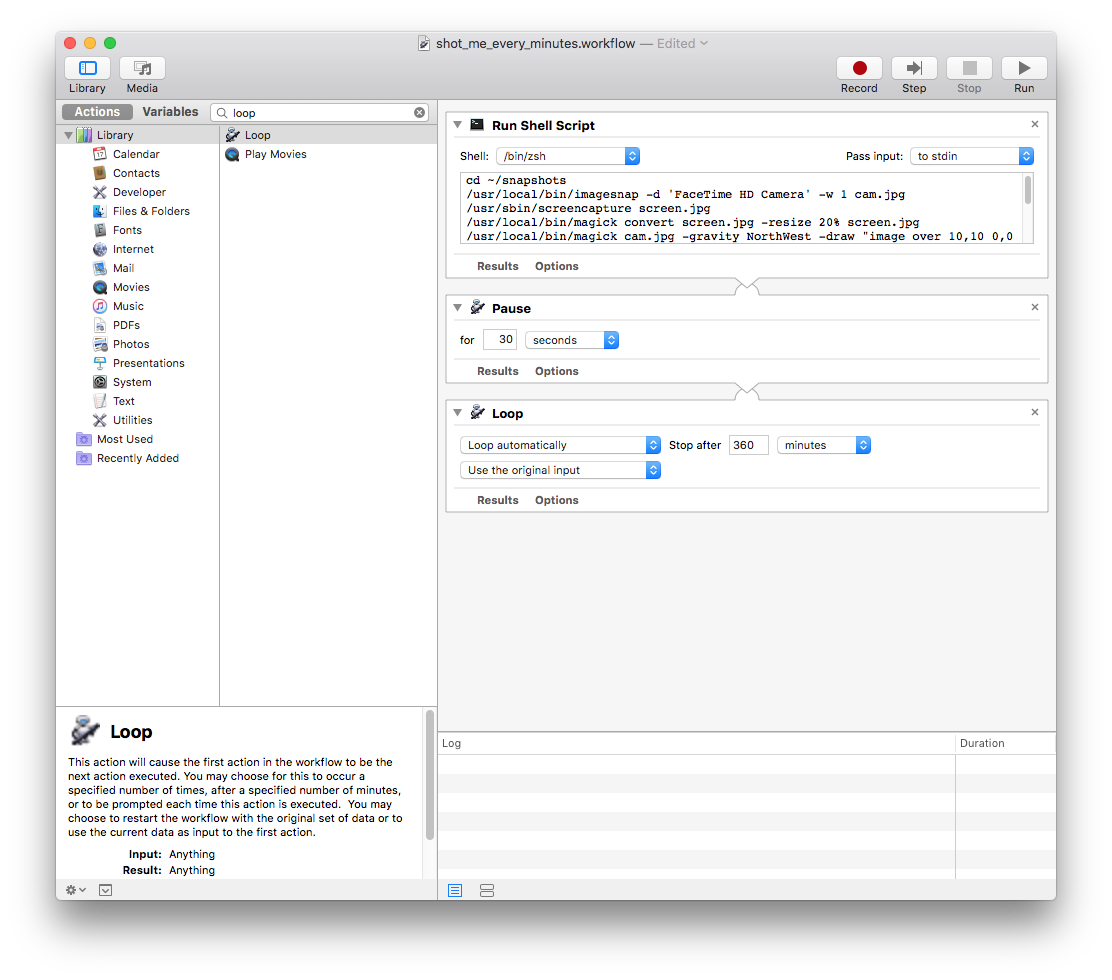 제대로 동작하는지 궁금하니 바로 Run 을 눌러서, `~/snapshot` 디렉터리에 파일이 잘 쌓이는지 확인해보자. ### 동영상 만들기 이미지는 준비되었으니 영상을 만들어보자. `ffmpeg`을 쓰면 되는데, 이 경우 이미지 파일이름이 순차적인 번호 형식이어야 한다. 따라서 시간 기준 파일명을 순차 번호 기준으로 바꾸어야 한다. `rename` 도구를 이용하면 이 작업을 쉽게 처리할 수 있다. 우선 열심히 촬영한 원본 사진이 불의의 사고로 날아가지 않도록, snapshot 밑에 output 이라는 디렉터리를 만들고, 여기에 원본 사진들을 다 복사하자. ``` mkdir output cp *.jpg output ``` 이제 rename을 이용해 `snapshot_시_분_초.jpg` 을 `snapshot_001.jpg` 형식으로 바꾸자. ``` rename -N 001 's/.*/snapshot_$N.jpg/' *.jpg ``` 마지막으로 이미지들만 영상으로 묶어주면 끝! ffmpeg 엔 수만가지 옵션이 있는데 아무 옵션도 안주어도 대충 잘 만들어진다. 영상을 만든 후, rec_년_월_일.mp4 로 만들어 snapshot 디렉터리에 쌓자. ``` ffmpeg -i snapshot_%03d.jpg output.mp4 rm *.jpg date +"%Y_%m_%d" | xargs -I {} mv output.mp4 ../rec_{}.mp4 cd .. rm -rf output ``` 위 내용은 snapshot 디렉터리에 make_video.sh 등의 이름으로 script로 저장해서 촬영이 끝나면 실행하자. 물론 실행되어야 하므로 실행 권한을 주어야 한다. ``` mkdir output cp *.jpg output cd output rename -N 001 's/.*/snapshot_$N.jpg/' *.jpg ffmpeg -i snapshot_%03d.jpg output.mp4 rm *.jpg date +"%Y_%m_%d" | xargs -I {} mv output.mp4 ../rec_{}.mp4 cd .. rm -rf output ``` 마지막으로 영상이 잘 만들어졌다면 하루종일 찍은 snapshot 원본 jpg도 다 지우면 된다. ## 정리 긴 글을 정리하면 다음과 같다. 1. automator 를 이용해 다음 script 실행 ``` cd ~/snapshots /usr/local/bin/imagesnap -w 1 cam.jpg /usr/sbin/screencapture screen.jpg /usr/local/bin/magick convert screen.jpg -resize 20% screen.jpg /usr/local/bin/magick cam.jpg -gravity NorthWest -draw "image over 10,10 0,0 'screen.jpg'" cam.jpg rm screen.jpg date +"%H:%M:%S" | xargs -I {} /usr/local/bin/magick cam.jpg -undercolor '#0008' -gravity SouthEast -pointsize 30 -fill grey -draw "text 30,30 '{}'" cam.jpg date +"%H_%M_%S" | xargs -I {} mv cam.jpg snapshot_{}.jpg ``` 2. terminal에서 다음 script 실행해서 영상 제작 ``` mkdir output cp *.jpg output cd output rename -N 001 's/.*/snapshot_$N.jpg/' *.jpg ffmpeg -i snapshot_%03d.jpg output.mp4 rm *.jpg date +"%Y_%m_%d" | xargs -I {} mv output.mp4 ../rec_{}.mp4 cd .. rm -rf output ``` 3. 원본 사진 삭제 ``` rm *.jpg ``` |
| json metadata | {"tags":["kr-dev","mac","timelapse"],"image":["https://cdn.steemitimages.com/DQmQezX8u5Eert3vHDvHqbYccs6wcYaBRQMEQBAfCNbbwmK/image.png"],"links":["http://iharder.sourceforge.net/current/macosx/imagesnap/","http://www.imagemagick.org/","https://www.ffmpeg.org/","https://support.apple.com/ko-kr/guide/automator/welcome/mac","https://brew.sh/index_ko"],"app":"steemit/0.1","format":"markdown"} |
| Transaction Info | Block #30873581/Trx c018e429c2d1d417374cc65157fabe19a89b2328 |
View Raw JSON Data
{
"trx_id": "c018e429c2d1d417374cc65157fabe19a89b2328",
"block": 30873581,
"trx_in_block": 19,
"op_in_trx": 0,
"virtual_op": 0,
"timestamp": "2019-03-05T01:19:42",
"op": [
"comment",
{
"parent_author": "",
"parent_permlink": "kr-dev",
"author": "kingori2",
"permlink": "kjgug",
"title": "맥북의 카메라로 타임랩스 동영상 만들기",
"body": "## 발단 \n\n어느날 문득 내가 회사에서 하루종일 어떤 자세로 일하고 있는지 궁금해졌다. 나만 궁금한가?\n\n 안드로이드 앱 개발로 먹고사니 앱으로 만들어볼까 싶었지만 카메라 API를 다루기도 귀찮고, 막상 촬영을 하려면 폰을 어딘가에 잘 고정해두고 계속 켜둬야 하는데 이것도 거추장스럽다고 판단했다. **그래, 노트북에 장식처럼 달린 카메라를 이 참에 한번 써 보자!**\n\n\n## 정보 수집\n어떻게 만들 수 있을까 생각했다.\n1. 노트북 카메라로 사진을 찍는다.\n2. 1번 작업을 주기적으로, 특정 시점까지 반복한다.\n3. 1번 작업으로 만든 사진들을 모아 동영상을 만든다.\n\n2번은 뭔가 cronjob 같은걸 쓰면 될 것 같은데 1, 3번은 다 해 보지 않은 작업이다. 열심히 구글링을 해 보니, 이미 멋진 분들이 다 만들어두셨다.\n\n* [ImageSnap](http://iharder.sourceforge.net/current/macosx/imagesnap/) - 맥용 캠으로 사진을 찍는 커맨드라인 도구\n* [ImageMagick](http://www.imagemagick.org/) - 이미지 조작 + 동영상 제작 도구. 워낙 유명해서 이름은 많이 들어봤다.\n* [ffMpeg](https://www.ffmpeg.org/) - 동영상 제작 도구. 역시 아주 유명한 도구이다.\n* [automator](https://support.apple.com/ko-kr/guide/automator/welcome/mac) - osX 기본 탑재된 스크립트 실행 도구\n\n주기적인 반복작업은 어떻게 할까 고민을 해 봤는데, cron 을 이용할 수도 있겠지만 작업을 자주 시작하거나 중단하기엔 커맨드라인 도구보다는 GUI 도구가 더 좋다고 생각해서 osX가 기본 제공하는 automator를 사용하기로 했다.\n\n작업을 좀 더 구체화하면 다음과 같다.\n1. imagesnap으로 사진을 찍는다.\n2. automator를 이용해 '1번 작업을 수행 - 30초 딜레이 - 다시 1번 작업 수행' 하는 반복 동작을 5시간 동안 수행한다.\n3. imageMagick이나 ffmpeg을 이용해 이미지를 동영상으로 변환한다.\n\n## 작업 준비\n도구는 알았으니 설치를 해야지. 모든 도구는 [homebrew](https://brew.sh/index_ko)를 이용해 간단히 설치할 수 있다.\n터미널에서 다음 명령어들을 입력하면 된다.\n```\n#1. homebrew 설치\n/usr/bin/ruby -e \"$(curl -fsSL https://raw.githubusercontent.com/Homebrew/install/master/install)\"\n#2. imagesnap 설치\nbrew install imagesnap\n#3. imagemagick 설치\nbrew install imagemagick\n#4. ffmpeg 설치\nbrew install ffmpeg\n#5. rename 설치 - 아직 소개하지 않은 rename 도구\nbrew install rename\n```\n\n## 구현\n자, 이제 진짜 구현해보자.\n\n### 촬영\nimagesnap은 매우 사용하기 쉽다. 그냥 `imagesnap cap.jpg` 이런식으로 명령만 날리면 사진이 찍힌다. 다만 이렇게 하면 사진이 시커멓게 나온다. 이는 camera warm up 때문인 듯 하다. `-w` 옵션을 이용해 1초 정도 기동 시간을 주면 된다. 참고로 내 경우엔 모니터에도 캠이 달려서 캠 2대가 인식되었다. 이 경우 `-l` 옵션을 이용해 카메라 목록을 확인한 후, `-d` 옵션으로 촬영할 카메라를 선택하면 된다. 촬영 포맷은 png, jpg 모두 가능한데, 나중에 ffmpeg을 이용하려면 jpg여야 하므로 처음부터 jpg로 촬영하자.\n```\nimagesnap -w 1 cam.jpg\n```\n\n### 이미지 조작\n촬영은 성공했는데, 사진만을 그대로 이어붙이면 나중에 영상이 좀 밋밋하다. 그래서 사진의 오른쪽 아래에 촬영 시각을 표시해보자. 이미 `imagemagick`이라는 훌륭한 도구를 설치했으니 간단히(명령어가 그리 간단한진 않았지만...) 사진에 시각을 표시할 수 있다. 잘 동작하는지 꼭 직접 실행해보자.\n```\n#사진에 시각 표시\ndate +\"%H:%M:%S\" | xargs -I {} /usr/local/bin/magick cam.jpg -undercolor '#0008' -gravity SouthEast -pointsize 30 -fill grey -draw \"text 30,30 '{}'\" cam.jpg\n```\n\n나는 당시 내가 뭘 하고 있었는지도 궁금해졌다. 그래서 화면 스크린샷도 집어넣어보기로 했다. 스샷은 내장된 `screencapture` 커맨드라인 도구를 사용하면 된다.\n```\n/usr/sbin/screencapture screen.jpg\n```\n\n스크린샷은 찍었으니 이를 아까 찍은 `cam.jpg` 에 넣어보자. 나는 왼쪽 상단에 스크린샷을 넣었다. 스크린샷은 매우 크기가 클 수 있어서, 20% 로 축소해서 집어넣었다.\n```\n# 20% 로 축소\n/usr/local/bin/magick convert screen.jpg -resize 20% screen.jpg\n# cam.jpg 의 왼쪽 상단에 살짝 마진을 주어 집어넣음\n/usr/local/bin/magick cam.jpg -gravity NorthWest -draw \"image over 10,10 0,0 'screen.jpg'\" cam.jpg\n```\n\n하루 종일 사진을 찍어 차곡차곡 쌓아야 하므로 촬영한 사진 파일명엔 시각을 표시하기로 한다. 이를 위해 다음과 같이 파일명을 바꾼다.\n```\n#snapshot_HH_MM_SS.jpg 로 이름 변경\ndate +\"%H_%M_%S\" | xargs -I {} mv cam.jpg snapshot_{}.jpg\n```\n\n자, 지금까지 한 장의 사진을 만드는 작업을 마쳤다. 이제 반복 작업을 수행해보자.\n\n### automator로 반복작업하기\n\nosX엔 이미 automator가 다 깔려있을테니 이를 실행해보자. 실행하자마자 뭘 선택하라고 나오는데, `workflow` 를 선택한다.\n\n이제 작업을 하나씩 등록해야 한다. 우리가 앞 단계에서 열심히 만든 shell script를 실행해야 하니 왼쪽 Variables 옆에 보이는 검색창에 shell 을 입력하면 나오는 `Run Shell Script`를 더블클릭한다.\n\n더블클릭하면 오른쪽 영역에 스크립트를 입력하라고 나온다. 우리가 열심히 작업한 script를 집어넣자. 나의 경우 home 디렉터리 밑에 미리 snapshots 라는 디렉터리를 만들어서 여기서 작업했다.\n\n```\ncd ~/snapshots\n/usr/local/bin/imagesnap -w 1 cam.jpg\n/usr/sbin/screencapture screen.jpg\n/usr/local/bin/magick convert screen.jpg -resize 20% screen.jpg\n/usr/local/bin/magick cam.jpg -gravity NorthWest -draw \"image over 10,10 0,0 'screen.jpg'\" cam.jpg\nrm screen.jpg\ndate +\"%H:%M:%S\" | xargs -I {} /usr/local/bin/magick cam.jpg -undercolor '#0008' -gravity SouthEast -pointsize 30 -fill grey -draw \"text 30,30 '{}'\" cam.jpg\ndate +\"%H_%M_%S\" | xargs -I {} mv cam.jpg snapshot_{}.jpg\n```\n\n사진을 한장 찍었으니 좀 쉬자. 검색창에 pause를 입력하면 나오는 `Pause`를 더블클릭하면 `Run Shell Script` 밑에 `Pause` 항목이 추가된다. 30초 쯤 쉬자.\n\n마지막으로 이 짓을 몇시간 동안 반복하도록 설정하자. 검색창에 loop를 입력하면 나오는 `Loop`를 더블클릭하고, Stop after 항목에 대충 300분 정도 넣어보자. (5시간 반복) \n\n\n이렇게 다 작업을 한 후, 적절한 이름으로 저장한다. 이런 모습일 것이다. \n\n\n제대로 동작하는지 궁금하니 바로 Run 을 눌러서, `~/snapshot` 디렉터리에 파일이 잘 쌓이는지 확인해보자.\n\n### 동영상 만들기\n이미지는 준비되었으니 영상을 만들어보자. `ffmpeg`을 쓰면 되는데, 이 경우 이미지 파일이름이 순차적인 번호 형식이어야 한다. 따라서 시간 기준 파일명을 순차 번호 기준으로 바꾸어야 한다. `rename` 도구를 이용하면 이 작업을 쉽게 처리할 수 있다.\n\n우선 열심히 촬영한 원본 사진이 불의의 사고로 날아가지 않도록, snapshot 밑에 output 이라는 디렉터리를 만들고, 여기에 원본 사진들을 다 복사하자.\n```\nmkdir output\ncp *.jpg output\n```\n\n이제 rename을 이용해 `snapshot_시_분_초.jpg` 을 `snapshot_001.jpg` 형식으로 바꾸자.\n```\nrename -N 001 's/.*/snapshot_$N.jpg/' *.jpg\n```\n\n마지막으로 이미지들만 영상으로 묶어주면 끝! ffmpeg 엔 수만가지 옵션이 있는데 아무 옵션도 안주어도 대충 잘 만들어진다. 영상을 만든 후, rec_년_월_일.mp4 로 만들어 snapshot 디렉터리에 쌓자.\n```\nffmpeg -i snapshot_%03d.jpg output.mp4\nrm *.jpg\ndate +\"%Y_%m_%d\" | xargs -I {} mv output.mp4 ../rec_{}.mp4\ncd ..\nrm -rf output\n```\n\n위 내용은 snapshot 디렉터리에 make_video.sh 등의 이름으로 script로 저장해서 촬영이 끝나면 실행하자. 물론 실행되어야 하므로 실행 권한을 주어야 한다.\n```\nmkdir output\ncp *.jpg output\ncd output\nrename -N 001 's/.*/snapshot_$N.jpg/' *.jpg\nffmpeg -i snapshot_%03d.jpg output.mp4\nrm *.jpg\ndate +\"%Y_%m_%d\" | xargs -I {} mv output.mp4 ../rec_{}.mp4\ncd ..\nrm -rf output\n```\n\n마지막으로 영상이 잘 만들어졌다면 하루종일 찍은 snapshot 원본 jpg도 다 지우면 된다. \n\n## 정리\n\n긴 글을 정리하면 다음과 같다.\n1. automator 를 이용해 다음 script 실행\n ```\n cd ~/snapshots\n /usr/local/bin/imagesnap -w 1 cam.jpg\n /usr/sbin/screencapture screen.jpg\n /usr/local/bin/magick convert screen.jpg -resize 20% screen.jpg\n /usr/local/bin/magick cam.jpg -gravity NorthWest -draw \"image over 10,10 0,0 'screen.jpg'\" cam.jpg\n rm screen.jpg\n date +\"%H:%M:%S\" | xargs -I {} /usr/local/bin/magick cam.jpg -undercolor '#0008' -gravity SouthEast -pointsize 30 -fill \n grey -draw \"text 30,30 '{}'\" cam.jpg\n date +\"%H_%M_%S\" | xargs -I {} mv cam.jpg snapshot_{}.jpg\n ```\n2. terminal에서 다음 script 실행해서 영상 제작\n ```\n mkdir output\n cp *.jpg output\n cd output\n rename -N 001 's/.*/snapshot_$N.jpg/' *.jpg\n ffmpeg -i snapshot_%03d.jpg output.mp4\n rm *.jpg\n date +\"%Y_%m_%d\" | xargs -I {} mv output.mp4 ../rec_{}.mp4\n cd ..\n rm -rf output\n ```\n3. 원본 사진 삭제\n ```\n rm *.jpg\n ```",
"json_metadata": "{\"tags\":[\"kr-dev\",\"mac\",\"timelapse\"],\"image\":[\"https://cdn.steemitimages.com/DQmQezX8u5Eert3vHDvHqbYccs6wcYaBRQMEQBAfCNbbwmK/image.png\"],\"links\":[\"http://iharder.sourceforge.net/current/macosx/imagesnap/\",\"http://www.imagemagick.org/\",\"https://www.ffmpeg.org/\",\"https://support.apple.com/ko-kr/guide/automator/welcome/mac\",\"https://brew.sh/index_ko\"],\"app\":\"steemit/0.1\",\"format\":\"markdown\"}"
}
]
}2019/02/25 23:53:15
2019/02/25 23:53:15
| parent author | kingori2 |
| parent permlink | kotlin-lazy-field-serialize-proguard |
| author | partiko |
| permlink | partiko-re-kingori2-kotlin-lazy-field-serialize-proguard-20190225t235314869z |
| title | |
| body | Hello @kingori2! This is a friendly reminder that you have 3000 Partiko Points unclaimed in your Partiko account! Partiko is a fast and beautiful mobile app for Steem, and it’s the most popular Steem mobile app out there! Download Partiko using the link below and login using SteemConnect to claim your 3000 Partiko points! You can easily convert them into Steem token! https://partiko.app/referral/partiko |
| json metadata | {"app":"partiko"} |
| Transaction Info | Block #30670387/Trx 40a2b75b9db6b8a66b9836bff2baecbad62df906 |
View Raw JSON Data
{
  "trx_id": "40a2b75b9db6b8a66b9836bff2baecbad62df906",
  "block": 30670387,
  "trx_in_block": 10,
  "op_in_trx": 0,
  "virtual_op": 0,
  "timestamp": "2019-02-25T23:53:15",
  "op": [
    "comment",
    {
      "parent_author": "kingori2",
      "parent_permlink": "kotlin-lazy-field-serialize-proguard",
      "author": "partiko",
      "permlink": "partiko-re-kingori2-kotlin-lazy-field-serialize-proguard-20190225t235314869z",
      "title": "",
      "body": "Hello @kingori2! This is a friendly reminder that you have 3000 Partiko Points unclaimed in your Partiko account!\n\nPartiko is a fast and beautiful mobile app for Steem, and it’s the most popular Steem mobile app out there! Download Partiko using the link below and login using SteemConnect to claim your 3000 Partiko points! You can easily convert them into Steem token!\n\nhttps://partiko.app/referral/partiko",
      "json_metadata": "{\"app\":\"partiko\"}"
    }
  ]
}2019/02/11 15:34:51
2019/02/11 15:34:51
| parent author | kingori2 |
| parent permlink | kotlin-lazy-field-serialize-proguard |
| author | steemitboard |
| permlink | steemitboard-notify-kingori2-20190211t153450000z |
| title | |
| body | Congratulations @kingori2! You received a personal award! <table><tr><td>https://steemitimages.com/70x70/http://steemitboard.com/@kingori2/birthday1.png</td><td>Happy Birthday! - You are on the Steem blockchain for 1 year!</td></tr></table> <sub>_[Click here to view your Board](https://steemitboard.com/@kingori2)_</sub> > Support [SteemitBoard's project](https://steemit.com/@steemitboard)! **[Vote for its witness](https://v2.steemconnect.com/sign/account-witness-vote?witness=steemitboard&approve=1)** and **get one more award**! |
| json metadata | {"image":["https://steemitboard.com/img/notify.png"]} |
| Transaction Info | Block #30257536/Trx 74d0bcee3197f38b583fe8c32f56035ed4203db4 |
View Raw JSON Data
{
  "trx_id": "74d0bcee3197f38b583fe8c32f56035ed4203db4",
  "block": 30257536,
  "trx_in_block": 4,
  "op_in_trx": 0,
  "virtual_op": 0,
  "timestamp": "2019-02-11T15:34:51",
  "op": [
    "comment",
    {
      "parent_author": "kingori2",
      "parent_permlink": "kotlin-lazy-field-serialize-proguard",
      "author": "steemitboard",
      "permlink": "steemitboard-notify-kingori2-20190211t153450000z",
      "title": "",
      "body": "Congratulations @kingori2! You received a personal award!\n\n<table><tr><td>https://steemitimages.com/70x70/http://steemitboard.com/@kingori2/birthday1.png</td><td>Happy Birthday! - You are on the Steem blockchain for 1 year!</td></tr></table>\n\n<sub>_[Click here to view your Board](https://steemitboard.com/@kingori2)_</sub>\n\n\n> Support [SteemitBoard's project](https://steemit.com/@steemitboard)! **[Vote for its witness](https://v2.steemconnect.com/sign/account-witness-vote?witness=steemitboard&approve=1)** and **get one more award**!",
      "json_metadata": "{\"image\":[\"https://steemitboard.com/img/notify.png\"]}"
    }
  ]
}jule1upvoted (100.00%) @kingori2 / kotlin-lazy-field-serialize-proguard2019/02/07 02:25:15
jule1upvoted (100.00%) @kingori2 / kotlin-lazy-field-serialize-proguard
2019/02/07 02:25:15
| voter | jule1 |
| author | kingori2 |
| permlink | kotlin-lazy-field-serialize-proguard |
| weight | 10000 (100.00%) |
| Transaction Info | Block #30126633/Trx ffc08e12361dbc15fd29190609c94cb8b16a0d56 |
View Raw JSON Data
{
  "trx_id": "ffc08e12361dbc15fd29190609c94cb8b16a0d56",
  "block": 30126633,
  "trx_in_block": 21,
  "op_in_trx": 0,
  "virtual_op": 0,
  "timestamp": "2019-02-07T02:25:15",
  "op": [
    "vote",
    {
      "voter": "jule1",
      "author": "kingori2",
      "permlink": "kotlin-lazy-field-serialize-proguard",
      "weight": 10000
    }
  ]
}june0620upvoted (10.00%) @kingori2 / kotlin-lazy-field-serialize-proguard2019/01/30 12:08:30
june0620upvoted (10.00%) @kingori2 / kotlin-lazy-field-serialize-proguard
2019/01/30 12:08:30
| voter | june0620 |
| author | kingori2 |
| permlink | kotlin-lazy-field-serialize-proguard |
| weight | 1000 (10.00%) |
| Transaction Info | Block #29908107/Trx 8a8e5e38e3754122475bb5a8e57ddd6547cf98e5 |
View Raw JSON Data
{
  "trx_id": "8a8e5e38e3754122475bb5a8e57ddd6547cf98e5",
  "block": 29908107,
  "trx_in_block": 110,
  "op_in_trx": 0,
  "virtual_op": 0,
  "timestamp": "2019-01-30T12:08:30",
  "op": [
    "vote",
    {
      "voter": "june0620",
      "author": "kingori2",
      "permlink": "kotlin-lazy-field-serialize-proguard",
      "weight": 1000
    }
  ]
}2019/01/30 01:36:03
2019/01/30 01:36:03
| parent author | keinyou |
| parent permlink | re-kingori2-kotlin-lazy-field-serialize-proguard-20190129t092606302z |
| author | kingori2 |
| permlink | re-keinyou-re-kingori2-kotlin-lazy-field-serialize-proguard-20190130t013603703z |
| title | |
| body | 고맙습니다. 수정했습니다. 그런데 두번 적으니 파워풀해보이네요 ㅋㅋㅋ |
| json metadata | {"tags":["kotlin"],"app":"steemit/0.1"} |
| Transaction Info | Block #29895464/Trx dfe50eb1f9cb42c0f5bda0435227957a62998913 |
View Raw JSON Data
{
  "trx_id": "dfe50eb1f9cb42c0f5bda0435227957a62998913",
  "block": 29895464,
  "trx_in_block": 20,
  "op_in_trx": 0,
  "virtual_op": 0,
  "timestamp": "2019-01-30T01:36:03",
  "op": [
    "comment",
    {
      "parent_author": "keinyou",
      "parent_permlink": "re-kingori2-kotlin-lazy-field-serialize-proguard-20190129t092606302z",
      "author": "kingori2",
      "permlink": "re-keinyou-re-kingori2-kotlin-lazy-field-serialize-proguard-20190130t013603703z",
      "title": "",
      "body": "고맙습니다. 수정했습니다. 그런데 두번 적으니 파워풀해보이네요 ㅋㅋㅋ",
      "json_metadata": "{\"tags\":[\"kotlin\"],\"app\":\"steemit/0.1\"}"
    }
  ]
}kingori2published a new post: kotlin-lazy-field-serialize-proguard2019/01/30 01:35:36
kingori2published a new post: kotlin-lazy-field-serialize-proguard
2019/01/30 01:35:36
| parent author | |
| parent permlink | kotlin |
| author | kingori2 |
| permlink | kotlin-lazy-field-serialize-proguard |
| title | Kotlin의 lazy field를 가진 serialize 객체를 Proguard 적용할 때 주의할 점 |
| body | @@ -4031,17 +4031,16 @@ ** %EC%A0%81%EC%9A%A9%EB%90%98%EC%96%B4 -%EC%96%B4 %EC%95%BC %ED%95%9C%EB%8B%A4%EA%B3%A0 %EC%83%9D%EA%B0%81 |
| json metadata | {"tags":["kotlin","android","lazy","kr-dev"],"links":["https://kotlinlang.org/docs/reference/delegated-properties.html","https://gist.github.com/kingori/518e8afcb6fb4d90b81eb8348395f39e"],"app":"steemit/0.1","format":"markdown"} |
| Transaction Info | Block #29895455/Trx bb528ecfa25b0604821daf5cd3c66a3dcf5463cc |
View Raw JSON Data
{
  "trx_id": "bb528ecfa25b0604821daf5cd3c66a3dcf5463cc",
  "block": 29895455,
  "trx_in_block": 1,
  "op_in_trx": 0,
  "virtual_op": 0,
  "timestamp": "2019-01-30T01:35:36",
  "op": [
    "comment",
    {
      "parent_author": "",
      "parent_permlink": "kotlin",
      "author": "kingori2",
      "permlink": "kotlin-lazy-field-serialize-proguard",
      "title": "Kotlin의 lazy field를 가진 serialize 객체를 Proguard 적용할 때 주의할 점",
      "body": "@@ -4031,17 +4031,16 @@\n **  %EC%A0%81%EC%9A%A9%EB%90%98%EC%96%B4\n-%EC%96%B4\n %EC%95%BC %ED%95%9C%EB%8B%A4%EA%B3%A0 %EC%83%9D%EA%B0%81\n",
      "json_metadata": "{\"tags\":[\"kotlin\",\"android\",\"lazy\",\"kr-dev\"],\"links\":[\"https://kotlinlang.org/docs/reference/delegated-properties.html\",\"https://gist.github.com/kingori/518e8afcb6fb4d90b81eb8348395f39e\"],\"app\":\"steemit/0.1\",\"format\":\"markdown\"}"
    }
  ]
}2019/01/29 09:26:06
2019/01/29 09:26:06
| parent author | kingori2 |
| parent permlink | kotlin-lazy-field-serialize-proguard |
| author | keinyou |
| permlink | re-kingori2-kotlin-lazy-field-serialize-proguard-20190129t092606302z |
| title | |
| body | 글 마지막에 초큼 흥분 하신듯 ^^;; (당연히 적용되어어야) |
| json metadata | {"tags":["kotlin"],"app":"steemit/0.1"} |
| Transaction Info | Block #29876078/Trx 04974ff63872befa92aa19aa4c87df4e432d92aa |
View Raw JSON Data
{
  "trx_id": "04974ff63872befa92aa19aa4c87df4e432d92aa",
  "block": 29876078,
  "trx_in_block": 17,
  "op_in_trx": 0,
  "virtual_op": 0,
  "timestamp": "2019-01-29T09:26:06",
  "op": [
    "comment",
    {
      "parent_author": "kingori2",
      "parent_permlink": "kotlin-lazy-field-serialize-proguard",
      "author": "keinyou",
      "permlink": "re-kingori2-kotlin-lazy-field-serialize-proguard-20190129t092606302z",
      "title": "",
      "body": "글 마지막에 초큼 흥분 하신듯 ^^;;  (당연히 적용되어어야)",
      "json_metadata": "{\"tags\":[\"kotlin\"],\"app\":\"steemit/0.1\"}"
    }
  ]
}steemitboardupvoted (1.00%) @kingori2 / kotlin-lazy-field-serialize-proguard2019/01/29 09:04:54
steemitboardupvoted (1.00%) @kingori2 / kotlin-lazy-field-serialize-proguard
2019/01/29 09:04:54
| voter | steemitboard |
| author | kingori2 |
| permlink | kotlin-lazy-field-serialize-proguard |
| weight | 100 (1.00%) |
| Transaction Info | Block #29875655/Trx f4cd53f27c3095f953712e5eff96e588e3daff91 |
View Raw JSON Data
{
  "trx_id": "f4cd53f27c3095f953712e5eff96e588e3daff91",
  "block": 29875655,
  "trx_in_block": 11,
  "op_in_trx": 0,
  "virtual_op": 0,
  "timestamp": "2019-01-29T09:04:54",
  "op": [
    "vote",
    {
      "voter": "steemitboard",
      "author": "kingori2",
      "permlink": "kotlin-lazy-field-serialize-proguard",
      "weight": 100
    }
  ]
}2019/01/29 09:04:51
2019/01/29 09:04:51
| parent author | kingori2 |
| parent permlink | kotlin-lazy-field-serialize-proguard |
| author | steemitboard |
| permlink | steemitboard-notify-kingori2-20190129t090451000z |
| title | |
| body | Congratulations @kingori2! You have completed the following achievement on the Steem blockchain and have been rewarded with new badge(s) : <table><tr><td>https://steemitimages.com/60x70/http://steemitboard.com/@kingori2/posts.png?201901290817</td><td>You published more than 10 posts. Your next target is to reach 20 posts.</td></tr> </table> <sub>_[Click here to view your Board](https://steemitboard.com/@kingori2)_</sub> <sub>_If you no longer want to receive notifications, reply to this comment with the word_ `STOP`</sub> To support your work, I also upvoted your post! > Support [SteemitBoard's project](https://steemit.com/@steemitboard)! **[Vote for its witness](https://v2.steemconnect.com/sign/account-witness-vote?witness=steemitboard&approve=1)** and **get one more award**! |
| json metadata | {"image":["https://steemitboard.com/img/notify.png"]} |
| Transaction Info | Block #29875654/Trx 6e3ecb19386cc180b7062180d08ded2d0f490442 |
View Raw JSON Data
{
  "trx_id": "6e3ecb19386cc180b7062180d08ded2d0f490442",
  "block": 29875654,
  "trx_in_block": 8,
  "op_in_trx": 0,
  "virtual_op": 0,
  "timestamp": "2019-01-29T09:04:51",
  "op": [
    "comment",
    {
      "parent_author": "kingori2",
      "parent_permlink": "kotlin-lazy-field-serialize-proguard",
      "author": "steemitboard",
      "permlink": "steemitboard-notify-kingori2-20190129t090451000z",
      "title": "",
      "body": "Congratulations @kingori2! You have completed the following achievement on the Steem blockchain and have been rewarded with new badge(s) :\n\n<table><tr><td>https://steemitimages.com/60x70/http://steemitboard.com/@kingori2/posts.png?201901290817</td><td>You published more than 10 posts. Your next target is to reach 20 posts.</td></tr>\n</table>\n\n<sub>_[Click here to view your Board](https://steemitboard.com/@kingori2)_</sub>\n<sub>_If you no longer want to receive notifications, reply to this comment with the word_ `STOP`</sub>\n\n\nTo support your work, I also upvoted your post!\n\n\n> Support [SteemitBoard's project](https://steemit.com/@steemitboard)! **[Vote for its witness](https://v2.steemconnect.com/sign/account-witness-vote?witness=steemitboard&approve=1)** and **get one more award**!",
      "json_metadata": "{\"image\":[\"https://steemitboard.com/img/notify.png\"]}"
    }
  ]
}krfeedupvoted (100.00%) @kingori2 / kotlin-lazy-field-serialize-proguard2019/01/29 08:30:03
krfeedupvoted (100.00%) @kingori2 / kotlin-lazy-field-serialize-proguard
2019/01/29 08:30:03
| voter | krfeed |
| author | kingori2 |
| permlink | kotlin-lazy-field-serialize-proguard |
| weight | 10000 (100.00%) |
| Transaction Info | Block #29874958/Trx a0f90c1544ab48fcc5c6115394a84356fdd35a11 |
View Raw JSON Data
{
  "trx_id": "a0f90c1544ab48fcc5c6115394a84356fdd35a11",
  "block": 29874958,
  "trx_in_block": 30,
  "op_in_trx": 0,
  "virtual_op": 0,
  "timestamp": "2019-01-29T08:30:03",
  "op": [
    "vote",
    {
      "voter": "krfeed",
      "author": "kingori2",
      "permlink": "kotlin-lazy-field-serialize-proguard",
      "weight": 10000
    }
  ]
}guest123upvoted (100.00%) @kingori2 / kotlin-lazy-field-serialize-proguard2019/01/29 08:30:03
guest123upvoted (100.00%) @kingori2 / kotlin-lazy-field-serialize-proguard
2019/01/29 08:30:03
| voter | guest123 |
| author | kingori2 |
| permlink | kotlin-lazy-field-serialize-proguard |
| weight | 10000 (100.00%) |
| Transaction Info | Block #29874958/Trx 8138c3971e3a88a76f0d18304ed11b6d8aca64c6 |
View Raw JSON Data
{
  "trx_id": "8138c3971e3a88a76f0d18304ed11b6d8aca64c6",
  "block": 29874958,
  "trx_in_block": 26,
  "op_in_trx": 0,
  "virtual_op": 0,
  "timestamp": "2019-01-29T08:30:03",
  "op": [
    "vote",
    {
      "voter": "guest123",
      "author": "kingori2",
      "permlink": "kotlin-lazy-field-serialize-proguard",
      "weight": 10000
    }
  ]
}sisilafamilleupvoted (100.00%) @kingori2 / kotlin-lazy-field-serialize-proguard2019/01/29 08:30:03
sisilafamilleupvoted (100.00%) @kingori2 / kotlin-lazy-field-serialize-proguard
2019/01/29 08:30:03
| voter | sisilafamille |
| author | kingori2 |
| permlink | kotlin-lazy-field-serialize-proguard |
| weight | 10000 (100.00%) |
| Transaction Info | Block #29874958/Trx 44627b13b43bdf77fba3fac6bc01a1eb92decc0e |
View Raw JSON Data
{
  "trx_id": "44627b13b43bdf77fba3fac6bc01a1eb92decc0e",
  "block": 29874958,
  "trx_in_block": 21,
  "op_in_trx": 0,
  "virtual_op": 0,
  "timestamp": "2019-01-29T08:30:03",
  "op": [
    "vote",
    {
      "voter": "sisilafamille",
      "author": "kingori2",
      "permlink": "kotlin-lazy-field-serialize-proguard",
      "weight": 10000
    }
  ]
}garoadupvoted (100.00%) @kingori2 / kotlin-lazy-field-serialize-proguard2019/01/29 08:22:30
garoadupvoted (100.00%) @kingori2 / kotlin-lazy-field-serialize-proguard
2019/01/29 08:22:30
| voter | garoad |
| author | kingori2 |
| permlink | kotlin-lazy-field-serialize-proguard |
| weight | 10000 (100.00%) |
| Transaction Info | Block #29874807/Trx e0126bce43cf9292d106310accb364ad44da3711 |
View Raw JSON Data
{
  "trx_id": "e0126bce43cf9292d106310accb364ad44da3711",
  "block": 29874807,
  "trx_in_block": 1,
  "op_in_trx": 0,
  "virtual_op": 0,
  "timestamp": "2019-01-29T08:22:30",
  "op": [
    "vote",
    {
      "voter": "garoad",
      "author": "kingori2",
      "permlink": "kotlin-lazy-field-serialize-proguard",
      "weight": 10000
    }
  ]
}2019/01/29 08:12:09
2019/01/29 08:12:09
| delegator | steem |
| delegatee | kingori2 |
| vesting shares | 29080.396914 VESTS |
| Transaction Info | Block #29874600/Trx 0adc4d0705a5948e8f157989a0d1462e2a73b630 |
View Raw JSON Data
{
  "trx_id": "0adc4d0705a5948e8f157989a0d1462e2a73b630",
  "block": 29874600,
  "trx_in_block": 10,
  "op_in_trx": 0,
  "virtual_op": 0,
  "timestamp": "2019-01-29T08:12:09",
  "op": [
    "delegate_vesting_shares",
    {
      "delegator": "steem",
      "delegatee": "kingori2",
      "vesting_shares": "29080.396914 VESTS"
    }
  ]
}mishanaupvoted (60.00%) @kingori2 / kotlin-lazy-field-serialize-proguard2019/01/29 08:03:54
mishanaupvoted (60.00%) @kingori2 / kotlin-lazy-field-serialize-proguard
2019/01/29 08:03:54
| voter | mishana |
| author | kingori2 |
| permlink | kotlin-lazy-field-serialize-proguard |
| weight | 6000 (60.00%) |
| Transaction Info | Block #29874435/Trx 9166e0b8173b207e93883c24dcbf507997333c80 |
View Raw JSON Data
{
  "trx_id": "9166e0b8173b207e93883c24dcbf507997333c80",
  "block": 29874435,
  "trx_in_block": 9,
  "op_in_trx": 0,
  "virtual_op": 0,
  "timestamp": "2019-01-29T08:03:54",
  "op": [
    "vote",
    {
      "voter": "mishana",
      "author": "kingori2",
      "permlink": "kotlin-lazy-field-serialize-proguard",
      "weight": 6000
    }
  ]
}kingori2published a new post: kotlin-lazy-field-serialize-proguard2019/01/29 07:28:51
kingori2published a new post: kotlin-lazy-field-serialize-proguard
2019/01/29 07:28:51
| parent author | |
| parent permlink | kotlin |
| author | kingori2 |
| permlink | kotlin-lazy-field-serialize-proguard |
| title | Kotlin의 lazy field를 가진 serialize 객체를 Proguard 적용할 때 주의할 점 |
| body | Kotlin의 [Delegated proproperties](https://kotlinlang.org/docs/reference/delegated-properties.html)는 매우 유용한 기능이다. 언어가 제공하는 lazy 펑션을 이용하면필드를 lazy하게 초기화 할 수 있다. 다음과 같은 객체를 생각해보자. ```kotlin class User: Serializable { val _name = Name("wilson", Name.NameType.A) val nameType by lazy { _name.nameType } } class Name(val text:String, val nameType:NameType): Serializable { enum class NameType { A,B } } ``` `User`객체는 `Serializeable` 인터페이스를 구현하므로 직렬화 할 수 있다. nameType 이란 프로퍼티는 `lazy` 펑션을 이용하였으므로 최초 접근 시 `_name ` 필드의 `NameType` 값이 할당된다. 안드로이드에서 활용해보면 어떨까? 다음 [gist](https://gist.github.com/kingori/518e8afcb6fb4d90b81eb8348395f39e) 는 안드로이드 기본 애플리케이션을 살짝 고쳐 본 코드이다. 버튼을 누르면 intent의 extra 에 `User`객체를 저장하여 액티비티를 실행한다. 아무 문제 없어보인다. 아무 문제가 없다. 하지만 Proguard를 이용해 난독화/최적화를 수행해보면 다음과 같은 예외를 뿜으며 크래시난다. ``` Caused by: java.io.NotSerializableException: a.bn at java.io.ObjectOutputStream.writeObject0(ObjectOutputStream.java:1240) at java.io.ObjectOutputStream.defaultWriteFields(ObjectOutputStream.java:1604) at java.io.ObjectOutputStream.writeSerialData(ObjectOutputStream.java:1565) at java.io.ObjectOutputStream.writeOrdinaryObject(ObjectOutputStream.java:1488) at java.io.ObjectOutputStream.writeObject0(ObjectOutputStream.java:1234) at java.io.ObjectOutputStream.defaultWriteFields(ObjectOutputStream.java:1604) at java.io.ObjectOutputStream.writeSerialData(ObjectOutputStream.java:1565) at java.io.ObjectOutputStream.writeOrdinaryObject(ObjectOutputStream.java:1488) at java.io.ObjectOutputStream.writeObject0(ObjectOutputStream.java:1234) at java.io.ObjectOutputStream.writeObject(ObjectOutputStream.java:354) at android.os.Parcel.writeSerializable(Parcel.java:1701) at android.os.Parcel.writeValue(Parcel.java:1654) at android.os.Parcel.writeArrayMapInternal(Parcel.java:867) at android.os.BaseBundle.writeToParcelInner(BaseBundle.java:1579) at android.os.Bundle.writeToParcel(Bundle.java:1233) at android.os.Parcel.writeBundle(Parcel.java:907) at android.content.Intent.writeToParcel(Intent.java:9961) at android.app.IActivityManager$Stub$Proxy.startActivity(IActivityManager.java:3730) at android.app.Instrumentation.execStartActivity(Instrumentation.java:1669) at android.app.Activity.startActivityForResult(Activity.java:4586) at android.support.v4.app.n.startActivityForResult(Unknown Source:10) at android.app.Activity.startActivityForResult(Activity.java:4544) at android.support.v4.app.n.startActivityForResult(Unknown Source:10) at android.app.Activity.startActivity(Activity.java:4905) at android.app.Activity.startActivity(Activity.java:4873) at com.example.myapplication.MainActivity$a.onClick(Unknown Source:25) ``` 원인을 분석한 결과는 다음과 같다. 1. lazy property는 java 바이트코드로 만들어질 때 클래스 내부에 lazy 타입의 필드를 선언한다. ``` public final class User implements Serializable { @NotNull private final Lazy nameType$delegate; } ``` 2. 실행 후 디버거를 찍어보면 저 필드에 할당되는 구현체는 kotlin stdlib에 들어있는 `SynchronizedLazyImpl` 클래스이다. ``` private class SynchronizedLazyImpl<out T>(initializer: () -> T, lock: Any? = null) : Lazy<T>, Serializable { ... private fun writeReplace(): Any = InitializedLazyImpl(value) } ``` 위 코드에서 보듯, `SynchronizedLazyImpl` 는 `Serializable` 인터페이스를 구현하며, `writeReplace()` 펑션을 이용해 자신이 serialize될 때 까지 아직 평가되지 않은 상태라면 평가를 진행하고, 그 값을 serialize 한다. 아직 평가되지 않았을 때 가지는 값은 UNINITIALIZED_VALUE 라는 객체이다. 3. (상상) Proguard를 거치기 전엔 위의 구현이 문제없이 동작한다. 하지만 Proguard 난독화/최적화를 거치면서 저 `writeReplace()` 메서드가 사라지는 것 같다. 그래서 Proguard를 적용한 후엔 lazy 펑션 내부의 람다를 평가해 얻은 값이 아닌, UNINITIALIZED_VALUE 자체를 직렬화하려다 실패한다. 이 문제를 해결하는 방법은 간단하다. `writeReplace()` 펑션이 지워지지 않도록 다음의 keep rule을 프로가드 설정 파일에 추가하면 된다. ``` -keepclassmembers class * { *** writeReplace(); } ``` 다음에 하게 되는 고민은 저 keep 규칙이 위험할까? 막 써도 될까? 인데, 내 생각엔 저 keep 규칙은 **당연히** 적용되어어야 한다고 생각한다. 안그러면 온갖 custom serialize 규칙이 proguard를 거치면서 다 망가지지 않을까? 그래서 kotlin 프로젝트에 proguard를 적용한다면, 저 rule은 꼭 추가해두어야 혹시나 어디선가 발생할 serialize 문제를 방지할 수 있다고 생각한다. |
| json metadata | {"tags":["kotlin","android","lazy","kr-dev"],"links":["https://kotlinlang.org/docs/reference/delegated-properties.html","https://gist.github.com/kingori/518e8afcb6fb4d90b81eb8348395f39e"],"app":"steemit/0.1","format":"markdown"} |
| Transaction Info | Block #29873734/Trx 7e74b7b50c6d2b10dc2d514e27b2b058225ae69d |
View Raw JSON Data
{
  "trx_id": "7e74b7b50c6d2b10dc2d514e27b2b058225ae69d",
  "block": 29873734,
  "trx_in_block": 7,
  "op_in_trx": 0,
  "virtual_op": 0,
  "timestamp": "2019-01-29T07:28:51",
  "op": [
    "comment",
    {
      "parent_author": "",
      "parent_permlink": "kotlin",
      "author": "kingori2",
      "permlink": "kotlin-lazy-field-serialize-proguard",
      "title": "Kotlin의 lazy field를 가진 serialize 객체를 Proguard 적용할 때 주의할 점",
      "body": "Kotlin의 [Delegated proproperties](https://kotlinlang.org/docs/reference/delegated-properties.html)는 매우 유용한 기능이다. 언어가 제공하는 lazy 펑션을 이용하면필드를 lazy하게 초기화 할 수 있다.\n\n다음과 같은 객체를 생각해보자.\n```kotlin\nclass User: Serializable {\n    val _name = Name(\"wilson\", Name.NameType.A)\n\n    val nameType by lazy {\n        _name.nameType\n    }\n}\n\n\nclass Name(val text:String, val nameType:NameType): Serializable {\n    enum class NameType {\n        A,B\n    }\n}\n\n```\n\n\n`User`객체는 `Serializeable` 인터페이스를 구현하므로 직렬화 할 수 있다. nameType 이란 프로퍼티는 `lazy` 펑션을 이용하였으므로 최초 접근 시 `_name ` 필드의 `NameType` 값이 할당된다. \n\n안드로이드에서 활용해보면 어떨까? 다음 [gist](https://gist.github.com/kingori/518e8afcb6fb4d90b81eb8348395f39e) 는 안드로이드 기본 애플리케이션을 살짝 고쳐 본 코드이다. 버튼을 누르면 intent의 extra 에 `User`객체를 저장하여 액티비티를 실행한다. 아무 문제 없어보인다. 아무 문제가 없다.\n\n하지만 Proguard를 이용해 난독화/최적화를 수행해보면 다음과 같은 예외를 뿜으며 크래시난다.\n```\n  Caused by: java.io.NotSerializableException: a.bn\n        at java.io.ObjectOutputStream.writeObject0(ObjectOutputStream.java:1240)\n        at java.io.ObjectOutputStream.defaultWriteFields(ObjectOutputStream.java:1604)\n        at java.io.ObjectOutputStream.writeSerialData(ObjectOutputStream.java:1565)\n        at java.io.ObjectOutputStream.writeOrdinaryObject(ObjectOutputStream.java:1488)\n        at java.io.ObjectOutputStream.writeObject0(ObjectOutputStream.java:1234)\n        at java.io.ObjectOutputStream.defaultWriteFields(ObjectOutputStream.java:1604)\n        at java.io.ObjectOutputStream.writeSerialData(ObjectOutputStream.java:1565)\n        at java.io.ObjectOutputStream.writeOrdinaryObject(ObjectOutputStream.java:1488)\n        at java.io.ObjectOutputStream.writeObject0(ObjectOutputStream.java:1234)\n        at java.io.ObjectOutputStream.writeObject(ObjectOutputStream.java:354)\n        at android.os.Parcel.writeSerializable(Parcel.java:1701)\n        at android.os.Parcel.writeValue(Parcel.java:1654) \n        at android.os.Parcel.writeArrayMapInternal(Parcel.java:867) \n        at android.os.BaseBundle.writeToParcelInner(BaseBundle.java:1579) \n        at android.os.Bundle.writeToParcel(Bundle.java:1233) \n        at android.os.Parcel.writeBundle(Parcel.java:907) \n        at android.content.Intent.writeToParcel(Intent.java:9961) \n        at android.app.IActivityManager$Stub$Proxy.startActivity(IActivityManager.java:3730) \n        at android.app.Instrumentation.execStartActivity(Instrumentation.java:1669) \n        at android.app.Activity.startActivityForResult(Activity.java:4586) \n        at android.support.v4.app.n.startActivityForResult(Unknown Source:10) \n        at android.app.Activity.startActivityForResult(Activity.java:4544) \n        at android.support.v4.app.n.startActivityForResult(Unknown Source:10) \n        at android.app.Activity.startActivity(Activity.java:4905) \n        at android.app.Activity.startActivity(Activity.java:4873) \n        at com.example.myapplication.MainActivity$a.onClick(Unknown Source:25) \n```\n\n원인을 분석한 결과는 다음과 같다.\n\n1. lazy property는 java 바이트코드로 만들어질 때 클래스 내부에 lazy 타입의 필드를 선언한다.\n    ```\n    public final class User implements Serializable {\n      @NotNull\n      private final Lazy nameType$delegate;\n    }\n    ```\n2. 실행 후 디버거를 찍어보면 저 필드에 할당되는 구현체는 kotlin stdlib에 들어있는 `SynchronizedLazyImpl` 클래스이다.\n    ```\n    private class SynchronizedLazyImpl<out T>(initializer: () -> T, lock: Any? = null) : Lazy<T>, Serializable {\n    \n      ...\n      private fun writeReplace(): Any = InitializedLazyImpl(value)\n    }\n    ```\n    위 코드에서 보듯, `SynchronizedLazyImpl` 는 `Serializable` 인터페이스를 구현하며, `writeReplace()` 펑션을 이용해 자신이 serialize될 때 까지 아직 평가되지 않은 상태라면 평가를 진행하고, 그 값을 serialize 한다. 아직 평가되지 않았을 때 가지는 값은 UNINITIALIZED_VALUE 라는 객체이다.\n3. (상상) Proguard를 거치기 전엔 위의 구현이 문제없이 동작한다. 하지만 Proguard 난독화/최적화를 거치면서 저 `writeReplace()` 메서드가 사라지는 것 같다. 그래서 Proguard를 적용한 후엔 lazy 펑션 내부의 람다를 평가해 얻은 값이 아닌, UNINITIALIZED_VALUE 자체를 직렬화하려다 실패한다. \n\n이 문제를 해결하는 방법은 간단하다. `writeReplace()` 펑션이 지워지지 않도록 다음의 keep rule을 프로가드 설정 파일에 추가하면 된다.\n```\n-keepclassmembers class * {\n *** writeReplace();\n}\n```\n\n다음에 하게 되는 고민은 저 keep 규칙이 위험할까? 막 써도 될까? 인데, 내 생각엔 저 keep 규칙은 **당연히**  적용되어어야 한다고 생각한다. 안그러면 온갖 custom serialize 규칙이 proguard를 거치면서 다 망가지지 않을까? 그래서 kotlin 프로젝트에 proguard를 적용한다면, 저 rule은 꼭 추가해두어야 혹시나 어디선가 발생할 serialize 문제를 방지할 수 있다고 생각한다.",
      "json_metadata": "{\"tags\":[\"kotlin\",\"android\",\"lazy\",\"kr-dev\"],\"links\":[\"https://kotlinlang.org/docs/reference/delegated-properties.html\",\"https://gist.github.com/kingori/518e8afcb6fb4d90b81eb8348395f39e\"],\"app\":\"steemit/0.1\",\"format\":\"markdown\"}"
    }
  ]
}2018/11/26 18:12:54
2018/11/26 18:12:54
| delegator | steem |
| delegatee | kingori2 |
| vesting shares | 9047.459391 VESTS |
| Transaction Info | Block #28044799/Trx d51c3b3a16008d95540e96a8e830393ccfeedf6b |
View Raw JSON Data
{
  "trx_id": "d51c3b3a16008d95540e96a8e830393ccfeedf6b",
  "block": 28044799,
  "trx_in_block": 27,
  "op_in_trx": 0,
  "virtual_op": 0,
  "timestamp": "2018-11-26T18:12:54",
  "op": [
    "delegate_vesting_shares",
    {
      "delegator": "steem",
      "delegatee": "kingori2",
      "vesting_shares": "9047.459391 VESTS"
    }
  ]
}2018/09/22 21:46:54
2018/09/22 21:46:54
| delegator | steem |
| delegatee | kingori2 |
| vesting shares | 29293.220276 VESTS |
| Transaction Info | Block #26178545/Trx 8bc5b78055fb6b658b3c10c82bbe8485d75b9695 |
View Raw JSON Data
{
  "trx_id": "8bc5b78055fb6b658b3c10c82bbe8485d75b9695",
  "block": 26178545,
  "trx_in_block": 3,
  "op_in_trx": 0,
  "virtual_op": 0,
  "timestamp": "2018-09-22T21:46:54",
  "op": [
    "delegate_vesting_shares",
    {
      "delegator": "steem",
      "delegatee": "kingori2",
      "vesting_shares": "29293.220276 VESTS"
    }
  ]
}2018/08/25 05:38:06
2018/08/25 05:38:06
| author | kingori2 |
| permlink | t-kotlin |
| sbd payout | 0.000 SBD |
| steem payout | 0.023 STEEM |
| vesting payout | 46.554842 VESTS |
| Transaction Info | Block #25368750/Virtual Operation #3 |
View Raw JSON Data
{
  "trx_id": "0000000000000000000000000000000000000000",
  "block": 25368750,
  "trx_in_block": 4294967295,
  "op_in_trx": 0,
  "virtual_op": 3,
  "timestamp": "2018-08-25T05:38:06",
  "op": [
    "author_reward",
    {
      "author": "kingori2",
      "permlink": "t-kotlin",
      "sbd_payout": "0.000 SBD",
      "steem_payout": "0.023 STEEM",
      "vesting_payout": "46.554842 VESTS"
    }
  ]
}brainstormotupvoted (100.00%) @kingori2 / t-kotlin2018/08/18 11:53:30
brainstormotupvoted (100.00%) @kingori2 / t-kotlin
2018/08/18 11:53:30
| voter | brainstormot |
| author | kingori2 |
| permlink | t-kotlin |
| weight | 10000 (100.00%) |
| Transaction Info | Block #25174747/Trx 3d613d8c191b73d3e884889d82d0c05b5594fa0c |
View Raw JSON Data
{
  "trx_id": "3d613d8c191b73d3e884889d82d0c05b5594fa0c",
  "block": 25174747,
  "trx_in_block": 23,
  "op_in_trx": 0,
  "virtual_op": 0,
  "timestamp": "2018-08-18T11:53:30",
  "op": [
    "vote",
    {
      "voter": "brainstormot",
      "author": "kingori2",
      "permlink": "t-kotlin",
      "weight": 10000
    }
  ]
}2018/08/18 06:57:09
2018/08/18 06:57:09
| parent author | |
| parent permlink | android |
| author | kingori2 |
| permlink | t-kotlin |
| title | 카카오 T 택시 기사용 앱 Kotlin 적용기 |
| body | @@ -107,17 +107,16 @@ in %EC%A0%81%EC%9A%A9%EA%B8%B0%5D( -%5B https:// @@ -186,17 +186,16 @@ yonggi-1 -%5D ) %EB%9D%BC%EB%8A%94 %EC%A0%9C%EB%AA%A9%EC%9C%BC |
| json metadata | {"tags":["android","kr-dev","kotlin"],"links":["https://festa.io/events/62","https://speakerdeck.com/kingori/kakao-t-taegsi-gisayong-aeb-kotlin-jeogyonggi-1"],"app":"steemit/0.1","format":"markdown"} |
| Transaction Info | Block #25168823/Trx 3c9b94ac7074948e1d15db1cb9876bbbc6afba80 |
View Raw JSON Data
{
  "trx_id": "3c9b94ac7074948e1d15db1cb9876bbbc6afba80",
  "block": 25168823,
  "trx_in_block": 1,
  "op_in_trx": 0,
  "virtual_op": 0,
  "timestamp": "2018-08-18T06:57:09",
  "op": [
    "comment",
    {
      "parent_author": "",
      "parent_permlink": "android",
      "author": "kingori2",
      "permlink": "t-kotlin",
      "title": "카카오 T 택시 기사용 앱 Kotlin 적용기",
      "body": "@@ -107,17 +107,16 @@\n in %EC%A0%81%EC%9A%A9%EA%B8%B0%5D(\n-%5B\n https://\n@@ -186,17 +186,16 @@\n yonggi-1\n-%5D\n ) %EB%9D%BC%EB%8A%94 %EC%A0%9C%EB%AA%A9%EC%9C%BC\n",
      "json_metadata": "{\"tags\":[\"android\",\"kr-dev\",\"kotlin\"],\"links\":[\"https://festa.io/events/62\",\"https://speakerdeck.com/kingori/kakao-t-taegsi-gisayong-aeb-kotlin-jeogyonggi-1\"],\"app\":\"steemit/0.1\",\"format\":\"markdown\"}"
    }
  ]
}2018/08/18 05:38:18
2018/08/18 05:38:18
| voter | alphabot |
| author | kingori2 |
| permlink | t-kotlin |
| weight | 100 (1.00%) |
| Transaction Info | Block #25167246/Trx 8305ba30c8c2690997d9c4af9aa384cfa83b51b3 |
View Raw JSON Data
{
  "trx_id": "8305ba30c8c2690997d9c4af9aa384cfa83b51b3",
  "block": 25167246,
  "trx_in_block": 3,
  "op_in_trx": 0,
  "virtual_op": 0,
  "timestamp": "2018-08-18T05:38:18",
  "op": [
    "vote",
    {
      "voter": "alphabot",
      "author": "kingori2",
      "permlink": "t-kotlin",
      "weight": 100
    }
  ]
}2018/08/18 05:38:06
2018/08/18 05:38:06
| parent author | |
| parent permlink | android |
| author | kingori2 |
| permlink | t-kotlin |
| title | 카카오 T 택시 기사용 앱 Kotlin 적용기 |
| body | 8/10(금) 판교역 카카오페이 사무실에서 열린 GDG 판교의 [Android & Chain](https://festa.io/events/62) 행사에서 [카카오 T 택시 기사용 앱 Kotlin 적용기]([https://speakerdeck.com/kingori/kakao-t-taegsi-gisayong-aeb-kotlin-jeogyonggi-1]) 라는 제목으로 짧은 발표를 했다. 작년 12월에 시작해서 6주간 4명이 함께 진행한, 아주 작지만은 않은 중간 규모의 작업이었다. 멀쩡히 돌아가는 앱의 언어와 라이브러리를 뜯어고치는 작업이라 위험하긴 하지만, 앞으로 계속 성장해나갈 앱의 유지보수와 생산성을 높이기 위해 한번은 해야 할 작업이라고 생각한다. 재밌고 즐겁게 진행했었고, 덩달아 앱의 안정성도 나아져 보람이 있었다. 나는 재밌었는데 같이 참여하신 분은 엄청 빡셌다고 하셨네. 팀 내 세미나에서 먼저 발표를 하면서 버벅댄 부분을 체크해 둔 게 행사 발표에 많은 도움이 되었다. 베타 버전 발표를 엉겁결에 듣게 된 팀원들에게 감사의 말씀을... 작업을 하고 나서도 느끼는 것이지만, 코틀린 정말 좋다. 이젠 java 문법이 가물가물해 질 정도야. 안드로이드 앱 개발은 그냥 코틀린으로 하세요! 그리고 시간 문제도 있어서 발표 땐 별로 다루지 않았지만 자동화 테스트건 매뉴얼 테스트건, 테스트 굉장히 중요하다. 개발자의 부주의 인지, 그냥 기계적으로 변환했어도 될 코드가 이상하게 바뀐 경우를 심심치않게 발견했었다. 언어를 포힘해서 온갖 변환 작업은 양도 많고 집중력도 굉장히 필요하기 때문에 다른 작업과 병행하기 매우 어렵다고 생각한다. 바짝 긴장한 상태에서 해 치우는게 중요하다고 생각한다. 바짝! 행사에서 다룬 다른 주제들도 재밌었다. Dapp 관련한 얘기는 몇 번 듣긴 했는데 들을 때 마다 알듯 말듯 하다. 그런데 직접 게임까지 만드셔서 보여준 예시를 보면 조금은 손에 잡히는 느낌? 협찬으로 마음껏 마실 수 있었던 더 부스의 맥주도 좋았고. |
| json metadata | {"tags":["android","kr-dev","kotlin"],"links":["https://festa.io/events/62","[https://speakerdeck.com/kingori/kakao-t-taegsi-gisayong-aeb-kotlin-jeogyonggi-1]"],"app":"steemit/0.1","format":"markdown"} |
| Transaction Info | Block #25167242/Trx c7aeb32f5d745f7a586559d4a64c2bf21a117b17 |
View Raw JSON Data
{
  "trx_id": "c7aeb32f5d745f7a586559d4a64c2bf21a117b17",
  "block": 25167242,
  "trx_in_block": 1,
  "op_in_trx": 0,
  "virtual_op": 0,
  "timestamp": "2018-08-18T05:38:06",
  "op": [
    "comment",
    {
      "parent_author": "",
      "parent_permlink": "android",
      "author": "kingori2",
      "permlink": "t-kotlin",
      "title": "카카오 T 택시 기사용 앱 Kotlin 적용기",
      "body": "8/10(금) 판교역 카카오페이 사무실에서 열린 GDG 판교의 [Android & Chain](https://festa.io/events/62) 행사에서 [카카오 T 택시 기사용 앱 Kotlin 적용기]([https://speakerdeck.com/kingori/kakao-t-taegsi-gisayong-aeb-kotlin-jeogyonggi-1]) 라는 제목으로 짧은 발표를 했다.\n\n작년 12월에 시작해서 6주간 4명이 함께 진행한, 아주 작지만은 않은 중간 규모의 작업이었다. 멀쩡히 돌아가는 앱의 언어와 라이브러리를 뜯어고치는 작업이라 위험하긴 하지만, 앞으로 계속 성장해나갈 앱의 유지보수와 생산성을 높이기 위해 한번은 해야 할 작업이라고 생각한다. 재밌고 즐겁게 진행했었고, 덩달아 앱의 안정성도 나아져 보람이 있었다. 나는 재밌었는데 같이 참여하신 분은 엄청 빡셌다고 하셨네. \n\n팀 내 세미나에서 먼저 발표를 하면서 버벅댄 부분을 체크해 둔 게 행사 발표에 많은 도움이 되었다. 베타 버전 발표를 엉겁결에 듣게 된 팀원들에게 감사의 말씀을...\n\n작업을 하고 나서도 느끼는 것이지만,  코틀린 정말 좋다. 이젠 java 문법이 가물가물해 질 정도야. 안드로이드 앱 개발은 그냥 코틀린으로 하세요!\n\n그리고 시간 문제도 있어서 발표 땐 별로 다루지 않았지만 자동화 테스트건 매뉴얼 테스트건, 테스트 굉장히 중요하다. 개발자의 부주의 인지, 그냥 기계적으로 변환했어도 될 코드가 이상하게 바뀐 경우를 심심치않게 발견했었다. 언어를 포힘해서 온갖 변환 작업은 양도 많고 집중력도 굉장히 필요하기 때문에 다른 작업과 병행하기 매우 어렵다고 생각한다. 바짝 긴장한 상태에서 해 치우는게 중요하다고 생각한다. 바짝!\n\n행사에서 다룬 다른 주제들도 재밌었다. Dapp 관련한 얘기는 몇 번 듣긴 했는데 들을 때 마다 알듯 말듯 하다. 그런데 직접 게임까지 만드셔서 보여준 예시를 보면 조금은 손에 잡히는 느낌? 협찬으로 마음껏 마실 수 있었던 더 부스의 맥주도 좋았고.",
      "json_metadata": "{\"tags\":[\"android\",\"kr-dev\",\"kotlin\"],\"links\":[\"https://festa.io/events/62\",\"[https://speakerdeck.com/kingori/kakao-t-taegsi-gisayong-aeb-kotlin-jeogyonggi-1]\"],\"app\":\"steemit/0.1\",\"format\":\"markdown\"}"
    }
  ]
}2018/07/05 06:14:51
2018/07/05 06:14:51
| author | kingori2 |
| permlink | aar |
| sbd payout | 0.027 SBD |
| steem payout | 0.015 STEEM |
| vesting payout | 64.947971 VESTS |
| Transaction Info | Block #23901847/Virtual Operation #18 |
View Raw JSON Data
{
  "trx_id": "0000000000000000000000000000000000000000",
  "block": 23901847,
  "trx_in_block": 4294967295,
  "op_in_trx": 0,
  "virtual_op": 18,
  "timestamp": "2018-07-05T06:14:51",
  "op": [
    "author_reward",
    {
      "author": "kingori2",
      "permlink": "aar",
      "sbd_payout": "0.027 SBD",
      "steem_payout": "0.015 STEEM",
      "vesting_payout": "64.947971 VESTS"
    }
  ]
}2018/07/02 01:23:18
2018/07/02 01:23:18
| voter | nephilimz |
| author | kingori2 |
| permlink | aar |
| weight | 10000 (100.00%) |
| Transaction Info | Block #23819482/Trx fb88944d6238df6ba9a9f1603426606c8b8b9744 |
View Raw JSON Data
{
  "trx_id": "fb88944d6238df6ba9a9f1603426606c8b8b9744",
  "block": 23819482,
  "trx_in_block": 7,
  "op_in_trx": 0,
  "virtual_op": 0,
  "timestamp": "2018-07-02T01:23:18",
  "op": [
    "vote",
    {
      "voter": "nephilimz",
      "author": "kingori2",
      "permlink": "aar",
      "weight": 10000
    }
  ]
}brainstormotupvoted (100.00%) @kingori2 / aar2018/06/28 13:03:45
brainstormotupvoted (100.00%) @kingori2 / aar
2018/06/28 13:03:45
| voter | brainstormot |
| author | kingori2 |
| permlink | aar |
| weight | 10000 (100.00%) |
| Transaction Info | Block #23718345/Trx 2ee6798d3101e7adab5722ecf94c75a843ea6a36 |
View Raw JSON Data
{
  "trx_id": "2ee6798d3101e7adab5722ecf94c75a843ea6a36",
  "block": 23718345,
  "trx_in_block": 14,
  "op_in_trx": 0,
  "virtual_op": 0,
  "timestamp": "2018-06-28T13:03:45",
  "op": [
    "vote",
    {
      "voter": "brainstormot",
      "author": "kingori2",
      "permlink": "aar",
      "weight": 10000
    }
  ]
}2018/06/28 06:53:54
2018/06/28 06:53:54
| voter | mishana |
| author | kingori2 |
| permlink | aar |
| weight | 6000 (60.00%) |
| Transaction Info | Block #23710949/Trx c5269201e095de0dff37e9c4d8e6d5434b5fcd6c |
View Raw JSON Data
{
  "trx_id": "c5269201e095de0dff37e9c4d8e6d5434b5fcd6c",
  "block": 23710949,
  "trx_in_block": 3,
  "op_in_trx": 0,
  "virtual_op": 0,
  "timestamp": "2018-06-28T06:53:54",
  "op": [
    "vote",
    {
      "voter": "mishana",
      "author": "kingori2",
      "permlink": "aar",
      "weight": 6000
    }
  ]
}2018/06/28 06:14:51
2018/06/28 06:14:51
| parent author | |
| parent permlink | android |
| author | kingori2 |
| permlink | aar |
| title | 여러개의 사내 배포 aar을 사용할 때 로컬 캐시로 인한 문제를 빨리 파악하기 |
| body | 애플리케이션 프로젝트 C에서 사내 배포 aar 프로젝트 A를 사용하는데, 이 녀석은 다시 다른 사내 배포 aar 프로젝트 B 를 사용하는 중이다. 또한 C는 B를 직접 참고하고 있기도 하다. ``` C -> A(by aar) -> B(by aar) -> B(by aar) ``` 사내 배포 aar 을 쓰면 local aar 캐시 때문에 aar이 새로 배포될 때 마다 굉장히 짜증이 난다. 더군다나 두개의 aar이 맞물렸을 경우에 문제가 발생하면, 이게 A 의 캐시 때문인지, B의 캐시 때문인지 문제 파악 자체도 어렵기 때문에 짜증이 제곱이 된다. # 문제 발견하기 적어도 문제를 빠르게 파악하기 위해 현재까지 최선의 방법이라고 생각하는 건 다음과 같다. 1. 각 aar 의 BuildConfig 클래스 등에 반드시 build time 이나 build git hash 등을 남기다. 2. 뭔가 꼬이는 상황이 발생하면, 로컬 gradle cache를 뒤져 해당 aar 혹은 jar 파일을 찾아낸다. 그 다음 java decompile 도구를 이용해 BuildConfig 클래스의 내용을 열어서 build time 혹은 git hash를 확인해서 언제 릴리즈된 빌드인지 확인한다. 이렇게하면 적어도 로컬 aar이 언제적 빌드인지 정확히 파악할 수 있다. 둘 중 한놈이라도 최신이 아니라면 그 녀석을 최신으로 내려받기 위한 조치를 취해서 최신 aar를 갖춘 후 문제를 해결해나가면 된다. # 로컬 aar 캐시를 갱신하기 로컬 aar을 날리고 새로 받기 위해 할 수 있는 대응은 다음과 같다. **gradlew 커맨드 라인 대응** 1. gradlew 명령에 --refresh-dependencies 옵션을 붙인다. ex) `gradlew clean --refresh-dependencies` 2. build.gradle 에 아래 명령을 추가한 후 다시 빌드 : 보통 땐 주석처리할 것. ``` //aar 등 의존 라이브러리 갱신이 필요할 때에만 살짝 주석을 풀자 //configurations.all { // // Check for updates every build // resolutionStrategy.cacheChangingModulesFor 0, 'seconds' //} ``` 3. 그래도 안되면 ~/.gradle 쪽의 cache 디렉터리 몽땅 삭제 **안드로이드 스튜디오 대응** 1. 로컬 캐시 aar 에 포함된 클래스 아무거나 찾아들어간다. 2. 안드로이드 스튜디오의 project 윈도우를 보면 그 aar 의 local cache jar 파일이 보인다. jar 파일에 우클릭하고 `Reveal in Finder` 를 선택해 로컬 캐시 파일을 찾아낸 후 삭제한다. 3. 프로젝트의 .idea 폴더 밑의 libraries 디렉터리를 모두 삭제한다. 왠지 cache 디렉터리도 함께 삭제하니 더 잘 되는 것 같은 느낌적인 필링이 든다. 4. gradle sync 를 한다. # aar 의존관계를 모듈 의존관계로 변경 두 aar 프로젝트를 직접 빌드할 수 있는 행복한 상황이라면, 프로젝트 C를 임시로 수정해서 골치아픈 캐시가 끼어드는 aar 의존관계를 모듈 의존관계로 고친 후 빌드를 하면 된다. settings.gradle을 수정하면 의존 모듈을 추가할 수 있다. 이 때 임시로 추가한 모듈의 프로젝트는 아마도 프로젝트 외부에 위치할 것이기 때문에 projectDir을 명시해야 한다. 애플리케이션 프로젝트 C의 settings.gradle ``` include ':기존_의존_모듈', ':임시_모듈_a' , ':임시_모듈_b' project(':임시_모듈_a').projectDir = new File('모듈_a_프로젝트의_로컬_경로') project(':임시_모듈_b').projectDir = new File('모듈_b_프로젝트의_로컬_경로') ``` 애플리케이션 프로젝트 C의 build.gradle ``` // 기존 aar 의존 관계를 임시로 주석처리 // implementation("com.mycompany:lib_a:1.0.0-SNAPSHOT") // 대신 모듈 의존 관계를 임시로 추가 implementation project(':임시_모듈_a') // 모듈 b도 동일 // implementation("com.mycompany:lib_b:1.0.0-SNAPSHOT") implementation project(':임시_모듈_b') ``` 이렇게 하면 a, b를 모두 로컬 경로로 참조할 수 있다. 더 완벽하게 하려면 모듈 a에서도 모듈 b를 aar이 아닌 로컬 모듈로 참고하도록 모듈 a 의 settings.gradle와 build.gradle을 수정하면 된다. 하지만 굳이 그럴 필요까지 없는 경우, 즉 A->B 관계는 문제가 없고 C->B 관계만 문제가 발생한 경우엔, C->A->B 로 연결되는 의존관계만 임시로 끊어두면 굳이 모듈 A의 프로젝트를 건드리지 않아도 된다. 수정하기 귀찮으니깐. 이 경우의 문법이 좀 직관적이지 않은데, [다음 링크](https://discuss.gradle.org/t/excluding-transitive-dependency-does-not-work-for-project-dependency/8719/2)에서 힌트를 찾았다. 다음과 같이 하면 된다. 애플리케이션 프로젝트 C의 build.gradle ``` // 기존 aar 의존 관계를 임시로 주석처리 , A->B 의존 관계는 exclude // implementation("com.mycompany:lib_a:1.0.0-SNAPSHOT") { // exclude group: 'com.mycompany', module: 'lib_b' //} implementation(project(':임시_모듈_a')) { exclude group: 'com.mycompany', module: 'lib_b' } ``` 이렇게 하면 모듈 A를 수정하지 않아도 A->(B aar) 의존관계가 끼어들어 빌드 상황이 꼬이는 문제를 막을 수 있다. 핵심은 project 의존관계에서 exclude를 하려면 project를 한번 더 괄호로 감싸줘야 한다는 것! |
| json metadata | {"tags":["android","kr-dev","gradle"],"links":["https://discuss.gradle.org/t/excluding-transitive-dependency-does-not-work-for-project-dependency/8719/2"],"app":"steemit/0.1","format":"markdown"} |
| Transaction Info | Block #23710168/Trx c7c4997ffab7b0f0b7aa6848da0ef2aebb03cfbe |
View Raw JSON Data
{
  "trx_id": "c7c4997ffab7b0f0b7aa6848da0ef2aebb03cfbe",
  "block": 23710168,
  "trx_in_block": 12,
  "op_in_trx": 0,
  "virtual_op": 0,
  "timestamp": "2018-06-28T06:14:51",
  "op": [
    "comment",
    {
      "parent_author": "",
      "parent_permlink": "android",
      "author": "kingori2",
      "permlink": "aar",
      "title": "여러개의 사내 배포 aar을 사용할 때 로컬 캐시로 인한 문제를 빨리 파악하기",
      "body": "애플리케이션 프로젝트 C에서 사내 배포 aar 프로젝트 A를 사용하는데, 이 녀석은 다시 다른 사내 배포 aar 프로젝트 B 를 사용하는 중이다. 또한 C는 B를 직접 참고하고 있기도 하다.\n\n```\nC -> A(by aar) -> B(by aar)\n  -> B(by aar)\n```\n\n사내 배포 aar 을 쓰면 local aar 캐시 때문에 aar이 새로 배포될 때 마다 굉장히 짜증이 난다. 더군다나 두개의 aar이 맞물렸을 경우에 문제가 발생하면, 이게 A 의 캐시 때문인지, B의 캐시 때문인지 문제 파악 자체도 어렵기 때문에 짜증이 제곱이 된다.\n\n# 문제 발견하기\n적어도 문제를 빠르게 파악하기 위해 현재까지 최선의 방법이라고 생각하는 건 다음과 같다. \n\n1. 각 aar 의 BuildConfig 클래스 등에 반드시 build time 이나 build git hash 등을 남기다. \n2. 뭔가 꼬이는 상황이 발생하면, 로컬 gradle cache를 뒤져 해당 aar 혹은 jar 파일을 찾아낸다. 그 다음 java decompile 도구를 이용해 BuildConfig 클래스의 내용을 열어서 build time 혹은 git hash를 확인해서 언제 릴리즈된 빌드인지 확인한다. \n\n이렇게하면 적어도 로컬 aar이 언제적 빌드인지 정확히 파악할 수 있다. 둘 중 한놈이라도 최신이 아니라면 그 녀석을 최신으로 내려받기 위한 조치를 취해서 최신 aar를 갖춘 후 문제를 해결해나가면 된다.\n\n# 로컬 aar 캐시를 갱신하기\n로컬 aar을 날리고 새로 받기 위해 할 수 있는 대응은 다음과 같다.\n\n**gradlew 커맨드 라인 대응**\n1. gradlew 명령에 --refresh-dependencies 옵션을 붙인다. ex) `gradlew clean  --refresh-dependencies`\n2. build.gradle 에 아래 명령을 추가한 후 다시 빌드 : 보통 땐 주석처리할 것.\n    ```\n    //aar 등 의존 라이브러리 갱신이 필요할 때에만 살짝 주석을 풀자\n    //configurations.all {\n    //    // Check for updates every build\n    //    resolutionStrategy.cacheChangingModulesFor 0, 'seconds'\n    //}\n    ```\n3. 그래도 안되면 ~/.gradle 쪽의 cache 디렉터리 몽땅 삭제\n\n**안드로이드 스튜디오 대응**\n1. 로컬 캐시 aar 에 포함된 클래스 아무거나 찾아들어간다. \n2. 안드로이드 스튜디오의 project 윈도우를 보면 그 aar 의 local cache jar 파일이 보인다. jar 파일에 우클릭하고 `Reveal in Finder` 를 선택해 로컬 캐시 파일을 찾아낸 후 삭제한다.\n3. 프로젝트의 .idea 폴더 밑의 libraries 디렉터리를 모두 삭제한다. 왠지 cache 디렉터리도 함께 삭제하니 더 잘 되는 것 같은 느낌적인 필링이 든다.\n4. gradle sync 를 한다.\n\n# aar 의존관계를 모듈 의존관계로 변경\n두 aar 프로젝트를 직접 빌드할 수 있는 행복한 상황이라면, 프로젝트 C를 임시로 수정해서 골치아픈 캐시가 끼어드는 aar 의존관계를 모듈 의존관계로 고친 후 빌드를 하면 된다. settings.gradle을 수정하면 의존 모듈을 추가할 수 있다. 이 때 임시로 추가한 모듈의 프로젝트는 아마도 프로젝트 외부에 위치할 것이기 때문에 projectDir을 명시해야 한다.\n\n애플리케이션 프로젝트 C의 settings.gradle\n```\ninclude ':기존_의존_모듈', ':임시_모듈_a' , ':임시_모듈_b'\n\nproject(':임시_모듈_a').projectDir = new File('모듈_a_프로젝트의_로컬_경로')\nproject(':임시_모듈_b').projectDir = new File('모듈_b_프로젝트의_로컬_경로')\n```\n\n\n애플리케이션 프로젝트 C의 build.gradle\n```\n// 기존 aar 의존 관계를 임시로 주석처리\n//    implementation(\"com.mycompany:lib_a:1.0.0-SNAPSHOT\")\n\n// 대신 모듈 의존 관계를 임시로 추가\n    implementation project(':임시_모듈_a')\n\n// 모듈 b도 동일\n//    implementation(\"com.mycompany:lib_b:1.0.0-SNAPSHOT\")\nimplementation project(':임시_모듈_b')\n\n```\n\n이렇게 하면 a, b를 모두 로컬 경로로 참조할 수 있다. 더 완벽하게 하려면 모듈 a에서도 모듈 b를 aar이 아닌 로컬 모듈로 참고하도록 모듈 a 의  settings.gradle와 build.gradle을 수정하면 된다. 하지만 굳이 그럴 필요까지 없는 경우, 즉 A->B 관계는 문제가 없고 C->B 관계만 문제가 발생한 경우엔, C->A->B 로 연결되는 의존관계만 임시로 끊어두면 굳이 모듈 A의 프로젝트를 건드리지 않아도 된다. 수정하기 귀찮으니깐. 이 경우의 문법이 좀 직관적이지 않은데, [다음 링크](https://discuss.gradle.org/t/excluding-transitive-dependency-does-not-work-for-project-dependency/8719/2)에서 힌트를 찾았다. 다음과 같이 하면 된다.\n\n애플리케이션 프로젝트 C의 build.gradle\n```\n// 기존 aar 의존 관계를 임시로 주석처리 , A->B 의존 관계는 exclude\n//    implementation(\"com.mycompany:lib_a:1.0.0-SNAPSHOT\") {\n//       exclude group: 'com.mycompany', module: 'lib_b'\n//}\nimplementation(project(':임시_모듈_a')) {\n  exclude group: 'com.mycompany', module: 'lib_b'\n}\n```\n\n이렇게 하면 모듈 A를 수정하지 않아도 A->(B aar) 의존관계가 끼어들어 빌드 상황이 꼬이는 문제를 막을 수 있다. 핵심은 project 의존관계에서 exclude를 하려면 project를 한번 더 괄호로 감싸줘야 한다는 것!",
      "json_metadata": "{\"tags\":[\"android\",\"kr-dev\",\"gradle\"],\"links\":[\"https://discuss.gradle.org/t/excluding-transitive-dependency-does-not-work-for-project-dependency/8719/2\"],\"app\":\"steemit/0.1\",\"format\":\"markdown\"}"
    }
  ]
}kingori2received 0.069 SBD, 0.029 SP author reward for @kingori2 / intent-flagactivitynewtask2018/05/21 07:46:27
kingori2received 0.069 SBD, 0.029 SP author reward for @kingori2 / intent-flagactivitynewtask
2018/05/21 07:46:27
| author | kingori2 |
| permlink | intent-flagactivitynewtask |
| sbd payout | 0.069 SBD |
| steem payout | 0.000 STEEM |
| vesting payout | 46.790735 VESTS |
| Transaction Info | Block #22618808/Virtual Operation #8 |
View Raw JSON Data
{
  "trx_id": "0000000000000000000000000000000000000000",
  "block": 22618808,
  "trx_in_block": 4294967295,
  "op_in_trx": 0,
  "virtual_op": 8,
  "timestamp": "2018-05-21T07:46:27",
  "op": [
    "author_reward",
    {
      "author": "kingori2",
      "permlink": "intent-flagactivitynewtask",
      "sbd_payout": "0.069 SBD",
      "steem_payout": "0.000 STEEM",
      "vesting_payout": "46.790735 VESTS"
    }
  ]
}2018/05/19 17:25:21
2018/05/19 17:25:21
| delegator | steem |
| delegatee | kingori2 |
| vesting shares | 29495.592415 VESTS |
| Transaction Info | Block #22572792/Trx 2388fbf73f4afcb58665c28fafb6904abdab08b4 |
View Raw JSON Data
{
  "trx_id": "2388fbf73f4afcb58665c28fafb6904abdab08b4",
  "block": 22572792,
  "trx_in_block": 27,
  "op_in_trx": 0,
  "virtual_op": 0,
  "timestamp": "2018-05-19T17:25:21",
  "op": [
    "delegate_vesting_shares",
    {
      "delegator": "steem",
      "delegatee": "kingori2",
      "vesting_shares": "29495.592415 VESTS"
    }
  ]
}dongmin.kimupvoted (100.00%) @kingori2 / android-studio-intellij2018/05/18 07:26:03
dongmin.kimupvoted (100.00%) @kingori2 / android-studio-intellij
2018/05/18 07:26:03
| voter | dongmin.kim |
| author | kingori2 |
| permlink | android-studio-intellij |
| weight | 10000 (100.00%) |
| Transaction Info | Block #22532015/Trx 0f4c0f82d2f8d1fd61eb27beacd9e1d1af2d9171 |
View Raw JSON Data
{
  "trx_id": "0f4c0f82d2f8d1fd61eb27beacd9e1d1af2d9171",
  "block": 22532015,
  "trx_in_block": 54,
  "op_in_trx": 0,
  "virtual_op": 0,
  "timestamp": "2018-05-18T07:26:03",
  "op": [
    "vote",
    {
      "voter": "dongmin.kim",
      "author": "kingori2",
      "permlink": "android-studio-intellij",
      "weight": 10000
    }
  ]
}Manabar
Voting Power100.00%
Downvote Power100.00%
Resource Credits100.00%
Reputation Progress99.12%
{
  "voting_manabar": {
    "current_mana": "8143659806",
    "last_update_time": 1779071514
  },
  "downvote_manabar": {
    "current_mana": 2035914951,
    "last_update_time": 1779071514
  },
  "rc_account": {
    "account": "kingori2",
    "rc_manabar": {
      "current_mana": "10164408779",
      "last_update_time": 1779071514
    },
    "max_rc_creation_adjustment": {
      "amount": "2020748973",
      "precision": 6,
      "nai": "@@000000037"
    },
    "max_rc": "10164408779"
  }
}
Account Metadata
| POSTING JSON METADATA | |
| profile | {"profile_image":"https://avatars3.githubusercontent.com/u/520510?s=400&v=4","name":"오리대마왕","about":"Android, Programming, Guitar","location":"Korea"} |
| JSON METADATA | |
| profile | {"profile_image":"https://avatars3.githubusercontent.com/u/520510?s=400&v=4","name":"오리대마왕","about":"Android, Programming, Guitar","location":"Korea"} |
{
  "posting_json_metadata": {
    "profile": {
      "profile_image": "https://avatars3.githubusercontent.com/u/520510?s=400&v=4",
      "name": "오리대마왕",
      "about": "Android, Programming, Guitar",
      "location": "Korea"
    }
  },
  "json_metadata": {
    "profile": {
      "profile_image": "https://avatars3.githubusercontent.com/u/520510?s=400&v=4",
      "name": "오리대마왕",
      "about": "Android, Programming, Guitar",
      "location": "Korea"
    }
  }
}
Auth Keys
Owner
Single Signature
Public Keys
STM7hYavnM8KZpcAfbre5Yyp9GiykkhhgUpATZR2ecEoZEJrYxuFG1/1
Active
Single Signature
Public Keys
STM5agG7xZJzmr5AgJ3x9WxHNVPJA9EzWRjADC7LgVwZDpvCUAckw1/1
Posting
Single Signature
Public Keys
STM7dckFvfb6N4FroA5AJtAtacdFwthz6vZvYfGBapcXq45NnCWht1/1
Memo
STM5pE81uyQuTwMZ2n4GKz1Cxst7wfXS7G8BF9ErdcChWmh7LrbGd
{
  "owner": {
    "weight_threshold": 1,
    "account_auths": [],
    "key_auths": [
      [
        "STM7hYavnM8KZpcAfbre5Yyp9GiykkhhgUpATZR2ecEoZEJrYxuFG",
        1
      ]
    ]
  },
  "active": {
    "weight_threshold": 1,
    "account_auths": [],
    "key_auths": [
      [
        "STM5agG7xZJzmr5AgJ3x9WxHNVPJA9EzWRjADC7LgVwZDpvCUAckw",
        1
      ]
    ]
  },
  "posting": {
    "weight_threshold": 1,
    "account_auths": [],
    "key_auths": [
      [
        "STM7dckFvfb6N4FroA5AJtAtacdFwthz6vZvYfGBapcXq45NnCWht",
        1
      ]
    ]
  },
  "memo": "STM5pE81uyQuTwMZ2n4GKz1Cxst7wfXS7G8BF9ErdcChWmh7LrbGd"
}
Witness Votes
0 / 30
No active witness votes.
[]