

VOTING POWER100.00%
DOWNVOTE POWER100.00%
RESOURCE CREDITS100.00%
REPUTATION PROGRESS88.56%
Net Worth
0.065USD
STEEM
0.000STEEM
SBD
0.013SBD
Effective Power
5.007SP
├── Own SP
1.005SP
└── Incoming DelegationsDeleg
+4.002SP
Detailed Balance
| STEEM | ||
| balance | 0.000STEEM | STEEM |
| market_balance | 0.000STEEM | STEEM |
| savings_balance | 0.000STEEM | STEEM |
| reward_steem_balance | 0.000STEEM | STEEM |
| STEEM POWER | ||
| Own SP | 1.005SP | SP |
| Delegated Out | 0.000SP | SP |
| Delegation In | 4.002SP | SP |
| Effective Power | 5.007SP | SP |
| Reward SP (pending) | 0.000SP | SP |
| SBD | ||
| sbd_balance | 0.013SBD | SBD |
| sbd_conversions | 0.000SBD | SBD |
| sbd_market_balance | 0.000SBD | SBD |
| savings_sbd_balance | 0.000SBD | SBD |
| reward_sbd_balance | 0.000SBD | SBD |
{
  "balance": "0.000 STEEM",
  "savings_balance": "0.000 STEEM",
  "reward_steem_balance": "0.000 STEEM",
  "vesting_shares": "1634.068718 VESTS",
  "delegated_vesting_shares": "0.000000 VESTS",
  "received_vesting_shares": "6509.591088 VESTS",
  "sbd_balance": "0.013 SBD",
  "savings_sbd_balance": "0.000 SBD",
  "reward_sbd_balance": "0.000 SBD",
  "conversions": []
}
Account Info
| name | lynor |
| id | 220681 |
| rank | 1,448,519 |
| reputation | 1619972702 |
| created | 2017-06-24T19:47:33 |
| recovery_account | steem |
| proxy | None |
| post_count | 11 |
| comment_count | 0 |
| lifetime_vote_count | 0 |
| witnesses_voted_for | 0 |
| last_post | 2017-12-09T20:19:12 |
| last_root_post | 2017-12-09T20:19:12 |
| last_vote_time | 2017-12-09T20:38:30 |
| proxied_vsf_votes | 0, 0, 0, 0 |
| can_vote | 1 |
| voting_power | 0 |
| delayed_votes | 0 |
| balance | 0.000 STEEM |
| savings_balance | 0.000 STEEM |
| sbd_balance | 0.013 SBD |
| savings_sbd_balance | 0.000 SBD |
| vesting_shares | 1634.068718 VESTS |
| delegated_vesting_shares | 0.000000 VESTS |
| received_vesting_shares | 6509.591088 VESTS |
| reward_vesting_balance | 0.000000 VESTS |
| vesting_balance | 0.000 STEEM |
| vesting_withdraw_rate | 0.000000 VESTS |
| next_vesting_withdrawal | 1969-12-31T23:59:59 |
| withdrawn | 0 |
| to_withdraw | 0 |
| withdraw_routes | 0 |
| savings_withdraw_requests | 0 |
| last_account_recovery | 1970-01-01T00:00:00 |
| reset_account | null |
| last_owner_update | 1970-01-01T00:00:00 |
| last_account_update | 1970-01-01T00:00:00 |
| mined | No |
| sbd_seconds | 0 |
| sbd_last_interest_payment | 2021-05-03T16:41:54 |
| savings_sbd_last_interest_payment | 1970-01-01T00:00:00 |
{
  "active": {
    "account_auths": [],
    "key_auths": [
      [
        "STM7VKoQt5cdTYvyWnyJrn2cm2gXqvyJEghYsRPEGRiP3KxDMhcAy",
        1
      ]
    ],
    "weight_threshold": 1
  },
  "balance": "0.000 STEEM",
  "can_vote": true,
  "comment_count": 0,
  "created": "2017-06-24T19:47:33",
  "curation_rewards": 0,
  "delegated_vesting_shares": "0.000000 VESTS",
  "downvote_manabar": {
    "current_mana": 2035914951,
    "last_update_time": 1779073929
  },
  "guest_bloggers": [],
  "id": 220681,
  "json_metadata": "",
  "last_account_recovery": "1970-01-01T00:00:00",
  "last_account_update": "1970-01-01T00:00:00",
  "last_owner_update": "1970-01-01T00:00:00",
  "last_post": "2017-12-09T20:19:12",
  "last_root_post": "2017-12-09T20:19:12",
  "last_vote_time": "2017-12-09T20:38:30",
  "lifetime_vote_count": 0,
  "market_history": [],
  "memo_key": "STM6pryxGBV1V9ziuEeNARkWXB2NPd3MuFCbi1pa6mLt91Z11MXdn",
  "mined": false,
  "name": "lynor",
  "next_vesting_withdrawal": "1969-12-31T23:59:59",
  "other_history": [],
  "owner": {
    "account_auths": [],
    "key_auths": [
      [
        "STM6srLiYogY8ZxTMVxBs74tqokDmTUm8Bb4Xjh4cU7RytJUusieX",
        1
      ]
    ],
    "weight_threshold": 1
  },
  "pending_claimed_accounts": 0,
  "post_bandwidth": 0,
  "post_count": 11,
  "post_history": [],
  "posting": {
    "account_auths": [],
    "key_auths": [
      [
        "STM6f51XnELsYUzF7Yptby6zeuVu8NM8hY8SSDNEhW8NC6iddSfpY",
        1
      ]
    ],
    "weight_threshold": 1
  },
  "posting_json_metadata": "",
  "posting_rewards": 297,
  "proxied_vsf_votes": [
    0,
    0,
    0,
    0
  ],
  "proxy": "",
  "received_vesting_shares": "6509.591088 VESTS",
  "recovery_account": "steem",
  "reputation": 1619972702,
  "reset_account": "null",
  "reward_sbd_balance": "0.000 SBD",
  "reward_steem_balance": "0.000 STEEM",
  "reward_vesting_balance": "0.000000 VESTS",
  "reward_vesting_steem": "0.000 STEEM",
  "savings_balance": "0.000 STEEM",
  "savings_sbd_balance": "0.000 SBD",
  "savings_sbd_last_interest_payment": "1970-01-01T00:00:00",
  "savings_sbd_seconds": "0",
  "savings_sbd_seconds_last_update": "1970-01-01T00:00:00",
  "savings_withdraw_requests": 0,
  "sbd_balance": "0.013 SBD",
  "sbd_last_interest_payment": "2021-05-03T16:41:54",
  "sbd_seconds": "0",
  "sbd_seconds_last_update": "2021-05-03T16:41:54",
  "tags_usage": [],
  "to_withdraw": 0,
  "transfer_history": [],
  "vesting_balance": "0.000 STEEM",
  "vesting_shares": "1634.068718 VESTS",
  "vesting_withdraw_rate": "0.000000 VESTS",
  "vote_history": [],
  "voting_manabar": {
    "current_mana": "8143659806",
    "last_update_time": 1779073929
  },
  "voting_power": 0,
  "withdraw_routes": 0,
  "withdrawn": 0,
  "witness_votes": [],
  "witnesses_voted_for": 0,
  "rank": 1448519
}
Withdraw Routes
| Incoming | Outgoing |
|---|---|
Empty | Empty |
{
  "incoming": [],
  "outgoing": []
}From Date
To Date
2026/05/18 03:12:09
2026/05/18 03:12:09
| delegatee | lynor |
| delegator | steem |
| vesting shares | 6509.591088 VESTS |
| Transaction Info | Block #106146969/Trx cea9ca8d307455e7f0cb7cdeaacb4d44a858b032 |
View Raw JSON Data
{
  "block": 106146969,
  "op": [
    "delegate_vesting_shares",
    {
      "delegatee": "lynor",
      "delegator": "steem",
      "vesting_shares": "6509.591088 VESTS"
    }
  ],
  "op_in_trx": 0,
  "timestamp": "2026-05-18T03:12:09",
  "trx_id": "cea9ca8d307455e7f0cb7cdeaacb4d44a858b032",
  "trx_in_block": 0,
  "virtual_op": 0
}2026/05/12 15:46:18
2026/05/12 15:46:18
| delegatee | lynor |
| delegator | steem |
| vesting shares | 3797.380683 VESTS |
| Transaction Info | Block #105989997/Trx 8c0ce023398f6a81af7d4d4b81c1463ce76f8d8b |
View Raw JSON Data
{
  "block": 105989997,
  "op": [
    "delegate_vesting_shares",
    {
      "delegatee": "lynor",
      "delegator": "steem",
      "vesting_shares": "3797.380683 VESTS"
    }
  ],
  "op_in_trx": 0,
  "timestamp": "2026-05-12T15:46:18",
  "trx_id": "8c0ce023398f6a81af7d4d4b81c1463ce76f8d8b",
  "trx_in_block": 2,
  "virtual_op": 0
}2026/04/26 02:28:36
2026/04/26 02:28:36
| delegatee | lynor |
| delegator | steem |
| vesting shares | 6522.106844 VESTS |
| Transaction Info | Block #105514541/Trx ccfdd02bcd0f9507179648217d906945dded8a57 |
View Raw JSON Data
{
  "block": 105514541,
  "op": [
    "delegate_vesting_shares",
    {
      "delegatee": "lynor",
      "delegator": "steem",
      "vesting_shares": "6522.106844 VESTS"
    }
  ],
  "op_in_trx": 0,
  "timestamp": "2026-04-26T02:28:36",
  "trx_id": "ccfdd02bcd0f9507179648217d906945dded8a57",
  "trx_in_block": 2,
  "virtual_op": 0
}2026/01/23 15:41:33
2026/01/23 15:41:33
| delegatee | lynor |
| delegator | steem |
| vesting shares | 3838.927502 VESTS |
| Transaction Info | Block #102861267/Trx d515abc885255ad9ae3a2c1160bb07ec1ffdb769 |
View Raw JSON Data
{
  "block": 102861267,
  "op": [
    "delegate_vesting_shares",
    {
      "delegatee": "lynor",
      "delegator": "steem",
      "vesting_shares": "3838.927502 VESTS"
    }
  ],
  "op_in_trx": 0,
  "timestamp": "2026-01-23T15:41:33",
  "trx_id": "d515abc885255ad9ae3a2c1160bb07ec1ffdb769",
  "trx_in_block": 4,
  "virtual_op": 0
}2024/12/17 10:55:24
2024/12/17 10:55:24
| delegatee | lynor |
| delegator | steem |
| vesting shares | 4003.146699 VESTS |
| Transaction Info | Block #91307556/Trx 31361838e1d29d663fe7a8e10489c800c83eedaa |
View Raw JSON Data
{
  "block": 91307556,
  "op": [
    "delegate_vesting_shares",
    {
      "delegatee": "lynor",
      "delegator": "steem",
      "vesting_shares": "4003.146699 VESTS"
    }
  ],
  "op_in_trx": 0,
  "timestamp": "2024-12-17T10:55:24",
  "trx_id": "31361838e1d29d663fe7a8e10489c800c83eedaa",
  "trx_in_block": 2,
  "virtual_op": 0
}2023/11/14 02:37:30
2023/11/14 02:37:30
| delegatee | lynor |
| delegator | steem |
| vesting shares | 4172.280231 VESTS |
| Transaction Info | Block #79861736/Trx d15ddd550214f30e5ebc3703f8ef783576ff9d5e |
View Raw JSON Data
{
  "block": 79861736,
  "op": [
    "delegate_vesting_shares",
    {
      "delegatee": "lynor",
      "delegator": "steem",
      "vesting_shares": "4172.280231 VESTS"
    }
  ],
  "op_in_trx": 0,
  "timestamp": "2023-11-14T02:37:30",
  "trx_id": "d15ddd550214f30e5ebc3703f8ef783576ff9d5e",
  "trx_in_block": 2,
  "virtual_op": 0
}2023/09/22 01:17:30
2023/09/22 01:17:30
| delegatee | lynor |
| delegator | steem |
| vesting shares | 7109.559017 VESTS |
| Transaction Info | Block #78351973/Trx 9b2e41f894656a6efd8aa2df5344201dcbc5eef5 |
View Raw JSON Data
{
  "block": 78351973,
  "op": [
    "delegate_vesting_shares",
    {
      "delegatee": "lynor",
      "delegator": "steem",
      "vesting_shares": "7109.559017 VESTS"
    }
  ],
  "op_in_trx": 0,
  "timestamp": "2023-09-22T01:17:30",
  "trx_id": "9b2e41f894656a6efd8aa2df5344201dcbc5eef5",
  "trx_in_block": 4,
  "virtual_op": 0
}2022/11/03 14:39:42
2022/11/03 14:39:42
| delegatee | lynor |
| delegator | steem |
| vesting shares | 7331.240455 VESTS |
| Transaction Info | Block #69116792/Trx 8a70bdbc4a9bc8793e07fd1ffc442a647dfc945d |
View Raw JSON Data
{
  "block": 69116792,
  "op": [
    "delegate_vesting_shares",
    {
      "delegatee": "lynor",
      "delegator": "steem",
      "vesting_shares": "7331.240455 VESTS"
    }
  ],
  "op_in_trx": 0,
  "timestamp": "2022-11-03T14:39:42",
  "trx_id": "8a70bdbc4a9bc8793e07fd1ffc442a647dfc945d",
  "trx_in_block": 5,
  "virtual_op": 0
}2021/11/29 11:58:18
2021/11/29 11:58:18
| delegatee | lynor |
| delegator | steem |
| vesting shares | 7591.189729 VESTS |
| Transaction Info | Block #59412809/Trx 72ef0afad5808f945ba4d3246d85e0ad881f2797 |
View Raw JSON Data
{
  "block": 59412809,
  "op": [
    "delegate_vesting_shares",
    {
      "delegatee": "lynor",
      "delegator": "steem",
      "vesting_shares": "7591.189729 VESTS"
    }
  ],
  "op_in_trx": 0,
  "timestamp": "2021-11-29T11:58:18",
  "trx_id": "72ef0afad5808f945ba4d3246d85e0ad881f2797",
  "trx_in_block": 20,
  "virtual_op": 0
}2021/05/03 17:17:33
2021/05/03 17:17:33
| delegatee | lynor |
| delegator | steem |
| vesting shares | 7775.711027 VESTS |
| Transaction Info | Block #53427227/Trx be0163b3c44227d10d5937cb9b83c7f0c0d93300 |
View Raw JSON Data
{
  "block": 53427227,
  "op": [
    "delegate_vesting_shares",
    {
      "delegatee": "lynor",
      "delegator": "steem",
      "vesting_shares": "7775.711027 VESTS"
    }
  ],
  "op_in_trx": 0,
  "timestamp": "2021-05-03T17:17:33",
  "trx_id": "be0163b3c44227d10d5937cb9b83c7f0c0d93300",
  "trx_in_block": 8,
  "virtual_op": 0
}lynorclaimed reward balance: 0.011 SBD, 0.368 SP2021/05/03 16:41:54
lynorclaimed reward balance: 0.011 SBD, 0.368 SP
2021/05/03 16:41:54
| account | lynor |
| reward sbd | 0.011 SBD |
| reward steem | 0.000 STEEM |
| reward vests | 599.304794 VESTS |
| Transaction Info | Block #53426519/Trx 900f466ea7e961cfe8db0149a13fddea94ebc233 |
View Raw JSON Data
{
  "block": 53426519,
  "op": [
    "claim_reward_balance",
    {
      "account": "lynor",
      "reward_sbd": "0.011 SBD",
      "reward_steem": "0.000 STEEM",
      "reward_vests": "599.304794 VESTS"
    }
  ],
  "op_in_trx": 0,
  "timestamp": "2021-05-03T16:41:54",
  "trx_id": "900f466ea7e961cfe8db0149a13fddea94ebc233",
  "trx_in_block": 3,
  "virtual_op": 0
}2020/12/11 13:44:09
2020/12/11 13:44:09
| delegatee | lynor |
| delegator | steem |
| vesting shares | 8522.269112 VESTS |
| Transaction Info | Block #49358259/Trx b50b98ccd434d2c8a798eda13ede3ebcbc495901 |
View Raw JSON Data
{
  "block": 49358259,
  "op": [
    "delegate_vesting_shares",
    {
      "delegatee": "lynor",
      "delegator": "steem",
      "vesting_shares": "8522.269112 VESTS"
    }
  ],
  "op_in_trx": 0,
  "timestamp": "2020-12-11T13:44:09",
  "trx_id": "b50b98ccd434d2c8a798eda13ede3ebcbc495901",
  "trx_in_block": 17,
  "virtual_op": 0
}2020/12/06 07:20:30
2020/12/06 07:20:30
| delegatee | lynor |
| delegator | steem |
| vesting shares | 1912.543513 VESTS |
| Transaction Info | Block #49209801/Trx fe52618e7acb5f7d352b9e45594f2d7649c4ae18 |
View Raw JSON Data
{
  "block": 49209801,
  "op": [
    "delegate_vesting_shares",
    {
      "delegatee": "lynor",
      "delegator": "steem",
      "vesting_shares": "1912.543513 VESTS"
    }
  ],
  "op_in_trx": 0,
  "timestamp": "2020-12-06T07:20:30",
  "trx_id": "fe52618e7acb5f7d352b9e45594f2d7649c4ae18",
  "trx_in_block": 1,
  "virtual_op": 0
}2020/12/05 17:22:06
2020/12/05 17:22:06
| delegatee | lynor |
| delegator | steem |
| vesting shares | 8528.476966 VESTS |
| Transaction Info | Block #49193349/Trx e1dacce21e996b765d9195016eb3d66fbfdf5fe5 |
View Raw JSON Data
{
  "block": 49193349,
  "op": [
    "delegate_vesting_shares",
    {
      "delegatee": "lynor",
      "delegator": "steem",
      "vesting_shares": "8528.476966 VESTS"
    }
  ],
  "op_in_trx": 0,
  "timestamp": "2020-12-05T17:22:06",
  "trx_id": "e1dacce21e996b765d9195016eb3d66fbfdf5fe5",
  "trx_in_block": 1,
  "virtual_op": 0
}2020/11/02 21:02:12
2020/11/02 21:02:12
| delegatee | lynor |
| delegator | steem |
| vesting shares | 1920.017158 VESTS |
| Transaction Info | Block #48264159/Trx 4e56caed00ded4e27a32144f5eee8b9443413675 |
View Raw JSON Data
{
  "block": 48264159,
  "op": [
    "delegate_vesting_shares",
    {
      "delegatee": "lynor",
      "delegator": "steem",
      "vesting_shares": "1920.017158 VESTS"
    }
  ],
  "op_in_trx": 0,
  "timestamp": "2020-11-02T21:02:12",
  "trx_id": "4e56caed00ded4e27a32144f5eee8b9443413675",
  "trx_in_block": 2,
  "virtual_op": 0
}2020/05/09 08:20:48
2020/05/09 08:20:48
| delegatee | lynor |
| delegator | steem |
| vesting shares | 8731.282325 VESTS |
| Transaction Info | Block #43220088/Trx 14c06054f9af74ead2df13aaf6eaa7d4ea3178ea |
View Raw JSON Data
{
  "block": 43220088,
  "op": [
    "delegate_vesting_shares",
    {
      "delegatee": "lynor",
      "delegator": "steem",
      "vesting_shares": "8731.282325 VESTS"
    }
  ],
  "op_in_trx": 0,
  "timestamp": "2020-05-09T08:20:48",
  "trx_id": "14c06054f9af74ead2df13aaf6eaa7d4ea3178ea",
  "trx_in_block": 16,
  "virtual_op": 0
}2020/05/08 12:20:36
2020/05/08 12:20:36
| delegatee | lynor |
| delegator | steem |
| vesting shares | 1953.311140 VESTS |
| Transaction Info | Block #43196650/Trx e99f5d19d3ea12cfcc6db6ee6778d906008dcbad |
View Raw JSON Data
{
  "block": 43196650,
  "op": [
    "delegate_vesting_shares",
    {
      "delegatee": "lynor",
      "delegator": "steem",
      "vesting_shares": "1953.311140 VESTS"
    }
  ],
  "op_in_trx": 0,
  "timestamp": "2020-05-08T12:20:36",
  "trx_id": "e99f5d19d3ea12cfcc6db6ee6778d906008dcbad",
  "trx_in_block": 18,
  "virtual_op": 0
}2020/04/16 01:33:42
2020/04/16 01:33:42
| delegatee | lynor |
| delegator | steem |
| vesting shares | 8744.169773 VESTS |
| Transaction Info | Block #42567141/Trx a887fa16d9b9e71c6e68847da63d6b41e96a6bb7 |
View Raw JSON Data
{
  "block": 42567141,
  "op": [
    "delegate_vesting_shares",
    {
      "delegatee": "lynor",
      "delegator": "steem",
      "vesting_shares": "8744.169773 VESTS"
    }
  ],
  "op_in_trx": 0,
  "timestamp": "2020-04-16T01:33:42",
  "trx_id": "a887fa16d9b9e71c6e68847da63d6b41e96a6bb7",
  "trx_in_block": 18,
  "virtual_op": 0
}2019/06/24 21:22:03
2019/06/24 21:22:03
| author | steemitboard |
| body | Congratulations @lynor! You received a personal award! <table><tr><td>https://steemitimages.com/70x70/http://steemitboard.com/@lynor/birthday2.png</td><td>Happy Birthday! - You are on the Steem blockchain for 2 years!</td></tr></table> <sub>_You can view [your badges on your Steem Board](https://steemitboard.com/@lynor) and compare to others on the [Steem Ranking](https://steemitboard.com/ranking/index.php?name=lynor)_</sub> **Do not miss the last post from @steemitboard:** <table><tr><td><a href="https://steemit.com/steemitboard/@steemitboard/the-steem-community-has-lost-an-epic-member-farewell-woflhart"><img src="https://steemitimages.com/64x128/https://cdn.steemitimages.com/DQmQWnM36SWCPGn98nY83M1ArgweMz5fnovQEp2E4FiDdug/Wolfhart_header.png"></a></td><td><a href="https://steemit.com/steemitboard/@steemitboard/the-steem-community-has-lost-an-epic-member-farewell-woflhart">The Steem community has lost an epic member! Farewell @woflhart!</a></td></tr><tr><td><a href="https://steemit.com/steemtoolbar/@steemitboard/steemtoolbar-update-display-bug-fixed"><img src="https://steemitimages.com/64x128/http://i.cubeupload.com/7CiQEO.png"></a></td><td><a href="https://steemit.com/steemtoolbar/@steemitboard/steemtoolbar-update-display-bug-fixed">SteemitBoard - Witness Update</a></td></tr><tr><td><a href="https://steemit.com/steem/@steemitboard/do-not-miss-the-coming-rocky-mountain-steem-meetup-and-get-a-new-community-badge"><img src="https://steemitimages.com/64x128/https://cdn.steemitimages.com/DQmUphCGZFWgt6bJ1XTtunV7esnwy6bxnGqcLcHAV3NEqnQ/meetup-rocky-mountain.png"></a></td><td><a href="https://steemit.com/steem/@steemitboard/do-not-miss-the-coming-rocky-mountain-steem-meetup-and-get-a-new-community-badge">Do not miss the coming Rocky Mountain Steem Meetup and get a new community badge!</a></td></tr></table> ###### [Vote for @Steemitboard as a witness](https://v2.steemconnect.com/sign/account-witness-vote?witness=steemitboard&approve=1) to get one more award and increased upvotes! |
| json metadata | {"image":["https://steemitboard.com/img/notify.png"]} |
| parent author | lynor |
| parent permlink | bitcoin-mine-fake-website |
| permlink | steemitboard-notify-lynor-20190624t212202000z |
| title | |
| Transaction Info | Block #34090191/Trx 8334f2caa3809638d9069b984e1e4edd5b7f2074 |
View Raw JSON Data
{
  "block": 34090191,
  "op": [
    "comment",
    {
      "author": "steemitboard",
      "body": "Congratulations @lynor! You received a personal award!\n\n<table><tr><td>https://steemitimages.com/70x70/http://steemitboard.com/@lynor/birthday2.png</td><td>Happy Birthday! - You are on the Steem blockchain for 2 years!</td></tr></table>\n\n<sub>_You can view [your badges on your Steem Board](https://steemitboard.com/@lynor) and compare to others on the [Steem Ranking](https://steemitboard.com/ranking/index.php?name=lynor)_</sub>\n\n\n**Do not miss the last post from @steemitboard:**\n<table><tr><td><a href=\"https://steemit.com/steemitboard/@steemitboard/the-steem-community-has-lost-an-epic-member-farewell-woflhart\"><img src=\"https://steemitimages.com/64x128/https://cdn.steemitimages.com/DQmQWnM36SWCPGn98nY83M1ArgweMz5fnovQEp2E4FiDdug/Wolfhart_header.png\"></a></td><td><a href=\"https://steemit.com/steemitboard/@steemitboard/the-steem-community-has-lost-an-epic-member-farewell-woflhart\">The Steem community has lost an epic member! Farewell @woflhart!</a></td></tr><tr><td><a href=\"https://steemit.com/steemtoolbar/@steemitboard/steemtoolbar-update-display-bug-fixed\"><img src=\"https://steemitimages.com/64x128/http://i.cubeupload.com/7CiQEO.png\"></a></td><td><a href=\"https://steemit.com/steemtoolbar/@steemitboard/steemtoolbar-update-display-bug-fixed\">SteemitBoard - Witness Update</a></td></tr><tr><td><a href=\"https://steemit.com/steem/@steemitboard/do-not-miss-the-coming-rocky-mountain-steem-meetup-and-get-a-new-community-badge\"><img src=\"https://steemitimages.com/64x128/https://cdn.steemitimages.com/DQmUphCGZFWgt6bJ1XTtunV7esnwy6bxnGqcLcHAV3NEqnQ/meetup-rocky-mountain.png\"></a></td><td><a href=\"https://steemit.com/steem/@steemitboard/do-not-miss-the-coming-rocky-mountain-steem-meetup-and-get-a-new-community-badge\">Do not miss the coming Rocky Mountain Steem Meetup and get a new community badge!</a></td></tr></table>\n\n###### [Vote for @Steemitboard as a witness](https://v2.steemconnect.com/sign/account-witness-vote?witness=steemitboard&approve=1) to get one more award and increased upvotes!",
      "json_metadata": "{\"image\":[\"https://steemitboard.com/img/notify.png\"]}",
      "parent_author": "lynor",
      "parent_permlink": "bitcoin-mine-fake-website",
      "permlink": "steemitboard-notify-lynor-20190624t212202000z",
      "title": ""
    }
  ],
  "op_in_trx": 0,
  "timestamp": "2019-06-24T21:22:03",
  "trx_id": "8334f2caa3809638d9069b984e1e4edd5b7f2074",
  "trx_in_block": 5,
  "virtual_op": 0
}chencreplied to @lynor / re-sharing-is-caring2019/05/13 05:23:42
chencreplied to @lynor / re-sharing-is-caring
2019/05/13 05:23:42
| author | chenc |
| body | Wellcome 2 steemit |
| json metadata | {} |
| parent author | lynor |
| parent permlink | sharing-is-caring |
| permlink | re-sharing-is-caring |
| title | |
| Transaction Info | Block #32862868/Trx c0d1495df3155a93e842dae93540001c83935b69 |
View Raw JSON Data
{
  "block": 32862868,
  "op": [
    "comment",
    {
      "author": "chenc",
      "body": "Wellcome 2 steemit",
      "json_metadata": "{}",
      "parent_author": "lynor",
      "parent_permlink": "sharing-is-caring",
      "permlink": "re-sharing-is-caring",
      "title": ""
    }
  ],
  "op_in_trx": 0,
  "timestamp": "2019-05-13T05:23:42",
  "trx_id": "c0d1495df3155a93e842dae93540001c83935b69",
  "trx_in_block": 13,
  "virtual_op": 0
}2019/05/12 18:39:48
2019/05/12 18:39:48
| delegatee | lynor |
| delegator | steem |
| vesting shares | 8939.786586 VESTS |
| Transaction Info | Block #32849998/Trx 33ba396b645a216b8e9afab30e1b17faf092e0fa |
View Raw JSON Data
{
  "block": 32849998,
  "op": [
    "delegate_vesting_shares",
    {
      "delegatee": "lynor",
      "delegator": "steem",
      "vesting_shares": "8939.786586 VESTS"
    }
  ],
  "op_in_trx": 0,
  "timestamp": "2019-05-12T18:39:48",
  "trx_id": "33ba396b645a216b8e9afab30e1b17faf092e0fa",
  "trx_in_block": 7,
  "virtual_op": 0
}herzelreplied to @lynor / re-sharing-is-caring2018/07/04 07:13:48
herzelreplied to @lynor / re-sharing-is-caring
2018/07/04 07:13:48
| author | herzel |
| body | Wellcome to steemit |
| json metadata | {} |
| parent author | lynor |
| parent permlink | sharing-is-caring |
| permlink | re-sharing-is-caring |
| title | |
| Transaction Info | Block #23874261/Trx 265716ecaf75b97287e1b0a7f3b9482e4520d908 |
View Raw JSON Data
{
  "block": 23874261,
  "op": [
    "comment",
    {
      "author": "herzel",
      "body": "Wellcome to steemit",
      "json_metadata": "{}",
      "parent_author": "lynor",
      "parent_permlink": "sharing-is-caring",
      "permlink": "re-sharing-is-caring",
      "title": ""
    }
  ],
  "op_in_trx": 0,
  "timestamp": "2018-07-04T07:13:48",
  "trx_id": "265716ecaf75b97287e1b0a7f3b9482e4520d908",
  "trx_in_block": 24,
  "virtual_op": 0
}herzelupvoted (100.00%) @lynor / sharing-is-caring2018/07/04 07:13:18
herzelupvoted (100.00%) @lynor / sharing-is-caring
2018/07/04 07:13:18
| author | lynor |
| permlink | sharing-is-caring |
| voter | herzel |
| weight | 10000 (100.00%) |
| Transaction Info | Block #23874251/Trx 04a33e4b746be61d3e1fe37f2a6e78b8eebc81c7 |
View Raw JSON Data
{
  "block": 23874251,
  "op": [
    "vote",
    {
      "author": "lynor",
      "permlink": "sharing-is-caring",
      "voter": "herzel",
      "weight": 10000
    }
  ],
  "op_in_trx": 0,
  "timestamp": "2018-07-04T07:13:18",
  "trx_id": "04a33e4b746be61d3e1fe37f2a6e78b8eebc81c7",
  "trx_in_block": 31,
  "virtual_op": 0
}2018/06/25 00:24:09
2018/06/25 00:24:09
| author | steemitboard |
| body | Congratulations @lynor! You have received a personal award! [](http://steemitboard.com/@lynor) 1 Year on Steemit <sub>_Click on the badge to view your Board of Honor._</sub> **Do not miss the [last post](https://steemit.com/steemitboard/@steemitboard/steemitboard-world-cup-contest-results-of-day-11) from @steemitboard!** --- **Participate in the [SteemitBoard World Cup Contest](https://steemit.com/steemitboard/@steemitboard/steemitboard-world-cup-contest-collect-badges-and-win-free-sbd)!** Collect World Cup badges and win free SBD Support the Gold Sponsors of the contest: [@good-karma](https://v2.steemconnect.com/sign/account-witness-vote?witness=good-karma&approve=1) and [@lukestokes](https://v2.steemconnect.com/sign/account-witness-vote?witness=lukestokes.mhth&approve=1) --- > Do you like [SteemitBoard's project](https://steemit.com/@steemitboard)? Then **[Vote for its witness](https://v2.steemconnect.com/sign/account-witness-vote?witness=steemitboard&approve=1)** and **get one more award**! |
| json metadata | {"image":["https://steemitboard.com/img/notify.png"]} |
| parent author | lynor |
| parent permlink | bitcoin-mine-fake-website |
| permlink | steemitboard-notify-lynor-20180625t002408000z |
| title | |
| Transaction Info | Block #23616770/Trx fc762a3576d92b8b515f68b14edf15cf5daaa923 |
View Raw JSON Data
{
"block": 23616770,
"op": [
"comment",
{
"author": "steemitboard",
"body": "Congratulations @lynor! You have received a personal award!\n\n[](http://steemitboard.com/@lynor) 1 Year on Steemit\n<sub>_Click on the badge to view your Board of Honor._</sub>\n\n\n**Do not miss the [last post](https://steemit.com/steemitboard/@steemitboard/steemitboard-world-cup-contest-results-of-day-11) from @steemitboard!**\n\n---\n**Participate in the [SteemitBoard World Cup Contest](https://steemit.com/steemitboard/@steemitboard/steemitboard-world-cup-contest-collect-badges-and-win-free-sbd)!**\nCollect World Cup badges and win free SBD\nSupport the Gold Sponsors of the contest: [@good-karma](https://v2.steemconnect.com/sign/account-witness-vote?witness=good-karma&approve=1) and [@lukestokes](https://v2.steemconnect.com/sign/account-witness-vote?witness=lukestokes.mhth&approve=1)\n\n---\n\n> Do you like [SteemitBoard's project](https://steemit.com/@steemitboard)? Then **[Vote for its witness](https://v2.steemconnect.com/sign/account-witness-vote?witness=steemitboard&approve=1)** and **get one more award**!",
"json_metadata": "{\"image\":[\"https://steemitboard.com/img/notify.png\"]}",
"parent_author": "lynor",
"parent_permlink": "bitcoin-mine-fake-website",
"permlink": "steemitboard-notify-lynor-20180625t002408000z",
"title": ""
}
],
"op_in_trx": 0,
"timestamp": "2018-06-25T00:24:09",
"trx_id": "fc762a3576d92b8b515f68b14edf15cf5daaa923",
"trx_in_block": 0,
"virtual_op": 0
}2018/05/16 22:41:12
2018/05/16 22:41:12
| delegatee | lynor |
| delegator | steem |
| vesting shares | 9139.397454 VESTS |
| Transaction Info | Block #22492725/Trx 6b243606ae3f7a3420bbe17db91b0c09399a63e8 |
View Raw JSON Data
{
  "block": 22492725,
  "op": [
    "delegate_vesting_shares",
    {
      "delegatee": "lynor",
      "delegator": "steem",
      "vesting_shares": "9139.397454 VESTS"
    }
  ],
  "op_in_trx": 0,
  "timestamp": "2018-05-16T22:41:12",
  "trx_id": "6b243606ae3f7a3420bbe17db91b0c09399a63e8",
  "trx_in_block": 3,
  "virtual_op": 0
}2018/01/09 06:41:54
2018/01/09 06:41:54
| delegatee | lynor |
| delegator | steem |
| vesting shares | 29690.425368 VESTS |
| Transaction Info | Block #18819635/Trx de204a81e4c62e7b9c08859fc343aa3ef94d156b |
View Raw JSON Data
{
  "block": 18819635,
  "op": [
    "delegate_vesting_shares",
    {
      "delegatee": "lynor",
      "delegator": "steem",
      "vesting_shares": "29690.425368 VESTS"
    }
  ],
  "op_in_trx": 0,
  "timestamp": "2018-01-09T06:41:54",
  "trx_id": "de204a81e4c62e7b9c08859fc343aa3ef94d156b",
  "trx_in_block": 40,
  "virtual_op": 0
}lynorupvoted (100.00%) @lynor / bitcoin-mine-fake-website2017/12/09 20:38:30
lynorupvoted (100.00%) @lynor / bitcoin-mine-fake-website
2017/12/09 20:38:30
| author | lynor |
| permlink | bitcoin-mine-fake-website |
| voter | lynor |
| weight | 10000 (100.00%) |
| Transaction Info | Block #17944177/Trx 3fcffd6d0cbfa7e3a93fad7ae65b146ce692618e |
View Raw JSON Data
{
  "block": 17944177,
  "op": [
    "vote",
    {
      "author": "lynor",
      "permlink": "bitcoin-mine-fake-website",
      "voter": "lynor",
      "weight": 10000
    }
  ],
  "op_in_trx": 0,
  "timestamp": "2017-12-09T20:38:30",
  "trx_id": "3fcffd6d0cbfa7e3a93fad7ae65b146ce692618e",
  "trx_in_block": 3,
  "virtual_op": 0
}portiajayupvoted (100.00%) @lynor / bitcoin-mine-fake-website2017/12/09 20:20:21
portiajayupvoted (100.00%) @lynor / bitcoin-mine-fake-website
2017/12/09 20:20:21
| author | lynor |
| permlink | bitcoin-mine-fake-website |
| voter | portiajay |
| weight | 10000 (100.00%) |
| Transaction Info | Block #17943814/Trx 0fce546f92502875e766712b7562c7070c2e3f76 |
View Raw JSON Data
{
  "block": 17943814,
  "op": [
    "vote",
    {
      "author": "lynor",
      "permlink": "bitcoin-mine-fake-website",
      "voter": "portiajay",
      "weight": 10000
    }
  ],
  "op_in_trx": 0,
  "timestamp": "2017-12-09T20:20:21",
  "trx_id": "0fce546f92502875e766712b7562c7070c2e3f76",
  "trx_in_block": 25,
  "virtual_op": 0
}lynorpublished a new post: bitcoin-mine-fake-website2017/12/09 20:19:36
lynorpublished a new post: bitcoin-mine-fake-website
2017/12/09 20:19:36
| author | lynor |
| body | @@ -1,93 +1,4 @@ -# In this part we will startup a simple C++ Webserver to handle requests to our server.%0A%0A ## S |
| json metadata | {"tags":["bitcoin","mining","satoshi","nakamoto","scam"],"links":["http://cnn.com-cat.press/satoshi-nakamoto-launches-bitcoin-mine/?utm=ODQuMTE0LjE2NS4zNw==#","https://hacked.com/spotting-well-made-investment-scam/","https://bitcoin-mine.org/?tid=iehsp5a2c3f8e10e4d763864605"],"app":"steemit/0.1","format":"markdown"} |
| parent author | |
| parent permlink | bitcoin |
| permlink | bitcoin-mine-fake-website |
| title | Bitcoin Mine fake website |
| Transaction Info | Block #17943799/Trx 35618c2fb7ce1697aaeae513de0839c70a4d3600 |
View Raw JSON Data
{
  "block": 17943799,
  "op": [
    "comment",
    {
      "author": "lynor",
      "body": "@@ -1,93 +1,4 @@\n-# In this part we will startup a simple C++ Webserver to handle requests to our server.%0A%0A\n ## S\n",
      "json_metadata": "{\"tags\":[\"bitcoin\",\"mining\",\"satoshi\",\"nakamoto\",\"scam\"],\"links\":[\"http://cnn.com-cat.press/satoshi-nakamoto-launches-bitcoin-mine/?utm=ODQuMTE0LjE2NS4zNw==#\",\"https://hacked.com/spotting-well-made-investment-scam/\",\"https://bitcoin-mine.org/?tid=iehsp5a2c3f8e10e4d763864605\"],\"app\":\"steemit/0.1\",\"format\":\"markdown\"}",
      "parent_author": "",
      "parent_permlink": "bitcoin",
      "permlink": "bitcoin-mine-fake-website",
      "title": "Bitcoin Mine fake website"
    }
  ],
  "op_in_trx": 0,
  "timestamp": "2017-12-09T20:19:36",
  "trx_id": "35618c2fb7ce1697aaeae513de0839c70a4d3600",
  "trx_in_block": 18,
  "virtual_op": 0
}lynorpublished a new post: bitcoin-mine-fake-website2017/12/09 20:19:12
lynorpublished a new post: bitcoin-mine-fake-website
2017/12/09 20:19:12
| author | lynor |
| body | # In this part we will startup a simple C++ Webserver to handle requests to our server. ## Scam Site I noticed a new site which popped up in several blogs and even facebook, pretending to be a cnn tech new article: (Please notice the url-address. This is obviously a fishing site) http://cnn.com-cat.press/satoshi-nakamoto-launches-bitcoin-mine/?utm=ODQuMTE0LjE2NS4zNw==# There have been reports about similar sites in the past: https://hacked.com/spotting-well-made-investment-scam/ The purpose is to lure the victims to another site: https://bitcoin-mine.org/?tid=iehsp5a2c3f8e10e4d763864605 Which shows a message from a fake "Satoshi Nakamoto". ## Warning Please be aware of the scam, and don't let yourself get cheated. |
| json metadata | {"tags":["bitcoin","mining","satoshi","nakamoto","scam"],"links":["http://cnn.com-cat.press/satoshi-nakamoto-launches-bitcoin-mine/?utm=ODQuMTE0LjE2NS4zNw==#","https://hacked.com/spotting-well-made-investment-scam/","https://bitcoin-mine.org/?tid=iehsp5a2c3f8e10e4d763864605"],"app":"steemit/0.1","format":"markdown"} |
| parent author | |
| parent permlink | bitcoin |
| permlink | bitcoin-mine-fake-website |
| title | Bitcoin Mine fake website |
| Transaction Info | Block #17943791/Trx 7f3a2f655f36628dd1009c3dccdc8e440bee4702 |
View Raw JSON Data
{
  "block": 17943791,
  "op": [
    "comment",
    {
      "author": "lynor",
      "body": "# In this part we will startup a simple C++ Webserver to handle requests to our server.\n\n## Scam Site\n\nI noticed a new site which popped up in several blogs and even facebook, pretending to be a cnn tech new article:\n\n(Please notice the url-address. This is obviously a fishing site)\n\nhttp://cnn.com-cat.press/satoshi-nakamoto-launches-bitcoin-mine/?utm=ODQuMTE0LjE2NS4zNw==#\n\nThere have been reports about similar sites in the past:\n\nhttps://hacked.com/spotting-well-made-investment-scam/\n\nThe purpose is to lure the victims to another site:\n\nhttps://bitcoin-mine.org/?tid=iehsp5a2c3f8e10e4d763864605\n\nWhich shows a message from a fake \"Satoshi Nakamoto\".\n\n## Warning\n\nPlease be aware of the scam, and don't let yourself get cheated.",
      "json_metadata": "{\"tags\":[\"bitcoin\",\"mining\",\"satoshi\",\"nakamoto\",\"scam\"],\"links\":[\"http://cnn.com-cat.press/satoshi-nakamoto-launches-bitcoin-mine/?utm=ODQuMTE0LjE2NS4zNw==#\",\"https://hacked.com/spotting-well-made-investment-scam/\",\"https://bitcoin-mine.org/?tid=iehsp5a2c3f8e10e4d763864605\"],\"app\":\"steemit/0.1\",\"format\":\"markdown\"}",
      "parent_author": "",
      "parent_permlink": "bitcoin",
      "permlink": "bitcoin-mine-fake-website",
      "title": "Bitcoin Mine fake website"
    }
  ],
  "op_in_trx": 0,
  "timestamp": "2017-12-09T20:19:12",
  "trx_id": "7f3a2f655f36628dd1009c3dccdc8e440bee4702",
  "trx_in_block": 21,
  "virtual_op": 0
}2017/10/15 05:04:21
2017/10/15 05:04:21
| author | ankarlie |
| body | Nice to meet you here sir lynor learned about you in some post I was reading. Steemians like who are generous to share what they know are the real ones that is worth following. upvoted and followed you sir too bad it can't be resteemed anymore I would have. See you around. |
| json metadata | {"tags":["introduceyourself"],"app":"steemit/0.1"} |
| parent author | lynor |
| parent permlink | sharing-is-caring |
| permlink | re-lynor-sharing-is-caring-20171015t050412818z |
| title | |
| Transaction Info | Block #16342272/Trx 71757ae7f2cbe33261011882aa2e074b09e72f74 |
View Raw JSON Data
{
  "block": 16342272,
  "op": [
    "comment",
    {
      "author": "ankarlie",
      "body": "Nice to meet you here sir lynor learned about you in some post I was reading. Steemians like who are generous to share what they know are the real ones that is worth following. upvoted and followed you sir too bad it can't be resteemed anymore I would have. See you around.",
      "json_metadata": "{\"tags\":[\"introduceyourself\"],\"app\":\"steemit/0.1\"}",
      "parent_author": "lynor",
      "parent_permlink": "sharing-is-caring",
      "permlink": "re-lynor-sharing-is-caring-20171015t050412818z",
      "title": ""
    }
  ],
  "op_in_trx": 0,
  "timestamp": "2017-10-15T05:04:21",
  "trx_id": "71757ae7f2cbe33261011882aa2e074b09e72f74",
  "trx_in_block": 12,
  "virtual_op": 0
}ankarlieupvoted (100.00%) @lynor / sharing-is-caring2017/10/15 05:01:21
ankarlieupvoted (100.00%) @lynor / sharing-is-caring
2017/10/15 05:01:21
| author | lynor |
| permlink | sharing-is-caring |
| voter | ankarlie |
| weight | 10000 (100.00%) |
| Transaction Info | Block #16342212/Trx d2a23ae7b3872d5a22bd9d5e47aaf6e73ab550da |
View Raw JSON Data
{
  "block": 16342212,
  "op": [
    "vote",
    {
      "author": "lynor",
      "permlink": "sharing-is-caring",
      "voter": "ankarlie",
      "weight": 10000
    }
  ],
  "op_in_trx": 0,
  "timestamp": "2017-10-15T05:01:21",
  "trx_id": "d2a23ae7b3872d5a22bd9d5e47aaf6e73ab550da",
  "trx_in_block": 9,
  "virtual_op": 0
}2017/10/05 14:07:24
2017/10/05 14:07:24
| author | lynor |
| permlink | raspberry-pi-server-part-2-setup-tmux-on-your-raspberry-with-a-few-plugins-for-sessions |
| voter | n-ur |
| weight | 10000 (100.00%) |
| Transaction Info | Block #16065659/Trx 0fb407b4e048f54ce6535423e892ff93f41884e0 |
View Raw JSON Data
{
  "block": 16065659,
  "op": [
    "vote",
    {
      "author": "lynor",
      "permlink": "raspberry-pi-server-part-2-setup-tmux-on-your-raspberry-with-a-few-plugins-for-sessions",
      "voter": "n-ur",
      "weight": 10000
    }
  ],
  "op_in_trx": 0,
  "timestamp": "2017-10-05T14:07:24",
  "trx_id": "0fb407b4e048f54ce6535423e892ff93f41884e0",
  "trx_in_block": 28,
  "virtual_op": 0
}2017/09/02 15:34:48
2017/09/02 15:34:48
| author | lynor |
| body | @@ -4985,16 +4985,60 @@ L + d%60%0A%0A +Look what sessions are running:%0A%0A%60tmux ls%60%0A%0A And cont |
| json metadata | {"tags":["it","ssh","raspberry","steemdev","programming"],"links":["https://steemit.com/it/@lynor/raspberry-pi-server-part-1-configure-ssh-only-access-and-fail2ban","https://brandonwamboldt.ca/tmux-cygwin-1807/","https://gist.github.com/spicycode/1229612"],"app":"steemit/0.1","format":"markdown","image":["https://steemitimages.com/DQma39wiXKdaZFLgciiC1u3GuY3DdtDLGjeBWbB5tGiHQ7T/image.png"]} |
| parent author | |
| parent permlink | it |
| permlink | raspberry-pi-server-part-2-setup-tmux-on-your-raspberry-with-a-few-plugins-for-sessions |
| title | Raspberry Pi Server - Part 2: Setup TMUX on your raspberry with a few plugins for sessions |
| Transaction Info | Block #15117470/Trx 0814002fd80528fbf5f8bc8075152ecf7c3e2775 |
View Raw JSON Data
{
  "block": 15117470,
  "op": [
    "comment",
    {
      "author": "lynor",
      "body": "@@ -4985,16 +4985,60 @@\n L + d%60%0A%0A\n+Look what sessions are running:%0A%0A%60tmux ls%60%0A%0A\n And cont\n",
      "json_metadata": "{\"tags\":[\"it\",\"ssh\",\"raspberry\",\"steemdev\",\"programming\"],\"links\":[\"https://steemit.com/it/@lynor/raspberry-pi-server-part-1-configure-ssh-only-access-and-fail2ban\",\"https://brandonwamboldt.ca/tmux-cygwin-1807/\",\"https://gist.github.com/spicycode/1229612\"],\"app\":\"steemit/0.1\",\"format\":\"markdown\",\"image\":[\"https://steemitimages.com/DQma39wiXKdaZFLgciiC1u3GuY3DdtDLGjeBWbB5tGiHQ7T/image.png\"]}",
      "parent_author": "",
      "parent_permlink": "it",
      "permlink": "raspberry-pi-server-part-2-setup-tmux-on-your-raspberry-with-a-few-plugins-for-sessions",
      "title": "Raspberry Pi Server - Part 2: Setup TMUX on your raspberry with a few plugins for sessions"
    }
  ],
  "op_in_trx": 0,
  "timestamp": "2017-09-02T15:34:48",
  "trx_id": "0814002fd80528fbf5f8bc8075152ecf7c3e2775",
  "trx_in_block": 9,
  "virtual_op": 0
}2017/09/02 15:31:21
2017/09/02 15:31:21
| author | lynor |
| permlink | raspberry-pi-server-part-2-setup-tmux-on-your-raspberry-with-a-few-plugins-for-sessions |
| voter | lynor |
| weight | 10000 (100.00%) |
| Transaction Info | Block #15117401/Trx 91bcdf0382ddbd051471cca282e52ca0b3d1d8eb |
View Raw JSON Data
{
  "block": 15117401,
  "op": [
    "vote",
    {
      "author": "lynor",
      "permlink": "raspberry-pi-server-part-2-setup-tmux-on-your-raspberry-with-a-few-plugins-for-sessions",
      "voter": "lynor",
      "weight": 10000
    }
  ],
  "op_in_trx": 0,
  "timestamp": "2017-09-02T15:31:21",
  "trx_id": "91bcdf0382ddbd051471cca282e52ca0b3d1d8eb",
  "trx_in_block": 13,
  "virtual_op": 0
}2017/09/02 15:30:06
2017/09/02 15:30:06
| author | lynor |
| body | @@ -5227,8 +5227,98 @@ %0ACheers! +%0A%0A!%5B%5D(https://steemitimages.com/DQma39wiXKdaZFLgciiC1u3GuY3DdtDLGjeBWbB5tGiHQ7T/image.png) |
| json metadata | {"tags":["it","ssh","raspberry","steemdev","programming"],"links":["https://steemit.com/it/@lynor/raspberry-pi-server-part-1-configure-ssh-only-access-and-fail2ban","https://brandonwamboldt.ca/tmux-cygwin-1807/","https://gist.github.com/spicycode/1229612"],"app":"steemit/0.1","format":"markdown","image":["https://steemitimages.com/DQma39wiXKdaZFLgciiC1u3GuY3DdtDLGjeBWbB5tGiHQ7T/image.png"]} |
| parent author | |
| parent permlink | it |
| permlink | raspberry-pi-server-part-2-setup-tmux-on-your-raspberry-with-a-few-plugins-for-sessions |
| title | Raspberry Pi Server - Part 2: Setup TMUX on your raspberry with a few plugins for sessions |
| Transaction Info | Block #15117376/Trx 0a8a8bf9f02301d9b4c84c25c0c6a93601af7049 |
View Raw JSON Data
{
  "block": 15117376,
  "op": [
    "comment",
    {
      "author": "lynor",
      "body": "@@ -5227,8 +5227,98 @@\n %0ACheers!\n+%0A%0A!%5B%5D(https://steemitimages.com/DQma39wiXKdaZFLgciiC1u3GuY3DdtDLGjeBWbB5tGiHQ7T/image.png)\n",
      "json_metadata": "{\"tags\":[\"it\",\"ssh\",\"raspberry\",\"steemdev\",\"programming\"],\"links\":[\"https://steemit.com/it/@lynor/raspberry-pi-server-part-1-configure-ssh-only-access-and-fail2ban\",\"https://brandonwamboldt.ca/tmux-cygwin-1807/\",\"https://gist.github.com/spicycode/1229612\"],\"app\":\"steemit/0.1\",\"format\":\"markdown\",\"image\":[\"https://steemitimages.com/DQma39wiXKdaZFLgciiC1u3GuY3DdtDLGjeBWbB5tGiHQ7T/image.png\"]}",
      "parent_author": "",
      "parent_permlink": "it",
      "permlink": "raspberry-pi-server-part-2-setup-tmux-on-your-raspberry-with-a-few-plugins-for-sessions",
      "title": "Raspberry Pi Server - Part 2: Setup TMUX on your raspberry with a few plugins for sessions"
    }
  ],
  "op_in_trx": 0,
  "timestamp": "2017-09-02T15:30:06",
  "trx_id": "0a8a8bf9f02301d9b4c84c25c0c6a93601af7049",
  "trx_in_block": 4,
  "virtual_op": 0
}2017/09/02 15:21:45
2017/09/02 15:21:45
| author | lynor |
| permlink | raspberry-pi-server-part-2-setup-tmux-on-your-raspberry-with-a-few-plugins-for-sessions |
| voter | keyss |
| weight | 10000 (100.00%) |
| Transaction Info | Block #15117209/Trx b4c0ff656d2b30a834863941725d5f4458b20093 |
View Raw JSON Data
{
  "block": 15117209,
  "op": [
    "vote",
    {
      "author": "lynor",
      "permlink": "raspberry-pi-server-part-2-setup-tmux-on-your-raspberry-with-a-few-plugins-for-sessions",
      "voter": "keyss",
      "weight": 10000
    }
  ],
  "op_in_trx": 0,
  "timestamp": "2017-09-02T15:21:45",
  "trx_id": "b4c0ff656d2b30a834863941725d5f4458b20093",
  "trx_in_block": 15,
  "virtual_op": 0
}2017/09/02 15:21:33
2017/09/02 15:21:33
| allow curation rewards | true |
| allow votes | true |
| author | lynor |
| extensions | [] |
| max accepted payout | 1000000.000 SBD |
| percent steem dollars | 0 |
| permlink | raspberry-pi-server-part-2-setup-tmux-on-your-raspberry-with-a-few-plugins-for-sessions |
| Transaction Info | Block #15117205/Trx b774c068939e96cb59a132a4db2c4396410521eb |
View Raw JSON Data
{
  "block": 15117205,
  "op": [
    "comment_options",
    {
      "allow_curation_rewards": true,
      "allow_votes": true,
      "author": "lynor",
      "extensions": [],
      "max_accepted_payout": "1000000.000 SBD",
      "percent_steem_dollars": 0,
      "permlink": "raspberry-pi-server-part-2-setup-tmux-on-your-raspberry-with-a-few-plugins-for-sessions"
    }
  ],
  "op_in_trx": 0,
  "timestamp": "2017-09-02T15:21:33",
  "trx_id": "b774c068939e96cb59a132a4db2c4396410521eb",
  "trx_in_block": 16,
  "virtual_op": 0
}2017/09/02 15:21:33
2017/09/02 15:21:33
| author | lynor |
| body | --- In the previous post: https://steemit.com/it/@lynor/raspberry-pi-server-part-1-configure-ssh-only-access-and-fail2ban we set up ssh access to our raspberry pi, made it quite restrictive and also set up fail2ban to reject connection attempts from suspicious IP addresses. This time we will introduce a tool called tmux. This is useful to start sessions on our raspberry which can be saved and restored even after disconnecting or even restarting the raspberry. Let's get started! --- # TMUX ## Get TMUX Nowadays you can install tmux with the Advanced Packaging Tool (apt) for linux distributions: Login to your raspberry with the steps from the first part (open a terminal and type: `ssh <user>@<ip_address>`) then install tmux `sudo apt-get install tmux` ## TMUX Hotkeys Before starting any fance things with tmux, lets get a basic set of hotkeys change to your home directory: `cd ~` now download following settings file by brandon wamboldt: `wget https://raw.githubusercontent.com/brandonwamboldt/dotfiles/master/.tmux.conf` who by the way made this very nice website about describing how tmux works: https://brandonwamboldt.ca/tmux-cygwin-1807/ One of the most important changes: Once you start tmux, all tmux command have a special prefix, by default this is `CTRL + b`, this config file however changes the prefix to `CTRL + Space` In my opinion this is great change, but you should always have this in mind. There are more good settings for tmux in a second example file on: https://gist.github.com/spicycode/1229612 Especially following part is quite helpful: `# Reload tmux config bind r source-file ~/.tmux.conf` I included this in my version as well. Further help can be found on the tmux cheatsheet my full configuration is this one: ```shell # appearance customization set -g status-bg black set -g status-fg white set -g window-status-current-fg green set -g status-right 'Continuum status: #{continuum_status}' # Custom modifier key set -g prefix C-Space unbind-key C-b bind-key C-Space send-prefix # Terminal improvements set -g terminal-overrides "xterm*:XT:smcup@:rmcup@" set-window-option -g automatic-rename on set-option -g set-titles on set -g mouse on set -g default-terminal screen-256color set -g status-keys vi set -g history-limit 10000 # Clear scrollback buffer bind l clear-history # Custom key bindings to split the window bind-key v split-window -h bind-key s split-window -v # Reload tmux config bind r source-file ~/.tmux.conf # No delay for escape key press set -sg escape-time 0 # Shift arrow to switch panes bind -n S-Left select-pane -L bind -n S-Right select-pane -R bind -n S-Up select-pane -U bind -n S-Down select-pane -D # Control arrow to create panes bind -n C-Down split-window -v bind -n C-Up split-window -v -b bind -n C-Right split-window -h bind -n C-Left split-window -h -b # Easier window navigation bind -n C-Tab next-window bind -n C-S-Tab previous-window bind -n C-S-Left previous-window bind -n C-S-Right next-window # Reload tmux config bind r source-file ~/.tmux.conf # Ctrl + Alt + Left/Right to move windows bind-key -n C-M-Left swap-window -t -1 bind-key -n C-M-Right swap-window -t +1 # Copy to cygwin clipboard bind -n C-t run "tmux save-buffer - > /dev/clipboard" # Kill tabs quicker bind-key x kill-pane # Plugins # run-shell ~/.tmux-plugins/resurrect/resurrect.tmux # List of plugins set -g @plugin 'tmux-plugins/tpm' set -g @plugin 'tmux-plugins/tmux-sensible' # Other examples: # set -g @plugin 'github_username/plugin_name' # set -g @plugin '[email protected]/user/plugin' # set -g @plugin '[email protected]/user/plugin' # Initialize TMUX plugin manager (keep this line at the very bottom of tmux.conf) run '~/.tmux/plugins/tpm/tpm' set -g @plugin 'tmux-plugins/tmux-resurrect' set -g @plugin 'tmux-plugins/tmux-continuum' set -g @continuum-save-interval '15' ``` ## TMUX Plugins Let's get also some tmux plugins before you start out create a .tmux/plugins folder in your home directory ``` cd ~ mkdir .tmux mkdir .tmux/plugins ``` Now enter your plugins directory, and get all the repositories from the plugins you need ``` git clone https://github.com/tmux-plugins/tmux-resurrect git clone https://github.com/tmux-plugins/tmux-continuum git clone https://github.com/tmux-plugins/tpm git clone https://github.com/tmux-plugins/tmux-resurrect ``` ## Save and Restore Session Now you can save your session by `prefix + CTRL + s` and restore it with `prefix + CTRL + r` And continuum will save your session every 15 seconds ## Try it out! start tmux with the simple command `tmux` Now you can split your window with `CTRL - leftarrow` or create even a new window with `CTRL - c` Switch between your windows with `CTRL - SHIFT - leftarrow` `CTRL - SHIFT - rightarrow` or close one of your windows with `prefix + CTRL + x` (remember, in our case `prefix` means `CTRL + Space`) We can detach from our session with: `prefix + CTRL + d` And continue our session later by reattaching to it with: `tmux a -t 0` (In this case we reattach to session "0") That is all for today, if you have questions please post. Have fun with tmux and splitting your screens! Thank you! Cheers! |
| json metadata | {"tags":["it","ssh","raspberry","steemdev","programming"],"links":["https://steemit.com/it/@lynor/raspberry-pi-server-part-1-configure-ssh-only-access-and-fail2ban","https://brandonwamboldt.ca/tmux-cygwin-1807/","https://gist.github.com/spicycode/1229612"],"app":"steemit/0.1","format":"markdown"} |
| parent author | |
| parent permlink | it |
| permlink | raspberry-pi-server-part-2-setup-tmux-on-your-raspberry-with-a-few-plugins-for-sessions |
| title | Raspberry Pi Server - Part 2: Setup TMUX on your raspberry with a few plugins for sessions |
| Transaction Info | Block #15117205/Trx b774c068939e96cb59a132a4db2c4396410521eb |
View Raw JSON Data
{
  "block": 15117205,
  "op": [
    "comment",
    {
      "author": "lynor",
      "body": "---\nIn the previous post: https://steemit.com/it/@lynor/raspberry-pi-server-part-1-configure-ssh-only-access-and-fail2ban\nwe set up ssh access to our raspberry pi, made it quite restrictive and also set up fail2ban to reject connection attempts from suspicious IP addresses.\n\nThis time we will introduce a tool called tmux.\n\nThis is useful to start sessions on our raspberry which can be saved and restored even after disconnecting or even restarting the raspberry.\n\nLet's get started!\n\n---\n\n# TMUX\n\n## Get TMUX\n\nNowadays you can install tmux with the Advanced Packaging Tool (apt) for linux distributions:\n\nLogin to your raspberry with the steps from the first part (open a terminal and type: `ssh <user>@<ip_address>`)\n\nthen install tmux\n\n`sudo apt-get install tmux`\n\n## TMUX Hotkeys \n\nBefore starting any fance things with tmux, lets get a basic set of hotkeys \n\nchange to your home directory:\n\n`cd ~`\n\nnow download following settings file by brandon wamboldt:\n\n`wget https://raw.githubusercontent.com/brandonwamboldt/dotfiles/master/.tmux.conf`\n\nwho by the way made this very nice website about describing how tmux works:\n\nhttps://brandonwamboldt.ca/tmux-cygwin-1807/\n\nOne of the most important changes:\n\nOnce you start tmux, all tmux command have a special prefix, by default this is `CTRL + b`, this config file however changes the prefix to `CTRL + Space`\n\nIn my opinion this is great change, but you should always have this in mind.\n\nThere are more good settings for tmux in a second example file on:\n\nhttps://gist.github.com/spicycode/1229612\n\nEspecially following part is quite helpful:\n\n`# Reload tmux config\nbind r source-file ~/.tmux.conf`\n\nI included this in my version as well.\n\nFurther help can be found on the tmux cheatsheet\n\nmy full configuration is this one:\n\n```shell\n# appearance customization\nset -g status-bg black\nset -g status-fg white\nset -g window-status-current-fg green\nset -g status-right 'Continuum status: #{continuum_status}'\n\n# Custom modifier key\nset -g prefix C-Space\nunbind-key C-b\nbind-key C-Space send-prefix\n\n# Terminal improvements\nset -g terminal-overrides \"xterm*:XT:smcup@:rmcup@\"\nset-window-option -g automatic-rename on\nset-option -g set-titles on\nset -g mouse on\nset -g default-terminal screen-256color\nset -g status-keys vi\nset -g history-limit 10000\n\n# Clear scrollback buffer\nbind l clear-history\n\n# Custom key bindings to split the window\nbind-key v split-window -h\nbind-key s split-window -v\n\n# Reload tmux config\nbind r source-file ~/.tmux.conf\n\n# No delay for escape key press\nset -sg escape-time 0\n\n# Shift arrow to switch panes\nbind -n S-Left  select-pane -L\nbind -n S-Right select-pane -R\nbind -n S-Up    select-pane -U\nbind -n S-Down  select-pane -D\n\n# Control arrow to create panes\nbind -n C-Down  split-window -v\nbind -n C-Up    split-window -v -b\nbind -n C-Right split-window -h\nbind -n C-Left  split-window -h -b\n\n# Easier window navigation\nbind -n C-Tab     next-window\nbind -n C-S-Tab   previous-window\nbind -n C-S-Left  previous-window\nbind -n C-S-Right next-window\n\n# Reload tmux config\nbind r source-file ~/.tmux.conf\n\n# Ctrl + Alt + Left/Right to move windows\nbind-key -n C-M-Left swap-window -t -1\nbind-key -n C-M-Right swap-window -t +1\n\n# Copy to cygwin clipboard\nbind -n C-t run \"tmux save-buffer - > /dev/clipboard\"\n\n# Kill tabs quicker\nbind-key x kill-pane\n\n# Plugins\n# run-shell ~/.tmux-plugins/resurrect/resurrect.tmux\n\n# List of plugins\nset -g @plugin 'tmux-plugins/tpm'\nset -g @plugin 'tmux-plugins/tmux-sensible'\n\n# Other examples:\n# set -g @plugin 'github_username/plugin_name'\n# set -g @plugin '[email protected]/user/plugin'\n# set -g @plugin '[email protected]/user/plugin'\n\n# Initialize TMUX plugin manager (keep this line at the very bottom of tmux.conf)\nrun '~/.tmux/plugins/tpm/tpm'\n\nset -g @plugin 'tmux-plugins/tmux-resurrect'\nset -g @plugin 'tmux-plugins/tmux-continuum'\nset -g @continuum-save-interval '15'\n```\n\n## TMUX Plugins\n\nLet's get also some tmux plugins before you start out\n\ncreate a .tmux/plugins folder in your home directory\n\n```\ncd ~\nmkdir .tmux\nmkdir .tmux/plugins\n```\n\nNow enter your plugins directory, and get all the repositories from the plugins you need\n\n```\ngit clone https://github.com/tmux-plugins/tmux-resurrect\ngit clone https://github.com/tmux-plugins/tmux-continuum\ngit clone https://github.com/tmux-plugins/tpm\ngit clone https://github.com/tmux-plugins/tmux-resurrect\n\n```\n\n## Save and Restore Session\n\nNow you can save your session by `prefix + CTRL + s`\nand restore it with `prefix + CTRL + r`\n\nAnd continuum will save your session every 15 seconds\n\n\n## Try it out!\n\nstart tmux with the simple command\n\n`tmux`\n\nNow you can split your window with\n\n`CTRL - leftarrow`\n\nor create even a new window with \n\n`CTRL - c`\n\nSwitch between your windows with\n\n`CTRL - SHIFT - leftarrow`\n`CTRL - SHIFT - rightarrow`\n\nor close one of your windows with \n\n`prefix + CTRL + x`\n\n(remember, in our case `prefix` means `CTRL + Space`)\n\nWe can detach from our session with:\n\n`prefix + CTRL + d`\n\nAnd continue our session later by reattaching to it with:\n\n`tmux a -t 0`\n\n(In this case we reattach to session \"0\")\n\n\nThat is all for today, if you have questions please post.\nHave fun with tmux and splitting your screens!\n\nThank you!\nCheers!",
      "json_metadata": "{\"tags\":[\"it\",\"ssh\",\"raspberry\",\"steemdev\",\"programming\"],\"links\":[\"https://steemit.com/it/@lynor/raspberry-pi-server-part-1-configure-ssh-only-access-and-fail2ban\",\"https://brandonwamboldt.ca/tmux-cygwin-1807/\",\"https://gist.github.com/spicycode/1229612\"],\"app\":\"steemit/0.1\",\"format\":\"markdown\"}",
      "parent_author": "",
      "parent_permlink": "it",
      "permlink": "raspberry-pi-server-part-2-setup-tmux-on-your-raspberry-with-a-few-plugins-for-sessions",
      "title": "Raspberry Pi Server - Part 2: Setup TMUX on your raspberry with a few plugins for sessions"
    }
  ],
  "op_in_trx": 0,
  "timestamp": "2017-09-02T15:21:33",
  "trx_id": "b774c068939e96cb59a132a4db2c4396410521eb",
  "trx_in_block": 16,
  "virtual_op": 0
}2017/08/04 05:17:45
2017/08/04 05:17:45
| delegatee | lynor |
| delegator | steem |
| vesting shares | 29941.236076 VESTS |
| Transaction Info | Block #14271433/Trx 86b35c0f8cfd623a5566b55a26a5660fbf9873f2 |
View Raw JSON Data
{
  "block": 14271433,
  "op": [
    "delegate_vesting_shares",
    {
      "delegatee": "lynor",
      "delegator": "steem",
      "vesting_shares": "29941.236076 VESTS"
    }
  ],
  "op_in_trx": 0,
  "timestamp": "2017-08-04T05:17:45",
  "trx_id": "86b35c0f8cfd623a5566b55a26a5660fbf9873f2",
  "trx_in_block": 5,
  "virtual_op": 0
}2017/08/01 22:14:27
2017/08/01 22:14:27
| author | montnfulpecmei |
| body | Well described |
| json metadata | {"tags":["introduceyourself"],"app":"steemit/0.1"} |
| parent author | lynor |
| parent permlink | sharing-is-caring |
| permlink | re-lynor-sharing-is-caring-20170801t221605352z |
| title | |
| Transaction Info | Block #14205404/Trx 5676cddd446d6daf6a9e725051c0664d7c9a0e8e |
View Raw JSON Data
{
  "block": 14205404,
  "op": [
    "comment",
    {
      "author": "montnfulpecmei",
      "body": "Well described",
      "json_metadata": "{\"tags\":[\"introduceyourself\"],\"app\":\"steemit/0.1\"}",
      "parent_author": "lynor",
      "parent_permlink": "sharing-is-caring",
      "permlink": "re-lynor-sharing-is-caring-20170801t221605352z",
      "title": ""
    }
  ],
  "op_in_trx": 0,
  "timestamp": "2017-08-01T22:14:27",
  "trx_id": "5676cddd446d6daf6a9e725051c0664d7c9a0e8e",
  "trx_in_block": 11,
  "virtual_op": 0
}2017/07/26 02:55:18
2017/07/26 02:55:18
| author | adutetrup |
| body | Excellent write! |
| json metadata | {"tags":["it"],"app":"steemit/0.1"} |
| parent author | lynor |
| parent permlink | raspberry-pi-server-part-0-setup-and-ssh-access |
| permlink | re-lynor-raspberry-pi-server-part-0-setup-and-ssh-access-20170726t025650331z |
| title | |
| Transaction Info | Block #14009536/Trx 8ed5fd91e6303b3afcae4e30da5019db0c3f85b7 |
View Raw JSON Data
{
  "block": 14009536,
  "op": [
    "comment",
    {
      "author": "adutetrup",
      "body": "Excellent write!",
      "json_metadata": "{\"tags\":[\"it\"],\"app\":\"steemit/0.1\"}",
      "parent_author": "lynor",
      "parent_permlink": "raspberry-pi-server-part-0-setup-and-ssh-access",
      "permlink": "re-lynor-raspberry-pi-server-part-0-setup-and-ssh-access-20170726t025650331z",
      "title": ""
    }
  ],
  "op_in_trx": 0,
  "timestamp": "2017-07-26T02:55:18",
  "trx_id": "8ed5fd91e6303b3afcae4e30da5019db0c3f85b7",
  "trx_in_block": 0,
  "virtual_op": 0
}alumareplied to @lynor / re-sharing-is-caring2017/07/22 07:26:06
alumareplied to @lynor / re-sharing-is-caring
2017/07/22 07:26:06
| author | aluma |
| body | Welcome to the community! |
| json metadata | {} |
| parent author | lynor |
| parent permlink | sharing-is-caring |
| permlink | re-sharing-is-caring |
| title | |
| Transaction Info | Block #13899868/Trx 5de03ba7fc8434a71209009626bbcfc2be130f31 |
View Raw JSON Data
{
  "block": 13899868,
  "op": [
    "comment",
    {
      "author": "aluma",
      "body": "Welcome to the community!",
      "json_metadata": "{}",
      "parent_author": "lynor",
      "parent_permlink": "sharing-is-caring",
      "permlink": "re-sharing-is-caring",
      "title": ""
    }
  ],
  "op_in_trx": 0,
  "timestamp": "2017-07-22T07:26:06",
  "trx_id": "5de03ba7fc8434a71209009626bbcfc2be130f31",
  "trx_in_block": 20,
  "virtual_op": 0
}alumaupvoted (100.00%) @lynor / sharing-is-caring2017/07/22 07:24:24
alumaupvoted (100.00%) @lynor / sharing-is-caring
2017/07/22 07:24:24
| author | lynor |
| permlink | sharing-is-caring |
| voter | aluma |
| weight | 10000 (100.00%) |
| Transaction Info | Block #13899834/Trx d87325b2efa4ba6011587e751d87d028c3dfdf0d |
View Raw JSON Data
{
  "block": 13899834,
  "op": [
    "vote",
    {
      "author": "lynor",
      "permlink": "sharing-is-caring",
      "voter": "aluma",
      "weight": 10000
    }
  ],
  "op_in_trx": 0,
  "timestamp": "2017-07-22T07:24:24",
  "trx_id": "d87325b2efa4ba6011587e751d87d028c3dfdf0d",
  "trx_in_block": 17,
  "virtual_op": 0
}lynorreceived 0.296 SP author reward for @lynor / raspberry-pi-server-part-1-configure-ssh-only-access-and-fail2ban2017/07/21 22:43:51
lynorreceived 0.296 SP author reward for @lynor / raspberry-pi-server-part-1-configure-ssh-only-access-and-fail2ban
2017/07/21 22:43:51
| author | lynor |
| permlink | raspberry-pi-server-part-1-configure-ssh-only-access-and-fail2ban |
| sbd payout | 0.000 SBD |
| steem payout | 0.000 STEEM |
| vesting payout | 481.501373 VESTS |
| Transaction Info | Block #13889428/Virtual Operation #7 |
View Raw JSON Data
{
  "block": 13889428,
  "op": [
    "author_reward",
    {
      "author": "lynor",
      "permlink": "raspberry-pi-server-part-1-configure-ssh-only-access-and-fail2ban",
      "sbd_payout": "0.000 SBD",
      "steem_payout": "0.000 STEEM",
      "vesting_payout": "481.501373 VESTS"
    }
  ],
  "op_in_trx": 0,
  "timestamp": "2017-07-21T22:43:51",
  "trx_id": "0000000000000000000000000000000000000000",
  "trx_in_block": 4294967295,
  "virtual_op": 7
}lynorreceived 0.062 SP author reward for @lynor / sharing-is-caring2017/07/21 20:57:12
lynorreceived 0.062 SP author reward for @lynor / sharing-is-caring
2017/07/21 20:57:12
| author | lynor |
| permlink | sharing-is-caring |
| sbd payout | 0.000 SBD |
| steem payout | 0.000 STEEM |
| vesting payout | 101.260343 VESTS |
| Transaction Info | Block #13887298/Virtual Operation #4 |
View Raw JSON Data
{
  "block": 13887298,
  "op": [
    "author_reward",
    {
      "author": "lynor",
      "permlink": "sharing-is-caring",
      "sbd_payout": "0.000 SBD",
      "steem_payout": "0.000 STEEM",
      "vesting_payout": "101.260343 VESTS"
    }
  ],
  "op_in_trx": 0,
  "timestamp": "2017-07-21T20:57:12",
  "trx_id": "0000000000000000000000000000000000000000",
  "trx_in_block": 4294967295,
  "virtual_op": 4
}2017/07/21 09:47:24
2017/07/21 09:47:24
| author | kassie-vegas |
| body | Sweet ! Welcome to Steemit! Followed. **Follow me back** 😘 |
| json metadata | {"tags":["introduceyourself"],"app":"steemit/0.1"} |
| parent author | lynor |
| parent permlink | sharing-is-caring |
| permlink | re-lynor-sharing-is-caring-20170721t094704858z |
| title | |
| Transaction Info | Block #13873914/Trx 4a08ffe08f8be8b8d6d812ca2e1610361a237079 |
View Raw JSON Data
{
  "block": 13873914,
  "op": [
    "comment",
    {
      "author": "kassie-vegas",
      "body": "Sweet ! Welcome to Steemit! Followed. **Follow me back** 😘",
      "json_metadata": "{\"tags\":[\"introduceyourself\"],\"app\":\"steemit/0.1\"}",
      "parent_author": "lynor",
      "parent_permlink": "sharing-is-caring",
      "permlink": "re-lynor-sharing-is-caring-20170721t094704858z",
      "title": ""
    }
  ],
  "op_in_trx": 0,
  "timestamp": "2017-07-21T09:47:24",
  "trx_id": "4a08ffe08f8be8b8d6d812ca2e1610361a237079",
  "trx_in_block": 1,
  "virtual_op": 0
}jordanlindseysent 0.001 SBD to @lynor- "I invite you to watch this new video. Compounding interest and earning Bitcoin daily, https://goo.gl/2HLjuL"2017/07/17 03:07:12
jordanlindseysent 0.001 SBD to @lynor- "I invite you to watch this new video. Compounding interest and earning Bitcoin daily, https://goo.gl/2HLjuL"
2017/07/17 03:07:12
| amount | 0.001 SBD |
| from | jordanlindsey |
| memo | I invite you to watch this new video. Compounding interest and earning Bitcoin daily, https://goo.gl/2HLjuL |
| to | lynor |
| Transaction Info | Block #13750783/Trx ce54428f828536ee59fda2f856a6c4e1510709c9 |
View Raw JSON Data
{
  "block": 13750783,
  "op": [
    "transfer",
    {
      "amount": "0.001 SBD",
      "from": "jordanlindsey",
      "memo": "I invite you to watch this new video. Compounding interest and earning Bitcoin daily, https://goo.gl/2HLjuL",
      "to": "lynor"
    }
  ],
  "op_in_trx": 0,
  "timestamp": "2017-07-17T03:07:12",
  "trx_id": "ce54428f828536ee59fda2f856a6c4e1510709c9",
  "trx_in_block": 19,
  "virtual_op": 0
}cristiupvoted (20.00%) @lynor / raspberry-pi-server-part-1-configure-ssh-only-access-and-fail2ban2017/07/16 17:58:27
cristiupvoted (20.00%) @lynor / raspberry-pi-server-part-1-configure-ssh-only-access-and-fail2ban
2017/07/16 17:58:27
| author | lynor |
| permlink | raspberry-pi-server-part-1-configure-ssh-only-access-and-fail2ban |
| voter | cristi |
| weight | 2000 (20.00%) |
| Transaction Info | Block #13739812/Trx b279c3bbe01db31fe22adfa8d56793c33b54a8cc |
View Raw JSON Data
{
  "block": 13739812,
  "op": [
    "vote",
    {
      "author": "lynor",
      "permlink": "raspberry-pi-server-part-1-configure-ssh-only-access-and-fail2ban",
      "voter": "cristi",
      "weight": 2000
    }
  ],
  "op_in_trx": 0,
  "timestamp": "2017-07-16T17:58:27",
  "trx_id": "b279c3bbe01db31fe22adfa8d56793c33b54a8cc",
  "trx_in_block": 1,
  "virtual_op": 0
}yanevupvoted (100.00%) @lynor / raspberry-pi-server-part-1-configure-ssh-only-access-and-fail2ban2017/07/16 16:03:42
yanevupvoted (100.00%) @lynor / raspberry-pi-server-part-1-configure-ssh-only-access-and-fail2ban
2017/07/16 16:03:42
| author | lynor |
| permlink | raspberry-pi-server-part-1-configure-ssh-only-access-and-fail2ban |
| voter | yanev |
| weight | 10000 (100.00%) |
| Transaction Info | Block #13737517/Trx fbb07bed254449d698aa709d26ecdf966e032738 |
View Raw JSON Data
{
  "block": 13737517,
  "op": [
    "vote",
    {
      "author": "lynor",
      "permlink": "raspberry-pi-server-part-1-configure-ssh-only-access-and-fail2ban",
      "voter": "yanev",
      "weight": 10000
    }
  ],
  "op_in_trx": 0,
  "timestamp": "2017-07-16T16:03:42",
  "trx_id": "fbb07bed254449d698aa709d26ecdf966e032738",
  "trx_in_block": 16,
  "virtual_op": 0
}2017/07/15 11:02:51
2017/07/15 11:02:51
| author | qed |
| body | np. Auf den anderen posts kannst du die hinteren 4 tags auch noch add/ändern. Diese Woche solidity outline email? |
| json metadata | {"tags":["it"],"app":"steemit/0.1"} |
| parent author | lynor |
| parent permlink | re-qed-re-lynor-raspberry-pi-server-part-1-configure-ssh-only-access-and-fail2ban-20170715t094401649z |
| permlink | re-lynor-re-qed-re-lynor-raspberry-pi-server-part-1-configure-ssh-only-access-and-fail2ban-20170715t110254480z |
| title | |
| Transaction Info | Block #13702723/Trx b54e7915fe96978fbfdc78ed3660b771aad38b6d |
View Raw JSON Data
{
  "block": 13702723,
  "op": [
    "comment",
    {
      "author": "qed",
      "body": "np. \nAuf den anderen posts kannst du die hinteren 4 tags auch noch add/ändern.\n\nDiese Woche solidity outline email?",
      "json_metadata": "{\"tags\":[\"it\"],\"app\":\"steemit/0.1\"}",
      "parent_author": "lynor",
      "parent_permlink": "re-qed-re-lynor-raspberry-pi-server-part-1-configure-ssh-only-access-and-fail2ban-20170715t094401649z",
      "permlink": "re-lynor-re-qed-re-lynor-raspberry-pi-server-part-1-configure-ssh-only-access-and-fail2ban-20170715t110254480z",
      "title": ""
    }
  ],
  "op_in_trx": 0,
  "timestamp": "2017-07-15T11:02:51",
  "trx_id": "b54e7915fe96978fbfdc78ed3660b771aad38b6d",
  "trx_in_block": 3,
  "virtual_op": 0
}2017/07/15 11:01:39
2017/07/15 11:01:39
| author | qed |
| body | @@ -160,16 +160,8 @@ o. %0A -Cheerz! The @@ -580,16 +580,20 @@ urpose.%0A +---%0A Oh, und @@ -749,116 +749,4 @@ tsch - %0A---%0AFix the tags and I'll do my first %22resteem%22 with your articles :) Definitely add the two programming tags. |
| json metadata | {"tags":["it"],"app":"steemit/0.1","links":["https://steemit.com/created/foobar","https://steemit.com/created/programming","https://steemit.com/tags","https://steemit.com/created/deutsch"]} |
| parent author | lynor |
| parent permlink | raspberry-pi-server-part-1-configure-ssh-only-access-and-fail2ban |
| permlink | re-lynor-raspberry-pi-server-part-1-configure-ssh-only-access-and-fail2ban-20170715t090855696z |
| title | |
| Transaction Info | Block #13702699/Trx b50367607b8448530e3eb6854a1e485d613d4f29 |
View Raw JSON Data
{
  "block": 13702699,
  "op": [
    "comment",
    {
      "author": "qed",
      "body": "@@ -160,16 +160,8 @@\n o. %0A\n-Cheerz! \n The \n@@ -580,16 +580,20 @@\n urpose.%0A\n+---%0A\n Oh, und \n@@ -749,116 +749,4 @@\n tsch\n- %0A---%0AFix the tags and I'll do my first %22resteem%22 with your articles :) Definitely add the two programming tags.\n",
      "json_metadata": "{\"tags\":[\"it\"],\"app\":\"steemit/0.1\",\"links\":[\"https://steemit.com/created/foobar\",\"https://steemit.com/created/programming\",\"https://steemit.com/tags\",\"https://steemit.com/created/deutsch\"]}",
      "parent_author": "lynor",
      "parent_permlink": "raspberry-pi-server-part-1-configure-ssh-only-access-and-fail2ban",
      "permlink": "re-lynor-raspberry-pi-server-part-1-configure-ssh-only-access-and-fail2ban-20170715t090855696z",
      "title": ""
    }
  ],
  "op_in_trx": 0,
  "timestamp": "2017-07-15T11:01:39",
  "trx_id": "b50367607b8448530e3eb6854a1e485d613d4f29",
  "trx_in_block": 16,
  "virtual_op": 0
}2017/07/15 09:44:03
2017/07/15 09:44:03
| author | lynor |
| body | Thanks! Danke für die ganzen Tipps!!! |
| json metadata | {"tags":["it"],"app":"steemit/0.1"} |
| parent author | qed |
| parent permlink | re-lynor-raspberry-pi-server-part-1-configure-ssh-only-access-and-fail2ban-20170715t090855696z |
| permlink | re-qed-re-lynor-raspberry-pi-server-part-1-configure-ssh-only-access-and-fail2ban-20170715t094401649z |
| title | |
| Transaction Info | Block #13701151/Trx cca1ee8367c36b07f00af7a04f0e2c8974cd938d |
View Raw JSON Data
{
  "block": 13701151,
  "op": [
    "comment",
    {
      "author": "lynor",
      "body": "Thanks!\n\nDanke für die ganzen Tipps!!!",
      "json_metadata": "{\"tags\":[\"it\"],\"app\":\"steemit/0.1\"}",
      "parent_author": "qed",
      "parent_permlink": "re-lynor-raspberry-pi-server-part-1-configure-ssh-only-access-and-fail2ban-20170715t090855696z",
      "permlink": "re-qed-re-lynor-raspberry-pi-server-part-1-configure-ssh-only-access-and-fail2ban-20170715t094401649z",
      "title": ""
    }
  ],
  "op_in_trx": 0,
  "timestamp": "2017-07-15T09:44:03",
  "trx_id": "cca1ee8367c36b07f00af7a04f0e2c8974cd938d",
  "trx_in_block": 16,
  "virtual_op": 0
}2017/07/15 09:41:30
2017/07/15 09:41:30
| author | lynor |
| permlink | raspberry-pi-server-part-1-configure-ssh-only-access-and-fail2ban |
| voter | proctologic |
| weight | 100 (1.00%) |
| Transaction Info | Block #13701101/Trx 68118822a13f6dbd034e50c98bccb40657b288bf |
View Raw JSON Data
{
  "block": 13701101,
  "op": [
    "vote",
    {
      "author": "lynor",
      "permlink": "raspberry-pi-server-part-1-configure-ssh-only-access-and-fail2ban",
      "voter": "proctologic",
      "weight": 100
    }
  ],
  "op_in_trx": 0,
  "timestamp": "2017-07-15T09:41:30",
  "trx_id": "68118822a13f6dbd034e50c98bccb40657b288bf",
  "trx_in_block": 4,
  "virtual_op": 0
}lynorpublished a new post: raspberry-pi-server-part-1-configure-ssh-only-access-and-fail2ban2017/07/15 09:31:54
lynorpublished a new post: raspberry-pi-server-part-1-configure-ssh-only-access-and-fail2ban
2017/07/15 09:31:54
| author | lynor |
| body | @@ -1,43 +1,7 @@ -======================================%0A +--- %0AIn @@ -720,46 +720,11 @@ d!%0A%0A -====================================== +--- %0A%0A# |
| json metadata | {"tags":["it","ssh","raspberry","steemdev","programming"],"image":["https://steemitimages.com/DQmc6UxBLqWMyhVWmMEA7BCN5nwQvZJCySncPBP6osKHEiL/image.png","https://steemitimages.com/DQmVgmCiSjaaEKhmfrbnCrHepSR5t5h4NmWXkzMdGGzuYxK/image.png","https://steemitimages.com/DQmNyPQCwdR71Xh57Px3MgH69PqKHWWPNW7CCsWdrEfH3bG/image.png"],"links":["https://steemit.com/it/@lynor/raspberry-pi-server-part-0-setup-and-ssh-access","https://help.github.com/articles/generating-a-new-ssh-key-and-adding-it-to-the-ssh-agent/","https://blog.josefsson.org/2016/11/03/why-i-dont-use-2048-or-4096-rsa-key-sizes/","http://raspi.tv/2012/how-to-set-up-keys-and-disable-password-login-for-ssh-on-your-raspberry-pi","http://kamilslab.com/2016/12/11/how-to-install-fail2ban-on-the-raspberry-pi/"],"app":"steemit/0.1","format":"markdown"} |
| parent author | |
| parent permlink | it |
| permlink | raspberry-pi-server-part-1-configure-ssh-only-access-and-fail2ban |
| title | Raspberry Pi Server - Part 1: Configure SSH-only access and fail2ban |
| Transaction Info | Block #13700909/Trx f5f6c8a2f2900a2f5cf5eab84bbb88d495a79cf0 |
View Raw JSON Data
{
  "block": 13700909,
  "op": [
    "comment",
    {
      "author": "lynor",
      "body": "@@ -1,43 +1,7 @@\n-======================================%0A\n+---\n %0AIn \n@@ -720,46 +720,11 @@\n d!%0A%0A\n-======================================\n+---\n %0A%0A# \n",
      "json_metadata": "{\"tags\":[\"it\",\"ssh\",\"raspberry\",\"steemdev\",\"programming\"],\"image\":[\"https://steemitimages.com/DQmc6UxBLqWMyhVWmMEA7BCN5nwQvZJCySncPBP6osKHEiL/image.png\",\"https://steemitimages.com/DQmVgmCiSjaaEKhmfrbnCrHepSR5t5h4NmWXkzMdGGzuYxK/image.png\",\"https://steemitimages.com/DQmNyPQCwdR71Xh57Px3MgH69PqKHWWPNW7CCsWdrEfH3bG/image.png\"],\"links\":[\"https://steemit.com/it/@lynor/raspberry-pi-server-part-0-setup-and-ssh-access\",\"https://help.github.com/articles/generating-a-new-ssh-key-and-adding-it-to-the-ssh-agent/\",\"https://blog.josefsson.org/2016/11/03/why-i-dont-use-2048-or-4096-rsa-key-sizes/\",\"http://raspi.tv/2012/how-to-set-up-keys-and-disable-password-login-for-ssh-on-your-raspberry-pi\",\"http://kamilslab.com/2016/12/11/how-to-install-fail2ban-on-the-raspberry-pi/\"],\"app\":\"steemit/0.1\",\"format\":\"markdown\"}",
      "parent_author": "",
      "parent_permlink": "it",
      "permlink": "raspberry-pi-server-part-1-configure-ssh-only-access-and-fail2ban",
      "title": "Raspberry Pi Server - Part 1:  Configure SSH-only access and fail2ban"
    }
  ],
  "op_in_trx": 0,
  "timestamp": "2017-07-15T09:31:54",
  "trx_id": "f5f6c8a2f2900a2f5cf5eab84bbb88d495a79cf0",
  "trx_in_block": 0,
  "virtual_op": 0
}lynorpublished a new post: raspberry-pi-server-part-1-configure-ssh-only-access-and-fail2ban2017/07/15 09:31:24
lynorpublished a new post: raspberry-pi-server-part-1-configure-ssh-only-access-and-fail2ban
2017/07/15 09:31:24
| author | lynor |
| body | ====================================== In the previous post: https://steemit.com/it/@lynor/raspberry-pi-server-part-0-setup-and-ssh-access a rasperry has been set-up and prepared for easy ssh access using a password. Now imagine if we open up this raspberry to the wide world. Anybody could connect to it and just try out as many passwords as they please until they find a way to login and take over our nice little project. For this reason we will generate our own **ssh-keys**, **deactivate password login** so only users with authorized keys can login, and setup **fail2ban**, a small service which keeps track of who is trying to login to our system and **blocks** connections made from **IP-addresses** which fail too many times Let's get started! ====================================== # Configure SSH-only access ## Setup SSH Keys The steps to take are described perfectly well on this page: https://help.github.com/articles/generating-a-new-ssh-key-and-adding-it-to-the-ssh-agent/ Still, I will describe them here once more just in case the website disappears some day. start your git bash (or any other terminal that you will use), and let us use the `ssh-keygen` command to generate a private and public key pair which we will use for later access. type: `ssh-keygen -t rsa -b 4096 -C "<your_comment>"` you can replace *<your_comment>* with anything, it is just a comment that should helpyou identify your ssh public key if it is copied into the same file with many other ssh public keys. 4096 rsa key size encryption has become popular lately, but you can use other sizes as well. an interesting short article about that can be found here: https://blog.josefsson.org/2016/11/03/why-i-dont-use-2048-or-4096-rsa-key-sizes/  Eventually you will be asked where to save the files, just press enter to save it in your *.ssh/* folder in your home directory. Finally, you will be asked to give a password for the ssh private key file. This is just a password which enables you to use the private key file in case it gets stolen. When all is done you should get a randomart image of your key: 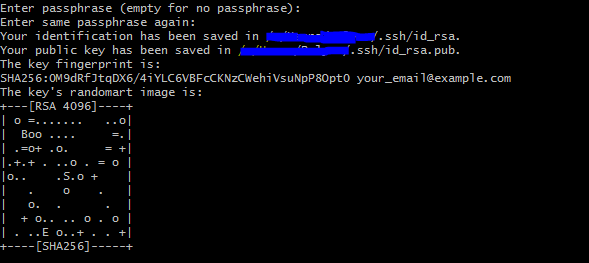 Just click enter, and you can jump into the folder with your ssh keys with `cd ~/.ssh` and check the files: `ls` You should see an **id_rsa** and **id_rsa.pub** Now, you have to add this key to the **authorized_keys** file on your raspberry, so your raspberry will recognize you, when you try to login based on your ssh key. There are several ways to do it, an easy way would be option 1: `ssh-copy-id [email protected]` This will copy your public key onto the server. Option 2: I like to do it like this, even though it might seem more complicated: `cat ~/.ssh/id_rsa.pub | ssh [email protected] 'cat >> .ssh/authorized_keys'` This means that: 1. The content of your public key (**cat ~/.ssh/id_rsa.pub**) 2. will be taken (**|**) 3. and after login to your raspberry (**ssh [email protected]**) 4. a command will be executed to append the that content to the end of your authorized_keys file (**'cat >> .ssh/authorized_keys'**) Now if we ssh to the server, only the password (if any was set) for the public key is asked, but not the passphrase for the user *pi*. so let's check that file: startup yout terminal or git bash (or cygwin or ...) and ssh into your raspberry `ssh pi@<ip-address>` replace `<ip-address>` with your raspberry pi's ip address. In my case it was: *192.168.0.136* Now output the content of the authorized_keys file with `cat ~/.ssh/authorized_keys` At the end of the public key you should find your comment which you added when generating the ssh keys. Congrats, now you have configured ssh-access via public and private keys. Now let us deactivate the password login, to make sure that really only you, with the only real private key, can login to your raspberry. ## deactivate password login For this, we have to edit a config file of the ssh daemon. There are mainly two editors available, nano and vi. for now let us use the nano editor because it is simpler. To open the config file type: `sudo nano /etc/ssh/sshd_config` In this file there is an entry with `#PasswordAuthentication yes` change it to `#PasswordAuthentication no`  and press **CTRL-X** and **ENTER** to save and close the editor. Now nobody can login as the user *pi* anymore, except they have one of the right keys inserted in the *authorized_keys* file there is more info about configuring ssh on http://raspi.tv/2012/how-to-set-up-keys-and-disable-password-login-for-ssh-on-your-raspberry-pi after all is set, restart the ssh daemon with: `sudo /etc/init.d/ssh restart` Or simply restart the raspberry with `sudo reboot` In both cases you will have to reconnect with the raspberry, # fail2ban There is a very nice blog post which lays out all the necessary steps: http://kamilslab.com/2016/12/11/how-to-install-fail2ban-on-the-raspberry-pi/ As before, I will describe all the steps once more on this page: ## install fail2ban `sudo apt-get update` `sudo apt-get install fail2ban` ## configure fail2ban I have a slightly changed configuration file than suggested on the website start editing your local fail2ban config file with: `sudo nano /etc/fail2ban/jail.local` ``` [ssh] sudo nano /etc/fail2ban/jail.local enabled = true port = ssh filter = sshd logpath = /var/log/auth.log bantime = -1 banaction = iptables-allports findtime = 86400 maxretry = 3 usedns = warn ``` Explanations: 1. **logpath**: this path is important because we will watch the changes of this file. It shows us all authorized uses of command and login attempts on the rapsberry. 2. **bantime** = -1 this means the after exceed the maximum limit of failed login attempts, and IP address is banned forever. 3. **findtime** = 86400 4. **maxretry** = 3 Over a period of 24 hours, at most 3 login attempts are allowed to fail before permanently banning an IP address. After setting the config fail, restart fail2ban `sudo service fail2ban restart` From now on the lgoin attempts are watched on. If all went fine, this is generally a good start for a safe setup. In general, now the port 22 can be opener on your router, with port forwarding (in my case port:22) directly to your raspberry. Next time we will setup our terminal tool: **tmux** Thank you! Cheers! |
| json metadata | {"tags":["it","ssh","raspberry","steemdev","programming"],"image":["https://steemitimages.com/DQmc6UxBLqWMyhVWmMEA7BCN5nwQvZJCySncPBP6osKHEiL/image.png","https://steemitimages.com/DQmVgmCiSjaaEKhmfrbnCrHepSR5t5h4NmWXkzMdGGzuYxK/image.png","https://steemitimages.com/DQmNyPQCwdR71Xh57Px3MgH69PqKHWWPNW7CCsWdrEfH3bG/image.png"],"links":["https://steemit.com/it/@lynor/raspberry-pi-server-part-0-setup-and-ssh-access","https://help.github.com/articles/generating-a-new-ssh-key-and-adding-it-to-the-ssh-agent/","https://blog.josefsson.org/2016/11/03/why-i-dont-use-2048-or-4096-rsa-key-sizes/","http://raspi.tv/2012/how-to-set-up-keys-and-disable-password-login-for-ssh-on-your-raspberry-pi","http://kamilslab.com/2016/12/11/how-to-install-fail2ban-on-the-raspberry-pi/"],"app":"steemit/0.1","format":"markdown"} |
| parent author | |
| parent permlink | it |
| permlink | raspberry-pi-server-part-1-configure-ssh-only-access-and-fail2ban |
| title | Raspberry Pi Server - Part 1: Configure SSH-only access and fail2ban |
| Transaction Info | Block #13700899/Trx 382904400b56df078076205f98df545490e02201 |
View Raw JSON Data
{
"block": 13700899,
"op": [
"comment",
{
"author": "lynor",
"body": "======================================\n\nIn the previous post: https://steemit.com/it/@lynor/raspberry-pi-server-part-0-setup-and-ssh-access\na rasperry has been set-up and prepared for easy ssh access using a password.\n\n\nNow imagine if we open up this raspberry to the wide world. Anybody could connect to it and just try out as many passwords as they please until they find a way to login and take over our nice little project.\n\nFor this reason we will generate our own **ssh-keys**, **deactivate password login** so only users with authorized keys can login, and setup **fail2ban**, a small service which keeps track of who is trying to login to our system and **blocks** connections made from **IP-addresses** which fail too many times\n\nLet's get started!\n\n======================================\n\n# Configure SSH-only access\n\n## Setup SSH Keys\n\nThe steps to take are described perfectly well on this page:\nhttps://help.github.com/articles/generating-a-new-ssh-key-and-adding-it-to-the-ssh-agent/\n\nStill, I will describe them here once more just in case the website disappears some day.\n\nstart your git bash (or any other terminal that you will use), and let us use the `ssh-keygen` command to generate a private and public key pair which we will use for later access.\n\ntype:\n`ssh-keygen -t rsa -b 4096 -C \"<your_comment>\"`\n\nyou can replace *<your_comment>* with anything, it is just a comment that should helpyou identify your ssh public key if it is copied into the same file with many other ssh public keys.\n\n4096 rsa key size encryption has become popular lately, but you can use other sizes as well. an interesting short article about that can be found here: https://blog.josefsson.org/2016/11/03/why-i-dont-use-2048-or-4096-rsa-key-sizes/\n\n\n\nEventually you will be asked where to save the files, just press enter to save it in your *.ssh/* folder in your home directory.\nFinally, you will be asked to give a password for the ssh private key file. This is just a password which enables you to use the private key file in case it gets stolen.\n\nWhen all is done you should get a randomart image of your key:\n\n\n\n\n\nJust click enter, and you can jump into the folder with your ssh keys with\n\n`cd ~/.ssh`\n\nand check the files:\n\n`ls`\n\nYou should see an **id_rsa** and **id_rsa.pub**\n\n\nNow, you have to add this key to the **authorized_keys** file on your raspberry, so your raspberry will recognize you, when you try to login based on your ssh key.\nThere are several ways to do it, an easy way would be option 1:\n`ssh-copy-id [email protected]`\nThis will copy your public key onto the server.\n\nOption 2: I like to do it like this, even though it might seem more complicated:\n\n`cat ~/.ssh/id_rsa.pub | ssh [email protected] 'cat >> .ssh/authorized_keys'`\n\nThis means that:\n1. The content of your public key (**cat ~/.ssh/id_rsa.pub**)\n2. will be taken (**|**)\n3. and after login to your raspberry (**ssh [email protected]**)\n4. a command will be executed to append the that content to the end of your authorized_keys file (**'cat >> .ssh/authorized_keys'**)\n\nNow if we ssh to the server, only the password (if any was set) for the public key is asked, but not the passphrase for the user *pi*.\n\nso let's check that file:\n\nstartup yout terminal or git bash (or cygwin or ...) and ssh into your raspberry\n\n`ssh pi@<ip-address>`\n\nreplace `<ip-address>` with your raspberry pi's ip address. In my case it was: *192.168.0.136*\n\nNow output the content of the authorized_keys file with\n\n`cat ~/.ssh/authorized_keys`\n\nAt the end of the public key you should find your comment which you added when generating the ssh keys.\n\nCongrats, now you have configured ssh-access via public and private keys.\n\nNow let us deactivate the password login, to make sure that really only you, with the only real private key, can login to your raspberry.\n\n## deactivate password login\n\nFor this, we have to edit a config file of the ssh daemon.\n\nThere are mainly two editors available, nano and vi. for now let us use the nano editor because it is simpler.\nTo open the config file type:\n`sudo nano /etc/ssh/sshd_config`\n\nIn this file there is an entry with \n`#PasswordAuthentication yes`\nchange it to \n`#PasswordAuthentication no`\n\n\n\nand press **CTRL-X** and **ENTER** to save and close the editor.\n\nNow nobody can login as the user *pi* anymore, except they have one of the right keys inserted in the *authorized_keys* file\n\nthere is more info about configuring ssh on http://raspi.tv/2012/how-to-set-up-keys-and-disable-password-login-for-ssh-on-your-raspberry-pi\n\nafter all is set, restart the ssh daemon with:\n`sudo /etc/init.d/ssh restart`\nOr simply restart the raspberry with\n`sudo reboot`\nIn both cases you will have to reconnect with the raspberry,\n\n# fail2ban\n\nThere is a very nice blog post which lays out all the necessary steps:\nhttp://kamilslab.com/2016/12/11/how-to-install-fail2ban-on-the-raspberry-pi/\n\nAs before, I will describe all the steps once more on this page:\n\n## install fail2ban\n`sudo apt-get update`\n`sudo apt-get install fail2ban`\n\n\n## configure fail2ban\nI have a slightly changed configuration file than suggested on the website\n\nstart editing your local fail2ban config file with:\n`sudo nano /etc/fail2ban/jail.local`\n\n\n```\n[ssh]\nsudo nano /etc/fail2ban/jail.local\nenabled = true\nport = ssh\nfilter = sshd\nlogpath = /var/log/auth.log\nbantime = -1\nbanaction = iptables-allports\nfindtime = 86400\nmaxretry = 3\nusedns = warn\n```\n\nExplanations:\n1. **logpath**: this path is important because we will watch the changes of this file. It shows us all authorized uses of command and login attempts on the rapsberry.\n2. **bantime** = -1\nthis means the after exceed the maximum limit of failed login attempts, and IP address is banned forever.\n3. **findtime** = 86400\n4. **maxretry** = 3\nOver a period of 24 hours, at most 3 login attempts are allowed to fail before permanently banning an IP address.\n\nAfter setting the config fail, restart fail2ban\n`sudo service fail2ban restart`\n\nFrom now on the lgoin attempts are watched on.\n\nIf all went fine, this is generally a good start for a safe setup.\nIn general, now the port 22 can be opener on your router, with port forwarding (in my case port:22) directly to your raspberry.\n\nNext time we will setup our terminal tool: **tmux**\n\nThank you!\nCheers!",
"json_metadata": "{\"tags\":[\"it\",\"ssh\",\"raspberry\",\"steemdev\",\"programming\"],\"image\":[\"https://steemitimages.com/DQmc6UxBLqWMyhVWmMEA7BCN5nwQvZJCySncPBP6osKHEiL/image.png\",\"https://steemitimages.com/DQmVgmCiSjaaEKhmfrbnCrHepSR5t5h4NmWXkzMdGGzuYxK/image.png\",\"https://steemitimages.com/DQmNyPQCwdR71Xh57Px3MgH69PqKHWWPNW7CCsWdrEfH3bG/image.png\"],\"links\":[\"https://steemit.com/it/@lynor/raspberry-pi-server-part-0-setup-and-ssh-access\",\"https://help.github.com/articles/generating-a-new-ssh-key-and-adding-it-to-the-ssh-agent/\",\"https://blog.josefsson.org/2016/11/03/why-i-dont-use-2048-or-4096-rsa-key-sizes/\",\"http://raspi.tv/2012/how-to-set-up-keys-and-disable-password-login-for-ssh-on-your-raspberry-pi\",\"http://kamilslab.com/2016/12/11/how-to-install-fail2ban-on-the-raspberry-pi/\"],\"app\":\"steemit/0.1\",\"format\":\"markdown\"}",
"parent_author": "",
"parent_permlink": "it",
"permlink": "raspberry-pi-server-part-1-configure-ssh-only-access-and-fail2ban",
"title": "Raspberry Pi Server - Part 1: Configure SSH-only access and fail2ban"
}
],
"op_in_trx": 0,
"timestamp": "2017-07-15T09:31:24",
"trx_id": "382904400b56df078076205f98df545490e02201",
"trx_in_block": 10,
"virtual_op": 0
}qedreplied to @lynor / re-lynor-sharing-is-caring-20170715t092721697z2017/07/15 09:27:33
qedreplied to @lynor / re-lynor-sharing-is-caring-20170715t092721697z
2017/07/15 09:27:33
| author | qed |
| body | @@ -118,9 +118,53 @@ t-target +, aber es werden viele Punkte ausgesch%C3%BCttet. ) |
| json metadata | {"tags":["introduceyourself"],"app":"steemit/0.1"} |
| parent author | lynor |
| parent permlink | sharing-is-caring |
| permlink | re-lynor-sharing-is-caring-20170715t092721697z |
| title | |
| Transaction Info | Block #13700822/Trx 7e34f26ff28e5b46caca033d6e6ebfff67f63f86 |
View Raw JSON Data
{
  "block": 13700822,
  "op": [
    "comment",
    {
      "author": "qed",
      "body": "@@ -118,9 +118,53 @@\n t-target\n+, aber es werden viele Punkte ausgesch%C3%BCttet.\n )\n",
      "json_metadata": "{\"tags\":[\"introduceyourself\"],\"app\":\"steemit/0.1\"}",
      "parent_author": "lynor",
      "parent_permlink": "sharing-is-caring",
      "permlink": "re-lynor-sharing-is-caring-20170715t092721697z",
      "title": ""
    }
  ],
  "op_in_trx": 0,
  "timestamp": "2017-07-15T09:27:33",
  "trx_id": "7e34f26ff28e5b46caca033d6e6ebfff67f63f86",
  "trx_in_block": 0,
  "virtual_op": 0
}qedreplied to @lynor / re-lynor-sharing-is-caring-20170715t092721697z2017/07/15 09:27:15
qedreplied to @lynor / re-lynor-sharing-is-caring-20170715t092721697z
2017/07/15 09:27:15
| author | qed |
| body | Das is ein pancake? Bilder sind hier sehr wichtig (leider), wie ich rausfinde. (PS: introduceyourself is Nummer 1 Bot-target) |
| json metadata | {"tags":["introduceyourself"],"app":"steemit/0.1"} |
| parent author | lynor |
| parent permlink | sharing-is-caring |
| permlink | re-lynor-sharing-is-caring-20170715t092721697z |
| title | |
| Transaction Info | Block #13700816/Trx 242837cbaa9dd9bf1d623c27f6c92540fbaae3cf |
View Raw JSON Data
{
  "block": 13700816,
  "op": [
    "comment",
    {
      "author": "qed",
      "body": "Das is ein pancake?\nBilder sind hier sehr wichtig (leider), wie ich rausfinde. \n(PS: introduceyourself is Nummer 1 Bot-target)",
      "json_metadata": "{\"tags\":[\"introduceyourself\"],\"app\":\"steemit/0.1\"}",
      "parent_author": "lynor",
      "parent_permlink": "sharing-is-caring",
      "permlink": "re-lynor-sharing-is-caring-20170715t092721697z",
      "title": ""
    }
  ],
  "op_in_trx": 0,
  "timestamp": "2017-07-15T09:27:15",
  "trx_id": "242837cbaa9dd9bf1d623c27f6c92540fbaae3cf",
  "trx_in_block": 16,
  "virtual_op": 0
}2017/07/15 09:24:18
2017/07/15 09:24:18
| author | qed |
| body | @@ -1,8 +1,89 @@ +Guten morgen. %0ADepending on what your outlook is, here some tips I've gathered: %0A Change t |
| json metadata | {"tags":["it"],"app":"steemit/0.1","links":["https://steemit.com/created/foobar","https://steemit.com/created/programming","https://steemit.com/tags","https://steemit.com/created/deutsch"]} |
| parent author | lynor |
| parent permlink | raspberry-pi-server-part-1-configure-ssh-only-access-and-fail2ban |
| permlink | re-lynor-raspberry-pi-server-part-1-configure-ssh-only-access-and-fail2ban-20170715t090855696z |
| title | |
| Transaction Info | Block #13700757/Trx f9359ab2306351efb03b9885575c8e02bfbf105c |
View Raw JSON Data
{
  "block": 13700757,
  "op": [
    "comment",
    {
      "author": "qed",
      "body": "@@ -1,8 +1,89 @@\n+Guten morgen. %0ADepending on what your outlook is, here some tips I've gathered: %0A\n Change t\n",
      "json_metadata": "{\"tags\":[\"it\"],\"app\":\"steemit/0.1\",\"links\":[\"https://steemit.com/created/foobar\",\"https://steemit.com/created/programming\",\"https://steemit.com/tags\",\"https://steemit.com/created/deutsch\"]}",
      "parent_author": "lynor",
      "parent_permlink": "raspberry-pi-server-part-1-configure-ssh-only-access-and-fail2ban",
      "permlink": "re-lynor-raspberry-pi-server-part-1-configure-ssh-only-access-and-fail2ban-20170715t090855696z",
      "title": ""
    }
  ],
  "op_in_trx": 0,
  "timestamp": "2017-07-15T09:24:18",
  "trx_id": "f9359ab2306351efb03b9885575c8e02bfbf105c",
  "trx_in_block": 10,
  "virtual_op": 0
}2017/07/15 09:23:21
2017/07/15 09:23:21
| author | qed |
| body | @@ -507,16 +507,179 @@ urpose.%0A +Oh, und schreib einen introduceyourself post (oder %C3%BCbersetzte den englischen und reposte) mit dem %22deutsch%22 und %22austria%22 tag%0Ahttps://steemit.com/created/deutsch %0A ---%0AFix |
| json metadata | {"tags":["it"],"app":"steemit/0.1","links":["https://steemit.com/created/foobar","https://steemit.com/created/programming","https://steemit.com/tags","https://steemit.com/created/deutsch"]} |
| parent author | lynor |
| parent permlink | raspberry-pi-server-part-1-configure-ssh-only-access-and-fail2ban |
| permlink | re-lynor-raspberry-pi-server-part-1-configure-ssh-only-access-and-fail2ban-20170715t090855696z |
| title | |
| Transaction Info | Block #13700738/Trx 91dedfdb7a6123df8d2642c8982ec4d86fbe1992 |
View Raw JSON Data
{
  "block": 13700738,
  "op": [
    "comment",
    {
      "author": "qed",
      "body": "@@ -507,16 +507,179 @@\n urpose.%0A\n+Oh, und schreib einen introduceyourself post (oder %C3%BCbersetzte den englischen und reposte) mit dem %22deutsch%22 und %22austria%22 tag%0Ahttps://steemit.com/created/deutsch %0A\n ---%0AFix \n",
      "json_metadata": "{\"tags\":[\"it\"],\"app\":\"steemit/0.1\",\"links\":[\"https://steemit.com/created/foobar\",\"https://steemit.com/created/programming\",\"https://steemit.com/tags\",\"https://steemit.com/created/deutsch\"]}",
      "parent_author": "lynor",
      "parent_permlink": "raspberry-pi-server-part-1-configure-ssh-only-access-and-fail2ban",
      "permlink": "re-lynor-raspberry-pi-server-part-1-configure-ssh-only-access-and-fail2ban-20170715t090855696z",
      "title": ""
    }
  ],
  "op_in_trx": 0,
  "timestamp": "2017-07-15T09:23:21",
  "trx_id": "91dedfdb7a6123df8d2642c8982ec4d86fbe1992",
  "trx_in_block": 2,
  "virtual_op": 0
}2017/07/15 09:19:42
2017/07/15 09:19:42
| author | qed |
| body | @@ -443,17 +443,25 @@ can do -- +three %22-%22 for a s |
| json metadata | {"tags":["it"],"app":"steemit/0.1","links":["https://steemit.com/created/foobar","https://steemit.com/created/programming","https://steemit.com/tags"]} |
| parent author | lynor |
| parent permlink | raspberry-pi-server-part-1-configure-ssh-only-access-and-fail2ban |
| permlink | re-lynor-raspberry-pi-server-part-1-configure-ssh-only-access-and-fail2ban-20170715t090855696z |
| title | |
| Transaction Info | Block #13700666/Trx a2a0d728edb1f9c8130a0a958d595f8aa281c787 |
View Raw JSON Data
{
  "block": 13700666,
  "op": [
    "comment",
    {
      "author": "qed",
      "body": "@@ -443,17 +443,25 @@\n  can do \n--\n+three %22-%22\n  for a s\n",
      "json_metadata": "{\"tags\":[\"it\"],\"app\":\"steemit/0.1\",\"links\":[\"https://steemit.com/created/foobar\",\"https://steemit.com/created/programming\",\"https://steemit.com/tags\"]}",
      "parent_author": "lynor",
      "parent_permlink": "raspberry-pi-server-part-1-configure-ssh-only-access-and-fail2ban",
      "permlink": "re-lynor-raspberry-pi-server-part-1-configure-ssh-only-access-and-fail2ban-20170715t090855696z",
      "title": ""
    }
  ],
  "op_in_trx": 0,
  "timestamp": "2017-07-15T09:19:42",
  "trx_id": "a2a0d728edb1f9c8130a0a958d595f8aa281c787",
  "trx_in_block": 19,
  "virtual_op": 0
}2017/07/15 09:19:15
2017/07/15 09:19:15
| author | qed |
| body | @@ -427,8 +427,190 @@ suppose. +%0AAnd you can do - for a seperating line, but maybe that was on purpose.%0A---%0AFix the tags and I'll do my first %22resteem%22 with your articles :) Definitely add the two programming tags. |
| json metadata | {"tags":["it"],"app":"steemit/0.1","links":["https://steemit.com/created/foobar","https://steemit.com/created/programming","https://steemit.com/tags"]} |
| parent author | lynor |
| parent permlink | raspberry-pi-server-part-1-configure-ssh-only-access-and-fail2ban |
| permlink | re-lynor-raspberry-pi-server-part-1-configure-ssh-only-access-and-fail2ban-20170715t090855696z |
| title | |
| Transaction Info | Block #13700657/Trx b96fab8b690ceb068ac99e928ab2585a86fbb7cf |
View Raw JSON Data
{
  "block": 13700657,
  "op": [
    "comment",
    {
      "author": "qed",
      "body": "@@ -427,8 +427,190 @@\n suppose.\n+%0AAnd you can do - for a seperating line, but maybe that was on purpose.%0A---%0AFix the tags and I'll do my first %22resteem%22 with your articles :) Definitely add the two programming tags.\n",
      "json_metadata": "{\"tags\":[\"it\"],\"app\":\"steemit/0.1\",\"links\":[\"https://steemit.com/created/foobar\",\"https://steemit.com/created/programming\",\"https://steemit.com/tags\"]}",
      "parent_author": "lynor",
      "parent_permlink": "raspberry-pi-server-part-1-configure-ssh-only-access-and-fail2ban",
      "permlink": "re-lynor-raspberry-pi-server-part-1-configure-ssh-only-access-and-fail2ban-20170715t090855696z",
      "title": ""
    }
  ],
  "op_in_trx": 0,
  "timestamp": "2017-07-15T09:19:15",
  "trx_id": "b96fab8b690ceb068ac99e928ab2585a86fbb7cf",
  "trx_in_block": 4,
  "virtual_op": 0
}2017/07/15 09:13:27
2017/07/15 09:13:27
| author | qed |
| body | @@ -203,16 +203,232 @@ ated/programming +%0AYou see all used tage on the startpage on the right, or here:%0Ahttps://steemit.com/tags%0AEverything over 500 posts on this list has a very fast rotation time, though. It's a bit of a steep curve to be seen, I suppose. |
| json metadata | {"tags":["it"],"app":"steemit/0.1","links":["https://steemit.com/created/foobar","https://steemit.com/created/programming","https://steemit.com/tags"]} |
| parent author | lynor |
| parent permlink | raspberry-pi-server-part-1-configure-ssh-only-access-and-fail2ban |
| permlink | re-lynor-raspberry-pi-server-part-1-configure-ssh-only-access-and-fail2ban-20170715t090855696z |
| title | |
| Transaction Info | Block #13700541/Trx 879cd080dfd679f2950fb31efe5c618e081f7951 |
View Raw JSON Data
{
  "block": 13700541,
  "op": [
    "comment",
    {
      "author": "qed",
      "body": "@@ -203,16 +203,232 @@\n ated/programming\n+%0AYou see all used tage on the startpage on the right, or here:%0Ahttps://steemit.com/tags%0AEverything over 500 posts on this list has a very fast rotation time, though. It's a bit of a steep curve to be seen, I suppose.\n",
      "json_metadata": "{\"tags\":[\"it\"],\"app\":\"steemit/0.1\",\"links\":[\"https://steemit.com/created/foobar\",\"https://steemit.com/created/programming\",\"https://steemit.com/tags\"]}",
      "parent_author": "lynor",
      "parent_permlink": "raspberry-pi-server-part-1-configure-ssh-only-access-and-fail2ban",
      "permlink": "re-lynor-raspberry-pi-server-part-1-configure-ssh-only-access-and-fail2ban-20170715t090855696z",
      "title": ""
    }
  ],
  "op_in_trx": 0,
  "timestamp": "2017-07-15T09:13:27",
  "trx_id": "879cd080dfd679f2950fb31efe5c618e081f7951",
  "trx_in_block": 11,
  "virtual_op": 0
}2017/07/15 09:11:24
2017/07/15 09:11:24
| author | qed |
| body | @@ -200,16 +200,19 @@ created/ -steemdev +programming |
| json metadata | {"tags":["it"],"app":"steemit/0.1","links":["https://steemit.com/created/foobar","https://steemit.com/created/programming"]} |
| parent author | lynor |
| parent permlink | raspberry-pi-server-part-1-configure-ssh-only-access-and-fail2ban |
| permlink | re-lynor-raspberry-pi-server-part-1-configure-ssh-only-access-and-fail2ban-20170715t090855696z |
| title | |
| Transaction Info | Block #13700500/Trx 4f899d7376845f8500f5a69067abf0ea8be5ec93 |
View Raw JSON Data
{
  "block": 13700500,
  "op": [
    "comment",
    {
      "author": "qed",
      "body": "@@ -200,16 +200,19 @@\n created/\n-steemdev\n+programming\n",
      "json_metadata": "{\"tags\":[\"it\"],\"app\":\"steemit/0.1\",\"links\":[\"https://steemit.com/created/foobar\",\"https://steemit.com/created/programming\"]}",
      "parent_author": "lynor",
      "parent_permlink": "raspberry-pi-server-part-1-configure-ssh-only-access-and-fail2ban",
      "permlink": "re-lynor-raspberry-pi-server-part-1-configure-ssh-only-access-and-fail2ban-20170715t090855696z",
      "title": ""
    }
  ],
  "op_in_trx": 0,
  "timestamp": "2017-07-15T09:11:24",
  "trx_id": "4f899d7376845f8500f5a69067abf0ea8be5ec93",
  "trx_in_block": 16,
  "virtual_op": 0
}fisermanupvoted (100.00%) @lynor / raspberry-pi-server-part-0-setup-and-ssh-access2017/07/15 09:11:24
fisermanupvoted (100.00%) @lynor / raspberry-pi-server-part-0-setup-and-ssh-access
2017/07/15 09:11:24
| author | lynor |
| permlink | raspberry-pi-server-part-0-setup-and-ssh-access |
| voter | fiserman |
| weight | 10000 (100.00%) |
| Transaction Info | Block #13700500/Trx a3350868d3c62383e65d651618377ebec9f2d7c7 |
View Raw JSON Data
{
  "block": 13700500,
  "op": [
    "vote",
    {
      "author": "lynor",
      "permlink": "raspberry-pi-server-part-0-setup-and-ssh-access",
      "voter": "fiserman",
      "weight": 10000
    }
  ],
  "op_in_trx": 0,
  "timestamp": "2017-07-15T09:11:24",
  "trx_id": "a3350868d3c62383e65d651618377ebec9f2d7c7",
  "trx_in_block": 10,
  "virtual_op": 0
}fisermanupvoted (100.00%) @lynor / sharing-is-caring2017/07/15 09:11:21
fisermanupvoted (100.00%) @lynor / sharing-is-caring
2017/07/15 09:11:21
| author | lynor |
| permlink | sharing-is-caring |
| voter | fiserman |
| weight | 10000 (100.00%) |
| Transaction Info | Block #13700499/Trx 26717d39c4166c7b262e0f444cf53653746c9bd9 |
View Raw JSON Data
{
  "block": 13700499,
  "op": [
    "vote",
    {
      "author": "lynor",
      "permlink": "sharing-is-caring",
      "voter": "fiserman",
      "weight": 10000
    }
  ],
  "op_in_trx": 0,
  "timestamp": "2017-07-15T09:11:21",
  "trx_id": "26717d39c4166c7b262e0f444cf53653746c9bd9",
  "trx_in_block": 10,
  "virtual_op": 0
}2017/07/15 09:11:15
2017/07/15 09:11:15
| author | fiserman |
| body | It looks like you put a lot of effort into this guide. Followed |
| json metadata | {"tags":["it"],"app":"steemit/0.1"} |
| parent author | lynor |
| parent permlink | raspberry-pi-server-part-1-configure-ssh-only-access-and-fail2ban |
| permlink | re-lynor-raspberry-pi-server-part-1-configure-ssh-only-access-and-fail2ban-20170715t091116437z |
| title | |
| Transaction Info | Block #13700497/Trx a2dc35b2053bd53355a9dc5935a583bf916aae08 |
View Raw JSON Data
{
  "block": 13700497,
  "op": [
    "comment",
    {
      "author": "fiserman",
      "body": "It looks like you put a lot of effort into this guide. Followed",
      "json_metadata": "{\"tags\":[\"it\"],\"app\":\"steemit/0.1\"}",
      "parent_author": "lynor",
      "parent_permlink": "raspberry-pi-server-part-1-configure-ssh-only-access-and-fail2ban",
      "permlink": "re-lynor-raspberry-pi-server-part-1-configure-ssh-only-access-and-fail2ban-20170715t091116437z",
      "title": ""
    }
  ],
  "op_in_trx": 0,
  "timestamp": "2017-07-15T09:11:15",
  "trx_id": "a2dc35b2053bd53355a9dc5935a583bf916aae08",
  "trx_in_block": 7,
  "virtual_op": 0
}2017/07/15 09:10:30
2017/07/15 09:10:30
| author | qed |
| body | @@ -82,8 +82,134 @@ %0ACheerz! + The posts in tag foobar rotate through the feed %0Ahttps://steemit.com/created/foobar%0AE.g.%0Ahttps://steemit.com/created/steemdev |
| json metadata | {"tags":["it"],"app":"steemit/0.1","links":["https://steemit.com/created/foobar","https://steemit.com/created/steemdev"]} |
| parent author | lynor |
| parent permlink | raspberry-pi-server-part-1-configure-ssh-only-access-and-fail2ban |
| permlink | re-lynor-raspberry-pi-server-part-1-configure-ssh-only-access-and-fail2ban-20170715t090855696z |
| title | |
| Transaction Info | Block #13700482/Trx 52ed0bf40bcea94aae4a91bd283fa832dba30988 |
View Raw JSON Data
{
  "block": 13700482,
  "op": [
    "comment",
    {
      "author": "qed",
      "body": "@@ -82,8 +82,134 @@\n %0ACheerz!\n+ The posts in tag foobar rotate through the feed %0Ahttps://steemit.com/created/foobar%0AE.g.%0Ahttps://steemit.com/created/steemdev\n",
      "json_metadata": "{\"tags\":[\"it\"],\"app\":\"steemit/0.1\",\"links\":[\"https://steemit.com/created/foobar\",\"https://steemit.com/created/steemdev\"]}",
      "parent_author": "lynor",
      "parent_permlink": "raspberry-pi-server-part-1-configure-ssh-only-access-and-fail2ban",
      "permlink": "re-lynor-raspberry-pi-server-part-1-configure-ssh-only-access-and-fail2ban-20170715t090855696z",
      "title": ""
    }
  ],
  "op_in_trx": 0,
  "timestamp": "2017-07-15T09:10:30",
  "trx_id": "52ed0bf40bcea94aae4a91bd283fa832dba30988",
  "trx_in_block": 4,
  "virtual_op": 0
}fisermanupvoted (100.00%) @lynor / raspberry-pi-server-part-1-configure-ssh-only-access-and-fail2ban2017/07/15 09:10:21
fisermanupvoted (100.00%) @lynor / raspberry-pi-server-part-1-configure-ssh-only-access-and-fail2ban
2017/07/15 09:10:21
| author | lynor |
| permlink | raspberry-pi-server-part-1-configure-ssh-only-access-and-fail2ban |
| voter | fiserman |
| weight | 10000 (100.00%) |
| Transaction Info | Block #13700479/Trx 155eff35eb0501cff80ab5ed9d39777d4746b139 |
View Raw JSON Data
{
  "block": 13700479,
  "op": [
    "vote",
    {
      "author": "lynor",
      "permlink": "raspberry-pi-server-part-1-configure-ssh-only-access-and-fail2ban",
      "voter": "fiserman",
      "weight": 10000
    }
  ],
  "op_in_trx": 0,
  "timestamp": "2017-07-15T09:10:21",
  "trx_id": "155eff35eb0501cff80ab5ed9d39777d4746b139",
  "trx_in_block": 7,
  "virtual_op": 0
}2017/07/15 09:08:51
2017/07/15 09:08:51
| author | qed |
| body | Change the last two tags to "programming" and "steemdev". In the other post too. Cheerz! |
| json metadata | {"tags":["it"],"app":"steemit/0.1"} |
| parent author | lynor |
| parent permlink | raspberry-pi-server-part-1-configure-ssh-only-access-and-fail2ban |
| permlink | re-lynor-raspberry-pi-server-part-1-configure-ssh-only-access-and-fail2ban-20170715t090855696z |
| title | |
| Transaction Info | Block #13700449/Trx 81fdfc8fe6fa215bdae9261bd9e66e5ec0531917 |
View Raw JSON Data
{
  "block": 13700449,
  "op": [
    "comment",
    {
      "author": "qed",
      "body": "Change the last two tags to \"programming\" and \"steemdev\". In the other post too. \nCheerz!",
      "json_metadata": "{\"tags\":[\"it\"],\"app\":\"steemit/0.1\"}",
      "parent_author": "lynor",
      "parent_permlink": "raspberry-pi-server-part-1-configure-ssh-only-access-and-fail2ban",
      "permlink": "re-lynor-raspberry-pi-server-part-1-configure-ssh-only-access-and-fail2ban-20170715t090855696z",
      "title": ""
    }
  ],
  "op_in_trx": 0,
  "timestamp": "2017-07-15T09:08:51",
  "trx_id": "81fdfc8fe6fa215bdae9261bd9e66e5ec0531917",
  "trx_in_block": 1,
  "virtual_op": 0
}qedupvoted (100.00%) @lynor / raspberry-pi-server-part-1-configure-ssh-only-access-and-fail2ban2017/07/15 09:07:30
qedupvoted (100.00%) @lynor / raspberry-pi-server-part-1-configure-ssh-only-access-and-fail2ban
2017/07/15 09:07:30
| author | lynor |
| permlink | raspberry-pi-server-part-1-configure-ssh-only-access-and-fail2ban |
| voter | qed |
| weight | 10000 (100.00%) |
| Transaction Info | Block #13700422/Trx 3e8f3e6006ee694c603d1c57728fe4596825755d |
View Raw JSON Data
{
  "block": 13700422,
  "op": [
    "vote",
    {
      "author": "lynor",
      "permlink": "raspberry-pi-server-part-1-configure-ssh-only-access-and-fail2ban",
      "voter": "qed",
      "weight": 10000
    }
  ],
  "op_in_trx": 0,
  "timestamp": "2017-07-15T09:07:30",
  "trx_id": "3e8f3e6006ee694c603d1c57728fe4596825755d",
  "trx_in_block": 7,
  "virtual_op": 0
}2017/07/15 07:16:57
2017/07/15 07:16:57
| author | steemitboard |
| body | Congratulations @lynor! You have completed some achievement on Steemit and have been rewarded with new badge(s) : [](http://steemitboard.com/@lynor) Award for the number of upvotes received Click on any badge to view your own Board of Honor on SteemitBoard. For more information about SteemitBoard, click [here](https://steemit.com/@steemitboard) If you no longer want to receive notifications, reply to this comment with the word `STOP` > By upvoting this notification, you can help all Steemit users. Learn how [here](https://steemit.com/steemitboard/@steemitboard/http-i-cubeupload-com-7ciqeo-png)! |
| json metadata | {"image":["https://steemitboard.com/img/notifications.png"]} |
| parent author | lynor |
| parent permlink | raspberry-pi-server-part-1-configure-ssh-only-access-and-fail2ban |
| permlink | steemitboard-notify-lynor-20170715t071656000z |
| title | |
| Transaction Info | Block #13698219/Trx f8c54be5a3d47f4cc2b62fba0a10b5093ecdcf07 |
View Raw JSON Data
{
"block": 13698219,
"op": [
"comment",
{
"author": "steemitboard",
"body": "Congratulations @lynor! You have completed some achievement on Steemit and have been rewarded with new badge(s) :\n\n[](http://steemitboard.com/@lynor) Award for the number of upvotes received\n\nClick on any badge to view your own Board of Honor on SteemitBoard.\nFor more information about SteemitBoard, click [here](https://steemit.com/@steemitboard)\n\nIf you no longer want to receive notifications, reply to this comment with the word `STOP`\n\n> By upvoting this notification, you can help all Steemit users. Learn how [here](https://steemit.com/steemitboard/@steemitboard/http-i-cubeupload-com-7ciqeo-png)!",
"json_metadata": "{\"image\":[\"https://steemitboard.com/img/notifications.png\"]}",
"parent_author": "lynor",
"parent_permlink": "raspberry-pi-server-part-1-configure-ssh-only-access-and-fail2ban",
"permlink": "steemitboard-notify-lynor-20170715t071656000z",
"title": ""
}
],
"op_in_trx": 0,
"timestamp": "2017-07-15T07:16:57",
"trx_id": "f8c54be5a3d47f4cc2b62fba0a10b5093ecdcf07",
"trx_in_block": 0,
"virtual_op": 0
}gamanreplied to @lynor / sharing-is-caring-gaman2017/07/15 06:23:33
gamanreplied to @lynor / sharing-is-caring-gaman
2017/07/15 06:23:33
| author | gaman |
| body | Welcome to Steem Community @lynor! As a gentle reminder, please keep your master password safe. The best practise is to use your private posting key to login to Steemit when posting; and the private active key for wallet related transactions. |
| json metadata | {"app": "pysteem/0.5.4"} |
| parent author | lynor |
| parent permlink | sharing-is-caring |
| permlink | sharing-is-caring-gaman |
| title | |
| Transaction Info | Block #13697151/Trx 3161c984bed4db6a4a736859d37d5c007541c5c5 |
View Raw JSON Data
{
  "block": 13697151,
  "op": [
    "comment",
    {
      "author": "gaman",
      "body": "Welcome to Steem Community @lynor! As a gentle reminder, please keep your master password safe. The best practise is to use your private posting key to login to Steemit when posting; and the private active key for wallet related transactions.",
      "json_metadata": "{\"app\": \"pysteem/0.5.4\"}",
      "parent_author": "lynor",
      "parent_permlink": "sharing-is-caring",
      "permlink": "sharing-is-caring-gaman",
      "title": " "
    }
  ],
  "op_in_trx": 0,
  "timestamp": "2017-07-15T06:23:33",
  "trx_id": "3161c984bed4db6a4a736859d37d5c007541c5c5",
  "trx_in_block": 14,
  "virtual_op": 0
}gamanreplied to @lynor / sharing-is-caring-gaman2017/07/15 05:23:24
gamanreplied to @lynor / sharing-is-caring-gaman
2017/07/15 05:23:24
| author | gaman |
| body | Welcome to Steem Community @lynor! As a gentle reminder, please keep your master password safe. The best practise is to use your private posting key to login to Steemit when posting; and the private active key for wallet related transactions. |
| json metadata | {"app": "pysteem/0.5.4"} |
| parent author | lynor |
| parent permlink | sharing-is-caring |
| permlink | sharing-is-caring-gaman |
| title | |
| Transaction Info | Block #13695948/Trx e1f7cce13a6ee6ab4f0c877fc6da745c7f06f4e0 |
View Raw JSON Data
{
  "block": 13695948,
  "op": [
    "comment",
    {
      "author": "gaman",
      "body": "Welcome to Steem Community @lynor! As a gentle reminder, please keep your master password safe. The best practise is to use your private posting key to login to Steemit when posting; and the private active key for wallet related transactions.",
      "json_metadata": "{\"app\": \"pysteem/0.5.4\"}",
      "parent_author": "lynor",
      "parent_permlink": "sharing-is-caring",
      "permlink": "sharing-is-caring-gaman",
      "title": " "
    }
  ],
  "op_in_trx": 0,
  "timestamp": "2017-07-15T05:23:24",
  "trx_id": "e1f7cce13a6ee6ab4f0c877fc6da745c7f06f4e0",
  "trx_in_block": 2,
  "virtual_op": 0
}digitalplayerreplied to @lynor / 20170715t031204185z2017/07/15 03:12:27
digitalplayerreplied to @lynor / 20170715t031204185z
2017/07/15 03:12:27
| author | digitalplayer |
| body | Welcome and Thank You for being with us!! Following your Blog now |
| json metadata | {"tags":["welcome"],"app":"digitalplayer"} |
| parent author | lynor |
| parent permlink | sharing-is-caring |
| permlink | 20170715t031204185z |
| title | |
| Transaction Info | Block #13693330/Trx adf396a0d44bfe8dde906ca9b09a86578e05e176 |
View Raw JSON Data
{
  "block": 13693330,
  "op": [
    "comment",
    {
      "author": "digitalplayer",
      "body": "Welcome and Thank You for being with us!! Following your Blog now",
      "json_metadata": "{\"tags\":[\"welcome\"],\"app\":\"digitalplayer\"}",
      "parent_author": "lynor",
      "parent_permlink": "sharing-is-caring",
      "permlink": "20170715t031204185z",
      "title": ""
    }
  ],
  "op_in_trx": 0,
  "timestamp": "2017-07-15T03:12:27",
  "trx_id": "adf396a0d44bfe8dde906ca9b09a86578e05e176",
  "trx_in_block": 12,
  "virtual_op": 0
}Manabar
Voting Power100.00%
Downvote Power100.00%
Resource Credits100.00%
Reputation Progress88.56%
{
  "voting_manabar": {
    "current_mana": "8143659806",
    "last_update_time": 1779073929
  },
  "downvote_manabar": {
    "current_mana": 2035914951,
    "last_update_time": 1779073929
  },
  "rc_account": {
    "account": "lynor",
    "max_rc": "10164408779",
    "max_rc_creation_adjustment": {
      "amount": "2020748973",
      "nai": "@@000000037",
      "precision": 6
    },
    "rc_manabar": {
      "current_mana": "10164408779",
      "last_update_time": 1779073929
    }
  }
}
Account Metadata
| POSTING JSON METADATA | |
| None | |
| JSON METADATA | |
| None |
{
  "posting_json_metadata": {},
  "json_metadata": {}
}
Auth Keys
Owner
Single Signature
Public Keys
STM6srLiYogY8ZxTMVxBs74tqokDmTUm8Bb4Xjh4cU7RytJUusieX1/1
Active
Single Signature
Public Keys
STM7VKoQt5cdTYvyWnyJrn2cm2gXqvyJEghYsRPEGRiP3KxDMhcAy1/1
Posting
Single Signature
Public Keys
STM6f51XnELsYUzF7Yptby6zeuVu8NM8hY8SSDNEhW8NC6iddSfpY1/1
Memo
STM6pryxGBV1V9ziuEeNARkWXB2NPd3MuFCbi1pa6mLt91Z11MXdn
{
  "owner": {
    "account_auths": [],
    "key_auths": [
      [
        "STM6srLiYogY8ZxTMVxBs74tqokDmTUm8Bb4Xjh4cU7RytJUusieX",
        1
      ]
    ],
    "weight_threshold": 1
  },
  "active": {
    "account_auths": [],
    "key_auths": [
      [
        "STM7VKoQt5cdTYvyWnyJrn2cm2gXqvyJEghYsRPEGRiP3KxDMhcAy",
        1
      ]
    ],
    "weight_threshold": 1
  },
  "posting": {
    "account_auths": [],
    "key_auths": [
      [
        "STM6f51XnELsYUzF7Yptby6zeuVu8NM8hY8SSDNEhW8NC6iddSfpY",
        1
      ]
    ],
    "weight_threshold": 1
  },
  "memo": "STM6pryxGBV1V9ziuEeNARkWXB2NPd3MuFCbi1pa6mLt91Z11MXdn"
}
Witness Votes
0 / 30
No active witness votes.
[]