

VOTING POWER100.00%
DOWNVOTE POWER100.00%
RESOURCE CREDITS100.00%
REPUTATION PROGRESS0.00%
Net Worth
1.816USD
STEEM
0.001STEEM
SBD
0.000SBD
Own SP
31.304SP
Detailed Balance
| STEEM | ||
| balance | 0.001STEEM | STEEM |
| market_balance | 0.000STEEM | STEEM |
| savings_balance | 0.000STEEM | STEEM |
| reward_steem_balance | 0.000STEEM | STEEM |
| STEEM POWER | ||
| Own SP | 31.304SP | SP |
| Delegated Out | 0.000SP | SP |
| Delegation In | 0.000SP | SP |
| Effective Power | 31.304SP | SP |
| Reward SP (pending) | 0.000SP | SP |
| SBD | ||
| sbd_balance | 0.000SBD | SBD |
| sbd_conversions | 0.000SBD | SBD |
| sbd_market_balance | 0.000SBD | SBD |
| savings_sbd_balance | 0.000SBD | SBD |
| reward_sbd_balance | 0.000SBD | SBD |
{
  "balance": "0.001 STEEM",
  "savings_balance": "0.000 STEEM",
  "reward_steem_balance": "0.000 STEEM",
  "vesting_shares": "50907.807766 VESTS",
  "delegated_vesting_shares": "0.000000 VESTS",
  "received_vesting_shares": "0.000000 VESTS",
  "sbd_balance": "0.000 SBD",
  "savings_sbd_balance": "0.000 SBD",
  "reward_sbd_balance": "0.000 SBD",
  "conversions": []
}
Account Info
| name | maxvestgroup |
| id | 1194499 |
| rank | 60,582 |
| reputation | 133981513 |
| created | 2019-01-10T16:54:18 |
| recovery_account | anonsteem |
| proxy | None |
| post_count | 5 |
| comment_count | 0 |
| lifetime_vote_count | 0 |
| witnesses_voted_for | 0 |
| last_post | 2019-03-10T02:14:54 |
| last_root_post | 2019-03-10T02:14:54 |
| last_vote_time | 1970-01-01T00:00:00 |
| proxied_vsf_votes | 0, 0, 0, 0 |
| can_vote | 1 |
| voting_power | 0 |
| delayed_votes | 0 |
| balance | 0.001 STEEM |
| savings_balance | 0.000 STEEM |
| sbd_balance | 0.000 SBD |
| savings_sbd_balance | 0.000 SBD |
| vesting_shares | 50907.807766 VESTS |
| delegated_vesting_shares | 0.000000 VESTS |
| received_vesting_shares | 0.000000 VESTS |
| reward_vesting_balance | 0.000000 VESTS |
| vesting_balance | 0.000 STEEM |
| vesting_withdraw_rate | 0.000000 VESTS |
| next_vesting_withdrawal | 1969-12-31T23:59:59 |
| withdrawn | 0 |
| to_withdraw | 0 |
| withdraw_routes | 0 |
| savings_withdraw_requests | 0 |
| last_account_recovery | 1970-01-01T00:00:00 |
| reset_account | null |
| last_owner_update | 2019-01-10T16:56:06 |
| last_account_update | 2019-10-02T07:24:03 |
| mined | No |
| sbd_seconds | 0 |
| sbd_last_interest_payment | 1970-01-01T00:00:00 |
| savings_sbd_last_interest_payment | 1970-01-01T00:00:00 |
{
  "id": 1194499,
  "name": "maxvestgroup",
  "owner": {
    "weight_threshold": 1,
    "account_auths": [],
    "key_auths": [
      [
        "STM5g1GLSCXyz1KTqsj776brih9y1hVgJbpjC8pd6iQfoGpNpVZ5z",
        1
      ]
    ]
  },
  "active": {
    "weight_threshold": 1,
    "account_auths": [],
    "key_auths": [
      [
        "STM71DDsq7mJcy1D8XS2JBPqhszWKiXgVbEztJZc4CWxUUrhzNLNm",
        1
      ]
    ]
  },
  "posting": {
    "weight_threshold": 1,
    "account_auths": [],
    "key_auths": [
      [
        "STM6KCVrt3Frh8JFqZ9VpDdS9biEA39PB8ubqCEM2A7non757vQ4Y",
        1
      ]
    ]
  },
  "memo_key": "STM5h7kHhB2s8jd2yvn9hge2DHZtfY89EQUT2Gf7D65LsnzBbrd4i",
  "json_metadata": "{\"profile\":{\"name\":\"Max\",\"about\":\"Max Token\"}}",
  "posting_json_metadata": "{\"profile\":{\"name\":\"MVG Tech\",\"about\":\"MVG Technology on Steem.it\",\"website\":\"https://mvg.dev\",\"location\":\"Decentralised Technology\",\"cover_image\":\"https://cdn.steemitimages.com/DQmdbdXhnJC66K2NXr2dDTfFKqMKNicQXJq31Rsx9de7rqb/social_bg.png\",\"profile_image\":\"https://cdn.steemitimages.com/DQmZRpdSTMK8hhjQCiuohadmVNL4DXUkUtx7s2F4DRjvo4b/0x675.png\"}}",
  "proxy": "",
  "last_owner_update": "2019-01-10T16:56:06",
  "last_account_update": "2019-10-02T07:24:03",
  "created": "2019-01-10T16:54:18",
  "mined": false,
  "recovery_account": "anonsteem",
  "last_account_recovery": "1970-01-01T00:00:00",
  "reset_account": "null",
  "comment_count": 0,
  "lifetime_vote_count": 0,
  "post_count": 5,
  "can_vote": true,
  "voting_manabar": {
    "current_mana": "50907807766",
    "last_update_time": 1552134990
  },
  "downvote_manabar": {
    "current_mana": 0,
    "last_update_time": 1547139258
  },
  "voting_power": 0,
  "balance": "0.001 STEEM",
  "savings_balance": "0.000 STEEM",
  "sbd_balance": "0.000 SBD",
  "sbd_seconds": "0",
  "sbd_seconds_last_update": "1970-01-01T00:00:00",
  "sbd_last_interest_payment": "1970-01-01T00:00:00",
  "savings_sbd_balance": "0.000 SBD",
  "savings_sbd_seconds": "0",
  "savings_sbd_seconds_last_update": "1970-01-01T00:00:00",
  "savings_sbd_last_interest_payment": "1970-01-01T00:00:00",
  "savings_withdraw_requests": 0,
  "reward_sbd_balance": "0.000 SBD",
  "reward_steem_balance": "0.000 STEEM",
  "reward_vesting_balance": "0.000000 VESTS",
  "reward_vesting_steem": "0.000 STEEM",
  "vesting_shares": "50907.807766 VESTS",
  "delegated_vesting_shares": "0.000000 VESTS",
  "received_vesting_shares": "0.000000 VESTS",
  "vesting_withdraw_rate": "0.000000 VESTS",
  "next_vesting_withdrawal": "1969-12-31T23:59:59",
  "withdrawn": 0,
  "to_withdraw": 0,
  "withdraw_routes": 0,
  "curation_rewards": 0,
  "posting_rewards": 0,
  "proxied_vsf_votes": [
    0,
    0,
    0,
    0
  ],
  "witnesses_voted_for": 0,
  "last_post": "2019-03-10T02:14:54",
  "last_root_post": "2019-03-10T02:14:54",
  "last_vote_time": "1970-01-01T00:00:00",
  "post_bandwidth": 0,
  "pending_claimed_accounts": 0,
  "vesting_balance": "0.000 STEEM",
  "reputation": 133981513,
  "transfer_history": [],
  "market_history": [],
  "post_history": [],
  "vote_history": [],
  "other_history": [],
  "witness_votes": [],
  "tags_usage": [],
  "guest_bloggers": [],
  "rank": 60582
}
Withdraw Routes
| Incoming | Outgoing |
|---|---|
Empty | Empty |
{
  "incoming": [],
  "outgoing": []
}From Date
To Date
2020/01/10 17:31:39
2020/01/10 17:31:39
| parent author | maxvestgroup |
| parent permlink | how-to-add-max-mvg-to-your-coinomi-wallet-ios |
| author | steemitboard |
| permlink | steemitboard-notify-maxvestgroup-20200110t173138000z |
| title | |
| body | Congratulations @maxvestgroup! You received a personal award! <table><tr><td>https://steemitimages.com/70x70/http://steemitboard.com/@maxvestgroup/birthday1.png</td><td>Happy Birthday! - You are on the Steem blockchain for 1 year!</td></tr></table> <sub>_You can view [your badges on your Steem Board](https://steemitboard.com/@maxvestgroup) and compare to others on the [Steem Ranking](https://steemitboard.com/ranking/index.php?name=maxvestgroup)_</sub> ###### [Vote for @Steemitboard as a witness](https://v2.steemconnect.com/sign/account-witness-vote?witness=steemitboard&approve=1) to get one more award and increased upvotes! |
| json metadata | {"image":["https://steemitboard.com/img/notify.png"]} |
| Transaction Info | Block #39812035/Trx d0f9f34f9df690ffccecdce9f11b6ed1380fc5b4 |
View Raw JSON Data
{
  "trx_id": "d0f9f34f9df690ffccecdce9f11b6ed1380fc5b4",
  "block": 39812035,
  "trx_in_block": 6,
  "op_in_trx": 0,
  "virtual_op": 0,
  "timestamp": "2020-01-10T17:31:39",
  "op": [
    "comment",
    {
      "parent_author": "maxvestgroup",
      "parent_permlink": "how-to-add-max-mvg-to-your-coinomi-wallet-ios",
      "author": "steemitboard",
      "permlink": "steemitboard-notify-maxvestgroup-20200110t173138000z",
      "title": "",
      "body": "Congratulations @maxvestgroup! You received a personal award!\n\n<table><tr><td>https://steemitimages.com/70x70/http://steemitboard.com/@maxvestgroup/birthday1.png</td><td>Happy Birthday! - You are on the Steem blockchain for 1 year!</td></tr></table>\n\n<sub>_You can view [your badges on your Steem Board](https://steemitboard.com/@maxvestgroup) and compare to others on the [Steem Ranking](https://steemitboard.com/ranking/index.php?name=maxvestgroup)_</sub>\n\n\n###### [Vote for @Steemitboard as a witness](https://v2.steemconnect.com/sign/account-witness-vote?witness=steemitboard&approve=1) to get one more award and increased upvotes!",
      "json_metadata": "{\"image\":[\"https://steemitboard.com/img/notify.png\"]}"
    }
  ]
}2019/10/02 08:56:36
2019/10/02 08:56:36
| voter | maxvestgroup |
| author | mvg |
| permlink | mvg-project-news-token-swap-market-update-public-contract-security-audit-and-more |
| weight | 10000 (100.00%) |
| Transaction Info | Block #36927254/Trx 4ddebd0e5930febf30238086073e4acb4b891243 |
View Raw JSON Data
{
  "trx_id": "4ddebd0e5930febf30238086073e4acb4b891243",
  "block": 36927254,
  "trx_in_block": 28,
  "op_in_trx": 0,
  "virtual_op": 0,
  "timestamp": "2019-10-02T08:56:36",
  "op": [
    "vote",
    {
      "voter": "maxvestgroup",
      "author": "mvg",
      "permlink": "mvg-project-news-token-swap-market-update-public-contract-security-audit-and-more",
      "weight": 10000
    }
  ]
}maxvestgrouppublished a new post: how-to-import-maxvest-keystore-json-file-to-myetherwallet2019/10/02 07:35:21
maxvestgrouppublished a new post: how-to-import-maxvest-keystore-json-file-to-myetherwallet
2019/10/02 07:35:21
| parent author | |
| parent permlink | maxvest |
| author | maxvestgroup |
| permlink | how-to-import-maxvest-keystore-json-file-to-myetherwallet |
| title | How to store & send Max using MyEtherWallet + Setup & JSON / Keystore Import Guide |
| body | @@ -1415,16 +1415,22 @@ 5.png)%0A%0A +%3Chr%3E%0A%0A %3Ch1%3EPart |
| json metadata | {"tags":["max","myetherwallet","erc20"],"image":["https://cdn.steemitimages.com/DQmUfEMirS2UwwUMEHU9jYrJEUVXQZ8ciY7Xpep8jUX5Fde/mew1.png","https://cdn.steemitimages.com/DQma9abEcJBgAHnrZ7LZ71zcxQ8hro1GLvBvnsFnZPu51yw/mew2.png","https://cdn.steemitimages.com/DQmRT82ReV9YLPz3ewah1F5pJSuJEmE7ktk4YqqF78P9znn/mew3.png","https://cdn.steemitimages.com/DQmVUitCirrnXdCARDJfkKrHSFbU745UPG3BXQ4gMx4gvbL/mew4.png","https://cdn.steemitimages.com/DQmW3pXZvBRCRmErG7SAYWfSaE2RX6XbhM9H95VEKrJYJoV/mew5.png","https://cdn.steemitimages.com/DQmTv2VeboweYEYNnkmS7qxczaZAeqA2KkCvmrXRqqptYro/mew6.png","https://cdn.steemitimages.com/DQmRohFxNqMzwgbRF7tXar4v15GNfcmAEhDnNDjafuz8yow/mew7.png","https://cdn.steemitimages.com/DQmfJiAEYwXZY7QzGmhtFt4Sppeg1G7vECFy8EewKM42XAA/mew8.png","https://cdn.steemitimages.com/DQmdfqAocpthhiPjD2DX4PXNEuNCsFra2TqWsgjiAXkuXLd/mew9.png"],"links":["https://vintage.myetherwallet.com"],"app":"steemit/0.1","format":"markdown"} |
| Transaction Info | Block #36925632/Trx 696a331476ea69a9c8684a16a34e74373d883f1d |
View Raw JSON Data
{
  "trx_id": "696a331476ea69a9c8684a16a34e74373d883f1d",
  "block": 36925632,
  "trx_in_block": 11,
  "op_in_trx": 0,
  "virtual_op": 0,
  "timestamp": "2019-10-02T07:35:21",
  "op": [
    "comment",
    {
      "parent_author": "",
      "parent_permlink": "maxvest",
      "author": "maxvestgroup",
      "permlink": "how-to-import-maxvest-keystore-json-file-to-myetherwallet",
      "title": "How to store & send Max using MyEtherWallet + Setup & JSON / Keystore Import Guide",
      "body": "@@ -1415,16 +1415,22 @@\n 5.png)%0A%0A\n+%3Chr%3E%0A%0A\n %3Ch1%3EPart\n",
      "json_metadata": "{\"tags\":[\"max\",\"myetherwallet\",\"erc20\"],\"image\":[\"https://cdn.steemitimages.com/DQmUfEMirS2UwwUMEHU9jYrJEUVXQZ8ciY7Xpep8jUX5Fde/mew1.png\",\"https://cdn.steemitimages.com/DQma9abEcJBgAHnrZ7LZ71zcxQ8hro1GLvBvnsFnZPu51yw/mew2.png\",\"https://cdn.steemitimages.com/DQmRT82ReV9YLPz3ewah1F5pJSuJEmE7ktk4YqqF78P9znn/mew3.png\",\"https://cdn.steemitimages.com/DQmVUitCirrnXdCARDJfkKrHSFbU745UPG3BXQ4gMx4gvbL/mew4.png\",\"https://cdn.steemitimages.com/DQmW3pXZvBRCRmErG7SAYWfSaE2RX6XbhM9H95VEKrJYJoV/mew5.png\",\"https://cdn.steemitimages.com/DQmTv2VeboweYEYNnkmS7qxczaZAeqA2KkCvmrXRqqptYro/mew6.png\",\"https://cdn.steemitimages.com/DQmRohFxNqMzwgbRF7tXar4v15GNfcmAEhDnNDjafuz8yow/mew7.png\",\"https://cdn.steemitimages.com/DQmfJiAEYwXZY7QzGmhtFt4Sppeg1G7vECFy8EewKM42XAA/mew8.png\",\"https://cdn.steemitimages.com/DQmdfqAocpthhiPjD2DX4PXNEuNCsFra2TqWsgjiAXkuXLd/mew9.png\"],\"links\":[\"https://vintage.myetherwallet.com\"],\"app\":\"steemit/0.1\",\"format\":\"markdown\"}"
    }
  ]
}maxvestgrouppublished a new post: how-to-import-maxvest-keystore-json-file-to-myetherwallet2019/10/02 07:34:54
maxvestgrouppublished a new post: how-to-import-maxvest-keystore-json-file-to-myetherwallet
2019/10/02 07:34:54
| parent author | |
| parent permlink | maxvest |
| author | maxvestgroup |
| permlink | how-to-import-maxvest-keystore-json-file-to-myetherwallet |
| title | How to store & send Max using MyEtherWallet + Setup & JSON / Keystore Import Guide |
| body | @@ -1,1651 +1,14 @@ -Hello Maxvest clients!%0A%0ABelow is a tutorial on how to import your Keystore file to your %3Ca href=%22https://vintage.myetherwallet.com%22%3EMyEtherWallet.com%3C/a%3E account, so that you are able to store, send and receive %3Ca href=%22https://etherscan.io/address/0x71396a6410249725c5609646c4e449c6c4d41e27%22%3EMax %5BMVG%5D%3C/a%3E Tokens quickly & easily in preparation for our exchange listings. %0A%0A**Please Note**: This tutorial is only for users who **have not** modified the ETH address for attached to their account.%0A%0A%3Ch3%3EThis tutorial is broken down into 3 parts. %3C/h3%3E%0A**Part 1:** Downloading your Keystore file from your %3Ca href=%22https://maxvest.io%22%3EMaxvest%3C/a%3E Account%0A**Part 2:** Importing Keystore / JSON file to MyEtherWallet.com%0A**Part 3:** How to send tokens from MyEtherWallet%0A%0AFor users who do not hold Max %5BMVG%5D or do not have an account at Maxvest.io, you may skip to **Part 2** to find out how to import a Keystore / JSON file to MyEtherWallet.com, and to **Part 3** to find out how to send ERC-20 tokens from MyEtherWallet.com after you have successfully imported your keystore / json file.%0A%0A%0A%3Ch2%3EPart 1: Downloading your Keystore file from your Maxvest account%3C/h2%3E%0A**1. Firstly, login to your Maxvest Account, and navigate to %22Edit Account%22 .**%0A!%5BStep1.png%5D(https://cdn.steemitimages.com/DQmcKoWXYwWvTfL1WeEGy6kXSTFHnvMBtJR5DiTXQchUsao/Step1.png)%0A**2. If you have not edited your ETH address since creating your account, a %22Download Encrypted Keystore%22 link will be available for you to download, to import to a supported wallet.**%0A!%5BStep 2.png%5D(https://cdn.steemitimages.com/DQmPTjtWso2oCcYhvyDCWHmy9vZTmYNN5xiRh9vhkJnV1Nv/Step%25202.png)%0A%0A%0A%3Ch1%3EPart 2 +%3Ch1%3EPart 1 : Im @@ -507,20 +507,16 @@ your Max -vest account @@ -565,15 +565,11 @@ our -m +M ax -vest acc @@ -853,18 +853,18 @@ to add M -VG +ax to your @@ -1160,18 +1160,18 @@ e your M -VG +ax , the tu @@ -1316,21 +1316,8 @@ Max - %5BMVG%5D tokens .%0A!%5B @@ -1424,17 +1424,17 @@ h1%3EPart -3 +2 : How to @@ -2399,61 +2399,4 @@ png) -%0A%0ANew updates about our MVG Token will be following soon! + |
| json metadata | {"tags":["max","myetherwallet","erc20"],"image":["https://cdn.steemitimages.com/DQmUfEMirS2UwwUMEHU9jYrJEUVXQZ8ciY7Xpep8jUX5Fde/mew1.png","https://cdn.steemitimages.com/DQma9abEcJBgAHnrZ7LZ71zcxQ8hro1GLvBvnsFnZPu51yw/mew2.png","https://cdn.steemitimages.com/DQmRT82ReV9YLPz3ewah1F5pJSuJEmE7ktk4YqqF78P9znn/mew3.png","https://cdn.steemitimages.com/DQmVUitCirrnXdCARDJfkKrHSFbU745UPG3BXQ4gMx4gvbL/mew4.png","https://cdn.steemitimages.com/DQmW3pXZvBRCRmErG7SAYWfSaE2RX6XbhM9H95VEKrJYJoV/mew5.png","https://cdn.steemitimages.com/DQmTv2VeboweYEYNnkmS7qxczaZAeqA2KkCvmrXRqqptYro/mew6.png","https://cdn.steemitimages.com/DQmRohFxNqMzwgbRF7tXar4v15GNfcmAEhDnNDjafuz8yow/mew7.png","https://cdn.steemitimages.com/DQmfJiAEYwXZY7QzGmhtFt4Sppeg1G7vECFy8EewKM42XAA/mew8.png","https://cdn.steemitimages.com/DQmdfqAocpthhiPjD2DX4PXNEuNCsFra2TqWsgjiAXkuXLd/mew9.png"],"links":["https://vintage.myetherwallet.com"],"app":"steemit/0.1","format":"markdown"} |
| Transaction Info | Block #36925623/Trx dec0c1bce6b54948781bf1cb246b616f42bbce91 |
View Raw JSON Data
{
  "trx_id": "dec0c1bce6b54948781bf1cb246b616f42bbce91",
  "block": 36925623,
  "trx_in_block": 9,
  "op_in_trx": 0,
  "virtual_op": 0,
  "timestamp": "2019-10-02T07:34:54",
  "op": [
    "comment",
    {
      "parent_author": "",
      "parent_permlink": "maxvest",
      "author": "maxvestgroup",
      "permlink": "how-to-import-maxvest-keystore-json-file-to-myetherwallet",
      "title": "How to store & send Max using MyEtherWallet + Setup & JSON / Keystore Import Guide",
      "body": "@@ -1,1651 +1,14 @@\n-Hello Maxvest clients!%0A%0ABelow is a tutorial on how to import your Keystore file to your %3Ca href=%22https://vintage.myetherwallet.com%22%3EMyEtherWallet.com%3C/a%3E account, so that you are able to store, send and receive %3Ca href=%22https://etherscan.io/address/0x71396a6410249725c5609646c4e449c6c4d41e27%22%3EMax %5BMVG%5D%3C/a%3E Tokens quickly & easily in preparation for our exchange listings. %0A%0A**Please Note**: This tutorial is only for users who **have not** modified the ETH address for attached to their account.%0A%0A%3Ch3%3EThis tutorial is broken down into 3 parts. %3C/h3%3E%0A**Part 1:** Downloading your Keystore file from your %3Ca href=%22https://maxvest.io%22%3EMaxvest%3C/a%3E Account%0A**Part 2:** Importing Keystore / JSON file to MyEtherWallet.com%0A**Part 3:** How to send tokens from MyEtherWallet%0A%0AFor users who do not hold Max %5BMVG%5D or do not have an account at Maxvest.io, you may skip to **Part 2** to find out how to import a Keystore / JSON file to MyEtherWallet.com, and to **Part 3** to find out how to send ERC-20 tokens from MyEtherWallet.com after you have successfully imported your keystore / json file.%0A%0A%0A%3Ch2%3EPart 1: Downloading your Keystore file from your Maxvest account%3C/h2%3E%0A**1. Firstly, login to your Maxvest Account, and navigate to %22Edit Account%22 .**%0A!%5BStep1.png%5D(https://cdn.steemitimages.com/DQmcKoWXYwWvTfL1WeEGy6kXSTFHnvMBtJR5DiTXQchUsao/Step1.png)%0A**2. If you have not edited your ETH address since creating your account, a %22Download Encrypted Keystore%22 link will be available for you to download, to import to a supported wallet.**%0A!%5BStep 2.png%5D(https://cdn.steemitimages.com/DQmPTjtWso2oCcYhvyDCWHmy9vZTmYNN5xiRh9vhkJnV1Nv/Step%25202.png)%0A%0A%0A%3Ch1%3EPart 2\n+%3Ch1%3EPart 1\n : Im\n@@ -507,20 +507,16 @@\n your Max\n-vest\n  account\n@@ -565,15 +565,11 @@\n our \n-m\n+M\n ax\n-vest\n  acc\n@@ -853,18 +853,18 @@\n to add M\n-VG\n+ax\n  to your\n@@ -1160,18 +1160,18 @@\n e your M\n-VG\n+ax\n , the tu\n@@ -1316,21 +1316,8 @@\n  Max\n- %5BMVG%5D tokens\n .%0A!%5B\n@@ -1424,17 +1424,17 @@\n h1%3EPart \n-3\n+2\n : How to\n@@ -2399,61 +2399,4 @@\n png)\n-%0A%0ANew updates about our MVG Token will be following soon!\n \n+\n",
      "json_metadata": "{\"tags\":[\"max\",\"myetherwallet\",\"erc20\"],\"image\":[\"https://cdn.steemitimages.com/DQmUfEMirS2UwwUMEHU9jYrJEUVXQZ8ciY7Xpep8jUX5Fde/mew1.png\",\"https://cdn.steemitimages.com/DQma9abEcJBgAHnrZ7LZ71zcxQ8hro1GLvBvnsFnZPu51yw/mew2.png\",\"https://cdn.steemitimages.com/DQmRT82ReV9YLPz3ewah1F5pJSuJEmE7ktk4YqqF78P9znn/mew3.png\",\"https://cdn.steemitimages.com/DQmVUitCirrnXdCARDJfkKrHSFbU745UPG3BXQ4gMx4gvbL/mew4.png\",\"https://cdn.steemitimages.com/DQmW3pXZvBRCRmErG7SAYWfSaE2RX6XbhM9H95VEKrJYJoV/mew5.png\",\"https://cdn.steemitimages.com/DQmTv2VeboweYEYNnkmS7qxczaZAeqA2KkCvmrXRqqptYro/mew6.png\",\"https://cdn.steemitimages.com/DQmRohFxNqMzwgbRF7tXar4v15GNfcmAEhDnNDjafuz8yow/mew7.png\",\"https://cdn.steemitimages.com/DQmfJiAEYwXZY7QzGmhtFt4Sppeg1G7vECFy8EewKM42XAA/mew8.png\",\"https://cdn.steemitimages.com/DQmdfqAocpthhiPjD2DX4PXNEuNCsFra2TqWsgjiAXkuXLd/mew9.png\"],\"links\":[\"https://vintage.myetherwallet.com\"],\"app\":\"steemit/0.1\",\"format\":\"markdown\"}"
    }
  ]
}maxvestgrouppublished a new post: how-to-import-maxvest-keystore-json-file-to-metamask-browser-wallet2019/10/02 07:32:09
maxvestgrouppublished a new post: how-to-import-maxvest-keystore-json-file-to-metamask-browser-wallet
2019/10/02 07:32:09
| parent author | |
| parent permlink | mvg |
| author | maxvestgroup |
| permlink | how-to-import-maxvest-keystore-json-file-to-metamask-browser-wallet |
| title | How to store & send Max using MetaMask Wallet + Setup & JSON / Keystore File Import Guide |
| body | @@ -1,1677 +1,14 @@ -Hello Maxvest clients!%0A%0ABelow is a tutorial on how to import your Keystore file to your %3Ca href=%22https://metamask.io%22%3EMetaMask.io browser wallet%3C/a%3E, so that you are able to store, send and receive %3Ca href=%22https://mvgtoken.io%22%3EMax %5BMVG%5D%3C/a%3E Tokens quickly & easily in preparation for our upcoming exchange listings. %0A%0A**Please Note**: This tutorial is only for users who **have not** modified the ETH address for attached to their account.%0A%0A%3Ch3%3EThis tutorial is broken down into 4 parts. %3C/h3%3E%0A**Part 1:** Downloading your Keystore file from your Maxvest Account%0A**Part 2:** New Users: Setting up your MetaMask wallet.%0A**Part 3:** Importing your Keystore / JSON file to your MetaMask wallet.%0A**Part 4:** How to send tokens from MetaMask. %0A%0AFor users who do not hold Max %5BMVG%5D or do not have an account at %3Ca href=%22https://maxvest.io%22%3EMaxvest.io%3C/a%3E, you may skip to **Part 2** to find out how to import a Keystore / JSON file to MetaMask.io, and to **Part 3** to find out how to send ERC-20 tokens from MetaMask.io after you have successfully imported your keystore / json file.%0A%0A---%0A%0A%3Ch2%3EPart 1: Downloading your Keystore file from your Maxvest account%3C/h2%3E%0A**1. Firstly, login to your Maxvest Account, and navigate to %22Edit Account%22 .**%0A!%5Bkeystore1.png%5D(https://cdn.steemitimages.com/DQmNh6S64xS5V4QJyo2Fq4q3HkB2MueG7LcoEzur7P8aiZ8/keystore1.png)%0A%0A**2. If you have not edited your ETH address since creating your account, a %22Download Encrypted Keystore%22 link will be available for you to download, to import to a supported wallet.**%0A!%5Bkeystore2.png%5D(https://cdn.steemitimages.com/DQmWoPi7ZB4ciKHYCyHvFhKTcS7HGm4xepiNgBVXoqhiJ8T/keystore2.png)%0A%0A---%0A%0A%3Ch1%3EPart 2: New Users +%3Ch1%3EPart 1 : Se @@ -1082,19 +1082,20 @@ face. %0A%0A ---- +%3Chr%3E %0A%0A%3Ch1%3EPa @@ -1097,17 +1097,17 @@ h1%3EPart -3 +2 : Import @@ -1110,16 +1110,20 @@ porting +Max Keystore @@ -1351,20 +1351,19 @@ import -your +the keystor @@ -1369,16 +1369,45 @@ re file +downloaded from your account & decryp @@ -1432,15 +1432,8 @@ Max -vest.io acc @@ -1600,35 +1600,11 @@ ind -your Max %5BMVG%5D ERC-20 Token +Max .%3C/h @@ -1756,18 +1756,18 @@ to add M -VG +ax to your @@ -1777,26 +1777,8 @@ llet -s supported tokens .%3C/h @@ -2324,11 +2324,12 @@ g)%0A%0A ---- +%3Chr%3E %0A%0A%3Ch @@ -2335,17 +2335,17 @@ h1%3EPart -4 +3 : How to @@ -3266,128 +3266,4 @@ png) -%0A%0AFor priority support or help with other wallets, visit our %3Ca href=%22https://t.me/discussmvg%22%3Etelegram discussion group%3C/a%3E + |
| json metadata | {"tags":["metamask","erc20","import","keystore","max"],"image":["https://cdn.steemitimages.com/DQmakQgUUm4Q3m77N4YJFr76AZKzZPYV12N2PAX9BRTvApB/meta1.png","https://cdn.steemitimages.com/DQmb3AcVRmz5izBns6CFctgCdKBeyNY8GwmGU4fYZ188A1K/meta3.png","https://cdn.steemitimages.com/DQmV1i5skhtonnPrwvvmgjhDngFhoUCrEUaj77aLdXjQ3ZX/meta4.png","https://cdn.steemitimages.com/DQmbHHarapnnMPqsECETboyyxPmzsL1Xg3WVqUaSCTWUgdH/meta5.png","https://cdn.steemitimages.com/DQmPfPfHpT4YxcGTQe8RFhh93hALSPwsbuQa89GEiCrJnkh/meta6.png","https://cdn.steemitimages.com/DQmUt8dJio2rja5fgqZTrgTM1TxbnpR65D4uNA9WfUkdtgf/meta7.png","https://cdn.steemitimages.com/DQmT1439VUAfHjp6SJTSYCrheF4NsjzzWZfAFsB8mshPY98/meta8.png","https://cdn.steemitimages.com/DQmTvxGtqSHg178aDbpfP6jwHYSrgwSoxFujZ8nqu3HT2jL/meta9.png","https://cdn.steemitimages.com/DQmTmmqQ9euBVKkwT9vZF6d2jPHrGRzMDTDjdmb9cvz1FJN/meta10.png","https://cdn.steemitimages.com/DQmQgjAnnxVTCg1V73s6bhJtNqm3bFg6zXDTFujqsfmeR9T/meta11.png","https://cdn.steemitimages.com/DQmYhJF1YDkj7uor1UkACE7dKnV82osRhqvtWibkHER6Yxw/meta12.png","https://cdn.steemitimages.com/DQmYGuXcU1PK5rojEeHt62UDYHZtXsqb9LFH6CizNgajA5c/meta13.png","https://cdn.steemitimages.com/DQmQ7u4YvmMFePi5N8Et4WdYRnRkjFxaxgncYD6ZGvfP1jz/meta14.png"],"links":["https://metamask.io"],"app":"steemit/0.1","format":"markdown"} |
| Transaction Info | Block #36925568/Trx c9abf1837dacd5ef1f4956e52e0052b92be23761 |
View Raw JSON Data
{
  "trx_id": "c9abf1837dacd5ef1f4956e52e0052b92be23761",
  "block": 36925568,
  "trx_in_block": 4,
  "op_in_trx": 0,
  "virtual_op": 0,
  "timestamp": "2019-10-02T07:32:09",
  "op": [
    "comment",
    {
      "parent_author": "",
      "parent_permlink": "mvg",
      "author": "maxvestgroup",
      "permlink": "how-to-import-maxvest-keystore-json-file-to-metamask-browser-wallet",
      "title": "How to store & send Max using MetaMask Wallet + Setup & JSON / Keystore File Import Guide",
      "body": "@@ -1,1677 +1,14 @@\n-Hello Maxvest clients!%0A%0ABelow is a tutorial on how to import your Keystore file to your %3Ca href=%22https://metamask.io%22%3EMetaMask.io browser wallet%3C/a%3E, so that you are able to store, send and receive %3Ca href=%22https://mvgtoken.io%22%3EMax %5BMVG%5D%3C/a%3E Tokens quickly & easily in preparation for our upcoming exchange listings. %0A%0A**Please Note**: This tutorial is only for users who **have not** modified the ETH address for attached to their account.%0A%0A%3Ch3%3EThis tutorial is broken down into 4 parts. %3C/h3%3E%0A**Part 1:** Downloading your Keystore file from your Maxvest Account%0A**Part 2:** New Users: Setting up your MetaMask wallet.%0A**Part 3:** Importing your Keystore / JSON file to your MetaMask wallet.%0A**Part 4:** How to send tokens from MetaMask. %0A%0AFor users who do not hold Max %5BMVG%5D or do not have an account at %3Ca href=%22https://maxvest.io%22%3EMaxvest.io%3C/a%3E, you may skip to **Part 2** to find out how to import a Keystore / JSON file to MetaMask.io, and to **Part 3** to find out how to send ERC-20 tokens from MetaMask.io after you have successfully imported your keystore / json file.%0A%0A---%0A%0A%3Ch2%3EPart 1: Downloading your Keystore file from your Maxvest account%3C/h2%3E%0A**1. Firstly, login to your Maxvest Account, and navigate to %22Edit Account%22 .**%0A!%5Bkeystore1.png%5D(https://cdn.steemitimages.com/DQmNh6S64xS5V4QJyo2Fq4q3HkB2MueG7LcoEzur7P8aiZ8/keystore1.png)%0A%0A**2. If you have not edited your ETH address since creating your account, a %22Download Encrypted Keystore%22 link will be available for you to download, to import to a supported wallet.**%0A!%5Bkeystore2.png%5D(https://cdn.steemitimages.com/DQmWoPi7ZB4ciKHYCyHvFhKTcS7HGm4xepiNgBVXoqhiJ8T/keystore2.png)%0A%0A---%0A%0A%3Ch1%3EPart 2: New Users\n+%3Ch1%3EPart 1\n : Se\n@@ -1082,19 +1082,20 @@\n face. %0A%0A\n----\n+%3Chr%3E\n %0A%0A%3Ch1%3EPa\n@@ -1097,17 +1097,17 @@\n h1%3EPart \n-3\n+2\n : Import\n@@ -1110,16 +1110,20 @@\n porting \n+Max \n Keystore\n@@ -1351,20 +1351,19 @@\n  import \n-your\n+the\n  keystor\n@@ -1369,16 +1369,45 @@\n re file \n+downloaded from your account \n & decryp\n@@ -1432,15 +1432,8 @@\n  Max\n-vest.io\n  acc\n@@ -1600,35 +1600,11 @@\n ind \n-your Max %5BMVG%5D ERC-20 Token\n+Max\n .%3C/h\n@@ -1756,18 +1756,18 @@\n to add M\n-VG\n+ax\n  to your\n@@ -1777,26 +1777,8 @@\n llet\n-s supported tokens\n .%3C/h\n@@ -2324,11 +2324,12 @@\n g)%0A%0A\n----\n+%3Chr%3E\n %0A%0A%3Ch\n@@ -2335,17 +2335,17 @@\n h1%3EPart \n-4\n+3\n : How to\n@@ -3266,128 +3266,4 @@\n png)\n-%0A%0AFor priority support or help with other wallets, visit our %3Ca href=%22https://t.me/discussmvg%22%3Etelegram discussion group%3C/a%3E\n \n+\n",
      "json_metadata": "{\"tags\":[\"metamask\",\"erc20\",\"import\",\"keystore\",\"max\"],\"image\":[\"https://cdn.steemitimages.com/DQmakQgUUm4Q3m77N4YJFr76AZKzZPYV12N2PAX9BRTvApB/meta1.png\",\"https://cdn.steemitimages.com/DQmb3AcVRmz5izBns6CFctgCdKBeyNY8GwmGU4fYZ188A1K/meta3.png\",\"https://cdn.steemitimages.com/DQmV1i5skhtonnPrwvvmgjhDngFhoUCrEUaj77aLdXjQ3ZX/meta4.png\",\"https://cdn.steemitimages.com/DQmbHHarapnnMPqsECETboyyxPmzsL1Xg3WVqUaSCTWUgdH/meta5.png\",\"https://cdn.steemitimages.com/DQmPfPfHpT4YxcGTQe8RFhh93hALSPwsbuQa89GEiCrJnkh/meta6.png\",\"https://cdn.steemitimages.com/DQmUt8dJio2rja5fgqZTrgTM1TxbnpR65D4uNA9WfUkdtgf/meta7.png\",\"https://cdn.steemitimages.com/DQmT1439VUAfHjp6SJTSYCrheF4NsjzzWZfAFsB8mshPY98/meta8.png\",\"https://cdn.steemitimages.com/DQmTvxGtqSHg178aDbpfP6jwHYSrgwSoxFujZ8nqu3HT2jL/meta9.png\",\"https://cdn.steemitimages.com/DQmTmmqQ9euBVKkwT9vZF6d2jPHrGRzMDTDjdmb9cvz1FJN/meta10.png\",\"https://cdn.steemitimages.com/DQmQgjAnnxVTCg1V73s6bhJtNqm3bFg6zXDTFujqsfmeR9T/meta11.png\",\"https://cdn.steemitimages.com/DQmYhJF1YDkj7uor1UkACE7dKnV82osRhqvtWibkHER6Yxw/meta12.png\",\"https://cdn.steemitimages.com/DQmYGuXcU1PK5rojEeHt62UDYHZtXsqb9LFH6CizNgajA5c/meta13.png\",\"https://cdn.steemitimages.com/DQmQ7u4YvmMFePi5N8Et4WdYRnRkjFxaxgncYD6ZGvfP1jz/meta14.png\"],\"links\":[\"https://metamask.io\"],\"app\":\"steemit/0.1\",\"format\":\"markdown\"}"
    }
  ]
}maxvestgroupupdated their account properties2019/10/02 07:24:03
maxvestgroupupdated their account properties
2019/10/02 07:24:03
| account | maxvestgroup |
| memo key | STM5h7kHhB2s8jd2yvn9hge2DHZtfY89EQUT2Gf7D65LsnzBbrd4i |
| json metadata | {"profile":{"name":"Max","about":"Max Token"}} |
| Transaction Info | Block #36925406/Trx 7ea84995760751d170c9233c3d0aaa09b3916be3 |
View Raw JSON Data
{
  "trx_id": "7ea84995760751d170c9233c3d0aaa09b3916be3",
  "block": 36925406,
  "trx_in_block": 13,
  "op_in_trx": 0,
  "virtual_op": 0,
  "timestamp": "2019-10-02T07:24:03",
  "op": [
    "account_update",
    {
      "account": "maxvestgroup",
      "memo_key": "STM5h7kHhB2s8jd2yvn9hge2DHZtfY89EQUT2Gf7D65LsnzBbrd4i",
      "json_metadata": "{\"profile\":{\"name\":\"Max\",\"about\":\"Max Token\"}}"
    }
  ]
}anomalyupvoted (1.00%) @maxvestgroup / how-to-add-max-mvg-to-your-coinomi-wallet-ios2019/10/02 07:23:45
anomalyupvoted (1.00%) @maxvestgroup / how-to-add-max-mvg-to-your-coinomi-wallet-ios
2019/10/02 07:23:45
| voter | anomaly |
| author | maxvestgroup |
| permlink | how-to-add-max-mvg-to-your-coinomi-wallet-ios |
| weight | 100 (1.00%) |
| Transaction Info | Block #36925400/Trx 37a28ca11ee579d079fe3024c150f36b46261901 |
View Raw JSON Data
{
  "trx_id": "37a28ca11ee579d079fe3024c150f36b46261901",
  "block": 36925400,
  "trx_in_block": 14,
  "op_in_trx": 0,
  "virtual_op": 0,
  "timestamp": "2019-10-02T07:23:45",
  "op": [
    "vote",
    {
      "voter": "anomaly",
      "author": "maxvestgroup",
      "permlink": "how-to-add-max-mvg-to-your-coinomi-wallet-ios",
      "weight": 100
    }
  ]
}maxvestgrouppublished a new post: how-to-add-max-mvg-to-your-coinomi-wallet-ios2019/10/02 07:22:45
maxvestgrouppublished a new post: how-to-add-max-mvg-to-your-coinomi-wallet-ios
2019/10/02 07:22:45
| parent author | |
| parent permlink | mvg |
| author | maxvestgroup |
| permlink | how-to-add-max-mvg-to-your-coinomi-wallet-ios |
| title | We have moved! |
| body | Hello Max holders. As part of our project restructuring, we have relocated our steemit page. For quarterly updates & the most up-to-date resource list, head over to @mvg Thank you! |
| json metadata | {"tags":["max"],"app":"steemit/0.1","format":"markdown","users":["mvg"]} |
| Transaction Info | Block #36925380/Trx 10f6cd4fecd2409d83f5f8684f8aca0617353166 |
View Raw JSON Data
{
  "trx_id": "10f6cd4fecd2409d83f5f8684f8aca0617353166",
  "block": 36925380,
  "trx_in_block": 7,
  "op_in_trx": 0,
  "virtual_op": 0,
  "timestamp": "2019-10-02T07:22:45",
  "op": [
    "comment",
    {
      "parent_author": "",
      "parent_permlink": "mvg",
      "author": "maxvestgroup",
      "permlink": "how-to-add-max-mvg-to-your-coinomi-wallet-ios",
      "title": "We have moved!",
      "body": "Hello Max holders.\n\nAs part of our project restructuring, we have relocated our steemit page. For quarterly updates & the most up-to-date resource list, head over to @mvg\n\nThank you!",
      "json_metadata": "{\"tags\":[\"max\"],\"app\":\"steemit/0.1\",\"format\":\"markdown\",\"users\":[\"mvg\"]}"
    }
  ]
}maxvestgrouppublished a new post: how-to-add-max-mvg-to-your-trust-wallet-ios2019/10/02 07:20:30
maxvestgrouppublished a new post: how-to-add-max-mvg-to-your-trust-wallet-ios
2019/10/02 07:20:30
| parent author | |
| parent permlink | mvg |
| author | maxvestgroup |
| permlink | how-to-add-max-mvg-to-your-trust-wallet-ios |
| title | How to add Max to your Coinomi & Trust Wallet (iOS) |
| body | <h1>Storing, Sending & Receiving Max</h1> Below are two tutorials to explain how to add Max tokens to the Coinomi & Trust Wallet applications. <hr> <h3>Coinomi Wallet</h3> <h5>1. Firstly, <a href="https://www.coinomi.com/downloads/">download the mobile wallet from the official Coinomi website</a></h5> <h5>2. Open the Coinomi app.</h5> <h5>3. Click the left menu and click "+Token" </h5> <h5>4. Select "Ethereum" as the token layer/protocol</h5> <h5>5. Select the three-column (three vertical dots) in the top right corner to add a token manually</h5> <h5>6. Select "Add Token Manually"</h5> <h5>7. Enter the contract information and click "Add ERC20 Token"</h5> Contract: 0x71396a6410249725c5609646c4e449c6c4d41e27 Name: Max Ticker: MVG Decimals: 0 <h5>8. Success! You can now send and receive Max [MVG] with the Coinomi wallet!</h5> <hr> <h3>Trust Wallet</h3> <h3>1. Download & open the verified <a href="https://trustwallet.com/">Trust Wallet App</a> </h3> <h3>2. Search "Max" or "MVG" and select Max [MVG]. </h3> <h3>3. Done! Max [MVG] can now be sent and received using Trust wallet!</h3> If you need any further assistance, please visit our <a href="https://t.me/discussmvg">Telegram Discussion!</a> |
| json metadata | {"tags":["max","trustwallet","add","erc20"],"links":["https://www.coinomi.com/downloads/","https://trustwallet.com/","https://t.me/discussmvg"],"app":"steemit/0.1","format":"markdown"} |
| Transaction Info | Block #36925335/Trx 893e76f4cad5f66226dd8427f474fd342875547b |
View Raw JSON Data
{
  "trx_id": "893e76f4cad5f66226dd8427f474fd342875547b",
  "block": 36925335,
  "trx_in_block": 20,
  "op_in_trx": 0,
  "virtual_op": 0,
  "timestamp": "2019-10-02T07:20:30",
  "op": [
    "comment",
    {
      "parent_author": "",
      "parent_permlink": "mvg",
      "author": "maxvestgroup",
      "permlink": "how-to-add-max-mvg-to-your-trust-wallet-ios",
      "title": "How to add Max to your Coinomi & Trust Wallet (iOS)",
      "body": "<h1>Storing, Sending & Receiving Max</h1>\n\nBelow are two tutorials to explain how to add Max tokens to the Coinomi & Trust Wallet applications.\n\n<hr>\n\n<h3>Coinomi Wallet</h3>\n<h5>1. Firstly, <a href=\"https://www.coinomi.com/downloads/\">download the mobile wallet from the official Coinomi website</a></h5>\n\n<h5>2. Open the Coinomi app.</h5>\n\n<h5>3. Click the left menu and click \"+Token\" </h5>\n\n<h5>4. Select \"Ethereum\" as the token layer/protocol</h5>\n\n<h5>5. Select the three-column (three vertical dots) in the top right corner to add a token manually</h5>\n\n<h5>6. Select \"Add Token Manually\"</h5>\n\n<h5>7. Enter the contract information and click \"Add ERC20 Token\"</h5>\nContract: 0x71396a6410249725c5609646c4e449c6c4d41e27\nName: Max\nTicker: MVG\nDecimals: 0\n\n<h5>8. Success! You can now send and receive Max [MVG] with the Coinomi wallet!</h5>\n\n<hr>\n\n<h3>Trust Wallet</h3>\n\n<h3>1. Download & open the verified <a href=\"https://trustwallet.com/\">Trust Wallet App</a> </h3>\n\n<h3>2. Search \"Max\" or \"MVG\" and select Max [MVG]. </h3>\n\n<h3>3. Done! Max [MVG] can now be sent and received using Trust wallet!</h3>\n\nIf you need any further assistance, please visit our <a href=\"https://t.me/discussmvg\">Telegram Discussion!</a>",
      "json_metadata": "{\"tags\":[\"max\",\"trustwallet\",\"add\",\"erc20\"],\"links\":[\"https://www.coinomi.com/downloads/\",\"https://trustwallet.com/\",\"https://t.me/discussmvg\"],\"app\":\"steemit/0.1\",\"format\":\"markdown\"}"
    }
  ]
}maxvestgrouppublished a new post: how-to-add-max-mvg-to-your-coinomi-wallet-ios2019/10/02 07:16:45
maxvestgrouppublished a new post: how-to-add-max-mvg-to-your-coinomi-wallet-ios
2019/10/02 07:16:45
| parent author | |
| parent permlink | mvg |
| author | maxvestgroup |
| permlink | how-to-add-max-mvg-to-your-coinomi-wallet-ios |
| title | How to add Max to your Coinomi or Trust Wallet (iOS) |
| body | Hello Max holders! Below is a tutorial on how to add Max to <a href="https://www.coinomi.com/">Coinomi Mobile Wallet</a>, which will enable you to store, send and receive tokens. <h5>1. Firstly, <a href="https://www.coinomi.com/downloads/">download the mobile wallet from the official Coinomi website</a></h5> <h5>2. Open the Coinomi app.</h5> <h5>3. Click the left menu and click "+Token" </h5> <h5>4. Select "Ethereum" as the token layer/protocol</h5> <h5>5. Select the three-column (three vertical dots) in the top right corner to add a token manually</h5> <h5>6. Select "Add Token Manually"</h5> <h5>7. Enter the contract information and click "Add ERC20 Token"</h5> Contract: 0x71396a6410249725c5609646c4e449c6c4d41e27 Name: Max Ticker: MVG Decimals: 0 <h5>8. Success! You can now send and receive Max [MVG] with the Coinomi wallet!</h5> |
| json metadata | {"tags":["coinomi","wallet","max","token"],"links":["https://www.coinomi.com/","https://www.coinomi.com/downloads/"],"app":"steemit/0.1","format":"markdown"} |
| Transaction Info | Block #36925260/Trx aa05b2c3cb06c1239d65f64ac91d2df9bc2bf46a |
View Raw JSON Data
{
  "trx_id": "aa05b2c3cb06c1239d65f64ac91d2df9bc2bf46a",
  "block": 36925260,
  "trx_in_block": 1,
  "op_in_trx": 0,
  "virtual_op": 0,
  "timestamp": "2019-10-02T07:16:45",
  "op": [
    "comment",
    {
      "parent_author": "",
      "parent_permlink": "mvg",
      "author": "maxvestgroup",
      "permlink": "how-to-add-max-mvg-to-your-coinomi-wallet-ios",
      "title": "How to add Max to your Coinomi or Trust Wallet (iOS)",
      "body": "Hello Max holders!\n\nBelow is a tutorial on how to add Max to <a href=\"https://www.coinomi.com/\">Coinomi Mobile Wallet</a>, which will enable you  to store, send and receive tokens. \n\n<h5>1. Firstly, <a href=\"https://www.coinomi.com/downloads/\">download the mobile wallet from the official Coinomi website</a></h5>\n\n<h5>2. Open the Coinomi app.</h5>\n\n<h5>3. Click the left menu and click \"+Token\" </h5>\n\n<h5>4. Select \"Ethereum\" as the token layer/protocol</h5>\n\n<h5>5. Select the three-column (three vertical dots) in the top right corner to add a token manually</h5>\n\n<h5>6. Select \"Add Token Manually\"</h5>\n\n<h5>7. Enter the contract information and click \"Add ERC20 Token\"</h5>\nContract: 0x71396a6410249725c5609646c4e449c6c4d41e27\nName: Max\nTicker: MVG\nDecimals: 0\n\n<h5>8. Success! You can now send and receive Max [MVG] with the Coinomi wallet!</h5>",
      "json_metadata": "{\"tags\":[\"coinomi\",\"wallet\",\"max\",\"token\"],\"links\":[\"https://www.coinomi.com/\",\"https://www.coinomi.com/downloads/\"],\"app\":\"steemit/0.1\",\"format\":\"markdown\"}"
    }
  ]
}maxvestgrouppublished a new post: how-to-add-max-mvg-to-your-coinomi-wallet-ios2019/10/02 07:16:15
maxvestgrouppublished a new post: how-to-add-max-mvg-to-your-coinomi-wallet-ios
2019/10/02 07:16:15
| parent author | |
| parent permlink | mvg |
| author | maxvestgroup |
| permlink | how-to-add-max-mvg-to-your-coinomi-wallet-ios |
| title | How to add Max to your Coinomi or Trust Wallet (iOS) |
| body | @@ -178,17 +178,17 @@ ns. %0A%0A%3Ch -3 +5 %3E1. Firs @@ -301,21 +301,26 @@ site%3C/a%3E +%3C/h5%3E %0A%0A%3Ch -3 +5 %3E2. Open @@ -339,23 +339,23 @@ app.%3C/h -3 +5 %3E%0A%0A%3Ch -3 +5 %3E3. Clic @@ -392,23 +392,23 @@ ken%22 %3C/h -3 +5 %3E%0A%0A%3Ch -3 +5 %3E4. Sele @@ -451,23 +451,23 @@ tocol%3C/h -3 +5 %3E%0A%0A%3Ch -3 +5 %3E5. Sele @@ -558,23 +558,23 @@ ually%3C/h -3 +5 %3E%0A%0A%3Ch -3 +5 %3E6. Sele @@ -603,15 +603,15 @@ %22%3C/h -3 +5 %3E%0A%0A%3Ch -3 +5 %3E7. @@ -671,17 +671,17 @@ oken%22%3C/h -3 +5 %3E%0AContra @@ -764,17 +764,17 @@ s: 0%0A%0A%3Ch -3 +5 %3E8. Succ @@ -844,10 +844,10 @@ llet!%3C/h -3 +5 %3E |
| json metadata | {"tags":["coinomi","wallet","max","token"],"links":["https://www.coinomi.com/","https://www.coinomi.com/downloads/"],"app":"steemit/0.1","format":"markdown"} |
| Transaction Info | Block #36925250/Trx 900c1949cf3c22d11446e85b2dc84543b2478e03 |
View Raw JSON Data
{
  "trx_id": "900c1949cf3c22d11446e85b2dc84543b2478e03",
  "block": 36925250,
  "trx_in_block": 1,
  "op_in_trx": 0,
  "virtual_op": 0,
  "timestamp": "2019-10-02T07:16:15",
  "op": [
    "comment",
    {
      "parent_author": "",
      "parent_permlink": "mvg",
      "author": "maxvestgroup",
      "permlink": "how-to-add-max-mvg-to-your-coinomi-wallet-ios",
      "title": "How to add Max to your Coinomi or Trust Wallet (iOS)",
      "body": "@@ -178,17 +178,17 @@\n ns. %0A%0A%3Ch\n-3\n+5\n %3E1. Firs\n@@ -301,21 +301,26 @@\n site%3C/a%3E\n+%3C/h5%3E\n %0A%0A%3Ch\n-3\n+5\n %3E2. Open\n@@ -339,23 +339,23 @@\n  app.%3C/h\n-3\n+5\n %3E%0A%0A%3Ch\n-3\n+5\n %3E3. Clic\n@@ -392,23 +392,23 @@\n ken%22 %3C/h\n-3\n+5\n %3E%0A%0A%3Ch\n-3\n+5\n %3E4. Sele\n@@ -451,23 +451,23 @@\n tocol%3C/h\n-3\n+5\n %3E%0A%0A%3Ch\n-3\n+5\n %3E5. Sele\n@@ -558,23 +558,23 @@\n ually%3C/h\n-3\n+5\n %3E%0A%0A%3Ch\n-3\n+5\n %3E6. Sele\n@@ -603,15 +603,15 @@\n %22%3C/h\n-3\n+5\n %3E%0A%0A%3Ch\n-3\n+5\n %3E7. \n@@ -671,17 +671,17 @@\n oken%22%3C/h\n-3\n+5\n %3E%0AContra\n@@ -764,17 +764,17 @@\n s: 0%0A%0A%3Ch\n-3\n+5\n %3E8. Succ\n@@ -844,10 +844,10 @@\n llet!%3C/h\n-3\n+5\n %3E\n",
      "json_metadata": "{\"tags\":[\"coinomi\",\"wallet\",\"max\",\"token\"],\"links\":[\"https://www.coinomi.com/\",\"https://www.coinomi.com/downloads/\"],\"app\":\"steemit/0.1\",\"format\":\"markdown\"}"
    }
  ]
}maxvestgrouppublished a new post: how-to-add-max-mvg-to-your-coinomi-wallet-ios2019/10/02 07:15:00
maxvestgrouppublished a new post: how-to-add-max-mvg-to-your-coinomi-wallet-ios
2019/10/02 07:15:00
| parent author | |
| parent permlink | mvg |
| author | maxvestgroup |
| permlink | how-to-add-max-mvg-to-your-coinomi-wallet-ios |
| title | How to add Max to your Coinomi or Trust Wallet (iOS) |
| body | Hello Max holders! Below is a tutorial on how to add Max to <a href="https://www.coinomi.com/">Coinomi Mobile Wallet</a>, which will enable you to store, send and receive tokens. <h3>1. Firstly, <a href="https://www.coinomi.com/downloads/">download the mobile wallet from the official Coinomi website</a> <h3>2. Open the Coinomi app.</h3> <h3>3. Click the left menu and click "+Token" </h3> <h3>4. Select "Ethereum" as the token layer/protocol</h3> <h3>5. Select the three-column (three vertical dots) in the top right corner to add a token manually</h3> <h3>6. Select "Add Token Manually"</h3> <h3>7. Enter the contract information and click "Add ERC20 Token"</h3> Contract: 0x71396a6410249725c5609646c4e449c6c4d41e27 Name: Max Ticker: MVG Decimals: 0 <h3>8. Success! You can now send and receive Max [MVG] with the Coinomi wallet!</h3> |
| json metadata | {"tags":["coinomi","wallet","max","token"],"links":["https://www.coinomi.com/","https://www.coinomi.com/downloads/"],"app":"steemit/0.1","format":"markdown"} |
| Transaction Info | Block #36925225/Trx 886591194b1955dfed2ff0bae06eeca8df49e452 |
View Raw JSON Data
{
  "trx_id": "886591194b1955dfed2ff0bae06eeca8df49e452",
  "block": 36925225,
  "trx_in_block": 2,
  "op_in_trx": 0,
  "virtual_op": 0,
  "timestamp": "2019-10-02T07:15:00",
  "op": [
    "comment",
    {
      "parent_author": "",
      "parent_permlink": "mvg",
      "author": "maxvestgroup",
      "permlink": "how-to-add-max-mvg-to-your-coinomi-wallet-ios",
      "title": "How to add Max to your Coinomi or Trust Wallet (iOS)",
      "body": "Hello Max holders!\n\nBelow is a tutorial on how to add Max to <a href=\"https://www.coinomi.com/\">Coinomi Mobile Wallet</a>, which will enable you  to store, send and receive tokens. \n\n<h3>1. Firstly, <a href=\"https://www.coinomi.com/downloads/\">download the mobile wallet from the official Coinomi website</a>\n\n<h3>2. Open the Coinomi app.</h3>\n\n<h3>3. Click the left menu and click \"+Token\" </h3>\n\n<h3>4. Select \"Ethereum\" as the token layer/protocol</h3>\n\n<h3>5. Select the three-column (three vertical dots) in the top right corner to add a token manually</h3>\n\n<h3>6. Select \"Add Token Manually\"</h3>\n\n<h3>7. Enter the contract information and click \"Add ERC20 Token\"</h3>\nContract: 0x71396a6410249725c5609646c4e449c6c4d41e27\nName: Max\nTicker: MVG\nDecimals: 0\n\n<h3>8. Success! You can now send and receive Max [MVG] with the Coinomi wallet!</h3>",
      "json_metadata": "{\"tags\":[\"coinomi\",\"wallet\",\"max\",\"token\"],\"links\":[\"https://www.coinomi.com/\",\"https://www.coinomi.com/downloads/\"],\"app\":\"steemit/0.1\",\"format\":\"markdown\"}"
    }
  ]
}maxvestgroupupdated their account properties2019/06/15 18:45:15
maxvestgroupupdated their account properties
2019/06/15 18:45:15
| account | maxvestgroup |
| memo key | STM5h7kHhB2s8jd2yvn9hge2DHZtfY89EQUT2Gf7D65LsnzBbrd4i |
| json metadata | {"profile":{"name":"MVG Tech","about":"MVG Technology on Steem.it","website":"https://mvg.dev","location":"Decentralised Technology","cover_image":"https://cdn.steemitimages.com/DQmdbdXhnJC66K2NXr2dDTfFKqMKNicQXJq31Rsx9de7rqb/social_bg.png","profile_image":"https://cdn.steemitimages.com/DQmZRpdSTMK8hhjQCiuohadmVNL4DXUkUtx7s2F4DRjvo4b/0x675.png"}} |
| Transaction Info | Block #33828351/Trx 0a1670b520321016b5e7756ab30a5dd848adab58 |
View Raw JSON Data
{
  "trx_id": "0a1670b520321016b5e7756ab30a5dd848adab58",
  "block": 33828351,
  "trx_in_block": 13,
  "op_in_trx": 0,
  "virtual_op": 0,
  "timestamp": "2019-06-15T18:45:15",
  "op": [
    "account_update",
    {
      "account": "maxvestgroup",
      "memo_key": "STM5h7kHhB2s8jd2yvn9hge2DHZtfY89EQUT2Gf7D65LsnzBbrd4i",
      "json_metadata": "{\"profile\":{\"name\":\"MVG Tech\",\"about\":\"MVG Technology on Steem.it\",\"website\":\"https://mvg.dev\",\"location\":\"Decentralised Technology\",\"cover_image\":\"https://cdn.steemitimages.com/DQmdbdXhnJC66K2NXr2dDTfFKqMKNicQXJq31Rsx9de7rqb/social_bg.png\",\"profile_image\":\"https://cdn.steemitimages.com/DQmZRpdSTMK8hhjQCiuohadmVNL4DXUkUtx7s2F4DRjvo4b/0x675.png\"}}"
    }
  ]
}maxvestgroupupdated their account properties2019/06/15 18:44:21
maxvestgroupupdated their account properties
2019/06/15 18:44:21
| account | maxvestgroup |
| memo key | STM5h7kHhB2s8jd2yvn9hge2DHZtfY89EQUT2Gf7D65LsnzBbrd4i |
| json metadata | {"profile":{"name":"MVG Technology","about":"MVG Technology on Steem.it","website":"https://mvg.dev","location":"Decentralised Technology","cover_image":"https://cdn.steemitimages.com/DQmdbdXhnJC66K2NXr2dDTfFKqMKNicQXJq31Rsx9de7rqb/social_bg.png","profile_image":"https://cdn.steemitimages.com/DQmZRpdSTMK8hhjQCiuohadmVNL4DXUkUtx7s2F4DRjvo4b/0x675.png"}} |
| Transaction Info | Block #33828333/Trx fa538cf9868c07206c705dcd86394a199d208cbf |
View Raw JSON Data
{
  "trx_id": "fa538cf9868c07206c705dcd86394a199d208cbf",
  "block": 33828333,
  "trx_in_block": 19,
  "op_in_trx": 0,
  "virtual_op": 0,
  "timestamp": "2019-06-15T18:44:21",
  "op": [
    "account_update",
    {
      "account": "maxvestgroup",
      "memo_key": "STM5h7kHhB2s8jd2yvn9hge2DHZtfY89EQUT2Gf7D65LsnzBbrd4i",
      "json_metadata": "{\"profile\":{\"name\":\"MVG Technology\",\"about\":\"MVG Technology on Steem.it\",\"website\":\"https://mvg.dev\",\"location\":\"Decentralised Technology\",\"cover_image\":\"https://cdn.steemitimages.com/DQmdbdXhnJC66K2NXr2dDTfFKqMKNicQXJq31Rsx9de7rqb/social_bg.png\",\"profile_image\":\"https://cdn.steemitimages.com/DQmZRpdSTMK8hhjQCiuohadmVNL4DXUkUtx7s2F4DRjvo4b/0x675.png\"}}"
    }
  ]
}maxvestgrouppublished a new post: how-to-import-maxvest-keystore-json-file-to-myetherwallet2019/05/31 04:56:12
maxvestgrouppublished a new post: how-to-import-maxvest-keystore-json-file-to-myetherwallet
2019/05/31 04:56:12
| parent author | |
| parent permlink | maxvest |
| author | maxvestgroup |
| permlink | how-to-import-maxvest-keystore-json-file-to-myetherwallet |
| title | How to import Maxvest Keystore / JSON file to MyEtherWallet |
| body | @@ -2190,24 +2190,151 @@ wallet%3C/h3%3E%0A +If your maxvest account password does not work, try without any password, or the original password you used upon registration.%0A !%5Bmew3.png%5D( |
| json metadata | {"tags":["maxvest","mvg","mvgtoken","myetherwallet","erc20"],"image":["https://cdn.steemitimages.com/DQmcKoWXYwWvTfL1WeEGy6kXSTFHnvMBtJR5DiTXQchUsao/Step1.png","https://cdn.steemitimages.com/DQmPTjtWso2oCcYhvyDCWHmy9vZTmYNN5xiRh9vhkJnV1Nv/Step%202.png","https://cdn.steemitimages.com/DQmUfEMirS2UwwUMEHU9jYrJEUVXQZ8ciY7Xpep8jUX5Fde/mew1.png","https://cdn.steemitimages.com/DQma9abEcJBgAHnrZ7LZ71zcxQ8hro1GLvBvnsFnZPu51yw/mew2.png","https://cdn.steemitimages.com/DQmRT82ReV9YLPz3ewah1F5pJSuJEmE7ktk4YqqF78P9znn/mew3.png","https://cdn.steemitimages.com/DQmVUitCirrnXdCARDJfkKrHSFbU745UPG3BXQ4gMx4gvbL/mew4.png","https://cdn.steemitimages.com/DQmW3pXZvBRCRmErG7SAYWfSaE2RX6XbhM9H95VEKrJYJoV/mew5.png","https://cdn.steemitimages.com/DQmTv2VeboweYEYNnkmS7qxczaZAeqA2KkCvmrXRqqptYro/mew6.png","https://cdn.steemitimages.com/DQmRohFxNqMzwgbRF7tXar4v15GNfcmAEhDnNDjafuz8yow/mew7.png","https://cdn.steemitimages.com/DQmfJiAEYwXZY7QzGmhtFt4Sppeg1G7vECFy8EewKM42XAA/mew8.png","https://cdn.steemitimages.com/DQmdfqAocpthhiPjD2DX4PXNEuNCsFra2TqWsgjiAXkuXLd/mew9.png"],"links":["https://vintage.myetherwallet.com","https://etherscan.io/address/0x71396a6410249725c5609646c4e449c6c4d41e27","https://maxvest.io"],"app":"steemit/0.1","format":"markdown"} |
| Transaction Info | Block #33380328/Trx de8df0a61d43057703d78ce91f3b080e3f5cbc83 |
View Raw JSON Data
{
  "trx_id": "de8df0a61d43057703d78ce91f3b080e3f5cbc83",
  "block": 33380328,
  "trx_in_block": 1,
  "op_in_trx": 0,
  "virtual_op": 0,
  "timestamp": "2019-05-31T04:56:12",
  "op": [
    "comment",
    {
      "parent_author": "",
      "parent_permlink": "maxvest",
      "author": "maxvestgroup",
      "permlink": "how-to-import-maxvest-keystore-json-file-to-myetherwallet",
      "title": "How to import Maxvest Keystore / JSON file to MyEtherWallet",
      "body": "@@ -2190,24 +2190,151 @@\n wallet%3C/h3%3E%0A\n+If your maxvest account password does not work, try without any password, or the original password you used upon registration.%0A\n !%5Bmew3.png%5D(\n",
      "json_metadata": "{\"tags\":[\"maxvest\",\"mvg\",\"mvgtoken\",\"myetherwallet\",\"erc20\"],\"image\":[\"https://cdn.steemitimages.com/DQmcKoWXYwWvTfL1WeEGy6kXSTFHnvMBtJR5DiTXQchUsao/Step1.png\",\"https://cdn.steemitimages.com/DQmPTjtWso2oCcYhvyDCWHmy9vZTmYNN5xiRh9vhkJnV1Nv/Step%202.png\",\"https://cdn.steemitimages.com/DQmUfEMirS2UwwUMEHU9jYrJEUVXQZ8ciY7Xpep8jUX5Fde/mew1.png\",\"https://cdn.steemitimages.com/DQma9abEcJBgAHnrZ7LZ71zcxQ8hro1GLvBvnsFnZPu51yw/mew2.png\",\"https://cdn.steemitimages.com/DQmRT82ReV9YLPz3ewah1F5pJSuJEmE7ktk4YqqF78P9znn/mew3.png\",\"https://cdn.steemitimages.com/DQmVUitCirrnXdCARDJfkKrHSFbU745UPG3BXQ4gMx4gvbL/mew4.png\",\"https://cdn.steemitimages.com/DQmW3pXZvBRCRmErG7SAYWfSaE2RX6XbhM9H95VEKrJYJoV/mew5.png\",\"https://cdn.steemitimages.com/DQmTv2VeboweYEYNnkmS7qxczaZAeqA2KkCvmrXRqqptYro/mew6.png\",\"https://cdn.steemitimages.com/DQmRohFxNqMzwgbRF7tXar4v15GNfcmAEhDnNDjafuz8yow/mew7.png\",\"https://cdn.steemitimages.com/DQmfJiAEYwXZY7QzGmhtFt4Sppeg1G7vECFy8EewKM42XAA/mew8.png\",\"https://cdn.steemitimages.com/DQmdfqAocpthhiPjD2DX4PXNEuNCsFra2TqWsgjiAXkuXLd/mew9.png\"],\"links\":[\"https://vintage.myetherwallet.com\",\"https://etherscan.io/address/0x71396a6410249725c5609646c4e449c6c4d41e27\",\"https://maxvest.io\"],\"app\":\"steemit/0.1\",\"format\":\"markdown\"}"
    }
  ]
}maxvestgrouppublished a new post: how-to-import-maxvest-keystore-json-file-to-myetherwallet2019/05/31 04:55:00
maxvestgrouppublished a new post: how-to-import-maxvest-keystore-json-file-to-myetherwallet
2019/05/31 04:55:00
| parent author | |
| parent permlink | maxvest |
| author | maxvestgroup |
| permlink | how-to-import-maxvest-keystore-json-file-to-myetherwallet |
| title | How to import Maxvest Keystore / JSON file to MyEtherWallet |
| body | @@ -1237,24 +1237,20 @@ %22 .**%0A!%5B -keystore +Step 1.png%5D(h @@ -1285,69 +1285,64 @@ /DQm -Nh6S64xS5V4QJyo2Fq4q3HkB2MueG7LcoEzur7P8aiZ8/keystore +cKoWXYwWvTfL1WeEGy6kXSTFHnvMBtJR5DiTXQchUsao/Step 1.png)%0A -%0A **2. @@ -1524,24 +1524,21 @@ et.**%0A!%5B -keystore +Step 2.png%5D(h @@ -1573,61 +1573,60 @@ /DQm -WoPi7ZB4ciKHYCyHvFhKTcS7HGm4xepiNgBVXoqhiJ8T/keystore +PTjtWso2oCcYhvyDCWHmy9vZTmYNN5xiRh9vhkJnV1Nv/Step%2520 2.pn |
| json metadata | {"tags":["maxvest","mvg","mvgtoken","myetherwallet","erc20"],"image":["https://cdn.steemitimages.com/DQmcKoWXYwWvTfL1WeEGy6kXSTFHnvMBtJR5DiTXQchUsao/Step1.png","https://cdn.steemitimages.com/DQmPTjtWso2oCcYhvyDCWHmy9vZTmYNN5xiRh9vhkJnV1Nv/Step%202.png","https://cdn.steemitimages.com/DQmUfEMirS2UwwUMEHU9jYrJEUVXQZ8ciY7Xpep8jUX5Fde/mew1.png","https://cdn.steemitimages.com/DQma9abEcJBgAHnrZ7LZ71zcxQ8hro1GLvBvnsFnZPu51yw/mew2.png","https://cdn.steemitimages.com/DQmRT82ReV9YLPz3ewah1F5pJSuJEmE7ktk4YqqF78P9znn/mew3.png","https://cdn.steemitimages.com/DQmVUitCirrnXdCARDJfkKrHSFbU745UPG3BXQ4gMx4gvbL/mew4.png","https://cdn.steemitimages.com/DQmW3pXZvBRCRmErG7SAYWfSaE2RX6XbhM9H95VEKrJYJoV/mew5.png","https://cdn.steemitimages.com/DQmTv2VeboweYEYNnkmS7qxczaZAeqA2KkCvmrXRqqptYro/mew6.png","https://cdn.steemitimages.com/DQmRohFxNqMzwgbRF7tXar4v15GNfcmAEhDnNDjafuz8yow/mew7.png","https://cdn.steemitimages.com/DQmfJiAEYwXZY7QzGmhtFt4Sppeg1G7vECFy8EewKM42XAA/mew8.png","https://cdn.steemitimages.com/DQmdfqAocpthhiPjD2DX4PXNEuNCsFra2TqWsgjiAXkuXLd/mew9.png"],"links":["https://vintage.myetherwallet.com","https://etherscan.io/address/0x71396a6410249725c5609646c4e449c6c4d41e27","https://maxvest.io"],"app":"steemit/0.1","format":"markdown"} |
| Transaction Info | Block #33380304/Trx 3d9d73a44b3430d6fd20546b3df3d46f28c6973c |
View Raw JSON Data
{
  "trx_id": "3d9d73a44b3430d6fd20546b3df3d46f28c6973c",
  "block": 33380304,
  "trx_in_block": 25,
  "op_in_trx": 0,
  "virtual_op": 0,
  "timestamp": "2019-05-31T04:55:00",
  "op": [
    "comment",
    {
      "parent_author": "",
      "parent_permlink": "maxvest",
      "author": "maxvestgroup",
      "permlink": "how-to-import-maxvest-keystore-json-file-to-myetherwallet",
      "title": "How to import Maxvest Keystore / JSON file to MyEtherWallet",
      "body": "@@ -1237,24 +1237,20 @@\n %22 .**%0A!%5B\n-keystore\n+Step\n 1.png%5D(h\n@@ -1285,69 +1285,64 @@\n /DQm\n-Nh6S64xS5V4QJyo2Fq4q3HkB2MueG7LcoEzur7P8aiZ8/keystore\n+cKoWXYwWvTfL1WeEGy6kXSTFHnvMBtJR5DiTXQchUsao/Step\n 1.png)%0A\n-%0A\n **2.\n@@ -1524,24 +1524,21 @@\n et.**%0A!%5B\n-keystore\n+Step \n 2.png%5D(h\n@@ -1573,61 +1573,60 @@\n /DQm\n-WoPi7ZB4ciKHYCyHvFhKTcS7HGm4xepiNgBVXoqhiJ8T/keystore\n+PTjtWso2oCcYhvyDCWHmy9vZTmYNN5xiRh9vhkJnV1Nv/Step%2520\n 2.pn\n",
      "json_metadata": "{\"tags\":[\"maxvest\",\"mvg\",\"mvgtoken\",\"myetherwallet\",\"erc20\"],\"image\":[\"https://cdn.steemitimages.com/DQmcKoWXYwWvTfL1WeEGy6kXSTFHnvMBtJR5DiTXQchUsao/Step1.png\",\"https://cdn.steemitimages.com/DQmPTjtWso2oCcYhvyDCWHmy9vZTmYNN5xiRh9vhkJnV1Nv/Step%202.png\",\"https://cdn.steemitimages.com/DQmUfEMirS2UwwUMEHU9jYrJEUVXQZ8ciY7Xpep8jUX5Fde/mew1.png\",\"https://cdn.steemitimages.com/DQma9abEcJBgAHnrZ7LZ71zcxQ8hro1GLvBvnsFnZPu51yw/mew2.png\",\"https://cdn.steemitimages.com/DQmRT82ReV9YLPz3ewah1F5pJSuJEmE7ktk4YqqF78P9znn/mew3.png\",\"https://cdn.steemitimages.com/DQmVUitCirrnXdCARDJfkKrHSFbU745UPG3BXQ4gMx4gvbL/mew4.png\",\"https://cdn.steemitimages.com/DQmW3pXZvBRCRmErG7SAYWfSaE2RX6XbhM9H95VEKrJYJoV/mew5.png\",\"https://cdn.steemitimages.com/DQmTv2VeboweYEYNnkmS7qxczaZAeqA2KkCvmrXRqqptYro/mew6.png\",\"https://cdn.steemitimages.com/DQmRohFxNqMzwgbRF7tXar4v15GNfcmAEhDnNDjafuz8yow/mew7.png\",\"https://cdn.steemitimages.com/DQmfJiAEYwXZY7QzGmhtFt4Sppeg1G7vECFy8EewKM42XAA/mew8.png\",\"https://cdn.steemitimages.com/DQmdfqAocpthhiPjD2DX4PXNEuNCsFra2TqWsgjiAXkuXLd/mew9.png\"],\"links\":[\"https://vintage.myetherwallet.com\",\"https://etherscan.io/address/0x71396a6410249725c5609646c4e449c6c4d41e27\",\"https://maxvest.io\"],\"app\":\"steemit/0.1\",\"format\":\"markdown\"}"
    }
  ]
}maxvestgrouppublished a new post: how-to-add-max-mvg-to-your-coinomi-wallet-ios2019/03/10 02:14:54
maxvestgrouppublished a new post: how-to-add-max-mvg-to-your-coinomi-wallet-ios
2019/03/10 02:14:54
| parent author | |
| parent permlink | mvg |
| author | maxvestgroup |
| permlink | how-to-add-max-mvg-to-your-coinomi-wallet-ios |
| title | How to add Max [MVG] to your Coinomi Wallet (iOS) |
| body | Hello Maxvest clients! Below is a tutorial on how to add <a href="https://www.coinomi.com/">Coinomi Mobile Wallet</a>, which will enable you to store, send and receive Max [MVG] Tokens quickly & easily in preparation for our upcoming exchange listings. <h3>1. Firstly, <a href="https://www.coinomi.com/downloads/">download the mobile wallet from the official Coinomi website</a> 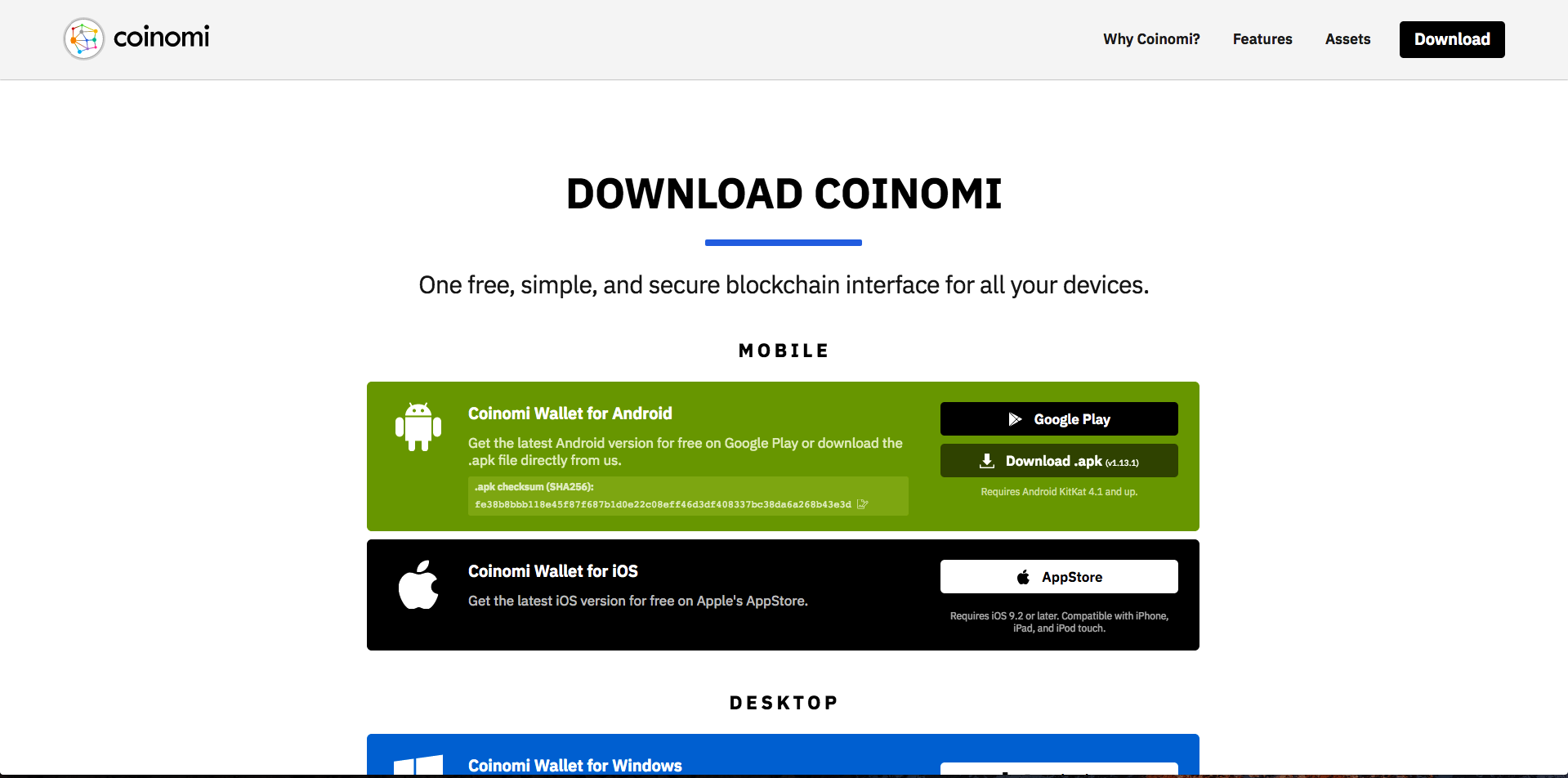 <h3>2. Open the Coinomi app.</h3> 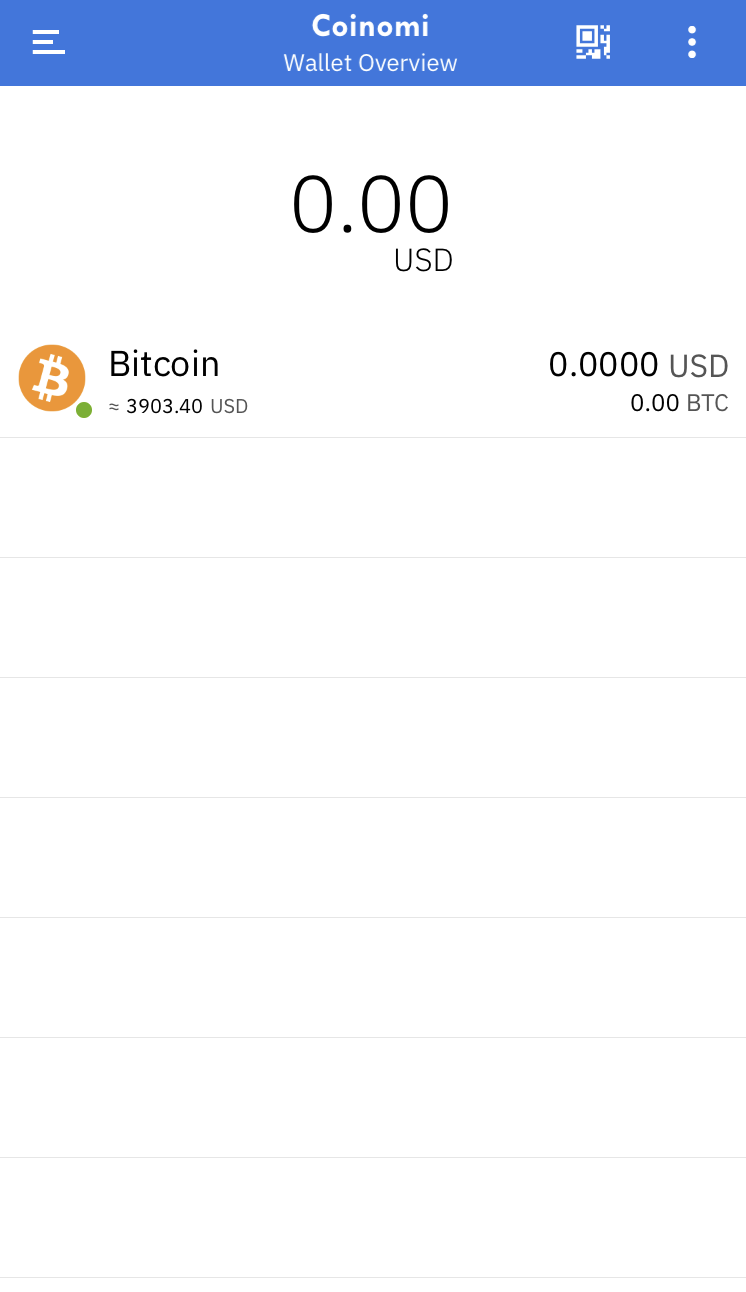 <h3>3. Click the left menu and click "+Token" </h3> 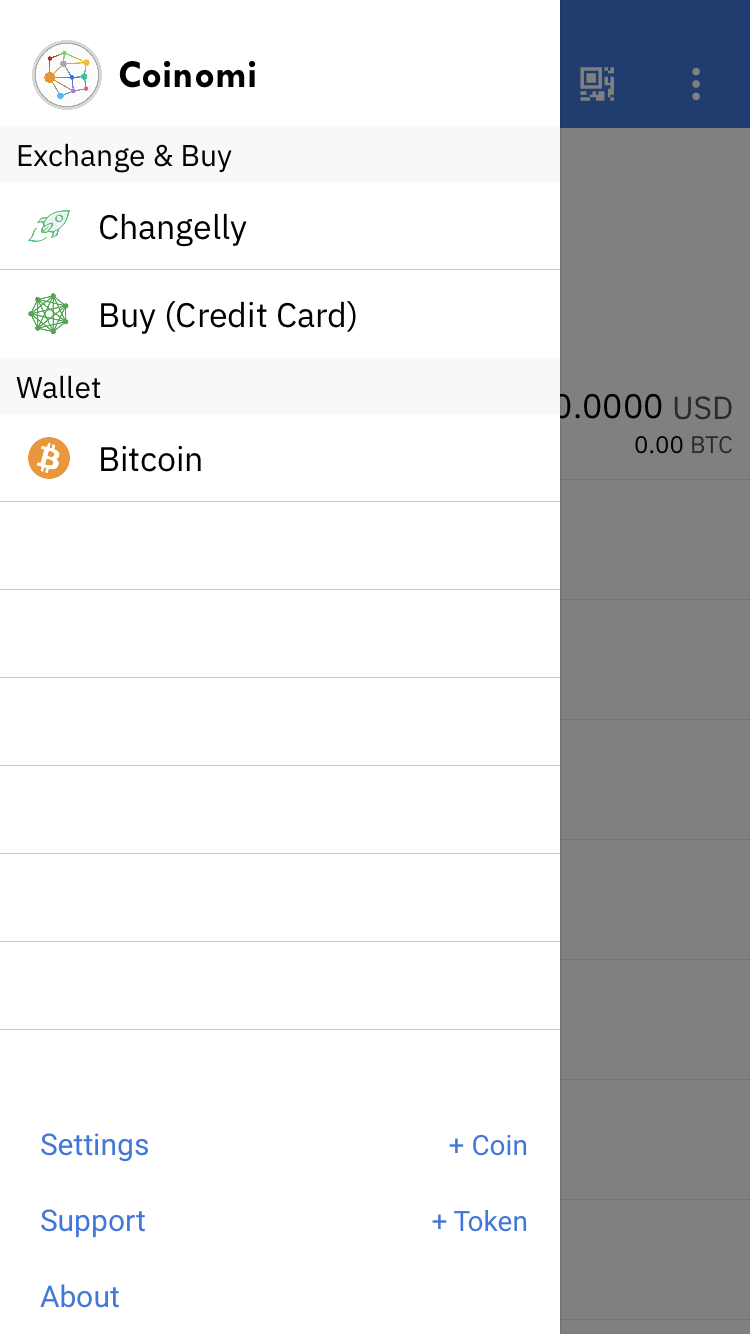 <h3>4. Select "Ethereum" as the token layer/protocol</h3> 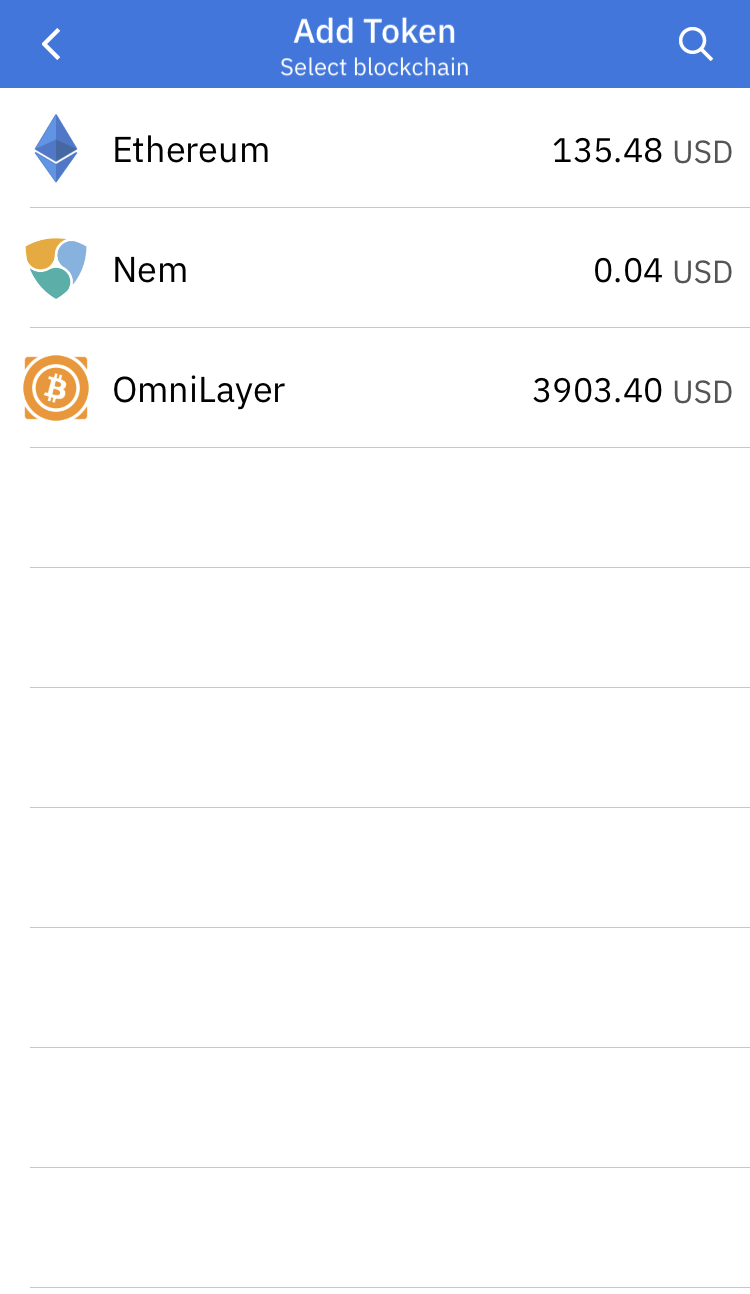 <h3>5. Select the three-column (three vertical dots) in the top right corner to add a token manually</h3> 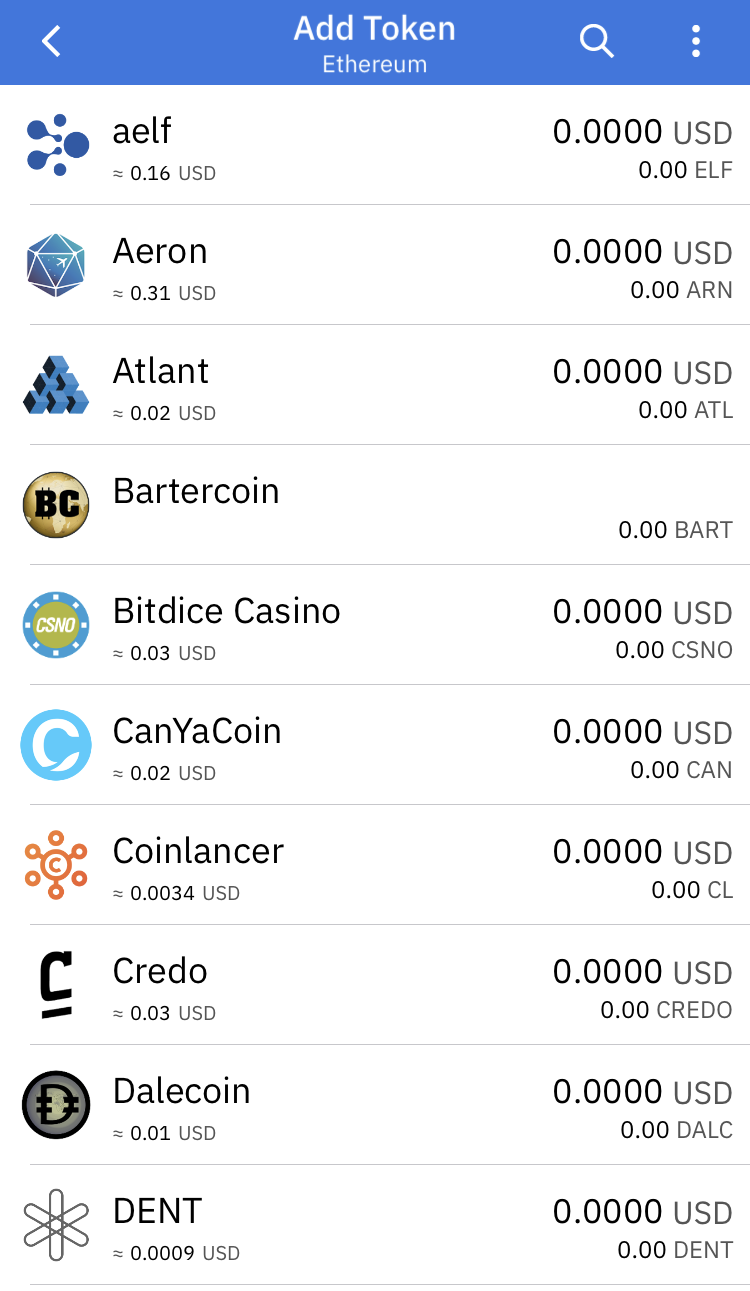 <h3>6. Select "Add Token Manually"</h3> 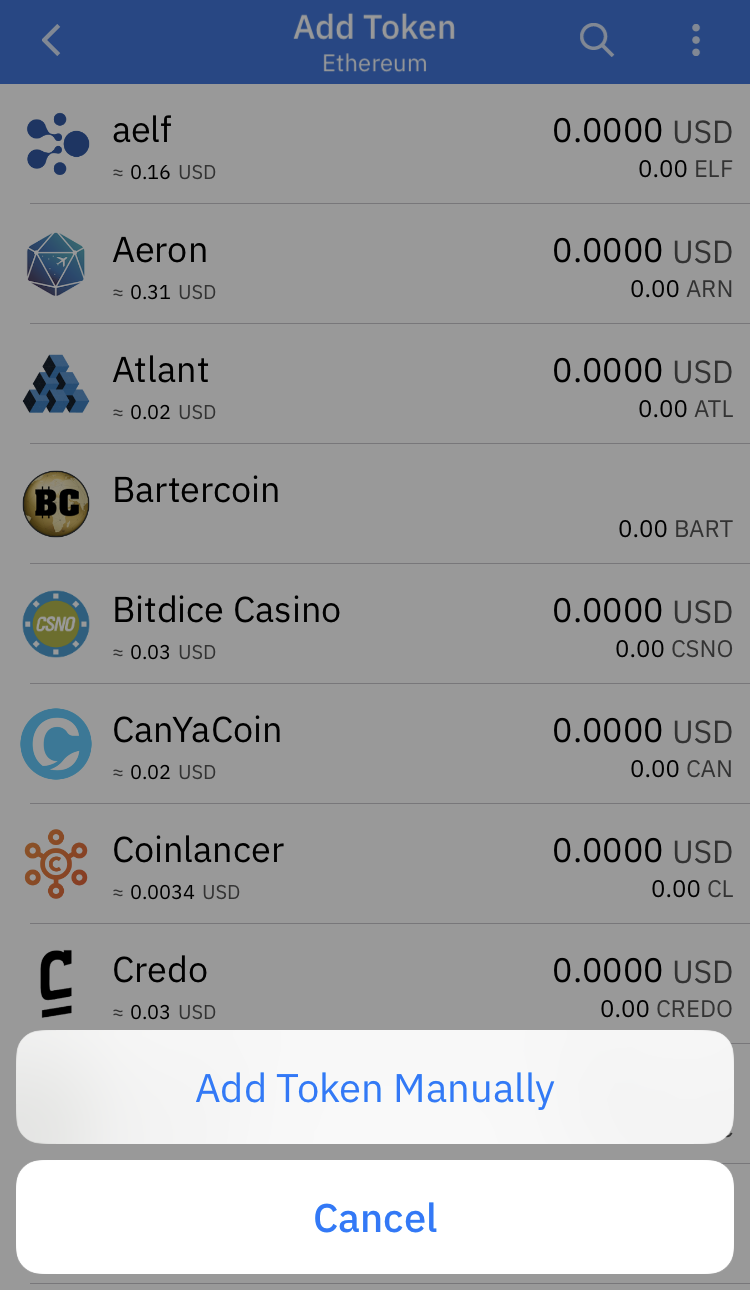 <h3>7. Enter the contract information and click "Add ERC20 Token"</h3> 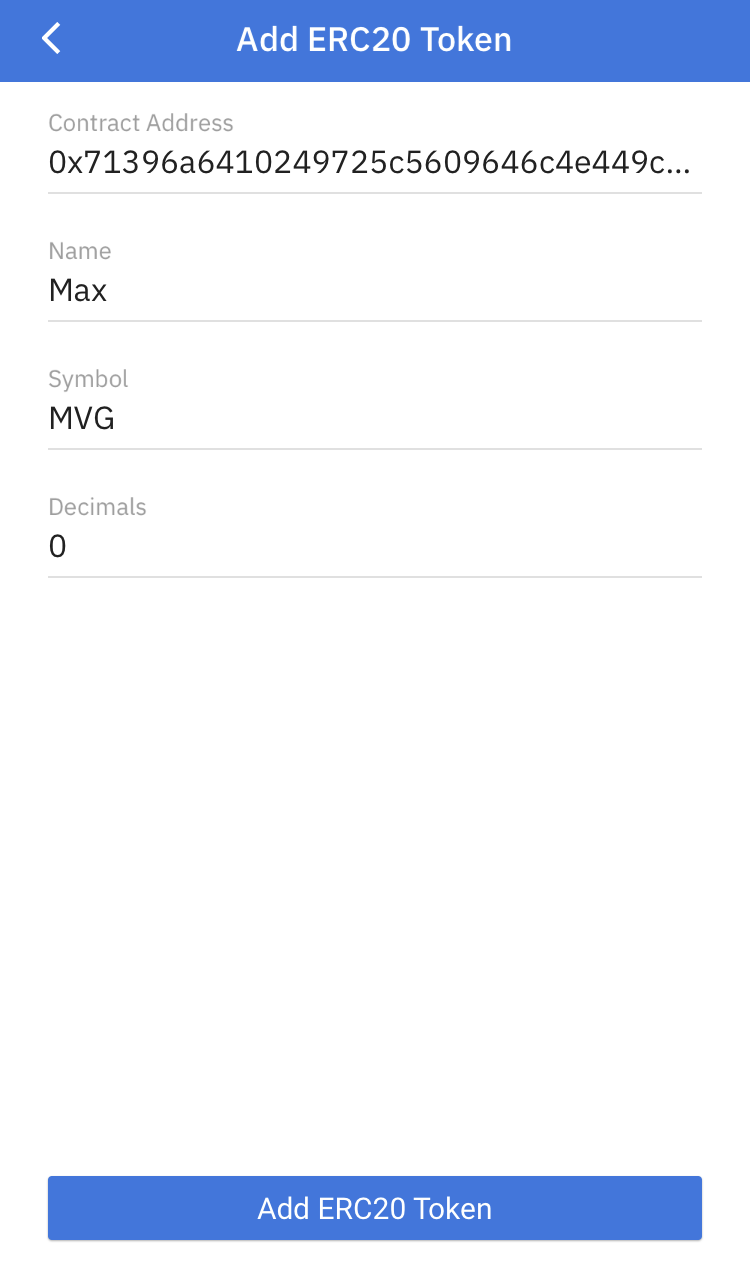 <h3>8. Success! You can now send and receive Max [MVG] with the Coinomi wallet!</h3> 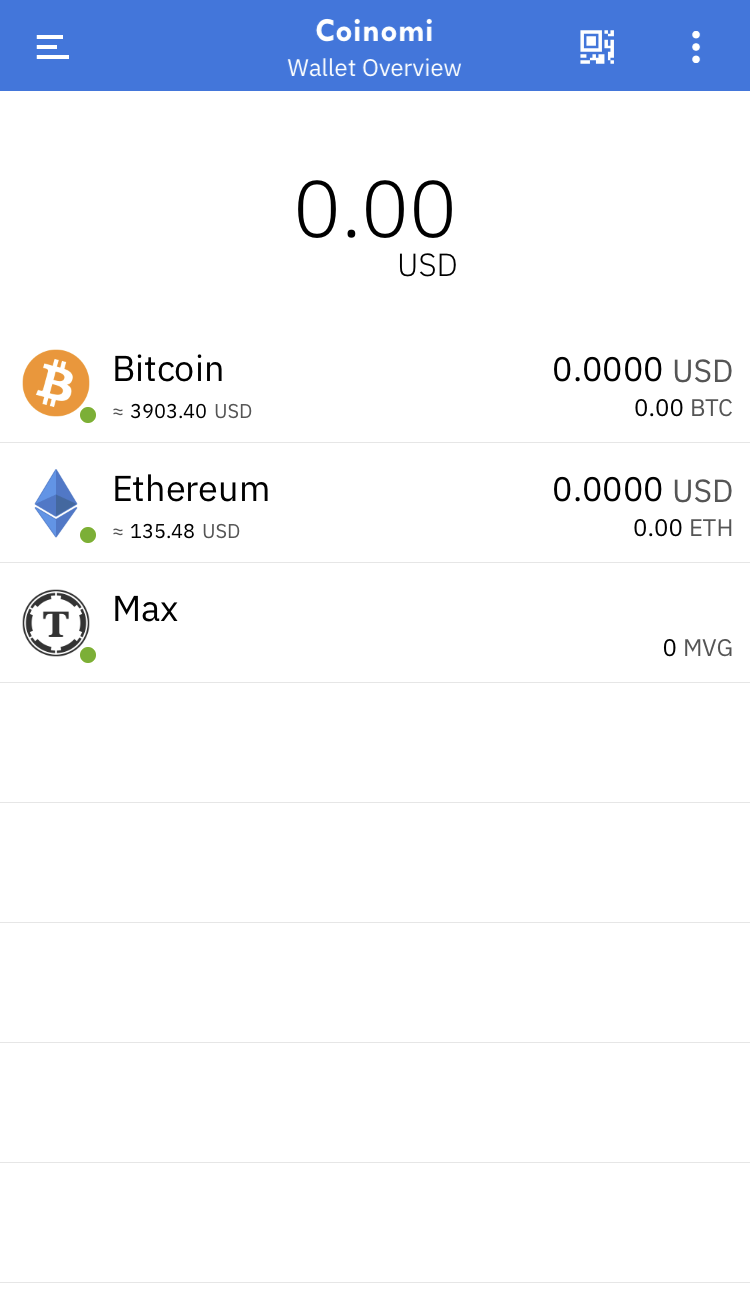 |
| json metadata | {"tags":["mvg","coinomi","wallet","max","token"],"image":["https://cdn.steemitimages.com/DQmatmRzQJzMnCoTmz9HReemtfmF6yYWFYVNFtsAhnU6omk/coinomi.png","https://cdn.steemitimages.com/DQmS9RKtt7Fxbzpd4TTvsr3Vay9JHxCAZPaoAkUAxjCjd7k/cnomi1.png","https://cdn.steemitimages.com/DQmZnhRJkbwwyDRVLxArBvjNPpuL15AKUBM4a6uVqRUduFU/cnomi2.PNG","https://cdn.steemitimages.com/DQmUhA4ym2cMieZD5XnPzZ3LcgxF9PqqhW3aLM34VDCrz57/cnomi3.png","https://cdn.steemitimages.com/DQmX3EFQG1L7J9NbzgUNuXuDXWXvmwDEvs3c67kbKxpy9zG/cnomi4.png","https://cdn.steemitimages.com/DQmeQcBqMVSrk8FPB4DKqkttEoGiNGQrqrmRPXaMDBu442R/cnomi5.png","https://cdn.steemitimages.com/DQmVsjssxnJ8Adw6SM6XaWUHh1pQEnzzpmytdNrWGFXLUhT/cnomi6.png","https://cdn.steemitimages.com/DQmaEzejfoaZwJcY47EEtyvH2skD5znWbEiwoV6pfQZRxGH/cnomi7.png"],"links":["https://www.coinomi.com/","https://www.coinomi.com/downloads/"],"app":"steemit/0.1","format":"markdown"} |
| Transaction Info | Block #31018594/Trx 3713f1115dd82f4f6fe6ebf0aa9ffedc72bba0e6 |
View Raw JSON Data
{
"trx_id": "3713f1115dd82f4f6fe6ebf0aa9ffedc72bba0e6",
"block": 31018594,
"trx_in_block": 6,
"op_in_trx": 0,
"virtual_op": 0,
"timestamp": "2019-03-10T02:14:54",
"op": [
"comment",
{
"parent_author": "",
"parent_permlink": "mvg",
"author": "maxvestgroup",
"permlink": "how-to-add-max-mvg-to-your-coinomi-wallet-ios",
"title": "How to add Max [MVG] to your Coinomi Wallet (iOS)",
"body": "Hello Maxvest clients!\n\nBelow is a tutorial on how to add <a href=\"https://www.coinomi.com/\">Coinomi Mobile Wallet</a>, which will enable you to store, send and receive Max [MVG] Tokens quickly & easily in preparation for our upcoming exchange listings. \n\n<h3>1. Firstly, <a href=\"https://www.coinomi.com/downloads/\">download the mobile wallet from the official Coinomi website</a>\n\n\n<h3>2. Open the Coinomi app.</h3>\n\n\n<h3>3. Click the left menu and click \"+Token\" </h3>\n\n\n<h3>4. Select \"Ethereum\" as the token layer/protocol</h3>\n\n\n<h3>5. Select the three-column (three vertical dots) in the top right corner to add a token manually</h3>\n\n\n<h3>6. Select \"Add Token Manually\"</h3>\n\n\n<h3>7. Enter the contract information and click \"Add ERC20 Token\"</h3>\n\n\n<h3>8. Success! You can now send and receive Max [MVG] with the Coinomi wallet!</h3>\n",
"json_metadata": "{\"tags\":[\"mvg\",\"coinomi\",\"wallet\",\"max\",\"token\"],\"image\":[\"https://cdn.steemitimages.com/DQmatmRzQJzMnCoTmz9HReemtfmF6yYWFYVNFtsAhnU6omk/coinomi.png\",\"https://cdn.steemitimages.com/DQmS9RKtt7Fxbzpd4TTvsr3Vay9JHxCAZPaoAkUAxjCjd7k/cnomi1.png\",\"https://cdn.steemitimages.com/DQmZnhRJkbwwyDRVLxArBvjNPpuL15AKUBM4a6uVqRUduFU/cnomi2.PNG\",\"https://cdn.steemitimages.com/DQmUhA4ym2cMieZD5XnPzZ3LcgxF9PqqhW3aLM34VDCrz57/cnomi3.png\",\"https://cdn.steemitimages.com/DQmX3EFQG1L7J9NbzgUNuXuDXWXvmwDEvs3c67kbKxpy9zG/cnomi4.png\",\"https://cdn.steemitimages.com/DQmeQcBqMVSrk8FPB4DKqkttEoGiNGQrqrmRPXaMDBu442R/cnomi5.png\",\"https://cdn.steemitimages.com/DQmVsjssxnJ8Adw6SM6XaWUHh1pQEnzzpmytdNrWGFXLUhT/cnomi6.png\",\"https://cdn.steemitimages.com/DQmaEzejfoaZwJcY47EEtyvH2skD5znWbEiwoV6pfQZRxGH/cnomi7.png\"],\"links\":[\"https://www.coinomi.com/\",\"https://www.coinomi.com/downloads/\"],\"app\":\"steemit/0.1\",\"format\":\"markdown\"}"
}
]
}hozn4ukhlytriwcupvoted (15.00%) @maxvestgroup / how-to-add-max-mvg-to-your-trust-wallet-ios2019/03/09 12:54:24
hozn4ukhlytriwcupvoted (15.00%) @maxvestgroup / how-to-add-max-mvg-to-your-trust-wallet-ios
2019/03/09 12:54:24
| voter | hozn4ukhlytriwc |
| author | maxvestgroup |
| permlink | how-to-add-max-mvg-to-your-trust-wallet-ios |
| weight | 1500 (15.00%) |
| Transaction Info | Block #31002596/Trx 414fb2868f42ade23dbef54fcbf786511b9e4e21 |
View Raw JSON Data
{
  "trx_id": "414fb2868f42ade23dbef54fcbf786511b9e4e21",
  "block": 31002596,
  "trx_in_block": 13,
  "op_in_trx": 0,
  "virtual_op": 0,
  "timestamp": "2019-03-09T12:54:24",
  "op": [
    "vote",
    {
      "voter": "hozn4ukhlytriwc",
      "author": "maxvestgroup",
      "permlink": "how-to-add-max-mvg-to-your-trust-wallet-ios",
      "weight": 1500
    }
  ]
}boostersent 0.001 STEEM to @maxvestgroup- "Congratulations on your POWER UP - Now make your STEEM POWER work for you by delegating to @Booster Marketing Services. For more information, check out (we use SteemConnect): http://booster.ink/"2019/03/09 12:46:57
boostersent 0.001 STEEM to @maxvestgroup- "Congratulations on your POWER UP - Now make your STEEM POWER work for you by delegating to @Booster Marketing Services. For more information, check out (we use SteemConnect): http://booster.ink/"
2019/03/09 12:46:57
| from | booster |
| to | maxvestgroup |
| amount | 0.001 STEEM |
| memo | Congratulations on your POWER UP - Now make your STEEM POWER work for you by delegating to @Booster Marketing Services. For more information, check out (we use SteemConnect): http://booster.ink/ |
| Transaction Info | Block #31002447/Trx 380d8c52c00137d5e2059bb7499edcfb4234eb07 |
View Raw JSON Data
{
  "trx_id": "380d8c52c00137d5e2059bb7499edcfb4234eb07",
  "block": 31002447,
  "trx_in_block": 22,
  "op_in_trx": 0,
  "virtual_op": 0,
  "timestamp": "2019-03-09T12:46:57",
  "op": [
    "transfer",
    {
      "from": "booster",
      "to": "maxvestgroup",
      "amount": "0.001 STEEM",
      "memo": "Congratulations on your POWER UP - Now make your STEEM POWER work for you by delegating to @Booster Marketing Services.  For more information, check out (we use SteemConnect): http://booster.ink/"
    }
  ]
}blocktradespowered up 16.891 STEEM to @maxvestgroup2019/03/09 12:36:30
blocktradespowered up 16.891 STEEM to @maxvestgroup
2019/03/09 12:36:30
| from | blocktrades |
| to | maxvestgroup |
| amount | 16.891 STEEM |
| Transaction Info | Block #31002238/Trx 767910484bad5a9498610ac87626c5d666b98012 |
View Raw JSON Data
{
  "trx_id": "767910484bad5a9498610ac87626c5d666b98012",
  "block": 31002238,
  "trx_in_block": 26,
  "op_in_trx": 0,
  "virtual_op": 0,
  "timestamp": "2019-03-09T12:36:30",
  "op": [
    "transfer_to_vesting",
    {
      "from": "blocktrades",
      "to": "maxvestgroup",
      "amount": "16.891 STEEM"
    }
  ]
}banzzaraupvoted (100.00%) @maxvestgroup / how-to-add-max-mvg-to-your-trust-wallet-ios2019/03/09 12:14:48
banzzaraupvoted (100.00%) @maxvestgroup / how-to-add-max-mvg-to-your-trust-wallet-ios
2019/03/09 12:14:48
| voter | banzzara |
| author | maxvestgroup |
| permlink | how-to-add-max-mvg-to-your-trust-wallet-ios |
| weight | 10000 (100.00%) |
| Transaction Info | Block #31001804/Trx b90295b32d3538fd421394d2ab743b029e49e1ff |
View Raw JSON Data
{
  "trx_id": "b90295b32d3538fd421394d2ab743b029e49e1ff",
  "block": 31001804,
  "trx_in_block": 6,
  "op_in_trx": 0,
  "virtual_op": 0,
  "timestamp": "2019-03-09T12:14:48",
  "op": [
    "vote",
    {
      "voter": "banzzara",
      "author": "maxvestgroup",
      "permlink": "how-to-add-max-mvg-to-your-trust-wallet-ios",
      "weight": 10000
    }
  ]
}pokseupvoted (5.00%) @maxvestgroup / how-to-add-max-mvg-to-your-trust-wallet-ios2019/03/09 12:14:09
pokseupvoted (5.00%) @maxvestgroup / how-to-add-max-mvg-to-your-trust-wallet-ios
2019/03/09 12:14:09
| voter | pokse |
| author | maxvestgroup |
| permlink | how-to-add-max-mvg-to-your-trust-wallet-ios |
| weight | 500 (5.00%) |
| Transaction Info | Block #31001791/Trx 2f892edee849fcef61b792f73b9ae4da006ca226 |
View Raw JSON Data
{
  "trx_id": "2f892edee849fcef61b792f73b9ae4da006ca226",
  "block": 31001791,
  "trx_in_block": 29,
  "op_in_trx": 0,
  "virtual_op": 0,
  "timestamp": "2019-03-09T12:14:09",
  "op": [
    "vote",
    {
      "voter": "pokse",
      "author": "maxvestgroup",
      "permlink": "how-to-add-max-mvg-to-your-trust-wallet-ios",
      "weight": 500
    }
  ]
}maxvestgrouppublished a new post: how-to-add-max-mvg-to-your-trust-wallet-ios2019/03/09 12:10:30
maxvestgrouppublished a new post: how-to-add-max-mvg-to-your-trust-wallet-ios
2019/03/09 12:10:30
| parent author | |
| parent permlink | mvg |
| author | maxvestgroup |
| permlink | how-to-add-max-mvg-to-your-trust-wallet-ios |
| title | How to add Max [MVG] to your Trust Wallet (iOS) |
| body | Hello Maxvest clients! Below is a tutorial on how to add <a href="https://trustwallet.com">Trust Mobile Wallet</a>, which will enable you to store, send and receive Max [MVG] Tokens quickly & easily in preparation for our upcoming exchange listings. If you need any further assistance, please visit our <a href="https://t.me/discussmvg">Telegram Discussion!</a> --- <h3>1. Download & open the verified <a href="https://trustwallet.com/">Trust Wallet App</a> </h3> 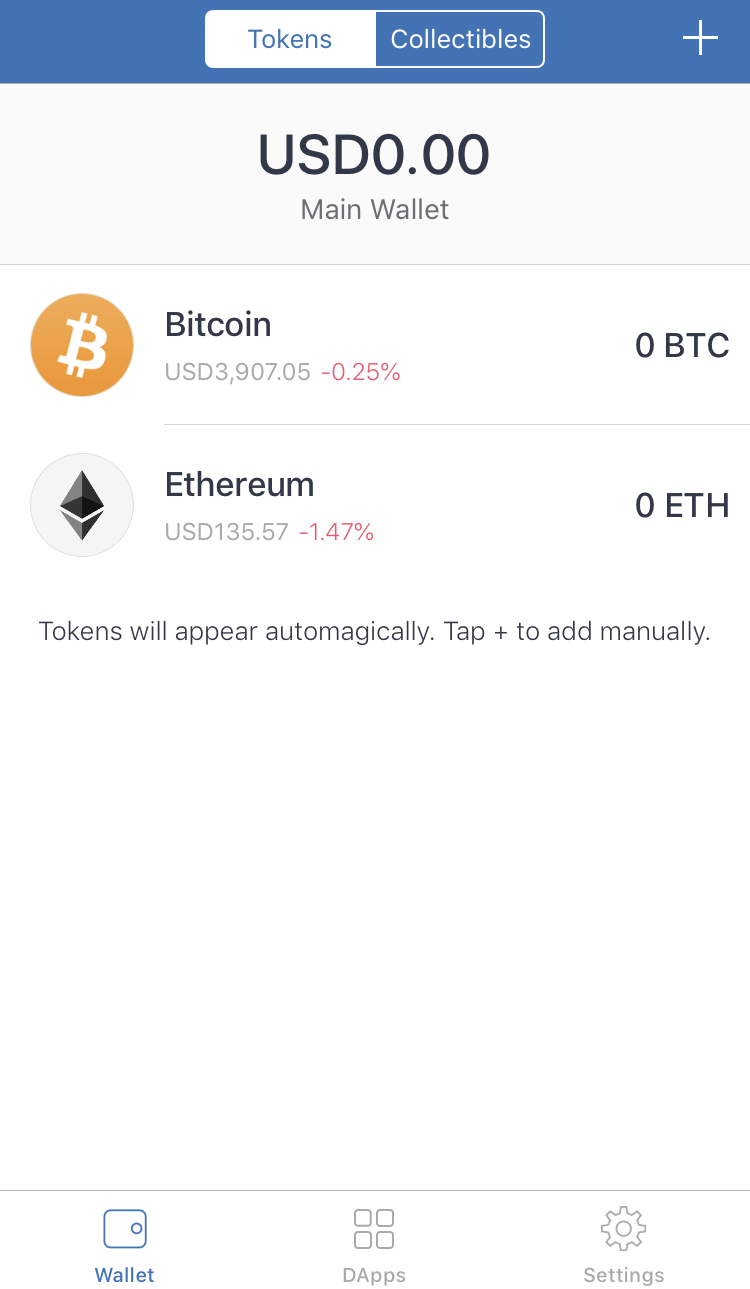 <h3>2. Search "MVG". If our token does not show, click "Add Custom Token"</h3> 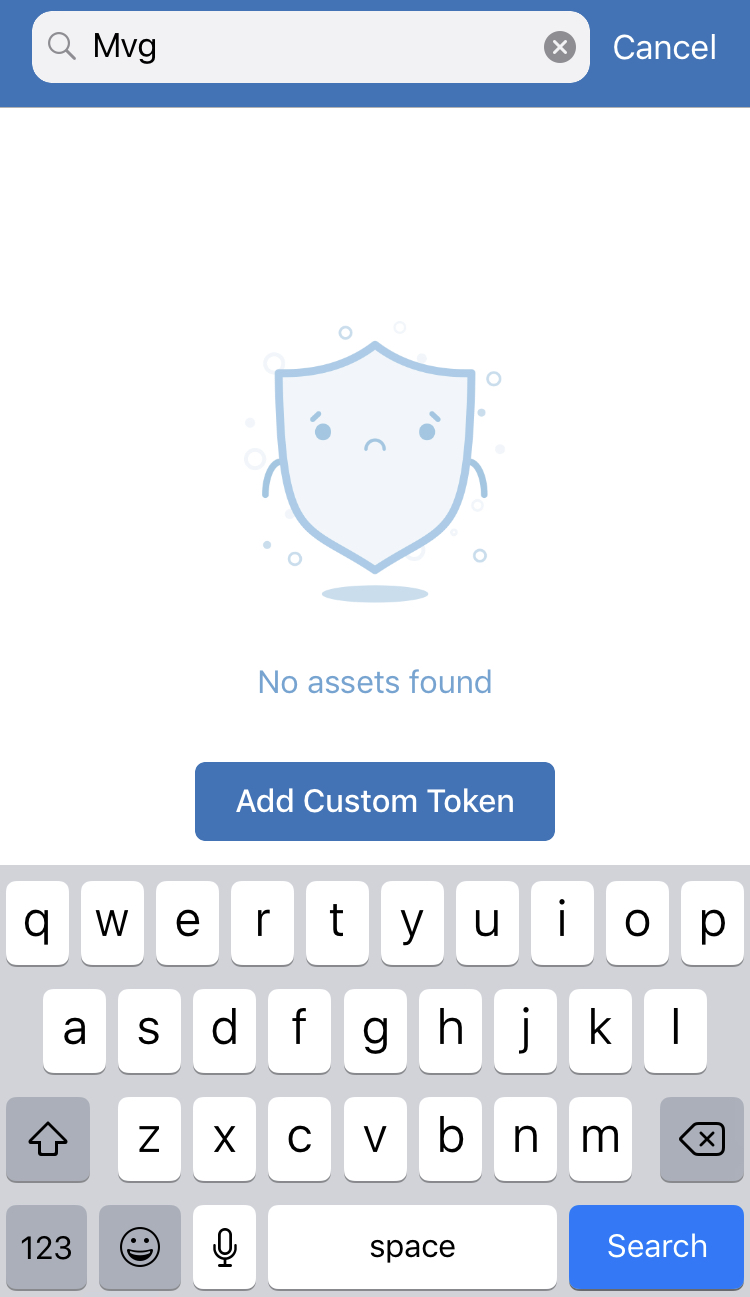 <h3>3. Add the Max [MVG] Contract Information into the form provided.</h3> **Contract Address:** 0x71396a6410249725c5609646c4e449c6c4d41e27 **Name:** Max **Token Symbol:** MVG **Decimals:** 0 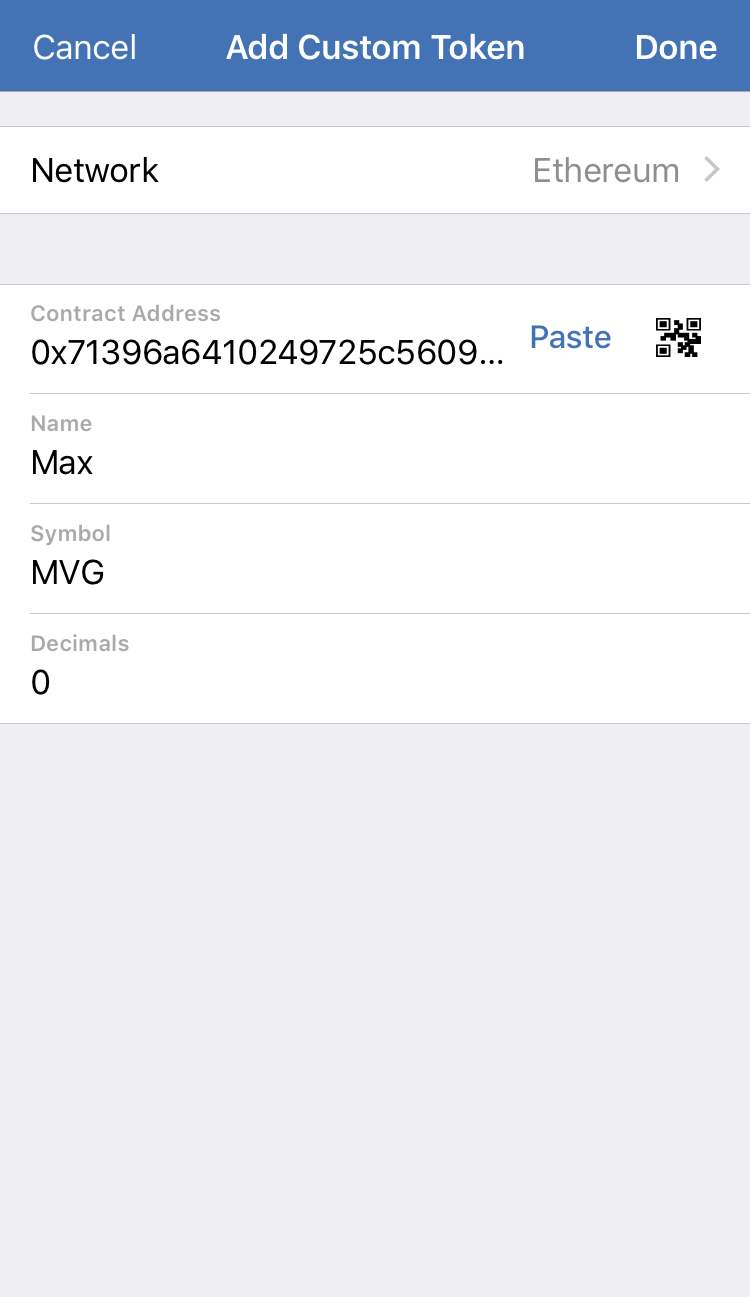 <h3>4. Done! Max [MVG] can now be sent and received in your Trust wallet!</h3> 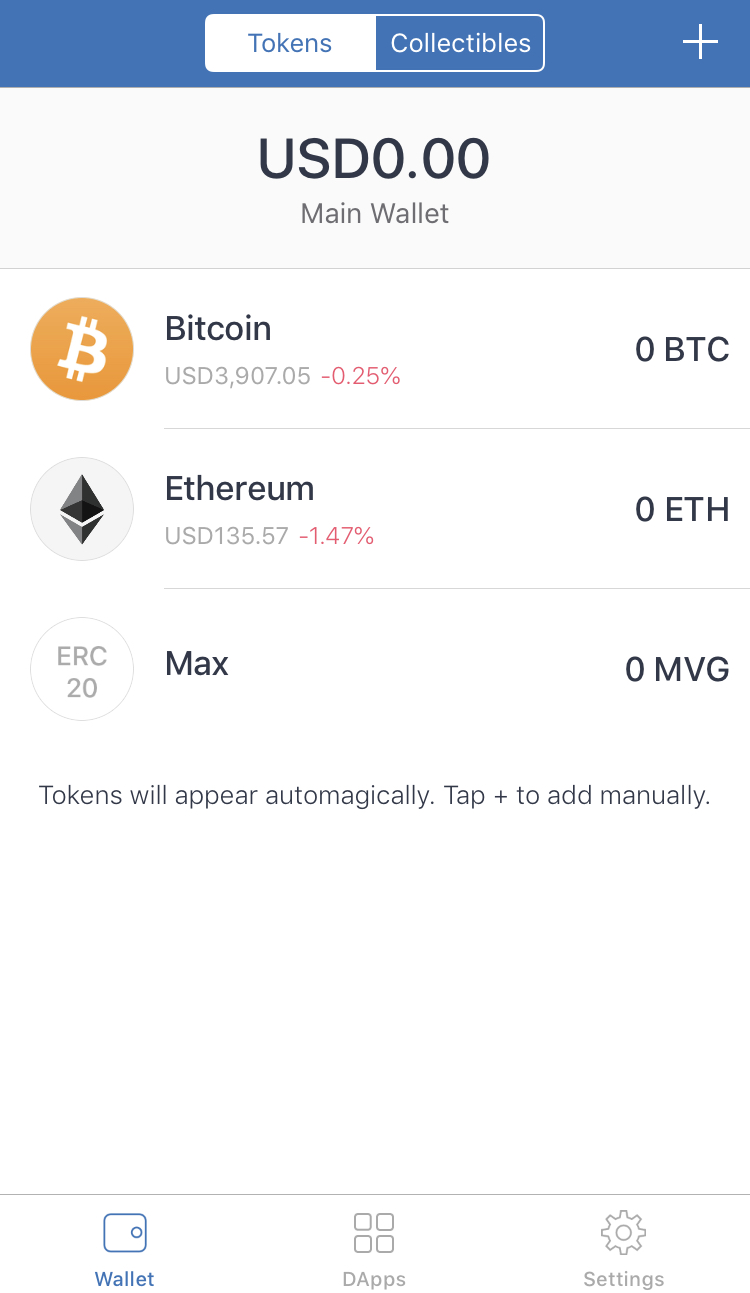 |
| json metadata | {"tags":["mvg","max","trustwallet","add","erc20"],"image":["https://cdn.steemitimages.com/DQmVVoRTjDiWrZhQJ1ggEHMgCfyCoVMC18i7M1mH8coQagy/trust1.jpg","https://cdn.steemitimages.com/DQmf27rpQfUgCj5ga7E4F2Y2EsXcKtcsby6ZH16Z2wYezk1/trust2.jpg","https://cdn.steemitimages.com/DQmfLhgz6KL2QtSEbtUaE1NMUg1uqLuoUUmZioVBKfkJrec/trust3.png","https://cdn.steemitimages.com/DQmNvx2k66MJE3g9yUC67Yquk5PN5mBv5UvKH7WwHcmANjM/trust4.jpg"],"links":["https://trustwallet.com","https://t.me/discussmvg","https://trustwallet.com/"],"app":"steemit/0.1","format":"markdown"} |
| Transaction Info | Block #31001718/Trx 33bb8499a8e77fb040e598d5d4eee47860f8bd47 |
View Raw JSON Data
{
"trx_id": "33bb8499a8e77fb040e598d5d4eee47860f8bd47",
"block": 31001718,
"trx_in_block": 2,
"op_in_trx": 0,
"virtual_op": 0,
"timestamp": "2019-03-09T12:10:30",
"op": [
"comment",
{
"parent_author": "",
"parent_permlink": "mvg",
"author": "maxvestgroup",
"permlink": "how-to-add-max-mvg-to-your-trust-wallet-ios",
"title": "How to add Max [MVG] to your Trust Wallet (iOS)",
"body": "Hello Maxvest clients!\n\nBelow is a tutorial on how to add <a href=\"https://trustwallet.com\">Trust Mobile Wallet</a>, which will enable you to store, send and receive Max [MVG] Tokens quickly & easily in preparation for our upcoming exchange listings. \n\nIf you need any further assistance, please visit our <a href=\"https://t.me/discussmvg\">Telegram Discussion!</a>\n\n---\n\n<h3>1. Download & open the verified <a href=\"https://trustwallet.com/\">Trust Wallet App</a> </h3>\n\n\n<h3>2. Search \"MVG\". If our token does not show, click \"Add Custom Token\"</h3>\n\n\n<h3>3. Add the Max [MVG] Contract Information into the form provided.</h3>\n**Contract Address:** 0x71396a6410249725c5609646c4e449c6c4d41e27\n**Name:** Max\n**Token Symbol:** MVG\n**Decimals:** 0\n\n\n<h3>4. Done! Max [MVG] can now be sent and received in your Trust wallet!</h3>\n",
"json_metadata": "{\"tags\":[\"mvg\",\"max\",\"trustwallet\",\"add\",\"erc20\"],\"image\":[\"https://cdn.steemitimages.com/DQmVVoRTjDiWrZhQJ1ggEHMgCfyCoVMC18i7M1mH8coQagy/trust1.jpg\",\"https://cdn.steemitimages.com/DQmf27rpQfUgCj5ga7E4F2Y2EsXcKtcsby6ZH16Z2wYezk1/trust2.jpg\",\"https://cdn.steemitimages.com/DQmfLhgz6KL2QtSEbtUaE1NMUg1uqLuoUUmZioVBKfkJrec/trust3.png\",\"https://cdn.steemitimages.com/DQmNvx2k66MJE3g9yUC67Yquk5PN5mBv5UvKH7WwHcmANjM/trust4.jpg\"],\"links\":[\"https://trustwallet.com\",\"https://t.me/discussmvg\",\"https://trustwallet.com/\"],\"app\":\"steemit/0.1\",\"format\":\"markdown\"}"
}
]
}2019/03/09 09:10:21
2019/03/09 09:10:21
| voter | hozn4ukhlytriwc |
| author | maxvestgroup |
| permlink | how-to-import-maxvest-keystore-json-file-to-metamask-browser-wallet |
| weight | 1500 (15.00%) |
| Transaction Info | Block #30998116/Trx afd910ea1db11126ec6037556a4a0afa7c072356 |
View Raw JSON Data
{
  "trx_id": "afd910ea1db11126ec6037556a4a0afa7c072356",
  "block": 30998116,
  "trx_in_block": 21,
  "op_in_trx": 0,
  "virtual_op": 0,
  "timestamp": "2019-03-09T09:10:21",
  "op": [
    "vote",
    {
      "voter": "hozn4ukhlytriwc",
      "author": "maxvestgroup",
      "permlink": "how-to-import-maxvest-keystore-json-file-to-metamask-browser-wallet",
      "weight": 1500
    }
  ]
}maxvestgrouppublished a new post: how-to-import-maxvest-keystore-json-file-to-myetherwallet2019/03/09 09:03:42
maxvestgrouppublished a new post: how-to-import-maxvest-keystore-json-file-to-myetherwallet
2019/03/09 09:03:42
| parent author | |
| parent permlink | maxvest |
| author | maxvestgroup |
| permlink | how-to-import-maxvest-keystore-json-file-to-myetherwallet |
| title | How to import Maxvest Keystore / JSON file to MyEtherWallet |
| body | @@ -81,16 +81,60 @@ to your +%3Ca href=%22https://vintage.myetherwallet.com%22%3E MyEtherW @@ -142,16 +142,20 @@ llet.com +%3C/a%3E account @@ -204,16 +204,98 @@ receive +%3Ca href=%22https://etherscan.io/address/0x71396a6410249725c5609646c4e449c6c4d41e27%22%3E Max %5BMVG @@ -295,16 +295,20 @@ ax %5BMVG%5D +%3C/a%3E Tokens @@ -593,31 +593,64 @@ e from your +%3Ca href=%22https://maxvest.io%22%3E Maxvest +%3C/a%3E Account%0A**P @@ -1702,20 +1702,16 @@ erWallet -.com %3C/h1%3E%0A%0A%3C |
| json metadata | {"tags":["maxvest","mvg","mvgtoken","myetherwallet","erc20"],"image":["https://cdn.steemitimages.com/DQmNh6S64xS5V4QJyo2Fq4q3HkB2MueG7LcoEzur7P8aiZ8/keystore1.png","https://cdn.steemitimages.com/DQmWoPi7ZB4ciKHYCyHvFhKTcS7HGm4xepiNgBVXoqhiJ8T/keystore2.png","https://cdn.steemitimages.com/DQmUfEMirS2UwwUMEHU9jYrJEUVXQZ8ciY7Xpep8jUX5Fde/mew1.png","https://cdn.steemitimages.com/DQma9abEcJBgAHnrZ7LZ71zcxQ8hro1GLvBvnsFnZPu51yw/mew2.png","https://cdn.steemitimages.com/DQmRT82ReV9YLPz3ewah1F5pJSuJEmE7ktk4YqqF78P9znn/mew3.png","https://cdn.steemitimages.com/DQmVUitCirrnXdCARDJfkKrHSFbU745UPG3BXQ4gMx4gvbL/mew4.png","https://cdn.steemitimages.com/DQmW3pXZvBRCRmErG7SAYWfSaE2RX6XbhM9H95VEKrJYJoV/mew5.png","https://cdn.steemitimages.com/DQmTv2VeboweYEYNnkmS7qxczaZAeqA2KkCvmrXRqqptYro/mew6.png","https://cdn.steemitimages.com/DQmRohFxNqMzwgbRF7tXar4v15GNfcmAEhDnNDjafuz8yow/mew7.png","https://cdn.steemitimages.com/DQmfJiAEYwXZY7QzGmhtFt4Sppeg1G7vECFy8EewKM42XAA/mew8.png","https://cdn.steemitimages.com/DQmdfqAocpthhiPjD2DX4PXNEuNCsFra2TqWsgjiAXkuXLd/mew9.png"],"links":["https://vintage.myetherwallet.com","https://etherscan.io/address/0x71396a6410249725c5609646c4e449c6c4d41e27","https://maxvest.io"],"app":"steemit/0.1","format":"markdown"} |
| Transaction Info | Block #30997983/Trx 4679f71be4698c073ed5a18179d1af0f10c66fb3 |
View Raw JSON Data
{
  "trx_id": "4679f71be4698c073ed5a18179d1af0f10c66fb3",
  "block": 30997983,
  "trx_in_block": 1,
  "op_in_trx": 0,
  "virtual_op": 0,
  "timestamp": "2019-03-09T09:03:42",
  "op": [
    "comment",
    {
      "parent_author": "",
      "parent_permlink": "maxvest",
      "author": "maxvestgroup",
      "permlink": "how-to-import-maxvest-keystore-json-file-to-myetherwallet",
      "title": "How to import Maxvest Keystore / JSON file to MyEtherWallet",
      "body": "@@ -81,16 +81,60 @@\n to your \n+%3Ca href=%22https://vintage.myetherwallet.com%22%3E\n MyEtherW\n@@ -142,16 +142,20 @@\n llet.com\n+%3C/a%3E\n  account\n@@ -204,16 +204,98 @@\n receive \n+%3Ca href=%22https://etherscan.io/address/0x71396a6410249725c5609646c4e449c6c4d41e27%22%3E\n Max %5BMVG\n@@ -295,16 +295,20 @@\n ax %5BMVG%5D\n+%3C/a%3E\n  Tokens \n@@ -593,31 +593,64 @@\n e from your \n+%3Ca href=%22https://maxvest.io%22%3E\n Maxvest\n+%3C/a%3E\n  Account%0A**P\n@@ -1702,20 +1702,16 @@\n erWallet\n-.com\n %3C/h1%3E%0A%0A%3C\n",
      "json_metadata": "{\"tags\":[\"maxvest\",\"mvg\",\"mvgtoken\",\"myetherwallet\",\"erc20\"],\"image\":[\"https://cdn.steemitimages.com/DQmNh6S64xS5V4QJyo2Fq4q3HkB2MueG7LcoEzur7P8aiZ8/keystore1.png\",\"https://cdn.steemitimages.com/DQmWoPi7ZB4ciKHYCyHvFhKTcS7HGm4xepiNgBVXoqhiJ8T/keystore2.png\",\"https://cdn.steemitimages.com/DQmUfEMirS2UwwUMEHU9jYrJEUVXQZ8ciY7Xpep8jUX5Fde/mew1.png\",\"https://cdn.steemitimages.com/DQma9abEcJBgAHnrZ7LZ71zcxQ8hro1GLvBvnsFnZPu51yw/mew2.png\",\"https://cdn.steemitimages.com/DQmRT82ReV9YLPz3ewah1F5pJSuJEmE7ktk4YqqF78P9znn/mew3.png\",\"https://cdn.steemitimages.com/DQmVUitCirrnXdCARDJfkKrHSFbU745UPG3BXQ4gMx4gvbL/mew4.png\",\"https://cdn.steemitimages.com/DQmW3pXZvBRCRmErG7SAYWfSaE2RX6XbhM9H95VEKrJYJoV/mew5.png\",\"https://cdn.steemitimages.com/DQmTv2VeboweYEYNnkmS7qxczaZAeqA2KkCvmrXRqqptYro/mew6.png\",\"https://cdn.steemitimages.com/DQmRohFxNqMzwgbRF7tXar4v15GNfcmAEhDnNDjafuz8yow/mew7.png\",\"https://cdn.steemitimages.com/DQmfJiAEYwXZY7QzGmhtFt4Sppeg1G7vECFy8EewKM42XAA/mew8.png\",\"https://cdn.steemitimages.com/DQmdfqAocpthhiPjD2DX4PXNEuNCsFra2TqWsgjiAXkuXLd/mew9.png\"],\"links\":[\"https://vintage.myetherwallet.com\",\"https://etherscan.io/address/0x71396a6410249725c5609646c4e449c6c4d41e27\",\"https://maxvest.io\"],\"app\":\"steemit/0.1\",\"format\":\"markdown\"}"
    }
  ]
}maxvestgrouppublished a new post: how-to-import-maxvest-keystore-json-file-to-metamask-browser-wallet2019/03/09 08:37:24
maxvestgrouppublished a new post: how-to-import-maxvest-keystore-json-file-to-metamask-browser-wallet
2019/03/09 08:37:24
| parent author | |
| parent permlink | mvg |
| author | maxvestgroup |
| permlink | how-to-import-maxvest-keystore-json-file-to-metamask-browser-wallet |
| title | How to import Maxvest Keystore / JSON file to MetaMask Browser Wallet |
| body | @@ -73,32 +73,62 @@ re file to your +%3Ca href=%22https://metamask.io%22%3E MetaMask.io brow @@ -137,16 +137,20 @@ r wallet +%3C/a%3E , so tha @@ -191,16 +191,46 @@ receive +%3Ca href=%22https://mvgtoken.io%22%3E Max %5BMVG @@ -230,16 +230,20 @@ ax %5BMVG%5D +%3C/a%3E Tokens @@ -799,16 +799,45 @@ ount at +%3Ca href=%22https://maxvest.io%22%3E Maxvest. @@ -838,16 +838,20 @@ xvest.io +%3C/a%3E , you ma @@ -2801,24 +2801,15 @@ to M -yEtherWallet.com +etaMask %3C/h1 @@ -5005,18 +5005,17 @@ our -telegram: +%3Ca href=%22 http @@ -5033,8 +5033,39 @@ scussmvg +%22%3Etelegram discussion group%3C/a%3E |
| json metadata | {"tags":["mvg","metamask","erc20","import","keystore"],"image":["https://cdn.steemitimages.com/DQmNh6S64xS5V4QJyo2Fq4q3HkB2MueG7LcoEzur7P8aiZ8/keystore1.png","https://cdn.steemitimages.com/DQmWoPi7ZB4ciKHYCyHvFhKTcS7HGm4xepiNgBVXoqhiJ8T/keystore2.png","https://cdn.steemitimages.com/DQmakQgUUm4Q3m77N4YJFr76AZKzZPYV12N2PAX9BRTvApB/meta1.png","https://cdn.steemitimages.com/DQmb3AcVRmz5izBns6CFctgCdKBeyNY8GwmGU4fYZ188A1K/meta3.png","https://cdn.steemitimages.com/DQmV1i5skhtonnPrwvvmgjhDngFhoUCrEUaj77aLdXjQ3ZX/meta4.png","https://cdn.steemitimages.com/DQmbHHarapnnMPqsECETboyyxPmzsL1Xg3WVqUaSCTWUgdH/meta5.png","https://cdn.steemitimages.com/DQmPfPfHpT4YxcGTQe8RFhh93hALSPwsbuQa89GEiCrJnkh/meta6.png","https://cdn.steemitimages.com/DQmUt8dJio2rja5fgqZTrgTM1TxbnpR65D4uNA9WfUkdtgf/meta7.png","https://cdn.steemitimages.com/DQmT1439VUAfHjp6SJTSYCrheF4NsjzzWZfAFsB8mshPY98/meta8.png","https://cdn.steemitimages.com/DQmTvxGtqSHg178aDbpfP6jwHYSrgwSoxFujZ8nqu3HT2jL/meta9.png","https://cdn.steemitimages.com/DQmTmmqQ9euBVKkwT9vZF6d2jPHrGRzMDTDjdmb9cvz1FJN/meta10.png","https://cdn.steemitimages.com/DQmQgjAnnxVTCg1V73s6bhJtNqm3bFg6zXDTFujqsfmeR9T/meta11.png","https://cdn.steemitimages.com/DQmYhJF1YDkj7uor1UkACE7dKnV82osRhqvtWibkHER6Yxw/meta12.png","https://cdn.steemitimages.com/DQmYGuXcU1PK5rojEeHt62UDYHZtXsqb9LFH6CizNgajA5c/meta13.png","https://cdn.steemitimages.com/DQmQ7u4YvmMFePi5N8Et4WdYRnRkjFxaxgncYD6ZGvfP1jz/meta14.png"],"links":["https://metamask.io","https://mvgtoken.io","https://maxvest.io","https://t.me/discussmvg"],"app":"steemit/0.1","format":"markdown"} |
| Transaction Info | Block #30997457/Trx adf2fd0d17ee694b3bd9f3ce83ffb8de394ce9c4 |
View Raw JSON Data
{
  "trx_id": "adf2fd0d17ee694b3bd9f3ce83ffb8de394ce9c4",
  "block": 30997457,
  "trx_in_block": 6,
  "op_in_trx": 0,
  "virtual_op": 0,
  "timestamp": "2019-03-09T08:37:24",
  "op": [
    "comment",
    {
      "parent_author": "",
      "parent_permlink": "mvg",
      "author": "maxvestgroup",
      "permlink": "how-to-import-maxvest-keystore-json-file-to-metamask-browser-wallet",
      "title": "How to import Maxvest Keystore / JSON file to MetaMask Browser Wallet",
      "body": "@@ -73,32 +73,62 @@\n re file to your \n+%3Ca href=%22https://metamask.io%22%3E\n MetaMask.io brow\n@@ -137,16 +137,20 @@\n r wallet\n+%3C/a%3E\n , so tha\n@@ -191,16 +191,46 @@\n receive \n+%3Ca href=%22https://mvgtoken.io%22%3E\n Max %5BMVG\n@@ -230,16 +230,20 @@\n ax %5BMVG%5D\n+%3C/a%3E\n  Tokens \n@@ -799,16 +799,45 @@\n ount at \n+%3Ca href=%22https://maxvest.io%22%3E\n Maxvest.\n@@ -838,16 +838,20 @@\n xvest.io\n+%3C/a%3E\n , you ma\n@@ -2801,24 +2801,15 @@\n to M\n-yEtherWallet.com\n+etaMask\n %3C/h1\n@@ -5005,18 +5005,17 @@\n our \n-telegram: \n+%3Ca href=%22\n http\n@@ -5033,8 +5033,39 @@\n scussmvg\n+%22%3Etelegram discussion group%3C/a%3E\n",
      "json_metadata": "{\"tags\":[\"mvg\",\"metamask\",\"erc20\",\"import\",\"keystore\"],\"image\":[\"https://cdn.steemitimages.com/DQmNh6S64xS5V4QJyo2Fq4q3HkB2MueG7LcoEzur7P8aiZ8/keystore1.png\",\"https://cdn.steemitimages.com/DQmWoPi7ZB4ciKHYCyHvFhKTcS7HGm4xepiNgBVXoqhiJ8T/keystore2.png\",\"https://cdn.steemitimages.com/DQmakQgUUm4Q3m77N4YJFr76AZKzZPYV12N2PAX9BRTvApB/meta1.png\",\"https://cdn.steemitimages.com/DQmb3AcVRmz5izBns6CFctgCdKBeyNY8GwmGU4fYZ188A1K/meta3.png\",\"https://cdn.steemitimages.com/DQmV1i5skhtonnPrwvvmgjhDngFhoUCrEUaj77aLdXjQ3ZX/meta4.png\",\"https://cdn.steemitimages.com/DQmbHHarapnnMPqsECETboyyxPmzsL1Xg3WVqUaSCTWUgdH/meta5.png\",\"https://cdn.steemitimages.com/DQmPfPfHpT4YxcGTQe8RFhh93hALSPwsbuQa89GEiCrJnkh/meta6.png\",\"https://cdn.steemitimages.com/DQmUt8dJio2rja5fgqZTrgTM1TxbnpR65D4uNA9WfUkdtgf/meta7.png\",\"https://cdn.steemitimages.com/DQmT1439VUAfHjp6SJTSYCrheF4NsjzzWZfAFsB8mshPY98/meta8.png\",\"https://cdn.steemitimages.com/DQmTvxGtqSHg178aDbpfP6jwHYSrgwSoxFujZ8nqu3HT2jL/meta9.png\",\"https://cdn.steemitimages.com/DQmTmmqQ9euBVKkwT9vZF6d2jPHrGRzMDTDjdmb9cvz1FJN/meta10.png\",\"https://cdn.steemitimages.com/DQmQgjAnnxVTCg1V73s6bhJtNqm3bFg6zXDTFujqsfmeR9T/meta11.png\",\"https://cdn.steemitimages.com/DQmYhJF1YDkj7uor1UkACE7dKnV82osRhqvtWibkHER6Yxw/meta12.png\",\"https://cdn.steemitimages.com/DQmYGuXcU1PK5rojEeHt62UDYHZtXsqb9LFH6CizNgajA5c/meta13.png\",\"https://cdn.steemitimages.com/DQmQ7u4YvmMFePi5N8Et4WdYRnRkjFxaxgncYD6ZGvfP1jz/meta14.png\"],\"links\":[\"https://metamask.io\",\"https://mvgtoken.io\",\"https://maxvest.io\",\"https://t.me/discussmvg\"],\"app\":\"steemit/0.1\",\"format\":\"markdown\"}"
    }
  ]
}2019/03/09 05:11:00
2019/03/09 05:11:00
| voter | jorgedr0id |
| author | maxvestgroup |
| permlink | how-to-import-maxvest-keystore-json-file-to-metamask-browser-wallet |
| weight | 10000 (100.00%) |
| Transaction Info | Block #30993332/Trx 6c37828c0a6ec5a0713690f660ec1491a8de4057 |
View Raw JSON Data
{
  "trx_id": "6c37828c0a6ec5a0713690f660ec1491a8de4057",
  "block": 30993332,
  "trx_in_block": 10,
  "op_in_trx": 0,
  "virtual_op": 0,
  "timestamp": "2019-03-09T05:11:00",
  "op": [
    "vote",
    {
      "voter": "jorgedr0id",
      "author": "maxvestgroup",
      "permlink": "how-to-import-maxvest-keystore-json-file-to-metamask-browser-wallet",
      "weight": 10000
    }
  ]
}maxvestgrouppublished a new post: how-to-import-maxvest-keystore-json-file-to-metamask-browser-wallet2019/03/09 05:10:27
maxvestgrouppublished a new post: how-to-import-maxvest-keystore-json-file-to-metamask-browser-wallet
2019/03/09 05:10:27
| parent author | |
| parent permlink | mvg |
| author | maxvestgroup |
| permlink | how-to-import-maxvest-keystore-json-file-to-metamask-browser-wallet |
| title | How to import Maxvest Keystore / JSON file to MetaMask Browser Wallet |
| body | Hello Maxvest clients! Below is a tutorial on how to import your Keystore file to your MetaMask.io browser wallet, so that you are able to store, send and receive Max [MVG] Tokens quickly & easily in preparation for our upcoming exchange listings. **Please Note**: This tutorial is only for users who **have not** modified the ETH address for attached to their account. <h3>This tutorial is broken down into 4 parts. </h3> **Part 1:** Downloading your Keystore file from your Maxvest Account **Part 2:** New Users: Setting up your MetaMask wallet. **Part 3:** Importing your Keystore / JSON file to your MetaMask wallet. **Part 4:** How to send tokens from MetaMask. For users who do not hold Max [MVG] or do not have an account at Maxvest.io, you may skip to **Part 2** to find out how to import a Keystore / JSON file to MetaMask.io, and to **Part 3** to find out how to send ERC-20 tokens from MetaMask.io after you have successfully imported your keystore / json file. --- <h2>Part 1: Downloading your Keystore file from your Maxvest account</h2> **1. Firstly, login to your Maxvest Account, and navigate to "Edit Account" .** 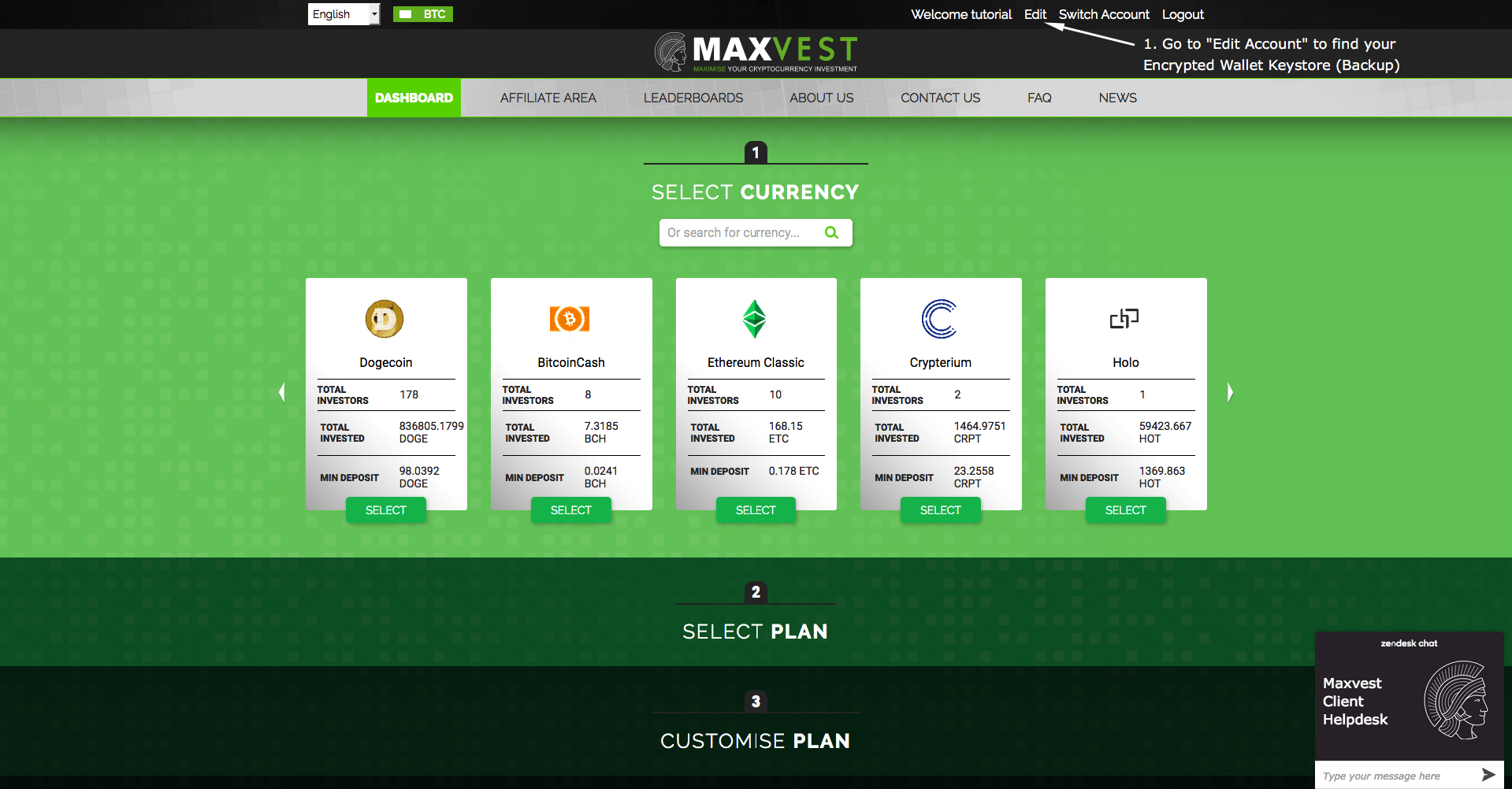 **2. If you have not edited your ETH address since creating your account, a "Download Encrypted Keystore" link will be available for you to download, to import to a supported wallet.** 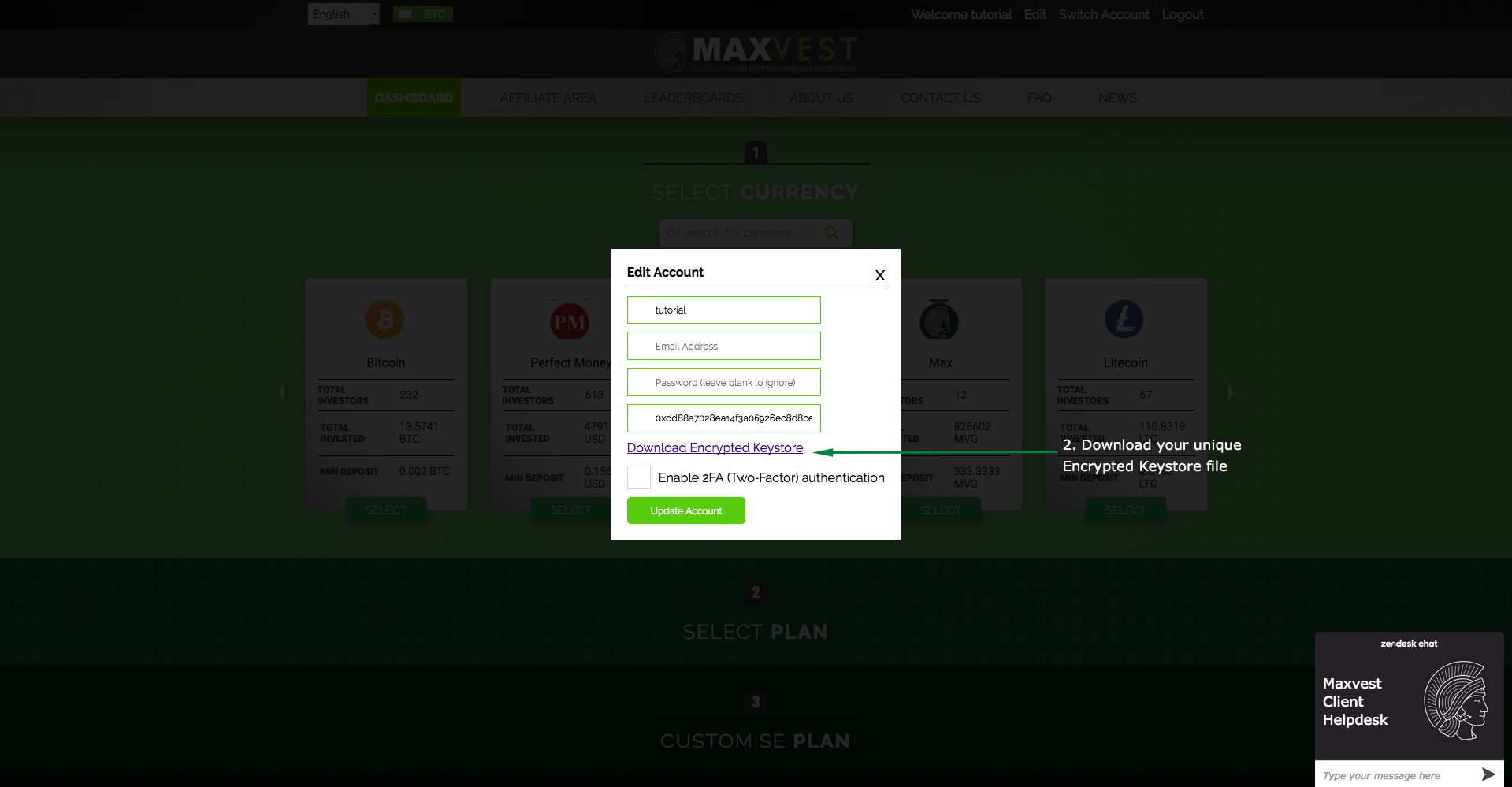 --- <h1>Part 2: New Users: Setting up your MetaMask wallet</h1> <h3>1. Visit https://metamask.io to download the MetaMask Browser Add-on Wallet for your browser.</h3> 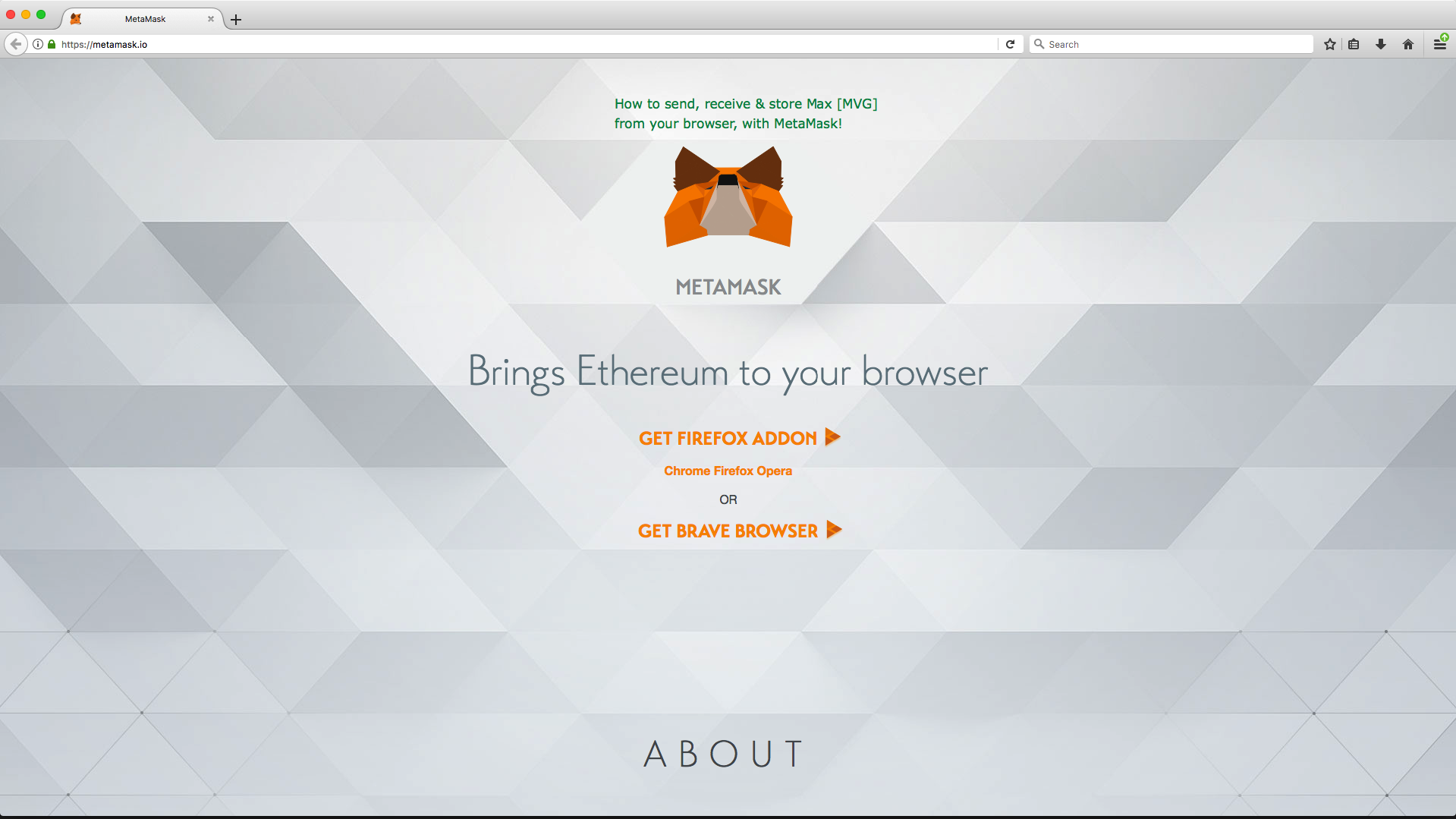 <h3>2. Once the add-on is added, you will be taken to the setup window. Click continue to begin setting up your MetaMask wallet.</h3> 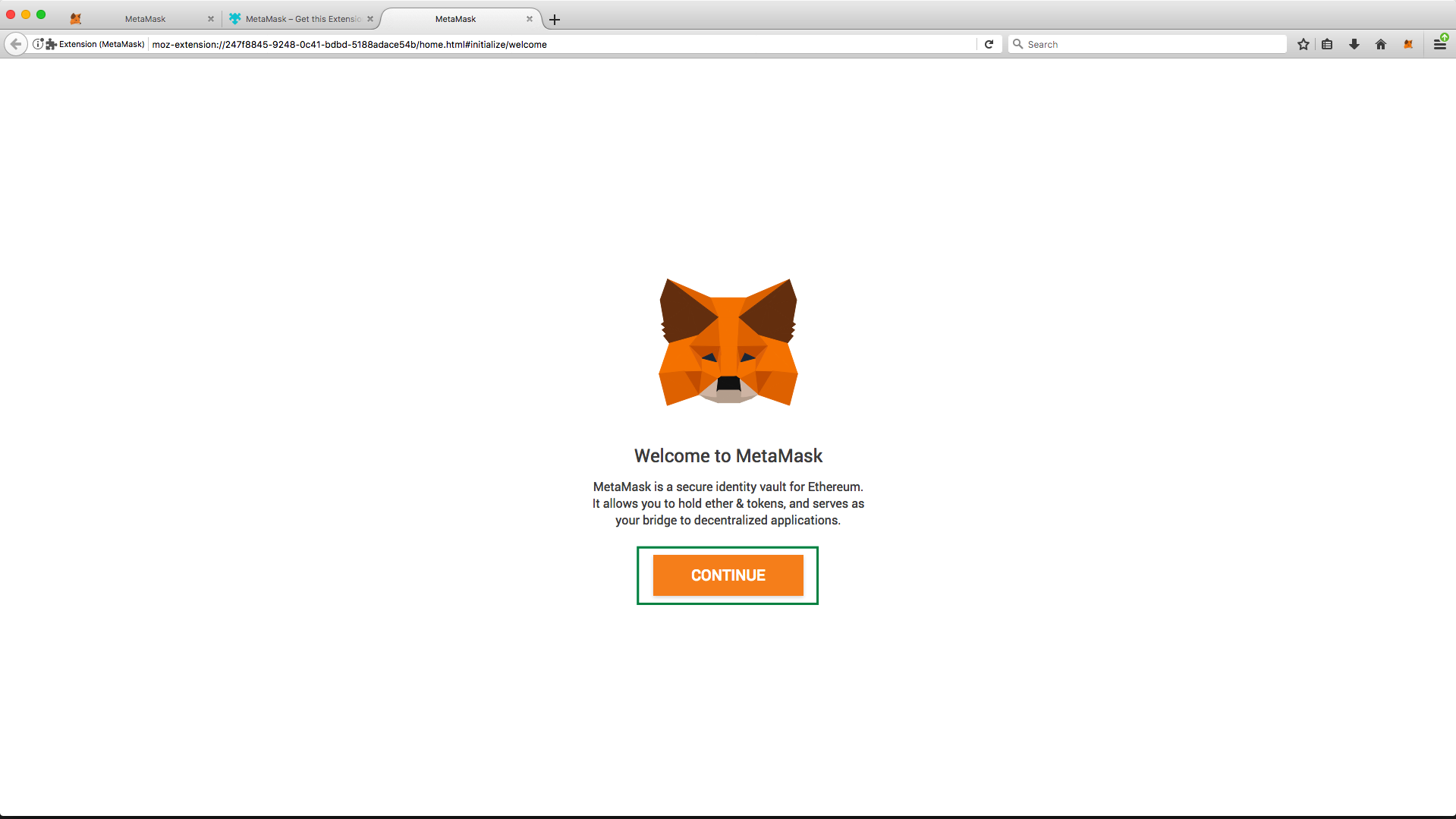 <h3>3. Set a secure password for your wallet (Do not forget! Used to unlock your wallet each time your browser is opened.)</h3> 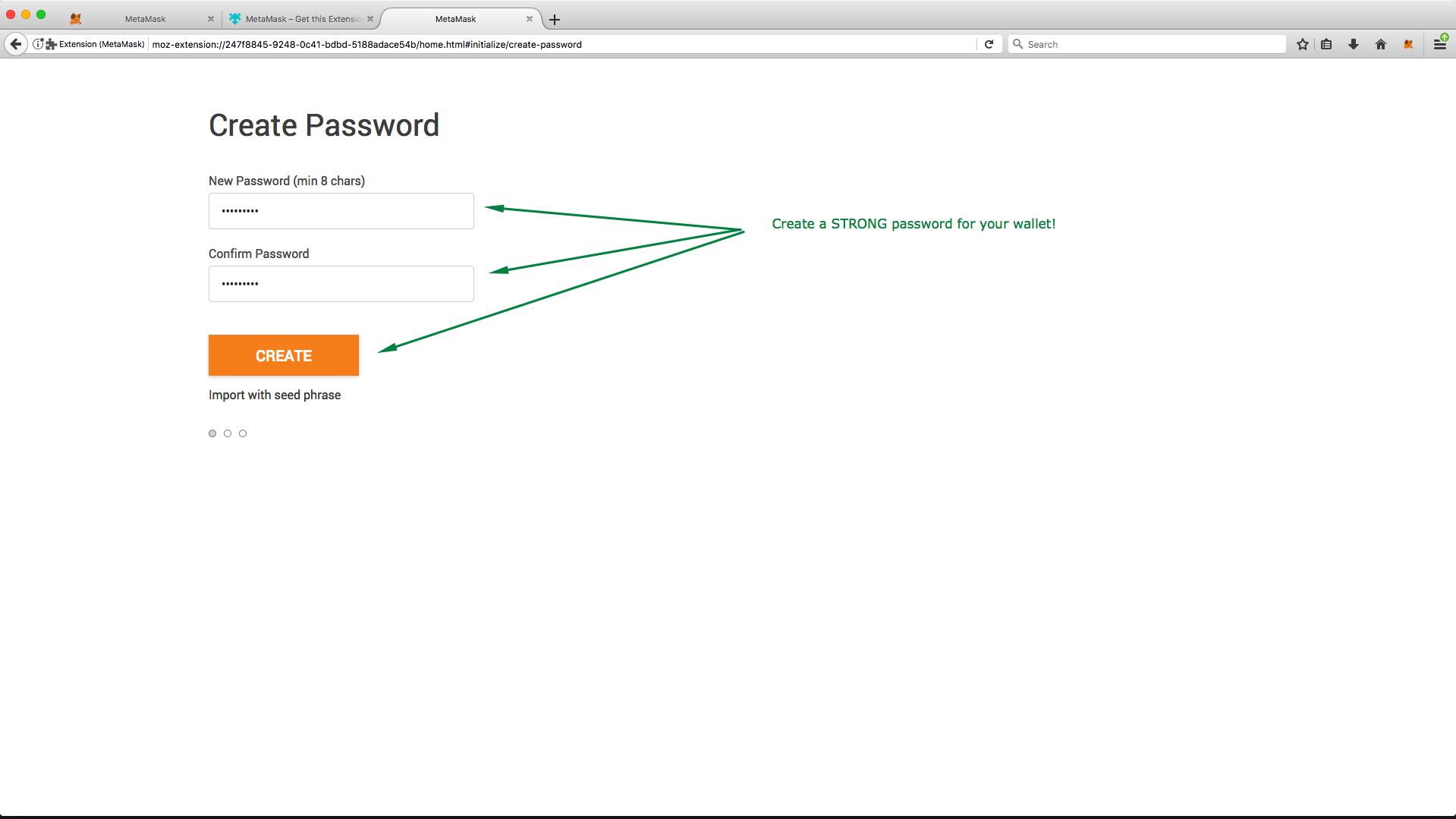 <h3>4. Securely store your Secret Phrase.</h3> **This phrase can be used on any MetaMask support browser to recover your wallet! Keep this phrase safe!** 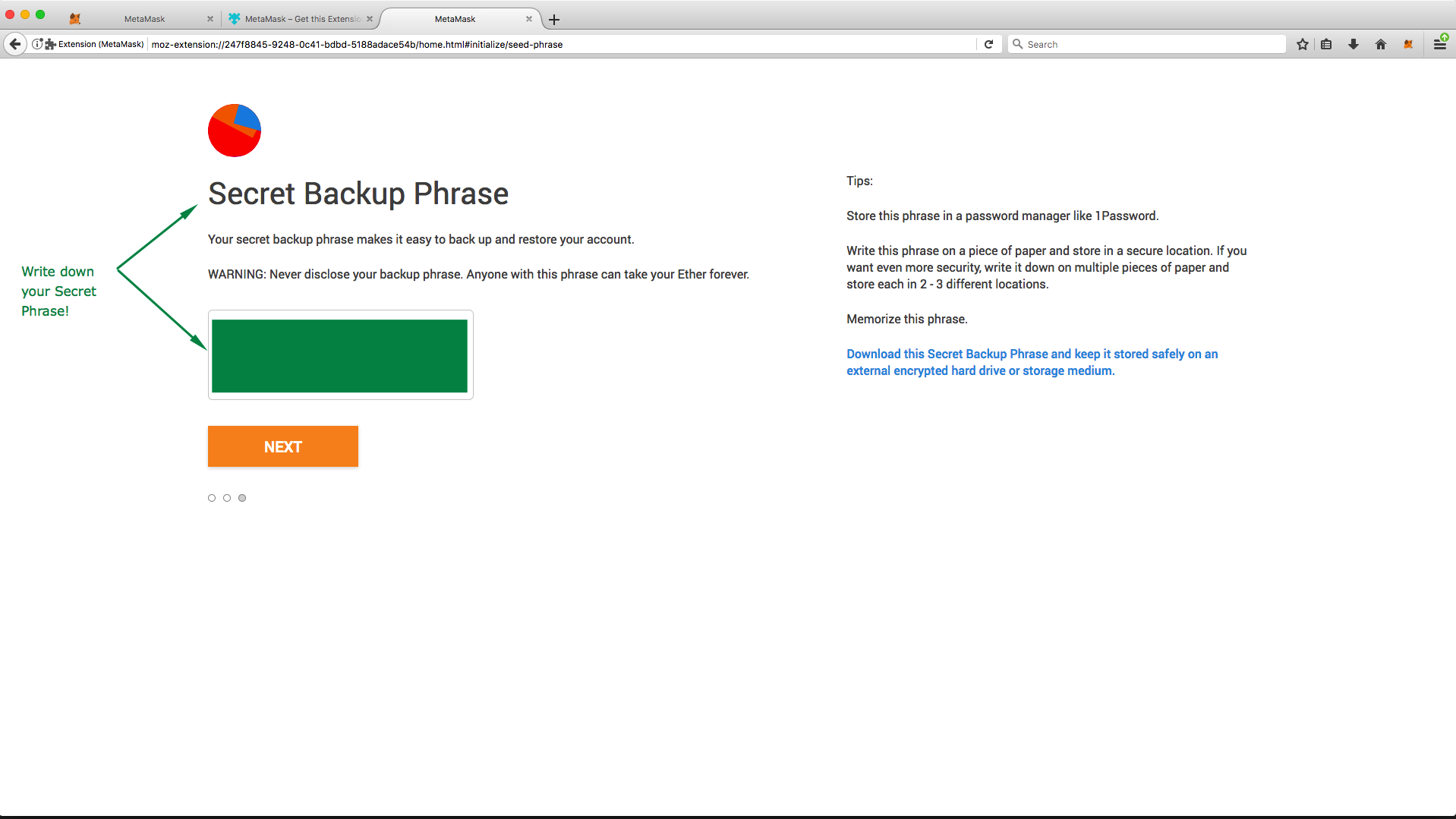 **Done!** You can now use the MetaMask browser wallet in the add-on popup or from the browser interface. --- <h1>Part 3: Importing Keystore / JSON file to MyEtherWallet.com</h1> <h3>1. Click your avatar & then "Import" from the drop-down.</h3> 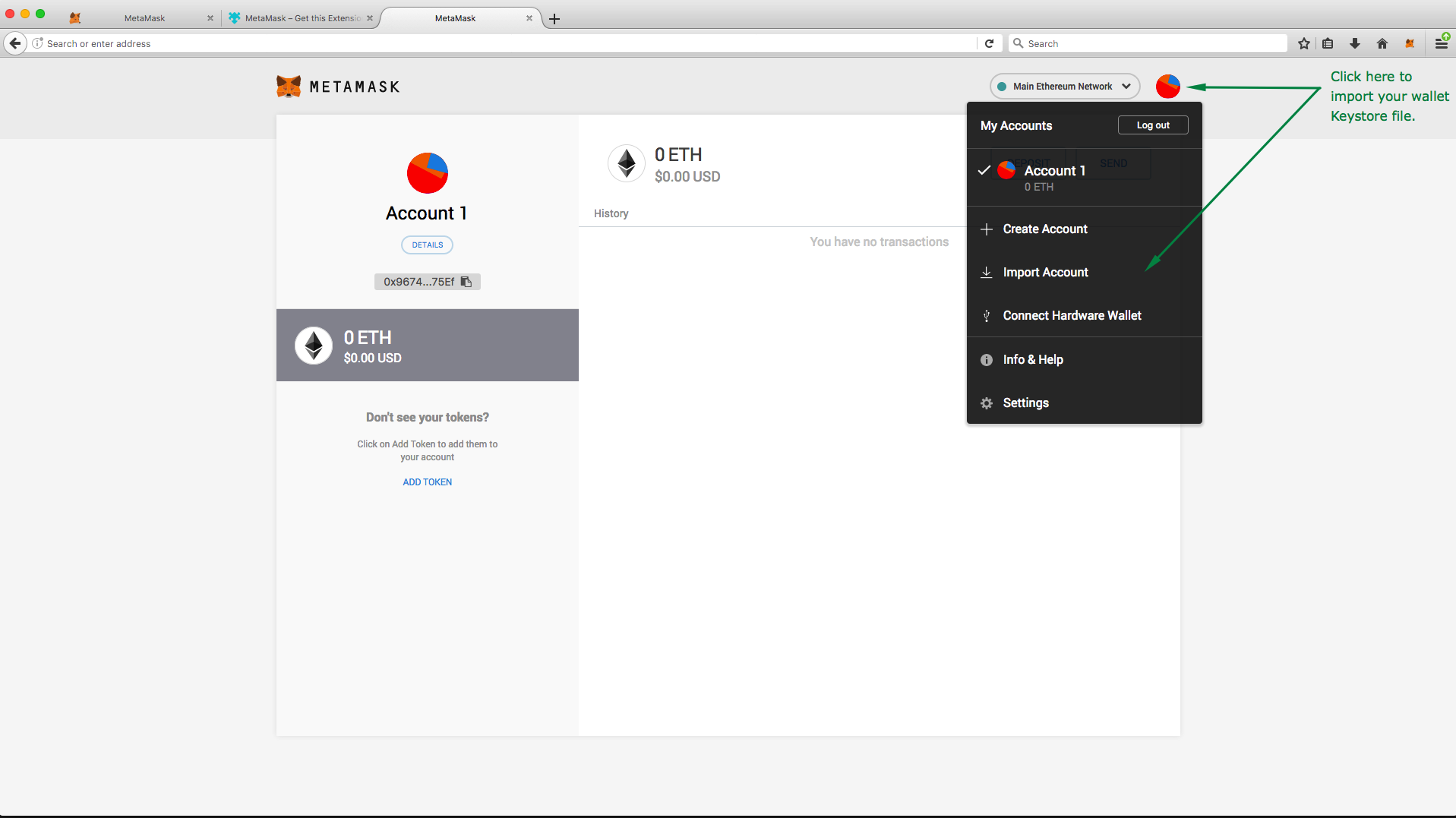 <h3>2. Select "JSON", import your keystore file & decrypt/unlock with your Maxvest.io account password.</h3> 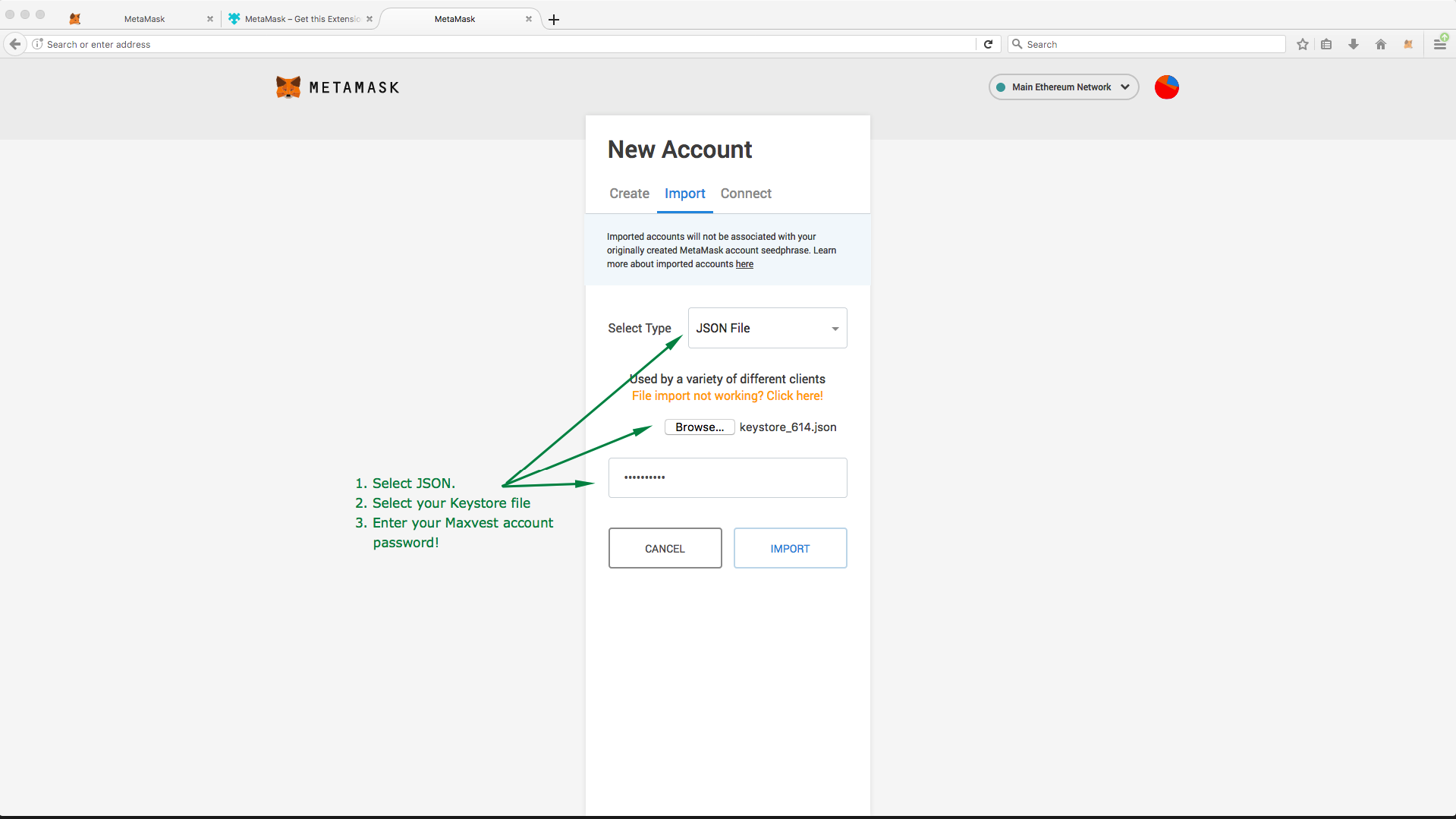 <h3>3. Select "Add Custom Token" to find your Max [MVG] ERC-20 Token.</h3> 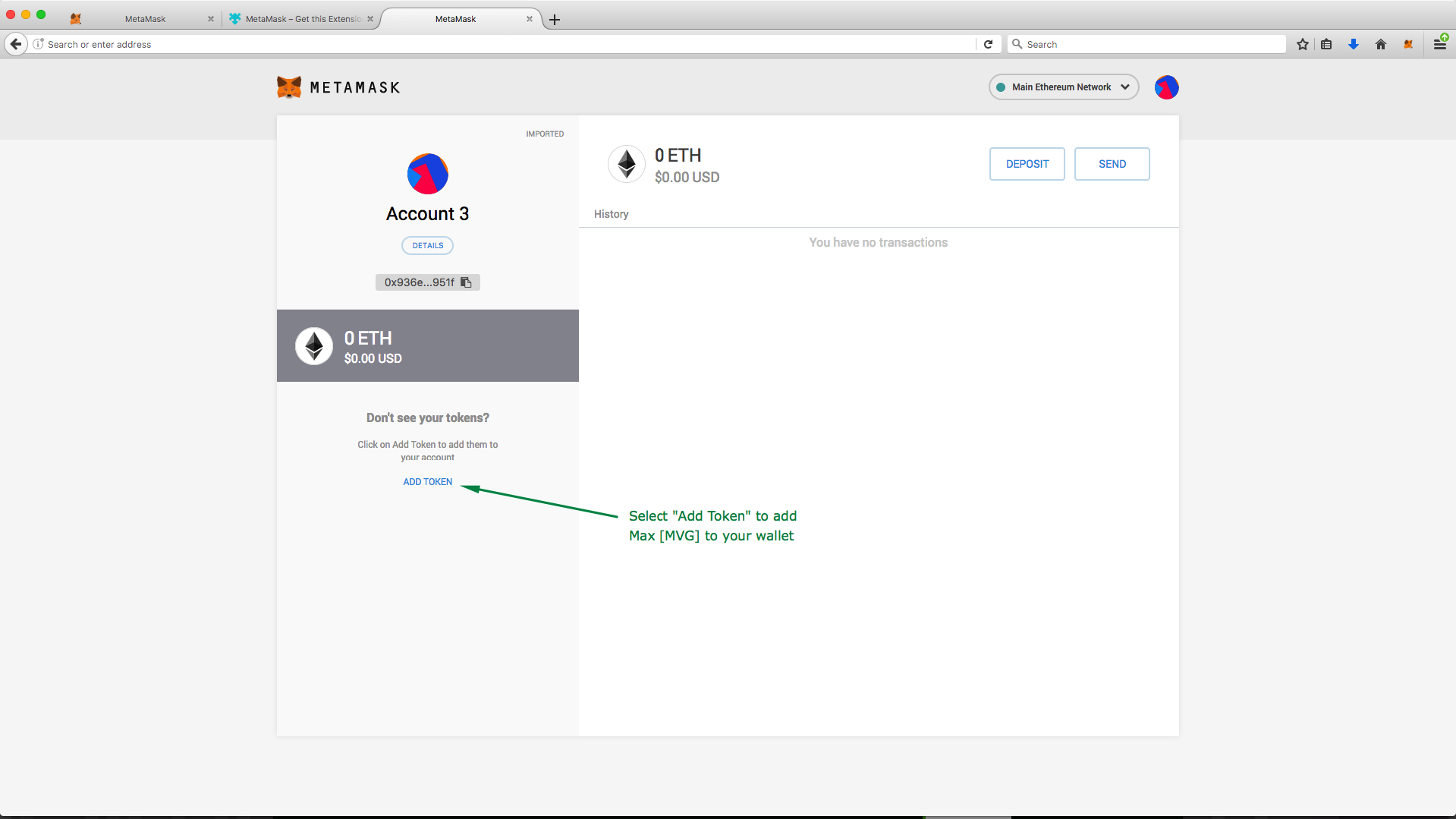 <h3>4. Enter the following information to add MVG to your wallets supported tokens.</h3> **Contract Address:** 0x71396a6410249725c5609646c4e449c6c4d41e27 **Token Symbol:** MVG **Decimals:** 0 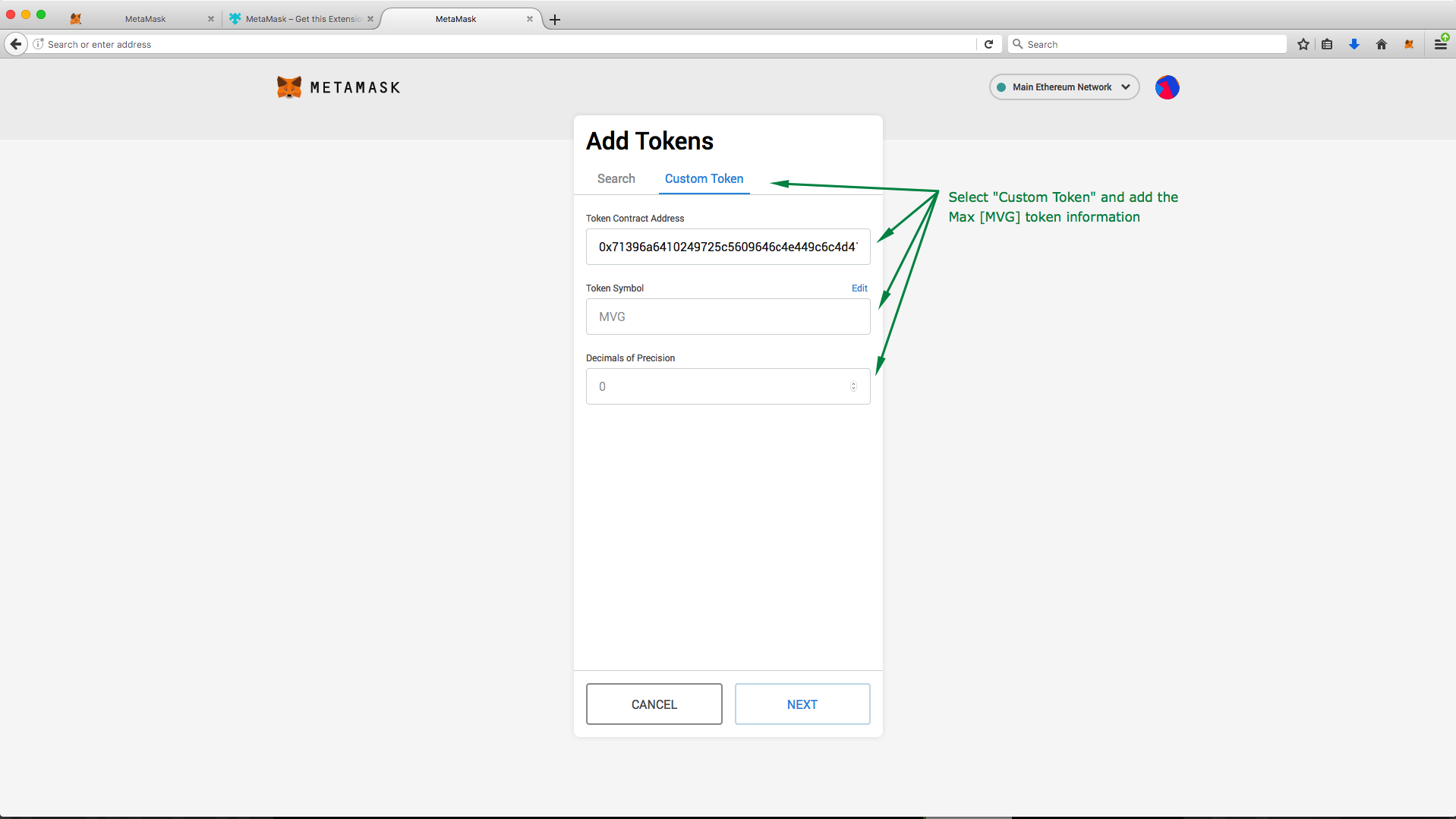 <h3>5. Complete! Click "Add Tokens" to complete the process.</h3> If you are simply looking to store your MVG, the tutorial ends here! You may learn how to send these tokens to a new address by following Part 4 of this tutorial. 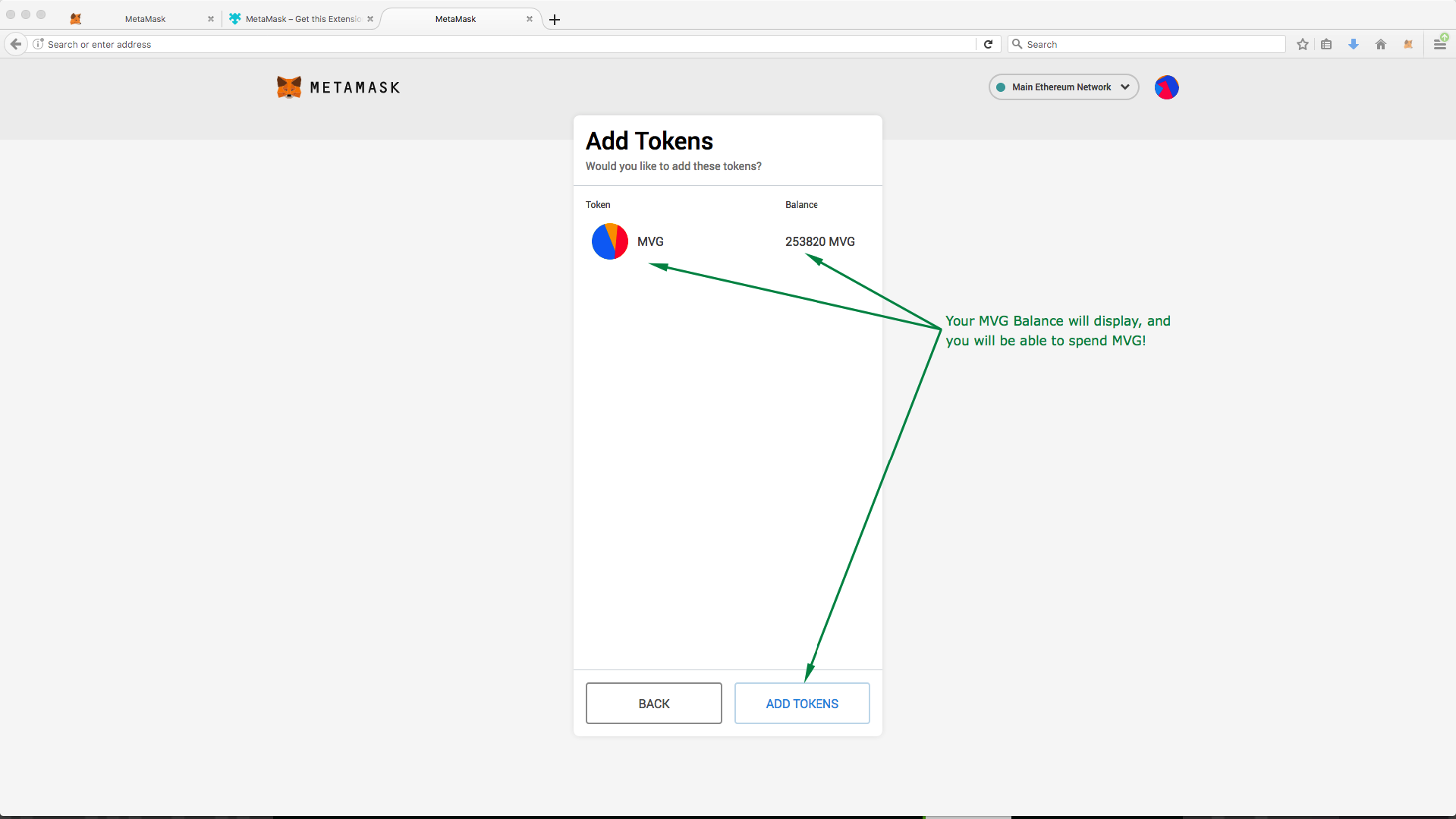 --- <h1>Part 4: How to send ERC-20 tokens from MetaMask</h1> <h3>1. Select the token you would like to transfer, and click "Send".</h3> Ensure you have a sufficient ETH balance for fees! 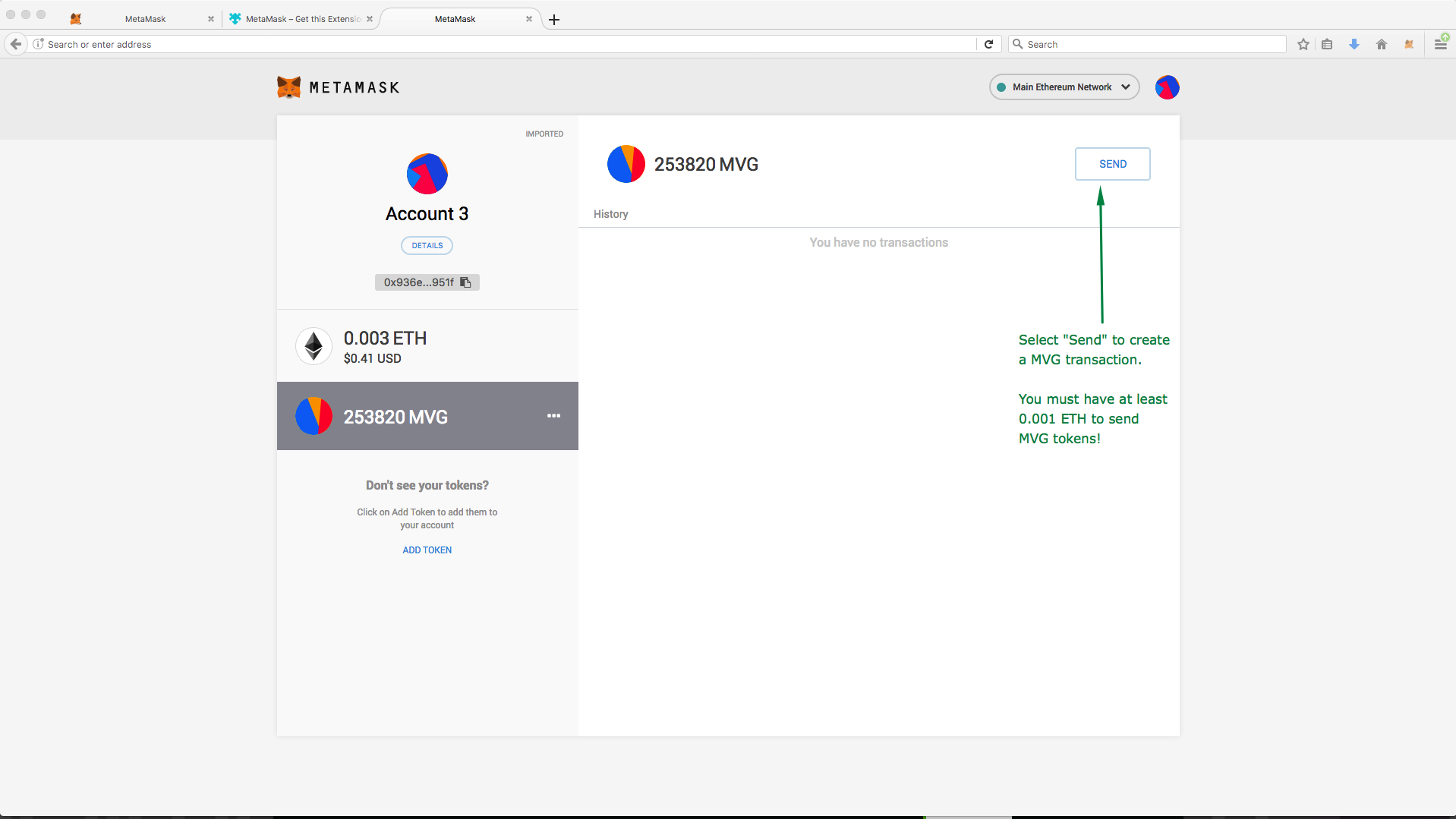 <h3>2. Fill in the transaction information</h3> **Ensure this information is correct as in most cases, it is irreversible!** 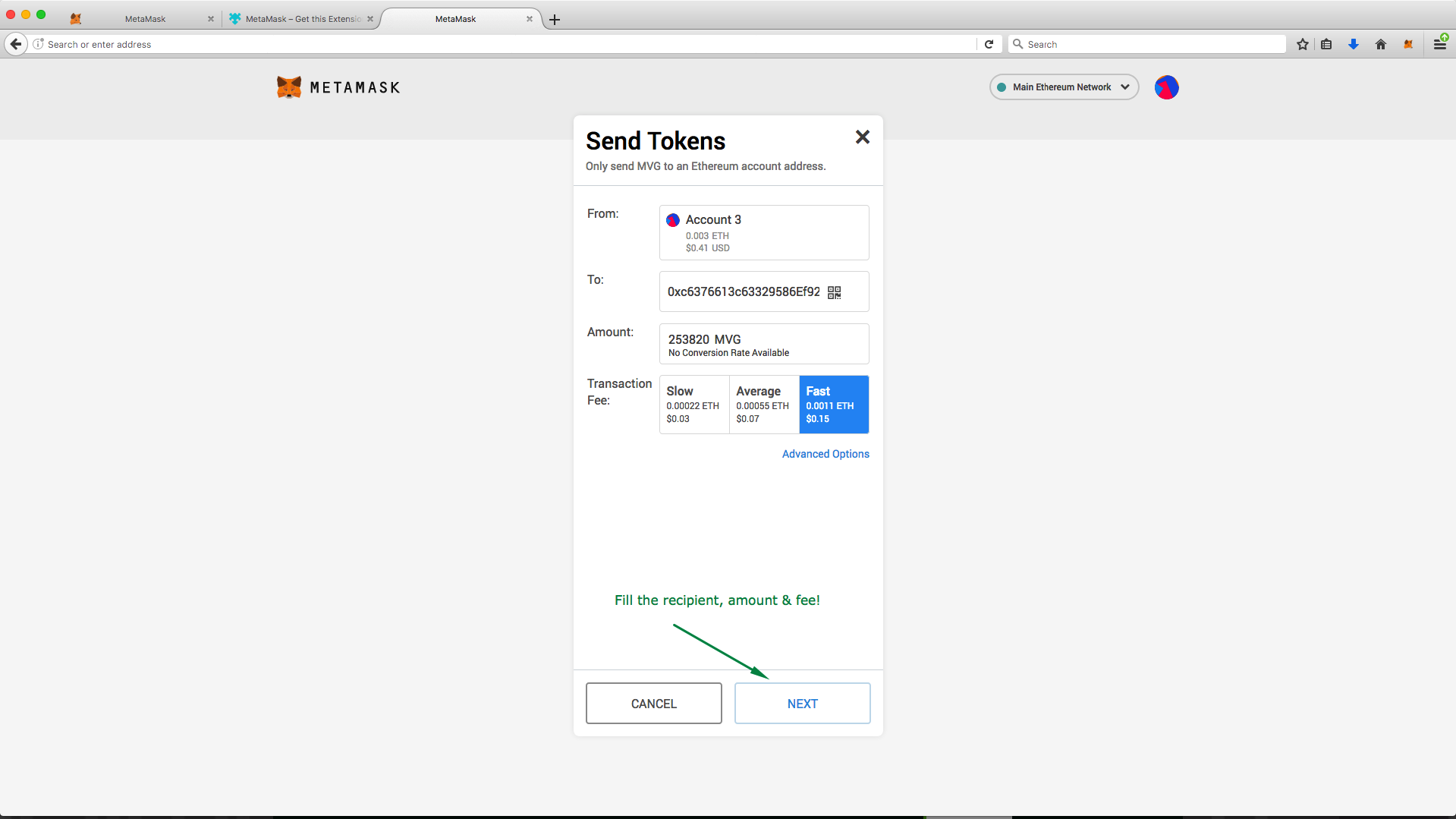 <h3>3. Confirm the transaction information is correct, then click "Confirm" to send!</h3> 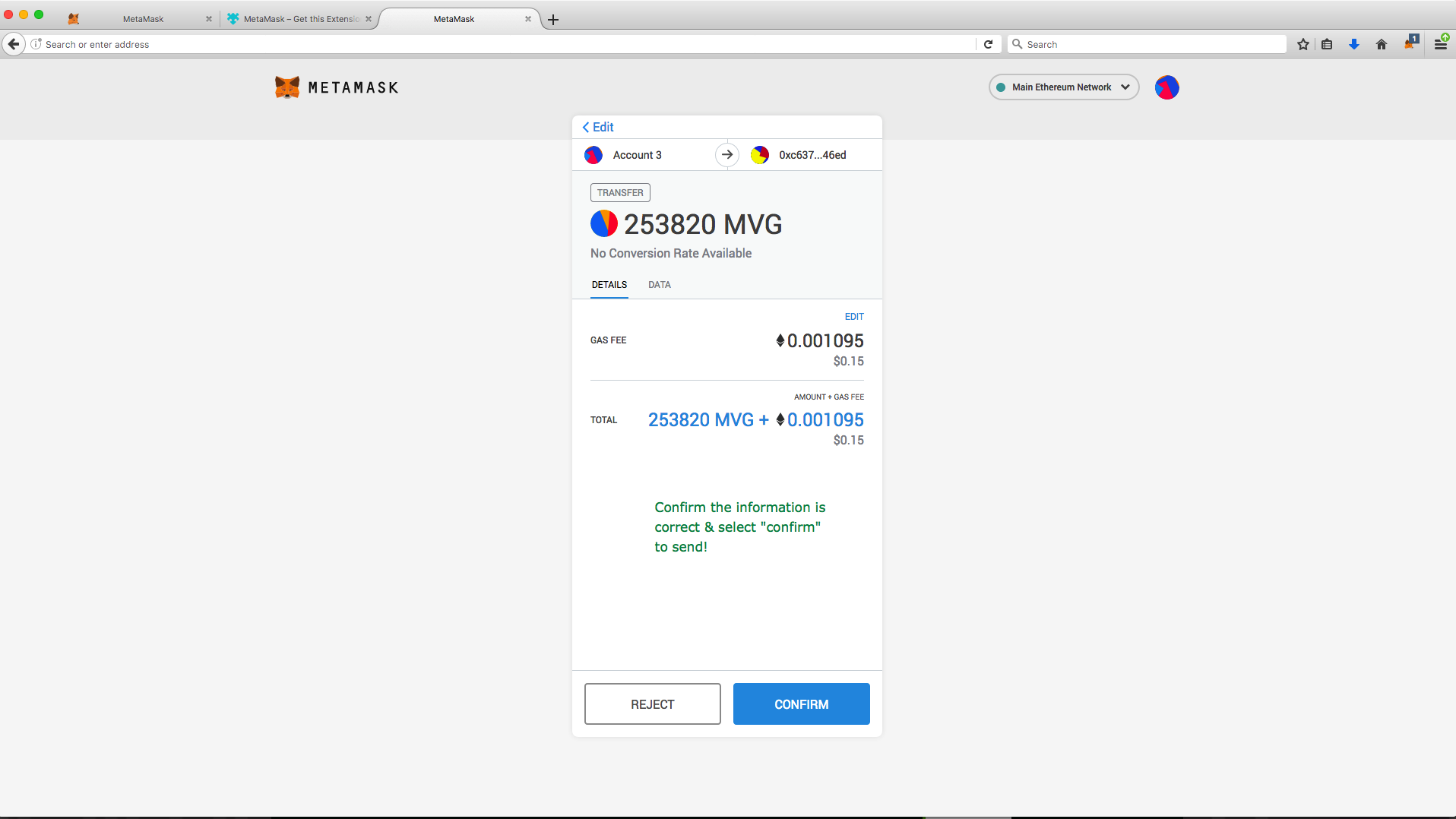 <h3>4. Success!</h3> Your transaction will appear in your recent transactions, which you can then verify on Etherscan. 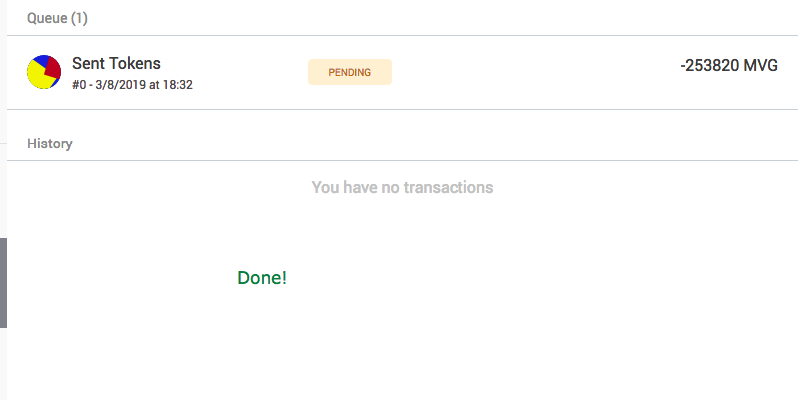 For priority support or help with other wallets, visit our telegram: https://t.me/discussmvg |
| json metadata | {"tags":["mvg","metamask","erc20","import","keystore"],"image":["https://cdn.steemitimages.com/DQmNh6S64xS5V4QJyo2Fq4q3HkB2MueG7LcoEzur7P8aiZ8/keystore1.png","https://cdn.steemitimages.com/DQmWoPi7ZB4ciKHYCyHvFhKTcS7HGm4xepiNgBVXoqhiJ8T/keystore2.png","https://cdn.steemitimages.com/DQmakQgUUm4Q3m77N4YJFr76AZKzZPYV12N2PAX9BRTvApB/meta1.png","https://cdn.steemitimages.com/DQmb3AcVRmz5izBns6CFctgCdKBeyNY8GwmGU4fYZ188A1K/meta3.png","https://cdn.steemitimages.com/DQmV1i5skhtonnPrwvvmgjhDngFhoUCrEUaj77aLdXjQ3ZX/meta4.png","https://cdn.steemitimages.com/DQmbHHarapnnMPqsECETboyyxPmzsL1Xg3WVqUaSCTWUgdH/meta5.png","https://cdn.steemitimages.com/DQmPfPfHpT4YxcGTQe8RFhh93hALSPwsbuQa89GEiCrJnkh/meta6.png","https://cdn.steemitimages.com/DQmUt8dJio2rja5fgqZTrgTM1TxbnpR65D4uNA9WfUkdtgf/meta7.png","https://cdn.steemitimages.com/DQmT1439VUAfHjp6SJTSYCrheF4NsjzzWZfAFsB8mshPY98/meta8.png","https://cdn.steemitimages.com/DQmTvxGtqSHg178aDbpfP6jwHYSrgwSoxFujZ8nqu3HT2jL/meta9.png","https://cdn.steemitimages.com/DQmTmmqQ9euBVKkwT9vZF6d2jPHrGRzMDTDjdmb9cvz1FJN/meta10.png","https://cdn.steemitimages.com/DQmQgjAnnxVTCg1V73s6bhJtNqm3bFg6zXDTFujqsfmeR9T/meta11.png","https://cdn.steemitimages.com/DQmYhJF1YDkj7uor1UkACE7dKnV82osRhqvtWibkHER6Yxw/meta12.png","https://cdn.steemitimages.com/DQmYGuXcU1PK5rojEeHt62UDYHZtXsqb9LFH6CizNgajA5c/meta13.png","https://cdn.steemitimages.com/DQmQ7u4YvmMFePi5N8Et4WdYRnRkjFxaxgncYD6ZGvfP1jz/meta14.png"],"links":["https://metamask.io","https://t.me/discussmvg"],"app":"steemit/0.1","format":"markdown"} |
| Transaction Info | Block #30993321/Trx 37282fed17cd53d7b539f26a92e99ad37c54d1ac |
View Raw JSON Data
{
"trx_id": "37282fed17cd53d7b539f26a92e99ad37c54d1ac",
"block": 30993321,
"trx_in_block": 22,
"op_in_trx": 0,
"virtual_op": 0,
"timestamp": "2019-03-09T05:10:27",
"op": [
"comment",
{
"parent_author": "",
"parent_permlink": "mvg",
"author": "maxvestgroup",
"permlink": "how-to-import-maxvest-keystore-json-file-to-metamask-browser-wallet",
"title": "How to import Maxvest Keystore / JSON file to MetaMask Browser Wallet",
"body": "Hello Maxvest clients!\n\nBelow is a tutorial on how to import your Keystore file to your MetaMask.io browser wallet, so that you are able to store, send and receive Max [MVG] Tokens quickly & easily in preparation for our upcoming exchange listings. \n\n**Please Note**: This tutorial is only for users who **have not** modified the ETH address for attached to their account.\n\n<h3>This tutorial is broken down into 4 parts. </h3>\n**Part 1:** Downloading your Keystore file from your Maxvest Account\n**Part 2:** New Users: Setting up your MetaMask wallet.\n**Part 3:** Importing your Keystore / JSON file to your MetaMask wallet.\n**Part 4:** How to send tokens from MetaMask. \n\nFor users who do not hold Max [MVG] or do not have an account at Maxvest.io, you may skip to **Part 2** to find out how to import a Keystore / JSON file to MetaMask.io, and to **Part 3** to find out how to send ERC-20 tokens from MetaMask.io after you have successfully imported your keystore / json file.\n\n---\n\n<h2>Part 1: Downloading your Keystore file from your Maxvest account</h2>\n**1. Firstly, login to your Maxvest Account, and navigate to \"Edit Account\" .**\n\n\n**2. If you have not edited your ETH address since creating your account, a \"Download Encrypted Keystore\" link will be available for you to download, to import to a supported wallet.**\n\n\n---\n\n<h1>Part 2: New Users: Setting up your MetaMask wallet</h1>\n\n<h3>1. Visit https://metamask.io to download the MetaMask Browser Add-on Wallet for your browser.</h3>\n\n\n<h3>2. Once the add-on is added, you will be taken to the setup window. Click continue to begin setting up your MetaMask wallet.</h3>\n\n\n<h3>3. Set a secure password for your wallet (Do not forget! Used to unlock your wallet each time your browser is opened.)</h3>\n\n\n<h3>4. Securely store your Secret Phrase.</h3>\n**This phrase can be used on any MetaMask support browser to recover your wallet! Keep this phrase safe!**\n\n\n\n**Done!** You can now use the MetaMask browser wallet in the add-on popup or from the browser interface. \n\n---\n\n<h1>Part 3: Importing Keystore / JSON file to MyEtherWallet.com</h1>\n\n<h3>1. Click your avatar & then \"Import\" from the drop-down.</h3>\n\n\n<h3>2. Select \"JSON\", import your keystore file & decrypt/unlock with your Maxvest.io account password.</h3>\n\n\n<h3>3. Select \"Add Custom Token\" to find your Max [MVG] ERC-20 Token.</h3>\n\n\n<h3>4. Enter the following information to add MVG to your wallets supported tokens.</h3>\n**Contract Address:** 0x71396a6410249725c5609646c4e449c6c4d41e27\n**Token Symbol:** MVG\n**Decimals:** 0\n\n\n<h3>5. Complete! Click \"Add Tokens\" to complete the process.</h3>\nIf you are simply looking to store your MVG, the tutorial ends here! You may learn how to send these tokens to a new address by following Part 4 of this tutorial.\n\n\n---\n\n<h1>Part 4: How to send ERC-20 tokens from MetaMask</h1>\n\n<h3>1. Select the token you would like to transfer, and click \"Send\".</h3>\nEnsure you have a sufficient ETH balance for fees!\n\n\n<h3>2. Fill in the transaction information</h3>\n**Ensure this information is correct as in most cases, it is irreversible!**\n\n\n<h3>3. Confirm the transaction information is correct, then click \"Confirm\" to send!</h3>\n\n\n<h3>4. Success!</h3>\nYour transaction will appear in your recent transactions, which you can then verify on Etherscan.\n\n\nFor priority support or help with other wallets, visit our telegram: https://t.me/discussmvg",
"json_metadata": "{\"tags\":[\"mvg\",\"metamask\",\"erc20\",\"import\",\"keystore\"],\"image\":[\"https://cdn.steemitimages.com/DQmNh6S64xS5V4QJyo2Fq4q3HkB2MueG7LcoEzur7P8aiZ8/keystore1.png\",\"https://cdn.steemitimages.com/DQmWoPi7ZB4ciKHYCyHvFhKTcS7HGm4xepiNgBVXoqhiJ8T/keystore2.png\",\"https://cdn.steemitimages.com/DQmakQgUUm4Q3m77N4YJFr76AZKzZPYV12N2PAX9BRTvApB/meta1.png\",\"https://cdn.steemitimages.com/DQmb3AcVRmz5izBns6CFctgCdKBeyNY8GwmGU4fYZ188A1K/meta3.png\",\"https://cdn.steemitimages.com/DQmV1i5skhtonnPrwvvmgjhDngFhoUCrEUaj77aLdXjQ3ZX/meta4.png\",\"https://cdn.steemitimages.com/DQmbHHarapnnMPqsECETboyyxPmzsL1Xg3WVqUaSCTWUgdH/meta5.png\",\"https://cdn.steemitimages.com/DQmPfPfHpT4YxcGTQe8RFhh93hALSPwsbuQa89GEiCrJnkh/meta6.png\",\"https://cdn.steemitimages.com/DQmUt8dJio2rja5fgqZTrgTM1TxbnpR65D4uNA9WfUkdtgf/meta7.png\",\"https://cdn.steemitimages.com/DQmT1439VUAfHjp6SJTSYCrheF4NsjzzWZfAFsB8mshPY98/meta8.png\",\"https://cdn.steemitimages.com/DQmTvxGtqSHg178aDbpfP6jwHYSrgwSoxFujZ8nqu3HT2jL/meta9.png\",\"https://cdn.steemitimages.com/DQmTmmqQ9euBVKkwT9vZF6d2jPHrGRzMDTDjdmb9cvz1FJN/meta10.png\",\"https://cdn.steemitimages.com/DQmQgjAnnxVTCg1V73s6bhJtNqm3bFg6zXDTFujqsfmeR9T/meta11.png\",\"https://cdn.steemitimages.com/DQmYhJF1YDkj7uor1UkACE7dKnV82osRhqvtWibkHER6Yxw/meta12.png\",\"https://cdn.steemitimages.com/DQmYGuXcU1PK5rojEeHt62UDYHZtXsqb9LFH6CizNgajA5c/meta13.png\",\"https://cdn.steemitimages.com/DQmQ7u4YvmMFePi5N8Et4WdYRnRkjFxaxgncYD6ZGvfP1jz/meta14.png\"],\"links\":[\"https://metamask.io\",\"https://t.me/discussmvg\"],\"app\":\"steemit/0.1\",\"format\":\"markdown\"}"
}
]
}maxvestgroupdeleted a comment or post2019/03/08 08:58:03
maxvestgroupdeleted a comment or post
2019/03/08 08:58:03
| author | maxvestgroup |
| permlink | how-to-import-your-maxvest-keystore-to-myetherwalelt |
| Transaction Info | Block #30969085/Trx e9613a91ebf3acdeb7e5a87779e21a54c8513ff6 |
View Raw JSON Data
{
  "trx_id": "e9613a91ebf3acdeb7e5a87779e21a54c8513ff6",
  "block": 30969085,
  "trx_in_block": 12,
  "op_in_trx": 0,
  "virtual_op": 0,
  "timestamp": "2019-03-08T08:58:03",
  "op": [
    "delete_comment",
    {
      "author": "maxvestgroup",
      "permlink": "how-to-import-your-maxvest-keystore-to-myetherwalelt"
    }
  ]
}maxvestgrouppublished a new post: how-to-import-maxvest-keystore-json-file-to-myetherwallet2019/03/08 08:57:54
maxvestgrouppublished a new post: how-to-import-maxvest-keystore-json-file-to-myetherwallet
2019/03/08 08:57:54
| parent author | |
| parent permlink | maxvest |
| author | maxvestgroup |
| permlink | how-to-import-maxvest-keystore-json-file-to-myetherwallet |
| title | How to import Maxvest Keystore / JSON file to MyEtherWallet |
| body | Hello Maxvest clients! Below is a tutorial on how to import your Keystore file to your MyEtherWallet.com account, so that you are able to store, send and receive Max [MVG] Tokens quickly & easily in preparation for our exchange listings. **Please Note**: This tutorial is only for users who **have not** modified the ETH address for attached to their account. <h3>This tutorial is broken down into 3 parts. </h3> **Part 1:** Downloading your Keystore file from your Maxvest Account **Part 2:** Importing Keystore / JSON file to MyEtherWallet.com **Part 3:** How to send tokens from MyEtherWallet For users who do not hold Max [MVG] or do not have an account at Maxvest.io, you may skip to **Part 2** to find out how to import a Keystore / JSON file to MyEtherWallet.com, and to **Part 3** to find out how to send ERC-20 tokens from MyEtherWallet.com after you have successfully imported your keystore / json file. <h2>Part 1: Downloading your Keystore file from your Maxvest account</h2> **1. Firstly, login to your Maxvest Account, and navigate to "Edit Account" .**  **2. If you have not edited your ETH address since creating your account, a "Download Encrypted Keystore" link will be available for you to download, to import to a supported wallet.**  <h1>Part 2: Importing Keystore / JSON file to MyEtherWallet.com</h1> <h3>1. Visit https://vintage.myetherwallet.com for the simplest import experience, and click "Send Ether & Tokens"</h3> 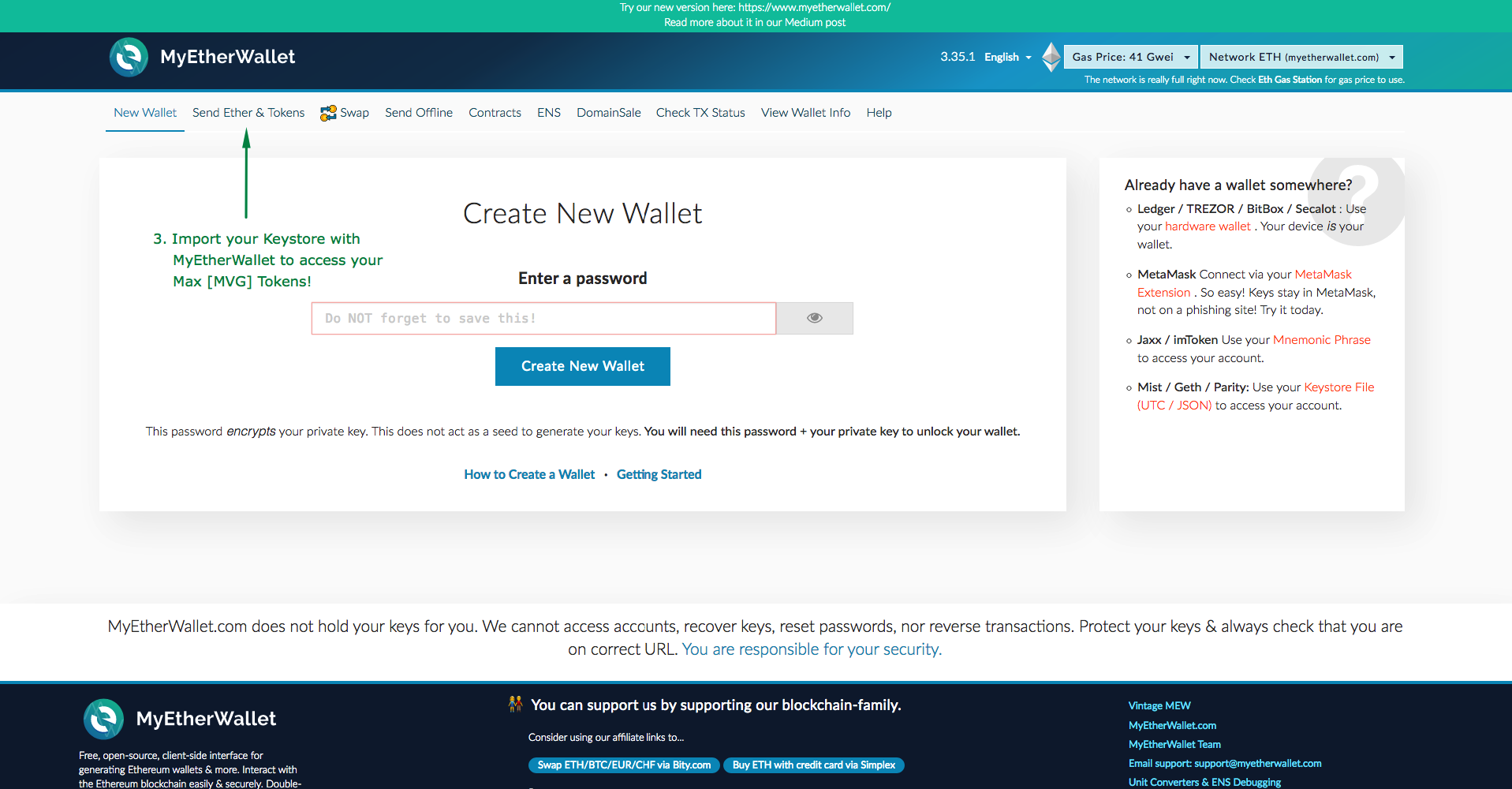 <h3>2. Select "Keystore / JSON File" and select the keystore file previously downloaded in Step 1 & 2</h3> 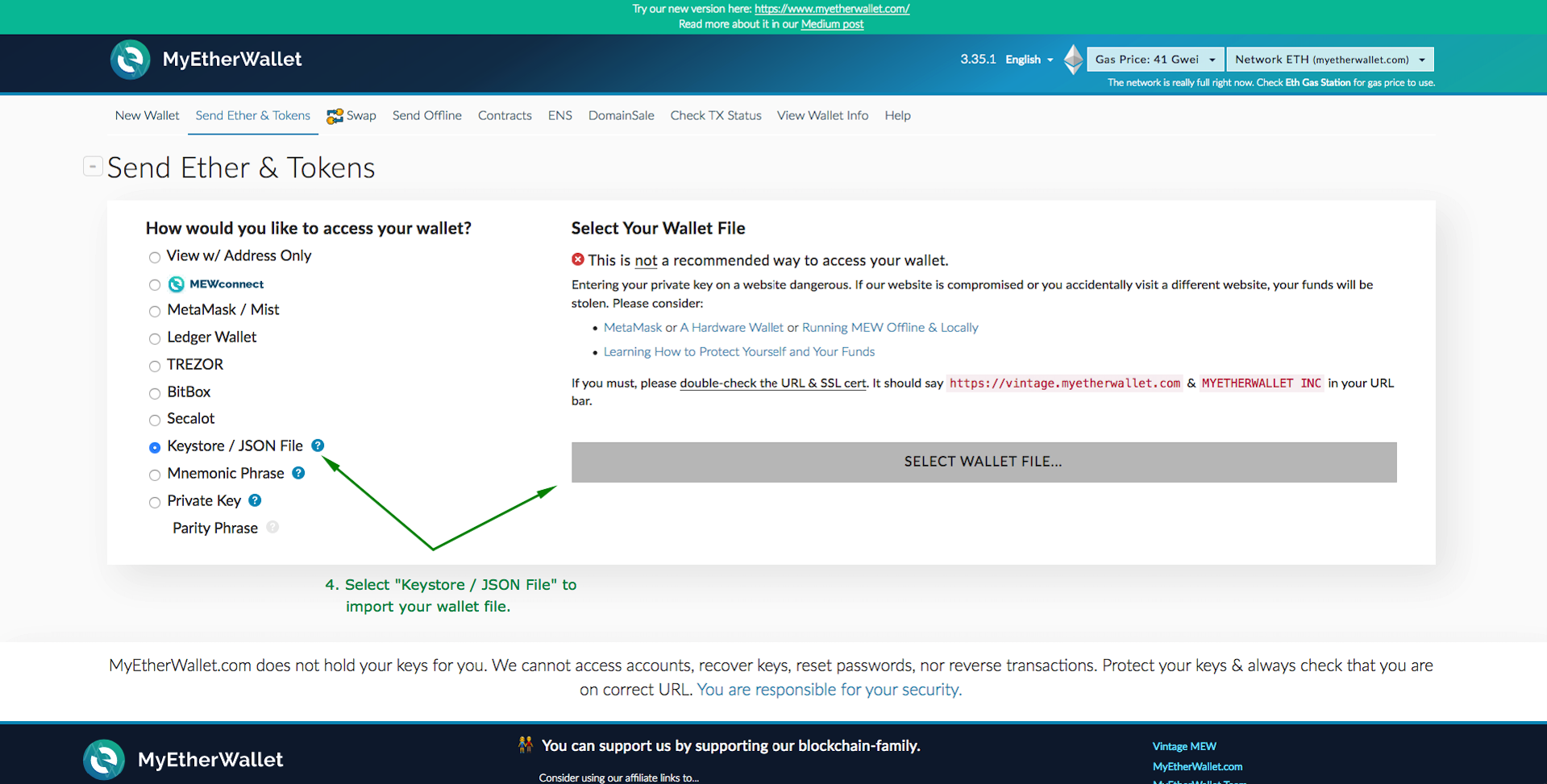 <h3>3. Use your Maxvest account password to decrypt your wallet</h3> 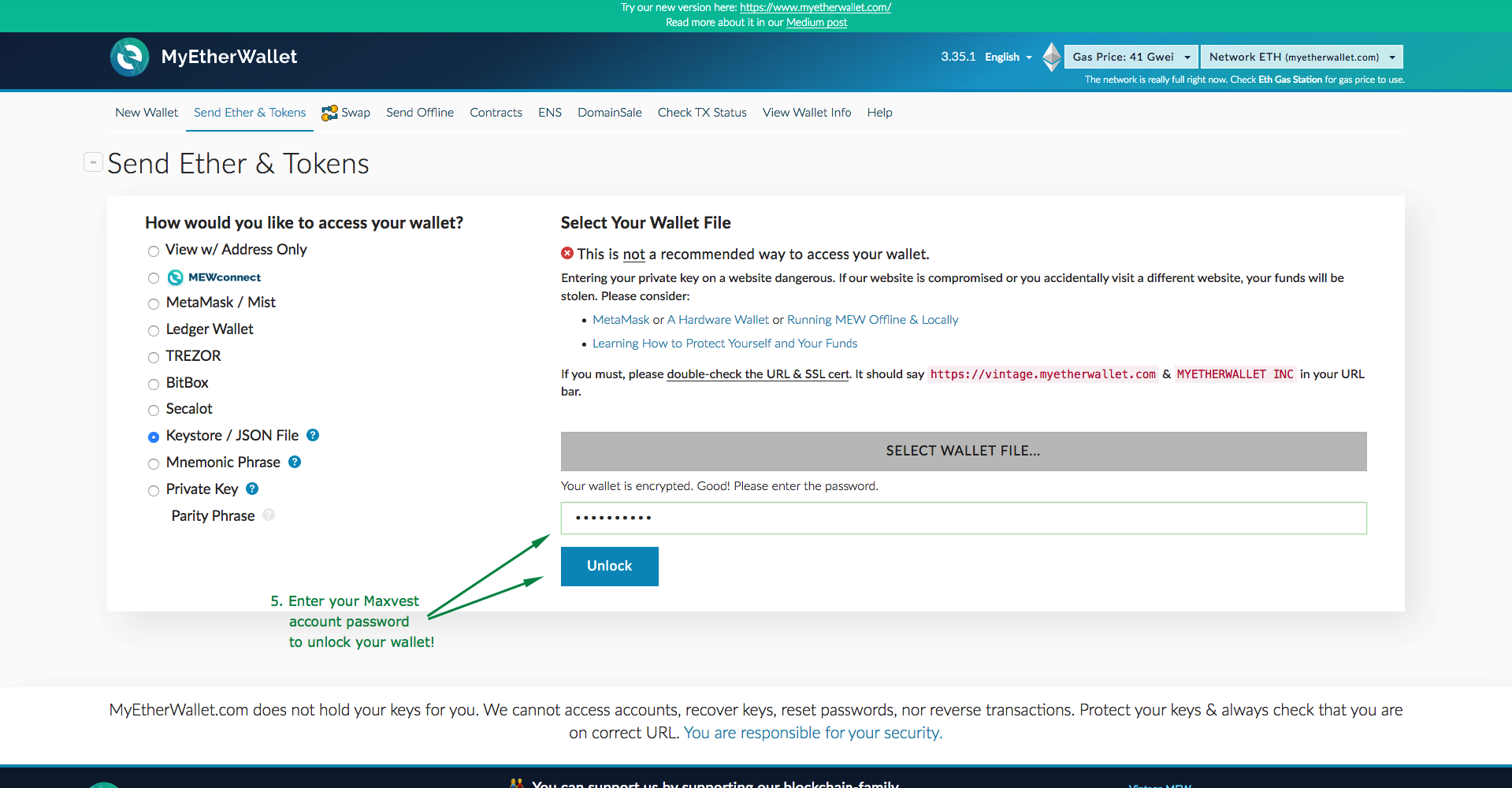 <h3>4. Click "Add Custom Token" and enter the following information to add MVG to your wallets supported tokens.</h3> **Contract Address:** 0x71396a6410249725c5609646c4e449c6c4d41e27 **Token Symbol:** MVG **Decimals:** 0 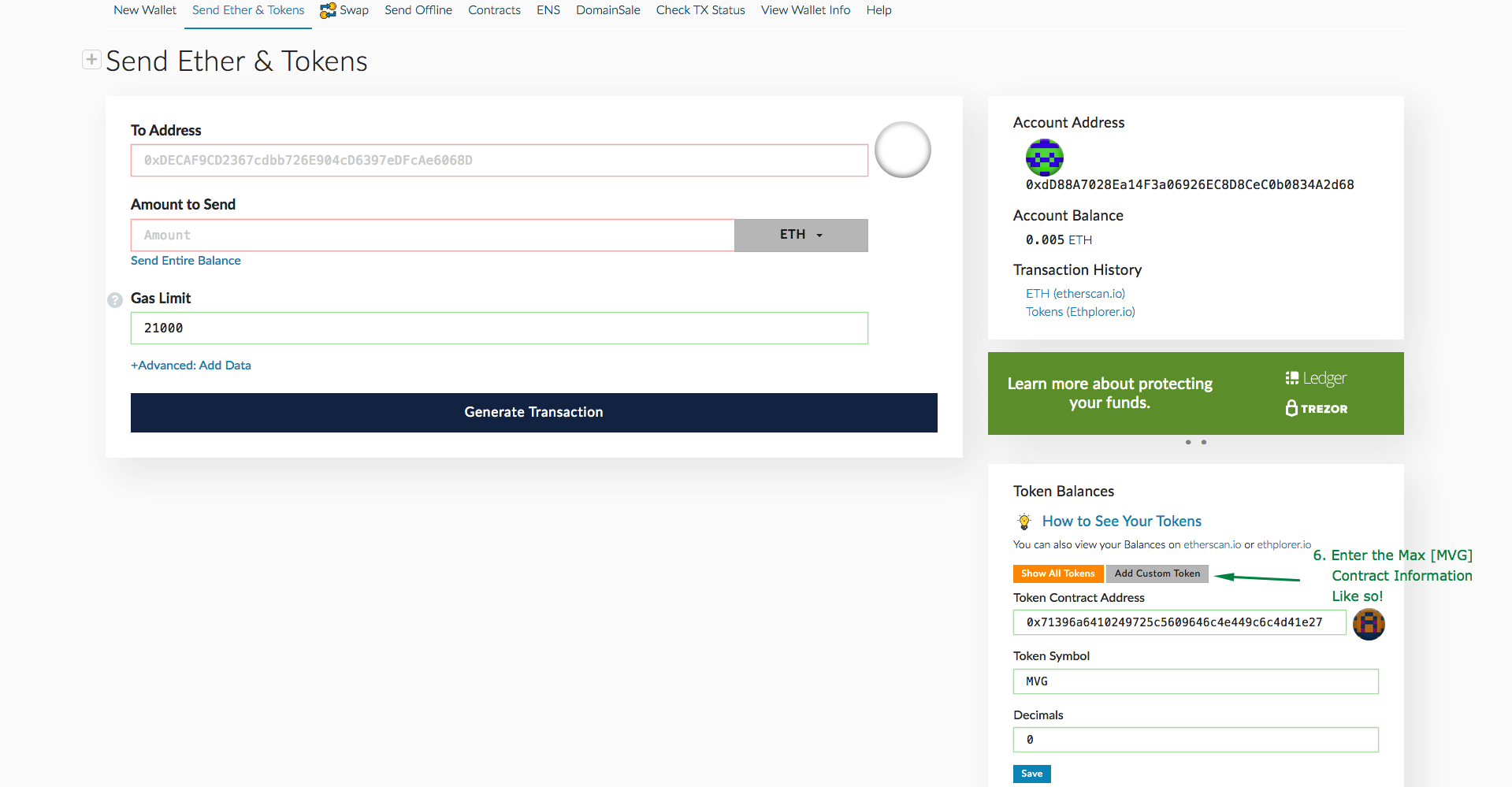 <h3>5. Done!</h3> If you are simply looking to store your MVG, the tutorial ends here! You may send these tokens to a new address by following the rest of this tutorial, or repeat this process to access your Max [MVG] tokens. 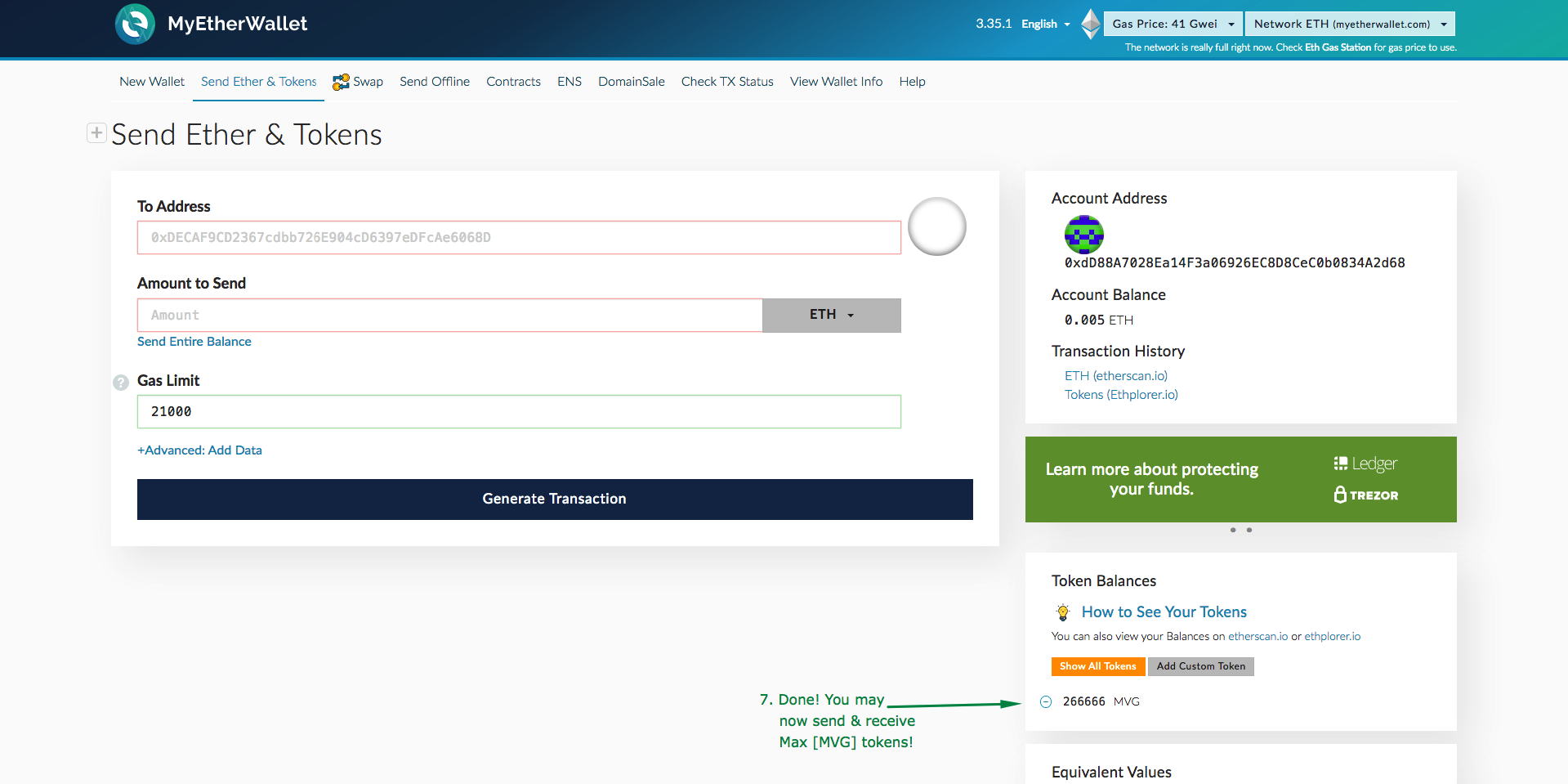 <h1>Part 3: How to send ERC-20 tokens from MyEtherWallet</h1> <h3>1. Select the token you would like to transfer, and fill in the appropriate information for your transaction.</h3> 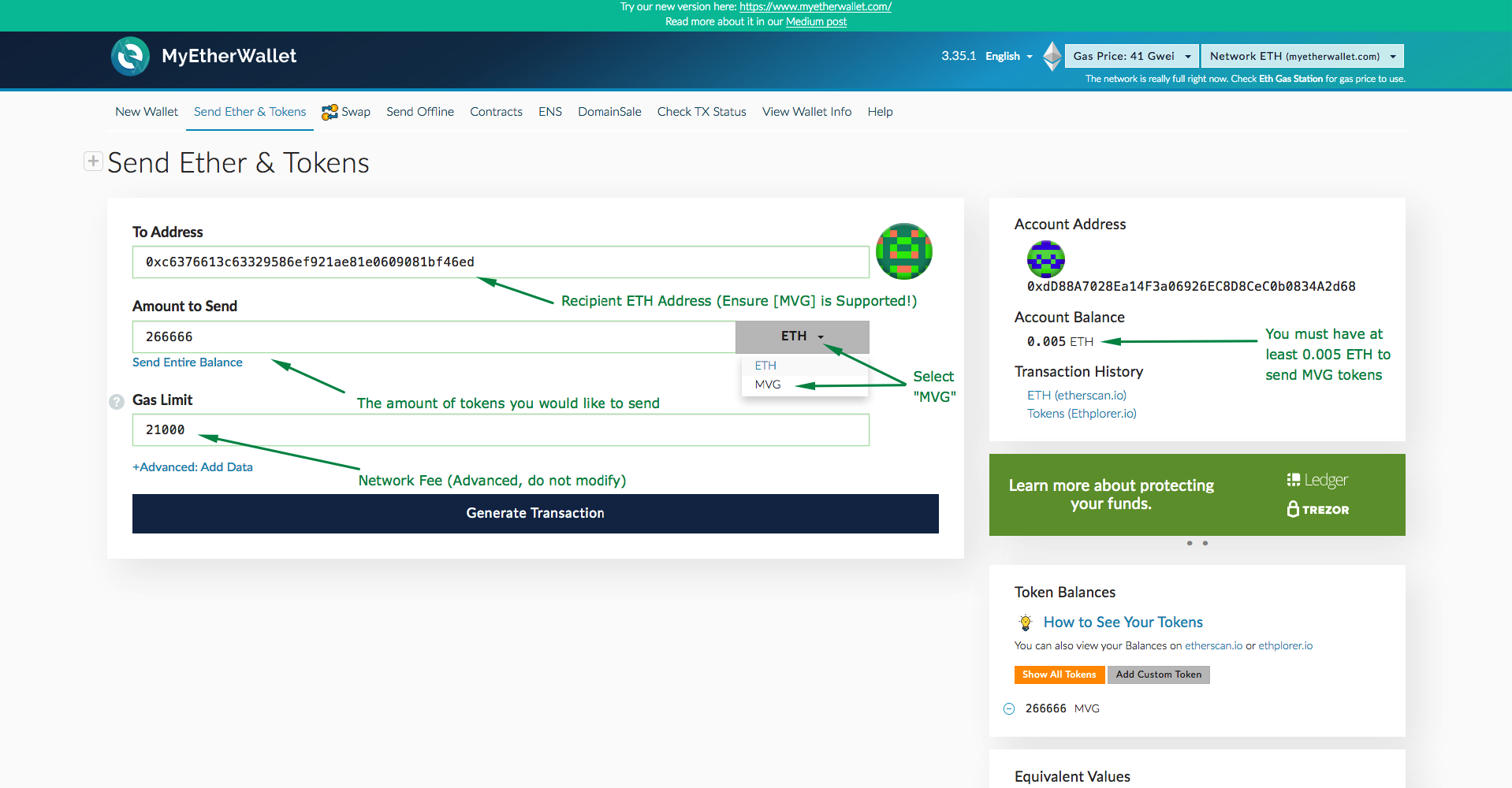 <h3>2. The network fee will be calculated once you click "Generate". You are now ready to send your transaction!</h3> 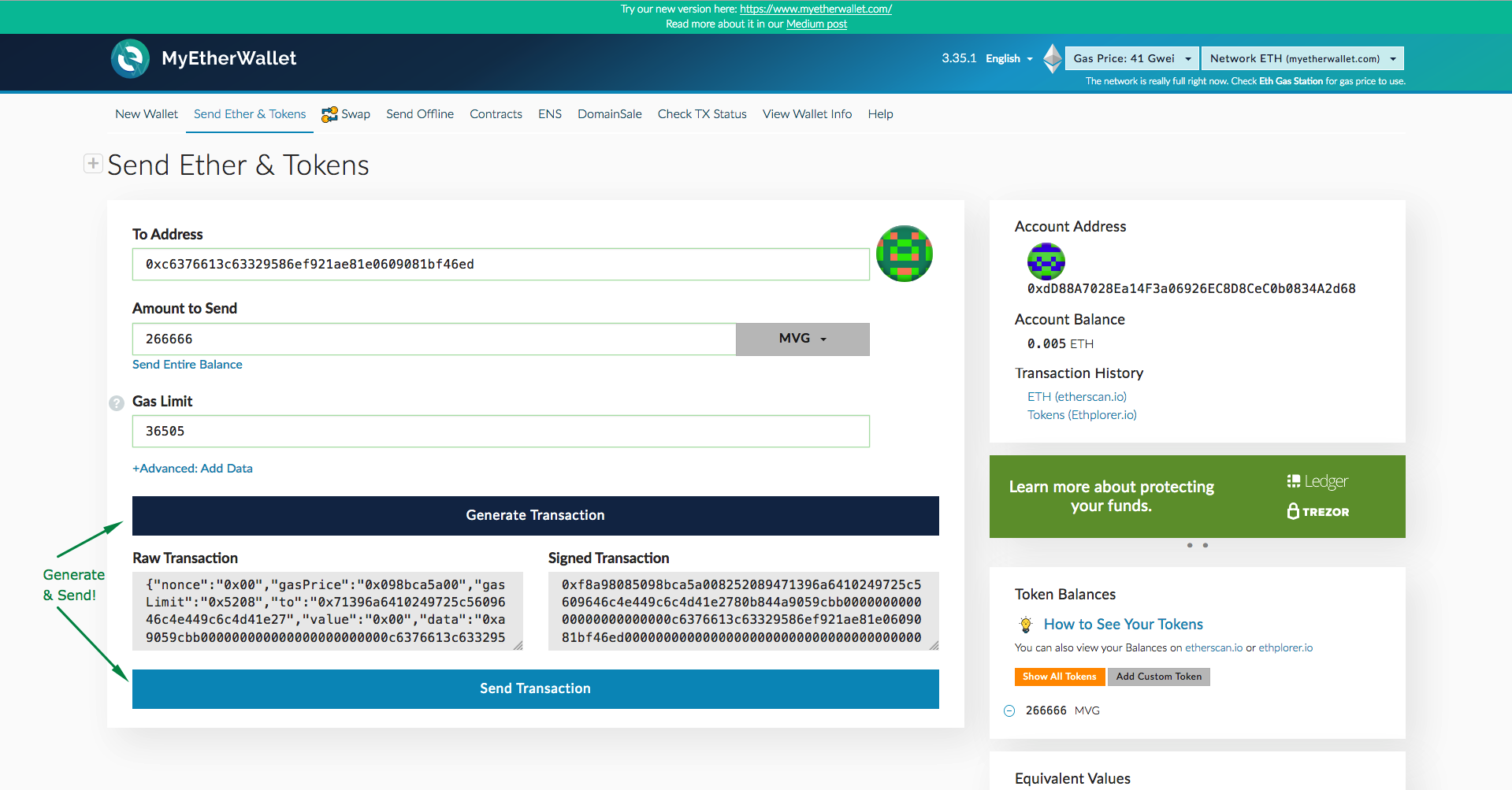 <h3>3. Ensure you are sending the correct amount of tokens to the correct address, as transactions are in most cases irreversible!</h3> 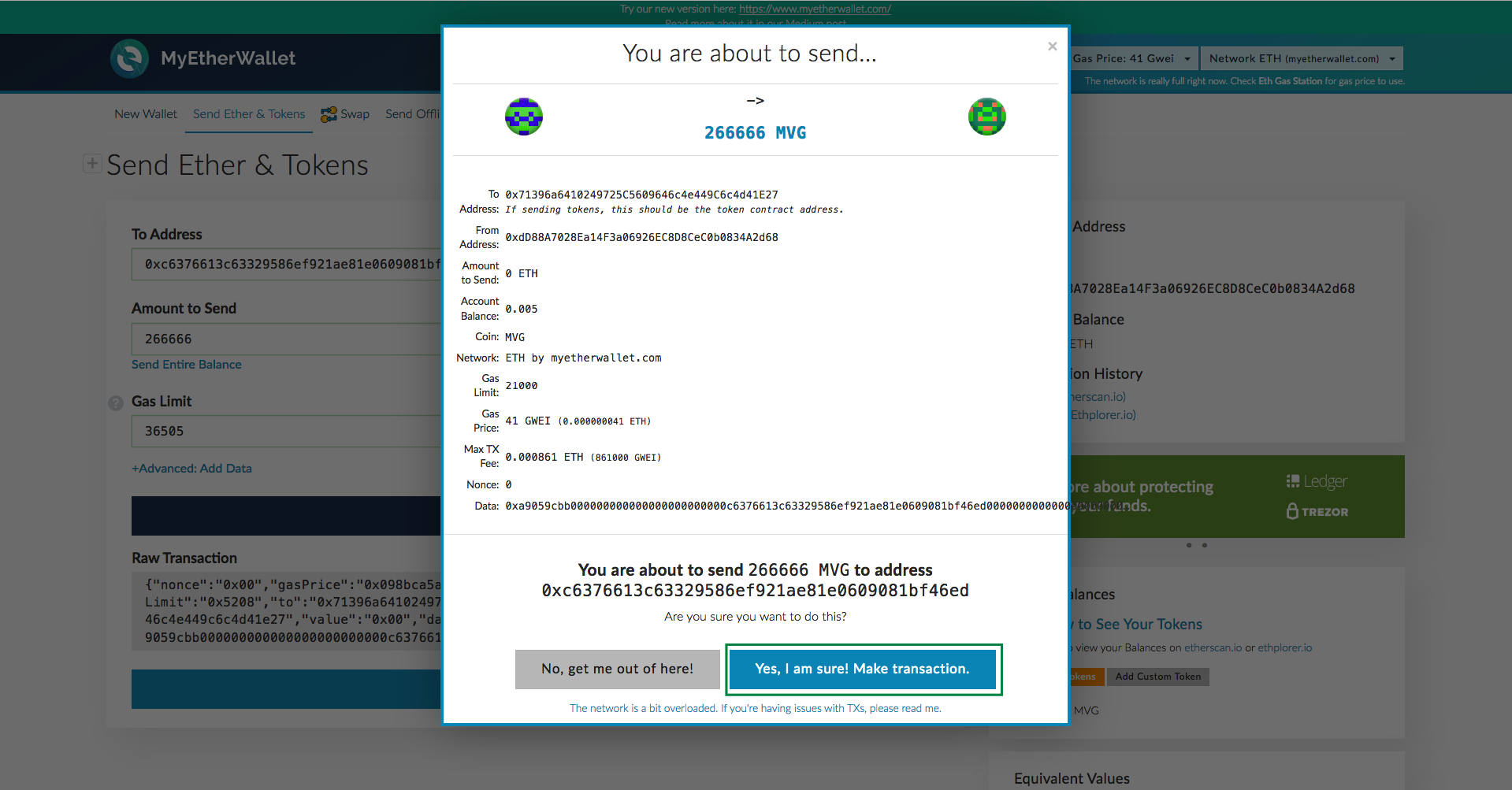 <h3>4. Success! Your transaction has been sent and can now be tracked on the Ethereum Blockchain for public transparency & verification</h3> 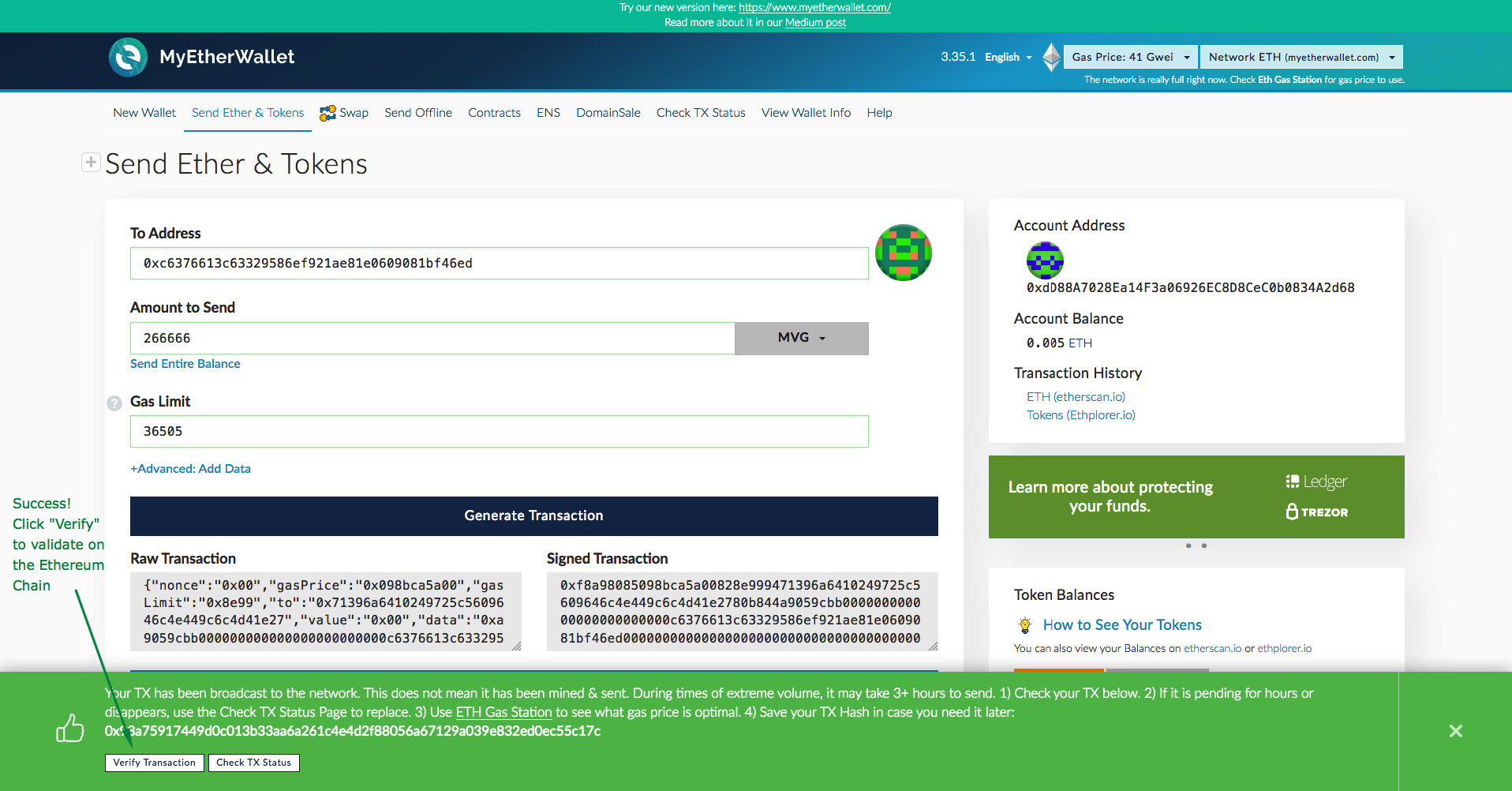 New updates about our MVG Token will be following soon! |
| json metadata | {"tags":["maxvest","mvg","mvgtoken","myetherwallet","erc20"],"image":["https://cdn.steemitimages.com/DQmNh6S64xS5V4QJyo2Fq4q3HkB2MueG7LcoEzur7P8aiZ8/keystore1.png","https://cdn.steemitimages.com/DQmWoPi7ZB4ciKHYCyHvFhKTcS7HGm4xepiNgBVXoqhiJ8T/keystore2.png","https://cdn.steemitimages.com/DQmUfEMirS2UwwUMEHU9jYrJEUVXQZ8ciY7Xpep8jUX5Fde/mew1.png","https://cdn.steemitimages.com/DQma9abEcJBgAHnrZ7LZ71zcxQ8hro1GLvBvnsFnZPu51yw/mew2.png","https://cdn.steemitimages.com/DQmRT82ReV9YLPz3ewah1F5pJSuJEmE7ktk4YqqF78P9znn/mew3.png","https://cdn.steemitimages.com/DQmVUitCirrnXdCARDJfkKrHSFbU745UPG3BXQ4gMx4gvbL/mew4.png","https://cdn.steemitimages.com/DQmW3pXZvBRCRmErG7SAYWfSaE2RX6XbhM9H95VEKrJYJoV/mew5.png","https://cdn.steemitimages.com/DQmTv2VeboweYEYNnkmS7qxczaZAeqA2KkCvmrXRqqptYro/mew6.png","https://cdn.steemitimages.com/DQmRohFxNqMzwgbRF7tXar4v15GNfcmAEhDnNDjafuz8yow/mew7.png","https://cdn.steemitimages.com/DQmfJiAEYwXZY7QzGmhtFt4Sppeg1G7vECFy8EewKM42XAA/mew8.png","https://cdn.steemitimages.com/DQmdfqAocpthhiPjD2DX4PXNEuNCsFra2TqWsgjiAXkuXLd/mew9.png"],"links":["https://vintage.myetherwallet.com"],"app":"steemit/0.1","format":"markdown"} |
| Transaction Info | Block #30969082/Trx 429ec78fb343f96e6dea7fe57420e9e05b535b7e |
View Raw JSON Data
{
"trx_id": "429ec78fb343f96e6dea7fe57420e9e05b535b7e",
"block": 30969082,
"trx_in_block": 12,
"op_in_trx": 0,
"virtual_op": 0,
"timestamp": "2019-03-08T08:57:54",
"op": [
"comment",
{
"parent_author": "",
"parent_permlink": "maxvest",
"author": "maxvestgroup",
"permlink": "how-to-import-maxvest-keystore-json-file-to-myetherwallet",
"title": "How to import Maxvest Keystore / JSON file to MyEtherWallet",
"body": "Hello Maxvest clients!\n\nBelow is a tutorial on how to import your Keystore file to your MyEtherWallet.com account, so that you are able to store, send and receive Max [MVG] Tokens quickly & easily in preparation for our exchange listings. \n\n**Please Note**: This tutorial is only for users who **have not** modified the ETH address for attached to their account.\n\n<h3>This tutorial is broken down into 3 parts. </h3>\n**Part 1:** Downloading your Keystore file from your Maxvest Account\n**Part 2:** Importing Keystore / JSON file to MyEtherWallet.com\n**Part 3:** How to send tokens from MyEtherWallet\n\nFor users who do not hold Max [MVG] or do not have an account at Maxvest.io, you may skip to **Part 2** to find out how to import a Keystore / JSON file to MyEtherWallet.com, and to **Part 3** to find out how to send ERC-20 tokens from MyEtherWallet.com after you have successfully imported your keystore / json file.\n\n\n<h2>Part 1: Downloading your Keystore file from your Maxvest account</h2>\n**1. Firstly, login to your Maxvest Account, and navigate to \"Edit Account\" .**\n\n\n**2. If you have not edited your ETH address since creating your account, a \"Download Encrypted Keystore\" link will be available for you to download, to import to a supported wallet.**\n\n\n\n<h1>Part 2: Importing Keystore / JSON file to MyEtherWallet.com</h1>\n\n<h3>1. Visit https://vintage.myetherwallet.com for the simplest import experience, and click \"Send Ether & Tokens\"</h3>\n\n\n<h3>2. Select \"Keystore / JSON File\" and select the keystore file previously downloaded in Step 1 & 2</h3>\n\n\n<h3>3. Use your Maxvest account password to decrypt your wallet</h3>\n\n\n<h3>4. Click \"Add Custom Token\" and enter the following information to add MVG to your wallets supported tokens.</h3>\n**Contract Address:** 0x71396a6410249725c5609646c4e449c6c4d41e27\n**Token Symbol:** MVG\n**Decimals:** 0\n\n \n\n<h3>5. Done!</h3>\nIf you are simply looking to store your MVG, the tutorial ends here! You may send these tokens to a new address by following the rest of this tutorial, or repeat this process to access your Max [MVG] tokens.\n\n\n<h1>Part 3: How to send ERC-20 tokens from MyEtherWallet</h1>\n\n<h3>1. Select the token you would like to transfer, and fill in the appropriate information for your transaction.</h3>\n\n\n\n<h3>2. The network fee will be calculated once you click \"Generate\". You are now ready to send your transaction!</h3>\n\n\n<h3>3. Ensure you are sending the correct amount of tokens to the correct address, as transactions are in most cases irreversible!</h3>\n\n\n<h3>4. Success! Your transaction has been sent and can now be tracked on the Ethereum Blockchain for public transparency & verification</h3>\n\n\nNew updates about our MVG Token will be following soon!",
"json_metadata": "{\"tags\":[\"maxvest\",\"mvg\",\"mvgtoken\",\"myetherwallet\",\"erc20\"],\"image\":[\"https://cdn.steemitimages.com/DQmNh6S64xS5V4QJyo2Fq4q3HkB2MueG7LcoEzur7P8aiZ8/keystore1.png\",\"https://cdn.steemitimages.com/DQmWoPi7ZB4ciKHYCyHvFhKTcS7HGm4xepiNgBVXoqhiJ8T/keystore2.png\",\"https://cdn.steemitimages.com/DQmUfEMirS2UwwUMEHU9jYrJEUVXQZ8ciY7Xpep8jUX5Fde/mew1.png\",\"https://cdn.steemitimages.com/DQma9abEcJBgAHnrZ7LZ71zcxQ8hro1GLvBvnsFnZPu51yw/mew2.png\",\"https://cdn.steemitimages.com/DQmRT82ReV9YLPz3ewah1F5pJSuJEmE7ktk4YqqF78P9znn/mew3.png\",\"https://cdn.steemitimages.com/DQmVUitCirrnXdCARDJfkKrHSFbU745UPG3BXQ4gMx4gvbL/mew4.png\",\"https://cdn.steemitimages.com/DQmW3pXZvBRCRmErG7SAYWfSaE2RX6XbhM9H95VEKrJYJoV/mew5.png\",\"https://cdn.steemitimages.com/DQmTv2VeboweYEYNnkmS7qxczaZAeqA2KkCvmrXRqqptYro/mew6.png\",\"https://cdn.steemitimages.com/DQmRohFxNqMzwgbRF7tXar4v15GNfcmAEhDnNDjafuz8yow/mew7.png\",\"https://cdn.steemitimages.com/DQmfJiAEYwXZY7QzGmhtFt4Sppeg1G7vECFy8EewKM42XAA/mew8.png\",\"https://cdn.steemitimages.com/DQmdfqAocpthhiPjD2DX4PXNEuNCsFra2TqWsgjiAXkuXLd/mew9.png\"],\"links\":[\"https://vintage.myetherwallet.com\"],\"app\":\"steemit/0.1\",\"format\":\"markdown\"}"
}
]
}maxvestgrouppublished a new post: how-to-import-your-maxvest-keystore-to-myetherwalelt2019/03/08 08:57:00
maxvestgrouppublished a new post: how-to-import-your-maxvest-keystore-to-myetherwalelt
2019/03/08 08:57:00
| parent author | |
| parent permlink | maxvest |
| author | maxvestgroup |
| permlink | how-to-import-your-maxvest-keystore-to-myetherwalelt |
| title | How to import Maxvest Keystore / JSON file to MyEtherWallet |
| body | Hello Maxvest clients! Below is a tutorial on how to import your Keystore file to your MyEtherWallet.com account, so that you are able to store, send and receive Max [MVG] Tokens quickly & easily in preparation for our exchange listings. **Please Note**: This tutorial is only for users who **have not** modified the ETH address for attached to their account. <h3>This tutorial is broken down into 3 parts. </h3> **Part 1:** Downloading your Keystore file from your Maxvest Account **Part 2:** Importing Keystore / JSON file to MyEtherWallet.com **Part 3:** How to send tokens from MyEtherWallet For users who do not hold Max [MVG] or do not have an account at Maxvest.io, you may skip to **Part 2** to find out how to import a Keystore / JSON file to MyEtherWallet.com, and to **Part 3** to find out how to send ERC-20 tokens from MyEtherWallet.com after you have successfully imported your keystore / json file. <h2>Part 1: Downloading your Keystore file from your Maxvest account</h2> **1. Firstly, login to your Maxvest Account, and navigate to "Edit Account" .**  **2. If you have not edited your ETH address since creating your account, a "Download Encrypted Keystore" link will be available for you to download, to import to a supported wallet.**  <h1>Part 2: Importing Keystore / JSON file to MyEtherWallet.com</h1> <h3>1. Visit https://vintage.myetherwallet.com for the simplest import experience, and click "Send Ether & Tokens"</h3>  <h3>2. Select "Keystore / JSON File" and select the keystore file previously downloaded in Step 1 & 2</h3>  <h3>3. Use your Maxvest account password to decrypt your wallet</h3>  <h3>4. Click "Add Custom Token" and enter the following information to add MVG to your wallets supported tokens.</h3> **Contract Address:** 0x71396a6410249725c5609646c4e449c6c4d41e27 **Token Symbol:** MVG **Decimals:** 0  <h3>5. Done!</h3> If you are simply looking to store your MVG, the tutorial ends here! You may send these tokens to a new address by following the rest of this tutorial, or repeat this process to access your Max [MVG] tokens.  <h1>Part 3: How to send ERC-20 tokens from MyEtherWallet</h1> <h3>1. Select the token you would like to transfer, and fill in the appropriate information for your transaction.</h3>  <h3>2. The network fee will be calculated once you click "Generate". You are now ready to send your transaction!</h3>  <h3>3. Ensure you are sending the correct amount of tokens to the correct address, as transactions are in most cases irreversible!</h3>  <h3>4. Success! Your transaction has been sent and can now be tracked on the Ethereum Blockchain for public transparency & verification</h3>  |
| json metadata | {"tags":["maxvest","mvg","mvgtoken","myetherwallet","erc20"],"app":"steemit/0.1","format":"markdown","image":["https://cdn.steemitimages.com/DQmNh6S64xS5V4QJyo2Fq4q3HkB2MueG7LcoEzur7P8aiZ8/keystore1.png","https://cdn.steemitimages.com/DQmWoPi7ZB4ciKHYCyHvFhKTcS7HGm4xepiNgBVXoqhiJ8T/keystore2.png","https://cdn.steemitimages.com/DQmUfEMirS2UwwUMEHU9jYrJEUVXQZ8ciY7Xpep8jUX5Fde/mew1.png","https://cdn.steemitimages.com/DQma9abEcJBgAHnrZ7LZ71zcxQ8hro1GLvBvnsFnZPu51yw/mew2.png","https://cdn.steemitimages.com/DQmRT82ReV9YLPz3ewah1F5pJSuJEmE7ktk4YqqF78P9znn/mew3.png","https://cdn.steemitimages.com/DQmVUitCirrnXdCARDJfkKrHSFbU745UPG3BXQ4gMx4gvbL/mew4.png","https://cdn.steemitimages.com/DQmW3pXZvBRCRmErG7SAYWfSaE2RX6XbhM9H95VEKrJYJoV/mew5.png","https://cdn.steemitimages.com/DQmTv2VeboweYEYNnkmS7qxczaZAeqA2KkCvmrXRqqptYro/mew6.png","https://cdn.steemitimages.com/DQmRohFxNqMzwgbRF7tXar4v15GNfcmAEhDnNDjafuz8yow/mew7.png","https://cdn.steemitimages.com/DQmfJiAEYwXZY7QzGmhtFt4Sppeg1G7vECFy8EewKM42XAA/mew8.png","https://cdn.steemitimages.com/DQmdfqAocpthhiPjD2DX4PXNEuNCsFra2TqWsgjiAXkuXLd/mew9.png"],"links":["https://vintage.myetherwallet.com"]} |
| Transaction Info | Block #30969064/Trx 8f9b58542f27a567ae8a8f70edd69ce586437e0c |
View Raw JSON Data
{
"trx_id": "8f9b58542f27a567ae8a8f70edd69ce586437e0c",
"block": 30969064,
"trx_in_block": 3,
"op_in_trx": 0,
"virtual_op": 0,
"timestamp": "2019-03-08T08:57:00",
"op": [
"comment",
{
"parent_author": "",
"parent_permlink": "maxvest",
"author": "maxvestgroup",
"permlink": "how-to-import-your-maxvest-keystore-to-myetherwalelt",
"title": "How to import Maxvest Keystore / JSON file to MyEtherWallet",
"body": "Hello Maxvest clients!\n\nBelow is a tutorial on how to import your Keystore file to your MyEtherWallet.com account, so that you are able to store, send and receive Max [MVG] Tokens quickly & easily in preparation for our exchange listings. \n\n**Please Note**: This tutorial is only for users who **have not** modified the ETH address for attached to their account.\n\n<h3>This tutorial is broken down into 3 parts. </h3>\n**Part 1:** Downloading your Keystore file from your Maxvest Account\n**Part 2:** Importing Keystore / JSON file to MyEtherWallet.com\n**Part 3:** How to send tokens from MyEtherWallet\n\nFor users who do not hold Max [MVG] or do not have an account at Maxvest.io, you may skip to **Part 2** to find out how to import a Keystore / JSON file to MyEtherWallet.com, and to **Part 3** to find out how to send ERC-20 tokens from MyEtherWallet.com after you have successfully imported your keystore / json file.\n\n\n<h2>Part 1: Downloading your Keystore file from your Maxvest account</h2>\n**1. Firstly, login to your Maxvest Account, and navigate to \"Edit Account\" .**\n\n\n**2. If you have not edited your ETH address since creating your account, a \"Download Encrypted Keystore\" link will be available for you to download, to import to a supported wallet.**\n\n\n\n<h1>Part 2: Importing Keystore / JSON file to MyEtherWallet.com</h1>\n\n<h3>1. Visit https://vintage.myetherwallet.com for the simplest import experience, and click \"Send Ether & Tokens\"</h3>\n\n\n<h3>2. Select \"Keystore / JSON File\" and select the keystore file previously downloaded in Step 1 & 2</h3>\n\n\n<h3>3. Use your Maxvest account password to decrypt your wallet</h3>\n\n\n<h3>4. Click \"Add Custom Token\" and enter the following information to add MVG to your wallets supported tokens.</h3>\n**Contract Address:** 0x71396a6410249725c5609646c4e449c6c4d41e27\n**Token Symbol:** MVG\n**Decimals:** 0\n\n \n\n<h3>5. Done!</h3>\nIf you are simply looking to store your MVG, the tutorial ends here! You may send these tokens to a new address by following the rest of this tutorial, or repeat this process to access your Max [MVG] tokens.\n\n\n<h1>Part 3: How to send ERC-20 tokens from MyEtherWallet</h1>\n\n<h3>1. Select the token you would like to transfer, and fill in the appropriate information for your transaction.</h3>\n\n\n\n<h3>2. The network fee will be calculated once you click \"Generate\". You are now ready to send your transaction!</h3>\n\n\n<h3>3. Ensure you are sending the correct amount of tokens to the correct address, as transactions are in most cases irreversible!</h3>\n\n\n<h3>4. Success! Your transaction has been sent and can now be tracked on the Ethereum Blockchain for public transparency & verification</h3>\n",
"json_metadata": "{\"tags\":[\"maxvest\",\"mvg\",\"mvgtoken\",\"myetherwallet\",\"erc20\"],\"app\":\"steemit/0.1\",\"format\":\"markdown\",\"image\":[\"https://cdn.steemitimages.com/DQmNh6S64xS5V4QJyo2Fq4q3HkB2MueG7LcoEzur7P8aiZ8/keystore1.png\",\"https://cdn.steemitimages.com/DQmWoPi7ZB4ciKHYCyHvFhKTcS7HGm4xepiNgBVXoqhiJ8T/keystore2.png\",\"https://cdn.steemitimages.com/DQmUfEMirS2UwwUMEHU9jYrJEUVXQZ8ciY7Xpep8jUX5Fde/mew1.png\",\"https://cdn.steemitimages.com/DQma9abEcJBgAHnrZ7LZ71zcxQ8hro1GLvBvnsFnZPu51yw/mew2.png\",\"https://cdn.steemitimages.com/DQmRT82ReV9YLPz3ewah1F5pJSuJEmE7ktk4YqqF78P9znn/mew3.png\",\"https://cdn.steemitimages.com/DQmVUitCirrnXdCARDJfkKrHSFbU745UPG3BXQ4gMx4gvbL/mew4.png\",\"https://cdn.steemitimages.com/DQmW3pXZvBRCRmErG7SAYWfSaE2RX6XbhM9H95VEKrJYJoV/mew5.png\",\"https://cdn.steemitimages.com/DQmTv2VeboweYEYNnkmS7qxczaZAeqA2KkCvmrXRqqptYro/mew6.png\",\"https://cdn.steemitimages.com/DQmRohFxNqMzwgbRF7tXar4v15GNfcmAEhDnNDjafuz8yow/mew7.png\",\"https://cdn.steemitimages.com/DQmfJiAEYwXZY7QzGmhtFt4Sppeg1G7vECFy8EewKM42XAA/mew8.png\",\"https://cdn.steemitimages.com/DQmdfqAocpthhiPjD2DX4PXNEuNCsFra2TqWsgjiAXkuXLd/mew9.png\"],\"links\":[\"https://vintage.myetherwallet.com\"]}"
}
]
}maxvestgrouppublished a new post: how-to-import-your-maxvest-keystore-to-myetherwalelt2019/03/08 08:54:18
maxvestgrouppublished a new post: how-to-import-your-maxvest-keystore-to-myetherwalelt
2019/03/08 08:54:18
| parent author | |
| parent permlink | maxvest |
| author | maxvestgroup |
| permlink | how-to-import-your-maxvest-keystore-to-myetherwalelt |
| title | How to import Maxvest Keystore / JSON file to MyEtherWallet |
| body | Hello Maxvest clients! Below is a tutorial on how to import your Keystore file to your MyEtherWallet.com account, so that you are able to store, send and receive Max [MVG] Tokens quickly & easily in preparation for our exchange listings. **Please Note**: This tutorial is only for users who **have not** modified the ETH address for attached to their account. <h3>This tutorial is broken down into 3 parts. </h3> **Part 1:** Downloading your Keystore file from your Maxvest Account **Part 2:** Importing Keystore / JSON file to MyEtherWallet.com **Part 3:** How to send tokens from MyEtherWallet For users who do not hold Max [MVG] or do not have an account at Maxvest.io, you may skip to **Part 2** to find out how to import a Keystore / JSON file to MyEtherWallet.com, and to **Part 3** to find out how to send ERC-20 tokens from MyEtherWallet.com after you have successfully imported your keystore / json file. <h2>Part 1: Downloading your Keystore file from your Maxvest account</h2> **1. Firstly, login to your Maxvest Account, and navigate to "Edit Account" .**  **2. If you have not edited your ETH address since creating your account, a "Download Encrypted Keystore" link will be available for you to download, to import to a supported wallet.**  <h1>Part 2: Importing Keystore / JSON file to MyEtherWallet.com</h1> <h3>1. Visit https://vintage.myetherwallet.com for the simplest import experience, and click "Send Ether & Tokens"</h3>  <h3>2. Select "Keystore / JSON File" and select the keystore file previously downloaded in Step 1 & 2</h3>  <h3>3. Use your Maxvest account password to decrypt your wallet</h3>  <h3>4. Click "Add Custom Token" and enter the following information to add MVG to your wallets supported tokens.</h3> **Contract Address:** 0x71396a6410249725c5609646c4e449c6c4d41e27 **Token Symbol:** MVG **Decimals:** 0  <h3>5. Done!</h3> If you are simply looking to store your MVG, the tutorial ends here! You may send these tokens to a new address by following the rest of this tutorial, or repeat this process to access your Max [MVG] tokens.  <h1>Part 3: How to send ERC-20 tokens from MyEtherWallet</h1> <h3>1. Select the token you would like to transfer, and fill in the appropriate information for your transaction.</h3>  <h3>2. The network fee will be calculated once you click "Generate". You are now ready to send your transaction!</h3>  <h3>3. Ensure you are sending the correct amount of tokens to the correct address, as transactions are in most cases irreversible!</h3>  <h3>4. Success! Your transaction has been sent and can now be tracked on the Ethereum Blockchain for public transparency & verification</h3>  |
| json metadata | {"tags":["maxvest","mvg","mvgtoken","myetherwallet","erc20"],"app":"steemit/0.1","format":"markdown","image":["https://cdn.steemitimages.com/DQmNh6S64xS5V4QJyo2Fq4q3HkB2MueG7LcoEzur7P8aiZ8/keystore1.png","https://cdn.steemitimages.com/DQmWoPi7ZB4ciKHYCyHvFhKTcS7HGm4xepiNgBVXoqhiJ8T/keystore2.png","https://cdn.steemitimages.com/DQmUfEMirS2UwwUMEHU9jYrJEUVXQZ8ciY7Xpep8jUX5Fde/mew1.png","https://cdn.steemitimages.com/DQma9abEcJBgAHnrZ7LZ71zcxQ8hro1GLvBvnsFnZPu51yw/mew2.png","https://cdn.steemitimages.com/DQmRT82ReV9YLPz3ewah1F5pJSuJEmE7ktk4YqqF78P9znn/mew3.png","https://cdn.steemitimages.com/DQmVUitCirrnXdCARDJfkKrHSFbU745UPG3BXQ4gMx4gvbL/mew4.png","https://cdn.steemitimages.com/DQmW3pXZvBRCRmErG7SAYWfSaE2RX6XbhM9H95VEKrJYJoV/mew5.png","https://cdn.steemitimages.com/DQmTv2VeboweYEYNnkmS7qxczaZAeqA2KkCvmrXRqqptYro/mew6.png","https://cdn.steemitimages.com/DQmRohFxNqMzwgbRF7tXar4v15GNfcmAEhDnNDjafuz8yow/mew7.png","https://cdn.steemitimages.com/DQmfJiAEYwXZY7QzGmhtFt4Sppeg1G7vECFy8EewKM42XAA/mew8.png","https://cdn.steemitimages.com/DQmdfqAocpthhiPjD2DX4PXNEuNCsFra2TqWsgjiAXkuXLd/mew9.png"],"links":["https://vintage.myetherwallet.com"]} |
| Transaction Info | Block #30969010/Trx 2f9706d0670cf81fc746314b06e38d84d1baae00 |
View Raw JSON Data
{
"trx_id": "2f9706d0670cf81fc746314b06e38d84d1baae00",
"block": 30969010,
"trx_in_block": 19,
"op_in_trx": 0,
"virtual_op": 0,
"timestamp": "2019-03-08T08:54:18",
"op": [
"comment",
{
"parent_author": "",
"parent_permlink": "maxvest",
"author": "maxvestgroup",
"permlink": "how-to-import-your-maxvest-keystore-to-myetherwalelt",
"title": "How to import Maxvest Keystore / JSON file to MyEtherWallet",
"body": "Hello Maxvest clients!\n\nBelow is a tutorial on how to import your Keystore file to your MyEtherWallet.com account, so that you are able to store, send and receive Max [MVG] Tokens quickly & easily in preparation for our exchange listings. \n\n**Please Note**: This tutorial is only for users who **have not** modified the ETH address for attached to their account.\n\n<h3>This tutorial is broken down into 3 parts. </h3>\n**Part 1:** Downloading your Keystore file from your Maxvest Account\n**Part 2:** Importing Keystore / JSON file to MyEtherWallet.com\n**Part 3:** How to send tokens from MyEtherWallet\n\nFor users who do not hold Max [MVG] or do not have an account at Maxvest.io, you may skip to **Part 2** to find out how to import a Keystore / JSON file to MyEtherWallet.com, and to **Part 3** to find out how to send ERC-20 tokens from MyEtherWallet.com after you have successfully imported your keystore / json file.\n\n\n<h2>Part 1: Downloading your Keystore file from your Maxvest account</h2>\n**1. Firstly, login to your Maxvest Account, and navigate to \"Edit Account\" .**\n\n\n**2. If you have not edited your ETH address since creating your account, a \"Download Encrypted Keystore\" link will be available for you to download, to import to a supported wallet.**\n\n\n\n<h1>Part 2: Importing Keystore / JSON file to MyEtherWallet.com</h1>\n\n<h3>1. Visit https://vintage.myetherwallet.com for the simplest import experience, and click \"Send Ether & Tokens\"</h3>\n\n\n<h3>2. Select \"Keystore / JSON File\" and select the keystore file previously downloaded in Step 1 & 2</h3>\n\n\n<h3>3. Use your Maxvest account password to decrypt your wallet</h3>\n\n\n<h3>4. Click \"Add Custom Token\" and enter the following information to add MVG to your wallets supported tokens.</h3>\n**Contract Address:** 0x71396a6410249725c5609646c4e449c6c4d41e27\n**Token Symbol:** MVG\n**Decimals:** 0\n\n \n\n<h3>5. Done!</h3>\nIf you are simply looking to store your MVG, the tutorial ends here! You may send these tokens to a new address by following the rest of this tutorial, or repeat this process to access your Max [MVG] tokens.\n\n\n<h1>Part 3: How to send ERC-20 tokens from MyEtherWallet</h1>\n\n<h3>1. Select the token you would like to transfer, and fill in the appropriate information for your transaction.</h3>\n\n\n\n<h3>2. The network fee will be calculated once you click \"Generate\". You are now ready to send your transaction!</h3>\n\n\n<h3>3. Ensure you are sending the correct amount of tokens to the correct address, as transactions are in most cases irreversible!</h3>\n\n\n<h3>4. Success! Your transaction has been sent and can now be tracked on the Ethereum Blockchain for public transparency & verification</h3>\n",
"json_metadata": "{\"tags\":[\"maxvest\",\"mvg\",\"mvgtoken\",\"myetherwallet\",\"erc20\"],\"app\":\"steemit/0.1\",\"format\":\"markdown\",\"image\":[\"https://cdn.steemitimages.com/DQmNh6S64xS5V4QJyo2Fq4q3HkB2MueG7LcoEzur7P8aiZ8/keystore1.png\",\"https://cdn.steemitimages.com/DQmWoPi7ZB4ciKHYCyHvFhKTcS7HGm4xepiNgBVXoqhiJ8T/keystore2.png\",\"https://cdn.steemitimages.com/DQmUfEMirS2UwwUMEHU9jYrJEUVXQZ8ciY7Xpep8jUX5Fde/mew1.png\",\"https://cdn.steemitimages.com/DQma9abEcJBgAHnrZ7LZ71zcxQ8hro1GLvBvnsFnZPu51yw/mew2.png\",\"https://cdn.steemitimages.com/DQmRT82ReV9YLPz3ewah1F5pJSuJEmE7ktk4YqqF78P9znn/mew3.png\",\"https://cdn.steemitimages.com/DQmVUitCirrnXdCARDJfkKrHSFbU745UPG3BXQ4gMx4gvbL/mew4.png\",\"https://cdn.steemitimages.com/DQmW3pXZvBRCRmErG7SAYWfSaE2RX6XbhM9H95VEKrJYJoV/mew5.png\",\"https://cdn.steemitimages.com/DQmTv2VeboweYEYNnkmS7qxczaZAeqA2KkCvmrXRqqptYro/mew6.png\",\"https://cdn.steemitimages.com/DQmRohFxNqMzwgbRF7tXar4v15GNfcmAEhDnNDjafuz8yow/mew7.png\",\"https://cdn.steemitimages.com/DQmfJiAEYwXZY7QzGmhtFt4Sppeg1G7vECFy8EewKM42XAA/mew8.png\",\"https://cdn.steemitimages.com/DQmdfqAocpthhiPjD2DX4PXNEuNCsFra2TqWsgjiAXkuXLd/mew9.png\"],\"links\":[\"https://vintage.myetherwallet.com\"]}"
}
]
}blocktradespowered up 8.533 STEEM to @maxvestgroup2019/03/08 08:24:39
blocktradespowered up 8.533 STEEM to @maxvestgroup
2019/03/08 08:24:39
| from | blocktrades |
| to | maxvestgroup |
| amount | 8.533 STEEM |
| Transaction Info | Block #30968417/Trx 284bf205b5854e893e059ce4fa1465b1934d3d78 |
View Raw JSON Data
{
  "trx_id": "284bf205b5854e893e059ce4fa1465b1934d3d78",
  "block": 30968417,
  "trx_in_block": 4,
  "op_in_trx": 0,
  "virtual_op": 0,
  "timestamp": "2019-03-08T08:24:39",
  "op": [
    "transfer_to_vesting",
    {
      "from": "blocktrades",
      "to": "maxvestgroup",
      "amount": "8.533 STEEM"
    }
  ]
}maxvestgrouppublished a new post: how-to-import-your-maxvest-keystore-to-myetherwalelt2019/03/08 07:43:48
maxvestgrouppublished a new post: how-to-import-your-maxvest-keystore-to-myetherwalelt
2019/03/08 07:43:48
| parent author | |
| parent permlink | maxvest |
| author | maxvestgroup |
| permlink | how-to-import-your-maxvest-keystore-to-myetherwalelt |
| title | How to import your Maxvest Keystore to MyEtherWalelt |
| body | To be edited! |
| json metadata | {"tags":["maxvest","mvg","mvgtoken"],"app":"steemit/0.1","format":"markdown"} |
| Transaction Info | Block #30967601/Trx 6b4b867eb6bc832eb6634100be7dfb670221330b |
View Raw JSON Data
{
  "trx_id": "6b4b867eb6bc832eb6634100be7dfb670221330b",
  "block": 30967601,
  "trx_in_block": 31,
  "op_in_trx": 0,
  "virtual_op": 0,
  "timestamp": "2019-03-08T07:43:48",
  "op": [
    "comment",
    {
      "parent_author": "",
      "parent_permlink": "maxvest",
      "author": "maxvestgroup",
      "permlink": "how-to-import-your-maxvest-keystore-to-myetherwalelt",
      "title": "How to import your Maxvest Keystore to MyEtherWalelt",
      "body": "To be edited!",
      "json_metadata": "{\"tags\":[\"maxvest\",\"mvg\",\"mvgtoken\"],\"app\":\"steemit/0.1\",\"format\":\"markdown\"}"
    }
  ]
}maxvestgrouppublished a new post: how-to-import-your-maxvest-keystore-to-myetherwalelt2019/03/08 07:43:21
maxvestgrouppublished a new post: how-to-import-your-maxvest-keystore-to-myetherwalelt
2019/03/08 07:43:21
| parent author | |
| parent permlink | maxvest |
| author | maxvestgroup |
| permlink | how-to-import-your-maxvest-keystore-to-myetherwalelt |
| title | How to import your Maxvest Keystore to MyEtherWalelt |
| body | Hello Maxvest clients! Below is a tutorial on how to import your Keystore file to your MyEtherWallet.com account, so that you are able to store, send and receive Max [MVG] Tokens quickly & easily in preparation for our exchange listings. **Please Note**: This tutorial is only for users who **have not** modified the ETH address for attached to their account. **1. Firstly, login to your Maxvest Account, and navigate to "Edit Account" .**  **2. If you have not edited your ETH address since creating your account, a "Download Encrypted Keystore" link will be available for you to download, to import to a supported wallet.**   |
| json metadata | {"tags":["maxvest","mvg","mvgtoken"],"image":["https://cdn.steemitimages.com/DQmNh6S64xS5V4QJyo2Fq4q3HkB2MueG7LcoEzur7P8aiZ8/keystore1.png","https://cdn.steemitimages.com/DQmWoPi7ZB4ciKHYCyHvFhKTcS7HGm4xepiNgBVXoqhiJ8T/keystore2.png","https://cdn.steemitimages.com/DQmUfEMirS2UwwUMEHU9jYrJEUVXQZ8ciY7Xpep8jUX5Fde/mew1.png"],"app":"steemit/0.1","format":"markdown"} |
| Transaction Info | Block #30967592/Trx ff12e3f81671e125270d8578d1db3c8bdc94cc97 |
View Raw JSON Data
{
"trx_id": "ff12e3f81671e125270d8578d1db3c8bdc94cc97",
"block": 30967592,
"trx_in_block": 15,
"op_in_trx": 0,
"virtual_op": 0,
"timestamp": "2019-03-08T07:43:21",
"op": [
"comment",
{
"parent_author": "",
"parent_permlink": "maxvest",
"author": "maxvestgroup",
"permlink": "how-to-import-your-maxvest-keystore-to-myetherwalelt",
"title": "How to import your Maxvest Keystore to MyEtherWalelt",
"body": "Hello Maxvest clients!\n\nBelow is a tutorial on how to import your Keystore file to your MyEtherWallet.com account, so that you are able to store, send and receive Max [MVG] Tokens quickly & easily in preparation for our exchange listings. \n\n**Please Note**: This tutorial is only for users who **have not** modified the ETH address for attached to their account.\n\n**1. Firstly, login to your Maxvest Account, and navigate to \"Edit Account\" .**\n\n\n**2. If you have not edited your ETH address since creating your account, a \"Download Encrypted Keystore\" link will be available for you to download, to import to a supported wallet.**\n\n\n",
"json_metadata": "{\"tags\":[\"maxvest\",\"mvg\",\"mvgtoken\"],\"image\":[\"https://cdn.steemitimages.com/DQmNh6S64xS5V4QJyo2Fq4q3HkB2MueG7LcoEzur7P8aiZ8/keystore1.png\",\"https://cdn.steemitimages.com/DQmWoPi7ZB4ciKHYCyHvFhKTcS7HGm4xepiNgBVXoqhiJ8T/keystore2.png\",\"https://cdn.steemitimages.com/DQmUfEMirS2UwwUMEHU9jYrJEUVXQZ8ciY7Xpep8jUX5Fde/mew1.png\"],\"app\":\"steemit/0.1\",\"format\":\"markdown\"}"
}
]
}anonsteemdelegated 0.000 SP to @maxvestgroup2019/02/09 16:55:15
anonsteemdelegated 0.000 SP to @maxvestgroup
2019/02/09 16:55:15
| delegator | anonsteem |
| delegatee | maxvestgroup |
| vesting shares | 0.000000 VESTS |
| Transaction Info | Block #30201574/Trx 78f7f1e38e66eb6d70f57f116fc733930a343e58 |
View Raw JSON Data
{
  "trx_id": "78f7f1e38e66eb6d70f57f116fc733930a343e58",
  "block": 30201574,
  "trx_in_block": 23,
  "op_in_trx": 0,
  "virtual_op": 0,
  "timestamp": "2019-02-09T16:55:15",
  "op": [
    "delegate_vesting_shares",
    {
      "delegator": "anonsteem",
      "delegatee": "maxvestgroup",
      "vesting_shares": "0.000000 VESTS"
    }
  ]
}maxvestgroupupdated their account properties2019/01/28 15:14:21
maxvestgroupupdated their account properties
2019/01/28 15:14:21
| account | maxvestgroup |
| memo key | STM5h7kHhB2s8jd2yvn9hge2DHZtfY89EQUT2Gf7D65LsnzBbrd4i |
| json metadata | {"profile":{"name":"Maxvest Group LTD","about":"Maxvest Group - Steem","website":"https://maxvestgroup.io","location":"United Kingdom","cover_image":"https://cdn.steemitimages.com/DQmdbdXhnJC66K2NXr2dDTfFKqMKNicQXJq31Rsx9de7rqb/social_bg.png","profile_image":"https://cdn.steemitimages.com/DQmZRpdSTMK8hhjQCiuohadmVNL4DXUkUtx7s2F4DRjvo4b/0x675.png"}} |
| Transaction Info | Block #29854260/Trx 601a086b0985e283167b4c737e2fa4da316e225f |
View Raw JSON Data
{
  "trx_id": "601a086b0985e283167b4c737e2fa4da316e225f",
  "block": 29854260,
  "trx_in_block": 22,
  "op_in_trx": 0,
  "virtual_op": 0,
  "timestamp": "2019-01-28T15:14:21",
  "op": [
    "account_update",
    {
      "account": "maxvestgroup",
      "memo_key": "STM5h7kHhB2s8jd2yvn9hge2DHZtfY89EQUT2Gf7D65LsnzBbrd4i",
      "json_metadata": "{\"profile\":{\"name\":\"Maxvest Group LTD\",\"about\":\"Maxvest Group - Steem\",\"website\":\"https://maxvestgroup.io\",\"location\":\"United Kingdom\",\"cover_image\":\"https://cdn.steemitimages.com/DQmdbdXhnJC66K2NXr2dDTfFKqMKNicQXJq31Rsx9de7rqb/social_bg.png\",\"profile_image\":\"https://cdn.steemitimages.com/DQmZRpdSTMK8hhjQCiuohadmVNL4DXUkUtx7s2F4DRjvo4b/0x675.png\"}}"
    }
  ]
}maxvestgroupupdated their account properties2019/01/28 15:13:42
maxvestgroupupdated their account properties
2019/01/28 15:13:42
| account | maxvestgroup |
| memo key | STM5h7kHhB2s8jd2yvn9hge2DHZtfY89EQUT2Gf7D65LsnzBbrd4i |
| json metadata | {"profile":{"name":"Maxvest Group LTD","about":"Maxvest Group - Next-Generation Blockchain Crowdfunding & Investment","website":"https://maxvestgroup.io","location":"United Kingdom","cover_image":"https://cdn.steemitimages.com/DQmdbdXhnJC66K2NXr2dDTfFKqMKNicQXJq31Rsx9de7rqb/social_bg.png","profile_image":"https://cdn.steemitimages.com/DQmZRpdSTMK8hhjQCiuohadmVNL4DXUkUtx7s2F4DRjvo4b/0x675.png"}} |
| Transaction Info | Block #29854247/Trx 643d86695a9cd7e514ee72cdf1e33c7a8a203602 |
View Raw JSON Data
{
  "trx_id": "643d86695a9cd7e514ee72cdf1e33c7a8a203602",
  "block": 29854247,
  "trx_in_block": 26,
  "op_in_trx": 0,
  "virtual_op": 0,
  "timestamp": "2019-01-28T15:13:42",
  "op": [
    "account_update",
    {
      "account": "maxvestgroup",
      "memo_key": "STM5h7kHhB2s8jd2yvn9hge2DHZtfY89EQUT2Gf7D65LsnzBbrd4i",
      "json_metadata": "{\"profile\":{\"name\":\"Maxvest Group LTD\",\"about\":\"Maxvest Group - Next-Generation Blockchain Crowdfunding & Investment\",\"website\":\"https://maxvestgroup.io\",\"location\":\"United Kingdom\",\"cover_image\":\"https://cdn.steemitimages.com/DQmdbdXhnJC66K2NXr2dDTfFKqMKNicQXJq31Rsx9de7rqb/social_bg.png\",\"profile_image\":\"https://cdn.steemitimages.com/DQmZRpdSTMK8hhjQCiuohadmVNL4DXUkUtx7s2F4DRjvo4b/0x675.png\"}}"
    }
  ]
}maxvestgroupupdated their account properties2019/01/22 05:06:24
maxvestgroupupdated their account properties
2019/01/22 05:06:24
| account | maxvestgroup |
| memo key | STM5h7kHhB2s8jd2yvn9hge2DHZtfY89EQUT2Gf7D65LsnzBbrd4i |
| json metadata | {"profile":{"name":"Maxvest Group LTD","about":"Maxvest Group - Next-Generation Blockchain Crowdfunding & Investment","website":"https://maxvestgroup.io","location":"United Kingdom","cover_image":"https://cdn.steemitimages.com/DQmdbdXhnJC66K2NXr2dDTfFKqMKNicQXJq31Rsx9de7rqb/social_bg.png","profile_image":"https://cdn.steemitimages.com/DQmT69ifZgwLGzhuowVTV2CJmcMRGUFPaUeeFQ2hNGrmGMr/maxvest_avatar.png"}} |
| Transaction Info | Block #29669532/Trx 93619fbba19850f3b880e88270a0d7fa05a7c8f5 |
View Raw JSON Data
{
  "trx_id": "93619fbba19850f3b880e88270a0d7fa05a7c8f5",
  "block": 29669532,
  "trx_in_block": 20,
  "op_in_trx": 0,
  "virtual_op": 0,
  "timestamp": "2019-01-22T05:06:24",
  "op": [
    "account_update",
    {
      "account": "maxvestgroup",
      "memo_key": "STM5h7kHhB2s8jd2yvn9hge2DHZtfY89EQUT2Gf7D65LsnzBbrd4i",
      "json_metadata": "{\"profile\":{\"name\":\"Maxvest Group LTD\",\"about\":\"Maxvest Group - Next-Generation Blockchain Crowdfunding & Investment\",\"website\":\"https://maxvestgroup.io\",\"location\":\"United Kingdom\",\"cover_image\":\"https://cdn.steemitimages.com/DQmdbdXhnJC66K2NXr2dDTfFKqMKNicQXJq31Rsx9de7rqb/social_bg.png\",\"profile_image\":\"https://cdn.steemitimages.com/DQmT69ifZgwLGzhuowVTV2CJmcMRGUFPaUeeFQ2hNGrmGMr/maxvest_avatar.png\"}}"
    }
  ]
}maxvestgroupupdated their account properties2019/01/10 16:56:06
maxvestgroupupdated their account properties
2019/01/10 16:56:06
| account | maxvestgroup |
| owner | {"weight_threshold":1,"account_auths":[],"key_auths":[["STM5g1GLSCXyz1KTqsj776brih9y1hVgJbpjC8pd6iQfoGpNpVZ5z",1]]} |
| active | {"weight_threshold":1,"account_auths":[],"key_auths":[["STM71DDsq7mJcy1D8XS2JBPqhszWKiXgVbEztJZc4CWxUUrhzNLNm",1]]} |
| posting | {"weight_threshold":1,"account_auths":[],"key_auths":[["STM6KCVrt3Frh8JFqZ9VpDdS9biEA39PB8ubqCEM2A7non757vQ4Y",1]]} |
| memo key | STM5h7kHhB2s8jd2yvn9hge2DHZtfY89EQUT2Gf7D65LsnzBbrd4i |
| json metadata | |
| Transaction Info | Block #29338425/Trx 78669efebe349177aee693f8d829e585e848572a |
View Raw JSON Data
{
  "trx_id": "78669efebe349177aee693f8d829e585e848572a",
  "block": 29338425,
  "trx_in_block": 0,
  "op_in_trx": 0,
  "virtual_op": 0,
  "timestamp": "2019-01-10T16:56:06",
  "op": [
    "account_update",
    {
      "account": "maxvestgroup",
      "owner": {
        "weight_threshold": 1,
        "account_auths": [],
        "key_auths": [
          [
            "STM5g1GLSCXyz1KTqsj776brih9y1hVgJbpjC8pd6iQfoGpNpVZ5z",
            1
          ]
        ]
      },
      "active": {
        "weight_threshold": 1,
        "account_auths": [],
        "key_auths": [
          [
            "STM71DDsq7mJcy1D8XS2JBPqhszWKiXgVbEztJZc4CWxUUrhzNLNm",
            1
          ]
        ]
      },
      "posting": {
        "weight_threshold": 1,
        "account_auths": [],
        "key_auths": [
          [
            "STM6KCVrt3Frh8JFqZ9VpDdS9biEA39PB8ubqCEM2A7non757vQ4Y",
            1
          ]
        ]
      },
      "memo_key": "STM5h7kHhB2s8jd2yvn9hge2DHZtfY89EQUT2Gf7D65LsnzBbrd4i",
      "json_metadata": ""
    }
  ]
}anonsteemdelegated 3.706 SP to @maxvestgroup2019/01/10 16:54:24
anonsteemdelegated 3.706 SP to @maxvestgroup
2019/01/10 16:54:24
| delegator | anonsteem |
| delegatee | maxvestgroup |
| vesting shares | 6026.832121 VESTS |
| Transaction Info | Block #29338391/Trx 5a6bf160ec24afbe1c32a595332b278924f329c5 |
View Raw JSON Data
{
  "trx_id": "5a6bf160ec24afbe1c32a595332b278924f329c5",
  "block": 29338391,
  "trx_in_block": 16,
  "op_in_trx": 0,
  "virtual_op": 0,
  "timestamp": "2019-01-10T16:54:24",
  "op": [
    "delegate_vesting_shares",
    {
      "delegator": "anonsteem",
      "delegatee": "maxvestgroup",
      "vesting_shares": "6026.832121 VESTS"
    }
  ]
}anonsteemcreated a new account: @maxvestgroup2019/01/10 16:54:18
anonsteemcreated a new account: @maxvestgroup
2019/01/10 16:54:18
| fee | 3.000 STEEM |
| creator | anonsteem |
| new account name | maxvestgroup |
| owner | {"weight_threshold":1,"account_auths":[],"key_auths":[["STM7gmFp6WCUgpfS4kKaG77H5GroDU5W3owRrDWdMcYVzwFbD6jPF",1]]} |
| active | {"weight_threshold":1,"account_auths":[],"key_auths":[["STM5gDfcDkNvo7N9KxfAaJjWbj4M5QPFp74mrHwsCcb9qkjBdLu96",1]]} |
| posting | {"weight_threshold":1,"account_auths":[],"key_auths":[["STM7b3ADRQ9Fd8dFE6MCsTVZBrfxLPwKTPGYyACsUGJ4BT6sYWvZL",1]]} |
| memo key | STM891X9BW9rk5Hi7mSBFBWi9UHHHRnoDsTqkVQVma7qHVJdfriUu |
| json metadata | |
| Transaction Info | Block #29338389/Trx 39d2663b66cc9f203eb7e9c8b069dce32d0512e1 |
View Raw JSON Data
{
  "trx_id": "39d2663b66cc9f203eb7e9c8b069dce32d0512e1",
  "block": 29338389,
  "trx_in_block": 25,
  "op_in_trx": 0,
  "virtual_op": 0,
  "timestamp": "2019-01-10T16:54:18",
  "op": [
    "account_create",
    {
      "fee": "3.000 STEEM",
      "creator": "anonsteem",
      "new_account_name": "maxvestgroup",
      "owner": {
        "weight_threshold": 1,
        "account_auths": [],
        "key_auths": [
          [
            "STM7gmFp6WCUgpfS4kKaG77H5GroDU5W3owRrDWdMcYVzwFbD6jPF",
            1
          ]
        ]
      },
      "active": {
        "weight_threshold": 1,
        "account_auths": [],
        "key_auths": [
          [
            "STM5gDfcDkNvo7N9KxfAaJjWbj4M5QPFp74mrHwsCcb9qkjBdLu96",
            1
          ]
        ]
      },
      "posting": {
        "weight_threshold": 1,
        "account_auths": [],
        "key_auths": [
          [
            "STM7b3ADRQ9Fd8dFE6MCsTVZBrfxLPwKTPGYyACsUGJ4BT6sYWvZL",
            1
          ]
        ]
      },
      "memo_key": "STM891X9BW9rk5Hi7mSBFBWi9UHHHRnoDsTqkVQVma7qHVJdfriUu",
      "json_metadata": ""
    }
  ]
}Manabar
Voting Power100.00%
Downvote Power100.00%
Resource Credits100.00%
Reputation Progress0.00%
{
  "voting_manabar": {
    "current_mana": "50907807766",
    "last_update_time": 1552134990
  },
  "downvote_manabar": {
    "current_mana": 0,
    "last_update_time": 1547139258
  },
  "rc_account": {
    "account": "maxvestgroup",
    "rc_manabar": {
      "current_mana": "39451832124",
      "last_update_time": 1570006596
    },
    "max_rc_creation_adjustment": {
      "amount": "6026832062",
      "precision": 6,
      "nai": "@@000000037"
    },
    "max_rc": "56934639828"
  }
}
Account Metadata
| POSTING JSON METADATA | |
| profile | {"name":"MVG Tech","about":"MVG Technology on Steem.it","website":"https://mvg.dev","location":"Decentralised Technology","cover_image":"https://cdn.steemitimages.com/DQmdbdXhnJC66K2NXr2dDTfFKqMKNicQXJq31Rsx9de7rqb/social_bg.png","profile_image":"https://cdn.steemitimages.com/DQmZRpdSTMK8hhjQCiuohadmVNL4DXUkUtx7s2F4DRjvo4b/0x675.png"} |
| JSON METADATA | |
| profile | {"name":"Max","about":"Max Token"} |
{
  "posting_json_metadata": {
    "profile": {
      "name": "MVG Tech",
      "about": "MVG Technology on Steem.it",
      "website": "https://mvg.dev",
      "location": "Decentralised Technology",
      "cover_image": "https://cdn.steemitimages.com/DQmdbdXhnJC66K2NXr2dDTfFKqMKNicQXJq31Rsx9de7rqb/social_bg.png",
      "profile_image": "https://cdn.steemitimages.com/DQmZRpdSTMK8hhjQCiuohadmVNL4DXUkUtx7s2F4DRjvo4b/0x675.png"
    }
  },
  "json_metadata": {
    "profile": {
      "name": "Max",
      "about": "Max Token"
    }
  }
}
Auth Keys
Owner
Single Signature
Public Keys
STM5g1GLSCXyz1KTqsj776brih9y1hVgJbpjC8pd6iQfoGpNpVZ5z1/1
Active
Single Signature
Public Keys
STM71DDsq7mJcy1D8XS2JBPqhszWKiXgVbEztJZc4CWxUUrhzNLNm1/1
Posting
Single Signature
Public Keys
STM6KCVrt3Frh8JFqZ9VpDdS9biEA39PB8ubqCEM2A7non757vQ4Y1/1
Memo
STM5h7kHhB2s8jd2yvn9hge2DHZtfY89EQUT2Gf7D65LsnzBbrd4i
{
  "owner": {
    "weight_threshold": 1,
    "account_auths": [],
    "key_auths": [
      [
        "STM5g1GLSCXyz1KTqsj776brih9y1hVgJbpjC8pd6iQfoGpNpVZ5z",
        1
      ]
    ]
  },
  "active": {
    "weight_threshold": 1,
    "account_auths": [],
    "key_auths": [
      [
        "STM71DDsq7mJcy1D8XS2JBPqhszWKiXgVbEztJZc4CWxUUrhzNLNm",
        1
      ]
    ]
  },
  "posting": {
    "weight_threshold": 1,
    "account_auths": [],
    "key_auths": [
      [
        "STM6KCVrt3Frh8JFqZ9VpDdS9biEA39PB8ubqCEM2A7non757vQ4Y",
        1
      ]
    ]
  },
  "memo": "STM5h7kHhB2s8jd2yvn9hge2DHZtfY89EQUT2Gf7D65LsnzBbrd4i"
}
Witness Votes
0 / 30
No active witness votes.
[]