

VOTING POWER100.00%
DOWNVOTE POWER100.00%
RESOURCE CREDITS100.00%
REPUTATION PROGRESS0.00%
Net Worth
0.007USD
STEEM
0.000STEEM
SBD
0.000SBD
Effective Power
5.007SP
├── Own SP
0.125SP
└── Incoming DelegationsDeleg
+4.882SP
Detailed Balance
| STEEM | ||
| balance | 0.000STEEM | STEEM |
| market_balance | 0.000STEEM | STEEM |
| savings_balance | 0.000STEEM | STEEM |
| reward_steem_balance | 0.000STEEM | STEEM |
| STEEM POWER | ||
| Own SP | 0.125SP | SP |
| Delegated Out | 0.000SP | SP |
| Delegation In | 4.882SP | SP |
| Effective Power | 5.007SP | SP |
| Reward SP (pending) | 0.000SP | SP |
| SBD | ||
| sbd_balance | 0.000SBD | SBD |
| sbd_conversions | 0.000SBD | SBD |
| sbd_market_balance | 0.000SBD | SBD |
| savings_sbd_balance | 0.000SBD | SBD |
| reward_sbd_balance | 0.000SBD | SBD |
{
  "balance": "0.000 STEEM",
  "savings_balance": "0.000 STEEM",
  "reward_steem_balance": "0.000 STEEM",
  "vesting_shares": "203.951927 VESTS",
  "delegated_vesting_shares": "0.000000 VESTS",
  "received_vesting_shares": "7939.707879 VESTS",
  "sbd_balance": "0.000 SBD",
  "savings_sbd_balance": "0.000 SBD",
  "reward_sbd_balance": "0.000 SBD",
  "conversions": []
}
Account Info
| name | mirio |
| id | 912403 |
| rank | 1,455,592 |
| reputation | 40856583 |
| created | 2018-04-02T18:31:24 |
| recovery_account | steem |
| proxy | None |
| post_count | 3 |
| comment_count | 0 |
| lifetime_vote_count | 0 |
| witnesses_voted_for | 0 |
| last_post | 2018-04-06T05:57:03 |
| last_root_post | 2018-04-06T05:57:03 |
| last_vote_time | 2018-04-08T17:07:18 |
| proxied_vsf_votes | 0, 0, 0, 0 |
| can_vote | 1 |
| voting_power | 0 |
| delayed_votes | 0 |
| balance | 0.000 STEEM |
| savings_balance | 0.000 STEEM |
| sbd_balance | 0.000 SBD |
| savings_sbd_balance | 0.000 SBD |
| vesting_shares | 203.951927 VESTS |
| delegated_vesting_shares | 0.000000 VESTS |
| received_vesting_shares | 7939.707879 VESTS |
| reward_vesting_balance | 0.000000 VESTS |
| vesting_balance | 0.000 STEEM |
| vesting_withdraw_rate | 0.000000 VESTS |
| next_vesting_withdrawal | 1969-12-31T23:59:59 |
| withdrawn | 0 |
| to_withdraw | 0 |
| withdraw_routes | 0 |
| savings_withdraw_requests | 0 |
| last_account_recovery | 1970-01-01T00:00:00 |
| reset_account | null |
| last_owner_update | 1970-01-01T00:00:00 |
| last_account_update | 1970-01-01T00:00:00 |
| mined | No |
| sbd_seconds | 0 |
| sbd_last_interest_payment | 1970-01-01T00:00:00 |
| savings_sbd_last_interest_payment | 1970-01-01T00:00:00 |
{
  "active": {
    "account_auths": [],
    "key_auths": [
      [
        "STM684Kin4Lh1moLDVXgP2fNy5de2vtHdFPGB46s7stgNAhMZU6Ta",
        1
      ]
    ],
    "weight_threshold": 1
  },
  "balance": "0.000 STEEM",
  "can_vote": true,
  "comment_count": 0,
  "created": "2018-04-02T18:31:24",
  "curation_rewards": 0,
  "delegated_vesting_shares": "0.000000 VESTS",
  "downvote_manabar": {
    "current_mana": 2035914951,
    "last_update_time": 1779076284
  },
  "guest_bloggers": [],
  "id": 912403,
  "json_metadata": "{}",
  "last_account_recovery": "1970-01-01T00:00:00",
  "last_account_update": "1970-01-01T00:00:00",
  "last_owner_update": "1970-01-01T00:00:00",
  "last_post": "2018-04-06T05:57:03",
  "last_root_post": "2018-04-06T05:57:03",
  "last_vote_time": "2018-04-08T17:07:18",
  "lifetime_vote_count": 0,
  "market_history": [],
  "memo_key": "STM7EMAJvjZXWAmZBCi6pDJ1CtQ1DA6bBMARarjeL57xWHSGeUgnJ",
  "mined": false,
  "name": "mirio",
  "next_vesting_withdrawal": "1969-12-31T23:59:59",
  "other_history": [],
  "owner": {
    "account_auths": [],
    "key_auths": [
      [
        "STM6DyUV9BLkSw4wTLNx6mBjU3WUcXp3H1PqwBj6DG9Jjp3fVPykY",
        1
      ]
    ],
    "weight_threshold": 1
  },
  "pending_claimed_accounts": 0,
  "post_bandwidth": 0,
  "post_count": 3,
  "post_history": [],
  "posting": {
    "account_auths": [],
    "key_auths": [
      [
        "STM5rieH4u1QGstCvsoo4d85rwQdgevC5HeqJTByLsBv26XKPmtPo",
        1
      ]
    ],
    "weight_threshold": 1
  },
  "posting_json_metadata": "",
  "posting_rewards": 0,
  "proxied_vsf_votes": [
    0,
    0,
    0,
    0
  ],
  "proxy": "",
  "received_vesting_shares": "7939.707879 VESTS",
  "recovery_account": "steem",
  "reputation": 40856583,
  "reset_account": "null",
  "reward_sbd_balance": "0.000 SBD",
  "reward_steem_balance": "0.000 STEEM",
  "reward_vesting_balance": "0.000000 VESTS",
  "reward_vesting_steem": "0.000 STEEM",
  "savings_balance": "0.000 STEEM",
  "savings_sbd_balance": "0.000 SBD",
  "savings_sbd_last_interest_payment": "1970-01-01T00:00:00",
  "savings_sbd_seconds": "0",
  "savings_sbd_seconds_last_update": "1970-01-01T00:00:00",
  "savings_withdraw_requests": 0,
  "sbd_balance": "0.000 SBD",
  "sbd_last_interest_payment": "1970-01-01T00:00:00",
  "sbd_seconds": "0",
  "sbd_seconds_last_update": "1970-01-01T00:00:00",
  "tags_usage": [],
  "to_withdraw": 0,
  "transfer_history": [],
  "vesting_balance": "0.000 STEEM",
  "vesting_shares": "203.951927 VESTS",
  "vesting_withdraw_rate": "0.000000 VESTS",
  "vote_history": [],
  "voting_manabar": {
    "current_mana": "8143659806",
    "last_update_time": 1779076284
  },
  "voting_power": 0,
  "withdraw_routes": 0,
  "withdrawn": 0,
  "witness_votes": [],
  "witnesses_voted_for": 0,
  "rank": 1455592
}
Withdraw Routes
| Incoming | Outgoing |
|---|---|
Empty | Empty |
{
  "incoming": [],
  "outgoing": []
}From Date
To Date
2026/05/18 03:51:24
2026/05/18 03:51:24
| delegatee | mirio |
| delegator | steem |
| vesting shares | 7939.707879 VESTS |
| Transaction Info | Block #106147751/Trx b579c8a74d99c619b952810a364c85323e486d39 |
View Raw JSON Data
{
  "block": 106147751,
  "op": [
    "delegate_vesting_shares",
    {
      "delegatee": "mirio",
      "delegator": "steem",
      "vesting_shares": "7939.707879 VESTS"
    }
  ],
  "op_in_trx": 0,
  "timestamp": "2026-05-18T03:51:24",
  "trx_id": "b579c8a74d99c619b952810a364c85323e486d39",
  "trx_in_block": 4,
  "virtual_op": 0
}2026/05/12 18:26:27
2026/05/12 18:26:27
| delegatee | mirio |
| delegator | steem |
| vesting shares | 5227.497474 VESTS |
| Transaction Info | Block #105993192/Trx 3ec1ac5da5638cc20e95ee2421e3ffdcb6e67b9e |
View Raw JSON Data
{
  "block": 105993192,
  "op": [
    "delegate_vesting_shares",
    {
      "delegatee": "mirio",
      "delegator": "steem",
      "vesting_shares": "5227.497474 VESTS"
    }
  ],
  "op_in_trx": 0,
  "timestamp": "2026-05-12T18:26:27",
  "trx_id": "3ec1ac5da5638cc20e95ee2421e3ffdcb6e67b9e",
  "trx_in_block": 0,
  "virtual_op": 0
}2026/04/26 03:06:39
2026/04/26 03:06:39
| delegatee | mirio |
| delegator | steem |
| vesting shares | 7952.223635 VESTS |
| Transaction Info | Block #105515301/Trx fd94e655256f10c07c035759cbc3420234640211 |
View Raw JSON Data
{
  "block": 105515301,
  "op": [
    "delegate_vesting_shares",
    {
      "delegatee": "mirio",
      "delegator": "steem",
      "vesting_shares": "7952.223635 VESTS"
    }
  ],
  "op_in_trx": 0,
  "timestamp": "2026-04-26T03:06:39",
  "trx_id": "fd94e655256f10c07c035759cbc3420234640211",
  "trx_in_block": 0,
  "virtual_op": 0
}2026/01/23 17:28:15
2026/01/23 17:28:15
| delegatee | mirio |
| delegator | steem |
| vesting shares | 5269.044293 VESTS |
| Transaction Info | Block #102863398/Trx df13d0554ef6cd63029b10dcd280f16b216b8610 |
View Raw JSON Data
{
  "block": 102863398,
  "op": [
    "delegate_vesting_shares",
    {
      "delegatee": "mirio",
      "delegator": "steem",
      "vesting_shares": "5269.044293 VESTS"
    }
  ],
  "op_in_trx": 0,
  "timestamp": "2026-01-23T17:28:15",
  "trx_id": "df13d0554ef6cd63029b10dcd280f16b216b8610",
  "trx_in_block": 2,
  "virtual_op": 0
}2024/12/17 12:40:48
2024/12/17 12:40:48
| delegatee | mirio |
| delegator | steem |
| vesting shares | 5433.263490 VESTS |
| Transaction Info | Block #91309660/Trx 18597d5c8736b06c2a68be0bc80b359014de2b22 |
View Raw JSON Data
{
  "block": 91309660,
  "op": [
    "delegate_vesting_shares",
    {
      "delegatee": "mirio",
      "delegator": "steem",
      "vesting_shares": "5433.263490 VESTS"
    }
  ],
  "op_in_trx": 0,
  "timestamp": "2024-12-17T12:40:48",
  "trx_id": "18597d5c8736b06c2a68be0bc80b359014de2b22",
  "trx_in_block": 0,
  "virtual_op": 0
}2023/11/14 04:22:27
2023/11/14 04:22:27
| delegatee | mirio |
| delegator | steem |
| vesting shares | 5602.397022 VESTS |
| Transaction Info | Block #79863831/Trx d704ac74e65dbf58cc89d9244498947593365a30 |
View Raw JSON Data
{
  "block": 79863831,
  "op": [
    "delegate_vesting_shares",
    {
      "delegatee": "mirio",
      "delegator": "steem",
      "vesting_shares": "5602.397022 VESTS"
    }
  ],
  "op_in_trx": 0,
  "timestamp": "2023-11-14T04:22:27",
  "trx_id": "d704ac74e65dbf58cc89d9244498947593365a30",
  "trx_in_block": 1,
  "virtual_op": 0
}2023/09/22 07:30:30
2023/09/22 07:30:30
| delegatee | mirio |
| delegator | steem |
| vesting shares | 8539.305808 VESTS |
| Transaction Info | Block #78359416/Trx 7b8f3f276a062a57a93da3ddcdd9463da03e33be |
View Raw JSON Data
{
  "block": 78359416,
  "op": [
    "delegate_vesting_shares",
    {
      "delegatee": "mirio",
      "delegator": "steem",
      "vesting_shares": "8539.305808 VESTS"
    }
  ],
  "op_in_trx": 0,
  "timestamp": "2023-09-22T07:30:30",
  "trx_id": "7b8f3f276a062a57a93da3ddcdd9463da03e33be",
  "trx_in_block": 0,
  "virtual_op": 0
}2022/11/03 15:20:36
2022/11/03 15:20:36
| delegatee | mirio |
| delegator | steem |
| vesting shares | 8761.357246 VESTS |
| Transaction Info | Block #69117607/Trx 919afbe63235563e42d4b1c1946973e33fed3e8a |
View Raw JSON Data
{
  "block": 69117607,
  "op": [
    "delegate_vesting_shares",
    {
      "delegatee": "mirio",
      "delegator": "steem",
      "vesting_shares": "8761.357246 VESTS"
    }
  ],
  "op_in_trx": 0,
  "timestamp": "2022-11-03T15:20:36",
  "trx_id": "919afbe63235563e42d4b1c1946973e33fed3e8a",
  "trx_in_block": 2,
  "virtual_op": 0
}2022/01/17 20:46:51
2022/01/17 20:46:51
| delegatee | mirio |
| delegator | steem |
| vesting shares | 8981.464847 VESTS |
| Transaction Info | Block #60821142/Trx ac26a8a22a3cb82fe766141a704144861ca508f5 |
View Raw JSON Data
{
  "block": 60821142,
  "op": [
    "delegate_vesting_shares",
    {
      "delegatee": "mirio",
      "delegator": "steem",
      "vesting_shares": "8981.464847 VESTS"
    }
  ],
  "op_in_trx": 0,
  "timestamp": "2022-01-17T20:46:51",
  "trx_id": "ac26a8a22a3cb82fe766141a704144861ca508f5",
  "trx_in_block": 2,
  "virtual_op": 0
}2021/06/14 04:04:06
2021/06/14 04:04:06
| delegatee | mirio |
| delegator | steem |
| vesting shares | 9165.659135 VESTS |
| Transaction Info | Block #54611604/Trx 023e8197b2ec4ee8295acc25d3ed3b9c24848eef |
View Raw JSON Data
{
  "block": 54611604,
  "op": [
    "delegate_vesting_shares",
    {
      "delegatee": "mirio",
      "delegator": "steem",
      "vesting_shares": "9165.659135 VESTS"
    }
  ],
  "op_in_trx": 0,
  "timestamp": "2021-06-14T04:04:06",
  "trx_id": "023e8197b2ec4ee8295acc25d3ed3b9c24848eef",
  "trx_in_block": 2,
  "virtual_op": 0
}2020/12/11 14:18:48
2020/12/11 14:18:48
| delegatee | mirio |
| delegator | steem |
| vesting shares | 9353.081109 VESTS |
| Transaction Info | Block #49358939/Trx f44766a0cb0c4ab7d9c9391d3dacebdd35832c0c |
View Raw JSON Data
{
  "block": 49358939,
  "op": [
    "delegate_vesting_shares",
    {
      "delegatee": "mirio",
      "delegator": "steem",
      "vesting_shares": "9353.081109 VESTS"
    }
  ],
  "op_in_trx": 0,
  "timestamp": "2020-12-11T14:18:48",
  "trx_id": "f44766a0cb0c4ab7d9c9391d3dacebdd35832c0c",
  "trx_in_block": 0,
  "virtual_op": 0
}2020/12/06 07:54:45
2020/12/06 07:54:45
| delegatee | mirio |
| delegator | steem |
| vesting shares | 1912.543513 VESTS |
| Transaction Info | Block #49210470/Trx 06308c2c74d54a77eb0ec281f1048812400a9d12 |
View Raw JSON Data
{
  "block": 49210470,
  "op": [
    "delegate_vesting_shares",
    {
      "delegatee": "mirio",
      "delegator": "steem",
      "vesting_shares": "1912.543513 VESTS"
    }
  ],
  "op_in_trx": 0,
  "timestamp": "2020-12-06T07:54:45",
  "trx_id": "06308c2c74d54a77eb0ec281f1048812400a9d12",
  "trx_in_block": 2,
  "virtual_op": 0
}2020/12/05 17:56:30
2020/12/05 17:56:30
| delegatee | mirio |
| delegator | steem |
| vesting shares | 9359.288963 VESTS |
| Transaction Info | Block #49194022/Trx 68d1c8af4d547c8c4fcbf39ceb48555977394c18 |
View Raw JSON Data
{
  "block": 49194022,
  "op": [
    "delegate_vesting_shares",
    {
      "delegatee": "mirio",
      "delegator": "steem",
      "vesting_shares": "9359.288963 VESTS"
    }
  ],
  "op_in_trx": 0,
  "timestamp": "2020-12-05T17:56:30",
  "trx_id": "68d1c8af4d547c8c4fcbf39ceb48555977394c18",
  "trx_in_block": 0,
  "virtual_op": 0
}2020/11/02 22:14:45
2020/11/02 22:14:45
| delegatee | mirio |
| delegator | steem |
| vesting shares | 1920.017158 VESTS |
| Transaction Info | Block #48265583/Trx c22cefb2291640e2ec0da6634aa2d0ef6ae95319 |
View Raw JSON Data
{
  "block": 48265583,
  "op": [
    "delegate_vesting_shares",
    {
      "delegatee": "mirio",
      "delegator": "steem",
      "vesting_shares": "1920.017158 VESTS"
    }
  ],
  "op_in_trx": 0,
  "timestamp": "2020-11-02T22:14:45",
  "trx_id": "c22cefb2291640e2ec0da6634aa2d0ef6ae95319",
  "trx_in_block": 0,
  "virtual_op": 0
}2020/05/09 08:55:45
2020/05/09 08:55:45
| delegatee | mirio |
| delegator | steem |
| vesting shares | 9562.094322 VESTS |
| Transaction Info | Block #43220772/Trx 77aecf5279c66d7d2819de731f89788c47941834 |
View Raw JSON Data
{
  "block": 43220772,
  "op": [
    "delegate_vesting_shares",
    {
      "delegatee": "mirio",
      "delegator": "steem",
      "vesting_shares": "9562.094322 VESTS"
    }
  ],
  "op_in_trx": 0,
  "timestamp": "2020-05-09T08:55:45",
  "trx_id": "77aecf5279c66d7d2819de731f89788c47941834",
  "trx_in_block": 2,
  "virtual_op": 0
}2020/05/08 13:01:00
2020/05/08 13:01:00
| delegatee | mirio |
| delegator | steem |
| vesting shares | 1953.311140 VESTS |
| Transaction Info | Block #43197441/Trx d8fe7131bca772c27a65d1fb03388d535b033973 |
View Raw JSON Data
{
  "block": 43197441,
  "op": [
    "delegate_vesting_shares",
    {
      "delegatee": "mirio",
      "delegator": "steem",
      "vesting_shares": "1953.311140 VESTS"
    }
  ],
  "op_in_trx": 0,
  "timestamp": "2020-05-08T13:01:00",
  "trx_id": "d8fe7131bca772c27a65d1fb03388d535b033973",
  "trx_in_block": 0,
  "virtual_op": 0
}2019/06/28 23:44:30
2019/06/28 23:44:30
| delegatee | mirio |
| delegator | steem |
| vesting shares | 9743.199482 VESTS |
| Transaction Info | Block #34208092/Trx 7a9354846fbb57f953db38e45bc5ac28c1ae41b4 |
View Raw JSON Data
{
  "block": 34208092,
  "op": [
    "delegate_vesting_shares",
    {
      "delegatee": "mirio",
      "delegator": "steem",
      "vesting_shares": "9743.199482 VESTS"
    }
  ],
  "op_in_trx": 0,
  "timestamp": "2019-06-28T23:44:30",
  "trx_id": "7a9354846fbb57f953db38e45bc5ac28c1ae41b4",
  "trx_in_block": 1,
  "virtual_op": 0
}2019/04/02 19:52:36
2019/04/02 19:52:36
| author | steemitboard |
| body | Congratulations @mirio! You received a personal award! <table><tr><td>https://steemitimages.com/70x70/http://steemitboard.com/@mirio/birthday1.png</td><td>Happy Birthday! - You are on the Steem blockchain for 1 year!</td></tr></table> <sub>_You can view [your badges on your Steem Board](https://steemitboard.com/@mirio) and compare to others on the [Steem Ranking](http://steemitboard.com/ranking/index.php?name=mirio)_</sub> ###### [Vote for @Steemitboard as a witness](https://v2.steemconnect.com/sign/account-witness-vote?witness=steemitboard&approve=1) to get one more award and increased upvotes! |
| json metadata | {"image":["https://steemitboard.com/img/notify.png"]} |
| parent author | mirio |
| parent permlink | come-tracciare-il-trend-delle-cryptovalute-real-time |
| permlink | steemitboard-notify-mirio-20190402t195236000z |
| title | |
| Transaction Info | Block #31701687/Trx 598643e89c4caec85473626915cc313e054ea904 |
View Raw JSON Data
{
  "block": 31701687,
  "op": [
    "comment",
    {
      "author": "steemitboard",
      "body": "Congratulations @mirio! You received a personal award!\n\n<table><tr><td>https://steemitimages.com/70x70/http://steemitboard.com/@mirio/birthday1.png</td><td>Happy Birthday! - You are on the Steem blockchain for 1 year!</td></tr></table>\n\n<sub>_You can view [your badges on your Steem Board](https://steemitboard.com/@mirio) and compare to others on the [Steem Ranking](http://steemitboard.com/ranking/index.php?name=mirio)_</sub>\n\n\n###### [Vote for @Steemitboard as a witness](https://v2.steemconnect.com/sign/account-witness-vote?witness=steemitboard&approve=1) to get one more award and increased upvotes!",
      "json_metadata": "{\"image\":[\"https://steemitboard.com/img/notify.png\"]}",
      "parent_author": "mirio",
      "parent_permlink": "come-tracciare-il-trend-delle-cryptovalute-real-time",
      "permlink": "steemitboard-notify-mirio-20190402t195236000z",
      "title": ""
    }
  ],
  "op_in_trx": 0,
  "timestamp": "2019-04-02T19:52:36",
  "trx_id": "598643e89c4caec85473626915cc313e054ea904",
  "trx_in_block": 8,
  "virtual_op": 0
}2018/07/08 19:07:42
2018/07/08 19:07:42
| delegatee | mirio |
| delegator | steem |
| vesting shares | 9942.197636 VESTS |
| Transaction Info | Block #24003642/Trx e9a6bbc1ad37c225e6762a2e0d2758ca42038e1b |
View Raw JSON Data
{
  "block": 24003642,
  "op": [
    "delegate_vesting_shares",
    {
      "delegatee": "mirio",
      "delegator": "steem",
      "vesting_shares": "9942.197636 VESTS"
    }
  ],
  "op_in_trx": 0,
  "timestamp": "2018-07-08T19:07:42",
  "trx_id": "e9a6bbc1ad37c225e6762a2e0d2758ca42038e1b",
  "trx_in_block": 21,
  "virtual_op": 0
}bitbolloupvoted (100.00%) @mirio / come-tracciare-il-trend-delle-cryptovalute-real-time2018/05/27 06:20:36
bitbolloupvoted (100.00%) @mirio / come-tracciare-il-trend-delle-cryptovalute-real-time
2018/05/27 06:20:36
| author | mirio |
| permlink | come-tracciare-il-trend-delle-cryptovalute-real-time |
| voter | bitbollo |
| weight | 10000 (100.00%) |
| Transaction Info | Block #22789488/Trx c52328d096cd4cbdfdc5f488d8c9dfc785d863c8 |
View Raw JSON Data
{
  "block": 22789488,
  "op": [
    "vote",
    {
      "author": "mirio",
      "permlink": "come-tracciare-il-trend-delle-cryptovalute-real-time",
      "voter": "bitbollo",
      "weight": 10000
    }
  ],
  "op_in_trx": 0,
  "timestamp": "2018-05-27T06:20:36",
  "trx_id": "c52328d096cd4cbdfdc5f488d8c9dfc785d863c8",
  "trx_in_block": 43,
  "virtual_op": 0
}mirioflagged (-100.00%) @arcange / re-come-tracciare-il-trend-delle-cryptovalute-real-time-20180406t171634000z2018/04/08 17:07:18
mirioflagged (-100.00%) @arcange / re-come-tracciare-il-trend-delle-cryptovalute-real-time-20180406t171634000z
2018/04/08 17:07:18
| author | arcange |
| permlink | re-come-tracciare-il-trend-delle-cryptovalute-real-time-20180406t171634000z |
| voter | mirio |
| weight | -10000 (-100.00%) |
| Transaction Info | Block #21392493/Trx 5d7c3a68b07933df9e28493a442dac6696524a2c |
View Raw JSON Data
{
  "block": 21392493,
  "op": [
    "vote",
    {
      "author": "arcange",
      "permlink": "re-come-tracciare-il-trend-delle-cryptovalute-real-time-20180406t171634000z",
      "voter": "mirio",
      "weight": -10000
    }
  ],
  "op_in_trx": 0,
  "timestamp": "2018-04-08T17:07:18",
  "trx_id": "5d7c3a68b07933df9e28493a442dac6696524a2c",
  "trx_in_block": 37,
  "virtual_op": 0
}2018/04/08 17:06:39
2018/04/08 17:06:39
| author | mirio |
| permlink | how-to-create-a-google-docs-in-order-to-track-the-real-time-crypto-trending |
| voter | mirio |
| weight | 10000 (100.00%) |
| Transaction Info | Block #21392480/Trx 4e43b29d90dcf6db8163e123771757586306a389 |
View Raw JSON Data
{
  "block": 21392480,
  "op": [
    "vote",
    {
      "author": "mirio",
      "permlink": "how-to-create-a-google-docs-in-order-to-track-the-real-time-crypto-trending",
      "voter": "mirio",
      "weight": 10000
    }
  ],
  "op_in_trx": 0,
  "timestamp": "2018-04-08T17:06:39",
  "trx_id": "4e43b29d90dcf6db8163e123771757586306a389",
  "trx_in_block": 15,
  "virtual_op": 0
}samjverteliupvoted (100.00%) @mirio / come-tracciare-il-trend-delle-cryptovalute-real-time2018/04/06 16:29:39
samjverteliupvoted (100.00%) @mirio / come-tracciare-il-trend-delle-cryptovalute-real-time
2018/04/06 16:29:39
| author | mirio |
| permlink | come-tracciare-il-trend-delle-cryptovalute-real-time |
| voter | samjverteli |
| weight | 10000 (100.00%) |
| Transaction Info | Block #21334143/Trx 0274a863e0b01aa033d77e6668f1d3c017f5d445 |
View Raw JSON Data
{
  "block": 21334143,
  "op": [
    "vote",
    {
      "author": "mirio",
      "permlink": "come-tracciare-il-trend-delle-cryptovalute-real-time",
      "voter": "samjverteli",
      "weight": 10000
    }
  ],
  "op_in_trx": 0,
  "timestamp": "2018-04-06T16:29:39",
  "trx_id": "0274a863e0b01aa033d77e6668f1d3c017f5d445",
  "trx_in_block": 59,
  "virtual_op": 0
}knotmilcalaupvoted (100.00%) @mirio / come-tracciare-il-trend-delle-cryptovalute-real-time2018/04/06 16:29:39
knotmilcalaupvoted (100.00%) @mirio / come-tracciare-il-trend-delle-cryptovalute-real-time
2018/04/06 16:29:39
| author | mirio |
| permlink | come-tracciare-il-trend-delle-cryptovalute-real-time |
| voter | knotmilcala |
| weight | 10000 (100.00%) |
| Transaction Info | Block #21334143/Trx e1190ca20001b1d2e3463cfa1a62c37599abeb89 |
View Raw JSON Data
{
  "block": 21334143,
  "op": [
    "vote",
    {
      "author": "mirio",
      "permlink": "come-tracciare-il-trend-delle-cryptovalute-real-time",
      "voter": "knotmilcala",
      "weight": 10000
    }
  ],
  "op_in_trx": 0,
  "timestamp": "2018-04-06T16:29:39",
  "trx_id": "e1190ca20001b1d2e3463cfa1a62c37599abeb89",
  "trx_in_block": 37,
  "virtual_op": 0
}2018/04/06 15:16:30
2018/04/06 15:16:30
| author | arcange |
| body | WARNING - The message you received from @eliterry12 is a CONFIRMED SCAM! DO NOT FOLLOW any instruction and DO NOT CLICK on any link in the comment! For more information, read this post: https://steemit.com/steemit/@arcange/phishing-site-reported-steemautobot-dot-ml Please consider to upvote this warning if you find my work to protect you and the platform valuable. Your support is welcome! |
| json metadata | {"image":["http://i.cubeupload.com/d1Dr28.png"]} |
| parent author | mirio |
| parent permlink | come-tracciare-il-trend-delle-cryptovalute-real-time |
| permlink | re-come-tracciare-il-trend-delle-cryptovalute-real-time-20180406t171634000z |
| title | |
| Transaction Info | Block #21332680/Trx 8c16911f6b3c3a4daa8a38dd97cb9f3699994a54 |
View Raw JSON Data
{
  "block": 21332680,
  "op": [
    "comment",
    {
      "author": "arcange",
      "body": "WARNING - The message you received from @eliterry12 is a CONFIRMED SCAM!\nDO NOT FOLLOW any instruction and DO NOT CLICK on any link in the comment!\nFor more information, read this post: https://steemit.com/steemit/@arcange/phishing-site-reported-steemautobot-dot-ml\nPlease consider to upvote this warning if you find my work to protect you and the platform valuable. Your support is welcome!",
      "json_metadata": "{\"image\":[\"http://i.cubeupload.com/d1Dr28.png\"]}",
      "parent_author": "mirio",
      "parent_permlink": "come-tracciare-il-trend-delle-cryptovalute-real-time",
      "permlink": "re-come-tracciare-il-trend-delle-cryptovalute-real-time-20180406t171634000z",
      "title": ""
    }
  ],
  "op_in_trx": 0,
  "timestamp": "2018-04-06T15:16:30",
  "trx_id": "8c16911f6b3c3a4daa8a38dd97cb9f3699994a54",
  "trx_in_block": 6,
  "virtual_op": 0
}2018/04/06 06:34:06
2018/04/06 06:34:06
| author | mirio |
| permlink | how-to-create-a-google-docs-in-order-to-track-the-real-time-crypto-trending |
| voter | wetpoverin |
| weight | 10000 (100.00%) |
| Transaction Info | Block #21322232/Trx 81f792cc20d4f22e31ce7562a63d5511369f167e |
View Raw JSON Data
{
  "block": 21322232,
  "op": [
    "vote",
    {
      "author": "mirio",
      "permlink": "how-to-create-a-google-docs-in-order-to-track-the-real-time-crypto-trending",
      "voter": "wetpoverin",
      "weight": 10000
    }
  ],
  "op_in_trx": 0,
  "timestamp": "2018-04-06T06:34:06",
  "trx_id": "81f792cc20d4f22e31ce7562a63d5511369f167e",
  "trx_in_block": 20,
  "virtual_op": 0
}2018/04/06 06:01:36
2018/04/06 06:01:36
| author | eliterry12 |
| permlink | re-mirio-come-tracciare-il-trend-delle-cryptovalute-real-time-20180406t055642476z |
| voter | mirio |
| weight | -10000 (-100.00%) |
| Transaction Info | Block #21321582/Trx 8805ba79408535f1477a29b8d5de3d86b4a40ae9 |
View Raw JSON Data
{
  "block": 21321582,
  "op": [
    "vote",
    {
      "author": "eliterry12",
      "permlink": "re-mirio-come-tracciare-il-trend-delle-cryptovalute-real-time-20180406t055642476z",
      "voter": "mirio",
      "weight": -10000
    }
  ],
  "op_in_trx": 0,
  "timestamp": "2018-04-06T06:01:36",
  "trx_id": "8805ba79408535f1477a29b8d5de3d86b4a40ae9",
  "trx_in_block": 20,
  "virtual_op": 0
}2018/04/06 05:57:30
2018/04/06 05:57:30
| author | eliterry12 |
| body | ## Try Our Service Befre Buy🎁 * **Exclusive 30 days free upvotes to your every new post.** * **Limited Time Offer** * **No need to send any kinds of steem or sbd its full free service.** _**we have paid service too so please check them too. Active the free upvote service and learn more about it here : [JOIN NOW CLICK HERE](http://nullrefer.com/?http://steemupper.gq/)**_ |
| json metadata | {"tags":["cryptocurrency"],"links":["http://nullrefer.com/?http://steemupper.gq/"],"app":"steemit/0.1"} |
| parent author | mirio |
| parent permlink | come-tracciare-il-trend-delle-cryptovalute-real-time |
| permlink | re-mirio-come-tracciare-il-trend-delle-cryptovalute-real-time-20180406t055642476z |
| title | |
| Transaction Info | Block #21321500/Trx 1ee8c7af0141b395248cad1a50bfc7b05ca0e092 |
View Raw JSON Data
{
  "block": 21321500,
  "op": [
    "comment",
    {
      "author": "eliterry12",
      "body": "## Try Our Service Befre Buy🎁\n* **Exclusive 30 days free upvotes to your every new post.** \n* **Limited Time Offer**\n* **No need to send any kinds of steem or sbd its full free service.**\n _**we have paid service too so please check them too. Active the free upvote service and learn more about it here : [JOIN NOW CLICK HERE](http://nullrefer.com/?http://steemupper.gq/)**_",
      "json_metadata": "{\"tags\":[\"cryptocurrency\"],\"links\":[\"http://nullrefer.com/?http://steemupper.gq/\"],\"app\":\"steemit/0.1\"}",
      "parent_author": "mirio",
      "parent_permlink": "come-tracciare-il-trend-delle-cryptovalute-real-time",
      "permlink": "re-mirio-come-tracciare-il-trend-delle-cryptovalute-real-time-20180406t055642476z",
      "title": ""
    }
  ],
  "op_in_trx": 0,
  "timestamp": "2018-04-06T05:57:30",
  "trx_id": "1ee8c7af0141b395248cad1a50bfc7b05ca0e092",
  "trx_in_block": 6,
  "virtual_op": 0
}mirioupvoted (100.00%) @mirio / come-tracciare-il-trend-delle-cryptovalute-real-time2018/04/06 05:57:03
mirioupvoted (100.00%) @mirio / come-tracciare-il-trend-delle-cryptovalute-real-time
2018/04/06 05:57:03
| author | mirio |
| permlink | come-tracciare-il-trend-delle-cryptovalute-real-time |
| voter | mirio |
| weight | 10000 (100.00%) |
| Transaction Info | Block #21321491/Trx 9987cf64766e09276e09b6157004b6a79ae3f735 |
View Raw JSON Data
{
  "block": 21321491,
  "op": [
    "vote",
    {
      "author": "mirio",
      "permlink": "come-tracciare-il-trend-delle-cryptovalute-real-time",
      "voter": "mirio",
      "weight": 10000
    }
  ],
  "op_in_trx": 0,
  "timestamp": "2018-04-06T05:57:03",
  "trx_id": "9987cf64766e09276e09b6157004b6a79ae3f735",
  "trx_in_block": 5,
  "virtual_op": 0
}miriopublished a new post: come-tracciare-il-trend-delle-cryptovalute-real-time2018/04/06 05:57:03
miriopublished a new post: come-tracciare-il-trend-delle-cryptovalute-real-time
2018/04/06 05:57:03
| author | mirio |
| body | --- ENGLISH GUIDE --> [CLICK HERE](https://steemit.com/howto/@mirio/how-to-create-a-google-docs-in-order-to-track-the-real-time-crypto-trending) --- ## Introduzione Questa guida nasce con lo scopo di aiutare sia i neofiti sia gli esperti a tener traccia dei repentini cambiamenti di mercato senza l'utilizzo di tool proprietari o accessi a siti specifici dietro pagamento. La guida servirà ad avere: * Una lista dei prezzi aggiornati in tempo reale * Una lista di transazioni completa (opzionale) * Un recap completo della vostra situazione in ambito crypto (guadagno, perdite...) ## Requisito * Account Google ## Procedimento Step-by-Step Vai all'indirizzo relativo al [Google Docs Spreadsheets](https://docs.google.com/spreadsheets/) e procedi a creare un nuovo foglio cliccando sul pulsante "+" 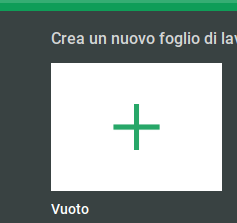 Dai un nome significativo al foglio, così da ricordarti a posteriori il contenuto (per esempio: `Bilancio crypto`) per farlo clicca in alto a sinistra dove vi è il blocco relativo al titolo e inserisci al suo interno il nome che hai scelto (nel mio caso `Bilancio crypto`). 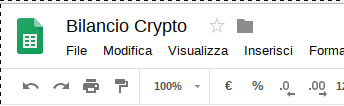 ### Lista transazioni completa (opzionale) Se vuoi avere uno storico delle transazioni indipendente dall'exchange usato e dal tipo di scambio avvenuto ti consiglio di partire da uno schema simile a questo:  Nello specifico le indicazioni per i field indicati: * Data = Inserisci la data dell'operazione, ti consiglio il formato %YYYY-%MM-%DD %HH:%mm (es: `2018-04-03 22:50`) * Azione = Breve descrizione dell'operazione svolta, per esempio `DEP SEPA` per indicare un bonifico sepa * Valuta Guadagnata = Qual è la valuta guadagnata dall'operazione * Descrizione = Descrizione completa dell'operazione esempio "Deposito Sepa verso Kraken" * Euro Caricati = In caso di investimento in euro consiglio di compilare questo campo per gli step successivi * Valuta Spesa = in caso venga spesa una crypto va inserita in questo campo, per esempio (`-5000 BTC`) * Conseguenza = Guadagno e/o perdita in ambito crypto, per esempio (`+20000 ETH`) * Exchange = Exchange dov'è avvenuta tale transazione * Wallet Src / Wallet Dst = In caso di trasferimento di crypto bisogna indicare il nome del wallet, per esempio in source "Kraken" e in dest "Ledger" Si può aggiungere qualsiasi altro campo tu voglia, sentiti libero di modificarlo a tuo piacimento. ### Prezzi e guadagno/perdite in tempo reale Per sapere in tempo reale i prezzi di un token o una coin ci affideremo alle API di [https://coinmarketcap.com/](CoinMarketCap) (noto sito in ambito crypto). Se hai già fatto la lista delle transazioni ti consiglio di creare un nuovo foglio cliccando sul "+" in basso a sinistra  A questo punto è necessario aggiungere una funzione in google scripts al fine di avere l'aggiornamento in tempo reale. Apri il menu "Strumenti" e vai nella voce "Editor di script" 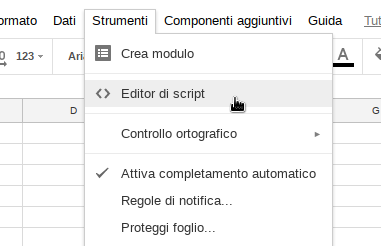 Ti aprirà una scheda parallela con un contenuto simile a questo: 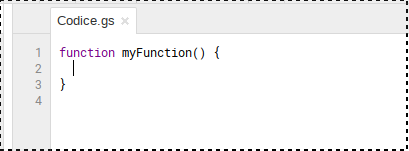 Cancella completamente il contenuto e inserisci quanto segue per intero ``` function ccprice(name) { var url = "https://api.coinmarketcap.com/v1/ticker/" + name + "/?convert=EUR"; var response = UrlFetchApp.fetch(url); var json = response.getContentText(); var data = JSON.parse(json); var price = parseFloat(data[0]["price_eur"]) return price } ``` (Versione modificata dello script https://github.com/rathergood/Crypto-Currency-Price/) Infine clicca sul tasto salva in alto a sinistra 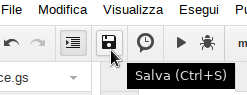 Immetti il nome ```ccprice``` Il risultato finale sarà qualcosa di simile a questo 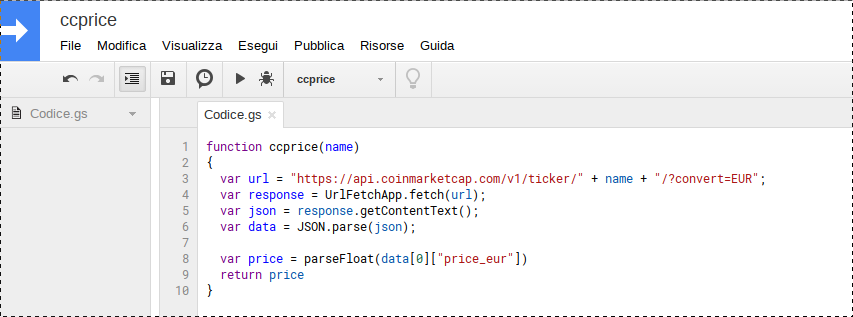 Perfetto, ora puoi chiudere quella schede e tornare al nostro foglio. Crea una griglia simile a quella che segue: 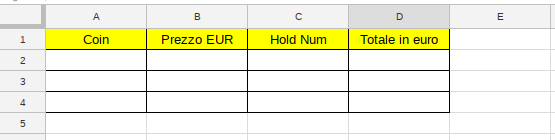 Nel primo field inserisci il nome della moneta o del token, per esempio Bitcoin. 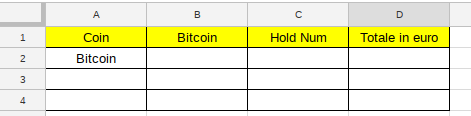 Nel secondo field andremo a richiamare la funzione che abbiamo creato poco fa in questo modo: ```=ccprice("<NOME MONETA/TOKEN>")``` Per esempio: ```=ccprice("Bitcoin")``` Al fine di inserirla correttamente clicca sul field e di seguito in alto a sinistra nello spazio preceduto dalla scritta `fx` 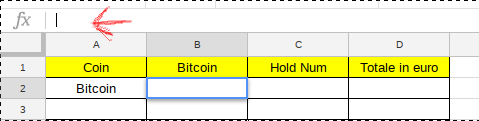 E scrivi esattamente come indicato poco fa, per esempio 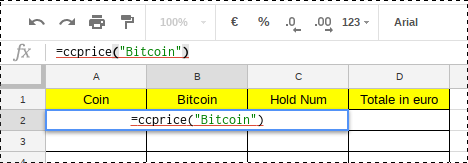 Premi invio e in questo modo apparirà il prezzo in tempo reale. Procediamo dunque ad inserire il field "Hold num", al suo interno devi inserire il numero della coin/token che possiedi in valore numerico, per esempio 10000000 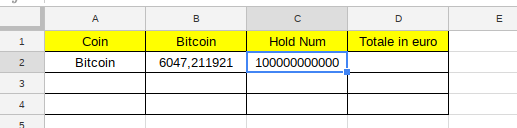 Infine compila il campo "Totale in euro" come quanto segue al fine di calcolare esattamente quanto sia il valore attuale della tua moneta rispetto all'euro ```=B2*C2``` Il risultato sarà simile a quanto segue 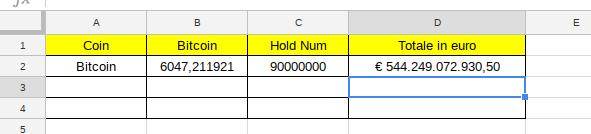 Ripeti l'operazione per tutte le coin/token che possiedi stando attento al nome della moneta, infatti le monete/token che contengono degli spazi devono essere sostituite con il "-" al suo interno, per esempio Bitcoin Cash diventa "bitcoin-cash". ### Recap guadagni / perdite Se hai fatto correttamente tutti i passaggi precedenti, per il prossimo si tratterà solo di applicare un po' di matematica per avere un recap generale di ciò che sta succedendo. Ti consiglio una griglia del genere:  Andiamo a compilare il primo field "Totale euro immesso" e qui ci sono due scenari: #### Scenario 1: Hai seguito il passo "Lista transazioni completa" e hai il field "Euro Caricati" a cui agganciarvi Nel field scrivi `=SUM(` torna sul primo foglio e seleziona *TUTTE* le righe relative al field "Euro Caricati" (ricordati di aggiornare la funzione in caso allungassi la lista), il risultato dovrebbe essere una funzione simile: ```=SUM('Lista Transazioni'!E2:E5)``` Premi invio e nel primo field avrai il totale degli euro spesi #### Scenario 2: NON hai seguito il passo "Lista transazioni completa" Inserisci manualmente il totale degli euro spesi nel field In entrambi i casi ti dovresti trovare davanti ad una situazione simile  Procediamo ora con il field "Totale Attuale", seleziona il field e scrivi `=SUM(` e seleziona *TUTTE* tutte le righe relative al field "Totale in euro" precedentemente creato:  E premi invio:  Procediamo dunque a compilare anche il field "Totale Guadagno" Ovviamente il totale del guadagno sarà dato dal totale attuale meno il totale immesso, quindi possiamo inserire la formula ```=<Numero cella totale guadagnato>-<Numero cella totale immesso>``` Nel mio caso per esempio èš: ```=G2-F2```  Infine andiamo a calcolare la percentuale di guadagno Quest'ultima sarà data dal totale attuale DIVISO il totale immesso ```=<Numero cella totale guadagnato>/<Numero cella totale immesso>``` Nel mio caso per esempio è: ```=G2/F2``` #### Ultimi ritocchi per rendere il tutto più leggibile Nei field "Totale in euro", "Totale euro immesso", "Totale Attuale" e "Totale Guadagno" effettua questa operazione: * Seleziona la colonna * Apri il menu Formato-> Numero e seleziona "Valuta" 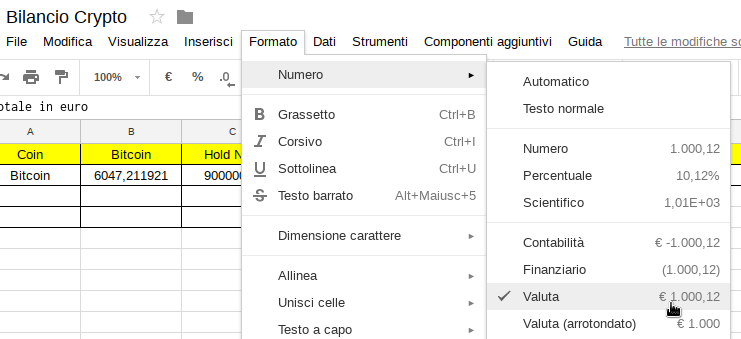 Mentre per il field "Guadagno percentuale" effettua la seguente operazione * Seleziona la colonna * Apri il menù Formato -> Numero e seleziona "Percentuale" Il risultato finale sarà qualcosa del genere  Spero di esserti stato utile nella guida :) Alla prossima, |
| json metadata | {"tags":["cryptocurrency","ita","trending","investment","education"],"image":["https://steemitimages.com/DQmPpYcywpsb3HjYqbZCFqbCv6S85SZ29VHAM4LymvjxnTT/image.png","https://steemitimages.com/DQmaU82gDBVJPNdDNPhBZf4qYYga2JPAnXbtuCw5Yg6eHvD/image.png","https://steemitimages.com/DQmWwtS9jdbDtJiLKeQuvLiYh4hJuN6sg5fAQbm4Rkk6qGa/image.png","https://steemitimages.com/DQmXXP6MHrwYdGunkxM49KKYuGf93ryHdH5G3D7MpDcnopC/image.png","https://steemitimages.com/DQmd4X79dYhMYeoUMWhiBtVE82vGwEsJLj5f4ZPW84Y26q1/image.png","https://steemitimages.com/DQmY5ocDJFcM55z8F997DRTYdkv3gKzvKjbeGXmPEHVgYe8/image.png","https://steemitimages.com/DQmckkX4xeP5AGsGNEK3sUZzwtxVEaHeQj4n8U91pSqPm9Z/image.png","https://steemitimages.com/DQmXJoPZ2yv81BMx8Jg3xdn9erUkLTemvqqpyYtqjPPMssR/image.png","https://steemitimages.com/DQmPzpbuxeCcwkm5wxetszCxcKfnQ9RxHVQYfERGusQK637/image.png","https://steemitimages.com/DQmShmKWaBbZJefEwgjZdCWHCE1dM6xDGsBoCdmJq9p9HmS/image.png","https://steemitimages.com/DQmbT4vbsNJ2wZ3GJ94shMbTccTwZa4net8SrDgDzUsnKMn/image.png","https://steemitimages.com/DQmZLnyhxvrtmmY9Zyk9cWGuh4kuNqK3GCLWm4kEzuziRk5/image.png","https://steemitimages.com/DQmRM7fwYwbZwW6FJEZxEEkAH6LfDNT65mJUmpeZhJzjqfh/image.png","https://steemitimages.com/DQmRVzSg4u9Eo7ntFBKwVS6N1CkXSQM7Vrvs5MKCD3zrfiu/image.png","https://steemitimages.com/DQmWjBED9CgPfdVBAS4pesViPNHuZG59bX5hMLq8SZG3Mm5/image.png","https://steemitimages.com/DQmWfR8hPQAMf4fKXzcV5GWXnHSHeGn7UA6ZXU9R8qshy97/image.png","https://steemitimages.com/DQmcU8YHaXATB2qXPvPUiN6Nzw9iPHsimo2jZenEVgMDZzp/image.png","https://steemitimages.com/DQmVqhcCRoUTkgrwcaud4FMu2qhNJ43Yvojqn4q43KNUguU/image.png","https://steemitimages.com/DQmZD5pCt2XgBkZ4Dgmdx6CGkxdKakdiZk3RBpDCT478UHt/image.png","https://steemitimages.com/DQmUiuBq44U2eo7rWeNAwTkY6KQUnNFJknrjNkatgvPCZXU/image.png","https://steemitimages.com/DQmSt4JVrQtUwbdqYteeKaDYnQktSTq41jty9NpEFZxiJ7B/image.png"],"links":["https://steemit.com/howto/@mirio/how-to-create-a-google-docs-in-order-to-track-the-real-time-crypto-trending","https://docs.google.com/spreadsheets/","CoinMarketCap","https://github.com/rathergood/Crypto-Currency-Price/"],"app":"steemit/0.1","format":"markdown"} |
| parent author | |
| parent permlink | cryptocurrency |
| permlink | come-tracciare-il-trend-delle-cryptovalute-real-time |
| title | Come tracciare il trend delle cryptovalute real-time |
| Transaction Info | Block #21321491/Trx 9987cf64766e09276e09b6157004b6a79ae3f735 |
View Raw JSON Data
{
"block": 21321491,
"op": [
"comment",
{
"author": "mirio",
"body": "---\nENGLISH GUIDE --> [CLICK HERE](https://steemit.com/howto/@mirio/how-to-create-a-google-docs-in-order-to-track-the-real-time-crypto-trending)\n---\n\n## Introduzione \nQuesta guida nasce con lo scopo di aiutare sia i neofiti sia gli esperti a tener traccia dei repentini cambiamenti di mercato senza l'utilizzo di tool proprietari o accessi a siti specifici dietro pagamento.\nLa guida servirà ad avere: \n* Una lista dei prezzi aggiornati in tempo reale\n* Una lista di transazioni completa (opzionale)\n* Un recap completo della vostra situazione in ambito crypto (guadagno, perdite...)\n\n## Requisito\n* Account Google\n\n## Procedimento Step-by-Step\nVai all'indirizzo relativo al [Google Docs Spreadsheets](https://docs.google.com/spreadsheets/) e procedi a creare un nuovo foglio cliccando sul pulsante \"+\"\n\n\n\nDai un nome significativo al foglio, così da ricordarti a posteriori il contenuto (per esempio: `Bilancio crypto`) per farlo clicca in alto a sinistra dove vi è il blocco relativo al titolo e inserisci al suo interno il nome che hai scelto (nel mio caso `Bilancio crypto`).\n\n\n\n### Lista transazioni completa (opzionale)\nSe vuoi avere uno storico delle transazioni indipendente dall'exchange usato e dal tipo di scambio avvenuto ti consiglio di partire da uno schema simile a questo:\n\n\n\nNello specifico le indicazioni per i field indicati:\n* Data = Inserisci la data dell'operazione, ti consiglio il formato %YYYY-%MM-%DD %HH:%mm (es: `2018-04-03 22:50`)\n* Azione = Breve descrizione dell'operazione svolta, per esempio `DEP SEPA` per indicare un bonifico sepa\n* Valuta Guadagnata = Qual è la valuta guadagnata dall'operazione\n* Descrizione = Descrizione completa dell'operazione esempio \"Deposito Sepa verso Kraken\"\n* Euro Caricati = In caso di investimento in euro consiglio di compilare questo campo per gli step successivi\n* Valuta Spesa = in caso venga spesa una crypto va inserita in questo campo, per esempio (`-5000 BTC`)\n* Conseguenza = Guadagno e/o perdita in ambito crypto, per esempio (`+20000 ETH`)\n* Exchange = Exchange dov'è avvenuta tale transazione\n* Wallet Src / Wallet Dst = In caso di trasferimento di crypto bisogna indicare il nome del wallet, per esempio in source \"Kraken\" e in dest \"Ledger\"\n\nSi può aggiungere qualsiasi altro campo tu voglia, sentiti libero di modificarlo a tuo piacimento.\n\n### Prezzi e guadagno/perdite in tempo reale\nPer sapere in tempo reale i prezzi di un token o una coin ci affideremo alle API di [https://coinmarketcap.com/](CoinMarketCap) (noto sito in ambito crypto).\nSe hai già fatto la lista delle transazioni ti consiglio di creare un nuovo foglio cliccando sul \"+\" in basso a sinistra\n\n\n\nA questo punto è necessario aggiungere una funzione in google scripts al fine di avere l'aggiornamento in tempo reale.\n\nApri il menu \"Strumenti\" e vai nella voce \"Editor di script\"\n\n\n\nTi aprirà una scheda parallela con un contenuto simile a questo:\n\n\n\n\nCancella completamente il contenuto e inserisci quanto segue per intero\n\n```\nfunction ccprice(name) \n{\n var url = \"https://api.coinmarketcap.com/v1/ticker/\" + name + \"/?convert=EUR\";\n var response = UrlFetchApp.fetch(url);\n var json = response.getContentText();\n var data = JSON.parse(json);\n \n var price = parseFloat(data[0][\"price_eur\"]) \n return price\n}\n```\n(Versione modificata dello script https://github.com/rathergood/Crypto-Currency-Price/)\n\nInfine clicca sul tasto salva in alto a sinistra\n\n\n\nImmetti il nome ```ccprice```\n\nIl risultato finale sarà qualcosa di simile a questo\n\n\nPerfetto, ora puoi chiudere quella schede e tornare al nostro foglio.\nCrea una griglia simile a quella che segue:\n\n\n\nNel primo field inserisci il nome della moneta o del token, per esempio Bitcoin.\n\n\nNel secondo field andremo a richiamare la funzione che abbiamo creato poco fa in questo modo:\n```=ccprice(\"<NOME MONETA/TOKEN>\")```\nPer esempio:\n```=ccprice(\"Bitcoin\")```\n\nAl fine di inserirla correttamente clicca sul field e di seguito in alto a sinistra nello spazio preceduto dalla scritta `fx`\n\n\n\nE scrivi esattamente come indicato poco fa, per esempio\n\nPremi invio e in questo modo apparirà il prezzo in tempo reale.\n\nProcediamo dunque ad inserire il field \"Hold num\", al suo interno devi inserire il numero della coin/token che possiedi in valore numerico, per esempio 10000000\n\n\n\nInfine compila il campo \"Totale in euro\" come quanto segue al fine di calcolare esattamente quanto sia il valore attuale della tua moneta rispetto all'euro \n\n```=B2*C2```\n\nIl risultato sarà simile a quanto segue\n\n\n\nRipeti l'operazione per tutte le coin/token che possiedi stando attento al nome della moneta, infatti le monete/token che contengono degli spazi devono essere sostituite con il \"-\" al suo interno, per esempio Bitcoin Cash diventa \"bitcoin-cash\".\n\n\n### Recap guadagni / perdite\nSe hai fatto correttamente tutti i passaggi precedenti, per il prossimo si tratterà solo di applicare un po' di matematica per avere un recap generale di ciò che sta succedendo.\nTi consiglio una griglia del genere:\n\n\nAndiamo a compilare il primo field \"Totale euro immesso\" e qui ci sono due scenari:\n#### Scenario 1: Hai seguito il passo \"Lista transazioni completa\" e hai il field \"Euro Caricati\" a cui agganciarvi\n\nNel field scrivi `=SUM(` torna sul primo foglio e seleziona *TUTTE* le righe relative al field \"Euro Caricati\" (ricordati di aggiornare la funzione in caso allungassi la lista), il risultato dovrebbe essere una funzione simile:\n\n```=SUM('Lista Transazioni'!E2:E5)```\n\nPremi invio e nel primo field avrai il totale degli euro spesi\n\n#### Scenario 2: NON hai seguito il passo \"Lista transazioni completa\"\nInserisci manualmente il totale degli euro spesi nel field \n\nIn entrambi i casi ti dovresti trovare davanti ad una situazione simile\n\n\n\nProcediamo ora con il field \"Totale Attuale\", seleziona il field e scrivi `=SUM(` e seleziona *TUTTE* tutte le righe relative al field \"Totale in euro\" precedentemente creato:\n\n\n\nE premi invio:\n\n\n\nProcediamo dunque a compilare anche il field \"Totale Guadagno\"\nOvviamente il totale del guadagno sarà dato dal totale attuale meno il totale immesso, quindi possiamo inserire la formula\n\n```=<Numero cella totale guadagnato>-<Numero cella totale immesso>```\n\nNel mio caso per esempio èš:\n```=G2-F2```\n\n\n \nInfine andiamo a calcolare la percentuale di guadagno\nQuest'ultima sarà data dal totale attuale DIVISO il totale immesso\n```=<Numero cella totale guadagnato>/<Numero cella totale immesso>```\n\nNel mio caso per esempio è:\n```=G2/F2```\n\n\n#### Ultimi ritocchi per rendere il tutto più leggibile\n\nNei field \"Totale in euro\", \"Totale euro immesso\", \"Totale Attuale\" e \"Totale Guadagno\" effettua questa operazione:\n* Seleziona la colonna \n* Apri il menu Formato-> Numero e seleziona \"Valuta\"\n\n\n\nMentre per il field \"Guadagno percentuale\" effettua la seguente operazione\n* Seleziona la colonna\n* Apri il menù Formato -> Numero e seleziona \"Percentuale\"\n\nIl risultato finale sarà qualcosa del genere\n\n\n\nSpero di esserti stato utile nella guida :)\nAlla prossima,",
"json_metadata": "{\"tags\":[\"cryptocurrency\",\"ita\",\"trending\",\"investment\",\"education\"],\"image\":[\"https://steemitimages.com/DQmPpYcywpsb3HjYqbZCFqbCv6S85SZ29VHAM4LymvjxnTT/image.png\",\"https://steemitimages.com/DQmaU82gDBVJPNdDNPhBZf4qYYga2JPAnXbtuCw5Yg6eHvD/image.png\",\"https://steemitimages.com/DQmWwtS9jdbDtJiLKeQuvLiYh4hJuN6sg5fAQbm4Rkk6qGa/image.png\",\"https://steemitimages.com/DQmXXP6MHrwYdGunkxM49KKYuGf93ryHdH5G3D7MpDcnopC/image.png\",\"https://steemitimages.com/DQmd4X79dYhMYeoUMWhiBtVE82vGwEsJLj5f4ZPW84Y26q1/image.png\",\"https://steemitimages.com/DQmY5ocDJFcM55z8F997DRTYdkv3gKzvKjbeGXmPEHVgYe8/image.png\",\"https://steemitimages.com/DQmckkX4xeP5AGsGNEK3sUZzwtxVEaHeQj4n8U91pSqPm9Z/image.png\",\"https://steemitimages.com/DQmXJoPZ2yv81BMx8Jg3xdn9erUkLTemvqqpyYtqjPPMssR/image.png\",\"https://steemitimages.com/DQmPzpbuxeCcwkm5wxetszCxcKfnQ9RxHVQYfERGusQK637/image.png\",\"https://steemitimages.com/DQmShmKWaBbZJefEwgjZdCWHCE1dM6xDGsBoCdmJq9p9HmS/image.png\",\"https://steemitimages.com/DQmbT4vbsNJ2wZ3GJ94shMbTccTwZa4net8SrDgDzUsnKMn/image.png\",\"https://steemitimages.com/DQmZLnyhxvrtmmY9Zyk9cWGuh4kuNqK3GCLWm4kEzuziRk5/image.png\",\"https://steemitimages.com/DQmRM7fwYwbZwW6FJEZxEEkAH6LfDNT65mJUmpeZhJzjqfh/image.png\",\"https://steemitimages.com/DQmRVzSg4u9Eo7ntFBKwVS6N1CkXSQM7Vrvs5MKCD3zrfiu/image.png\",\"https://steemitimages.com/DQmWjBED9CgPfdVBAS4pesViPNHuZG59bX5hMLq8SZG3Mm5/image.png\",\"https://steemitimages.com/DQmWfR8hPQAMf4fKXzcV5GWXnHSHeGn7UA6ZXU9R8qshy97/image.png\",\"https://steemitimages.com/DQmcU8YHaXATB2qXPvPUiN6Nzw9iPHsimo2jZenEVgMDZzp/image.png\",\"https://steemitimages.com/DQmVqhcCRoUTkgrwcaud4FMu2qhNJ43Yvojqn4q43KNUguU/image.png\",\"https://steemitimages.com/DQmZD5pCt2XgBkZ4Dgmdx6CGkxdKakdiZk3RBpDCT478UHt/image.png\",\"https://steemitimages.com/DQmUiuBq44U2eo7rWeNAwTkY6KQUnNFJknrjNkatgvPCZXU/image.png\",\"https://steemitimages.com/DQmSt4JVrQtUwbdqYteeKaDYnQktSTq41jty9NpEFZxiJ7B/image.png\"],\"links\":[\"https://steemit.com/howto/@mirio/how-to-create-a-google-docs-in-order-to-track-the-real-time-crypto-trending\",\"https://docs.google.com/spreadsheets/\",\"CoinMarketCap\",\"https://github.com/rathergood/Crypto-Currency-Price/\"],\"app\":\"steemit/0.1\",\"format\":\"markdown\"}",
"parent_author": "",
"parent_permlink": "cryptocurrency",
"permlink": "come-tracciare-il-trend-delle-cryptovalute-real-time",
"title": "Come tracciare il trend delle cryptovalute real-time"
}
],
"op_in_trx": 0,
"timestamp": "2018-04-06T05:57:03",
"trx_id": "9987cf64766e09276e09b6157004b6a79ae3f735",
"trx_in_block": 5,
"virtual_op": 0
}2018/04/05 22:44:48
2018/04/05 22:44:48
| author | mirio |
| body | Atm i'm still hold the coins/token, i think the market go up on long term |
| json metadata | {"tags":["howto"],"app":"steemit/0.1"} |
| parent author | cryptoissweet |
| parent permlink | re-mirio-how-to-create-a-google-docs-in-order-to-track-the-real-time-crypto-trending-1522960312495te82575d7-58fd-47bb-a189-9b5554ffb265uid |
| permlink | re-cryptoissweet-re-mirio-how-to-create-a-google-docs-in-order-to-track-the-real-time-crypto-trending-1522960312495te82575d7-58fd-47bb-a189-9b5554ffb265uid-20180405t224447858z |
| title | |
| Transaction Info | Block #21312846/Trx 0f08c6ef868eece9e4f9447de2ca5fb6f0aa2d85 |
View Raw JSON Data
{
  "block": 21312846,
  "op": [
    "comment",
    {
      "author": "mirio",
      "body": "Atm i'm still hold the coins/token, i think the market go up on long term",
      "json_metadata": "{\"tags\":[\"howto\"],\"app\":\"steemit/0.1\"}",
      "parent_author": "cryptoissweet",
      "parent_permlink": "re-mirio-how-to-create-a-google-docs-in-order-to-track-the-real-time-crypto-trending-1522960312495te82575d7-58fd-47bb-a189-9b5554ffb265uid",
      "permlink": "re-cryptoissweet-re-mirio-how-to-create-a-google-docs-in-order-to-track-the-real-time-crypto-trending-1522960312495te82575d7-58fd-47bb-a189-9b5554ffb265uid-20180405t224447858z",
      "title": ""
    }
  ],
  "op_in_trx": 0,
  "timestamp": "2018-04-05T22:44:48",
  "trx_id": "0f08c6ef868eece9e4f9447de2ca5fb6f0aa2d85",
  "trx_in_block": 22,
  "virtual_op": 0
}2018/04/05 21:30:09
2018/04/05 21:30:09
| author | mirio |
| permlink | how-to-create-a-google-docs-in-order-to-track-the-real-time-crypto-trending |
| voter | mendace |
| weight | 10000 (100.00%) |
| Transaction Info | Block #21311353/Trx d377ffcf8cd3d2419e9d0a14c27925d9ad33d600 |
View Raw JSON Data
{
  "block": 21311353,
  "op": [
    "vote",
    {
      "author": "mirio",
      "permlink": "how-to-create-a-google-docs-in-order-to-track-the-real-time-crypto-trending",
      "voter": "mendace",
      "weight": 10000
    }
  ],
  "op_in_trx": 0,
  "timestamp": "2018-04-05T21:30:09",
  "trx_id": "d377ffcf8cd3d2419e9d0a14c27925d9ad33d600",
  "trx_in_block": 45,
  "virtual_op": 0
}2018/04/05 20:31:54
2018/04/05 20:31:54
| author | cryptoissweet |
| body | Added to my follow list. Keep up the good work and what do you think of the current market? |
| json metadata | {"tags":["Bitcoin"],"app":"SteemJ-Core/0.5.0-SNAPSHOT","format":"markdown"} |
| parent author | mirio |
| parent permlink | how-to-create-a-google-docs-in-order-to-track-the-real-time-crypto-trending |
| permlink | re-mirio-how-to-create-a-google-docs-in-order-to-track-the-real-time-crypto-trending-1522960312495te82575d7-58fd-47bb-a189-9b5554ffb265uid |
| title | |
| Transaction Info | Block #21310188/Trx 2941639b2dd27cc90ed51081828564e75ac2fb55 |
View Raw JSON Data
{
  "block": 21310188,
  "op": [
    "comment",
    {
      "author": "cryptoissweet",
      "body": "Added to my follow list. Keep up the good work and what do you think of the current market?",
      "json_metadata": "{\"tags\":[\"Bitcoin\"],\"app\":\"SteemJ-Core/0.5.0-SNAPSHOT\",\"format\":\"markdown\"}",
      "parent_author": "mirio",
      "parent_permlink": "how-to-create-a-google-docs-in-order-to-track-the-real-time-crypto-trending",
      "permlink": "re-mirio-how-to-create-a-google-docs-in-order-to-track-the-real-time-crypto-trending-1522960312495te82575d7-58fd-47bb-a189-9b5554ffb265uid",
      "title": ""
    }
  ],
  "op_in_trx": 0,
  "timestamp": "2018-04-05T20:31:54",
  "trx_id": "2941639b2dd27cc90ed51081828564e75ac2fb55",
  "trx_in_block": 6,
  "virtual_op": 0
}miriopublished a new post: how-to-create-a-google-docs-in-order-to-track-the-real-time-crypto-trending2018/04/05 20:01:48
miriopublished a new post: how-to-create-a-google-docs-in-order-to-track-the-real-time-crypto-trending
2018/04/05 20:01:48
| author | mirio |
| body | ## Introduction The aim of this guide is to help either the newbies or the experts to keep track of the continuous change of the market without using a subscription service or the access to specific websites against payment of a fee. This guide will help you make: * A list of real-time prices * A complete list of transactions (optional) * A complete recap of your situation within the crypto (profit, losses...) ## Prerequisite * Google Account ## Step-by-Step process Go to [Google Docs Spreadsheets](https://docs.google.com/spreadsheets/) and create a new file clicking the icon "+" 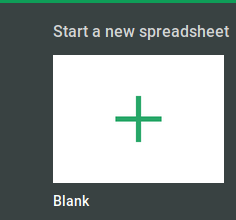 Give the file a revealing name so that later you can remember the contents (e.g."Crypto Balance"), in order to do this click in the upper left where there is the area concerning the title and fit in the name you chose (in my case "Crypto Balance"). 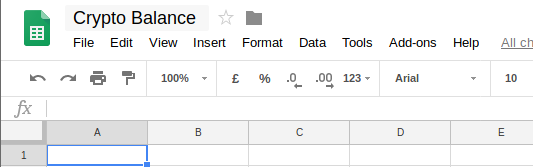 ### Complete transactions list (optional) If you want to have a transaction history regardless of the exchange I suggest you to begin from a similar scheme:  Here the instructions for the fields: * Date = Fill in the date of the transaction, I suggest you the format %YYYY-%MM-%DD %HH:%mm (e.g. `2018-04-03 22:50`) * Action = Short description of the transaction done, e.g. `DEP SEPA` in order to indicate a sepa transfer * Earned crypto = What is the earned value from the transaction * Description = A complete description of the transaction e.g. `Sepa Deposit towards Kraken` * FIAT deposited = In case of investment in euros I suggest you to fill in this field for the following steps * Spent Value = In case of spending a crypto you have to fill in this field, e.g. `-5000 BTC` * Result = Profit and/or loss as regarding crypto, e.g. `+20000 ETH` * Exchange = Where the transaction happened * Wallet Src / Wallet Dst = In case of crypto transfer you need to indicate the name of the wallet, e.g. in source `Kraken` and in dest `Ledger` You can add any kind of field, feel free to modify it as much as you like. ### Prices and profit/losses in real-time In order to know in real-time the prices of a token or a coin we will rely on the API of [https://coinmarketcap.com/](CoinMarketCap) (well-known website regarding crypto). If you already done a transactions list I suggest you to create a new file clicking on the icon "+" in the lower left  At this point it is necessary to add a function in google scripts in order to have the real-time updating. Open the menu "Tools" and go to the item `Script Editor` 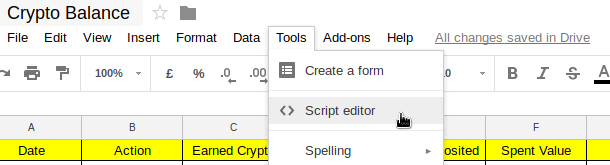 It will open a parallel tab with a similar content:  Delete completely the content and fill in as follows: **Price in EUR** ``` function ccprice(name) { var url = "https://api.coinmarketcap.com/v1/ticker/" + name + "/?convert=EUR"; var response = UrlFetchApp.fetch(url); var json = response.getContentText(); var data = JSON.parse(json); var price = parseFloat(data[0]["price_eur"]) return price } ``` **Price in USD** ``` function ccprice(name) { var url = "https://api.coinmarketcap.com/v1/ticker/" + name + "/"; var response = UrlFetchApp.fetch(url); var json = response.getContentText(); var data = JSON.parse(json); var price = parseFloat(data[0]["price_usd"]) return price } ``` (Modified version of the script https://github.com/rathergood/Crypto-Currency-Price/) Now click on save on the top left 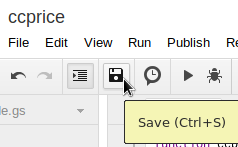 Fill in the name ```ccprice``` The final result should be something like this: 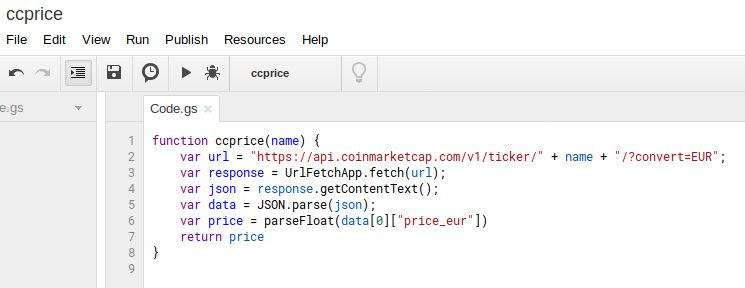 Perfect, now you can close those tabs and go back to our file. Create a scheme similar as it follows (if you want USD use usd name): 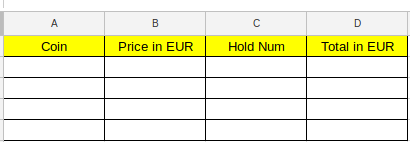 In the first filed fill in the name of the coin or the token, e.g. `Bitcoin`.  In the second field we will recall the function that we created few minutes ago in this way: ```=ccprice("<NAME OF COIN/TOKEN>")``` e.g. ```=ccprice("Bitcoin")``` In order to fill in it correctly click on the filed and then on the top left in the space preceded by the writing `fx` 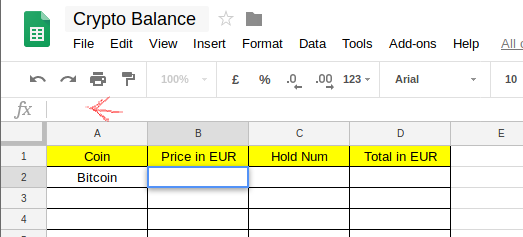 Now you have to write exactly like we said before, e.g. 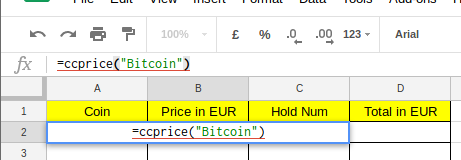 Push the enter key and you will have the real-time price. Let's fill in the field "Hold num", you have to insert the number of the coin or the token that you have got in numeric value, e.g. `10000000`  Finally fill in the field "Total in euro" (or usd) as it follows in order to calculate exactly what is the current price of your coin in comparison with euros ```=B2*C2``` The result should be something like it follows:  Repeat the transaction for every coin/token that you have. **Beware** of the name of the coin, remember that coins or tokens that contain spaces have to be replaces with "-", e.g. `Bitcoin Cash` become `bitcoin-cash`. ### Recap profit/ losses If you did all the previous steps for the next one you will just have to apply a little bit of maths in order to have a general recap of what it is happening. I suggest you a scheme like it follows:  Now let's fill in the first field "FIAT deposited" and here there are two possible scenarios: #### Scenario No 1: You have followed the step "Completed transactions list" and you have the field "FIAT deposited" In the field write `=SUM(` go back to the first file and select *ALL* the lines relating to the field "FIAT deposited" (remember to update the function in case you add something to the list), the result should be something similar to this: ```=SUM('Transaction list'!E2:E5)``` Now push the enter key and in the first field you will have the total amount of euros #### Scenario No 2: You DON'T have followed the step "Completed transactions list" So fill in manually the total amount of euros in the field In both cases you should be confronted with a similar situation:  Now let's see the field "Current Total in FIAT", select it and write `=SUM(` and select *ALL* the lines regarding the field "Total in EUR" that we created before: 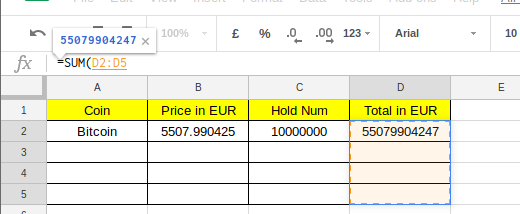 Push the enter key:  Now let's fill in also the "Total Profit" field Obviously the total of profit will consist of the current total less the total introduced, at this point we can fit in the formula ```=<No cell total profit>-<No cell total introduced>``` In my case for example is¨: ```=G2-F2```  Let's now calculate the percentage of profit This will consist of the current total DIVIDED the total introduced ```=<No cell total profit>/<No cell total introduced>``` In my case for example is: ```=G2/F2``` #### Now let's give this the finishing touches in order to make it easier to read In the field "Total in euros", "Total introduced euros", "Current total" e "Total profit" do this: * Select the column * Open the menu Format-> Number and select "Currency" 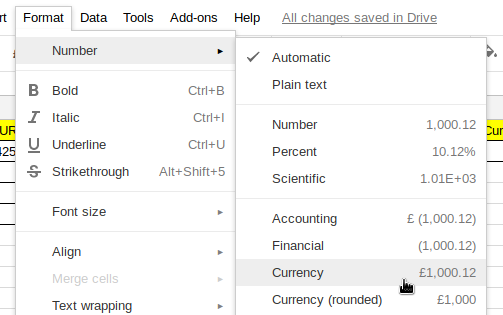 While in the field "Percentage profit" do like it follows: * Select the column * Open the menu Format -> Number and select "Percentage" The result should be something like it follows:  I hope this guide helped you :) See you to the next one, |
| json metadata | {"tags":["howto","market","trending","bitcoin","cryptocurrency"],"image":["https://steemitimages.com/DQmWnnhhUZ3Ca7Rmf8Kg6LMacBEciszNDtBTuSa9uJEd62E/image.png","https://steemitimages.com/DQmTsVCoqF5ezADrygWR5VFgckaYhEWb573dWYNE7pHs38o/image.png","https://steemitimages.com/DQmS9hPYRYKeW7v4G6USxSAPQH63uk9fazpVv9H5f48SttU/image.png","https://steemitimages.com/DQmdsdfAvyGt3hYfvYd8sL37LTwV15LRG5ff1W3ER9XHegH/image.png","https://steemitimages.com/DQmSubsypBv4zvxcTpcCfQK1MbDdEEB71v5yQGVpgj6B7Uj/image.png","https://steemitimages.com/DQmY5ocDJFcM55z8F997DRTYdkv3gKzvKjbeGXmPEHVgYe8/image.png","https://steemitimages.com/DQmc92JEwZU1qw15ZCNpUzVTycrYvRkdQ8674LB4cBxi4ML/image.png","https://steemitimages.com/DQmZraZtHY2wpaP7QXKJG5T7XwAWRVww8zEjaHXcDW2zL8s/image.png","https://steemitimages.com/DQmbodkwwJqsm14X8AoB6GQUzGsAT7E2bi3AQnnKPrKvDap/image.png","https://steemitimages.com/DQmXtueY8mLD8JKAstDsyPZF9fDQKqvrHU2EHGnaaS17kcx/image.png","https://steemitimages.com/DQmR9Kg81epPz42fz9xkk1M1VfQpXdNX7TG1ZeehutPuPsu/image.png","https://steemitimages.com/DQmcQ6uK2cPLmQo2pdAAqV8bWKDmiNh8Y3XBtytoRMvoR9G/image.png","https://steemitimages.com/DQmRM7fwYwbZwW6FJEZxEEkAH6LfDNT65mJUmpeZhJzjqfh/image.png","https://steemitimages.com/DQmPJotaxLreKjdZLC9wbzuzV3deMrikikntkBwkjSFijdC/image.png","https://steemitimages.com/DQmeLDACEQp8MwyynuwFSeuyo3upq9NJ7cSXVC8UV2jwshw/image.png","https://steemitimages.com/DQmfPoFLYqG7vTbP7R1gg9UC5rp1sFXShBX6JxwT7yGetf7/image.png","https://steemitimages.com/DQmXk4RhvMaVvUxwhW78Vcw7ocNxeL2BCPeYCbi5z1RbD43/image.png","https://steemitimages.com/DQmQvpXt8PYCBR2bRFXqSZKxdW8acEkRqH8B3HkfhQY7mTW/image.png","https://steemitimages.com/DQmNfZQqgdpYidNed8dGXMSVh4vVn5Be7cRETiN54jC9sQT/image.png","https://steemitimages.com/DQmTKoyQnakBjh7cH3CnyZnLnetdkTQhXjLaxNwX4u7PmLN/image.png","https://steemitimages.com/DQmPBhxr5NCPiNJuajoDNpdBLWUJxTbgKPrhkMQH4BBSsvs/image.png"],"links":["https://docs.google.com/spreadsheets/","CoinMarketCap","https://github.com/rathergood/Crypto-Currency-Price/"],"app":"steemit/0.1","format":"markdown"} |
| parent author | |
| parent permlink | howto |
| permlink | how-to-create-a-google-docs-in-order-to-track-the-real-time-crypto-trending |
| title | How to create a Google docs in order to track the real-time crypto trending |
| Transaction Info | Block #21309586/Trx 9856f4d761dd7f323586fbf8a7528223a0c4584b |
View Raw JSON Data
{
"block": 21309586,
"op": [
"comment",
{
"author": "mirio",
"body": "## Introduction \n\nThe aim of this guide is to help either the newbies or the experts to keep track of the continuous change of the market without using a subscription service or the access to specific websites against payment of a fee. \n\nThis guide will help you make: \n\n* A list of real-time prices\n\n* A complete list of transactions (optional)\n\n* A complete recap of your situation within the crypto (profit, losses...)\n\n\n## Prerequisite\n\n* Google Account\n\n\n## Step-by-Step process\n\nGo to [Google Docs Spreadsheets](https://docs.google.com/spreadsheets/) and create a new file clicking the icon \"+\"\n\n\n\n\n\nGive the file a revealing name so that later you can remember the contents (e.g.\"Crypto Balance\"), in order to do this click in the upper left where there is the area concerning the title and fit in the name you chose (in my case \"Crypto Balance\").\n\n\n\n\n\n### Complete transactions list (optional)\n\nIf you want to have a transaction history regardless of the exchange I suggest you to begin from a similar scheme:\n\n\n\nHere the instructions for the fields:\n\n* Date = Fill in the date of the transaction, I suggest you the format %YYYY-%MM-%DD %HH:%mm (e.g. `2018-04-03 22:50`)\n\n* Action = Short description of the transaction done, e.g. `DEP SEPA` in order to indicate a sepa transfer\n\n* Earned crypto = What is the earned value from the transaction\n\n* Description = A complete description of the transaction e.g. `Sepa Deposit towards Kraken`\n\n* FIAT deposited = In case of investment in euros I suggest you to fill in this field for the following steps\n\n* Spent Value = In case of spending a crypto you have to fill in this field, e.g. `-5000 BTC`\n\n* Result = Profit and/or loss as regarding crypto, e.g. `+20000 ETH`\n\n* Exchange = Where the transaction happened\n\n* Wallet Src / Wallet Dst = In case of crypto transfer you need to indicate the name of the wallet, e.g. in source `Kraken` and in dest `Ledger`\n\n\nYou can add any kind of field, feel free to modify it as much as you like.\n\n\n### Prices and profit/losses in real-time\n\nIn order to know in real-time the prices of a token or a coin we will rely on the API of [https://coinmarketcap.com/](CoinMarketCap) (well-known website regarding crypto).\n\nIf you already done a transactions list I suggest you to create a new file clicking on the icon \"+\" in the lower left\n\n\n\nAt this point it is necessary to add a function in google scripts in order to have the real-time updating. \n\nOpen the menu \"Tools\" and go to the item `Script Editor`\n\n\n\nIt will open a parallel tab with a similar content:\n\n\n\nDelete completely the content and fill in as follows: \n\n**Price in EUR**\n```\nfunction ccprice(name) {\n var url = \"https://api.coinmarketcap.com/v1/ticker/\" + name + \"/?convert=EUR\";\n var response = UrlFetchApp.fetch(url);\n var json = response.getContentText();\n var data = JSON.parse(json);\n var price = parseFloat(data[0][\"price_eur\"]) \n return price\n}\n```\n**Price in USD**\n```\nfunction ccprice(name) {\n var url = \"https://api.coinmarketcap.com/v1/ticker/\" + name + \"/\";\n var response = UrlFetchApp.fetch(url);\n var json = response.getContentText();\n var data = JSON.parse(json);\n var price = parseFloat(data[0][\"price_usd\"]) \n return price\n}\n```\n\n\n(Modified version of the script https://github.com/rathergood/Crypto-Currency-Price/)\n\n\nNow click on save on the top left\n\n\n\n\nFill in the name ```ccprice```\n\n\nThe final result should be something like this:\n\n\n\n\nPerfect, now you can close those tabs and go back to our file.\n\n\nCreate a scheme similar as it follows (if you want USD use usd name):\n\n\n\nIn the first filed fill in the name of the coin or the token, e.g. `Bitcoin`.\n\n\n\nIn the second field we will recall the function that we created few minutes ago in this way:\n\n```=ccprice(\"<NAME OF COIN/TOKEN>\")```\n\ne.g.\n\n```=ccprice(\"Bitcoin\")```\n\n\nIn order to fill in it correctly click on the filed and then on the top left in the space preceded by the writing `fx`\n\n\n\nNow you have to write exactly like we said before, e.g.\n\n\n\nPush the enter key and you will have the real-time price.\n\n\nLet's fill in the field \"Hold num\", you have to insert the number of the coin or the token that you have got in numeric value, e.g. `10000000`\n\n\n\n\n\nFinally fill in the field \"Total in euro\" (or usd) as it follows in order to calculate exactly what is the current price of your coin in comparison with euros\n\n\n```=B2*C2```\n\n\nThe result should be something like it follows:\n\n\n\nRepeat the transaction for every coin/token that you have. \n**Beware** of the name of the coin, remember that coins or tokens that contain spaces have to be replaces with \"-\", e.g. `Bitcoin Cash` become `bitcoin-cash`.\n\n\n### Recap profit/ losses\n\nIf you did all the previous steps for the next one you will just have to apply a little bit of maths in order to have a general recap of what it is happening. \n\n\nI suggest you a scheme like it follows:\n\n\n\nNow let's fill in the first field \"FIAT deposited\" and here there are two possible scenarios: \n\n\n#### Scenario No 1: You have followed the step \"Completed transactions list\" and you have the field \"FIAT deposited\"\n\n\nIn the field write `=SUM(` go back to the first file and select *ALL* the lines relating to the field \"FIAT deposited\" (remember to update the function in case you add something to the list), the result should be something similar to this:\n\n\n```=SUM('Transaction list'!E2:E5)```\n\n\nNow push the enter key and in the first field you will have the total amount of euros\n\n\n#### Scenario No 2: You DON'T have followed the step \"Completed transactions list\"\n\nSo fill in manually the total amount of euros in the field\n\n\nIn both cases you should be confronted with a similar situation:\n\n\n\nNow let's see the field \"Current Total in FIAT\", select it and write `=SUM(` and select *ALL* the lines regarding the field \"Total in EUR\" that we created before:\n\n\n\nPush the enter key:\n\n\n\nNow let's fill in also the \"Total Profit\" field\n\nObviously the total of profit will consist of the current total less the total introduced, at this point we can fit in the formula\n\n\n```=<No cell total profit>-<No cell total introduced>```\n\n\nIn my case for example is¨:\n\n```=G2-F2```\n\n\n\nLet's now calculate the percentage of profit\n\nThis will consist of the current total DIVIDED the total introduced\n\n```=<No cell total profit>/<No cell total introduced>```\n\n\nIn my case for example is:\n\n```=G2/F2```\n\n\n#### Now let's give this the finishing touches in order to make it easier to read\n\n\nIn the field \"Total in euros\", \"Total introduced euros\", \"Current total\" e \"Total profit\" do this:\n\n* Select the column\n\n* Open the menu Format-> Number and select \"Currency\"\n\n\n\nWhile in the field \"Percentage profit\" do like it follows:\n\n* Select the column\n\n* Open the menu Format -> Number and select \"Percentage\"\n\n\nThe result should be something like it follows:\n\n\n\nI hope this guide helped you :) \nSee you to the next one,",
"json_metadata": "{\"tags\":[\"howto\",\"market\",\"trending\",\"bitcoin\",\"cryptocurrency\"],\"image\":[\"https://steemitimages.com/DQmWnnhhUZ3Ca7Rmf8Kg6LMacBEciszNDtBTuSa9uJEd62E/image.png\",\"https://steemitimages.com/DQmTsVCoqF5ezADrygWR5VFgckaYhEWb573dWYNE7pHs38o/image.png\",\"https://steemitimages.com/DQmS9hPYRYKeW7v4G6USxSAPQH63uk9fazpVv9H5f48SttU/image.png\",\"https://steemitimages.com/DQmdsdfAvyGt3hYfvYd8sL37LTwV15LRG5ff1W3ER9XHegH/image.png\",\"https://steemitimages.com/DQmSubsypBv4zvxcTpcCfQK1MbDdEEB71v5yQGVpgj6B7Uj/image.png\",\"https://steemitimages.com/DQmY5ocDJFcM55z8F997DRTYdkv3gKzvKjbeGXmPEHVgYe8/image.png\",\"https://steemitimages.com/DQmc92JEwZU1qw15ZCNpUzVTycrYvRkdQ8674LB4cBxi4ML/image.png\",\"https://steemitimages.com/DQmZraZtHY2wpaP7QXKJG5T7XwAWRVww8zEjaHXcDW2zL8s/image.png\",\"https://steemitimages.com/DQmbodkwwJqsm14X8AoB6GQUzGsAT7E2bi3AQnnKPrKvDap/image.png\",\"https://steemitimages.com/DQmXtueY8mLD8JKAstDsyPZF9fDQKqvrHU2EHGnaaS17kcx/image.png\",\"https://steemitimages.com/DQmR9Kg81epPz42fz9xkk1M1VfQpXdNX7TG1ZeehutPuPsu/image.png\",\"https://steemitimages.com/DQmcQ6uK2cPLmQo2pdAAqV8bWKDmiNh8Y3XBtytoRMvoR9G/image.png\",\"https://steemitimages.com/DQmRM7fwYwbZwW6FJEZxEEkAH6LfDNT65mJUmpeZhJzjqfh/image.png\",\"https://steemitimages.com/DQmPJotaxLreKjdZLC9wbzuzV3deMrikikntkBwkjSFijdC/image.png\",\"https://steemitimages.com/DQmeLDACEQp8MwyynuwFSeuyo3upq9NJ7cSXVC8UV2jwshw/image.png\",\"https://steemitimages.com/DQmfPoFLYqG7vTbP7R1gg9UC5rp1sFXShBX6JxwT7yGetf7/image.png\",\"https://steemitimages.com/DQmXk4RhvMaVvUxwhW78Vcw7ocNxeL2BCPeYCbi5z1RbD43/image.png\",\"https://steemitimages.com/DQmQvpXt8PYCBR2bRFXqSZKxdW8acEkRqH8B3HkfhQY7mTW/image.png\",\"https://steemitimages.com/DQmNfZQqgdpYidNed8dGXMSVh4vVn5Be7cRETiN54jC9sQT/image.png\",\"https://steemitimages.com/DQmTKoyQnakBjh7cH3CnyZnLnetdkTQhXjLaxNwX4u7PmLN/image.png\",\"https://steemitimages.com/DQmPBhxr5NCPiNJuajoDNpdBLWUJxTbgKPrhkMQH4BBSsvs/image.png\"],\"links\":[\"https://docs.google.com/spreadsheets/\",\"CoinMarketCap\",\"https://github.com/rathergood/Crypto-Currency-Price/\"],\"app\":\"steemit/0.1\",\"format\":\"markdown\"}",
"parent_author": "",
"parent_permlink": "howto",
"permlink": "how-to-create-a-google-docs-in-order-to-track-the-real-time-crypto-trending",
"title": "How to create a Google docs in order to track the real-time crypto trending"
}
],
"op_in_trx": 0,
"timestamp": "2018-04-05T20:01:48",
"trx_id": "9856f4d761dd7f323586fbf8a7528223a0c4584b",
"trx_in_block": 13,
"virtual_op": 0
}2018/04/02 20:43:48
2018/04/02 20:43:48
| delegatee | mirio |
| delegator | steem |
| vesting shares | 30388.698406 VESTS |
| Transaction Info | Block #21224043/Trx 6f056a46959ace1694bfb4db6d764ed9475b30d0 |
View Raw JSON Data
{
  "block": 21224043,
  "op": [
    "delegate_vesting_shares",
    {
      "delegatee": "mirio",
      "delegator": "steem",
      "vesting_shares": "30388.698406 VESTS"
    }
  ],
  "op_in_trx": 0,
  "timestamp": "2018-04-02T20:43:48",
  "trx_id": "6f056a46959ace1694bfb4db6d764ed9475b30d0",
  "trx_in_block": 49,
  "virtual_op": 0
}2018/04/02 18:31:24
2018/04/02 18:31:24
| active | {"account_auths":[],"key_auths":[["STM684Kin4Lh1moLDVXgP2fNy5de2vtHdFPGB46s7stgNAhMZU6Ta",1]],"weight_threshold":1} |
| creator | steem |
| delegation | 30690.000000 VESTS |
| extensions | [] |
| fee | 0.100 STEEM |
| json metadata | {} |
| memo key | STM7EMAJvjZXWAmZBCi6pDJ1CtQ1DA6bBMARarjeL57xWHSGeUgnJ |
| new account name | mirio |
| owner | {"account_auths":[],"key_auths":[["STM6DyUV9BLkSw4wTLNx6mBjU3WUcXp3H1PqwBj6DG9Jjp3fVPykY",1]],"weight_threshold":1} |
| posting | {"account_auths":[],"key_auths":[["STM5rieH4u1QGstCvsoo4d85rwQdgevC5HeqJTByLsBv26XKPmtPo",1]],"weight_threshold":1} |
| Transaction Info | Block #21221395/Trx 2a676f6ca5f6b984b07f053db24cd99a591cc6fd |
View Raw JSON Data
{
  "block": 21221395,
  "op": [
    "account_create_with_delegation",
    {
      "active": {
        "account_auths": [],
        "key_auths": [
          [
            "STM684Kin4Lh1moLDVXgP2fNy5de2vtHdFPGB46s7stgNAhMZU6Ta",
            1
          ]
        ],
        "weight_threshold": 1
      },
      "creator": "steem",
      "delegation": "30690.000000 VESTS",
      "extensions": [],
      "fee": "0.100 STEEM",
      "json_metadata": "{}",
      "memo_key": "STM7EMAJvjZXWAmZBCi6pDJ1CtQ1DA6bBMARarjeL57xWHSGeUgnJ",
      "new_account_name": "mirio",
      "owner": {
        "account_auths": [],
        "key_auths": [
          [
            "STM6DyUV9BLkSw4wTLNx6mBjU3WUcXp3H1PqwBj6DG9Jjp3fVPykY",
            1
          ]
        ],
        "weight_threshold": 1
      },
      "posting": {
        "account_auths": [],
        "key_auths": [
          [
            "STM5rieH4u1QGstCvsoo4d85rwQdgevC5HeqJTByLsBv26XKPmtPo",
            1
          ]
        ],
        "weight_threshold": 1
      }
    }
  ],
  "op_in_trx": 0,
  "timestamp": "2018-04-02T18:31:24",
  "trx_id": "2a676f6ca5f6b984b07f053db24cd99a591cc6fd",
  "trx_in_block": 3,
  "virtual_op": 0
}Manabar
Voting Power100.00%
Downvote Power100.00%
Resource Credits100.00%
Reputation Progress0.00%
{
  "voting_manabar": {
    "current_mana": "8143659806",
    "last_update_time": 1779076284
  },
  "downvote_manabar": {
    "current_mana": 2035914951,
    "last_update_time": 1779076284
  },
  "rc_account": {
    "account": "mirio",
    "max_rc": "10164408779",
    "max_rc_creation_adjustment": {
      "amount": "2020748973",
      "nai": "@@000000037",
      "precision": 6
    },
    "rc_manabar": {
      "current_mana": "10164408779",
      "last_update_time": 1779076284
    }
  }
}
Account Metadata
| POSTING JSON METADATA | |
| None | |
| JSON METADATA | |
| None |
{
  "posting_json_metadata": {},
  "json_metadata": {}
}
Auth Keys
Owner
Single Signature
Public Keys
STM6DyUV9BLkSw4wTLNx6mBjU3WUcXp3H1PqwBj6DG9Jjp3fVPykY1/1
Active
Single Signature
Public Keys
STM684Kin4Lh1moLDVXgP2fNy5de2vtHdFPGB46s7stgNAhMZU6Ta1/1
Posting
Single Signature
Public Keys
STM5rieH4u1QGstCvsoo4d85rwQdgevC5HeqJTByLsBv26XKPmtPo1/1
Memo
STM7EMAJvjZXWAmZBCi6pDJ1CtQ1DA6bBMARarjeL57xWHSGeUgnJ
{
  "owner": {
    "account_auths": [],
    "key_auths": [
      [
        "STM6DyUV9BLkSw4wTLNx6mBjU3WUcXp3H1PqwBj6DG9Jjp3fVPykY",
        1
      ]
    ],
    "weight_threshold": 1
  },
  "active": {
    "account_auths": [],
    "key_auths": [
      [
        "STM684Kin4Lh1moLDVXgP2fNy5de2vtHdFPGB46s7stgNAhMZU6Ta",
        1
      ]
    ],
    "weight_threshold": 1
  },
  "posting": {
    "account_auths": [],
    "key_auths": [
      [
        "STM5rieH4u1QGstCvsoo4d85rwQdgevC5HeqJTByLsBv26XKPmtPo",
        1
      ]
    ],
    "weight_threshold": 1
  },
  "memo": "STM7EMAJvjZXWAmZBCi6pDJ1CtQ1DA6bBMARarjeL57xWHSGeUgnJ"
}
Witness Votes
0 / 30
No active witness votes.
[]