

VOTING POWER100.00%
DOWNVOTE POWER100.00%
RESOURCE CREDITS100.00%
REPUTATION PROGRESS2.49%
Net Worth
0.480USD
STEEM
0.001STEEM
SBD
0.924SBD
Effective Power
5.007SP
├── Own SP
0.630SP
└── Incoming DelegationsDeleg
+4.377SP
Detailed Balance
| STEEM | ||
| balance | 0.001STEEM | STEEM |
| market_balance | 0.000STEEM | STEEM |
| savings_balance | 0.000STEEM | STEEM |
| reward_steem_balance | 0.000STEEM | STEEM |
| STEEM POWER | ||
| Own SP | 0.630SP | SP |
| Delegated Out | 0.000SP | SP |
| Delegation In | 4.377SP | SP |
| Effective Power | 5.007SP | SP |
| Reward SP (pending) | 0.167SP | SP |
| SBD | ||
| sbd_balance | 0.000SBD | SBD |
| sbd_conversions | 0.000SBD | SBD |
| sbd_market_balance | 0.000SBD | SBD |
| savings_sbd_balance | 0.000SBD | SBD |
| reward_sbd_balance | 0.924SBD | SBD |
{
  "balance": "0.001 STEEM",
  "savings_balance": "0.000 STEEM",
  "reward_steem_balance": "0.000 STEEM",
  "vesting_shares": "1024.482592 VESTS",
  "delegated_vesting_shares": "0.000000 VESTS",
  "received_vesting_shares": "7119.177214 VESTS",
  "sbd_balance": "0.000 SBD",
  "savings_sbd_balance": "0.000 SBD",
  "reward_sbd_balance": "0.924 SBD",
  "conversions": []
}
Account Info
| name | shimdh |
| id | 547715 |
| rank | 0 |
| reputation | 3616773587 |
| created | 2018-01-03T03:17:24 |
| recovery_account | steem |
| proxy | None |
| post_count | 10 |
| comment_count | 0 |
| lifetime_vote_count | 0 |
| witnesses_voted_for | 0 |
| last_post | 2025-01-20T04:47:57 |
| last_root_post | 2025-01-20T04:47:57 |
| last_vote_time | 2025-01-20T04:48:03 |
| proxied_vsf_votes | 0, 0, 0, 0 |
| can_vote | 1 |
| voting_power | 0 |
| delayed_votes | 0 |
| balance | 0.001 STEEM |
| savings_balance | 0.000 STEEM |
| sbd_balance | 0.000 SBD |
| savings_sbd_balance | 0.000 SBD |
| vesting_shares | 1024.482592 VESTS |
| delegated_vesting_shares | 0.000000 VESTS |
| received_vesting_shares | 7119.177214 VESTS |
| reward_vesting_balance | 342.021766 VESTS |
| vesting_balance | 0.000 STEEM |
| vesting_withdraw_rate | 0.000000 VESTS |
| next_vesting_withdrawal | 1969-12-31T23:59:59 |
| withdrawn | 0 |
| to_withdraw | 0 |
| withdraw_routes | 0 |
| savings_withdraw_requests | 0 |
| last_account_recovery | 1970-01-01T00:00:00 |
| reset_account | null |
| last_owner_update | 1970-01-01T00:00:00 |
| last_account_update | 2018-01-11T07:25:03 |
| mined | No |
| sbd_seconds | 0 |
| sbd_last_interest_payment | 1970-01-01T00:00:00 |
| savings_sbd_last_interest_payment | 1970-01-01T00:00:00 |
{
  "id": 547715,
  "name": "shimdh",
  "owner": {
    "weight_threshold": 1,
    "account_auths": [],
    "key_auths": [
      [
        "STM5xhAEvSC8x7otYsdcQgRQ1qbvTKhedmdouhwdPcDJYLkKjhbHr",
        1
      ]
    ]
  },
  "active": {
    "weight_threshold": 1,
    "account_auths": [],
    "key_auths": [
      [
        "STM6581cRmikCtqF9cypsL7wH6Y2nC2WvNHPXFJTiz6cjNqmapDjD",
        1
      ]
    ]
  },
  "posting": {
    "weight_threshold": 1,
    "account_auths": [
      [
        "busy.app",
        1
      ],
      [
        "dtube.app",
        1
      ]
    ],
    "key_auths": [
      [
        "STM6udNfw4725bJMFoN3tdsG84X8pxQxXWyhAgE1kU4S4RSgm8Zd1",
        1
      ]
    ]
  },
  "memo_key": "STM8mmEHwRs56y45BVDSRmi5GaDwuAcZ7eqabCvQryLoCWcHuMYPh",
  "json_metadata": "",
  "posting_json_metadata": "",
  "proxy": "",
  "last_owner_update": "1970-01-01T00:00:00",
  "last_account_update": "2018-01-11T07:25:03",
  "created": "2018-01-03T03:17:24",
  "mined": false,
  "recovery_account": "steem",
  "last_account_recovery": "1970-01-01T00:00:00",
  "reset_account": "null",
  "comment_count": 0,
  "lifetime_vote_count": 0,
  "post_count": 10,
  "can_vote": true,
  "voting_manabar": {
    "current_mana": "8143659806",
    "last_update_time": 1779085635
  },
  "downvote_manabar": {
    "current_mana": 2035914951,
    "last_update_time": 1779085635
  },
  "voting_power": 0,
  "balance": "0.001 STEEM",
  "savings_balance": "0.000 STEEM",
  "sbd_balance": "0.000 SBD",
  "sbd_seconds": "0",
  "sbd_seconds_last_update": "1970-01-01T00:00:00",
  "sbd_last_interest_payment": "1970-01-01T00:00:00",
  "savings_sbd_balance": "0.000 SBD",
  "savings_sbd_seconds": "0",
  "savings_sbd_seconds_last_update": "1970-01-01T00:00:00",
  "savings_sbd_last_interest_payment": "1970-01-01T00:00:00",
  "savings_withdraw_requests": 0,
  "reward_sbd_balance": "0.924 SBD",
  "reward_steem_balance": "0.000 STEEM",
  "reward_vesting_balance": "342.021766 VESTS",
  "reward_vesting_steem": "0.167 STEEM",
  "vesting_shares": "1024.482592 VESTS",
  "delegated_vesting_shares": "0.000000 VESTS",
  "received_vesting_shares": "7119.177214 VESTS",
  "vesting_withdraw_rate": "0.000000 VESTS",
  "next_vesting_withdrawal": "1969-12-31T23:59:59",
  "withdrawn": 0,
  "to_withdraw": 0,
  "withdraw_routes": 0,
  "curation_rewards": 0,
  "posting_rewards": 334,
  "proxied_vsf_votes": [
    0,
    0,
    0,
    0
  ],
  "witnesses_voted_for": 0,
  "last_post": "2025-01-20T04:47:57",
  "last_root_post": "2025-01-20T04:47:57",
  "last_vote_time": "2025-01-20T04:48:03",
  "post_bandwidth": 0,
  "pending_claimed_accounts": 0,
  "vesting_balance": "0.000 STEEM",
  "reputation": 3616773587,
  "transfer_history": [],
  "market_history": [],
  "post_history": [],
  "vote_history": [],
  "other_history": [],
  "witness_votes": [],
  "tags_usage": [],
  "guest_bloggers": []
}
Withdraw Routes
| Incoming | Outgoing |
|---|---|
Empty | Empty |
{
  "incoming": [],
  "outgoing": []
}From Date
To Date
2026/05/18 06:27:15
2026/05/18 06:27:15
| delegator | steem |
| delegatee | shimdh |
| vesting shares | 7119.177214 VESTS |
| Transaction Info | Block #106150856/Trx f7bd2e309a7b40f38b58460dc94d5913f35dc971 |
View Raw JSON Data
{
  "trx_id": "f7bd2e309a7b40f38b58460dc94d5913f35dc971",
  "block": 106150856,
  "trx_in_block": 10,
  "op_in_trx": 0,
  "virtual_op": 0,
  "timestamp": "2026-05-18T06:27:15",
  "op": [
    "delegate_vesting_shares",
    {
      "delegator": "steem",
      "delegatee": "shimdh",
      "vesting_shares": "7119.177214 VESTS"
    }
  ]
}2026/05/13 05:05:27
2026/05/13 05:05:27
| delegator | steem |
| delegatee | shimdh |
| vesting shares | 4406.966809 VESTS |
| Transaction Info | Block #106005940/Trx 05cd396c088a63def6b2abd7dfc7b9a5d1b3651e |
View Raw JSON Data
{
  "trx_id": "05cd396c088a63def6b2abd7dfc7b9a5d1b3651e",
  "block": 106005940,
  "trx_in_block": 0,
  "op_in_trx": 0,
  "virtual_op": 0,
  "timestamp": "2026-05-13T05:05:27",
  "op": [
    "delegate_vesting_shares",
    {
      "delegator": "steem",
      "delegatee": "shimdh",
      "vesting_shares": "4406.966809 VESTS"
    }
  ]
}2026/04/26 05:38:45
2026/04/26 05:38:45
| delegator | steem |
| delegatee | shimdh |
| vesting shares | 7131.692970 VESTS |
| Transaction Info | Block #105518336/Trx 97032dbbeec82ff3c3d2f504e35aa208739d7434 |
View Raw JSON Data
{
  "trx_id": "97032dbbeec82ff3c3d2f504e35aa208739d7434",
  "block": 105518336,
  "trx_in_block": 2,
  "op_in_trx": 0,
  "virtual_op": 0,
  "timestamp": "2026-04-26T05:38:45",
  "op": [
    "delegate_vesting_shares",
    {
      "delegator": "steem",
      "delegatee": "shimdh",
      "vesting_shares": "7131.692970 VESTS"
    }
  ]
}2025/04/21 06:27:33
2025/04/21 06:27:33
| delegator | steem |
| delegatee | shimdh |
| vesting shares | 4560.458071 VESTS |
| Transaction Info | Block #94892306/Trx 6915bc6e7e7c307b0fe9261a5ff55f268bbcead8 |
View Raw JSON Data
{
  "trx_id": "6915bc6e7e7c307b0fe9261a5ff55f268bbcead8",
  "block": 94892306,
  "trx_in_block": 0,
  "op_in_trx": 0,
  "virtual_op": 0,
  "timestamp": "2025-04-21T06:27:33",
  "op": [
    "delegate_vesting_shares",
    {
      "delegator": "steem",
      "delegatee": "shimdh",
      "vesting_shares": "4560.458071 VESTS"
    }
  ]
}2025/01/20 04:48:03
2025/01/20 04:48:03
| voter | shimdh |
| author | shimdh |
| permlink | guee8 |
| weight | 10000 (100.00%) |
| Transaction Info | Block #92277099/Trx 12d86cbd55e8492267e9727ca3cbe47ed45b2614 |
View Raw JSON Data
{
  "trx_id": "12d86cbd55e8492267e9727ca3cbe47ed45b2614",
  "block": 92277099,
  "trx_in_block": 4,
  "op_in_trx": 0,
  "virtual_op": 0,
  "timestamp": "2025-01-20T04:48:03",
  "op": [
    "vote",
    {
      "voter": "shimdh",
      "author": "shimdh",
      "permlink": "guee8",
      "weight": 10000
    }
  ]
}2025/01/20 04:47:57
2025/01/20 04:47:57
| parent author | |
| parent permlink | sql-server |
| author | shimdh |
| permlink | guee8 |
| title | 데이터베이스 관리: 백업, 복원, 권한 및 성능 관리의 종합 가이드 |
| body | 데이터베이스 관리는 데이터의 보존, 보안, 접근 제어, 성능 최적화를 포함하는 광범위한 과정입니다. 본 글에서는 데이터베이스 관리의 주요 요소인 **백업 및 복원**, **사용자 및 권한 관리**, **성능 튜닝**, 그리고 **트랜잭션 관리**를 중심으로 SQL Server의 실용적인 활용법을 소개합니다. --- ## 데이터 보호: 백업과 복원 ### 1. 백업의 중요성 백업은 데이터 손실 위험을 최소화하고, 시스템 장애 발생 시 빠르게 복구할 수 있는 필수적인 과정입니다. 이를 통해 비즈니스 연속성을 유지할 수 있습니다. 기업에서 정기적인 백업 전략을 구현하면 예상치 못한 재해나 오류에도 데이터를 안전하게 복구할 수 있는 환경을 조성할 수 있습니다. ### 2. SQL Server의 백업 유형 - **전체 백업**: 데이터베이스의 모든 데이터를 포함하며 주기적으로 실행하는 것이 일반적입니다. 전체 백업은 시스템의 안정성과 보존성을 유지하는 기본 방법으로, 모든 데이터를 포함하여 재해 복구의 핵심이 됩니다. ```sql BACKUP DATABASE YourDatabaseName TO DISK = 'C:\Backup\YourDatabase.bak'; ``` - **차등 백업**: 마지막 전체 백업 이후 변경된 데이터만 저장하여 저장 공간을 절약합니다. 이는 백업 프로세스를 최적화하여 속도를 높이는 데 유용합니다. ```sql BACKUP DATABASE YourDatabaseName TO DISK = 'C:\Backup\YourDatabaseDiff.bak' WITH DIFFERENTIAL; ``` - **트랜잭션 로그 백업**: 특정 시점으로 복원이 가능하며, 데이터 변경 내역을 보관합니다. 주기적으로 실행하면 실시간 데이터 복구가 가능합니다. ```sql BACKUP LOG YourDatabaseName TO DISK = 'C:\Backup\YourDatabaseLog.bak'; ``` ### 3. 복원 과정 복원은 데이터베이스 복구의 핵심 단계로, 아래와 같은 절차를 따릅니다: 1. **백업 파일 선택**: 복원에 필요한 백업 파일 지정. 전체 백업 후 차등 백업과 로그 백업을 조합하여 원하는 시점으로 복원할 수 있습니다. 2. **복원 명령 실행**: ```sql RESTORE DATABASE YourDatabaseName FROM DISK = 'C:\Backup\YourDatabase.bak' WITH RECOVERY; ``` 3. **검증 및 테스트**: 복원이 완료되었는지 확인. 데이터 일관성을 확인하고 복원된 데이터베이스가 정상적으로 작동하는지 테스트합니다. 자동화된 복원 프로세스를 구현하여 장애 복구 시간을 단축하고, 필요한 경우 정기적으로 복구 테스트를 수행하는 것이 중요합니다. --- ## 데이터 보안: 사용자 및 권한 관리 ### 1. 사용자 생성 및 권한 부여 사용자 계정 및 권한 관리는 데이터 보안의 핵심 요소입니다. 잘 정의된 사용자와 권한 체계는 데이터 접근을 제어하고, 민감한 정보를 보호하는 데 도움을 줍니다. - **사용자 생성**: ```sql CREATE LOGIN sales WITH PASSWORD = 'securePassword123'; CREATE USER sales FOR LOGIN sales; ``` - **역할 기반 접근 제어**: ```sql EXEC sp_addrolemember 'db_datareader', 'sales'; ``` 이를 통해 특정 데이터베이스 내 데이터를 읽는 권한을 부여할 수 있습니다. ### 2. 세부적인 권한 설정 특정 테이블에 대한 권한을 세밀하게 제어할 수 있습니다: ```sql GRANT SELECT ON dbo.Products TO sales; DENY DELETE ON dbo.Products TO sales; ``` 필요한 경우 권한을 변경하거나 취소하여 민감한 데이터에 대한 접근을 제한할 수 있습니다. 이를 통해 데이터 무결성을 유지하고 불필요한 작업을 방지할 수 있습니다. ### 3. 감사 및 기록 사용자의 작업을 추적하기 위해 감사 로그를 설정하여 보안을 강화합니다. 감사 로그는 누가 어떤 작업을 했는지 기록하며, 보안 사고 발생 시 문제 해결에 유용합니다. --- ## 성능 최적화: 성능 튜닝 데이터베이스 성능 튜닝은 효율적인 시스템 운영의 필수 조건입니다. 성능 병목 현상을 식별하고 이를 해결함으로써 리소스를 최적화하고 사용자 경험을 개선할 수 있습니다. ### 1. 인덱스 최적화 인덱스를 통해 쿼리 성능을 크게 향상시킬 수 있습니다. 대량의 데이터가 있는 테이블에서 특정 데이터를 빠르게 검색하는 데 유용합니다. ```sql CREATE INDEX idx_customer_id ON Customers (CustomerID); ``` 적절한 인덱스를 설정하면 검색 속도가 크게 향상되지만, 너무 많은 인덱스는 데이터 변경 작업을 느리게 만들 수 있으므로 균형이 필요합니다. ### 2. 쿼리 최적화 효율적인 쿼리 작성은 데이터 처리 속도에 직접적인 영향을 미칩니다. 복잡한 쿼리를 단순화하거나 실행 계획을 최적화하여 성능을 향상시킬 수 있습니다: ```sql -- 개선된 쿼리 예시 SELECT O.* FROM Orders O JOIN Customers C ON O.CustomerID = C.CustomerID WHERE C.Country = 'USA'; ``` SQL Server의 실행 계획을 분석하여 쿼리 성능을 평가하고, 필요 시 인덱스나 파티셔닝을 추가하여 쿼리 성능을 높일 수 있습니다. ### 3. 성능 분석 도구 SQL Server Profiler와 Database Engine Tuning Advisor를 사용하여 성능 병목 현상을 분석합니다. 이 도구들은 실시간으로 데이터를 모니터링하고, 개선점을 제안하여 효율적인 시스템 운영을 돕습니다. --- ## 데이터 무결성: 트랜잭션 관리 트랜잭션 관리는 데이터 일관성을 유지하며, 오류 발생 시 복구를 가능하게 합니다. 트랜잭션은 여러 작업을 하나의 단위로 묶어 처리하며, 오류 발생 시 전체 작업을 원래 상태로 되돌릴 수 있습니다. ### 1. 트랜잭션 관리 명령어 트랜잭션은 데이터 무결성을 보장하는 데 필수적인 요소입니다. ```sql BEGIN TRANSACTION; -- 작업 수행 COMMIT; -- 오류 발생 시 ROLLBACK; ``` 트랜잭션을 사용하여 데이터의 변경 작업을 안전하게 처리할 수 있습니다. 작업 도중 오류가 발생하면 `ROLLBACK` 명령을 사용해 변경 사항을 취소하고 데이터베이스를 원래 상태로 복구합니다. ### 2. 실용적인 예제 고객 주문 처리를 위한 트랜잭션 관리: ```sql BEGIN TRANSACTION; -- 재고 감소 UPDATE Products SET Stock = Stock - @quantity WHERE ProductID = @productId; -- 주문 추가 INSERT INTO Orders (CustomerID, ProductID, Quantity) VALUES (@customerId, @productId, @quantity); IF @@ERROR <> 0 ROLLBACK; ELSE COMMIT; ``` 트랜잭션을 통해 작업 도중 발생할 수 있는 오류로부터 데이터를 보호하고, 작업의 원자성을 보장합니다. 이는 특히 여러 작업이 상호 의존적인 환경에서 중요합니다. --- ## 결론 데이터베이스 관리는 데이터 보호, 보안, 성능 최적화, 데이터 무결성을 통합적으로 다룹니다. 본 글에서 다룬 백업 및 복원, 사용자 및 권한 관리, 성능 튜닝, 트랜잭션 관리의 원칙과 예제를 바탕으로 SQL Server 환경에서 데이터베이스의 안정성과 효율성을 극대화할 수 있습니다. 이러한 전략은 데이터베이스의 운영과 관리를 단순화하고, 비즈니스 요구 사항을 충족시키는 데 필수적입니다. |
| json metadata | {"tags":["sql-server"],"app":"steemit/0.2","format":"markdown"} |
| Transaction Info | Block #92277097/Trx d4b10aeaed195707810d1ae791223c4edacdbb5c |
View Raw JSON Data
{
  "trx_id": "d4b10aeaed195707810d1ae791223c4edacdbb5c",
  "block": 92277097,
  "trx_in_block": 2,
  "op_in_trx": 0,
  "virtual_op": 0,
  "timestamp": "2025-01-20T04:47:57",
  "op": [
    "comment",
    {
      "parent_author": "",
      "parent_permlink": "sql-server",
      "author": "shimdh",
      "permlink": "guee8",
      "title": "데이터베이스 관리: 백업, 복원, 권한 및 성능 관리의 종합 가이드",
      "body": "데이터베이스 관리는 데이터의 보존, 보안, 접근 제어, 성능 최적화를 포함하는 광범위한 과정입니다. 본 글에서는 데이터베이스 관리의 주요 요소인 **백업 및 복원**, **사용자 및 권한 관리**, **성능 튜닝**, 그리고 **트랜잭션 관리**를 중심으로 SQL Server의 실용적인 활용법을 소개합니다.\n\n---\n\n## 데이터 보호: 백업과 복원\n\n### 1. 백업의 중요성\n백업은 데이터 손실 위험을 최소화하고, 시스템 장애 발생 시 빠르게 복구할 수 있는 필수적인 과정입니다. 이를 통해 비즈니스 연속성을 유지할 수 있습니다. 기업에서 정기적인 백업 전략을 구현하면 예상치 못한 재해나 오류에도 데이터를 안전하게 복구할 수 있는 환경을 조성할 수 있습니다.\n\n### 2. SQL Server의 백업 유형\n\n- **전체 백업**: 데이터베이스의 모든 데이터를 포함하며 주기적으로 실행하는 것이 일반적입니다. 전체 백업은 시스템의 안정성과 보존성을 유지하는 기본 방법으로, 모든 데이터를 포함하여 재해 복구의 핵심이 됩니다.\n  ```sql\n  BACKUP DATABASE YourDatabaseName TO DISK = 'C:\\Backup\\YourDatabase.bak';\n  ```\n\n- **차등 백업**: 마지막 전체 백업 이후 변경된 데이터만 저장하여 저장 공간을 절약합니다. 이는 백업 프로세스를 최적화하여 속도를 높이는 데 유용합니다.\n  ```sql\n  BACKUP DATABASE YourDatabaseName TO DISK = 'C:\\Backup\\YourDatabaseDiff.bak' WITH DIFFERENTIAL;\n  ```\n\n- **트랜잭션 로그 백업**: 특정 시점으로 복원이 가능하며, 데이터 변경 내역을 보관합니다. 주기적으로 실행하면 실시간 데이터 복구가 가능합니다.\n  ```sql\n  BACKUP LOG YourDatabaseName TO DISK = 'C:\\Backup\\YourDatabaseLog.bak';\n  ```\n\n### 3. 복원 과정\n복원은 데이터베이스 복구의 핵심 단계로, 아래와 같은 절차를 따릅니다:\n\n1. **백업 파일 선택**: 복원에 필요한 백업 파일 지정. 전체 백업 후 차등 백업과 로그 백업을 조합하여 원하는 시점으로 복원할 수 있습니다.\n2. **복원 명령 실행**:\n  ```sql\n  RESTORE DATABASE YourDatabaseName FROM DISK = 'C:\\Backup\\YourDatabase.bak' WITH RECOVERY;\n  ```\n3. **검증 및 테스트**: 복원이 완료되었는지 확인. 데이터 일관성을 확인하고 복원된 데이터베이스가 정상적으로 작동하는지 테스트합니다.\n\n자동화된 복원 프로세스를 구현하여 장애 복구 시간을 단축하고, 필요한 경우 정기적으로 복구 테스트를 수행하는 것이 중요합니다.\n\n---\n\n## 데이터 보안: 사용자 및 권한 관리\n\n### 1. 사용자 생성 및 권한 부여\n\n사용자 계정 및 권한 관리는 데이터 보안의 핵심 요소입니다. 잘 정의된 사용자와 권한 체계는 데이터 접근을 제어하고, 민감한 정보를 보호하는 데 도움을 줍니다.\n\n- **사용자 생성**:\n  ```sql\n  CREATE LOGIN sales WITH PASSWORD = 'securePassword123';\n  CREATE USER sales FOR LOGIN sales;\n  ```\n- **역할 기반 접근 제어**:\n  ```sql\n  EXEC sp_addrolemember 'db_datareader', 'sales';\n  ```\n  이를 통해 특정 데이터베이스 내 데이터를 읽는 권한을 부여할 수 있습니다.\n\n### 2. 세부적인 권한 설정\n특정 테이블에 대한 권한을 세밀하게 제어할 수 있습니다:\n```sql\nGRANT SELECT ON dbo.Products TO sales;\nDENY DELETE ON dbo.Products TO sales;\n```\n\n필요한 경우 권한을 변경하거나 취소하여 민감한 데이터에 대한 접근을 제한할 수 있습니다. 이를 통해 데이터 무결성을 유지하고 불필요한 작업을 방지할 수 있습니다.\n\n### 3. 감사 및 기록\n사용자의 작업을 추적하기 위해 감사 로그를 설정하여 보안을 강화합니다. 감사 로그는 누가 어떤 작업을 했는지 기록하며, 보안 사고 발생 시 문제 해결에 유용합니다.\n\n---\n\n## 성능 최적화: 성능 튜닝\n\n데이터베이스 성능 튜닝은 효율적인 시스템 운영의 필수 조건입니다. 성능 병목 현상을 식별하고 이를 해결함으로써 리소스를 최적화하고 사용자 경험을 개선할 수 있습니다.\n\n### 1. 인덱스 최적화\n인덱스를 통해 쿼리 성능을 크게 향상시킬 수 있습니다. 대량의 데이터가 있는 테이블에서 특정 데이터를 빠르게 검색하는 데 유용합니다.\n```sql\nCREATE INDEX idx_customer_id ON Customers (CustomerID);\n```\n\n적절한 인덱스를 설정하면 검색 속도가 크게 향상되지만, 너무 많은 인덱스는 데이터 변경 작업을 느리게 만들 수 있으므로 균형이 필요합니다.\n\n### 2. 쿼리 최적화\n효율적인 쿼리 작성은 데이터 처리 속도에 직접적인 영향을 미칩니다. 복잡한 쿼리를 단순화하거나 실행 계획을 최적화하여 성능을 향상시킬 수 있습니다:\n```sql\n-- 개선된 쿼리 예시\nSELECT O.*\nFROM Orders O\nJOIN Customers C ON O.CustomerID = C.CustomerID\nWHERE C.Country = 'USA';\n```\n\nSQL Server의 실행 계획을 분석하여 쿼리 성능을 평가하고, 필요 시 인덱스나 파티셔닝을 추가하여 쿼리 성능을 높일 수 있습니다.\n\n### 3. 성능 분석 도구\nSQL Server Profiler와 Database Engine Tuning Advisor를 사용하여 성능 병목 현상을 분석합니다. 이 도구들은 실시간으로 데이터를 모니터링하고, 개선점을 제안하여 효율적인 시스템 운영을 돕습니다.\n\n---\n\n## 데이터 무결성: 트랜잭션 관리\n\n트랜잭션 관리는 데이터 일관성을 유지하며, 오류 발생 시 복구를 가능하게 합니다. 트랜잭션은 여러 작업을 하나의 단위로 묶어 처리하며, 오류 발생 시 전체 작업을 원래 상태로 되돌릴 수 있습니다.\n\n### 1. 트랜잭션 관리 명령어\n트랜잭션은 데이터 무결성을 보장하는 데 필수적인 요소입니다.\n```sql\nBEGIN TRANSACTION;\n-- 작업 수행\nCOMMIT;\n-- 오류 발생 시\nROLLBACK;\n```\n\n트랜잭션을 사용하여 데이터의 변경 작업을 안전하게 처리할 수 있습니다. 작업 도중 오류가 발생하면 `ROLLBACK` 명령을 사용해 변경 사항을 취소하고 데이터베이스를 원래 상태로 복구합니다.\n\n### 2. 실용적인 예제\n고객 주문 처리를 위한 트랜잭션 관리:\n```sql\nBEGIN TRANSACTION;\n\n-- 재고 감소\nUPDATE Products SET Stock = Stock - @quantity WHERE ProductID = @productId;\n-- 주문 추가\nINSERT INTO Orders (CustomerID, ProductID, Quantity) VALUES (@customerId, @productId, @quantity);\n\nIF @@ERROR <> 0\n    ROLLBACK;\nELSE\n    COMMIT;\n```\n\n트랜잭션을 통해 작업 도중 발생할 수 있는 오류로부터 데이터를 보호하고, 작업의 원자성을 보장합니다. 이는 특히 여러 작업이 상호 의존적인 환경에서 중요합니다.\n\n---\n\n## 결론\n\n데이터베이스 관리는 데이터 보호, 보안, 성능 최적화, 데이터 무결성을 통합적으로 다룹니다. 본 글에서 다룬 백업 및 복원, 사용자 및 권한 관리, 성능 튜닝, 트랜잭션 관리의 원칙과 예제를 바탕으로 SQL Server 환경에서 데이터베이스의 안정성과 효율성을 극대화할 수 있습니다. 이러한 전략은 데이터베이스의 운영과 관리를 단순화하고, 비즈니스 요구 사항을 충족시키는 데 필수적입니다.",
      "json_metadata": "{\"tags\":[\"sql-server\"],\"app\":\"steemit/0.2\",\"format\":\"markdown\"}"
    }
  ]
}2025/01/20 04:38:39
2025/01/20 04:38:39
| voter | shimdh |
| author | shimdh |
| permlink | 7pm51d |
| weight | 10000 (100.00%) |
| Transaction Info | Block #92276911/Trx 9de1694fcc453fbc910a20f2f55af67fcc6f9d26 |
View Raw JSON Data
{
  "trx_id": "9de1694fcc453fbc910a20f2f55af67fcc6f9d26",
  "block": 92276911,
  "trx_in_block": 0,
  "op_in_trx": 0,
  "virtual_op": 0,
  "timestamp": "2025-01-20T04:38:39",
  "op": [
    "vote",
    {
      "voter": "shimdh",
      "author": "shimdh",
      "permlink": "7pm51d",
      "weight": 10000
    }
  ]
}2025/01/20 04:24:42
2025/01/20 04:24:42
| delegator | steem |
| delegatee | shimdh |
| vesting shares | 16357.020918 VESTS |
| Transaction Info | Block #92276632/Trx b703850a6c11c5a5f25607324d8e2df9aaf2a567 |
View Raw JSON Data
{
  "trx_id": "b703850a6c11c5a5f25607324d8e2df9aaf2a567",
  "block": 92276632,
  "trx_in_block": 2,
  "op_in_trx": 0,
  "virtual_op": 0,
  "timestamp": "2025-01-20T04:24:42",
  "op": [
    "delegate_vesting_shares",
    {
      "delegator": "steem",
      "delegatee": "shimdh",
      "vesting_shares": "16357.020918 VESTS"
    }
  ]
}2025/01/20 02:09:18
2025/01/20 02:09:18
| parent author | |
| parent permlink | sql-server |
| author | shimdh |
| permlink | 7pm51d |
| title | 데이터베이스 기초: 생성, 관리, 그리고 활용하기 |
| body | 데이터베이스는 데이터를 체계적으로 저장하고 관리하기 위한 구조로, 현대 애플리케이션의 핵심 요소입니다. 이 글에서는 SQL Server를 기준으로 데이터베이스 생성부터 테이블 및 관계 설정, 데이터 무결성 유지, SQL 쿼리 활용까지 한 번에 이해할 수 있도록 정리하였습니다. 각 주제는 상세한 예제와 설명을 통해 이해를 돕습니다. --- ## 데이터베이스 생성: 첫걸음 ### 데이터베이스란? 데이터베이스는 관련 정보를 조직적이고 효율적으로 저장하는 장소입니다. 데이터를 체계적으로 관리하면 검색, 분석, 보고서 작성이 용이해지고, 데이터베이스는 모든 현대 애플리케이션의 핵심 구성 요소로 자리 잡고 있습니다. 데이터베이스 생성은 이러한 모든 작업의 시작점입니다. ### SQL Server에서 데이터베이스 생성하기 SQL Server에서 데이터베이스를 생성하는 것은 비교적 간단한 과정입니다. 이를 통해 사용자는 애플리케이션의 요구사항에 맞는 데이터 구조를 정의할 수 있습니다. 1. **SQL Server Management Studio(SSMS) 실행**: SSMS는 SQL Server와 상호작용하기 위한 GUI 환경을 제공합니다. 직관적인 인터페이스를 통해 복잡한 작업도 손쉽게 처리할 수 있습니다. 2. **새 데이터베이스 만들기**: '객체 탐색기'에서 서버를 선택한 후 마우스 오른쪽 버튼을 클릭하여 '새로 만들기 > 데이터베이스'를 클릭합니다. 3. **필수 정보 입력**: 데이터베이스 이름(예: `SalesDB`) 및 파일 경로, 초기 크기, 최대 크기 등을 설정합니다. 이 단계에서 데이터베이스의 용량과 성능 요구사항을 고려해야 합니다. 4. **옵션 구성**: 정렬 순서와 같은 추가 설정을 조정합니다. 예를 들어, 특정 언어에 맞는 정렬 기준을 설정하여 데이터 정렬 방식에 영향을 줄 수 있습니다. 5. **생성 완료**: 설정 후 '확인'을 눌러 데이터베이스를 생성합니다. **SQL 쿼리 예제**: ```sql CREATE DATABASE SalesDB; GO ``` 위의 간단한 쿼리는 데이터베이스를 생성하는 가장 기본적인 방법입니다. GUI를 사용하지 않고도 빠르게 데이터베이스를 생성할 수 있습니다. **생성 확인**: ```sql SELECT name FROM sys.databases WHERE name = 'SalesDB'; ``` 이 쿼리는 데이터베이스가 정상적으로 생성되었는지 확인하는 데 사용됩니다. --- ## 테이블 및 관계: 데이터의 조직화 데이터베이스 내에서 데이터는 테이블이라는 구조적 단위로 저장됩니다. 테이블을 통해 데이터를 체계적으로 저장하고, 테이블 간의 관계를 정의하여 복잡한 데이터 요구사항을 처리할 수 있습니다. ### 테이블 테이블은 데이터베이스 내 데이터를 저장하는 기본 단위로, 각 테이블은 행(row)과 열(column)로 구성됩니다. 열은 데이터의 속성을 정의하고, 행은 각 속성에 대한 실제 데이터를 포함합니다. **예제**: | 학생ID | 이름 | 나이 | 전공 | |--------|--------|------|-----------| | 1 | 김철수 | 20 | 컴퓨터공학 | | 2 | 이영희 | 22 | 경영학 | | 3 | 박민수 | 21 | 수학 | 이 테이블은 학생 정보를 저장하기 위한 예제입니다. 각 열은 속성을 나타내며, 각 행은 특정 학생의 데이터를 나타냅니다. ### 관계 테이블 간의 관계는 데이터를 연결하고 복잡한 쿼리를 가능하게 합니다. 이를 통해 데이터 중복을 줄이고, 효율적인 데이터 검색 및 관리를 할 수 있습니다. 주요 관계 유형은 다음과 같습니다: - **일대일 (One-to-One)**: 한 레코드가 다른 레코드와 정확히 하나만 대응합니다. 예를 들어, 사용자 정보와 사용자 세부정보 테이블 간의 관계입니다. - **일대다 (One-to-Many)**: 한 레코드가 여러 개의 다른 레코드와 대응합니다. 예를 들어, 고객과 주문 테이블 간의 관계입니다. - **다대다 (Many-to-Many)**: 여러 레코드가 여러 레코드와 대응합니다. 예를 들어, 학생과 강좌 테이블 간의 관계입니다. **예제**: `학생` 테이블과 `강좌` 테이블을 연결하는 `학생_강좌` 테이블: | 학생ID (FK) | 강좌ID (FK) | |-------------|-------------| | 1 | A101 | | 1 | B202 | | 2 | B202 | `학생_강좌` 테이블은 학생과 강좌 간의 다대다 관계를 처리하기 위해 생성된 중간 테이블입니다. --- ## 데이터 무결성: 정확성과 일관성 유지 ### 데이터 무결성이란? 데이터 무결성은 데이터베이스의 데이터를 정확하고 일관되게 유지하기 위한 개념입니다. 이를 통해 데이터의 신뢰성을 보장하고, 잘못된 데이터 입력을 방지합니다. ### SQL Server에서의 무결성 유지 방법 SQL Server는 다양한 제약 조건을 통해 데이터 무결성을 유지할 수 있습니다: - **기본 키(Primary Key)**: 각 레코드를 고유하게 식별하며, 중복 값을 허용하지 않습니다. - **외래 키(Foreign Key)**: 테이블 간의 참조 무결성을 보장합니다. 외래 키는 한 테이블의 열이 다른 테이블의 기본 키를 참조하도록 설정됩니다. - **고유 제약 조건(Unique Constraint)**: 특정 열에 중복 값을 허용하지 않습니다. 이를 통해 데이터 중복 문제를 방지할 수 있습니다. **트리거 예제**: ```sql CREATE TRIGGER trg_CheckEmail ON Customers AFTER INSERT AS BEGIN IF EXISTS ( SELECT Email FROM Customers GROUP BY Email HAVING COUNT(*) > 1 ) BEGIN RAISERROR ('Duplicate email detected.', 16, 1); ROLLBACK TRANSACTION; END END; ``` 트리거는 특정 이벤트 발생 시 자동으로 실행되며, 복잡한 데이터 검증 논리를 구현하는 데 유용합니다. ### 무결성의 중요성 데이터 무결성을 유지하면 오류 수정 비용을 줄이고 데이터 신뢰도를 높일 수 있습니다. 이는 비즈니스 운영과 데이터 분석의 신뢰성을 확보하는 데 필수적입니다. 또한, 법적 요구 사항을 준수하기 위한 기본 조건이기도 합니다. --- ## SQL 쿼리: 데이터 조작의 기본 SQL 쿼리는 데이터베이스와 상호작용하기 위한 표준 언어로, 데이터를 조회하고 수정하며 삭제할 수 있습니다. 주요 명령어는 SELECT, INSERT, UPDATE, DELETE 등이 있습니다. ### SELECT 문 SELECT 문은 데이터 조회를 위한 기본 명령어입니다. ```sql SELECT column1, column2 FROM table_name; ``` **예제**: ```sql SELECT first_name, last_name FROM employees WHERE department = 'Sales'; ``` 이 쿼리는 `Sales` 부서의 직원 이름과 성을 반환합니다. ### INSERT, UPDATE, DELETE - **INSERT**: 새로운 데이터를 추가합니다. ```sql INSERT INTO Employees (FirstName, LastName, Age) VALUES ('John', 'Doe', 30); ``` - **UPDATE**: 기존 데이터를 수정합니다. ```sql UPDATE Employees SET Age = 31 WHERE FirstName = 'John'; ``` - **DELETE**: 데이터를 삭제합니다. ```sql DELETE FROM Employees WHERE FirstName = 'John'; ``` ### 조인 (JOIN) 조인은 여러 테이블에서 데이터를 결합하여 더 유용한 정보를 추출하는 데 사용됩니다. - **INNER JOIN**: 일치하는 행만 반환합니다. ```sql SELECT Customers.CustomerName, Orders.OrderID FROM Customers INNER JOIN Orders ON Customers.CustomerID = Orders.CustomerID; ``` - **LEFT JOIN**: 왼쪽 테이블의 모든 행을 반환하며, 오른쪽 테이블의 일치하지 않는 값은 NULL로 표시됩니다. ```sql SELECT Customers.CustomerName, Orders.OrderID FROM Customers LEFT JOIN Orders ON Customers.CustomerID = Orders.CustomerID; ``` --- ## 결론 SQL Server를 활용한 데이터베이스 생성과 관리는 현대 애플리케이션에서 필수적인 작업입니다. 1. **데이터베이스 생성**: 데이터 관리의 첫 단계로, 효율적인 데이터 구조를 설정합니다. 2. **테이블 및 관계 설정**: 데이터 중복을 방지하고 데이터를 체계적으로 구성합니다. 3. **무결성 유지**: 데이터의 신뢰성과 정확성을 보장합니다. 4. **SQL 쿼리 활용**: 데이터 검색, 수정, 삭제를 통해 데이터를 효과적으로 관리합니다. SQL의 다양한 기능을 이해하고 활용하여 데이터베이스를 체계적으로 관리하고 더 나은 비즈니스 결정을 내려보세요. 실습을 통해 익히고, 실제 프로젝트에 적용해 보세요! |
| json metadata | {"tags":["sql-server"],"app":"steemit/0.2","format":"markdown"} |
| Transaction Info | Block #92273932/Trx b41d08e86d658d6c331933cc19063efa7b9ea8d4 |
View Raw JSON Data
{
  "trx_id": "b41d08e86d658d6c331933cc19063efa7b9ea8d4",
  "block": 92273932,
  "trx_in_block": 0,
  "op_in_trx": 0,
  "virtual_op": 0,
  "timestamp": "2025-01-20T02:09:18",
  "op": [
    "comment",
    {
      "parent_author": "",
      "parent_permlink": "sql-server",
      "author": "shimdh",
      "permlink": "7pm51d",
      "title": "데이터베이스 기초: 생성, 관리, 그리고 활용하기",
      "body": "데이터베이스는 데이터를 체계적으로 저장하고 관리하기 위한 구조로, 현대 애플리케이션의 핵심 요소입니다. 이 글에서는 SQL Server를 기준으로 데이터베이스 생성부터 테이블 및 관계 설정, 데이터 무결성 유지, SQL 쿼리 활용까지 한 번에 이해할 수 있도록 정리하였습니다. 각 주제는 상세한 예제와 설명을 통해 이해를 돕습니다.\n\n---\n\n## 데이터베이스 생성: 첫걸음\n\n### 데이터베이스란?\n데이터베이스는 관련 정보를 조직적이고 효율적으로 저장하는 장소입니다. 데이터를 체계적으로 관리하면 검색, 분석, 보고서 작성이 용이해지고, 데이터베이스는 모든 현대 애플리케이션의 핵심 구성 요소로 자리 잡고 있습니다. 데이터베이스 생성은 이러한 모든 작업의 시작점입니다.\n\n### SQL Server에서 데이터베이스 생성하기\nSQL Server에서 데이터베이스를 생성하는 것은 비교적 간단한 과정입니다. 이를 통해 사용자는 애플리케이션의 요구사항에 맞는 데이터 구조를 정의할 수 있습니다.\n\n1. **SQL Server Management Studio(SSMS) 실행**: SSMS는 SQL Server와 상호작용하기 위한 GUI 환경을 제공합니다. 직관적인 인터페이스를 통해 복잡한 작업도 손쉽게 처리할 수 있습니다.\n2. **새 데이터베이스 만들기**: '객체 탐색기'에서 서버를 선택한 후 마우스 오른쪽 버튼을 클릭하여 '새로 만들기 > 데이터베이스'를 클릭합니다.\n3. **필수 정보 입력**: 데이터베이스 이름(예: `SalesDB`) 및 파일 경로, 초기 크기, 최대 크기 등을 설정합니다. 이 단계에서 데이터베이스의 용량과 성능 요구사항을 고려해야 합니다.\n4. **옵션 구성**: 정렬 순서와 같은 추가 설정을 조정합니다. 예를 들어, 특정 언어에 맞는 정렬 기준을 설정하여 데이터 정렬 방식에 영향을 줄 수 있습니다.\n5. **생성 완료**: 설정 후 '확인'을 눌러 데이터베이스를 생성합니다.\n\n**SQL 쿼리 예제**:\n```sql\nCREATE DATABASE SalesDB;\nGO\n```\n\n위의 간단한 쿼리는 데이터베이스를 생성하는 가장 기본적인 방법입니다. GUI를 사용하지 않고도 빠르게 데이터베이스를 생성할 수 있습니다.\n\n**생성 확인**:\n```sql\nSELECT name\nFROM sys.databases\nWHERE name = 'SalesDB';\n```\n\n이 쿼리는 데이터베이스가 정상적으로 생성되었는지 확인하는 데 사용됩니다.\n\n---\n\n## 테이블 및 관계: 데이터의 조직화\n\n데이터베이스 내에서 데이터는 테이블이라는 구조적 단위로 저장됩니다. 테이블을 통해 데이터를 체계적으로 저장하고, 테이블 간의 관계를 정의하여 복잡한 데이터 요구사항을 처리할 수 있습니다.\n\n### 테이블\n테이블은 데이터베이스 내 데이터를 저장하는 기본 단위로, 각 테이블은 행(row)과 열(column)로 구성됩니다. 열은 데이터의 속성을 정의하고, 행은 각 속성에 대한 실제 데이터를 포함합니다.\n\n**예제**:\n| 학생ID | 이름   | 나이 | 전공      |\n|--------|--------|------|-----------|\n| 1      | 김철수 | 20   | 컴퓨터공학 |\n| 2      | 이영희 | 22   | 경영학    |\n| 3      | 박민수 | 21   | 수학      |\n\n이 테이블은 학생 정보를 저장하기 위한 예제입니다. 각 열은 속성을 나타내며, 각 행은 특정 학생의 데이터를 나타냅니다.\n\n### 관계\n테이블 간의 관계는 데이터를 연결하고 복잡한 쿼리를 가능하게 합니다. 이를 통해 데이터 중복을 줄이고, 효율적인 데이터 검색 및 관리를 할 수 있습니다. 주요 관계 유형은 다음과 같습니다:\n\n- **일대일 (One-to-One)**: 한 레코드가 다른 레코드와 정확히 하나만 대응합니다. 예를 들어, 사용자 정보와 사용자 세부정보 테이블 간의 관계입니다.\n- **일대다 (One-to-Many)**: 한 레코드가 여러 개의 다른 레코드와 대응합니다. 예를 들어, 고객과 주문 테이블 간의 관계입니다.\n- **다대다 (Many-to-Many)**: 여러 레코드가 여러 레코드와 대응합니다. 예를 들어, 학생과 강좌 테이블 간의 관계입니다.\n\n**예제**: `학생` 테이블과 `강좌` 테이블을 연결하는 `학생_강좌` 테이블:\n| 학생ID (FK) | 강좌ID (FK) |\n|-------------|-------------|\n| 1           | A101        |\n| 1           | B202        |\n| 2           | B202        |\n\n`학생_강좌` 테이블은 학생과 강좌 간의 다대다 관계를 처리하기 위해 생성된 중간 테이블입니다.\n\n---\n\n## 데이터 무결성: 정확성과 일관성 유지\n\n### 데이터 무결성이란?\n데이터 무결성은 데이터베이스의 데이터를 정확하고 일관되게 유지하기 위한 개념입니다. 이를 통해 데이터의 신뢰성을 보장하고, 잘못된 데이터 입력을 방지합니다.\n\n### SQL Server에서의 무결성 유지 방법\nSQL Server는 다양한 제약 조건을 통해 데이터 무결성을 유지할 수 있습니다:\n\n- **기본 키(Primary Key)**: 각 레코드를 고유하게 식별하며, 중복 값을 허용하지 않습니다.\n- **외래 키(Foreign Key)**: 테이블 간의 참조 무결성을 보장합니다. 외래 키는 한 테이블의 열이 다른 테이블의 기본 키를 참조하도록 설정됩니다.\n- **고유 제약 조건(Unique Constraint)**: 특정 열에 중복 값을 허용하지 않습니다. 이를 통해 데이터 중복 문제를 방지할 수 있습니다.\n\n**트리거 예제**:\n```sql\nCREATE TRIGGER trg_CheckEmail\nON Customers\nAFTER INSERT\nAS\nBEGIN\n    IF EXISTS (\n        SELECT Email FROM Customers GROUP BY Email HAVING COUNT(*) > 1\n    )\n    BEGIN\n        RAISERROR ('Duplicate email detected.', 16, 1);\n        ROLLBACK TRANSACTION;\n    END\nEND;\n```\n\n트리거는 특정 이벤트 발생 시 자동으로 실행되며, 복잡한 데이터 검증 논리를 구현하는 데 유용합니다.\n\n### 무결성의 중요성\n데이터 무결성을 유지하면 오류 수정 비용을 줄이고 데이터 신뢰도를 높일 수 있습니다. 이는 비즈니스 운영과 데이터 분석의 신뢰성을 확보하는 데 필수적입니다. 또한, 법적 요구 사항을 준수하기 위한 기본 조건이기도 합니다.\n\n---\n\n## SQL 쿼리: 데이터 조작의 기본\n\nSQL 쿼리는 데이터베이스와 상호작용하기 위한 표준 언어로, 데이터를 조회하고 수정하며 삭제할 수 있습니다. 주요 명령어는 SELECT, INSERT, UPDATE, DELETE 등이 있습니다.\n\n### SELECT 문\nSELECT 문은 데이터 조회를 위한 기본 명령어입니다.\n```sql\nSELECT column1, column2 FROM table_name;\n```\n\n**예제**:\n```sql\nSELECT first_name, last_name FROM employees WHERE department = 'Sales';\n```\n이 쿼리는 `Sales` 부서의 직원 이름과 성을 반환합니다.\n\n### INSERT, UPDATE, DELETE\n- **INSERT**: 새로운 데이터를 추가합니다.\n  ```sql\n  INSERT INTO Employees (FirstName, LastName, Age) VALUES ('John', 'Doe', 30);\n  ```\n- **UPDATE**: 기존 데이터를 수정합니다.\n  ```sql\n  UPDATE Employees SET Age = 31 WHERE FirstName = 'John';\n  ```\n- **DELETE**: 데이터를 삭제합니다.\n  ```sql\n  DELETE FROM Employees WHERE FirstName = 'John';\n  ```\n\n### 조인 (JOIN)\n조인은 여러 테이블에서 데이터를 결합하여 더 유용한 정보를 추출하는 데 사용됩니다.\n\n- **INNER JOIN**: 일치하는 행만 반환합니다.\n  ```sql\n  SELECT Customers.CustomerName, Orders.OrderID\n  FROM Customers\n  INNER JOIN Orders ON Customers.CustomerID = Orders.CustomerID;\n  ```\n- **LEFT JOIN**: 왼쪽 테이블의 모든 행을 반환하며, 오른쪽 테이블의 일치하지 않는 값은 NULL로 표시됩니다.\n  ```sql\n  SELECT Customers.CustomerName, Orders.OrderID\n  FROM Customers\n  LEFT JOIN Orders ON Customers.CustomerID = Orders.CustomerID;\n  ```\n\n---\n\n## 결론\n\nSQL Server를 활용한 데이터베이스 생성과 관리는 현대 애플리케이션에서 필수적인 작업입니다. \n\n1. **데이터베이스 생성**: 데이터 관리의 첫 단계로, 효율적인 데이터 구조를 설정합니다.\n2. **테이블 및 관계 설정**: 데이터 중복을 방지하고 데이터를 체계적으로 구성합니다.\n3. **무결성 유지**: 데이터의 신뢰성과 정확성을 보장합니다.\n4. **SQL 쿼리 활용**: 데이터 검색, 수정, 삭제를 통해 데이터를 효과적으로 관리합니다.\n\nSQL의 다양한 기능을 이해하고 활용하여 데이터베이스를 체계적으로 관리하고 더 나은 비즈니스 결정을 내려보세요. 실습을 통해 익히고, 실제 프로젝트에 적용해 보세요!",
      "json_metadata": "{\"tags\":[\"sql-server\"],\"app\":\"steemit/0.2\",\"format\":\"markdown\"}"
    }
  ]
}2024/12/17 19:40:45
2024/12/17 19:40:45
| delegator | steem |
| delegatee | shimdh |
| vesting shares | 4612.732825 VESTS |
| Transaction Info | Block #91318042/Trx c61125ac4fffe9b493049b33140666cb4aeb7557 |
View Raw JSON Data
{
  "trx_id": "c61125ac4fffe9b493049b33140666cb4aeb7557",
  "block": 91318042,
  "trx_in_block": 3,
  "op_in_trx": 0,
  "virtual_op": 0,
  "timestamp": "2024-12-17T19:40:45",
  "op": [
    "delegate_vesting_shares",
    {
      "delegator": "steem",
      "delegatee": "shimdh",
      "vesting_shares": "4612.732825 VESTS"
    }
  ]
}2023/11/14 11:21:51
2023/11/14 11:21:51
| delegator | steem |
| delegatee | shimdh |
| vesting shares | 4781.866357 VESTS |
| Transaction Info | Block #79872189/Trx d865c2f552f314d0984888f02f1d426ca660e1a2 |
View Raw JSON Data
{
  "trx_id": "d865c2f552f314d0984888f02f1d426ca660e1a2",
  "block": 79872189,
  "trx_in_block": 4,
  "op_in_trx": 0,
  "virtual_op": 0,
  "timestamp": "2023-11-14T11:21:51",
  "op": [
    "delegate_vesting_shares",
    {
      "delegator": "steem",
      "delegatee": "shimdh",
      "vesting_shares": "4781.866357 VESTS"
    }
  ]
}2023/09/22 10:36:09
2023/09/22 10:36:09
| delegator | steem |
| delegatee | shimdh |
| vesting shares | 7718.775143 VESTS |
| Transaction Info | Block #78363118/Trx c514ad69d6019c8ed07b2803d7bd2911982fa16e |
View Raw JSON Data
{
  "trx_id": "c514ad69d6019c8ed07b2803d7bd2911982fa16e",
  "block": 78363118,
  "trx_in_block": 8,
  "op_in_trx": 0,
  "virtual_op": 0,
  "timestamp": "2023-09-22T10:36:09",
  "op": [
    "delegate_vesting_shares",
    {
      "delegator": "steem",
      "delegatee": "shimdh",
      "vesting_shares": "7718.775143 VESTS"
    }
  ]
}2022/11/03 18:01:45
2022/11/03 18:01:45
| delegator | steem |
| delegatee | shimdh |
| vesting shares | 7940.826581 VESTS |
| Transaction Info | Block #69120816/Trx 6ae417a1c302a2a85023f9489f665ceb693c0866 |
View Raw JSON Data
{
  "trx_id": "6ae417a1c302a2a85023f9489f665ceb693c0866",
  "block": 69120816,
  "trx_in_block": 10,
  "op_in_trx": 0,
  "virtual_op": 0,
  "timestamp": "2022-11-03T18:01:45",
  "op": [
    "delegate_vesting_shares",
    {
      "delegator": "steem",
      "delegatee": "shimdh",
      "vesting_shares": "7940.826581 VESTS"
    }
  ]
}2022/01/17 23:12:48
2022/01/17 23:12:48
| delegator | steem |
| delegatee | shimdh |
| vesting shares | 8160.934182 VESTS |
| Transaction Info | Block #60824049/Trx 89405111792dfdb669591faa09911a62cf2bd16e |
View Raw JSON Data
{
  "trx_id": "89405111792dfdb669591faa09911a62cf2bd16e",
  "block": 60824049,
  "trx_in_block": 17,
  "op_in_trx": 0,
  "virtual_op": 0,
  "timestamp": "2022-01-17T23:12:48",
  "op": [
    "delegate_vesting_shares",
    {
      "delegator": "steem",
      "delegatee": "shimdh",
      "vesting_shares": "8160.934182 VESTS"
    }
  ]
}2021/06/14 06:23:03
2021/06/14 06:23:03
| delegator | steem |
| delegatee | shimdh |
| vesting shares | 8345.128470 VESTS |
| Transaction Info | Block #54614359/Trx 6dfa3b24feeeadc76a887e0aa3ded97e92dcc328 |
View Raw JSON Data
{
  "trx_id": "6dfa3b24feeeadc76a887e0aa3ded97e92dcc328",
  "block": 54614359,
  "trx_in_block": 6,
  "op_in_trx": 0,
  "virtual_op": 0,
  "timestamp": "2021-06-14T06:23:03",
  "op": [
    "delegate_vesting_shares",
    {
      "delegator": "steem",
      "delegatee": "shimdh",
      "vesting_shares": "8345.128470 VESTS"
    }
  ]
}2020/12/11 16:35:00
2020/12/11 16:35:00
| delegator | steem |
| delegatee | shimdh |
| vesting shares | 8532.550444 VESTS |
| Transaction Info | Block #49361615/Trx bda833f981f44315bd0d7ca324440df5a3612493 |
View Raw JSON Data
{
  "trx_id": "bda833f981f44315bd0d7ca324440df5a3612493",
  "block": 49361615,
  "trx_in_block": 4,
  "op_in_trx": 0,
  "virtual_op": 0,
  "timestamp": "2020-12-11T16:35:00",
  "op": [
    "delegate_vesting_shares",
    {
      "delegator": "steem",
      "delegatee": "shimdh",
      "vesting_shares": "8532.550444 VESTS"
    }
  ]
}2020/12/06 10:10:42
2020/12/06 10:10:42
| delegator | steem |
| delegatee | shimdh |
| vesting shares | 1912.543513 VESTS |
| Transaction Info | Block #49213135/Trx 82b30289bf0f8f46775bafc79c09599357f5574e |
View Raw JSON Data
{
  "trx_id": "82b30289bf0f8f46775bafc79c09599357f5574e",
  "block": 49213135,
  "trx_in_block": 2,
  "op_in_trx": 0,
  "virtual_op": 0,
  "timestamp": "2020-12-06T10:10:42",
  "op": [
    "delegate_vesting_shares",
    {
      "delegator": "steem",
      "delegatee": "shimdh",
      "vesting_shares": "1912.543513 VESTS"
    }
  ]
}2020/12/05 20:12:54
2020/12/05 20:12:54
| delegator | steem |
| delegatee | shimdh |
| vesting shares | 8538.758298 VESTS |
| Transaction Info | Block #49196700/Trx 9176fd0ad8e0962adba810dabf47607b21aae826 |
View Raw JSON Data
{
  "trx_id": "9176fd0ad8e0962adba810dabf47607b21aae826",
  "block": 49196700,
  "trx_in_block": 3,
  "op_in_trx": 0,
  "virtual_op": 0,
  "timestamp": "2020-12-05T20:12:54",
  "op": [
    "delegate_vesting_shares",
    {
      "delegator": "steem",
      "delegatee": "shimdh",
      "vesting_shares": "8538.758298 VESTS"
    }
  ]
}2020/11/03 02:56:03
2020/11/03 02:56:03
| delegator | steem |
| delegatee | shimdh |
| vesting shares | 1920.017158 VESTS |
| Transaction Info | Block #48271101/Trx ac6fff80df7615a3401b629355b20b7ab941be26 |
View Raw JSON Data
{
  "trx_id": "ac6fff80df7615a3401b629355b20b7ab941be26",
  "block": 48271101,
  "trx_in_block": 4,
  "op_in_trx": 0,
  "virtual_op": 0,
  "timestamp": "2020-11-03T02:56:03",
  "op": [
    "delegate_vesting_shares",
    {
      "delegator": "steem",
      "delegatee": "shimdh",
      "vesting_shares": "1920.017158 VESTS"
    }
  ]
}2020/05/09 11:13:54
2020/05/09 11:13:54
| delegator | steem |
| delegatee | shimdh |
| vesting shares | 8741.563657 VESTS |
| Transaction Info | Block #43223466/Trx b39006d9d7e5d42e6030069f2a710fca79f58bfe |
View Raw JSON Data
{
  "trx_id": "b39006d9d7e5d42e6030069f2a710fca79f58bfe",
  "block": 43223466,
  "trx_in_block": 4,
  "op_in_trx": 0,
  "virtual_op": 0,
  "timestamp": "2020-05-09T11:13:54",
  "op": [
    "delegate_vesting_shares",
    {
      "delegator": "steem",
      "delegatee": "shimdh",
      "vesting_shares": "8741.563657 VESTS"
    }
  ]
}2020/05/08 15:39:24
2020/05/08 15:39:24
| delegator | steem |
| delegatee | shimdh |
| vesting shares | 1953.311140 VESTS |
| Transaction Info | Block #43200533/Trx ba4008cf953c06596315d6686dd9c21b0ca594af |
View Raw JSON Data
{
  "trx_id": "ba4008cf953c06596315d6686dd9c21b0ca594af",
  "block": 43200533,
  "trx_in_block": 24,
  "op_in_trx": 0,
  "virtual_op": 0,
  "timestamp": "2020-05-08T15:39:24",
  "op": [
    "delegate_vesting_shares",
    {
      "delegator": "steem",
      "delegatee": "shimdh",
      "vesting_shares": "1953.311140 VESTS"
    }
  ]
}2020/04/16 03:22:03
2020/04/16 03:22:03
| delegator | steem |
| delegatee | shimdh |
| vesting shares | 8754.451105 VESTS |
| Transaction Info | Block #42569238/Trx c45a96c0ae349e488a08236e78d5bf3172851a9d |
View Raw JSON Data
{
  "trx_id": "c45a96c0ae349e488a08236e78d5bf3172851a9d",
  "block": 42569238,
  "trx_in_block": 0,
  "op_in_trx": 0,
  "virtual_op": 0,
  "timestamp": "2020-04-16T03:22:03",
  "op": [
    "delegate_vesting_shares",
    {
      "delegator": "steem",
      "delegatee": "shimdh",
      "vesting_shares": "8754.451105 VESTS"
    }
  ]
}2020/01/03 04:10:21
2020/01/03 04:10:21
| parent author | shimdh |
| parent permlink | rest-client-vs-code |
| author | steemitboard |
| permlink | steemitboard-notify-shimdh-20200103t041020000z |
| title | |
| body | Congratulations @shimdh! You received a personal award! <table><tr><td>https://steemitimages.com/70x70/http://steemitboard.com/@shimdh/birthday2.png</td><td>Happy Birthday! - You are on the Steem blockchain for 2 years!</td></tr></table> <sub>_You can view [your badges on your Steem Board](https://steemitboard.com/@shimdh) and compare to others on the [Steem Ranking](https://steemitboard.com/ranking/index.php?name=shimdh)_</sub> ###### [Vote for @Steemitboard as a witness](https://v2.steemconnect.com/sign/account-witness-vote?witness=steemitboard&approve=1) to get one more award and increased upvotes! |
| json metadata | {"image":["https://steemitboard.com/img/notify.png"]} |
| Transaction Info | Block #39594819/Trx dfdc36901f1cd69b0b86b11867430b8797326995 |
View Raw JSON Data
{
  "trx_id": "dfdc36901f1cd69b0b86b11867430b8797326995",
  "block": 39594819,
  "trx_in_block": 5,
  "op_in_trx": 0,
  "virtual_op": 0,
  "timestamp": "2020-01-03T04:10:21",
  "op": [
    "comment",
    {
      "parent_author": "shimdh",
      "parent_permlink": "rest-client-vs-code",
      "author": "steemitboard",
      "permlink": "steemitboard-notify-shimdh-20200103t041020000z",
      "title": "",
      "body": "Congratulations @shimdh! You received a personal award!\n\n<table><tr><td>https://steemitimages.com/70x70/http://steemitboard.com/@shimdh/birthday2.png</td><td>Happy Birthday! - You are on the Steem blockchain for 2 years!</td></tr></table>\n\n<sub>_You can view [your badges on your Steem Board](https://steemitboard.com/@shimdh) and compare to others on the [Steem Ranking](https://steemitboard.com/ranking/index.php?name=shimdh)_</sub>\n\n\n###### [Vote for @Steemitboard as a witness](https://v2.steemconnect.com/sign/account-witness-vote?witness=steemitboard&approve=1) to get one more award and increased upvotes!",
      "json_metadata": "{\"image\":[\"https://steemitboard.com/img/notify.png\"]}"
    }
  ]
}2019/08/22 15:29:12
2019/08/22 15:29:12
| from | dtube |
| to | shimdh |
| amount | 0.001 STEEM |
| memo | Time is running out, claim your DTube account now before anyone else can! Login at https://d.tube |
| Transaction Info | Block #35778595/Trx cb9b9e5ebcc3f5be2c379c6b4998d34cecef1fd3 |
View Raw JSON Data
{
  "trx_id": "cb9b9e5ebcc3f5be2c379c6b4998d34cecef1fd3",
  "block": 35778595,
  "trx_in_block": 16,
  "op_in_trx": 0,
  "virtual_op": 0,
  "timestamp": "2019-08-22T15:29:12",
  "op": [
    "transfer",
    {
      "from": "dtube",
      "to": "shimdh",
      "amount": "0.001 STEEM",
      "memo": "Time is running out, claim your DTube account now before anyone else can! Login at https://d.tube"
    }
  ]
}2019/05/12 20:29:03
2019/05/12 20:29:03
| delegator | steem |
| delegatee | shimdh |
| vesting shares | 8950.067918 VESTS |
| Transaction Info | Block #32852182/Trx fb787378f4465bd0796f8584ba1d25587cab6813 |
View Raw JSON Data
{
  "trx_id": "fb787378f4465bd0796f8584ba1d25587cab6813",
  "block": 32852182,
  "trx_in_block": 66,
  "op_in_trx": 0,
  "virtual_op": 0,
  "timestamp": "2019-05-12T20:29:03",
  "op": [
    "delegate_vesting_shares",
    {
      "delegator": "steem",
      "delegatee": "shimdh",
      "vesting_shares": "8950.067918 VESTS"
    }
  ]
}alwaysmileupvoted (100.00%) @shimdh / npx2019/01/30 04:12:33
alwaysmileupvoted (100.00%) @shimdh / npx
2019/01/30 04:12:33
| voter | alwaysmile |
| author | shimdh |
| permlink | npx |
| weight | 10000 (100.00%) |
| Transaction Info | Block #29898594/Trx c03cf8d41db0fb2e4321118665763b8cce7cbe62 |
View Raw JSON Data
{
  "trx_id": "c03cf8d41db0fb2e4321118665763b8cce7cbe62",
  "block": 29898594,
  "trx_in_block": 28,
  "op_in_trx": 0,
  "virtual_op": 0,
  "timestamp": "2019-01-30T04:12:33",
  "op": [
    "vote",
    {
      "voter": "alwaysmile",
      "author": "shimdh",
      "permlink": "npx",
      "weight": 10000
    }
  ]
}2019/01/03 05:00:39
2019/01/03 05:00:39
| parent author | shimdh |
| parent permlink | rest-client-vs-code |
| author | steemitboard |
| permlink | steemitboard-notify-shimdh-20190103t050038000z |
| title | |
| body | Congratulations @shimdh! You received a personal award! <table><tr><td>https://steemitimages.com/70x70/http://steemitboard.com/@shimdh/birthday1.png</td><td>1 Year on Steemit</td></tr></table> <sub>_[Click here to view your Board](https://steemitboard.com/@shimdh)_</sub> > Support [SteemitBoard's project](https://steemit.com/@steemitboard)! **[Vote for its witness](https://v2.steemconnect.com/sign/account-witness-vote?witness=steemitboard&approve=1)** and **get one more award**! |
| json metadata | {"image":["https://steemitboard.com/img/notify.png"]} |
| Transaction Info | Block #29122725/Trx dc67f11085b21213692f124a8c2b901399544129 |
View Raw JSON Data
{
  "trx_id": "dc67f11085b21213692f124a8c2b901399544129",
  "block": 29122725,
  "trx_in_block": 2,
  "op_in_trx": 0,
  "virtual_op": 0,
  "timestamp": "2019-01-03T05:00:39",
  "op": [
    "comment",
    {
      "parent_author": "shimdh",
      "parent_permlink": "rest-client-vs-code",
      "author": "steemitboard",
      "permlink": "steemitboard-notify-shimdh-20190103t050038000z",
      "title": "",
      "body": "Congratulations @shimdh! You received a personal award!\n\n<table><tr><td>https://steemitimages.com/70x70/http://steemitboard.com/@shimdh/birthday1.png</td><td>1 Year on Steemit</td></tr></table>\n\n<sub>_[Click here to view your Board](https://steemitboard.com/@shimdh)_</sub>\n\n\n> Support [SteemitBoard's project](https://steemit.com/@steemitboard)! **[Vote for its witness](https://v2.steemconnect.com/sign/account-witness-vote?witness=steemitboard&approve=1)** and **get one more award**!",
      "json_metadata": "{\"image\":[\"https://steemitboard.com/img/notify.png\"]}"
    }
  ]
}2018/08/21 02:12:21
2018/08/21 02:12:21
| voter | mmmindy |
| author | shimdh |
| permlink | npx |
| weight | 10000 (100.00%) |
| Transaction Info | Block #25249502/Trx 3cdc73438db2724a5d9b288105e1f5b83f6c4069 |
View Raw JSON Data
{
  "trx_id": "3cdc73438db2724a5d9b288105e1f5b83f6c4069",
  "block": 25249502,
  "trx_in_block": 26,
  "op_in_trx": 0,
  "virtual_op": 0,
  "timestamp": "2018-08-21T02:12:21",
  "op": [
    "vote",
    {
      "voter": "mmmindy",
      "author": "shimdh",
      "permlink": "npx",
      "weight": 10000
    }
  ]
}minhoyooreplied to @shimdh / re-shimdh-npx-20180728t172222000z2018/07/28 17:22:21
minhoyooreplied to @shimdh / re-shimdh-npx-20180728t172222000z
2018/07/28 17:22:21
| parent author | shimdh |
| parent permlink | npx |
| author | minhoyoo |
| permlink | re-shimdh-npx-20180728t172222000z |
| title | |
| body | 정리 잘해주셨네요 감사합니다! |
| json metadata | {"tags":["kr"],"app":"steemit/0.1"} |
| Transaction Info | Block #24576751/Trx 57f9144d51897c8f49c068c17938410cd34da538 |
View Raw JSON Data
{
  "trx_id": "57f9144d51897c8f49c068c17938410cd34da538",
  "block": 24576751,
  "trx_in_block": 45,
  "op_in_trx": 0,
  "virtual_op": 0,
  "timestamp": "2018-07-28T17:22:21",
  "op": [
    "comment",
    {
      "parent_author": "shimdh",
      "parent_permlink": "npx",
      "author": "minhoyoo",
      "permlink": "re-shimdh-npx-20180728t172222000z",
      "title": "",
      "body": "정리 잘해주셨네요 감사합니다!",
      "json_metadata": "{\"tags\":[\"kr\"],\"app\":\"steemit/0.1\"}"
    }
  ]
}2018/05/17 02:47:18
2018/05/17 02:47:18
| delegator | steem |
| delegatee | shimdh |
| vesting shares | 9149.583010 VESTS |
| Transaction Info | Block #22497646/Trx 3c1d8dafef44d691e6d36a1250b9c4f0799e969e |
View Raw JSON Data
{
  "trx_id": "3c1d8dafef44d691e6d36a1250b9c4f0799e969e",
  "block": 22497646,
  "trx_in_block": 27,
  "op_in_trx": 0,
  "virtual_op": 0,
  "timestamp": "2018-05-17T02:47:18",
  "op": [
    "delegate_vesting_shares",
    {
      "delegator": "steem",
      "delegatee": "shimdh",
      "vesting_shares": "9149.583010 VESTS"
    }
  ]
}leengine90replied to @shimdh / re-shimdh-npx-20180320t084222503z2018/03/20 08:42:24
leengine90replied to @shimdh / re-shimdh-npx-20180320t084222503z
2018/03/20 08:42:24
| parent author | shimdh |
| parent permlink | npx |
| author | leengine90 |
| permlink | re-shimdh-npx-20180320t084222503z |
| title | |
| body | 오오 많은 도움이 되었습니다! 감사합니다 |
| json metadata | {"tags":["kr"],"app":"steemit/0.1"} |
| Transaction Info | Block #20836117/Trx 8522cc3943af5a68b4e7e37e16780f18066b29b3 |
View Raw JSON Data
{
  "trx_id": "8522cc3943af5a68b4e7e37e16780f18066b29b3",
  "block": 20836117,
  "trx_in_block": 61,
  "op_in_trx": 0,
  "virtual_op": 0,
  "timestamp": "2018-03-20T08:42:24",
  "op": [
    "comment",
    {
      "parent_author": "shimdh",
      "parent_permlink": "npx",
      "author": "leengine90",
      "permlink": "re-shimdh-npx-20180320t084222503z",
      "title": "",
      "body": "오오 많은 도움이 되었습니다! 감사합니다",
      "json_metadata": "{\"tags\":[\"kr\"],\"app\":\"steemit/0.1\"}"
    }
  ]
}rltjs623upvoted (100.00%) @shimdh / simplenote2018/01/23 05:13:24
rltjs623upvoted (100.00%) @shimdh / simplenote
2018/01/23 05:13:24
| voter | rltjs623 |
| author | shimdh |
| permlink | simplenote |
| weight | 10000 (100.00%) |
| Transaction Info | Block #19220813/Trx 68e6d9dd4f2f4ffd76ea76d647bbf94fe59710bf |
View Raw JSON Data
{
  "trx_id": "68e6d9dd4f2f4ffd76ea76d647bbf94fe59710bf",
  "block": 19220813,
  "trx_in_block": 21,
  "op_in_trx": 0,
  "virtual_op": 0,
  "timestamp": "2018-01-23T05:13:24",
  "op": [
    "vote",
    {
      "voter": "rltjs623",
      "author": "shimdh",
      "permlink": "simplenote",
      "weight": 10000
    }
  ]
}2018/01/23 05:13:15
2018/01/23 05:13:15
| voter | rltjs623 |
| author | shimdh |
| permlink | eslint |
| weight | 10000 (100.00%) |
| Transaction Info | Block #19220810/Trx 35a77b08ca387f9a3bd874ca5ce37ea556c7f915 |
View Raw JSON Data
{
  "trx_id": "35a77b08ca387f9a3bd874ca5ce37ea556c7f915",
  "block": 19220810,
  "trx_in_block": 33,
  "op_in_trx": 0,
  "virtual_op": 0,
  "timestamp": "2018-01-23T05:13:15",
  "op": [
    "vote",
    {
      "voter": "rltjs623",
      "author": "shimdh",
      "permlink": "eslint",
      "weight": 10000
    }
  ]
}2018/01/23 05:13:15
2018/01/23 05:13:15
| voter | rltjs623 |
| author | shimdh |
| permlink | npx |
| weight | 10000 (100.00%) |
| Transaction Info | Block #19220810/Trx 60a8fad08ecbf695dd11ee3d28e764b188fb41de |
View Raw JSON Data
{
  "trx_id": "60a8fad08ecbf695dd11ee3d28e764b188fb41de",
  "block": 19220810,
  "trx_in_block": 17,
  "op_in_trx": 0,
  "virtual_op": 0,
  "timestamp": "2018-01-23T05:13:15",
  "op": [
    "vote",
    {
      "voter": "rltjs623",
      "author": "shimdh",
      "permlink": "npx",
      "weight": 10000
    }
  ]
}2018/01/23 05:13:15
2018/01/23 05:13:15
| voter | rltjs623 |
| author | shimdh |
| permlink | ts-check |
| weight | 10000 (100.00%) |
| Transaction Info | Block #19220810/Trx 426364a59ab6e46561881f255edf201e901d4c07 |
View Raw JSON Data
{
  "trx_id": "426364a59ab6e46561881f255edf201e901d4c07",
  "block": 19220810,
  "trx_in_block": 9,
  "op_in_trx": 0,
  "virtual_op": 0,
  "timestamp": "2018-01-23T05:13:15",
  "op": [
    "vote",
    {
      "voter": "rltjs623",
      "author": "shimdh",
      "permlink": "ts-check",
      "weight": 10000
    }
  ]
}rltjs623upvoted (100.00%) @shimdh / rest-client-vs-code2018/01/18 09:55:21
rltjs623upvoted (100.00%) @shimdh / rest-client-vs-code
2018/01/18 09:55:21
| voter | rltjs623 |
| author | shimdh |
| permlink | rest-client-vs-code |
| weight | 10000 (100.00%) |
| Transaction Info | Block #19082521/Trx 73739daf0267374528366767638ceecaf2d27ec5 |
View Raw JSON Data
{
  "trx_id": "73739daf0267374528366767638ceecaf2d27ec5",
  "block": 19082521,
  "trx_in_block": 10,
  "op_in_trx": 0,
  "virtual_op": 0,
  "timestamp": "2018-01-18T09:55:21",
  "op": [
    "vote",
    {
      "voter": "rltjs623",
      "author": "shimdh",
      "permlink": "rest-client-vs-code",
      "weight": 10000
    }
  ]
}shimdhreceived 0.011 SBD, 0.003 SP author reward for @shimdh / rest-client-vs-code2018/01/15 06:31:00
shimdhreceived 0.011 SBD, 0.003 SP author reward for @shimdh / rest-client-vs-code
2018/01/15 06:31:00
| author | shimdh |
| permlink | rest-client-vs-code |
| sbd payout | 0.011 SBD |
| steem payout | 0.000 STEEM |
| vesting payout | 4.095502 VESTS |
| Transaction Info | Block #18992067/Virtual Operation #10 |
View Raw JSON Data
{
  "trx_id": "0000000000000000000000000000000000000000",
  "block": 18992067,
  "trx_in_block": 4294967295,
  "op_in_trx": 0,
  "virtual_op": 10,
  "timestamp": "2018-01-15T06:31:00",
  "op": [
    "author_reward",
    {
      "author": "shimdh",
      "permlink": "rest-client-vs-code",
      "sbd_payout": "0.011 SBD",
      "steem_payout": "0.000 STEEM",
      "vesting_payout": "4.095502 VESTS"
    }
  ]
}shimdhreceived 0.459 SBD, 0.111 SP author reward for @shimdh / chocolatey2018/01/13 07:33:15
shimdhreceived 0.459 SBD, 0.111 SP author reward for @shimdh / chocolatey
2018/01/13 07:33:15
| author | shimdh |
| permlink | chocolatey |
| sbd payout | 0.459 SBD |
| steem payout | 0.000 STEEM |
| vesting payout | 180.219342 VESTS |
| Transaction Info | Block #18935762/Virtual Operation #4 |
View Raw JSON Data
{
  "trx_id": "0000000000000000000000000000000000000000",
  "block": 18935762,
  "trx_in_block": 4294967295,
  "op_in_trx": 0,
  "virtual_op": 4,
  "timestamp": "2018-01-13T07:33:15",
  "op": [
    "author_reward",
    {
      "author": "shimdh",
      "permlink": "chocolatey",
      "sbd_payout": "0.459 SBD",
      "steem_payout": "0.000 STEEM",
      "vesting_payout": "180.219342 VESTS"
    }
  ]
}2018/01/11 08:58:48
2018/01/11 08:58:48
| author | shimdh |
| permlink | eslint |
| sbd payout | 0.224 SBD |
| steem payout | 0.000 STEEM |
| vesting payout | 77.829383 VESTS |
| Transaction Info | Block #18879948/Virtual Operation #8 |
View Raw JSON Data
{
  "trx_id": "0000000000000000000000000000000000000000",
  "block": 18879948,
  "trx_in_block": 4294967295,
  "op_in_trx": 0,
  "virtual_op": 8,
  "timestamp": "2018-01-11T08:58:48",
  "op": [
    "author_reward",
    {
      "author": "shimdh",
      "permlink": "eslint",
      "sbd_payout": "0.224 SBD",
      "steem_payout": "0.000 STEEM",
      "vesting_payout": "77.829383 VESTS"
    }
  ]
}2018/01/11 08:53:42
2018/01/11 08:53:42
| author | shimdh |
| permlink | prettier |
| sbd payout | 0.230 SBD |
| steem payout | 0.000 STEEM |
| vesting payout | 79.877539 VESTS |
| Transaction Info | Block #18879846/Virtual Operation #28 |
View Raw JSON Data
{
  "trx_id": "0000000000000000000000000000000000000000",
  "block": 18879846,
  "trx_in_block": 4294967295,
  "op_in_trx": 0,
  "virtual_op": 28,
  "timestamp": "2018-01-11T08:53:42",
  "op": [
    "author_reward",
    {
      "author": "shimdh",
      "permlink": "prettier",
      "sbd_payout": "0.230 SBD",
      "steem_payout": "0.000 STEEM",
      "vesting_payout": "79.877539 VESTS"
    }
  ]
}2018/01/11 07:25:09
2018/01/11 07:25:09
| required auths | [] |
| required posting auths | ["shimdh"] |
| id | follow |
| json | ["follow",{"follower":"shimdh","following":"dtube","what":["blog"]}] |
| Transaction Info | Block #18878076/Trx bcd968965827f71f79f2224f7ad0ab2a92c8515f |
View Raw JSON Data
{
  "trx_id": "bcd968965827f71f79f2224f7ad0ab2a92c8515f",
  "block": 18878076,
  "trx_in_block": 45,
  "op_in_trx": 0,
  "virtual_op": 0,
  "timestamp": "2018-01-11T07:25:09",
  "op": [
    "custom_json",
    {
      "required_auths": [],
      "required_posting_auths": [
        "shimdh"
      ],
      "id": "follow",
      "json": "[\"follow\",{\"follower\":\"shimdh\",\"following\":\"dtube\",\"what\":[\"blog\"]}]"
    }
  ]
}shimdhupdated their account properties2018/01/11 07:25:03
shimdhupdated their account properties
2018/01/11 07:25:03
| account | shimdh |
| posting | {"weight_threshold":1,"account_auths":[["busy.app",1],["dtube.app",1]],"key_auths":[["STM6udNfw4725bJMFoN3tdsG84X8pxQxXWyhAgE1kU4S4RSgm8Zd1",1]]} |
| memo key | STM8mmEHwRs56y45BVDSRmi5GaDwuAcZ7eqabCvQryLoCWcHuMYPh |
| json metadata | |
| Transaction Info | Block #18878074/Trx f590620827f80efcc0b59a0a828b46fadae8051a |
View Raw JSON Data
{
  "trx_id": "f590620827f80efcc0b59a0a828b46fadae8051a",
  "block": 18878074,
  "trx_in_block": 30,
  "op_in_trx": 0,
  "virtual_op": 0,
  "timestamp": "2018-01-11T07:25:03",
  "op": [
    "account_update",
    {
      "account": "shimdh",
      "posting": {
        "weight_threshold": 1,
        "account_auths": [
          [
            "busy.app",
            1
          ],
          [
            "dtube.app",
            1
          ]
        ],
        "key_auths": [
          [
            "STM6udNfw4725bJMFoN3tdsG84X8pxQxXWyhAgE1kU4S4RSgm8Zd1",
            1
          ]
        ]
      },
      "memo_key": "STM8mmEHwRs56y45BVDSRmi5GaDwuAcZ7eqabCvQryLoCWcHuMYPh",
      "json_metadata": ""
    }
  ]
}2018/01/09 07:13:00
2018/01/09 07:13:00
| delegator | steem |
| delegatee | shimdh |
| vesting shares | 29700.670959 VESTS |
| Transaction Info | Block #18820256/Trx 793d4d96efcbc1ee8136e66a756c246248b396ea |
View Raw JSON Data
{
  "trx_id": "793d4d96efcbc1ee8136e66a756c246248b396ea",
  "block": 18820256,
  "trx_in_block": 33,
  "op_in_trx": 0,
  "virtual_op": 0,
  "timestamp": "2018-01-09T07:13:00",
  "op": [
    "delegate_vesting_shares",
    {
      "delegator": "steem",
      "delegatee": "shimdh",
      "vesting_shares": "29700.670959 VESTS"
    }
  ]
}romireplied to @shimdh / re-shimdh-re-romi-6en8rs-20180108t115820952z2018/01/08 11:58:21
romireplied to @shimdh / re-shimdh-re-romi-6en8rs-20180108t115820952z
2018/01/08 11:58:21
| parent author | shimdh |
| parent permlink | re-romi-6en8rs-20180108t065701662z |
| author | romi |
| permlink | re-shimdh-re-romi-6en8rs-20180108t115820952z |
| title | |
| body | 도움이 되셨다니 저두 기분이 좋네요^.^ |
| json metadata | {"tags":["kr"],"app":"steemit/0.1"} |
| Transaction Info | Block #18797212/Trx e6d25e37c5caa20811f443f6f1c82af9ded30135 |
View Raw JSON Data
{
  "trx_id": "e6d25e37c5caa20811f443f6f1c82af9ded30135",
  "block": 18797212,
  "trx_in_block": 19,
  "op_in_trx": 0,
  "virtual_op": 0,
  "timestamp": "2018-01-08T11:58:21",
  "op": [
    "comment",
    {
      "parent_author": "shimdh",
      "parent_permlink": "re-romi-6en8rs-20180108t065701662z",
      "author": "romi",
      "permlink": "re-shimdh-re-romi-6en8rs-20180108t115820952z",
      "title": "",
      "body": "도움이 되셨다니 저두 기분이 좋네요^.^",
      "json_metadata": "{\"tags\":[\"kr\"],\"app\":\"steemit/0.1\"}"
    }
  ]
}shimdhreplied to @romi / re-romi-6en8rs-20180108t065701662z2018/01/08 06:57:00
shimdhreplied to @romi / re-romi-6en8rs-20180108t065701662z
2018/01/08 06:57:00
| parent author | romi |
| parent permlink | 6en8rs |
| author | shimdh |
| permlink | re-romi-6en8rs-20180108t065701662z |
| title | |
| body | 몰랐던 내용들이네요. 감사합니다. |
| json metadata | {"tags":["kr"],"app":"steemit/0.1"} |
| Transaction Info | Block #18791199/Trx b25685ca2b879d8aad84afe390faa4aa4666396d |
View Raw JSON Data
{
  "trx_id": "b25685ca2b879d8aad84afe390faa4aa4666396d",
  "block": 18791199,
  "trx_in_block": 33,
  "op_in_trx": 0,
  "virtual_op": 0,
  "timestamp": "2018-01-08T06:57:00",
  "op": [
    "comment",
    {
      "parent_author": "romi",
      "parent_permlink": "6en8rs",
      "author": "shimdh",
      "permlink": "re-romi-6en8rs-20180108t065701662z",
      "title": "",
      "body": "몰랐던 내용들이네요. 감사합니다.",
      "json_metadata": "{\"tags\":[\"kr\"],\"app\":\"steemit/0.1\"}"
    }
  ]
}steemonen1upvoted (100.00%) @shimdh / rest-client-vs-code2018/01/08 06:43:18
steemonen1upvoted (100.00%) @shimdh / rest-client-vs-code
2018/01/08 06:43:18
| voter | steemonen1 |
| author | shimdh |
| permlink | rest-client-vs-code |
| weight | 10000 (100.00%) |
| Transaction Info | Block #18790925/Trx ac9ea30c108328cb4bca22a386dba9ee6ebb11df |
View Raw JSON Data
{
  "trx_id": "ac9ea30c108328cb4bca22a386dba9ee6ebb11df",
  "block": 18790925,
  "trx_in_block": 4,
  "op_in_trx": 0,
  "virtual_op": 0,
  "timestamp": "2018-01-08T06:43:18",
  "op": [
    "vote",
    {
      "voter": "steemonen1",
      "author": "shimdh",
      "permlink": "rest-client-vs-code",
      "weight": 10000
    }
  ]
}shimdhupvoted (100.00%) @shimdh / rest-client-vs-code2018/01/08 06:31:00
shimdhupvoted (100.00%) @shimdh / rest-client-vs-code
2018/01/08 06:31:00
| voter | shimdh |
| author | shimdh |
| permlink | rest-client-vs-code |
| weight | 10000 (100.00%) |
| Transaction Info | Block #18790679/Trx 2354bf68630c4b7b370559fea818cc5245741baf |
View Raw JSON Data
{
  "trx_id": "2354bf68630c4b7b370559fea818cc5245741baf",
  "block": 18790679,
  "trx_in_block": 29,
  "op_in_trx": 0,
  "virtual_op": 0,
  "timestamp": "2018-01-08T06:31:00",
  "op": [
    "vote",
    {
      "voter": "shimdh",
      "author": "shimdh",
      "permlink": "rest-client-vs-code",
      "weight": 10000
    }
  ]
}shimdhpublished a new post: rest-client-vs-code2018/01/08 06:31:00
shimdhpublished a new post: rest-client-vs-code
2018/01/08 06:31:00
| parent author | |
| parent permlink | kr |
| author | shimdh |
| permlink | rest-client-vs-code |
| title | rest client 소개(vs code용 확장툴) |
| body | REST Client (vs code) ===================== **REST client**를 사용하면 HTTP 요청을 보내고 **vs code**에서 직접 응답을 볼 수 있습니다. 사이트: https://marketplace.visualstudio.com/items?itemName=humao.rest-client 사용 --- **vs code** 상에서 아래와 같이 간단히 입력하시면 됩니다. ``` https://example.com/comments/1 ``` 표준 **RFC 2616**에 따라서 request method, headers and body를 정의 할수 있습니다. ``` POST https://example.com/comments HTTP/1.1 content-type: application/json { "name": "sample", "time": "Wed, 21 Oct 2015 18:27:50 GMT" } ``` request 선택 ----------- 같은 파일에 많은 요청을 저장하고 원하는대로 쉽게 실행할 수 있습니다. **REST Client**는 세 개 이상의 연속 된 **#**으로 시작하는 모든 행을 요청 간의 구분 기호로 인식 할 수 있습니다. ``` GET https://example.com/comments/1 HTTP/1.1 ### GET https://example.com/topics/1 HTTP/1.1 ### POST https://example.com/comments HTTP/1.1 content-type: application/json { "name": "sample", "time": "Wed, 21 Oct 2015 18:27:50 GMT" } ``` Request Line ------------ 선택 영역의 첫 번째 비어 있지 않은 행 (또는 아무것도 선택되지 않은 경우 문서)이 **Request Line**입니다. ``` GET https://example.com/comments/1 HTTP/1.1 ``` ``` GET https://example.com/comments/1 ``` ``` https://example.com/comments/1 ``` **method** 가 생략되면 요청은 **GET**으로 처리됩니다. Query Strings ------------- ``` GET https://example.com/comments?page=2&pageSize=10 ``` ``` GET https://example.com/comments ?page=2 &pageSize=10 ``` Request Headers --------------- 첫 번째 줄에 대한 **Request Line** 바로 뒤의 줄은 **Request Headers**로 사용됩니다. ``` User-Agent: rest-client Accept-Language: en-GB,en-US;q=0.8,en;q=0.6,zh-CN;q=0.4 Content-Type: application/json ``` Request Body ------------ **Request Headers** 다음에 빈 줄을 추가하고 이후의 모든 내용은 **Request Body**로 처리됩니다. ``` POST https://example.com/comments HTTP/1.1 Content-Type: application/xml Authorization: token xxx <request> <name>sample</name> <time>Wed, 21 Oct 2015 18:27:50 GMT</time> </request> ``` ``` POST https://example.com/comments HTTP/1.1 Content-Type: application/xml Authorization: token xxx < C:\Users\Default\Desktop\demo.xml ``` ``` POST https://example.com/comments HTTP/1.1 Content-Type: application/xml Authorization: token xxx < ./demo.xml ``` ``` POST https://api.example.com/user/upload Content-Type: multipart/form-data; boundary=----WebKitFormBoundary7MA4YWxkTrZu0gW ------WebKitFormBoundary7MA4YWxkTrZu0gW Content-Disposition: form-data; name="text" title ------WebKitFormBoundary7MA4YWxkTrZu0gW Content-Disposition: form-data; name="image"; filename="1.png" Content-Type: image/png < ./1.png ------WebKitFormBoundary7MA4YWxkTrZu0gW-- ``` |
| json metadata | {"community":"busy","app":"busy/2.2.0","format":"markdown","tags":["kr","dev-kr","busy"],"links":["https://marketplace.visualstudio.com/items?itemName=humao.rest-client"]} |
| Transaction Info | Block #18790679/Trx 2354bf68630c4b7b370559fea818cc5245741baf |
View Raw JSON Data
{
  "trx_id": "2354bf68630c4b7b370559fea818cc5245741baf",
  "block": 18790679,
  "trx_in_block": 29,
  "op_in_trx": 0,
  "virtual_op": 0,
  "timestamp": "2018-01-08T06:31:00",
  "op": [
    "comment",
    {
      "parent_author": "",
      "parent_permlink": "kr",
      "author": "shimdh",
      "permlink": "rest-client-vs-code",
      "title": "rest client 소개(vs code용 확장툴)",
      "body": "REST Client (vs code)\n=====================\n\n**REST client**를 사용하면 HTTP 요청을 보내고 **vs code**에서 직접 응답을 볼 수 있습니다.\n\n사이트: https://marketplace.visualstudio.com/items?itemName=humao.rest-client\n\n\n사용\n---\n\n**vs code** 상에서 아래와 같이 간단히 입력하시면 됩니다.\n```\nhttps://example.com/comments/1\n```\n\n\n표준 **RFC 2616**에 따라서 request method, headers and body를 정의 할수 있습니다.\n\n```\nPOST https://example.com/comments HTTP/1.1\ncontent-type: application/json\n\n{\n    \"name\": \"sample\",\n    \"time\": \"Wed, 21 Oct 2015 18:27:50 GMT\"\n}\n```\n\nrequest 선택\n-----------\n\n같은 파일에 많은 요청을 저장하고 원하는대로 쉽게 실행할 수 있습니다. **REST Client**는 세 개 이상의 연속 된 **#**으로 시작하는 모든 행을 요청 간의 구분 기호로 인식 할 수 있습니다.\n\n```\nGET https://example.com/comments/1 HTTP/1.1\n\n###\n\nGET https://example.com/topics/1 HTTP/1.1\n\n###\n\nPOST https://example.com/comments HTTP/1.1\ncontent-type: application/json\n\n{\n    \"name\": \"sample\",\n    \"time\": \"Wed, 21 Oct 2015 18:27:50 GMT\"\n}\n```\n\n\nRequest Line\n------------\n\n선택 영역의 첫 번째 비어 있지 않은 행 (또는 아무것도 선택되지 않은 경우 문서)이  **Request Line**입니다.\n\n```\nGET https://example.com/comments/1 HTTP/1.1\n```\n\n```\nGET https://example.com/comments/1\n```\n\n```\nhttps://example.com/comments/1\n```\n\n**method** 가 생략되면 요청은 **GET**으로 처리됩니다.\n\n\nQuery Strings\n-------------\n\n```\nGET https://example.com/comments?page=2&pageSize=10\n```\n\n```\nGET https://example.com/comments\n    ?page=2\n    &pageSize=10\n```\n\n\nRequest Headers\n---------------\n\n첫 번째 줄에 대한 **Request Line** 바로 뒤의 줄은 **Request Headers**로 사용됩니다.\n\n```\nUser-Agent: rest-client\nAccept-Language: en-GB,en-US;q=0.8,en;q=0.6,zh-CN;q=0.4\nContent-Type: application/json\n```\n\n\nRequest Body\n------------\n\n**Request Headers** 다음에 빈 줄을 추가하고 이후의 모든 내용은 **Request Body**로 처리됩니다.\n\n```\nPOST https://example.com/comments HTTP/1.1\nContent-Type: application/xml\nAuthorization: token xxx\n\n<request>\n    <name>sample</name>\n    <time>Wed, 21 Oct 2015 18:27:50 GMT</time>\n</request>\n```\n\n```\nPOST https://example.com/comments HTTP/1.1\nContent-Type: application/xml\nAuthorization: token xxx\n\n< C:\\Users\\Default\\Desktop\\demo.xml\n\n```\n\n```\nPOST https://example.com/comments HTTP/1.1\nContent-Type: application/xml\nAuthorization: token xxx\n\n< ./demo.xml\n```\n\n```\nPOST https://api.example.com/user/upload\nContent-Type: multipart/form-data; boundary=----WebKitFormBoundary7MA4YWxkTrZu0gW\n\n------WebKitFormBoundary7MA4YWxkTrZu0gW\nContent-Disposition: form-data; name=\"text\"\n\ntitle\n------WebKitFormBoundary7MA4YWxkTrZu0gW\nContent-Disposition: form-data; name=\"image\"; filename=\"1.png\"\nContent-Type: image/png\n\n< ./1.png\n------WebKitFormBoundary7MA4YWxkTrZu0gW--\n```",
      "json_metadata": "{\"community\":\"busy\",\"app\":\"busy/2.2.0\",\"format\":\"markdown\",\"tags\":[\"kr\",\"dev-kr\",\"busy\"],\"links\":[\"https://marketplace.visualstudio.com/items?itemName=humao.rest-client\"]}"
    }
  ]
}shimdhpublished a new post: simplenote2018/01/08 06:25:27
shimdhpublished a new post: simplenote
2018/01/08 06:25:27
| parent author | |
| parent permlink | kr |
| author | shimdh |
| permlink | simplenote |
| title | Simplenote 소개 |
| body | # Simplenote  공식 사이트: https://simplenote.com/  - 공짜입니다. - 위와 같이 대부분의 os를 지원하는 노트앱입니다. - 자체 클라우드를 통해 동기화를 지원합니다. - 버전관리를 지원합니다. - 태그를 이용하여 쉽게 관리할수 있습니다. - 공유도 쉽게 할수 있습니다. |
| json metadata | {"community":"busy","app":"busy/2.2.0","format":"markdown","tags":["kr","app","busy"],"links":["https://simplenote.com/"],"image":["https://dha4w82d62smt.cloudfront.net/items/0i0a3D2H1t11070x4747/Image%202018-01-08%20at%203.17.16%20PM.png?X-CloudApp-Visitor-Id=3a2d59ec2f3354cfdaa1dabbe79b0d23&v=a8195b01","https://dha4w82d62smt.cloudfront.net/items/40233o1W0P3Y2G20200x/Image%202018-01-08%20at%203.14.36%20PM.png?X-CloudApp-Visitor-Id=3a2d59ec2f3354cfdaa1dabbe79b0d23&v=a64d8da4"]} |
| Transaction Info | Block #18790568/Trx fe8f9f14b231a030e82e66d6c0ef87c768661d37 |
View Raw JSON Data
{
"trx_id": "fe8f9f14b231a030e82e66d6c0ef87c768661d37",
"block": 18790568,
"trx_in_block": 34,
"op_in_trx": 0,
"virtual_op": 0,
"timestamp": "2018-01-08T06:25:27",
"op": [
"comment",
{
"parent_author": "",
"parent_permlink": "kr",
"author": "shimdh",
"permlink": "simplenote",
"title": "Simplenote 소개",
"body": "# Simplenote\n\n\n\n공식 사이트: https://simplenote.com/\n\n\n\n- 공짜입니다.\n- 위와 같이 대부분의 os를 지원하는 노트앱입니다.\n- 자체 클라우드를 통해 동기화를 지원합니다.\n- 버전관리를 지원합니다.\n- 태그를 이용하여 쉽게 관리할수 있습니다.\n- 공유도 쉽게 할수 있습니다.\n\n\n\n",
"json_metadata": "{\"community\":\"busy\",\"app\":\"busy/2.2.0\",\"format\":\"markdown\",\"tags\":[\"kr\",\"app\",\"busy\"],\"links\":[\"https://simplenote.com/\"],\"image\":[\"https://dha4w82d62smt.cloudfront.net/items/0i0a3D2H1t11070x4747/Image%202018-01-08%20at%203.17.16%20PM.png?X-CloudApp-Visitor-Id=3a2d59ec2f3354cfdaa1dabbe79b0d23&v=a8195b01\",\"https://dha4w82d62smt.cloudfront.net/items/40233o1W0P3Y2G20200x/Image%202018-01-08%20at%203.14.36%20PM.png?X-CloudApp-Visitor-Id=3a2d59ec2f3354cfdaa1dabbe79b0d23&v=a64d8da4\"]}"
}
]
}shimdhupvoted (100.00%) @shimdh / simplenote2018/01/08 06:25:06
shimdhupvoted (100.00%) @shimdh / simplenote
2018/01/08 06:25:06
| voter | shimdh |
| author | shimdh |
| permlink | simplenote |
| weight | 10000 (100.00%) |
| Transaction Info | Block #18790561/Trx 5448c5ebadb583175aafb5a9567056226d946d7f |
View Raw JSON Data
{
  "trx_id": "5448c5ebadb583175aafb5a9567056226d946d7f",
  "block": 18790561,
  "trx_in_block": 10,
  "op_in_trx": 0,
  "virtual_op": 0,
  "timestamp": "2018-01-08T06:25:06",
  "op": [
    "vote",
    {
      "voter": "shimdh",
      "author": "shimdh",
      "permlink": "simplenote",
      "weight": 10000
    }
  ]
}shimdhpublished a new post: simplenote2018/01/08 06:25:06
shimdhpublished a new post: simplenote
2018/01/08 06:25:06
| parent author | |
| parent permlink | kr |
| author | shimdh |
| permlink | simplenote |
| title | Simplenote 소개 |
| body | # Simplenote  공식 사이트: https://simplenote.com/  - 공짜입니다. - 위와 같이 대부분의 os를 지원하는 노트앱입니다. - 자체 클라우드를 통해 동기화를 지원합니다. - 버전관리를 지원합니다. - 태그를 이용하여 쉽게 관리할수 있습니다. - 공유도 쉽게 할수 있습니다. |
| json metadata | {"community":"busy","app":"busy/2.2.0","format":"markdown","tags":["kr","app"],"links":["https://simplenote.com/"],"image":["https://dha4w82d62smt.cloudfront.net/items/0i0a3D2H1t11070x4747/Image%202018-01-08%20at%203.17.16%20PM.png?X-CloudApp-Visitor-Id=3a2d59ec2f3354cfdaa1dabbe79b0d23&v=a8195b01","https://dha4w82d62smt.cloudfront.net/items/40233o1W0P3Y2G20200x/Image%202018-01-08%20at%203.14.36%20PM.png?X-CloudApp-Visitor-Id=3a2d59ec2f3354cfdaa1dabbe79b0d23&v=a64d8da4"]} |
| Transaction Info | Block #18790561/Trx 5448c5ebadb583175aafb5a9567056226d946d7f |
View Raw JSON Data
{
"trx_id": "5448c5ebadb583175aafb5a9567056226d946d7f",
"block": 18790561,
"trx_in_block": 10,
"op_in_trx": 0,
"virtual_op": 0,
"timestamp": "2018-01-08T06:25:06",
"op": [
"comment",
{
"parent_author": "",
"parent_permlink": "kr",
"author": "shimdh",
"permlink": "simplenote",
"title": "Simplenote 소개",
"body": "# Simplenote\n\n\n\n공식 사이트: https://simplenote.com/\n\n\n\n- 공짜입니다.\n- 위와 같이 대부분의 os를 지원하는 노트앱입니다.\n- 자체 클라우드를 통해 동기화를 지원합니다.\n- 버전관리를 지원합니다.\n- 태그를 이용하여 쉽게 관리할수 있습니다.\n- 공유도 쉽게 할수 있습니다.\n\n\n\n",
"json_metadata": "{\"community\":\"busy\",\"app\":\"busy/2.2.0\",\"format\":\"markdown\",\"tags\":[\"kr\",\"app\"],\"links\":[\"https://simplenote.com/\"],\"image\":[\"https://dha4w82d62smt.cloudfront.net/items/0i0a3D2H1t11070x4747/Image%202018-01-08%20at%203.17.16%20PM.png?X-CloudApp-Visitor-Id=3a2d59ec2f3354cfdaa1dabbe79b0d23&v=a8195b01\",\"https://dha4w82d62smt.cloudfront.net/items/40233o1W0P3Y2G20200x/Image%202018-01-08%20at%203.14.36%20PM.png?X-CloudApp-Visitor-Id=3a2d59ec2f3354cfdaa1dabbe79b0d23&v=a64d8da4\"]}"
}
]
}rltjs623upvoted (100.00%) @shimdh / chocolatey2018/01/08 05:40:03
rltjs623upvoted (100.00%) @shimdh / chocolatey
2018/01/08 05:40:03
| voter | rltjs623 |
| author | shimdh |
| permlink | chocolatey |
| weight | 10000 (100.00%) |
| Transaction Info | Block #18789660/Trx 4b7a5a01414a5831fd366286ffb56e5038d2d767 |
View Raw JSON Data
{
  "trx_id": "4b7a5a01414a5831fd366286ffb56e5038d2d767",
  "block": 18789660,
  "trx_in_block": 23,
  "op_in_trx": 0,
  "virtual_op": 0,
  "timestamp": "2018-01-08T05:40:03",
  "op": [
    "vote",
    {
      "voter": "rltjs623",
      "author": "shimdh",
      "permlink": "chocolatey",
      "weight": 10000
    }
  ]
}2018/01/08 05:39:48
2018/01/08 05:39:48
| voter | rltjs623 |
| author | shimdh |
| permlink | prettier |
| weight | 10000 (100.00%) |
| Transaction Info | Block #18789655/Trx fb149b5cefc6711d6d4a2a1e59a4ed3fbef0337b |
View Raw JSON Data
{
  "trx_id": "fb149b5cefc6711d6d4a2a1e59a4ed3fbef0337b",
  "block": 18789655,
  "trx_in_block": 13,
  "op_in_trx": 0,
  "virtual_op": 0,
  "timestamp": "2018-01-08T05:39:48",
  "op": [
    "vote",
    {
      "voter": "rltjs623",
      "author": "shimdh",
      "permlink": "prettier",
      "weight": 10000
    }
  ]
}bunnyupvoted (100.00%) @shimdh / chocolatey2018/01/06 08:05:12
bunnyupvoted (100.00%) @shimdh / chocolatey
2018/01/06 08:05:12
| voter | bunny |
| author | shimdh |
| permlink | chocolatey |
| weight | 10000 (100.00%) |
| Transaction Info | Block #18735014/Trx 8651e04913310e00aafbc88909a4a6e8a0ae4124 |
View Raw JSON Data
{
  "trx_id": "8651e04913310e00aafbc88909a4a6e8a0ae4124",
  "block": 18735014,
  "trx_in_block": 9,
  "op_in_trx": 0,
  "virtual_op": 0,
  "timestamp": "2018-01-06T08:05:12",
  "op": [
    "vote",
    {
      "voter": "bunny",
      "author": "shimdh",
      "permlink": "chocolatey",
      "weight": 10000
    }
  ]
}bueupvoted (100.00%) @shimdh / chocolatey2018/01/06 08:05:06
bueupvoted (100.00%) @shimdh / chocolatey
2018/01/06 08:05:06
| voter | bue |
| author | shimdh |
| permlink | chocolatey |
| weight | 10000 (100.00%) |
| Transaction Info | Block #18735012/Trx 9e8b11df093a7888f7efde486e369b470f7c3ed8 |
View Raw JSON Data
{
  "trx_id": "9e8b11df093a7888f7efde486e369b470f7c3ed8",
  "block": 18735012,
  "trx_in_block": 22,
  "op_in_trx": 0,
  "virtual_op": 0,
  "timestamp": "2018-01-06T08:05:06",
  "op": [
    "vote",
    {
      "voter": "bue",
      "author": "shimdh",
      "permlink": "chocolatey",
      "weight": 10000
    }
  ]
}hr1upvoted (0.05%) @shimdh / chocolatey2018/01/06 08:04:06
hr1upvoted (0.05%) @shimdh / chocolatey
2018/01/06 08:04:06
| voter | hr1 |
| author | shimdh |
| permlink | chocolatey |
| weight | 5 (0.05%) |
| Transaction Info | Block #18734992/Trx 9aea70c70c6d4efe49edccac164444b289e159c5 |
View Raw JSON Data
{
  "trx_id": "9aea70c70c6d4efe49edccac164444b289e159c5",
  "block": 18734992,
  "trx_in_block": 17,
  "op_in_trx": 0,
  "virtual_op": 0,
  "timestamp": "2018-01-06T08:04:06",
  "op": [
    "vote",
    {
      "voter": "hr1",
      "author": "shimdh",
      "permlink": "chocolatey",
      "weight": 5
    }
  ]
}shimdhupvoted (100.00%) @shimdh / chocolatey2018/01/06 07:33:15
shimdhupvoted (100.00%) @shimdh / chocolatey
2018/01/06 07:33:15
| voter | shimdh |
| author | shimdh |
| permlink | chocolatey |
| weight | 10000 (100.00%) |
| Transaction Info | Block #18734376/Trx 15ae476c6e1e8dd65160eb43eed01e3c4075d1c3 |
View Raw JSON Data
{
  "trx_id": "15ae476c6e1e8dd65160eb43eed01e3c4075d1c3",
  "block": 18734376,
  "trx_in_block": 0,
  "op_in_trx": 0,
  "virtual_op": 0,
  "timestamp": "2018-01-06T07:33:15",
  "op": [
    "vote",
    {
      "voter": "shimdh",
      "author": "shimdh",
      "permlink": "chocolatey",
      "weight": 10000
    }
  ]
}shimdhpublished a new post: chocolatey2018/01/06 07:33:15
shimdhpublished a new post: chocolatey
2018/01/06 07:33:15
| parent author | |
| parent permlink | kr |
| author | shimdh |
| permlink | chocolatey |
| title | chocolatey 소개 |
| body | # chocolatey - 윈도우용 패키지 매니져 - 리눅스에서 사용되는 패키지 매니져와 비슷한 개념 - node의 npm이나 nuget같은 느낌 - powershell을 이용 ## 공식 사이트 https://chocolatey.org/ ## 설치 조건 - Windows 7+ / Windows Server 2003+ - PowerShell v2+ ## 설치 ### cmd에서 설치 ```powershell @"%SystemRoot%\System32\WindowsPowerShell\v1.0\powershell.exe" -NoProfile -InputFormat None -ExecutionPolicy Bypass -Command "iex ((New-Object System.Net.WebClient).DownloadString('https://chocolatey.org/install.ps1'))" && SET "PATH=%PATH%;%ALLUSERSPROFILE%\chocolatey\bin" ``` ### powershell에서 설치 - `Get-ExecutionPolicy`가 제한적이지 않아야 됩니다. - `Get-ExecutionPolicy`를 실행했을때 `Restricted`라고 나오면 - `Set-ExecutionPolicy AllSigned` 실행하거나 - `Set-ExecutionPolicy Bypass -Scope Process` 실행하면 됩니다. ```powershell Set-ExecutionPolicy Bypass -Scope Process -Force; iex ((New-Object System.Net.WebClient).DownloadString('https://chocolatey.org/install.ps1')) ``` ## 업그레이드 ```powershell choco upgrade chocolatey ``` ## 삭제 ### chocolatey 삭제 ```powershell Remove-Item -Recurse -Force "$env:ChocolateyInstall" -WhatIf [System.Text.RegularExpressions.Regex]::Replace([Microsoft.Win32.Registry]::CurrentUser.OpenSubKey('Environment').GetValue('PATH', '', [Microsoft.Win32.RegistryValueOptions]::DoNotExpandEnvironmentNames).ToString(), [System.Text.RegularExpressions.Regex]::Escape("$env:ChocolateyInstall\bin") + '(?>;)?', '', [System.Text.RegularExpressions.RegexOptions]::IgnoreCase) | %{[System.Environment]::SetEnvironmentVariable('PATH', $_, 'User')} [System.Text.RegularExpressions.Regex]::Replace([Microsoft.Win32.Registry]::LocalMachine.OpenSubKey('SYSTEM\CurrentControlSet\Control\Session Manager\Environment\').GetValue('PATH', '', [Microsoft.Win32.RegistryValueOptions]::DoNotExpandEnvironmentNames).ToString(), [System.Text.RegularExpressions.Regex]::Escape("$env:ChocolateyInstall\bin") + '(?>;)?', '', [System.Text.RegularExpressions.RegexOptions]::IgnoreCase) | %{[System.Environment]::SetEnvironmentVariable('PATH', $_, 'Machine')} ``` ### chocolatey에서 관리하던 툴 디렉터리 삭제 ```powershell if ($env:ChocolateyBinRoot -ne '' -and $env:ChocolateyBinRoot -ne $null) { Remove-Item -Recurse -Force "$env:ChocolateyBinRoot" -WhatIf } if ($env:ChocolateyToolsRoot -ne '' -and $env:ChocolateyToolsRoot -ne $null) { Remove-Item -Recurse -Force "$env:ChocolateyToolsRoot" -WhatIf } [System.Environment]::SetEnvironmentVariable("ChocolateyBinRoot", $null, 'User') [System.Environment]::SetEnvironmentVariable("ChocolateyToolsLocation", $null, 'User') ``` ## 패키지들 설치 #### 웹사이트: https://chocolatey.org/packages 검색해서 필요한 패키지들을 설치하면 된다. #### git 설치 ```powershell choco install git.install ``` |
| json metadata | {"community":"busy","app":"busy/2.2.0","format":"markdown","links":["https://chocolatey.org/","https://chocolatey.org/packages"],"tags":["kr","dev-kr","busy"]} |
| Transaction Info | Block #18734376/Trx 15ae476c6e1e8dd65160eb43eed01e3c4075d1c3 |
View Raw JSON Data
{
  "trx_id": "15ae476c6e1e8dd65160eb43eed01e3c4075d1c3",
  "block": 18734376,
  "trx_in_block": 0,
  "op_in_trx": 0,
  "virtual_op": 0,
  "timestamp": "2018-01-06T07:33:15",
  "op": [
    "comment",
    {
      "parent_author": "",
      "parent_permlink": "kr",
      "author": "shimdh",
      "permlink": "chocolatey",
      "title": "chocolatey 소개",
      "body": "# chocolatey\n\n- 윈도우용 패키지 매니져\n- 리눅스에서 사용되는 패키지 매니져와 비슷한 개념\n- node의 npm이나 nuget같은 느낌\n- powershell을 이용\n\n## 공식 사이트\n\nhttps://chocolatey.org/\n\n## 설치 조건\n\n- Windows 7+ / Windows Server 2003+\n- PowerShell v2+\n\n## 설치\n\n### cmd에서 설치\n\n```powershell\n@\"%SystemRoot%\\System32\\WindowsPowerShell\\v1.0\\powershell.exe\" -NoProfile -InputFormat None -ExecutionPolicy Bypass -Command \"iex ((New-Object System.Net.WebClient).DownloadString('https://chocolatey.org/install.ps1'))\" && SET \"PATH=%PATH%;%ALLUSERSPROFILE%\\chocolatey\\bin\"\n```\n\n### powershell에서 설치\n\n- `Get-ExecutionPolicy`가 제한적이지 않아야 됩니다. \n- `Get-ExecutionPolicy`를 실행했을때 `Restricted`라고 나오면 \n  - `Set-ExecutionPolicy AllSigned`  실행하거나\n  - `Set-ExecutionPolicy Bypass -Scope Process` 실행하면 됩니다.\n\n```powershell\nSet-ExecutionPolicy Bypass -Scope Process -Force; iex ((New-Object System.Net.WebClient).DownloadString('https://chocolatey.org/install.ps1'))\n```\n\n\n\n## 업그레이드\n\n```powershell\nchoco upgrade chocolatey\n```\n\n\n\n## 삭제\n\n### chocolatey 삭제\n\n```powershell\nRemove-Item -Recurse -Force \"$env:ChocolateyInstall\" -WhatIf\n[System.Text.RegularExpressions.Regex]::Replace([Microsoft.Win32.Registry]::CurrentUser.OpenSubKey('Environment').GetValue('PATH', '', [Microsoft.Win32.RegistryValueOptions]::DoNotExpandEnvironmentNames).ToString(), [System.Text.RegularExpressions.Regex]::Escape(\"$env:ChocolateyInstall\\bin\") + '(?>;)?', '', [System.Text.RegularExpressions.RegexOptions]::IgnoreCase) | %{[System.Environment]::SetEnvironmentVariable('PATH', $_, 'User')}\n[System.Text.RegularExpressions.Regex]::Replace([Microsoft.Win32.Registry]::LocalMachine.OpenSubKey('SYSTEM\\CurrentControlSet\\Control\\Session Manager\\Environment\\').GetValue('PATH', '', [Microsoft.Win32.RegistryValueOptions]::DoNotExpandEnvironmentNames).ToString(),  [System.Text.RegularExpressions.Regex]::Escape(\"$env:ChocolateyInstall\\bin\") + '(?>;)?', '', [System.Text.RegularExpressions.RegexOptions]::IgnoreCase) | %{[System.Environment]::SetEnvironmentVariable('PATH', $_, 'Machine')}\n```\n\n\n\n### chocolatey에서 관리하던 툴 디렉터리 삭제\n\n```powershell\nif ($env:ChocolateyBinRoot -ne '' -and $env:ChocolateyBinRoot -ne $null) { Remove-Item -Recurse -Force \"$env:ChocolateyBinRoot\" -WhatIf }\nif ($env:ChocolateyToolsRoot -ne '' -and $env:ChocolateyToolsRoot -ne $null) { Remove-Item -Recurse -Force \"$env:ChocolateyToolsRoot\" -WhatIf }\n[System.Environment]::SetEnvironmentVariable(\"ChocolateyBinRoot\", $null, 'User')\n[System.Environment]::SetEnvironmentVariable(\"ChocolateyToolsLocation\", $null, 'User')\n```\n\n\n\n## 패키지들 설치\n\n#### 웹사이트: https://chocolatey.org/packages\n\n검색해서 필요한 패키지들을 설치하면 된다.\n\n\n\n#### git 설치\n\n```powershell\nchoco install git.install\n```\n\n",
      "json_metadata": "{\"community\":\"busy\",\"app\":\"busy/2.2.0\",\"format\":\"markdown\",\"links\":[\"https://chocolatey.org/\",\"https://chocolatey.org/packages\"],\"tags\":[\"kr\",\"dev-kr\",\"busy\"]}"
    }
  ]
}2018/01/04 09:30:03
2018/01/04 09:30:03
| voter | hr1 |
| author | shimdh |
| permlink | eslint |
| weight | 5 (0.05%) |
| Transaction Info | Block #18679134/Trx 4a4015eea49297df40d0c66d4284d2622acebf20 |
View Raw JSON Data
{
  "trx_id": "4a4015eea49297df40d0c66d4284d2622acebf20",
  "block": 18679134,
  "trx_in_block": 16,
  "op_in_trx": 0,
  "virtual_op": 0,
  "timestamp": "2018-01-04T09:30:03",
  "op": [
    "vote",
    {
      "voter": "hr1",
      "author": "shimdh",
      "permlink": "eslint",
      "weight": 5
    }
  ]
}2018/01/04 09:25:42
2018/01/04 09:25:42
| voter | hr1 |
| author | shimdh |
| permlink | prettier |
| weight | 5 (0.05%) |
| Transaction Info | Block #18679047/Trx 8b24d7678aa1ce134515fe80a3758b1c8dc4a1b3 |
View Raw JSON Data
{
  "trx_id": "8b24d7678aa1ce134515fe80a3758b1c8dc4a1b3",
  "block": 18679047,
  "trx_in_block": 13,
  "op_in_trx": 0,
  "virtual_op": 0,
  "timestamp": "2018-01-04T09:25:42",
  "op": [
    "vote",
    {
      "voter": "hr1",
      "author": "shimdh",
      "permlink": "prettier",
      "weight": 5
    }
  ]
}shimdhupdated their account properties2018/01/04 09:22:48
shimdhupdated their account properties
2018/01/04 09:22:48
| account | shimdh |
| posting | {"weight_threshold":1,"account_auths":[["busy.app",1]],"key_auths":[["STM6udNfw4725bJMFoN3tdsG84X8pxQxXWyhAgE1kU4S4RSgm8Zd1",1]]} |
| memo key | STM8mmEHwRs56y45BVDSRmi5GaDwuAcZ7eqabCvQryLoCWcHuMYPh |
| json metadata | |
| Transaction Info | Block #18678989/Trx 41214ebe41e31e727905692b0e313f655bdcd402 |
View Raw JSON Data
{
  "trx_id": "41214ebe41e31e727905692b0e313f655bdcd402",
  "block": 18678989,
  "trx_in_block": 2,
  "op_in_trx": 0,
  "virtual_op": 0,
  "timestamp": "2018-01-04T09:22:48",
  "op": [
    "account_update",
    {
      "account": "shimdh",
      "posting": {
        "weight_threshold": 1,
        "account_auths": [
          [
            "busy.app",
            1
          ]
        ],
        "key_auths": [
          [
            "STM6udNfw4725bJMFoN3tdsG84X8pxQxXWyhAgE1kU4S4RSgm8Zd1",
            1
          ]
        ]
      },
      "memo_key": "STM8mmEHwRs56y45BVDSRmi5GaDwuAcZ7eqabCvQryLoCWcHuMYPh",
      "json_metadata": ""
    }
  ]
}2018/01/04 09:15:36
2018/01/04 09:15:36
| voter | shimdh |
| author | shimdh |
| permlink | ts-check |
| weight | 10000 (100.00%) |
| Transaction Info | Block #18678845/Trx cfc3a155447f32b0b479956425b90ff1141070b9 |
View Raw JSON Data
{
  "trx_id": "cfc3a155447f32b0b479956425b90ff1141070b9",
  "block": 18678845,
  "trx_in_block": 38,
  "op_in_trx": 0,
  "virtual_op": 0,
  "timestamp": "2018-01-04T09:15:36",
  "op": [
    "vote",
    {
      "voter": "shimdh",
      "author": "shimdh",
      "permlink": "ts-check",
      "weight": 10000
    }
  ]
}2018/01/04 09:15:36
2018/01/04 09:15:36
| parent author | |
| parent permlink | kr |
| author | shimdh |
| permlink | ts-check |
| title | ts-check 소개 |
| body | ts-check ======= **TypeScript** 2.3부터 유형주석이 있는 기존 **JavaScript** 코드를 분석 할 수 있도록 지원합니다. vs code ------- 자바 스크립트에서 **TypeScript** 분석을 켜려면 **vs code** 에디터상에서 **@ts-check**라는 텍스트가 있는 주석을 파일의 시작 부분에 추가하기만하면 됩니다. 그런 다음 파일의 아무 곳에나 **TypeScript**의 **JSDoc** 유형의 주석을 추가하면 됩니다. jsdoc ----- ```js // @ts-check /** * @type {string} */ var var1; /** * The type specifier can specify a union type - e.g. a string or a boolean * @type {(string | boolean)} */ var var4; // You can specify an array type (e.g. an array of numbers) /** @type {number[]} */ var var6; ``` ```js // @ts-check // Likewise, for the return type of a function /** * @return {PromiseLike<string>} */ function fn1(){} /** * @returns {{a: string, b: number}} - May use '@returns' as well as '@return' */ function fn2(){} ``` ```js // @ts-check /** * @param {number} a * @param {number} b * @return {number} */ function example(a, b) { return a + b; } ``` **TypeScript**가 내장된 **vs code** 에서는 이러한 주석을 자동으로 감지하여 사용자가 기대하는대로 수행합니다. 객체의 구조 --------- 주석 기능 외에도 임의의 객체의 구조를 기술 할 수 있습니다. ```js /** * @typedef {Object} Issue * @property {string} url * @property {string} repository_url * @property {id} number * @property {string} title * @property {string} state * @property {bool} open */ const url = 'https://api.github.com/repos/microsoft/typescript/issues'; (async () => { let response = await got(url, {json: true}); /** @type {Issue[]} */ let issues = response.body; for (let issue of issues) console.log(issue.title); })(); ``` |
| json metadata | {"tags":["kr","kr-dev","nodejs"],"users":["ts-check"],"app":"steemit/0.1","format":"markdown"} |
| Transaction Info | Block #18678845/Trx cfc3a155447f32b0b479956425b90ff1141070b9 |
View Raw JSON Data
{
  "trx_id": "cfc3a155447f32b0b479956425b90ff1141070b9",
  "block": 18678845,
  "trx_in_block": 38,
  "op_in_trx": 0,
  "virtual_op": 0,
  "timestamp": "2018-01-04T09:15:36",
  "op": [
    "comment",
    {
      "parent_author": "",
      "parent_permlink": "kr",
      "author": "shimdh",
      "permlink": "ts-check",
      "title": "ts-check 소개",
      "body": "ts-check\n=======\n\n**TypeScript** 2.3부터 유형주석이 있는 기존 **JavaScript** 코드를 분석 할 수 있도록 지원합니다.\n\n\nvs code\n-------\n\n자바 스크립트에서 **TypeScript** 분석을 켜려면 **vs code** 에디터상에서 **@ts-check**라는 텍스트가 있는 주석을 파일의 시작 부분에 추가하기만하면 됩니다.\n\n그런 다음 파일의 아무 곳에나 **TypeScript**의 **JSDoc** 유형의 주석을 추가하면 됩니다.\n\n\njsdoc\n-----\n\n```js\n// @ts-check\n\n/**\n * @type {string}\n */\nvar var1;\n\n/**\n * The type specifier can specify a union type - e.g. a string or a boolean\n * @type {(string | boolean)}\n */\nvar var4;\n\n// You can specify an array type (e.g. an array of numbers)\n/** @type {number[]} */\nvar var6;\n```\n\n```js\n// @ts-check\n\n// Likewise, for the return type of a function\n/**\n * @return {PromiseLike<string>}\n */\nfunction fn1(){}\n\n/**\n * @returns {{a: string, b: number}} - May use '@returns' as well as '@return'\n */\nfunction fn2(){}\n```\n\n```js\n// @ts-check\n\n/**\n * @param {number} a\n * @param {number} b\n * @return {number}\n */\nfunction example(a, b) {\n    return a + b;\n}\n```\n\n**TypeScript**가 내장된 **vs code** 에서는 이러한 주석을 자동으로 감지하여 사용자가 기대하는대로 수행합니다.\n\n\n객체의 구조\n---------\n\n주석 기능 외에도 임의의 객체의 구조를 기술 할 수 있습니다.\n\n```js\n/**\n * @typedef {Object} Issue\n * @property {string} url\n * @property {string} repository_url\n * @property {id} number\n * @property {string} title\n * @property {string} state\n * @property {bool} open\n */\n\nconst url = 'https://api.github.com/repos/microsoft/typescript/issues';\n\n(async () => {\n  let response = await got(url, {json: true});\n\n  /** @type {Issue[]} */\n  let issues = response.body;\n  for (let issue of issues)\n    console.log(issue.title);\n})();\n```",
      "json_metadata": "{\"tags\":[\"kr\",\"kr-dev\",\"nodejs\"],\"users\":[\"ts-check\"],\"app\":\"steemit/0.1\",\"format\":\"markdown\"}"
    }
  ]
}2018/01/04 09:07:45
2018/01/04 09:07:45
| voter | shimdh |
| author | shimdh |
| permlink | npx |
| weight | 10000 (100.00%) |
| Transaction Info | Block #18678688/Trx 215c89f5da706ae849a493c5d1b1981b302feff9 |
View Raw JSON Data
{
  "trx_id": "215c89f5da706ae849a493c5d1b1981b302feff9",
  "block": 18678688,
  "trx_in_block": 36,
  "op_in_trx": 0,
  "virtual_op": 0,
  "timestamp": "2018-01-04T09:07:45",
  "op": [
    "vote",
    {
      "voter": "shimdh",
      "author": "shimdh",
      "permlink": "npx",
      "weight": 10000
    }
  ]
}2018/01/04 09:07:45
2018/01/04 09:07:45
| parent author | |
| parent permlink | kr |
| author | shimdh |
| permlink | npx |
| title | npx 소개 |
| body | npx === an npm package runner --------------------- **npm 5.2.0** 이후 버전을 설치하면 npx 라는 새로운 바이너리가 설치됩니다. **npx**는 **npm**의 패키지 사용에 도움이되는 도구입니다. npm 실행스크립트 없이 로컬로 설치된 도구사용 -------------------------------------- ```sh npm i -D cowsay npx cowsay hello! ``` 최근에 사용자들이 **global**로 패키지를 설치하는 대신 **devDepenency**에 도구를 설치하는 방향으로 점점 더 이동했습니다. **global**로 설치되었던 **mocha**, **grunt**, **gulp** 및 **bower**와 같은 도구는 프로젝트별로 관리 할 수 있습니다. 일회성 명령실행 ------------------------ ```sh > which create-react-app create-react-app not found. > npx create-react-app my-cool-new-app ``` `npx <command>`를 실행하면 $ PATH에없는 경우 **npm** 레지스트리에서 해당 이름의 패키지를 자동으로 설치하고 호출합니다. 설치가 완료되면 설치 패키지가 전역에 있지 않으므로 장기적으로 오염에 대해 걱정할 필요가 없습니다. 다른 Node.js 버전으로 명령 실행 ----------------------------------------------- ```sh > npx node@6 -v v6.11.1 > npx -p node@7 -- node -v v7.10.1 > node -v v8.1.2 ``` **npm** 레지스트리에 node라는 멋진 패키지가 있습니다. 즉, **nvm**, **nave** 또는 **n**과 같은 버전 관리자를 사용하지 않고도 다른 **node.js** 버전을 사용하여 **node** 명령을 매우 쉽게 시도 할 수 있습니다. **npx**의 **-p** 옵션을 사용하면 설치하고 실행중인 $ PATH에 추가 할 패키지를 지정할 수 있으므로 다음과 같은 재미있는 일을 할 수 있습니다. `node@6`를 전역으로 실행하는 것처럼 `npx -p node@6 npm it` 를 실행하여 현재 **npm** 패키지를 설치하고 테스트할수 있습니다. |
| json metadata | {"tags":["kr","kr-dev","nodejs"],"app":"steemit/0.1","format":"markdown"} |
| Transaction Info | Block #18678688/Trx 215c89f5da706ae849a493c5d1b1981b302feff9 |
View Raw JSON Data
{
"trx_id": "215c89f5da706ae849a493c5d1b1981b302feff9",
"block": 18678688,
"trx_in_block": 36,
"op_in_trx": 0,
"virtual_op": 0,
"timestamp": "2018-01-04T09:07:45",
"op": [
"comment",
{
"parent_author": "",
"parent_permlink": "kr",
"author": "shimdh",
"permlink": "npx",
"title": "npx 소개",
"body": "npx\n===\n\nan npm package runner\n---------------------\n\n\n**npm 5.2.0** 이후 버전을 설치하면 npx 라는 새로운 바이너리가 설치됩니다.\n**npx**는 **npm**의 패키지 사용에 도움이되는 도구입니다.\n\n\nnpm 실행스크립트 없이 로컬로 설치된 도구사용\n--------------------------------------\n\n\n```sh\nnpm i -D cowsay\n\nnpx cowsay hello!\n```\n\n최근에 사용자들이 **global**로 패키지를 설치하는 대신 **devDepenency**에 도구를 설치하는 방향으로 점점 더 이동했습니다.\n\n**global**로 설치되었던 **mocha**, **grunt**, **gulp** 및 **bower**와 같은 도구는 프로젝트별로 관리 할 수 있습니다.\n\n\n일회성 명령실행\n------------------------\n\n```sh\n> which create-react-app\ncreate-react-app not found.\n\n> npx create-react-app my-cool-new-app\n```\n\n`npx <command>`를 실행하면 $ PATH에없는 경우 **npm** 레지스트리에서 해당 이름의 패키지를 자동으로 설치하고 호출합니다.\n설치가 완료되면 설치 패키지가 전역에 있지 않으므로 장기적으로 오염에 대해 걱정할 필요가 없습니다.\n\n다른 Node.js 버전으로 명령 실행\n-----------------------------------------------\n\n```sh\n> npx node@6 -v\nv6.11.1\n\n> npx -p node@7 -- node -v\nv7.10.1\n\n> node -v\nv8.1.2\n```\n\n\n**npm** 레지스트리에 node라는 멋진 패키지가 있습니다.\n즉, **nvm**, **nave** 또는 **n**과 같은 버전 관리자를 사용하지 않고도 다른 **node.js** 버전을 사용하여 **node** 명령을 매우 쉽게 시도 할 수 있습니다.\n\n**npx**의 **-p** 옵션을 사용하면 설치하고 실행중인 $ PATH에 추가 할 패키지를 지정할 수 있으므로 다음과 같은 재미있는 일을 할 수 있습니다.\n`node@6`를 전역으로 실행하는 것처럼 `npx -p node@6 npm it` 를 실행하여 현재 **npm** 패키지를 설치하고 테스트할수 있습니다.",
"json_metadata": "{\"tags\":[\"kr\",\"kr-dev\",\"nodejs\"],\"app\":\"steemit/0.1\",\"format\":\"markdown\"}"
}
]
}2018/01/04 08:58:48
2018/01/04 08:58:48
| voter | shimdh |
| author | shimdh |
| permlink | eslint |
| weight | 10000 (100.00%) |
| Transaction Info | Block #18678509/Trx 057d26232228c483bd347626e05a5b8316edf8ec |
View Raw JSON Data
{
  "trx_id": "057d26232228c483bd347626e05a5b8316edf8ec",
  "block": 18678509,
  "trx_in_block": 48,
  "op_in_trx": 0,
  "virtual_op": 0,
  "timestamp": "2018-01-04T08:58:48",
  "op": [
    "vote",
    {
      "voter": "shimdh",
      "author": "shimdh",
      "permlink": "eslint",
      "weight": 10000
    }
  ]
}2018/01/04 08:58:48
2018/01/04 08:58:48
| parent author | |
| parent permlink | kr |
| author | shimdh |
| permlink | eslint |
| title | Eslint 소개 |
| body | # Eslint 사이트 주소: https://eslint.org/ ESLint와 같은 linting 도구를 사용하면 개발자는 JavaScript 코드를 실행하지 않고도 문제를 발견 할 수 있습니다. ESLint가 만들어진 주된 이유는 개발자가 자신의 linting 규칙을 만들 수있게하는 것에 었습니다. ESLint는 모든 규칙을 완벽하게 플러그 가능하도록 설계되었습니다. ESLint는 초기부터 유용하게 사용할 수있는 내장 규칙을 제공하지만 어느 시점에서든 규칙을 동적으로 로드 할 수 있습니다. ESLint는 Node.js를 사용하여 작성되었으므로 npm을 통해 빠른 런타임 환경과 쉬운 설치를 제공합니다. --- ## 로컬설치 ``` shell $ npm install eslint --save-dev ``` ## 설정파일 생성 ```shell $ ./node_modules/.bin/eslint --init ``` ## eslint 사용 ```shell $ ./node_modules/.bin/eslint yourfile.js ``` ## 설정 `eslint --init` 한 후에는 `.eslintrc` 파일이 디렉터리에 생깁니다. 그 파일의 내용은 아래와 같습니다. ```shell { "rules": { "semi": ["error", "always"], "quotes": ["error", "double"] } } ``` 위의 `semi`와 `quotes`는 규칙의 이름입니다. * `"semi"` * `["error", "always"]`: 문장의 끝에는 세미콜론을 항상 붙이지 않으면 에러라고 표시한다. * `"quotes"` * `["error", "double"]`: 스트링을 만들때 "을 사용하지 않으면 에러라고 표시한다. ## 현재 사용중인 설정 각 프로젝트의 루트 디렉터리에 `.eslintrc.json`가 위치하고 있습니다. ```json { "rules": { "linebreak-style": 0, "indent": [ "error", 4 ], "quotes": [ "error", "single" ], "semi": [ "error", "always" ], "no-console": "off", "comma-dangle": [ "error", "always" ], "max-len": [ "error", 120 ] } } ``` - `"linebreak-style"`: 모두 허용 - `"indent"`: 들여쓰기시에 스페이스 4칸을 하지 않으면 에러로 표시한다. - `"qoutes"`: 스트링을 만들시에 '사용지 않으면 에러로 표시한다. - `"semi"`: 문장의 끝에 세미콜론을 항상 추가하지 않으면 에러로 표시한다. - `"no-console"`: `console` 사용을 허용한다. - `"comma-dangle"`: 쉼표를 끝에 항상 추가하지 않으면 에러로 표시한다. - `"max-len"`: 한줄에 120자를 넘으면 에러로 표시한다. |
| json metadata | {"tags":["kr","kr-dev","nodejs"],"links":["https://eslint.org/"],"app":"steemit/0.1","format":"markdown"} |
| Transaction Info | Block #18678509/Trx 057d26232228c483bd347626e05a5b8316edf8ec |
View Raw JSON Data
{
  "trx_id": "057d26232228c483bd347626e05a5b8316edf8ec",
  "block": 18678509,
  "trx_in_block": 48,
  "op_in_trx": 0,
  "virtual_op": 0,
  "timestamp": "2018-01-04T08:58:48",
  "op": [
    "comment",
    {
      "parent_author": "",
      "parent_permlink": "kr",
      "author": "shimdh",
      "permlink": "eslint",
      "title": "Eslint 소개",
      "body": "# Eslint\n\n사이트 주소: https://eslint.org/\n\nESLint와 같은 linting 도구를 사용하면 개발자는 JavaScript 코드를 실행하지 않고도 문제를 발견 할 수 있습니다. \n\nESLint가 만들어진 주된 이유는 개발자가 자신의 linting 규칙을 만들 수있게하는 것에 었습니다. \n\nESLint는 모든 규칙을 완벽하게 플러그 가능하도록 설계되었습니다. \n\nESLint는 초기부터 유용하게 사용할 수있는 내장 규칙을 제공하지만 어느 시점에서든 규칙을 동적으로 로드 할 수 있습니다.\n\n\nESLint는 Node.js를 사용하여 작성되었으므로 npm을 통해 빠른 런타임 환경과 쉬운 설치를 제공합니다.\n\n---\n\n## 로컬설치\n\n``` shell\n$ npm install eslint --save-dev\n```\n\n\n\n## 설정파일 생성\n\n```shell\n$ ./node_modules/.bin/eslint --init\n```\n\n\n\n## eslint 사용\n\n```shell\n$ ./node_modules/.bin/eslint yourfile.js\n```\n\n\n\n## 설정\n\n`eslint --init` 한 후에는 `.eslintrc` 파일이 디렉터리에 생깁니다.\n\n그 파일의 내용은 아래와 같습니다.\n\n```shell\n{\n  \"rules\": {\n    \"semi\": [\"error\", \"always\"],\n    \"quotes\": [\"error\", \"double\"]\n  }\n}\n```\n\n위의 `semi`와 `quotes`는 규칙의 이름입니다.\n\n* `\"semi\"`\n  * `[\"error\", \"always\"]`: 문장의 끝에는 세미콜론을 항상 붙이지 않으면 에러라고 표시한다.\n* `\"quotes\"`\n  * `[\"error\", \"double\"]`:  스트링을 만들때 \"을 사용하지 않으면 에러라고 표시한다.\n\n\n\n## 현재 사용중인 설정\n\n각 프로젝트의 루트 디렉터리에 `.eslintrc.json`가 위치하고 있습니다.\n\n```json\n{\n    \"rules\": {\n        \"linebreak-style\": 0,\n        \"indent\": [\n            \"error\",\n            4\n        ],\n        \"quotes\": [\n            \"error\",\n            \"single\"\n        ],\n        \"semi\": [\n            \"error\",\n            \"always\"\n        ],\n        \"no-console\": \"off\",\n        \"comma-dangle\": [\n            \"error\",\n            \"always\"\n        ],\n        \"max-len\": [\n            \"error\",\n            120\n        ]\n    }\n}\n```\n\n\n\n- `\"linebreak-style\"`: 모두 허용\n- `\"indent\"`: 들여쓰기시에 스페이스 4칸을 하지 않으면 에러로 표시한다.\n- `\"qoutes\"`:  스트링을 만들시에 '사용지 않으면 에러로 표시한다.\n- `\"semi\"`: 문장의 끝에 세미콜론을 항상 추가하지 않으면 에러로 표시한다.\n- `\"no-console\"`: `console` 사용을 허용한다.\n- `\"comma-dangle\"`: 쉼표를 끝에 항상 추가하지 않으면 에러로 표시한다.\n- `\"max-len\"`: 한줄에 120자를 넘으면 에러로 표시한다.",
      "json_metadata": "{\"tags\":[\"kr\",\"kr-dev\",\"nodejs\"],\"links\":[\"https://eslint.org/\"],\"app\":\"steemit/0.1\",\"format\":\"markdown\"}"
    }
  ]
}2018/01/04 08:53:42
2018/01/04 08:53:42
| voter | shimdh |
| author | shimdh |
| permlink | prettier |
| weight | 10000 (100.00%) |
| Transaction Info | Block #18678407/Trx 7b5ed3e21b0e120e2ed83076ab31ef05004aedcf |
View Raw JSON Data
{
  "trx_id": "7b5ed3e21b0e120e2ed83076ab31ef05004aedcf",
  "block": 18678407,
  "trx_in_block": 52,
  "op_in_trx": 0,
  "virtual_op": 0,
  "timestamp": "2018-01-04T08:53:42",
  "op": [
    "vote",
    {
      "voter": "shimdh",
      "author": "shimdh",
      "permlink": "prettier",
      "weight": 10000
    }
  ]
}2018/01/04 08:53:42
2018/01/04 08:53:42
| parent author | |
| parent permlink | kr |
| author | shimdh |
| permlink | prettier |
| title | Prettier 소개 |
| body | # Prettier 사이트: https://github.com/prettier/prettier Prettier는 코드 포맷터입니다. 아래와 같은 것들을 지원합니다. * JavaScript, including ES2017 * JSX * Flow * TypeScript * CSS, Less, and SCSS * JSON * GraphQL * * * ### 설치 #### 로컬 설치 ```sh npm install prettier --save-dev ``` #### 글로벌 설치 ```sh npm install prettier -g ``` * * * ### 사용 ##### 기본 사용 ```sh prettier [opts] [filename ...] ``` ##### 사용 예 ```sh prettier --single-quote --trailing-comma es5 --write "{app,__{tests,mocks}__}/**/*.js" ``` ###### `--write` 파일이 재작성되어 저장됩니다. * * * ### 옵션 #### Print Width 줄바꿈 길이을 지정 | Default | CLI Override | |:-------:|:------------:| | `120` | `--print-width <int>` | * * * #### Tab Width 들여쓰기할 공백수 지정 | Default | CLI Override | |:-------:|:------------:| | `4` | `--tab-width <int>` | * * * #### Tabs 스페이스 대신 탭으로 들여쓰기 | Default | CLI Override | |:-------:|:------------:| | `false` | `--use-tabs` | * * * #### Semicolons 명령문의 끝에 세미콜론을 추가 - `true`: 모든 문장의 끝에 세미콜론을 추가한다. - `false`: 오직 꼭 필요한 부분의 라인의 처음에 추가한다. | Default | CLI Override | |:-------:|:------------:| | `true` | `--no-semi` | * * * #### Quotes 큰 따옴표 대신 작음 따옴표를 사용 | Default | CLI Override | |:-------:|:------------:| | `false` | `--single-quote` | * * * #### Trailing Commas 가능하면 여러 줄을 입력 할 때마다 후행 쉼표를 추가 - `"none"`: 후행쉼표를 추가하지 않는다. - `"es5"`: ES5에서의 유효한 쉼표를 추가 - `"all"`: 가능한 곳에는 후행쉼표를 추가 | Default | CLI Override | |:-------:|:------------:| | `"none"` | `--trailing-comma <none|es5|all>` | * * * #### Bracket Spacing 객체 리터럴의 괄호 사이에 공백을 출력 - `true`: 예 `{ foo: bar }` - `false`: 예 `{foo: bar}` | Default | CLI Override | |:-------:|:------------:| | `true` | `--no-bracket-spacing` | * * * ### 설정파일 `.prettierrc.json`를 기본적으로 사용 #### 기본설정 ```json { "printWidth": 100, "parser": "flow" } ``` #### 설정 덮어쓰기 `eslint`의 `overrides`에서 차용 ```json { "semi": false, "overrides": [{ "files": "*.test.js", "options": { "semi": true } }] } ``` #### 사용중인 설정파일 `.prettierrc.json`이 루트디렉터리에 존재 ```js { "printWidth": 120, "trailingComma": "all", "tabWidth": 4, "singleQuote": true, "semi": true, "useTabs": false, "bracketSpacing": true } ``` * * * ## 웹스톰 ### External Tools에 추가 #### `Preperences` -> `Tools` -> `External Tools` `+` 클릭하여 새로운 `exteral tool` 생성 \\ 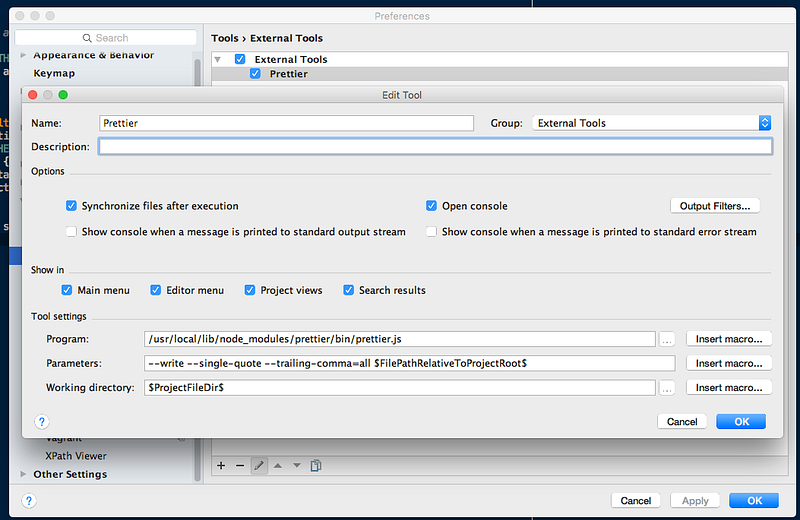 `parameters` 에 `--write --trailing-comma=all --tab-width 4 --print-width 120 --single-quote $FilePathRelativeToProjectRoot$` 를 추가 ### Keymap에 추가 #### `Preperences` -> `Keymap` 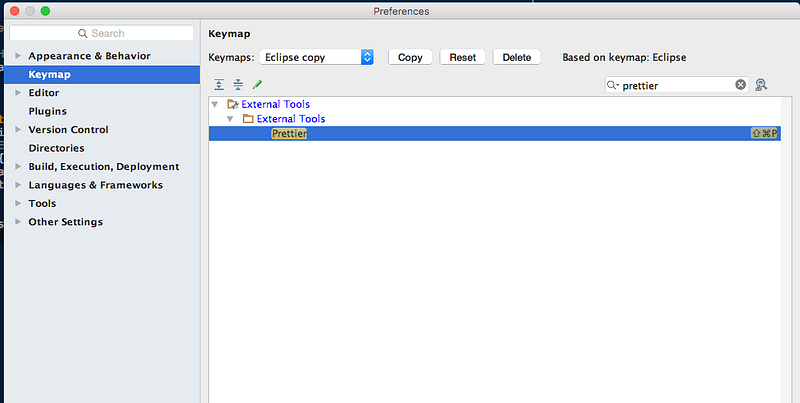 위에는 단축키 `command + shift + p`에 `prettier` 를 등록한 모습 * * * ## VS Code `Prettier - JavaScript formatter` 플러그인 설치 \\ 사이트: https://marketplace.visualstudio.com/items?itemName=esbenp.prettier-vscode \\ [링크](https://marketplace.visualstudio.com/items?itemName=esbenp.prettier-vscode) `settings.json`에 `"editor.formatOnSave": true`로 활성화 * * * ## git에 커밋시 적용 `prettier`를 `pre-commit` 툴과 함께 사용할수 있다. `git`에 커밋하기전에 `git add` 통해 `staged`로 표시된 파일을 재포맷하여 저장한다. `husky` 모듈과 `lint-staged` 모듈을 이용 ### 모듈 설치 ```sh npm install --save-dev lint-staged husky ``` ### `package.json`에 설정 ```js { "scripts": { "precommit": "lint-staged" }, "lint-staged": { "*.{js,json,css}": [ "prettier --write", "git add" ] } } ``` |
| json metadata | {"tags":["kr","kr-dev","nodejs"],"image":["https://cdn-images-1.medium.com/max/800/1*anZPX6XaHHBJQUC4Zz6aSA.png","https://cdn-images-1.medium.com/max/800/1*rwhqT811uuR2X4ftQpWOPA.png"],"links":["https://github.com/prettier/prettier","https://marketplace.visualstudio.com/items?itemName=esbenp.prettier-vscode"],"app":"steemit/0.1","format":"markdown"} |
| Transaction Info | Block #18678407/Trx 7b5ed3e21b0e120e2ed83076ab31ef05004aedcf |
View Raw JSON Data
{
"trx_id": "7b5ed3e21b0e120e2ed83076ab31ef05004aedcf",
"block": 18678407,
"trx_in_block": 52,
"op_in_trx": 0,
"virtual_op": 0,
"timestamp": "2018-01-04T08:53:42",
"op": [
"comment",
{
"parent_author": "",
"parent_permlink": "kr",
"author": "shimdh",
"permlink": "prettier",
"title": "Prettier 소개",
"body": "# Prettier\n\n사이트: https://github.com/prettier/prettier\n\nPrettier는 코드 포맷터입니다. 아래와 같은 것들을 지원합니다.\n* JavaScript, including ES2017\n* JSX\n* Flow\n* TypeScript\n* CSS, Less, and SCSS\n* JSON\n* GraphQL\n\n* * *\n\n### 설치\n\n#### 로컬 설치\n\n```sh\nnpm install prettier --save-dev\n```\n\n#### 글로벌 설치\n```sh\nnpm install prettier -g\n```\n\n* * *\n\n### 사용\n\n##### 기본 사용\n\n```sh\nprettier [opts] [filename ...]\n```\n\n##### 사용 예\n\n```sh\nprettier --single-quote --trailing-comma es5 --write \"{app,__{tests,mocks}__}/**/*.js\"\n```\n\n\n###### `--write`\n파일이 재작성되어 저장됩니다.\n\n* * *\n\n### 옵션\n\n#### Print Width\n\n줄바꿈 길이을 지정\n\n| Default | CLI Override |\n|:-------:|:------------:|\n| `120` | `--print-width <int>` |\n\n* * *\n\n#### Tab Width\n\n들여쓰기할 공백수 지정\n\n| Default | CLI Override |\n|:-------:|:------------:|\n| `4` | `--tab-width <int>` |\n\n* * *\n\n#### Tabs\n\n스페이스 대신 탭으로 들여쓰기\n\n| Default | CLI Override |\n|:-------:|:------------:|\n| `false` | `--use-tabs` |\n\n* * *\n\n#### Semicolons\n\n명령문의 끝에 세미콜론을 추가\n\n- `true`: 모든 문장의 끝에 세미콜론을 추가한다.\n- `false`: 오직 꼭 필요한 부분의 라인의 처음에 추가한다.\n\n| Default | CLI Override |\n|:-------:|:------------:|\n| `true` | `--no-semi` |\n\n* * *\n\n#### Quotes\n\n큰 따옴표 대신 작음 따옴표를 사용\n\n| Default | CLI Override |\n|:-------:|:------------:|\n| `false` | `--single-quote` |\n\n* * *\n\n#### Trailing Commas\n\n가능하면 여러 줄을 입력 할 때마다 후행 쉼표를 추가\n\n- `\"none\"`: 후행쉼표를 추가하지 않는다.\n- `\"es5\"`: ES5에서의 유효한 쉼표를 추가\n- `\"all\"`: 가능한 곳에는 후행쉼표를 추가\n\n| Default | CLI Override |\n|:-------:|:------------:|\n| `\"none\"` | `--trailing-comma <none|es5|all>` |\n\n* * *\n\n#### Bracket Spacing\n\n객체 리터럴의 괄호 사이에 공백을 출력\n\n- `true`: 예 `{ foo: bar }`\n- `false`: 예 `{foo: bar}`\n\n\n| Default | CLI Override |\n|:-------:|:------------:|\n| `true` | `--no-bracket-spacing` |\n\n* * *\n\n### 설정파일\n\n`.prettierrc.json`를 기본적으로 사용\n\n#### 기본설정\n\n```json\n{\n \"printWidth\": 100,\n \"parser\": \"flow\"\n}\n```\n\n\n#### 설정 덮어쓰기\n\n`eslint`의 `overrides`에서 차용\n\n```json\n{\n \"semi\": false,\n \"overrides\": [{\n \"files\": \"*.test.js\",\n \"options\": {\n \"semi\": true\n }\n }]\n}\n```\n\n#### 사용중인 설정파일\n`.prettierrc.json`이 루트디렉터리에 존재\n```js\n{\n \"printWidth\": 120,\n \"trailingComma\": \"all\",\n \"tabWidth\": 4,\n \"singleQuote\": true,\n \"semi\": true,\n \"useTabs\": false,\n \"bracketSpacing\": true\n}\n```\n\n* * *\n\n## 웹스톰\n\n### External Tools에 추가\n\n#### `Preperences` -> `Tools` -> `External Tools`\n`+` 클릭하여 새로운 `exteral tool` 생성 \\\\\n\n\n`parameters` 에 `--write --trailing-comma=all --tab-width 4 --print-width 120 --single-quote $FilePathRelativeToProjectRoot$` 를 추가\n\n\n### Keymap에 추가\n\n#### `Preperences` -> `Keymap`\n\n\n\n\n위에는 단축키 `command + shift + p`에 `prettier` 를 등록한 모습\n\n* * *\n\n## VS Code\n\n`Prettier - JavaScript formatter` 플러그인 설치 \\\\\n사이트: https://marketplace.visualstudio.com/items?itemName=esbenp.prettier-vscode \\\\\n[링크](https://marketplace.visualstudio.com/items?itemName=esbenp.prettier-vscode)\n\n`settings.json`에 `\"editor.formatOnSave\": true`로 활성화\n\n* * *\n\n## git에 커밋시 적용\n\n`prettier`를 `pre-commit` 툴과 함께 사용할수 있다. `git`에 커밋하기전에 `git add` 통해 `staged`로 표시된 파일을 재포맷하여 저장한다.\n\n`husky` 모듈과 `lint-staged` 모듈을 이용\n\n### 모듈 설치\n```sh\nnpm install --save-dev lint-staged husky\n```\n\n### `package.json`에 설정\n\n```js\n{\n \"scripts\": {\n \"precommit\": \"lint-staged\"\n },\n \"lint-staged\": {\n \"*.{js,json,css}\": [\n \"prettier --write\",\n \"git add\"\n ]\n }\n}\n```",
"json_metadata": "{\"tags\":[\"kr\",\"kr-dev\",\"nodejs\"],\"image\":[\"https://cdn-images-1.medium.com/max/800/1*anZPX6XaHHBJQUC4Zz6aSA.png\",\"https://cdn-images-1.medium.com/max/800/1*rwhqT811uuR2X4ftQpWOPA.png\"],\"links\":[\"https://github.com/prettier/prettier\",\"https://marketplace.visualstudio.com/items?itemName=esbenp.prettier-vscode\"],\"app\":\"steemit/0.1\",\"format\":\"markdown\"}"
}
]
}2018/01/03 03:17:24
2018/01/03 03:17:24
| fee | 0.500 STEEM |
| delegation | 57000.000000 VESTS |
| creator | steem |
| new account name | shimdh |
| owner | {"weight_threshold":1,"account_auths":[],"key_auths":[["STM5xhAEvSC8x7otYsdcQgRQ1qbvTKhedmdouhwdPcDJYLkKjhbHr",1]]} |
| active | {"weight_threshold":1,"account_auths":[],"key_auths":[["STM6581cRmikCtqF9cypsL7wH6Y2nC2WvNHPXFJTiz6cjNqmapDjD",1]]} |
| posting | {"weight_threshold":1,"account_auths":[],"key_auths":[["STM6udNfw4725bJMFoN3tdsG84X8pxQxXWyhAgE1kU4S4RSgm8Zd1",1]]} |
| memo key | STM8mmEHwRs56y45BVDSRmi5GaDwuAcZ7eqabCvQryLoCWcHuMYPh |
| json metadata | |
| extensions | [] |
| Transaction Info | Block #18642895/Trx 79dd9e18cfa5e17e219ce02f794cd4ebeff99dba |
View Raw JSON Data
{
  "trx_id": "79dd9e18cfa5e17e219ce02f794cd4ebeff99dba",
  "block": 18642895,
  "trx_in_block": 5,
  "op_in_trx": 0,
  "virtual_op": 0,
  "timestamp": "2018-01-03T03:17:24",
  "op": [
    "account_create_with_delegation",
    {
      "fee": "0.500 STEEM",
      "delegation": "57000.000000 VESTS",
      "creator": "steem",
      "new_account_name": "shimdh",
      "owner": {
        "weight_threshold": 1,
        "account_auths": [],
        "key_auths": [
          [
            "STM5xhAEvSC8x7otYsdcQgRQ1qbvTKhedmdouhwdPcDJYLkKjhbHr",
            1
          ]
        ]
      },
      "active": {
        "weight_threshold": 1,
        "account_auths": [],
        "key_auths": [
          [
            "STM6581cRmikCtqF9cypsL7wH6Y2nC2WvNHPXFJTiz6cjNqmapDjD",
            1
          ]
        ]
      },
      "posting": {
        "weight_threshold": 1,
        "account_auths": [],
        "key_auths": [
          [
            "STM6udNfw4725bJMFoN3tdsG84X8pxQxXWyhAgE1kU4S4RSgm8Zd1",
            1
          ]
        ]
      },
      "memo_key": "STM8mmEHwRs56y45BVDSRmi5GaDwuAcZ7eqabCvQryLoCWcHuMYPh",
      "json_metadata": "",
      "extensions": []
    }
  ]
}Manabar
Voting Power100.00%
Downvote Power100.00%
Resource Credits100.00%
Reputation Progress2.49%
{
  "voting_manabar": {
    "current_mana": "8143659806",
    "last_update_time": 1779085635
  },
  "downvote_manabar": {
    "current_mana": 2035914951,
    "last_update_time": 1779085635
  },
  "rc_account": {
    "account": "shimdh",
    "rc_manabar": {
      "current_mana": "10164408779",
      "last_update_time": 1779085635
    },
    "max_rc_creation_adjustment": {
      "amount": "2020748973",
      "precision": 6,
      "nai": "@@000000037"
    },
    "max_rc": "10164408779"
  }
}
Account Metadata
| POSTING JSON METADATA | |
| None | |
| JSON METADATA | |
| None |
{
  "posting_json_metadata": {},
  "json_metadata": {}
}
Auth Keys
Owner
Single Signature
Public Keys
STM5xhAEvSC8x7otYsdcQgRQ1qbvTKhedmdouhwdPcDJYLkKjhbHr1/1
Active
Single Signature
Public Keys
STM6581cRmikCtqF9cypsL7wH6Y2nC2WvNHPXFJTiz6cjNqmapDjD1/1
Posting
Single Signature
Public Keys
STM6udNfw4725bJMFoN3tdsG84X8pxQxXWyhAgE1kU4S4RSgm8Zd11/1
Memo
STM8mmEHwRs56y45BVDSRmi5GaDwuAcZ7eqabCvQryLoCWcHuMYPh
{
  "owner": {
    "weight_threshold": 1,
    "account_auths": [],
    "key_auths": [
      [
        "STM5xhAEvSC8x7otYsdcQgRQ1qbvTKhedmdouhwdPcDJYLkKjhbHr",
        1
      ]
    ]
  },
  "active": {
    "weight_threshold": 1,
    "account_auths": [],
    "key_auths": [
      [
        "STM6581cRmikCtqF9cypsL7wH6Y2nC2WvNHPXFJTiz6cjNqmapDjD",
        1
      ]
    ]
  },
  "posting": {
    "weight_threshold": 1,
    "account_auths": [
      [
        "busy.app",
        1
      ],
      [
        "dtube.app",
        1
      ]
    ],
    "key_auths": [
      [
        "STM6udNfw4725bJMFoN3tdsG84X8pxQxXWyhAgE1kU4S4RSgm8Zd1",
        1
      ]
    ]
  },
  "memo": "STM8mmEHwRs56y45BVDSRmi5GaDwuAcZ7eqabCvQryLoCWcHuMYPh"
}
Witness Votes
0 / 30
No active witness votes.
[]