

VOTING POWER100.00%
DOWNVOTE POWER100.00%
RESOURCE CREDITS100.00%
REPUTATION PROGRESS0.00%
Net Worth
0.218USD
STEEM
0.000STEEM
SBD
0.284SBD
Effective Power
5.001SP
├── Own SP
1.443SP
└── Incoming DelegationsDeleg
+3.558SP
Detailed Balance
| STEEM | ||
| balance | 0.000STEEM | STEEM |
| market_balance | 0.000STEEM | STEEM |
| savings_balance | 0.000STEEM | STEEM |
| reward_steem_balance | 0.000STEEM | STEEM |
| STEEM POWER | ||
| Own SP | 1.443SP | SP |
| Delegated Out | 0.000SP | SP |
| Delegation In | 3.558SP | SP |
| Effective Power | 5.001SP | SP |
| Reward SP (pending) | 0.000SP | SP |
| SBD | ||
| sbd_balance | 0.284SBD | SBD |
| sbd_conversions | 0.000SBD | SBD |
| sbd_market_balance | 0.000SBD | SBD |
| savings_sbd_balance | 0.000SBD | SBD |
| reward_sbd_balance | 0.000SBD | SBD |
{
  "balance": "0.000 STEEM",
  "savings_balance": "0.000 STEEM",
  "reward_steem_balance": "0.000 STEEM",
  "vesting_shares": "2350.075087 VESTS",
  "delegated_vesting_shares": "0.000000 VESTS",
  "received_vesting_shares": "5793.584719 VESTS",
  "sbd_balance": "0.284 SBD",
  "savings_sbd_balance": "0.000 SBD",
  "reward_sbd_balance": "0.000 SBD",
  "conversions": []
}
Account Info
| name | worktogether |
| id | 170850 |
| rank | 701,932 |
| reputation | 845144909 |
| created | 2017-05-26T17:46:48 |
| recovery_account | steem |
| proxy | None |
| post_count | 11 |
| comment_count | 0 |
| lifetime_vote_count | 0 |
| witnesses_voted_for | 0 |
| last_post | 2018-01-09T22:47:51 |
| last_root_post | 2018-01-09T22:47:51 |
| last_vote_time | 2017-06-30T21:32:12 |
| proxied_vsf_votes | 0, 0, 0, 0 |
| can_vote | 1 |
| voting_power | 0 |
| delayed_votes | 0 |
| balance | 0.000 STEEM |
| savings_balance | 0.000 STEEM |
| sbd_balance | 0.284 SBD |
| savings_sbd_balance | 0.000 SBD |
| vesting_shares | 2350.075087 VESTS |
| delegated_vesting_shares | 0.000000 VESTS |
| received_vesting_shares | 5793.584719 VESTS |
| reward_vesting_balance | 0.000000 VESTS |
| vesting_balance | 0.000 STEEM |
| vesting_withdraw_rate | 0.000000 VESTS |
| next_vesting_withdrawal | 1969-12-31T23:59:59 |
| withdrawn | 0 |
| to_withdraw | 0 |
| withdraw_routes | 0 |
| savings_withdraw_requests | 0 |
| last_account_recovery | 1970-01-01T00:00:00 |
| reset_account | null |
| last_owner_update | 1970-01-01T00:00:00 |
| last_account_update | 2017-06-30T21:22:42 |
| mined | No |
| sbd_seconds | 0 |
| sbd_last_interest_payment | 2017-06-24T22:30:00 |
| savings_sbd_last_interest_payment | 1970-01-01T00:00:00 |
{
  "id": 170850,
  "name": "worktogether",
  "owner": {
    "weight_threshold": 1,
    "account_auths": [],
    "key_auths": [
      [
        "STM5zRA5XXob8vRDscZViV6gy5DANcLCVzox399LQk3jacVpg8va7",
        1
      ]
    ]
  },
  "active": {
    "weight_threshold": 1,
    "account_auths": [],
    "key_auths": [
      [
        "STM5PFTJ2kxjX2ATjMR7ftMG8TKLY8pMYE9kacc5i6sfk6M5Dft7V",
        1
      ]
    ]
  },
  "posting": {
    "weight_threshold": 1,
    "account_auths": [],
    "key_auths": [
      [
        "STM5oZ9drCYNNJ5aGrSM61LHx71yojEhGg3mcK3t3vacWoDeHiNFJ",
        1
      ]
    ]
  },
  "memo_key": "STM5H1H2ZuHYJjhRmi6eyLd8SKki1inmACxLtF9wjiRRNgoPJUjWq",
  "json_metadata": "{\"profile\":{\"name\":\"Work Together\",\"about\":\"A company assisting companies with Office 365 and Azure\",\"location\":\"The Netherlands\",\"website\":\"https://worktogether.tech\",\"profile_image\":\"https://wpac.blob.core.windows.net/wpstorage/2016/01/O3A8884-bewerkt.jpg\"}}",
  "posting_json_metadata": "{\"profile\":{\"name\":\"Work Together\",\"about\":\"A company assisting companies with Office 365 and Azure\",\"location\":\"The Netherlands\",\"website\":\"https://worktogether.tech\",\"profile_image\":\"https://wpac.blob.core.windows.net/wpstorage/2016/01/O3A8884-bewerkt.jpg\"}}",
  "proxy": "",
  "last_owner_update": "1970-01-01T00:00:00",
  "last_account_update": "2017-06-30T21:22:42",
  "created": "2017-05-26T17:46:48",
  "mined": false,
  "recovery_account": "steem",
  "last_account_recovery": "1970-01-01T00:00:00",
  "reset_account": "null",
  "comment_count": 0,
  "lifetime_vote_count": 0,
  "post_count": 11,
  "can_vote": true,
  "voting_manabar": {
    "current_mana": "8143659806",
    "last_update_time": 1779092265
  },
  "downvote_manabar": {
    "current_mana": 2035914951,
    "last_update_time": 1779092265
  },
  "voting_power": 0,
  "balance": "0.000 STEEM",
  "savings_balance": "0.000 STEEM",
  "sbd_balance": "0.284 SBD",
  "sbd_seconds": "0",
  "sbd_seconds_last_update": "2017-06-24T22:30:00",
  "sbd_last_interest_payment": "2017-06-24T22:30:00",
  "savings_sbd_balance": "0.000 SBD",
  "savings_sbd_seconds": "0",
  "savings_sbd_seconds_last_update": "1970-01-01T00:00:00",
  "savings_sbd_last_interest_payment": "1970-01-01T00:00:00",
  "savings_withdraw_requests": 0,
  "reward_sbd_balance": "0.000 SBD",
  "reward_steem_balance": "0.000 STEEM",
  "reward_vesting_balance": "0.000000 VESTS",
  "reward_vesting_steem": "0.000 STEEM",
  "vesting_shares": "2350.075087 VESTS",
  "delegated_vesting_shares": "0.000000 VESTS",
  "received_vesting_shares": "5793.584719 VESTS",
  "vesting_withdraw_rate": "0.000000 VESTS",
  "next_vesting_withdrawal": "1969-12-31T23:59:59",
  "withdrawn": 0,
  "to_withdraw": 0,
  "withdraw_routes": 0,
  "curation_rewards": 0,
  "posting_rewards": 266,
  "proxied_vsf_votes": [
    0,
    0,
    0,
    0
  ],
  "witnesses_voted_for": 0,
  "last_post": "2018-01-09T22:47:51",
  "last_root_post": "2018-01-09T22:47:51",
  "last_vote_time": "2017-06-30T21:32:12",
  "post_bandwidth": 0,
  "pending_claimed_accounts": 0,
  "vesting_balance": "0.000 STEEM",
  "reputation": 845144909,
  "transfer_history": [],
  "market_history": [],
  "post_history": [],
  "vote_history": [],
  "other_history": [],
  "witness_votes": [],
  "tags_usage": [],
  "guest_bloggers": [],
  "rank": 701932
}
Withdraw Routes
| Incoming | Outgoing |
|---|---|
Empty | Empty |
{
  "incoming": [],
  "outgoing": []
}From Date
To Date
steemdelegated 3.558 SP to @worktogether2026/05/18 08:17:45
steemdelegated 3.558 SP to @worktogether
2026/05/18 08:17:45
| delegator | steem |
| delegatee | worktogether |
| vesting shares | 5793.584719 VESTS |
| Transaction Info | Block #106153060/Trx e95cbfa644623d65cfd84aa9074d01fc08b369fb |
View Raw JSON Data
{
  "trx_id": "e95cbfa644623d65cfd84aa9074d01fc08b369fb",
  "block": 106153060,
  "trx_in_block": 1,
  "op_in_trx": 0,
  "virtual_op": 0,
  "timestamp": "2026-05-18T08:17:45",
  "op": [
    "delegate_vesting_shares",
    {
      "delegator": "steem",
      "delegatee": "worktogether",
      "vesting_shares": "5793.584719 VESTS"
    }
  ]
}steemdelegated 1.892 SP to @worktogether2026/05/13 12:30:18
steemdelegated 1.892 SP to @worktogether
2026/05/13 12:30:18
| delegator | steem |
| delegatee | worktogether |
| vesting shares | 3081.374314 VESTS |
| Transaction Info | Block #106014819/Trx eca66eaf02cb94d4ec1c31af8bc82def9eab2a82 |
View Raw JSON Data
{
  "trx_id": "eca66eaf02cb94d4ec1c31af8bc82def9eab2a82",
  "block": 106014819,
  "trx_in_block": 0,
  "op_in_trx": 0,
  "virtual_op": 0,
  "timestamp": "2026-05-13T12:30:18",
  "op": [
    "delegate_vesting_shares",
    {
      "delegator": "steem",
      "delegatee": "worktogether",
      "vesting_shares": "3081.374314 VESTS"
    }
  ]
}steemdelegated 3.566 SP to @worktogether2026/04/26 07:26:42
steemdelegated 3.566 SP to @worktogether
2026/04/26 07:26:42
| delegator | steem |
| delegatee | worktogether |
| vesting shares | 5806.100475 VESTS |
| Transaction Info | Block #105520489/Trx 3f9bf4892474b4f09c273465593c670e641d9af4 |
View Raw JSON Data
{
  "trx_id": "3f9bf4892474b4f09c273465593c670e641d9af4",
  "block": 105520489,
  "trx_in_block": 2,
  "op_in_trx": 0,
  "virtual_op": 0,
  "timestamp": "2026-04-26T07:26:42",
  "op": [
    "delegate_vesting_shares",
    {
      "delegator": "steem",
      "delegatee": "worktogether",
      "vesting_shares": "5806.100475 VESTS"
    }
  ]
}steemdelegated 1.918 SP to @worktogether2026/01/24 05:25:09
steemdelegated 1.918 SP to @worktogether
2026/01/24 05:25:09
| delegator | steem |
| delegatee | worktogether |
| vesting shares | 3122.921133 VESTS |
| Transaction Info | Block #102877697/Trx a4c98e46f4395a8c3eb33d13fc9e5e467d1fe224 |
View Raw JSON Data
{
  "trx_id": "a4c98e46f4395a8c3eb33d13fc9e5e467d1fe224",
  "block": 102877697,
  "trx_in_block": 0,
  "op_in_trx": 0,
  "virtual_op": 0,
  "timestamp": "2026-01-24T05:25:09",
  "op": [
    "delegate_vesting_shares",
    {
      "delegator": "steem",
      "delegatee": "worktogether",
      "vesting_shares": "3122.921133 VESTS"
    }
  ]
}steemdelegated 2.019 SP to @worktogether2024/12/18 00:34:24
steemdelegated 2.019 SP to @worktogether
2024/12/18 00:34:24
| delegator | steem |
| delegatee | worktogether |
| vesting shares | 3287.140330 VESTS |
| Transaction Info | Block #91323901/Trx 231aefdd83902aa4285442ee91200a73860f6117 |
View Raw JSON Data
{
  "trx_id": "231aefdd83902aa4285442ee91200a73860f6117",
  "block": 91323901,
  "trx_in_block": 1,
  "op_in_trx": 0,
  "virtual_op": 0,
  "timestamp": "2024-12-18T00:34:24",
  "op": [
    "delegate_vesting_shares",
    {
      "delegator": "steem",
      "delegatee": "worktogether",
      "vesting_shares": "3287.140330 VESTS"
    }
  ]
}steemdelegated 2.123 SP to @worktogether2023/11/14 16:12:54
steemdelegated 2.123 SP to @worktogether
2023/11/14 16:12:54
| delegator | steem |
| delegatee | worktogether |
| vesting shares | 3456.273862 VESTS |
| Transaction Info | Block #79877986/Trx 21b5def50bd57b3698a4cfd354d133135c0440ef |
View Raw JSON Data
{
  "trx_id": "21b5def50bd57b3698a4cfd354d133135c0440ef",
  "block": 79877986,
  "trx_in_block": 2,
  "op_in_trx": 0,
  "virtual_op": 0,
  "timestamp": "2023-11-14T16:12:54",
  "op": [
    "delegate_vesting_shares",
    {
      "delegator": "steem",
      "delegatee": "worktogether",
      "vesting_shares": "3456.273862 VESTS"
    }
  ]
}steemdelegated 3.926 SP to @worktogether2023/09/22 12:45:51
steemdelegated 3.926 SP to @worktogether
2023/09/22 12:45:51
| delegator | steem |
| delegatee | worktogether |
| vesting shares | 6393.182648 VESTS |
| Transaction Info | Block #78365704/Trx eed2f45730e7d03fe5b15aa543279fd9a720f7fa |
View Raw JSON Data
{
  "trx_id": "eed2f45730e7d03fe5b15aa543279fd9a720f7fa",
  "block": 78365704,
  "trx_in_block": 0,
  "op_in_trx": 0,
  "virtual_op": 0,
  "timestamp": "2023-09-22T12:45:51",
  "op": [
    "delegate_vesting_shares",
    {
      "delegator": "steem",
      "delegatee": "worktogether",
      "vesting_shares": "6393.182648 VESTS"
    }
  ]
}steemdelegated 4.062 SP to @worktogether2022/11/03 19:55:42
steemdelegated 4.062 SP to @worktogether
2022/11/03 19:55:42
| delegator | steem |
| delegatee | worktogether |
| vesting shares | 6615.234086 VESTS |
| Transaction Info | Block #69123087/Trx 45556b4f2b150960518295686a339e68c0f4a643 |
View Raw JSON Data
{
  "trx_id": "45556b4f2b150960518295686a339e68c0f4a643",
  "block": 69123087,
  "trx_in_block": 2,
  "op_in_trx": 0,
  "virtual_op": 0,
  "timestamp": "2022-11-03T19:55:42",
  "op": [
    "delegate_vesting_shares",
    {
      "delegator": "steem",
      "delegatee": "worktogether",
      "vesting_shares": "6615.234086 VESTS"
    }
  ]
}steemdelegated 4.198 SP to @worktogether2022/01/18 00:56:03
steemdelegated 4.198 SP to @worktogether
2022/01/18 00:56:03
| delegator | steem |
| delegatee | worktogether |
| vesting shares | 6835.341687 VESTS |
| Transaction Info | Block #60826104/Trx bd988ea37a4fec2c1d50b8ca8d041ea8204b2006 |
View Raw JSON Data
{
  "trx_id": "bd988ea37a4fec2c1d50b8ca8d041ea8204b2006",
  "block": 60826104,
  "trx_in_block": 49,
  "op_in_trx": 0,
  "virtual_op": 0,
  "timestamp": "2022-01-18T00:56:03",
  "op": [
    "delegate_vesting_shares",
    {
      "delegator": "steem",
      "delegatee": "worktogether",
      "vesting_shares": "6835.341687 VESTS"
    }
  ]
}steemdelegated 4.311 SP to @worktogether2021/06/14 08:01:57
steemdelegated 4.311 SP to @worktogether
2021/06/14 08:01:57
| delegator | steem |
| delegatee | worktogether |
| vesting shares | 7019.535975 VESTS |
| Transaction Info | Block #54616321/Trx 33c30f26c9a9a19ac009205dd495706db9b84c05 |
View Raw JSON Data
{
  "trx_id": "33c30f26c9a9a19ac009205dd495706db9b84c05",
  "block": 54616321,
  "trx_in_block": 2,
  "op_in_trx": 0,
  "virtual_op": 0,
  "timestamp": "2021-06-14T08:01:57",
  "op": [
    "delegate_vesting_shares",
    {
      "delegator": "steem",
      "delegatee": "worktogether",
      "vesting_shares": "7019.535975 VESTS"
    }
  ]
}steemdelegated 4.426 SP to @worktogether2020/12/11 18:12:15
steemdelegated 4.426 SP to @worktogether
2020/12/11 18:12:15
| delegator | steem |
| delegatee | worktogether |
| vesting shares | 7206.957949 VESTS |
| Transaction Info | Block #49363519/Trx 45aec278dcfca95e9cf1b8477c5501e75e21a4c0 |
View Raw JSON Data
{
  "trx_id": "45aec278dcfca95e9cf1b8477c5501e75e21a4c0",
  "block": 49363519,
  "trx_in_block": 1,
  "op_in_trx": 0,
  "virtual_op": 0,
  "timestamp": "2020-12-11T18:12:15",
  "op": [
    "delegate_vesting_shares",
    {
      "delegator": "steem",
      "delegatee": "worktogether",
      "vesting_shares": "7206.957949 VESTS"
    }
  ]
}steemdelegated 1.175 SP to @worktogether2020/12/06 11:47:18
steemdelegated 1.175 SP to @worktogether
2020/12/06 11:47:18
| delegator | steem |
| delegatee | worktogether |
| vesting shares | 1912.543513 VESTS |
| Transaction Info | Block #49215032/Trx 0ca8092aa57d2a7b1fb15dd8d8a952be5cf8f760 |
View Raw JSON Data
{
  "trx_id": "0ca8092aa57d2a7b1fb15dd8d8a952be5cf8f760",
  "block": 49215032,
  "trx_in_block": 0,
  "op_in_trx": 0,
  "virtual_op": 0,
  "timestamp": "2020-12-06T11:47:18",
  "op": [
    "delegate_vesting_shares",
    {
      "delegator": "steem",
      "delegatee": "worktogether",
      "vesting_shares": "1912.543513 VESTS"
    }
  ]
}steemdelegated 4.430 SP to @worktogether2020/12/05 21:50:00
steemdelegated 4.430 SP to @worktogether
2020/12/05 21:50:00
| delegator | steem |
| delegatee | worktogether |
| vesting shares | 7213.165803 VESTS |
| Transaction Info | Block #49198602/Trx 0f46951976fd7e2c303a28bedc696649a32778c1 |
View Raw JSON Data
{
  "trx_id": "0f46951976fd7e2c303a28bedc696649a32778c1",
  "block": 49198602,
  "trx_in_block": 0,
  "op_in_trx": 0,
  "virtual_op": 0,
  "timestamp": "2020-12-05T21:50:00",
  "op": [
    "delegate_vesting_shares",
    {
      "delegator": "steem",
      "delegatee": "worktogether",
      "vesting_shares": "7213.165803 VESTS"
    }
  ]
}steemdelegated 1.179 SP to @worktogether2020/11/03 06:19:33
steemdelegated 1.179 SP to @worktogether
2020/11/03 06:19:33
| delegator | steem |
| delegatee | worktogether |
| vesting shares | 1920.017158 VESTS |
| Transaction Info | Block #48275094/Trx 08eea89616b40196569f78617537a6fc42181950 |
View Raw JSON Data
{
  "trx_id": "08eea89616b40196569f78617537a6fc42181950",
  "block": 48275094,
  "trx_in_block": 1,
  "op_in_trx": 0,
  "virtual_op": 0,
  "timestamp": "2020-11-03T06:19:33",
  "op": [
    "delegate_vesting_shares",
    {
      "delegator": "steem",
      "delegatee": "worktogether",
      "vesting_shares": "1920.017158 VESTS"
    }
  ]
}steemdelegated 4.554 SP to @worktogether2020/05/09 12:52:12
steemdelegated 4.554 SP to @worktogether
2020/05/09 12:52:12
| delegator | steem |
| delegatee | worktogether |
| vesting shares | 7415.971162 VESTS |
| Transaction Info | Block #43225390/Trx c1e37f1585b9c4b6c9cfd545d614d5ccf57f2ead |
View Raw JSON Data
{
  "trx_id": "c1e37f1585b9c4b6c9cfd545d614d5ccf57f2ead",
  "block": 43225390,
  "trx_in_block": 5,
  "op_in_trx": 0,
  "virtual_op": 0,
  "timestamp": "2020-05-09T12:52:12",
  "op": [
    "delegate_vesting_shares",
    {
      "delegator": "steem",
      "delegatee": "worktogether",
      "vesting_shares": "7415.971162 VESTS"
    }
  ]
}steemdelegated 1.200 SP to @worktogether2020/05/08 17:32:39
steemdelegated 1.200 SP to @worktogether
2020/05/08 17:32:39
| delegator | steem |
| delegatee | worktogether |
| vesting shares | 1953.311140 VESTS |
| Transaction Info | Block #43202741/Trx 1fc14753aeb76affe404d92bf4dad67eea1dfcf2 |
View Raw JSON Data
{
  "trx_id": "1fc14753aeb76affe404d92bf4dad67eea1dfcf2",
  "block": 43202741,
  "trx_in_block": 2,
  "op_in_trx": 0,
  "virtual_op": 0,
  "timestamp": "2020-05-08T17:32:39",
  "op": [
    "delegate_vesting_shares",
    {
      "delegator": "steem",
      "delegatee": "worktogether",
      "vesting_shares": "1953.311140 VESTS"
    }
  ]
}steemdelegated 4.562 SP to @worktogether2020/04/16 04:24:27
steemdelegated 4.562 SP to @worktogether
2020/04/16 04:24:27
| delegator | steem |
| delegatee | worktogether |
| vesting shares | 7428.858610 VESTS |
| Transaction Info | Block #42570446/Trx 25a72e0f5ab60b545f4fa778b3d9e55af9395984 |
View Raw JSON Data
{
  "trx_id": "25a72e0f5ab60b545f4fa778b3d9e55af9395984",
  "block": 42570446,
  "trx_in_block": 11,
  "op_in_trx": 0,
  "virtual_op": 0,
  "timestamp": "2020-04-16T04:24:27",
  "op": [
    "delegate_vesting_shares",
    {
      "delegator": "steem",
      "delegatee": "worktogether",
      "vesting_shares": "7428.858610 VESTS"
    }
  ]
}2019/05/26 19:40:03
2019/05/26 19:40:03
| parent author | worktogether |
| parent permlink | epidermolysis-bullosa-eb |
| author | steemitboard |
| permlink | steemitboard-notify-worktogether-20190526t194002000z |
| title | |
| body | Congratulations @worktogether! You received a personal award! <table><tr><td>https://steemitimages.com/70x70/http://steemitboard.com/@worktogether/birthday2.png</td><td>Happy Birthday! - You are on the Steem blockchain for 2 years!</td></tr></table> <sub>_You can view [your badges on your Steem Board](https://steemitboard.com/@worktogether) and compare to others on the [Steem Ranking](http://steemitboard.com/ranking/index.php?name=worktogether)_</sub> ###### [Vote for @Steemitboard as a witness](https://v2.steemconnect.com/sign/account-witness-vote?witness=steemitboard&approve=1) to get one more award and increased upvotes! |
| json metadata | {"image":["https://steemitboard.com/img/notify.png"]} |
| Transaction Info | Block #33254125/Trx 9718ebb5c869ad4cc0280a5fe1686701b40da46a |
View Raw JSON Data
{
  "trx_id": "9718ebb5c869ad4cc0280a5fe1686701b40da46a",
  "block": 33254125,
  "trx_in_block": 3,
  "op_in_trx": 0,
  "virtual_op": 0,
  "timestamp": "2019-05-26T19:40:03",
  "op": [
    "comment",
    {
      "parent_author": "worktogether",
      "parent_permlink": "epidermolysis-bullosa-eb",
      "author": "steemitboard",
      "permlink": "steemitboard-notify-worktogether-20190526t194002000z",
      "title": "",
      "body": "Congratulations @worktogether! You received a personal award!\n\n<table><tr><td>https://steemitimages.com/70x70/http://steemitboard.com/@worktogether/birthday2.png</td><td>Happy Birthday! - You are on the Steem blockchain for 2 years!</td></tr></table>\n\n<sub>_You can view [your badges on your Steem Board](https://steemitboard.com/@worktogether) and compare to others on the [Steem Ranking](http://steemitboard.com/ranking/index.php?name=worktogether)_</sub>\n\n\n###### [Vote for @Steemitboard as a witness](https://v2.steemconnect.com/sign/account-witness-vote?witness=steemitboard&approve=1) to get one more award and increased upvotes!",
      "json_metadata": "{\"image\":[\"https://steemitboard.com/img/notify.png\"]}"
    }
  ]
}steemdelegated 4.682 SP to @worktogether2019/05/12 21:32:18
steemdelegated 4.682 SP to @worktogether
2019/05/12 21:32:18
| delegator | steem |
| delegatee | worktogether |
| vesting shares | 7624.475423 VESTS |
| Transaction Info | Block #32853445/Trx 8c14751b0f7e1d698394fd0ecd4a2fd1c25f00fd |
View Raw JSON Data
{
  "trx_id": "8c14751b0f7e1d698394fd0ecd4a2fd1c25f00fd",
  "block": 32853445,
  "trx_in_block": 0,
  "op_in_trx": 0,
  "virtual_op": 0,
  "timestamp": "2019-05-12T21:32:18",
  "op": [
    "delegate_vesting_shares",
    {
      "delegator": "steem",
      "delegatee": "worktogether",
      "vesting_shares": "7624.475423 VESTS"
    }
  ]
}2018/05/26 20:07:15
2018/05/26 20:07:15
| parent author | worktogether |
| parent permlink | epidermolysis-bullosa-eb |
| author | steemitboard |
| permlink | steemitboard-notify-worktogether-20180526t200717000z |
| title | |
| body | Congratulations @worktogether! You have received a personal award! [](http://steemitboard.com/@worktogether) 1 Year on Steemit _Click on the badge to view your Board of Honor. > Do you like **SteemitBoard**'s project? **[Vote for its witness](https://v2.steemconnect.com/sign/account-witness-vote?witness=steemitboard&approve=1)** and **get one more award**! |
| json metadata | {"image":["https://steemitboard.com/img/notify.png"]} |
| Transaction Info | Block #22777223/Trx 6d66132f4bf26a3634b7c73e02596fc87e1f673b |
View Raw JSON Data
{
"trx_id": "6d66132f4bf26a3634b7c73e02596fc87e1f673b",
"block": 22777223,
"trx_in_block": 45,
"op_in_trx": 0,
"virtual_op": 0,
"timestamp": "2018-05-26T20:07:15",
"op": [
"comment",
{
"parent_author": "worktogether",
"parent_permlink": "epidermolysis-bullosa-eb",
"author": "steemitboard",
"permlink": "steemitboard-notify-worktogether-20180526t200717000z",
"title": "",
"body": "Congratulations @worktogether! You have received a personal award!\n\n[](http://steemitboard.com/@worktogether) 1 Year on Steemit\n_Click on the badge to view your Board of Honor.\n\n\n> Do you like **SteemitBoard**'s project? **[Vote for its witness](https://v2.steemconnect.com/sign/account-witness-vote?witness=steemitboard&approve=1)** and **get one more award**!",
"json_metadata": "{\"image\":[\"https://steemitboard.com/img/notify.png\"]}"
}
]
}steemdelegated 4.805 SP to @worktogether2018/05/17 03:46:30
steemdelegated 4.805 SP to @worktogether
2018/05/17 03:46:30
| delegator | steem |
| delegatee | worktogether |
| vesting shares | 7823.990515 VESTS |
| Transaction Info | Block #22498828/Trx 74a72751a54f053fc0055efeb25c34375e7869f0 |
View Raw JSON Data
{
  "trx_id": "74a72751a54f053fc0055efeb25c34375e7869f0",
  "block": 22498828,
  "trx_in_block": 13,
  "op_in_trx": 0,
  "virtual_op": 0,
  "timestamp": "2018-05-17T03:46:30",
  "op": [
    "delegate_vesting_shares",
    {
      "delegator": "steem",
      "delegatee": "worktogether",
      "vesting_shares": "7823.990515 VESTS"
    }
  ]
}steemdelegated 17.311 SP to @worktogether2018/05/06 06:35:21
steemdelegated 17.311 SP to @worktogether
2018/05/06 06:35:21
| delegator | steem |
| delegatee | worktogether |
| vesting shares | 28189.289342 VESTS |
| Transaction Info | Block #22185456/Trx 22dbe1053add85e3443f49feb57966b60bcbe187 |
View Raw JSON Data
{
  "trx_id": "22dbe1053add85e3443f49feb57966b60bcbe187",
  "block": 22185456,
  "trx_in_block": 11,
  "op_in_trx": 0,
  "virtual_op": 0,
  "timestamp": "2018-05-06T06:35:21",
  "op": [
    "delegate_vesting_shares",
    {
      "delegator": "steem",
      "delegatee": "worktogether",
      "vesting_shares": "28189.289342 VESTS"
    }
  ]
}2018/02/13 21:33:12
2018/02/13 21:33:12
| voter | worktogether |
| author | cryptouk |
| permlink | 54prjx-fake-news-elon-musk-to-quit-tesla-jumps-on-a-bitcoin-tech-startup |
| weight | 10000 (100.00%) |
| Transaction Info | Block #19844434/Trx 783651cc7efc8a69d59c165f8886e7ad6a836077 |
View Raw JSON Data
{
  "trx_id": "783651cc7efc8a69d59c165f8886e7ad6a836077",
  "block": 19844434,
  "trx_in_block": 3,
  "op_in_trx": 0,
  "virtual_op": 0,
  "timestamp": "2018-02-13T21:33:12",
  "op": [
    "vote",
    {
      "voter": "worktogether",
      "author": "cryptouk",
      "permlink": "54prjx-fake-news-elon-musk-to-quit-tesla-jumps-on-a-bitcoin-tech-startup",
      "weight": 10000
    }
  ]
}worktogetherpublished a new post: epidermolysis-bullosa-eb2018/01/09 22:47:51
worktogetherpublished a new post: epidermolysis-bullosa-eb
2018/01/09 22:47:51
| parent author | |
| parent permlink | epidermolysis |
| author | worktogether |
| permlink | epidermolysis-bullosa-eb |
| title | Epidermolysis Bullosa (EB) |
| body | Last year my niece was born with the incurable disease Epidermolysis Bullosa or EB for short. At this moment there is no cure for this genetic skin disease, and a lot of research is needed to find a cure. Most children that are born with it might not live longer than a few months to a few years depending on the severity. My niece has a mild version of EB and has a normal life expectancy, but needs extra care her whole life. At the moment we are doing a lot of things to get more attention to this disease, and that is the reason for posting it here. You can find more information in Dutch on http://www.vlinderkind.nl or http://www.debra.org/whatiseb for an English explanation. It is the worst disease you've never heard of |
| json metadata | {"tags":["epidermolysis","bullosa","eb","disease","research"],"links":["http://www.vlinderkind.nl","http://www.debra.org/whatiseb"],"app":"steemit/0.1","format":"markdown"} |
| Transaction Info | Block #18838943/Trx f7c609574fdc34ffdf0fd0498ce56418379ada29 |
View Raw JSON Data
{
  "trx_id": "f7c609574fdc34ffdf0fd0498ce56418379ada29",
  "block": 18838943,
  "trx_in_block": 24,
  "op_in_trx": 0,
  "virtual_op": 0,
  "timestamp": "2018-01-09T22:47:51",
  "op": [
    "comment",
    {
      "parent_author": "",
      "parent_permlink": "epidermolysis",
      "author": "worktogether",
      "permlink": "epidermolysis-bullosa-eb",
      "title": "Epidermolysis Bullosa (EB)",
      "body": "Last year my niece was born with the incurable disease Epidermolysis Bullosa or EB for short. At this moment there is no cure for this genetic skin disease, and a lot of research is needed to find a cure. Most children that are born with it might not live longer than a few months to a few years depending on the severity. My niece has a mild version of EB and has a normal life expectancy, but needs extra care her whole life.\n\nAt the moment we are doing a lot of things to get more attention to this disease, and that is the reason for posting it here.\nYou can find more information in Dutch on http://www.vlinderkind.nl or http://www.debra.org/whatiseb for an English explanation.\n\nIt is the worst disease you've never heard of",
      "json_metadata": "{\"tags\":[\"epidermolysis\",\"bullosa\",\"eb\",\"disease\",\"research\"],\"links\":[\"http://www.vlinderkind.nl\",\"http://www.debra.org/whatiseb\"],\"app\":\"steemit/0.1\",\"format\":\"markdown\"}"
    }
  ]
}steemdelegated 17.436 SP to @worktogether2017/12/27 21:18:48
steemdelegated 17.436 SP to @worktogether
2017/12/27 21:18:48
| delegator | steem |
| delegatee | worktogether |
| vesting shares | 28392.924913 VESTS |
| Transaction Info | Block #18463189/Trx 8979f3655e6f1582a37219dd5399931ae4356372 |
View Raw JSON Data
{
  "trx_id": "8979f3655e6f1582a37219dd5399931ae4356372",
  "block": 18463189,
  "trx_in_block": 21,
  "op_in_trx": 0,
  "virtual_op": 0,
  "timestamp": "2017-12-27T21:18:48",
  "op": [
    "delegate_vesting_shares",
    {
      "delegator": "steem",
      "delegatee": "worktogether",
      "vesting_shares": "28392.924913 VESTS"
    }
  ]
}worktogetherpublished a new post: enabling-modern-authentication-on-office-3652017/08/24 07:21:24
worktogetherpublished a new post: enabling-modern-authentication-on-office-365
2017/08/24 07:21:24
| parent author | |
| parent permlink | office365 |
| author | worktogether |
| permlink | enabling-modern-authentication-on-office-365 |
| title | Enabling modern authentication on Office 365 |
| body | The first thing that might come to your mind might be that modern authentication is enabled for Office 365. Well that is partly true. It is enabled for SharePoint online, not for Exchange and Skype for Business if your tenant is created before august 1<sup>st</sup> 2017. While writing this about 95% of the tenants are older then 1 month so modern authentication is not enabled for Exchange and Skype for Business. ## What is modern authentication ## Modern authentication is basically a browser window where you can authenticate instead of the old username/password dialog. This browser windows allows you to have a certain flow of authentication that is not possible with the old dialog window. The benefits of the browser window is that you can have thing like multi factor authentication and smart card authentication. The modern authentication uses the ADAL (Active Directory Authentication Library). Detail can be found [here](https://msdn.microsoft.com/en-us/library/azure/jj573266.aspx). ## Why enable modern authentication ## This is a fair question when you are working with older versions of Office because they do not support modern authentication, but when you have an office version that does not support modern authentication, you also almost out of support for the combination of Office client and Office 365. So the question should be why not enable modern authentication? The answer to this is that modern authentication has a fallback to the classic authentication if the client does not support modern authentication. ## What clients support modern authentication ## Off course the latest version of Office Pro Plus and Office 2016 support modern authentication out of the box. Office 2013 does support it, but here you need to add a certain registry key to trigger the modern authentication, otherwise it will use basic authentication. The full details of the supported clients can be found [here](http://aka.ms/modernAuthClients) and to enable it [here](http://aka.ms/AuthAdminHowTo) ## Enable modern authentication Exchange Online ## Enabling it for Exchange is very simple, just run the command "Set-OrganizationConfig -OAuth2ClientProfileEnabled:$true" when you are connected to Exchange Online in PowerShell. To connect to Exchange Online you can follow this [manual](https://technet.microsoft.com/library/jj984289(v=exchg.160).aspx) To verify that the setting is correct you can use this command "Get-OrganizationConfig | ft name, *OAuth*" ## Enable modern authentication Skype for Business ## If you want to enable this for Skype for Business, you also need to enable it for Exchange Online because the Skype for Business client connects to both Exchange and Skype for Business Enabling it for skype for business takes a bit more effort because you need to install the Skype for Business module that you can download [here](http://go.microsoft.com/fwlink/?LinkId=294688) After installing it and downloading you can connect to Skype for Business with the following 2 commands * $session = New-CsOnlineSession -Credential (Get-Credential) * Import-PSSession $session When you are connected use "Set-CsOAuthConfiguration -ClientAdalAuthOverride Allowed" To verify that the setting is correct you can use this command "Get-CsOAuthConfiguration | ft *clientadal*" ## Resources ## Exchange online: https://social.technet.microsoft.com/wiki/contents/articles/32711.exchange-online-how-to-enable-your-tenant-for-modern-authentication.aspx Skype for Business: https://social.technet.microsoft.com/wiki/contents/articles/34339.skype-for-business-online-enable-your-tenant-for-modern-authentication.aspx Connect to Skype for Business: https://technet.microsoft.com/en-us/library/dn362795.aspx |
| json metadata | {"tags":["office365","exchange","skypeforbusiness","powershell","configuration"],"links":["https://msdn.microsoft.com/en-us/library/azure/jj573266.aspx","http://aka.ms/modernAuthClients","http://aka.ms/AuthAdminHowTo","https://technet.microsoft.com/library/jj984289(v=exchg.160).aspx","http://go.microsoft.com/fwlink/?LinkId=294688","https://social.technet.microsoft.com/wiki/contents/articles/32711.exchange-online-how-to-enable-your-tenant-for-modern-authentication.aspx","https://social.technet.microsoft.com/wiki/contents/articles/34339.skype-for-business-online-enable-your-tenant-for-modern-authentication.aspx","https://technet.microsoft.com/en-us/library/dn362795.aspx"],"app":"steemit/0.1","format":"markdown"} |
| Transaction Info | Block #14848593/Trx cb022968a94bd77cfa8b37f7a890f94065c4002e |
View Raw JSON Data
{
  "trx_id": "cb022968a94bd77cfa8b37f7a890f94065c4002e",
  "block": 14848593,
  "trx_in_block": 15,
  "op_in_trx": 0,
  "virtual_op": 0,
  "timestamp": "2017-08-24T07:21:24",
  "op": [
    "comment",
    {
      "parent_author": "",
      "parent_permlink": "office365",
      "author": "worktogether",
      "permlink": "enabling-modern-authentication-on-office-365",
      "title": "Enabling modern authentication on Office 365",
      "body": "The first thing that might come to your mind might be that modern authentication is enabled for Office 365. Well that is partly true. It is enabled for SharePoint online, not for Exchange and Skype for Business if your tenant is created before august 1<sup>st</sup> 2017. While writing this about 95% of the tenants are older then 1 month so modern authentication is not enabled for Exchange and Skype for Business.\n## What is modern authentication ##\nModern authentication is basically a browser window where you can authenticate instead of the old username/password dialog. This browser windows allows you to have a certain flow of authentication that is not possible with the old dialog window.\nThe benefits of the browser window is that you can have thing like multi factor authentication and smart card authentication.\n\nThe modern authentication uses the ADAL (Active Directory Authentication Library). Detail can be found [here](https://msdn.microsoft.com/en-us/library/azure/jj573266.aspx).\n## Why enable modern authentication ##\nThis is a fair question when you are working with older versions of Office because they do not support modern authentication, but when you have an office version that does not support modern authentication, you also almost out of support for the combination of Office client and Office 365.\nSo the question should be why not enable modern authentication? The answer to this is that modern authentication has a fallback to the classic authentication if the client does not support modern authentication.\n## What clients support modern authentication ##\nOff course the latest version of Office Pro Plus and Office 2016 support modern authentication out of the box.\nOffice 2013 does support it, but here you need to add a certain registry key to trigger the modern authentication, otherwise it will use basic authentication.\nThe full details of the supported clients can be found [here](http://aka.ms/modernAuthClients) and to enable it [here](http://aka.ms/AuthAdminHowTo)\n## Enable modern authentication Exchange Online ##\nEnabling it for Exchange is very simple, just run the command \"Set-OrganizationConfig -OAuth2ClientProfileEnabled:$true\" when you are connected to Exchange Online in PowerShell.\n\nTo connect to Exchange Online you can follow this [manual](https://technet.microsoft.com/library/jj984289(v=exchg.160).aspx)\nTo verify that the setting is correct you can use this command \"Get-OrganizationConfig | ft name, *OAuth*\"\n## Enable modern authentication Skype for Business ##\nIf you want to enable this for Skype for Business, you also need to enable it for Exchange Online because the Skype for Business client connects to both Exchange and Skype for Business\n\nEnabling it for skype for business takes a bit more effort because you need to install the Skype for Business module that you can download [here](http://go.microsoft.com/fwlink/?LinkId=294688)\n\nAfter installing it and downloading you can connect to Skype for Business with the following 2 commands\n* $session = New-CsOnlineSession -Credential (Get-Credential)\n* Import-PSSession $session\nWhen you are connected use \"Set-CsOAuthConfiguration -ClientAdalAuthOverride Allowed\"\n\nTo verify that the setting is correct you can use this command \"Get-CsOAuthConfiguration | ft *clientadal*\"\n## Resources ##\nExchange online: https://social.technet.microsoft.com/wiki/contents/articles/32711.exchange-online-how-to-enable-your-tenant-for-modern-authentication.aspx\nSkype for Business: https://social.technet.microsoft.com/wiki/contents/articles/34339.skype-for-business-online-enable-your-tenant-for-modern-authentication.aspx\nConnect to Skype for Business: https://technet.microsoft.com/en-us/library/dn362795.aspx",
      "json_metadata": "{\"tags\":[\"office365\",\"exchange\",\"skypeforbusiness\",\"powershell\",\"configuration\"],\"links\":[\"https://msdn.microsoft.com/en-us/library/azure/jj573266.aspx\",\"http://aka.ms/modernAuthClients\",\"http://aka.ms/AuthAdminHowTo\",\"https://technet.microsoft.com/library/jj984289(v=exchg.160).aspx\",\"http://go.microsoft.com/fwlink/?LinkId=294688\",\"https://social.technet.microsoft.com/wiki/contents/articles/32711.exchange-online-how-to-enable-your-tenant-for-modern-authentication.aspx\",\"https://social.technet.microsoft.com/wiki/contents/articles/34339.skype-for-business-online-enable-your-tenant-for-modern-authentication.aspx\",\"https://technet.microsoft.com/en-us/library/dn362795.aspx\"],\"app\":\"steemit/0.1\",\"format\":\"markdown\"}"
    }
  ]
}unlimitedvesselupvoted (100.00%) @worktogether / become-administrator-of-your-free-yammer-networks2017/07/22 19:05:06
unlimitedvesselupvoted (100.00%) @worktogether / become-administrator-of-your-free-yammer-networks
2017/07/22 19:05:06
| voter | unlimitedvessel |
| author | worktogether |
| permlink | become-administrator-of-your-free-yammer-networks |
| weight | 10000 (100.00%) |
| Transaction Info | Block #13913836/Trx 8ea1001e13731593ee7d032443fa429ea379887e |
View Raw JSON Data
{
  "trx_id": "8ea1001e13731593ee7d032443fa429ea379887e",
  "block": 13913836,
  "trx_in_block": 24,
  "op_in_trx": 0,
  "virtual_op": 0,
  "timestamp": "2017-07-22T19:05:06",
  "op": [
    "vote",
    {
      "voter": "unlimitedvessel",
      "author": "worktogether",
      "permlink": "become-administrator-of-your-free-yammer-networks",
      "weight": 10000
    }
  ]
}worktogetherpublished a new post: become-administrator-of-your-free-yammer-networks2017/07/22 19:02:09
worktogetherpublished a new post: become-administrator-of-your-free-yammer-networks
2017/07/22 19:02:09
| parent author | |
| parent permlink | yammer |
| author | worktogether |
| permlink | become-administrator-of-your-free-yammer-networks |
| title | Become administrator of your free Yammer networks |
| body | At my current customer, we have a lot of domains and many of them have a free Yammer network. We are rolling out Office 365 and want to consolidate all the networks that we have into one enterprise network. With this wish we got two options, just consolidate all networks and tell the users that all the networks are consolidated into one network and that all the conversations are lost or you can try to find out for every network who uses it and create a backup of all the conversations before you consolidate. The first option is good if you do not have any or just a few conversations in these Yammer networks. When you have more or even hundreds of messages your employees won’t be that happy if they lose all their conversations. ## What can you do? ## The first thing is to find out who uses these yammer networks, you can do that by sending out an email to all your employees asking for which Yammer network they use, but most likely you will not get the responses that you need. The best thing to do is to get yourself an email address for each free Yammer network and check out what messages there are in this network and who uses it. ## How can you do it? ## You can easily add an alias to your user account and signup at the free Yammer network, this will give you reader access to this Yammer network and you can see what messages and groups there are. With this information, you can go to specific users and ask what they do with the network and if they need the conversations be saved. This is one way, but the better way is to create a new user in Office 365 as a Cloud Account with the domain of the Yammer network you want to go into. When you create this new account make this a Global Admin of your tenant and give this user a Yammer Enterprise license. When you have created this new user, wait about 5 to 10 minutes and sign in Office 365. Here you can click on the Yammer icon and you will be redirected and signed in the free Yammer network of that domain. Now you can also checkout all the messages and groups, but also export the data and see the private messages between people and posts in private groups if enabled. To see these messages you need to go to “Network admin” and then to Content Mode. Here you can select “Private Content Mode” That setting applies only to the individual network admin that enabled it. ## Export the data ## Now that you have admin access to the free Yammer network you can export all the data to have a backup of this network. To create this network you need to go to “Network admin” a then Export data between two dates. When you want to export every message that was send from the beginning you need to find out when the network was created. This can be found in the people directory. Here you see the “Joined On” column and when you sort this you find the person that joined as first, this is the network creation date. ## Consolidate network ## Now that you have access to the network, informed the users and created a backup you can consolidate this network with your Enterprise Yammer network. To do this log in to your Enterprise Yammer network and go to “Network admin” and then “Network Migration”. Here you can follow the wizard and select the domain you want to consolidate. ## Conclusion ## There is no straightforward way to get into the free Yammer networks with a admin account, for every free network you need to create a new user or update the alias to primary. When you just have a few free networks, this is not that hard, but when your customer has a few hundred domains and most of them has a free Yammer network you got yourself some work to consolidate. This is a repost from my [company blog](https://worktogether.tech/2017/07/22/become-administrator-of-your-free-yammer-networks/) |
| json metadata | {"tags":["yammer","office365","consolidation","migration"],"links":["https://worktogether.tech/2017/07/22/become-administrator-of-your-free-yammer-networks/"],"app":"steemit/0.1","format":"markdown"} |
| Transaction Info | Block #13913777/Trx 18dda216c9785f80117a2fb6e0013723ed14acaf |
View Raw JSON Data
{
  "trx_id": "18dda216c9785f80117a2fb6e0013723ed14acaf",
  "block": 13913777,
  "trx_in_block": 7,
  "op_in_trx": 0,
  "virtual_op": 0,
  "timestamp": "2017-07-22T19:02:09",
  "op": [
    "comment",
    {
      "parent_author": "",
      "parent_permlink": "yammer",
      "author": "worktogether",
      "permlink": "become-administrator-of-your-free-yammer-networks",
      "title": "Become administrator of your free Yammer networks",
      "body": "At my current customer, we have a lot of domains and many of them have a free Yammer network.\nWe are rolling out Office 365 and want to consolidate all the networks that we have into one enterprise network.\n\nWith this wish we got two options, just consolidate all networks and tell the users that all the networks are consolidated into one network and that all the conversations are lost or you can try to find out for every network who uses it and create a backup of all the conversations before you consolidate.\n\nThe first option is good if you do not have any or just a few conversations in these Yammer networks. When you have more or even hundreds of messages your employees won’t be that happy if they lose all their conversations.\n\n## What can you do? ##\nThe first thing is to find out who uses these yammer networks, you can do that by sending out an email to all your employees asking for which Yammer network they use, but most likely you will not get the responses that you need.\nThe best thing to do is to get yourself an email address for each free Yammer network and check out what messages there are in this network and who uses it.\n\n## How can you do it? ##\nYou can easily add an alias to your user account and signup at the free Yammer network, this will give you reader access to this Yammer network and you can see what messages and groups there are. With this information, you can go to specific users and ask what they do with the network and if they need the conversations be saved.\n\nThis is one way, but the better way is to create a new user in Office 365 as a Cloud Account with the domain of the Yammer network you want to go into. When you create this new account make this a Global Admin of your tenant and give this user a Yammer Enterprise license.\nWhen you have created this new user, wait about 5 to 10 minutes and sign in Office 365. Here you can click on the Yammer icon and you will be redirected and signed in the free Yammer network of that domain. Now you can also checkout all the messages and groups, but also export the data and see the private messages between people and posts in private groups if enabled.\nTo see these messages you need to go to “Network admin” and then to Content Mode. Here you can select “Private Content Mode”\nThat setting applies only to the individual network admin that enabled it.\n\n## Export the data ##\nNow that you have admin access to the free Yammer network you can export all the data to have a backup of this network.\nTo create this network you need to go to “Network admin” a then Export data between two dates. When you want to export every message that was send from the beginning you need to find out when the network was created.\nThis can be found in the people directory. Here you see the “Joined On” column and when you sort this you find the person that joined as first, this is the network creation date.\n\n## Consolidate network ##\nNow that you have access to the network, informed the users and created a backup you can consolidate this network with your Enterprise Yammer network.\nTo do this log in to your Enterprise Yammer network and go to “Network admin” and then “Network Migration”. Here you can follow the wizard and select the domain you want to consolidate.\n\n## Conclusion ##\nThere is no straightforward way to get into the free Yammer networks with a admin account, for every free network you need to create a new user or update the alias to primary. When you just have a few free networks, this is not that hard, but when your customer has a few hundred domains and most of them has a free Yammer network you got yourself some work to consolidate.\n\nThis is a repost from my [company blog](https://worktogether.tech/2017/07/22/become-administrator-of-your-free-yammer-networks/)",
      "json_metadata": "{\"tags\":[\"yammer\",\"office365\",\"consolidation\",\"migration\"],\"links\":[\"https://worktogether.tech/2017/07/22/become-administrator-of-your-free-yammer-networks/\"],\"app\":\"steemit/0.1\",\"format\":\"markdown\"}"
    }
  ]
}2017/06/30 21:34:00
2017/06/30 21:34:00
| parent author | worktogether |
| parent permlink | upgrading-an-office-365-group-to-a-microsoft-team |
| author | cheetah |
| permlink | cheetah-re-worktogetherupgrading-an-office-365-group-to-a-microsoft-team |
| title | |
| body | Hi! I am a robot. I just upvoted you! I found similar content that readers might be interested in: https://worktogether.tech/2017/02/05/upgrading-an-office-365-group-to-a-microsoft-team/ |
| json metadata | |
| Transaction Info | Block #13284199/Trx 7d6fbfa5156de1167f30fbbf4b28bae28e398b10 |
View Raw JSON Data
{
  "trx_id": "7d6fbfa5156de1167f30fbbf4b28bae28e398b10",
  "block": 13284199,
  "trx_in_block": 1,
  "op_in_trx": 0,
  "virtual_op": 0,
  "timestamp": "2017-06-30T21:34:00",
  "op": [
    "comment",
    {
      "parent_author": "worktogether",
      "parent_permlink": "upgrading-an-office-365-group-to-a-microsoft-team",
      "author": "cheetah",
      "permlink": "cheetah-re-worktogetherupgrading-an-office-365-group-to-a-microsoft-team",
      "title": "",
      "body": "Hi! I am a robot. I just upvoted you! I found similar content that readers might be interested in:\nhttps://worktogether.tech/2017/02/05/upgrading-an-office-365-group-to-a-microsoft-team/",
      "json_metadata": ""
    }
  ]
}cheetahupvoted (1.00%) @worktogether / upgrading-an-office-365-group-to-a-microsoft-team2017/06/30 21:33:54
cheetahupvoted (1.00%) @worktogether / upgrading-an-office-365-group-to-a-microsoft-team
2017/06/30 21:33:54
| voter | cheetah |
| author | worktogether |
| permlink | upgrading-an-office-365-group-to-a-microsoft-team |
| weight | 100 (1.00%) |
| Transaction Info | Block #13284197/Trx 09e6ad1a1b0d7e426c05063e5a19501fe5071090 |
View Raw JSON Data
{
  "trx_id": "09e6ad1a1b0d7e426c05063e5a19501fe5071090",
  "block": 13284197,
  "trx_in_block": 3,
  "op_in_trx": 0,
  "virtual_op": 0,
  "timestamp": "2017-06-30T21:33:54",
  "op": [
    "vote",
    {
      "voter": "cheetah",
      "author": "worktogether",
      "permlink": "upgrading-an-office-365-group-to-a-microsoft-team",
      "weight": 100
    }
  ]
}worktogetherupvoted (100.00%) @worktogether / upgrading-an-office-365-group-to-a-microsoft-team2017/06/30 21:32:12
worktogetherupvoted (100.00%) @worktogether / upgrading-an-office-365-group-to-a-microsoft-team
2017/06/30 21:32:12
| voter | worktogether |
| author | worktogether |
| permlink | upgrading-an-office-365-group-to-a-microsoft-team |
| weight | 10000 (100.00%) |
| Transaction Info | Block #13284163/Trx 926a03e1e592bf34fd0068e64694b9f0a9943da5 |
View Raw JSON Data
{
  "trx_id": "926a03e1e592bf34fd0068e64694b9f0a9943da5",
  "block": 13284163,
  "trx_in_block": 1,
  "op_in_trx": 0,
  "virtual_op": 0,
  "timestamp": "2017-06-30T21:32:12",
  "op": [
    "vote",
    {
      "voter": "worktogether",
      "author": "worktogether",
      "permlink": "upgrading-an-office-365-group-to-a-microsoft-team",
      "weight": 10000
    }
  ]
}worktogetherpublished a new post: upgrading-an-office-365-group-to-a-microsoft-team2017/06/30 21:32:12
worktogetherpublished a new post: upgrading-an-office-365-group-to-a-microsoft-team
2017/06/30 21:32:12
| parent author | |
| parent permlink | teams |
| author | worktogether |
| permlink | upgrading-an-office-365-group-to-a-microsoft-team |
| title | Upgrading an Office 365 Group to a Microsoft Team |
| body | Since a Microsoft Teams depends on Office 365 Groups and creating a Microsoft Team creates an Office 365 Group I wanted to know if it was possible to upgrade an already existing Office 365 Group to a Microsoft Team. This is possible but you need to keep a few things in mind to have the ability to upgrade a Microsoft Team. So let's first start at the beginning, creating a Microsoft Team can be done within the Microsoft Team application by clicking on "Create team" and you will get this simple screen to create a new team 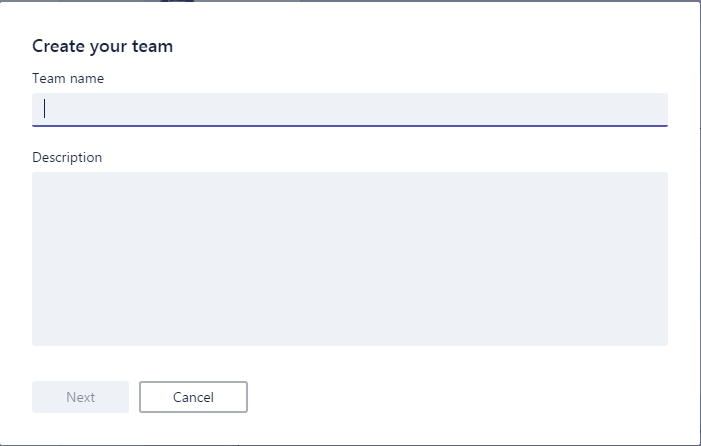 When you have an Office 365 Group that meets the requirements for a Microsoft Group you get this screen when you create a new team 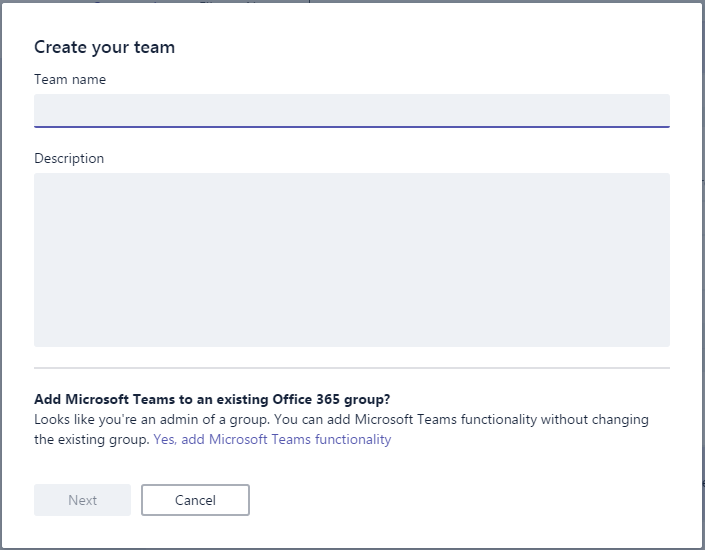 As you can see there is an extra option at the bottom of the creation screen where can upgrade an existing Office 365 Group to a Microsoft Team. There you get all the groups that are available for the upgrade, but you will only see the groups that meet the requirements to become a Microsoft Team. ## Requirements for upgrading ## So what are those requirement? * The group must be a private group * It must be a distribution group. SecurityEnabled property must be false * You must be the owner of the group When your group meets these requirements you get the screen showed above and are able to select it to upgrade. So what can you do to meet these requirements when your group is not showing. First you need to be an Exchange admin or Global admin in you tenant, otherwise ask someone who is. When you have the appropriate rights you can go into the GUI and update it within the Office 365 Admin panel under Groups, but you need to have an Exchange license update these groups, the other way is to go thru the Exchange Online admin panel and change here the privacy and the owner of the group. The other way is to use PowerShell, here we have to routes, you can use the AzureADPreview module or the Exchange Online PowerShell Module. With the Exchange Online PowerShell Module, you can only update the group privacy with the command "Set-UnifiedGroup". With the AzureADPreview Module you can update the SecurityEnabled property and adding the owner of the group. Setting SecurityEnabled can be done with "Set-AzureADGroup" and adding an owner can be done with "Add-AzureADGroupOwner". For now, you cannot set all three the requirements with one of the PowerShell modules, but you can do this with the GUI. ## Creating the Office 365 Group the right way. ## There are a few ways to create an Office 365 Group. * Exchange Online Admin portal * Azure Portal * PowerShell Please do not use the Azure Portal to create an Office 365 group, this will create GUIDS for the primary email address and MailNickName. It also creates this group as a security group, not a distribution group, and sets the privacy to public. You can correct this, but that will give some extra work. Creating the group thru the Exchange Online Admin portal will give you the correct type of group but you need to pay attention to set the privacy correct. This also applies to using the Exchange Online PowerShell Module with the command "New-UnifiedGroup". For now, you cannot create a new group with the AzureADPreview module because of a bug in the command New-AzureADGroup. ## Conclusion ## Upgrading is possible for your existing Office 365 groups, but you need to keep the rules in mind. |
| json metadata | {"tags":["teams","office365groups","microsoftteams","powershell"],"image":["https://steemitimages.com/DQmXujg9DzPstZ1BS8KcE17xzmQPXu18coAiJNFBDr3Vc3s/UpgradingAnOffice365GroupToAMicrosoftTeam01.png","https://steemitimages.com/DQmeRy3BebE3kBP2Dx9EsXsAobE7FicBwgE91UrA3mc5FCM/UpgradingAnOffice365GroupToAMicrosoftTeam02.png"],"app":"steemit/0.1","format":"markdown"} |
| Transaction Info | Block #13284163/Trx 926a03e1e592bf34fd0068e64694b9f0a9943da5 |
View Raw JSON Data
{
"trx_id": "926a03e1e592bf34fd0068e64694b9f0a9943da5",
"block": 13284163,
"trx_in_block": 1,
"op_in_trx": 0,
"virtual_op": 0,
"timestamp": "2017-06-30T21:32:12",
"op": [
"comment",
{
"parent_author": "",
"parent_permlink": "teams",
"author": "worktogether",
"permlink": "upgrading-an-office-365-group-to-a-microsoft-team",
"title": "Upgrading an Office 365 Group to a Microsoft Team",
"body": "Since a Microsoft Teams depends on Office 365 Groups and creating a Microsoft Team creates an Office 365 Group I wanted to know if it was possible to upgrade an already existing Office 365 Group to a Microsoft Team.\n\nThis is possible but you need to keep a few things in mind to have the ability to upgrade a Microsoft Team.\nSo let's first start at the beginning, creating a Microsoft Team can be done within the Microsoft Team application by clicking on \"Create team\" and you will get this simple screen to create a new team\n\nWhen you have an Office 365 Group that meets the requirements for a Microsoft Group you get this screen when you create a new team\n\nAs you can see there is an extra option at the bottom of the creation screen where can upgrade an existing Office 365 Group to a Microsoft Team.\nThere you get all the groups that are available for the upgrade, but you will only see the groups that meet the requirements to become a Microsoft Team.\n## Requirements for upgrading ##\nSo what are those requirement?\n* The group must be a private group\n* It must be a distribution group. SecurityEnabled property must be false\n* You must be the owner of the group\n\nWhen your group meets these requirements you get the screen showed above and are able to select it to upgrade.\nSo what can you do to meet these requirements when your group is not showing.\nFirst you need to be an Exchange admin or Global admin in you tenant, otherwise ask someone who is.\n\nWhen you have the appropriate rights you can go into the GUI and update it within the Office 365 Admin panel under Groups, but you need to have an Exchange license update these groups, the other way is to go thru the Exchange Online admin panel and change here the privacy and the owner of the group.\n\nThe other way is to use PowerShell, here we have to routes, you can use the AzureADPreview module or the Exchange Online PowerShell Module.\n\nWith the Exchange Online PowerShell Module, you can only update the group privacy with the command \"Set-UnifiedGroup\".\n\nWith the AzureADPreview Module you can update the SecurityEnabled property and adding the owner of the group.\nSetting SecurityEnabled can be done with \"Set-AzureADGroup\" and adding an owner can be done with \"Add-AzureADGroupOwner\".\n\nFor now, you cannot set all three the requirements with one of the PowerShell modules, but you can do this with the GUI.\n## Creating the Office 365 Group the right way. ##\nThere are a few ways to create an Office 365 Group.\n* Exchange Online Admin portal\n* Azure Portal\n* PowerShell\n\nPlease do not use the Azure Portal to create an Office 365 group, this will create GUIDS for the primary email address and MailNickName. It also creates this group as a security group, not a distribution group, and sets the privacy to public. You can correct this, but that will give some extra work.\n\nCreating the group thru the Exchange Online Admin portal will give you the correct type of group but you need to pay attention to set the privacy correct.\nThis also applies to using the Exchange Online PowerShell Module with the command \"New-UnifiedGroup\". For now, you cannot create a new group with the AzureADPreview module because of a bug in the command New-AzureADGroup.\n## Conclusion ##\nUpgrading is possible for your existing Office 365 groups, but you need to keep the rules in mind.",
"json_metadata": "{\"tags\":[\"teams\",\"office365groups\",\"microsoftteams\",\"powershell\"],\"image\":[\"https://steemitimages.com/DQmXujg9DzPstZ1BS8KcE17xzmQPXu18coAiJNFBDr3Vc3s/UpgradingAnOffice365GroupToAMicrosoftTeam01.png\",\"https://steemitimages.com/DQmeRy3BebE3kBP2Dx9EsXsAobE7FicBwgE91UrA3mc5FCM/UpgradingAnOffice365GroupToAMicrosoftTeam02.png\"],\"app\":\"steemit/0.1\",\"format\":\"markdown\"}"
}
]
}worktogetherupdated their account properties2017/06/30 21:22:42
worktogetherupdated their account properties
2017/06/30 21:22:42
| account | worktogether |
| memo key | STM5H1H2ZuHYJjhRmi6eyLd8SKki1inmACxLtF9wjiRRNgoPJUjWq |
| json metadata | {"profile":{"name":"Work Together","about":"A company assisting companies with Office 365 and Azure","location":"The Netherlands","website":"https://worktogether.tech","profile_image":"https://wpac.blob.core.windows.net/wpstorage/2016/01/O3A8884-bewerkt.jpg"}} |
| Transaction Info | Block #13283973/Trx 4e60d25d715115e5c67f3fac2207a043febf144a |
View Raw JSON Data
{
  "trx_id": "4e60d25d715115e5c67f3fac2207a043febf144a",
  "block": 13283973,
  "trx_in_block": 18,
  "op_in_trx": 0,
  "virtual_op": 0,
  "timestamp": "2017-06-30T21:22:42",
  "op": [
    "account_update",
    {
      "account": "worktogether",
      "memo_key": "STM5H1H2ZuHYJjhRmi6eyLd8SKki1inmACxLtF9wjiRRNgoPJUjWq",
      "json_metadata": "{\"profile\":{\"name\":\"Work Together\",\"about\":\"A company assisting companies with Office 365 and Azure\",\"location\":\"The Netherlands\",\"website\":\"https://worktogether.tech\",\"profile_image\":\"https://wpac.blob.core.windows.net/wpstorage/2016/01/O3A8884-bewerkt.jpg\"}}"
    }
  ]
}worktogetherclaimed reward balance: 0.271 SBD, 0.161 SP2017/06/24 22:30:00
worktogetherclaimed reward balance: 0.271 SBD, 0.161 SP
2017/06/24 22:30:00
| account | worktogether |
| reward steem | 0.000 STEEM |
| reward sbd | 0.271 SBD |
| reward vests | 262.836198 VESTS |
| Transaction Info | Block #13112896/Trx 206398c470f3a608c87124616600f6b22b1f26a4 |
View Raw JSON Data
{
  "trx_id": "206398c470f3a608c87124616600f6b22b1f26a4",
  "block": 13112896,
  "trx_in_block": 5,
  "op_in_trx": 0,
  "virtual_op": 0,
  "timestamp": "2017-06-24T22:30:00",
  "op": [
    "claim_reward_balance",
    {
      "account": "worktogether",
      "reward_steem": "0.000 STEEM",
      "reward_sbd": "0.271 SBD",
      "reward_vests": "262.836198 VESTS"
    }
  ]
}worktogetherfollowed @englishtchrivy2017/06/24 22:26:27
worktogetherfollowed @englishtchrivy
2017/06/24 22:26:27
| required auths | [] |
| required posting auths | ["worktogether"] |
| id | follow |
| json | ["follow",{"follower":"worktogether","following":"englishtchrivy","what":["blog"]}] |
| Transaction Info | Block #13112825/Trx ef68468bbc2e42a7cd393b10c21d80d6dd765db1 |
View Raw JSON Data
{
  "trx_id": "ef68468bbc2e42a7cd393b10c21d80d6dd765db1",
  "block": 13112825,
  "trx_in_block": 1,
  "op_in_trx": 0,
  "virtual_op": 0,
  "timestamp": "2017-06-24T22:26:27",
  "op": [
    "custom_json",
    {
      "required_auths": [],
      "required_posting_auths": [
        "worktogether"
      ],
      "id": "follow",
      "json": "[\"follow\",{\"follower\":\"worktogether\",\"following\":\"englishtchrivy\",\"what\":[\"blog\"]}]"
    }
  ]
}worktogetherreceived 0.271 SBD, 0.161 SP author reward for @worktogether / benefits-of-the-cloud2017/06/24 09:25:39
worktogetherreceived 0.271 SBD, 0.161 SP author reward for @worktogether / benefits-of-the-cloud
2017/06/24 09:25:39
| author | worktogether |
| permlink | benefits-of-the-cloud |
| sbd payout | 0.271 SBD |
| steem payout | 0.000 STEEM |
| vesting payout | 262.836198 VESTS |
| Transaction Info | Block #13097208/Virtual Operation #8 |
View Raw JSON Data
{
  "trx_id": "0000000000000000000000000000000000000000",
  "block": 13097208,
  "trx_in_block": 4294967295,
  "op_in_trx": 0,
  "virtual_op": 8,
  "timestamp": "2017-06-24T09:25:39",
  "op": [
    "author_reward",
    {
      "author": "worktogether",
      "permlink": "benefits-of-the-cloud",
      "sbd_payout": "0.271 SBD",
      "steem_payout": "0.000 STEEM",
      "vesting_payout": "262.836198 VESTS"
    }
  ]
}2017/06/22 10:02:27
2017/06/22 10:02:27
| voter | worktogether |
| author | jenmendez |
| permlink | re-worktogether-started-my-own-company-work-together-20170530t085258077z |
| weight | 10000 (100.00%) |
| Transaction Info | Block #13040369/Trx f08d9e44b903bae83a850102c0d97edfcf16b444 |
View Raw JSON Data
{
  "trx_id": "f08d9e44b903bae83a850102c0d97edfcf16b444",
  "block": 13040369,
  "trx_in_block": 15,
  "op_in_trx": 0,
  "virtual_op": 0,
  "timestamp": "2017-06-22T10:02:27",
  "op": [
    "vote",
    {
      "voter": "worktogether",
      "author": "jenmendez",
      "permlink": "re-worktogether-started-my-own-company-work-together-20170530t085258077z",
      "weight": 10000
    }
  ]
}worktogetherupvoted (100.00%) @worktogether / free-email-vs-paid-email2017/06/21 22:32:12
worktogetherupvoted (100.00%) @worktogether / free-email-vs-paid-email
2017/06/21 22:32:12
| voter | worktogether |
| author | worktogether |
| permlink | free-email-vs-paid-email |
| weight | 10000 (100.00%) |
| Transaction Info | Block #13026567/Trx 5fcb9f2afeba342677808ae5d69fbe512cd45bb2 |
View Raw JSON Data
{
  "trx_id": "5fcb9f2afeba342677808ae5d69fbe512cd45bb2",
  "block": 13026567,
  "trx_in_block": 9,
  "op_in_trx": 0,
  "virtual_op": 0,
  "timestamp": "2017-06-21T22:32:12",
  "op": [
    "vote",
    {
      "voter": "worktogether",
      "author": "worktogether",
      "permlink": "free-email-vs-paid-email",
      "weight": 10000
    }
  ]
}worktogetherpublished a new post: free-email-vs-paid-email2017/06/21 22:32:12
worktogetherpublished a new post: free-email-vs-paid-email
2017/06/21 22:32:12
| parent author | |
| parent permlink | freevspaid |
| author | worktogether |
| permlink | free-email-vs-paid-email |
| title | Free email vs Paid email |
| body | Since I started my own company I am more aware of the impact of a domain name for your company. Not only for your website but also for your email address. I keep seeing companies with their own domain and website but having an @outlook.com or @gmail.com email address. That inspired me to write this post.  ## Free email ## So let’s start with what I mean by free email. These are the providers where you just can register and get an email address for ‘free’. Almost nothing is for free on the internet, you pay it one way or another. For instance, using gmail.com means that Google can look at your email and target advertisements to you based on the emails you send and receive. Not that much wrong with that if you are a private person. Other providers make their money on similar ways. ## Paid email ## These are the providers where you pay some amount of money to host your email, usually you get this with your hosting provider or you can go with another party to host it like Office 365, Gmail for Business. ## Branding ## The most important part of your company is how your customers can reach you, this can be done by visiting your website, send an email or by phone. My feeling with a company that uses a free email address gives themselves not enough credit for how they brand themselves to the outside world. When I can choose between two small businesses that have similar qualifications and one has a paid email address and the other a free one, I will choose for the paid one because they probably have a better value of themselves. ## Privacy ## When you use a free email provider, privacy is usually the first one that will be sacrificed. Most users do not know this because they do not read the agreements before signing up for the account. To know what you are giving to the provider you can read the license agreement or you can take a good guess on how the company is making their money. For Google, this is advertisements. For Microsoft, this is selling licenses and products. ## Costs ## The costs of an email address can be just hard cash or with your privacy. When you choose for a paid email provider the cost can be from a few Euro’s/Dollars per month to around 10 Euro’s/Dollars depending on the provider or options of the email provider. Most domain providers also give you access to basic email facilities. My domain provider has a website package with 5 email addresses for €5, - per month. But you can also choose to host it on Office 365 and there you have and Office 365 Exchange Plan 1 for €3,40 per month. A basic Gmail for business costs $5, - per month. ## Accessibility ## Nowadays we have at least 2 devices if not more where we check our email on. This can give some challenges with some of the hosting companies because they have their own system and synching that to your phone, tablet and computer can sometimes a challenging task. When you use Office 365, Gmail for business, Outllook.com or Gmail this is as simple as entering your email address and password on those devices. Some have their own apps like the Outlook app ## Compatibility ## Not everybody thinks about this one, because email is email, right? Well the email part is not the problem here, but when you run a business you also make appointments and invite other people for those appointments. When you are on Gmail and invite a partner that is not on Gmail they get a strangely formatted email with an extra attachment. When you do the same from Office 365 or outlook it uses the de facto standard ICS format. Using your providers email, you might not have an option to send an invite to other people. ## Conclusion ## Selecting your email provider is not as easy as it might see. The choice between free and paid is very easy in my opinion. Branding is very important for every company and having your own domain in your email address is a part of this branding, just like your business card and logo is. The selection on which email provider is a harder one for most of you. I really like the service from Microsoft and choose for Office 365. This is compatible with every device and uses the de facto standards in email and appointments. This is a repost from my personal blog: https://worktogether.tech/2017/06/21/free-email-vs-paid-email/ |
| json metadata | {"tags":["freevspaid","email","office365","gmail","business"],"users":["outlook.com","gmail.com"],"image":["https://steemitimages.com/DQmYvSnVyPt1iKJgsC7RUcv52BuRARor6NtHMReqkH8nEQL/FreeEmailvsPaidEmail01.png"],"links":["https://worktogether.tech/2017/06/21/free-email-vs-paid-email/"],"app":"steemit/0.1","format":"markdown"} |
| Transaction Info | Block #13026567/Trx 5fcb9f2afeba342677808ae5d69fbe512cd45bb2 |
View Raw JSON Data
{
"trx_id": "5fcb9f2afeba342677808ae5d69fbe512cd45bb2",
"block": 13026567,
"trx_in_block": 9,
"op_in_trx": 0,
"virtual_op": 0,
"timestamp": "2017-06-21T22:32:12",
"op": [
"comment",
{
"parent_author": "",
"parent_permlink": "freevspaid",
"author": "worktogether",
"permlink": "free-email-vs-paid-email",
"title": "Free email vs Paid email",
"body": "Since I started my own company I am more aware of the impact of a domain name for your company. Not only for your website but also for your email address. I keep seeing companies with their own domain and website but having an @outlook.com or @gmail.com email address. That inspired me to write this post.\n\n## Free email ##\nSo let’s start with what I mean by free email. These are the providers where you just can register and get an email address for ‘free’. Almost nothing is for free on the internet, you pay it one way or another. For instance, using gmail.com means that Google can look at your email and target advertisements to you based on the emails you send and receive. Not that much wrong with that if you are a private person. Other providers make their money on similar ways.\n## Paid email ##\nThese are the providers where you pay some amount of money to host your email, usually you get this with your hosting provider or you can go with another party to host it like Office 365, Gmail for Business.\n## Branding ##\nThe most important part of your company is how your customers can reach you, this can be done by visiting your website, send an email or by phone. My feeling with a company that uses a free email address gives themselves not enough credit for how they brand themselves to the outside world. When I can choose between two small businesses that have similar qualifications and one has a paid email address and the other a free one, I will choose for the paid one because they probably have a better value of themselves.\n## Privacy ##\nWhen you use a free email provider, privacy is usually the first one that will be sacrificed. Most users do not know this because they do not read the agreements before signing up for the account. To know what you are giving to the provider you can read the license agreement or you can take a good guess on how the company is making their money. For Google, this is advertisements. For Microsoft, this is selling licenses and products.\n## Costs ##\nThe costs of an email address can be just hard cash or with your privacy. When you choose for a paid email provider the cost can be from a few Euro’s/Dollars per month to around 10 Euro’s/Dollars depending on the provider or options of the email provider.\nMost domain providers also give you access to basic email facilities. My domain provider has a website package with 5 email addresses for €5, - per month. But you can also choose to host it on Office 365 and there you have and Office 365 Exchange Plan 1 for €3,40 per month. A basic Gmail for business costs $5, - per month.\n## Accessibility ##\nNowadays we have at least 2 devices if not more where we check our email on. This can give some challenges with some of the hosting companies because they have their own system and synching that to your phone, tablet and computer can sometimes a challenging task. When you use Office 365, Gmail for business, Outllook.com or Gmail this is as simple as entering your email address and password on those devices. Some have their own apps like the Outlook app\n## Compatibility ##\nNot everybody thinks about this one, because email is email, right? Well the email part is not the problem here, but when you run a business you also make appointments and invite other people for those appointments. When you are on Gmail and invite a partner that is not on Gmail they get a strangely formatted email with an extra attachment. When you do the same from Office 365 or outlook it uses the de facto standard ICS format. Using your providers email, you might not have an option to send an invite to other people.\n## Conclusion ##\nSelecting your email provider is not as easy as it might see. The choice between free and paid is very easy in my opinion. Branding is very important for every company and having your own domain in your email address is a part of this branding, just like your business card and logo is. The selection on which email provider is a harder one for most of you. I really like the service from Microsoft and choose for Office 365. This is compatible with every device and uses the de facto standards in email and appointments.\n\nThis is a repost from my personal blog: https://worktogether.tech/2017/06/21/free-email-vs-paid-email/",
"json_metadata": "{\"tags\":[\"freevspaid\",\"email\",\"office365\",\"gmail\",\"business\"],\"users\":[\"outlook.com\",\"gmail.com\"],\"image\":[\"https://steemitimages.com/DQmYvSnVyPt1iKJgsC7RUcv52BuRARor6NtHMReqkH8nEQL/FreeEmailvsPaidEmail01.png\"],\"links\":[\"https://worktogether.tech/2017/06/21/free-email-vs-paid-email/\"],\"app\":\"steemit/0.1\",\"format\":\"markdown\"}"
}
]
}worktogetherclaimed reward balance: 0.013 SBD, 0.009 SP2017/06/20 23:22:51
worktogetherclaimed reward balance: 0.013 SBD, 0.009 SP
2017/06/20 23:22:51
| account | worktogether |
| reward steem | 0.000 STEEM |
| reward sbd | 0.013 SBD |
| reward vests | 14.489703 VESTS |
| Transaction Info | Block #12998871/Trx 80251b3e9755e65d780b9f5d5b2d0482352862ab |
View Raw JSON Data
{
  "trx_id": "80251b3e9755e65d780b9f5d5b2d0482352862ab",
  "block": 12998871,
  "trx_in_block": 8,
  "op_in_trx": 0,
  "virtual_op": 0,
  "timestamp": "2017-06-20T23:22:51",
  "op": [
    "claim_reward_balance",
    {
      "account": "worktogether",
      "reward_steem": "0.000 STEEM",
      "reward_sbd": "0.013 SBD",
      "reward_vests": "14.489703 VESTS"
    }
  ]
}worktogetherreceived 0.013 SBD, 0.009 SP author reward for @worktogether / connect-to-exchange-online-powershell-with-mfa-enabled-account2017/06/20 22:58:15
worktogetherreceived 0.013 SBD, 0.009 SP author reward for @worktogether / connect-to-exchange-online-powershell-with-mfa-enabled-account
2017/06/20 22:58:15
| author | worktogether |
| permlink | connect-to-exchange-online-powershell-with-mfa-enabled-account |
| sbd payout | 0.013 SBD |
| steem payout | 0.000 STEEM |
| vesting payout | 14.489703 VESTS |
| Transaction Info | Block #12998381/Virtual Operation #55 |
View Raw JSON Data
{
  "trx_id": "0000000000000000000000000000000000000000",
  "block": 12998381,
  "trx_in_block": 4294967295,
  "op_in_trx": 0,
  "virtual_op": 55,
  "timestamp": "2017-06-20T22:58:15",
  "op": [
    "author_reward",
    {
      "author": "worktogether",
      "permlink": "connect-to-exchange-online-powershell-with-mfa-enabled-account",
      "sbd_payout": "0.013 SBD",
      "steem_payout": "0.000 STEEM",
      "vesting_payout": "14.489703 VESTS"
    }
  ]
}worktogetherupvoted (100.00%) @cloh76 / guide-steem-mining-for-free-using-microsoft-azure2017/06/19 12:14:30
worktogetherupvoted (100.00%) @cloh76 / guide-steem-mining-for-free-using-microsoft-azure
2017/06/19 12:14:30
| voter | worktogether |
| author | cloh76 |
| permlink | guide-steem-mining-for-free-using-microsoft-azure |
| weight | 10000 (100.00%) |
| Transaction Info | Block #12956895/Trx 0547a5998b4d5bab752486617de6a8a815441578 |
View Raw JSON Data
{
  "trx_id": "0547a5998b4d5bab752486617de6a8a815441578",
  "block": 12956895,
  "trx_in_block": 0,
  "op_in_trx": 0,
  "virtual_op": 0,
  "timestamp": "2017-06-19T12:14:30",
  "op": [
    "vote",
    {
      "voter": "worktogether",
      "author": "cloh76",
      "permlink": "guide-steem-mining-for-free-using-microsoft-azure",
      "weight": 10000
    }
  ]
}worktogetherupvoted (100.00%) @joseph / mining-steem-for-dummies2017/06/18 12:39:33
worktogetherupvoted (100.00%) @joseph / mining-steem-for-dummies
2017/06/18 12:39:33
| voter | worktogether |
| author | joseph |
| permlink | mining-steem-for-dummies |
| weight | 10000 (100.00%) |
| Transaction Info | Block #12928628/Trx 038023ddd25a58204d843c03ffd592405b971a58 |
View Raw JSON Data
{
  "trx_id": "038023ddd25a58204d843c03ffd592405b971a58",
  "block": 12928628,
  "trx_in_block": 13,
  "op_in_trx": 0,
  "virtual_op": 0,
  "timestamp": "2017-06-18T12:39:33",
  "op": [
    "vote",
    {
      "voter": "worktogether",
      "author": "joseph",
      "permlink": "mining-steem-for-dummies",
      "weight": 10000
    }
  ]
}2017/06/18 09:19:42
2017/06/18 09:19:42
| voter | worktogether |
| author | worktogether |
| permlink | re-crypto-p-re-worktogether-benefits-of-the-cloud-20170618t091037962z |
| weight | 10000 (100.00%) |
| Transaction Info | Block #12924639/Trx 032e7bd82b08d0052a46be38584b876077b21e2c |
View Raw JSON Data
{
  "trx_id": "032e7bd82b08d0052a46be38584b876077b21e2c",
  "block": 12924639,
  "trx_in_block": 6,
  "op_in_trx": 0,
  "virtual_op": 0,
  "timestamp": "2017-06-18T09:19:42",
  "op": [
    "vote",
    {
      "voter": "worktogether",
      "author": "worktogether",
      "permlink": "re-crypto-p-re-worktogether-benefits-of-the-cloud-20170618t091037962z",
      "weight": 10000
    }
  ]
}worktogetherupvoted (100.00%) @crypto-p / re-worktogether-benefits-of-the-cloud-20170617t100852849z2017/06/18 09:19:18
worktogetherupvoted (100.00%) @crypto-p / re-worktogether-benefits-of-the-cloud-20170617t100852849z
2017/06/18 09:19:18
| voter | worktogether |
| author | crypto-p |
| permlink | re-worktogether-benefits-of-the-cloud-20170617t100852849z |
| weight | 10000 (100.00%) |
| Transaction Info | Block #12924631/Trx 027cbc679ce8d4c7a4bad4b2c07d7c71ea21832d |
View Raw JSON Data
{
  "trx_id": "027cbc679ce8d4c7a4bad4b2c07d7c71ea21832d",
  "block": 12924631,
  "trx_in_block": 2,
  "op_in_trx": 0,
  "virtual_op": 0,
  "timestamp": "2017-06-18T09:19:18",
  "op": [
    "vote",
    {
      "voter": "worktogether",
      "author": "crypto-p",
      "permlink": "re-worktogether-benefits-of-the-cloud-20170617t100852849z",
      "weight": 10000
    }
  ]
}worktogethercustom json: follow2017/06/18 09:18:21
worktogethercustom json: follow
2017/06/18 09:18:21
| required auths | [] |
| required posting auths | ["worktogether"] |
| id | follow |
| json | ["reblog",{"account":"worktogether","author":"mallorcaman","permlink":"why-its-important-to-upvote-comments-on-your-steemit-posts"}] |
| Transaction Info | Block #12924612/Trx f55473d5dc74b947937ab959ccee46f804522c70 |
View Raw JSON Data
{
  "trx_id": "f55473d5dc74b947937ab959ccee46f804522c70",
  "block": 12924612,
  "trx_in_block": 3,
  "op_in_trx": 0,
  "virtual_op": 0,
  "timestamp": "2017-06-18T09:18:21",
  "op": [
    "custom_json",
    {
      "required_auths": [],
      "required_posting_auths": [
        "worktogether"
      ],
      "id": "follow",
      "json": "[\"reblog\",{\"account\":\"worktogether\",\"author\":\"mallorcaman\",\"permlink\":\"why-its-important-to-upvote-comments-on-your-steemit-posts\"}]"
    }
  ]
}2017/06/18 09:17:54
2017/06/18 09:17:54
| voter | worktogether |
| author | roelandp |
| permlink | save-the-date-steemfest-2017-creamy-and-delicious-1-2-3-4-5-november-lisbon |
| weight | 10000 (100.00%) |
| Transaction Info | Block #12924603/Trx 830549d2cdd437ace792b60062adb7ecddd147b5 |
View Raw JSON Data
{
  "trx_id": "830549d2cdd437ace792b60062adb7ecddd147b5",
  "block": 12924603,
  "trx_in_block": 12,
  "op_in_trx": 0,
  "virtual_op": 0,
  "timestamp": "2017-06-18T09:17:54",
  "op": [
    "vote",
    {
      "voter": "worktogether",
      "author": "roelandp",
      "permlink": "save-the-date-steemfest-2017-creamy-and-delicious-1-2-3-4-5-november-lisbon",
      "weight": 10000
    }
  ]
}2017/06/18 09:10:45
2017/06/18 09:10:45
| parent author | crypto-p |
| parent permlink | re-worktogether-benefits-of-the-cloud-20170617t100852849z |
| author | worktogether |
| permlink | re-crypto-p-re-worktogether-benefits-of-the-cloud-20170618t091037962z |
| title | |
| body | Thanks for the follow, like to share my knowledge |
| json metadata | {"tags":["cloud"],"app":"steemit/0.1"} |
| Transaction Info | Block #12924460/Trx c261597120fa82c9d5f36c0ac8fe386c872d4141 |
View Raw JSON Data
{
  "trx_id": "c261597120fa82c9d5f36c0ac8fe386c872d4141",
  "block": 12924460,
  "trx_in_block": 5,
  "op_in_trx": 0,
  "virtual_op": 0,
  "timestamp": "2017-06-18T09:10:45",
  "op": [
    "comment",
    {
      "parent_author": "crypto-p",
      "parent_permlink": "re-worktogether-benefits-of-the-cloud-20170617t100852849z",
      "author": "worktogether",
      "permlink": "re-crypto-p-re-worktogether-benefits-of-the-cloud-20170618t091037962z",
      "title": "",
      "body": "Thanks for the follow, like to share my knowledge",
      "json_metadata": "{\"tags\":[\"cloud\"],\"app\":\"steemit/0.1\"}"
    }
  ]
}2017/06/17 10:08:57
2017/06/17 10:08:57
| parent author | worktogether |
| parent permlink | benefits-of-the-cloud |
| author | crypto-p |
| permlink | re-worktogether-benefits-of-the-cloud-20170617t100852849z |
| title | |
| body | Thank you for sharing this, following you! |
| json metadata | {"tags":["cloud"],"app":"steemit/0.1"} |
| Transaction Info | Block #12896842/Trx a2622ffd1f828675cfed4e6846459b313f1e9278 |
View Raw JSON Data
{
  "trx_id": "a2622ffd1f828675cfed4e6846459b313f1e9278",
  "block": 12896842,
  "trx_in_block": 0,
  "op_in_trx": 0,
  "virtual_op": 0,
  "timestamp": "2017-06-17T10:08:57",
  "op": [
    "comment",
    {
      "parent_author": "worktogether",
      "parent_permlink": "benefits-of-the-cloud",
      "author": "crypto-p",
      "permlink": "re-worktogether-benefits-of-the-cloud-20170617t100852849z",
      "title": "",
      "body": "Thank you for sharing this, following you!",
      "json_metadata": "{\"tags\":[\"cloud\"],\"app\":\"steemit/0.1\"}"
    }
  ]
}personzupvoted (100.00%) @worktogether / benefits-of-the-cloud2017/06/17 10:01:36
personzupvoted (100.00%) @worktogether / benefits-of-the-cloud
2017/06/17 10:01:36
| voter | personz |
| author | worktogether |
| permlink | benefits-of-the-cloud |
| weight | 10000 (100.00%) |
| Transaction Info | Block #12896695/Trx 6d54f8d47ad7bee7109e38ce784bc68097759d7e |
View Raw JSON Data
{
  "trx_id": "6d54f8d47ad7bee7109e38ce784bc68097759d7e",
  "block": 12896695,
  "trx_in_block": 22,
  "op_in_trx": 0,
  "virtual_op": 0,
  "timestamp": "2017-06-17T10:01:36",
  "op": [
    "vote",
    {
      "voter": "personz",
      "author": "worktogether",
      "permlink": "benefits-of-the-cloud",
      "weight": 10000
    }
  ]
}ubgupvoted (1.00%) @worktogether / benefits-of-the-cloud2017/06/17 09:55:39
ubgupvoted (1.00%) @worktogether / benefits-of-the-cloud
2017/06/17 09:55:39
| voter | ubg |
| author | worktogether |
| permlink | benefits-of-the-cloud |
| weight | 100 (1.00%) |
| Transaction Info | Block #12896576/Trx a634a4b998cff355f42ea36c0cbbe222531af31d |
View Raw JSON Data
{
  "trx_id": "a634a4b998cff355f42ea36c0cbbe222531af31d",
  "block": 12896576,
  "trx_in_block": 11,
  "op_in_trx": 0,
  "virtual_op": 0,
  "timestamp": "2017-06-17T09:55:39",
  "op": [
    "vote",
    {
      "voter": "ubg",
      "author": "worktogether",
      "permlink": "benefits-of-the-cloud",
      "weight": 100
    }
  ]
}worktogetherupvoted (100.00%) @worktogether / benefits-of-the-cloud2017/06/17 09:25:39
worktogetherupvoted (100.00%) @worktogether / benefits-of-the-cloud
2017/06/17 09:25:39
| voter | worktogether |
| author | worktogether |
| permlink | benefits-of-the-cloud |
| weight | 10000 (100.00%) |
| Transaction Info | Block #12895976/Trx a9f94dfeb4931d0dfe4526cf4ed0fdff308e0328 |
View Raw JSON Data
{
  "trx_id": "a9f94dfeb4931d0dfe4526cf4ed0fdff308e0328",
  "block": 12895976,
  "trx_in_block": 11,
  "op_in_trx": 0,
  "virtual_op": 0,
  "timestamp": "2017-06-17T09:25:39",
  "op": [
    "vote",
    {
      "voter": "worktogether",
      "author": "worktogether",
      "permlink": "benefits-of-the-cloud",
      "weight": 10000
    }
  ]
}worktogetherpublished a new post: benefits-of-the-cloud2017/06/17 09:25:39
worktogetherpublished a new post: benefits-of-the-cloud
2017/06/17 09:25:39
| parent author | |
| parent permlink | cloud |
| author | worktogether |
| permlink | benefits-of-the-cloud |
| title | Benefits of the cloud |
| body | This post was inspired by a Facebook group where there was a question what we could teach the others and since my expertise is about Office 365 and Azure and suggested that I could write about that, but it was to technical so they asked me to make teach a higher over topic. One of the topics is explaining the benefits of using the cloud. To do that I need to start what the cloud is. ## What is cloud? ## Well it is nothing more than a set of datacenters where you can hire services to host processes and data. To make it a bit more concrete. The image below is a Lego version of a Microsoft datacenter that I have taken on a conference. It is just a very large building up to multiple football fields big. This version has sea containers that contain the servers for compute power and storage and are connected to the building bij plugging in Power, Network and cooling. There are many varieties of a datacenter. On YouTube, there is a on tour of a [Microsoft datacenter](https://www.youtube.com/watch?v=0uRR72b_qvc) There are three big players that are dominant in this industry * Microsoft * Amazon * Google There are many more, but these are the biggest. They do not have the same options that they sell. The most complete one is Microsoft. ## Cloud versions ## There are multiple versions of cloud, the most common one is the public cloud, this version is the one where you hear about in the news. Then we also have a private cloud, this is a private datacenter for a certain company. These are used by the bigger companies where they host their own hardware and is usually a section in a big datacenter. This post will focus on the public cloud. ## Service models ## When we talk about the public cloud we can have 3 service models * SaaS * PaaS * IaaS ## SaaS (Software as a Service) ## This model can be referred to Office 365, Gmail for business, Photoshop, Salesforce, WordPress.com and many more. It is essentially a service where you get access to a certain product on a subscription base. In the case of Office 365 you get for instance a mail server, Office client and storage. There are many different providers that have a subscription based license where you pay a fee to use their product. The provider will manage the product completely and you as a customer does not have to worry about maintaining servers, patching the software or having to have the technical know-how of the infrastructure where it runs on. A downside of this model is that you do not have any control on the installation of the product and whether you want the updates that they made or not. This takes a mindset update for some customers where they were in control over everything before and now they need to give that away. ## PaaS (Platform as a Service) ## In this model, you get a bit more control about the environment, you get a service like a webservice where you can build your own website on. This gives you a bit more control then a SaaS model. The downside of that is that you are responsible for a part of keeping it running and maintaining it. A good example of this is running your own instance of a WordPress site like by blog is doing. Here you are in control of all the settings of WordPress and the database attached to it. You need more knowledge of the product that you are using ## IaaS (Infrastructure as a Service) ## In this model, you have the most control of your solution and here you can control everything from networking, Virtual Machines and how they are connected. This is like a virtual datacenter, only everything is software based instead of hardware based. Here you need to have a full understanding about networking, security, firewalls and virtual machines. This model is usually used when a company wants to move their existing environment to the cloud as is or when there is no SaaS or PaaS solution for it. ## Conclusion ## There are a lot of choices to make when you want to use cloud and there are benefits of using cloud in your company but also outside your company. A lot of services can be used privately like Gmail, Outlook.com, Spotify, OneDrive, Dropbox and a few thousand more. The biggest benefit of using cloud is that you only pay what you use and you do not necessarily need to have knowledge of maintaining the product that you use. You always have the latest version of the product. A drawback of this is that when you stop paying for the service you do not have access to it anymore. A few years ago, you bought and Office 2013 license, this license can be used many years because you paid it in full. When an updated version arrives you can upgrade, but you need to pay again. Now with Office 365 you pay a monthly fee and always get the latest version with the newest capabilities. So instead of paying once every few years a large amount you pay a monthly few and get more updates in the process. There are also reasons for not using the cloud. These are usually compliance or security reasons. While security reasons are mostly also a feeling of that the on-premises environment is more secure than Windows Azure for instance. This is usually not the case because the big cloud providers have a lot more on stake when they have a security breach. This is not the case for every cloud provider. |
| json metadata | {"tags":["cloud","servicemodels","whatiscloud"],"links":["https://www.youtube.com/watch?v=0uRR72b_qvc"],"app":"steemit/0.1","format":"markdown"} |
| Transaction Info | Block #12895976/Trx a9f94dfeb4931d0dfe4526cf4ed0fdff308e0328 |
View Raw JSON Data
{
  "trx_id": "a9f94dfeb4931d0dfe4526cf4ed0fdff308e0328",
  "block": 12895976,
  "trx_in_block": 11,
  "op_in_trx": 0,
  "virtual_op": 0,
  "timestamp": "2017-06-17T09:25:39",
  "op": [
    "comment",
    {
      "parent_author": "",
      "parent_permlink": "cloud",
      "author": "worktogether",
      "permlink": "benefits-of-the-cloud",
      "title": "Benefits of the cloud",
      "body": "This post was inspired by a Facebook group where there was a question what we could teach the others and since my expertise is about Office 365 and Azure and suggested that I could write about that, but it was to technical so they asked me to make teach a higher over topic. One of the topics is explaining the benefits of using the cloud. To do that I need to start what the cloud is.\n## What is cloud? ##\nWell it is nothing more than a set of datacenters where you can hire services to host processes and data. To make it a bit more concrete. The image below is a Lego version of a Microsoft datacenter that I have taken on a conference.\n\nIt is just a very large building up to multiple football fields big. This version has sea containers that contain the servers for compute power and storage and are connected to the building bij plugging in Power, Network and cooling. There are many varieties of a datacenter. On YouTube, there is a on tour of a [Microsoft datacenter](https://www.youtube.com/watch?v=0uRR72b_qvc)\n\nThere are three big players that are dominant in this industry\n* Microsoft\n* Amazon\n* Google\n\nThere are many more, but these are the biggest. They do not have the same options that they sell. The most complete one is Microsoft.\n## Cloud versions ##\nThere are multiple versions of cloud, the most common one is the public cloud, this version is the one where you hear about in the news. Then we also have a private cloud, this is a private datacenter for a certain company. These are used by the bigger companies where they host their own hardware and is usually a section in a big datacenter. This post will focus on the public cloud.\n## Service models ##\nWhen we talk about the public cloud we can have 3 service models\n* SaaS\n* PaaS\n* IaaS\n\n## SaaS (Software as a Service) ##\nThis model can be referred to Office 365, Gmail for business, Photoshop, Salesforce, WordPress.com and many more. It is essentially a service where you get access to a certain product on a subscription base. In the case of Office 365 you get for instance a mail server, Office client and storage. There are many different providers that have a subscription based license where you pay a fee to use their product. The provider will manage the product completely and you as a customer does not have to worry about maintaining servers, patching the software or having to have the technical know-how of the infrastructure where it runs on.\n\nA downside of this model is that you do not have any control on the installation of the product and whether you want the updates that they made or not. This takes a mindset update for some customers where they were in control over everything before and now they need to give that away.\n## PaaS (Platform as a Service) ##\nIn this model, you get a bit more control about the environment, you get a service like a webservice where you can build your own website on. This gives you a bit more control then a SaaS model. The downside of that is that you are responsible for a part of keeping it running and maintaining it. A good example of this is running your own instance of a WordPress site like by blog is doing. Here you are in control of all the settings of WordPress and the database attached to it. You need more knowledge of the product that you are using\n## IaaS (Infrastructure as a Service) ##\nIn this model, you have the most control of your solution and here you can control everything from networking, Virtual Machines and how they are connected. This is like a virtual datacenter, only everything is software based instead of hardware based. Here you need to have a full understanding about networking, security, firewalls and virtual machines. This model is usually used when a company wants to move their existing environment to the cloud as is or when there is no SaaS or PaaS solution for it.\n## Conclusion ##\nThere are a lot of choices to make when you want to use cloud and there are benefits of using cloud in your company but also outside your company. A lot of services can be used privately like Gmail, Outlook.com, Spotify, OneDrive, Dropbox and a few thousand more.\nThe biggest benefit of using cloud is that you only pay what you use and you do not necessarily need to have knowledge of maintaining the product that you use. You always have the latest version of the product. A drawback of this is that when you stop paying for the service you do not have access to it anymore. A few years ago, you bought and Office 2013 license, this license can be used many years because you paid it in full. When an updated version arrives you can upgrade, but you need to pay again. Now with Office 365 you pay a monthly fee and always get the latest version with the newest capabilities. So instead of paying once every few years a large amount you pay a monthly few and get more updates in the process.\n\nThere are also reasons for not using the cloud. These are usually compliance or security reasons. While security reasons are mostly also a feeling of that the on-premises environment is more secure than Windows Azure for instance. This is usually not the case because the big cloud providers have a lot more on stake when they have a security breach. This is not the case for every cloud provider.",
      "json_metadata": "{\"tags\":[\"cloud\",\"servicemodels\",\"whatiscloud\"],\"links\":[\"https://www.youtube.com/watch?v=0uRR72b_qvc\"],\"app\":\"steemit/0.1\",\"format\":\"markdown\"}"
    }
  ]
}2017/06/13 23:01:24
2017/06/13 23:01:24
| voter | proctologic |
| author | worktogether |
| permlink | connect-to-exchange-online-powershell-with-mfa-enabled-account |
| weight | 10 (0.10%) |
| Transaction Info | Block #12797187/Trx 6e59e0618a6f3c8745594f2ce939b50a2aa2f856 |
View Raw JSON Data
{
  "trx_id": "6e59e0618a6f3c8745594f2ce939b50a2aa2f856",
  "block": 12797187,
  "trx_in_block": 3,
  "op_in_trx": 0,
  "virtual_op": 0,
  "timestamp": "2017-06-13T23:01:24",
  "op": [
    "vote",
    {
      "voter": "proctologic",
      "author": "worktogether",
      "permlink": "connect-to-exchange-online-powershell-with-mfa-enabled-account",
      "weight": 10
    }
  ]
}2017/06/13 22:58:15
2017/06/13 22:58:15
| voter | worktogether |
| author | worktogether |
| permlink | connect-to-exchange-online-powershell-with-mfa-enabled-account |
| weight | 10000 (100.00%) |
| Transaction Info | Block #12797124/Trx cc69bc8464baa64eab4ccd81081be92d4558c995 |
View Raw JSON Data
{
  "trx_id": "cc69bc8464baa64eab4ccd81081be92d4558c995",
  "block": 12797124,
  "trx_in_block": 11,
  "op_in_trx": 0,
  "virtual_op": 0,
  "timestamp": "2017-06-13T22:58:15",
  "op": [
    "vote",
    {
      "voter": "worktogether",
      "author": "worktogether",
      "permlink": "connect-to-exchange-online-powershell-with-mfa-enabled-account",
      "weight": 10000
    }
  ]
}worktogetherpublished a new post: connect-to-exchange-online-powershell-with-mfa-enabled-account2017/06/13 22:58:15
worktogetherpublished a new post: connect-to-exchange-online-powershell-with-mfa-enabled-account
2017/06/13 22:58:15
| parent author | |
| parent permlink | office365 |
| author | worktogether |
| permlink | connect-to-exchange-online-powershell-with-mfa-enabled-account |
| title | Connect to Exchange Online PowerShell with MFA enabled account |
| body | Connecting to Exchange Online was only possible with an account that did not have MFA enabled because it only can handle basic authentication. This is an issue because Microsoft advises us to have accounts that can do administrative tasks to have MFA enabled. Now we must choose between an account that has no MFA and a possible security breach and an account that cannot connect to Exchange Online. To solve this, we had an account that was disabled by default and when we had to do Exchange tasks we enabled it. This is a solution but not a great one. A coworker of my discovered a way to connect to Exchange Online with an MFA enabled account. He found and Exchange Online Module in the hybrid settings of Exchange. This module can be found in the admin portal of Exchange Online on the Hybrid tab. 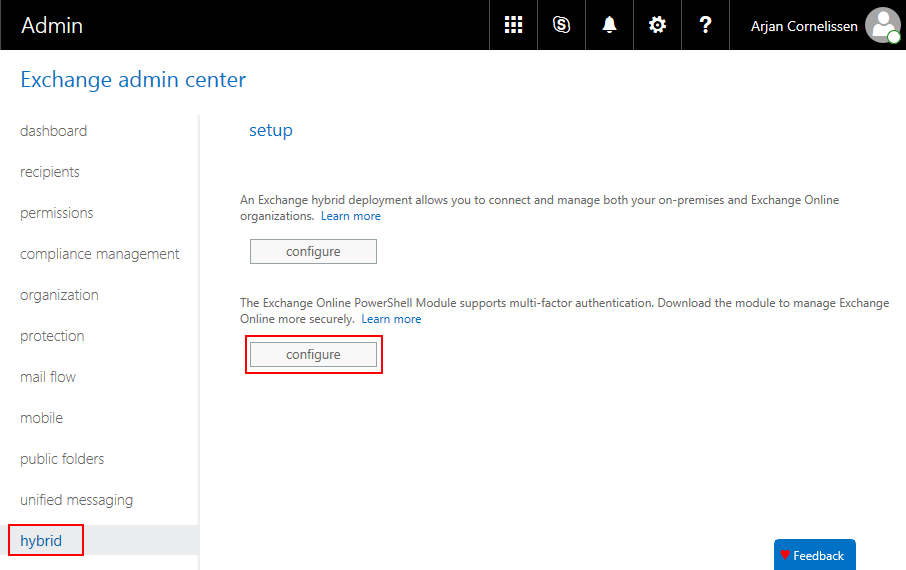 By clicking on “Configure” it will install the “Microsoft Exchange Online PowerShell Module”. After installing it, there is an icon in the start menu called “Microsoft Exchange Online PowerShell Module” and this will launch a PowerShell window and loads the correct module. This icon is just a small console app that loads the file “CreateExoPSSession.ps1” from the installed directory. Connecting to Exchange Online with this module can be done with the command “Connect-EXPOPSSession”. After a quick look in the dll files, I noticed that is uses an Azure AD application to authenticate. With this they authenticate thru OAuth and rebuild login URL with the OAuth token to get to the basic authentication that Exchange Online needs. More info about the module can be found here: [https://technet.microsoft.com/library/mt775114.aspx](https://technet.microsoft.com/library/mt775114.aspx) This is a repost from my company [blog](https://worktogether.tech/2017/04/18/connect-to-exchange-online-powershell-with-mfa-enabled-account/) |
| json metadata | {"tags":["office365","powershell","mfa","exchangeonline"],"image":["https://steemitimages.com/DQmQfBm5wJJbHMDDAvUHtLWuaYkpu4n6NzYTv66J8ACVyfW/ConnectToEchangeOnlinePowerShellWithMFAEnabledAccount01.png"],"links":["https://technet.microsoft.com/library/mt775114.aspx","https://worktogether.tech/2017/04/18/connect-to-exchange-online-powershell-with-mfa-enabled-account/"],"app":"steemit/0.1","format":"markdown"} |
| Transaction Info | Block #12797124/Trx cc69bc8464baa64eab4ccd81081be92d4558c995 |
View Raw JSON Data
{
"trx_id": "cc69bc8464baa64eab4ccd81081be92d4558c995",
"block": 12797124,
"trx_in_block": 11,
"op_in_trx": 0,
"virtual_op": 0,
"timestamp": "2017-06-13T22:58:15",
"op": [
"comment",
{
"parent_author": "",
"parent_permlink": "office365",
"author": "worktogether",
"permlink": "connect-to-exchange-online-powershell-with-mfa-enabled-account",
"title": "Connect to Exchange Online PowerShell with MFA enabled account",
"body": "Connecting to Exchange Online was only possible with an account that did not have MFA enabled because it only can handle basic authentication.\nThis is an issue because Microsoft advises us to have accounts that can do administrative tasks to have MFA enabled. Now we must choose between an account that has no MFA and a possible security breach and an account that cannot connect to Exchange Online.\n\nTo solve this, we had an account that was disabled by default and when we had to do Exchange tasks we enabled it. This is a solution but not a great one.\n\nA coworker of my discovered a way to connect to Exchange Online with an MFA enabled account. He found and Exchange Online Module in the hybrid settings of Exchange.\nThis module can be found in the admin portal of Exchange Online on the Hybrid tab.\n\nBy clicking on “Configure” it will install the “Microsoft Exchange Online PowerShell Module”.\nAfter installing it, there is an icon in the start menu called “Microsoft Exchange Online PowerShell Module” and this will launch a PowerShell window and loads the correct module.\nThis icon is just a small console app that loads the file “CreateExoPSSession.ps1” from the installed directory.\n\nConnecting to Exchange Online with this module can be done with the command “Connect-EXPOPSSession”.\n\nAfter a quick look in the dll files, I noticed that is uses an Azure AD application to authenticate. With this they authenticate thru OAuth and rebuild login URL with the OAuth token to get to the basic authentication that Exchange Online needs.\n\nMore info about the module can be found here: [https://technet.microsoft.com/library/mt775114.aspx](https://technet.microsoft.com/library/mt775114.aspx)\n\nThis is a repost from my company [blog](https://worktogether.tech/2017/04/18/connect-to-exchange-online-powershell-with-mfa-enabled-account/)",
"json_metadata": "{\"tags\":[\"office365\",\"powershell\",\"mfa\",\"exchangeonline\"],\"image\":[\"https://steemitimages.com/DQmQfBm5wJJbHMDDAvUHtLWuaYkpu4n6NzYTv66J8ACVyfW/ConnectToEchangeOnlinePowerShellWithMFAEnabledAccount01.png\"],\"links\":[\"https://technet.microsoft.com/library/mt775114.aspx\",\"https://worktogether.tech/2017/04/18/connect-to-exchange-online-powershell-with-mfa-enabled-account/\"],\"app\":\"steemit/0.1\",\"format\":\"markdown\"}"
}
]
}steemdelegated 17.806 SP to @worktogether2017/06/12 16:23:00
steemdelegated 17.806 SP to @worktogether
2017/06/12 16:23:00
| delegator | steem |
| delegatee | worktogether |
| vesting shares | 28994.250814 VESTS |
| Transaction Info | Block #12760427/Trx bc7e981248a289b7c508497b4b3fd8777304d978 |
View Raw JSON Data
{
  "trx_id": "bc7e981248a289b7c508497b4b3fd8777304d978",
  "block": 12760427,
  "trx_in_block": 4,
  "op_in_trx": 0,
  "virtual_op": 0,
  "timestamp": "2017-06-12T16:23:00",
  "op": [
    "delegate_vesting_shares",
    {
      "delegator": "steem",
      "delegatee": "worktogether",
      "vesting_shares": "28994.250814 VESTS"
    }
  ]
}jumowaupvoted (100.00%) @worktogether / azure-ad-connect-modern-authentication2017/06/11 09:49:00
jumowaupvoted (100.00%) @worktogether / azure-ad-connect-modern-authentication
2017/06/11 09:49:00
| voter | jumowa |
| author | worktogether |
| permlink | azure-ad-connect-modern-authentication |
| weight | 10000 (100.00%) |
| Transaction Info | Block #12723752/Trx b602ad93c91b94f79daa4029c602c53b9591e7a4 |
View Raw JSON Data
{
  "trx_id": "b602ad93c91b94f79daa4029c602c53b9591e7a4",
  "block": 12723752,
  "trx_in_block": 3,
  "op_in_trx": 0,
  "virtual_op": 0,
  "timestamp": "2017-06-11T09:49:00",
  "op": [
    "vote",
    {
      "voter": "jumowa",
      "author": "worktogether",
      "permlink": "azure-ad-connect-modern-authentication",
      "weight": 10000
    }
  ]
}worktogetherupvoted (100.00%) @worktogether / azure-ad-connect-modern-authentication2017/06/11 09:32:54
worktogetherupvoted (100.00%) @worktogether / azure-ad-connect-modern-authentication
2017/06/11 09:32:54
| voter | worktogether |
| author | worktogether |
| permlink | azure-ad-connect-modern-authentication |
| weight | 10000 (100.00%) |
| Transaction Info | Block #12723430/Trx e9b2a3ce54e0ad20fdb56c8957b77b6fc7ac189c |
View Raw JSON Data
{
  "trx_id": "e9b2a3ce54e0ad20fdb56c8957b77b6fc7ac189c",
  "block": 12723430,
  "trx_in_block": 1,
  "op_in_trx": 0,
  "virtual_op": 0,
  "timestamp": "2017-06-11T09:32:54",
  "op": [
    "vote",
    {
      "voter": "worktogether",
      "author": "worktogether",
      "permlink": "azure-ad-connect-modern-authentication",
      "weight": 10000
    }
  ]
}worktogetherpublished a new post: azure-ad-connect-modern-authentication2017/06/11 09:32:54
worktogetherpublished a new post: azure-ad-connect-modern-authentication
2017/06/11 09:32:54
| parent author | |
| parent permlink | azure |
| author | worktogether |
| permlink | azure-ad-connect-modern-authentication |
| title | Azure AD Connect modern authentication |
| body | This week I needed to create a demo environment for my presentation at SharePoint Saturday in the Netherlands and I Installed the latest version of [Azure Active Directory Connect (1.1.524.0)](https://www.microsoft.com/en-us/download/details.aspx?id=47594) and to my surprise it supported modern authentication when I connected to Azure Active Directory. I created an account where MFA was disabled to make the connection but that was not necessary to my surprise. See the screenshot below asking Azure Active Directory Connect for sign into my tenant. 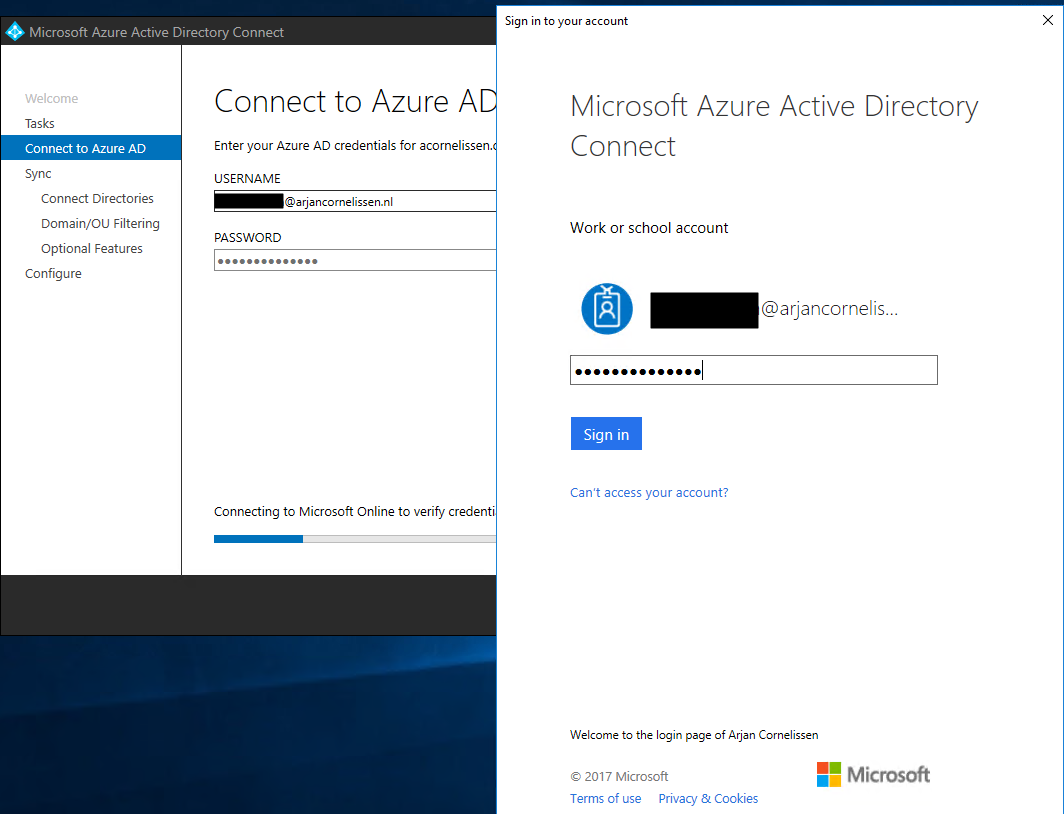 This is a repost from my company [blog](https://worktogether.tech/2017/06/11/azure-ad-connect-modern-authentication/) |
| json metadata | {"tags":["azure","aadconnect","azuread","newfeature"],"image":["https://steemitimages.com/DQmYkti8b9gpze7QedzHzntNqY9njUyexfnubFzDSfXMA47/AzureADConnectModernAuthentication01.png"],"links":["https://www.microsoft.com/en-us/download/details.aspx?id=47594","https://worktogether.tech/2017/06/11/azure-ad-connect-modern-authentication/"],"app":"steemit/0.1","format":"markdown"} |
| Transaction Info | Block #12723430/Trx e9b2a3ce54e0ad20fdb56c8957b77b6fc7ac189c |
View Raw JSON Data
{
"trx_id": "e9b2a3ce54e0ad20fdb56c8957b77b6fc7ac189c",
"block": 12723430,
"trx_in_block": 1,
"op_in_trx": 0,
"virtual_op": 0,
"timestamp": "2017-06-11T09:32:54",
"op": [
"comment",
{
"parent_author": "",
"parent_permlink": "azure",
"author": "worktogether",
"permlink": "azure-ad-connect-modern-authentication",
"title": "Azure AD Connect modern authentication",
"body": "This week I needed to create a demo environment for my presentation at SharePoint Saturday in the Netherlands and I Installed the latest version of [Azure Active Directory Connect (1.1.524.0)](https://www.microsoft.com/en-us/download/details.aspx?id=47594) and to my surprise it supported modern authentication when I connected to Azure Active Directory. I created an account where MFA was disabled to make the connection but that was not necessary to my surprise. See the screenshot below asking Azure Active Directory Connect for sign into my tenant.\n\n\nThis is a repost from my company [blog](https://worktogether.tech/2017/06/11/azure-ad-connect-modern-authentication/)",
"json_metadata": "{\"tags\":[\"azure\",\"aadconnect\",\"azuread\",\"newfeature\"],\"image\":[\"https://steemitimages.com/DQmYkti8b9gpze7QedzHzntNqY9njUyexfnubFzDSfXMA47/AzureADConnectModernAuthentication01.png\"],\"links\":[\"https://www.microsoft.com/en-us/download/details.aspx?id=47594\",\"https://worktogether.tech/2017/06/11/azure-ad-connect-modern-authentication/\"],\"app\":\"steemit/0.1\",\"format\":\"markdown\"}"
}
]
}steemdelegated 5.087 SP to @worktogether2017/06/08 22:19:27
steemdelegated 5.087 SP to @worktogether
2017/06/08 22:19:27
| delegator | steem |
| delegatee | worktogether |
| vesting shares | 8283.250814 VESTS |
| Transaction Info | Block #12652422/Trx 09fa1fe812670da5dc88b77644259eddb82659ba |
View Raw JSON Data
{
  "trx_id": "09fa1fe812670da5dc88b77644259eddb82659ba",
  "block": 12652422,
  "trx_in_block": 5,
  "op_in_trx": 0,
  "virtual_op": 0,
  "timestamp": "2017-06-08T22:19:27",
  "op": [
    "delegate_vesting_shares",
    {
      "delegator": "steem",
      "delegatee": "worktogether",
      "vesting_shares": "8283.250814 VESTS"
    }
  ]
}worktogetherupvoted (100.00%) @worktogether / azure-automation-credentials2017/06/01 21:30:42
worktogetherupvoted (100.00%) @worktogether / azure-automation-credentials
2017/06/01 21:30:42
| voter | worktogether |
| author | worktogether |
| permlink | azure-automation-credentials |
| weight | 10000 (100.00%) |
| Transaction Info | Block #12450044/Trx 498a82f730ea71d7f07f6b6d869b165ae9289a77 |
View Raw JSON Data
{
  "trx_id": "498a82f730ea71d7f07f6b6d869b165ae9289a77",
  "block": 12450044,
  "trx_in_block": 5,
  "op_in_trx": 0,
  "virtual_op": 0,
  "timestamp": "2017-06-01T21:30:42",
  "op": [
    "vote",
    {
      "voter": "worktogether",
      "author": "worktogether",
      "permlink": "azure-automation-credentials",
      "weight": 10000
    }
  ]
}worktogetherpublished a new post: azure-automation-credentials2017/06/01 21:30:42
worktogetherpublished a new post: azure-automation-credentials
2017/06/01 21:30:42
| parent author | |
| parent permlink | azure |
| author | worktogether |
| permlink | azure-automation-credentials |
| title | Azure Automation credentials |
| body | Last week I found out that the account name that you use in Azure automation are case-sensitive. We found this after a co-worker was adding a credential to the credentials assets. I had used some capital letters to read the account name a bit better in our local AD and my co-worker just wrote them down with small letters. He came back to me asking if the password was correct because the credentials did not work. After some tries and digging we found out that the casing of the account was the issue. Be warned for this. Repost from my company blog: https://worktogether.tech/2017/04/02/azure-automation-credentials/ |
| json metadata | {"tags":["azure","automation","azureautomation","azuread"],"links":["https://worktogether.tech/2017/04/02/azure-automation-credentials/"],"app":"steemit/0.1","format":"markdown"} |
| Transaction Info | Block #12450044/Trx 498a82f730ea71d7f07f6b6d869b165ae9289a77 |
View Raw JSON Data
{
  "trx_id": "498a82f730ea71d7f07f6b6d869b165ae9289a77",
  "block": 12450044,
  "trx_in_block": 5,
  "op_in_trx": 0,
  "virtual_op": 0,
  "timestamp": "2017-06-01T21:30:42",
  "op": [
    "comment",
    {
      "parent_author": "",
      "parent_permlink": "azure",
      "author": "worktogether",
      "permlink": "azure-automation-credentials",
      "title": "Azure Automation credentials",
      "body": "Last week I found out that the account name that you use in Azure automation are case-sensitive. We found this after a co-worker was adding a credential to the credentials assets. I had used some capital letters to read the account name a bit better in our local AD and my co-worker just wrote them down with small letters. He came back to me asking if the password was correct because the credentials did not work. After some tries and digging we found out that the casing of the account was the issue.\nBe warned for this.\nRepost from my company blog: https://worktogether.tech/2017/04/02/azure-automation-credentials/",
      "json_metadata": "{\"tags\":[\"azure\",\"automation\",\"azureautomation\",\"azuread\"],\"links\":[\"https://worktogether.tech/2017/04/02/azure-automation-credentials/\"],\"app\":\"steemit/0.1\",\"format\":\"markdown\"}"
    }
  ]
}2017/05/30 08:53:00
2017/05/30 08:53:00
| parent author | worktogether |
| parent permlink | started-my-own-company-work-together |
| author | jenmendez |
| permlink | re-worktogether-started-my-own-company-work-together-20170530t085258077z |
| title | |
| body | Welcome to Steemit! I hope you will enjoy being part of this community, you may want to introduce yourself, there are examples of introduction posts here and all you need to know when you start on Steemit here: https://steemit.com/welcome. I recommend reading the Steem whitepaper also here: https://steem.io/SteemWhitePaper.pdf Good luck! |
| json metadata | {"tags":["startup"],"links":["https://steemit.com/welcome","https://steem.io/SteemWhitePaper.pdf"],"app":"steemit/0.1"} |
| Transaction Info | Block #12377339/Trx 5d28902683f82dd93de2259923938f585ca96d74 |
View Raw JSON Data
{
  "trx_id": "5d28902683f82dd93de2259923938f585ca96d74",
  "block": 12377339,
  "trx_in_block": 1,
  "op_in_trx": 0,
  "virtual_op": 0,
  "timestamp": "2017-05-30T08:53:00",
  "op": [
    "comment",
    {
      "parent_author": "worktogether",
      "parent_permlink": "started-my-own-company-work-together",
      "author": "jenmendez",
      "permlink": "re-worktogether-started-my-own-company-work-together-20170530t085258077z",
      "title": "",
      "body": "Welcome to Steemit! I hope you will enjoy being part of this community, you may want to introduce yourself, there are examples of introduction posts here and all you need to know when you start on Steemit here: https://steemit.com/welcome.\nI recommend reading the Steem whitepaper also here: https://steem.io/SteemWhitePaper.pdf\nGood luck!",
      "json_metadata": "{\"tags\":[\"startup\"],\"links\":[\"https://steemit.com/welcome\",\"https://steem.io/SteemWhitePaper.pdf\"],\"app\":\"steemit/0.1\"}"
    }
  ]
}dimimpupvoted (1.00%) @worktogether / started-my-own-company-work-together2017/05/27 21:46:42
dimimpupvoted (1.00%) @worktogether / started-my-own-company-work-together
2017/05/27 21:46:42
| voter | dimimp |
| author | worktogether |
| permlink | started-my-own-company-work-together |
| weight | 100 (1.00%) |
| Transaction Info | Block #12306476/Trx 1212b025326eadb819374ac67cebec118ab9920d |
View Raw JSON Data
{
  "trx_id": "1212b025326eadb819374ac67cebec118ab9920d",
  "block": 12306476,
  "trx_in_block": 4,
  "op_in_trx": 0,
  "virtual_op": 0,
  "timestamp": "2017-05-27T21:46:42",
  "op": [
    "vote",
    {
      "voter": "dimimp",
      "author": "worktogether",
      "permlink": "started-my-own-company-work-together",
      "weight": 100
    }
  ]
}worktogetherupdated their account properties2017/05/27 21:43:18
worktogetherupdated their account properties
2017/05/27 21:43:18
| account | worktogether |
| memo key | STM5H1H2ZuHYJjhRmi6eyLd8SKki1inmACxLtF9wjiRRNgoPJUjWq |
| json metadata | {"profile":{"name":"Work Together","about":"A company assisting companies with Office 365 and Azure","location":"The Netherlands","website":"https://worktogether.tech"}} |
| Transaction Info | Block #12306408/Trx bf07e92ad6a4f46bee6a50f92824dfa6fcd05466 |
View Raw JSON Data
{
  "trx_id": "bf07e92ad6a4f46bee6a50f92824dfa6fcd05466",
  "block": 12306408,
  "trx_in_block": 1,
  "op_in_trx": 0,
  "virtual_op": 0,
  "timestamp": "2017-05-27T21:43:18",
  "op": [
    "account_update",
    {
      "account": "worktogether",
      "memo_key": "STM5H1H2ZuHYJjhRmi6eyLd8SKki1inmACxLtF9wjiRRNgoPJUjWq",
      "json_metadata": "{\"profile\":{\"name\":\"Work Together\",\"about\":\"A company assisting companies with Office 365 and Azure\",\"location\":\"The Netherlands\",\"website\":\"https://worktogether.tech\"}}"
    }
  ]
}worktogetherupvoted (100.00%) @jenmendez / excited-to-meet-steemit2017/05/27 21:38:54
worktogetherupvoted (100.00%) @jenmendez / excited-to-meet-steemit
2017/05/27 21:38:54
| voter | worktogether |
| author | jenmendez |
| permlink | excited-to-meet-steemit |
| weight | 10000 (100.00%) |
| Transaction Info | Block #12306320/Trx 465aab9254af10ea5f6b112fc677709f4aac8548 |
View Raw JSON Data
{
  "trx_id": "465aab9254af10ea5f6b112fc677709f4aac8548",
  "block": 12306320,
  "trx_in_block": 6,
  "op_in_trx": 0,
  "virtual_op": 0,
  "timestamp": "2017-05-27T21:38:54",
  "op": [
    "vote",
    {
      "voter": "worktogether",
      "author": "jenmendez",
      "permlink": "excited-to-meet-steemit",
      "weight": 10000
    }
  ]
}worktogetherfollowed @jenmendez2017/05/27 21:38:15
worktogetherfollowed @jenmendez
2017/05/27 21:38:15
| required auths | [] |
| required posting auths | ["worktogether"] |
| id | follow |
| json | ["follow",{"follower":"worktogether","following":"jenmendez","what":["blog"]}] |
| Transaction Info | Block #12306307/Trx 66ad87c5ff740b7138d7583dac6c7db641d3e09b |
View Raw JSON Data
{
  "trx_id": "66ad87c5ff740b7138d7583dac6c7db641d3e09b",
  "block": 12306307,
  "trx_in_block": 7,
  "op_in_trx": 0,
  "virtual_op": 0,
  "timestamp": "2017-05-27T21:38:15",
  "op": [
    "custom_json",
    {
      "required_auths": [],
      "required_posting_auths": [
        "worktogether"
      ],
      "id": "follow",
      "json": "[\"follow\",{\"follower\":\"worktogether\",\"following\":\"jenmendez\",\"what\":[\"blog\"]}]"
    }
  ]
}worktogetherupvoted (100.00%) @worktogether / started-my-own-company-work-together2017/05/27 21:31:06
worktogetherupvoted (100.00%) @worktogether / started-my-own-company-work-together
2017/05/27 21:31:06
| voter | worktogether |
| author | worktogether |
| permlink | started-my-own-company-work-together |
| weight | 10000 (100.00%) |
| Transaction Info | Block #12306164/Trx 32c8baafa7873a06c130a6e926936bce1a48c5eb |
View Raw JSON Data
{
  "trx_id": "32c8baafa7873a06c130a6e926936bce1a48c5eb",
  "block": 12306164,
  "trx_in_block": 19,
  "op_in_trx": 0,
  "virtual_op": 0,
  "timestamp": "2017-05-27T21:31:06",
  "op": [
    "vote",
    {
      "voter": "worktogether",
      "author": "worktogether",
      "permlink": "started-my-own-company-work-together",
      "weight": 10000
    }
  ]
}worktogetherpublished a new post: started-my-own-company-work-together2017/05/27 21:31:06
worktogetherpublished a new post: started-my-own-company-work-together
2017/05/27 21:31:06
| parent author | |
| parent permlink | startup |
| author | worktogether |
| permlink | started-my-own-company-work-together |
| title | Started my own company "Work Together" |
| body | About a month ago I started my own company Work Together. With this company I will assist other companies and small businesses with the implementation of Office 365 and Azure. I started working with SharePoint late 2007 and quickly became aware that a good understanding of the product is essential to give a solid advice to the customer. Since then I worked on several projects from SharePoint 2007, 2010, 2013 and SharePoint Online. Since the rollout of Office 365 I focused more on the Microsoft Cloud and got involved with Microsoft Azure. At first the IaaS parts like VM's and networking and now also the other parts of Azure. The focus of Work Together is that the customer can focus on their business and that the products they use are supportive on their processes. Everything I can automate I will do, mainly with PowerShell, Azure Automation, Azure Functions or Flow at the moment. I will post more information in the coming weeks, for now you can find more on https://worktogether.tech |
| json metadata | {"tags":["startup","office365","powershell","azure","sharepoint"],"links":["https://worktogether.tech"],"app":"steemit/0.1","format":"markdown"} |
| Transaction Info | Block #12306164/Trx 32c8baafa7873a06c130a6e926936bce1a48c5eb |
View Raw JSON Data
{
  "trx_id": "32c8baafa7873a06c130a6e926936bce1a48c5eb",
  "block": 12306164,
  "trx_in_block": 19,
  "op_in_trx": 0,
  "virtual_op": 0,
  "timestamp": "2017-05-27T21:31:06",
  "op": [
    "comment",
    {
      "parent_author": "",
      "parent_permlink": "startup",
      "author": "worktogether",
      "permlink": "started-my-own-company-work-together",
      "title": "Started my own company \"Work Together\"",
      "body": "About a month ago I started my own company Work Together. With this company I will assist other companies and small businesses with the implementation of Office 365 and Azure. I started working with SharePoint late 2007 and quickly became aware that a good understanding of the product is essential to give a solid advice to the customer. Since then I worked on several projects from SharePoint 2007, 2010, 2013 and SharePoint Online. Since the rollout of Office 365 I focused more on the Microsoft Cloud and got involved with Microsoft Azure. At first the IaaS parts like VM's and networking and now also the other parts of Azure.\nThe focus of Work Together is that the customer can focus on their business and that the products they use are supportive on their processes.\nEverything I can automate I will do, mainly with PowerShell, Azure Automation, Azure Functions or Flow at the moment.\nI will post more information in the coming weeks, for now you can find more on https://worktogether.tech",
      "json_metadata": "{\"tags\":[\"startup\",\"office365\",\"powershell\",\"azure\",\"sharepoint\"],\"links\":[\"https://worktogether.tech\"],\"app\":\"steemit/0.1\",\"format\":\"markdown\"}"
    }
  ]
}steemcreated a new account: @worktogether2017/05/26 17:46:48
steemcreated a new account: @worktogether
2017/05/26 17:46:48
| fee | 1.000 STEEM |
| delegation | 301000.000000 VESTS |
| creator | steem |
| new account name | worktogether |
| owner | {"weight_threshold":1,"account_auths":[],"key_auths":[["STM5zRA5XXob8vRDscZViV6gy5DANcLCVzox399LQk3jacVpg8va7",1]]} |
| active | {"weight_threshold":1,"account_auths":[],"key_auths":[["STM5PFTJ2kxjX2ATjMR7ftMG8TKLY8pMYE9kacc5i6sfk6M5Dft7V",1]]} |
| posting | {"weight_threshold":1,"account_auths":[],"key_auths":[["STM5oZ9drCYNNJ5aGrSM61LHx71yojEhGg3mcK3t3vacWoDeHiNFJ",1]]} |
| memo key | STM5H1H2ZuHYJjhRmi6eyLd8SKki1inmACxLtF9wjiRRNgoPJUjWq |
| json metadata | |
| extensions | [] |
| Transaction Info | Block #12272883/Trx 2272db167b5e75955ad096c7685f57e6ca1026b6 |
View Raw JSON Data
{
  "trx_id": "2272db167b5e75955ad096c7685f57e6ca1026b6",
  "block": 12272883,
  "trx_in_block": 1,
  "op_in_trx": 0,
  "virtual_op": 0,
  "timestamp": "2017-05-26T17:46:48",
  "op": [
    "account_create_with_delegation",
    {
      "fee": "1.000 STEEM",
      "delegation": "301000.000000 VESTS",
      "creator": "steem",
      "new_account_name": "worktogether",
      "owner": {
        "weight_threshold": 1,
        "account_auths": [],
        "key_auths": [
          [
            "STM5zRA5XXob8vRDscZViV6gy5DANcLCVzox399LQk3jacVpg8va7",
            1
          ]
        ]
      },
      "active": {
        "weight_threshold": 1,
        "account_auths": [],
        "key_auths": [
          [
            "STM5PFTJ2kxjX2ATjMR7ftMG8TKLY8pMYE9kacc5i6sfk6M5Dft7V",
            1
          ]
        ]
      },
      "posting": {
        "weight_threshold": 1,
        "account_auths": [],
        "key_auths": [
          [
            "STM5oZ9drCYNNJ5aGrSM61LHx71yojEhGg3mcK3t3vacWoDeHiNFJ",
            1
          ]
        ]
      },
      "memo_key": "STM5H1H2ZuHYJjhRmi6eyLd8SKki1inmACxLtF9wjiRRNgoPJUjWq",
      "json_metadata": "",
      "extensions": []
    }
  ]
}Manabar
Voting Power100.00%
Downvote Power100.00%
Resource Credits100.00%
Reputation Progress0.00%
{
  "voting_manabar": {
    "current_mana": "8143659806",
    "last_update_time": 1779092265
  },
  "downvote_manabar": {
    "current_mana": 2035914951,
    "last_update_time": 1779092265
  },
  "rc_account": {
    "account": "worktogether",
    "rc_manabar": {
      "current_mana": "10164408779",
      "last_update_time": 1779092265
    },
    "max_rc_creation_adjustment": {
      "amount": "2020748973",
      "precision": 6,
      "nai": "@@000000037"
    },
    "max_rc": "10164408779"
  }
}
Account Metadata
| POSTING JSON METADATA | |
| profile | {"name":"Work Together","about":"A company assisting companies with Office 365 and Azure","location":"The Netherlands","website":"https://worktogether.tech","profile_image":"https://wpac.blob.core.windows.net/wpstorage/2016/01/O3A8884-bewerkt.jpg"} |
| JSON METADATA | |
| profile | {"name":"Work Together","about":"A company assisting companies with Office 365 and Azure","location":"The Netherlands","website":"https://worktogether.tech","profile_image":"https://wpac.blob.core.windows.net/wpstorage/2016/01/O3A8884-bewerkt.jpg"} |
{
  "posting_json_metadata": {
    "profile": {
      "name": "Work Together",
      "about": "A company assisting companies with Office 365 and Azure",
      "location": "The Netherlands",
      "website": "https://worktogether.tech",
      "profile_image": "https://wpac.blob.core.windows.net/wpstorage/2016/01/O3A8884-bewerkt.jpg"
    }
  },
  "json_metadata": {
    "profile": {
      "name": "Work Together",
      "about": "A company assisting companies with Office 365 and Azure",
      "location": "The Netherlands",
      "website": "https://worktogether.tech",
      "profile_image": "https://wpac.blob.core.windows.net/wpstorage/2016/01/O3A8884-bewerkt.jpg"
    }
  }
}
Auth Keys
Owner
Single Signature
Public Keys
STM5zRA5XXob8vRDscZViV6gy5DANcLCVzox399LQk3jacVpg8va71/1
Active
Single Signature
Public Keys
STM5PFTJ2kxjX2ATjMR7ftMG8TKLY8pMYE9kacc5i6sfk6M5Dft7V1/1
Posting
Single Signature
Public Keys
STM5oZ9drCYNNJ5aGrSM61LHx71yojEhGg3mcK3t3vacWoDeHiNFJ1/1
Memo
STM5H1H2ZuHYJjhRmi6eyLd8SKki1inmACxLtF9wjiRRNgoPJUjWq
{
  "owner": {
    "weight_threshold": 1,
    "account_auths": [],
    "key_auths": [
      [
        "STM5zRA5XXob8vRDscZViV6gy5DANcLCVzox399LQk3jacVpg8va7",
        1
      ]
    ]
  },
  "active": {
    "weight_threshold": 1,
    "account_auths": [],
    "key_auths": [
      [
        "STM5PFTJ2kxjX2ATjMR7ftMG8TKLY8pMYE9kacc5i6sfk6M5Dft7V",
        1
      ]
    ]
  },
  "posting": {
    "weight_threshold": 1,
    "account_auths": [],
    "key_auths": [
      [
        "STM5oZ9drCYNNJ5aGrSM61LHx71yojEhGg3mcK3t3vacWoDeHiNFJ",
        1
      ]
    ]
  },
  "memo": "STM5H1H2ZuHYJjhRmi6eyLd8SKki1inmACxLtF9wjiRRNgoPJUjWq"
}
Witness Votes
0 / 30
No active witness votes.
[]