

VOTING POWER100.00%
DOWNVOTE POWER100.00%
RESOURCE CREDITS100.00%
REPUTATION PROGRESS88.63%
Net Worth
0.184USD
STEEM
0.000STEEM
SBD
0.280SBD
Effective Power
5.007SP
├── Own SP
0.855SP
└── Incoming DelegationsDeleg
+4.152SP
Detailed Balance
| STEEM | ||
| balance | 0.000STEEM | STEEM |
| market_balance | 0.000STEEM | STEEM |
| savings_balance | 0.000STEEM | STEEM |
| reward_steem_balance | 0.000STEEM | STEEM |
| STEEM POWER | ||
| Own SP | 0.855SP | SP |
| Delegated Out | 0.000SP | SP |
| Delegation In | 4.152SP | SP |
| Effective Power | 5.007SP | SP |
| Reward SP (pending) | 0.003SP | SP |
| SBD | ||
| sbd_balance | 0.265SBD | SBD |
| sbd_conversions | 0.000SBD | SBD |
| sbd_market_balance | 0.000SBD | SBD |
| savings_sbd_balance | 0.000SBD | SBD |
| reward_sbd_balance | 0.015SBD | SBD |
{
  "balance": "0.000 STEEM",
  "savings_balance": "0.000 STEEM",
  "reward_steem_balance": "0.000 STEEM",
  "vesting_shares": "1390.163381 VESTS",
  "delegated_vesting_shares": "0.000000 VESTS",
  "received_vesting_shares": "6753.496425 VESTS",
  "sbd_balance": "0.265 SBD",
  "savings_sbd_balance": "0.000 SBD",
  "reward_sbd_balance": "0.015 SBD",
  "conversions": []
}
Account Info
| name | yancyming |
| id | 377722 |
| rank | 1,359,237 |
| reputation | 2702793803 |
| created | 2017-09-21T02:41:09 |
| recovery_account | steem |
| proxy | None |
| post_count | 26 |
| comment_count | 0 |
| lifetime_vote_count | 0 |
| witnesses_voted_for | 1 |
| last_post | 2018-01-11T12:57:21 |
| last_root_post | 2018-01-11T12:57:21 |
| last_vote_time | 2018-03-02T05:54:12 |
| proxied_vsf_votes | 0, 0, 0, 0 |
| can_vote | 1 |
| voting_power | 0 |
| delayed_votes | 0 |
| balance | 0.000 STEEM |
| savings_balance | 0.000 STEEM |
| sbd_balance | 0.265 SBD |
| savings_sbd_balance | 0.000 SBD |
| vesting_shares | 1390.163381 VESTS |
| delegated_vesting_shares | 0.000000 VESTS |
| received_vesting_shares | 6753.496425 VESTS |
| reward_vesting_balance | 6.144062 VESTS |
| vesting_balance | 0.000 STEEM |
| vesting_withdraw_rate | 0.000000 VESTS |
| next_vesting_withdrawal | 1969-12-31T23:59:59 |
| withdrawn | 0 |
| to_withdraw | 0 |
| withdraw_routes | 0 |
| savings_withdraw_requests | 0 |
| last_account_recovery | 1970-01-01T00:00:00 |
| reset_account | null |
| last_owner_update | 1970-01-01T00:00:00 |
| last_account_update | 2017-09-25T06:36:24 |
| mined | No |
| sbd_seconds | 0 |
| sbd_last_interest_payment | 2018-01-09T00:36:27 |
| savings_sbd_last_interest_payment | 1970-01-01T00:00:00 |
{
  "active": {
    "account_auths": [],
    "key_auths": [
      [
        "STM8ZfjCaQ1pyQzPjLcbvGChm5P1zxTUNob2iDbcKhtPri69ZJq9k",
        1
      ]
    ],
    "weight_threshold": 1
  },
  "balance": "0.000 STEEM",
  "can_vote": true,
  "comment_count": 0,
  "created": "2017-09-21T02:41:09",
  "curation_rewards": 3,
  "delegated_vesting_shares": "0.000000 VESTS",
  "downvote_manabar": {
    "current_mana": 2035914951,
    "last_update_time": 1779092673
  },
  "guest_bloggers": [],
  "id": 377722,
  "json_metadata": "{\"profile\":{\"cover_image\":\"\",\"profile_image\":\"https://img.esteem.ws/atazzhdi2i.jpg\"}}",
  "last_account_recovery": "1970-01-01T00:00:00",
  "last_account_update": "2017-09-25T06:36:24",
  "last_owner_update": "1970-01-01T00:00:00",
  "last_post": "2018-01-11T12:57:21",
  "last_root_post": "2018-01-11T12:57:21",
  "last_vote_time": "2018-03-02T05:54:12",
  "lifetime_vote_count": 0,
  "market_history": [],
  "memo_key": "STM7cC8iVVGRhNQAhb4pQnCn6aGaQpYVWh6zZZdfjqT1Ejjdc24hS",
  "mined": false,
  "name": "yancyming",
  "next_vesting_withdrawal": "1969-12-31T23:59:59",
  "other_history": [],
  "owner": {
    "account_auths": [],
    "key_auths": [
      [
        "STM6hxb3CbmF6xg4tFarfvfsiL8VrqKDiyqCdVahqbJcthq77D5E8",
        1
      ]
    ],
    "weight_threshold": 1
  },
  "pending_claimed_accounts": 0,
  "post_bandwidth": 0,
  "post_count": 26,
  "post_history": [],
  "posting": {
    "account_auths": [
      [
        "esteemapp",
        1
      ]
    ],
    "key_auths": [
      [
        "STM5gbPyWNkFBSLzHPnQwmpSd2GAyUmBDUaSSDi3jCNod1Lhco6th",
        1
      ]
    ],
    "weight_threshold": 1
  },
  "posting_json_metadata": "{\"profile\":{\"cover_image\":\"\",\"profile_image\":\"https://img.esteem.ws/atazzhdi2i.jpg\"}}",
  "posting_rewards": 349,
  "proxied_vsf_votes": [
    0,
    0,
    0,
    0
  ],
  "proxy": "",
  "received_vesting_shares": "6753.496425 VESTS",
  "recovery_account": "steem",
  "reputation": 2702793803,
  "reset_account": "null",
  "reward_sbd_balance": "0.015 SBD",
  "reward_steem_balance": "0.000 STEEM",
  "reward_vesting_balance": "6.144062 VESTS",
  "reward_vesting_steem": "0.003 STEEM",
  "savings_balance": "0.000 STEEM",
  "savings_sbd_balance": "0.000 SBD",
  "savings_sbd_last_interest_payment": "1970-01-01T00:00:00",
  "savings_sbd_seconds": "0",
  "savings_sbd_seconds_last_update": "1970-01-01T00:00:00",
  "savings_withdraw_requests": 0,
  "sbd_balance": "0.265 SBD",
  "sbd_last_interest_payment": "2018-01-09T00:36:27",
  "sbd_seconds": "0",
  "sbd_seconds_last_update": "2018-01-09T00:36:27",
  "tags_usage": [],
  "to_withdraw": 0,
  "transfer_history": [],
  "vesting_balance": "0.000 STEEM",
  "vesting_shares": "1390.163381 VESTS",
  "vesting_withdraw_rate": "0.000000 VESTS",
  "vote_history": [],
  "voting_manabar": {
    "current_mana": "8143659806",
    "last_update_time": 1779092673
  },
  "voting_power": 0,
  "withdraw_routes": 0,
  "withdrawn": 0,
  "witness_votes": [
    "good-karma"
  ],
  "witnesses_voted_for": 1,
  "rank": 1359237
}
Withdraw Routes
| Incoming | Outgoing |
|---|---|
Empty | Empty |
{
  "incoming": [],
  "outgoing": []
}From Date
To Date
steemdelegated 4.152 SP to @yancyming2026/05/18 08:24:33
steemdelegated 4.152 SP to @yancyming
2026/05/18 08:24:33
| delegator | steem |
| delegatee | yancyming |
| vesting shares | 6753.496425 VESTS |
| Transaction Info | Block #106153196/Trx fc9d6eb40e65ffa365a49e16916e2ed3ddf12166 |
View Raw JSON Data
{
  "trx_id": "fc9d6eb40e65ffa365a49e16916e2ed3ddf12166",
  "block": 106153196,
  "trx_in_block": 4,
  "op_in_trx": 0,
  "virtual_op": 0,
  "timestamp": "2026-05-18T08:24:33",
  "op": [
    "delegate_vesting_shares",
    {
      "delegator": "steem",
      "delegatee": "yancyming",
      "vesting_shares": "6753.496425 VESTS"
    }
  ]
}steemdelegated 2.485 SP to @yancyming2026/05/13 12:59:24
steemdelegated 2.485 SP to @yancyming
2026/05/13 12:59:24
| delegator | steem |
| delegatee | yancyming |
| vesting shares | 4041.286020 VESTS |
| Transaction Info | Block #106015401/Trx 7462d39d16cd42632ed7407b5f52c830f3e8310e |
View Raw JSON Data
{
  "trx_id": "7462d39d16cd42632ed7407b5f52c830f3e8310e",
  "block": 106015401,
  "trx_in_block": 1,
  "op_in_trx": 0,
  "virtual_op": 0,
  "timestamp": "2026-05-13T12:59:24",
  "op": [
    "delegate_vesting_shares",
    {
      "delegator": "steem",
      "delegatee": "yancyming",
      "vesting_shares": "4041.286020 VESTS"
    }
  ]
}steemdelegated 4.160 SP to @yancyming2026/04/26 07:33:18
steemdelegated 4.160 SP to @yancyming
2026/04/26 07:33:18
| delegator | steem |
| delegatee | yancyming |
| vesting shares | 6766.012181 VESTS |
| Transaction Info | Block #105520621/Trx 403ef9af69e2bb164182dfd098f96a6f86d1ebac |
View Raw JSON Data
{
  "trx_id": "403ef9af69e2bb164182dfd098f96a6f86d1ebac",
  "block": 105520621,
  "trx_in_block": 1,
  "op_in_trx": 0,
  "virtual_op": 0,
  "timestamp": "2026-04-26T07:33:18",
  "op": [
    "delegate_vesting_shares",
    {
      "delegator": "steem",
      "delegatee": "yancyming",
      "vesting_shares": "6766.012181 VESTS"
    }
  ]
}steemdelegated 2.510 SP to @yancyming2026/01/24 05:44:03
steemdelegated 2.510 SP to @yancyming
2026/01/24 05:44:03
| delegator | steem |
| delegatee | yancyming |
| vesting shares | 4082.832839 VESTS |
| Transaction Info | Block #102878075/Trx 88fc35844939ea0342cf515985657c17c95212b0 |
View Raw JSON Data
{
  "trx_id": "88fc35844939ea0342cf515985657c17c95212b0",
  "block": 102878075,
  "trx_in_block": 0,
  "op_in_trx": 0,
  "virtual_op": 0,
  "timestamp": "2026-01-24T05:44:03",
  "op": [
    "delegate_vesting_shares",
    {
      "delegator": "steem",
      "delegatee": "yancyming",
      "vesting_shares": "4082.832839 VESTS"
    }
  ]
}steemdelegated 2.611 SP to @yancyming2024/12/18 00:53:03
steemdelegated 2.611 SP to @yancyming
2024/12/18 00:53:03
| delegator | steem |
| delegatee | yancyming |
| vesting shares | 4247.052036 VESTS |
| Transaction Info | Block #91324273/Trx b16593f5d062de1686a0b077f8d05712f4553d2b |
View Raw JSON Data
{
  "trx_id": "b16593f5d062de1686a0b077f8d05712f4553d2b",
  "block": 91324273,
  "trx_in_block": 3,
  "op_in_trx": 0,
  "virtual_op": 0,
  "timestamp": "2024-12-18T00:53:03",
  "op": [
    "delegate_vesting_shares",
    {
      "delegator": "steem",
      "delegatee": "yancyming",
      "vesting_shares": "4247.052036 VESTS"
    }
  ]
}steemdelegated 2.715 SP to @yancyming2023/11/14 16:32:06
steemdelegated 2.715 SP to @yancyming
2023/11/14 16:32:06
| delegator | steem |
| delegatee | yancyming |
| vesting shares | 4416.185568 VESTS |
| Transaction Info | Block #79878370/Trx f016d8ea72759f2d19105e310f6d06d8d85839d7 |
View Raw JSON Data
{
  "trx_id": "f016d8ea72759f2d19105e310f6d06d8d85839d7",
  "block": 79878370,
  "trx_in_block": 8,
  "op_in_trx": 0,
  "virtual_op": 0,
  "timestamp": "2023-11-14T16:32:06",
  "op": [
    "delegate_vesting_shares",
    {
      "delegator": "steem",
      "delegatee": "yancyming",
      "vesting_shares": "4416.185568 VESTS"
    }
  ]
}steemdelegated 4.521 SP to @yancyming2023/09/22 12:54:21
steemdelegated 4.521 SP to @yancyming
2023/09/22 12:54:21
| delegator | steem |
| delegatee | yancyming |
| vesting shares | 7353.094354 VESTS |
| Transaction Info | Block #78365873/Trx e7a565406c50ec46bf9ea9f23ee5b46ed1d223f8 |
View Raw JSON Data
{
  "trx_id": "e7a565406c50ec46bf9ea9f23ee5b46ed1d223f8",
  "block": 78365873,
  "trx_in_block": 10,
  "op_in_trx": 0,
  "virtual_op": 0,
  "timestamp": "2023-09-22T12:54:21",
  "op": [
    "delegate_vesting_shares",
    {
      "delegator": "steem",
      "delegatee": "yancyming",
      "vesting_shares": "7353.094354 VESTS"
    }
  ]
}steemdelegated 4.658 SP to @yancyming2022/11/03 20:02:27
steemdelegated 4.658 SP to @yancyming
2022/11/03 20:02:27
| delegator | steem |
| delegatee | yancyming |
| vesting shares | 7575.145792 VESTS |
| Transaction Info | Block #69123222/Trx 947bd7298f5e11afffb07b2f263913ed92ada82e |
View Raw JSON Data
{
  "trx_id": "947bd7298f5e11afffb07b2f263913ed92ada82e",
  "block": 69123222,
  "trx_in_block": 4,
  "op_in_trx": 0,
  "virtual_op": 0,
  "timestamp": "2022-11-03T20:02:27",
  "op": [
    "delegate_vesting_shares",
    {
      "delegator": "steem",
      "delegatee": "yancyming",
      "vesting_shares": "7575.145792 VESTS"
    }
  ]
}steemdelegated 4.793 SP to @yancyming2022/01/18 01:01:57
steemdelegated 4.793 SP to @yancyming
2022/01/18 01:01:57
| delegator | steem |
| delegatee | yancyming |
| vesting shares | 7795.253393 VESTS |
| Transaction Info | Block #60826222/Trx c2221b5b4fab840f2028db83ca2d812244dbe8e2 |
View Raw JSON Data
{
  "trx_id": "c2221b5b4fab840f2028db83ca2d812244dbe8e2",
  "block": 60826222,
  "trx_in_block": 24,
  "op_in_trx": 0,
  "virtual_op": 0,
  "timestamp": "2022-01-18T01:01:57",
  "op": [
    "delegate_vesting_shares",
    {
      "delegator": "steem",
      "delegatee": "yancyming",
      "vesting_shares": "7795.253393 VESTS"
    }
  ]
}steemdelegated 4.906 SP to @yancyming2021/06/14 08:07:45
steemdelegated 4.906 SP to @yancyming
2021/06/14 08:07:45
| delegator | steem |
| delegatee | yancyming |
| vesting shares | 7979.447681 VESTS |
| Transaction Info | Block #54616436/Trx 7c3ed63258a9946e9fdd27b355d0744dc4f30435 |
View Raw JSON Data
{
  "trx_id": "7c3ed63258a9946e9fdd27b355d0744dc4f30435",
  "block": 54616436,
  "trx_in_block": 7,
  "op_in_trx": 0,
  "virtual_op": 0,
  "timestamp": "2021-06-14T08:07:45",
  "op": [
    "delegate_vesting_shares",
    {
      "delegator": "steem",
      "delegatee": "yancyming",
      "vesting_shares": "7979.447681 VESTS"
    }
  ]
}steemdelegated 5.021 SP to @yancyming2020/12/11 18:17:51
steemdelegated 5.021 SP to @yancyming
2020/12/11 18:17:51
| delegator | steem |
| delegatee | yancyming |
| vesting shares | 8166.869655 VESTS |
| Transaction Info | Block #49363630/Trx c8c7b142a0f23aae7249aef3765e0bc8c71e3a57 |
View Raw JSON Data
{
  "trx_id": "c8c7b142a0f23aae7249aef3765e0bc8c71e3a57",
  "block": 49363630,
  "trx_in_block": 7,
  "op_in_trx": 0,
  "virtual_op": 0,
  "timestamp": "2020-12-11T18:17:51",
  "op": [
    "delegate_vesting_shares",
    {
      "delegator": "steem",
      "delegatee": "yancyming",
      "vesting_shares": "8166.869655 VESTS"
    }
  ]
}steemdelegated 1.176 SP to @yancyming2020/12/06 11:52:51
steemdelegated 1.176 SP to @yancyming
2020/12/06 11:52:51
| delegator | steem |
| delegatee | yancyming |
| vesting shares | 1912.543513 VESTS |
| Transaction Info | Block #49215143/Trx a55ed1a316a659a2e33c230b1ef2b04be32ce0d6 |
View Raw JSON Data
{
  "trx_id": "a55ed1a316a659a2e33c230b1ef2b04be32ce0d6",
  "block": 49215143,
  "trx_in_block": 0,
  "op_in_trx": 0,
  "virtual_op": 0,
  "timestamp": "2020-12-06T11:52:51",
  "op": [
    "delegate_vesting_shares",
    {
      "delegator": "steem",
      "delegatee": "yancyming",
      "vesting_shares": "1912.543513 VESTS"
    }
  ]
}steemdelegated 5.025 SP to @yancyming2020/12/05 21:55:30
steemdelegated 5.025 SP to @yancyming
2020/12/05 21:55:30
| delegator | steem |
| delegatee | yancyming |
| vesting shares | 8173.077509 VESTS |
| Transaction Info | Block #49198711/Trx 62c6adb4e9daeb8ac72bb5a2758a25af53066d0e |
View Raw JSON Data
{
  "trx_id": "62c6adb4e9daeb8ac72bb5a2758a25af53066d0e",
  "block": 49198711,
  "trx_in_block": 12,
  "op_in_trx": 0,
  "virtual_op": 0,
  "timestamp": "2020-12-05T21:55:30",
  "op": [
    "delegate_vesting_shares",
    {
      "delegator": "steem",
      "delegatee": "yancyming",
      "vesting_shares": "8173.077509 VESTS"
    }
  ]
}steemdelegated 1.181 SP to @yancyming2020/11/03 06:30:18
steemdelegated 1.181 SP to @yancyming
2020/11/03 06:30:18
| delegator | steem |
| delegatee | yancyming |
| vesting shares | 1920.017158 VESTS |
| Transaction Info | Block #48275305/Trx 1ece8df6a837f4306aefcb663dd7db1eef664191 |
View Raw JSON Data
{
  "trx_id": "1ece8df6a837f4306aefcb663dd7db1eef664191",
  "block": 48275305,
  "trx_in_block": 3,
  "op_in_trx": 0,
  "virtual_op": 0,
  "timestamp": "2020-11-03T06:30:18",
  "op": [
    "delegate_vesting_shares",
    {
      "delegator": "steem",
      "delegatee": "yancyming",
      "vesting_shares": "1920.017158 VESTS"
    }
  ]
}steemdelegated 5.150 SP to @yancyming2020/05/09 12:57:51
steemdelegated 5.150 SP to @yancyming
2020/05/09 12:57:51
| delegator | steem |
| delegatee | yancyming |
| vesting shares | 8375.882868 VESTS |
| Transaction Info | Block #43225501/Trx 5a5570a256c2440a51305447e6d807801698e35b |
View Raw JSON Data
{
  "trx_id": "5a5570a256c2440a51305447e6d807801698e35b",
  "block": 43225501,
  "trx_in_block": 12,
  "op_in_trx": 0,
  "virtual_op": 0,
  "timestamp": "2020-05-09T12:57:51",
  "op": [
    "delegate_vesting_shares",
    {
      "delegator": "steem",
      "delegatee": "yancyming",
      "vesting_shares": "8375.882868 VESTS"
    }
  ]
}steemdelegated 1.201 SP to @yancyming2020/05/08 17:39:12
steemdelegated 1.201 SP to @yancyming
2020/05/08 17:39:12
| delegator | steem |
| delegatee | yancyming |
| vesting shares | 1953.311140 VESTS |
| Transaction Info | Block #43202869/Trx e169af8d68614f9b01628c1c3a41da09d39d77e1 |
View Raw JSON Data
{
  "trx_id": "e169af8d68614f9b01628c1c3a41da09d39d77e1",
  "block": 43202869,
  "trx_in_block": 9,
  "op_in_trx": 0,
  "virtual_op": 0,
  "timestamp": "2020-05-08T17:39:12",
  "op": [
    "delegate_vesting_shares",
    {
      "delegator": "steem",
      "delegatee": "yancyming",
      "vesting_shares": "1953.311140 VESTS"
    }
  ]
}steemdelegated 5.153 SP to @yancyming2020/04/30 02:39:36
steemdelegated 5.153 SP to @yancyming
2020/04/30 02:39:36
| delegator | steem |
| delegatee | yancyming |
| vesting shares | 8381.048459 VESTS |
| Transaction Info | Block #42960544/Trx 936580667a95a9ce0517d44ee309ae73d56dd862 |
View Raw JSON Data
{
  "trx_id": "936580667a95a9ce0517d44ee309ae73d56dd862",
  "block": 42960544,
  "trx_in_block": 9,
  "op_in_trx": 0,
  "virtual_op": 0,
  "timestamp": "2020-04-30T02:39:36",
  "op": [
    "delegate_vesting_shares",
    {
      "delegator": "steem",
      "delegatee": "yancyming",
      "vesting_shares": "8381.048459 VESTS"
    }
  ]
}2019/09/21 03:41:33
2019/09/21 03:41:33
| parent author | yancyming |
| parent permlink | 212mn2 |
| author | steemitboard |
| permlink | steemitboard-notify-yancyming-20190921t034132000z |
| title | |
| body | Congratulations @yancyming! You received a personal award! <table><tr><td>https://steemitimages.com/70x70/http://steemitboard.com/@yancyming/birthday2.png</td><td>Happy Birthday! - You are on the Steem blockchain for 2 years!</td></tr></table> <sub>_You can view [your badges on your Steem Board](https://steemitboard.com/@yancyming) and compare to others on the [Steem Ranking](https://steemitboard.com/ranking/index.php?name=yancyming)_</sub> **Do not miss the last post from @steemitboard:** <table><tr><td><a href="https://steemit.com/steemfest/@steemitboard/steemitboard-supports-the-steemfest-travel-reimbursement-fund"><img src="https://steemitimages.com/64x128/https://cdn.steemitimages.com/DQmXDHs9xfx8ZZ3DESFUqHRUQAcQT5kUWobArsRoJg2Yz1F/image.png"></a></td><td><a href="https://steemit.com/steemfest/@steemitboard/steemitboard-supports-the-steemfest-travel-reimbursement-fund">SteemitBoard supports the SteemFest⁴ Travel Reimbursement Fund.</a></td></tr></table> ###### [Vote for @Steemitboard as a witness](https://v2.steemconnect.com/sign/account-witness-vote?witness=steemitboard&approve=1) to get one more award and increased upvotes! |
| json metadata | {"image":["https://steemitboard.com/img/notify.png"]} |
| Transaction Info | Block #36604831/Trx d6ff3c366faae0cff8c266b6a55cc52dc1e9bc85 |
View Raw JSON Data
{
  "trx_id": "d6ff3c366faae0cff8c266b6a55cc52dc1e9bc85",
  "block": 36604831,
  "trx_in_block": 2,
  "op_in_trx": 0,
  "virtual_op": 0,
  "timestamp": "2019-09-21T03:41:33",
  "op": [
    "comment",
    {
      "parent_author": "yancyming",
      "parent_permlink": "212mn2",
      "author": "steemitboard",
      "permlink": "steemitboard-notify-yancyming-20190921t034132000z",
      "title": "",
      "body": "Congratulations @yancyming! You received a personal award!\n\n<table><tr><td>https://steemitimages.com/70x70/http://steemitboard.com/@yancyming/birthday2.png</td><td>Happy Birthday! - You are on the Steem blockchain for 2 years!</td></tr></table>\n\n<sub>_You can view [your badges on your Steem Board](https://steemitboard.com/@yancyming) and compare to others on the [Steem Ranking](https://steemitboard.com/ranking/index.php?name=yancyming)_</sub>\n\n\n**Do not miss the last post from @steemitboard:**\n<table><tr><td><a href=\"https://steemit.com/steemfest/@steemitboard/steemitboard-supports-the-steemfest-travel-reimbursement-fund\"><img src=\"https://steemitimages.com/64x128/https://cdn.steemitimages.com/DQmXDHs9xfx8ZZ3DESFUqHRUQAcQT5kUWobArsRoJg2Yz1F/image.png\"></a></td><td><a href=\"https://steemit.com/steemfest/@steemitboard/steemitboard-supports-the-steemfest-travel-reimbursement-fund\">SteemitBoard supports the SteemFest⁴ Travel Reimbursement Fund.</a></td></tr></table>\n\n###### [Vote for @Steemitboard as a witness](https://v2.steemconnect.com/sign/account-witness-vote?witness=steemitboard&approve=1) to get one more award and increased upvotes!",
      "json_metadata": "{\"image\":[\"https://steemitboard.com/img/notify.png\"]}"
    }
  ]
}steemdelegated 5.273 SP to @yancyming2019/05/26 05:40:03
steemdelegated 5.273 SP to @yancyming
2019/05/26 05:40:03
| delegator | steem |
| delegatee | yancyming |
| vesting shares | 8576.494084 VESTS |
| Transaction Info | Block #33237337/Trx 53941e59e340c1f3debfad16609d4baef4a15afc |
View Raw JSON Data
{
  "trx_id": "53941e59e340c1f3debfad16609d4baef4a15afc",
  "block": 33237337,
  "trx_in_block": 0,
  "op_in_trx": 0,
  "virtual_op": 0,
  "timestamp": "2019-05-26T05:40:03",
  "op": [
    "delegate_vesting_shares",
    {
      "delegator": "steem",
      "delegatee": "yancyming",
      "vesting_shares": "8576.494084 VESTS"
    }
  ]
}steemdelegated 5.396 SP to @yancyming2018/06/01 08:08:21
steemdelegated 5.396 SP to @yancyming
2018/06/01 08:08:21
| delegator | steem |
| delegatee | yancyming |
| vesting shares | 8775.827823 VESTS |
| Transaction Info | Block #22935617/Trx 44e8a88a8692f976c6cdf450ccefb093ccd09ca3 |
View Raw JSON Data
{
  "trx_id": "44e8a88a8692f976c6cdf450ccefb093ccd09ca3",
  "block": 22935617,
  "trx_in_block": 27,
  "op_in_trx": 0,
  "virtual_op": 0,
  "timestamp": "2018-06-01T08:08:21",
  "op": [
    "delegate_vesting_shares",
    {
      "delegator": "steem",
      "delegatee": "yancyming",
      "vesting_shares": "8775.827823 VESTS"
    }
  ]
}steemdelegated 17.944 SP to @yancyming2018/04/14 05:20:57
steemdelegated 17.944 SP to @yancyming
2018/04/14 05:20:57
| delegator | steem |
| delegatee | yancyming |
| vesting shares | 29184.186287 VESTS |
| Transaction Info | Block #21551140/Trx bd018353113962ace2898a354f9d4f2763790209 |
View Raw JSON Data
{
  "trx_id": "bd018353113962ace2898a354f9d4f2763790209",
  "block": 21551140,
  "trx_in_block": 61,
  "op_in_trx": 0,
  "virtual_op": 0,
  "timestamp": "2018-04-14T05:20:57",
  "op": [
    "delegate_vesting_shares",
    {
      "delegator": "steem",
      "delegatee": "yancyming",
      "vesting_shares": "29184.186287 VESTS"
    }
  ]
}2018/03/21 22:39:39
2018/03/21 22:39:39
| parent author | yancyming |
| parent permlink | 212mn2 |
| author | upv0t3 |
| permlink | re-yancyming-212mn2-1521671975861ta30f5320-3885-4677-bffa-7415a1857094uid |
| title | |
| body | Hello @yancyming, upv0t3 This is a <b>free</b> service for new steemit users, to support them and motivate them to continue generating valuable content for the community. <3 This is a heart, or an ice cream, you choose. <h1>:) </h1> R4ND0M: 5264 7510 5021 6546 9031 8115 1505 8798 2787 9682 9563 6316 1958 1985 7749 4732 |
| json metadata | {"tags":["spanish","kame"],"users":["yancyming"],"app":"null/null","format":"markdown"} |
| Transaction Info | Block #20881214/Trx 2c2150383c25e7dc173d760b5d44a6aa7c964d9f |
View Raw JSON Data
{
  "trx_id": "2c2150383c25e7dc173d760b5d44a6aa7c964d9f",
  "block": 20881214,
  "trx_in_block": 23,
  "op_in_trx": 0,
  "virtual_op": 0,
  "timestamp": "2018-03-21T22:39:39",
  "op": [
    "comment",
    {
      "parent_author": "yancyming",
      "parent_permlink": "212mn2",
      "author": "upv0t3",
      "permlink": "re-yancyming-212mn2-1521671975861ta30f5320-3885-4677-bffa-7415a1857094uid",
      "title": "",
      "body": "Hello @yancyming, upv0t3\r\nThis is a <b>free</b> service for new steemit users, to support them and motivate them to continue generating valuable content for the community.\r\n<3 This is a heart, or an ice cream, you choose.\r\n\r\n<h1>:) </h1>\r\nR4ND0M:\r\n5264 7510 5021 6546\n9031 8115 1505 8798\n2787 9682 9563 6316\n1958 1985 7749 4732\n",
      "json_metadata": "{\"tags\":[\"spanish\",\"kame\"],\"users\":[\"yancyming\"],\"app\":\"null/null\",\"format\":\"markdown\"}"
    }
  ]
}upv0t3upvoted (100.00%) @yancyming / 212mn22018/03/21 22:39:36
upv0t3upvoted (100.00%) @yancyming / 212mn2
2018/03/21 22:39:36
| voter | upv0t3 |
| author | yancyming |
| permlink | 212mn2 |
| weight | 10000 (100.00%) |
| Transaction Info | Block #20881213/Trx b862fa83e958b067e30ec56a33b1068c5c567049 |
View Raw JSON Data
{
  "trx_id": "b862fa83e958b067e30ec56a33b1068c5c567049",
  "block": 20881213,
  "trx_in_block": 2,
  "op_in_trx": 0,
  "virtual_op": 0,
  "timestamp": "2018-03-21T22:39:36",
  "op": [
    "vote",
    {
      "voter": "upv0t3",
      "author": "yancyming",
      "permlink": "212mn2",
      "weight": 10000
    }
  ]
}2018/03/02 05:54:12
2018/03/02 05:54:12
| voter | yancyming |
| author | irisz |
| permlink | 3lpgk3-or |
| weight | 10000 (100.00%) |
| Transaction Info | Block #20314882/Trx 75297e61b929ac0a29160e3fe23d6f63f7ba5bb4 |
View Raw JSON Data
{
  "trx_id": "75297e61b929ac0a29160e3fe23d6f63f7ba5bb4",
  "block": 20314882,
  "trx_in_block": 27,
  "op_in_trx": 0,
  "virtual_op": 0,
  "timestamp": "2018-03-02T05:54:12",
  "op": [
    "vote",
    {
      "voter": "yancyming",
      "author": "irisz",
      "permlink": "3lpgk3-or",
      "weight": 10000
    }
  ]
}2018/03/02 05:43:12
2018/03/02 05:43:12
| voter | yancyming |
| author | cathysiub |
| permlink | steemit-blockchain-wallet-tips-to-new-steemians-how-to-transfer-the-steem-dollars-to-your-own-blockchain-wallet-with-detail |
| weight | 10000 (100.00%) |
| Transaction Info | Block #20314662/Trx d8bef3f7ce2258a829a3ff2952eb53a9dd0d51b7 |
View Raw JSON Data
{
  "trx_id": "d8bef3f7ce2258a829a3ff2952eb53a9dd0d51b7",
  "block": 20314662,
  "trx_in_block": 52,
  "op_in_trx": 0,
  "virtual_op": 0,
  "timestamp": "2018-03-02T05:43:12",
  "op": [
    "vote",
    {
      "voter": "yancyming",
      "author": "cathysiub",
      "permlink": "steemit-blockchain-wallet-tips-to-new-steemians-how-to-transfer-the-steem-dollars-to-your-own-blockchain-wallet-with-detail",
      "weight": 10000
    }
  ]
}yancymingupvoted (100.00%) @cathysiub / 4x8y252018/03/02 05:43:09
yancymingupvoted (100.00%) @cathysiub / 4x8y25
2018/03/02 05:43:09
| voter | yancyming |
| author | cathysiub |
| permlink | 4x8y25 |
| weight | 10000 (100.00%) |
| Transaction Info | Block #20314661/Trx 52fc750bb7d33cf5096286f22df8d67c7f253ba7 |
View Raw JSON Data
{
  "trx_id": "52fc750bb7d33cf5096286f22df8d67c7f253ba7",
  "block": 20314661,
  "trx_in_block": 104,
  "op_in_trx": 0,
  "virtual_op": 0,
  "timestamp": "2018-03-02T05:43:09",
  "op": [
    "vote",
    {
      "voter": "yancyming",
      "author": "cathysiub",
      "permlink": "4x8y25",
      "weight": 10000
    }
  ]
}dtubixupvoted (50.00%) @yancyming / 212mn22018/02/08 08:26:54
dtubixupvoted (50.00%) @yancyming / 212mn2
2018/02/08 08:26:54
| voter | dtubix |
| author | yancyming |
| permlink | 212mn2 |
| weight | 5000 (50.00%) |
| Transaction Info | Block #19684916/Trx b5e3b647699651e9b6a7c42754a39cc98368450f |
View Raw JSON Data
{
  "trx_id": "b5e3b647699651e9b6a7c42754a39cc98368450f",
  "block": 19684916,
  "trx_in_block": 24,
  "op_in_trx": 0,
  "virtual_op": 0,
  "timestamp": "2018-02-08T08:26:54",
  "op": [
    "vote",
    {
      "voter": "dtubix",
      "author": "yancyming",
      "permlink": "212mn2",
      "weight": 5000
    }
  ]
}yancymingreceived 0.015 SBD, 0.004 SP author reward for @yancyming / -a359b513836922018/01/12 13:52:57
yancymingreceived 0.015 SBD, 0.004 SP author reward for @yancyming / -a359b51383692
2018/01/12 13:52:57
| author | yancyming |
| permlink | -a359b51383692 |
| sbd payout | 0.015 SBD |
| steem payout | 0.000 STEEM |
| vesting payout | 6.144062 VESTS |
| Transaction Info | Block #18914605/Virtual Operation #26 |
View Raw JSON Data
{
  "trx_id": "0000000000000000000000000000000000000000",
  "block": 18914605,
  "trx_in_block": 4294967295,
  "op_in_trx": 0,
  "virtual_op": 26,
  "timestamp": "2018-01-12T13:52:57",
  "op": [
    "author_reward",
    {
      "author": "yancyming",
      "permlink": "-a359b51383692",
      "sbd_payout": "0.015 SBD",
      "steem_payout": "0.000 STEEM",
      "vesting_payout": "6.144062 VESTS"
    }
  ]
}esteemappreceived 0.000 SP benefactor reward from @yancyming2018/01/12 13:52:57
esteemappreceived 0.000 SP benefactor reward from @yancyming
2018/01/12 13:52:57
| benefactor | esteemapp |
| author | yancyming |
| permlink | -a359b51383692 |
| sbd payout | 0.000 SBD |
| steem payout | 0.000 STEEM |
| vesting payout | 0.000000 VESTS |
| Transaction Info | Block #18914605/Virtual Operation #25 |
View Raw JSON Data
{
  "trx_id": "0000000000000000000000000000000000000000",
  "block": 18914605,
  "trx_in_block": 4294967295,
  "op_in_trx": 0,
  "virtual_op": 25,
  "timestamp": "2018-01-12T13:52:57",
  "op": [
    "comment_benefactor_reward",
    {
      "benefactor": "esteemapp",
      "author": "yancyming",
      "permlink": "-a359b51383692",
      "sbd_payout": "0.000 SBD",
      "steem_payout": "0.000 STEEM",
      "vesting_payout": "0.000000 VESTS"
    }
  ]
}cqfupvoted (1.00%) @yancyming / 212mn22018/01/11 12:57:48
cqfupvoted (1.00%) @yancyming / 212mn2
2018/01/11 12:57:48
| voter | cqf |
| author | yancyming |
| permlink | 212mn2 |
| weight | 100 (1.00%) |
| Transaction Info | Block #18884729/Trx ab7dc657735a99f8909dceb34decbe7a4700a10b |
View Raw JSON Data
{
  "trx_id": "ab7dc657735a99f8909dceb34decbe7a4700a10b",
  "block": 18884729,
  "trx_in_block": 38,
  "op_in_trx": 0,
  "virtual_op": 0,
  "timestamp": "2018-01-11T12:57:48",
  "op": [
    "vote",
    {
      "voter": "cqf",
      "author": "yancyming",
      "permlink": "212mn2",
      "weight": 100
    }
  ]
}2018/01/11 12:57:21
2018/01/11 12:57:21
| parent author | |
| parent permlink | cn |
| author | yancyming |
| permlink | 212mn2 |
| title | 手机居然可以拍摄出这样的效果!!! |
| body |  无限连拍,让你拍到储存空间爆满为止。并能创造全高清动画GIF和MP4视频。 无限连拍,提供三种相片连拍模式: 1. 自动对焦连拍: 只要轻松的移动相机,一旦相机对焦成功,就会自动拍摄相片。 (此功能必须相机有支援) 2. 定时连拍: 每隔固定时间拍摄一张相片。 3. 高速连拍: 最高每秒拍摄30张相片。 (最高拍摄速度取决于手机硬体配备) 所以利用定时连拍就能后制缩时影片。 利用高速连拍之后就能后制慢动作影片。 注意:Android 4.3和之后的系统版本才支援制作MP4视频。 其他相机功能: 1. 设定曝光值 2. 变焦 3. 手动对焦。可以自行设定对焦区域。 4. 闪光灯 5. 无声拍摄 以上功能皆以手机支援为主。 提供相簿浏览功能,浏览拍摄过的相片。也能透过其他相簿程式浏览。 |
| json metadata | {"tags":["cn"],"image":["https://steemitimages.com/DQmcbQDvE7Vs3irZ1NumoXXwKvKVCBrQMscASiBTboWz1bn/%E6%97%A0%E9%99%90%E8%BF%9E%E6%8B%8D.jpg"],"app":"steemit/0.1","format":"markdown"} |
| Transaction Info | Block #18884720/Trx 76df48fd9f4a5092037678bbdab87c4cff0ad191 |
View Raw JSON Data
{
"trx_id": "76df48fd9f4a5092037678bbdab87c4cff0ad191",
"block": 18884720,
"trx_in_block": 2,
"op_in_trx": 0,
"virtual_op": 0,
"timestamp": "2018-01-11T12:57:21",
"op": [
"comment",
{
"parent_author": "",
"parent_permlink": "cn",
"author": "yancyming",
"permlink": "212mn2",
"title": "手机居然可以拍摄出这样的效果!!!",
"body": "\n无限连拍,让你拍到储存空间爆满为止。并能创造全高清动画GIF和MP4视频。\n\n无限连拍,提供三种相片连拍模式:\n\n1. 自动对焦连拍: 只要轻松的移动相机,一旦相机对焦成功,就会自动拍摄相片。 (此功能必须相机有支援)\n\n2. 定时连拍: 每隔固定时间拍摄一张相片。\n\n3. 高速连拍: 最高每秒拍摄30张相片。 (最高拍摄速度取决于手机硬体配备)\n\n所以利用定时连拍就能后制缩时影片。\n利用高速连拍之后就能后制慢动作影片。\n注意:Android 4.3和之后的系统版本才支援制作MP4视频。\n\n其他相机功能:\n1. 设定曝光值\n2. 变焦\n3. 手动对焦。可以自行设定对焦区域。\n4. 闪光灯\n5. 无声拍摄\n\n以上功能皆以手机支援为主。\n\n提供相簿浏览功能,浏览拍摄过的相片。也能透过其他相簿程式浏览。",
"json_metadata": "{\"tags\":[\"cn\"],\"image\":[\"https://steemitimages.com/DQmcbQDvE7Vs3irZ1NumoXXwKvKVCBrQMscASiBTboWz1bn/%E6%97%A0%E9%99%90%E8%BF%9E%E6%8B%8D.jpg\"],\"app\":\"steemit/0.1\",\"format\":\"markdown\"}"
}
]
}monkeyplayfireupvoted (100.00%) @yancyming / color-harmony-rgb2018/01/09 02:23:30
monkeyplayfireupvoted (100.00%) @yancyming / color-harmony-rgb
2018/01/09 02:23:30
| voter | monkeyplayfire |
| author | yancyming |
| permlink | color-harmony-rgb |
| weight | 10000 (100.00%) |
| Transaction Info | Block #18814477/Trx a7b05708bdf9f70fff6a9a43b7f57cfa80bd42c6 |
View Raw JSON Data
{
  "trx_id": "a7b05708bdf9f70fff6a9a43b7f57cfa80bd42c6",
  "block": 18814477,
  "trx_in_block": 24,
  "op_in_trx": 0,
  "virtual_op": 0,
  "timestamp": "2018-01-09T02:23:30",
  "op": [
    "vote",
    {
      "voter": "monkeyplayfire",
      "author": "yancyming",
      "permlink": "color-harmony-rgb",
      "weight": 10000
    }
  ]
}cqfupvoted (1.00%) @yancyming / color-harmony-rgb2018/01/09 02:09:12
cqfupvoted (1.00%) @yancyming / color-harmony-rgb
2018/01/09 02:09:12
| voter | cqf |
| author | yancyming |
| permlink | color-harmony-rgb |
| weight | 100 (1.00%) |
| Transaction Info | Block #18814193/Trx f4733d1f3b2eb9a5afce7d05e46b5aaf486be52c |
View Raw JSON Data
{
  "trx_id": "f4733d1f3b2eb9a5afce7d05e46b5aaf486be52c",
  "block": 18814193,
  "trx_in_block": 32,
  "op_in_trx": 0,
  "virtual_op": 0,
  "timestamp": "2018-01-09T02:09:12",
  "op": [
    "vote",
    {
      "voter": "cqf",
      "author": "yancyming",
      "permlink": "color-harmony-rgb",
      "weight": 100
    }
  ]
}2018/01/09 02:04:09
2018/01/09 02:04:09
| parent author | yancyming |
| parent permlink | color-harmony-rgb |
| author | allnatural |
| permlink | re-yancyming-color-harmony-rgb-20180109t020411329z |
| title | |
| body | Get Paid For Your Comments 💰 🤑 https://steemit.com/steemit/@a-a-a/get-paid-for-your-comments |
| json metadata | {"tags":["cn"],"links":["https://steemit.com/steemit/@a-a-a/get-paid-for-your-comments"],"app":"steemit/0.1"} |
| Transaction Info | Block #18814093/Trx 5fcb5870f6ca5f098743ca5a357a7b6f7ed53815 |
View Raw JSON Data
{
  "trx_id": "5fcb5870f6ca5f098743ca5a357a7b6f7ed53815",
  "block": 18814093,
  "trx_in_block": 37,
  "op_in_trx": 0,
  "virtual_op": 0,
  "timestamp": "2018-01-09T02:04:09",
  "op": [
    "comment",
    {
      "parent_author": "yancyming",
      "parent_permlink": "color-harmony-rgb",
      "author": "allnatural",
      "permlink": "re-yancyming-color-harmony-rgb-20180109t020411329z",
      "title": "",
      "body": "Get Paid For Your Comments 💰 🤑 https://steemit.com/steemit/@a-a-a/get-paid-for-your-comments",
      "json_metadata": "{\"tags\":[\"cn\"],\"links\":[\"https://steemit.com/steemit/@a-a-a/get-paid-for-your-comments\"],\"app\":\"steemit/0.1\"}"
    }
  ]
}yancymingpublished a new post: color-harmony-rgb2018/01/09 02:04:00
yancymingpublished a new post: color-harmony-rgb
2018/01/09 02:04:00
| parent author | |
| parent permlink | cn |
| author | yancyming |
| permlink | color-harmony-rgb |
| title | 推荐Color Harmony一款用相机截取RGB颜色数值工具 |
| body | 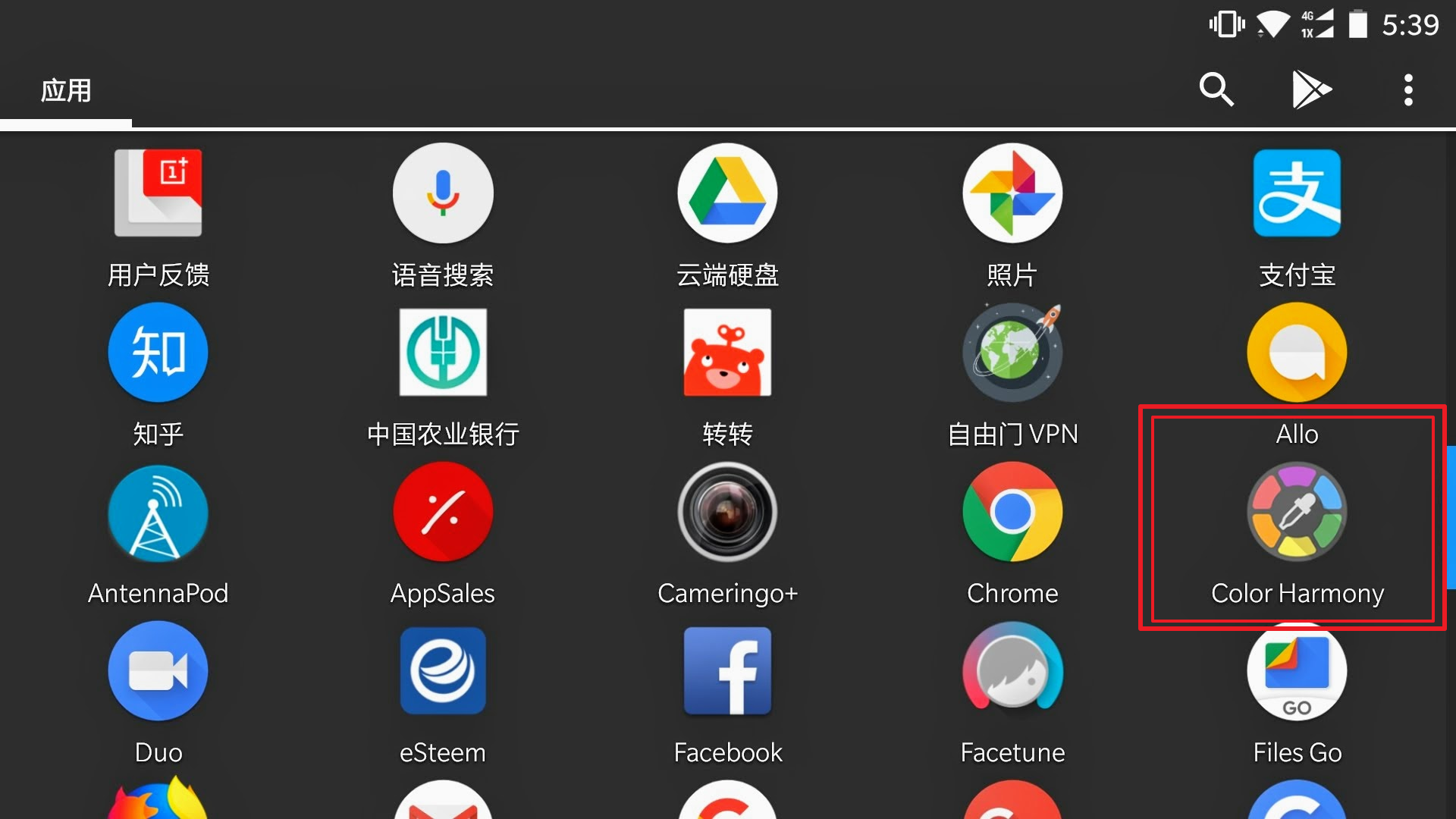 美工的同学不得不用的一款android手机软件 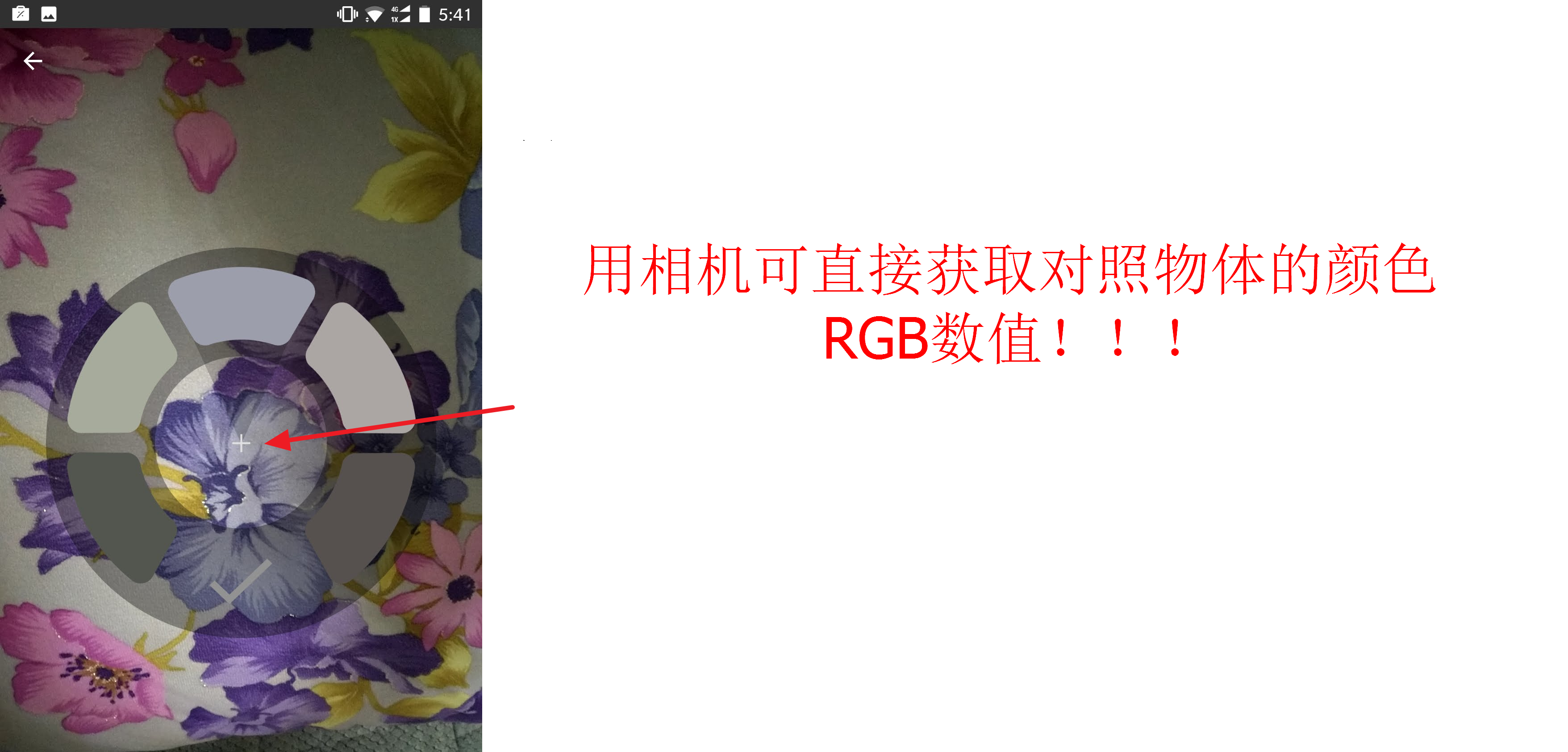 手机相机照到哪里 就能获取加号位置的颜色数值 ,神器啊 有木有 哪里好看点哪里 妈妈再也不用但是我不知道什么颜色了... |
| json metadata | {"tags":["cn"],"image":["https://steemitimages.com/DQmWfkt6n5giodF21LdzLWbtqLiCkrxM8saKVnnP1jDL7hC/apps.png","https://steemitimages.com/DQmQJHPPRQU6B2uJKkrP6Sp6APeZSXFexNK5hLEU9HCn4cS/apps0_20180108-174133.png"],"app":"steemit/0.1","format":"markdown"} |
| Transaction Info | Block #18814090/Trx e88afdc78f1d848575981bbccbd25e644ae62dcb |
View Raw JSON Data
{
"trx_id": "e88afdc78f1d848575981bbccbd25e644ae62dcb",
"block": 18814090,
"trx_in_block": 2,
"op_in_trx": 0,
"virtual_op": 0,
"timestamp": "2018-01-09T02:04:00",
"op": [
"comment",
{
"parent_author": "",
"parent_permlink": "cn",
"author": "yancyming",
"permlink": "color-harmony-rgb",
"title": "推荐Color Harmony一款用相机截取RGB颜色数值工具",
"body": "\n\n美工的同学不得不用的一款android手机软件\n\n手机相机照到哪里 就能获取加号位置的颜色数值 ,神器啊 有木有 哪里好看点哪里 妈妈再也不用但是我不知道什么颜色了...",
"json_metadata": "{\"tags\":[\"cn\"],\"image\":[\"https://steemitimages.com/DQmWfkt6n5giodF21LdzLWbtqLiCkrxM8saKVnnP1jDL7hC/apps.png\",\"https://steemitimages.com/DQmQJHPPRQU6B2uJKkrP6Sp6APeZSXFexNK5hLEU9HCn4cS/apps0_20180108-174133.png\"],\"app\":\"steemit/0.1\",\"format\":\"markdown\"}"
}
]
}yancymingclaimed reward balance: 0.041 SBD, 0.008 SP2018/01/09 00:36:27
yancymingclaimed reward balance: 0.041 SBD, 0.008 SP
2018/01/09 00:36:27
| account | yancyming |
| reward steem | 0.000 STEEM |
| reward sbd | 0.041 SBD |
| reward vests | 12.291739 VESTS |
| Transaction Info | Block #18812340/Trx 0552ee8ed6b88a4f2e24bf96e601bb3b8cebad47 |
View Raw JSON Data
{
  "trx_id": "0552ee8ed6b88a4f2e24bf96e601bb3b8cebad47",
  "block": 18812340,
  "trx_in_block": 12,
  "op_in_trx": 0,
  "virtual_op": 0,
  "timestamp": "2018-01-09T00:36:27",
  "op": [
    "claim_reward_balance",
    {
      "account": "yancyming",
      "reward_steem": "0.000 STEEM",
      "reward_sbd": "0.041 SBD",
      "reward_vests": "12.291739 VESTS"
    }
  ]
}2018/01/07 01:02:06
2018/01/07 01:02:06
| voter | yancyming |
| author | bestmz |
| permlink | hxtrka8b |
| weight | 10000 (100.00%) |
| Transaction Info | Block #18755329/Trx 89d9272af6506f06aa1e7d008799d2162ea4ceea |
View Raw JSON Data
{
  "trx_id": "89d9272af6506f06aa1e7d008799d2162ea4ceea",
  "block": 18755329,
  "trx_in_block": 11,
  "op_in_trx": 0,
  "virtual_op": 0,
  "timestamp": "2018-01-07T01:02:06",
  "op": [
    "vote",
    {
      "voter": "yancyming",
      "author": "bestmz",
      "permlink": "hxtrka8b",
      "weight": 10000
    }
  ]
}2018/01/07 01:00:18
2018/01/07 01:00:18
| voter | yancyming |
| author | red2018 |
| permlink | 7vzwcj-or |
| weight | 10000 (100.00%) |
| Transaction Info | Block #18755293/Trx e98b6ec210162f1fdf4b1feb895d69f815c31b08 |
View Raw JSON Data
{
  "trx_id": "e98b6ec210162f1fdf4b1feb895d69f815c31b08",
  "block": 18755293,
  "trx_in_block": 32,
  "op_in_trx": 0,
  "virtual_op": 0,
  "timestamp": "2018-01-07T01:00:18",
  "op": [
    "vote",
    {
      "voter": "yancyming",
      "author": "red2018",
      "permlink": "7vzwcj-or",
      "weight": 10000
    }
  ]
}yancymingreceived 0.041 SBD, 0.008 SP author reward for @yancyming / sstap-sockstap2018/01/06 14:15:30
yancymingreceived 0.041 SBD, 0.008 SP author reward for @yancyming / sstap-sockstap
2018/01/06 14:15:30
| author | yancyming |
| permlink | sstap-sockstap |
| sbd payout | 0.041 SBD |
| steem payout | 0.000 STEEM |
| vesting payout | 12.291739 VESTS |
| Transaction Info | Block #18742418/Virtual Operation #9 |
View Raw JSON Data
{
  "trx_id": "0000000000000000000000000000000000000000",
  "block": 18742418,
  "trx_in_block": 4294967295,
  "op_in_trx": 0,
  "virtual_op": 9,
  "timestamp": "2018-01-06T14:15:30",
  "op": [
    "author_reward",
    {
      "author": "yancyming",
      "permlink": "sstap-sockstap",
      "sbd_payout": "0.041 SBD",
      "steem_payout": "0.000 STEEM",
      "vesting_payout": "12.291739 VESTS"
    }
  ]
}monkeyplayfireupvoted (100.00%) @yancyming / -a359b513836922018/01/05 14:29:03
monkeyplayfireupvoted (100.00%) @yancyming / -a359b51383692
2018/01/05 14:29:03
| voter | monkeyplayfire |
| author | yancyming |
| permlink | -a359b51383692 |
| weight | 10000 (100.00%) |
| Transaction Info | Block #18713900/Trx 64275f59d84fbe8eb72171a62d8f9e149de435e5 |
View Raw JSON Data
{
  "trx_id": "64275f59d84fbe8eb72171a62d8f9e149de435e5",
  "block": 18713900,
  "trx_in_block": 45,
  "op_in_trx": 0,
  "virtual_op": 0,
  "timestamp": "2018-01-05T14:29:03",
  "op": [
    "vote",
    {
      "voter": "monkeyplayfire",
      "author": "yancyming",
      "permlink": "-a359b51383692",
      "weight": 10000
    }
  ]
}xiaoshancunupvoted (100.00%) @yancyming / -a359b513836922018/01/05 14:04:51
xiaoshancunupvoted (100.00%) @yancyming / -a359b51383692
2018/01/05 14:04:51
| voter | xiaoshancun |
| author | yancyming |
| permlink | -a359b51383692 |
| weight | 10000 (100.00%) |
| Transaction Info | Block #18713416/Trx 6d1e18ba8e15f603e2e4d94087690b8168136de0 |
View Raw JSON Data
{
  "trx_id": "6d1e18ba8e15f603e2e4d94087690b8168136de0",
  "block": 18713416,
  "trx_in_block": 1,
  "op_in_trx": 0,
  "virtual_op": 0,
  "timestamp": "2018-01-05T14:04:51",
  "op": [
    "vote",
    {
      "voter": "xiaoshancun",
      "author": "yancyming",
      "permlink": "-a359b51383692",
      "weight": 10000
    }
  ]
}red2018replied to @yancyming / re--a359b51383692-20180105t1400322018/01/05 14:00:36
red2018replied to @yancyming / re--a359b51383692-20180105t140032
2018/01/05 14:00:36
| parent author | yancyming |
| parent permlink | -a359b51383692 |
| author | red2018 |
| permlink | re--a359b51383692-20180105t140032 |
| title | |
| body | Hi ~ I'm a robot of red2018.I just upvoted your post! Please also help upvote my post here: https://steemit.com/@red2018/7vzwcj-or Thanks so much~!! |
| json metadata | {"app": "piston-lib/0.5.7"} |
| Transaction Info | Block #18713331/Trx 696fff050c1481185f4994a690cb14e2bdae0f96 |
View Raw JSON Data
{
  "trx_id": "696fff050c1481185f4994a690cb14e2bdae0f96",
  "block": 18713331,
  "trx_in_block": 7,
  "op_in_trx": 0,
  "virtual_op": 0,
  "timestamp": "2018-01-05T14:00:36",
  "op": [
    "comment",
    {
      "parent_author": "yancyming",
      "parent_permlink": "-a359b51383692",
      "author": "red2018",
      "permlink": "re--a359b51383692-20180105t140032",
      "title": "",
      "body": "Hi ~ I'm a robot of red2018.I just upvoted your post! \r\n Please also help upvote my post here: https://steemit.com/@red2018/7vzwcj-or \r\n Thanks so much~!!",
      "json_metadata": "{\"app\": \"piston-lib/0.5.7\"}"
    }
  ]
}red2018upvoted (100.00%) @yancyming / -a359b513836922018/01/05 14:00:30
red2018upvoted (100.00%) @yancyming / -a359b51383692
2018/01/05 14:00:30
| voter | red2018 |
| author | yancyming |
| permlink | -a359b51383692 |
| weight | 10000 (100.00%) |
| Transaction Info | Block #18713329/Trx a4c88f4dc21224639e396db2853032bd7bf59e81 |
View Raw JSON Data
{
  "trx_id": "a4c88f4dc21224639e396db2853032bd7bf59e81",
  "block": 18713329,
  "trx_in_block": 57,
  "op_in_trx": 0,
  "virtual_op": 0,
  "timestamp": "2018-01-05T14:00:30",
  "op": [
    "vote",
    {
      "voter": "red2018",
      "author": "yancyming",
      "permlink": "-a359b51383692",
      "weight": 10000
    }
  ]
}cqfupvoted (1.00%) @yancyming / -a359b513836922018/01/05 13:57:21
cqfupvoted (1.00%) @yancyming / -a359b51383692
2018/01/05 13:57:21
| voter | cqf |
| author | yancyming |
| permlink | -a359b51383692 |
| weight | 100 (1.00%) |
| Transaction Info | Block #18713266/Trx 99728de3ec396a86f5d8b48acd3424591fba585c |
View Raw JSON Data
{
  "trx_id": "99728de3ec396a86f5d8b48acd3424591fba585c",
  "block": 18713266,
  "trx_in_block": 47,
  "op_in_trx": 0,
  "virtual_op": 0,
  "timestamp": "2018-01-05T13:57:21",
  "op": [
    "vote",
    {
      "voter": "cqf",
      "author": "yancyming",
      "permlink": "-a359b51383692",
      "weight": 100
    }
  ]
}yancymingremoved vote from (0.00%) @yancyming / sstap-sockstap2018/01/05 13:53:42
yancymingremoved vote from (0.00%) @yancyming / sstap-sockstap
2018/01/05 13:53:42
| voter | yancyming |
| author | yancyming |
| permlink | sstap-sockstap |
| weight | 0 (0.00%) |
| Transaction Info | Block #18713193/Trx 38e68a12d119eca4fea0bb1a8cf947f898d81821 |
View Raw JSON Data
{
  "trx_id": "38e68a12d119eca4fea0bb1a8cf947f898d81821",
  "block": 18713193,
  "trx_in_block": 26,
  "op_in_trx": 0,
  "virtual_op": 0,
  "timestamp": "2018-01-05T13:53:42",
  "op": [
    "vote",
    {
      "voter": "yancyming",
      "author": "yancyming",
      "permlink": "sstap-sockstap",
      "weight": 0
    }
  ]
}yancymingupdated options for -a359b513836922018/01/05 13:52:57
yancymingupdated options for -a359b51383692
2018/01/05 13:52:57
| author | yancyming |
| permlink | -a359b51383692 |
| max accepted payout | 1000000.000 SBD |
| percent steem dollars | 10000 |
| allow votes | true |
| allow curation rewards | true |
| extensions | [[0,{"beneficiaries":[{"account":"esteemapp","weight":500}]}]] |
| Transaction Info | Block #18713178/Trx a4a240bb83afc25a45494c19dae29886e4f67bff |
View Raw JSON Data
{
  "trx_id": "a4a240bb83afc25a45494c19dae29886e4f67bff",
  "block": 18713178,
  "trx_in_block": 19,
  "op_in_trx": 0,
  "virtual_op": 0,
  "timestamp": "2018-01-05T13:52:57",
  "op": [
    "comment_options",
    {
      "author": "yancyming",
      "permlink": "-a359b51383692",
      "max_accepted_payout": "1000000.000 SBD",
      "percent_steem_dollars": 10000,
      "allow_votes": true,
      "allow_curation_rewards": true,
      "extensions": [
        [
          0,
          {
            "beneficiaries": [
              {
                "account": "esteemapp",
                "weight": 500
              }
            ]
          }
        ]
      ]
    }
  ]
}yancymingpublished a new post: -a359b513836922018/01/05 13:52:57
yancymingpublished a new post: -a359b51383692
2018/01/05 13:52:57
| parent author | |
| parent permlink | cn |
| author | yancyming |
| permlink | -a359b51383692 |
| title | 由“吃人嘴软,那人手短”引申 |
| body | 如何更好的理解这句话:亲身经历才能体会,人和人之间的接触是我最头疼的问题!说白了我就是傻,而我总是以“为人实在”自居,多么讽刺,自己打自己的脸 啪啪的 隐藏在内心深处的却是无尽的绝望,也许还有出路似的一直有这样那样的侥幸心理 我涉世不深,没经历过风雨,唯一庆幸的是我还能在事后感觉到自己是否吃亏上当,挺悲剧 曾几何时很多人都跟我说过“不管是接触谁都要留个心眼” 朋友又或者是亲人每每登门拜访时手里拎着的水果和一张张真真假假的笑脸是我最惧怕的,你不知道这次“美好”的相聚后等着你的会是什么…我得承认本人无德无能唯一可以被利用的价值就是体力活,(我不知道还有没有人比我还悲剧)当然我也有自己值得骄傲的地方要不然真的不想活了…但是转念想想为什么你不愿意干的事要搞得这么复杂然后让我去做,“己所不欲勿施于人”这句古话没听说过吗?还是你就真的认为谁都这么好欺负不实数!好吧我再一次承认经过这几年的苦苦打拼终于干到了社会最底层,原因或许是 “你太实在了 你是个实在人”。不可否认我国这种特色主义社会就是这样,人情是最大的事可以超越任何的理性思维,可以运用到各个层面, 小到林里相亲大到政界官场 外国人我不了解但国人做到了极致。 如今我三十出头,活了三十几个年头,回想起来原来从出生起每个人都是不平等的,而为了找到所谓的这种平等为了和他人比拼,演绎出各种“杂技”,围绕在我耳边的只有谁谁的酒量高👍你不行…谁家买了奔驰宝马车,谁谁出门穿貂绒大衣,这些物质上的东西无疑最能证明你的社会地位,有了社会地位就相当于你的脸上时刻写着两个大字 牛逼 如果你没有这些也想要到达牛逼的等级 那你只能吹了 俗称“吹牛逼” 而吹牛逼最佳场所就是酒场,恰巧也是我最惧怕的场所,只是声音都足以震慑到你,远远望去烟雾缭绕一个个生龙活虎,酒杯间的碰撞险些碰出火花 而毕恭毕敬的同时又能彰显出低调的奢华,人格分裂也不过如此,此时言语之间的角灼就是重中之重,你可以感受到每一句的字里行间充斥着压迫,能够巧妙反击和华丽转身才是场上的霸主,没有错此时投去无比羡慕崇拜眼光的那个人就是我 ,血淋淋的现实又给了我一个耳光,啪!!!我仿佛听到天上传来一句:没钱没能力还不赶紧喝酒吹牛逼去 |
| json metadata | {"tags":["cn","zh-cn"],"app":"esteem/1.5.0","format":"markdown+html","community":"esteem"} |
| Transaction Info | Block #18713178/Trx a4a240bb83afc25a45494c19dae29886e4f67bff |
View Raw JSON Data
{
  "trx_id": "a4a240bb83afc25a45494c19dae29886e4f67bff",
  "block": 18713178,
  "trx_in_block": 19,
  "op_in_trx": 0,
  "virtual_op": 0,
  "timestamp": "2018-01-05T13:52:57",
  "op": [
    "comment",
    {
      "parent_author": "",
      "parent_permlink": "cn",
      "author": "yancyming",
      "permlink": "-a359b51383692",
      "title": "由“吃人嘴软,那人手短”引申",
      "body": "如何更好的理解这句话:亲身经历才能体会,人和人之间的接触是我最头疼的问题!说白了我就是傻,而我总是以“为人实在”自居,多么讽刺,自己打自己的脸 啪啪的 隐藏在内心深处的却是无尽的绝望,也许还有出路似的一直有这样那样的侥幸心理\n         我涉世不深,没经历过风雨,唯一庆幸的是我还能在事后感觉到自己是否吃亏上当,挺悲剧 曾几何时很多人都跟我说过“不管是接触谁都要留个心眼”\n         朋友又或者是亲人每每登门拜访时手里拎着的水果和一张张真真假假的笑脸是我最惧怕的,你不知道这次“美好”的相聚后等着你的会是什么…我得承认本人无德无能唯一可以被利用的价值就是体力活,(我不知道还有没有人比我还悲剧)当然我也有自己值得骄傲的地方要不然真的不想活了…但是转念想想为什么你不愿意干的事要搞得这么复杂然后让我去做,“己所不欲勿施于人”这句古话没听说过吗?还是你就真的认为谁都这么好欺负不实数!好吧我再一次承认经过这几年的苦苦打拼终于干到了社会最底层,原因或许是 “你太实在了 你是个实在人”。不可否认我国这种特色主义社会就是这样,人情是最大的事可以超越任何的理性思维,可以运用到各个层面, 小到林里相亲大到政界官场 外国人我不了解但国人做到了极致。\n        如今我三十出头,活了三十几个年头,回想起来原来从出生起每个人都是不平等的,而为了找到所谓的这种平等为了和他人比拼,演绎出各种“杂技”,围绕在我耳边的只有谁谁的酒量高👍你不行…谁家买了奔驰宝马车,谁谁出门穿貂绒大衣,这些物质上的东西无疑最能证明你的社会地位,有了社会地位就相当于你的脸上时刻写着两个大字 牛逼\n 如果你没有这些也想要到达牛逼的等级 那你只能吹了 俗称“吹牛逼”  而吹牛逼最佳场所就是酒场,恰巧也是我最惧怕的场所,只是声音都足以震慑到你,远远望去烟雾缭绕一个个生龙活虎,酒杯间的碰撞险些碰出火花 而毕恭毕敬的同时又能彰显出低调的奢华,人格分裂也不过如此,此时言语之间的角灼就是重中之重,你可以感受到每一句的字里行间充斥着压迫,能够巧妙反击和华丽转身才是场上的霸主,没有错此时投去无比羡慕崇拜眼光的那个人就是我 ,血淋淋的现实又给了我一个耳光,啪!!!我仿佛听到天上传来一句:没钱没能力还不赶紧喝酒吹牛逼去",
      "json_metadata": "{\"tags\":[\"cn\",\"zh-cn\"],\"app\":\"esteem/1.5.0\",\"format\":\"markdown+html\",\"community\":\"esteem\"}"
    }
  ]
}yancymingupvoted (61.91%) @melaleuca / steemit-football2018/01/03 09:53:24
yancymingupvoted (61.91%) @melaleuca / steemit-football
2018/01/03 09:53:24
| voter | yancyming |
| author | melaleuca |
| permlink | steemit-football |
| weight | 6191 (61.91%) |
| Transaction Info | Block #18650809/Trx 1d4089b1e5c57009e7014c871803105d00d8258a |
View Raw JSON Data
{
  "trx_id": "1d4089b1e5c57009e7014c871803105d00d8258a",
  "block": 18650809,
  "trx_in_block": 38,
  "op_in_trx": 0,
  "virtual_op": 0,
  "timestamp": "2018-01-03T09:53:24",
  "op": [
    "vote",
    {
      "voter": "yancyming",
      "author": "melaleuca",
      "permlink": "steemit-football",
      "weight": 6191
    }
  ]
}2018/01/03 09:52:21
2018/01/03 09:52:21
| voter | yancyming |
| author | zxcvbnm |
| permlink | 375k8j |
| weight | 6191 (61.91%) |
| Transaction Info | Block #18650788/Trx 144cac85e3c2f63759b7cea27697610d69670de6 |
View Raw JSON Data
{
  "trx_id": "144cac85e3c2f63759b7cea27697610d69670de6",
  "block": 18650788,
  "trx_in_block": 26,
  "op_in_trx": 0,
  "virtual_op": 0,
  "timestamp": "2018-01-03T09:52:21",
  "op": [
    "vote",
    {
      "voter": "yancyming",
      "author": "zxcvbnm",
      "permlink": "375k8j",
      "weight": 6191
    }
  ]
}2018/01/03 06:18:06
2018/01/03 06:18:06
| voter | yancyming |
| author | nancie |
| permlink | 2018 |
| weight | 6191 (61.91%) |
| Transaction Info | Block #18646508/Trx 14e4d9ad5bb3938e655576bcf37eebdad2acb92c |
View Raw JSON Data
{
  "trx_id": "14e4d9ad5bb3938e655576bcf37eebdad2acb92c",
  "block": 18646508,
  "trx_in_block": 9,
  "op_in_trx": 0,
  "virtual_op": 0,
  "timestamp": "2018-01-03T06:18:06",
  "op": [
    "vote",
    {
      "voter": "yancyming",
      "author": "nancie",
      "permlink": "2018",
      "weight": 6191
    }
  ]
}yancymingupvoted (61.91%) @robin1866 / the-rest-of-you-only2018/01/03 04:28:39
yancymingupvoted (61.91%) @robin1866 / the-rest-of-you-only
2018/01/03 04:28:39
| voter | yancyming |
| author | robin1866 |
| permlink | the-rest-of-you-only |
| weight | 6191 (61.91%) |
| Transaction Info | Block #18644320/Trx 21d52ae30d0d81455cf80d1cbe0bd60cd6e34807 |
View Raw JSON Data
{
  "trx_id": "21d52ae30d0d81455cf80d1cbe0bd60cd6e34807",
  "block": 18644320,
  "trx_in_block": 3,
  "op_in_trx": 0,
  "virtual_op": 0,
  "timestamp": "2018-01-03T04:28:39",
  "op": [
    "vote",
    {
      "voter": "yancyming",
      "author": "robin1866",
      "permlink": "the-rest-of-you-only",
      "weight": 6191
    }
  ]
}jiayanglaiupvoted (100.00%) @yancyming / sstap-sockstap2017/12/30 16:07:36
jiayanglaiupvoted (100.00%) @yancyming / sstap-sockstap
2017/12/30 16:07:36
| voter | jiayanglai |
| author | yancyming |
| permlink | sstap-sockstap |
| weight | 10000 (100.00%) |
| Transaction Info | Block #18543340/Trx bf8ea55841a45eea6c1507ac89681a1fab7958c3 |
View Raw JSON Data
{
  "trx_id": "bf8ea55841a45eea6c1507ac89681a1fab7958c3",
  "block": 18543340,
  "trx_in_block": 13,
  "op_in_trx": 0,
  "virtual_op": 0,
  "timestamp": "2017-12-30T16:07:36",
  "op": [
    "vote",
    {
      "voter": "jiayanglai",
      "author": "yancyming",
      "permlink": "sstap-sockstap",
      "weight": 10000
    }
  ]
}2017/12/30 14:41:36
2017/12/30 14:41:36
| parent author | steemitboard |
| parent permlink | steemitboard-wish-you-a-merry-christmas-with-an-exclusive-badge |
| author | yancyming |
| permlink | re-steemitboard-steemitboard-wish-you-a-merry-christmas-with-an-exclusive-badge-20171230t144134789z |
| title | |
| body | @bestmz I wish you a Merry Christmas! 虽然我们不认识,谁让你关注我了呢 |
| json metadata | {"tags":["christmas"],"users":["bestmz"],"app":"steemit/0.1"} |
| Transaction Info | Block #18541620/Trx cb8e8e961b62718dff32947b845d543426d1bec1 |
View Raw JSON Data
{
  "trx_id": "cb8e8e961b62718dff32947b845d543426d1bec1",
  "block": 18541620,
  "trx_in_block": 10,
  "op_in_trx": 0,
  "virtual_op": 0,
  "timestamp": "2017-12-30T14:41:36",
  "op": [
    "comment",
    {
      "parent_author": "steemitboard",
      "parent_permlink": "steemitboard-wish-you-a-merry-christmas-with-an-exclusive-badge",
      "author": "yancyming",
      "permlink": "re-steemitboard-steemitboard-wish-you-a-merry-christmas-with-an-exclusive-badge-20171230t144134789z",
      "title": "",
      "body": "@bestmz\nI wish you a Merry Christmas!\n 虽然我们不认识,谁让你关注我了呢",
      "json_metadata": "{\"tags\":[\"christmas\"],\"users\":[\"bestmz\"],\"app\":\"steemit/0.1\"}"
    }
  ]
}monkeyplayfireupvoted (100.00%) @yancyming / sstap-sockstap2017/12/30 14:38:12
monkeyplayfireupvoted (100.00%) @yancyming / sstap-sockstap
2017/12/30 14:38:12
| voter | monkeyplayfire |
| author | yancyming |
| permlink | sstap-sockstap |
| weight | 10000 (100.00%) |
| Transaction Info | Block #18541552/Trx 55346e7c7c42f776e36a59efba92e64ee9e8be2a |
View Raw JSON Data
{
  "trx_id": "55346e7c7c42f776e36a59efba92e64ee9e8be2a",
  "block": 18541552,
  "trx_in_block": 19,
  "op_in_trx": 0,
  "virtual_op": 0,
  "timestamp": "2017-12-30T14:38:12",
  "op": [
    "vote",
    {
      "voter": "monkeyplayfire",
      "author": "yancyming",
      "permlink": "sstap-sockstap",
      "weight": 10000
    }
  ]
}yancymingupvoted (100.00%) @cathysiub / 8u9hv2017/12/30 14:35:33
yancymingupvoted (100.00%) @cathysiub / 8u9hv
2017/12/30 14:35:33
| voter | yancyming |
| author | cathysiub |
| permlink | 8u9hv |
| weight | 10000 (100.00%) |
| Transaction Info | Block #18541499/Trx 9a25bb5edfa55d4749b5f3c787d0fde712112077 |
View Raw JSON Data
{
  "trx_id": "9a25bb5edfa55d4749b5f3c787d0fde712112077",
  "block": 18541499,
  "trx_in_block": 19,
  "op_in_trx": 0,
  "virtual_op": 0,
  "timestamp": "2017-12-30T14:35:33",
  "op": [
    "vote",
    {
      "voter": "yancyming",
      "author": "cathysiub",
      "permlink": "8u9hv",
      "weight": 10000
    }
  ]
}cqfupvoted (1.00%) @yancyming / sstap-sockstap2017/12/30 14:27:21
cqfupvoted (1.00%) @yancyming / sstap-sockstap
2017/12/30 14:27:21
| voter | cqf |
| author | yancyming |
| permlink | sstap-sockstap |
| weight | 100 (1.00%) |
| Transaction Info | Block #18541335/Trx 4299472da92bab6af5f6d26c354a063c982c8703 |
View Raw JSON Data
{
  "trx_id": "4299472da92bab6af5f6d26c354a063c982c8703",
  "block": 18541335,
  "trx_in_block": 32,
  "op_in_trx": 0,
  "virtual_op": 0,
  "timestamp": "2017-12-30T14:27:21",
  "op": [
    "vote",
    {
      "voter": "cqf",
      "author": "yancyming",
      "permlink": "sstap-sockstap",
      "weight": 100
    }
  ]
}agarupvoted (1.00%) @yancyming / 5loprk2017/12/30 14:27:03
agarupvoted (1.00%) @yancyming / 5loprk
2017/12/30 14:27:03
| voter | agar |
| author | yancyming |
| permlink | 5loprk |
| weight | 100 (1.00%) |
| Transaction Info | Block #18541329/Trx d325552a91c909f4ff685b9092e9fe421b04c499 |
View Raw JSON Data
{
  "trx_id": "d325552a91c909f4ff685b9092e9fe421b04c499",
  "block": 18541329,
  "trx_in_block": 20,
  "op_in_trx": 0,
  "virtual_op": 0,
  "timestamp": "2017-12-30T14:27:03",
  "op": [
    "vote",
    {
      "voter": "agar",
      "author": "yancyming",
      "permlink": "5loprk",
      "weight": 100
    }
  ]
}2017/12/30 14:26:42
2017/12/30 14:26:42
| parent author | |
| parent permlink | mobileharddisk |
| author | yancyming |
| permlink | 5loprk |
| title | 把移动硬盘做成可携带的电脑 |
| body | 准备文件: 1. 上述windows作业系统的ISO文件,可以依照使用习惯使用windows7.iso/windows8.1.iso(可由微软官方网站下载评估版,官方有多种作业系统IOS可下载) 2. 创建工具软件包(共四个,在本目录内有详细介绍,可由这里下载取得) 注意事项: 1. 最好是使用USB3.0规格的外接式USB硬盘(USB随身硬盘会较慢,不然就要用USB随身硬盘的高速硬盘),当然如能用SSD的外接硬盘是最佳的,速度快,和电脑本身的内建硬盘速度相近 2. 单一的USB硬盘(单一是指单独一个硬盘分区),最好不要先做磁盘分割,保持单一磁盘区才能顺利安装(若使用SSD的外接USB硬盘,则先分割即可),格式化要为 primary 主要模式 (这样才能使用 set active 开机设定功能)。不要选 logical 逻辑模式(无法使用 set active开机设定功能),可使用 PartitionWizard软件来做硬盘分割 3. 使用NT6安装器 界面时:要勾选“更改系统占用盘符为别的盘”,改为Q盘,这样才能顺利完成,若不勾选则为C盘,但试做测试时发现会不能运作,易出错 4. 等USB外接硬盘WIN7或WIN8.1或WIN10 系统创建好后,再由其他原硬盘作业系统开机后,在使用PartitionWizard软件来分割做硬盘分割便可 创建流程简述 1. 主电脑环境是Win7,插上USB硬盘 2. 用PartitionWizard.exe来分割USB硬盘,注意要选priamary 3. 将windows7.iso挂载起来,用portableWinCDEmu或者WinMountPortable 64.exe软件来挂载出Z盘 4. 用NT6 [WiM镜像]快捷安装器v1.1.exe来创建,不勾选格式化,勾“更改系统占用盘符为别的盘”如Q盘,安装完成后,不重开机 5. 安装Ease US partition Master Free 10.2.exe,再利用Ease us partition Master 10.2 进行Partition的 set active,再重新开机进行启动区的建置动作,set active的方法还有另外两种,可看图解图片档案 6. 1到5这几个步骤完成后才能使USB硬盘进行系统Win7的安装,如此才能经Win7系统顺利的移至你的USB硬盘上 7. 记得BIOS要选USB硬盘设为启动的顺序第一启动区,或者有些主板可按F8来选那个硬盘启动方式也可 PS:建制流程部分图解可参考在本目录夹内 把WIndows 7灌进USB外接硬盘图解流程.png USB外接硬盘随身安装win7/win8.1/win10的优缺点 优点: 内建的系统及常用软件一样,一个USB移动硬盘带着到处跑,这就是所谓的可携式电脑(Portable PC)。 想要测试最新OS时,不必更新到原本的电脑安装的系统。 比起Windows PE来说,自动幅度更大,也能安装平时熟悉的系统。 可及时安装驱动,不像LiveCD每次载入时都得重新安装一遍。 不用带着笔记本电脑跑来跑去,是修电脑时最佳工具。且USB硬盘带到那就可以方便启动使用 缺点: 随着每台电脑硬件配置不同,也会有不同性能表现。 每款电脑主板BIOS启动方式不同 有可能会因电脑不同而出现相容性问题,例如显卡驱动程序安装 创建工具软件 共四款 PartitionWizard 软件档案 软件性质:免费 使用限制:无 所需系统:XP,win7,win8,win10 界面语言:英文 功能:来分割USB硬盘,注意要选择primary(主要分割区) WinCDEmuPortable(同WinMount Portable)软件小文档 软件性质:免费 使用限制:无 所需系统:XP,win7,win8,win10 界面语言:英文 功能:将ISO挂载为虚拟光碟机 NT6[WIM镜像]快捷安装器V1.1软件档案 软件性质:免费 使用限制:无 所需系统:XP,win7,win8,win10 界面语言:多国语言(含中文) EaseUS Partition Master Free 10.2.exe软件档案 软件性质:免费 使用限制:无 所需系统:XP,win7,win8,win10 界面语言:英文 官方网站:http://www.partition-tool.com/personal.htm 下载地址:http://download.cnet.com/Easeus-Partition-Manager-Home-Edition/3000-2248_4-10863346.html Note:将硬盘分割区设定为【active】的用意是让开机程序知道这颗硬盘的哪个主要分割区中有作业系统,因此一颗实体硬盘中只能有一个启动分区,而且这颗硬盘并未被用来当作开机磁盘时,即使被设定为【active】也是没有作用。 ###软件链接将Windows7+Win81+Win10安裝到USB外接硬盘的程序+图解+心得OK.rar 实际操作时使用的电脑系统为Win7 1. 可自由创建出win7,WIN8.1,WIN10等各版本均可OK,所以比起WTG只限制Win8/10的企业版,此方法是方便多了,但无UEFI功能只能BIOS,WTG两者均可 2. 用PartitionWizard.exe本身便有set active功能测试可成功。 实际操作具体细节详细内容 1. 主电脑环境是Win7,插上USB硬盘(使用内建硬盘也可以,不用传统安装法,采用此方法也行得通,所以可用此方法帮人维修重装系统非常快,而且若内建硬盘原有分割成两区,可保留另外一区也就是保留资料区)资料区不受损坏,只重建系统区就行,经测试完全没问题。 这里需要注意的是:如果你的移动硬盘有3.0接口,尽量要插在3.0电脑接口端,这样在建好系统后只要宿主电脑有3.0接口启动速度更快 2. 用PartitionWizard.exe来分割USB硬盘,注意要选Primary,而且可同时在硬盘分区上按右键,选modify修正选项“set active”先建立启动功能,再使用NT6[WIM镜像]快捷安装器可直接启动,不用等NT6【WIM镜像】快捷安装器做完才再来做,这样可省略操作动作 3. 将Windows7.iso或者WIndows10.iso挂载起来,也就是用WinCDEmuPortable软件来挂载出Z盘(若是在Win8/Win10环境可直接挂载即可) 4. 用NT6[WIM镜像]快捷安裝器V1.1.exe来创建,不勾选格式化,勾选“更改系统占用盘符为Q”安装后,即可重新开机,进行后续作业系统的环境侦测安装(系统第一次一定要做环境相关程序安装,显卡程序是要安装,显示解析度才能调高),环境侦测完,再重新开机,作业系统便安装成功,经测试,采用此方法比传统安装法快10到15分钟,很方便很迅速 5. 记得BIOS要选USB硬盘设定为第一启动区,或有些主板可按F8/F12来选那个硬盘启动,若是内建硬盘也一样,可按DET或者F8或者F12来调整BOOT的启动顺序,具体根据不同的主板可查看各种主板的boot menu(启动菜单) 使用心得总结:主电脑环境就算是用Win7(无WTG功能)采用本方法,反而比WTG更方便更具弹性不受限制,想创建任何系统如Win7,Win8.1,Win10均可,不像WTG只限于企业版,而且创建对象不限只有USB外接硬盘,就算内建硬盘一样可以,而且不像WTG会将整个硬盘全重格式化,使用本方法,碰到原格式为两个分区的硬盘,可保留另外一个分区,只重建开机分区,所以像现在 硬盘多为500G以上,一定先做好分区格式化,作为开机分割区一定要保留在最前面,且分割约为120G已经足够大了,其他则分割为资料区,就算日后开机区受损中毒需要重装采用本方法,重新创建开机区(开机区磁盘代号不一定非要是C盘,命名为其他也可以)便可,然而资料区是不会受损的,这点很重要,学会这个重装系统很方便 视频教程+win10 iso+操作软件:链接: https://pan.baidu.com/s/1gfEjcjD |
| json metadata | {"tags":["mobileharddisk","cn","china"],"links":["http://www.partition-tool.com/personal.htm","http://download.cnet.com/Easeus-Partition-Manager-Home-Edition/3000-2248_4-10863346.html","https://pan.baidu.com/s/1gfEjcjD"],"app":"steemit/0.1","format":"markdown"} |
| Transaction Info | Block #18541322/Trx a72bfb87ac2fbbe7c84757eb670fa79949d563f0 |
View Raw JSON Data
{
  "trx_id": "a72bfb87ac2fbbe7c84757eb670fa79949d563f0",
  "block": 18541322,
  "trx_in_block": 15,
  "op_in_trx": 0,
  "virtual_op": 0,
  "timestamp": "2017-12-30T14:26:42",
  "op": [
    "comment",
    {
      "parent_author": "",
      "parent_permlink": "mobileharddisk",
      "author": "yancyming",
      "permlink": "5loprk",
      "title": "把移动硬盘做成可携带的电脑",
      "body": "准备文件:\n\n\t1. 上述windows作业系统的ISO文件,可以依照使用习惯使用windows7.iso/windows8.1.iso(可由微软官方网站下载评估版,官方有多种作业系统IOS可下载)\n\t2. 创建工具软件包(共四个,在本目录内有详细介绍,可由这里下载取得)\n\n\n注意事项:\n\n\t1. 最好是使用USB3.0规格的外接式USB硬盘(USB随身硬盘会较慢,不然就要用USB随身硬盘的高速硬盘),当然如能用SSD的外接硬盘是最佳的,速度快,和电脑本身的内建硬盘速度相近 \n    2. 单一的USB硬盘(单一是指单独一个硬盘分区),最好不要先做磁盘分割,保持单一磁盘区才能顺利安装(若使用SSD的外接USB硬盘,则先分割即可),格式化要为 primary 主要模式 (这样才能使用 set active 开机设定功能)。不要选 logical 逻辑模式(无法使用 set active开机设定功能),可使用 PartitionWizard软件来做硬盘分割\n\t3. 使用NT6安装器 界面时:要勾选“更改系统占用盘符为别的盘”,改为Q盘,这样才能顺利完成,若不勾选则为C盘,但试做测试时发现会不能运作,易出错\n\t4. 等USB外接硬盘WIN7或WIN8.1或WIN10 系统创建好后,再由其他原硬盘作业系统开机后,在使用PartitionWizard软件来分割做硬盘分割便可\n\n\n创建流程简述\n\n\t1. 主电脑环境是Win7,插上USB硬盘\n\t2. 用PartitionWizard.exe来分割USB硬盘,注意要选priamary\n\t3. 将windows7.iso挂载起来,用portableWinCDEmu或者WinMountPortable 64.exe软件来挂载出Z盘\n\t4. 用NT6 [WiM镜像]快捷安装器v1.1.exe来创建,不勾选格式化,勾“更改系统占用盘符为别的盘”如Q盘,安装完成后,不重开机\n\t5. 安装Ease US partition Master Free 10.2.exe,再利用Ease us partition Master 10.2 进行Partition的 set active,再重新开机进行启动区的建置动作,set active的方法还有另外两种,可看图解图片档案\n\t6. 1到5这几个步骤完成后才能使USB硬盘进行系统Win7的安装,如此才能经Win7系统顺利的移至你的USB硬盘上\n\t7. 记得BIOS要选USB硬盘设为启动的顺序第一启动区,或者有些主板可按F8来选那个硬盘启动方式也可\n\n\nPS:建制流程部分图解可参考在本目录夹内 把WIndows 7灌进USB外接硬盘图解流程.png\nUSB外接硬盘随身安装win7/win8.1/win10的优缺点\n优点:\n内建的系统及常用软件一样,一个USB移动硬盘带着到处跑,这就是所谓的可携式电脑(Portable PC)。\n想要测试最新OS时,不必更新到原本的电脑安装的系统。\n比起Windows PE来说,自动幅度更大,也能安装平时熟悉的系统。\n可及时安装驱动,不像LiveCD每次载入时都得重新安装一遍。\n不用带着笔记本电脑跑来跑去,是修电脑时最佳工具。且USB硬盘带到那就可以方便启动使用\n缺点:\n随着每台电脑硬件配置不同,也会有不同性能表现。\n每款电脑主板BIOS启动方式不同\n有可能会因电脑不同而出现相容性问题,例如显卡驱动程序安装\n创建工具软件 共四款\nPartitionWizard 软件档案\n软件性质:免费\n使用限制:无\n所需系统:XP,win7,win8,win10\n界面语言:英文\n功能:来分割USB硬盘,注意要选择primary(主要分割区)\nWinCDEmuPortable(同WinMount Portable)软件小文档\n软件性质:免费\n使用限制:无\n所需系统:XP,win7,win8,win10\n界面语言:英文\n功能:将ISO挂载为虚拟光碟机\nNT6[WIM镜像]快捷安装器V1.1软件档案\n软件性质:免费\n使用限制:无\n所需系统:XP,win7,win8,win10\n界面语言:多国语言(含中文)\nEaseUS Partition Master Free 10.2.exe软件档案\n软件性质:免费\n使用限制:无\n所需系统:XP,win7,win8,win10\n界面语言:英文\n官方网站:http://www.partition-tool.com/personal.htm\n下载地址:http://download.cnet.com/Easeus-Partition-Manager-Home-Edition/3000-2248_4-10863346.html\nNote:将硬盘分割区设定为【active】的用意是让开机程序知道这颗硬盘的哪个主要分割区中有作业系统,因此一颗实体硬盘中只能有一个启动分区,而且这颗硬盘并未被用来当作开机磁盘时,即使被设定为【active】也是没有作用。\n###软件链接将Windows7+Win81+Win10安裝到USB外接硬盘的程序+图解+心得OK.rar\n实际操作时使用的电脑系统为Win7\n\n\t1. 可自由创建出win7,WIN8.1,WIN10等各版本均可OK,所以比起WTG只限制Win8/10的企业版,此方法是方便多了,但无UEFI功能只能BIOS,WTG两者均可\n\t2. 用PartitionWizard.exe本身便有set active功能测试可成功。\n\n\n实际操作具体细节详细内容\n\n\t1. 主电脑环境是Win7,插上USB硬盘(使用内建硬盘也可以,不用传统安装法,采用此方法也行得通,所以可用此方法帮人维修重装系统非常快,而且若内建硬盘原有分割成两区,可保留另外一区也就是保留资料区)资料区不受损坏,只重建系统区就行,经测试完全没问题。                       这里需要注意的是:如果你的移动硬盘有3.0接口,尽量要插在3.0电脑接口端,这样在建好系统后只要宿主电脑有3.0接口启动速度更快\n\t2. 用PartitionWizard.exe来分割USB硬盘,注意要选Primary,而且可同时在硬盘分区上按右键,选modify修正选项“set active”先建立启动功能,再使用NT6[WIM镜像]快捷安装器可直接启动,不用等NT6【WIM镜像】快捷安装器做完才再来做,这样可省略操作动作\n\t3. 将Windows7.iso或者WIndows10.iso挂载起来,也就是用WinCDEmuPortable软件来挂载出Z盘(若是在Win8/Win10环境可直接挂载即可)\n\t4. 用NT6[WIM镜像]快捷安裝器V1.1.exe来创建,不勾选格式化,勾选“更改系统占用盘符为Q”安装后,即可重新开机,进行后续作业系统的环境侦测安装(系统第一次一定要做环境相关程序安装,显卡程序是要安装,显示解析度才能调高),环境侦测完,再重新开机,作业系统便安装成功,经测试,采用此方法比传统安装法快10到15分钟,很方便很迅速\n\t5. 记得BIOS要选USB硬盘设定为第一启动区,或有些主板可按F8/F12来选那个硬盘启动,若是内建硬盘也一样,可按DET或者F8或者F12来调整BOOT的启动顺序,具体根据不同的主板可查看各种主板的boot menu(启动菜单)\n\n使用心得总结:主电脑环境就算是用Win7(无WTG功能)采用本方法,反而比WTG更方便更具弹性不受限制,想创建任何系统如Win7,Win8.1,Win10均可,不像WTG只限于企业版,而且创建对象不限只有USB外接硬盘,就算内建硬盘一样可以,而且不像WTG会将整个硬盘全重格式化,使用本方法,碰到原格式为两个分区的硬盘,可保留另外一个分区,只重建开机分区,所以像现在\n硬盘多为500G以上,一定先做好分区格式化,作为开机分割区一定要保留在最前面,且分割约为120G已经足够大了,其他则分割为资料区,就算日后开机区受损中毒需要重装采用本方法,重新创建开机区(开机区磁盘代号不一定非要是C盘,命名为其他也可以)便可,然而资料区是不会受损的,这点很重要,学会这个重装系统很方便\n视频教程+win10 iso+操作软件:链接: https://pan.baidu.com/s/1gfEjcjD",
      "json_metadata": "{\"tags\":[\"mobileharddisk\",\"cn\",\"china\"],\"links\":[\"http://www.partition-tool.com/personal.htm\",\"http://download.cnet.com/Easeus-Partition-Manager-Home-Edition/3000-2248_4-10863346.html\",\"https://pan.baidu.com/s/1gfEjcjD\"],\"app\":\"steemit/0.1\",\"format\":\"markdown\"}"
    }
  ]
}yancymingpublished a new post: sstap-sockstap2017/12/30 14:26:06
yancymingpublished a new post: sstap-sockstap
2017/12/30 14:26:06
| parent author | |
| parent permlink | application |
| author | yancyming |
| permlink | sstap-sockstap |
| title | SSTap全称SOCKSTap, 是一款利用虚拟网卡技术在网络层实现的代理工具 |
| body | 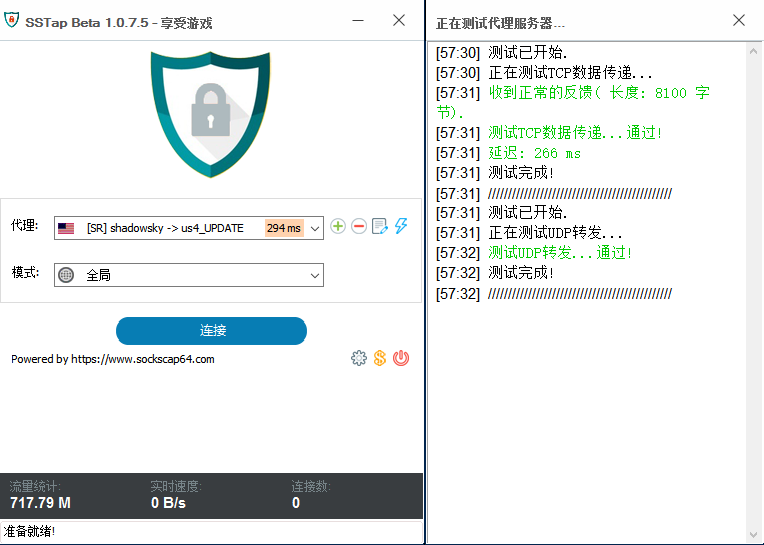SSTap能在网络层拦截所有连接并转发给HTTP,SOCKS4,5,SHADOWSOCKS代理.而无需对被代理的应用程序做任何修改或设置。它能同时转发TCP, UDP数据包。它非常适合于游戏玩家使用。 享受你的游戏时光!请使用SSTap! Latest Version:[1.0.8.5] Published at:2017-09-07 10:11:17 File size:4.6M Setup MD5: 5ab7913acd4760864782a7ae53caae11 Setup SHA1: D18CC597A31E6A264B54237660B936E7D8169421 下载地址:Changelog 免费下载SStap |
| json metadata | {"tags":["application","cn","china"],"image":["https://steemitimages.com/DQmQa8DuobDLZhvWd6f3SK51bFoXibtAxQ7JpAHTFSmJb3i/ScreenClip.png"],"app":"steemit/0.1","format":"markdown"} |
| Transaction Info | Block #18541310/Trx 6cf119361679f6e1ce45a348bc33a331d29c2859 |
View Raw JSON Data
{
"trx_id": "6cf119361679f6e1ce45a348bc33a331d29c2859",
"block": 18541310,
"trx_in_block": 47,
"op_in_trx": 0,
"virtual_op": 0,
"timestamp": "2017-12-30T14:26:06",
"op": [
"comment",
{
"parent_author": "",
"parent_permlink": "application",
"author": "yancyming",
"permlink": "sstap-sockstap",
"title": "SSTap全称SOCKSTap, 是一款利用虚拟网卡技术在网络层实现的代理工具",
"body": "SSTap能在网络层拦截所有连接并转发给HTTP,SOCKS4,5,SHADOWSOCKS代理.而无需对被代理的应用程序做任何修改或设置。它能同时转发TCP, UDP数据包。它非常适合于游戏玩家使用。\n 享受你的游戏时光!请使用SSTap!\n \n\nLatest Version:[1.0.8.5]\n \n\nPublished at:2017-09-07 10:11:17\n \n\nFile size:4.6M\n \n\nSetup MD5: 5ab7913acd4760864782a7ae53caae11\n \n\nSetup SHA1: D18CC597A31E6A264B54237660B936E7D8169421\n \n\n下载地址:Changelog\n \n\n免费下载SStap",
"json_metadata": "{\"tags\":[\"application\",\"cn\",\"china\"],\"image\":[\"https://steemitimages.com/DQmQa8DuobDLZhvWd6f3SK51bFoXibtAxQ7JpAHTFSmJb3i/ScreenClip.png\"],\"app\":\"steemit/0.1\",\"format\":\"markdown\"}"
}
]
}2017/12/30 14:19:30
2017/12/30 14:19:30
| parent author | |
| parent permlink | mobileharddisk |
| author | yancyming |
| permlink | 5loprk |
| title | 把移动硬盘做成可携带的电脑 |
| body | 准备文件: 1. 上述windows作业系统的ISO文件,可以依照使用习惯使用windows7.iso/windows8.1.iso(可由微软官方网站下载评估版,官方有多种作业系统IOS可下载) 2. 创建工具软件包(共四个,在本目录内有详细介绍,可由这里下载取得) 注意事项: 1. 最好是使用USB3.0规格的外接式USB硬盘(USB随身硬盘会较慢,不然就要用USB随身硬盘的高速硬盘),当然如能用SSD的外接硬盘是最佳的,速度快,和电脑本身的内建硬盘速度相近 2. 单一的USB硬盘(单一是指单独一个硬盘分区),最好不要先做磁盘分割,保持单一磁盘区才能顺利安装(若使用SSD的外接USB硬盘,则先分割即可),格式化要为 primary 主要模式 (这样才能使用 set active 开机设定功能)。不要选 logical 逻辑模式(无法使用 set active开机设定功能),可使用 PartitionWizard软件来做硬盘分割 3. 使用NT6安装器 界面时:要勾选“更改系统占用盘符为别的盘”,改为Q盘,这样才能顺利完成,若不勾选则为C盘,但试做测试时发现会不能运作,易出错 4. 等USB外接硬盘WIN7或WIN8.1或WIN10 系统创建好后,再由其他原硬盘作业系统开机后,在使用PartitionWizard软件来分割做硬盘分割便可 创建流程简述 1. 主电脑环境是Win7,插上USB硬盘 2. 用PartitionWizard.exe来分割USB硬盘,注意要选priamary 3. 将windows7.iso挂载起来,用portableWinCDEmu或者WinMountPortable 64.exe软件来挂载出Z盘 4. 用NT6 [WiM镜像]快捷安装器v1.1.exe来创建,不勾选格式化,勾“更改系统占用盘符为别的盘”如Q盘,安装完成后,不重开机 5. 安装Ease US partition Master Free 10.2.exe,再利用Ease us partition Master 10.2 进行Partition的 set active,再重新开机进行启动区的建置动作,set active的方法还有另外两种,可看图解图片档案 6. 1到5这几个步骤完成后才能使USB硬盘进行系统Win7的安装,如此才能经Win7系统顺利的移至你的USB硬盘上 7. 记得BIOS要选USB硬盘设为启动的顺序第一启动区,或者有些主板可按F8来选那个硬盘启动方式也可 PS:建制流程部分图解可参考在本目录夹内 把WIndows 7灌进USB外接硬盘图解流程.png USB外接硬盘随身安装win7/win8.1/win10的优缺点 优点: 内建的系统及常用软件一样,一个USB移动硬盘带着到处跑,这就是所谓的可携式电脑(Portable PC)。 想要测试最新OS时,不必更新到原本的电脑安装的系统。 比起Windows PE来说,自动幅度更大,也能安装平时熟悉的系统。 可及时安装驱动,不像LiveCD每次载入时都得重新安装一遍。 不用带着笔记本电脑跑来跑去,是修电脑时最佳工具。且USB硬盘带到那就可以方便启动使用 缺点: 随着每台电脑硬件配置不同,也会有不同性能表现。 每款电脑主板BIOS启动方式不同 有可能会因电脑不同而出现相容性问题,例如显卡驱动程序安装 创建工具软件 共四款 PartitionWizard 软件档案 软件性质:免费 使用限制:无 所需系统:XP,win7,win8,win10 界面语言:英文 功能:来分割USB硬盘,注意要选择primary(主要分割区) WinCDEmuPortable(同WinMount Portable)软件小文档 软件性质:免费 使用限制:无 所需系统:XP,win7,win8,win10 界面语言:英文 功能:将ISO挂载为虚拟光碟机 NT6[WIM镜像]快捷安装器V1.1软件档案 软件性质:免费 使用限制:无 所需系统:XP,win7,win8,win10 界面语言:多国语言(含中文) EaseUS Partition Master Free 10.2.exe软件档案 软件性质:免费 使用限制:无 所需系统:XP,win7,win8,win10 界面语言:英文 官方网站:http://www.partition-tool.com/personal.htm 下载地址:http://download.cnet.com/Easeus-Partition-Manager-Home-Edition/3000-2248_4-10863346.html Note:将硬盘分割区设定为【active】的用意是让开机程序知道这颗硬盘的哪个主要分割区中有作业系统,因此一颗实体硬盘中只能有一个启动分区,而且这颗硬盘并未被用来当作开机磁盘时,即使被设定为【active】也是没有作用。 ###软件链接将Windows7+Win81+Win10安裝到USB外接硬盘的程序+图解+心得OK.rar 实际操作时使用的电脑系统为Win7 1. 可自由创建出win7,WIN8.1,WIN10等各版本均可OK,所以比起WTG只限制Win8/10的企业版,此方法是方便多了,但无UEFI功能只能BIOS,WTG两者均可 2. 用PartitionWizard.exe本身便有set active功能测试可成功。 实际操作具体细节详细内容 1. 主电脑环境是Win7,插上USB硬盘(使用内建硬盘也可以,不用传统安装法,采用此方法也行得通,所以可用此方法帮人维修重装系统非常快,而且若内建硬盘原有分割成两区,可保留另外一区也就是保留资料区)资料区不受损坏,只重建系统区就行,经测试完全没问题。 这里需要注意的是:如果你的移动硬盘有3.0接口,尽量要插在3.0电脑接口端,这样在建好系统后只要宿主电脑有3.0接口启动速度更快 2. 用PartitionWizard.exe来分割USB硬盘,注意要选Primary,而且可同时在硬盘分区上按右键,选modify修正选项“set active”先建立启动功能,再使用NT6[WIM镜像]快捷安装器可直接启动,不用等NT6【WIM镜像】快捷安装器做完才再来做,这样可省略操作动作 3. 将Windows7.iso或者WIndows10.iso挂载起来,也就是用WinCDEmuPortable软件来挂载出Z盘(若是在Win8/Win10环境可直接挂载即可) 4. 用NT6[WIM镜像]快捷安裝器V1.1.exe来创建,不勾选格式化,勾选“更改系统占用盘符为Q”安装后,即可重新开机,进行后续作业系统的环境侦测安装(系统第一次一定要做环境相关程序安装,显卡程序是要安装,显示解析度才能调高),环境侦测完,再重新开机,作业系统便安装成功,经测试,采用此方法比传统安装法快10到15分钟,很方便很迅速 5. 记得BIOS要选USB硬盘设定为第一启动区,或有些主板可按F8/F12来选那个硬盘启动,若是内建硬盘也一样,可按DET或者F8或者F12来调整BOOT的启动顺序,具体根据不同的主板可查看各种主板的boot menu(启动菜单) 使用心得总结:主电脑环境就算是用Win7(无WTG功能)采用本方法,反而比WTG更方便更具弹性不受限制,想创建任何系统如Win7,Win8.1,Win10均可,不像WTG只限于企业版,而且创建对象不限只有USB外接硬盘,就算内建硬盘一样可以,而且不像WTG会将整个硬盘全重格式化,使用本方法,碰到原格式为两个分区的硬盘,可保留另外一个分区,只重建开机分区,所以像现在 硬盘多为500G以上,一定先做好分区格式化,作为开机分割区一定要保留在最前面,且分割约为120G已经足够大了,其他则分割为资料区,就算日后开机区受损中毒需要重装采用本方法,重新创建开机区(开机区磁盘代号不一定非要是C盘,命名为其他也可以)便可,然而资料区是不会受损的,这点很重要,学会这个重装系统很方便 视频教程+win10 iso+操作软件:链接: https://pan.baidu.com/s/1gfEjcjD |
| json metadata | {"tags":["cn","mobileharddisk"],"links":["http://www.partition-tool.com/personal.htm","http://download.cnet.com/Easeus-Partition-Manager-Home-Edition/3000-2248_4-10863346.html","https://pan.baidu.com/s/1gfEjcjD"],"app":"steemit/0.1","format":"markdown"} |
| Transaction Info | Block #18541178/Trx bfafae40bc77b3f039eba0884ad785e8f13953de |
View Raw JSON Data
{
  "trx_id": "bfafae40bc77b3f039eba0884ad785e8f13953de",
  "block": 18541178,
  "trx_in_block": 28,
  "op_in_trx": 0,
  "virtual_op": 0,
  "timestamp": "2017-12-30T14:19:30",
  "op": [
    "comment",
    {
      "parent_author": "",
      "parent_permlink": "mobileharddisk",
      "author": "yancyming",
      "permlink": "5loprk",
      "title": "把移动硬盘做成可携带的电脑",
      "body": "准备文件:\n\n\t1. 上述windows作业系统的ISO文件,可以依照使用习惯使用windows7.iso/windows8.1.iso(可由微软官方网站下载评估版,官方有多种作业系统IOS可下载)\n\t2. 创建工具软件包(共四个,在本目录内有详细介绍,可由这里下载取得)\n\n\n注意事项:\n\n\t1. 最好是使用USB3.0规格的外接式USB硬盘(USB随身硬盘会较慢,不然就要用USB随身硬盘的高速硬盘),当然如能用SSD的外接硬盘是最佳的,速度快,和电脑本身的内建硬盘速度相近 \n    2. 单一的USB硬盘(单一是指单独一个硬盘分区),最好不要先做磁盘分割,保持单一磁盘区才能顺利安装(若使用SSD的外接USB硬盘,则先分割即可),格式化要为 primary 主要模式 (这样才能使用 set active 开机设定功能)。不要选 logical 逻辑模式(无法使用 set active开机设定功能),可使用 PartitionWizard软件来做硬盘分割\n\t3. 使用NT6安装器 界面时:要勾选“更改系统占用盘符为别的盘”,改为Q盘,这样才能顺利完成,若不勾选则为C盘,但试做测试时发现会不能运作,易出错\n\t4. 等USB外接硬盘WIN7或WIN8.1或WIN10 系统创建好后,再由其他原硬盘作业系统开机后,在使用PartitionWizard软件来分割做硬盘分割便可\n\n\n创建流程简述\n\n\t1. 主电脑环境是Win7,插上USB硬盘\n\t2. 用PartitionWizard.exe来分割USB硬盘,注意要选priamary\n\t3. 将windows7.iso挂载起来,用portableWinCDEmu或者WinMountPortable 64.exe软件来挂载出Z盘\n\t4. 用NT6 [WiM镜像]快捷安装器v1.1.exe来创建,不勾选格式化,勾“更改系统占用盘符为别的盘”如Q盘,安装完成后,不重开机\n\t5. 安装Ease US partition Master Free 10.2.exe,再利用Ease us partition Master 10.2 进行Partition的 set active,再重新开机进行启动区的建置动作,set active的方法还有另外两种,可看图解图片档案\n\t6. 1到5这几个步骤完成后才能使USB硬盘进行系统Win7的安装,如此才能经Win7系统顺利的移至你的USB硬盘上\n\t7. 记得BIOS要选USB硬盘设为启动的顺序第一启动区,或者有些主板可按F8来选那个硬盘启动方式也可\n\n\nPS:建制流程部分图解可参考在本目录夹内 把WIndows 7灌进USB外接硬盘图解流程.png\nUSB外接硬盘随身安装win7/win8.1/win10的优缺点\n优点:\n内建的系统及常用软件一样,一个USB移动硬盘带着到处跑,这就是所谓的可携式电脑(Portable PC)。\n想要测试最新OS时,不必更新到原本的电脑安装的系统。\n比起Windows PE来说,自动幅度更大,也能安装平时熟悉的系统。\n可及时安装驱动,不像LiveCD每次载入时都得重新安装一遍。\n不用带着笔记本电脑跑来跑去,是修电脑时最佳工具。且USB硬盘带到那就可以方便启动使用\n缺点:\n随着每台电脑硬件配置不同,也会有不同性能表现。\n每款电脑主板BIOS启动方式不同\n有可能会因电脑不同而出现相容性问题,例如显卡驱动程序安装\n创建工具软件 共四款\nPartitionWizard 软件档案\n软件性质:免费\n使用限制:无\n所需系统:XP,win7,win8,win10\n界面语言:英文\n功能:来分割USB硬盘,注意要选择primary(主要分割区)\nWinCDEmuPortable(同WinMount Portable)软件小文档\n软件性质:免费\n使用限制:无\n所需系统:XP,win7,win8,win10\n界面语言:英文\n功能:将ISO挂载为虚拟光碟机\nNT6[WIM镜像]快捷安装器V1.1软件档案\n软件性质:免费\n使用限制:无\n所需系统:XP,win7,win8,win10\n界面语言:多国语言(含中文)\nEaseUS Partition Master Free 10.2.exe软件档案\n软件性质:免费\n使用限制:无\n所需系统:XP,win7,win8,win10\n界面语言:英文\n官方网站:http://www.partition-tool.com/personal.htm\n下载地址:http://download.cnet.com/Easeus-Partition-Manager-Home-Edition/3000-2248_4-10863346.html\nNote:将硬盘分割区设定为【active】的用意是让开机程序知道这颗硬盘的哪个主要分割区中有作业系统,因此一颗实体硬盘中只能有一个启动分区,而且这颗硬盘并未被用来当作开机磁盘时,即使被设定为【active】也是没有作用。\n###软件链接将Windows7+Win81+Win10安裝到USB外接硬盘的程序+图解+心得OK.rar\n实际操作时使用的电脑系统为Win7\n\n\t1. 可自由创建出win7,WIN8.1,WIN10等各版本均可OK,所以比起WTG只限制Win8/10的企业版,此方法是方便多了,但无UEFI功能只能BIOS,WTG两者均可\n\t2. 用PartitionWizard.exe本身便有set active功能测试可成功。\n\n\n实际操作具体细节详细内容\n\n\t1. 主电脑环境是Win7,插上USB硬盘(使用内建硬盘也可以,不用传统安装法,采用此方法也行得通,所以可用此方法帮人维修重装系统非常快,而且若内建硬盘原有分割成两区,可保留另外一区也就是保留资料区)资料区不受损坏,只重建系统区就行,经测试完全没问题。                       这里需要注意的是:如果你的移动硬盘有3.0接口,尽量要插在3.0电脑接口端,这样在建好系统后只要宿主电脑有3.0接口启动速度更快\n\t2. 用PartitionWizard.exe来分割USB硬盘,注意要选Primary,而且可同时在硬盘分区上按右键,选modify修正选项“set active”先建立启动功能,再使用NT6[WIM镜像]快捷安装器可直接启动,不用等NT6【WIM镜像】快捷安装器做完才再来做,这样可省略操作动作\n\t3. 将Windows7.iso或者WIndows10.iso挂载起来,也就是用WinCDEmuPortable软件来挂载出Z盘(若是在Win8/Win10环境可直接挂载即可)\n\t4. 用NT6[WIM镜像]快捷安裝器V1.1.exe来创建,不勾选格式化,勾选“更改系统占用盘符为Q”安装后,即可重新开机,进行后续作业系统的环境侦测安装(系统第一次一定要做环境相关程序安装,显卡程序是要安装,显示解析度才能调高),环境侦测完,再重新开机,作业系统便安装成功,经测试,采用此方法比传统安装法快10到15分钟,很方便很迅速\n\t5. 记得BIOS要选USB硬盘设定为第一启动区,或有些主板可按F8/F12来选那个硬盘启动,若是内建硬盘也一样,可按DET或者F8或者F12来调整BOOT的启动顺序,具体根据不同的主板可查看各种主板的boot menu(启动菜单)\n\n使用心得总结:主电脑环境就算是用Win7(无WTG功能)采用本方法,反而比WTG更方便更具弹性不受限制,想创建任何系统如Win7,Win8.1,Win10均可,不像WTG只限于企业版,而且创建对象不限只有USB外接硬盘,就算内建硬盘一样可以,而且不像WTG会将整个硬盘全重格式化,使用本方法,碰到原格式为两个分区的硬盘,可保留另外一个分区,只重建开机分区,所以像现在\n硬盘多为500G以上,一定先做好分区格式化,作为开机分割区一定要保留在最前面,且分割约为120G已经足够大了,其他则分割为资料区,就算日后开机区受损中毒需要重装采用本方法,重新创建开机区(开机区磁盘代号不一定非要是C盘,命名为其他也可以)便可,然而资料区是不会受损的,这点很重要,学会这个重装系统很方便\n视频教程+win10 iso+操作软件:链接: https://pan.baidu.com/s/1gfEjcjD",
      "json_metadata": "{\"tags\":[\"cn\",\"mobileharddisk\"],\"links\":[\"http://www.partition-tool.com/personal.htm\",\"http://download.cnet.com/Easeus-Partition-Manager-Home-Edition/3000-2248_4-10863346.html\",\"https://pan.baidu.com/s/1gfEjcjD\"],\"app\":\"steemit/0.1\",\"format\":\"markdown\"}"
    }
  ]
}yancymingpublished a new post: sstap-sockstap2017/12/30 14:18:00
yancymingpublished a new post: sstap-sockstap
2017/12/30 14:18:00
| parent author | |
| parent permlink | application |
| author | yancyming |
| permlink | sstap-sockstap |
| title | SSTap全称SOCKSTap, 是一款利用虚拟网卡技术在网络层实现的代理工具 |
| body | SSTap能在网络层拦截所有连接并转发给HTTP,SOCKS4,5,SHADOWSOCKS代理.而无需对被代理的应用程序做任何修改或设置。它能同时转发TCP, UDP数据包。它非常适合于游戏玩家使用。 享受你的游戏时光!请使用SSTap! Latest Version:[1.0.8.5] Published at:2017-09-07 10:11:17 File size:4.6M Setup MD5: 5ab7913acd4760864782a7ae53caae11 Setup SHA1: D18CC597A31E6A264B54237660B936E7D8169421 下载地址:Changelog 免费下载SStap |
| json metadata | {"tags":["cn","application"],"image":["https://steemitimages.com/DQmQa8DuobDLZhvWd6f3SK51bFoXibtAxQ7JpAHTFSmJb3i/ScreenClip.png"],"app":"steemit/0.1","format":"markdown"} |
| Transaction Info | Block #18541148/Trx 4d41e5f9441b3aa63c9d55126485b039bb1e8e12 |
View Raw JSON Data
{
"trx_id": "4d41e5f9441b3aa63c9d55126485b039bb1e8e12",
"block": 18541148,
"trx_in_block": 24,
"op_in_trx": 0,
"virtual_op": 0,
"timestamp": "2017-12-30T14:18:00",
"op": [
"comment",
{
"parent_author": "",
"parent_permlink": "application",
"author": "yancyming",
"permlink": "sstap-sockstap",
"title": "SSTap全称SOCKSTap, 是一款利用虚拟网卡技术在网络层实现的代理工具",
"body": "SSTap能在网络层拦截所有连接并转发给HTTP,SOCKS4,5,SHADOWSOCKS代理.而无需对被代理的应用程序做任何修改或设置。它能同时转发TCP, UDP数据包。它非常适合于游戏玩家使用。\n 享受你的游戏时光!请使用SSTap!\n \n\nLatest Version:[1.0.8.5]\n \n\nPublished at:2017-09-07 10:11:17\n \n\nFile size:4.6M\n \n\nSetup MD5: 5ab7913acd4760864782a7ae53caae11\n \n\nSetup SHA1: D18CC597A31E6A264B54237660B936E7D8169421\n \n\n下载地址:Changelog\n \n\n免费下载SStap",
"json_metadata": "{\"tags\":[\"cn\",\"application\"],\"image\":[\"https://steemitimages.com/DQmQa8DuobDLZhvWd6f3SK51bFoXibtAxQ7JpAHTFSmJb3i/ScreenClip.png\"],\"app\":\"steemit/0.1\",\"format\":\"markdown\"}"
}
]
}yancymingupvoted (100.00%) @yancyming / sstap-sockstap2017/12/30 14:15:30
yancymingupvoted (100.00%) @yancyming / sstap-sockstap
2017/12/30 14:15:30
| voter | yancyming |
| author | yancyming |
| permlink | sstap-sockstap |
| weight | 10000 (100.00%) |
| Transaction Info | Block #18541098/Trx 7f8d99aa7fad04de22e40e156388f1f720c5a577 |
View Raw JSON Data
{
  "trx_id": "7f8d99aa7fad04de22e40e156388f1f720c5a577",
  "block": 18541098,
  "trx_in_block": 10,
  "op_in_trx": 0,
  "virtual_op": 0,
  "timestamp": "2017-12-30T14:15:30",
  "op": [
    "vote",
    {
      "voter": "yancyming",
      "author": "yancyming",
      "permlink": "sstap-sockstap",
      "weight": 10000
    }
  ]
}yancymingpublished a new post: sstap-sockstap2017/12/30 14:15:30
yancymingpublished a new post: sstap-sockstap
2017/12/30 14:15:30
| parent author | |
| parent permlink | application |
| author | yancyming |
| permlink | sstap-sockstap |
| title | SSTap全称SOCKSTap, 是一款利用虚拟网卡技术在网络层实现的代理工具 |
| body | SSTap能在网络层拦截所有连接并转发给HTTP,SOCKS4,5,SHADOWSOCKS代理.而无需对被代理的应用程序做任何修改或设置。它能同时转发TCP, UDP数据包。它非常适合于游戏玩家使用。 享受你的游戏时光!请使用SSTap! Latest Version:[1.0.8.5] Published at:2017-09-07 10:11:17 File size:4.6M Setup MD5: 5ab7913acd4760864782a7ae53caae11 Setup SHA1: D18CC597A31E6A264B54237660B936E7D8169421 下载地址:Changelog 免费下载SStap |
| json metadata | {"tags":["application"],"image":["https://steemitimages.com/DQmQa8DuobDLZhvWd6f3SK51bFoXibtAxQ7JpAHTFSmJb3i/ScreenClip.png"],"app":"steemit/0.1","format":"markdown"} |
| Transaction Info | Block #18541098/Trx 7f8d99aa7fad04de22e40e156388f1f720c5a577 |
View Raw JSON Data
{
"trx_id": "7f8d99aa7fad04de22e40e156388f1f720c5a577",
"block": 18541098,
"trx_in_block": 10,
"op_in_trx": 0,
"virtual_op": 0,
"timestamp": "2017-12-30T14:15:30",
"op": [
"comment",
{
"parent_author": "",
"parent_permlink": "application",
"author": "yancyming",
"permlink": "sstap-sockstap",
"title": "SSTap全称SOCKSTap, 是一款利用虚拟网卡技术在网络层实现的代理工具",
"body": "SSTap能在网络层拦截所有连接并转发给HTTP,SOCKS4,5,SHADOWSOCKS代理.而无需对被代理的应用程序做任何修改或设置。它能同时转发TCP, UDP数据包。它非常适合于游戏玩家使用。\n 享受你的游戏时光!请使用SSTap!\n \n\nLatest Version:[1.0.8.5]\n \n\nPublished at:2017-09-07 10:11:17\n \n\nFile size:4.6M\n \n\nSetup MD5: 5ab7913acd4760864782a7ae53caae11\n \n\nSetup SHA1: D18CC597A31E6A264B54237660B936E7D8169421\n \n\n下载地址:Changelog\n \n\n免费下载SStap",
"json_metadata": "{\"tags\":[\"application\"],\"image\":[\"https://steemitimages.com/DQmQa8DuobDLZhvWd6f3SK51bFoXibtAxQ7JpAHTFSmJb3i/ScreenClip.png\"],\"app\":\"steemit/0.1\",\"format\":\"markdown\"}"
}
]
}monkeyplayfireupvoted (100.00%) @yancyming / 5loprk2017/12/29 15:56:24
monkeyplayfireupvoted (100.00%) @yancyming / 5loprk
2017/12/29 15:56:24
| voter | monkeyplayfire |
| author | yancyming |
| permlink | 5loprk |
| weight | 10000 (100.00%) |
| Transaction Info | Block #18514320/Trx 777329c97082a7a182abf4ddd2a509bb67f69752 |
View Raw JSON Data
{
  "trx_id": "777329c97082a7a182abf4ddd2a509bb67f69752",
  "block": 18514320,
  "trx_in_block": 47,
  "op_in_trx": 0,
  "virtual_op": 0,
  "timestamp": "2017-12-29T15:56:24",
  "op": [
    "vote",
    {
      "voter": "monkeyplayfire",
      "author": "yancyming",
      "permlink": "5loprk",
      "weight": 10000
    }
  ]
}yancymingupdated options for re-yancyming-20171229t235518335z2017/12/29 15:55:24
yancymingupdated options for re-yancyming-20171229t235518335z
2017/12/29 15:55:24
| author | yancyming |
| permlink | re-yancyming-20171229t235518335z |
| max accepted payout | 1000000.000 SBD |
| percent steem dollars | 10000 |
| allow votes | true |
| allow curation rewards | true |
| extensions | [[0,{"beneficiaries":[{"account":"esteemapp","weight":500}]}]] |
| Transaction Info | Block #18514300/Trx 2c5878174af6de674c94fe6c4864381c0ea2236c |
View Raw JSON Data
{
  "trx_id": "2c5878174af6de674c94fe6c4864381c0ea2236c",
  "block": 18514300,
  "trx_in_block": 22,
  "op_in_trx": 0,
  "virtual_op": 0,
  "timestamp": "2017-12-29T15:55:24",
  "op": [
    "comment_options",
    {
      "author": "yancyming",
      "permlink": "re-yancyming-20171229t235518335z",
      "max_accepted_payout": "1000000.000 SBD",
      "percent_steem_dollars": 10000,
      "allow_votes": true,
      "allow_curation_rewards": true,
      "extensions": [
        [
          0,
          {
            "beneficiaries": [
              {
                "account": "esteemapp",
                "weight": 500
              }
            ]
          }
        ]
      ]
    }
  ]
}yancymingreplied to @yancyming / re-yancyming-20171229t235518335z2017/12/29 15:55:24
yancymingreplied to @yancyming / re-yancyming-20171229t235518335z
2017/12/29 15:55:24
| parent author | yancyming |
| parent permlink | 5loprk |
| author | yancyming |
| permlink | re-yancyming-20171229t235518335z |
| title | |
| body | 要百度网盘密码的麻烦up下 |
| json metadata | {"tags":["mobileharddisk"],"app":"esteem/1.5.0","format":"markdown+html","community":"esteem"} |
| Transaction Info | Block #18514300/Trx 2c5878174af6de674c94fe6c4864381c0ea2236c |
View Raw JSON Data
{
  "trx_id": "2c5878174af6de674c94fe6c4864381c0ea2236c",
  "block": 18514300,
  "trx_in_block": 22,
  "op_in_trx": 0,
  "virtual_op": 0,
  "timestamp": "2017-12-29T15:55:24",
  "op": [
    "comment",
    {
      "parent_author": "yancyming",
      "parent_permlink": "5loprk",
      "author": "yancyming",
      "permlink": "re-yancyming-20171229t235518335z",
      "title": "",
      "body": "要百度网盘密码的麻烦up下",
      "json_metadata": "{\"tags\":[\"mobileharddisk\"],\"app\":\"esteem/1.5.0\",\"format\":\"markdown+html\",\"community\":\"esteem\"}"
    }
  ]
}2017/12/29 15:48:33
2017/12/29 15:48:33
| author | yancyming |
| permlink | 5loprk |
| max accepted payout | 1000000.000 SBD |
| percent steem dollars | 0 |
| allow votes | true |
| allow curation rewards | true |
| extensions | [] |
| Transaction Info | Block #18514163/Trx 745e1572f6b9bc78d574fc4f9ca68e73e01a8992 |
View Raw JSON Data
{
  "trx_id": "745e1572f6b9bc78d574fc4f9ca68e73e01a8992",
  "block": 18514163,
  "trx_in_block": 8,
  "op_in_trx": 0,
  "virtual_op": 0,
  "timestamp": "2017-12-29T15:48:33",
  "op": [
    "comment_options",
    {
      "author": "yancyming",
      "permlink": "5loprk",
      "max_accepted_payout": "1000000.000 SBD",
      "percent_steem_dollars": 0,
      "allow_votes": true,
      "allow_curation_rewards": true,
      "extensions": []
    }
  ]
}2017/12/29 15:48:33
2017/12/29 15:48:33
| parent author | |
| parent permlink | mobileharddisk |
| author | yancyming |
| permlink | 5loprk |
| title | 把移动硬盘做成可携带的电脑 |
| body | 准备文件: 1. 上述windows作业系统的ISO文件,可以依照使用习惯使用windows7.iso/windows8.1.iso(可由微软官方网站下载评估版,官方有多种作业系统IOS可下载) 2. 创建工具软件包(共四个,在本目录内有详细介绍,可由这里下载取得) 注意事项: 1. 最好是使用USB3.0规格的外接式USB硬盘(USB随身硬盘会较慢,不然就要用USB随身硬盘的高速硬盘),当然如能用SSD的外接硬盘是最佳的,速度快,和电脑本身的内建硬盘速度相近 2. 单一的USB硬盘(单一是指单独一个硬盘分区),最好不要先做磁盘分割,保持单一磁盘区才能顺利安装(若使用SSD的外接USB硬盘,则先分割即可),格式化要为 primary 主要模式 (这样才能使用 set active 开机设定功能)。不要选 logical 逻辑模式(无法使用 set active开机设定功能),可使用 PartitionWizard软件来做硬盘分割 3. 使用NT6安装器 界面时:要勾选“更改系统占用盘符为别的盘”,改为Q盘,这样才能顺利完成,若不勾选则为C盘,但试做测试时发现会不能运作,易出错 4. 等USB外接硬盘WIN7或WIN8.1或WIN10 系统创建好后,再由其他原硬盘作业系统开机后,在使用PartitionWizard软件来分割做硬盘分割便可 创建流程简述 1. 主电脑环境是Win7,插上USB硬盘 2. 用PartitionWizard.exe来分割USB硬盘,注意要选priamary 3. 将windows7.iso挂载起来,用portableWinCDEmu或者WinMountPortable 64.exe软件来挂载出Z盘 4. 用NT6 [WiM镜像]快捷安装器v1.1.exe来创建,不勾选格式化,勾“更改系统占用盘符为别的盘”如Q盘,安装完成后,不重开机 5. 安装Ease US partition Master Free 10.2.exe,再利用Ease us partition Master 10.2 进行Partition的 set active,再重新开机进行启动区的建置动作,set active的方法还有另外两种,可看图解图片档案 6. 1到5这几个步骤完成后才能使USB硬盘进行系统Win7的安装,如此才能经Win7系统顺利的移至你的USB硬盘上 7. 记得BIOS要选USB硬盘设为启动的顺序第一启动区,或者有些主板可按F8来选那个硬盘启动方式也可 PS:建制流程部分图解可参考在本目录夹内 把WIndows 7灌进USB外接硬盘图解流程.png USB外接硬盘随身安装win7/win8.1/win10的优缺点 优点: 内建的系统及常用软件一样,一个USB移动硬盘带着到处跑,这就是所谓的可携式电脑(Portable PC)。 想要测试最新OS时,不必更新到原本的电脑安装的系统。 比起Windows PE来说,自动幅度更大,也能安装平时熟悉的系统。 可及时安装驱动,不像LiveCD每次载入时都得重新安装一遍。 不用带着笔记本电脑跑来跑去,是修电脑时最佳工具。且USB硬盘带到那就可以方便启动使用 缺点: 随着每台电脑硬件配置不同,也会有不同性能表现。 每款电脑主板BIOS启动方式不同 有可能会因电脑不同而出现相容性问题,例如显卡驱动程序安装 创建工具软件 共四款 PartitionWizard 软件档案 软件性质:免费 使用限制:无 所需系统:XP,win7,win8,win10 界面语言:英文 功能:来分割USB硬盘,注意要选择primary(主要分割区) WinCDEmuPortable(同WinMount Portable)软件小文档 软件性质:免费 使用限制:无 所需系统:XP,win7,win8,win10 界面语言:英文 功能:将ISO挂载为虚拟光碟机 NT6[WIM镜像]快捷安装器V1.1软件档案 软件性质:免费 使用限制:无 所需系统:XP,win7,win8,win10 界面语言:多国语言(含中文) EaseUS Partition Master Free 10.2.exe软件档案 软件性质:免费 使用限制:无 所需系统:XP,win7,win8,win10 界面语言:英文 官方网站:http://www.partition-tool.com/personal.htm 下载地址:http://download.cnet.com/Easeus-Partition-Manager-Home-Edition/3000-2248_4-10863346.html Note:将硬盘分割区设定为【active】的用意是让开机程序知道这颗硬盘的哪个主要分割区中有作业系统,因此一颗实体硬盘中只能有一个启动分区,而且这颗硬盘并未被用来当作开机磁盘时,即使被设定为【active】也是没有作用。 ###软件链接将Windows7+Win81+Win10安裝到USB外接硬盘的程序+图解+心得OK.rar 实际操作时使用的电脑系统为Win7 1. 可自由创建出win7,WIN8.1,WIN10等各版本均可OK,所以比起WTG只限制Win8/10的企业版,此方法是方便多了,但无UEFI功能只能BIOS,WTG两者均可 2. 用PartitionWizard.exe本身便有set active功能测试可成功。 实际操作具体细节详细内容 1. 主电脑环境是Win7,插上USB硬盘(使用内建硬盘也可以,不用传统安装法,采用此方法也行得通,所以可用此方法帮人维修重装系统非常快,而且若内建硬盘原有分割成两区,可保留另外一区也就是保留资料区)资料区不受损坏,只重建系统区就行,经测试完全没问题。 这里需要注意的是:如果你的移动硬盘有3.0接口,尽量要插在3.0电脑接口端,这样在建好系统后只要宿主电脑有3.0接口启动速度更快 2. 用PartitionWizard.exe来分割USB硬盘,注意要选Primary,而且可同时在硬盘分区上按右键,选modify修正选项“set active”先建立启动功能,再使用NT6[WIM镜像]快捷安装器可直接启动,不用等NT6【WIM镜像】快捷安装器做完才再来做,这样可省略操作动作 3. 将Windows7.iso或者WIndows10.iso挂载起来,也就是用WinCDEmuPortable软件来挂载出Z盘(若是在Win8/Win10环境可直接挂载即可) 4. 用NT6[WIM镜像]快捷安裝器V1.1.exe来创建,不勾选格式化,勾选“更改系统占用盘符为Q”安装后,即可重新开机,进行后续作业系统的环境侦测安装(系统第一次一定要做环境相关程序安装,显卡程序是要安装,显示解析度才能调高),环境侦测完,再重新开机,作业系统便安装成功,经测试,采用此方法比传统安装法快10到15分钟,很方便很迅速 5. 记得BIOS要选USB硬盘设定为第一启动区,或有些主板可按F8/F12来选那个硬盘启动,若是内建硬盘也一样,可按DET或者F8或者F12来调整BOOT的启动顺序,具体根据不同的主板可查看各种主板的boot menu(启动菜单) 使用心得总结:主电脑环境就算是用Win7(无WTG功能)采用本方法,反而比WTG更方便更具弹性不受限制,想创建任何系统如Win7,Win8.1,Win10均可,不像WTG只限于企业版,而且创建对象不限只有USB外接硬盘,就算内建硬盘一样可以,而且不像WTG会将整个硬盘全重格式化,使用本方法,碰到原格式为两个分区的硬盘,可保留另外一个分区,只重建开机分区,所以像现在 硬盘多为500G以上,一定先做好分区格式化,作为开机分割区一定要保留在最前面,且分割约为120G已经足够大了,其他则分割为资料区,就算日后开机区受损中毒需要重装采用本方法,重新创建开机区(开机区磁盘代号不一定非要是C盘,命名为其他也可以)便可,然而资料区是不会受损的,这点很重要,学会这个重装系统很方便 视频教程+win10 iso+操作软件:链接: https://pan.baidu.com/s/1gfEjcjD |
| json metadata | {"tags":["mobileharddisk"],"links":["http://www.partition-tool.com/personal.htm","http://download.cnet.com/Easeus-Partition-Manager-Home-Edition/3000-2248_4-10863346.html","https://pan.baidu.com/s/1gfEjcjD"],"app":"steemit/0.1","format":"markdown"} |
| Transaction Info | Block #18514163/Trx 745e1572f6b9bc78d574fc4f9ca68e73e01a8992 |
View Raw JSON Data
{
  "trx_id": "745e1572f6b9bc78d574fc4f9ca68e73e01a8992",
  "block": 18514163,
  "trx_in_block": 8,
  "op_in_trx": 0,
  "virtual_op": 0,
  "timestamp": "2017-12-29T15:48:33",
  "op": [
    "comment",
    {
      "parent_author": "",
      "parent_permlink": "mobileharddisk",
      "author": "yancyming",
      "permlink": "5loprk",
      "title": "把移动硬盘做成可携带的电脑",
      "body": "准备文件:\n\n\t1. 上述windows作业系统的ISO文件,可以依照使用习惯使用windows7.iso/windows8.1.iso(可由微软官方网站下载评估版,官方有多种作业系统IOS可下载)\n\t2. 创建工具软件包(共四个,在本目录内有详细介绍,可由这里下载取得)\n\n\n注意事项:\n\n\t1. 最好是使用USB3.0规格的外接式USB硬盘(USB随身硬盘会较慢,不然就要用USB随身硬盘的高速硬盘),当然如能用SSD的外接硬盘是最佳的,速度快,和电脑本身的内建硬盘速度相近 \n    2. 单一的USB硬盘(单一是指单独一个硬盘分区),最好不要先做磁盘分割,保持单一磁盘区才能顺利安装(若使用SSD的外接USB硬盘,则先分割即可),格式化要为 primary 主要模式 (这样才能使用 set active 开机设定功能)。不要选 logical 逻辑模式(无法使用 set active开机设定功能),可使用 PartitionWizard软件来做硬盘分割\n\t3. 使用NT6安装器 界面时:要勾选“更改系统占用盘符为别的盘”,改为Q盘,这样才能顺利完成,若不勾选则为C盘,但试做测试时发现会不能运作,易出错\n\t4. 等USB外接硬盘WIN7或WIN8.1或WIN10 系统创建好后,再由其他原硬盘作业系统开机后,在使用PartitionWizard软件来分割做硬盘分割便可\n\n\n创建流程简述\n\n\t1. 主电脑环境是Win7,插上USB硬盘\n\t2. 用PartitionWizard.exe来分割USB硬盘,注意要选priamary\n\t3. 将windows7.iso挂载起来,用portableWinCDEmu或者WinMountPortable 64.exe软件来挂载出Z盘\n\t4. 用NT6 [WiM镜像]快捷安装器v1.1.exe来创建,不勾选格式化,勾“更改系统占用盘符为别的盘”如Q盘,安装完成后,不重开机\n\t5. 安装Ease US partition Master Free 10.2.exe,再利用Ease us partition Master 10.2 进行Partition的 set active,再重新开机进行启动区的建置动作,set active的方法还有另外两种,可看图解图片档案\n\t6. 1到5这几个步骤完成后才能使USB硬盘进行系统Win7的安装,如此才能经Win7系统顺利的移至你的USB硬盘上\n\t7. 记得BIOS要选USB硬盘设为启动的顺序第一启动区,或者有些主板可按F8来选那个硬盘启动方式也可\n\n\nPS:建制流程部分图解可参考在本目录夹内 把WIndows 7灌进USB外接硬盘图解流程.png\nUSB外接硬盘随身安装win7/win8.1/win10的优缺点\n优点:\n内建的系统及常用软件一样,一个USB移动硬盘带着到处跑,这就是所谓的可携式电脑(Portable PC)。\n想要测试最新OS时,不必更新到原本的电脑安装的系统。\n比起Windows PE来说,自动幅度更大,也能安装平时熟悉的系统。\n可及时安装驱动,不像LiveCD每次载入时都得重新安装一遍。\n不用带着笔记本电脑跑来跑去,是修电脑时最佳工具。且USB硬盘带到那就可以方便启动使用\n缺点:\n随着每台电脑硬件配置不同,也会有不同性能表现。\n每款电脑主板BIOS启动方式不同\n有可能会因电脑不同而出现相容性问题,例如显卡驱动程序安装\n创建工具软件 共四款\nPartitionWizard 软件档案\n软件性质:免费\n使用限制:无\n所需系统:XP,win7,win8,win10\n界面语言:英文\n功能:来分割USB硬盘,注意要选择primary(主要分割区)\nWinCDEmuPortable(同WinMount Portable)软件小文档\n软件性质:免费\n使用限制:无\n所需系统:XP,win7,win8,win10\n界面语言:英文\n功能:将ISO挂载为虚拟光碟机\nNT6[WIM镜像]快捷安装器V1.1软件档案\n软件性质:免费\n使用限制:无\n所需系统:XP,win7,win8,win10\n界面语言:多国语言(含中文)\nEaseUS Partition Master Free 10.2.exe软件档案\n软件性质:免费\n使用限制:无\n所需系统:XP,win7,win8,win10\n界面语言:英文\n官方网站:http://www.partition-tool.com/personal.htm\n下载地址:http://download.cnet.com/Easeus-Partition-Manager-Home-Edition/3000-2248_4-10863346.html\nNote:将硬盘分割区设定为【active】的用意是让开机程序知道这颗硬盘的哪个主要分割区中有作业系统,因此一颗实体硬盘中只能有一个启动分区,而且这颗硬盘并未被用来当作开机磁盘时,即使被设定为【active】也是没有作用。\n###软件链接将Windows7+Win81+Win10安裝到USB外接硬盘的程序+图解+心得OK.rar\n实际操作时使用的电脑系统为Win7\n\n\t1. 可自由创建出win7,WIN8.1,WIN10等各版本均可OK,所以比起WTG只限制Win8/10的企业版,此方法是方便多了,但无UEFI功能只能BIOS,WTG两者均可\n\t2. 用PartitionWizard.exe本身便有set active功能测试可成功。\n\n\n实际操作具体细节详细内容\n\n\t1. 主电脑环境是Win7,插上USB硬盘(使用内建硬盘也可以,不用传统安装法,采用此方法也行得通,所以可用此方法帮人维修重装系统非常快,而且若内建硬盘原有分割成两区,可保留另外一区也就是保留资料区)资料区不受损坏,只重建系统区就行,经测试完全没问题。                       这里需要注意的是:如果你的移动硬盘有3.0接口,尽量要插在3.0电脑接口端,这样在建好系统后只要宿主电脑有3.0接口启动速度更快\n\t2. 用PartitionWizard.exe来分割USB硬盘,注意要选Primary,而且可同时在硬盘分区上按右键,选modify修正选项“set active”先建立启动功能,再使用NT6[WIM镜像]快捷安装器可直接启动,不用等NT6【WIM镜像】快捷安装器做完才再来做,这样可省略操作动作\n\t3. 将Windows7.iso或者WIndows10.iso挂载起来,也就是用WinCDEmuPortable软件来挂载出Z盘(若是在Win8/Win10环境可直接挂载即可)\n\t4. 用NT6[WIM镜像]快捷安裝器V1.1.exe来创建,不勾选格式化,勾选“更改系统占用盘符为Q”安装后,即可重新开机,进行后续作业系统的环境侦测安装(系统第一次一定要做环境相关程序安装,显卡程序是要安装,显示解析度才能调高),环境侦测完,再重新开机,作业系统便安装成功,经测试,采用此方法比传统安装法快10到15分钟,很方便很迅速\n\t5. 记得BIOS要选USB硬盘设定为第一启动区,或有些主板可按F8/F12来选那个硬盘启动,若是内建硬盘也一样,可按DET或者F8或者F12来调整BOOT的启动顺序,具体根据不同的主板可查看各种主板的boot menu(启动菜单)\n\n使用心得总结:主电脑环境就算是用Win7(无WTG功能)采用本方法,反而比WTG更方便更具弹性不受限制,想创建任何系统如Win7,Win8.1,Win10均可,不像WTG只限于企业版,而且创建对象不限只有USB外接硬盘,就算内建硬盘一样可以,而且不像WTG会将整个硬盘全重格式化,使用本方法,碰到原格式为两个分区的硬盘,可保留另外一个分区,只重建开机分区,所以像现在\n硬盘多为500G以上,一定先做好分区格式化,作为开机分割区一定要保留在最前面,且分割约为120G已经足够大了,其他则分割为资料区,就算日后开机区受损中毒需要重装采用本方法,重新创建开机区(开机区磁盘代号不一定非要是C盘,命名为其他也可以)便可,然而资料区是不会受损的,这点很重要,学会这个重装系统很方便\n视频教程+win10 iso+操作软件:链接: https://pan.baidu.com/s/1gfEjcjD",
      "json_metadata": "{\"tags\":[\"mobileharddisk\"],\"links\":[\"http://www.partition-tool.com/personal.htm\",\"http://download.cnet.com/Easeus-Partition-Manager-Home-Edition/3000-2248_4-10863346.html\",\"https://pan.baidu.com/s/1gfEjcjD\"],\"app\":\"steemit/0.1\",\"format\":\"markdown\"}"
    }
  ]
}2017/12/29 00:59:39
2017/12/29 00:59:39
| parent author | zsilence |
| parent permlink | re-yancyming-re-zsilence-2017923t134728759z-20170923t075258608z |
| author | yancyming |
| permlink | re-zsilence-re-yancyming-re-zsilence-2017923t134728759z-20171229t005939861z |
| title | |
| body | 小的时候门牙拔掉了 现在另一颗已经歪的不像话 ,哎。。。 |
| json metadata | {"tags":["cn"],"app":"steemit/0.1"} |
| Transaction Info | Block #18496387/Trx 351e61672ed74e9d20d97dc7b752411e2277c529 |
View Raw JSON Data
{
  "trx_id": "351e61672ed74e9d20d97dc7b752411e2277c529",
  "block": 18496387,
  "trx_in_block": 33,
  "op_in_trx": 0,
  "virtual_op": 0,
  "timestamp": "2017-12-29T00:59:39",
  "op": [
    "comment",
    {
      "parent_author": "zsilence",
      "parent_permlink": "re-yancyming-re-zsilence-2017923t134728759z-20170923t075258608z",
      "author": "yancyming",
      "permlink": "re-zsilence-re-yancyming-re-zsilence-2017923t134728759z-20171229t005939861z",
      "title": "",
      "body": "小的时候门牙拔掉了 现在另一颗已经歪的不像话 ,哎。。。",
      "json_metadata": "{\"tags\":[\"cn\"],\"app\":\"steemit/0.1\"}"
    }
  ]
}yancymingupvoted (100.00%) @zsilence / re-yancyming-re-zsilence-2017923t134728759z-20170923t075258608z2017/12/29 00:58:24
yancymingupvoted (100.00%) @zsilence / re-yancyming-re-zsilence-2017923t134728759z-20170923t075258608z
2017/12/29 00:58:24
| voter | yancyming |
| author | zsilence |
| permlink | re-yancyming-re-zsilence-2017923t134728759z-20170923t075258608z |
| weight | 10000 (100.00%) |
| Transaction Info | Block #18496362/Trx deccf03fb853c4fe88d3e63fe611b75e802c2f2a |
View Raw JSON Data
{
  "trx_id": "deccf03fb853c4fe88d3e63fe611b75e802c2f2a",
  "block": 18496362,
  "trx_in_block": 18,
  "op_in_trx": 0,
  "virtual_op": 0,
  "timestamp": "2017-12-29T00:58:24",
  "op": [
    "vote",
    {
      "voter": "yancyming",
      "author": "zsilence",
      "permlink": "re-yancyming-re-zsilence-2017923t134728759z-20170923t075258608z",
      "weight": 10000
    }
  ]
}yancymingupvoted (100.00%) @lemooljiang / 3f5j36-steem2017/12/25 12:32:45
yancymingupvoted (100.00%) @lemooljiang / 3f5j36-steem
2017/12/25 12:32:45
| voter | yancyming |
| author | lemooljiang |
| permlink | 3f5j36-steem |
| weight | 10000 (100.00%) |
| Transaction Info | Block #18395113/Trx 26dc9bf5d183b4398e339e02c0fa63b252bdbcb7 |
View Raw JSON Data
{
  "trx_id": "26dc9bf5d183b4398e339e02c0fa63b252bdbcb7",
  "block": 18395113,
  "trx_in_block": 16,
  "op_in_trx": 0,
  "virtual_op": 0,
  "timestamp": "2017-12-25T12:32:45",
  "op": [
    "vote",
    {
      "voter": "yancyming",
      "author": "lemooljiang",
      "permlink": "3f5j36-steem",
      "weight": 10000
    }
  ]
}yancymingupvoted (100.00%) @sanzuwu / 6ubzsk-steemit2017/12/25 12:27:00
yancymingupvoted (100.00%) @sanzuwu / 6ubzsk-steemit
2017/12/25 12:27:00
| voter | yancyming |
| author | sanzuwu |
| permlink | 6ubzsk-steemit |
| weight | 10000 (100.00%) |
| Transaction Info | Block #18394998/Trx 7ef0154f4231ea043189b8e5adbd508af49b18c6 |
View Raw JSON Data
{
  "trx_id": "7ef0154f4231ea043189b8e5adbd508af49b18c6",
  "block": 18394998,
  "trx_in_block": 35,
  "op_in_trx": 0,
  "virtual_op": 0,
  "timestamp": "2017-12-25T12:27:00",
  "op": [
    "vote",
    {
      "voter": "yancyming",
      "author": "sanzuwu",
      "permlink": "6ubzsk-steemit",
      "weight": 10000
    }
  ]
}yancymingupvoted (100.00%) @tumutanzi / 3whjlk2017/12/25 12:25:57
yancymingupvoted (100.00%) @tumutanzi / 3whjlk
2017/12/25 12:25:57
| voter | yancyming |
| author | tumutanzi |
| permlink | 3whjlk |
| weight | 10000 (100.00%) |
| Transaction Info | Block #18394977/Trx 04683befd26fc2515486b69356d2882be7f4ff46 |
View Raw JSON Data
{
  "trx_id": "04683befd26fc2515486b69356d2882be7f4ff46",
  "block": 18394977,
  "trx_in_block": 29,
  "op_in_trx": 0,
  "virtual_op": 0,
  "timestamp": "2017-12-25T12:25:57",
  "op": [
    "vote",
    {
      "voter": "yancyming",
      "author": "tumutanzi",
      "permlink": "3whjlk",
      "weight": 10000
    }
  ]
}yancymingupvoted (61.91%) @coconut-home / 782017/12/18 07:36:27
yancymingupvoted (61.91%) @coconut-home / 78
2017/12/18 07:36:27
| voter | yancyming |
| author | coconut-home |
| permlink | 78 |
| weight | 6191 (61.91%) |
| Transaction Info | Block #18187671/Trx 7cf9dea9a28b7fd19f35c99eb84fce4978d36447 |
View Raw JSON Data
{
  "trx_id": "7cf9dea9a28b7fd19f35c99eb84fce4978d36447",
  "block": 18187671,
  "trx_in_block": 17,
  "op_in_trx": 0,
  "virtual_op": 0,
  "timestamp": "2017-12-18T07:36:27",
  "op": [
    "vote",
    {
      "voter": "yancyming",
      "author": "coconut-home",
      "permlink": "78",
      "weight": 6191
    }
  ]
}steemdelegated 18.069 SP to @yancyming2017/12/12 22:24:30
steemdelegated 18.069 SP to @yancyming
2017/12/12 22:24:30
| delegator | steem |
| delegatee | yancyming |
| vesting shares | 29388.128358 VESTS |
| Transaction Info | Block #18032673/Trx f05ad1c51a966d572c7d1457ad8f42d579d68ebc |
View Raw JSON Data
{
  "trx_id": "f05ad1c51a966d572c7d1457ad8f42d579d68ebc",
  "block": 18032673,
  "trx_in_block": 1,
  "op_in_trx": 0,
  "virtual_op": 0,
  "timestamp": "2017-12-12T22:24:30",
  "op": [
    "delegate_vesting_shares",
    {
      "delegator": "steem",
      "delegatee": "yancyming",
      "vesting_shares": "29388.128358 VESTS"
    }
  ]
}Manabar
Voting Power100.00%
Downvote Power100.00%
Resource Credits100.00%
Reputation Progress88.63%
{
  "voting_manabar": {
    "current_mana": "8143659806",
    "last_update_time": 1779092673
  },
  "downvote_manabar": {
    "current_mana": 2035914951,
    "last_update_time": 1779092673
  },
  "rc_account": {
    "account": "yancyming",
    "max_rc": "10164408779",
    "max_rc_creation_adjustment": {
      "amount": "2020748973",
      "nai": "@@000000037",
      "precision": 6
    },
    "rc_manabar": {
      "current_mana": "10164408779",
      "last_update_time": 1779092673
    }
  }
}
Account Metadata
| POSTING JSON METADATA | |
| profile | {"cover_image":"","profile_image":"https://img.esteem.ws/atazzhdi2i.jpg"} |
| JSON METADATA | |
| profile | {"cover_image":"","profile_image":"https://img.esteem.ws/atazzhdi2i.jpg"} |
{
  "posting_json_metadata": {
    "profile": {
      "cover_image": "",
      "profile_image": "https://img.esteem.ws/atazzhdi2i.jpg"
    }
  },
  "json_metadata": {
    "profile": {
      "cover_image": "",
      "profile_image": "https://img.esteem.ws/atazzhdi2i.jpg"
    }
  }
}
Auth Keys
Owner
Single Signature
Public Keys
STM6hxb3CbmF6xg4tFarfvfsiL8VrqKDiyqCdVahqbJcthq77D5E81/1
Active
Single Signature
Public Keys
STM8ZfjCaQ1pyQzPjLcbvGChm5P1zxTUNob2iDbcKhtPri69ZJq9k1/1
Posting
Single Signature
Public Keys
STM5gbPyWNkFBSLzHPnQwmpSd2GAyUmBDUaSSDi3jCNod1Lhco6th1/1
App Permissions
@esteemapp1/1
Memo
STM7cC8iVVGRhNQAhb4pQnCn6aGaQpYVWh6zZZdfjqT1Ejjdc24hS
{
  "owner": {
    "account_auths": [],
    "key_auths": [
      [
        "STM6hxb3CbmF6xg4tFarfvfsiL8VrqKDiyqCdVahqbJcthq77D5E8",
        1
      ]
    ],
    "weight_threshold": 1
  },
  "active": {
    "account_auths": [],
    "key_auths": [
      [
        "STM8ZfjCaQ1pyQzPjLcbvGChm5P1zxTUNob2iDbcKhtPri69ZJq9k",
        1
      ]
    ],
    "weight_threshold": 1
  },
  "posting": {
    "account_auths": [
      [
        "esteemapp",
        1
      ]
    ],
    "key_auths": [
      [
        "STM5gbPyWNkFBSLzHPnQwmpSd2GAyUmBDUaSSDi3jCNod1Lhco6th",
        1
      ]
    ],
    "weight_threshold": 1
  },
  "memo": "STM7cC8iVVGRhNQAhb4pQnCn6aGaQpYVWh6zZZdfjqT1Ejjdc24hS"
}
Witness Votes
1 / 30
01.good-karma |
[
  "good-karma"
]